306648 - Gas detector Brandson - Free user manual and instructions
Find the device manual for free 306648 Brandson in PDF.


| Product type | CO₂ detector |
| Brand | Brandson |
| Model | 306648 |
| Power supply | 5 V DC 600 mA via USB cable, built-in Li-Ion 500 mAh battery |
| Battery life | Approximately 5 hours with maximum backlight |
| CO₂ measurement range | 400 - 5000 ppm |
| Temperature measurement range | -9.9 °C to +50 °C |
| Humidity measurement range | 1% - 99% |
| Display | LCD screen with backlight, 12/24 h display, °C/°F |
| Main functions | CO₂ alarm, alarm clock, snooze, temperature/humidity measurement, ventilation indicator |
| Calibration | Automatic (48h-7 days) and manual (CAL, 20 min) |
| Update frequency | Approximately 5 seconds |
| Maintenance and cleaning | Clean with a soft, dry cloth. Do not use chemicals. Do not immerse in water. |
| Safety | Do not open the device. Do not expose to moisture, direct sunlight, or dust. Use only indoors. |
| Spare parts and repairability | USB cable included. Built-in battery not user-replaceable. Any unauthorized repair voids the warranty. |
| General information | Private use, not suitable for medical or professional use. Conforms to European directives. |
| Package contents | CO₂ meter, USB cable, instruction manual |
| Weight | Approximately 150 g (estimate) |
| Dimensions | Approximately 125 x 75 x 30 mm (estimate) |
Frequently Asked Questions - 306648 Brandson
User questions about 306648 Brandson
0 question about this device. Answer the ones you know or ask your own.
Ask a new question about this device
Download the instructions for your Gas detector in PDF format for free! Find your manual 306648 - Brandson and take your electronic device back in hand. On this page are published all the documents necessary for the use of your device. 306648 by Brandson.
USER MANUAL 306648 Brandson
ENG: Current drivers, user manuals and other relevant documents for this product can be found on our homepage.
Thank you for choosing a BRANDSON product. Please read the following user manual carefully so that you can enjoy the purchased product for a long time.
1. Scope of delivery
- CO_2 meter
• USB to DC coaxial cable - User manual
2. Technical data
| Power supply 5V DC 600mA | |
| Battery Li Ion 500 mAh | |
| CO2measuring range 400 - 5000 ppm | |
| Temperature measuring range -9.9°C to +50°C | |
| Humidity measuring range | 1% - 99% |
| Temperature range 0-50°C | |
| Features | • Alarm function (alarm)• Alarm function (CO2)• Temperature display• Snooze function• °C /°F - display• 12/24-hours display• Backlight |
16 English

3. Additional instructions
Before using, make sure that the device is not damaged. If this is the case, then do not use it. The device must not be exposed to moisture, direct sunlight or dust. Do not immerse the device in water. Do not throw it into fire, there is a risk of explosion. Before using the product, ensure that the available supply voltage corresponds to the operating voltage indicated on the specification plate. The product is intended only for private use and not for medical purposes or for public information. This device is suitable only for indoor use.

Caution!
Keep the batteries and the device out of the reach of children. Batteries contain harmful acids. Weak batteries should be replaced as soon as possible to prevent leakage! Never use new and old batteries or batteries of different types together. Never throw batteries into a fire and do not short-circuit them. Do not recharge the batteries and please do not take them apart. There is a risk of explosion!
4. Product details
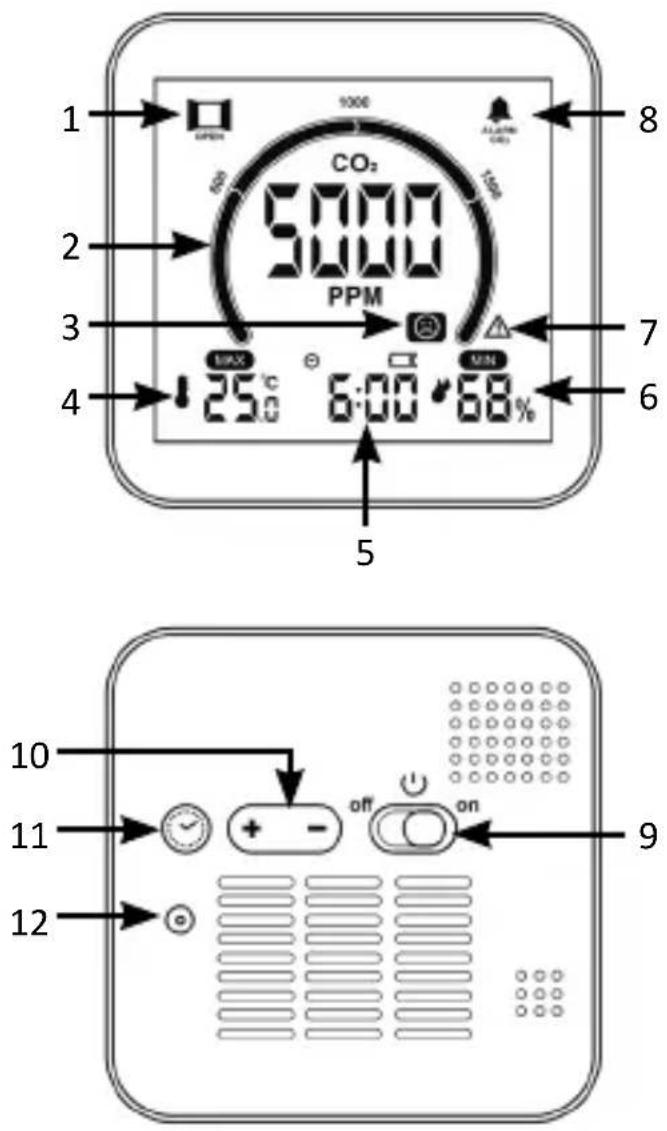
18 English
| 1 "Ventilate" symbol |
| 2 CO2 display |
| 3 Comfort symbol |
| 4 Temperature display |
| 5 Alarm |
| 6 Humidity display |
| 7 CO2 hint symbol |
| 8 CO2 alarm symbol |
| 9 ON/OFF button |
| 10 "+" / "-" buttons |
| 11 "Settings" button |
| 12 DC coaxial connector-Power supply |
5. Initial use
Take the product out of the package and remove all the packaging material. Charge the device fully before using it. To do this, use the supplied USB charging cable and connect it to a 5 V DC power adapter and the coaxial charging port of the device.
Slide the "On/Off" switch to the "ON" position to switch on the device. At this point, all the symbols are displayed on the screen. You hear a beep and the device goes into normal operating mode. A 60-second countdown appears on the screen indicating that the CO2 sensor is being initialised. The CO2 values are then shown in the display.
When using the charging cable, the battery inside the device is charged. If the power supply is interrupted, the device switches to battery mode or it can be operated directly with the built-in battery. A fully charged battery lasts about five hours of continuous operation with the backlight on and at maximum level.
5.1 Battery
You can check the battery level in the display at any time by looking at the battery level symbol.
When the voltage of the built-in battery is low, the battery symbol flashes on the screen. The product turns off the backlight, carbon dioxide detection function, etc. to ensure that the time function works continuously.
While the battery is charging, the battery symbol is displayed continuously. Once the battery is fully charged, the symbol disappears.
6. Time and alarm setting
Press and hold the "Settings" button for 2 seconds to access the time setting.
- The 12/24-hour display starts flashing. Press "+" or "-" button to set the time.
- Press the "Settings" button to confirm. Then the hour flashes. Set the hours and confirm by pressing the "Settings" button again.
- Repeat the procedure with the minutes display.
- Then set the alarm time, starting with the hour. Then press the "Settings" button to confirm the entry.
- Repeat the procedure for the minutes display of the alarm.
- You can then select the unit. Select between "°C" and "°F" and confirm with the "Settings" button.
- You can now exit the setting mode. You can also save the setting and exit the setting mode by not pressing any button for about 30 seconds.
- If you need to add or subtract quickly during the setting process, you can press and hold "+" or "-" for more than 2 seconds to make a quick adjustment.
6.1 Enabling/disabling the alarm
Press the "Settings" button briefly to switch the alarm function on or off. When the alarm is switched on, a symbol appears above the time in the display. The alarm sounds for 1 minute. You can touch the "Snooze" button to activate the snooze function for 5 minutes. Press any other button on the device to turn off the alarm and stop the alarm directly.
7. Minimum and maximum values of temperature and humidity
Press the "+" button to toggle the display between the minimum and maximum values. The display cycle is: Maximum → Minimum → Back to normal display mode.
If you press and hold the "+" button for 2 seconds while the maximum and minimum values are displayed, you can delete the maximum and minimum values and restart the recording.
The recordings of the maximum and minimum values are automatically deleted and re-recorded every day from 0:00 hrs.
8. Calibration of the CO2 concentration
Due to transport, vibration, ageing and other reasons, the detection accuracy of the sensor may be reduced. Deviations are corrected by calibration. The device has an automatic and a manual calibration option. It is advisable to use automatic calibration. Alternatively, you can also carry out manual calibration. The two methods are described below.
8.1 Automatic calibration
After starting the sensor, the minimum carbon dioxide concentration values are stored for 48 hours in order to determine the basic value of the outdoor atmospheric carbon dioxide concentration. The lowest carbon dioxide concen-
22 English
tration values are stored for 7 days in order to determine the basic value of the atmospheric carbon dioxide concentration (approx. 400 ppm).
Make sure that the sensor is in an environment where the atmospheric level is the same as outdoors (approx. 400 ppm) during this time.
The automatic calibration function is suitable for office, home and other environments that are isolated from weather. It is not suitable for agricultural greenhouses, farms, warehouses and other places.
8.2 Manual calibration of CO2 concentration
During calibration, the product must be positioned in an environment with a CO2 concentration equal to the outside air (approx. 400 ppm) to ensure that the CO2 concentration in the environment is stable.
In normal display mode, press and hold the "+" button for 2 seconds to enter manual calibration mode. "CAL" flashes in the display. At this point you can press "Settings" to confirm the entry or press the "+" key or not press any key for 30 seconds to exit the calibration mode.
The duration of manual calibration is about 20 minutes. During calibration, you can press the "+" button to cancel and exit the mode in advance.
9. Carbon dioxide alarm
Press the "-" button to switch the carbon dioxide alarm function on or off.
Press and hold the "-" button for 2 seconds to access the CO₂ concentration alarm setting. The value of the CO₂ concentration flashes. Press the "+" or "-" key to set the desired value.
Press the "Settings" button to confirm the setting and exit the setting mode. You can also save the setting and exit the setting mode at any time by not pressing any button for 30 seconds.
10. Dimming the backlight
You have the option of dimming the device backlight by touching the "Snooze" button.
11. CO _2 concentration values
If the CO_2 concentration is above 1500ppm, a window symbol ( ) appears in the display to remind the user to open the window for ventilation. If the CO_2 concentration is above 2000 ppm, a symbol ( ) appears in the display to indicate to the user that the values are too high.
24 English
12. Additional instructions
| Symbol Meaning | |
 | 400-600 ppm |
 | 601-1000 ppm |
 | 1001-1500 ppm |
 | 1501-2000 ppm |
 | 2001 ppm and higher |
The update frequency for temperature, humidity and carbon dioxide concentration is about 5 seconds.
Avoid device vibration or direct wind on the sensor during carbon dioxide measurement as this may cause the carbon dioxide values to fluctuate.

13. Safety instructions and disclaimer
Never try to open the device to repair or make modifications. Avoid contact with the mains voltage. Do not short-circuit the product. The device is not waterproof, therefore please use it only in dry surroundings. Protect it from high humidity, water and snow. Keep the product away from high temperatures. Do not expose the product to sudden changes in temperature or strong vibrations, as this could damage the electronic components. Check the device for damage before using it. The product should not be used if it was subject to impact or has been damaged in some other manner. Please comply with the local regulations and restrictions.
Do not use the product for purposes other than those described in the user manual. This product is not a toy. Keep it out of the reach of children or mentally disabled persons. Any repair or modification to the product, which is not carried out by the original supplier, will void any warranty and guarantee claims. The product should only be used by those who have read and understood this user manual. The specifications of the product may be changed without any special prior notification.

14. Disposal instructions
In line with the European WEEE directive, electrical and electronic products should not be disposed of along with domestic waste. Their components have to be separately sent for recycling or disposal, because improper disposal of toxic and dangerous components may permanently damage the environment. According to the electrical and electronic equipment act (ElektroG), you are obliged (as a consumer) to return (free of charge) electrical and electronic devices to the manufacturer, the point of sale or the public collection points set up for this purpose at the end of their service life. The relevant local laws regulate the details in this regard. The symbol displayed on the product, in the user manual or/and on the packaging refers to these regulations.
With this manner of sorting, recycling and disposal of used products, you make an important contribution towards protecting our environment. For information on authorised safe assembly points in your area, please contact your local city or municipal office.

15. Instructions for battery disposal
In conjunction with the sale of batteries along with the supply of devices that include batteries, the supplier is obliged to point out the following to the customer: The customer is legally obliged to return used batteries. He can return used batteries which the supplier offers or has offered as new batteries in his assortment free of charge to the supplier's dispatch warehouse (shipping address).
The symbols shown on the batteries indicate the following: Pb = battery contains more than 0.004 percent lead by weight, Cd = battery contains more than 0.002 percent cadmium by weight, Hg = battery contains more than 0.0005 percent mercury by weight.

The symbol of the crossed-out dustbin means that the battery should not be disposed of in household waste.



WEEE directive 2012/19/EU WEEE Register no.: DE 67896761
The company WD Plus GmbH hereby certifies that the product 306118 / 306648 complies with the fundamental requirements and all other relevant stipulations. A complete conformity statement can be obtained from: WD Plus GmbH, Wohlenbergstraße 16, 30179 Hannover
MO-FR 9:30am - 18pm CET

brandson-equipment.de
WD Plus GmbH
- Scope of delivery
- Technical data
- English
- Additional instructions
- Caution!
- Product details
- English
- Initial use
- Battery
- Time and alarm setting
- Enabling/disabling the alarm
- Minimum and maximum values of temperature and humidity
- Calibration of the CO2 concentration
- Automatic calibration
- English
- Manual calibration of CO2 concentration
- Carbon dioxide alarm
- Dimming the backlight
- CO _2 concentration values
- English
- Additional instructions
- Safety instructions and disclaimer
- Disposal instructions
- Instructions for battery disposal
Brand : Brandson
Model : 306648
Category : Gas detector