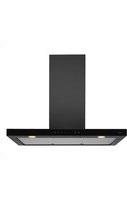
WS90292IM - Basket Atag - Free user manual and instructions
Find the device manual for free WS90292IM Atag in PDF.


User questions about WS90292IM Atag
0 question about this device. Answer the ones you know or ask your own.
Ask a new question about this device
Download the instructions for your Basket in PDF format for free! Find your manual WS90292IM - Atag and take your electronic device back in hand. On this page are published all the documents necessary for the use of your device. WS90292IM by Atag.
USER MANUAL WS90292IM Atag
Instructions for use cooker hood
ATAG
WS60__IM
WS90__IM
WS90__GM
NL Handleiding NL 3 - NL 10
natural_image
Illustration of a microwave oven with a door and front panel, accompanied by a hand inserting a clip into the pan (no text or symbols present)natural_image
Technical line drawing of a mechanical device with a close-up inset showing a hand holding a circular component (no text or symbols)natural_image
Technical line drawing of a device with a door and two panels, showing no text or symbolsVerlichting

natural_image
Symbol of a trash bin with crossed x-marks and no text or numbers presentnatural_image
Illustration of a microwave oven with a door and front panel, being cut with a hand (no text or symbols)natural_image
Diagram of a microwave oven with a hand inserting a component (no text or symbols)natural_image
Technical line drawing of a mechanical device with a door and mounting holes, showing internal components and a close-up view of a component (no text or symbols)Éclairage

natural_image
Symbol of a trash bin with crossed lines indicating no waste or discharge (no text or numbers present)natural_image
Illustration of a microwave oven with a door and lid, showing a hand inserting a paper into the front panel (no text or symbols present)natural_image
Technical line drawing of a mechanical device with a close-up inset showing a component (no text or symbols)natural_image
Technical line drawing of a device with a door and panel, showing a hand inserting a clip into a panel (no text or symbols present)Achtung:
natural_image
Symbol of a trash bin with crossed lines indicating no waste or discharge, no text or numbers present.| Operation | 5 | ||
| Cleaning | filters |
Maintenance
| Cleaning | 8 | |
| Grease filters | ||
| Replacing the odor/fine dust filter | 9 | |
| Lighting | 9 |
Environmental aspects
| Disposal of appliance, carbon filter and packaging | 10 |
Introduction
On reading these user manuals you will soon become familiar with the features of this appliance. Please read the appliance's safety and maintenance instructions.

Please retain the operating and installation instructions as these may be useful for future reference.
Read the separate safety instructions before using the device!
You can find the most recent version of the instructions for use on our website.
Description
text_image
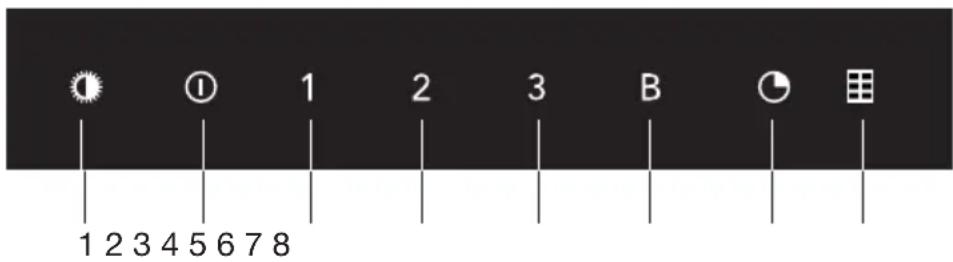
1 2 3 4 5 6 7 8 1 2 3 4 5 6 7 8 1 2 3 4 5 6 7 8 1 2 3 4 5 6 7 8 1 2 3 4 5 6 7 8 1 2 3 4 5 6 7 8 1 2 3 4 5 6 7 8 1 2 B C D- Switching on/off and dimming the lighting
- Switching fan on/off
- Speed setting 1
- Speed setting 2
- Speed setting 3
- Intensive mode
- Timer function/Clean Air function
- Filter indicator

Note!
If you have a cooker hood with a carbon filter, you should activate the carbon filter indicator as described in the ‘Cleaning filters’ paragraph.
Operation

Switching the lighting on and off
- Quickly press and release the lighting button. The light switches on at maximum strength.
- Press and hold the lighting button for approximately 3 seconds to dim the lighting strength.
- To set the lighting back to maximum strength, quickly press and release the lighting button.
- To turn off the lighting when the light is dimmed, press and hold the lighting button for approximately 3 seconds.
- To turn off the lighting when the light is at maximum strength, quickly press and release the lighting button.

Switching extraction on and off
- Quickly press and release the on/off button.
The cooker hood switches on at the lowest setting. - Select the desired extraction setting by pressing the corresponding speed setting buttons.
- Press the intensive mode button to select the highest setting (boost) (see switching on intensive setting).

Switching on intensive setting
- Quickly press and release the intensive mode button.
The intensive setting (boost setting 'B') is switched on for 6 minutes.
The intensive mode button will flash during this period.
The original extraction setting will be reactivated after this period. - Press the on/off button or the intensive mode button to switch off the intensive setting.

Switching on the timer
-
Quickly press and release the timer button.
The timer button will light up.
The cooker hood will switch off automatically after 15 minutes. If the lighting is lit, it switches off automatically once the timer is finished. -
Switch off the timer function in the meantime by pressing the timer button again.


Note!
The timer function cannot be activated when the intensive setting is switched on.
Clean Air function:
The Clean Air function allows you to freshen the air in your kitchen for a maximum of 24 hours.

-
Switch off the cooker hood by pressing the on/off button.
-
Press and hold the Clean Air button for approximately 3 seconds. The cooker hood switches on automatically for 10 minutes every hour at the lowest speed setting. During this period, the on/off button will be lit continuously while the speed setting 1 button and the Clean Air button will flash.
-
Switch off the Clean Air function in the meantime by pressing and holding the Clean Air button for approximately 3 seconds, or by switching off the cooker hood by pressing the on/off button.

Note!
The Clean Air function cannot be activated when the intensive setting or the timer function is switched on.

Button lock function
The button lock function allows you to lock the buttons for cleaning purposes or for child safety.
-
Switch off the cooker hood by pressing the on/off button.
-
Press and hold the on/off button for approximately 5 seconds until all buttons will flash from left to right. All buttons are locked.
-
To unlock the buttons, press and hold the on/off button again for approximately 5 seconds.
Cleaning filters

Saturation grease and carbon filters
The filters should be replaced or cleaned when the filter indicator is lit or flashing.
Grease filter
The filter indicator will light up after 100 operating hours.
- The grease filters should then be cleaned.
Carbon filter
The filter indicator will flash after 200 operating hours.
- The carbon filter should then be replaced.
Reset the filter indicator
- Switch off the cooker hood by pressing the on/off button.
- Switch off the lighting by pressing the lighting button.
Reset the memory by quickly pressing the filter indicator button.
All indicators will flash three times.

If you have a cooker hood with a carbon filter, you should activate the carbon filter indicator.
Switching on carbon filter indicator
- Switch off the cooker hood by pressing the on/off button.
- Press and hold the filter indicator button for approximately
5 seconds until all buttons flash twice.
The carbon filter indicator is activated.
Switching off carbon filter indicator
- Switch off the cooker hood by pressing the on/off button.
- Press and hold the filter indicator button for approximately
5 seconds until all buttons flash once.
The carbon filter buttons is deactivated.
Cleaning

Important!
For all maintenance first switch off the mains power to the cooker hood by pulling the plug out of the socket or by turning off the home's master switch. The hood needs to be cleaned regularly, both inside as well as outside (at least in the same frequency as the grease filter cleaning). Do not use abrasive cleaning products. Do not use alcohol!
Important!
If the instructions regarding cleaning the appliance or replacing the filters are not followed, this can cause a fire. These instructions should be followed! The manufacturer is not liable for damage to the hood or fire damage resulting from incompetent maintenance or from non-adherence to the above safety instructions.
Cooker hood
Clean the cooker hood with soapy water and a soft cloth. Then wash off with clean water. Do not use aggressive cleaning agents such as caustic soda. The cooker hood finish stays in good condition if it is buffed periodically following the application of wax.
Stainless steel cooker hoods
Do not use scouring pads or other abrasive cleaners on stainless steel cooker hoods. Finish with a non-abrasive, non-polishing agent and buff the stainless steel in the direction of the grain.
Metal grease filters
Metal grease filters should be cleaned once a month (or when indicated by the filter cleaning indicator – if present on the model) using a neutral cleaning agent, either by hand or in the dishwasher on a short, low-temperature program. Place the grease filters with the openings facing downwards in the dishwasher so the water can drain out of the filter. Aluminium grease filters become dull as a result of dishwasher cleaning agents. This is normal and does not effect the working.
Grease filters
natural_image
Illustration of a microwave oven with a door and front panel, accompanied by a hand inserting a clip into the pan (no text or symbols present)Removing the grease filters
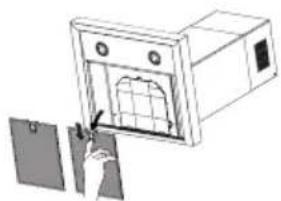
- Switch off the motor and lighting.
- Remove the grease filters from the hood by pulling the special handle.
Replacing the odor/fine dust filter
natural_image
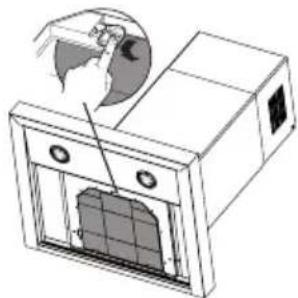
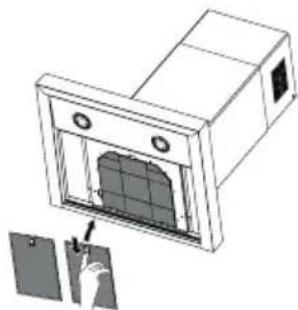
Technical line drawing of a microwave oven with a close-up inset showing the lid and base (no text or symbols)- Remove the grease filters.
- Fit the odor/fine dust filter. Slot the notches of the odor/fine dust filter in the specially designed opening.
- Fit the grease filters.
Note:
- The odor/fine dust filter must always be used if the cooker hood is not ducted.
- Using a odor/fine dust filter creates more sound than when using the cooker hood with an outlet.
- The odor/fine dust filter's operation is optimal at a lower motor speed. You should, therefore, avoid using the intensive setting.
- Saturation of the odor/fine dust filter will eventually occur after more or less prolonged use, depending on the type of cooking and how frequently the grease filter is cleaned.
- It is necessary to replace the odor/fine dust filter when indicated by the filter indicator.
- The odor/fine dust filter must be replaced at least every year.
- DO NOT wash or reuse the odor/fine dust filter. Saturated carbon is not environmentally friendly, change the filter regularly.
natural_image
Technical line drawing of a device with a door and control panel, showing a hand inserting a clip (no text or symbols present)Lighting

This hood is fitted with a light system. This light system has to be replaced by an authorized technician. Do not attempt to replace it by yourself.

The lamp in this household appliance is only suitable for illumination of this appliance. The lamp is not suitable for household room illumination.
Disposal of appliance, carbon filter and packaging
By ensuring this product is disposed of correctly, you will help prevent potential negative consequences for the environment and human health, which could otherwise be caused by inappropriate waste handling of this product. The local authorities can provide you with the relevant information.
The packaging of this appliance is recyclable. It could have been made from:
- cardboard;
- polythene foil (PE);
- CFK-free polystyrene (PS-hard foam).
natural_image
Symbol of a trash bin with crossed lines indicating no waste or discharge (no text or numbers present)You need to dispose of these materials responsibly in accordance with official regulations.
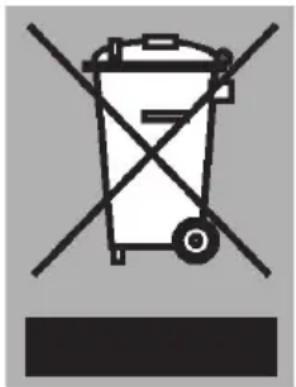
To draw attention to the fact that the segregated processing of electric household appliances is compulsory, this appliance carries the symbol of a crossed-out dustbin. This means that at the end of its working life, you may not dispose of the appliance as household refuse. Instead, you should hand it in at a special refuse collection centre run by the local authority or at a dealer's providing this service.
Segregated processing of household appliances avoids any negative effects on the environment and public health that might otherwise occur. It enables the recovery of the materials used in the production of this appliance, thus realising considerable savings in terms of raw materials and energy.

Please note! Do not throw a used carbo filter in the glass recycling bin but take this to the Municipality's waste recycling centre.

Declaration of conformity
We hereby declare that our products satisfy the applicable European directives, orders and regulations, as well as the requirements stated in the referenced standards.
www.atag.nl
www.atag.be
ATAG

text_image
Barcode image containing encoded digital information714192