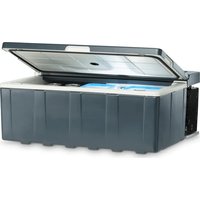
CoolMatic CSMP2 - Fridge DOMETIC - Free user manual and instructions
Find the device manual for free CoolMatic CSMP2 DOMETIC in PDF.


User questions about CoolMatic CSMP2 DOMETIC
0 question about this device. Answer the ones you know or ask your own.
Ask a new question about this device
Download the instructions for your Fridge in PDF format for free! Find your manual CoolMatic CSMP2 - DOMETIC and take your electronic device back in hand. On this page are published all the documents necessary for the use of your device. CoolMatic CSMP2 by DOMETIC.
USER MANUAL CoolMatic CSMP2 DOMETIC
natural_image
Black plastic container with a circular emblem on top, no visible text or symbols on the bodyCoolMatic CSMP2
Installation and operating manual
natural_image
Interior view of a tent with overhead lighting and white arrows indicating direction (no text or symbols)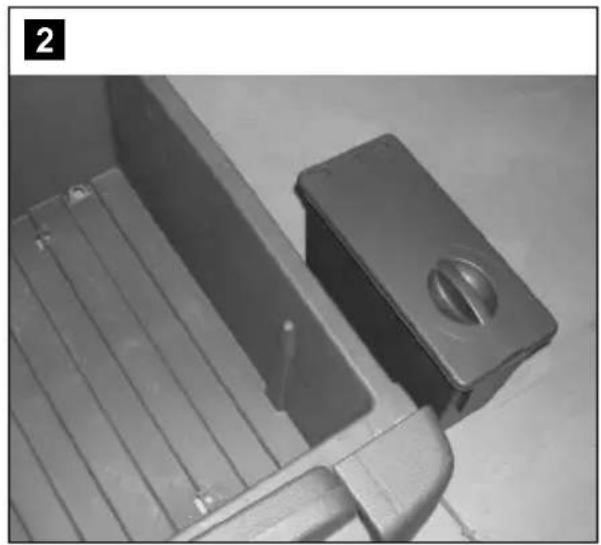
natural_image
Close-up of a mechanical component with a rectangular housing and a circular knob, no visible text or symbols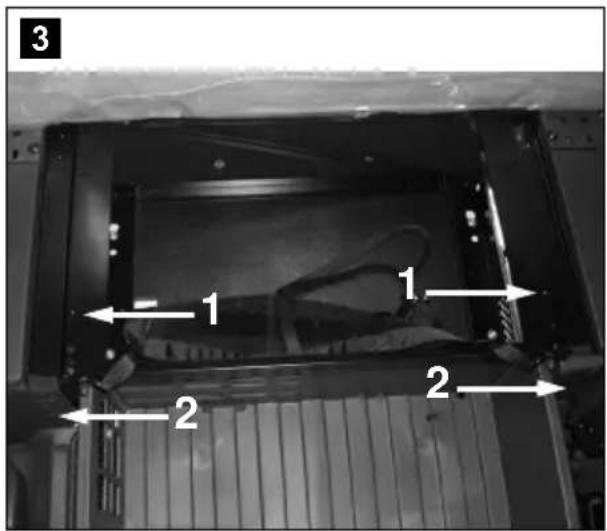
text_image
3 1 1 2 2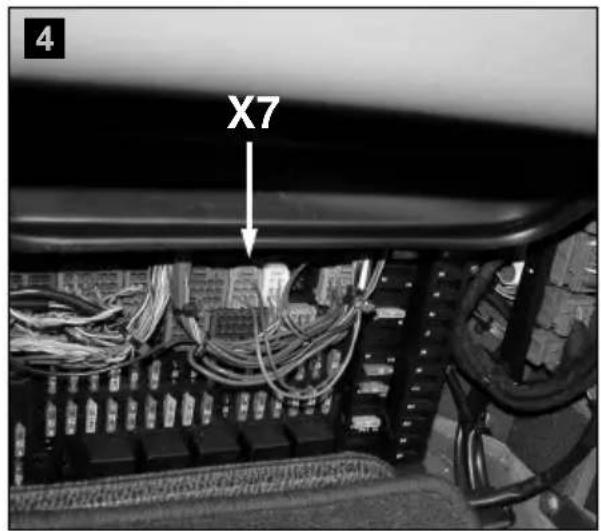
text_image
X7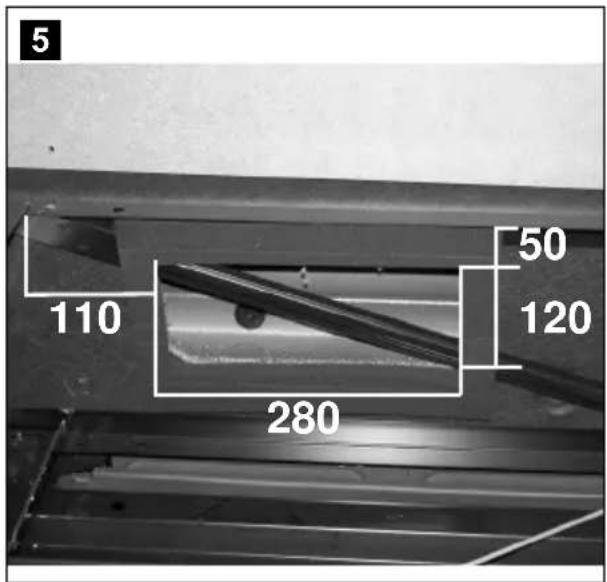
text_image
5 110 280 50 120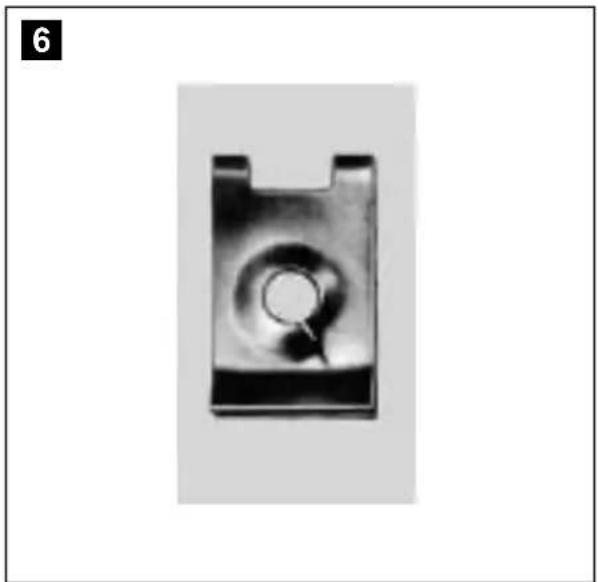
natural_image
Close-up of a metallic mechanical component with a circular hole and a pointed tip, no visible text or symbols.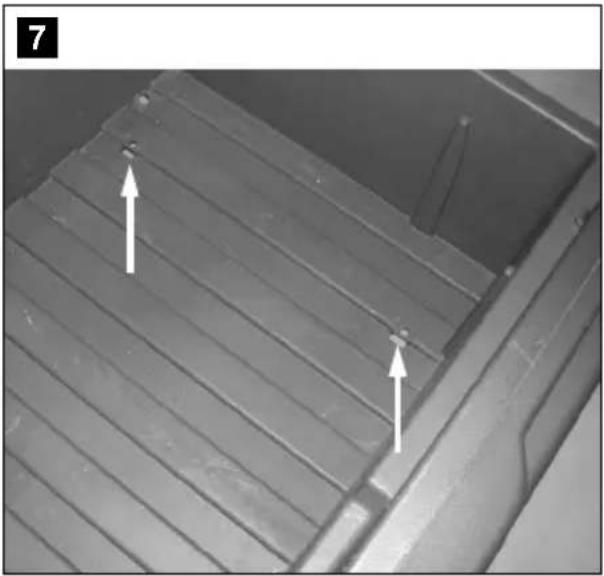
natural_image
Close-up of a metallic surface with parallel grooves and two white arrows indicating features (no text or symbols)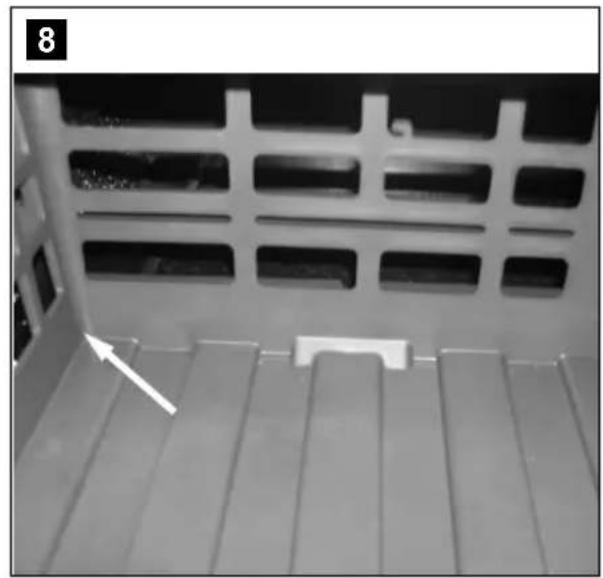
natural_image
Close-up of a white metal panel with a grid pattern and a white arrow pointing to a small component on the surface (no text or symbols visible)
natural_image
Close-up of a black plastic car door panel with white trim and two arrows pointing to a component (no text or symbols visible)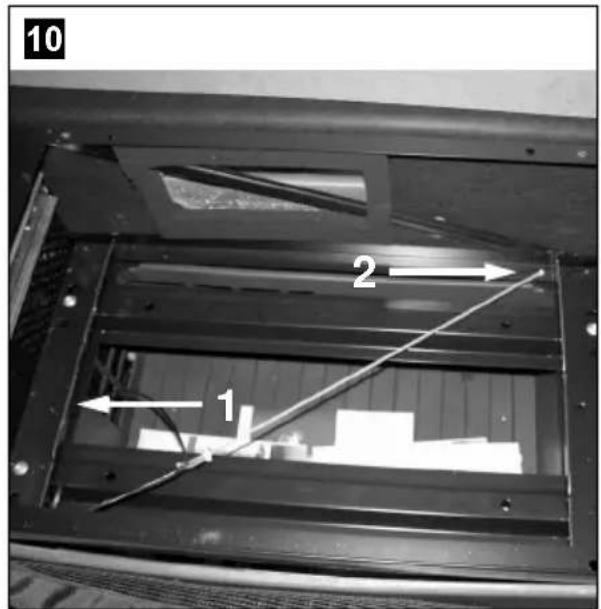
text_image
10 2 1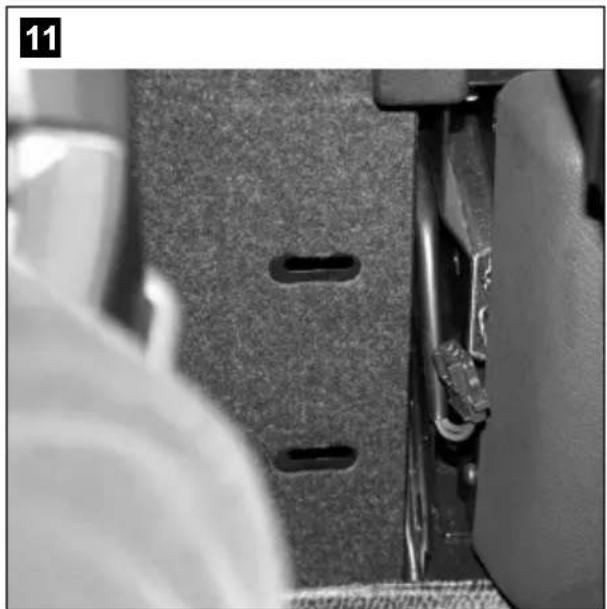
natural_image
Close-up of a sewing machine footset with visible stitching and metal clamps (no text or symbols)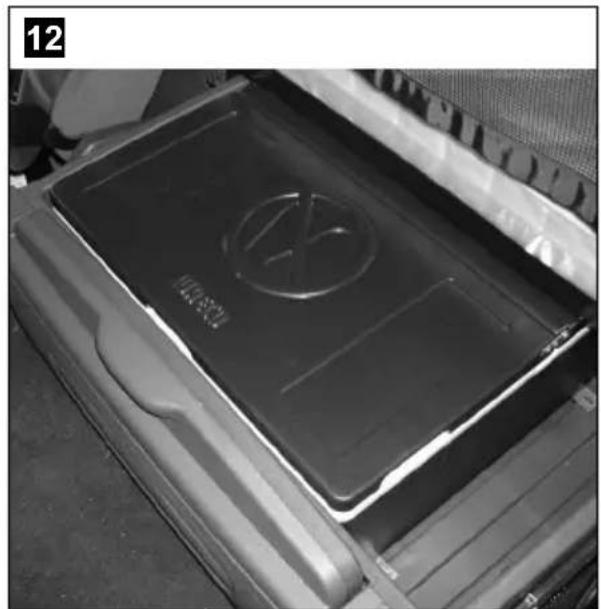
natural_image
Close-up of a car front panel with a black plastic cover and a circular logo on top (no visible text or symbols)13
natural_image
Interior view of a vehicle showing a white plastic tray with a labeled component (1), no visible text or symbols.14
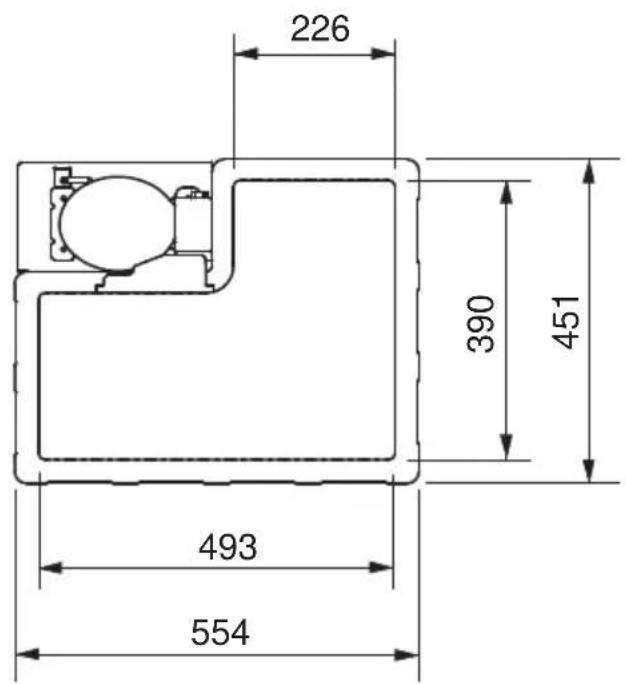
text_image
226 390 451 493 554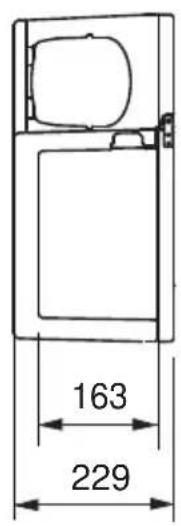
text_image
163 229Please read this operating manual carefully before starting the device. Keep it in a safe place for future reference. If the device is passed on to another person, this operating manual must be handed over to the user along with it.
The manufacturer cannot be held liable for damage resulting from improper usage or incorrect operation.
Contents
1 Explanation of symbols 17
2 Safety instructions 18
3 Scope of delivery 20
4 Intended use 20
5 Technical description 21
6 Installation and connection 22
7 Operation 23
8 Cleaning and care 24
9 Guarantee 24
10 Disposal 25
11 Technical data 25
1 Explanation of symbols

DANGER!
Safety instruction: Failure to observe this instruction will cause fatal or serious injury.

WARNING!
Safety instruction: Failure to observe this instruction can cause fatal or serious injury.

CAUTION!
Safety instruction: Failure to observe this instruction can lead to injury.

NOTICE!
Failure to observe this instruction can cause material damage and impair the function of the product.

NOTE
Supplementary information for operating the product.
▶ Action: This symbol indicates that action is required on your part. The required action is described step-by-step.
√This symbol describes the result of an action.
fig. 1 5, page 3: This refers to an element in an illustration. In this case, item 5 in figure 1 on page 3.
2 Safety instructions
2.1 General safety

WARNING!
- Do not operate the device if it is visibly damaged.
- This device may only be repaired by qualified personnel. Improper repairs can lead to considerable hazards.
- Persons (including children) whose physical, sensory or mental capacities or whose lack of experience or knowledge prevent them from using this product safely should not operate it without the supervision or instruction of a responsible person.
● Electrical devices are not toys.
Always keep and use the device out of the reach of children.
● Children must be supervised to ensure that they do not play with the device. - If this device's power cable is damaged, it must be replaced by the manufacturer, customer service or a similarly qualified person in order to prevent safety hazards.
- Do not store any explosive substances such as spray cans with propellants in the device.

CAUTION!
- Disconnect the device from the mains – before cleaning and maintenance – after use
- Food may only be stored in its original packaging or in suitable containers.

NOTICE!
- Check that the voltage specification on the type plate corresponds to that of the energy supply.
- The cooling device is not suitable for transporting caustic materials or materials containing solvents.
- Disconnect the cooler and other power consuming devices from the battery before connecting the quick charging device.
2.2 Operating the device safely

DANGER!
- Do not touch exposed cables with your bare hands. This especially applies when operating the device with an AC mains power supply.

NOTICE!
- In order to work properly, the cooler must have been standing upright for at least an hour before you switch it on.
- The cooler has a built-in inclination sensor which switches it off when it is tilted. Nevertheless, always switch off the cooler before tilting the cab.
Before switching the cooler on again, let it stand for at least 15 minutes after lowering the cab.
- Do not use electrical devices inside the cooler unless they are recommended by the manufacturer for the purpose.
- Install the device in a dry location where it is protected against splashing water.
- Do not install the device near naked flames or other heat sources (heaters, direct sunlight, gas ovens etc.)
● Danger of overheating!
Ensure at all times that there is sufficient ventilation so that the heat that arises during operation does not build up. Make sure that the device is sufficiently far away from walls and other objects so that the air can circulate.
● Ensure that the ventilation slots are not covered.
- Do not fill the inner container with ice or fluid.
● Never immerse the device in water.
● Protect the device and the cable against heat and moisture.
3 Scope of delivery
Quantity Description
1 Cooler
1 Set of fastening material
1 Operating manual
4 Intended use
The WAECO CoolMatic CSMP2 (item no. CS-ACT-MP2) is a cooler for installing in a Mercedes-Benz Actros (L and LH cab). It is suitable for cooling food.

CAUTION! Be careful when cooling perishable medicines.
If you wish to cool medicines, please check if the cooling capacity of the device is suitable for the medicine in question.
5 Technical description
5.1 Function description
The cooler chills products and keeps them cool. A maintenance-free refrigerant circuit with compressor provides the cooling.
The cooler is designed for continuous operation at ambient temperatures between -10^ and 55^ and air humidity up to 90% .
It can be tilted sideways up to 30^ .
Before exposing the cooler to extreme conditions – such as on expeditions – please contact the manufacturer. All materials used in the cooling device are compatible for use with foodstuffs.
Battery monitor
The device is equipped with a multi-level battery monitor that protects your vehicle battery against excessive discharging when the device is connected to the on-board 12/24 V supply.
If the cooler is operated when the vehicle ignition is switched off, the cooler switches off automatically as soon as the supply voltage falls below a set level. The cooler will switch back on once the battery has been recharged to the restart voltage level.

NOTICE! Risk of damage
When switched off by the battery monitor, the battery will no longer be fully charged. Avoid starting repeatedly or operating electric consumers without longer charging phases. Ensure that the battery is recharged.
The switch-off and switch-on points measured at the connection terminals of the compressor are listed in the following table.
| Voltage | |
| 12 V 24 V | |
| Cut-off voltage 11.3 V 24.6 V | |
| Restart voltage 12.5 V 26.0 V |
5.2 Operating and display elements
No. in
fig. 13, Description Explanation
page 5
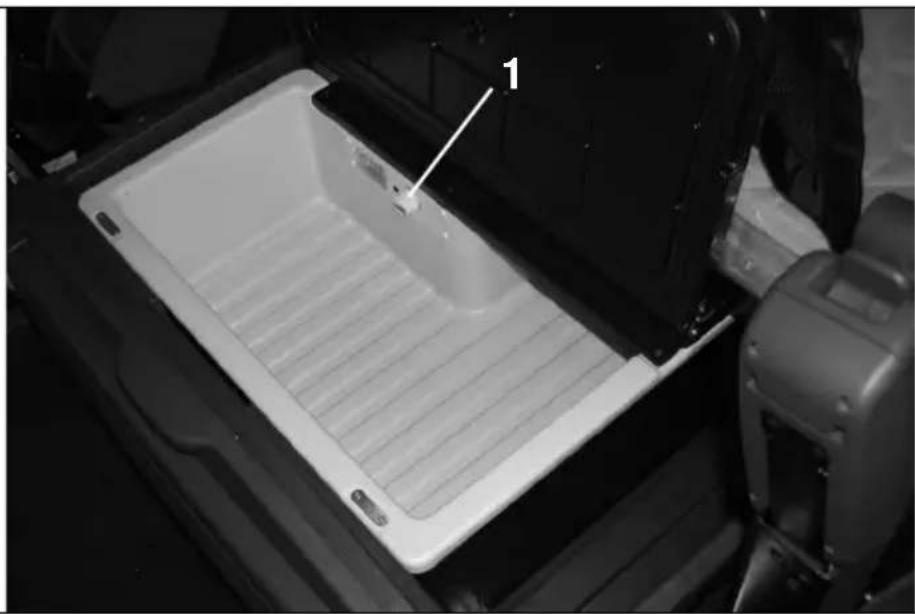
1 Temperature controller – Switches the cooler on or off – Adjusts the temperature
6 Installation and connection
The cooler is installed in the drawer under the bed.
▶Lift the mattress.
▶ Unscrew the four screws (fig. 1, page 3) and take off the board.
▶ Pull out the drawer and take out the container (fig. 2, page 3). After you fit the cooler, you can put the container back in.

NOTE
If you cannot fully pull out the drawer, this is how to release it:
Remove the screws (fig. 3 1, page 3) and unplug the panel beside the drawer (fig. 3 2, page 3).
▶ Have the supply cable from slot X 7 (fig. 4, page 3) to the cooler laid by a specialist Mercedes Benz garage.
▶Cut out a section for ventilation at the appropriate position on the panel (fig. 5, page 3)
▶ Push on the plate nuts supplied (fig. 6, page 3 and fig. 7, page 4)
▶Feed the connection cable for the cooler through the hole provided. (fig. 8, page 4)
▶Fasten the cooler with the screws provided at the appropriate positions (fig. 9, page 4).
▶ Fasten the cooler cable to the position marked on the drawer using the clip provided and place the rubber in the appropriate position (fig. 10, page 4).
▶Have the cooler cable connected to the cable laid by the Mercedes Benz garage from the fuse box behind the cover panel (fig. 11, page 4).
▶ Push the drawer back in (fig. 12, page 4).
▶Screw the lock tight again and put the panel back on.
▶Fasten the board again and put the mattress back on.
√ Installation is complete.
7 Operation

NOTE
Empty the cool box and switch it off before tilting the cab.
7.1 Before initial use

NOTE
Before starting your new cooler for the first time, you should clean it inside and outside with a damp cloth for hygienic reasons (see "Cleaning and care" on page 24).
7.2 Energy saving tips
- Allow hot food to cool down first before you place it into the device.
- Do not open the cooler more often than necessary.
- Do not leave the cooler open for longer than necessary.
- Avoid unnecessarily low temperature settings.
7.3 Using the cooler

NOTICE! Danger of overheating
Ensure at all times that there is sufficient ventilation so that the heat that generated during operation can dissipate. Ensure that the ventilation slots are not covered. Make sure that the device is sufficiently far away from walls and other objects so that the air can circulate.

NOTICE! Danger from excessively low temperature
Ensure that the only those objects are placed in the cooler that are intended to be cooled at the selected temperature.
▶ Switch on the cooler on by turning the temperature control knob to the right.
√The cooler starts cooling the interior.
▶Set the cooling temperature using the temperature control knob.
Turn right = colder, turn left = warmer.

NOTE
If you do not want to use the cooler for a longer period of time: Leave the cooler slightly open. This prevents smells from building up.
8 Cleaning and care

NOTICE! Danger of damaging the device
Never clean the device under running water or in dish water. Do not use abrasive cleaning agents or hard objects during cleaning as these can damage the device.
▶ Occasionally clean the inside of the device with a damp cloth.
9 Guarantee
The statutory warranty period applies. If the product is defective, please contact the manufacturer's branch in your country (see the back of the instruction manual for the addresses) or your retailer.
For repair and guarantee processing, please include the following documents when you send in the device:
● A copy of the receipt with purchasing date
● A reason for the claim or description of the fault
10 Disposal
▶Place the packaging material in the appropriate recycling waste bins wherever possible.
If you wish to finally dispose of the product, ask your local recycling centre or specialist dealer for details about how to do this in accordance with the applicable disposal regulations.
11 Technical data
| CSMP2 | |
| Item number | CS-ACT-MP2 |
| Capacity: | 25 litres |
| Voltage: | 12/24 V--- |
| Cooling capacity: | +10 °C to 0 °C |
| Weight: | 12.5 kg |
The coolant circuit contains R134a.
Certification
The device has e1 certification.
This device conforms to the following EC guideline:
● EMC Directive 72/245/EEC version 95/54/EC
5 Description technique
Dometic Australia Pty. Ltd.
1 John Duncan Court
Varsity Lakes QLD 4227
+61 7 55076000
+61 7 55076001
Mail: sales@dometic-waeco.com.au
AUSTRIA
Dometic Austria GmbH
Commercial : info@dometic.fr
SAV/Technique : service@dometic.fr
HONG KONG
WAECO Impex Ltd.
Suites 2207-2211 · 22/F · Tower 1
The Gateway · 25 Canton Road,
Tsim Sha Tsui · Kowloon
Hong Kong
+852 24611386
昌 +852 24665553
Mail: info@dometic-waeco.com.hk
HUNGARY
Dometic Plc. Sales Office
Kerékgyártó u. 5.
H-1147 Budapest
+36 1 468 4400
昌 +36 1 468 4401
Dometic Italy S.r.l.
Via Virgilio, 3
I-47100 Forlì
+39 0543 754901
+39 0543 756631
Mail: info@dometic.it
NORWAY
Dometic Norway AS
Skolmar 24
N-3232 Sandefjord
+47 33428450
吕 +47 33428459
Mail: firmapost@waeco.no
POLAND
Dometic Poland Sp. z o.o.
Ul. Puławska 435A
02-801 Warszawa
Poland
+48 22 414 32 00
+48 22 414 32 01
Mail: info@dometic.pl
RUSSIA
Dometic RUS LLC
Komsomolskaya square 6-1
107140 Moscow
Russia
+7 495 780 79 39
+7 495 916 56 53
Mail: info@dometic.ru
SLOVAKIA
Dometic Slovakia s.r.o.
Tehelná 8
SK-98601 Fil'akovo
+421 47 4319 107
+421 47 4319 166
Mail: info@dometic.sk
SPAIN
Dometic Spain S.L.
Avda. Sierra del Guadarrama, 16
E-28691 Villanueva de la Cañada
Madrid
+34 902 111 042
+34 900 100 245
Mail: info@dometic.es
SWEDEN
Dometic Scandinavia AB
Gustaf Melins gata 7
Dometic Switzerland AG
Riedackerstrasse 7a
CH-8153 Rümlang (Zürich)
+41 44 8187171
+41 44 8187191
Mail: info@dometic-waeco.ch
TAIWAN
WAECO Impex Ltd.
Taipei Office
2 FL-3 · No. 56 Tunhua South Rd, Sec 2
Taipei 106, Taiwan
+886 2 27014090
昌 +886 2 27060119
Mail:marketing@dometic-waeco.com.tw
UNITED KINGDOM
Dometic UK Ltd.
Dometic House · The Brewery
Blandford St. Mary
Dorset DT11 9LS
+44 844 626 0133
+44 844 626 0143
Mail: sales@dometic.co.uk
UNITED ARAB STATES
Dometic Middle East FZCO
P. O. Box 17860
S-D 6, Jebel Ali Freezone
Dubai, United Arab Emirates
+971 4 883 3858
+971 4 883 3868
Mail: info@dometic.ae
UNITED STATES OF AMERICA
Dometic Marine Division
2000 N. Andrews Ave. Extension
Pompano Beach, FL 33069 USA
+1 954 973 2477
+1 954 979 4414
Mail: marinesales@dometicusa.com