STWA-C101 - TV receiver SONY - Free user manual and instructions
Find the device manual for free STWA-C101 SONY in PDF.


User questions about STWA-C101 SONY
0 question about this device. Answer the ones you know or ask your own.
Ask a new question about this device
Download the instructions for your TV receiver in PDF format for free! Find your manual STWA-C101 - SONY and take your electronic device back in hand. On this page are published all the documents necessary for the use of your device. STWA-C101 by SONY.
USER MANUAL STWA-C101 SONY
Operating Instructions GB
Mode d'emploi FR
Before operating the unit, please read this manual thoroughly and retain it for future reference.
Owner's Record
The model and serial numbers are located on the bottom. Record these numbers in the spaces provided below. Refer to these numbers whenever you call upon your Sony dealer regarding this product.
Model No.
Serial No.
WARNING
To reduce the risk of fire or electric shock, do not expose this apparatus to rain or moisture.
To avoid electrical shock, do not open the cabinet. Refer servicing to qualified personnel only.
CAUTION
The apparatus shall not be exposed to dripping or splashing. No objects filled with liquids, such as vases, shall be placed on the apparatus.
IMPORTANT
The nameplate is located on the bottom.
For the customers in the U.S.A.
This equipment has been tested and found to comply with the limits for a Class A digital device, pursuant to part 15 of the FCC Rules. These limits are designed to provide reasonable protection against harmful interference when the equipment is operated in a commercial environment. This equipment generates, uses, and can radiate radio frequency energy and, if not installed and used in accordance with the instruction manual, may cause harmful interference to radio communications. Operation of this equipment in a residential area is likely to cause harmful interference in which case the user will be required to correct the interference at his own expense.
You are cautioned that any changes or modifications not expressly approved in this manual could void your authority to operate this equipment.
This device complies with part 15 of the FCC Rules. Operation is subject to the following two conditions: (1) This device may not cause harmful interference, and (2) this device must accept any interference received, including interference that may cause undesired operation.
This transmitter must not be co-located or operated in conjunction with any other antenna or transmitter.
This equipment complies with FCC radiation exposure limits set forth for an uncontrolled environment and meets the FCC radio frequency (RF) Exposure Guidelines in Supplement C to OET65. This equipment has very low levels of RF energy that it deemed to comply without maximum permissive exposure evaluation (MPE). But it is desirable that it should be installed and operated keeping the radiator at least 20cm or more away from person's body (excluding extremities: hands, wrists, feet and ankles).
For the customers in Canada
This Class A digital apparatus complies with Canadian ICES-003.
This device complies with Industry Canada licence-exempt RSS standard(s). Operation is subject to the following two conditions: (1) this device may not cause interference, and (2) this device must accept any interference, including interference that may cause undesired operation of the device.
This equipment complies with IC radiation exposure limits set forth for an uncontrolled environment and meets RSS-102 of the IC radio frequency (RF) Exposure rules. This equipment has very low levels of RF energy that it deemed to comply without maximum permissive exposure evaluation (MPE). But it is desirable that it should be installed and operated keeping the radiator at least 20cm or more away from person's body (excluding extremities: hands, wrists, feet and ankles).
The term "IC:" before the radio certification number only signifies that Industry Canada technical specifications were met.
For the customers in Europe, Australia and New Zealand
WARNING
This is a Class A product. In a domestic environment, this product may cause radio interference in which case the user may be required to take adequate measures.
For the customers in Europe
This product has been manufactured by or on behalf of Sony Corporation, 1-7-1 Konan Minato-ku Tokyo, 108-0075 Japan. Inquiries related to product compliance based on European Union legislation shall be addressed to the authorized representative, Sony Deutschland GmbH, Hedelfinger Strasse 61, 70327 Stuttgart, Germany. For any service or guarantee matters, please
refer to the addresses provided in the separate service or guarantee documents.
This apparatus shall not be used in the residential area.

| Dutch | Hierbij verklaart Sony Corporation dat het toestel STWA-C101/Datazender in overeenstemming is met de essentièle eisen en de andere relevante bepalingen van richtlijn 1999/5/EG. Nadere informatatie(Int)kunt u vinden op: http://www.compliance.SONy.de/ |
| English | Hereby, Sony Corporation, declares that this STWA-C101/Data Transmitter is in compliance with the essential requirements and other relevant provisions of the Directive 1999/5/EC.For details, please access the following URL:http://www.compliance.SONy.de/ |
| French | Par la presente Sony Corporation declare que l' apparcel ITWA-C101/Emetteur de données est conforme aux exigencies essentielles et aux autres dispositions pertinentes de la directive 1999/5/CE.Pour toute information complémentaire, veuillez consulter l'URL suivante: http://www.compliance.SONy.de/ |
| German | Hiermit erklärt Sony Corporation, dass sich das Gerät STWA-C101/Datensender in Übereinstimmung mit den grundlegenden Anforderungen und den übrigen einschlögigen Bestimmungen der Richtlinie 1999/5/EG befindet. Weitere Informationen erhältlich unter: http://www.compliance.SONy.de/ |
| Italian | Con la presente Sony Corporation dichiarare che questo STWA-C101/Trasmittente dati è conforme ai requisiti essenziali ed alle alter disposizioni pertinenti stabilite alla direttiva 1999/5/CE.Per ulteriori dettagli, si prega di consultare il seguente URL: http://www.compliance.SONy.de/ |
| Norwegian | Sony Corporation erklær herved at STWA-C101/datasender er i samsvar med de grunnleggende krav og øvrige relevante krav i direktiv 1999/5/EF.For flere detailjer, vennligst se: http://www.compliance.SONy.de/ |
| Spanish | Por medio de la presente Sony Corporation declara que el STWA-C101/transmisor de datos cumple con los requisitos esencias y cualesquiera除外as dispositions aplicables o exigibles de la Directiva 1999/5/CE.Para mayor información, por favor consulte el singular URL:http://www.compliance.SONy.de/ |
| Turkish | Sony Corporation, STWA-C101/Veri İleticişi ürünüz开荒,gerekli:tüm testleri 1999/5/EC Direktifine,gore yapımışı bulunmaktadır. Daha detaylı bilgi,içın lüften web sayfasını ziyaret ediniz: URL: http://www.compliance.Şony.de/ |
For the customers in Italy
Use of the RLAN network is governed:
with respect to private use, by the Legislative Decree of 1.8.2003, no.259 ("Code of Electronic Communications"). In particular Article 104 indicates when the prior obtainment of a general authorization is required and Art. 105 indicates when free use is permitted;
- with respect to the supply to the public of the LAN access to telecom networks and services, by the Ministerial Decree 28.5.2003, as amended, and Art. 25 (general authorization for electronic communications networks and services) of the Code of electronic communications
For the customers in Norway
Use of this radio equipment is not allowed in the geographical area within a radius of 20km from the centre of Ny-Alesund, Svalbard.
For kundene i Norge
Location and Function of Controls 10
Connection 12
Necessary Tools and Items 12
Devices Connection 12
Settings 12
Computer System Requirement ...12
Setting Screen 12
Wireless Channel and Audio Input Settings 13
Network Settings 14
Closed Caption Language Settings 14
Software Update 14
Suitable Installation Place 15
Wireless Setting Procedure 17
Term 17
Pre-Check 17
Channel Allocation 17
Detecting Crosstalk and Interference 19
Avoiding Crosstalk and Interference 19
Channel Allocation Examples ....23
Workaround Examples 28
Specifications 31
License 32
Overview
System Configuration (Example)
Closed caption data is transmitted from a D-Cinema (digital cinema) server to the unit (Data Transmitter) through an Ethernet network. Audio data is transported from the D-Cinema server to the unit via an AES/EBU interface (digital) or phono cable (analog). The unit distributes the caption data and audio data to receiver boxes over a wireless network.
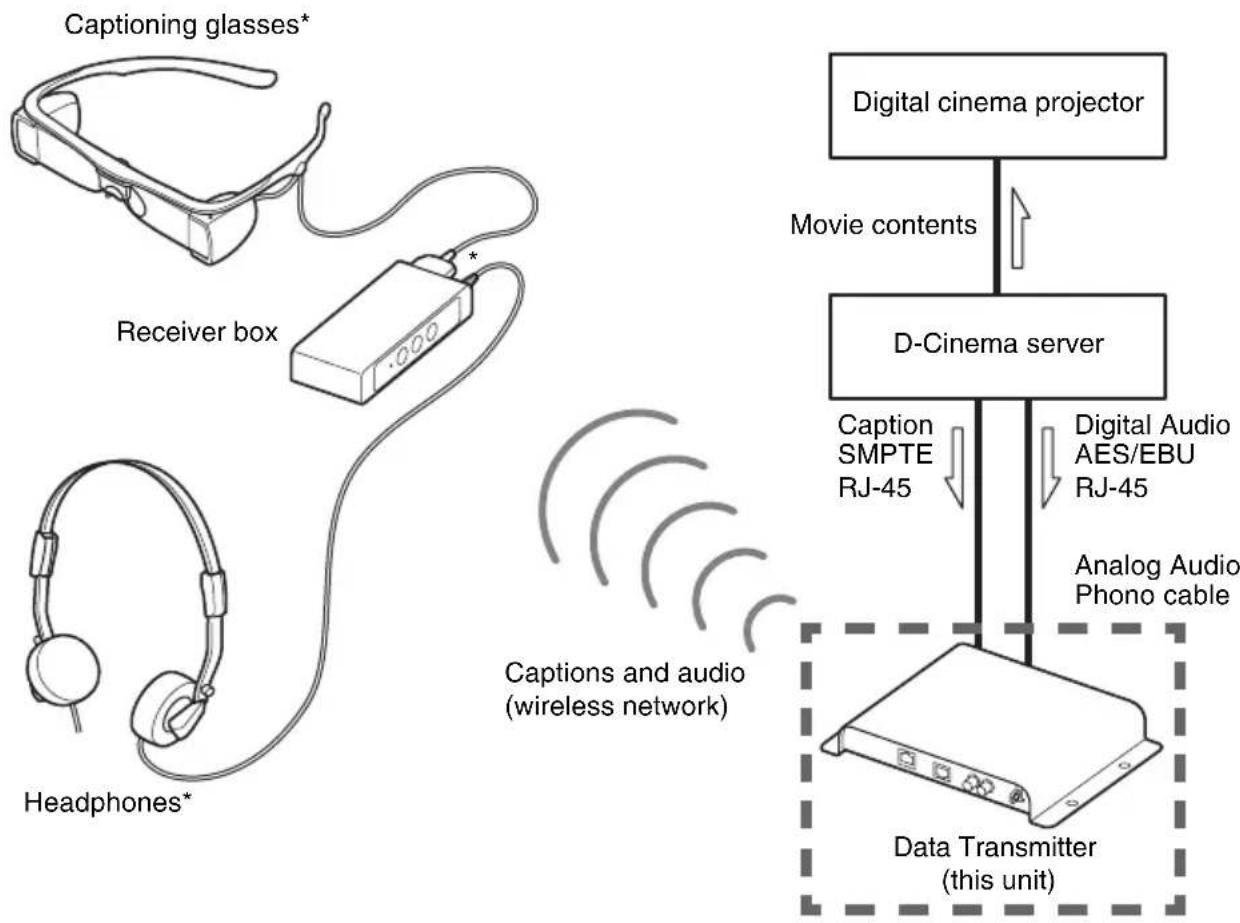
* The receiver box outputs to only one device at a time; either the captioning glasses or the headphones.
Precautions
Notes on temperature and humidity
Store or use the unit within the appropriate temperature ranges. For details on the operating and storage conditions, see "Specifications" (page 31).
Notes on wireless communication
The unit uses the 2.4 GHz band, the same band at which various devices operate. Although the unit utilizes technologies to prevent interference from other devices using the same band, it may suffer a decrease in speed or interruption caused by interference from other devices. See page 31 for wireless communication specifications.
Notes on placement
Keep the antennas of the unit away from metal objects, such as plates, desks or racks. Otherwise the performance of the antennas may be impaired.
See page 15 for more details on placement.
Notes on cleaning
Wipe the surface of the unit with a soft dry cloth. If the unit is badly stained, use a cloth moistened with neutral detergent to wipe it clean, and then wipe with a dry cloth. Do not expose the unit to alcohol, benzine, thinner, or insecticide. It may impair the finish of the surface or erase the printed markers.
Do not scrub the unit hard with a cloth that contains dust or sand. It may damage the surface.
Front/Side panel
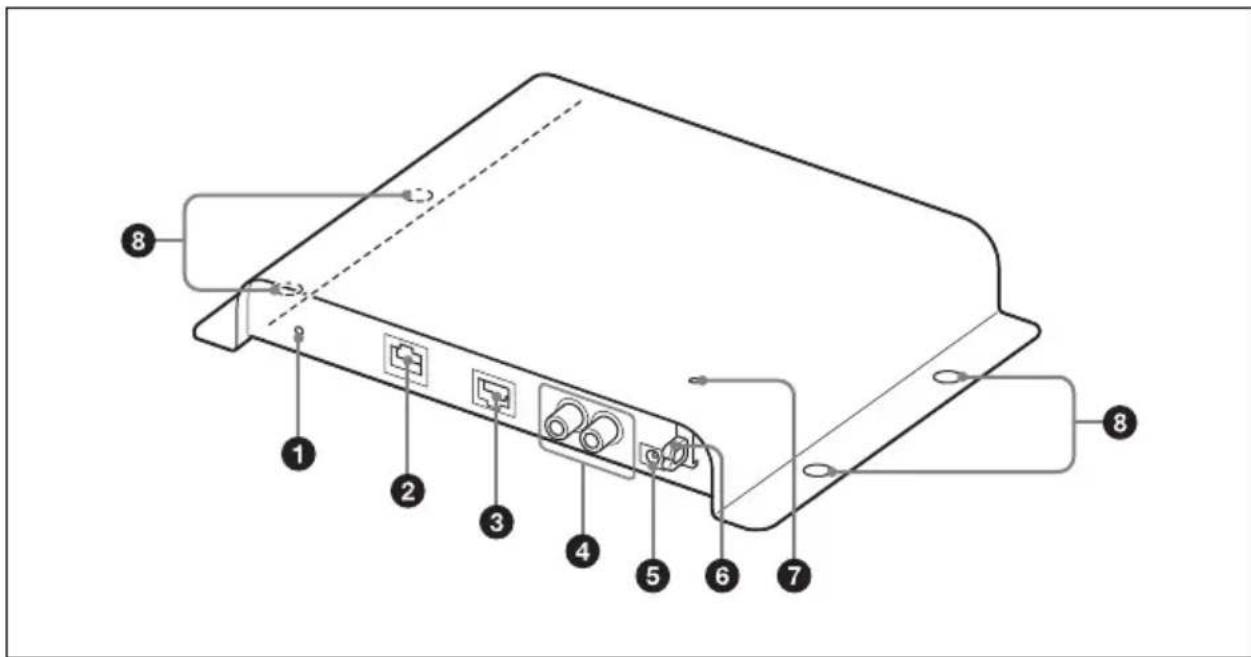
1Reset button
Press and hold the button for about five seconds with a thin, straight object (such as an opened paper clip) to restore the unit to the factory default settings, including the IP address.
2(LAN) connector
Connect to the LAN connector (RJ-45) on the hub or router of your network, using a LAN cable (category 5 straight type) (not supplied).
Digital audio connector
Format: AES/EBU
Connector type: RJ-45
Cable type: LAN cable (category 5 straight type, shielded) (not supplied)
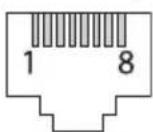
| Pin No. | Function Pin | No. | Function | ||
| 1 | N | C | 2 | N | C |
| 3 | N | C | 4 | N | C |
| 5 | N | C | 6 | N | C |
| 7 | AES/EBU (+) 8 | AES/EBU (−) | |||
CAUTION
- For safety, do not connect the connector for peripheral device wiring that might have excessive voltage to the following ports.
: LAN connector
: Digital audio connector
Follow the instructions for the above ports.
- When you connect the digital audio cable of the unit to peripheral device, use a shielded-type cable to prevent malfunction due to radiation noise.
ATTENTION
Connector type: phono output jacks
Cable type: stereo phono cable (not supplied)
DC IN 5V connector
Connect an AC adaptor (5 V DC, 1 A) (not supplied).
6 Cable holder
Secure the AC adaptor cable with this holder.
7 POWER indicator
Indicates the power status of the unit.
Screw holes
Secure the unit with four 1/4 -inch or M6 screws (recommended, not supplied).
Rear panel
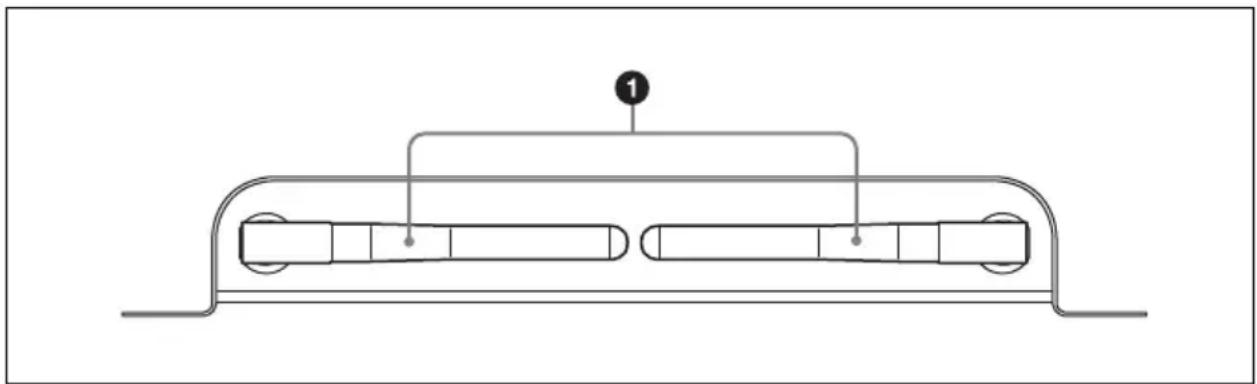
Antennas
Transmit caption and audio data to receiver boxes over the wireless network.
Connection
Necessary Tools and Items
- AC adaptor (output voltage +5V± 5% DC, output current 1 A or more)
Polarity

Plug dimensions
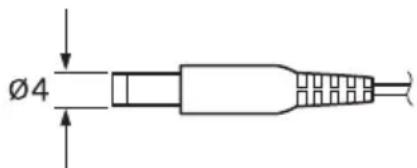
Outside diameter: 4.0mm (^3 / 16 inches) Inside diameter: 1.7mm (^3 / 32 inches)
- Four screws ( 1/4 -inch or M6 recommended; use ones appropriate to your mounting plate) and a screwdriver
- Two LAN cables (category 5 straight type, RJ-45) (Use a shielded-type cable for AES/EBU digital audio connection.) (When AES/EBU digital audio is not used, only one LAN cable is necessary.)
- Stereo phono cable (The phono cable is necessary only when analog audio is used.)
Devices Connection
Be sure to disconnect the AC adaptor from the unit before connecting other cables. After connecting other cables, plug the AC adaptor cable into the DC IN connector of the unit. Check that the POWER indicator comes on.
Settings
You can use the web browser of a computer to configure the unit.
Computer System Requirement
- Operating system Windows 7
Recommended web browser Internet Explorer 8
Setting Screen
Follow the instructions below to open the setting screen.
1 Start the web browser.
2 Enter the text below into the address line of the browser. http://xxx.xxx.xxx.xxx/ xxx.xxx.xxx.xxx:IP address for the unit The default IP address for the unit is 192.168.10.100.
3 Enter the user name and password and click "OK" to open the setting screen of the unit.
```bash User name: admin
Contact your Sony representative for the password.
Note
You can use the reset button to restore the unit to the factory default settings, including the IP address. Press and hold the button for about five seconds with a thin, straight object (such as an opened paper clip).
Setting screen
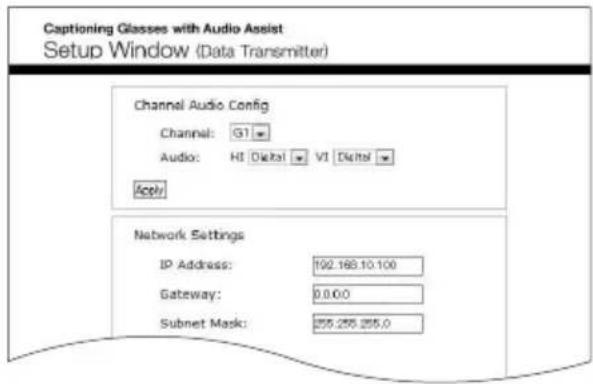
The setting screen shows the following items.
| Setting item Function | |
| Settings Channel Audio Config Wireless channel and audio input settings (see page 13) | |
| Network Settings IP address settings (see page 14) | |
| Closed Caption Language Settings | Closed caption language settings (see page 14) |
| Software Update Software update (see page 14) | |
| Footer Version information Shows the unit information. HW Version.: Hardware version SW Version.: Software version Bootloader Ver.: Bootloader version | |
Wireless Channel and Audio Input Settings
In the "Channel Audio Config" menu, you can set the following settings. After selecting the settings, click the "Apply" button to save the changes you made.
| Setting item Function | |
| Channel Selects the wireless channel over which the closed caption and audio data are transmitted. Options are “G1” to “G7” and “Y1” to “Y7.” The default setting is “G1.” | |
| Audio HI | (Hearing Impaired) Selects the audio input signal for the hearing impaired. The default setting is “Digital.” Digital: Inputs digital audio signal via the AUDIO (AES/EBU) connector. Analog: Inputs analog audio signal via the AUDIO (ANALOG) H jack. |
| VI (Visually Impaired) Selects the audio input signal for the visually impaired. The default setting is “Digital.” Digital: Inputs digital audio signal via the AUDIO (AES/EBU) connector. Analog: Inputs analog audio signal via the AUDIO (ANALOG) V jack. | |
Network Settings
In the "Network Settings" menu, you can set the following settings. After selecting the settings, click the "Apply and Restart system" button to save the changes you made and restart the unit. It takes about one minute for the unit to restart.
Setting item Function
IP Address Sets the IP address of the unit. The default setting is "192.168.10.100."
Gateway Sets the default gateway IP address.
Subnet Mask Sets the subnet mask of the network. The default setting is "255.255.255.0."
DCS IP Address Sets the D-Cinema server IP address. The default setting is "192.168.10.101."
Closed Caption Language Settings
In the "Closed Caption Language Settings" menu, you can select up to six languages from which the users of the captioning glasses can choose to display the closed captions. After selecting the language(s), click the "Apply and Restart system" button to save the changes you made and restart the unit. It takes about one minute for the unit to restart.
Note
If the DCP (Digital Cinema Package) does not contain closed caption data for the selected language(s), then no caption data for the language(s) is transmitted.
Tip
You can select "any Auto-select" in the language selection. In this case, the default language is automatically displayed from the DCP's closed captions.
Standby Message
You can enter a message that is transmitted to the receiver when the D-Cinema server is not playing the DCP that contains closed captions. You can enter from 2 to 20 characters for the message and can use only characters supported by the receiver.
RF Power
For service use only. Do not change the setting.
Test Mode
For service use only. Do not change the setting.
Software Update
You can update the software of the unit by following the instructions below.
1 Store the update file in your computer. You can download the file from the Digital Cinema web site. Contact your Sony sales representative for the URL of the web site.
2 Open the setting screen of the unit.
3 Click "Update" in the "Software Update" box at the bottom of the screen.
4 Click "Browse..." to open the file selection dialog box.
5 Choose the file downloaded in step 1 and click "OK."
6 Click "Submit and Restart system" to update the software. It takes about 30 minutes to complete the update.
To prevent possible unit malfunctions Never turn off the unit during the update process. It may cause a malfunction.
Suitable Installation Place
Locate the unit where the whole auditorium can be viewed unobstructed, such as the inner wall of the auditorium that separates the auditorium from the projection booth. Put the unit in a horizontal position with the antennas pointing toward the cinema screen. The transmission range of the radio waves is about 40m (131 feet, line-of-sight distance).
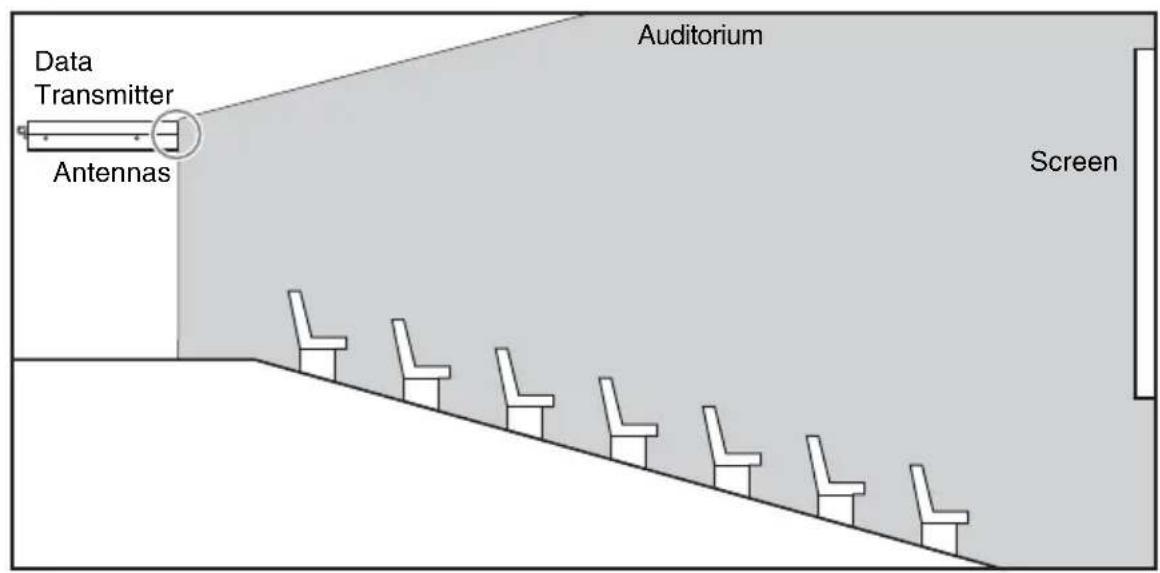
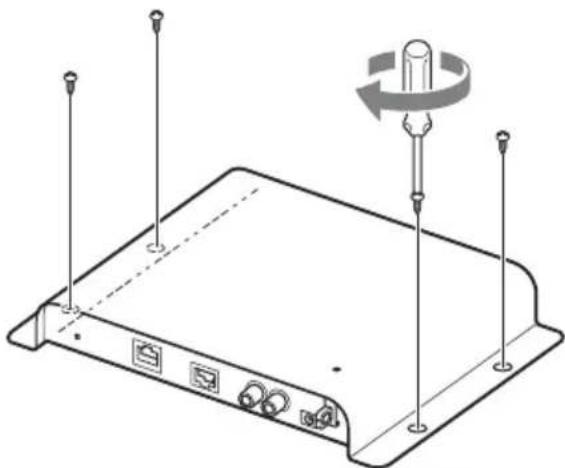
To fix the unit
Secure the unit to a stable place with four screws (1 / 4 -inch or M6 recommended; use ones appropriate to your mounting plate) (not supplied).
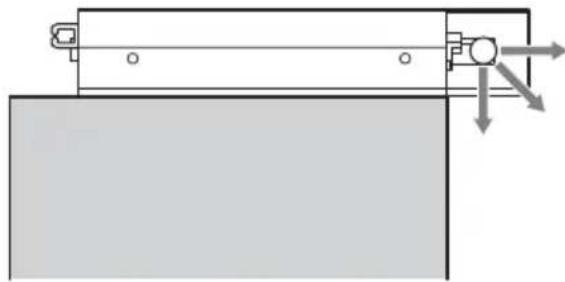
Notice on antenna position
Check that the antennas are set as illustrated below. Make sure that they do not contact other objects. Otherwise, the signal from the antennas may become weak.

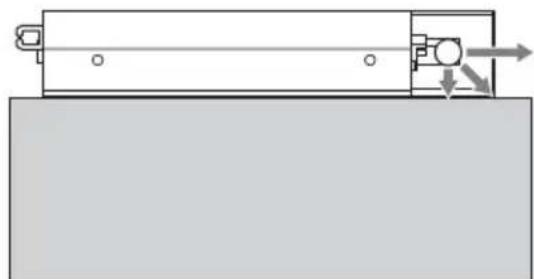
Keep the antennas of the unit away from metal objects, such as plates, desks or racks. Do not install the unit upside down. Also, do not let any metal objects obstruct the radio path. Otherwise the performance of the antennas may be impaired.
OK
Not OK
Not OK
The unit is installed upside down.
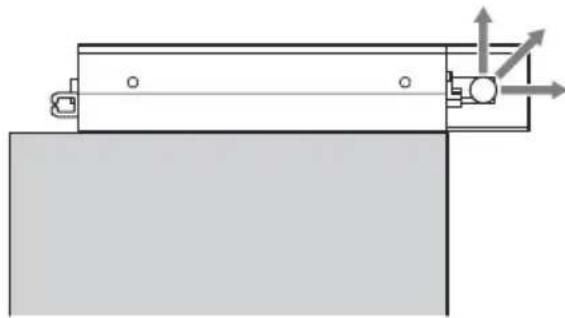
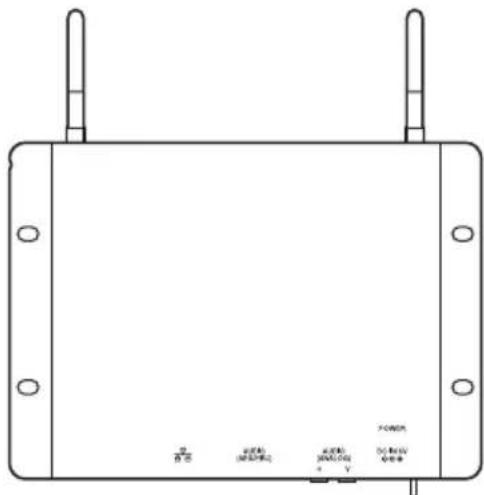
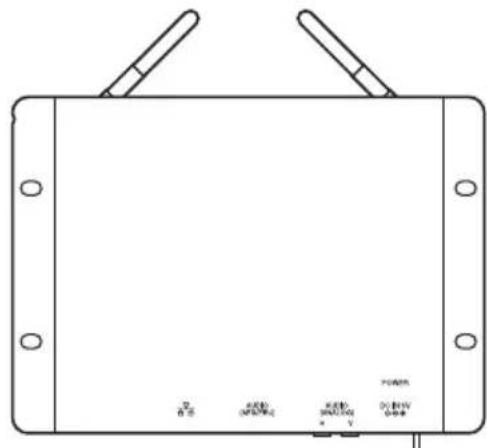
Do not position the antennas as illustrated below.
Otherwise the signal from the antennas to the auditorium may become weak, and it may cause cross-talk with receivers served in other auditoriums.
Not OK
Not OK
Wireless Setting Procedure
This chapter describes the wireless setting procedure. In particular, the decision process for wireless channel allocation and the wireless communication trouble shooting process are described, including:
- Wireless channel allocation with multiple screens
- Trouble shooting, such as sound and caption interruption.
As a number of transmitters are allocated for various screen areas in one theater, one transmitter may affect another screen's wireless communication area.
This wireless system uses the 2.4GHz frequency, and it is possible that other 2.4GHz wireless signal sources, e.g., Wi-Fi may cause interference in this system.
This chapter describes the wireless channel allocation procedure, and workarounds for smooth installation.
This chapter is intended for a theater operator and Sony service engineer.
Term
Crosstalk: Phenomena resulting in another transmitter's signal reaching a different screen area.
Interference: Infringement of signal from another wireless signal source of the same frequency.
Channels: 14 channels that user can choose G1 - G7 and Y1 - Y7.
Channel number: The numeric attached to the Channel indicates wireless frequency.
For example, G1 and Y1 use the same frequency.
Channel-pair: Channels that use the same channel number. For example, G1 and Y1 are channel-pair.
Pre-Check
- Check all 2.4GHz wireless systems in the theater.
- Stop them if they are not used.
Check regularly to make sure that unnecessary systems are not working.
The STWA-C101/STW-C140GI system uses the 2.4GHz frequency. Other devices that use the same frequency may cause interference in this system.
Channel Allocation
Allocate the channel for each screen based on the following fundamental allocation rule. Otherwise, wireless communication may not work as a result of crosstalk or other interference.
There are 14 channels: G1 to G7 (G group) and Y1 to Y7 (Y group). G group and Y group communicate independently, even if they share the same channel number. For example, although G1 and Y1 share the same frequency, these channels can be separated from each other.
Fundamental allocation rule
- Choose at least one unallocated channel-pair.
- If possible, refrain from using the same channel, such as G1 and G1.
- The same channel number, such as G1 and G1, or G1 and Y1, should not be used for adjacent screens (side-by-side, facing one another, or diagonally from one another).
The illustration below shows an example of channel allocation for a theater with 8 screens (1 row of screens on either side of a central corridor). Screens are depicted as rectangular boxes in the figure. Screens marked "×" break fundamental allocation rule 3.
| G1 G2 | X Y2 Y3 | X | |
| Y2 Y2 X | Y4 Y5 X | ||
The illustration below shows an example of correct channel allocation for a theater with 7 screens on either side of a central corridor.
| G1 G2 G3 G4 | G5 G7 | Y4 | |||
| Y4 Y5 | Y7 Y1 | Y2 Y3 G1 | |||
| Unallocated channels | G6 Y6 |
- G1 and Y4 are used at 2 screens. Same channels (G1 and G1, Y4 and Y4) should be allocated as far from one another as possible, as shown in the illustration.
- Channel groups of the same number (e.g. G1 and Y1) can be allocated to screens closer together than identical channels (G1 and G1).
- Channel-pair G6 and Y6 is kept unallocated in the example. The unallocated channel-pair can help to avoid crosstalk and interference, as explained in "Avoiding Crosstalk and Interference" (page 19).
For further examples, see "Channel Allocation Examples" (page 23)
Detecting Crosstalk and Interference
After allocating channels, make sure that the transmitters at all the screens are running and that no crosstalk or interference occurs at any of the screens.
While you are checking the system, you may recognize problems such as crosstalk or interference.
Correct transmission can more easily be determined by sound than by captions.
Evaluate HI/VI sound at the center of the auditorium as shown in the illustration below. The characteristics of the wireless antenna can make data reception in the corner areas of an auditorium difficult. Also, keep obstacles (including your hand) away from the receiver.
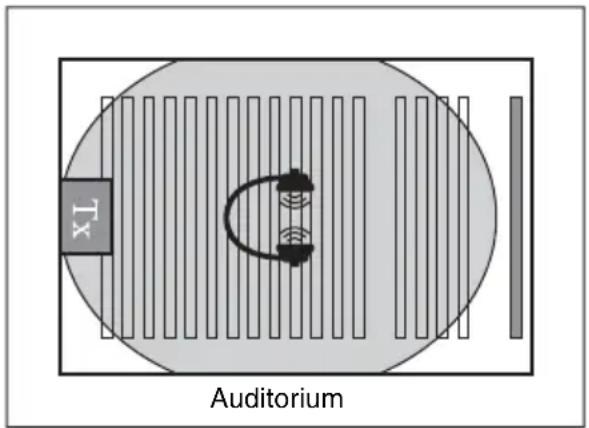
If HI/VI sound breakup occurs frequently, it is likely a result of one or both of the following:
1) Channel allocation does not satisfy the fundamental allocation, resulting in crosstalk. Check channel allocation again.
2) Another wireless system is causing interference.
A wireless system using the 2.4GHz frequency may be causing interference.
Avoiding Crosstalk and Interference
This section explains how to avoid crosstalk or interference without the need for specialized equipment. The same approach can be applied in the case of a caption problem. If you cannot solve the problem, it is likely that specialized equipment is required to resolve it. In this case, contact a service office.
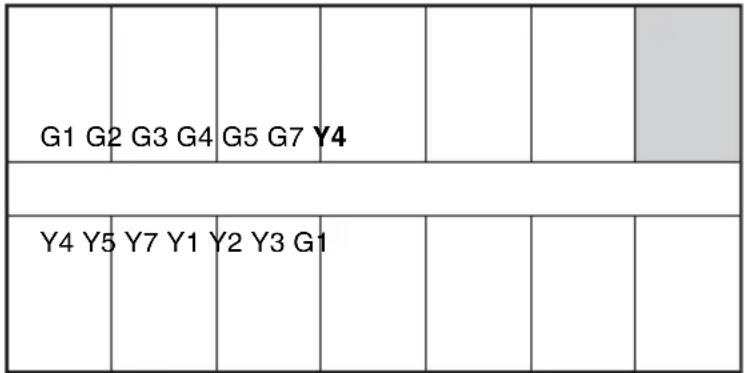
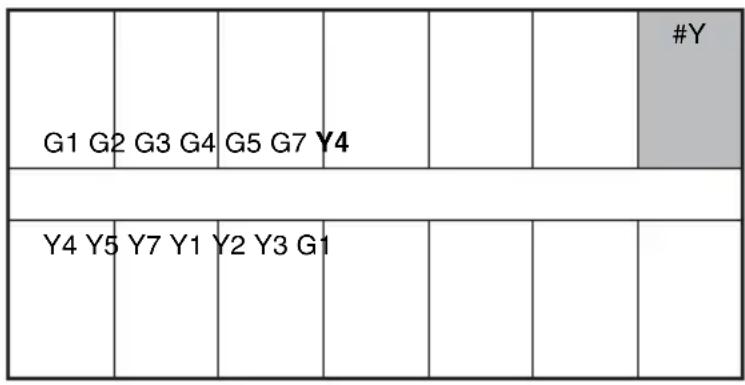
The illustration below shows a case where sound breakup occurs at Y4 (shown in gray).
| Unallocated channels | G6 Y6 |
The 3-step workaround process is as follows;
Step 1 Re-check Channel Allocation
Make sure that the channel allocation in the theater follows the fundamental allocation rules (page 18). Also, see "Channel Allocation Examples" (page 23).
After channel allocation, make sure that the transmitters for all the screens are running and no crosstalk or interference occurs at any of the screens. If the problem is not solved, another wireless device may be causing the problem. In this case, try Step 2 or Step 3.
Step 2 Use Workaround 1: Replace With Unallocated Channel
1. Check for available unallocated channel-pairs.
In the illustration below, G6 and Y6 are an unallocated channel-pair.
| Unallocated channels | G6 Y6 | #Y |
2. Replace the channel at the problem screen with an unallocated channel.
Select a channel of the same channel group. In this case, replace Y4 with Y6. This action does not break fundamental allocation rule 3.
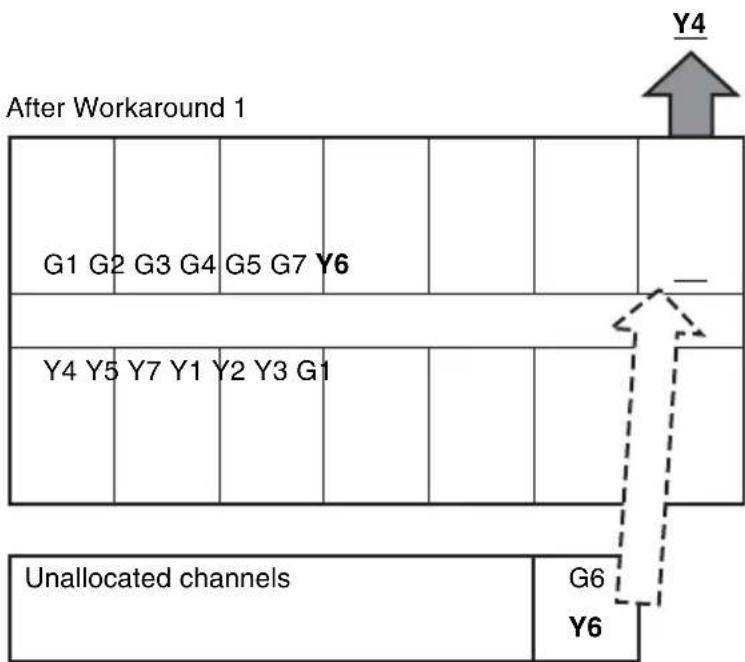
3. You may replace the channel for at the problem screen with the other unallocated channel.
However, replacing with "the other unallocated channel" may break the fundamental allocation rule 3. Make sure that allocation follows the fundamental allocation rule 3 to avoid possible crosstalk.
4. With the entire system running, check neither sound nor caption interruption occurs at the screens where you replaced the channel.
The workaround is success, if there is no problem.
Detailed examples of workaround 1 can be seen in "Workaround Examples" (page 28).
Step 3 Use Workaround 2: Replace Y7 or G7
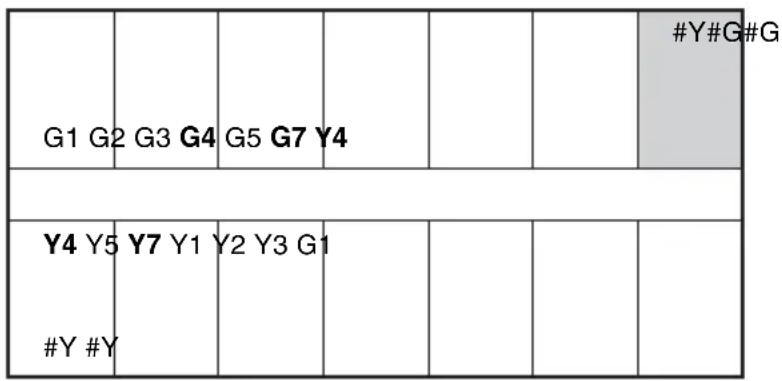
1. Replace Y4 and Y7
G7 and Y7 are relatively tolerant about other wireless signals, compared with other channels.
2. Replace G4 and G7
This action follows fundamental allocation rule 3.
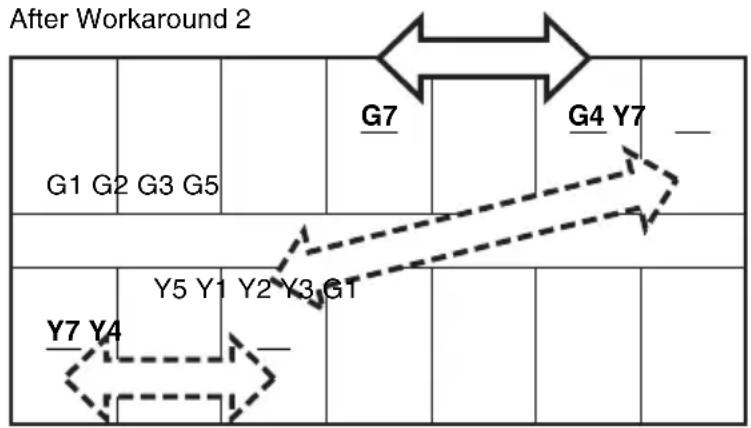
3. Check neither sound nor caption interruption occurs at the screens where you replaced the Channel with all of the system running.
The workaround is success if there is no problem.
Detailed examples of Workaround 2 can be seen in "Workaround Examples" (page 28).
In Case the Problem is Not Solved
If you cannot solve the problem by the process described above, call the service office.
Channel Allocation Examples
This section provides typical examples of channel allocation.
1. Standard channel allocation
The following shows the standard allocation pattern, based on a dual-row theater of 24 screens.
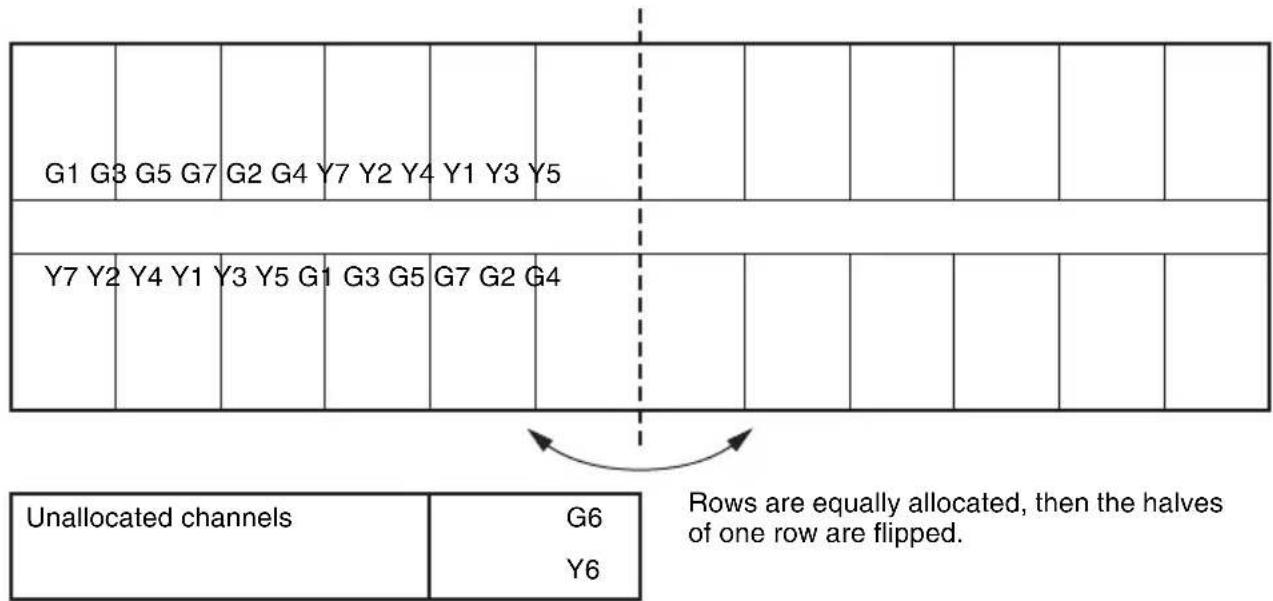
- Cut out a portion of the standard allocation pattern according to each theater layout and allocate them.
- This standard allocation pattern follows (complies with) the fundamental allocation rule described in "Channel Allocation" (page 17).
Description of allocation: - The available channels are G1-G7 and Y1-Y7. Reserve G6 and Y6 as unallocated channels.
- In order to avoid the cross talk, G row and Y row are flipped at the middle.
- In the case of over 24 screens, repeats the standard allocation pattern as it is.
2. In the case of 8 screens in line
| G1 G3 G5 G7 | G2 G4 | Y7 Y2 Y4 | Y1 Y3 | Y5 | |||||
| Y7 Y2 | Y4 Y1 | Y3 Y5 G1 | G3 G5 | G7 G2 | G4 | ||||
| Unallocated channels | G6 |
| Y6 | |
| Y1 Y3 | |
| Y4 Y5 |
- Cut the portion from G1 to Y2.
- Optionally you can cut the portion from Y7 to G3.
3. In the case of 18 screens in a dual row, with the entrance at the center of the theater
| G1 G3 G5 G7 | G2 G4 | Y7 Y2 Y4 | Y1 Y3 | Y5 | ||||||
| Y7 Y2 | Y4 Y1 | Y3 Y5 G1 | G3 G5 | G7 G2 | G4 | |||||
| Entrance | ||||||||||
| Unallocated channels | Y3 | G6 | ||||||||
| Y5 | Y6 | |||||||||
- Mask the unnecessary screens as above.
Y3 and Y5 will not be used because there is the entrance.
4. Alternative channel allocation pattern
- This pattern is a variation on the standard channel allocation described above.
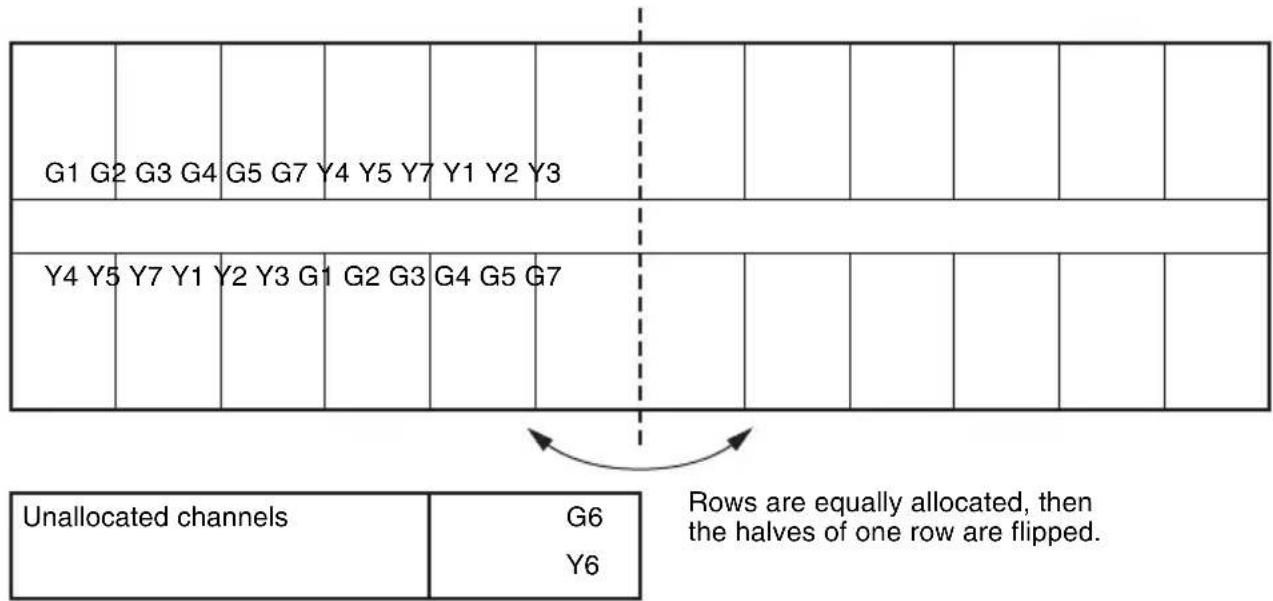
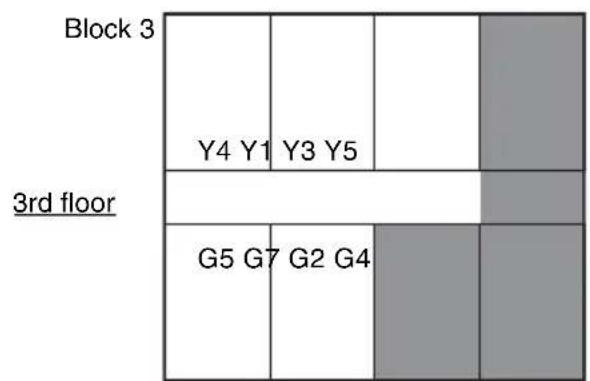
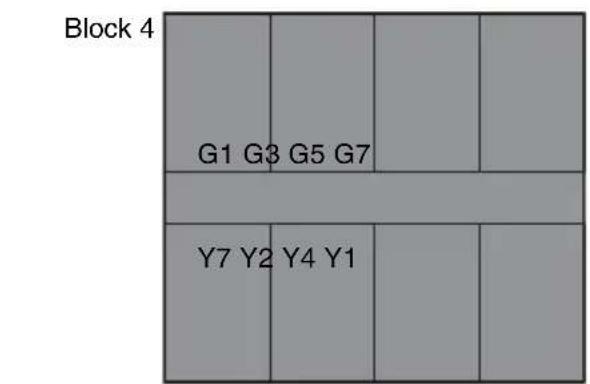
5. Standard channel allocation for stacked screens
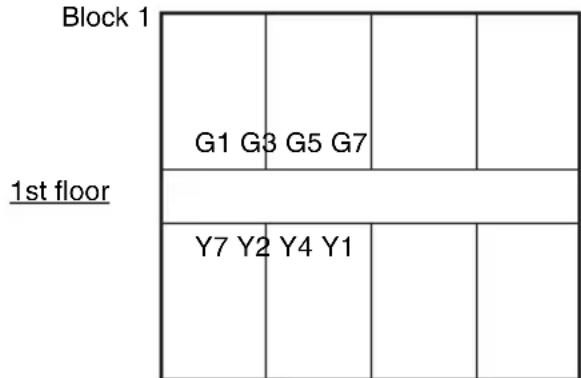
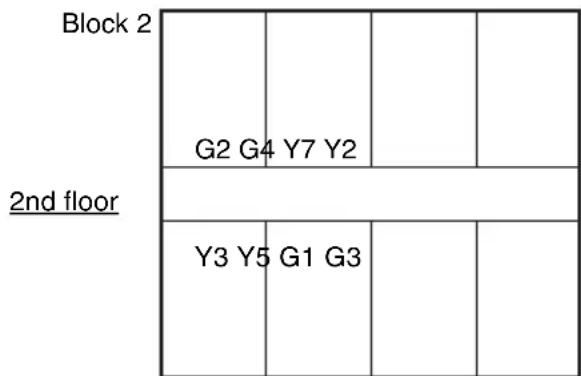
The standard channel allocation sample for stacked screens is based on 8 screens per floor. The sample consists of 4 blocks.
- On the 1st floor, set block 1.
- On the 2nd floor, set block 2.
- On the 3rd floor, set block 3.
- On the 4th floor, set block 4.
Channel allocation example for 8 stacked screens
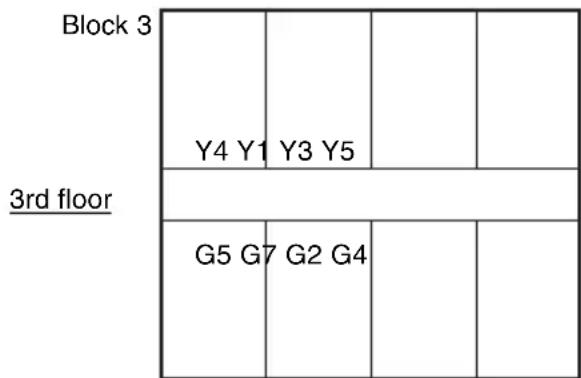
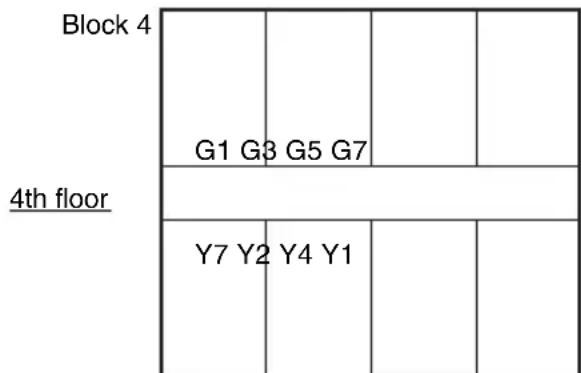
6. In the case of a 3-floor theater with 5 screens per floor
Cut out the portion of the standard channel allocation pattern for 8 screens stacked, according to each theater layout and allocate accordingly.
Channel allocation example for a 3-floor theater with 5 screens per floor
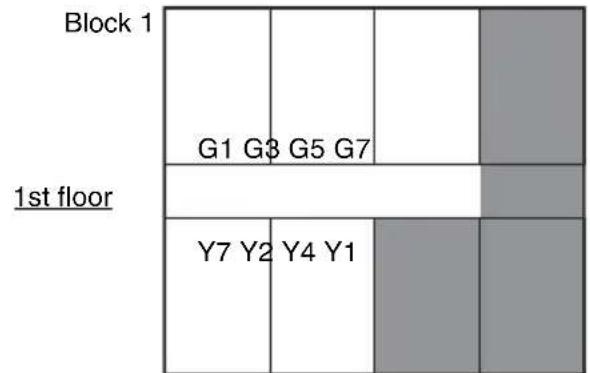
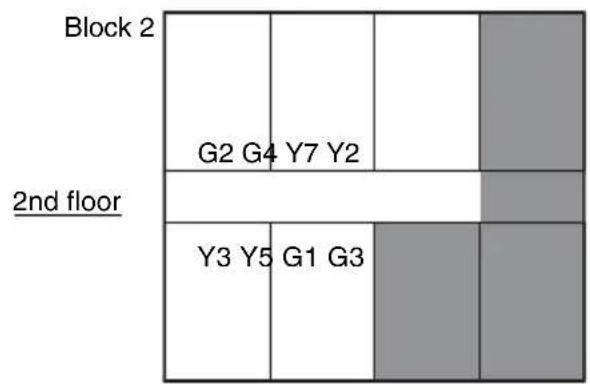
Workaround Examples
Samples of workaround 1: (1)(2)
Samples of workaround 2: (3)
(1)
After allocation Interference
| G1 G3 | G5 G7 | G2 G4 Y7 Y2 | #Y |
| Unallocated channels | G6 |
| Y1 Y3 Y4 Y5 Y6 | |
| #Y |
After remediation
| Unallocated channels | G6 | |
| Y1 Y3 Y4 Y5 | Y2 | |
(2)
After allocation
| G1 G3 | G5 G7 | Y7 Y2 Y4 | Y1 | ||||||
| Y7 Y2 | Y4 Y1 | Y3 Y5 G1 | G3 G5 #Y | G7 | |||||
Interference
| Unallocated channels | G2 | G4 | G6 |
| Y6 |
Check channel: Y1
After remediation
| G1 G3 | G5 G7 | Y7 Y2 Y4 | Y1 | ||||||
| Y7 Y2 | Y4 Y3 | Y5 G1 G8 | G5 G7 Y6 | ||||||
| Unallocated channels | G2 G4 | G6 |
(3)
After allocation
Interference
| G1 G3 | G5 G7 | G2 G4 | Y7 Y2 Y4 | Y1 | |||||
| Y7 Y2 | Y4 Y1 | Y3 Y5 G1 | G3 G5 | G7 | |||||
| #Y #Y | #G | ||||||||
| Unallocated channels | G6 |
| Y6 |
Check channel: G4, G7, Y4, Y7
After remediation
| G1 G3 | G5 G2 | Y2 Y1 | G4 | G7 Y4 | Y7_ | - | |||
| Y4 Y7 | Y2 Y1G4 | Y3 Y5- | G1 G3 G5 | - | |||||
| Unallocated channels | G6 |
| Y6 |
Specifications
Digital audio input
RJ-45
AES/EBU: balanced (2ch: HI audio
& VI-N audio)
Analog audio input
Phono × 2
HI audio/VI-N audio
Audio Level: -20dBV = 0.1 Vrms
(MAX: 0dBV = 1.0Vrms
Closed caption input
RJ-45 (Ethernet) SMPTE format
Wireless frequency
2.4 GHz band (15 wireless channels
from 2,405 MHz to 2,475 MHz with
5 MHz step. Each channel has 2
MHz bandwidth.)
Numbers of wireless channels
7 channels for closed caption, 7
channels for audio
Coverage area
Approx. 40m (131 feet) radius, line
of-sight distance
Power supply
AC adaptor (+5VDC)
Dimensions
Approx. 231 × 31 × 165 ~mm (9^1 / _8 ×
1^1 / 4× 6^1 / 2 inches (w / h / d)
Mass
Approx. 640g (1 lb 6.6 oz)
Operating conditions
Temperature
10^ to 35^ (50^ to 95^)
Humidity
10% to 85% (no condensation)
Storage conditions
Temperature
-20^ to +60^ (-4^ to +140
^)
Humidity
0% to 90% (no condensation)
Supplied items
Data Transmitter (1)
Operating Instructions (1)
Recommended options
AC adaptor (output voltage +5V± 5% DC, output current 1 A or more)
Design and specifications are subject to change without notice.
Note
Always verify that the unit is operating properly before use. SONY WILL NOT BE LIABLE FOR DAMAGES OF ANY KIND INCLUDING, BUT NOT
LIMITED TO, COMPENSATION OR REIMBURSEMENT ON ACCOUNT OF THE LOSS OF PRESENT OR
PROSPECTIVE PROFITS DUE TO
FAILURE OF THIS UNIT, EITHER DURING THE WARRANTY PERIOD
OR AFTER EXPIRATION OF THE
WARRANTY, OR FOR ANY OTHER
REASON WHATSOEVER.
License
expat
Copyright (c) 1998, 1999, 2000 Thai Open Source Software Center Ltd All rights reserved.
Redistribution and use in source and binary forms, with or without modification, are permitted provided that the following conditions are met:
Redistributions of source code must retain the above copyright notice, this list of conditions and the following disclaimer.
Redistributions in binary form must reproduce the above copyright notice, this list of conditions and the following disclaimer in the documentation and/or other materials provided with the distribution.
Neither the name of the Thai Open Source Software Center Ltd nor the names of its contributors may be used to endorse or promote products derived from this software without specific prior written permission.
THIS SOFTWARE IS PROVIDED BY THE Copyright Holders AND Contributors "AS IS" AND ANY EXPRESS OR IMPLIED WARRANTY, INCLUDING, BUT NOT LIMITED TO, THE IMPLIED WARRANTY OF MERCHANTABILITY AND FITNESS FOR A PARTICULAR PURPOSE ARE DISCLAIMED. IN NO EVENT SHALL THE REGENTS OR COLNTRIBUTORS BE LIABLE FOR ANY DIRECT, INDIRECT, INCIDENTAL, SPECIAL, EXEMPLARY, OR CONSEQUENTIAL DAMAGES (INCLUDING, BUT NOT LIMITED TO, PROCEDURE OF SUBSTITUTE GOODS OR SERVICES; LOSS OF USE, DATA, OR PROFITS; OR BUSINESS INTERRUsION) HOWEVER CAUSED AND ON ANY THEORY OF LIABILITY, WHETHER IN CONTRACT, STRICT
LIABILITY, OR TORT (INCLUDING NEGLIGENCE OR OTHERWISE) ARISING IN ANY WAY OUT OF THE USE OF THIS SOFTWARE, EVEN IF ADVISED OF THE POSSIBILITY OF SUCH DAMAGE.
standard library
Copyright c Regents of the University of California.
All rights reserved.
Redistribution and use in source and binary forms, with or without modification, are permitted provided that the following conditions are met:
- Redistributions of source code must retain the above copyright notice, this list of conditions and the following disclaimer.
- Redistributions in binary form must reproduce the above copyright notice, this list of conditions and the following disclaimer in the documentation and/or other materials provided with the distribution.
- All advertising materials mentioning features or use of this software must display the following acknowledgement: This product includes software developed by the University of California, Berkeley and its contributors.
- Neither the name of the University nor the names of its contributors may be used to endorse or promote products derived from this software without specific prior written permission.
THIS SOFTWARE IS PROVIDED BY THE REGENTS AND COLNTRIBUTORS "AS IS" AND ANY EXPRESS OR IMPLIED WARRANTY, INCLUDING, BUT NOT LIMITED TO, THE IMPLIED WARRANTY OF MERCHANTABILITY AND FITNESS FOR A PARTICULAR PURPOSE ARE DISCLAIMED. IN NO EVENT SHALL THE REGENTS OR COLNTRIBUTORS BE LIABLE FOR ANY DIRECT, INDIRECT, INCIDENTAL, SPECIAL, EXEMPLARY, OR CONSEQUENTIAL DAMAGES (INCLUDING, BUT NOT LIMITED TO, PROCEDURE OF SUBSTITUTE GOODS OR SERVICES; LOSS OF USE, DATA, OR PROFITS; OR BUSINESS INTERRUPTION) HOWEVER CAUSED
AND ON ANY THEORY OF LIABILITY,
WHETHER IN CONTRACT, STRICT
LIABILITY, OR TORT (INCLUDING
NEGLIGENCE OR OTHERWISE)
ARISING IN ANY WAY OUT OF THE
USE OF THIS SOFTWARE, EVEN IF
ADVISED OF THE POSSIBILITY OF
SUCH DAMAGE.
Developed at SunPro, a Sun Microsystems, Inc. business. Permission to use, copy, modify, and distribute this software is freely granted, provided that this notice is preserved.
Trademarks
- Windows, and Internet Explorer are registered trademarks of Microsoft Corporation in the United States and/or other countries.
- Other system names, products names, and company names appearing in this manual are trademarks or registered trademarks of their respective holders. In this manual such names are not indicated by ^® or TM marks.
Verification prealable 15
(MAX.:0 dBV = 1,0 Vrms)
Options recommendees
Copyright (c) 1998, 1999, 2000 Thai Open Source Software Center Ltd All rights reserved.
Redistribution and use in source and binary forms, with or without modification, are permitted provided that the following conditions are met:
Redistributions of source code must retain the above copyright notice, this list of conditions and the following disclaimer.
Redistributions in binary form must reproduce the above copyright notice, this list of conditions and the following disclaimer in the documentation and/or other materials provided with the distribution.
Neither the name of the Thai Open Source Software Center Ltd nor the names of its contributors may be used to endorse or promote products derived from this software without specific prior written permission.
THIS SOFTWARE IS PROVIDED BY THE Copyright Holders AND Contributors "AS IS" AND ANY EXPRESS OR IMPLIED WARRANTY, INCLUDING, BUT NOT LIMITED TO, THE IMPLIED WARRANTY OF MERCHANTABILITY AND FITNESS FOR A PARTICULAR PURPOSE ARE DISCLAIMED. IN NO EVENT SHALL THE REGENTS OR COLNTRIBUTORS BE LIABLE FOR ANY DIRECT, INDIRECT, INCIDENTAL, SPECIAL, EXEMPLARY, OR CONSEQUENTIAL DAMAGES (INCLUDING, BUT NOT LIMITED TO, PROCEDURE OF SUBSTITUTE GOODS OR SERVICES; LOSS OF USE, DATA, OR PROFITS; OR BUSINESS INTERRUsION) HOWEVER CAUSED AND ON ANY THEORY OF LIABILITY, WHETHER IN CONTRACT, STRICT
LIABILITY, OR TORT (INCLUDING NEGLIGENCE OR OTHERWISE) ARISING IN ANY WAY OUT OF THE USE OF THIS SOFTWARE, EVEN IF ADVISED OF THE POSSIBILITY OF SUCH DAMAGE.
standard library
Copyright c Regents of the University of California.
All rights reserved.
Redistribution and use in source and binary forms, with or without modification, are permitted provided that the following conditions are met:
- Redistributions of source code must retain the above copyright notice, this list of conditions and the following disclaimer.
- Redistributions in binary form must reproduce the above copyright notice, this list of conditions and the following disclaimer in the documentation and/or other materials provided with the distribution.
- All advertising materials mentioning features or use of this software must display the following acknowledgement: This product includes software developed by the University of California, Berkeley and its contributors.
- Neither the name of the University nor the names of its contributors may be used to endorse or promote products derived from this software without specific prior written permission.
THIS SOFTWARE IS PROVIDED BY THE REGENTS AND COLNTRIBUTORS "AS IS" AND ANY EXPRESS OR IMPLIED WARRANTY, INCLUDING, BUT NOT LIMITED TO, THE IMPLIED WARRANTY OF MERCHANTABILITY AND FITNESS FOR A PARTICULAR PURPOSE ARE DISCLAIMED. IN NO EVENT SHALL THE REGENTS OR COLNTRIBUTORS BE LIABLE FOR ANY DIRECT, INDIRECT, INCIDENTAL, SPECIAL, EXEMPLARY, OR CONSEQUENTIAL DAMAGES (INCLUDING, BUT NOT LIMITED TO, PROCEDURE OF SUBSTITUTE GOODS OR SERVICES; LOSS OF USE, DATA, OR PROFITS; OR BUSINESS INTERRUPTION) HOWEVER CAUSED
AND ON ANY THEORY OF LIABILITY,
WHETHER IN CONTRACT, STRICT
LIABILITY, OR TORT (INCLUDING
NEGLIGENCE OR OTHERWISE)
ARISING IN ANY WAY OUT OF THE
USE OF THIS SOFTWARE, EVEN IF
ADVISED OF THE POSSIBILITY OF
SUCH DAMAGE.
Developed at SunPro, a Sun Microsystems, Inc. business. Permission to use, copy, modify, and distribute this software is freely granted, provided that this notice is preserved.
Marques de commerce
(MAX.: 0 dBV = 1,0 Vrms)
Entrada de subtoyulos
Formato SMPTE RJ-45 (Ethernet)
Copyright (c) 1998, 1999, 2000 Thai Open Source Software Center Ltd All rights reserved.
Redistribution and use in source and binary forms, with or without modification, are permitted provided that the following conditions are met:
Redistributions of source code must retain the above copyright notice, this list of conditions and the following disclaimer.
Redistributions in binary form must reproduce the above copyright notice, this list of conditions and the following disclaimer in the documentation and/or other materials provided with the distribution.
Neither the name of the Thai Open Source Software Center Ltd nor the names of its contributors may be used to endorse or promote products derived from this software without specific prior written permission.
THIS SOFTWARE IS PROVIDED BY THE Copyright Holders AND Contributors "AS IS" AND ANY EXPRESS OR IMPLIED WARRANTY, INCLUDING, BUT NOT LIMITED TO, THE IMPLIED WARRANTY OF MERCHANTABILITY AND FITNESS FOR A PARTICULAR PURPOSE ARE DISCLAIMED. IN NO EVENT SHALL THE REGENTS OR COLNTRutors BE LIABLE FOR ANY DIRECT, INDIRECT, INCIDENTAL, SPECIAL, EXEMPLARY, OR CONSEQUENTIAL DAMAGES (INCLUDING, BUT NOT LIMITED TO, PROCEDURE OF SUBSTITUTE GOODS OR SERVICES; LOSS OF USE, DATA, OR PROFITS; OR BUSINESS INTERUPTION) HOWEVER CAUSED AND ON ANY THEORY OF LIABILITY, WHETHER IN CONTRACT, STRICT
LIABILITY, OR TORT (INCLUDING NEGLIGENCE OR OTHERWISE) ARISING IN ANY WAY OUT OF THE USE OF THIS SOFTWARE, EVEN IF ADVISED OF THE POSSIBILITY OF SUCH DAMAGE.
standard library
Copyright c Regents of the University of California.
All rights reserved.
Redistribution and use in source and binary forms, with or without modification, are permitted provided that the following conditions are met:
- Redistributions of source code must retain the above copyright notice, this list of conditions and the following disclaimer.
- Redistributions in binary form must reproduce the above copyright notice, this list of conditions and the following disclaimer in the documentation and/or other materials provided with the distribution.
- All advertising materials mentioning features or use of this software must display the following acknowledgement: This product includes software developed by the University of California, Berkeley and its contributors.
- Neither the name of the University nor the names of its contributors may be used to endorse or promote products derived from this software without specific prior written permission.
THIS SOFTWARE IS PROVIDED BY THE REGENTS AND COLNTRIBUTORS "AS IS" AND ANY EXPRESS OR IMPLIED WARRANTY, INCLUDING, BUT NOT LIMITED TO, THE IMPLIED WARRANTY OF MERCHANTABILITY AND FITNESS FOR A PARTICULAR PURPOSE ARE DISCLAIMED. IN NO EVENT SHALL THE REGENTS OR COLNTRIBUTORS BE LIABLE FOR ANY DIRECT, INDIRECT, INCIDENTAL, SPECIAL, EXEMPLARY, OR CONSEQUENTIAL DAMAGES (INCLUDING, BUT NOT LIMITED TO, PROCEDURE OF SUBSTITUTE GOODS OR SERVICES; LOSS OF USE, DATA, OR PROFITS; OR BUSINESS INTERR UPTION) HOWEVER CAUSED
AND ON ANY THEORY OF LIABILITY,
WHETHER IN CONTRACT, STRICT
LIABILITY, OR TORT (INCLUDING
NEGLIGENCE OR OTHERWISE)
ARISING IN ANY WAY OUT OF THE
USE OF THIS SOFTWARE, EVEN IF
ADVISED OF THE POSSIBILITY OF
SUCH DAMAGE.
Developed at SunPro, a Sun Microsystems, Inc. business. Permission to use, copy, modify, and distribute this software is freely granted, provided that this notice is preserved.
Marcas commerciales
Copyright (c) 1998, 1999, 2000 Thai Open Source Software Center Ltd All rights reserved.
Redistribution and use in source and binary forms, with or without modification, are permitted provided that the following conditions are met:
Redistributions of source code must retain the above copyright notice, this list of conditions and the following disclaimer.
Redistributions in binary form must reproduce the above copyright notice, this list of conditions and the following disclaimer in the documentation and/or other materials provided with the distribution.
Neither the name of the Thai Open Source Software Center Ltd nor the names of its contributors may be used to endorse or promote products derived from this software without specific prior written permission.
THIS SOFTWARE IS PROVIDED BY THE Copyright Holders AND Contributors "AS IS" AND ANY EXPRESS OR IMPLIED WARRANTY, INCLUDING, BUT NOT LIMITED TO, THE IMPLIED WARRANTY OF MERCHANTABILITY AND FITNESS FOR A PARTICULAR PURPOSE ARE DISCLAIMED. IN NO EVENT SHALL THE REGENTS OR COLNTRutors BE LIABLE FOR ANY DIRECT, INDIRECT, INCIDENTAL, SPECIAL, EXEMPLARY, OR CONSEQUENTIAL DAMAGES (INCLUDING, BUT NOT LIMITED TO, PROCEDURE OF SUBSTITUTE GOODS OR SERVICES; LOSS OF USE, DATA, OR PROFITS; OR BUSINESS INTERUPTION) HOWEVER CAUSED AND ON ANY THEORY OF LIABILITY, WHETHER IN CONTRACT, STRICT
LIABILITY, OR TORT (INCLUDING NEGLIGENCE OR OTHERWISE) ARISING IN ANY WAY OUT OF THE USE OF THIS SOFTWARE, EVEN IF ADVISED OF THE POSSIBILITY OF SUCH DAMAGE.
standard library
Copyright c Regents of the University of California.
All rights reserved.
Redistribution and use in source and binary forms, with or without modification, are permitted provided that the following conditions are met:
- Redistributions of source code must retain the above copyright notice, this list of conditions and the following disclaimer.
- Redistributions in binary form must reproduce the above copyright notice, this list of conditions and the following disclaimer in the documentation and/or other materials provided with the distribution.
- All advertising materials mentioning features or use of this software must display the following acknowledgement: This product includes software developed by the University of California, Berkeley and its contributors.
- Neither the name of the University nor the names of its contributors may be used to endorse or promote products derived from this software without specific prior written permission.
THIS SOFTWARE IS PROVIDED BY THE REGENTS AND COLNTRIBUTORS "AS IS" AND ANY EXPRESS OR IMPLIED WARRANTY, INCLUDING, BUT NOT LIMITED TO, THE IMPLIED WARRANTY OF MERCHANTABILITY AND FITNESS FOR A PARTICULAR PURPOSE ARE DISCLAIMED. IN NO EVENT SHALL THE REGENTS OR COLNTRIBUTORS BE LIABLE FOR ANY DIRECT, INDIRECT, INCIDENTAL, SPECIAL, EXEMPLARY, OR CONSEQUENTIAL DAMAGES (INCLUDING, BUT NOT LIMITED TO, PROCEDURE OF SUBSTITUTE GOODS OR SERVICES; LOSS OF USE, DATA, OR PROFITS; OR BUSINESS INTERR UPTION) HOWEVER CAUSED
AND ON ANY THEORY OF LIABILITY,
WHETHER IN CONTRACT, STRICT
LIABILITY, OR TORT (INCLUDING
NEGLIGENCE OR OTHERWISE)
ARISING IN ANY WAY OUT OF THE
USE OF THIS SOFTWARE, EVEN IF
ADVISED OF THE POSSIBILITY OF
SUCH DAMAGE.
Developed at SunPro, a Sun Microsystems, Inc. business. Permission to use, copy, modify, and distribute this software is freely granted, provided that this notice is preserved.
Marken
Copyright (c) 1998, 1999, 2000 Thai Open Source Software Center Ltd All rights reserved.
Redistribution and use in source and binary forms, with or without modification, are permitted provided that the following conditions are met:
Redistributions of source code must retain the above copyright notice, this list of conditions and the following disclaimer.
Redistributions in binary form must reproduce the above copyright notice, this list of conditions and the following disclaimer in the documentation and/or other materials provided with the distribution.
Neither the name of the Thai Open Source Software Center Ltd nor the names of its contributors may be used to endorse or promote products derived from this software without specific prior written permission.
THIS SOFTWARE IS PROVIDED BY THE Copyright Holders AND Contributors "AS IS" AND ANY EXPRESS OR IMPLIED WARRANTY, INCLUDING, BUT NOT LIMITED TO, THE IMPLIED WARRANTY OF MERCHANTABILITY AND FITNESS FOR A PARTICULAR PURPOSE ARE DISCLAIMED. IN NO EVENT SHALL THE REGENTS OR COLNTRutors BE LIABLE FOR ANY DIRECT, INDIRECT, INCIDENTAL, SPECIAL, EXEMPLARY, OR CONSEQUENTIAL DAMAGES (INCLUDING, BUT NOT LIMITED TO, PROCEDURE OF SUBSTITUTE GOODS OR SERVICES; LOSS OF USE, DATA, OR PROFITS; OR BUSINESS INTERUPTION) HOWEVER CAUSED AND ON ANY THEORY OF LIABILITY, WHETHER IN CONTRACT, STRICT
LIABILITY, OR TORT (INCLUDING NEGLIGENCE OR OTHERWISE) ARISING IN ANY WAY OUT OF THE USE OF THIS SOFTWARE, EVEN IF ADVISED OF THE POSSIBILITY OF SUCH DAMAGE.
standard library
Copyright c Regents of the University of California.
All rights reserved.
Redistribution and use in source and binary forms, with or without modification, are permitted provided that the following conditions are met:
- Redistributions of source code must retain the above copyright notice, this list of conditions and the following disclaimer.
- Redistributions in binary form must reproduce the above copyright notice, this list of conditions and the following disclaimer in the documentation and/or other materials provided with the distribution.
- All advertising materials mentioning features or use of this software must display the following acknowledgement: This product includes software developed by the University of California, Berkeley and its contributors.
- Neither the name of the University nor the names of its contributors may be used to endorse or promote products derived from this software without specific prior written permission.
THIS SOFTWARE IS PROVIDED BY THE REGENTS AND COLNTRIBUTORS "AS IS" AND ANY EXPRESS OR IMPLIED WARRANTY, INCLUDING, BUT NOT LIMITED TO, THE IMPLIED WARRANTY OF MERCHANTABILITY AND FITNESS FOR A PARTICULAR PURPOSE ARE DISCLAIMED. IN NO EVENT SHALL THE REGENTS OR COLNTRIBUTORS BE LIABLE FOR ANY DIRECT, INDIRECT, INCIDENTAL, SPECIAL, EXEMPLARY, OR CONSEQUENTIAL DAMAGES (INCLUDING, BUT NOT LIMITED TO, PROCEDURE OF SUBSTITUTE GOODS OR SERVICES; LOSS OF USE, DATA, OR PROFITS; OR BUSINESS INTERR UPTION) HOWEVER CAUSED
AND ON ANY THEORY OF LIABILITY,
WHETHER IN CONTRACT, STRICT
LIABILITY, OR TORT (INCLUDING
NEGLIGENCE OR OTHERWISE)
ARISING IN ANY WAY OUT OF THE
USE OF THIS SOFTWARE, EVEN IF
ADVISED OF THE POSSIBILITY OF
SUCH DAMAGE.
Developed at SunPro, a Sun Microsystems, Inc. business. Permission to use, copy, modify, and distribute this software is freely granted, provided that this notice is preserved.
Marchi
Printed on recycled paper.
http://www.sony.net/
Sony Corporation
Printed in Japan