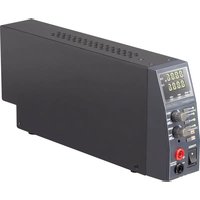
LSP-1362 - Laboratory power supply VOLTCRAFT - Free user manual and instructions
Find the device manual for free LSP-1362 VOLTCRAFT in PDF.


| Product type | Laboratory power supply |
| Brand | Voltcraft |
| Model | LSP-1362 |
| Dimensions (L x W x H) | 330 x 54 x 137 mm |
| Weight | 1.65 kg |
| Input voltage | 100–240 VAC, 50–60 Hz |
| Max. input current | 0.5 A |
| Output voltage | 0.5 to 36 VDC |
| Output current | 0 to 5 A |
| Max. output power | 80 W |
| Display resolution | 10 mV / 1 mA |
| Display accuracy | ± 0.5% (+ 5 counts) |
| Main functions | Continuous voltage/current adjustment, 3 presets, key lock, Sense connection, master/slave mode (up to 30 devices) |
| Protections | Overvoltage, overcurrent, short circuit, overheating |
| Display | Dual 4-digit display: voltage and current/power |
| Connections | 4 mm safety sockets on front, terminals on rear, Sense connection, master/slave |
| Protection class | I (with grounding) |
| Operating conditions | 0 to +40 °C, ≤ 80% RH (non-condensing) |
| Storage conditions | -20 to +70 °C, ≤ 80% RH (non-condensing) |
| Maintenance and cleaning | Disconnect, clean with a dry, lint-free cloth. Do not use aggressive agents or alcohol. |
| Safety | Use only in dry, enclosed rooms. Avoid water and moisture. Follow electrical safety instructions. |
| Package contents | Power supply unit, mains cable, connection cables with alligator clips, master/slave cable, termination plug, instruction manual |
| Repairability | Repairs must be carried out by a qualified technician. No specific spare parts mentioned. |
Frequently Asked Questions - LSP-1362 VOLTCRAFT
User questions about LSP-1362 VOLTCRAFT
0 question about this device. Answer the ones you know or ask your own.
Ask a new question about this device
Download the instructions for your Laboratory power supply in PDF format for free! Find your manual LSP-1362 - VOLTCRAFT and take your electronic device back in hand. On this page are published all the documents necessary for the use of your device. LSP-1362 by VOLTCRAFT.
USER MANUAL LSP-1362 VOLTCRAFT
GB Operating Instructions
LSP-1362 Laboratory power supply
Item No. 2247646 Page 27 - 51
Notice d'emploi
- Introduction....29
- Description of symbols ...... 29
- Intended use....30
- Delivery content....31
- Features and functions....31
- Safety information ....32
a) General information....32
b) Connected devices....32
c) Installation location....32
d) Operation....33
e) Electrical safety....33
- Controls 35
a) Control panel....35
b) Display type....36
c) Rear....37
- Operation....38
a) Connecting to the mains....38
b) Setting up the device....38
- Standby mode ....39
a) Switching on the device....39
b) Setting the voltage/current limit....39
c) Connecting consumers....40
d) Setting the voltage/current setpoint....41
e) Selecting the current/power display ....41
f) Switching the output on/off....42
g) Saving and retrieving presets....42
h) Activating/deactivating button lock....43
i) Using the sense function....43
j) Restoring the factory settings....45
- Master/slave operation....45
a) Preparing the devices....45
b) Connecting devices....46
c) Connecting consumers....47
- Troubleshooting....48
- Care and cleaning ....50
- Disposal....50
- Specifications ....51
1. Introduction
Dear customer,
Thank you for purchasing this product.
This product complies with statutory, national and European regulations.
To ensure that the product remains in this state and to guarantee safe operation, always follow the information in these operating instructions.

These operating instructions are part of this product. They contain important notes on commissioning and handling. Do not give this product to a third party without the operating instructions. Therefore, retain these operating instructions for reference!
If there are any technical questions, please contact:
www.conrad.com/contact
2. Description of symbols
The symbol with the lightning in a triangle indicates that there is a risk to your health, e.g. due to an electric shock.

The symbol with an exclamation mark in a triangle is used to highlight important information in these operating instructions. Always read this information carefully.
The arrow symbol indicates special information and tips on how to use the product.

This product must only be used in dry, enclosed indoor areas. The product must not become damp or wet. Risk of life-threatening electric shock!

This symbol reminds you to read the operating instructions included with the product.
3. Intended use
The laboratory power supply serves as a floating DC voltage source for the operation of low-voltage consumers with constant voltage or constant current. Up to three voltage/current output ranges can be stored as presets. The maximum output power is 80 W. The DC output can be realised alternatively on the front of the device via 4 mm safety sockets or on the back via plug-in clamps. Voltage drops in the DC line can be compensated and the output value stabilised via a sense cable.

Always use sufficiently dimensioned connection cables. A wire cross-section that is too small can cause overheating and fire.
To achieve higher output currents, multiple LSP-1362 laboratory power supplies can be connected in parallel via master/slave control. In that case, all laboratory power supplies are controlled via the master device.
An adjustable voltage and current limit protects the connected consumers against excess voltage/current. If the voltage/current is reached, the output is deactivated. The voltage and current strength are shown on the dual display and can be continuously adjusted.
The laboratory power supply is overload and short-circuit-proof and contains a safety temperature cut-off. The laboratory power supply is designed in compliance with protection class 1. It is only approved for connection to shockproof sockets with protective earthing and a standard domestic alternating current of 100 to 240 V/AC.
Operation under adverse ambient conditions is not permitted. Adverse conditions include:
- Wetness or high humidity
- Dust and flammable gases, vapours or solvents
- Thunderstorms or similar conditions such as strong electrostatic fields, etc.
For safety and approval purposes, do not rebuild and/or modify this product. Using the product for purposes other than those described above may damage the components. In addition, improper use can cause hazards such as a short-circuit, fire or electric operating instructions carefully and store them in a safe place. Only make this product available to third parties together with its operating instructions.
All company and product names contained herein are trademarks of their respective owners. All rights reserved.
4. Delivery content
• Laboratory power supply
- Mains cable for shockproof sockets
- Angled connection cables with alligator clips
• Master/slave connection cable
• Terminating plug for master/slave connection
- Operating instructions
Up-to-date operating instructions
Download the latest operating instructions at www.conrad.com/downloads or scan the QR code shown. Follow the instructions on the website.
5. Features and functions
- Continuous adjustment of output voltage (0.5 - 36 V) or output current (0 - 5 A)
- Rotary control with one-handed operation
- Button lock to prevent accidental adjustment
• Voltage and current display on 4-digit display with 10 mV/1 mA resolution - Adjustable voltage and current limit for the protection of connected consumers
• 3 presets can be stored for voltage and current - Option to connect several LSP-1362 laboratory power supplies in parallel via master/slave control
• Overheat, excess voltage, excess current and short-circuit protection - Sense connection for precise determination of the voltage at the consumer
- Error and warning messages on the display
Read the operating instructions and safety information carefully. If you do not follow the safety information and information on proper handling in these operating instructions, we will assume no liability for any resulting personal injury or damage to property. Such cases will invalidate the warranty/guarantee.
a) General information
- The device is not a toy. Keep it out of the reach of children and pets.
- Do not leave packaging material lying around carelessly. It may become a dangerous plaything for children.
- Protect the product from extreme temperatures, direct sunlight, strong jolts, high humidity, moisture, flammable gases, vapours and solvents.
- Never expose the product to mechanical stress.
- Handle the product carefully. Jolts, impacts or a fall even from a low height may damage the product.
- Consult a technician if you are not sure how to use or connect the product, or if you have concerns about safety.
- If it is no longer possible to operate the product safely, stop using it and prevent unauthorised use. Safe operation can no longer be guaranteed if the product:
- is visibly damaged,
- is no longer working properly,
- has been stored for extended periods in poor ambient conditions or
- has been subjected to any serious transport-related stress.
- Maintenance, modifications and repairs must be carried out by a technician or a specialist repair centre.
- If you have questions which remain unanswered by these operating instructions, contact our technical support service or other technical personnel.
b) Connected devices
- Always observe the safety information and operating instructions of any other devices which are connected to the product.
c) Installation location
- The product may only be used in dry, enclosed spaces. The product must not become damp or wet. This may cause a fatal electric shock!
- Select a stable, flat, clean, sufficiently large place for the product.
- Ensure that the cables are not pinched or damaged by sharp edges. Route the connection cable so that nobody can trip over it.
- The mains socket must be located near to the device and be easily accessible.
- Do not place any containers filled with liquid on or next to the product. If these liquids come into contact with the device, it may be permanently damaged, plus there is a risk of fire or electric shock.
- The product warms up during use. Ensure that there is sufficient ventilation. Do not cover the ventilation openings on the device!
- Do not place the product directly next to devices with strong electrical or magnetic fields (e.g. transformers, motors, cordless telephones, wireless devices, etc.) as these can prevent the product from working properly.
d) Operation
- Never use the product immediately after taking it from a cold room to a warm one. This may generate condensation, which can cause the product to malfunction or damage the interior components. It may also cause a fatal electric shock! Let the product reach room temperature before using it. This may take several hours.
- Do not wear metallic or conductive jewellery chains, bracelets, rings, etc. when working with power supplies or chargers. Never connect power supplies and chargers to people or animals.
- If liquid comes into contact with the product or its interior components:
- Switch the power supply off at the mains socket to which it is connected. To do this, switch the corresponding circuit breakers off or unscrew the fuse. In addition, switch the residual current circuit breaker off in order to disconnect all poles of the socket from the mains voltage.
- Disconnect the mains plug from the mains socket.
- Discontinue use of the product and take it to a specialised workshop or dispose of it in an environmentally friendly manner.
e) Electrical safety
- Before connecting the product to the mains, ensure that your local mains voltage matches the specifications on the product nameplate.
• If the mains cable is damaged:
- Switch the power supply off at the mains socket to which it is connected. To do this, switch the corresponding circuit breakers off or unscrew the fuse. In addition, switch the residual current circuit breaker off in order to disconnect all poles of the socket from the mains voltage.
- Disconnect the mains plug from the mains socket.
- Replace the damaged mains cable before using the product again.
- For safety reasons, disconnect the mains plug from the mains socket in the following situations:
- Before cleaning the product
- During thunderstorms
- If the product is not going to be used for an extended period of time.
- Never connect or disconnect mains plugs when your hands are wet.
- Do not pull the mains plug from the socket by pulling on the cable.
- Trained personnel must supervise the use of electrical appliances in schools, training facilities and DIY workshops.
- For installations in industrial facilities, follow the accident prevention regulations for electrical systems and equipment issued by the government safety organisation or the corresponding authority for your country.
7. Controls
a) Control panel
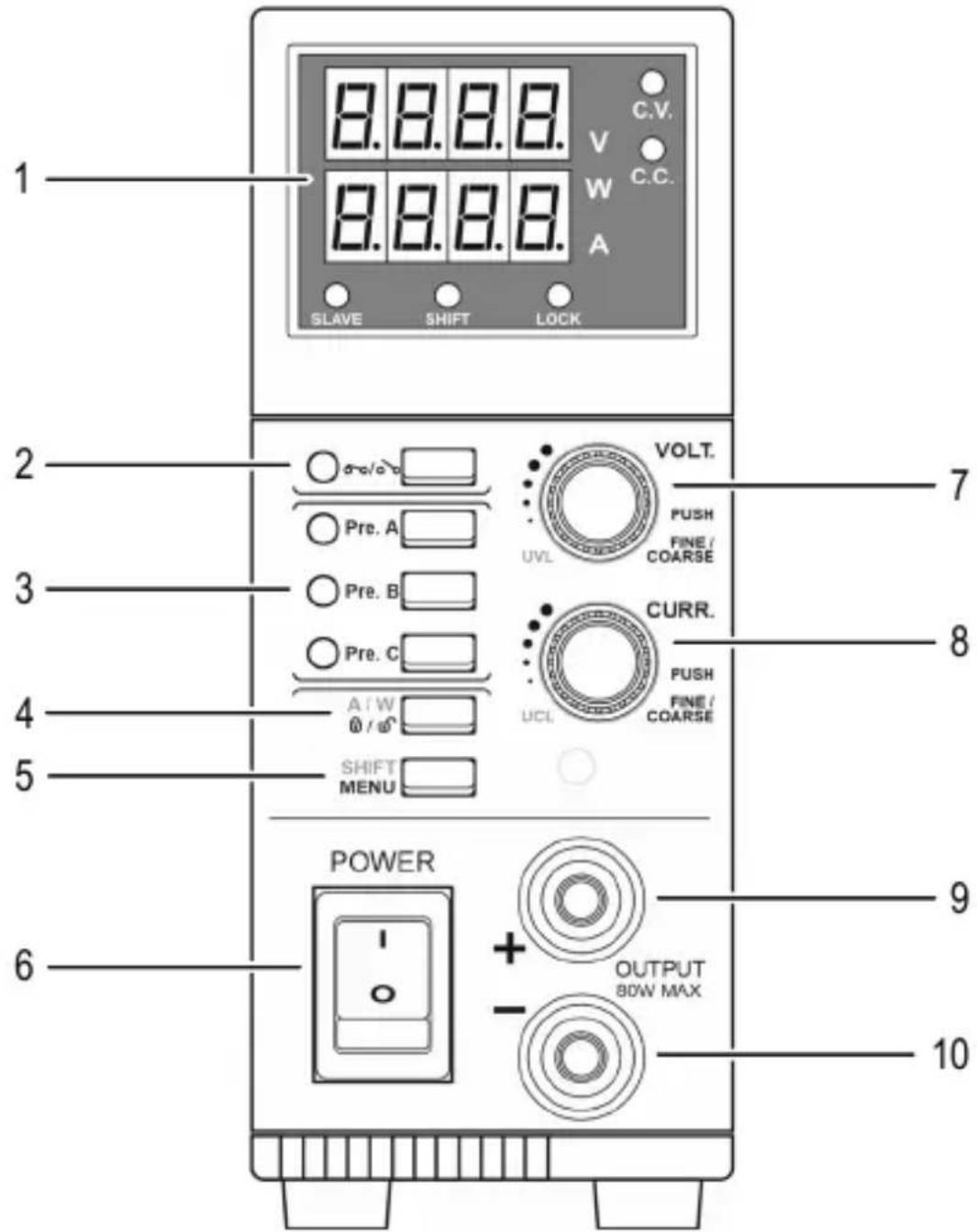
1 Display type 2 Output ON/OFF button
3 Preset buttons A - C 4 Button lock/current display/power display
5 Menu/shift button 6 ON/OFF toggle switch
7 Voltage knob 8 Current knob
9 Positive terminal connection 10 Negative terminal connection
b) Display type
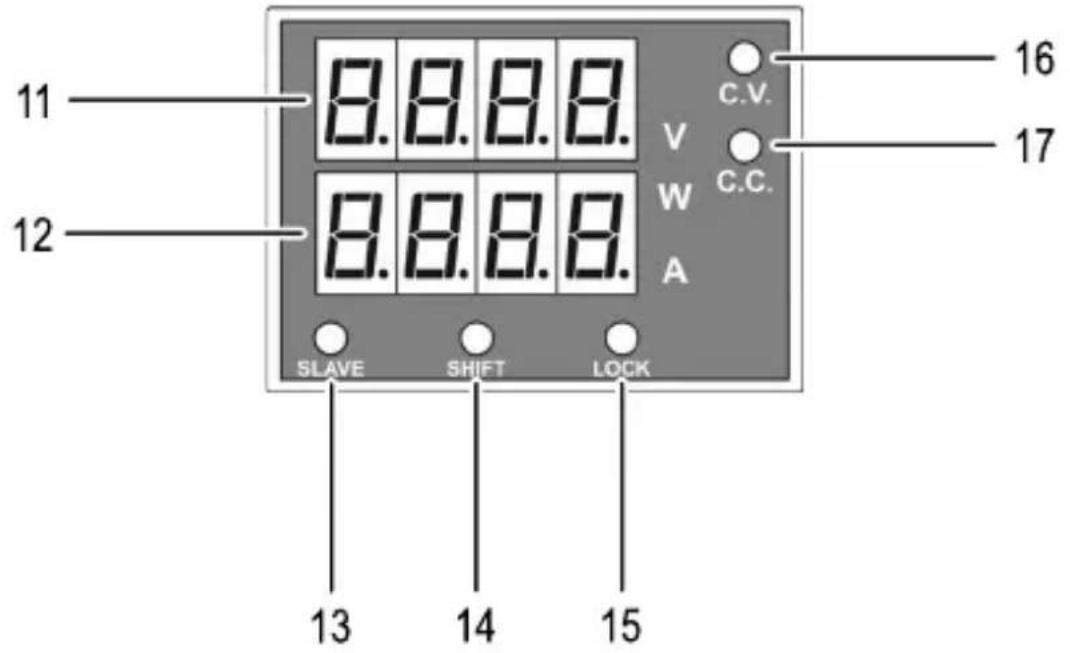
11 Voltage display 12 Current/power display
13 Slave LED 14 Shift LED
15 Lock LED 16 Constant voltage LED
17 Constant current LED
c) Rear
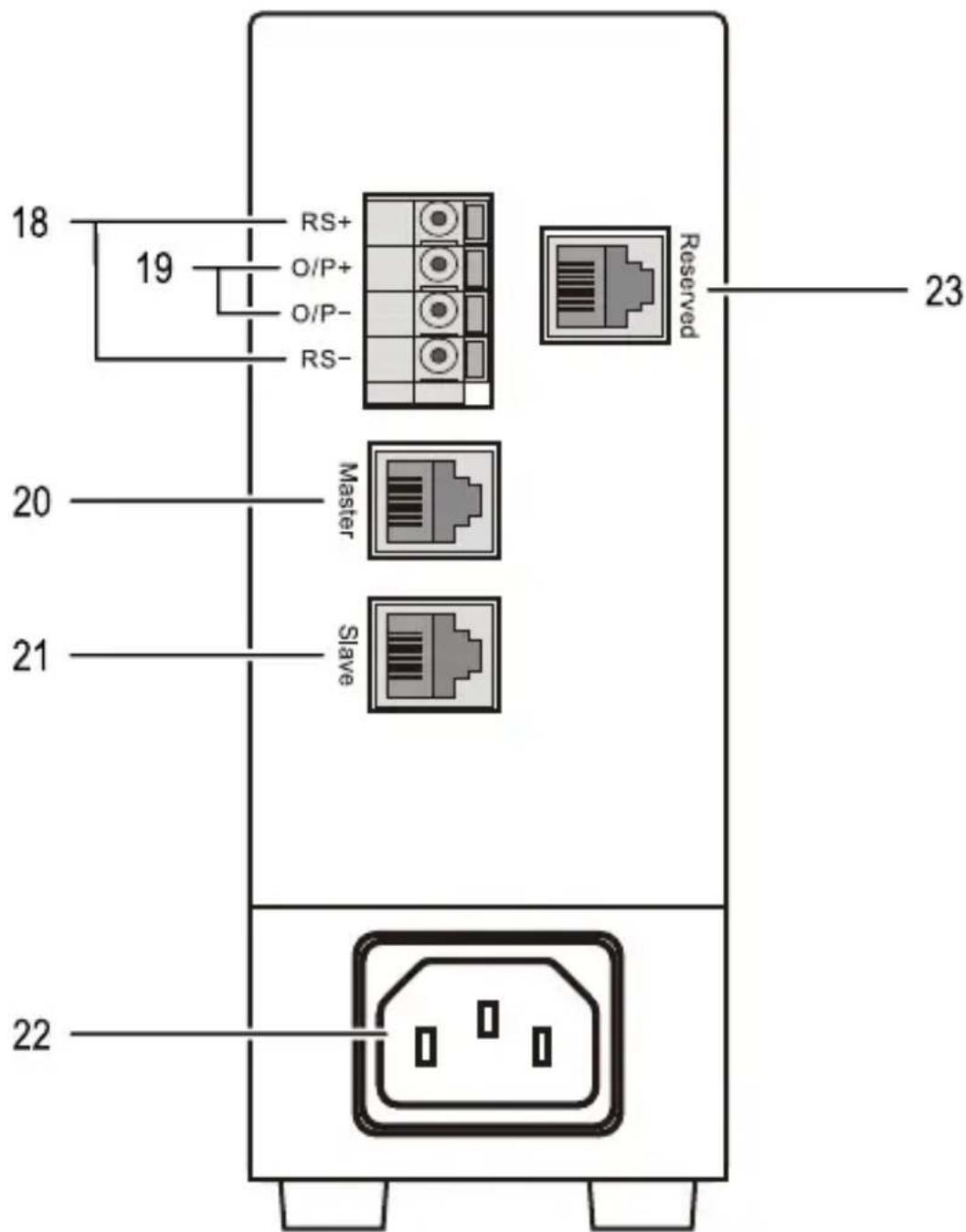
18 Connections for sense cable 19 Alternative voltage output
20 Master connection 21 Slave connection
22 Mains plug connection 23 Port for factory configuration
8. Operation
The laboratory power supply is not a charger. To charge batteries, use suitable chargers with a charging current cut-off. The surface of the housing will heat up during extended operation. Warning! Risk of burns! Therefore, ensure that there is adequate ventilation of the power supply and never operate it partly or fully covered to avoid any damage.
When connecting a consumer, ensure that it is connected when the device is switched off. A switched on consumer can produce sparks when connecting to the output sockets of the power supply, which in turn can damage the sockets or the connected cables and/or their terminals.
If your power supply is not required, switch it off and disconnect it from the mains. The displays remain on for a few seconds after the product has been switched off to discharge the internal capacitors and to store the last parameters that were set. Always ensure a sufficient conductor cross-section for the DC connection lines, since overload may cause fire in the cable.
a) Connecting to the mains
To connect the laboratory power supply to the mains, proceed as follows:
- Connect the supplied mains cable to the mains connection (22). Ensure a tight fit.
- Connect the other end of the mains cable to a suitable shockproof socket.
b) Setting up the device
Place the laboratory power supply on a stable, level and robust surface. Ensure that ventilation openings in the housing are not covered.
9. Standby mode
a) Switching on the device
To switch the laboratory power supply on, proceed as follows:
- Ensure that the laboratory power supply is connected to the power supply and that it is stable on a suitable surface.
- Remove any connected consumers from the output (9, 10).
- Switch the laboratory power supply on at the ON/OFF toggle switch (6).
After switching on, the display shows the current firmware version (e.g. 'rUe 1.1'). The current setpoint value for voltage and current are then shown briefly on the voltage display (11) or current/power display (12), followed by the current measured values for voltage and current.
b) Setting the voltage/current limit
Set the voltage/current limit before each voltage setting. The limit is used to protect connected consumers. If the current is too high, it could damage your connection cables.
Voltage limit
To set the voltage limit value, proceeds as follows:
- Remove any connected consumers from the output.
- Press the menu button (5). The shift LED (14) lights up.
- Press the voltage knob (7). The following appears on the display: 3600 SUL
- Turn the voltage knob (7) to adjust the voltage limit value.
- Press the menu button (5) to adopt the set value.
If you try to set a voltage limit value that is below the set output voltage setpoint, the error message appears on the display. Adjust the two values so that the setpoint is below the limit value. The error message then disappears.
Current limit
To set the current limit value, proceeds as follows:
- Remove any connected consumers from the output.
-
Press the menu button (5). The shift LED (14) lights up.
-
Press the current knob (8). The following appears on the display: SUCL S100.
-
Turn the current knob (8) to adjust the current limit value.
-
Press the menu button (5) to adopt the set value.
If you try to set a current limit value that is below the set output current setpoint, the error message on the display . Adjust the two values so that the setpoint is below the limit value. The error message then disappears.
c) Connecting consumers
When connecting a consumer, ensure that it is switched off when it is connected to the power supply. The maximum current consumption of the consumer being connected must not exceed the capacity indicated in the technical specifications.
For series connection of the outputs with several power supplies, the resulting voltages can be fatal on contact (> 75 VDC). Above this voltage, you may only use insulated accessories (connection/measuring cables, etc.) Avoid the use of non-insulated metallic cables and contacts. All of these bare spots must be covered with suitable, flame-resistant insulation materials or by other measures to prevent direct contact and short-circuits.
Ensure a sufficient cable cross-section for the intended current strength.
To connect a consumer, proceed as follows:
- Remove any connected consumers from the output.
- Connect the positive terminal (+) of the consumer to the red socket ‘+’ and the negative terminal (-) of the consumer to the black socket ‘-’ of the output. Use the supplied connection cables or other suitable and sufficiently dimensioned connection cables for this purpose.
d) Setting the voltage/current setpoint
Use the voltage or current knob (7, 8) to set the voltage or current setpoint:
- Turn the knob clockwise to increase the setpoint.
- Turn the knob anticlockwise to decrease the setpoint.
- Press the knob to switch between rough and fine setting.

In normal operation, the device operates in constant voltage mode. This means that the power supply emits a constant, preset output voltage. This mode is indicated by the 'C.V.' status LED (16). If the preset current is reached, the device switches to constant current mode and adjusts the voltage value so that the set current is not exceeded. This mode is indicated by the 'C.C.' status LED (17).
e) Selecting the current/power display
In addition to the voltage, the measured current or power can also be displayed. To switch between current and power display, proceed as follows:
- Press the menu button (5). The shift LED (14) lights up.
- Press the button for the current/power display (4) to switch between current and power display:
- If the letter 'W' next to the current/power display (12) lights up, the measured power is displayed.
- If the letter ‘A’ next to the current/power display (12) lights up, the measured current is displayed.
f) Switching the output on/off
The device has a function to switch the output on/off manually.
To switch the output on/off, press the 'Output ON/OFF' button (2).
- If the LED next to the 'Output ON/OFF' button (2) lights up, the output is switched on.
- If the LED next to the 'Output ON/OFF' button (2) goes out, the output is switched off.
Adjusting the default setting
The output is switched off by default when the device is started. Alternatively, you can set the device to adopt the last status of the output when it is switched on. Proceed as follows:
- Press and hold the menu button (5) to enter menu mode.
- Turn the voltage knob (7) until appears on the display.
- Press the voltage knob (7) to adjust the setting. appears on the display.
- Turn the current knob (8) until PULASE appears on the display. With this setting, the last status of the output is adopted when the device is switched on.
- Press the voltage knob (7) to confirm the setting.
- Press the menu button (5) to exit menu mode.
g) Saving and retrieving presets
The device has three buttons which can be used to save and retrieve current and voltage presets.
Saving presets
To save presets, proceed as follows:
- Remove any connected consumers from the output.
- Press one of the preset buttons (3).
- Set the voltage or current with the knobs (7,8).
- The set values are automatically saved as the preset for the selected button.
Retrieving presets

Always check the set values before connecting a consumer, this avoids the risk of damage.
To retrieve a preset, simply press the respective preset button (3). The LED next to the pressed button lights up and the preset values are adopted.
h) Activating/deactivating button lock
Button lock locks the buttons and knobs on the control panel in order to prevent unintentional entries. To activate and deactivate button lock, proceed as follows:
- Press the button lock button (4) to activate button lock. The 'LOCK' LED (15) lights up.
- Press the button lock button (4) again to deactivate button lock. The 'LOCK' LED (15) goes out.
i) Using the sense function
The sense function is an automatic voltage control for the connection sockets (9, 10). For this, two separate measuring cables are connected parallel to the connecting cables. The voltage drop which occurs on the connection cables is measured on these two measuring cables. The laboratory power supply automatically compensates for this voltage drop so that the set voltage is supplied to the consumer.
- Switch the laboratory power supply and any connected consumers off.
- Always connect the supply cables to the output on the laboratory power supply (9, 10) to the consumer first. Ensure that you insert them with the correct polarity.
- Press the clamp release on the rear RS+ and RS- (18) connection sockets inwards with a small screwdriver and insert the cables into the terminal openings. Check that they are firmly seated.
- Now, connect the two sense cables to the consumer, observing the correct polarity. The conductor cross-section for the sense cables must be at least 0.34 mm^2 .
- Always undo the connections in reverse order (sense cables followed by connection cables).
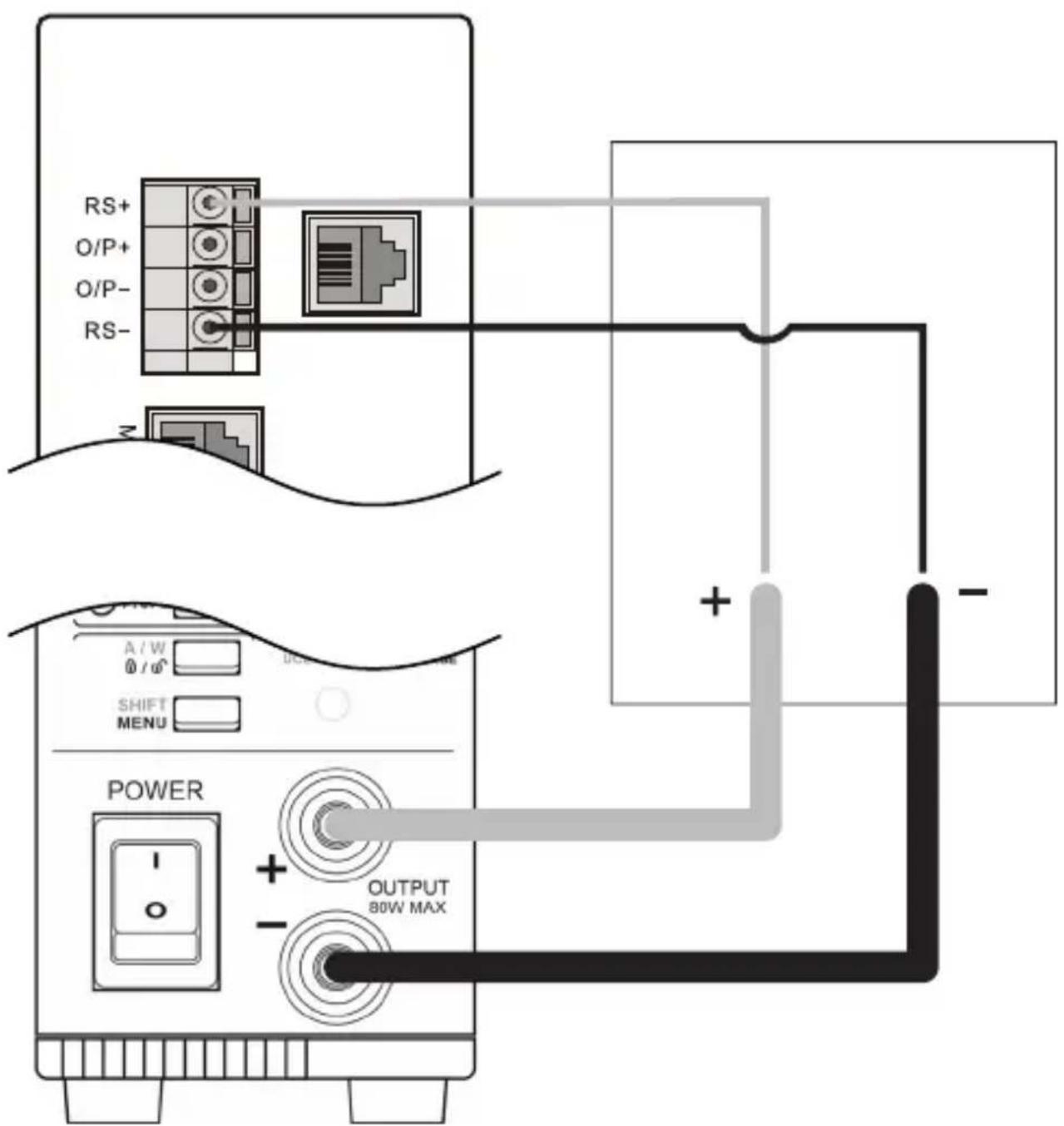

Ensure that you contact the sense cables as close as possible to the connecting point of the consumer. Observe the correct polarity.
Never short-circuit the sense cables.
j) Restoring the factory settings
To restore the factory settings, proceed as follows:
- Press and hold the menu button to go to menu mode.
- Turn the voltage knob (7) until appears on the display.
- Press the voltage knob (7) to open the factory settings menu. FACS □ No appears on the display.
- Turn the current knob (8) until appears on the display.
- Press the current knob (8) to restore the device to the factory settings.
10. Master/slave operation
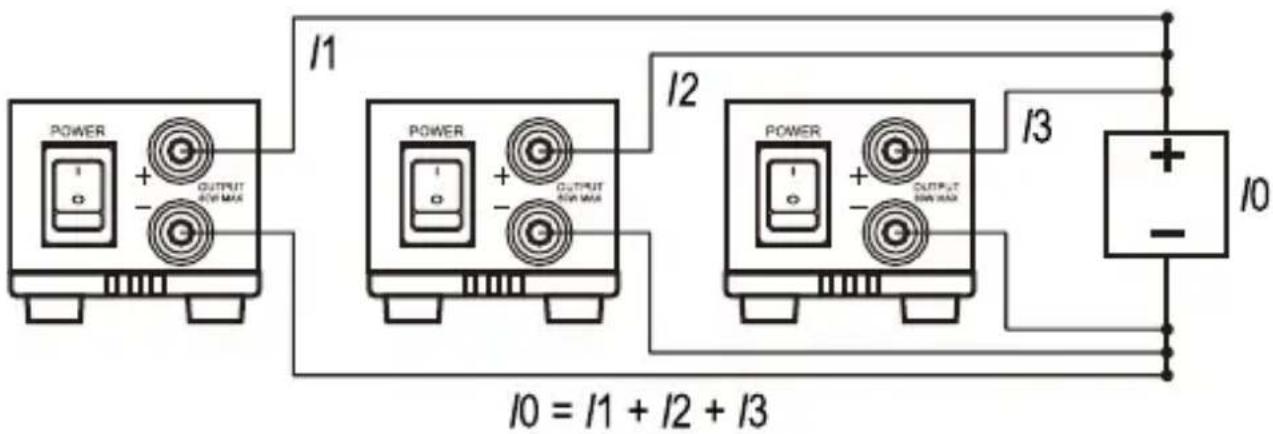
In order to achieve higher output currents, up to 30 LSP-1362 laboratory power supplies can be connected in parallel via master/slave control. In that case, all laboratory power supplies are controlled via the master device. The current applied to the consumer is the sum of the currents provided by the individual laboratory power supplies. The voltage is the same throughout the circuit and corresponds to the setpoint set on the 'master' device.
a) Preparing the devices
To prepare the devices for master/slave operation, each device must be assigned its own ID:
- Master device: ID=0
• 1. Slave device: ID=1
• 2. Slave device: ID=2; etc.
To assign an ID to a device, proceed as follows:
- Press and hold the menu button to go to menu mode.
- Turn the voltage knob (7) until appears on the display.
- Press the voltage knob (7) to open the address menu.
- Turn the current knob (8) until the desired address ID appears on the display.
- Press the voltage knob (7) to confirm the selected address ID.
- Press the menu button (5) to exit menu mode.
b) Connecting devices

Ensure that the connection cables used have the same length and cross-section.
To connect the devices together, proceed as follows:
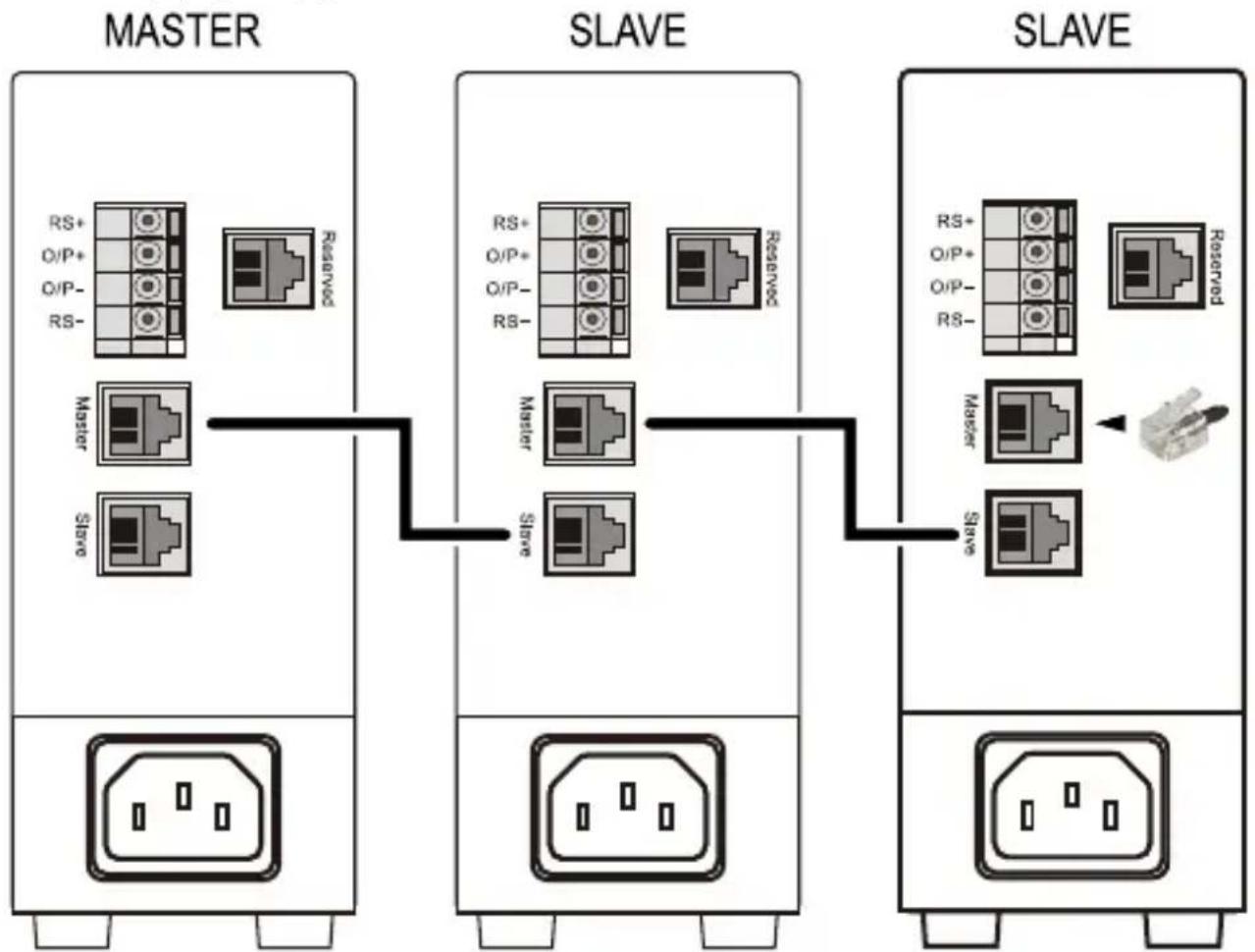
- Connect the master/slave connection cable to the master connection (20) of the master device and the slave connection (21) of the first slave device.
- If you wish to connect additional slave devices, connect an additional master/slave connection cable to the master connection (20) of the slave device and the slave connection (21) of the next slave device.
- Insert the terminating plug into the master connection (20) of the last slave device.
When the master/slave connection has been established correctly, the 'slave' LED (13) lights up green.
flowchart
graph LR
    subgraph MASTER
        A["RS+"] --> B["Reserved"]
        C["O/P+"] --> B
        D["O/P-"] --> B
        E["RS-"] --> B
        F["Master"] --> B
        G["Steve"] --> B
    end
    subgraph SLAVE
        H["RS+"] --> I["Reserved"]
        J["O/P+"] --> I
        K["O/P-"] --> I
        L["RS-"] --> I
        M["Master"] --> N["Reserved"]
        O["Steve"] --> N
        P["Slave"] --> N
    end
    subgraph SLAVE
        Q["RS+"] --> R["Reserved"]
        S["O/P+"] --> R
        T["O/P-"] --> R
        U["RS-"] --> R
        V["Master"] --> W["Reserved"]
        X["Steve"] --> W
        Y["Slave"] --> W
    end
c) Connecting consumers
The consumer must be connected in parallel with the devices used.
The current applied to the consumer is determined by the product of the current set on the master device and the number of devices used.
11. Troubleshooting
By purchasing the laboratory power supply unit, you have acquired a product that is reliable and operationally safe.
However, problems and malfunctions may still occur. This section explains how to troubleshoot common issues:

| Error Causes Suggested solution | ||
| Device cannot be switched on. | ·Device not connected to the power supply·Circuit breaker tripped | ·Connecting to the mains·Check the circuit breaker |
| Connected consumers don't work. | ·Voltage not set correctly·Incorrect polarity·Consumer unsuitable | ·Set the voltage correctly·Pay attention to the correct polarity·Check the technical data of the consumer |
Display message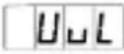 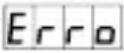 | ·Voltage limit error message Set voltage limit value is below the setpoint for the output voltage. | ·Turn the voltage knob (7) clockwise. The voltage limit value and the output voltage setpoint are adjusted together.·Alternatively: Reset the device by switching it off and on again. |
Display message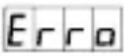 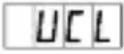 | ·Current limit error message: The set current limit value is below the output current setpoint. | ·Turn the current knob (8) clockwise. The current limit value and the output current setpoint are adjusted together.·Alternatively: Reset the device by switching it off and on again. |
Displaymessage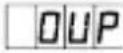 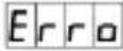 | Excess voltage protection error message.Voltage at the output is greater than the set voltage setpoint. | Switch the device off.Disconnect consumers.Switch the device back on.If the error persists, contact customer service. |
Displaymessage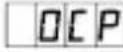 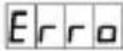 | Excess current error message.The current at the output is greater than the set current setpoint. | Switch the device off.Disconnect consumers.Switch the device back on.If the error persists, contact customer service. |
Displaymessage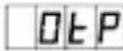 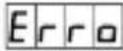 | Overheat error message.System temperature is too high. | Switch the device off.Disconnect consumers.Allow the device to cool down for 30 minutes.Switch the device back on.If the error persists, contact customer service. |
Displaymessage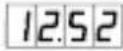 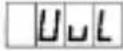 | Voltage limit warning messageThe voltage setpoint cannot be increased further because the set voltage limit value has been reached. | If necessary, increase the voltage limit value |
Displaymessage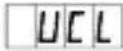 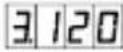 | Current limit warning messageThe current setpoint cannot be increased further because the set current limit value has been reached. | If necessary, increase the current limit value |

Any repair work other than that described above must be carried out by an authorised technician. If you have questions about using the device, please contact our technical support team.
12. Care and cleaning

Never use aggressive detergents, rubbing alcohol or other chemical solutions, as these may damage the housing or prevent the product from functioning properly.
- Disconnect the product from the mains before cleaning. Do not immerse the product in water.
- Use a dry, lint-free cloth to clean the product.
- To prevent scratch marks, do not press too hard on the surface of the enclosure or LC display when cleaning.
13. Disposal

This symbol must appear on any electrical and electronic equipment placed on the EU market. This symbol indicates that this device should not be disposed of as unsorted municipal waste at the end of its service life.
Owners of WEEE (Waste from Electrical and Electronic Equipment) shall dispose of it separately from unsorted municipal waste. Spent batteries and accumulators, which are not enclosed by the WEEE, as well as lamps that can be removed from the WEEE in a non-destructive manner, must be removed by end users from the WEEE in a non-destructive manner before it is handed over to a collection point.
Distributors of electrical and electronic equipment are legally obliged to provide free take-back of waste. Conrad provides the following return options free of charge (more details on our website):
- in our Conrad offices
• at the Conrad collection points - at the collection points of public waste management authorities or the collection points set up by manufacturers or distributors within the meaning of the ElektroG
End users are responsible for deleting personal data from the WEEE to be disposed of.
It should be noted that different obligations about the return or recycling of WEEE may apply in countries outside of Germany.
14. Specifications
Input voltage....100 - 240 V/AC, 50 - 60 Hz
Input current ....max. 0.5 A
Output voltage 0.5 - 36 V/DC
Output current....0 - 5 A
Stability during load change (0 - 100 %) ....≤ 30 mV
Stability during mains voltage variations (±10 %)....≤ 4 mV
Ripple (peak to peak) ....≤ 35 mV
Current control Resolution .... 1 mA (at min. 30 mA)
Stability during load change (0 - 100 %) ....≤ 10 mA
Stability during mains voltage variations (±10 %)....≤ 10 mA
Operating conditions....0 to +40 °C max. 80 % relative humidity (non-condensing)
Storage conditions....-20 to +70 °C max. 80 % relative humidity (non-condensing)
Dimensions (L x W x H)....330 x 54 x 137 mm
Weight 1.65 kg
Page
France (email): technique@conrad-france.fr
Resterende rimpel (peak to peak) .... ≤ 35 mV
Stroomregeling
Resolutie .... 1 mA (bij min. 30 mA)
Copyright 2023 by Conrad Electronic SE.

This is a publication by Conrad Electronic SE, Klaus-Conrad-Str. 1, D-92240 Hirschau (www.conrad.com).
All rights including translation reserved. Reproduction by any method, e.g. photocopy, microfilming, or the capture in electronic data processing systems require the prior written approval by the editor. Reprinting, also in part, is prohibited. This publication represent the technical status at the time of printing.
Copyright 2023 by Conrad Electronic SE.

Copyright 2023 by Conrad Electronic SE.

Copyright 2023 by Conrad Electronic SE.
- Introduction
- Description of symbols
- Intended use
- Delivery content
- Up-to-date operating instructions
- Features and functions
- a) General information
- b) Connected devices
- c) Installation location
- d) Operation
- e) Electrical safety
- Controls
- Operation
- a) Connecting to the mains
- b) Setting up the device
- Standby mode
- a) Switching on the device
- b) Setting the voltage/current limit
- Voltage limit
- Current limit
- c) Connecting consumers
- d) Setting the voltage/current setpoint
- e) Selecting the current/power display
- f) Switching the output on/off
- Adjusting the default setting
- g) Saving and retrieving presets
- Saving presets
- Retrieving presets
- h) Activating/deactivating button lock
- i) Using the sense function
- j) Restoring the factory settings
- Master/slave operation
- a) Preparing the devices
- b) Connecting devices
- Troubleshooting
- Care and cleaning
- Disposal
- Specifications
- Page
Brand : VOLTCRAFT
Model : LSP-1362
Category : Laboratory power supply