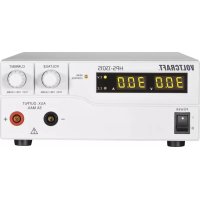
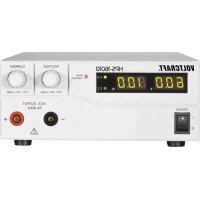
HPS13015 - Laboratory power supply VOLTCRAFT - Free user manual and instructions
Find the device manual for free HPS13015 VOLTCRAFT in PDF.


| Product type | Laboratory power supply |
| Brand | Voltcraft |
| Model | HPS13015 |
| Output voltage | 1 - 30 V/DC |
| Output current | 0 - 15 A |
| Output power | 450 W |
| Display | Digital display for voltage (V) and current (A) |
| Regulation | Constant voltage (C.V.) and constant current (C.C.) mode |
| Display accuracy | ± (0.2% + 0.3 V), ± (0.2% + 0.3 A) |
| Residual ripple | 5 mV/20 mA (at nominal load) |
| Special functions | Three memory slots (P1/P2/P3), remote control (external voltage 0-5 V/DC or 5 kOhm potentiometer), remote On/Off output |
| Protections | Overvoltage (OVP), overtemperature (OTP), overload (OLP), adjustable current limit |
| Outputs | Front: 2 x 4 mm safety sockets (5 A max); Rear: 2 x screw terminals (rated current) |
| Mains power | 220 - 240 V/AC, 50/60 Hz |
| Consumption (max.) | 2.4 A |
| Mains fuse | T3.15AL250V (5 x 20 mm, glass tube) |
| Protection class | 1 |
| Cooling | Temperature-controlled fan (0-100%) |
| Operating temperature | 0 to +40 °C |
| Relative humidity | 10 - 80% (non-condensing) |
| Dimensions (W x H x D) | 200 x 90 x 215 mm |
| Weight | 2.6 kg |
| Maintenance | Clean with a dry, antistatic, lint-free cloth; replace fuse if necessary |
| Spare parts | Mains fuse (T3.15AL250V) available as spare part |
Frequently Asked Questions - HPS13015 VOLTCRAFT
User questions about HPS13015 VOLTCRAFT
0 question about this device. Answer the ones you know or ask your own.
Ask a new question about this device
Download the instructions for your Laboratory power supply in PDF format for free! Find your manual HPS13015 - VOLTCRAFT and take your electronic device back in hand. On this page are published all the documents necessary for the use of your device. HPS13015 by VOLTCRAFT.
USER MANUAL HPS13015 VOLTCRAFT
flowchart
graph TD
    A["Main OUTPUT"] --> B["+"]
    A --> C["MAIN OUTPUT"]
    C --> D["-"]

natural_image
Diagram of a screwdriver with a handle and internal component, showing motion direction (no text or symbols)- Introduction....29
- Intended Use 30
- Package Contents 31
- Explanation of Symbols 31
- Safety Information 32
- Operating Controls....33
- Functional Description 34
- Start-Up 35
a) Connecting the Power Cable 35
b) Unit Installation....35
c) General Informations....35
d) Added Functions....37
e) Normal Operation 38
f) Memory Slot Operation "Preset" and "Set" 40
g) Resetting output presets (P1/P2/P3) to factory default values 42
h) Remote Control Operation "Remote Ctrl" 43
-
"SENSE" Function (HPS-11560 Only) 47
-
Protective Devices 47
- Disposal 48
- Maintenance and Cleaning 49
- Troubleshooting 49
- Technical Data 51
1. INTRODUCTION
Dear customer,
thank you for making the excellent decision of purchasing this Voltcraft® product.
Voltcraft® - This name stands for above-average quality products in the areas of measuring, charging and grid technology, characterised by technical competence, extraordinary performance and permanent innovation.
Whether you are an ambitious hobby electronics technician or a professional user - a product of the Voltcraft® brand family will provide you with the best solution for even the most sophisticated of tasks. Special features: We offer the sophisticated technology and reliable quality of our Voltcraft® products at a near-unbeatable price/performance ratio. We lay the groundwork for long, good and successful cooperation.
Enjoy your new Voltcraft® product!
All company names and product names are trademarks of their respective owners.
All rights reserved.
If there are any technical questions, please contact:
International: www.conrad.com/contact
United Kingdom: www.conrad-electronic.co.uk/contact
2. INTENDED USE
The laboratory power unit serves as a potential-free DC voltage source to operate low-voltage consumers. The adjustable output can be tapped with up to 5 A at the front and up to the full nominal current at the back. The front output is limited to 5 A and protected against overload. When switching the outputs of several power supplies in series, voltages of >75 V/DC, which are dangerous to touch, may be generated. This is why insulated lines/measuring cables must be used for safety reasons for voltages above this. Connection on the front is performed with 4 mm safety sockets, on the back with high-current socket screw connectors. The outputs (front and back) are connected to each other.

The connection cables used must be large enough. Where the conductor section is too small, overheating and fire may result
The output data of the laboratory measuring devices is as follows:
| Type Output voltage Output current | ||
| HPS-11530 1 - 15 V/DC 0 - 30 A | ||
| HPS-11560 1 - 15 V/DC 0 - 60 A | ||
| HPS-13015 1 - 30 V/DC 0 - 15 A | ||
| HPS-13030 1 - 30 V/DC 0 - 30 A | ||
| HPS-16010 1 - 60 V/DC 0 - 10 A |
Current and voltage can be set continually through digital rotary controls using coarse and fine settings in order to allow fast and precise value settings. The values are displayed on the structured LC display. A power limit for constant power operation can be pre-set without a shorting bar.
The power unit can be remote-controlled An external voltage (0 - 5 V/DC) or external potentiometer (5 kOhm) can be used to set the output voltage and output current. The DC output is turned on and off via the a switching contact.
Model HPS-11560 also has a remote sensor function (SENSE). The voltage drop in case of high load currents can be compensated for this way. The output voltage at the consumer remains absolutely stable and independent from the load.
Three freely programmable memory slots can be assigned to different fixed voltages and current limitations. The selection switch is located at the back of the device.
The device is overload- and short-circuit-proof and contains a safety temperature cut-off.
The laboratory power unit is designed in compliance with protection class 1. It is only approved for connection to shockproof sockets with protective grounding and an alternating current of 230V/AC commonly used in households.
The mains socket must be located close to the device and easily accessible, or an emergency stop fixture must be available.
Operation under adverse environmental conditions is not permitted. Unfavourable ambient conditions are:
- moisture or high humidity
- dust and combustible gases, vapours or solvents
- thunderstorms or similar conditions such as strong electrostatic fields etc.
Any use other than that described above damages the product. Moreover, this is linked to dangers such as short circuits, fire, electric shock, etc. No part of the product may be modified or rebuilt!
Observe the safety instructions under all circumstances!
3. PACKAGE CONTENTS
• Laboratory power unit
- Remote connection socket
- Cable with grounding contact
- Operating instructions
→ Up-to-date Operating Instructions:
1.Openwww.conrad.com/downloads in a browser or scan the displayed QR code.
2. Select document type and language and enter the item number into the search field. After submitting the query you can download displayed records.

4. EXPLANATION OF SYMBOLS

An exclamation mark in a triangle shows important information in this user's manual that must be observed.

The triangle containing a lightning symbol warns of danger of an electric shock or of the impairment of the electrical safety of the device.

The “arrow” symbol informs you that there are special tips and hints concerning the operation.

Only to be used in dry indoor areas.

This product has been CE-tested and meets the required European guidelines.

Grounding wire connection; this screw may not be loosened.
5. SAFETY INFORMATION
The guarantee/warranty will expire if damage is incurred resulting from noncompliance with the operating instructions! We do not assume any liability for consequential damage!
We do not assume any liability for property damage and personal injury caused by improper use or non-compliance with the safety instructions! In such cases the warranty/guarantee is voided.
DearCustomer,
this safety information serves not only to protect the product, but also your own safety and the safety of other persons. Therefore, read this chapter very carefully before taking the product into operation!
This product left the manufacturer's factory in a safe and perfect condition. To maintain this condition and to ensure safe operation, the user must observe the safety information and warning notes in these operating instructions.
- Electrical appliances and accessories are no toys and have no place in the hands of children.
- On industrial sites, the accident prevention regulations of the association of the industrial workers' society for electrical equipment and utilities must be followed. Power units used at schools, training facilities, do-it-yourself and hobby workshops should not be handled unless supervised by trained, responsible personnel.
- Please make sure that your hands, your shoes, your clothing, the floor and the power unit are dry.
- Live components may be exposed if covers are opened or parts are removed unless this can be done by hand.
- Disconnect the device from all voltage sources before opening it.
- Capacitors inside the device may still be charged, even if the device has been disconnected from all voltage sources.
- Do not switch the laboratory power pack unit on immediately after it has been taken from a cold to a warm environment. Under adverse conditions, the resulting condensation could destroy the device. Allow the device to reach room temperature before switching it on.
- The plug-in power unit generates heat during operation; ensure that it is adequately ventilated. Do not cover the ventilation apertures of the device!
- Never expose the device to any direct sunlight. Avoid heat sources in direct proximity. The device might overheat.
- Do not leave power units and connected consumer devices in operation unattended.
- Do not place any containers filled with liquid, e.g. vases or plants, on or next to the power unit. If they fall over, the device can be destroyed and there is a great risk of fire. When working with power units, wearing metallic or conductive jewellery, such as necklaces, bracelets, rings etc., is prohibited.
- The power unit is not designed for attaching to humans or animals.
- Never expose the device to mechanical stress. Dropping the device even from a low height may damage it! Avoid vibrations.
- If you have reason to believe that the device can no longer be operated safely, disconnect it immediately and make sure it is not unintentionally operated. It must be assumed that safe operation is no longer possible if:
device shows visible damage,
- the device no longer works and
- the device was stored under unfavourable conditions for a long period of time or
- after it was exposed to extraordinary stress caused by transport.
- You should also heed the additional safety instructions in each chapter of these operating instructions as well as in the operating instructions of the connected devices.
6. OPERATING CONTROLS (See fold-out page)
(1) Power switch for putting the device into operation (I=ON / 0=OFF)
(2) Voltage display "V"
(3) Current display "A"
(4) Status display output "C.V." (constant voltage operation)
(5) Status display output "C.C." (current limiter/constant current operation)
(6) Status display "REAR CONTROL" shows active remote control or fixed voltage operation
(7) Voltage control (with button function for coarse / fine adjustment)
(8) Current limiter control (with button function for coarse / fine adjustment)
(9) Minus pole connection socket (max. 5 A!)
(10) Plus pole connection socket (max. 5A!)
(11) Plus pole high-load connection (screw clamp with socket function)
(12) Minus pole high-load connection (screw clamp with socket function)
(13) Slider for selecting the 4 operating modes "MODE"
(14) "SENSE" remote sensor connection (HPS-11560 only)
(15) Slider for selecting the freely definable fixed voltage places "RECALL"
(16) Remove control connection "Remote Control"
(17) Temperature-controlled internal fan Do not cover!
(18) Grounded low-power connection for mains cable
(19) Fuse holder for the mains fuse
7. FUNCTIONAL DESCRIPTION
- The laboratory power unit works with highly developed combinational circuit technology and active PFC (power factor correction). This ensures a stable output voltage and a high degree of effectiveness. The DC outputs are isolated and feature a protective isolation against the mains voltage. For the secondary DC connection, there are two coloured safety sockets on the front (max. 5A) and two high-load terminal screw clamps on the back (full nominal current range).
- The structured display shows the voltage and current (V = Volt = unit of electric voltage, A = Ampere = unit of electric current) and the status display in case of device interferences.
- Various protective mechanisms, e.g. overload protection, current limitation, overheating protection, etc. are built in for secure and reliable operation.
- The power unit is cooled through a temperature-controlled fan. Therefore, ensure sufficient air circulation.
- The output voltage and output current at the power unit are infinitely adjustable.

The laboratory power unit is not a charger. To charge batteries, use suitable chargers with a charging current cut-off.
During a longer period of operation under nominal load, the surface of the housing will heat up. Attention! Risk of burns! Therefore, make sure that there is adequate ventilation of the power unit and never operate it partly or fully covered to avoid any damage.
When connecting a consumer, ensure that it is not connected when switched on. A switched-on consumer can result in sparks when connecting to the output terminals of the power unit, which in turn can damage the sockets or the connected cables and/or their clamps.
If your power unit is not required, switch it off and disconnect it from the mains. The displays remain on for a few seconds after it is switched off to unload the internal capacitors and to store the last parameters that were set.
Always ensure a sufficient conductor cross-section for the DC connection lines, since overload may cause fire in the line.
a) Connecting the Power Cable
Connect the supplied grounding mains cable to the low-power device installation socket (18) on the power unit. Ensure a tight fit.
Connect the power cable to a shockproof mains socket with protective grounding. The maximum length of the power cable to the outlet must not exceed 3 m.
b) Unit Installation
Place the laboratory power unit on a stable, level and robust surface. Make sure that ventilation slots in the casing are not covered up.
c) General Informations
The laboratory power unit is micro-processor-controlled and is operated through two digital controls (incremental encoders without end position) with sensor function. This enables fine and coarse control via a control.
After the device switches on, a system check is performed. The test status is displayed on the two displays.
The displays are in the following order:
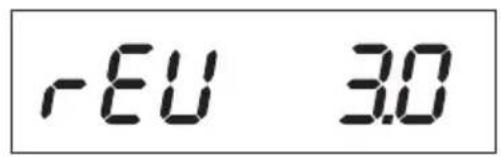
Display of the current software state.
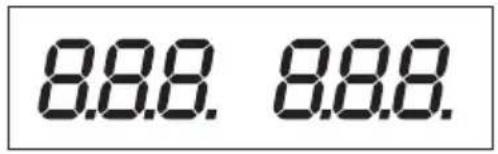
Segment test to determine if the display works with all its individual segments.
Then the LED displays "C.V.", "C.C." and "REAR CONTROL" are tested.
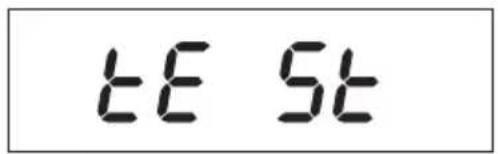
System test of the protective devices starts.
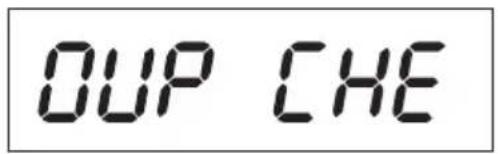
The over-voltage protection is tested.
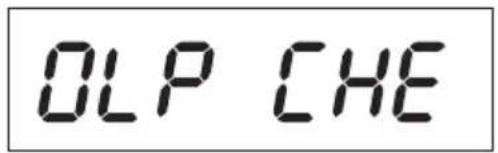
The over-load protection is tested.
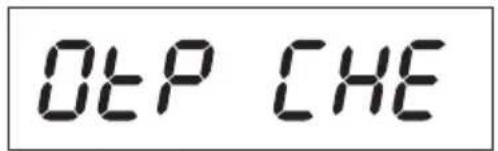
The over-temperature protection is tested.
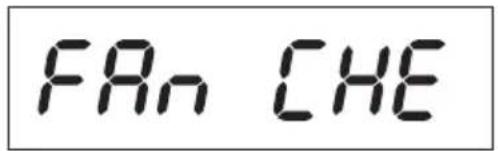
Fan test The fan is shortly tested throughout the speed range. For a short time, the fan speed increases audibly.
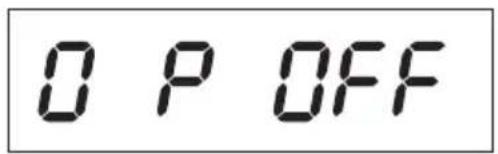
The remote control function for "output out" is tested. After this step, the device switches to the regular operating display mode.
The power unit enables operation in 4 modes. These modes are selected by the "MODE" (13) slider on the back. The following modes are possible:
Normal Normal operation. Voltage and current are adjusted on the front
Preset Memory slot operation Three fixed voltages can be stored in the device and directly selected through this "Preset" function. The memory slot is selected with the "RECALL" (15) slider. The front controls are inactive.
Remote Ctrl Remote control operation. The power unit can be remote-controlled via an external voltage or external poti. The remote settings can be performed for voltage and current. The front controls are inactive.
Set Settings operation. The three preset slots can be programmed freely. Select the memory slot with the "RECALL" (15) slider and make the settings using the controls (7, 8).
The separate operating modes are described in more detail in the following.
d) Added Functions
The power supply is auto-zeroed every time you turn it on. In case you need to zero the unit during operation and do not want to restart it, zero it manually.
- Press and hold the VOLTAGE control knob for approx. 30 s to enter the MENU mode. "CCO" and "no" are displayed.
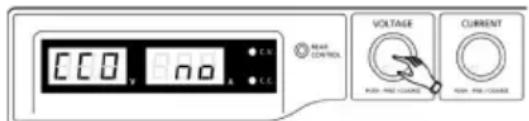
- Rotate the CURRENT control knob until "CCO" and "YES" are displayed.
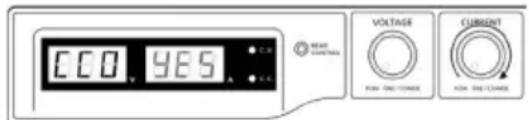
- Press the CURRENT control knob once to zero the unit. "YES" lights up in the display to confirm successful zeroing.
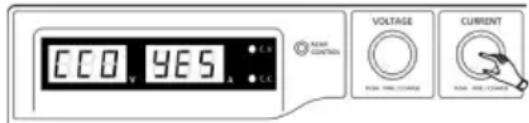
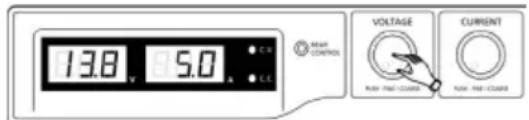
- Press the VOLTAGE control knob to exit the MENU mode.
e) Normal Operation
In normal operation, the power unit can be operated through the front controls.
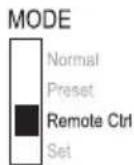
Ensure that the "MODE" slider is in the "Normal" position.
Remove any connected consumers from output (9 and 10 or 11 and 12).
MODE
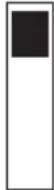
Normal
Preset
Remote Ctrl
Set
Switch on the power unit at the power switch (1). The display (2 and 3) lights up, and after a short selftest, the current and voltage displays appear.

Set the current limitation before setting any voltages. If the current value is too high, your connection lines can be damaged; if it is too low (<1 A), the output voltage can be limited.
Set current limitation
Limiting the output current is a protection mechanism to protect the consumer or connection cables. Current limitation can be pre-set at the output without any short circuit. The power unit then supplies the maximum current set.
Remove any connected consumers from the power unit.
Switch on the power unit at the power switch (1). The display (2 and 3) lights up, and after a short selftest, the current and voltage displays appear.
Set the current limitation at the "CURRENT" control according to your application.
Turn the control and a current limitation value appears.

Where no setting is made within 3 seconds, the display switches back to the current current display.
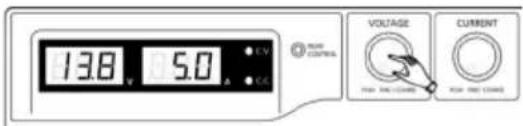
Turn the control to the left or right to set the current limitation. After switching on, the fine settings area (0.1 A) is always active. This is indicated by a slightly lighter digit. Press the rotary control slightly from the front. The decimal position (1.0 or 0.1) of the setting range changes each time you press. Turning changes the value.
Settings can be made coarsely (whole numbers) or fine (by tenths).
Where the desired current value was set, the display switches back to normal display after 3 seconds.

If the preset current is reached in normal operation, the power unit switches to current limitation mode and reduces the voltage value. This operation is signalled with the red status display "C.C." (5).
Set output voltage
The output voltage can be set at the "VOLTAGE" (7) control. The coarse and fine control is performed in the same way as for setting the current limitation.

With the large control range, it is possible that the voltage setting takes approx. 1-2 seconds to switch from a high to a low voltage value.

In normal mode the device operates in constant voltage mode. This means that the power unit emits a constant, preset output voltage. This operation is indicated with a green status display "CV" (4).
Connecting a load

When connecting a consumer, make sure that it is connected to the power unit when switched off. The maximum current consumption of the device to be connected must not exceed the capacity indicated in the technical specifications.
For serial connection of the outputs with several power supplies, the resulting voltages can be fatal on contact (> 70 VDC). As of this voltage, you may only use insulated accessories.
Avoid the use of non-insulated metallic cables and contacts.
All these exposed areas must be covered with suitable, flame-resistant insulation materials or by other measures and be protected from direct contact and short circuits.
Ensure a sufficient cable diameter for the intended current.
The power unit has two outputs. These outputs always have the same output voltage. The difference, however, is in the current carrying capacity.

At the front sockets (9 and 10), only a current of max. 5 A can be tapped. An automated current limitation is integrated
The screw sockets on the back are indicated for full nominal current.
From an output current of 20 A, the screw clamp function of the rear sockets is recommended to avoid overheating of the plug sockets.
Remove any connected consumers from the output.
Switch on the power unit at the power switch (1). The operating display (2/3) lights up and the current and voltage display appears on the display.
Set the parameters according to your specifications as described in the chapter "Start-Up".
Check once more that the correct output voltage is set.
Connect the plus pole (+) of the consumer with the red socket "+" and the minus pole (-) of the consumer with the blue socket "-" of the respective output (front = "AUX. OUTPUT", rear = "MAIN OUTPUT").
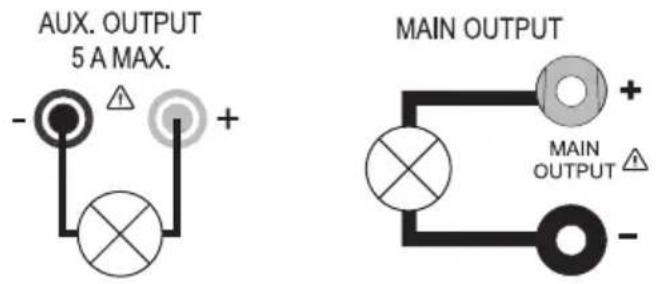
Now you can switch on the connected consumer.

The current consumption of the connected consumer is displayed in Ampere (A) in the display (3).
f) Memory Slot Operation "Preset" and "Set"
Three fixed voltages, including current settings, can be stored in the device with the "Set" function and directly selected through the "Preset" function.
Ex works, all three memory slots (P1, P2, P3) are preset.
They are assigned as follows:
| Type\Memory | P1 P2 P3 | |||||
| Voltage Current Voltage Current Voltage Current | ||||||
| HPS-11530 | 5 V Maximum 13,8 V Maximum | 15 V | Maximum | |||
| HPS-11560 15 V | ||||||
| HPS-13015 25 V | ||||||
| HPS-13030 25 V | ||||||
| HPS-16015 55 V | ||||||

Make sure that no consumers are connected.
Activate the "Preset" function through the "MODE" (13) slider on the rear. Put the switch in the "Preset" position. The front LED display "REAR CONTROL" (6) lights up. The front rotary controls are now inactive.
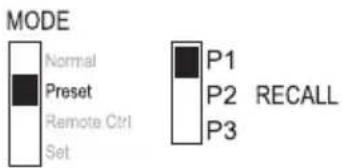
Select the respective memory slot "P1, P2 or P3" on the rear slider. The respective output voltage is indicated on the display (2).
Now you can connect and switch on the consumer.
For deactivating the xed voltage function, slide the “MODE” (13) slider back to the “Normal” position. The LED display “REAR CONTROL” (6) goes out. The device switches back to normal power unit operation (always remove DC consumers before!)
Assigning memory slots with "Set"
All three memory slots can be assigned user-specific values for output voltage and current limitation.

Make sure that no consumers are connected.
For this purpose, proceed as follows:
Activate the "Set" function through the "MODE" (13) slider on the rear. Put the switch in the "Set" position. The front LED display "REAR CONTROL" (6) lights up.
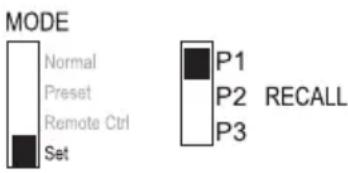
Select the respective memory slot "P1, P2 or P3" on the rear "RECALL" (15) slider. The respective values for current and voltage are indicated on the display (2/3). The front rotary controls (7 and 8) can be used to set the desired output voltage and current limitation.
If required, repeat these steps with the other memory slots.
When all parameters are set, slide the “MODE” (13) slider back to the “Preset” position for xed voltage operation or to the “Normal” position for standard operation.
g) Resetting output presets (P1/P2/P3) to factory default values
The power supply allows for presetting three voltage values (including current settings) by means of three memory slots: P1, P2, and P3. In case you want to reset the memory slots to the factory default values during operation, do the following.
- Press and hold the VOLTAGE control knob for approx. 30 s to enter the MENU mode. "CCO" and "no" are displayed.
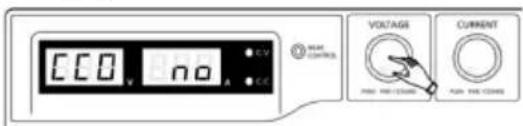
- Rotate the VOLTAGE control knob until "rPr" and "no" are displayed.
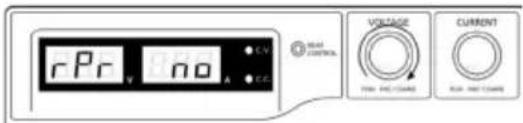
- Rotate the CURRENT control knob until "rPr" and "YES" are displayed.
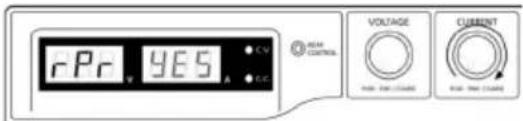
- Press the CURRENT control knob once to reset the preset values. "YES" lights up when the values have been successfully reset.
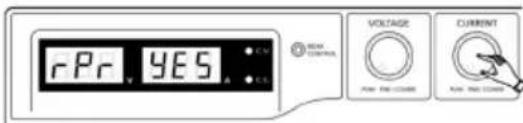
- Press the VOLTAGE control knob to exit the MENU mode.
h) Remote Control Operation "Remote Ctrl"
Through the built-in "Remote control" connection (16), the voltage and current can be set through an external voltage source or an external adjustable resistance (short "poti"). The remote control is connected on the rear "Remote Control" built-in plug (16). There is a remote socket included for connection.

In remote-controlled operation, the current control path must also be connected, since the output otherwise switches to the current limitation mode "C.C." and limits the output voltage.
Preparation of the remote control connection.
Turn the lateral screw of the supplied socket and remove the front, black contact socket turning it slightly.
Draw five connecting cables with a conductor cross-section of at least 0.34mm2) through the metal sleeve from the rear. Carefully solder these cables to the soldering lugs nos.1, 2, 3, 4 and 5 of the black contact socket. Ensure that no short circuits are created..

The numbers of the soldering lugs are indicated on the black insulator.
Mark the loose ends of the cables with the corresponding contact numbers (1-5) to avoid confusion.
Insert the black contact jack in the reverse order into the metal sleeve and screw them tight.
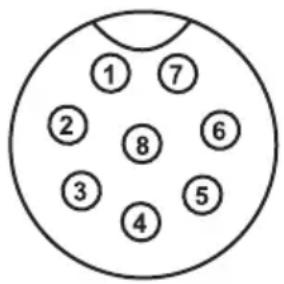
The contacts are assigned as follows:
Contact 1 Internal control voltage + 5 V/DC (<50 mA)
Contact 2 Voltage setting
Contact 3 Current setting
Contact 4 Reference ground ("Ground")
Contact 5 Output on/off
Contact 6 - 8 Not assignedt
Control through external voltage source
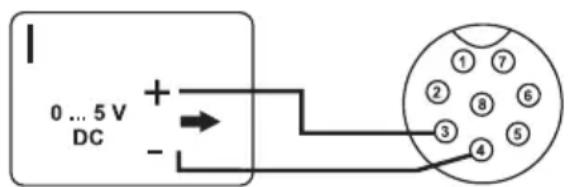
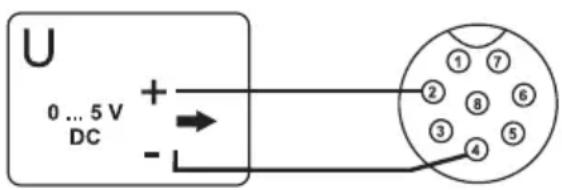
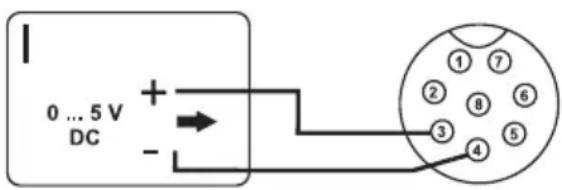
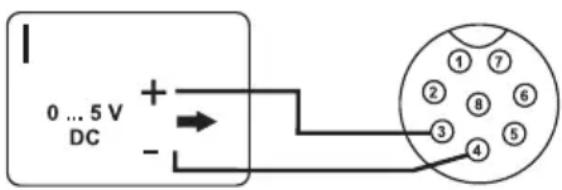
The power unit can be remote-controlled with an external voltage source from 0 to 5V/DC throughout the range for voltage and current.
Proceed as follows for connection:
Connect the connecting cables of the remote sockets as illustrated:
Voltage setting "U": Voltage setting „I“:
Connection 2 to the plus pole (+) of the external control voltage
Connection 4 to the minus pole (-) of the external control voltage
Connection 3 to the plus pole (+) of the external control voltage
Connection 4 to the minus pole (-) of the external control voltage

The voltage on the remote control connection must not exceed 5 V.
The connections may not be shorted.
Switch off the power unit and then connect the remote socket to the rear remote connection. Screw on the external fastening ring.
Turn the voltage of the external voltage source to 0 V.
Switch on the power unit.
Put the MODE switch on the rear into the "Remote Ctrl" position. The "REAR CONTROL" display is lit.
The desired output value can now be set through the external voltage source. Control the complete adjustment area for correct function. The output voltage can be monitored in the display.
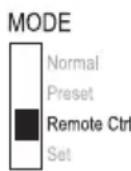

Short-circuit the rear main output (11, 12) with a sufficiently thick cable for checking the current control (at least 8 mm ^2 Control the complete adjustment area for correct function.
If this remote control function is no longer required, put the MODE switch to the "Normal" position.
Control through a controllable resistance (poti)
The power unit can be remote-controlled with an external poti (5 Kohm) throughout the range for voltage and current.
Proceed as follows for connection:
Connect the connecting cables of the remote sockets as illustrated.
Voltage setting "U": Voltage setting "I":
Connection 1 at one end of the resistance Connection 1 at one end of the resistance
Connection 2 at the centre sliding contact of the resistance.
Connection 3 at the centre sliding contact of the resistance
Connection 4 at the second end of the resistance Connection 4 at the second end of the resistance
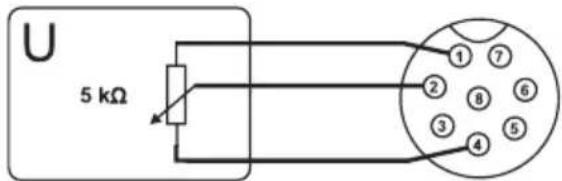
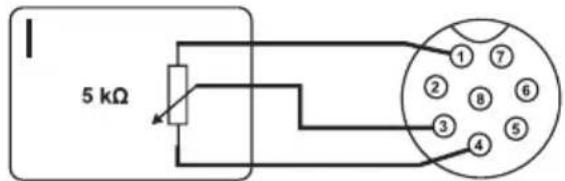

Connections 1 and 4 must not be short-circuited..
Switch off the power unit and then connect the remote socket to the rear remote connection. Screw on the external fastening ring.
Switch on the power unit.
Put the MODE switch on the rear into the "Remote Ctrl" position. The "REAR CONTROL" display is lit. The desired output values can now be set through the external poti.
Control the complete adjustment area for correct function. The output voltage can be monitored in the display.
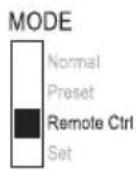

Short-circuit the rear main output (11, 12) with a sufficiently thick cable for checking the current control (at least 8 mm2 Control the complete adjustment area for correct function.
If this remote control function is no longer required, put the MODE switch to the "Normal" position.
Remote-control output (on/off)
The DC output can be turned on and off via the a switching contact.
Proceed as follows for connection:
Connect the connecting cables of the remote sockets as illustrated.
Contact connections 4 and 5 with an isolated switching contact.
When the output is turned off, the status displays "C.V." (4) and "C.C." (5) will flash. The display will then show the current settings of the output voltage (2) and the output current (3).
When the output is turned off, you can set the output values with the controls for voltage (7) and current limiting (8).
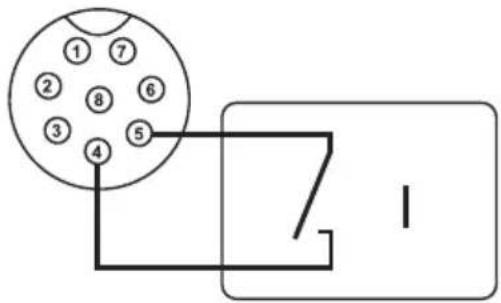
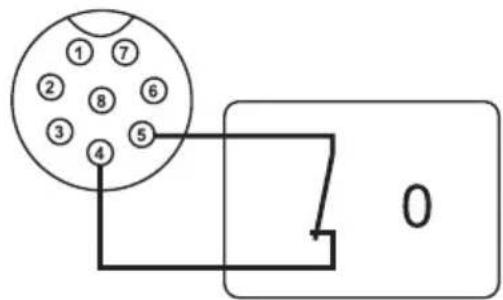

No voltage must be applied to contacts 4 and 5.
Switch off the power unit and then connect the remote socket to the rear remote connection. Screw on the external fastening ring.
Switch on the power unit.
Put the MODE switch on the rear into the "Remote Ctrl" position. The "REAR CONTROL" display is lit.
If the switching contact is open, the DC output is active; if it is closed, the DC output is switched off.
Check the switching function for correct function.
When the DC output is switched off, "O P OFF" is displayed.
If this remote control function is no longer required, put the MODE switch to the "Normal" position.
9. "SENSE" FUNCTION (HPS-11560 ONLY)
The HPS-11560 has an automatic voltage control for the rear high-current output. For this, two separate measuring cables are connected parallel to the connecting cables. The potential drop which occurs on the connecting cables is measured on these two measuring cables. The laboratory power unit automatically compensates for this voltage drop so that the actually set voltage is supplied to the consumer.
Proceed as follows for connection:
Always connect the supply cables from the power unit to the consumer first. Pay attention to correct polarity.
Press the clamp release on the rear SENSE connection inwards with a small screwdriver and insert the cables into the terminal openings. Check that they are plugged firmly.
Now connect the two “SENSE” cables to the consumer observing the correct polarity. The conductor cross-section for the “SENSE” cables must be at least 0.34mm2.
Always slacken the connection in the reverse order (first of all "SENSE" cables and then the connecting cables).
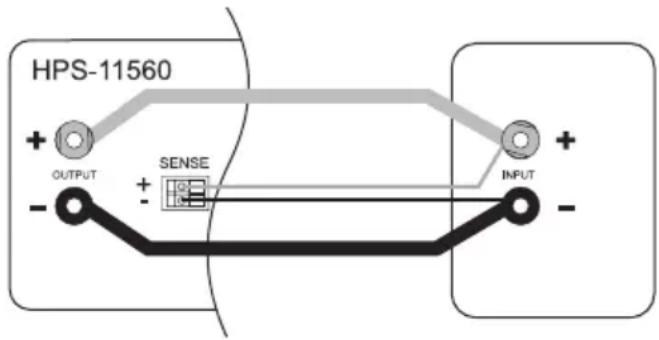

Make sure that you contact the SENSE cables as close as possible to the connecting point of the consumer. Observe correct polarity.
Never short-circuit the "SENSE" cables.
10. PROTECTIVE DEVICES
The power unit has several integrated automatic protective devices that protect the power unit from damage. The activated protective devices are displayed with letter codes and the DC output is switched off for safety reasons at the same time.

When a protective devices is active, the consumer must be switched off and disconnected from the power unit immediately.
To reactivate the output, switch off the power unit. Wait until all displays have gone out. Switch on the power unit again. The power unit should work normally again. Where this is not the case, please contact our customer service.
The following displays are possible:
Over-Voltage Protection
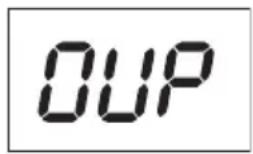
A higher external voltage than provided by the power unit was determined at the DC output. The output is switched off.
The current levels for switching off are listed in the technical data.
Over-Heating Protection
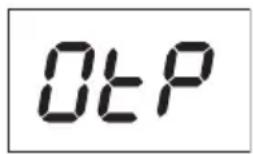
The integrated temperature sensor determined that the system temperature is too high.
To prevent overheating, the output is switched off.
Turn off the power unit and let it cool down for at least 30 minutes.
After switching it on, check if the fan or ventilation apertures are blocked. During the start-up self-test stage, the fan must start up audibly. Where this is not the case, please contact our customer service.
Overload Protection
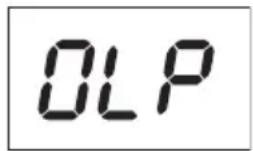
In case of overload at the DC output, the power limitation is usually switched on. If this is not the case, the second protective function becomes active.
Switch off the power unit at once when this warning message appears and check the connection data of the consumer. Remove the consumer from the power unit's DC output.
Switch on the power unit again and check its function. If the error message remains on, please contact our customer service.
11. DISPOSAL

Electronic devices are recyclable waste and must not be disposed of in the household waste.
end of its service life, dispose of the product according to the relevant statutory regulations.

us fulfil your statutory obligations and contribute to the protection of the environment.
12. MAINTENANCE AND CLEANING
Apart from an occasional cleaning or exchanging the fuse, this laboratory power unit is maintenancefree. Use a clean, lint-free, antistatic and dry cloth to clean the device. Do not use any abrasive or chemical agents or detergents containing solvents.
Exchanging the Fuse
If it is no longer possible to switch on the laboratory power unit, the rear mains fuse (19) is probably defective.
Proceed as follows to replace the mains fuse:
Switch off the power unit and remove all the connection cables and the mains plug from the device.
Lever the rear fuse holder (19) with a suitable screwdriver from the bracket.
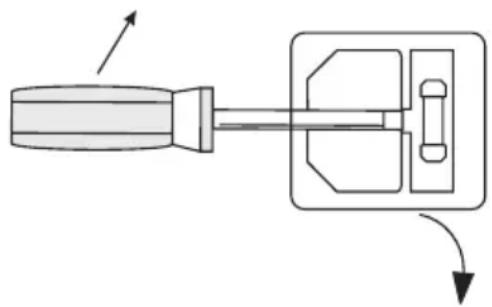
natural_image
Diagram of a screwdriver with directional arrows indicating movement (no text or symbols)Replace the defective fuse with a new fine-wire fuse (5 x 20 mm) of the same type and rated current. The fuse value is listed in the chapter on “Technical Data”.
Press the fuse insert into the fuse holder.
13. TROUBLESHOOTING
By purchasing the laboratory power unit, you have acquired a product that is reliable and operationally safe.
Nevertheless, problems or errors may occur.
For this reason we want to describe how to troubleshoot potential malfunctions:

Always follow the safety instructions!
| Error Possible cause | |
| The power unit cannot be switched on. | Does the operating display light up on the power unit (2)?Check the mains voltage (you may also want to check the mains fuse in the device or the line circuit breaker). |
| Connected consumer devices do not work. | Is the voltage set correctly?Is the polarity correct?Check the technical data of the consumers. |
| The “REAR CONTROL” display is lit. The device can not be operated via the rotary controls. | Remote control operation is active.Put the rear “MODE” slider into the “Normal” position. |
| The “O P PFF” display is lit. The DC output was switched off through the remote control output (16).Release the connection between contacts 4 and 5.The output is switched on again. | |
| The output current is limited to 5 A, although the current settings are higher. | The front connection is limited to no more than 5 A.For higher currents, connect the consumer to the rear main output. |
| The “CC” LED is lit. Constant current operationThe preset current was exceeded. Check power consumption on your con-sumer and increase the current limitation on your power unit, if applicable. | |
| The “C.V.” display is lit. Constant current operationThe power unit works normally.The output provides the constant voltage set. | |
| OVP Over-voltage protection | See chapter “Protective Devices” |
| OtP Over-temperature protection | See chapter “Protective devices” |
| OLP Overload-protection | See chapter “Protective devices” |
Regularly check the technical safety of the device e.g. for damaged housing etc.

Fuses are replacement parts and not covered by the warranty/guarantee.
is other than those described above may only be carried out by an authorised specialist. If you have any questions concerning the handling of the device, please do no hesitate to contact our Technical Support.
14. TECHNICAL DATA
| HPS-11530 HPS-11560 HPS-13015 HPS-13030 HPS-16010 | ||||||
| Output power 450 W 900 | W 450 W 900 W | 600 W | ||||
| Output voltage 1 - 15 V/DC 1 - 15 V/DC 1 - 30 V/DC 1 - 30 V/DC | ||||||
| Output current | 0 - 30 A | 0 - 60 A | 0 - 15 A | 0 - 30 A | 0 - 10 A | |
| Residual ripple at Nominal load (eff) | 5 mV/50 mA | 5 mV/100 mA | 5 mV/20 mA | 5 mV/40 mA | 5 mV/10 mA | |
| Voltage control response at 100% Load change | 50 mV | |||||
| Voltage control response at Mains fluctuation (170 - 264 V/AC) | 20 mV | |||||
| Current control response at 10 - 90% Load change | 150 mA 200 | mA 100 | mA 150 | mA 100 | mA | |
| Current control response at Mains fluctuation (170 - 264 V/AC) | 50 mA | |||||
| Display accuracy | +/- (0,2% + 0,3 V), +/- (0,2% + 0,3 A) | |||||
| OVP switch-off level of the U output | +2 V (1 - 5 V) +3 V (5 - 15 V) | +2 V (1 - 5 V) +3 V (5 - 15 V) | +2 V (1 - 5 V) +3 V (5 - 20 V) +4 V (20 - 30 V) | +2 V (1 - 5 V) +3 V (5 - 20 V) +4 V (20 - 30 V) | +2 V (1 - 5 V) +3 V (5 - 20 V) +4 V (20 - 60 V) | |
| Operating voltage | 220 - 240 V/AC, 50/60 Hz | |||||
| HPS-11530 HPS-11560 HPS-130 | 15 HPS-13030 HPS-16010 | ||||
| Power input (max.) 2 | 4 A 4.7 A 2.4 A 4.5 | A 3.1 A | |||
| Degree of effectiveness | 85% 85% 86% 86% 89% | ||||
| Clock signal 65 - 85 kHz | Hz 65 - 85 kHz 75 | - 95 kHz 75 - 95 kHz | Hz 65 - 85 kHz | ||
| Performance factor with active PFC | >0,95 | ||||
| Device fan Temperature controlled (0 - 100%) | |||||
| Mains fuse(5 x 20 mm) | T3,15AL250VGlass tube | F8AL250VGlass tube | T3,15AL250VGlass tube | F8AL250VGlass tube | T4AL250VGlass tube |
| Operating temperature | 0 to +40 °C | ||||
| Rel. air humidity 10 to 80%, non-condensing | |||||
| Protection class 1 | |||||
| Mains connection IEC 320 C14, Low-power device installation plug | |||||
| Weight 2.6 kg 3.2 kg | 2.6 kg 3.2 kg 2.6 kg | ||||
| Dimensions(W x H x D) mm | 200 x 90 x 215 | 200 x 90 x 275 200 | x 90 x 215 200 x 90 | x 275 200 x 90 x | 215 |
| Safety EN60950, EN61010 | |||||
| Operating height max. | 2,000 m above mean sea level | ||||
TABLE DES MATIÈRES
Page
France (email): technique@conrad-france.fr
4. EXPLICATIONS DES SYMBOLES


natural_image
Diagram of a screwdriver and its internal mechanism with directional arrows indicating motion (no text or labels)4. VERKLARING VAN DE SYMBOLEN


© Copyright 2016 by Conrad Electronic SE.
G Legal Notice
This is a publication by Conrad Electronic SE, Klaus-Conrad-Str. 1, D-92240 Hirschau (www.conrad.com).
All rights including translation reserved. Reproduction by any method, e.g. photocopy, microfilming, or the capture in electronic data processing systems require the prior written approval by the editor. Reprinting, also in part, is prohibited. This publication represents the technical status at the time of printing.
© Copyright 2016 by Conrad Electronic SE.
© Copyright 2016 by Conrad Electronic SE.
O Colofon
© Copyright 2016 by Conrad Electronic SE. V3_0116_01/SM
- INTRODUCTION
- INTENDED USE
- The connection cables used must be large enough. Where the conductor section is too small, overheating and fire may result
- PACKAGE CONTENTS
- → Up-to-date Operating Instructions:
- EXPLANATION OF SYMBOLS
- SAFETY INFORMATION
- OPERATING CONTROLS (See fold-out page)
- FUNCTIONAL DESCRIPTION
- a) Connecting the Power Cable
- b) Unit Installation
- c) General Informations
- d) Added Functions
- e) Normal Operation
- MODE
- Set current limitation
- Where no setting is made within 3 seconds, the display switches back to the current current display.
- Set output voltage
- Connecting a load
- f) Memory Slot Operation "Preset" and "Set"
- Make sure that no consumers are connected.
- Assigning memory slots with "Set"
- g) Resetting output presets (P1/P2/P3) to factory default values
- h) Remote Control Operation "Remote Ctrl"
- Preparation of the remote control connection.
- Control through external voltage source
- Voltage setting "U": Voltage setting „I“:
- The voltage on the remote control connection must not exceed 5 V.
- Control through a controllable resistance (poti)
- Connections 1 and 4 must not be short-circuited..
- Remote-control output (on/off)
- No voltage must be applied to contacts 4 and 5.
- "SENSE" FUNCTION (HPS-11560 ONLY)
- PROTECTIVE DEVICES
- DISPOSAL
- MAINTENANCE AND CLEANING
- Exchanging the Fuse
- TROUBLESHOOTING
- TECHNICAL DATA
- TABLE DES MATIÈRES
- Page
- EXPLICATIONS DES SYMBOLES
- VERKLARING VAN DE SYMBOLEN
- G Legal Notice
- O Colofon
Brand : VOLTCRAFT
Model : HPS13015
Category : Laboratory power supply