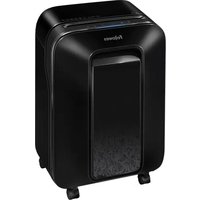
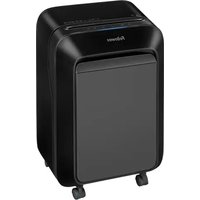
Powershred LX170 - Shredder FELLOWES - Free user manual and instructions
Find the device manual for free Powershred LX170 FELLOWES in PDF.


| Product Type | Cross-cut shredder |
| Brand | Fellowes |
| Model | Powershred LX170 |
| Sheet capacity (75 g/m²) | 12 sheets per pass |
| Paper entry width | 230 mm (9 inches) |
| Power supply | 120 V, 60 Hz, 3.75 A |
| Safety technology | SafeSense™: automatic stop upon hand contact |
| IntelliBAR function | Capacity indicator with lights (blue, green, yellow, red) |
| Sleep mode | Automatic shut-off after 2 minutes of inactivity |
| Maximum continuous operation | 10 minutes, then 15 minutes cool-down |
| Bin capacity | Removable bin with full-level indicator |
| Shreddable materials | Paper, credit cards, staples, paper clips |
| Non-shreddable materials | Adhesive labels, CD/DVD, plastic other than credit cards |
| Lubrication | Recommended after each bin emptying; use Fellowes 35250 oil (non-aerosol) |
| Sensor cleaning | Use a cotton swab soaked with rubbing alcohol |
| Parts warranty | 2 years |
| Cutting blades warranty | 5 years |
Frequently Asked Questions - Powershred LX170 FELLOWES
User questions about Powershred LX170 FELLOWES
0 question about this device. Answer the ones you know or ask your own.
Ask a new question about this device
Download the instructions for your Shredder in PDF format for free! Find your manual Powershred LX170 - FELLOWES and take your electronic device back in hand. On this page are published all the documents necessary for the use of your device. Powershred LX170 by FELLOWES.
USER MANUAL Powershred LX170 FELLOWES
Please Read These Instructions Before Use.
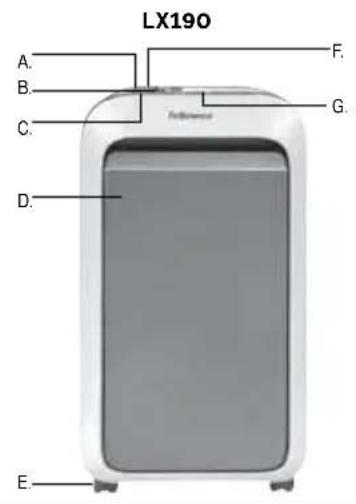
A. SafeSense®
Technology
B. Paper entry
C. See safety instructions
D. Pullout bin
E. Casters
F. Disconnect power switch
-
OFF
-
ON
G. Control Panel and LEDs
CAPABILITIES
Will shred: Paper, plastic credit cards, staples and paper clips
Will not shred: Adhesive labels, continuous form paper, transparencies, newspaper, cardboard, CD/ DVDs, laminates, file folders, X-rays or plastic other than noted above
Paper shred size: Cross-Cut, LX170 - 5/32 in x 1-1/16 in (4mm x 27mm), LX180/LX190 - 5/32 in x 1-3/8 in (4mm x 35mm)
Maximum Sheets per pass: LX170 - 12, LX180 - 16, LX190 - 20*
Maximum Paper entry width: 9 in. (230mm)
- 8.5 in. x11 in., 20lb., (75g) paper at 120V/ 60 Hz, 3.75Amps (LX170), 4.58Amps (LX180), 6.25Amps (LX190); heavier paper, humidity or other than rated voltage may reduce capacity. Maximum recommended daily usage rates: *1000 sheets per day, 25 credit cards. Fellowes SafeSense® shredders are designed to be operated in home and office environments ranging between 50 - 80 degrees Fahrenheit (10 - 26 degrees Celsius) and 40 - 80% relative humidity.

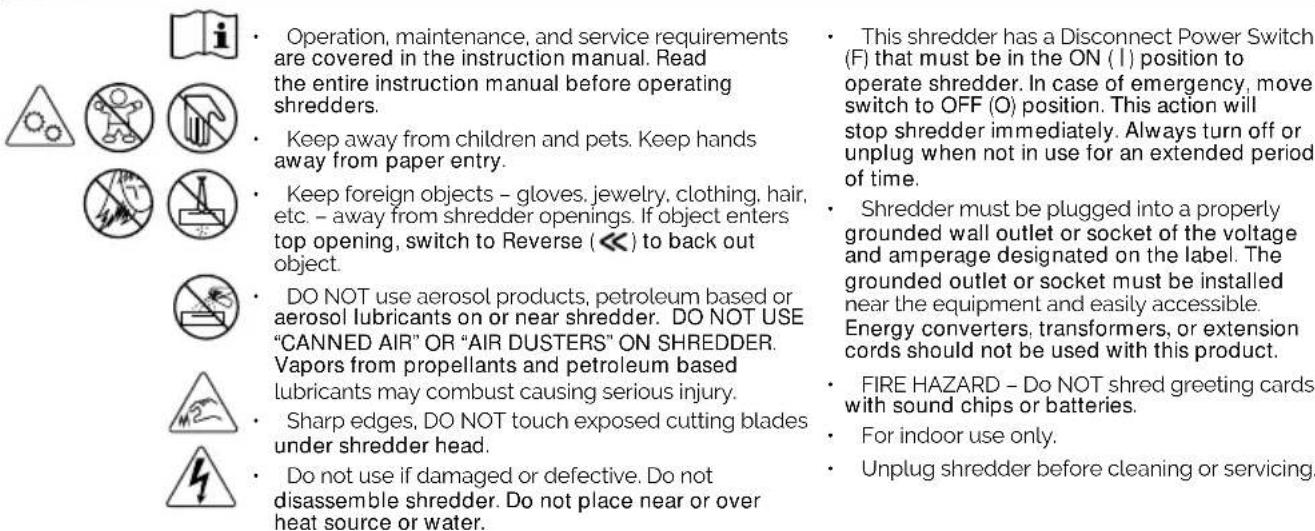
WARNING IMPORTANT SAFETY INSTRUCTIONS - Read before using!
Continuous operation. Up to 10-minutes maximum. NOTE: Shredder runs briefly after each pass to clear entry. Continuous operation beyond 10-minutes will trigger 15-minute cool down period.

LX180
Continuous operation. Up to 20-minutes maximum. NOTE: Shredder runs briefly after each pass to clear entry. Continuous operation beyond 20-minutes will trigger 15-minute cool down period.

LX190
Continuous operation. Up to 30-minutes maximum. NOTE: Shredder runs briefly after each pass to clear entry. Continuous operation beyond 30-minutes will trigger 15-minute cool down period.
PAPER OR CARD
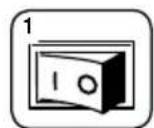
Plug in and put disconnect power switch in ON (I) position
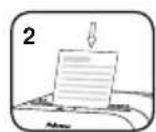
Align paper/ card to center of paper entry. Feed straight into paper entry and release.

IntelliBAR
With 5 Responsive Features. The revolutionary fearless shredder lineup that maximizes workplace efficiency and keeps your day in flow.

SLEEP MODE
Energy saving feature shuts down automatically after 2 minutes of no shredding activity. Insert paper, press forward/ reverse or open and close the bin to resume shredding.
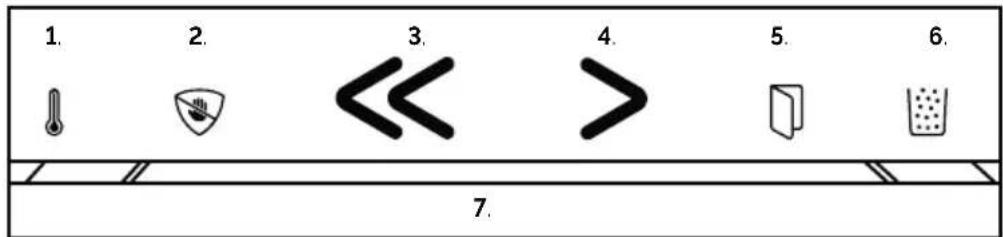
1. Run Time Indicator:
Light will turn yellow when machine is close to the maximum runtime and switch to red when cool down is needed
2. SafeSense® Technology:
Light will turn yellow to alert when system is activated. Machine will turn off after 5 seconds of hands touching the paper entry (open bin or switch power on/off to resume shredding)
3. Reverse:
Light will turn green
4. Forward:
Light will turn green
5. Bin Open:
Light will turn red when bin is pulled out.
6. Bin Full Indicator:
Light will turn yellow when nearly full and turn red when it needs to be emptied
7. Efficiency Meter:
Light will turn blue when powered on and ready. Light will expand green and when optimal shredding zone is reached it will pulse. Once the optimal level is surpassed, the light will turn yellow, then red to prevent feeding too many sheets. If machine jams, the light will turn red and paper will auto reverse.
PRODUCT MAINTENANCE
OILING SHREDDER
All cross-cut shredders require oil for peak performance. If not oiled, a machine may experience diminished sheet capacity, intrusive noise when shredding and could ultimately stop running. To avoid these problems, we recommend you oil your shredder each time you empty your waste bin.
CLEANING AUTO-START INFRARED SENSORS
Paper detection sensors are designed for maintenance free operation. However, on rare occasions the sensors may become blocked by paper dust causing the motor to run even if there is no paper present. (Note: two paper detection sensors are located in the center of the paper entry).
FOLLOW OILING PROCEDURE BELOW AND REPEAT TWICE TO CLEAN THE SENSORS
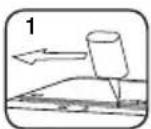
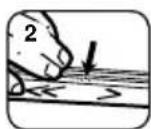
Apply oil across entry
*Only use a non-aerosol vegetable oil in long nozzle container such as Fellowes 35250


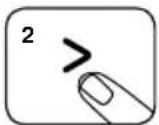
Press and hold forward (> 2-3 seconds
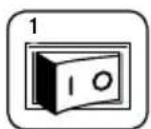
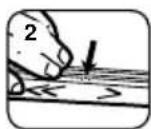
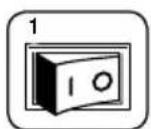
Turn off disconnect power switch (O) and unplug the shredder
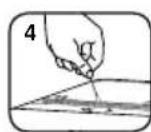
Locate Auto-start infrared sensor
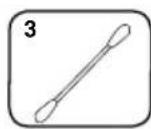
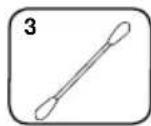
Dip cotton swab in rubbing alcohol
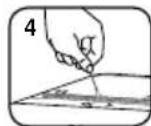
Using cotton swab, wipe away any contamination from the paper sensors
TROUBLESHOOTING

OVERHEAT INDICATOR

BIN OPEN

BIN FULL

SAFESENSE\* INDICATOR

POWER SWITCH
Overheat Indicator: When the Overheat Indicator is illuminated, the shredder has exceeded its maximum operating temperature and needs to cool down. This indicator will remain illuminated and the shredder will not operate for the duration of the recovery time.
Bin Open: The shredder will not run if the bin is open. When illuminated, close the bin to resume shredding.
Bin Full: When illuminated, the shredder waste bin is full and needs to be emptied. Use Fellowes waste bag 36052 (LX170/LX180), 36053 (LX190).
SafeSense Indicator: If hands are too close to the paper entry, the SafeSense indicator will illuminate and the shredder will stop shredding. If SafeSense is active for 5 seconds, the shredder will automatically turn off and the user must open and close the bin or toggle on/off the power switch on the rear.
Power: If the machine is not powered, ensure the power switch is in the ON (I) position and the power cord is plugged into both the machine and power outlet.

Coupe croisée, LX170 - 5/32 po x 1-1/16 po (4mm x 27mm), LX180/LX190 - 5/32 in x 1-3/8 po (4mm x 35mm)
Paper detection sensors are designed for maintenance free operation. However, on rare occasions the sensors may become blocked by paper dust causing the motor to run even if there is no paper present. (Note: two paper detection sensors are located in the center of the paper entry).
PARALIMPIARLOSSENSORES
Apaguen el
LIMITED PRODUCT WARRANTY
Limited Warranty: Fellowes, Inc. ("Fellows") warrants the additional costs incurred by Fellowes to provide parts or parts of the machine to be free of defects in material and services outside of the country where the shredder is initially workmanship and provides service and support for 2 years sold by an authorized reseller. ANY IMPLIED WARRANTY, from the date of purchase by the original consumer. Fellowes INCLUDING THAT OF MERCHANTABILITY OR FITNESS FOR A warrants the cutting blades of the machine to be free from PARTICULAR PURPOSE, IS HEREBY LIMITED IN DURATION TO defects in material and workmanship for 5 years from the date THE APPROPRIATE WARRANTY PERIOD SET FORTH ABOVE. of purchase by the original consumer. If any part is found to be in no event shall Fellowes be liable for any consequential or defective during the warranty period, your sole and exclusive incidental damages attributable to this product. This warranty remedy will be repair or replacement, at Fellowes' option and gives you specific legal rights. The duration, terms, and expense, of the defective part. This warranty does not apply in conditions of this warranty are valid worldwide, except where cases of abuse, mishandling, failure to comply with product different limitations, restrictions, or conditions may be required usage standards, shredder operation using an improper power by local law. For more details or to obtain service under this supply (other than listed on the label), or unauthorized repair, warranty, please contact us or your dealer. Fellowes reserves the right to charge the consumers for any
GARANTIE LIMITEE DU PRODUIT

- CAPABILITIES
- WARNING IMPORTANT SAFETY INSTRUCTIONS - Read before using!
- PAPER OR CARD
- IntelliBAR
- SLEEP MODE
- Run Time Indicator:
- SafeSense® Technology:
- Reverse:
- Forward:
- Bin Open:
- Bin Full Indicator:
- Efficiency Meter:
- PRODUCT MAINTENANCE
- OILING SHREDDER
- CLEANING AUTO-START INFRARED SENSORS
- FOLLOW OILING PROCEDURE BELOW AND REPEAT TWICE TO CLEAN THE SENSORS
- TROUBLESHOOTING
- OVERHEAT INDICATOR
- BIN OPEN
- BIN FULL
- SAFESENSE\* INDICATOR
- POWER SWITCH
- PARALIMPIARLOSSENSORES
- Apaguen el
- LIMITED PRODUCT WARRANTY
- GARANTIE LIMITEE DU PRODUIT
Brand : FELLOWES
Model : Powershred LX170
Category : Shredder