
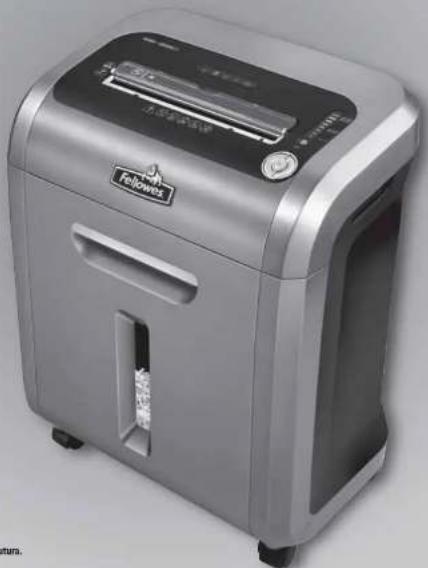
Intellishred SB-89Ci - Shredder FELLOWES - Free user manual and instructions
Find the device manual for free Intellishred SB-89Ci FELLOWES in PDF.


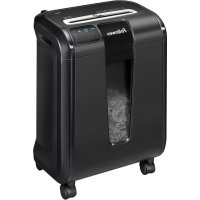
| Product Type | Paper Shredder |
| Brand | Fellowes |
| Model | Intellishred SB-89Ci |
| Cut Type | Cross-Cut (P-4 Security Level) |
| Sheet Capacity | Up to 12 sheets per pass (70 gsm) |
| Shred Size | 4 x 38 mm particles |
| Bin Capacity | 13 liters (approximately 3.4 gallons) |
| Feed Opening Width | 220 mm (8.7 inches) |
| Dimensions (H x W x D) | 48 x 36 x 25 cm (18.9 x 14.2 x 9.8 inches) |
| Weight | 5.4 kg (11.9 lbs) |
| Power | 120 W, 120 V, 60 Hz |
| Noise Level | < 65 dB |
| Duty Cycle | 3 minutes continuous use, then 30 minutes cool down |
| Safety Features | Auto-start/stop, overload protection, safety lock switch |
| Shreddable Items | Paper, staples, credit cards, paper clips |
| Maintenance | Lubricate with shredder oil after every bin emptying |
| Colour | Black with silver accents |
| Warranty | 2 years limited |
Frequently Asked Questions - Intellishred SB-89Ci FELLOWES
User questions about Intellishred SB-89Ci FELLOWES
0 question about this device. Answer the ones you know or ask your own.
Ask a new question about this device
Download the instructions for your Shredder in PDF format for free! Find your manual Intellishred SB-89Ci - FELLOWES and take your electronic device back in hand. On this page are published all the documents necessary for the use of your device. Intellishred SB-89Ci by FELLOWES.
USER MANUAL Intellishred SB-89Ci FELLOWES
Useful Phone Numbers
| Help Line | Europe | CO-800-1830-181C | |
| Australia | +1-800-32-11-7 | Mexico | +1-800-234-116 |
| Canada | +1-800-665-4339 | United States | +1-800-955-0951 |
Fell owes
| Australia | +61-3-8326-9700 | Japan | -81401-3-5496-2461 |
| Benelux | +21-131-76-523-2090 | Korea | -82101-2-3462-2844 |
| Canada | +1-905-475-6320 | Malaysia | +60-01-35122-1231 |
| Deutschland | +49-101-5131-97770 | Poland | +48-1221-771-67-42 |
| Espana | +34-91-748-05-01 | Singapore | +45-5221-3811 |
| France | +331 01-130-06-86-10 | United Kingdom | +46-101-1302-83483 |
| Italia | -3 9-371-730041 | United States | +1-630-893-1600 |
SB-89Ci
natural_image
Exterior view of a modern office building (no signage)
1789 Norwood Avenue, Itasca, Illinois 60143-1095 - USA - 630-893-1600
fellowes.com
| Australia | Canada | Canada and France | Japan | Poland | France | Korea | Japan | Polska |
| Benelux | China | España | Españ | Italia | Singapore | United States |
United
Kingdom
fellowes.com
2007 Fellowes, Inc. Part No. 402517
WARRANTY / GARANTIE / GARANTÍA
Our promise to you is quite simple. Fellowes shredders are built stronger, engineered to run longer, resist jams and power through large jobs. The Fellowes worry free warranty described below covers the performance of the product, provides for prompt service and support, plus a lifetime cutter warranty.
Limited Warranty : Fellowes, Inc. ("Fellowes") warrants the parts of the machine to be free of defects in material and workmanship and provides service and support for 2 years from the date of purchase by the original consumer. Fellowes warrants the cutting blades of the machine to be free from defects in material and workmanship for the lifetime d the shredder. If any part is found to be defective
during the warranty period, your sole and exclusive remedy will be repair or replacement, at Fellowes' option and expense, of the defective part. This warranty does not apply in cases of abuse, mishandling, or unauthorized repair. ANY IMPLIED WARRANTY, INCLUDING THAT OF MERCHANTABILITY OR FITNESS FOR A PARTICULAR PURPOSE, IS HEREBY LIMITED IN DURATION TO THE APPROPRIATE WARRANTY PERIOD SET FORTH ABOVE. In no event shall Fellowes be liable for any consequential or incidental damages attributable to this product. This warranty gives you specific legal rights. The duration, terms, and conditions of this warranty are valid worldwide, except where different limitations, restrictions, or conditions may be required by local law. For more details or to obtain service under this warranty, please contact us or your dealer.
ENGLISH
Model S8-8906
KEY
- SafeSense Technology
B. Paper entry
- See safety instructions
C. CD/Gard flap
E. t h thin
T. Casters
C. Disconnected power with
-
Paper tray
-
Salibene • overde zitior
1 Power controls
- Overheat (red)
.Bir open (re)
-
Ein full red!
-
Paper jam (red)
-
Salience indicator (yellow)
-
Street capacity indicator
C. Auto correcting when blue;
-
Reverse
-
On/off blue
TForward
CAPABILITIES
Will shred: Paper, credit cards, CD' DVD's staples and small paper pipes
Will not shred: adhesive label, continuous form paper, transpareties, newspaper.
cardboard. Large paper clips, laminates, filters, X-rays or plugs other than noted
nPCR
Paper shred size:
Cross-Out 3/32" x 1-1/2" [3.9 = 38mm]
Maximum:
Sheels per pass 15
The Cards per 10:
Ф.1 No 1
8.5"x1", 23E., (75g) paper at 120V, 60 Hz. 59mpa; heavier paper. Humidity
or other than raise charge may reduce capacity. Recommended daily charge rate
30-10% discounting rates per day, 50 cash rates, 10 subs. 10 cents per share
Follow the same ^4 stradions are designed to be operated in name and office environments ranging
between 50 - 60 degrees (fahrenheit) (10 - 25 degrees Celsius and 40 - 62% relative humidity
ADVANCED PRODUCT FEATURES

Jam Proof System
- Immune Indicating gene by
sterving overcase and powering through mified paper.
TECHNICAL EXPLANATION

sheet capacity indicator tells you
when you have too many sheets to
(2019) 30 maxima

Shredder will not operate when too many
sheers are fed me paper entry;red
Fig. 1. Reduce sheet quality and need

If rifled, shredder will automatically
adj. s to power through or reverse
out repeat

SafeSense® Technology
ops should increasingly with
- 2018年3月25日(星期六)
TECHNICAL EXPLANATION

Shredder will stop automatically
and indicator will light up when
varies are too close to the opening

Shredder will resume normal
operation when hands are no

Fasting indicator was when
sunknown technology has been

SilentSh red "Technology
al-terst - mio.
2.1605 M. 30. 192 by Cenipril
TECHNICAL EXPLANATION

SilanBhre ^19 meter
Features wrigs-on-quist.
efficient stretching
Performance WNTUR
WARNING: IMPORTANT SAFETY INSTRUCTIONS — Read Before Using!

- Keep away from children and acts, 4000 boys away from paper
entry. Always set to off or undo when not in use.

- Keep away from children and cats, 600+ hours away from paper
entry. Always set to off or unplug when not in use.
- Seen foreign objects - grass, jewelry, stething, hair, etc. - away
I am shroster openings. If object enters too opening, switch to
Reverse IF to back out object

• lower use semi-cel products, petroleum based lubricants or other flammable
products on or near shroder. Do not use carried air on shroder.

- Can not, see if damaged or debrief. Do not disorganize shockler. Do
not place near or over heat source or water.
- This shedder has a Power Disconnect switch (C) that must be in the OH by position to operate shedder. In case of emergency, move switch to OFF (C) position. The action will stop shrster immediately.
- Solid, a thin excess curing blades under shuddles head.
• Bulate: "The entry for smoking 'Tetanck. Keep it from now from
3D hole. - Do not mention objects in series entry
- The grounded socket outlet shall be installed near the equipment and shall be partly accessible.

Continuous operation:
20-minute maximum
NOTE: Shredder runs briefly after each pass to clear entry. Continuous operation beyond 20-minutes will trigger 40-minute cool down period.
PAPER OR CD/ CARD
Plug in and put
disconnect power
switch in ON (I) position.
Press (ON) ON to activate (blue)
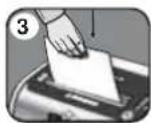
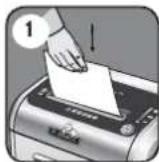
Feed into paper entry and release
To shred CDs rotate CD flap into place
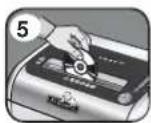
Hold CD' card at edge, feed into CD/ Card flap entry and release
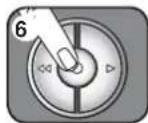
When finished shredding set to Off (○)

100% JAM PROOF
Eliminates frustrating jams by preventing overloads and powering through misfed paper.
SET-UP AND TESTING
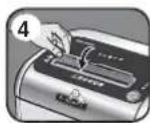
Feed into paper entry and release
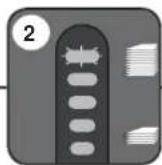
If too many sheets, indicator will light up to red and shredder will not take paper
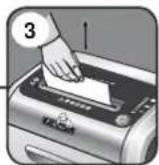
Pe move severa is here tsuntil the indicator is below red and the shredder will take the paper
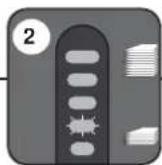
Shredder will take fewer sheets, but if indicator is below yellow, you can add more sheets without fear of jamming
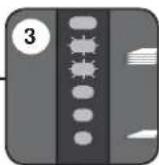
Increase the number of sheets being fed up to the top yellow light to maximize your productivity
MS FED PAPER
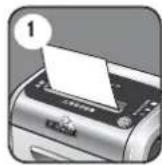
If paper is misfed and stops shredding
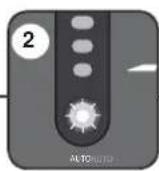
Automatic correcting action will power through the misfed paper, so shredding can continue
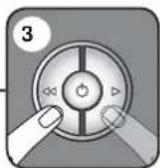
Misfed paper can also be addressed by manually using forward and reverse (See Maintenance & Troublesh ooting)
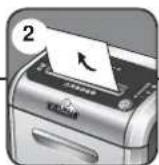
If there is too much paper for the sh redder to power through, it will reverse the paper out for easy removal
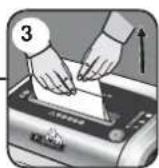
Reduce paper quantity to an acceptable amount and refeed into paper entry

SAFESENSE® TECHNOLOGY OPERATION
Stops shredder immediately when hands are too close to the opening.
SET-UP AND TESTING

Turn the shredder ON (○) to activate SafeSense®
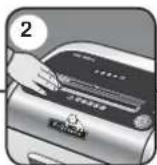
Touch test area and book for the Safe Sense® indicator to illuminate
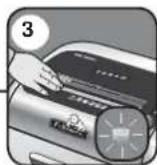
Safe Sense ^® is active and working properly
FLASHING INDICATOR

SafeSense® is deactivated when indicator is flashing
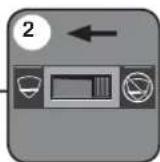
Shift override switch to the "active" position, reactivating SafeSense®
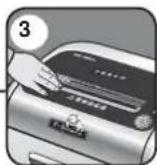
Confirm the indicator is no longer flashing and retest by putting your hard on the test area
ENGLISH
Model SB-89Ci
ADVANCED PRODUCT FEATURE MAINTENANCE AND TROUBLESHOOTING

JAM PROOF SYSTEM
Eliminates frustrating jams by preventing overloads and powering through misfed paper.
DISALING THE FEATURE

Should you choose to select the system press and hold the sum button (blue) and reverse (<q) key at the same time.

Once disabled, the blue Auto light is no longer lluminated [To re-engage, repeat step 1]

Shredding can continue with the system disabled, however a paper jam may occur with too many sheets:

If jam occurs, press and hold forward (▷) key until the document is completely through the stroke

f. not desired, press reverse (◀◀ briefly (repeat steps 4 and 5 until stride at)

listeps 4 and 5 do not clear art, covers paper all the wayout, remove several sheets and release

SAFESENSE® TECHNOLOGY
Stops shredder immediately when hands are too close to the opening.
DISCELING THE FEATURE

Should the safe sense indicator stay ill without to bring the opening

The shroder will send a sjam and SafeServer will need to be deactivated

To deactivate shift overwrite switch to the "not active" position:

Once deactivated, the indicator will have and the SafeSense failure will not function

To clear paper, press and hold forward (P) key until paper is shredded

Once the paper is cleared, reactivate the SaleServer teal.no (to re-engage, see Operations)
BASIC PRODUCT MAINTENANCE AND TROUBLESHOOTING
CLEANING AUTO-START INFRARED SENSORS
Paper detection sensors are designed for maintenance-free operation. However, on rare occasions the sensors may become blocked by paper dust causing the minor to nor even if there is no paper present (paper has perodation reason only based in the order of the paper ring).
TO CLEAN THE SENGORS

1121p

on the hub of
inased error

Cup zlon svs

Using order walk, wipe away any containeration from the paper sensors.
PREVENTIVE MAINTENANCE AND MISCELLANEOUS TROUBLESHOOTING
• All cross-out shredders require oil for peak performance. If not piled, a machine may experience diminished sheet capacity, intrusive noise when shredding and could ultimately stop running g. To avoid these problems, we recommend you all your shredder each time you empty your waste on.
- Run shredder once a day in reverse for 15 seconds to clear putters
• Empty wastebasket when bin full indicator light is illuminated using bag V 36262
- Shredder will not function if the pull-out bin is not pushed all the way in, or if this needs to be emotie.
+ When shredding for a prolonged period of time, the motor can become warm and require a cool down period. When this occurs the overheat indicator will alert you to the proclam, this model will require 40 minutes to cool down.
ACCESSORIES
Maintenance is an important part of protecting your investment. Don't forget oil and steelbar bags

Shredder cll - #3523

58-5901 Shredder
plastic bag - \$36052
PROBLEM STILL NOT SOLVED?
"ellows is committed to giving our customers the support and service they deserve. That is why we offer several options for you to find technical information, step by step assistance and personal attention."
- www.fellowes.com features an extensive online support section with a number of sell-service options
- Our customer service professionals are dedicated to reserve any of your issues
Go to Support Section at www.fellowes.com or see back page of manual for useful telephone numbers.
- WARRANTY / GARANTIE / GARANTÍA
- KEY
- CAPABILITIES
- ADVANCED PRODUCT FEATURES
- WARNING: IMPORTANT SAFETY INSTRUCTIONS — Read Before Using!
- SAFESENSE® TECHNOLOGY OPERATION
- ADVANCED PRODUCT FEATURE MAINTENANCE AND TROUBLESHOOTING
- JAM PROOF SYSTEM
- SAFESENSE® TECHNOLOGY
- BASIC PRODUCT MAINTENANCE AND TROUBLESHOOTING
- CLEANING AUTO-START INFRARED SENSORS
- PREVENTIVE MAINTENANCE AND MISCELLANEOUS TROUBLESHOOTING
- ACCESSORIES
- PROBLEM STILL NOT SOLVED?
Brand : FELLOWES
Model : Intellishred SB-89Ci
Category : Shredder