Fridge Mini Box - Fridge Create - Free user manual and instructions
Find the device manual for free Fridge Mini Box Create in PDF.


| Product Type | Mini hot/cold refrigerator |
| Brand | Create |
| Model | Fridge Mini Box |
| Power supply | DC 12 V (vehicle) and AC 220-240 V (home) |
| Cooling technology | Semiconductor (no compressor or refrigerant gas) |
| Cooling temperature range | Approximately 0 °C to 10 °C (depending on food) |
| Heating temperature range | Approximately 60 °C ± 10 °C |
| Operating modes | Normal (fast fan) and Silent (slow fan) |
| Capacity | Not specified (compact, for personal use) |
| Weight | Not specified (light, easy to carry) |
| Indicator lights | Green (cooling) and Red (heating) |
| Hot/cold switching | Must be turned off before switching, 15-minute delay |
| Recommended use | Car, home, yacht, office, bedroom, cosmetics store |
| Maintenance | Clean with a soft cloth dampened with mild detergent or warm water |
| Cleaning precautions | Do not rinse the body with water, protect ventilation openings |
| Safety instructions | Unplug before cleaning, do not use corrosive solvents, supervise children |
| Cooling module lifespan | Up to 50,000 hours |
| Included accessories | DC 12 V power cord (cigarette lighter) and AC 220-240 V cord |
| Storage and ventilation | At least 10 cm free space around the device |
| Warranty | Not specified (consult retailer) |
Frequently Asked Questions - Fridge Mini Box Create
User questions about Fridge Mini Box Create
0 question about this device. Answer the ones you know or ask your own.
Ask a new question about this device
Download the instructions for your Fridge in PDF format for free! Find your manual Fridge Mini Box - Create and take your electronic device back in hand. On this page are published all the documents necessary for the use of your device. Fridge Mini Box by Create.
USER MANUAL Fridge Mini Box Create
natural_image
Line drawing of a rectangular backpack with handle and side panel (no text or symbols)Fridge Mini Box
User manual | Manual de instrucciones
CREATE CREATE CREATE ATE CREATE CREATE CRE CREATE CREATE CREATE ATE CREATE CREATE CRE CREATE CREATE CREATE ATE CREATE CREATE CRE CREATE CREATE CREATE ATE CREATE CREATE CRE CREATE CREATE CREATE ATE CREATE CREATE CRE CREATE CREATE CREATE ATE CREATE CREATE CRE CREATE CREATE CREATE ATE CREATE CREATE CRE CREATE CREATE CREATE ATE CREATE CREATE CRE CREATE CREATE CREATE ATE CREATE CREATE CRE CREATE CREATE CREATE ATE CREATE CREATE CRE CREATE CREATE CREATE ATE CREATE CREATE CRE CREATE CREATE CRE CREATE CREATE CRE ATE CREATE CREATE CRE CREATE CREATE CRE CREATE CREATE CRE CREATE CREATE CRE
CREATE CREATE CREATE ATE CREATE CREATE CRE CREATE CREATE CREATE ATE CREATE CREATE CRE CREATE CREATE CREATE ATE CREATE CREATE CRE CREATE CREATE CREATE ATE CREATE CREATE CRE CREATE CREATE CREATE ATE CREATE CREATE CRE CREATE CREATE CREATE ATE CREATE CREATE CRE CREATE CREATE CREATE ATE CREATE CREATE CRE CREATE CREATE CREATE ATE CREATE CREATE CRE CREATE CREATE CREATE ATE CREATE CREATE CRE CREATE CREATE CREATE ATE CREATE CREATE CRE CREATE CREATE CREATE ATE CREATE CREATE CRE CREATE CREATE CRE CREATE CREATE CRE CREATE CREATE CRE CREATE CREATE CRE
INDEX
ENGLISH
Security instructions 6
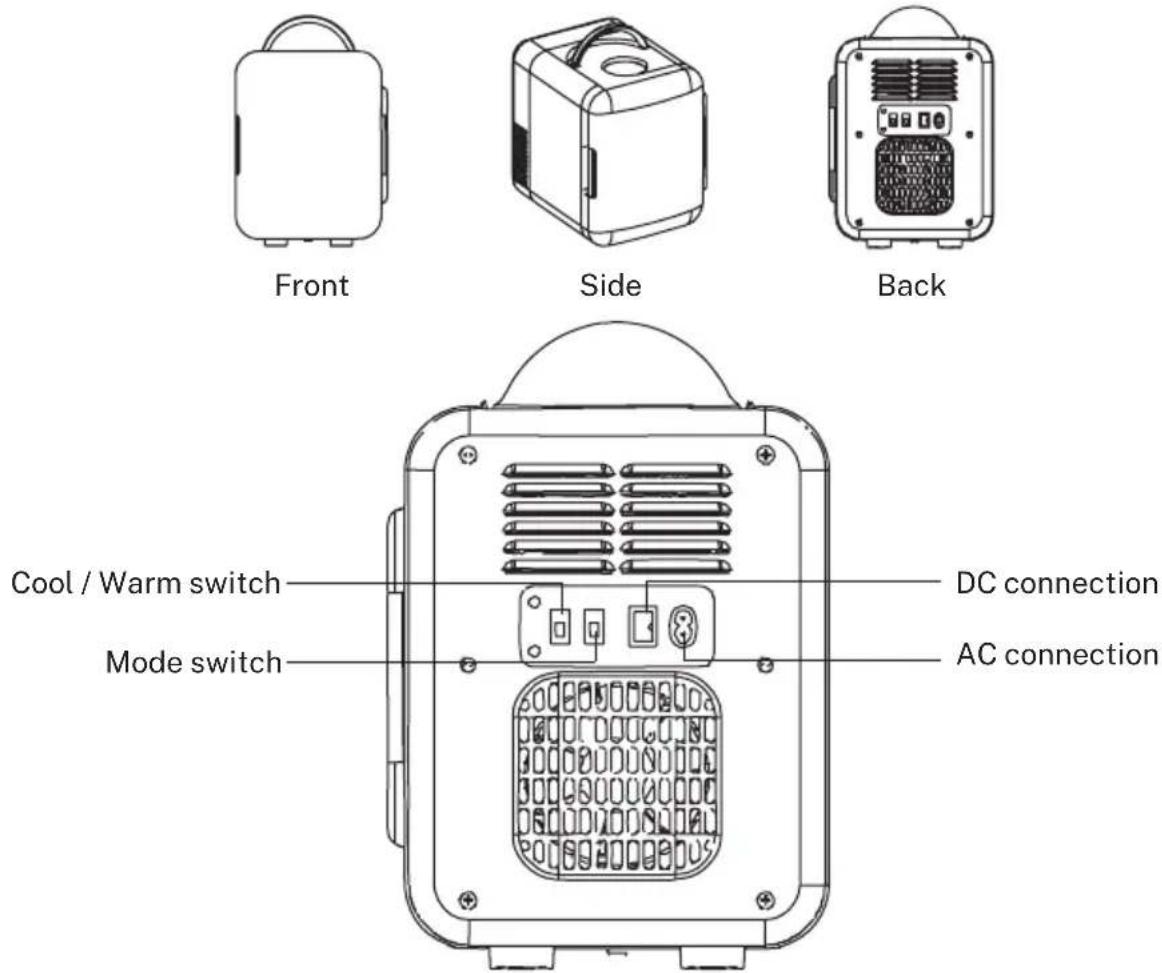
Description 7
Operation 8
Vehicle use (DC 12V) 8
Home use (AC 220-240V) 8
Cooling and heating settings 8
Normal and Silent modes 8
Tips for operation 9
Suggested temperatures 9
Scope of application 9
Troubleshooting 10
Cleaning and maintenance 10
PORTUGUÊS
Temperature suggerite 29
Thank you for choosing our fridge. Before using the appliance, and to ensure the best use, carefully read these instructions.
The safety precautions enclosed herein reduce the risk of death, injury and electrical shock when correctly adhered to. Keep the manual in a safe place for future reference, along with the completed warranty card, purchase receipt and package. If applicable, pass these instructions on to the next owner of the appliance. Always follow basic safety precautions and accident-prevention measures when using an electrical appliance. We assume no liability for customer failing to comply with these requirements.
SECURITY INSTRUCTIONS
When using any electrical appliance, basic safety precautions should always be observed.
- This appliance may be used by children over the age of 8 years old and persons with reduced physical, sensory or mental capabilities or lack of experience and know-how, but only if supervised or if they have been instructed on how to use the appliance safely and are aware of its potential dangers.
- When the power cord is damaged, do not touch the AC power cord with your hands to avoid danger.
- When using the product, please note that the voltage used is absolutely correct (the applicable voltage of this product is clearly marked on the product nameplate).
- The vehicle-used function can be only activated when the vehicle is running. Be sure to turn off its power and unplug the vehicle-used power cord after the vehicle stops running.
- The product should not be used for transporting or loading acid-corrosive items, and the product should not be wiped with corrosive solvents.
- Do not block the ventilation openings in normal use.
- Use this product in strict accordance with the instructions, please do not disassemble the internal parts without permission.
- Under the heating condition, the temperature inside the appliance can be controlled within a temperature at about 60^ ± 10^ , please pay attention to high temperature to avoid burns.
- When switching between “Cool” and “Heat” settings, be sure to turn the switch to “OFF” setting firstly and then switch to another setting after 15 minutes.
- The product should be stored in a place which is tidy, and a ventilation channel with a width of 10cm should be kept around it. And do not put the product at rainy places or places with heat sources, such as electric stoves, LPG stoves, heat pipes or flames.
- This mini warmer and cooler should be cleaned regularly if there is residual water inside it.
- This mini warmer and cooler is not a refrigerator, and it is not allowed to be used for freezing fresh meat. It is better to put frozen foods and drinks into it for storage.
- Please do not open the door frequently and the door cannot be opened for too long in order to keep contents inside it fresh.
• Children should be supervised to ensure that they do not play with appliances.
DESCRIPTION
- This product can not only be used for cooling but also for warming. It is of simple and cute appearance, compact, easy to carry, as well as of long service life and low power consumption. It is a good helper for home and travel use.
- This product keeps the concept of “Green and Environmentally-friendly”. And this product uses semiconductor refrigeration technology, it has no bulky compressor and no refrigerant to avoid noise and fluorine pollution. It is an environmentally-friendly refrigeration product without pollution.
- It is particularly suitable for drivers, tourists, workers and students due to its multi-function, light weight, small size and easy-to-carry.
- This product has simple structure and long service life, and it is convenient to maintain, and is of low power consumption and strong shock-resistant capability.
- It has a long service life, and the life of the cooling module can reach 50000 hours.
VEHICLE USE (DC 12V)
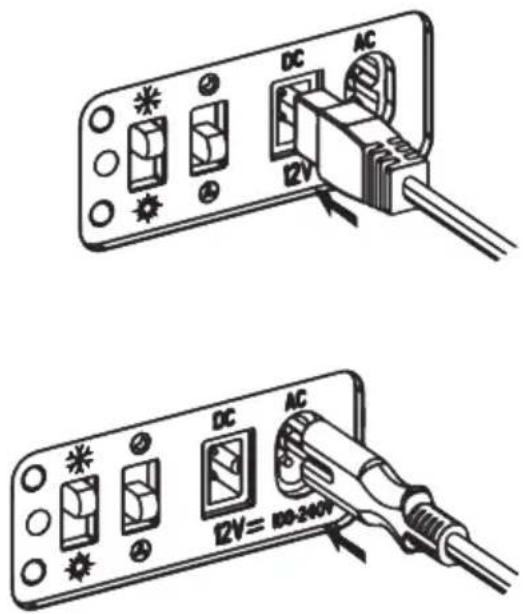
- Turn to the "Cool" setting.
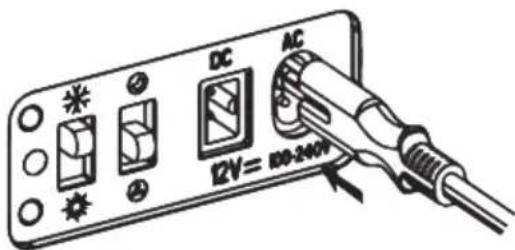
- Align the vehicle-used power cable with the socket of the vehicle (DC12V), and then insert it well in position.
- Then insert the cigarette lighter end of the vehicle-used cord into the cigarette lighter socket of the vehicle.
HOME USE (AC 220-240V)
- Turn to the "Cool" setting.
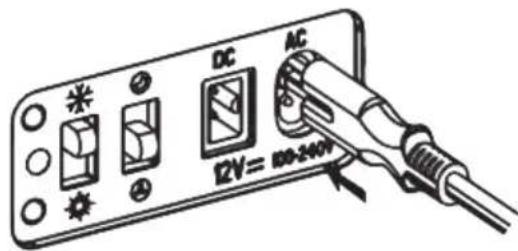
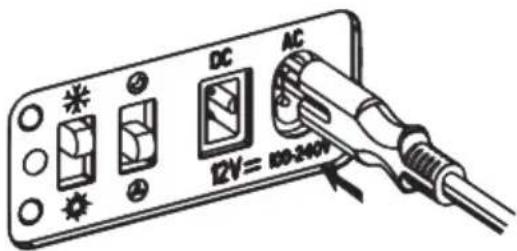
- Insert one end of the household power cord into the AC socket of the minifridge.
- Insert the other end of the household power cord into the household outlet.
COOLING AND HEATING SETTINGS
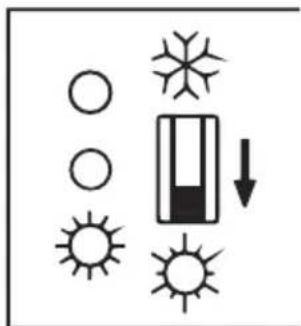
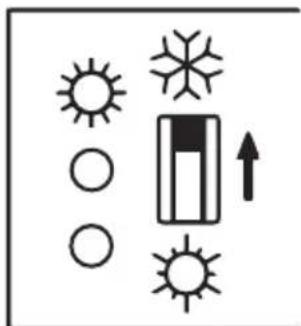
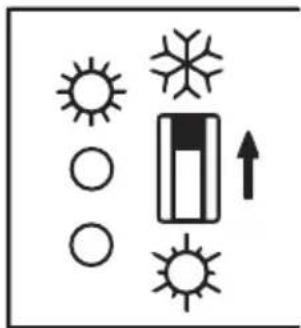
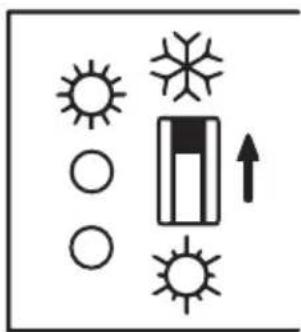
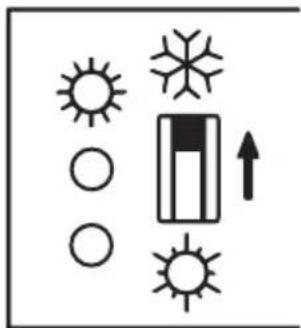
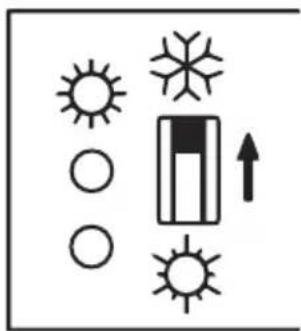
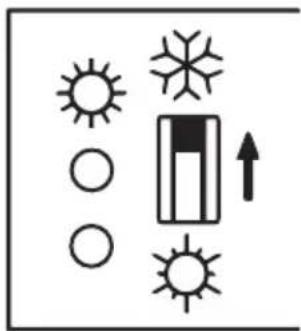
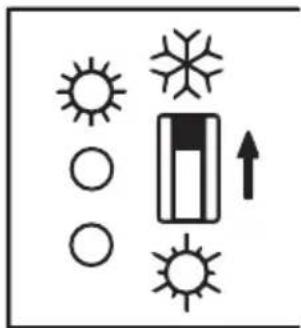
- When cooling, turn the "Cooler / warmer switch" to "Cool" setting, the green indicator lights up and the fridge starts to cool.
- When heating, turn the "Cooler / warmer switch" to "Heat" setting, the red indicator lights up and the appliance starts to heat.
- When you need to turn off the fridge, turn the switch to the middle "OFF" position, and the appliance stops working.
- When you want to switch between "Cool" and "Heat" settings, be sure to turn the switch to "OFF" setting firstly and then switch to another setting after 15 minutes. Do not directly make switch between "Cool" and "Heat" setting as the cooling system of the fridge may be damaged due to the drastic change of temperature.
natural_image
Simple diagram showing suns, windings, and a battery with an upward arrow (no text or labels)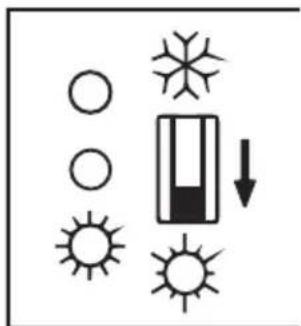
natural_image
Pure diagram of symbols for weather and solar radiation without any text or labelsNORMAL AND SILENT MODES
- Normal mode: The fan runs at higher speed under normal mode, it is recommended to select this mode in the daytime.
- Silent mode: The fan runs at lower speed under silent mode, it is recommended to select this mode at night.
TIPS FOR OPERATION
- The closer to the cooling position, the better the cooling effect.
- Metal cans offer better results if you want to enjoy cool drinks.
- Fruits such as watermelons can be cut into two halves and be sealed by plastic wrap, and then make its flat surface be attached to the inner wall of the minifridge.
- To enjoy fresh meals, firstly put the meal into a flat stainless steel plate, and then seal the plate with plastic wrap, finally, make the bottom surface of the plate be attached to the inner wall of the minifridge.
- Cosmetics and medicines should be spread on the inner wall of the minifridge flatly. The closer to the cooling module, the better the cooling result.
SUGGESTED TEMPERATURES
- Fruits: The suggested temperature for refrigerating fruits is about 0-10 °C, which can maintain the quality and flavour of the fruits and extend their freshness period.
- Beer: The suggested temperature for storing beers should be between 0-15 °C, preferably about 10 °C. And bottled beer should be stored between 5-25 °C.
- Tea: It can be kept better if the temperature is controlled between 5-10 °C, and the flavour of the tea can be maintained for more than 1 year.
- Cosmetics / skincare products: Generally, the temperature should be below 25 ^ , and the temperature for storing cosmetics or skincare products is 10-18 ^ . Too high or too low temperatures will deteriorate the cosmetics, and those (skincare products) which are cooled will have a good cooling effect for the skin which is hot, and it will make the skin shrink and be comfortable.
- Medicines: The temperature for refrigerating the household medicines should be set according to the requirements of the medicines. Generally, the refrigerating temperature is below 20 °C.
SCOPE OF APPLICATION
- Application places: Car, home, yacht, office, bedroom, cosmetics store, etc.
- Suitable for refrigeration: Fruits, bottled/canned beverages, tea, medicines, milk and cosmetics etc.
- Not suitable for refrigeration: Frozen foods such as ice cream and others, chemical agents, and meat etc. Cooked food can be stored for 5-8 hours.
- If the minifridge is not energized, please follow the steps below to operate:
-
Check and make sure the power cord is properly connected to the power outlet.
-
Check and make sure the appliance is turned on.
-
Check and make sure the AC/DC switch of the appliance is operated correctly.
-
Check and make sure the cigarette lighter is properly connected and turned on, and please clean the base of the cigarette lighter with a non-metallic brush if it is contaminated.
- If the cooling effect is not good, please deal with it according to the following measures:
-
Check and make sure the fan is running normally. If not, please contact after-sales service. (It is recommended to clean the fan every 3 - 5 months.)
-
Touch the four screws inside the minifridge to check if it is cold. If not, please contact after-sales service.
CLEANING AND MAINTENANCE
-
Before cleaning and maintenance, the "Cooler / warmer switch" must be firstly turned off and then unplug to disconnect the power source.
-
Wipe the dirt and dust on the surface of the body with a piece of soft cloth dipped with detergent. And you can use a piece of soft cloth dipped with warm water to clean the inside of the appliance.
-
The body must not be rinsed with water, especially the parts of the body such as the ventilation openings of the switch socket, otherwise it will cause damage to the product and a risk of electric shock.
-
Please get in touch with our customer service in case you encounter problems during use.
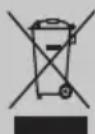
In compliance with Directives: 2012/19/EU and 2015/863/EU on the restriction of the use of dangerous substances in electric and electronic equipment as well as their waste disposal. The symbol with the crossed dustbin shown on the package indicates that the product at the end of its service life shall be collected as separate waste. Therefore, any products that have reached the end of their useful life must be given to waste disposal centres specialising in separate collection of waste electrical and electronic equipment, or given back to the retailer at the time of purchasing new similar equipment, on a one for one basis. The adequate separate collection for the subsequent start-up of the equipment sent to be recycled, treated and disposed of in an environmentally compatible way contributes to preventing possible negative effects on the environment and health and optimises the recycling and reuse of components making up the apparatus. Abusive disposal of the product by the user involves application of the administrative sanctions according to the laws.
natural_image
Simple diagram showing suns, circles, and a battery with an upward arrow (no text or labels)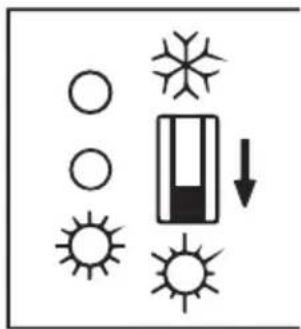
natural_image
Pure diagram of symbols for solar, wind, sun, and battery with no text or labelsMODO NORMAL Y SILENCIOSO
natural_image
Simple diagram showing suns, windings, and a battery with an upward arrow (no text or labels)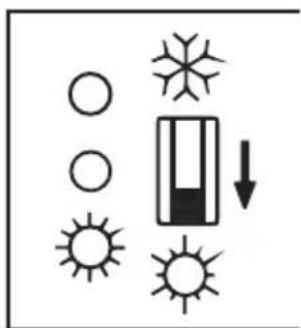
natural_image
Pure diagram of symbols for weather and lighting (no text or labels)MODO NORMAL E SILENCIOSO
natural_image
Simple line drawing of a suitcase with handle and side legs (no text or symbols)
natural_image
Line drawing of a rectangular electronic device with a circular top and handle (no text or symbols)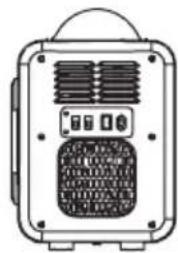
natural_image
Front view of a portable electronic device with ventilation grilles and buttons (no visible text or symbols)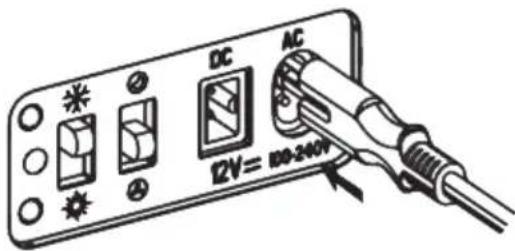

natural_image
Simple diagram showing suns, windings, and a battery with an upward arrow (no text or symbols)
natural_image
Pure diagram of symbols for weather and solar radiation without any text or labelsCONSEILS D'UTILISATION
USO NEI VEICOLI (DC 12V)
natural_image
Simple diagram showing suns, windings, and a battery with an upward arrow (no text or labels)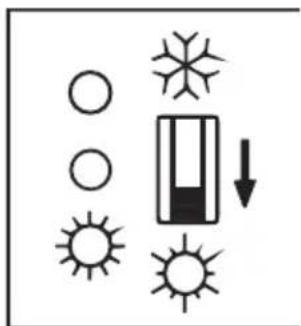
natural_image
Pure diagram of symbols for weather and lighting (no text or labels)MODALITÀ NORMALE E SILENZIOSA
natural_image
Simple line drawing of a suitcase with handle and side legs (no text or symbols)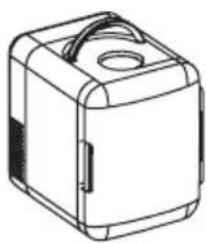
natural_image
Line drawing of a rectangular electronic device with a circular top and handle (no text or symbols)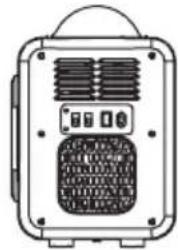
natural_image
Front view of a portable electronic device with ventilation grilles and control buttons (no visible text or symbols)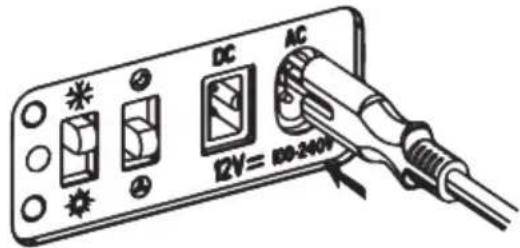
natural_image
Simple diagram showing suns, circles, a battery, and an upward arrow (no text or labels)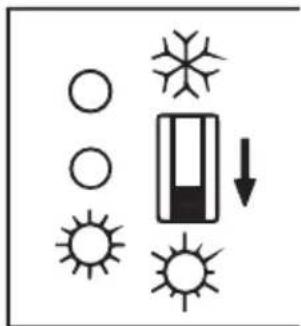
natural_image
Pure diagram of symbols for weather and solar radiation (no text or labels)EMPFOHLENE TEMPERATUREN
natural_image
Simple line drawing of a suitcase with handle and side legs (no text or symbols)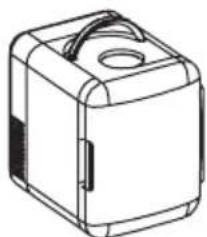
natural_image
Line drawing of a rectangular electronic device with a circular top and handle (no text or symbols)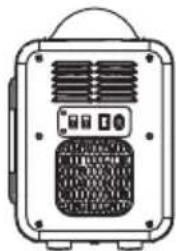
natural_image
Front view of a portable electronic device with ventilation grilles and control buttons (no visible text or symbols)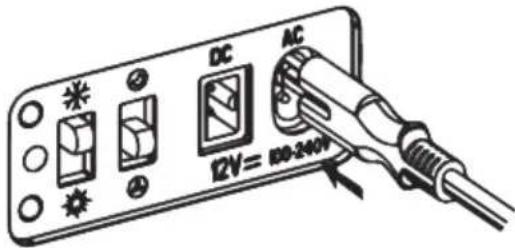
natural_image
Simple diagram with suns, circles, and a battery symbol (no text or labels)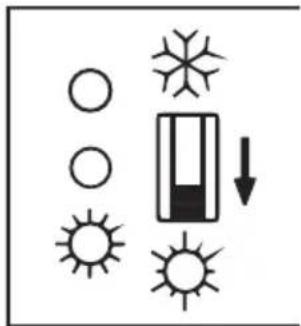
natural_image
Pure diagram of symbols for weather and lighting (no text or labels)NORMALE EN STILLE MODUS
natural_image
Simple line drawing of a suitcase with handle and side legs (no text or symbols)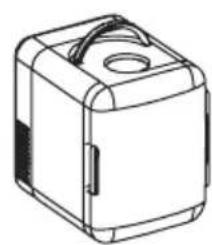
natural_image
Line drawing of a rectangular electronic device with a circular top and handle (no text or symbols)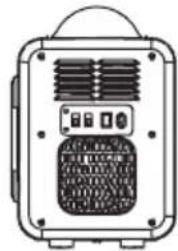
natural_image
Front view of a portable electronic device with ventilation grilles and control buttons (no visible text or symbols)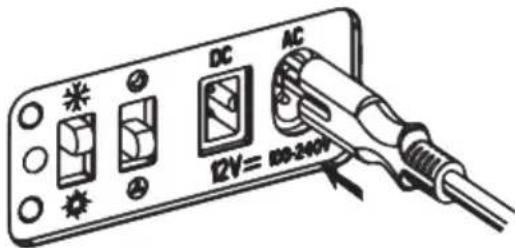
natural_image
Simple diagram showing suns, windings, and a battery with an upward arrow (no text or labels)