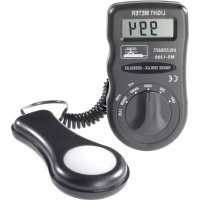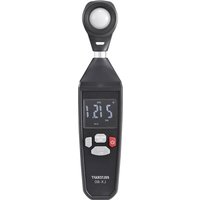
LX-80 - Lux meter VOLTCRAFT - Free user manual and instructions
Find the device manual for free LX-80 VOLTCRAFT in PDF.


User questions about LX-80 VOLTCRAFT
0 question about this device. Answer the ones you know or ask your own.
Ask a new question about this device
Download the instructions for your Lux meter in PDF format for free! Find your manual LX-80 - VOLTCRAFT and take your electronic device back in hand. On this page are published all the documents necessary for the use of your device. LX-80 by VOLTCRAFT.
USER MANUAL LX-80 VOLTCRAFT
GB Operating Instructions
LX-80 Light Meter
Item no: 2620277
F Mode d'emploi
Luxmètre LX-80
text_image
QR code image containing encoded data, no visible human-readable text5 Symbolerklärung

natural_image
Simple line drawing of a mechanical component with a curved top and base, no text or symbols present.1 Introduction.... 14
2 Intended use.... 14
3 Delivery contents 14
4 Up-to-date operating instructions.... 15
5 Description of symbols.... 15
6 Safety instructions .... 15
6.1 General.... 15
6.2 Handling.... 15
6.3 Operating environment.... 16
6.4 Operation.... 16
6.5 Batteries.... 16
7 Overview.... 17
7.1 Product.... 17
7.2 Display symbols 17
8 Taking measurements 18
9 Settings.... 18
9.1 Auto shut-off.... 18
9.2 Display hold.... 19
9.3 Relative mode 19
9.4 Automatic range selection.... 19
9.5 Manual range selection 19
9.6 MAX / MIN / AVG display 20
9.7 Change measurement units 20
10 Cleaning and care.... 20
11 Disposal.... 21
11.1 Product....21
11.2 (Rechargeable) batteries.... 21
12 Technical data 22
1 Introduction
Dear customer,
Thank you for purchasing this product.
If there are any technical questions, please contact:
www.conrad.com/contact
2 Intended use
The product is a handheld ambient light meter.
Important:
The product has an IP54 ingress protection rating. It is resistant against light splashes of water. Do not submerge.
If you use the product for purposes other than those described, the product may be damaged.
Improper use can result in short circuits, fires, or other hazards.
The product complies with the statutory national and European requirements.
For safety and approval purposes, you must not rebuild and/or modify the product.
Read the operating instructions carefully and store them in a safe place. Make this product available to third parties only together with the operating instructions.
All company names and product names are trademarks of their respective owners. All rights reserved.
3 Delivery contents
Light meter
3x AAA 1.5 V batteries
Carry bag
- Operating instructions
4 Up-to-date operating instructions
Download the latest operating instructions at www.conrad.com/downloads or scan the QR code shown. Follow the instructions on the website.
text_image
QR code image containing encoded data, no visible human-readable text5 Description of symbols

The symbol warns of hazards that can lead to personal injury.
6 Safety instructions

Read the operating instructions carefully and especially observe the safety information. If you do not follow the safety instructions and information on proper handling, we assume no liability for any resulting personal injury or damage to property. Such cases will invalidate the warranty/guarantee.
6.1 General
The product is not a toy. Keep it out of the reach of children and pets.
- Do not leave packaging material lying around carelessly. This may become dangerous playing material for children.
If you have questions which remain unanswered by this information product, contact our technical support service or other technical personnel.
- Maintenance, modifications and repairs must only be completed by a technician or an authorised repair centre.
6.2 Handling
- Handle the product carefully. Jolts, impacts or a fall even from a low height can damage the product.
6.3 Operating environment
- Do not place the product under any mechanical stress.
- Protect the appliance from extreme temperatures, strong jolts, flammable gases, steam and solvents.
■ Protect the product from direct sunlight.
6.4 Operation
- Consult an expert when in doubt about the operation, safety or connection of the product.
If it is no longer possible to operate the product safely, take it out of operation and protect it from any accidental use. DO NOT attempt to repair the product yourself. Safe operation can no longer be guaranteed if the product:
– is visibly damaged,
– is no longer working properly,
– has been stored for extended periods in poor ambient conditions or
– has been subjected to any serious transport-related stresses.
6.5 Batteries
- Correct polarity must be observed while inserting batteries.
The batteries should be removed from the device if it is not used for a long period of time to avoid damage through leaking. Leaking or damaged batteries might cause acid burns when in contact with skin, therefore use suitable protective gloves to handle corrupted batteries.
Batteries must be kept out of reach of children. Do not leave batteries lying around, as there is risk, that children or pets swallow them.
All batteries should be replaced at the same time. Mixing old and new batteries in the device can lead to battery leakage and device damage. - Batteries must not be dismantled, short-circuited or thrown into fire. Never recharge non-rechargeable batteries. There is a risk of explosion!
7 Overview
7.1 Product
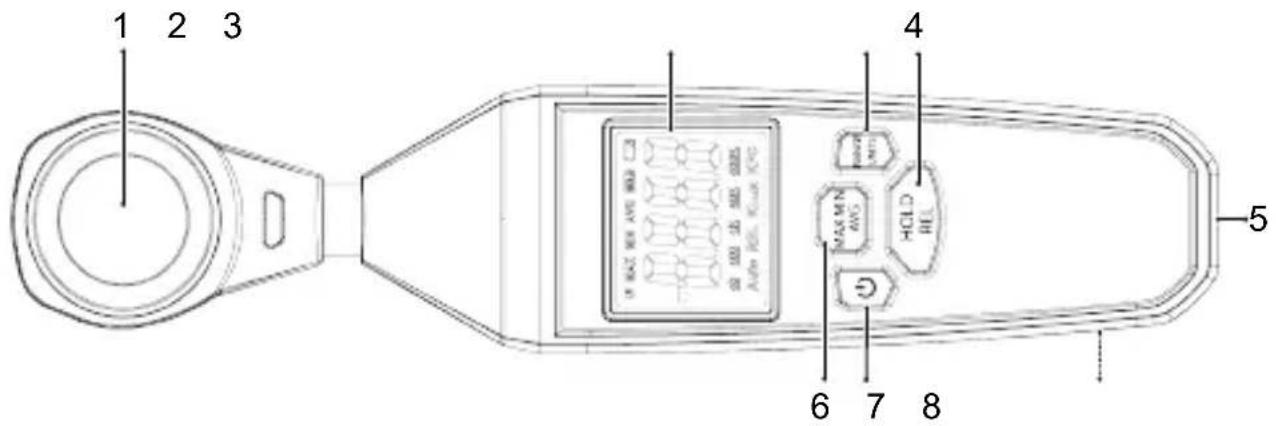
text_image
1 2 3 4 5 6 7 81 Light sensor 2 Display
3 RANGE UNITS: button
4 HOLD REL: button
5 Tripod mount 6
MAX MIN AVG: button
7 : ON/OFF button 8 Battery compartment (rear)
7.2 Display symbols
| Symbol Description | |
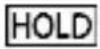 | Display hold active. |
| [3KHO] | Auto shut-off active. |
 | Low battery indicator. |
 | Maximum value is held. |
 | Minimum value is held. |
 | Average value is displayed. |
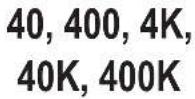 | Light measurement ranges.See section:Technical data [▶ 22]. |
| [CD6W] | Automatic measurement range switching. |
 | Relative measurement compared to reference value. |
| Lux, KLux | Light measurement unit (lm/m2), K=1000. |
| FC, KFC | Light measurement unit (lm/ft2), K=1000. |
| OL | Out of range. |
8 Taking measurements
- Press and hold the button to switch the power ON.
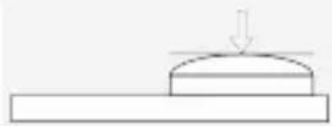
- Point the sensor at a light source to take measurements.
→ The brightness readings will appear on the display.
- When finished, press and hold the button to switch the power OFF.
Tips:
natural_image
Simple line drawing of a mechanical component with a downward arrow indicating force or motion (no text or symbols)For increased accuracy, the light being measured should strike the sensor perpendicular to its surface.
9 Settings
9.1 Auto shut-off
Notes:
- Auto shut-off is active by default, it is indicated by the " symbol.
- This energy saving feature will shut power off after approximately 15 minutes of no activity.
To disable auto shut-off:
Preconditions:
√ The power is switched ON.
- Enter hold mode. See section: Display hold.
- Short press the button to toggle auto shut-off ON/OFF.
→ The "symbol will disappear when disabled.
- Auto shut-off will reactivate after the power is switched OFF.
9.2 Display hold
Important:
- The display hold function freezes the display.
- The display hold should be switched OFF before taking measurements.
■ Press the HOLD button to switch display hold ON/OFF.
The "HOLD" symbol will appear when display hold is ON.
9.3 Relative mode
Measurements can be displayed as the difference between the measured light level and a stored reference value.
- Place the sensor under the light source to be taken as the reference value. See section: Taking measurements [▶ 18].
- Press and hold the REL button to switch relative mode ON.
→ The "REL" symbol will appear to indicate that a reference value has been stored.
→ All subsequent readings will be relative to the reference value. E.g., reference value = 100, measured value = 150, relative value = 50 (150-100=50).
- Press and hold the REL button to switch relative mode OFF.
9.4 Automatic range selection
Automatic range selection automatically sets a range based on the brightness of the light measured.
■ Press and hold the MAX MIN button to switch auto range selection ON/OFF.
The "Auto" symbol will appear when auto range selection is ON.
9.5 Manual range selection
Predefined measurement ranges can be selected manually.
- Press the RANGE button repeatedly to toggle through ranges.
The active range will be shown on the display.
The "oL" symbol will appear when the measured value is out of range.
9.6 MAX / MIN / AVG display
In this mode the display shows the "MIN" (minimum), "MAX" (maximum), or "AVG" (average) values measured.
■ Press the MAX MIN AVG button repeatedly to toggle through modes: MAX → MIN → AVG.
The display will show "MAX", "MIN", or "AVG" to indicate which mode is active.
9.7 Change measurement units
Switch between light measurement units: Lux (lm/m²) and FC (lm/ft²).
- Press and hold the UNITS button to switch between "Lux" and "FC" units of light measure.
The display will show "Lux", "FC", "KLux", or "KFC" to indicate which mode is active.
10 Cleaning and care
Important:
- Do not use aggressive cleaning agents, rubbing alcohol or other chemical solutions. They damage the housing and can cause the product to malfunction.
-
Do not immerse the product in water.
-
Clean the product with a dry, fibre-free cloth.
11 Disposal
11.1 Product
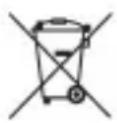
This symbol must appear on any electrical and electronic equipment placed on the EU market. This symbol indicates that this device should not be disposed of as unsorted municipal waste at the end of its service life.
Owners of WEEE (Waste from Electrical and Electronic Equipment) shall dispose of it separately from unsorted municipal waste. Spent batteries and accumulators, which are not enclosed by the WEEE, as well as lamps that can be removed from the WEEE in a non-destructive manner, must be removed by end users from the WEEE in a non-destructive manner before it is handed over to a collection point.
Distributors of electrical and electronic equipment are legally obliged to provide free take-back of waste. Conrad provides the following return options free of charge (more details on our website):
in our Conrad offices
■ at the Conrad collection points
at the collection points of public waste management authorities or the collection points set up by manufacturers or distributors within the meaning of the ElektroG
End users are responsible for deleting personal data from the WEEE to be disposed of.
It should be noted that different obligations about the return or recycling of WEEE may apply in countries outside of Germany.
11.2 (Rechargeable) batteries
Remove batteries/rechargeable batteries, if any, and dispose of them separately from the product. According to the Battery Directive, end users are legally obliged to return all spent batteries/rechargeable batteries; they must not be disposed of in the normal household waste.
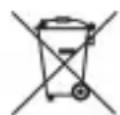
Batteries/rechargeable batteries containing hazardous substances are labelled with this symbol to indicate that disposal in household waste is forbidden. The abbreviations for heavy metals in batteries are:
Cd = Cadmium, Hg = Mercury, Pb = Lead (name on (rechargeable) batteries, e.g. below the trash icon on the left).
Used (rechargeable) batteries can be returned to collection points in your municipality, our stores or wherever (rechargeable) batteries are sold. You thus fulfil your statutory obligations and contribute to environmental protection.
Batteries/rechargeable batteries that are disposed of should be protected against short circuit and their exposed terminals should be covered completely with insulating tape before disposal. Even empty batteries/rechargeable batteries can contain residual energy that may cause them to swell, burst, catch fire or explode in the event of a short circuit.
12 Technical data
Power supply.... 3x AAA 1.5 V batteries
Battery life...... approx. 12 hrs (continuous use)
Auto shut-off.... 15 mins
Ingress protection..... IP54
Resolution..... Lux: 0.1, FC: 0.01
Accuracy.... <10,000 Lux: ±3 % of reading ±8 digits
≥10,000 Lux: ±5 % of reading ±10 digits
Measuring range (Lux) ...... 0 - 400 ,4 K, 40 K, 200 K
Measuring range (FC) 0 - 40, 400, 4 K, 20 K
Operating altitude ....≤2000 m
Operating conditions.... 0 °C to +50 °C
Storage conditions.... -10 °C to +80 °C, <80 % RH (non-condensing)
Dimensions (W x H x D) ..... 48 x 220 x 27 mm
Weight ..... approx. 168 g (without batteries)

Sommaire
France technique@conrad-
(email): france.fr
text_image
QR code image containing encoded data, no visible human-readable textnatural_image
Simple line drawing of a mechanical component with a downward arrow indicating force or motion (no text or symbols)Dimensions (L x H x P)...... 48 x 220 x 27 mm
Poids.... env. 168 g (sans piles)

Inhoudsopgave
text_image
QR code image containing encoded data, no visible human-readable textnatural_image
Simple line drawing of a mechanical component with a downward arrow indicating force or motion (no text or symbols)Copyright by Conrad Electronic SE
*2620277_V1_1123_dh_mh_de 1022322827-1 l1/O1 en

This is a publication by Conrad Electronic SE, Klaus-Conrad-Str. 1, D-92240 Hirschau (www.conrad.com).
All rights including translation reserved. Reproduction by any method (e.g. photocopying, microfilming or the capture in electronic data processing systems) requires prior written approval from the editor. Reprinting, also in part, is prohibited. This publication reflects the technical status at the time of printing.
Copyright by Conrad Electronic SE
*2620277_V1_1123_dh_mh_en 1022322827-2 l1/O1 en

Copyright by Conrad Electronic SE
*2620277_V1_1123_dh_mh_fr 1022322827-3 I1/O1 en

Copyright by Conrad Electronic SE
*2620277_V1_1123_dh_mh_nl 1022322827-4 I1/O1 en