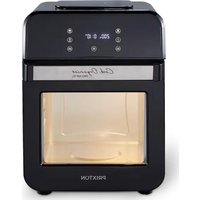
Cook Organics Pro Air - Deep fryer Prixton - Free user manual and instructions
Find the device manual for free Cook Organics Pro Air Prixton in PDF.


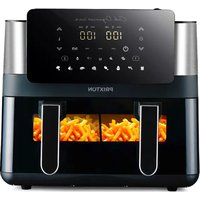
| Brand | Prixton |
| Model | Cook Organics Pro Air |
| Product type | Air Fryer |
| Capacity | 12 L |
| Power | 1500 W |
| Input voltage | 220-240 V ~50/60 Hz |
| Temperature range | 60 °C to 200 °C (adjustable in increments of 5 °C) |
| Timer | 1 to 60 minutes (adjustable in increments of 1 minute) |
| Main functions | Preheat, Reheat, Keep warm, Dehydrate, Frozen fries, Homemade fries, Chicken legs, Roast chicken, Steak |
| Rotisserie function | Yes (with cage and spit) |
| Interior light | Yes, touch control |
| Control panel | Digital touch |
| Display | Temperature and remaining time, operation indicators |
| Safety | Door micro switch, thermal protection, cooling protection |
| Included accessories | Shallow mesh basket, rotisserie cage, pizza plate (oil tray), grill rack, roast tongs, rotisserie forks and spit |
| Cleaning | Dishwasher safe accessories; main unit and interior cavity cleaned with a damp cloth |
| Warranty | 2 years |
| Housing material | Stainless steel and heat-resistant plastic (estimated from similar photos) |
Frequently Asked Questions - Cook Organics Pro Air Prixton
User questions about Cook Organics Pro Air Prixton
0 question about this device. Answer the ones you know or ask your own.
Ask a new question about this device
Download the instructions for your Deep fryer in PDF format for free! Find your manual Cook Organics Pro Air - Prixton and take your electronic device back in hand. On this page are published all the documents necessary for the use of your device. Cook Organics Pro Air by Prixton.
USER MANUAL Cook Organics Pro Air Prixton
SAFETY INSTRUCTIONS - General
- Please read these instructions carefully and retain them for future reference.
- Use this appliance solely in accordance with these instructions.
- This appliance is not intended for use by persons (including children) with reduced physical, sensory or mental capabilities, or lack of experience and knowledge, unless they have been given supervision or instruction concerning use of the appliance by a person responsible for their safety.
- Children should be supervised to ensure that they do not play with the appliance.
- Cleaning and maintenance must not be done by children, except if they are older than 8 years and supervised.
- Keep the appliance and the cable out of reach of children under 8 years.
- Have any repairs carried out solely by a qualified electrician. Never try to repair the appliance yourself.
CAUTION: The device is not suitable to be installed in an area that can be used where water spray.
CAUTION: Do not clean the device by spraying water.
CAUTION: In the event of any malfunction or damage in one of the parts. Do not repair the device by yourself, please visit the nearest Certified service center or specialized experts.
SAFETY INSTRUCTIONS - Electricity and heat
Certain parts of the machine may be hot. Do not touch it to avoid burns.
- Verify that the mains voltage is the same as that indicated on the type plate on the appliance before use.
• Make sure that you always use an grounded wall socket to connect the appliance.
• Always remove the plug from the socket when the appliance is not in use. - Make sure that the appliance, the power cord and plug do not make contact with water.
-
Remove the plug from the wall socket by pulling the plug, not the power cord.
-
Check the appliance's power cord regularly to make sure it is not damaged.
Do not use the appliance if the power cord is damaged. Have a damaged power cord replaced by a qualified repair service. - When using an extension lead always make sure that the entire cable is unwound from the reel.
- Use solely approved extension leads.
- Certain parts of the appliance may get hot. Do not touch these parts to prevent burning yourself.
• The appliance needs space to allow heat to escape, thereby preventing the risk of fire. Make sure that the appliance has sufficient space around it, and does not come in contact with flammable material. The appliance must not be covered. Make sure the air vents are not covered or blocked. - Never use the appliance in the vicinity of flammable materials.
- Make sure that the appliance, the power cord or the plug do not make contact with hot surfaces, such as a hot hob or naked flame.
• The door or the outer surface may get hot when the appliance is operating. - This appliance can be used by children aged from 8 years and above and persons with reduced physical, sensory or mental capabilities or lack of experience and knowledge if they have been given supervision or instruction concerning use of the appliance in a safe way and understand the hazards involved. Children shall not play with the appliance.
Cleaning and user maintenance shall not be made by children unless they are not older than 8 and supervised. Keep the appliance and its cord out of reach of children less than 8 years.
OPERATION - General
This appliance is only intended for domestic use, not for professional use.
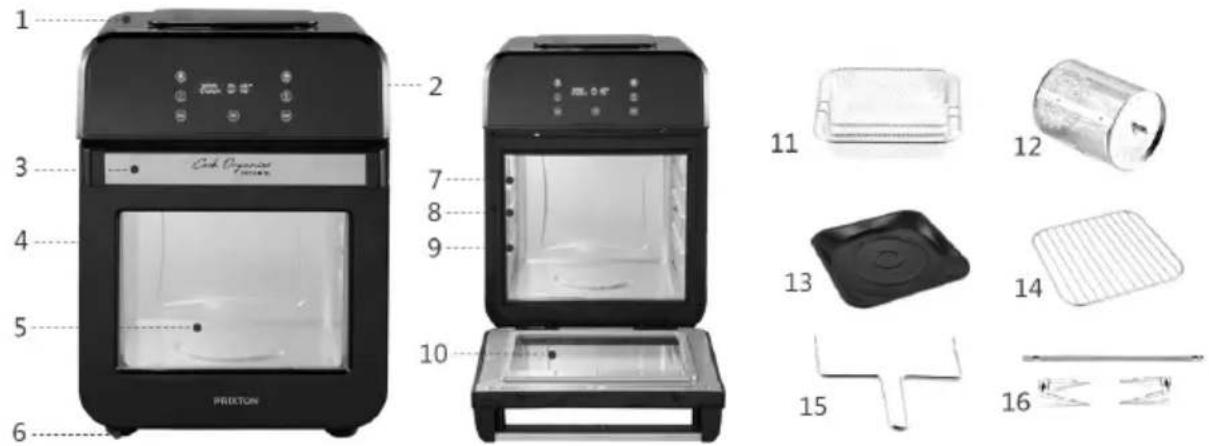
- Product main cover
- Touch-sensor digital control panel
- Door handle
- Door
- Outside of window(PC)
- Non-slip feet
- Top level
-
Middle level
-
Lower level
- Inside of window(Glass)
- Shallow mesh basket
- Rotisserie cage
- Pizza pan(Oil pan)
- Grill Rack
- Rotisserie tong
- Rotisserie forks & spit
Control Panel
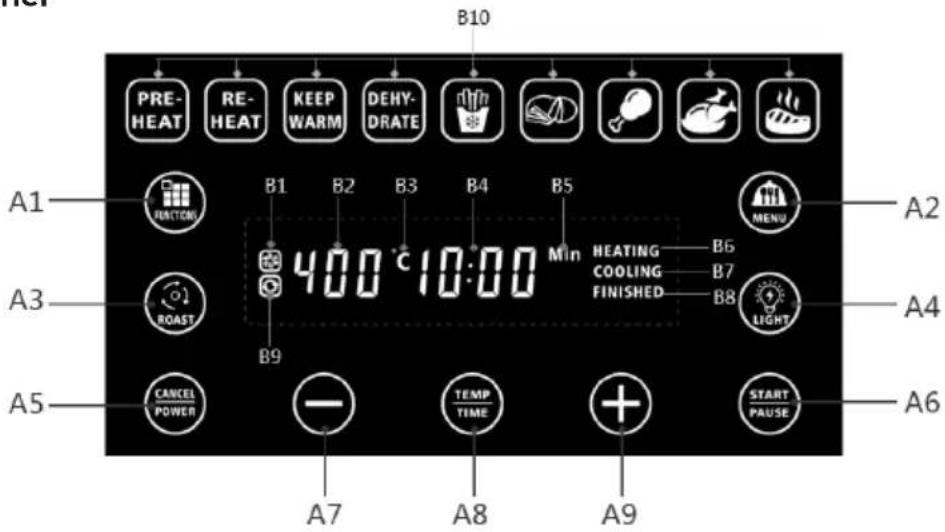
Tousensitive control buttons: A1 - A9 (Can be operating)
A1. Fast start functions select button
A2. Pre-set cooking programs select button
A3. Rotisserie function control button
A4. Inner light function control button
A5. Power / Cancel button
A6. Start / Pause button
A7. Timer/Temperature decrease button
A8. Timer/Temperature control switch button
A9. Timer/Temperature increase button
Indicator icons: A1 – A9 (Can not be operating)
B1. Fan working indicator light
B2. Temperature indicator
B3. Temperature unit icon - degree centi-grade
B4. Timer indicator
B5. Timer unit icon - minutes
B6. Heating indicator light
B7. Cooling indicator light
B8. Finished indicator light
B9. Rotisserie working indicator light
B10. Fast start functions + Pre-set cooking programs icons
OPERATION - Prior to the first use
-
Remove the appliance from the packaging.
-
Clean the appliance thoroughly to remove any manufacturing residues (see "Cleaning and maintenance").
OPERATION - Overheating safeguard
The air fryer oven comes with an overheating safeguard installed. The safeguard is activated once the temperature reaches its threshold. If this happens, you need to cool down the appliance through the following steps:
-
Shut down the appliance by turning both the temperature dial and timer dial all the way to the left. Take the plug from the socket.
-
Give the appliance ample time to cool down.
FUNCTION - Preheat function
The air fryer oven has a preset "Preheat function" of 190°C and 5 minutes.
-
Put the Plug (15) into the socket. You will hear a beep and and (A PEAR) appears and blinking.
-
Press (A) the digital display will switch on. In the display you will see "200°C" and "10 min".
-
Press (A1) one time. The Preheat function Icon PRE-HEAT will be blinking in the icon zone(B10).

-
Press (A) to start.
-
The air fryer oven will start working and the time in the display will run down.
When the air fryer oven is done you will hear a beep, The display appears (B8) and the air fryer oven will enter standby mode.
CAUTION: If you do not press the start button, the air fryer oven will switch to its standby mode after 5 minute.
FUNCTION - Program settings
The air fryer oven has a default setting of 200° C and 10 minutes quick start. But you can adjust this manually.
Adjusting temperature:
- Put the Plug into the socket. You will hear a beep and (A) appears and blinking.
- Press (A) the digital display will switch on. In the display you will see "200°C" and "10 min".
- Press (A) one time, the Set temperature (B2) blinking.
- Press (A) to increase the temperature. The maximum temperature is 200° C.
- Press (A) to decrease the temperature. The minimum temperature is 60° C.
CAUTION: The temperature is adjustable by degrees of 5° C, press (A7) and hold, can adjust the temperature quickly.

(A9) &

When the time shows 60° C blinking, press (A) and it can go back to 200° C.
When the time is at 200° C , press (A) and then it will go back to 60° C .
Adjusting time:
-
After setting the temperature. Press (A) take again, the Set time (B4) blinking.
-
Press (A) to increase the time. You can increase the time up to 60 minutes (the display will read 60:00).
-
Press (A) to decrease the time. You can decrease the time down to 1 minute (the display will read 01:00).
CAUTION: The time is adjustable by degrees of 1 minute, press and hold, can adjust the time quickly.
When the time shows 1 minute blinking, press (A) and it can go back to 60 minutes.
When the time is at 60 minutes, press (A) and then it will go back to 1 minute.
- When you are done setting the temperature and time, press (A START PULSE) to start.
The air fryer oven will switch on and the time in the display will run down, the display appears HEATING (B6).
Start / Pause: During the cooking, press (A6) pause, the air fryer oven will pause working, press (A6) again
to resume working.
When the air fryer oven is done you will hear 3 beeps. The display appears FINISHED (B8) and the air fryer oven will enter standby mode after 1 minute auto cool down. CAUTION: • If you do not press the start button, the air fryer oven will switch to its standby mode after 5 minute.
CAUTION: · After the air fryer oven has started its program you will still able to adjust the time and temperature at any moment by pressing the appropriate buttons.
FUNCTION - Oven lamp
The air fryer oven have a lamp inside, to provide a illumination for the oven cavity, so make the cooking is visible, cooking conditions can be checked from the transparent window.
The lamp can be controlled by the button (A4) which illumination is not needed, press the (A4) switch off, and press it again to switch on once needed.
FUNCTION - Rotisserie function
The air fryer oven has the rotisserie function and accessories for the function.
The rotisserie function can be controlled by the button (A) of the illumination is not needed, press the (A) to switch off, and press it again to switch on once needed.
1. To use the rotisserie cage.
1.1 Place food items in the rotisserie cage.
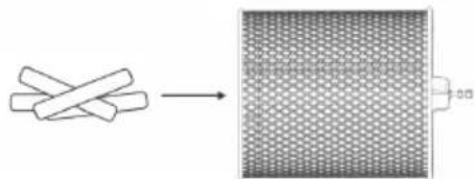
1.2 Close the rotisserie cage and make sure it had been locked.
1.3 With the oven door open, slide the rotisserie cage into the guides into the cooking chamber.
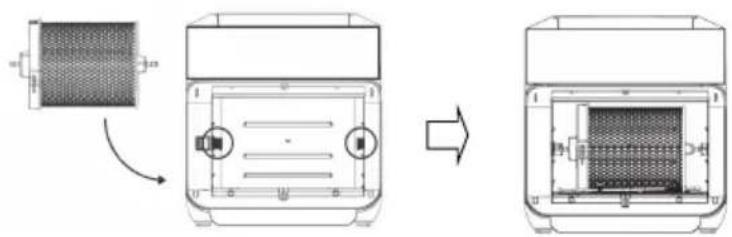

1.4 Close the door and Press (PAUSE) to start after all settings to be done. 1.5 Use the rotisserie tong to remove the cage from cooking chamber.
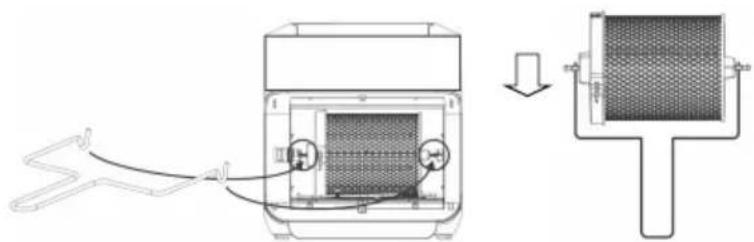
2. To use the rotisserie forks & spit.
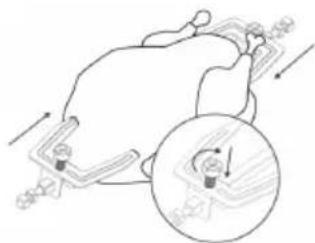
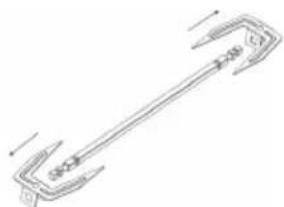
2.1 Unscrew the 2 set screws, and remove the forks from the spit.
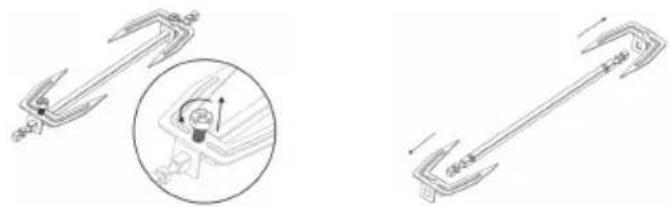
2.2 Push the food item onto the spit.
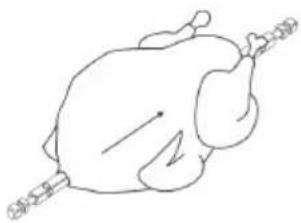
2.3 Slide the forks onto both ends of the spit, ensuring the prongs are inserted into the food item. CAUTION Ensure the food item is able to rotate freely. Do not allow food items to make contact with the heating coil. Tighten the set screw to secure the forks.
2.4 With the oven door open, slide the rotisserie spit into the guides into the cooking chamber.
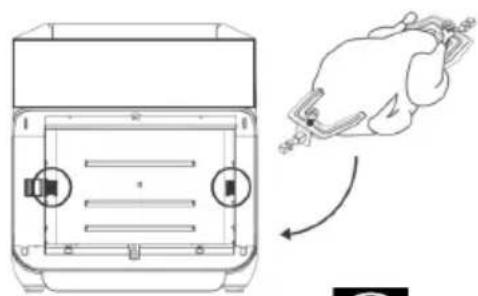
2.5 Close the door and Press

(A6) to start after all settings to be done.
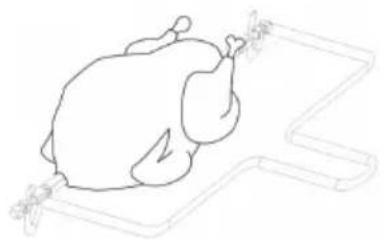
2.6 Use the rotisserie tong to remove the rotisserie spit from cooking chamber.
FUNCTION - Fast start functions and pre-set cooking programs
The air fryer oven is equipped with 4 fast start functions and 5 pre-set cooking programs. With these functions and programs you can easily to cook different foods by selecting the right programs.
4 Fast start functions :
-
Put the Plug (15) into the socket. You will hear a beep and and 📄 (A5) appears and blinking. 📄
-
Press (A5). The digital display will switch on. In the display you will see "200°C" and "10 min".
-
Press (A) zone time. The Preheat function Icon will be binding in the icon zone(B10).
Press (A) again to select next function.
- When you are done selecting the function, Press START PAUSE (A6) to start.
The air fryer oven will switch on and the time in the display will run down.
| Icons | Menus | Temp (°C) | Time (Min) | ||
 | Pre-heat 190 5 | ||||
 | Re-heat 200 5 | ||||
 | Keep warm 60 10 | ||||
 | Dehydrate 60 25 |
5 Pre-set cooking programs :
-
Put the Plug (15) into the socket. You will hear a beep and and (A) appears and blinking.
-
Press (A5). The digital display will switch on. In the display you will see "200°C" and "10 min".
-
Press zone(B10). (A2) one time. The Frozen Chips Icon will be blinking in the icon
Press (A2) again to select next program.
- When you are done selecting the program, Press START PAUSE (A6) to start.
The air fryer oven will switch on and the time in the display will run down.
| Icons Menus Temp (°C) Time (Min) | Suggested Weight | |||
 | Frozen Chips 200 25 | 1.0~1.2KG use the rotisserie cage | ||
 | Home Made Chips 200 35 | 1.0~1.2KG use the rotisserie cage | ||
 | Frozen Chicken Drumsticks 200 15 1.0kg(about 6pcs) | |||
 | Fried Chicken 200 35 | 0.5kg use rotisserie function | ||
 | Steak 180 15 200g*2 | |||
CAUTION: · If you do not press the start button, the air fryer oven will switch to its standby mode after 5 minute.
CAUTION: · After the air fryer oven has started its program you will still able to adjust the time and temperature at any moment by pressing the appropriate buttons except Dehydrate function.
OPERATION - Micro-switch protection
Cautions: The air fryer oven comes with a Micro-switch. The safeguard is activated once the door is opened during the air fryer oven working, the appliance will stop heating, fan and stirring motor also stop working, time pause until the door is closed properly, the appliance will continue working and the time countdown.
OPERATION - Cool down protection
Cautions: The air fryer oven comes with Cool down protection, when the setting time is up, you will hear a beep, then the air fryer oven will stop heating, but the fan will continue running for extra 1 minute to cool down the interior to protect the fuse and PCB,
the display appears COOLING (B7), the air fryer oven will switch to its standby mode after 1 minute.
CLEANING AND MAINTENANCE
Clean the appliance and its loose parts thoroughly after each use.
-
Switch off the air fryer oven and take the plug out of the socket.
-
Let the appliance cool down.
-
Take all the accessories from the appliance.
-
Remove remaining food parts by wiping them off with absorbent paper towels.
-
Clean the accessories thoroughly with hot water, dish-washing soap and a non-grating sponge.
The accessories can also be cleaned in a dish-washing machine. Dry them off thoroughly after cleaning.
-
Clean the housing and interior cavity with a moist towel, if need be with some dish-washing soap added to it. Dry it off thoroughly after cleaning.
-
Reassemble the parts.
-
Store the appliance in a dry place.
CAUTION: · Verify that the appliance is not connected to the power supply before you clean it.
CAUTION: • Never use corrosive or scouring cleaning agents or sharp objects (such as knives or hard brushes) to clean the appliance.
CAUTION: · Never immerse the heating element unit in water or another liquid and never place it under flowing water.
THE ENVIRONMENT
- Dispose of packaging material, such as plastic and boxes, in the appropriate waste containers. When this product reaches the end of its useful life do not dispose of it by putting it in a dustbin; hand it in at a collection point for the reuse of electrical and electronic equipment. Please refer to the symbols on the product, the user's instructions or the packing. The materials can be re-used as indicated. Your help in the re-use, recycling or other means of making use of old electrical equipment will make an important contribution to the protection of the environment. This marking indicates that this product should not be disposed with other household wastes. To prevent possible harm to the environment or human health from uncontrolled waste disposal, recycle it responsibly to promote the sustainable reuse of material resources. To return your used device, please use the return and collection systems or contact the retailer where the product was purchased. They can take this product fro the environmental safe recycling.
| Model / Model Number | COOK ORGANICS PRO AIR 12L |
| Operating Voltage | 220-240V ~50/60Hz |
| Power Consumption | 1500W |

Trouble Shooting
| PROBLEM | POSSIBLE CAUSES | SOLUTIONS |
| The air fryer oven does not work | The appliance is not plugged in. You have not turned the Unit on, set the preparation time, or temperature. | Double check if the power order is connect to the appliance properly. Then plug power cord into wall socket.Press the Power On button. Select a Preset menu or select Time and Temperature. Press the Start/Pause button and cooking will begin. |
| You have probably turned off the Unit. If you pressed the Power button while the Unit is cooking it will trigger the ‘shut down’ mode. | Press the power On button. Select a Preset menu or select Time and Temperature. Press the Start/Pause button and cooking will begin. | |
| The door is not closed properly, the micro-switch | Close the door and push it a bit until you hear a “Click”. | |
| Food not cooked | Food overload. | Use smaller batches for more even frying. |
| The set temperature is too low. | Use the Temperature + button to raise the temperature and continue cooking (see section ‘Recommended settings’ in chapter ‘Using the appliance’. | |
| Snacks are not fried crispy | You used a type of snacks meant to be prepared in a traditional deep fryer. | Use oven snacks or lightly brush some oil onto the snacks for a crispy result. |
| White smoke coming from Unit | Greasy ingredients, or too much oil being used. | When you fry greasy ingredients in the air fryer oven, a large amount of oil will leak out. The oil produces white smoke and the pan may heat up more than usual. This does not affect the appliance or the end result. |
| Accessories has grease residue from previous cooking. | White smoke is caused by grease heating up in the Accessories. Make sure you clean it properly after each use. | |
| Fresh fries are not fried unevenly | Wrong type of potato being used. | Use fresh, firm potatoes. |
| Potatoes not rinsed properly during preparation. | Rinse the potato sticks properly to remove starch from the outside of the sticks. | |
| Fresh fries are not crispy when they come out of the air fryer | The crispiness of the fries depends on the amount of oil and water in the fries. | Dry potato sticks properly before adding oil. |
| Cut sticks smaller. | ||
| Add a bit more oil. | ||
| Error | E1 - Broken circuit of the thermal sensorE2 - Short circuit of the thermal sensor or PCB | Call Customer Service at ..... |
Frequently Asked Questions
| 1. Can I prepare foods other than fried dishes with my Air fryer oven?You can prepare variety of dishes including steaks, chops, burgers and baked goods.See thein this manual. |
| 2. Is the Air fryer oven good for making or reheating soups and sauces?Never cook or reheat liquids in the Air fryer oven. |
| 3. Is it possible to shut off the Unit at any time?Press the power button once or open the door. |
| 4. What do I do if the Unit shuts down while cooking?As a safety feature the Air fryer oven has an auto shut off device that prevents damage from overheating. Remove the Cooking Pan and set it on a heat resistant surface. Allow the Unit to cool down. Remove the power cord from the socket. Restart with the Power On Button after the air fryer oven is cool down. |
| 5. Does the Unit need time to heat up?If you are cooking from a “cold start”, add 3 minutes to the cooking time to compensate. Or you can select the “Preheat Function” and preheat the air fryer at 190°C 5mins before your cooking. |
| 6. Is the Air fryer oven dishwasher safe?Only the accessories are dishwasher safe. The Unit itself containing the heating coil and electronic should never be submersed in liquid of any kind or cleaned with anything more than a hot moist cloth or nonabrasive sponge with a small amount of mild detergent. |
| 7. What happens if the Unit still does not work after I have tried all the troubleshooting suggestions?Never attempt a home repair. Contact the Service Center and follow the procedures set forth by the warranty.Failure to do so could render your warranty null and void. |

This product is guaranteed for 2 years from the date of purchase. When you have a problem that you can not solve, you must access the web www.prixton.com and click on the contact option to send us your assistance form.
Simplified eu declaration of conformity
We, La Trastienda Digital located in Avenida Cervantes 49, módulo 25, Basauri 48970, Bizkaia hereby declare that the following goods, imported and selling at European market:
| BRAND | MODEL NAME DESCRIPTION | CATEGORY | |
| Prixton | COOK ORGANICS PRO AIR 12L | AIR FRYER | Home |
Are in compliance with the EC Council Directive of 2014/53/EU (EM DIRECTIVE) and harmonized standards and with the board of the 16th of April 2014.
The complete text of the UE Declaration of conformity is available anytime at this website address:
www.prixton.com
LA TRASTIENDA DIGITAL
ISTRUZIONI DI SICUREZZA – Regole generali
2. Per usare le forchette girarrosto e lo spiedo.

- SAFETY INSTRUCTIONS - GENERAL
- SAFETY INSTRUCTIONS - ELECTRICITY AND HEAT
- OPERATION - GENERAL
- CONTROL PANEL
- TOUSENSITIVE CONTROL BUTTONS: A1 - A9 (CAN BE OPERATING)
- INDICATOR ICONS: A1 – A9 (CAN NOT BE OPERATING)
- OPERATION - PRIOR TO THE FIRST USE
- OPERATION - OVERHEATING SAFEGUARD
- FUNCTION - PREHEAT FUNCTION
- FUNCTION - PROGRAM SETTINGS
- ADJUSTING TEMPERATURE
- ADJUSTING TIME
- FUNCTION - OVEN LAMP
- FUNCTION - ROTISSERIE FUNCTION
- TO USE THE ROTISSERIE CAGE
- TO USE THE ROTISSERIE FORKS & SPIT
- FUNCTION - FAST START FUNCTIONS AND PRE-SET COOKING PROGRAMS
- 4 FAST START FUNCTIONS
- 5 PRE-SET COOKING PROGRAMS
- OPERATION - MICRO-SWITCH PROTECTION
- OPERATION - COOL DOWN PROTECTION
- CLEANING AND MAINTENANCE
- THE ENVIRONMENT
- FREQUENTLY ASKED QUESTIONS
- SIMPLIFIED EU DECLARATION OF CONFORMITY
- ISTRUZIONI DI SICUREZZA – REGOLE GENERALI
- PER USARE LE FORCHETTE GIRARROSTO E LO SPIEDO
Brand : Prixton
Model : Cook Organics Pro Air
Category : Deep fryer