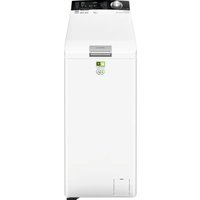
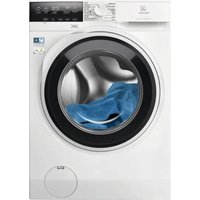
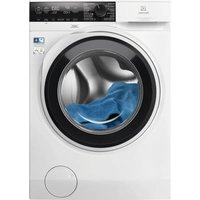
WASL5T500 - Washing machine ELECTROLUX - Free user manual and instructions
Find the device manual for free WASL5T500 ELECTROLUX in PDF.


| Product type | Washing machine |
| Brand | Electrolux |
| Model | WASL5T500 |
| Dimensions (W x H x D) | 39.7 cm x 90.3 cm x 59.9 cm |
| Power supply | 230 V ~ 50 Hz, 2100 W, 10 A |
| Water pressure | 0.5 bar (min) to 10 bars (max) |
| Maximum capacity (cotton) | 6 kg |
| Wash programmes | Eco 40-60, Cotton, Synthetics, Delicates, Wool/Silk, Steam, PowerClean 59min, 20 min - 3 kg, Outdoor, Duvet |
| Options | Anti-Allergy, Time Save, Temperature, Spin (with Rinse Hold and Extra Silent), Stains/Pre-wash, Extra Rinse, Delay Start, Steam Plus, Soft Plus |
| Smart functions | PowerCare (load detection), Child lock, Adjustable audible signal, Permanent extra rinse |
| Maximum spin speed | 1500 rpm |
| Protection rating | IPX4 |
| Maintenance and cleaning | Descaling (2x/year), maintenance wash (1x/month), cleaning door seal, drum, detergent drawer, pump filter, inlet hose |
| Safety | Anti-flood device (AquaStop), child lock, door lock |
| Spare parts availability | At least 10 years after model discontinuation |
| Warranty | 2 years (parts and labor) |
Frequently Asked Questions - WASL5T500 ELECTROLUX
User questions about WASL5T500 ELECTROLUX
0 question about this device. Answer the ones you know or ask your own.
Ask a new question about this device
Download the instructions for your Washing machine in PDF format for free! Find your manual WASL5T500 - ELECTROLUX and take your electronic device back in hand. On this page are published all the documents necessary for the use of your device. WASL5T500 by ELECTROLUX.
USER MANUAL WASL5T500 ELECTROLUX
natural_image
Simple line drawing of a smartphone with no text or symbolsWASL5T500
EN User Manual | Washing Machine 2
Welcome to Electrolux! Thank you for choosing our appliance.

In our drive to be sustainable, we are reducing paper assets and provide full user manuals online. Access your full user manual at electrolux.com/manuals

Get usage advice, brochures, troubleshooting, service and repair information at electrolux.com/support

Buy accessories, consumables, and original spare parts for your appliance at electrolux.com/shop
Subject to change without notice.
CONTENTS
- SAFETY INFORMATION......2
- SAFETY INSTRUCTIONS......4
- INSTALLATION....6
- PRODUCT DESCRIPTION....9
- TECHNICAL INFORMATION....10
- CONTROL PANEL....11
- PROGRAMME CHART....13
- OPTIONS.... 16
- SETTINGS.... 19
- DAILY USE....20
- CARE AND CLEANING.... 23
- CONSUMPTION VALUES...... 26
- QUICK GUIDE...... 28
- ALARM CODES AND POSSIBLE FAILURES.... 30
- GUARANTEE 31
- ENVIRONMENTAL CONCERNS....32
1. ⚠SAFETY INFORMATION

Before beginning the installation and use of this chance, carefully read the supplied instructions.
The manufacturer is not responsible for any injuries or damage that are the result of incorrect installation or usage. Always keep the instructions in a safe and accessible location for future reference.
1.1 Children and vulnerable people safety
- This appliance can be used by children aged from 8 years and above and persons with reduced physical, sensory or
2 ENGLISH
mental capabilities or lack of experience and knowledge if they have been given supervision or instruction concerning the use of the appliance in a safe way and understand the hazards involved.
- Children between 3 and 8 years of age and persons with very extensive and complex disabilities shall be kept away from the appliance unless continuously supervised.
- Children of less than 3 years of age should be kept away from the appliance unless continuously supervised.
- Children should be supervised to ensure that they do not play with the appliance.
- Keep all packaging away from children and dispose of it appropriately.
- Keep detergents away from children.
- Keep children and pets away from the appliance when the door is open.
- If the appliance has a child safety device, it should be activated.
- Children shall not carry out cleaning and user maintenance of the appliance without supervision.
1.2 General Safety
- This appliance is for washing domestic-type, machine-washable laundry only.
- This appliance is designed for single household domestic use in an indoor environment.
- This appliance may be used in offices, hotel guest rooms, bed & breakfast guest rooms, farm guest houses and other similar accommodation where such use does not exceed (average) domestic usage levels.
- Do not change the specification of this appliance.
-
The appliance maximum load is 6 kg. Do not exceed the maximum load of each programme (refer to the “Programmes” chapter).
-
The operating water pressure at the water entry point from the outlet connection must be between 0.5 bar (0.05 MPa) and 10 bar (1.0 MPa).
- The ventilation opening in the base must not be covered by a carpet, mat, or any floor covering.
- The appliance must be connected to the water mains using the new supplied hose sets, or other new hose sets supplied by the Authorised Service Centre.
- Old hose sets must not be reused.
- If the mains power supply cable is damaged, it must be replaced by the manufacturer, its Authorised Service Centre or similarly qualified persons to avoid an electrical hazard.
- Before any maintenance operation, deactivate the appliance and disconnect the mains plug from the socket.
- Do not use high pressure water sprays and/or steam to clean the appliance.
- Clean the appliance with a moist cloth. Use only neutral detergents. Do not use abrasive products, abrasive cleaning pads, solvents or metal objects.
2. SAFETY INSTRUCTIONS
2.1 Installation

The installation must comply with relevant national regulations.
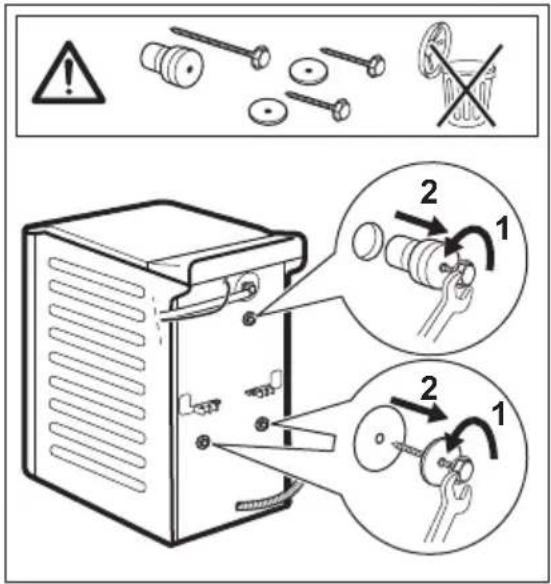
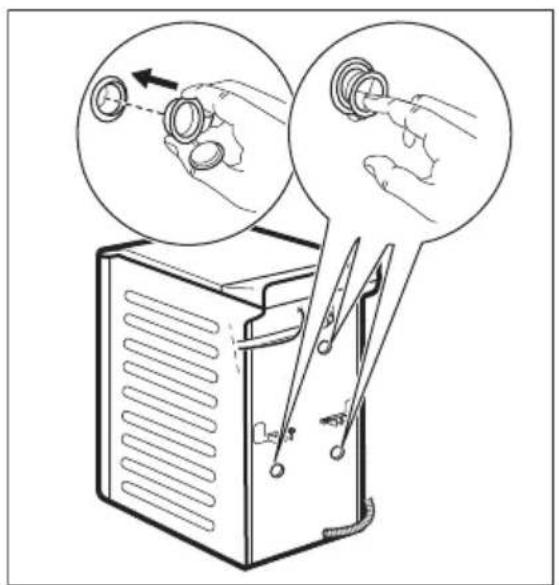
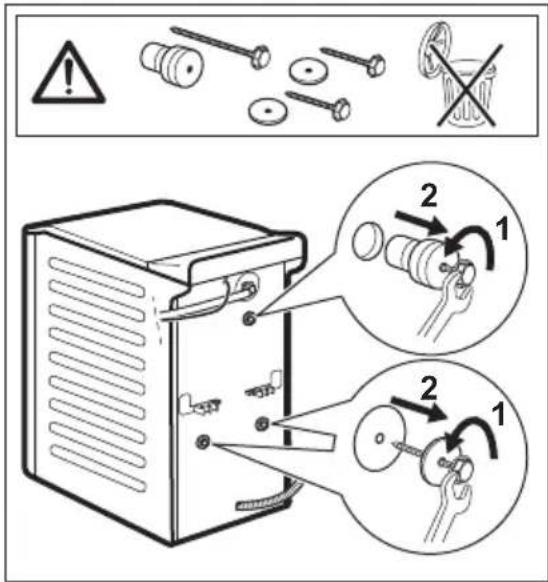
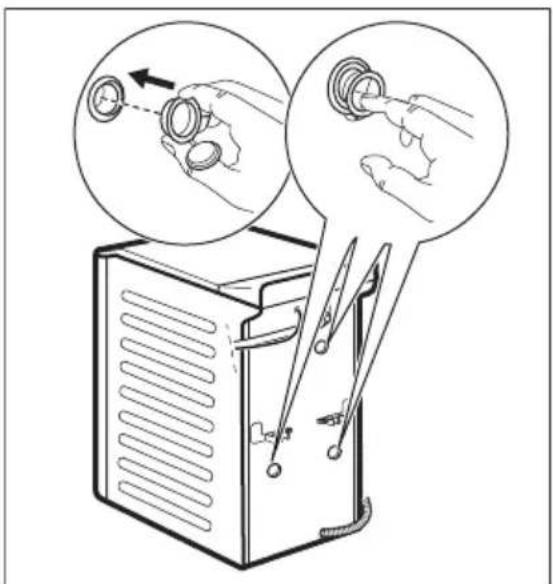
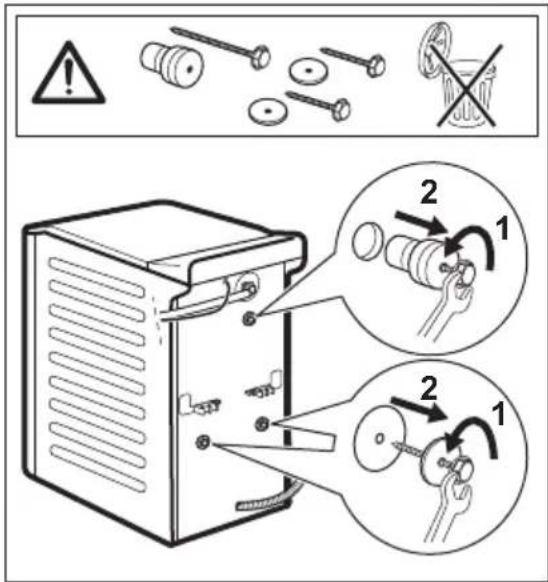
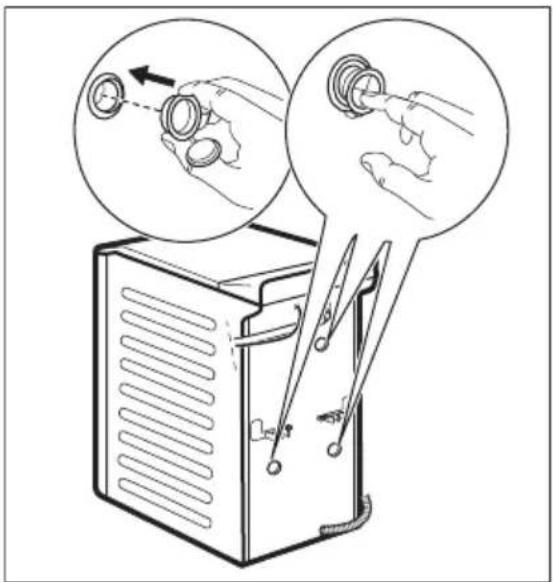
- Remove all the packaging and the transit bolts including rubber bush with plastic spacer.
- Keep the transit bolts in a safe place. If the appliance is to be moved in the future they must be reattached to lock the drum to prevent an internal damage.
• Always take care when moving the appliance as it is heavy. Always use safety gloves and enclosed footwear. - Follow the installation instructions supplied with the appliance.
-
Do not install or use a damaged appliance.
-
Do not install or use the appliance where the temperature can be less than 0°C or where it is exposed to the weather.
- The floor area on which the appliance is to be installed must be flat, stable, heat resistant and clean.
- Make sure that there is air circulation between the appliance and the floor.
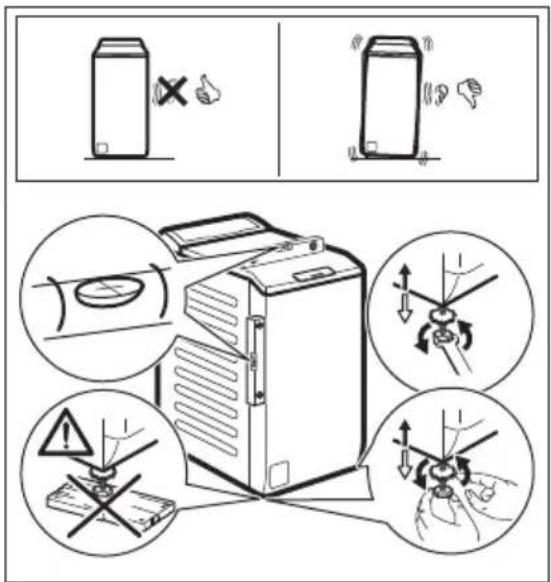
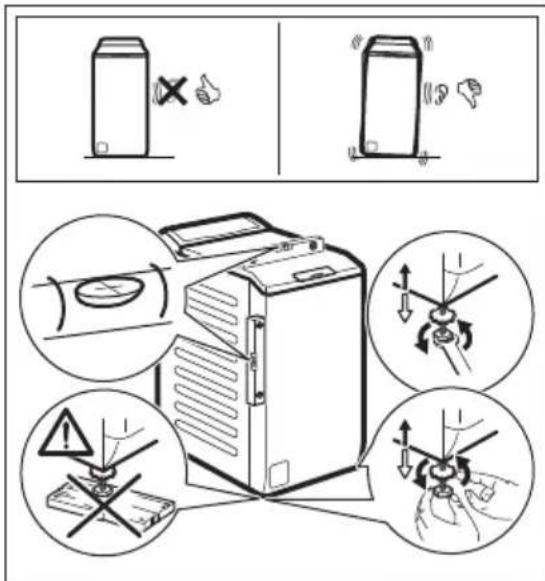
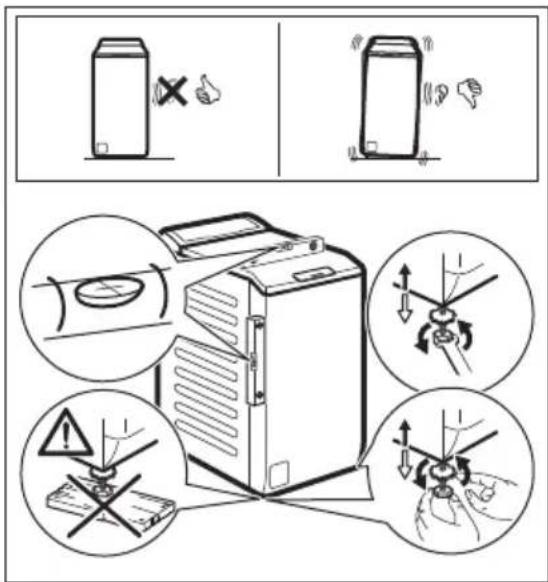
- When the appliance is in its permanent position, check if it is levelled correctly with the aid of a spirit level. If it is not, adjust the feet accordingly.
- Do not install the appliance directly above a floor drain.
- Do not spray water on the appliance and do not expose it to excessive humidity.
- Do not install the appliance where the appliance lid cannot be fully opened.
- Do not put a closed container to collect possible water leakage under the appliance. Contact the Authorised Service
Centre to ensure which accessories can be used.
2.2 Electrical connection

WARNING!
Risk of fire and electric shock.
- WARNING: This appliance is designed to be installed / connected to a grounding connection in the building.
• Always use a correctly installed shockproof socket. - Make sure that the parameters on the rating plate are compatible with the electrical ratings of the mains power supply.
- Do not use multi-plug adapters and extension cables.
- Make sure not to cause damage to the mains plug and to the mains cable. Should the mains cable need to be replaced, this must be carried out by our Authorised Service Centre.
- Connect the mains plug to the mains socket only at the end of the installation. Make sure that there is access to the mains plug after the installation.
- Do not touch the mains cable or the mains plug with wet hands.
- Do not pull the mains cable to disconnect the appliance. Always pull the mains plug.
2.3 Water connection
• The inlet water shall not exceed 25 °C.
- Do not cause damage to the water hoses.
- Before connection to new pipes, pipes not used for a long time, where repair work has been carried out or new devices fitted (water meters, etc.), let the water flow until it is clean and clear.
- Ensure that there are no visible water leaks during and after the first use of the appliance.
- Do not use an extension hose if the inlet hose is too short. Contact the Authorised Service Centre for the replacement of the inlet hose.
- When unpacking the appliance, It is possible to see water flowing from the drain hose. This is due to the testing of the appliance with the use of water in the factory.
- You can extend the drain hose to maximum 400 cm. Contact the Authorised Service Centre for the other drain hose and the extension.
- Make sure that there is access to the tap after the installation.
2.4 Use

WARNING!
Risk of injury, electric shock, fire, burns or damage to the appliance.
- Follow the safety instructions on the detergent packaging.
- Do not put flammable products or items that are wet with flammable products in, near or on the appliance.
- Do not wash fabrics which are heavily soiled with oil, grease or other greasy substances. It can damage rubber parts of the appliance. Prewash such fabrics by hand before loading them into the appliance.
- Do not use laundry fragrances to avoid the risk of damaging plastic and rubber parts of the appliance.
- Make sure that all metal objects are removed from the laundry.
2.5 Service
- To repair the appliance contact the Authorised Service Centre. Use original spare parts only.
- Please note that self-repair or non-professional repair can have safety consequences and might void the guarantee.
- The following spare parts are available for at least 10 years after the model has been discontinued: motor and motor brushes, transmission between motor and drum, pumps, shock absorbers and springs, washing drum, drum spider and related ball bearings, heaters and heating elements, including heat pumps, piping and related equipment including hoses, valves, filters and aquastops, printed circuit boards, electronic displays, pressure switches, thermostats and sensors, software and firmware including reset software, door, door hinge and seals, other seals, door locking assembly,
plastic peripherals such as detergent dispensers. The duration may be longer in your country. For further information, please visit our website.
- Please note that some of these spare parts are only available to professional repairers, and that not all spare parts are relevant for all models.
- Concerning the lamp(s) inside this product and spare part lamps sold separately: These lamps are intended to withstand extreme physical conditions in household appliances, such as temperature, vibration, humidity, or are intended to signal information about the operational status of the appliance. They are not intended to be used in other applications and are not suitable for household room illumination.
2.6 Disposal

WARNING!
Risk of injury or suffocation.
- Disconnect the appliance from the mains electrical and water supplies.
- Cut off the mains electrical cable close to the appliance and dispose of it.
- Remove the door catch to prevent children or pets from becoming trapped in the drum.
- Dispose of the appliance in accordance with local requirements for the disposal of Waste Electrical and Electronic Equipment (WEEE).
3. INSTALLATION

WARNING!
Refer to Safety chapters.
3.1 Unpacking and positioning
1.
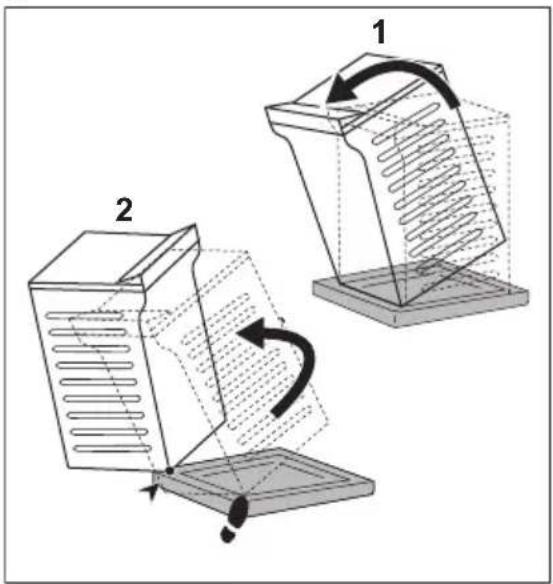
2.
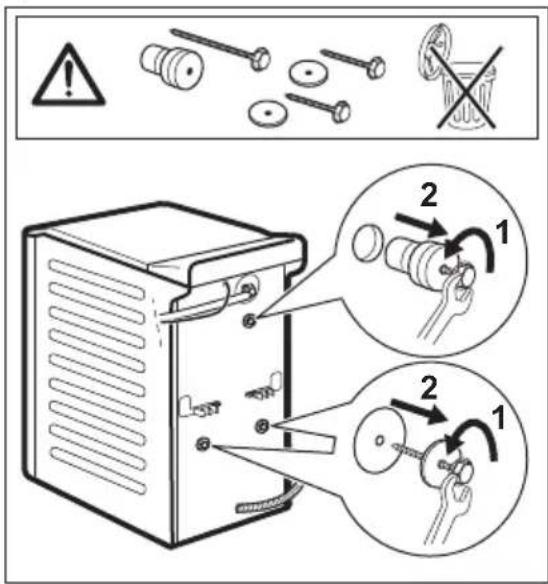
3.4.
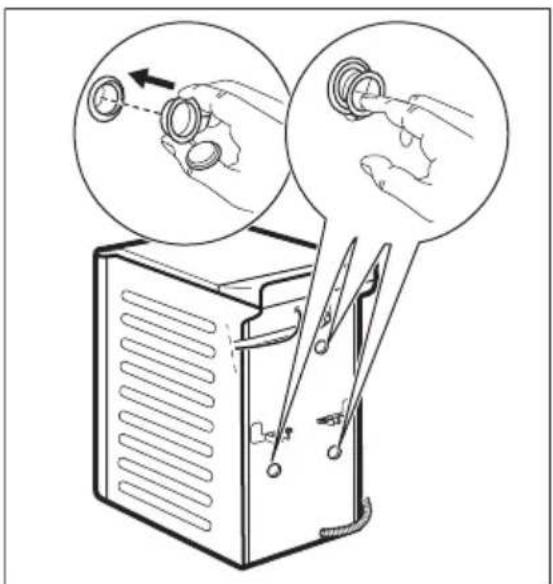
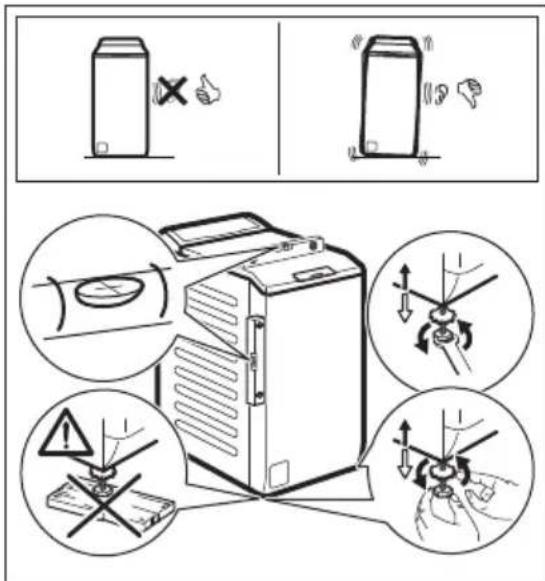
Adjust the appliance correctly to prevent vibration, noise and movement of the appliance when it operates.

WARNING!
Do not put cardboard, wood or equivalent materials below the appliance feet to adjust the level.

Make sure that carpets do not stop the air circulation below the appliance. Make sure that the appliance does not touch the wall or other units.
We recommend that you keep the packaging and the transit bolts for any transport of the appliance.
3.2 The inlet hose
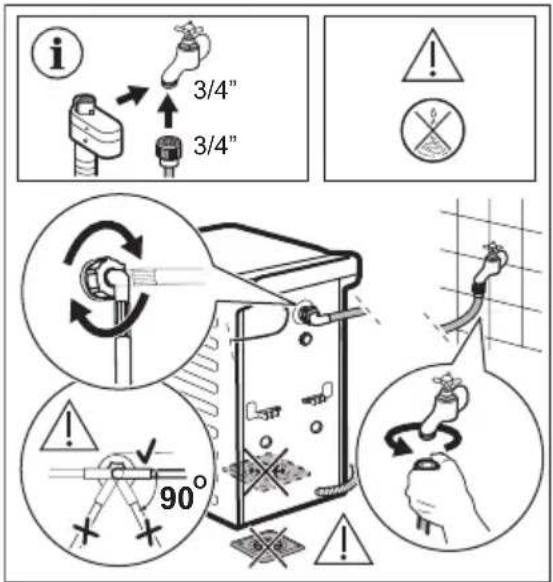
Accessories delivered with the appliance may vary depending on the model.

Make sure there is no damage to hoses and there are no leaks from the couplings. Do not use an extension hose if the inlet hose is too short. Contact the service centre for information on inlet hose replacement.
Some model can contain inlet hose with water stop device. It prevents any leaks in the hose because of its natural ageing.
The sector in the window shows this fault. If this occurs, close the water tap and contact the authorized service centre for information to replace the hose.
Subject to change spare parts without notice. Buy accessories from authorized supplier.
3.3 Water drainage
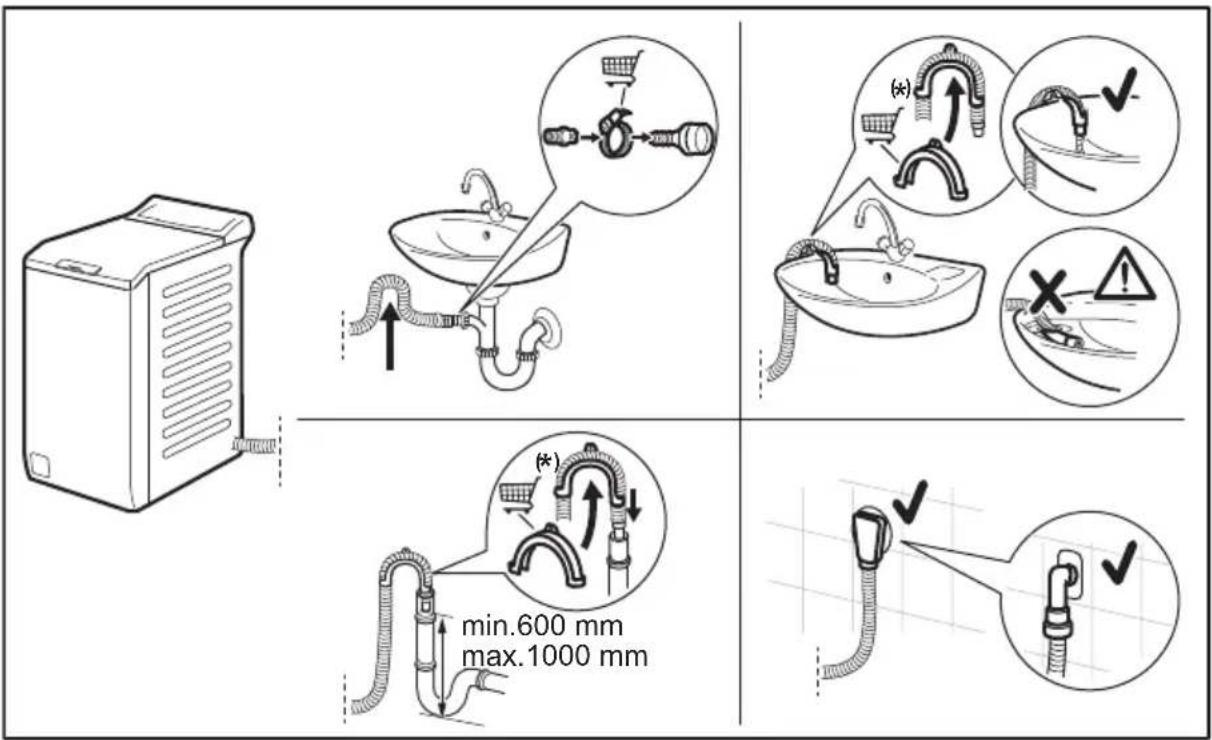

Subject to change without notice.
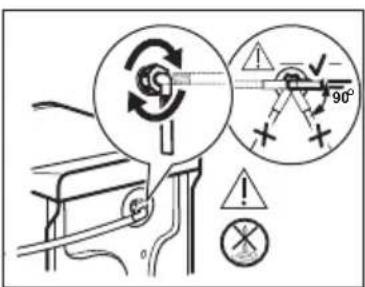
The drain hose should stay at a height of no less than 600 mm and not more than 1000 mm. You can extend the drain hose to maximum 4000 mm. Contact the authorised service centre for the other drain hose and the extension.
3.4 Water-stop device
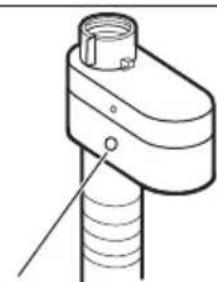
The inlet hose has a water stop device. This device prevents water leaks in the hose because of its natural ageing.
The red sector in the window «A» shows this fault.
natural_image
Technical line drawing of a mechanical component with threaded shaft and housing (no text or symbols)A
If this occurs, close the water tap and contact the authorized service centre for information on inlet hose replacement.
3.5 Electrical connection
At the end of installation you can connect the mains plug to the mains socket.
The rating plate and the 'Technical Data' chapter indicate the necessary electrical ratings. Make sure that they are compatible with the mains power supply.
Check that your domestic electrical installation can take the maximum load required, also taking into account any other appliances may also be in use.
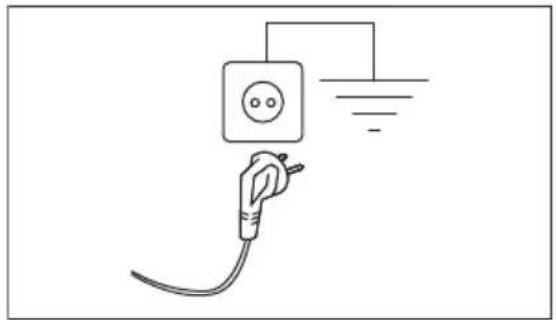
Connect the appliance to an earthed socket.
natural_image
Simple line drawing of an electric plug connected to a power outlet (no text or symbols)The power supply cable must be easily accessible after installing the appliance.
For any electrical work required to install this appliance, contact our Authorised Service Centre.
The manufacturer does not accept any responsibility for damage or injury through failure to comply with the above safety precaution.
4. PRODUCT DESCRIPTION
4.1 Appliance overview
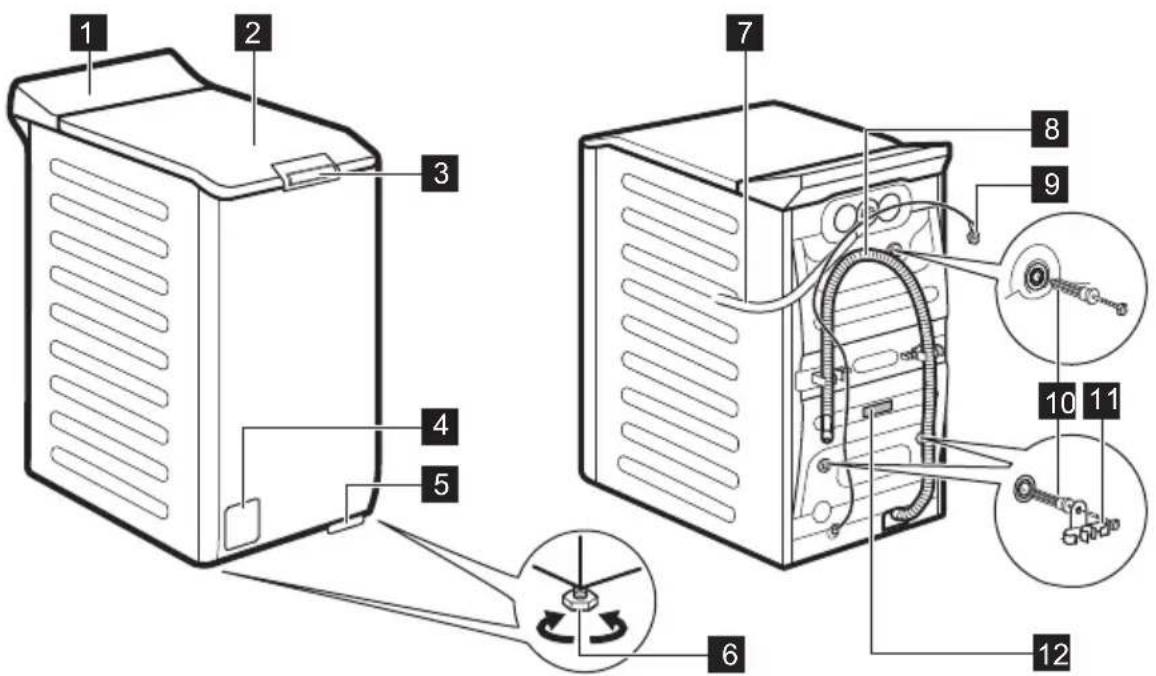
1 Control panel
2 Lid
3 Lid push handle
4 Drain pump filter
5 Lever to move the appliance
6 Feet for levelling the appliance
7 Inlet hose
8 Drain hose
9 Mains cable
10 Transit bolts
11 Hose support
12 Rating plate
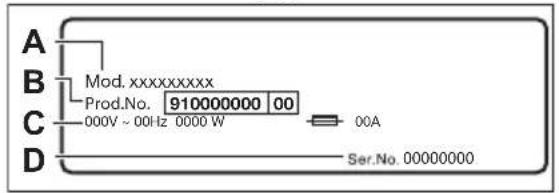
Information for register product.
The rating plate reports the model name (A), product number (B), electrical ratings (C) and serial number (D).
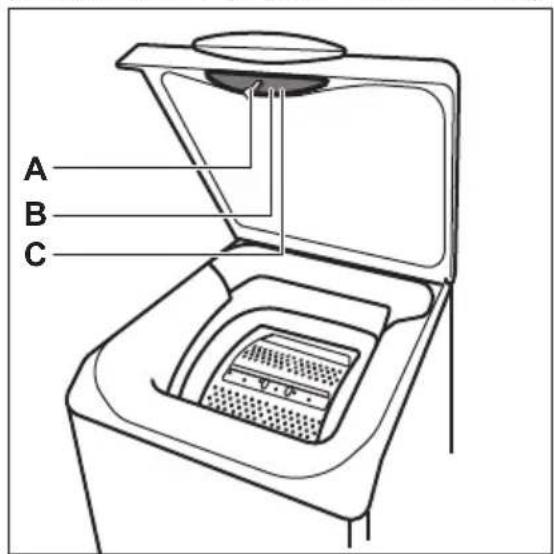
The info label reports the model name (A), product number (B) and serial number (C).
5. TECHNICAL INFORMATION
| Dimension | Width/ Height/ Total depth | 39,7 cm /90,3 cm /59,9 cm |
| Electrical connection | Voltage | 230 V |
| Overall power | 2100 W | |
| Fuse | 10 A | |
| Frequency | 50 Hz | |
| Level of protection against ingress of solid particles and moisture ensured by the protective cover, except where the low voltage equipment has no protection against moisture | IPX4 | |
| Water supply pressure | Minimum | 0.5 bar (0.05 MPa) |
| Maximum | 10 bar (1.0 MPa) | |
| Water supply 1) | Cold water | |
| Maximum Load | Cotton | 6 kg |
1) Connect the water inlet hose to a water tap with a 3/4" thread.
6. CONTROL PANEL
6.1 Control panel description
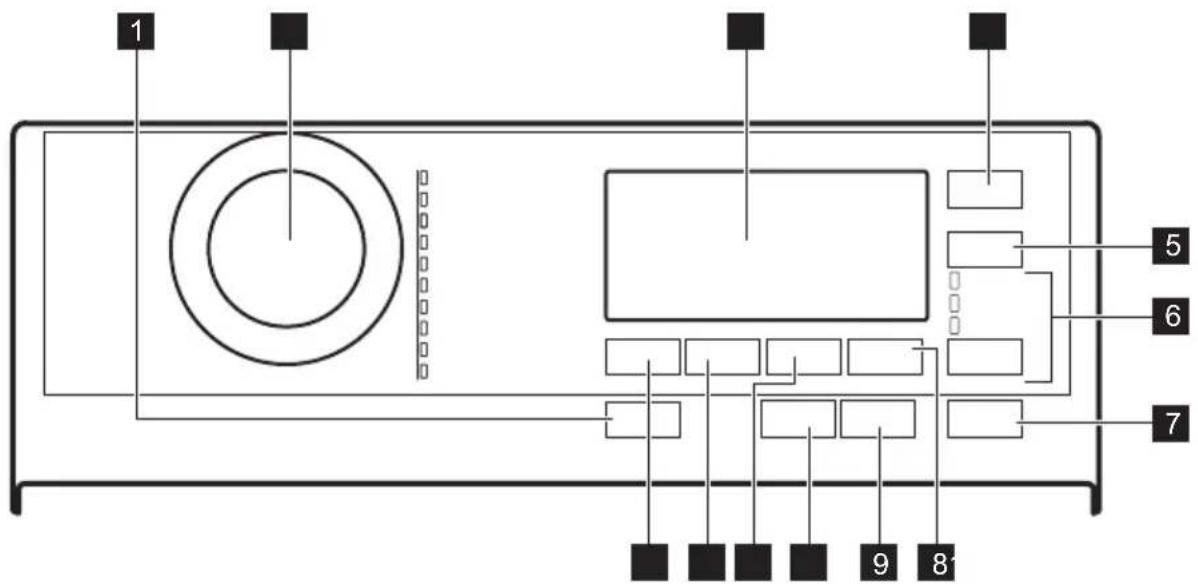
flowchart
graph TD
    A["1"] --> B(( ))
    B --> C[" "]
    B --> D[" "]
    B --> E[" "]
    B --> F[" "]
    B --> G[" "]
    B --> H[" "]
    B --> I[" "]
    B --> J[" "]
    B --> K[" "]
    B --> L[" "]
    B --> M[" "]
    B --> N[" "]
    B --> O[" "]
    B --> P[" "]
    B --> Q[" "]
    B --> R[" "]
    B --> S[" "]
    B --> T[" "]
    B --> U[" "]
    B --> V[" "]
    B --> W[" "]
    B --> X[" "]
    B --> Y[" "]
    B --> Z[" "]
    B --> AA[" "]
    B --> AB[" "]
    B --> AC[" "]
    B --> AD[" "]
    B --> AE[" "]
    B --> AF[" "]
    B --> AG[" "]
    B --> AH[" "]
    B --> AI[" "]
    B --> AJ[" "]
    B --> AK[" "]
    B --> AL[" "]
    B --> AM[" "]
    B --> AN[" "]
    B --> AO[" "]
    B --> AP[" "]
    B --> AQ[" "]
    B --> AR[" "]
    B --> AS[" "]
    B --> AT[" "]
    B --> AU[" "]
    B --> AV[" "]
    B --> AW[" "]
1 Ein/Aus - Marche/Arrêt push button
2 Programme dial
3 Display
4 Zeitvorwahl - Départ Différé touch button
5 Zeit Sparen - Gain de temps touch button
6 Options touch button
- Nur Spülen - Rinçage
• Schleudern - Essorage - Abpumpen - Vidange
7 Start/Pause - Départ/Pause touch button
8 Extra Spülen - Rinçage Plus touch button
9 Anti-Allergy touch button
10 Plus Dampf - Vapeur Plus touch button
11 Flecken/Vorw. - Taches/Prélav. touch button
12 Schleudern - Essorage touch button
13 Temp. touch button
6.2 Display
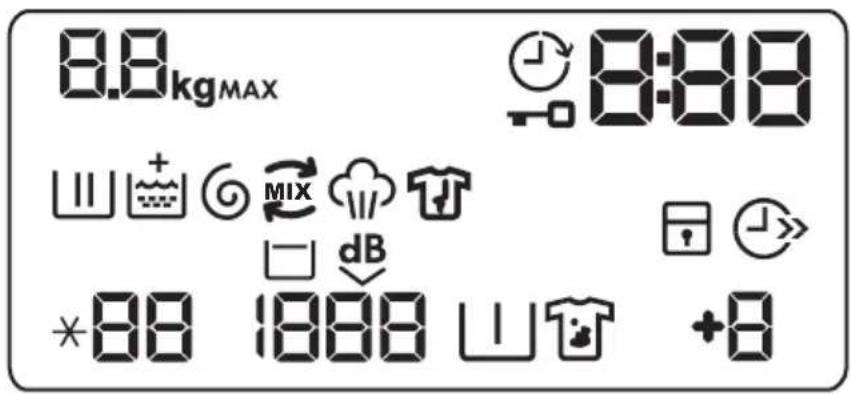
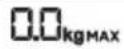 | Maximum load indicator. The "non flashes during laundry load estimation (refer to "PROSENSE load detection" paragraph). |
 | Maximum laundry indicator. It flashes when the laundry load exceeds the maximum declared load of the selected programme. |
 | Delay start indicator. |
 | Door locked indicator. |
 | The digital indicator can show:Programme duration (e.g.)240Delay time (e.g. 0)2hCycle end()DWarning code (e.g.)E20Indication of total operating hours of the appliance. Refer to the "Operating hours counter" section in the "Settings" paragraph for more details. |
 | Washing phase indicator: it flashes during prewash and wash phase. |
 | Rinsing phase indicator: it flashes during rinse phase. |
 | The Indicator appears when the Soft Plus option is activated. |
 | Spin and drain phase indicator. It flashes during spin and drain phase. |
 | PowerCare indicator. |
 | Steam phase indicator. |
 | Anti-crease phase indicator. Read the paragraph Plus Dampf - Vapeur Plus for more details. |
 | Child safety lock indicator. |
 | Time saving indicator. |
 | Temperature indicator. The * indicator appears when a cold wash is set. |
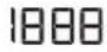 | Spin speed indicator. |
 | Rinse hold indicator. |
 | Extra Silent indicator. |
 | Pre-wash indicator. |
 | Stain indicator. |
 | Extra rinse indicator. |
7. PROGRAMME CHART
Washing programmes
| ProgrammeDefault temperatureTemperature range | Referencespin speedSpin speed range | Maximum load | Programme description |
| Eco 40-60 40^ 1) | 1500 rpm1500 - 400rpm | 6 kg | White cotton and fast-coloured cotton. Normally soiled items. The energy consumption decreases and the time of the washing programme is extended, ensuring good washing results. |
| Cottons40°C95°C - Cold | 1500 rpm1500 - 400rpm | 6 kg | White cotton and coloured cotton. Normally, heavily and lightly soiled items. |
| Synthetics40°C60°C - Cold | 1200 rpm1200- 400rpm | 3 kg | Synthetic items or mixed fabric items. Normally soiled items. |
| Delicates30°C40°C - Cold | 1200 rpm1200 - 400rpm | 2 kg | Delicate fabrics such as acrylics, viscose and mixed fabrics requiring gentler washing. Normally and lightly soiled items. |
| Wool/Silk40°C40°C - Cold | 1200 rpm1200- 400rpm | 1,5 kg | Machine washable wool, hand washable wool and other fabrics with «hand washing» care symbol2). |
| Steam | - 1 kg | Cotton, synthetics and mixed items. Special steam cycle without washing that can be used to prepare your dried laundry for ironing or refreshing garments worn once3). This programme reduces creases and odours4) and relaxes the fibres. When the programme is completed, quickly remove the laundry from the drum. After a steam programme, ironing becomes effortless. Do not use any detergent. If necessary, remove stains by washing or using localized stain removal. Steam programmes do not perform any hygienic cycle. Do not set a Steam programme with these types of items:Items that are not suitable for tumble drying.Items with label "Dry clean only". | |
| PowerClean 59min30°C60°C - 30°C | 1500 rpm1500 - 400rpm | 3 kg | Cotton and fast-coloured synthetic items. Complete washing programme that, in only 59 minutes, washes the daily soiled laundry intensively and ensures a good washing performance in a short time. |
| 20min 3kg30°C40°C - 30°C | 1200 rpm1200 - 400rpm | 3 kg | Cotton and synthetic items lightly soiled or once worn. |
| Programme | Reference | Maxi-mum load | Programme description |
| Default temperature | spin speed | ||
| Temperature range | Spin speed range |

Do not us fabric softener and make sure there is no softener residue in the detergent dispenser.
| Outdoor30°C40°C - Cold | 1200 rpm1200 - 400rpm | 2 kg5)1 kg6) | Outdoor clothing, technical, sport fabrics, waterproof and breathable jackets, shell jackets with a removable fleece or inner insulation.The recommended laundry load is 2 kg. This programme can also be used as water-repellent restoring cycle, specifically tailored for treating clothes with a hydrophobic coating. To perform the water-repellent restoring cycle, proceed as follows:Pour the washing detergent in the compartment.Pour a special water-repellent restorer for fabric in the drawer compartment for fabric softenerReduce the laundry load to 1 kg.To further improve the water repellency restoring action, dry the laundry in a tumble dryer by setting the Outdoor drying programme (if available and if the garment care label permits tumble drying). |
| Duvet40°C60°C - Cold | 800 rpm800 - 400rpm | 2 kg | Single synthetic blanket, padded clothes, duvets, down jackets and similar items. |
1) According to Commission Regulation EU 2019/2023, this programme at 40 °C is able to clean normally soiled cotton laundry declared to be washable at 40 °C or 60 °C, together in the same cycle.

For the reached temperature in the laundry, the programme duration and other data, please refer to 'Consumption Values' chapter. The most efficient programmes in terms of energy consumption are generally those that perform at lower temperatures and longer duration.
2) During this cycle the drum rotates slowly to ensure a gentle wash. It can seem that the drum doesn't rotate or doesn't rotate properly, but this is normal for this programme.
3) If you set a Steam programme with dried laundry, at the end of the cycle the laundry can be humid. Line dry the items for about 10 minutes.
4) Steam programme doesn't remove particularly intense odour.
5) Washing programme.
6) Washing programme and water repellent phase.
Programme options compatibility
| [8364] | [8241] | [829] | [832] | [8178] |  | [60x1] | [656] | [676] | | [676] | |
| OPTIONS | |||||||||||
| Schleudern - Essorage ■ ■ ■ ■ ■ ■ ■ ■ ■ | |||||||||||
| Rinse Hold [IMAGE] | ■ ■ ■ ■ ■ ■ ■ | ||||||||||
| Extra Silent dB | ■ ■ ■ | ||||||||||
| Flecken - Taches 1) | ■ ■ | ||||||||||
| Vorwäsche - Prélavage ■ ■ | |||||||||||
| Extra Spülen - Rinçage Plus ■ ■ ■ ■ ■ ■ | |||||||||||
| Anti-Allergy | ■ | ||||||||||
| Zeit Sparen - Gain de temps 2) | ■ ■ ■ ■ ■ | ||||||||||
| Nur Spülen - Rinçage ■ ■ ■ ■ ■ ■ ■ ■ ■ | |||||||||||
| Schleudern - Essorage ■ ■ ■ ■ ■ ■ ■ ■ ■ | |||||||||||
| Abpumpen - Vidange | ■ ■ ■ ■ ■ ■ ■ ■ ■ | ||||||||||
| Zeitvorwahl - Départ Différé | ■ ■ ■ ■ ■ ■ ■ ■ ■ ■ ■ | ||||||||||
| Plus Dampf - Vapeur Plus 1) | ■ ■ | ||||||||||
| Soft Plus | ■ ■ ■ ■ ■ ■ | ||||||||||
1) This option is not available with temperature lower than 40 °C.
2) If you set the shortest duration, we recommend that you decrease the load size. It is possible to fully load the appliance, however the washing results can be less satisfactory.
1) At temperature higher than 60 °C the use of powder detergent is recommended.
▲ = Recommended -- = Not recommended
Suitable detergents for washing programmes
| Programme | Universal powder1) | Liquid Uni-versal | Liquid for coloureds | Delicates woollens | Special |
| Eco 40-60 | ▲ | ▲ | ▲ | -- | -- |
| Cottons | ▲▲ | ▲ | -- | -- | |
| Synthetics | ▲▲ | ▲ | -- | -- | |
| Delicates | -- | -- | -- | ▲▲ | |
Wool/Silk  | -- -- -- ▲ ▲ | ||||
| PowerClean 59min | -- ▲ ▲ -- -- | ||||
| 20min 3kg | -- ▲ ▲ -- -- | ||||
| Outdoor | -- -- -- ▲ ▲ | ||||
| Duvet | -- -- -- ▲ ▲ |
7.1 Woolmark Premium Wool Care - Green

The wool wash cycle of this machine has been tested and approved by The Woolmark Company for the washing of wool garments labelled as «hand wash» provided that the products are washed according to the instructions on the garment label and those issued by the manufacturer of this washing machine. M 1734
8. OPTIONS
8.1 Introduction

The options/functions are not selectable with all washing programmes. Check the compatibility between options/functions and washing programmes in the "Programme Chart". An option/function can exclude another one, in this case the appliance doesn't allow you to set the incompatible options/functions together. Make sure the screen and touch buttons are always clean and dry.
Pressing this button for a few seconds allows to activate or deactivate the appliance. Two
different tunes sound while switching the appliance on or off.
As the Stand-by function automatically deactivates the appliance to decrease the energy consumption in a few cases, you may need to activate the appliance again.

The default selected programme, at machine switch on, is always the Eco 40-60 programme.
For more details, refer to Stand-by paragraph in Daily Use chapter.
8.3 Anti-Allergy
Set this option with white Cottons items programme. When the option is selected,
neither the temperature or the cycle time can be changed. Option Zeit Sparen - Gain de temps and Extra silent are not available.
The corresponding indicator above the touch button illuminates.
This option, thanks to washing phase combined with steam vapour, removes more than 99,99% of bacteria and viruses keeping the temperature above 60°C throughout the washing phase; with an additional action on the fibers thanks to a vapour phase, an enhanced rinsing phase ensures a proper removal of detergent and micro-organism residues. This option ensures also a proper reduction of pollens/allergenic items.
i
Tested for Staphylococcus aureus, Enterococcus faecium, Candida albicans, Pseudomonas aeruginosa and MS2 Bacteriophage in external test performed by Swissatest Testmaterialien AG in 2021 (Test Report No. 202120117).
8.4 Zeit Sparen - Gain de temps
With this option you can decrease the programme duration.
- If your laundry is normally or lightly soiled, it may be advisable to shorten the washing programme. Touch this button once to decrease the duration.
- In case of smaller load, touch this button twice to set an extra quick programme.
The display shows the indicator 🏠
i
This option can also be used to shorten the steam programme duration.
8.5 Temp.
When you select a washing programme, the appliance automatically proposes a default temperature.
Set this option to change the default temperature.
The indicator * =-cold water of the set temperature comes on (the appliance does not heat the water).
8.6 Schleudern - Essorage
When you set a programme, the appliance automatically selects the maximum spin speed.
Touch this button repeatedly to:
• Decrease the spin speed.
i
The display shows only the spin speeds available for the set programme.
- Activate the Rinse Hold option.
The water of the last rinse is not drained out to prevent the fabrics from creasing. The washing programme ends with water in the drum and the final spin phase is not performed.
The display shows the indicator ☐ The lid stays locked. The drum turns regularly to reduce creasing. You must drain the water to unlock the lid. Touch Start/Pause - Départ/Pause button: the appliance performs the spinning phase and drains the water.
- Activate the Extra Silent option.
All spinning phases (intermediate spin and final spin) are suppressed and the programme ends with water in the drum. This helps to reduce creasing. As the programme is very quiet, it is suitable for use at night time when cheaper electricity tariffs are available. In some programmes the rinses are performed with more water.
The display shows the indicator dB The lid stays locked. The drum turns regularly to reduce creasing. You must drain the water to unlock the lid. Touch the Start/Pause - Départ/Pause button: the appliance performs only the draining phase.
i
The appliance empties the water out automatically after approximately 18 hours.
8.7 Flecken/Vorw. - Taches/Prélav.
Press this button repeatedly to activate one of the two options.
The relevant indicator goes on in the display.
- Flecken - Taches
Select this option to add an anti-stain phase to a programme in order to treat heavily soiled or stained laundry with stain remover.
Pour the stain remover into compartment
The stain remover will be added in the appropriate phase of the washing programme.
i
This option can increase the programme duration and is not available with a temperature lower than 40 °C.
Use this option to add a prewash phase at 30^ C before the washing phase.
This option is recommended for heavily soiled laundry, especially if containing sand, dust, mud and other solid particles.
i
This option can increase the programme duration.
8.8 Extra Spülen - Rinçage Plus
With this option you can add up to 3 rinses accordingly to the selected washing programmes.
Useful for people allergic to detergents and in areas where the water is soft.
The +Indicator shows the selected number of rinses.
This option increases the programme duration.
i
If the Extra Spülen - Rinçage Plus is set as a default option and you select a compatible washing programme, the display shows + in this case, by pressing the Extra Spülen - Rinçage Plus button, it is possible to add just one rinse.
8.9 Skipping phase button (Options)
By touching this button you can set:
- Nur Spülen - Rinçage option. The appliance performs only the rinsing phase, the spinning and the draining phases of the selected programme.
- Schleudern - Essorage option. The appliance performs only the spinning phase of the selected washing programme.
- Abpumpen - Vidange option. The appliance performs the only draining phase of the selected washing programme.
i
At firth touch the appliance proposes the default setting of the washing programme again.
8.10 Plus Dampf - Vapeur Plus
This option adds a steam phase followed by a short anti-crease phase at the end of the washing programme. The steam phase reduces fabric creasing and facilitates the fabric ironing.
The indicator flashes on the display during steam phase.
The drum performs smooth movements for about 30 minutes. The duration of the steam phase changes accordingly to the selection. When Plus Dampf - Vapeur Plus option is set the programme ends up with an anticrease phase during which the drum is occasionally rotated to prevent wrinkling. The display shows the indicator is steady on and the indicator starts flashing. Start/
Pause - Départ/Pause button is lit as well. At the end of the anticrease phase the drum definitely stops, the indicator goes off, the door unlocks. User at any moment can terminate the anticrease phase by:
- pressing the Ein/Aus - Marche/Arrêt button for a few seconds to activate or deactivate the appliance;
- turning the selector knob to another position.
i
A small laundry load helps to reach better results.
With this option you can delay the start of a programme in a more convenient time.
Touch the button repeatedly to set the required delay. The time increases by steps of 30 minutes up to 90' and from 2 hours up to 20 h.
After touching the Start/Pause - Départ/Pause button, the display shows the indicator
😊 and the selected delay time and the appliance begins the countdown.
9.1 Acoustic signals
To deactivate the acoustic signals when the programme is completed touch the Anti-Allergy and the Extra Spülen - Rinçage Plus buttons simultaneously for about 3 seconds.
i
The acoustic signals, they continue operate when the appliance has a malfunction.
9.2 Child Lock
With this option you can prevent that the children play with the control panel.
- To activate/deactivate this option, touch the Flecken/Vorw. - Taches/Prélavage and the Extra Spülen - Rinçage Plus buttons
simultaneously until the indicator ⚠️ comes on/goes off on the display.
You can activate this option:
- After you touch the Start/Pause - Départ/Pause button: all the buttons and the programme dial are deactivated (except Ein/Aus - Marche/Arrêt button).
- Before you touch the Start/Pause - Départ/Pause button: the appliance cannot start. The appliance keeps the selection of this option after you switch it off.
9.3 Permanent Soft Plus
Set the Soft Plus option to optimise the fabric softener distribution and improve the fabric softness.
It is suggested when you use the fabric softener.
i
This option increases slightly the programme duration.
To activate/deactivate this option touch the Temp. button and the Schleudern - Essorage button simultaneously until the indicator comes on/goes off above the indicator.
9.4 Permanent Extra Rinse
With this option you can permanently have an extra rinse when you set a programme where it is selectable.
- To activate/deactivate this option touch the Option button and the Extra Spülen -
Rinçage Plus button simultaneously the relevant indicator comes on/goes off. This option adds two rinses and the display shows +2
9.5 Operating Hours Counter
It is possible to visualise the total operating time of the appliance in hours, starting from the first switching on. This value will count operating time of the cycles (does not include pauses, delayed start time). To visualise this value, proceed as follows:
- Switch the appliance on by pressing Ein/Aus - Marche/Arrêt button.
- Turn the programme knob to the Eco 40-60 programme (1st position clockwise).
- Press and hold the Anti-Allergie - Anti-Allergies and Extra Spülen - Rinçage Plus buttons for some seconds (within 10 seconds after the switching on. After these 10 seconds, the key combination activates and deactivates the acoustic signals).
- After 3 seconds the total hours operated by the appliance are shown in the display: e.g. 1276 hours, the display shows the text Hr for 2 seconds, 12 (thousands and hundreds) for 2 seconds and 76 (tens and units).
i
If the procedure does not work (due to timeout, wrong programme dial position or wrong keys combination), switch the appliance off and repeat sequence from the beginning.
9.6 Factory Reset
This function allows to restore the factory default options. To activate this option follow steps below:
- Switch the appliance on by pressing Ein/Aus - Marche/Arrêt button.
- Turn the programme knob to the Synthetics programme (3rd position clockwise).
- Press and hold the Anti-Allergie - Anti-Allergies and Extra Spülen - Rinçage Plus buttons for some seconds (within 10 seconds after the switching on. After these 10 seconds, the key combination activates and deactivates the acoustic signals).
- The display will show for about 5 seconds.
i
If the procedure does not work (due to timeout, wrong programme dial position or wrong keys combination), switch the appliance off and repeat sequence from the beginning.
10. DAILY USE

WARNING!
Refer to Safety chapters.
10.1 Activating the appliance
- Connect the mains plug to the mains socket.
- Open the water tap.
- Press button Ein/Àus - Marche/Arrêt to activate the appliance.
A short tune sounds.
10.2 Loading the laundry
- Open the appliance lid.
2. Push the button A.
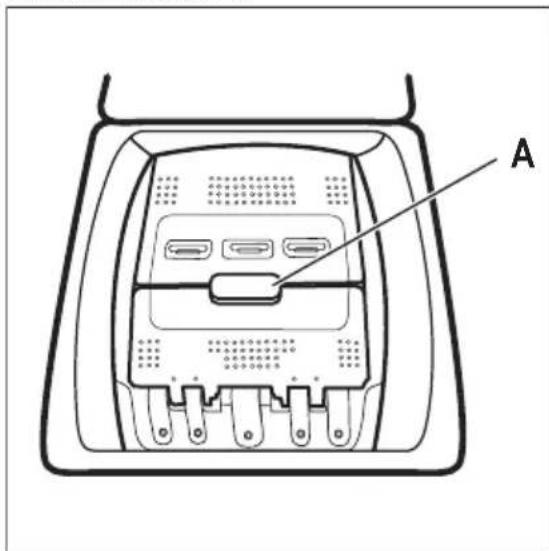
The drum opens automatically.
- Put the laundry in the drum, one item at a time.
- Shake the items before you put them in the appliance.
- Close the drum and the lid.

CAUTION!
- Make sure not to put too much laundry in the drum.
- Make sure that no laundry stays between the seal and the appliance and that you close the drum correctly.
- Washing heavily oiled, greasy stains or using fragrances perfume could cause damage rubber parts of the appliance.
10.3 Detergent compartments. Using detergent and additives
- Measure out specified detergents and the fabric conditioner.
- Put the detergent and the fabric conditioner into the proper compartments.

Always obey the instructions that you find on the packaging of the detergent products.
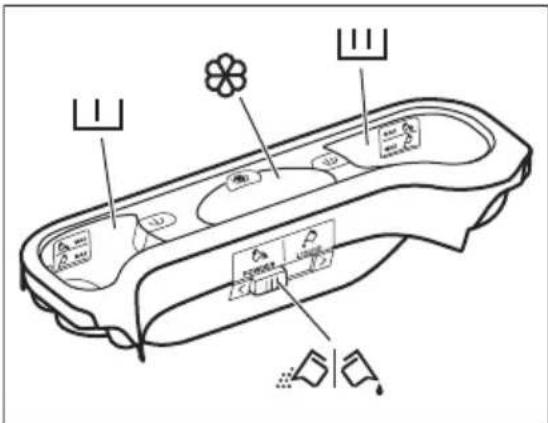

Detergent compartment for prewash phase. The marks MAX are the maximum levels of the quantity of detergent (powder or liquid). When you set a programme with a stain, add detergent (powder or liquid).

Detergent compartment for washing phase. The marks MAX are the maximum levels of the quantity of detergent (powder or liquid).

Compartment for liquid additives (fabric conditioner, starch). The mark M is the maximum level for the quantity liquid additives.

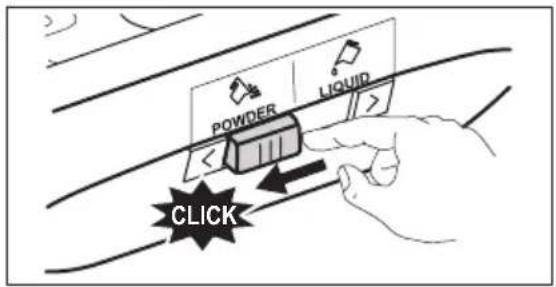
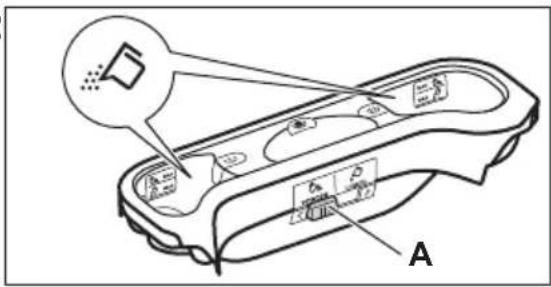
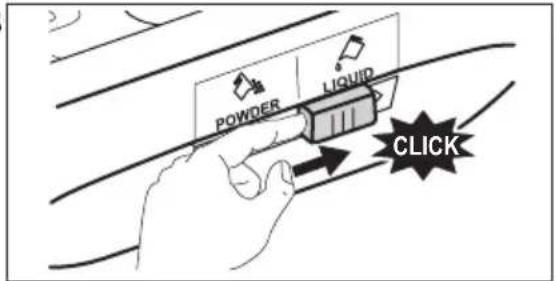
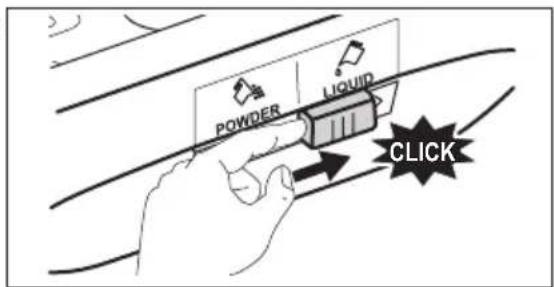
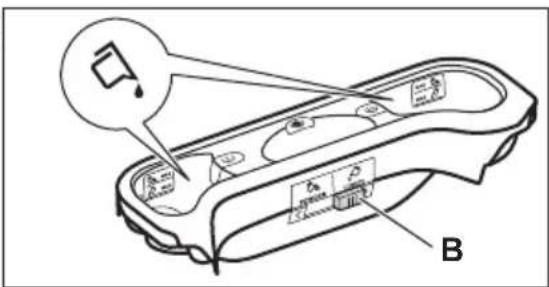
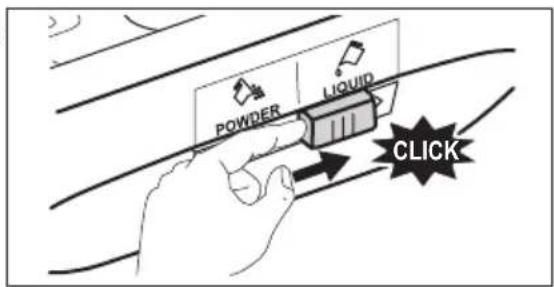
Flap for powder or liquid detergent.
1
2
3
4
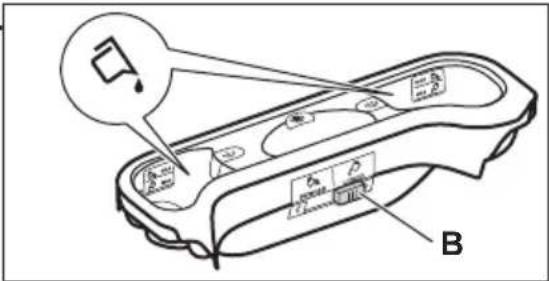
- Position A for powder detergent (factory setting).
- Position B for liquid detergent.

When you use the liquid detergent:
- Do not use gelatinous or thick liquid detergents.
- Do not put more liquid then the maximum level.
- Do not set the delay start function.
10.5 Setting a programme
- Turn the programme knob. The related programme indicator comes on.
The indicator of button Start/Pause - Départ/Pause flashes with red colour.
The display shows the default temperature, the spin speed and the empty indicator bars of the available functions. - To change the temperature and/or the spin speed, press the related buttons.
- Set the available functions.
10.6 Additional information about daily use
The PowerCare System load detection The PowerCare adjusts automatically the programme duration to the laundry in the drum to achieve perfect washing results in
the minimum possible time. At the end of the load detection, in case of drum overload, the indicator is flashing in the display. You can pause the appliance and remove the exceeding garments. If not the washing programme starts anyway.
Setting a programme
Turn the programme knob. The related programme indicator comes on. The display shows the default temperature, the spin speed and the available functions. Touch the Start/Pause - Départ/Pause button to start the programme. The lid is locked and display shows the indicator:
Starting a programme with delay start
- Press the Zeitvorwahl - Départ Différé button repeatedly until the display shows the desired delay time.
- Press the Start/Pause - Départ/Pause button. The appliance door locks and starts the countdown of the delay start. When the countdown is completed, the programme starts automatically.
Interrupting a programme and changing the options.
-
When the programme is running, you can change only some options. Press the Start/Pause - Départ/Pause button.
-
Change the options. The given information in the display changes accordingly
- Touch the Start/Pause - Départ/Pause again. The washing programme continues.
Cancelling a running programme
- Press the button Ein/Aus - Marche/Arrêt button to cancel the programme and to deactivate the appliance. Press again to activate the appliance.
Opening the lid
If the temperature and level of the water in the drum are too high, the indicator stays on and you cannot open the lid.
To open the lid
- Press the buttonEin/Aus - Marche/Arrêt.
- Wait for some minutes and then open carefully the lid. Now you can add or remove the items.
- Close the lid and press Start/Pause - Départ/Pause washing programme will be continues.
Draining water out after end of cycle
The washing programme is completed, but there is water in the drum. The drum turns regularly to prevent the creases in the laundry. The lid lock indicator is on. You must drain the water to open the lid:
- Touch button Schleudern - Essorage to decrease the spin speed proposed by the appliance
- Press the Start/Pause - Départ/Pause
- When the programme is completed and the lid locked indicator goes off, you can open the door and lid.
- Press Ein/Aus - Marche/Arrêt to deactivate the appliance.
Stand-by function
The Stand-by function automatically deactivates the appliance to reduce the energy consumption.
11. CARE AND CLEANING

WARNING!
Refer to Safety chapters.
11.1 Periodic cleaning schedule
Periodic cleaning helps to extend the life of your appliance.
After each cycle, keep the lid and the drum door ajar to get air circulation and dry the humidity inside the appliance: this will prevent mildew and odours.
If the appliance is not used for a long time: close the water tap and unplug the appliance.
Indicative periodic cleaning schedule:
Descaling Twice a year
Maintenance wash Once a month
Clean lid seal Every two months
Clean drum Every two months
Clean detergent dispenser Every two months er
Clean drain pump filter Twice a year
Clean the inlet hose and the valve filter
Twice a year
The following paragraphs explain how you should clean each part.
11.2 Removing foreign objects

Make sure that pockets are empty and all loose elements are tied up before running your cycle.
Remove any foreign objects (such as metal clip, buttons, coins, etc) that you may find in the filters and the drum. Refer to "Cleaning the drum", "Cleaning the drain pump" and "Cleaning the inlet hose and the valve filter" paragraphs. Be careful with curtains. Remove the hooks and put the curtains in a washing bag or pillowcase. If necessary, please contact the Authorised Service Centre.
11.3 External cleaning
Clean the appliance with mild soap and warm water only. Fully dry all the surfaces. Do not use a scouring pads or any scratching material.

CAUTION!
Do not use alcohol, solvents or chemical products.

CAUTION!
Do not clean the metal surfaces with chlorine-based detergent.
11.4 Descaling

If the water in your area is hard or medium hard, we recommend that you use a water softener for washing machines.
Regularly examine the drum to check for limescale.
Regular detergents already contain water softening agents, but we recommend to run a cycle with an empty drum and a descaling product.

Always follow the instructions that you find on the packaging of the product.
11.5 Maintenance wash
With the low temperature programmes it is possible that some detergent stays in the drum. Perform a maintenance wash regularly. To do this:
- Remove all laundry from the drum.
- Select the cotton programme with the highest temperature with a small quantity of detergent.
11.6 Lid seal
Regularly examine the seal and remove all objects from the inner part. Clean it when needed, using ammonia cream cleanser agent without scratching the seal surface.

Always obey the instructions that you find on the packaging of the product.
11.7 Cleaning the drum
Regularly examine the drum to prevent rust particles.
For a complete cleaning:
- Clean the drum with special products for stainless steel.

Always follow the instructions that you find on the packaging of the product.
- Run a short cotton programme at high temperature or use if is available programme Machine Clean. Add a small quantity of powder detergent into empty drum, in order to rinse out any left residues.
11.8 Cleaning the detergent dispenser
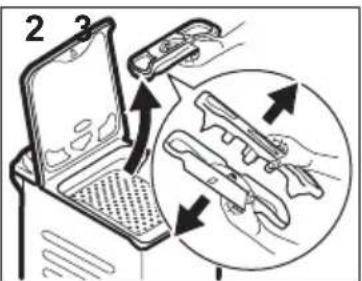
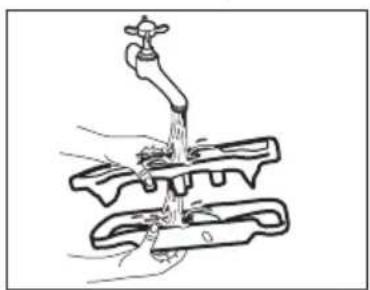
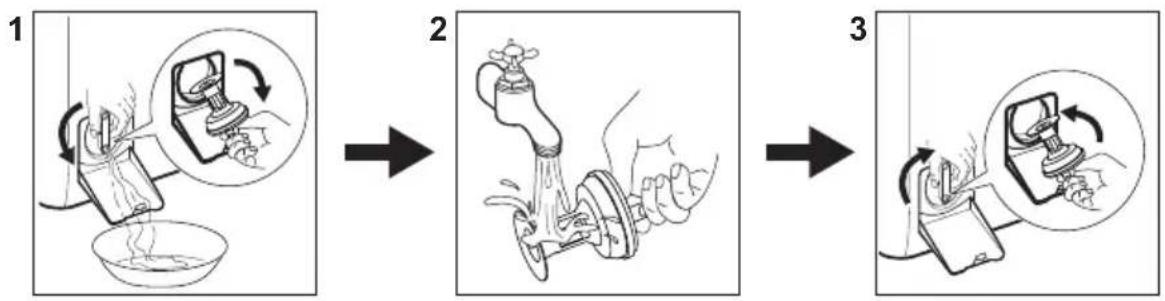
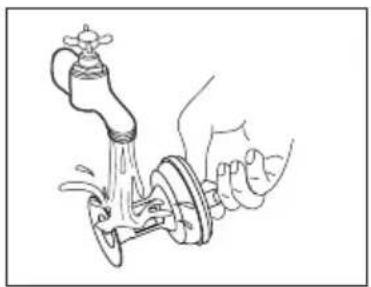
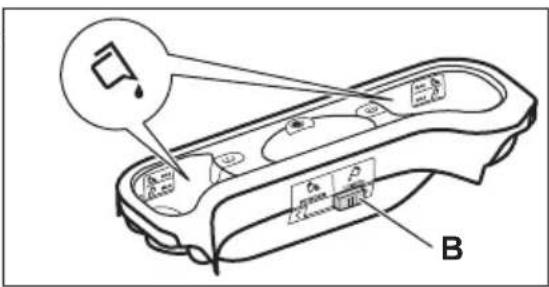
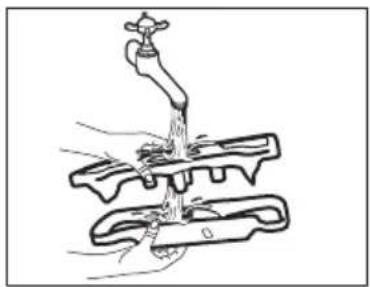
To prevent possible deposits of dried detergent or clotted fabric softener and/or formation of mould in the detergent dispenser, every two months carry out the following cleaning procedure how explained in the following diagrams:
1
natural_image
Illustration of a hand using a faucet to lift a mechanical component (no text or symbols)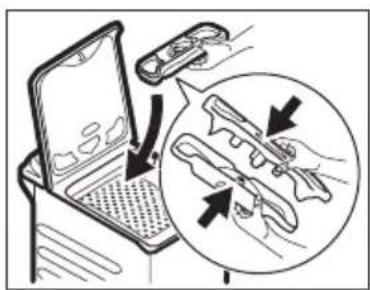
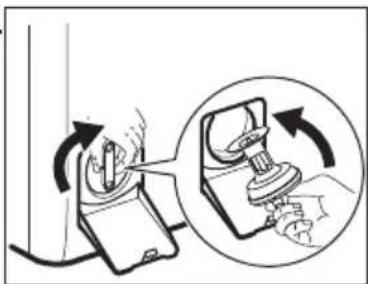
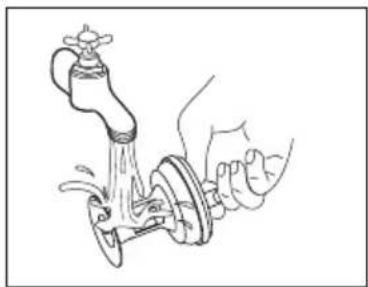
11.9 Cleaning the drain pomp filter
Regularly check the drain pump filter and make sure that it is clean.
- Disconnect the mains plug from the mains socket.
- Do not clean the pump if the water in the appliance is hot. Wait until the water cools down.
- Do not remove the filter while the appliance operates.
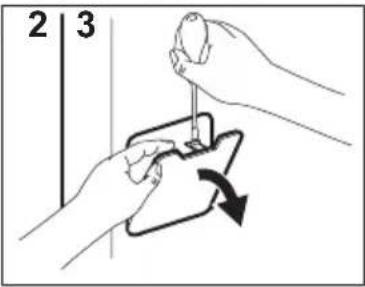
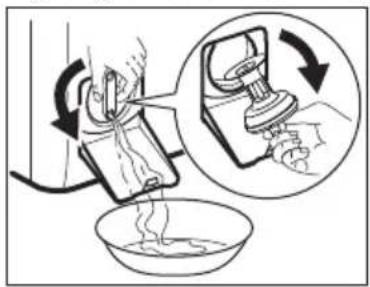
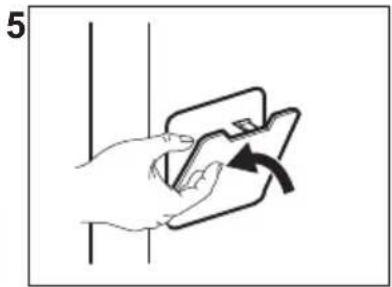
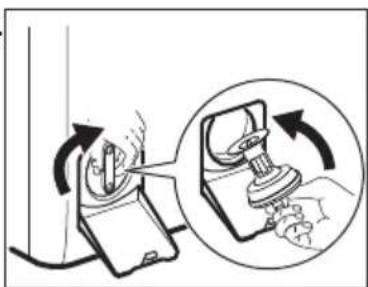
- Unscrew the filter slowly and gently until the water stops flowing out. After water has been drained, filter can be unscrewed fully.
Clean the drain pump if:
• The appliance does not drain the water.
• The drum does not turn.
- The appliance makes an unusual noise because of the blockage of the drain pump.
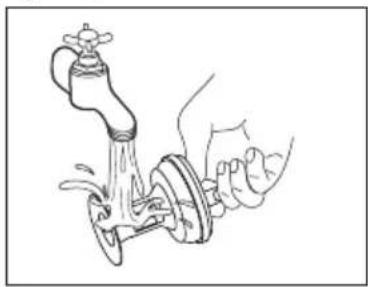
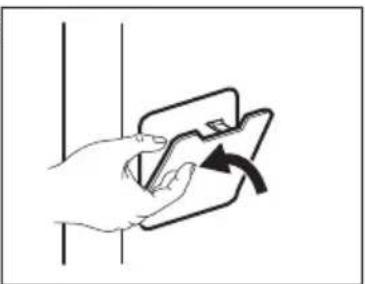
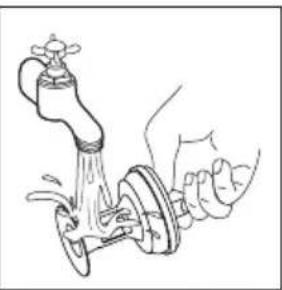
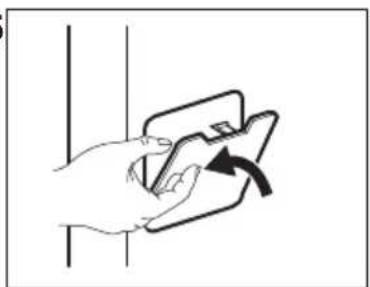
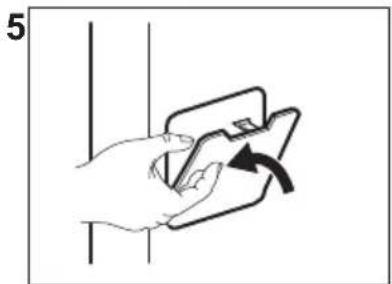
Proceed as described in following diagrams to clean the pump filter:
1
natural_image
Line drawing of a hand using a valve to lift water from a faucet (no text or symbols)4
natural_image
Diagram showing a hand using a switch to adjust a device, with an inset close-up illustrating the process (no text or symbols present)5
natural_image
Hand holding a smartphone with an arrow indicating rotation (no text or symbols)Always keep a rag nearby to dry up any water spillages when removing the filter.
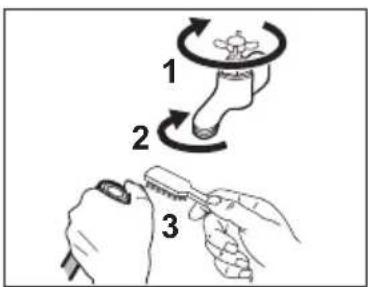
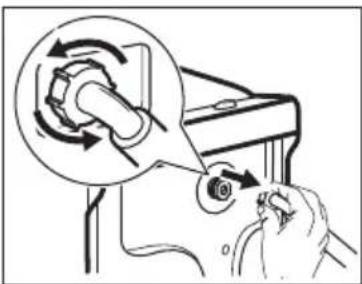
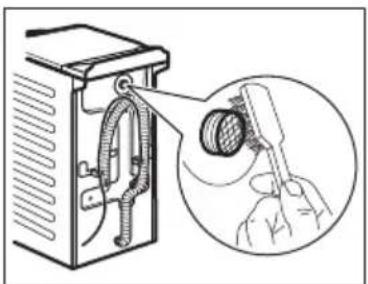
11.10 Cleaning the inlet hose and the valve filter
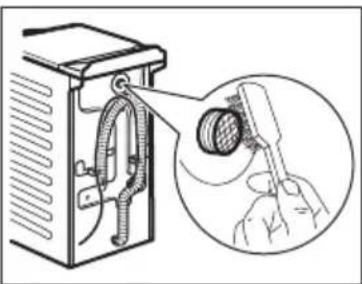
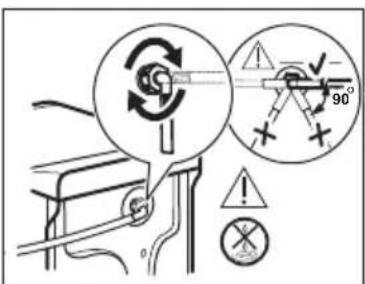
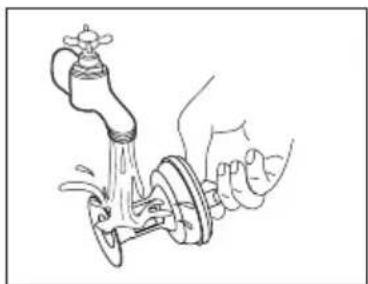
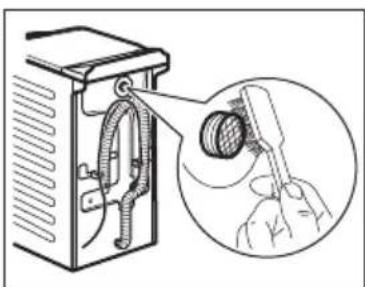
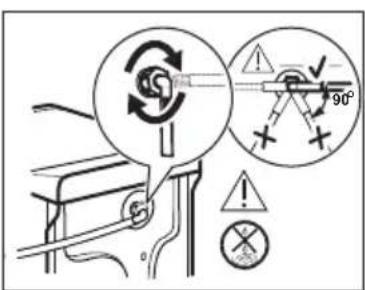
It is recommended to clean both the filters of the inlet hose and valve twice a year to remove any deposit, collected over the time. Proceed as described in following diagrams to clean filters:
1
2
natural_image
Illustration of a hand using a tool to adjust a mechanical component, with no visible text or symbols.3
natural_image
Diagram of a refrigerator with a hand holding a tool, showing internal components and a magnified view (no text or symbols)4
11.11 Emergency drain
If the appliance cannot drain the water, carry out the same procedure, described in 'Cleaning the drain pump' paragraph. If necessary, clean the pump.
When you drain the water with the emergency drain procedure, you must activate the drain system again:
- Put 2 litres of water in the main wash compartment of the detergent dispenser.
- Start the programme to drain the water.
11.12 Frost precautions
If the appliance is installed in an area where the temperature can reach values around 0^ C or drop below, remove the remaining water from the inlet hose and the drain pump.
- Disconnect the mains plug from the mains socket.
- Close the water tap.
- Put the two ends of the inlet hose in a container and let the water flow out of the hose.
- Empty the drain pump. Refer to the emergency drain procedure.
- When the drain pump is empty, install the inlet hose again.

WARNING!
Make sure that the temperature is higher than 0 °C before you use the appliance again.
The manufacturer is not responsible for damages caused by low temperatures.
12. CONSUMPTION VALUES
12.1 Comment

The QR code on the energy label supplied with the appliance provides a web link to the information related to the performance of the appliance in the EU EPREL database. Keep the energy label for reference together with the user manual and all other documents provided with this appliance.
It is also possible to find the same information in EPREL using the link https://eprel.ec.europa.eu and the model name and product number that you find on the rating plate of the appliance.
Values and programme duration may differ depending on different conditions (e.g. room temperature, water temperature and pressure, load size and type of laundry, supply voltage) and also if you change the default setting of a programme.
According to Commission Regulation Eu 2019/2023
| Eco 40-60 pro-gramme | kg kWh Litres hh:mm | %1) | °C | rpm2) |
| Full load 6 0.670 50 3:17 53.00 38 1451 | ||||
| Half load 3 0.270 40 2:35 53.00 27 1451 | ||||
| Quarter load 1,5 | 0.140 35 2:30 54.00 23 1451 | |||
1) Remaining moisture at the end of the spinning phase. The higher is the spin speed, the higher is the noise and the lower is the remaining moisture.
2) Maximum spin speed.
1) Remaining moisture at the end of the spinning phase. The higher is the spin speed, the higher is the noise and the lower is the remaining moisture.

These values are indicative only.
| Programme | kg kWh Litres hh:mm | %1) | °C | rpm2) |
| Cottons3)95°C | 6 2.350 85 4:05 44.00 85 1500 | |||
| Cottons60°C | 6 1.700 80 3:45 44.00 55 1500 | |||
| Cottons4)20°C | 6 0.250 80 2:45 44.00 20 1500 | |||
| Synthetics40°C | 3 0.550 55 2:15 35.00 40 1200 | |||
| Delicates5)30°C | 2 0.300 50 1:00 35.00 30 1200 | |||
| Wool/Silk30°C | 1,5 0.200 45 1:05 30.00 30 1200 |
1) Remaining moisture at the end of the spinning phase. The higher is the spin speed, the higher is the noise and the lower is the remaining moisture.
2) Reference indicator of the spin speed.
3) Suitable for washing heavily soiled textiles.
4) Suitable for washing lightly soiled cottons, synthetic and mixed fabrics.
5) It also performs as quick washing cycle for lightly soiled laundry.
Power consumption in different modes
| Off (W) Stand-by (W) Delay start (W) |
| 0.50 0.50 4.00 |
| Time to Off/Standby mode is 15 minutes maximum. |
13. QUICK GUIDE
13.1 Daily use
flowchart
graph LR
    A["Start: Rotation Roll"] --> B["Click Button"]
    B --> C["Control Panel with Buttons 1 and 2"]
    C --> D["Display: 8.8 kg 3:50, 40° 1200"]
    D --> E["OK/Finish"]
Connect the mains plug to the mains socket.
Open the water tap.
Load the laundry.
Pour the detergent and other treatment in the proper compartment of the detergent dispenser.
-
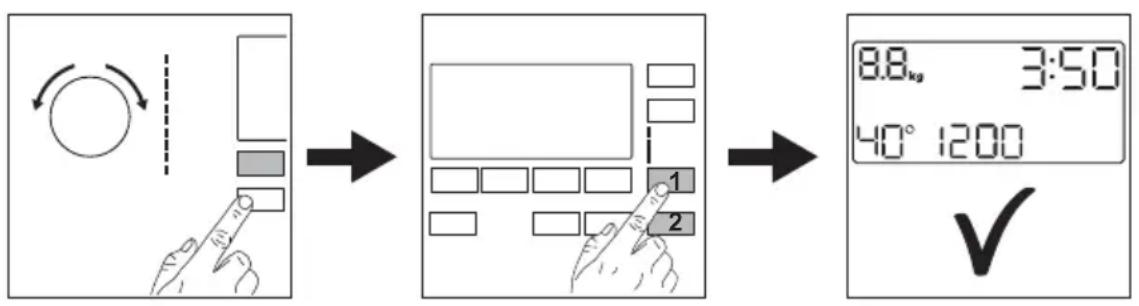
Push the Ein/Aus - Marche/Arrêt button to turn the appliance on. Turn the programme dial to set the desired programme.
-
Set the desired options (1) by means of the corresponding touch buttons. To start the programme, touch the Start/Pause - Départ/Pause (2) button.
-
The appliance starts.
At the end of the programme, remove the laundry.
Push the Ein/Aus - Marche/Arrêt button to turn the appliance off.
13.2 Care and cleaning
Periodic cleaning schedule will helps to extend the life of your appliance.
After each cycle, keep the lid slightly ajar to get air circulation and dry the humidity inside the appliance: this will prevent mildew and odours.
If the appliance is not used for a long time: close the water tap and unplug the appliance.
Descaling Twice a year
Maintenance wash Once a month
Clean lid seal Every two months
Clean drum Every two months
Clean detergent dispenser Every two months er
Clean drain pump filter Twice a year
Clean the inlet hose and Twice a year the valve filter
Keep clear the plastic parts, especially near the detergent drawer area, remove excess spillage.
The following paragraphs explain how you should clean some part.
Removing foreign objects
i
Make sure that pockets are empty and all loose elements are tied up before running your cycle.
Remove any foreign objects (such as metal clip, buttons, coins, etc) that you may find in the filters and the drum. If necessary, please contact the Authorised Service Centre.
Cleaning the drain pump filter
Clean the filter regularly and, especially, if the alarm code E20 appears on the display.
flowchart
graph LR
    A["1 Handwashing"] --> B["2 Washing Machine"]
    B --> C["3 Cleaning"]
13.3 Programmes
| Programmes Load Product description | |
| Eco 40-601) | 6 kg White and coloured cottons. Normally soiled garments. |
| Cottons | 6 kg White cotton and coloured cotton. |
| Synthetics | 3 kg Synthetic items or mixed fabric items. |
| Delicates | 2 kg Delicate fabrics such as acrylics, viscose, polyester items. |
| [CXXX]Wool/Silk | 1,5 kg Machine washable wool, hand washable wool and delicates. |
| [3D30]Steam | 1 kg Steam programme for cotton, synthetic and delicate garments. |
| PowerClean 59min | 3 kg Cotton and fast-coloured synthetic items. Complete washing programme that, in only 59 minutes, washes the daily soiled laundry intensively and ensures a good washing performance in a short time. |
| 20min 3kg | 3 kg Cotton and synthetic lightly soiled items or once worn items. |
| [SOW2]Outdoor | 2 kg2)Modern outdoor sporting garments.1 kg3) |
| Duvet | 2 kg Synthetic or feather and down filled blankets, padded clothes, duvets. |
(i) According to Commission Regulation EU 2019/2023, this programme at 40^ is able to clean normally soiled cotton laundry declared to be washable at 40^ or 60^ , together in the same cycle.

For the reached temperature in the laundry, the programme duration and other data, please refer to 'Consumption Values' chapter.
The most efficient programmes in terms of energy consumption are generally those that perform at lower temperatures and longer duration.
2) Washing programme.
3) Washing programme and water repellent phase.
Loading the appliance to the maximum capacity indicated for each programmes
helps to reduce energy and water consumption.
Suitable detergents for washing programmes
| Programme | Universal powder1) | Liquid Uni-versal | Liquid for coloureds | Delicates woollens | Special |
| Eco 40-60 ▲ ▲ ▲ -- -- | |||||
| Cottons | ▲ ▲ ▲ -- -- | ||||
| Synthetics | ▲ ▲ ▲ -- -- | ||||
| Delicates | -- -- -- ▲ ▲ | ||||
Wool/Silk  | -- -- -- ▲ ▲ | ||||
| PowerClean 59min -- ▲ ▲ -- -- | |||||
| 20min 3kg | -- ▲ ▲ -- -- | ||||
| Outdoor | -- -- -- ▲ ▲ | ||||
| Duvet | -- -- -- ▲ ▲ |
1) At temperature higher than 60 °C the use of powder detergent is recommended.
-- = Not recommended ▲ = Recommended
13.4 Detergent type and quantity.
- Use only detergents and other treatments specially made for washing machines. First, follow these generic rules:
- powder detergents (also tablets and single-dose detergents) for all types of fabric, excluding delicate. Prefer powder detergents containing bleach for whites and laundry sanitization,
- liquid detergents (also single-dose detergents), preferably for low temperature wash programmes (60 °C max) for all types of fabric, or special ones for woollens only.
- Do not mix different types of detergents.
-
Use less detergent if:
-
you are washing a small load,
– the laundry is lightly soiled,
– there is large amounts of foam during washing.
- When using detergent tabs or pods, always put them inside the drum, not in the detergent dispenser and follow the manufacturer's recommendations.
Insufficient detergent may cause:
• unsatisfactory washing results,
• the wash load to turn grey,
- greasy clothes,
- mould in the appliance.
Excessive detergent may cause:
- sudsing,
• reduced washing effect, - inadequate rinsing,
- a greater impact for the environment.
14. ALARM CODES AND POSSIBLE FAILURES
The appliance does not start or it stops during operation. First try to find a solution to the problem (refer to the tables).

WARNING!
Deactivate the appliance before carrying out any check.
| Problem Possible solution | |
| E10The appliance does not fill with water properly. | Make sure that the water tap is open.Make sure that the pressure of the water supply is not too low. For this information, contact your local water authority.Make sure that the water tap is not clogged.Make sure that the inlet hose has no kinks, damages or bends.Make sure that the connection of the water inlet hose is correct.Make sure that the filter of the inlet hose and the filter of the valve are not clogged. |
| E20The appliance does not drain the water. | Make sure that the sink spigot is not clogged.Make sure that the drain hose has no kinks or bends.Make sure that the drain filter is not clogged. Clean the filter, if necessary.Make sure that the connection of the drain hose is correct.Set the drain programme if you set a programme without drain phase.Set the drain programme if you set an option which ends with water in the tub. |
| E91Internal fail. No communication between electronic elements of the appliance. | The programme was not finished properly or the appliance stopped too early.Switch the appliance off and on again.If the alarm code appears again, contact the Authorised Service Centre. |
| EHOThe mains supply is unstable. | Wait until mains supply is stable. |
| EFOThe anti-flood device is on. | Disconnect the appliance and close the water tap. Contact the Authorised Service Centre. |
| If the problem persists, contact the Authorised Service Centre. The necessary data for the service centre are on the rating plate | |
| *Some alarm codes may not occur. Subject to change without notice. | |
15. CH GUARANTEE
Customer Service Centres
| Point of Service | ||
| Industriestrasse 105506 Mägenwil | Le Trési 61028 Préverenges | Via Violino 116928 Manno |
| Morgenstrasse 1313018 Bern | ||
| Langgasse 109008 St. Gallen | ||
| Am Mattenhof 4a/b6010 Kriens |  | |
| Schlossstrasse 14133 Pratteln | ||
| Comercialstrasse 197000 Chur | ||
Spare parts service Industriestrasse 10, 5506 Mägenwil, Tel. 0848 848 111
Specialist advice/Sale Buckhauserstrasse 40, 8048 Zürich, Tel. 044 405 82 44
Warranty For each product we provide a two-year guarantee from the date of purchase or delivery to the consumer (with a guarantee certificate, invoice or sales receipt serving as
proof). The guarantee covers the costs of materials, labour and travel. The guarantee will lapse if the operating instructions and conditions of use are not adhered to, if the product is incorrectly installed, or in the event of damage caused by external influences, force majeure, intervention by third parties or the use of non-genuine components.
16. ENVIRONMENTAL CONCERNS
Recycle materials with the symbol 📁. Put the packaging in relevant containers to recycle it. Help protect the environment and human health by recycling waste of electrical and electronic appliances. Do not dispose of appliances marked with the symbol 📋 with the household waste. Return the product to your local recycling facility or contact your municipal office.

For Switzerland:
Where should you take your old equipment?
Anywhere that sells new equipment or hand it in to official SENS collection points or official SENS recycling firms. The list of official SENS collection points can be found at www.erecycling.ch
3.4.
natural_image
Technical line drawing of a mechanical device with labeled component A (no text or symbols beyond label)natural_image
Simple line drawing of an electric plug connected to a power outlet (no text or symbols)
3
4
natural_image
Illustration of a faucet pouring liquid into a mechanical clamp (no text or symbols)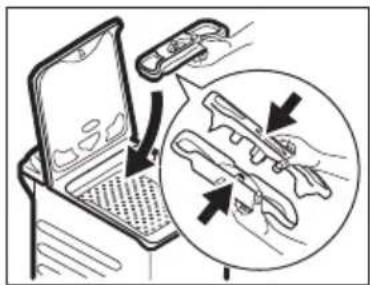
natural_image
Line drawing of a hand using a faucet to lift water, showing fluid flow (no text or symbols)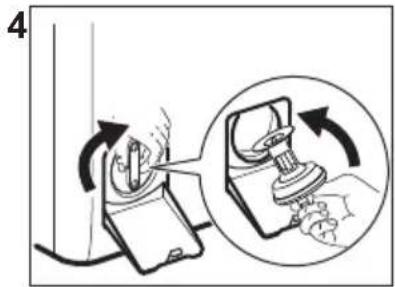
natural_image
Illustration of a hand holding a card with an arrow indicating rotation (no text or symbols)flowchart
graph LR
    A["1 Handwashing"] --> B["2 Washing Machine"]
    B --> C["3 Washing Machine Tooling"]
13.3 Programmes
natural_image
Line drawing of a hand using a faucet to lift water, with no text or symbols present.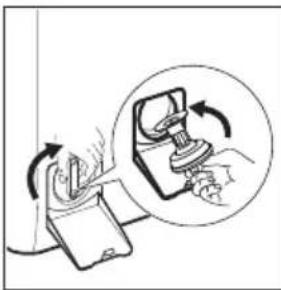
natural_image
Illustration of a hand using a device to interact with a device, showing rotational motion (no text or symbols)-- = non recommandé ▲ = recommandé
2.
3.4.
natural_image
Technical line drawing of a mechanical device with labeled component A (no text or symbols beyond label)natural_image
Simple line drawing of an electrical plug connected to a power outlet (no text or symbols)
3
4
natural_image
Diagram of a faucet pouring liquid into a mechanical clamp (no text or symbols)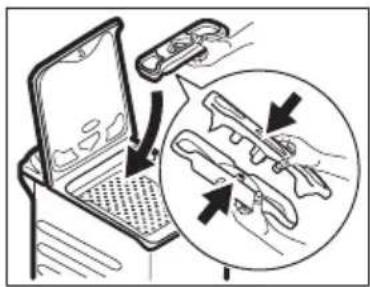
natural_image
Line drawing of a hand using a faucet to lift water, showing fluid flow (no text or symbols)4
natural_image
Diagram showing a hand using a device to press or adjust a component, with an inset close-up illustrating the process (no text or symbols present)5
natural_image
Illustration of a hand holding a card with an arrow indicating rotation (no text or symbols)natural_image
Illustration of a hand using a tool to adjust or install a mechanical component, with no visible text or symbols.3
natural_image
Diagram of a mechanical device with hoses and a magnified inset showing a hand holding a tool (no text or symbols present)4
11.11 Notentleerung
flowchart
graph LR
    A["Step 1: Washing with water bath"] --> B["Step 2: Mixing water from bowl"]
    B --> C["Step 3: Clearing sink with hand and drain"]
13.3 Programme
3.4.

natural_image
Technical line drawing of a mechanical device with labeled component A (no text or symbols beyond label)natural_image
Simple line drawing of a plug with a socket connected to an electrical outlet (no text or symbols)
natural_image
Diagram of a faucet pouring liquid into a mechanical clamp (no text or symbols)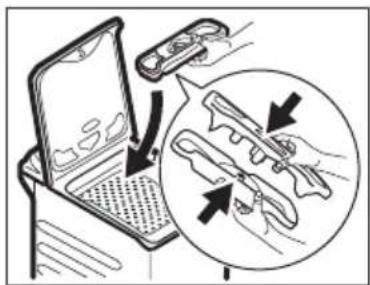
natural_image
Line drawing of a hand holding a faucet with water splashing (no text or symbols)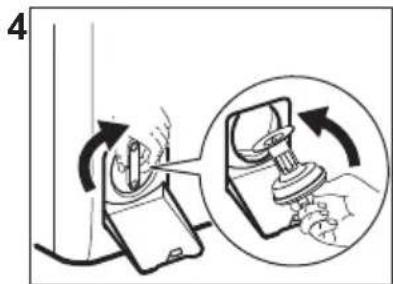
natural_image
Illustration of a hand holding a small object with an arrow indicating rotation (no text or symbols)natural_image
Illustration of a hand using a tool to adjust or install a device, with no visible text or symbols.3
natural_image
Diagram of a refrigerator with hoses and a magnified inset showing hand holding a tool (no text or symbols)4
flowchart
graph LR
    A["Start: Rotation with circular arrow, vertical bar, square, hand pointing"] --> B["Step 1: Display with grid of squares, labeled 1 and 2"]
    B --> C["Step 2: Display with grid of squares, labeled 1 and 2"]
    C --> D["End: Checkmark '✓'"]
flowchart
graph LR
    A["1: Washing bowl with water"] --> B["2: Piping drop and drain"]
    B --> C["3: Clean washing machine with water"]
13.3 Programmi
- Welcome to Electrolux! Thank you for choosing our appliance.
- CONTENTS
- ⚠SAFETY INFORMATION
- Children and vulnerable people safety
- ENGLISH
- General Safety
- SAFETY INSTRUCTIONS
- Installation
- Electrical connection
- WARNING!
- Water connection
- Use
- Service
- Disposal
- INSTALLATION
- Unpacking and positioning
- The inlet hose
- Water drainage
- Water-stop device
- Electrical connection
- PRODUCT DESCRIPTION
- TECHNICAL INFORMATION
- CONTROL PANEL
- Control panel description
- Display
- PROGRAMME CHART
- Programme options compatibility
- Woolmark Premium Wool Care - Green
- OPTIONS
- Introduction
- Anti-Allergy
- i
- Zeit Sparen - Gain de temps
- Temp.
- Schleudern - Essorage
- Flecken/Vorw. - Taches/Prélav.
- - Flecken - Taches
- Extra Spülen - Rinçage Plus
- Skipping phase button (Options)
- Plus Dampf - Vapeur Plus
- Acoustic signals
- Child Lock
- Permanent Soft Plus
- Permanent Extra Rinse
- Operating Hours Counter
- Factory Reset
- DAILY USE
- Activating the appliance
- Loading the laundry
- Push the button A.
- CAUTION!
- Detergent compartments. Using detergent and additives
- When you use the liquid detergent:
- Setting a programme
- Additional information about daily use
- Setting a programme
- Starting a programme with delay start
- Interrupting a programme and changing the options.
- Cancelling a running programme
- Opening the lid
- Draining water out after end of cycle
- Stand-by function
- CARE AND CLEANING
- Periodic cleaning schedule
- Periodic cleaning helps to extend the life of your appliance.
- Indicative periodic cleaning schedule:
- Removing foreign objects
- External cleaning
- Descaling
- Maintenance wash
- Lid seal
- Cleaning the drum
- Cleaning the detergent dispenser
- Cleaning the drain pomp filter
- Clean the drain pump if:
- Proceed as described in following diagrams to clean the pump filter:
- Cleaning the inlet hose and the valve filter
- Emergency drain
- Frost precautions
- CONSUMPTION VALUES
- Comment
- QUICK GUIDE
- Daily use
- Care and cleaning
- Removing foreign objects
- Cleaning the drain pump filter
- Detergent type and quantity.
- Insufficient detergent may cause:
- Excessive detergent may cause:
- ALARM CODES AND POSSIBLE FAILURES
- CH GUARANTEE
- ENVIRONMENTAL CONCERNS
- For Switzerland:
- Programmes
- Notentleerung
- Programme
- Programmi
Brand : ELECTROLUX
Model : WASL5T500
Category : Washing machine