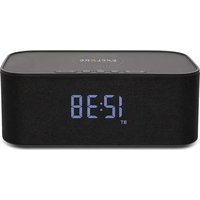
BCC1001 - Alarm clock radio Explore Scientific - Free user manual and instructions
Find the device manual for free BCC1001 Explore Scientific in PDF.


User questions about BCC1001 Explore Scientific
0 question about this device. Answer the ones you know or ask your own.
Ask a new question about this device
Download the instructions for your Alarm clock radio in PDF format for free! Find your manual BCC1001 - Explore Scientific and take your electronic device back in hand. On this page are published all the documents necessary for the use of your device. BCC1001 by Explore Scientific.
USER MANUAL BCC1001 Explore Scientific
PORTABLE BLUETOOTH SPEAKER CLOCK
WITH WIRELESS CHARGING
RADIOSVEGLIA BLUETOOTH CON RICARICA WIRELESS
TRAGBARER BLUETOOTH-LAUTSPRECHER MIT WECKER
UND KABELLOSER LADEFUNKTION
HORLOGE PORTABLE AVEC ENCEINTE BLUETOOTH
À CHARGEMENT SANS FIL
RELOJ ALTAVOZ BLUETOOTH PORTÁTIL
CON CARGA INALÁMBRICA
ART.NO.: BCC1001
text_image
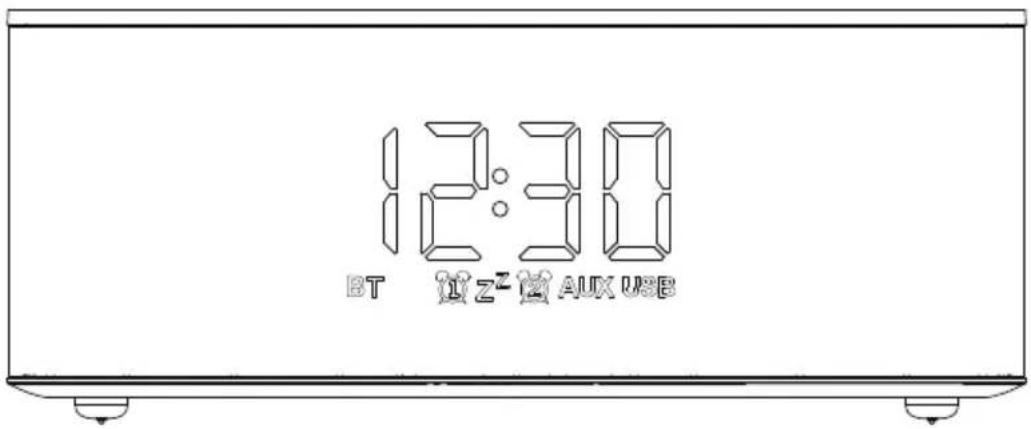
12:30 BT L Z² AUX USBEN INSTRUCTION MANUAL......2
IT ISTRUZIONI PER L'USO......9
ABOUT THIS INSTRUCTION MANUAL

These operating instructions are to be considered a component of the device.
Please read the safety instructions and the operating instructions carefully before use.
Keep these instructions for renewed use at a later date. When the device is sold or given to someone else, the instruction manual must be provided to the new owner/user of the product. The device is intended only for indoor use.

GENERAL WARNINGS
- Risk of electric shock – This device contains electronic components. Only use the device as described in the manual; otherwise, you run the risk of an electric shock.
- Choking hazard — Children should only use the device under adult supervision. Keep packaging material, like plastic bags and rubber bands, out of the reach of children, as these materials pose a choking hazard.
- Risk of chemical burn – Keep batteries out of the reach of children! Make sure you insert the batteries correctly. Leaking battery acid can lead to chemical burns. Avoid contact of battery acid with skin, eyes and mucous membranes. In the event of contact, rinse the affected region immediately with a plenty of water and seek medical attention.
-
Risk of fire/explosion – Do not expose the device to high temperatures. Use only the recommended batteries. Do not short-circuit the device or batteries, or throw them into a fire. Excessive heat or improper handling could trigger a short-circuit, a fire, or an explosion.
-
Do not disassemble the device. In the event of adefect, please contact your dealer. The dealer will contact the Service Centre and can send the de vice in to be repaired, if necessary.
- Use only the recommended batteries. Always replace weak or empty batteries with a new, complete set of batteries at full capacity. Do not use batteries from different brands or with different capacities. The batteries should be removed from the unit if it has not been used for a long time.
- Do not submerge the device in water or attempt to disassemble the device.
- Do not use this product in an aircraft.
- Device may be warm while with power supply through an adaptor. It is normal.
SCOPE OF DELIVERY
Wireless speaker clock, Operating instructions, Micro USB charging cable.
PRODUCT OVERVIEW
- Press [◀] to lower volume. While in Bluetooth mode, press and hold to go to previous track.
- Press [ ] to increase volume. While in Bluetooth mode, press and hold to go to next track. Remarks: While in Aux-in mode, the track could only be changed through your device.
- When playing music, press [▶] to pause or play. When you receive a call, press to answer or press and hold to reject the call.
When you are on the phone through Bluetooth mode, press to end. When the call ends, music will resume playing. At Bluetooth mode, press twice to dial number of last call.
- Press [A] to switch mode. Press and hold to enter or exit the standby status.
- Press [ Ⓤ] to switch setting between screen brightness, clock, alarm 1 and alarm 2.
- While in setting mode, press [<] to decrease brightness or numbers.
- While in setting mode, press [ > ] to increase brightness or numbers.
- Wireless charging location.
- Wireless charging indicator Green: wireless charging in progress.
- LED indicator Red: Speaker in turned on. Off: Speaker off / Standby.
- Power on/off
12.DC input 5V = 1.5A
13.Auxiliary Line-in Port - USB Charging Port - Output 5V 1A
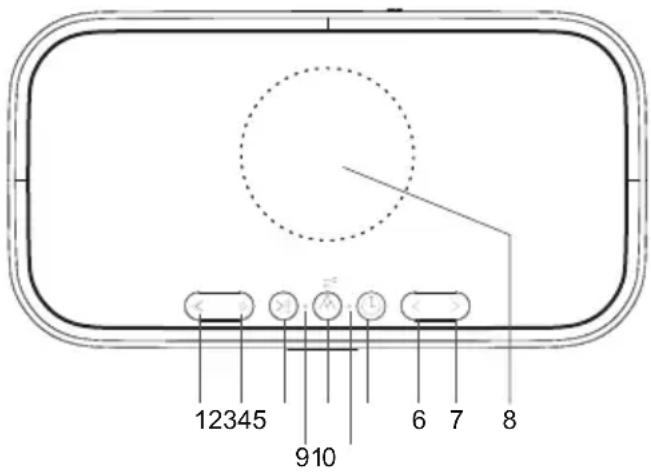
text_image
12345 910 6 7 8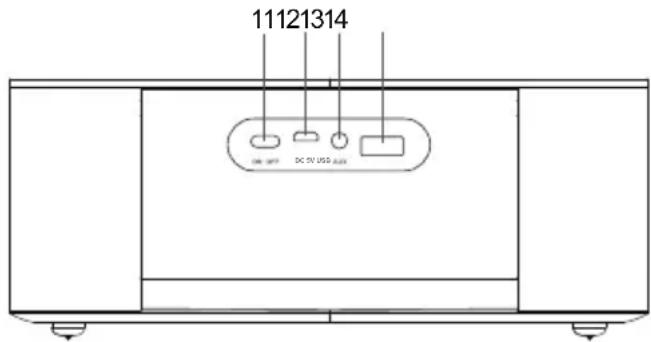
text_image
11121314 DC 50 USB port| BUTTONMODE | < | > | > | A | ∅ | < | > | |
| Standard mode | PRESS | Decrease volume | Increase volume | Play or pause Answer or end call Redial (Press twice) | Switch between AUX and Bluetooth mode Stop the alarm | Switch setting between screen brightness, clock, alarm 1 and alarm 2 | —— | —— |
| HOLD | Previous track | Next track | Reject call Disconnect Bluetooth connection | Enter or exit the standby status | —— | —— | —— | |
| Brightness setting mode | PRESS | —— | —— | —— | —— | —— | Decrease | Increase |
| HOLD | —— | —— | —— | —— | —— | —— | ||
| Time setting mode | PRESS | —— | —— | —— | —— | —— | Decrease | Increase |
| HOLD | —— | —— | —— | —— | Go to next parameter | —— | —— | |
| Alarm setting mode | PRESS | —— | —— | —— | —— | —— | Decrease | Increase |
| HOLD | —— | —— | —— | —— | Go to next parameter | —— | —— | |
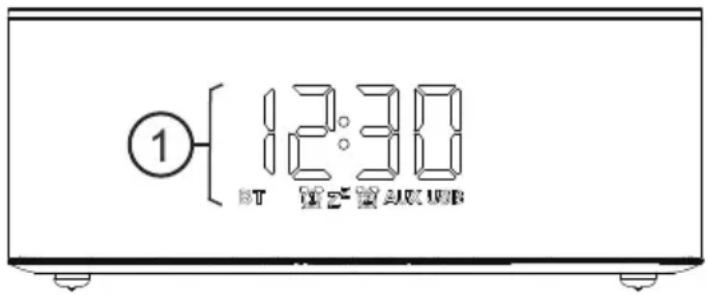
LCD DISPLAY
- Time / alarm time display
[BT] Bluetooth signal
[ ] Alarm 1 ON
[ z^z ] Snooze activated
[ ] Alarm 2 ON
[AUX] AUX mode ON
[USB] USB
- Insert the Micro USB Charging cable (included) to the DC 5V input port located at the rear of the unit. Insert the other end into a suitably rated wall outlet.
- Push the Power switch to the ON position to turn on the device. The time will be displayed.
- Press and hold the [A] to enter or exit standby status.
NOTE: To turn off the device and the screen, push the Power switch to OFF position.
INTERNAL BATTERY
The speaker contains 2 sets of 2200mAh batteries in the speaker. When fully charged, the speaker can operate without a power supply and become portable.
NOTE: The charge time is around 3 hours.
WIRELESS CHARGING
- Place the equipment to be charged on the top circle of the stereo.
- Device will now start charging.
NOTE: Please make sure your device supports wireless charging.
USB CHARGING
- To charge a device, connect with a USB charging cable to this USB charging port [USB] at the rear.
- Device will now start charging.
NOTE: When using the wireless charging and USB charging at the same time, USB charging would be disabled for the purpose of keeping the maximum output capacity within safe level.
PLAYING MUSIC
PAIRING / DISCONNECTING VIA BLUETOOH
- Place your device nearby. Press the [A] till the [BT] flashes.
- Search for Bluetooth according to your device's instructions.
- The speaker is named "BCC1001", enter the PIN "0000" if needed.
- The speaker will beep when complete pairing. The [BT] stays on.
NOTE: To disconnect the Bluetooth, press and hold [ >> ].
AUX
- Plug the 3.5mm audio cable into the audio input connector and automatically switch from Bluetooth mode to AUX mode. To switch the mode manually, press [ ] to switch between AUX and Bluetooth mode.
- Unplug the 3.5mm audio cable from AUX and the speaker returns to Bluetooth status automatically.
BRIGHTNESS ADJUSTMENT
- Press [ ⏻ ] once, all icons will flash.
- To set the brightness of display, short press [ < ] or [ > ].
- Wait for 3 seconds. The brightness you set would be saved automatically and exit brightness setting.
CLOCK
SET AUTOMATICALLY
The time will be automatically adjusted by the Bluetooth connection of an iPhone.
NOTE: Not applicable to Android phone.
SET THE CLOCK MANUALLY
- Press [💡] twice to enter time setting mode.
- The setting parameter will flash.
- Press and hold [☐] button to confirm setting and enter to next parameter.
- Press [<] or [>] to set the required data.
- Sequence of setting: Hour -> Minute -> 24Hr/12Hr
- If there is no action in 3 seconds, the setting will be saved and will exit the setting mode.
ALARM
SETTING / ADJUSTING ALARM TIME
- Press [L] triple to enter alarm 1 setting mode. The [L] will be on. (Press four times to enter alarm 2 setting mode. The [L] will be on.)
- The setting parameter will flash.
- Press and hold [☐] button to confirm setting and enter to next parameter.
- Press [ < ] or [ > ] to set the required data.
- Sequence of setting: Hour -> Minute -> Alarm OFF/ON
- If there is no action in 3 seconds, the setting will be saved and will exit the setting mode.
OPERATION
- At the set time, alarm signal rings.
- The alarm lasts 1 minute.
- To stop the alarm, press [ʌ].
- During the alarm, press any other button to delay the alarm by 5 minutes.
- The alarm will start again at the next alarm time, unless you switch off the alarm function.
NOTE:
a. The alarm will automatically turn off after 4 times of snooze.
b. The screen will be turned on when the alarm rings during Power OFF.
SPECIFICATIONS
Dimensions (Main unit):
204x79x109mm (LxWxH)
Weight (Main unit):
820 g (Exclude batteries)
Power:
Micro USB charging cable, DC 5V, 1.5A
Bluetooth standard:
5.0
Output Power:
5W * 2
Batteries:
2200mAh*2
Wireless Charging Power:
5W
Output Voltage:
5V
Output Current:
1A
EC DECLARATION OF CONFORMITY
CE Hereby, Explore Scientific GmbH declares that the equipment type with part number: BCC1001 is in compliance with
Directive: 2014/53/EU. The full text of the EU declaration of conformity is available at the following internet address: www.bresser.de/download/BCC1001/CE/BCC1001_CE.pdf
RCM DECLARATION OF CONFORMITY

The product complies with electrical safety, EMC and radio spectrum regulatory requirements for products supplied to
the Australia or New Zealand market.
NOTES ON CLEANING
- Remove the batteries before cleaning.
- Only use a dry cloth to clean the exterior of the device. To avoid damaging the electronics, do not use any cleaning fluid.
- Protect the device from dust and moisture.
DISPOSAL

Dispose of the packaging materials properly, according to their type, such as paper or card board. Contact your local waste-disposal service or environmental authority for information on the proper disposal.
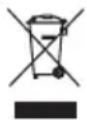
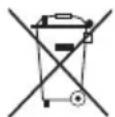
Do not dispose of electronic devices in the household garbage!
As per the Directive 2002/96/EC of the European Parliament on waste electrical and electronic equipment and its adaptation into German law, used electronic devices must be collected separately and recycled in an environmentally friendly manner.

In accordance with the regulations concerning batteries and rechargeable batteries, disposing of them in the normal household waste is explicitly forbidden. Please make sure to dispose of your used batteries as required by law – at a local collection point or in the retail market. Disposal in domestic waste violates the Battery Directive. Batteries that contain toxins are marked with a sign and a chemical symbol.


Cd^1Hg^2Pb^3
^1 battery contains cadmium
^2 battery contains mercury
^3 battery contains lead
WARRANTY & SERVICE
The regular guarantee period is 2 years and begins on the day of purchase. To benefit from an extended voluntary guarantee period as stated on the gift box, registration on our website is required.
You can consult the full guarantee terms as well as information on extending the guarantee period and details of our services at www.bresser.de/warranty_terms.
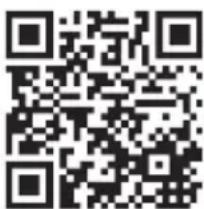
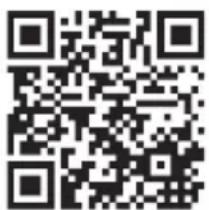
Would you like detailed instructions for this product in a particular language? Then visit our website via the link below (QR code) for available versions.
Alternatively you can also send an email to manuals@bresser.de or leave a message on +49 (0) 28 72 - 80 74-220*. Please always state your name, precise address, a valid phone number and email address, as well as the article number and name.
*Number charged at local rates in Germany (the amount you will be charged per phone call will depend on the tariff of your phone provider); calls from abroad will involve higher costs.
Errors and technical changes reserved.
MANUAL DOWNLOAD:
SERVICE AND WARRANTY:
text_image
QR code image containing encoded data, no visible human-readable textwww.bresser.de/warranty_terms
*Number charged at local rates in Germany (the amount you will be charged per phone call will depend on the tariff of your phone provider); calls from abroad will involve higher costs.
MANUAL DOWNLOAD:
SERVICE AND WARRANTY:
text_image
QR code image containing encoded data, no visible human-readable textwww.bresser.de/warranty_terms
text_image
11121314 DC OFF DC TV USB port[BT] Bluetooth-Signal
[ ] Wecker 1 EIN
Errors and technical changes reserved.
MANUAL DOWNLOAD:
SERVICE AND WARRANTY:
text_image
QR code image containing encoded data, no visible human-readable textwww.bresser.de/warranty_terms
A PROPOS DE CE MODE D'EMPLOI

[BT] Signal Bluetooth
DÉCLARATION DE CONFORMITÉ CE
SERVICE AND WARRANTY:
text_image
QR code image containing encoded data, no visible human-readable textwww.bresser.de/warranty_terms
chemical
Chemical structure diagram of Cd¹Hg²Pb³ catalyst with three cross-shaped catalystsSERVICE AND WARRANTY:
text_image
QR code image containing encoded data, no visible human-readable textwww.bresser.de/warranty_terms
Errors and technical changes reserved. Con riserva di errori e modifi che tecniche. Irrtümer und technische Änderungen vorbehalten. Conserver les erreurs et les modifications techniques. Guardar errores y cambios técnicos.
ManualBCC10012020081904
EXPLORE SCIENTIFIC
EU Explore Scientific GmbH
Gutenbergstr. 2 · DE-46414 Rhode Germany
1010 S. 48th Street, Springdale, AR 72762
www.explorescientific.com