D80 - Loudspeaker Majority - Free user manual and instructions
Find the device manual for free D80 Majority in PDF.


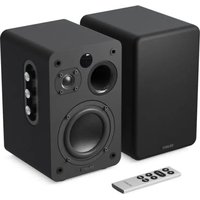
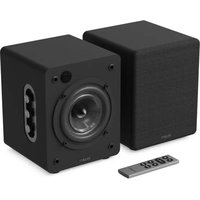
| Product type | Active bookshelf speaker |
| Brand | Majority |
| Model | D80 |
| Dimensions | 230 x 155 x 155 mm |
| Weight | 2.45 kg |
| Power supply | 100-240V, 50/60Hz |
| Standby power consumption | 0.5W |
| Speakers | 2x 4" woofer/midrange + 2x 1" tweeter |
| Bluetooth | Version 5.0, range up to 10 m |
| Playback modes | Bluetooth, optical, line (RCA), HDMI ARC, USB |
| USB audio formats | MP3, WMA, FLAC, MAV, APE |
| Maximum USB capacity | 128 GB |
| Preset equalizer | Movie, Music, Dialogue |
| Controls | Volume, treble, bass, input selection |
| Remote control included | Yes (AAA batteries not included) |
| Warranty | Standard 12 months, extendable free upon registration |
| Maintenance | Clean with a dry cloth; unplug before cleaning |
| Safety | Do not expose to water, ensure ventilation, keep out of reach of children |
Frequently Asked Questions - D80 Majority
User questions about D80 Majority
0 question about this device. Answer the ones you know or ask your own.
Ask a new question about this device
Download the instructions for your Loudspeaker in PDF format for free! Find your manual D80 - Majority and take your electronic device back in hand. On this page are published all the documents necessary for the use of your device. D80 by Majority.
USER MANUAL D80 Majority
What's In the Box? 3
Controls And Functions.... 4
Instructions Guide.... 7
Setting up your Majority D80 Speakers.... 7
Basic Operation.... 8
Cable Connections – Optical, RCA, HDMI ARC...... 9
Bluetooth Mode.... 10
USB Playback Mode.... 11
Troubleshooting.... 12
Specification and Warranty.... 13
Warranty.... 14
Safety Information.... 15
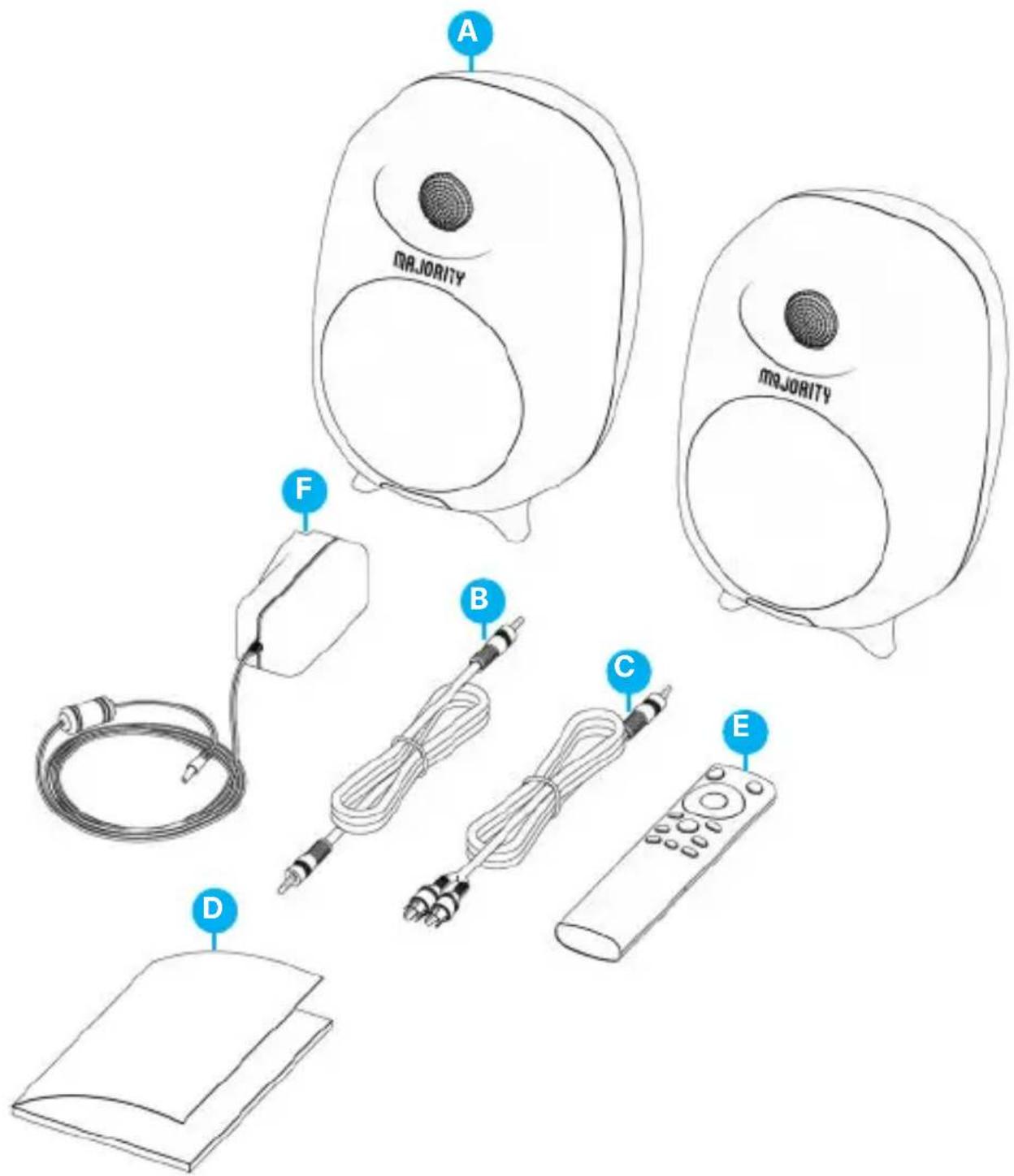
What's in the Box?
A. Majority D80 Bookshelf Speakers
B. Speakers connecting Cable
C. RCA Cable to AUX cable 3.5 mm
D. Instructions Guide
E. Remote Control
F. Power Adaptor
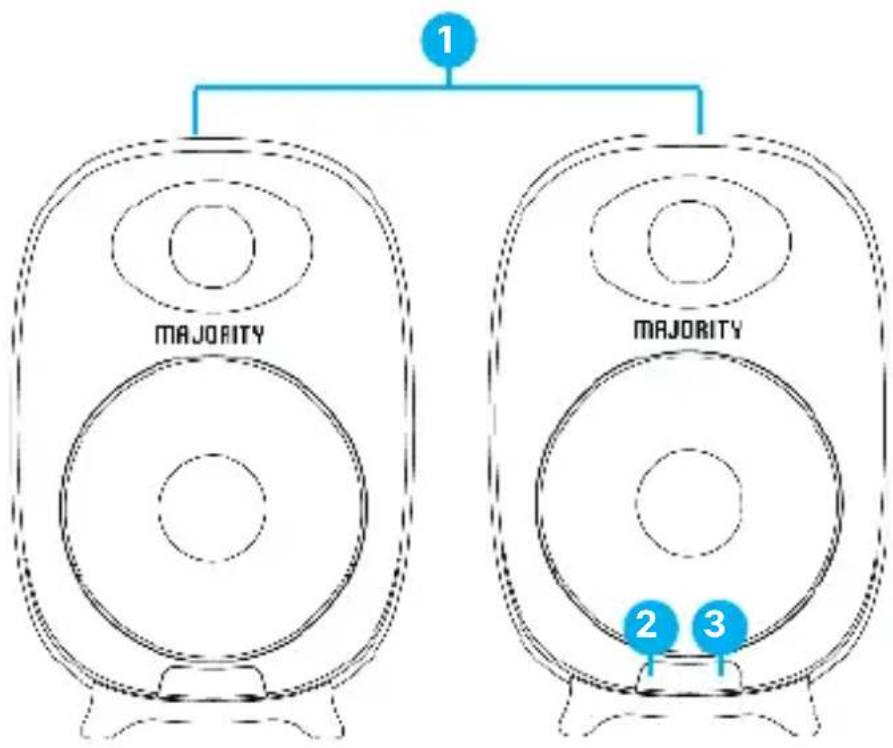
LED Indicators and Button Introduction
flowchart
graph TD
    A["1"] --> B["MAJORITY"]
    C["2"] --> D["MAJORITY"]
    E["3"] --> F["MAJORITY"]
- Active speakers
- Infrared Receiver
- LED Indicators
| State Indicator Lights | |
| Power off Red | |
| Optical mode White | |
| USB Purple | |
| Line in mode Light Blue | |
| Bluetooth connected Blue | |
| ARC Green |
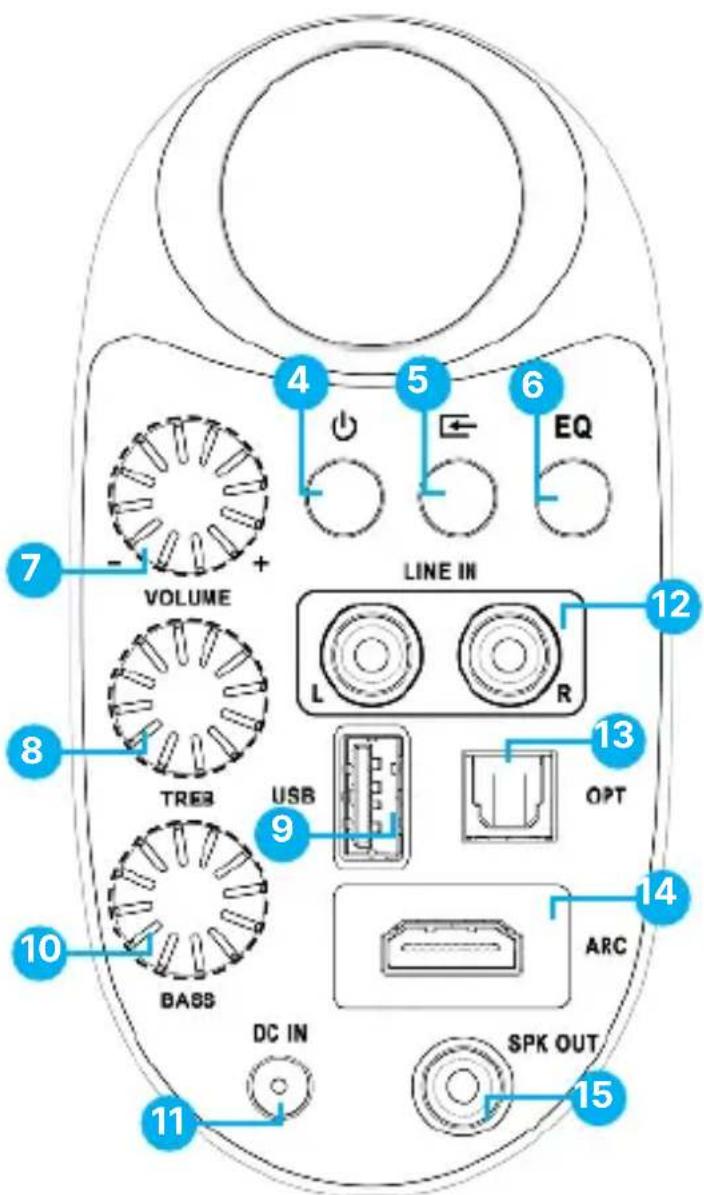
Back View of the primary speaker
- Power switch
- Input button (change speakers mode)
- EQ (Movie, Music & Dialogue)
- Volume control
- Treble control
- USB playback input port
-
Bass control
-
DC IN Power cable port
- 'Line in' input port
- Optical input port
- ARC input port
- Speaker output (connect with the left speaker using connecting cable)
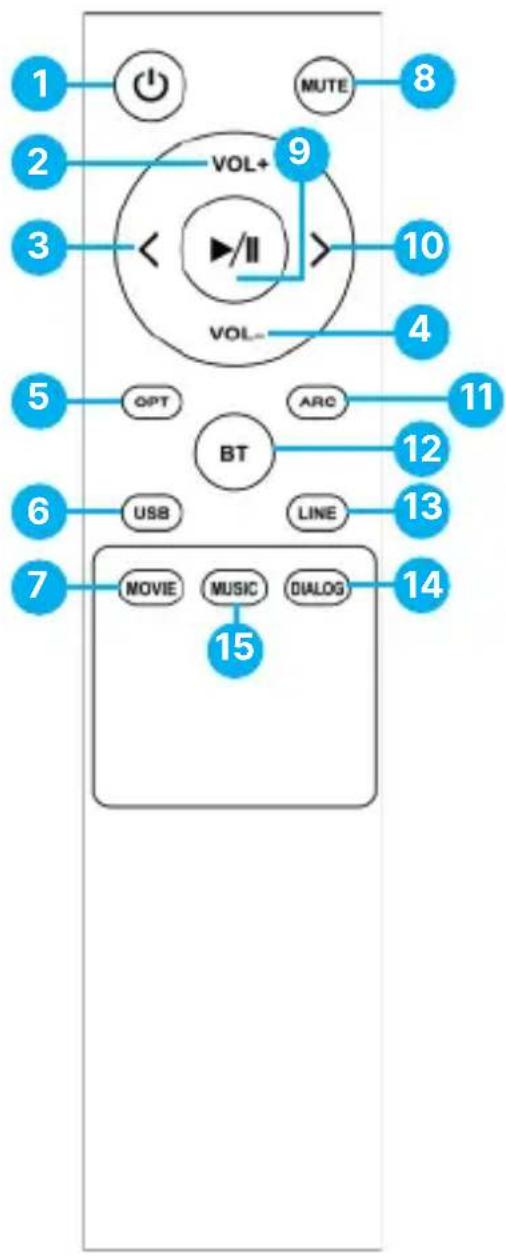
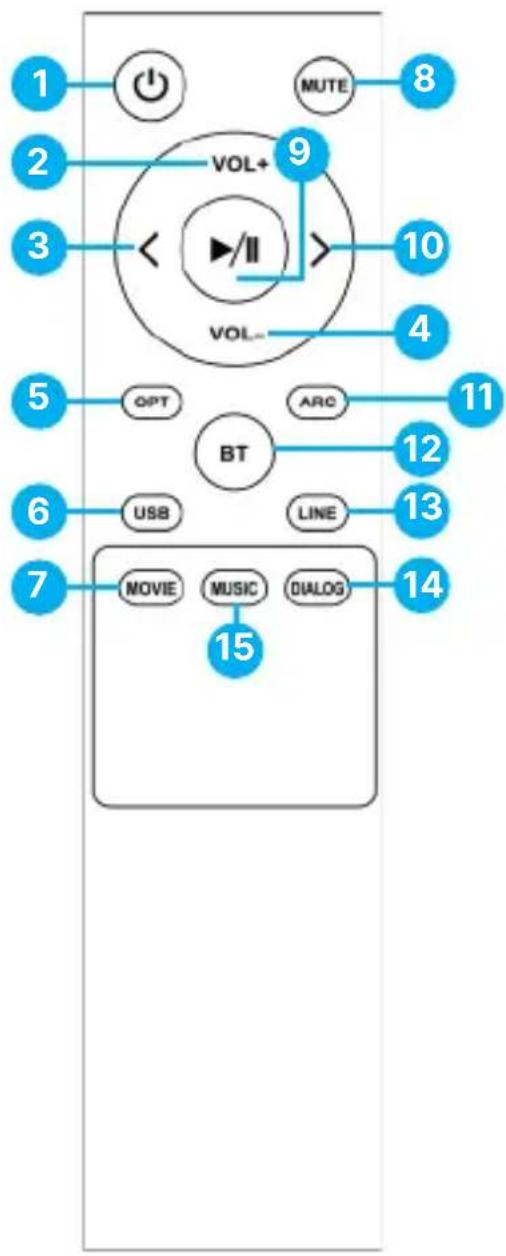
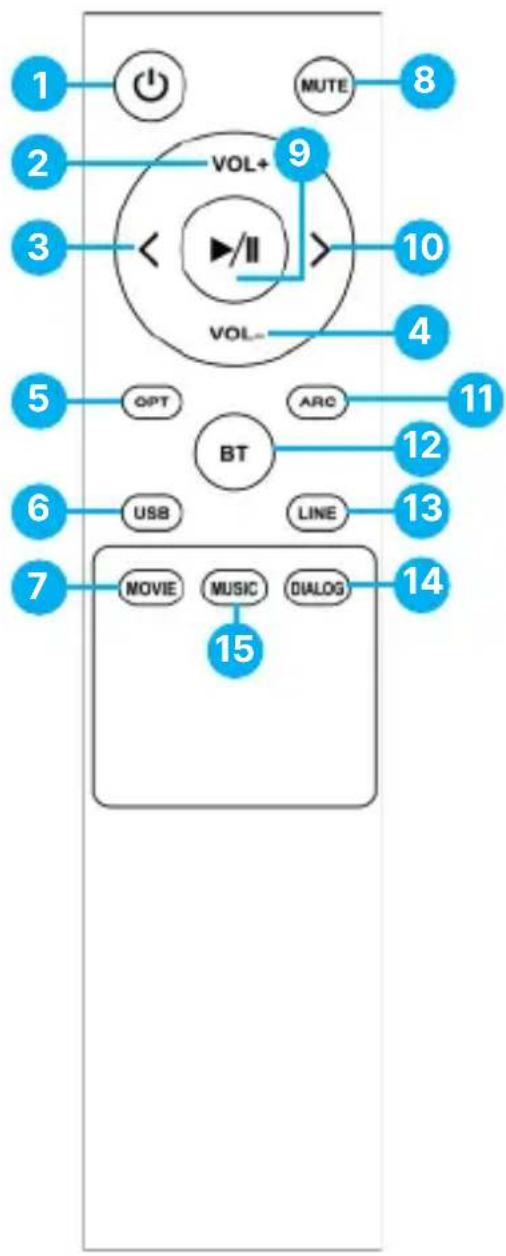
Remote Control
flowchart
graph TD
    A["1"] --> B["Power"]
    C["2"] --> D["VOL+"]
    E["3"] --> D
    D --> F[">"]
    G["4"] --> H["VOL-"]
    I["5"] --> J["GPT"]
    K["6"] --> L["USB"]
    M["7"] --> N["MOVIE"]
    O["8"] --> P["MUTE"]
    Q["9"] --> R[">"]
    S["10"] --> T["VOL-"]
    U["11"] --> V["ARC"]
    W["12"] --> X["BT"]
    Y["13"] --> X
    Z["14"] --> AA["LOG"]
    AB["15"] --> AC["MUSIC"]
    AD["15"] --> AE["DIALOG"]
- Power button
- Volume up
- Previous track
- Volume down
- Optical mode
- USB playback mode
- Movie EQ
- Mute button
- Play/Pause
- Next/ Forward
- ARC mode
- BT mode
- Line-in mode
- Dialog EQ
- Music EQ
Note: 'Movie,' 'Music' and 'Dialogue' are pre-defined equaliser sound effects which can be used while watching a movie, listening to music or news (dialogue). Alternatively, set the 'Bass' and 'Treble' as per your preferences.
Setting up your Majority D80 Speakers
Please note that the instructions within this user manual will refer to the D80's button number on the main speaker e.g. (Ref. 'number') and to the remote-control buttons e.g. (Rem. 'number'), in accordance with the diagrams from pages 4-6.
Remove all packaging and prepare the D80's for your set-up. Connect both speakers together using the connecting cable, insert one end on the left speaker back into the 'Speaker in' port and the other end into the 'Speaker output port' (Ref.12) on the back of the main speaker. Position the speakers on the left and right hand-side of the device you are about to connect with.
Using the power cord provided, plug one end into the DC IN power cable port which can be found at the back of the primary speaker (Ref.11) and plug the other end into a mains socket.
Prepare your remote for use. Remove the battery cover of the remote control. Insert 2 x AAA batteries (not included).
Ensure all cables are properly connected before switching the Majority D80 on, using either the 'Power' button on the main speaker (Ref.4) or using the 'Power' button on the remote control (Rem.1).
Basic Operation
Power ON/OFF: Use the button on remote control (Rem.1) or the Power button which can be found on the back of the primary speaker (Ref.4) to switch the unit on/off.
Change D80's speaker modes in between: Bluetooth, USB, Line in (RCA), Optical or HDMI/ARC using the corresponding mode buttons on remote control: BT, OPT, ARC, USB or LINE. Alternatively, use the Input button which can be found on the back of the primary speaker (Ref.2).
The mode selected is indicated by the sensor LED light colour positioned on the front of the main speaker, such as:
- Bluetooth - Blue
- Optical - White
• Line In/RCA - Light Blue - HDMI Arc - Green
- USB - Purple
Volume, treble and bass can be changed/controlled as per your preferences in all modes. Alternatively, use the pre-defined equalisers (Movie, Music & Dialogue) by pressing the corresponding buttons on remote control, or use the 'EQ' button (Ref.6) on the back of the main speaker.
Cable Connections
The Majority D80 speakers have multiple ports which can be used to connect with a TV, PC/laptop, phone, MP3 player, CD player, or any other devices which have an audio output port: Optical, AUX, HDMI ARC. Alternatively, The Majority D80 can be paired via Bluetooth.
Connecting D80s with your device using a cable type:
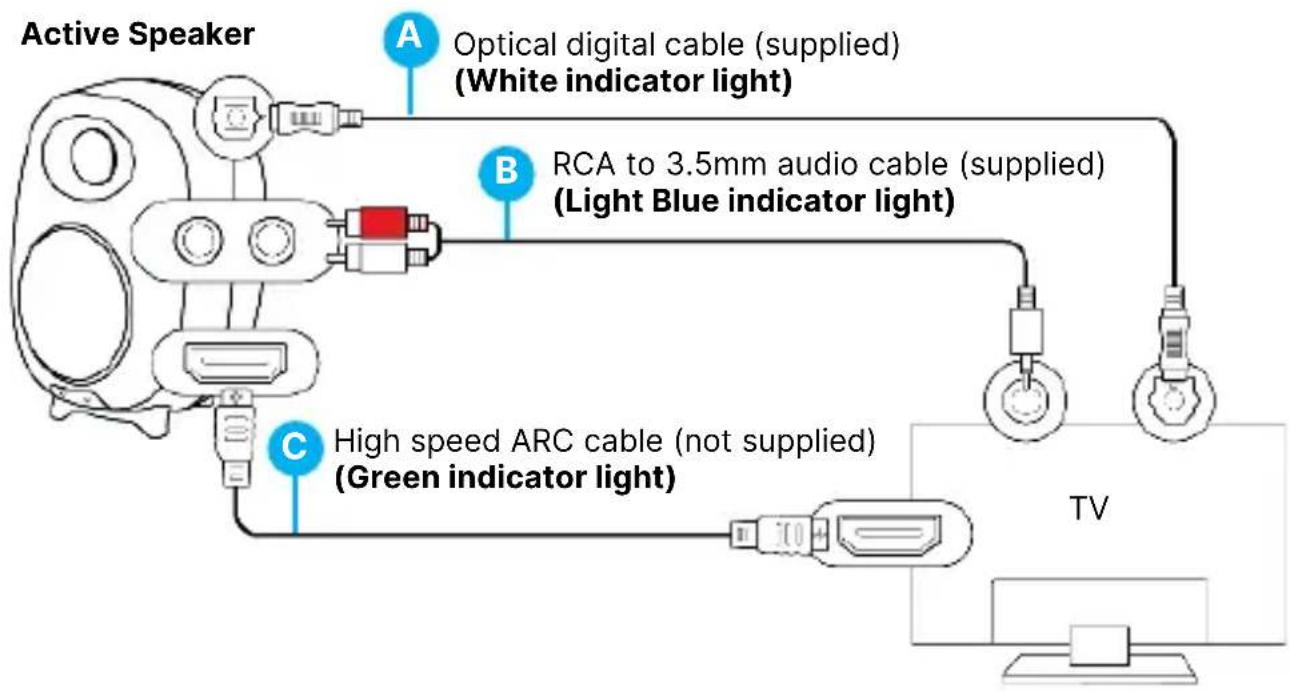
Using Optical digital cable (not included)
- Insert an optical digital cable into the main speaker port (Ref.10) and the other end to your TV optical output port or other similar device that you are about to connect the speakers with.
- Change the mode to Optical, by pressing the 'OPT' button on the remote control or use the 'Input' button on the back of the main speaker (Ref.5). The LED light sensor will turn white, indicating that the speakers are in Optical Mode.
- If you are connecting the speakers with a TV using an optical cable, make sure that your TV audio settings are set to 'Optical out' or 'PCM.'
Using the RCA to AUX 3.5 mm cable
- Insert the RCA cable provided into the main speaker port L/R 'LINE IN' (Ref.12) and the other end of the cable, AUX (3.5 mm) into an AUX or headphone jack port of your device.
- Change the mode to 'LINE IN', by pressing the 'LINE' button on the remote control (Rem.13) or use the 'Input' button on the back of the main speaker (Ref.5). The LED light sensor will turn light blue, indicating that the speakers are in 'LINE IN' Mode.
- If you are connecting the speakers with a TV using this cable, make sure your TV audio settings are set to PCM or Analogue.
Using a high-speed HDMI ARC cable (not included)
- Insert an HDMI ARC cable, into the main speaker port 'ARC' port and the other end of the cable to your TV or other device- HDMI ARC port that you are about to connect the speakers with.
- Change the mode to 'ARC', by pressing the 'ARC' button on the remote control (Rem.11). The LED light sensor will turn green, indicating that the speakers are in ARC Mode.
- If you are connecting the speakers with a TV using HDMI cable, make sure your TV audio settings are set to HDMI out or PCM.
Bluetooth Mode – Pairing with a device
The Majority D80 can be paired with a device via Bluetooth such as a phone, a tablet, or any other Bluetooth-enabled device.
- To pair the Majority D80 with your device via Bluetooth, change the mode to Bluetooth by pressing the 'BT' button on the remote control (Rem.12).
Alternatively, use the 'Input button on the back of the main speaker (Ref.3). The speaker's sensor LED light will flash blue, indicating that the speakers are ready to be paired. - Switch Bluetooth on your device, and search for the Majority D80. On your devices list you will see 'Majority D80'. Select and connect.
- When successfully connected, you will hear an audible sound from the Majority D80 confirming that the devices are now paired. The sensor LED light indicator will stop flashing and now show a steady blue light. You can now play audio from your paired device via the Majority D80.
- To disconnect the Majority D80 while in Bluetooth mode from your device, simply remove the speakers from your list of devices. Once disconnected you will then hear an audible sound, indicating that the devices have been disconnected. The sensor LED light will then start flashing blue.
- While playing audio from your device, you can use the buttons on the remote control including the Next/Forward' (Rem.10) or 'Previous' (Rem.3) buttons on remote control to skip audio tracks.
Note: The Majority D80 Speakers are not compatible with Bluetooth earbuds.
USB Playback Mode
- To use the Majority D80 in USB mode, press the 'USB' button on the remote control to change the speaker's mode. Alternatively, press the 'Input' button (Ref.5) on the main speaker to change the mode.
- The sensor LED light will turn purple, indicating that the Majority D80 is in the USB Playback Mode.
- Insert a USB stick into the USB port which can be found at the back of the main speaker (Ref.6) and use the remote-control functions to play, pause and navigate through the files.
Note: The Majority D80s' are compatible with USB sticks of up to 128 GB. The supported audio files are MP3, WMA, FLAC, MAV, APE.
The USB port cannot be used as a connection port with other devices as this is just for playback only.
| Observation Potential Cause/Solution | |
| No power/function | Check whether the power is switched on or off at the wall socket.Check if all cables are properly inserted. |
| No sound | Check whether the unit is set to MUTE.Check whether MODE is correctly selected. Turn up the volume on the speakers and on your external device.If connected with a TV, make sure the audio settings are adjusted as instructed in the user manual.Check if the audio port on your TV/device is an audio ‘output’ port not ‘input.’ |
| Any functionality issues | Switch off and unplug the speakers.Leave it for 2 minutes, re-connect and switch these on again. |
| Bluetooth not connecting | Ensure that the Majority D80 is in Bluetooth mode. Make sure these are not paired with other devices. |
Support
If you require further assistance with your Majority product, please contact our support team on the Majority website: www.majority.co.uk/support
Specification
| Power Supply | 100-240V/50-60Hz |
| Mode | BluetoothLine in ARCUSB Playback (reader)Optical |
| Power consumption 0.5W (Standby Mode) | |
| Dimensions 230 x 155 x 155 mm | |
| Weight 2.45 kg | |
| Speakers 2x4" full range + 2x1" tweeter | |
| Bluetooth Version 5.0 | |
| Bluetooth Range Up to 10 metres | |
| Compatible file types MP3, WMA, FLAC, MAV, APE | |
| Maximum compatible USB storage 128GB |
Warranty
All products come with a standard 12 month warranty. All items must be registered on www.majority.co.uk for the warranty to be valid. Once on the web page, use the menu to find 'Register Your Product'. You will also be given the chance to extend your warranty for an additional 24 months, free of charge.
D80
Regallautsprecher
Benutzerhandbuch
MAJORITY
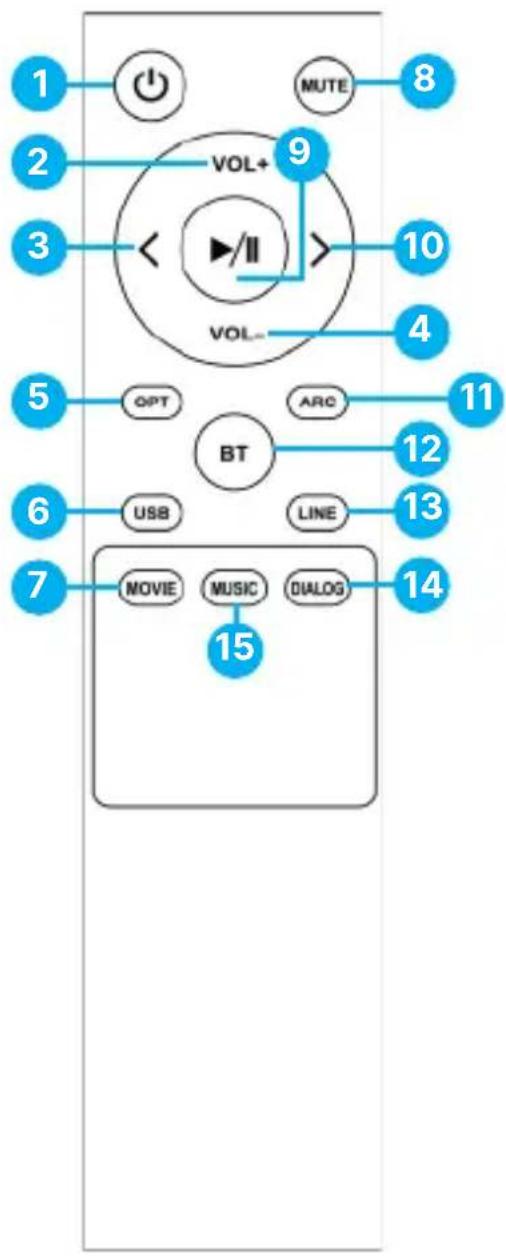
Fernsteuerung
flowchart
graph TD
    A["1"] --> B["Power"]
    C["2"] --> D["VOL+"]
    E["3"] --> D
    D --> F[">"]
    G["4"] --> H["VOL-"]
    I["5"] --> J["GPT"]
    K["6"] --> L["USB"]
    M["7"] --> N["MOVIE"]
    O["8"] --> P["MUTE"]
    Q["9"] --> R[">"]
    S["10"] --> T["VOL-"]
    U["11"] --> V["ARC"]
    W["12"] --> X["BT"]
    Y["13"] --> X
    Z["14"] --> AA["LOG"]
    AB["15"] --> AC["MUSIC"]
    AD["15"] --> AE["DIALOG"]
www.majority.co.uk/support
Spezifikation
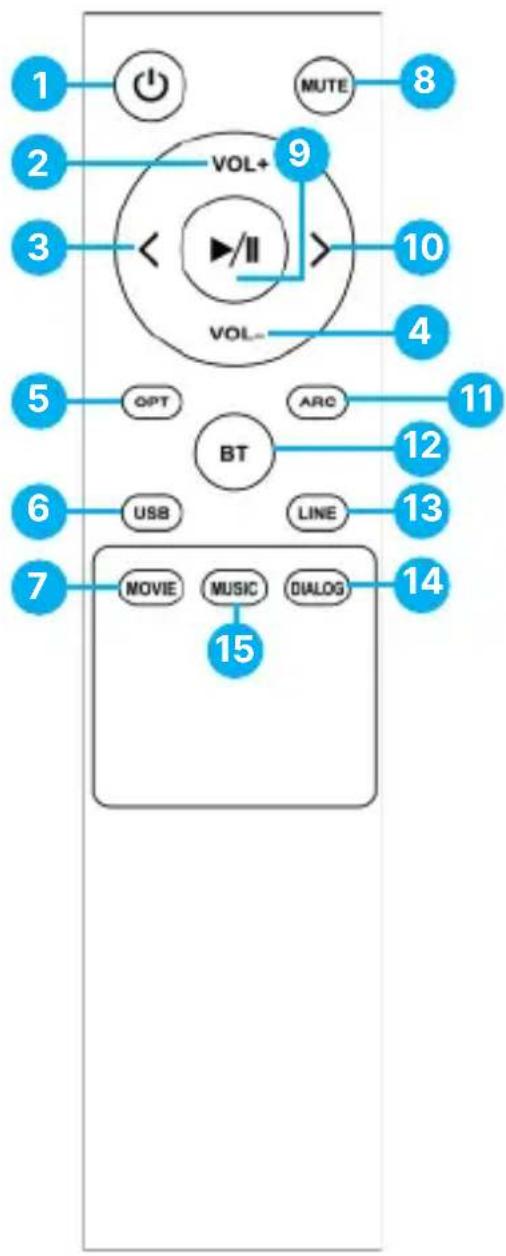
Télécommande
flowchart
graph TD
    A["1"] --> B["Power"]
    C["2"] --> D["VOL+"]
    E["3"] --> D
    D --> F[">"]
    G["4"] --> H["VOL-"]
    I["5"] --> J["GPT"]
    K["6"] --> L["USB"]
    M["7"] --> N["MOVIE"]
    O["8"] --> P["MUTE"]
    Q["9"] --> R[">"]
    S["10"] --> T["VOL-"]
    U["11"] --> V["ARC"]
    W["12"] --> X["BT"]
    Y["13"] --> X
    Z["14"] --> AA["MUSIC"]
    AB["15"] --> AC["DIALOG"]
Remote Control
flowchart
graph TD
    A["1"] --> B["Power"]
    C["2"] --> D["VOL+"]
    E["3"] --> D
    D --> F[">"]
    G["4"] --> H["VOL-"]
    I["5"] --> J["GPT"]
    K["6"] --> L["USB"]
    M["7"] --> N["MOVIE"]
    O["8"] --> P["MUTE"]
    Q["9"] --> R[">"]
    S["10"] --> T["VOL-"]
    U["11"] --> V["ARC"]
    W["12"] --> X["BT"]
    Y["13"] --> X
    Z["14"] --> AA["LOG"]
    AB["15"] --> AC["MUSIC"]
    AD["15"] --> AE["DIALOG"]
Mando a distancia
flowchart
graph TD
    A["1"] --> B["Power"]
    C["2"] --> D["VOL+"]
    E["3"] --> D
    D --> F[">"]
    G["4"] --> H["VOL-"]
    I["5"] --> J["GPT"]
    K["6"] --> L["USB"]
    M["7"] --> N["MOVIE"]
    O["8"] --> P["MUTE"]
    Q["9"] --> R[">"]
    S["10"] --> T["VOL-"]
    U["11"] --> V["ARC"]
    W["12"] --> X["BT"]
    Y["13"] --> X
    Z["14"] --> AA["MUSIC"]
    AB["15"] --> AC["DIALOG"]
EN Safety and Usage Guidelines (All where applicable)
General Safety Information - Read and Retain: Review all safety and operating instructions before use; keep them for future reference. Follow Instructions: Adhere strictly to all safety and operational guidelines. Water Exposure: Keep the device away from water; avoid placing liquids near it. Ventilation: Ensure ventilation openings are unobstructed to prevent overheating. Heat Sources: Keep the device away from heat-emitting appliances. Wall Mounting - Installation Safety: Follow the manufacturer's instructions and use approved mounting kits only. Avoid drilling into areas with cables, gas, or water lines. Use proper tools and safety apparatus. Regular Maintenance: Inspect regularly for wear or damage, especially if wall-mounted. Relocation: Detach from the wall mount before moving. Child Safety: Keep out of children's reach and ensure heavy items are securely mounted. Seismic Precautions: Use specialized mounts in earthquake-prone areas. Electrical Safety - Power Source: Use the specified power source; consult an electrician if unsure. Cable Management: Protect the power cord from damage. Power Disconnection: Keep the main plug accessible; unplug during storms or long periods of non-use. Battery Safety - Charging: Use the manufacturer's charger; avoid extreme conditions. Heat Exposure: Keep batteries away from heat to prevent explosion or leakage. Battery Condition: Discontinue use if the battery is damaged; dispose of it properly. Replacement: Only use recommended batteries; incorrect types can cause hazards. External Batteries: Use only specified types, observing correct polarity. Battery Removal: Remove batteries if not used for an extended period. Disposal: Follow local regulations for battery disposal; do not incinerate. Connectivity Safety - Cable Connections: Power off devices before connecting or disconnecting cables. Bluetooth Pairing: Ensure a secure connection; avoid interference from other devices. Volume Control: Keep volume moderate to prevent hearing damage. Connectivity and Data Security - Wireless Security: Review privacy policies and secure your network. Software Updates: Keep software updated for security and performance. Children's Safety Warnings - Product Use: Intended for adults; keep away from children. Battery Warning: Keep batteries and items containing batteries out of children's reach. Volume Control: Maintain a safe volume level to protect children's hearing. Fire Hazard - Flammable Materials: Do not place open flames near the product. Overheating: Avoid covering the product to prevent overheating and fire risks. Disposal and Recycling - Product Disposal: Dispose of at a recycling centre according to local laws. Environmental Compliance: Follow regulations for battery and electronic waste disposal. User Maintenance - Cleaning: Unplug before cleaning; use a dry cloth only. Servicing: Only qualified personnel should perform repairs. Data Protection: Reset to factory settings before returning or disposing of the product. Disclaimer: Failure to follow these instructions may result in injury, death, or property damage. The manufacturer is not liable for damage caused by improper use.
Declaration of Conformity:
We, Izilla Ltd, Newton House, 2 Pioneer Court, Histon, Cambridge, CB24 9PT declare under our sole responsibility that the product:
Product Name: D80 Bookshelf Speakers Model: 1000002883/1000002962
Brand Name: Majority
To which this declaration referred is in conformity to the following harmonized standards or normative documents (CE & Rohs 2.0);
EN 55035:2017, EN 55032:2015, EN61000-3-2:2014, EN61000-3-3:2013, EEN62368-1:2004+A11:2017, ETSI EN 301 489-1 V2.2.3(2019-11), ETSI EN 301 489-17, V3.2.2(2019-12), ETSI EN 300 328 V2.2.2 (2019-07), EN 62479: 2010, IEC 62321-3-1:2013, IEC 62321-4:2013, IEC 62321-5:2013, IEC 62321-6:2015, IEC 62321-7-1:2015, IEC 62321-7-2:2017, IEC 62321-8:2017, (EC)NO 1275/2008, EN50564:2011, (EC)NO 801/2013.
Complying with the requirements or provisions of Council Directives which relate to:
EMC Directive 2014/30/EU, RED Directive 2014/53/EU, LVD Directive 2014/35/EU, Directive (2011/65/EU) and its amendment directives 2015/863/EU (RoHS 2.0) of the, European parliament, ERP Directive 2009/125/EC.
All essential test suites have been carried out.
Point of Contact: Eddie Latham | Founder
Signed: E. Latham Date of Issue: January 2024 Place of Issue: Cambridge, UK
Importer's Addresses:
UK: iZilla Ltd, Newton House, 2 Pioneer Court, Histon, Cambridge, CB249PT
Email: techsupport@majority.co.uk
EU RP: AR Experts, Po Box 5047, 3620 AA Breukelen, The Netherlands
Email: info@ar-experts.eu
US: iZilla Ltd C/O A.N.Deringer Inc, 19520 Wilmington Ave, Rancho Dominguez, CA, 90220
Email: techsupport@majority.co.uk

ATTENTION
RISK OF ELECTRIC SHOCK DO NOT OPEN


CAUTION
RISQUE D'ELECTROCUTION NE PAS OUVRIR


IMPORTANT: Please read all instructions carefully before use and keep for future reference

natural_image
Solid dark blue background with no visible text, symbols, or objects.MAJORITY
www.majority.co.uk

FR

- What's in the Box?
- Back View of the primary speaker
- Remote Control
- Setting up your Majority D80 Speakers
- Basic Operation
- Cable Connections
- Connecting D80s with your device using a cable type:
- Using Optical digital cable (not included)
- Using the RCA to AUX 3.5 mm cable
- Using a high-speed HDMI ARC cable (not included)
- Bluetooth Mode – Pairing with a device
- USB Playback Mode
- Support
- Warranty
- D80
- Regallautsprecher
- Fernsteuerung
- Télécommande
- Mando a distancia
- EN Safety and Usage Guidelines (All where applicable)
- Declaration of Conformity:
- To which this declaration referred is in conformity to the following harmonized standards or normative documents (CE & Rohs 2.0);
- Complying with the requirements or provisions of Council Directives which relate to:
- Importer's Addresses:
- MAJORITY
Brand : Majority
Model : D80
Category : Loudspeaker