
M1 - Speaker Majority - Free user manual and instructions
Find the device manual for free M1 Majority in PDF.


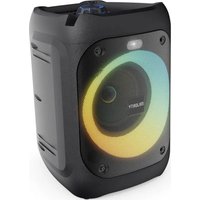
| Product type | Speaker |
| Brand | Majority |
| Model | M1 |
| Category | Portable speaker |
| Power supply | Built-in rechargeable battery |
| Connectivity | Bluetooth |
| Main functions | Wireless audio playback, volume control |
| Maintenance and cleaning | Unplug before cleaning, use a dry cloth |
| Safety | Safety instructions included: avoid water, ventilation, children |
| Wall mounting | Possible with approved kit |
| Cable management | Protect the power cord |
| Batteries | Rechargeable, do not expose to heat |
| Operating temperature | Avoid heat sources |
| Repairability | Repairs by qualified personnel only |
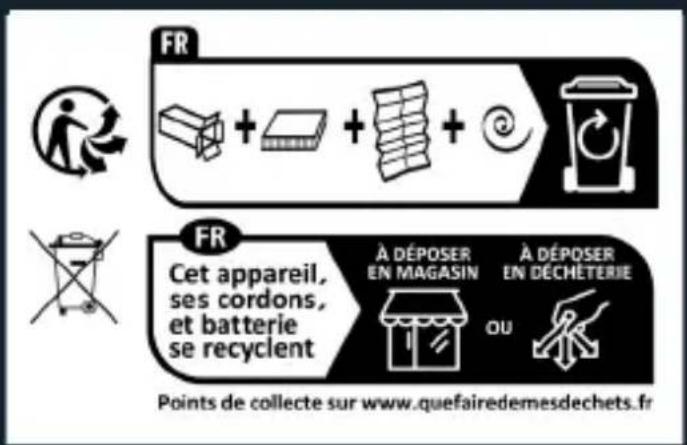
| Disposal | Recycle according to local regulations |
Frequently Asked Questions - M1 Majority
User questions about M1 Majority
0 question about this device. Answer the ones you know or ask your own.
Ask a new question about this device
Download the instructions for your Speaker in PDF format for free! Find your manual M1 - Majority and take your electronic device back in hand. On this page are published all the documents necessary for the use of your device. M1 by Majority.
USER MANUAL M1 Majority
Controls and Functions...... 4
Operating Instructions.... 5
Bluetooth Mode and TWS Function...... 6
Troubleshooting & Support.... 7
Specifications and Warranty.... 8
Warning and Safety Information.... 9
What's in the Box?
A. Majority M1 Bluetooth Speaker
B. User Manual
C. USB Type-C Cable
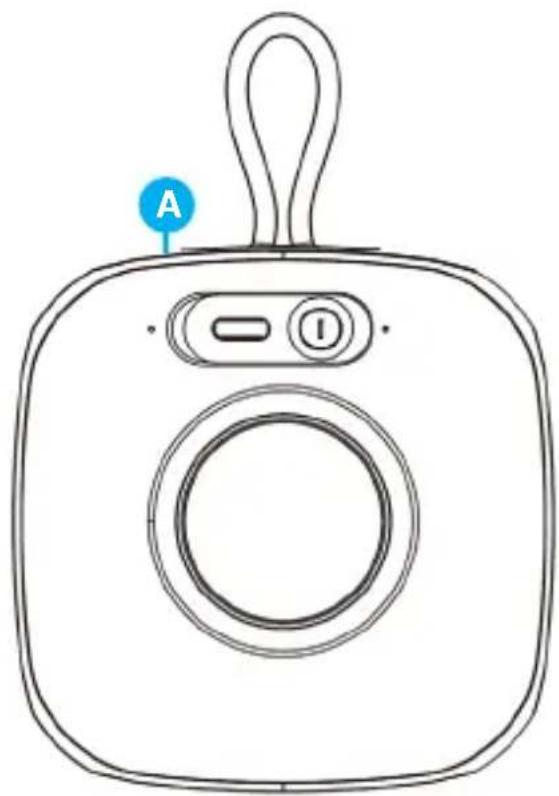
natural_image
Line drawing of a camera with labeled buttons (A, I) and a handle, no text or symbols present.
natural_image
Illustration of a blank rectangular book with a blue circular label labeled 'B' on top (no text or symbols on the pages)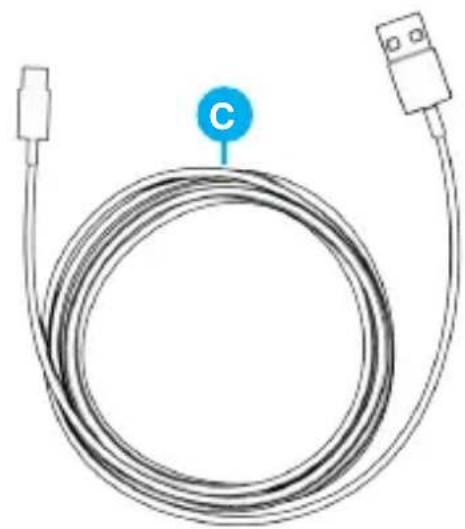
natural_image
Coiled cable with connector port and labeled point C (no text or symbols beyond label)Back View
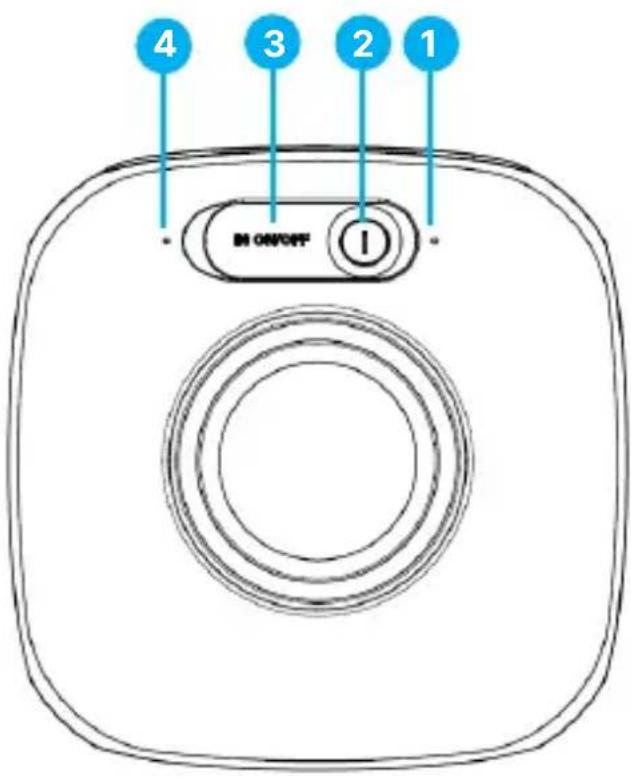
-
LED Indicator
-
Power / Multifunctional button (described in detail on the next page)
-
USB- Type C charging port covered by protective rubber
-
Phone calls and Voice Assistant microphone
Remove the packaging and prepare your Majority M1 and prepare for use.
Charging
To charge the Majority M1, insert the USB Type-C cable into the charging port which can be found on the back of the speaker, under the protective rubber cover (Ref.3). Connect the other end to a 5V/1A USB plug (not included) and plug it into a mains socket.
The speaker requires approximately 3-4 hours to fully charge the battery.
The charging LED Indicator will show a red light whilst charging and will turn off when a full charge course will be completed.
Important: Do not use the speaker while it is charging.
PLEASE NOTE: The instructions within this user manual will refer to Bluetooth speaker M1's button number on the speaker e.g. (Ref. 'number'), in accordance with the diagrams from page 4.
Power ON/OFF & Multifunctional button (Ref.2)
• Power ON/OFF Press and hold for 3 seconds to power the speaker on or off.
• Play/Pause - Press to play/pause audio
- Reset: Press five times to process a forced reset of the speaker.
- Enter/Exit TWS Mode (True Wireless Stereo):
Press 3 times to activate TWS mode. Repeat to disconnect TWS. (See full TWS setup instructions on page 6).
- Unpair Bluetooth device- Press the Power button 4 times to disconnect from currently paired device.
Phone Calls and Voice Assistant Functionality
The Majority Bluetooth Speaker M1 supports phone call and voice assistant features. These functions are only available when the speaker is paired via Bluetooth with a mobile phone running iOS or Android.
Phone Call Controls
• Answer a Call: Press the Power button (Ref.2) when the phone rings.
• End a Call: Press the Power button (Ref.2) during an active call.
- Reject a Call: Press and hold the Power button (Ref.2) for 3-4 seconds during an incoming call.
Voice Assistant Activation
To use the voice assistant, ensure your phone is connected to the M1 Speaker via Bluetooth and that Siri or Google Assistant is activated on your device.
- Activate Voice Assistant on the speaker:
Press the Power button (Ref.2) twice to activate Voice Assistant. A beep will confirm activation. Then, speak your voice command.
•Reactivate Voice Assistant:
If the speaker is not responding to your voice command, press twice again, and then issue your command.
Microphone (Ref.4)
•Phone Call Microphone:
Automatically activates when a call is answered.
•Voice Assistant Microphone:
Activates when using Siri or Google Assistant. For optimal performance, speak clearly and close to the microphone.
Bluetooth Mode
The Majority M1 can be paired via Bluetooth with a phone, tablet, or other compatible device to play audio through the Bluetooth speaker.
• Power on the speaker Bluetooth mode. The LED indicator (Ref.1) will start flashing a blue light indicating that M1 is searching for a device to pair with.
- Pair with your device. On your device, activate Bluetooth and search for 'Majority M1' in the list of available devices. Select it to connect. A beep sound will be heard confirming that Majority M1 is now paired and the LED light indicator will now show a steady blue light.
- Reconnect- Once paired with a device, the next time you power on the speaker, you will automatically reconnect to that same device in less than 10 seconds.
- To unpair the Majority M1 from a connected device, please remove the Bluetooth speaker from your device list. Alternatively, press the Power button (Ref.2) four times to unpair.
TWS – True Wireless Stereo Pairing Mode
The Majority M1 can also be paired with another Majority MOVE speaker (not included). It can pair with another M1 or with other Majority MOVE speaker, to play wireless audio in true stereo. Follow the steps below:
- Turn off Bluetooth function on your phone or other Bluetooth-enabled devices near the speakers.
- Power on both Majority MOVE speakers you would like to connect using TWS function.
- Both speakers must be in Bluetooth mode. Press the Power button (Ref.2) three times on M1 to activate TWS. A beep sound will be heard, and the LED indicator light will turn off. Activate TWS on the other MOVE speaker and wait to connect.
- Enable Bluetooth on your device that you are about to pair and connect to the Bluetooth speaker M1 with. Search on your phone list of devices for 'Majority M1' select and pair. Start playing audio — the sound will now be heard in stereo through both speakers.
To disconnect the TWS paired speaker, press the Power button (Ref.2) three times on the M1 speaker. The LED light will change to flashing blue. You can now use the MOVE Bluetooth speakers as standalone unit.
PLEASE NOTE: You can only pair using TWS function with one other Majority MOVE speaker. In case you have more than two MOVE speakers and two of these are already paired in TWS mode without being disconnected, you may hear the beep twice meaning that is already paired. Deactivate TWS first, power off and on the one you want to pair and follow these connecting steps again to pair two speakers that wish to use.
Observation Potential Cause/Solution
| No power/function | Fully charge the speaker battery for 4-5 hours.Check if the USB-Type C is properly inserted into its port and into the plug.Ensure this is properly connected to the power outlet. |
| No sound | Check whether audio is set to PAUSE.Increase the volume level on the connected device. |
| Function disturbance | Completely drain the speaker battery, and then fully charge for 3-4 hours. Whilst charging, keep the speaker switched off.When fully charged unplug from mains and power on. |
| Bluetooth not connecting | Ensure that you are on Bluetooth mode on the speaker and the Bluetooth on your device is switched on. Select the Bluetooth device ‘Majority M1’ connect and start playing. |
Do you still need help with your speaker? Contact Tech Support
If you require further assistance with your Majority product, please contact our team on the Majority website: www.majority.co.uk/support or email us @ techsupport@majority.co.uk
Specification
| Power Supply plug required USB | plug of 5V 1A |
| Mode | BluetoothTWS |
| Bluetooth Version | 6.0 |
| Bluetooth and TWS Range | Up to 10 metres |
| Dimensions | 10 x 10,1x4.4 cm |
| Weight | 220 g |
Warranty
All products come with a standard 12-month warranty. To extend your warranty to a total of three years, you must register your product within 30 days of purchase at www.majority.co.uk. Simply navigate to the menu and select 'Register Your Product'. This service is completely free of charge.
Warning & Safety Information
EN Safety and Usage Guidelines (All where applicable)
General Safety Information - Read and Retain: Review all safety and operating instructions before use; keep them for future reference. Follow Instructions: Adhere strictly to all safety and operational guidelines. Water Exposure: Keep the device away from water; avoid placing liquids near it. Ventilation: Ensure ventilation openings are unobstructed to prevent overheating. Heat Sources: Keep the device away from heat-emitting appliances. Wall Mounting - Installation Safety: Follow the manufacturer's instructions and use approved mounting kits only. Avoid drilling into areas with cables, gas, or water lines. Use proper tools and safety apparatus. Regular Maintenance: Inspect regularly for wear or damage, especially if wall-mounted. Relocation: Detach from the wall mount before moving. Child Safety: Keep out of children's reach and ensure heavy items are securely mounted. Seismic Precautions: Use specialized mounts in earthquake-prone areas. Electrical Safety - Power Source: Use the specified power source; consult an electrician if unsure. Cable Management: Protect the power cord from damage. Power Disconnection: Keep the main plug accessible; unplug during storms or long periods of non-use. Battery Safety - Charging: Use the manufacturer's charger; avoid extreme conditions. Heat Exposure: Keep batteries away from heat to prevent explosion or leakage. Battery Condition: Discontinue use if the battery is damaged; dispose of it properly. Replacement: Only use recommended batteries; incorrect types can cause hazards. External Batteries: Use only specified types, observing correct polarity. Battery Removal: Remove batteries if not used for an extended period. Disposal: Follow local regulations for battery disposal; do not incinerate. Connectivity Safety - Cable Connections: Power off devices before connecting or disconnecting cables. Bluetooth Pairing: Ensure a secure connection; avoid interference from other devices. Volume Control: Keep volume moderate to prevent hearing damage. Connectivity and Data Security - Wireless Security: Review privacy policies and secure your network. Software Updates: Keep software updated for security and performance. Children's Safety Warnings - Product Use: Intended for adults; keep away from children. Battery Warning: Keep batteries and items containing batteries out of children's reach. Volume Control: Maintain a safe volume level to protect children's hearing. Fire Hazard - Flammable Materials: Do not place open flames near the product. Overheating: Avoid covering the product to prevent overheating and fire risks. Disposal and Recycling - Product Disposal: Dispose of at a recycling centre according to local laws. Environmental Compliance: Follow regulations for battery and electronic waste disposal. User Maintenance - Cleaning: Unplug before cleaning; use a dry cloth only. Servicing: Only qualified personnel should perform repairs. Data Protection: Reset to factory settings before returning or disposing of the product. Disclaimer: Failure to follow these instructions may result in injury, death, or property damage. The manufacturer is not liable for damage caused by improper use.
Declaration of Conformity:
We, Izilla Ltd, Newton House, 2 Pioneer Court, Histon, Cambridge, CB24 9PT declare under our sole responsibility that the product:
Product Name: M1 Bluetooth Speaker Model: 1000003094
Brand Name: Majority
To which this declaration referred is in conformity to the following harmonized standards or normative documents (CE & Rohs 2.0);
EN 55035:2017, EN 55032:2015, EN61000-3-2:2014, EN61000-3-3:2013, EEN62368-1:2004+A11:2017, ETSI EN 301 489-1 V2.2.3(2019-11), ETSI EN 301 489-17, V3.2.2(2019-12), ETSI EN 300 328 V2.2.2 (2019-07), EN 62479: 2010, IEC 62321-3-1:2013, IEC 62321-4:2013, IEC 62321-5:2013, IEC 62321-6:2015, IEC 62321-7-1:2015, IEC 62321-7-2:2017, IEC 62321-8:2017, (EC)NO 1275/2008, EN50564:2011, (EC)NO 801/2013.
Complying with the requirements or provisions of Council Directives which relate to:
EMC Directive 2014/30/EU, RED Directive 2014/53/EU, LVD Directive 2014/35/EU, Directive (2011/65/EU) and its amendment directives 2015/863/EU (RoHS 2.0) of the, European parliament, ERP Directive 2009/125/EC.
All essential test suites have been carried out.
Point of Contact: Eddie Latham | Founder
Signed: E.Latham Date of Issue: January 2024 Place of Issue: Cambridge, UK
Importer's Addresses:
UK: iZilla Ltd, Newton House, 2 Pioneer Court, Histon, Cambridge, CB249PT
Email: techsupport@majority.co.uk
EU RP: AR Experts, Po Box 5047, 3620 AA Breukelen, The Netherlands
Email: info@ar-experts.eu
US: iZilla Ltd C/O A.N.Deringer Inc, 19520 Wilmington Ave, Rancho Dominguez, CA, 90220
Email: techsupport@majority.co.uk

ATTENTION
RISK OF ELECTRIC SHOCK DO NOT OPEN


CAUTION
RISQUE D'ELECTROCUTION NE PAS OUVRIR


IMPORTANT: Please read all instructions carefully before use and keep for future reference
MAJORITY
www.majority.co.uk
- What's in the Box?
- Back View
- Charging
- Power ON/OFF & Multifunctional button (Ref.2)
- - Enter/Exit TWS Mode (True Wireless Stereo):
- Phone Calls and Voice Assistant Functionality
- Phone Call Controls
- Voice Assistant Activation
- - Activate Voice Assistant on the speaker:
- •Reactivate Voice Assistant:
- Microphone (Ref.4)
- •Phone Call Microphone:
- •Voice Assistant Microphone:
- Bluetooth Mode
- TWS – True Wireless Stereo Pairing Mode
- Do you still need help with your speaker? Contact Tech Support
- Warranty
- Warning & Safety Information
- EN Safety and Usage Guidelines (All where applicable)
- Declaration of Conformity:
- To which this declaration referred is in conformity to the following harmonized standards or normative documents (CE & Rohs 2.0);
- Complying with the requirements or provisions of Council Directives which relate to:
- Importer's Addresses:
- MAJORITY
Brand : Majority
Model : M1
Category : Speaker