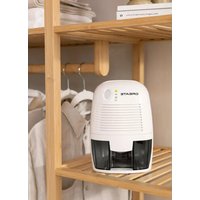
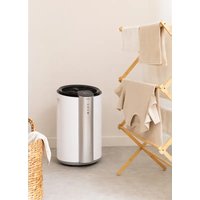
DRYZONE - Dehumidifier Create - Free user manual and instructions
Find the device manual for free DRYZONE Create in PDF.


| Brand | Create |
| Model | DRYZONE |
| Product Type | Thermoelectric Dehumidifier |
| Tank Capacity | 500 ml |
| Auto Shut-off | Yes, when tank is full |
| Indicator Lights | Green operation indicator, yellow tank full indicator |
| Power Supply | AC/DC power adapter (input 100-240 V, output 12 V DC) |
| Power Consumption | Approximately 30 W (estimate) |
| Dimensions (approx.) | 25 x 15 x 30 cm (estimated) |
| Net Weight | Approximately 1.5 kg (estimated) |
| Usage | Indoor, household use only |
| Main Functions | Moisture extraction, auto shut-off when tank full, dry air outlet |
| Maintenance and Cleaning | Clean the surface with a soft damp cloth, brush the air intake grille and dry air outlet |
| Safety | Do not use outdoors, do not immerse, unplug before cleaning, do not cover air outlets |
| Spare Parts | Removable water tank, AC/DC power adapter |
| Repairability | No user-serviceable parts, contact customer service in case of issues |
| Warranty | Household use only, commercial use voids warranty |
| Manual Availability | Manual available for free download in PDF format |
Frequently Asked Questions - DRYZONE Create
User questions about DRYZONE Create
0 question about this device. Answer the ones you know or ask your own.
Ask a new question about this device
Download the instructions for your Dehumidifier in PDF format for free! Find your manual DRYZONE - Create and take your electronic device back in hand. On this page are published all the documents necessary for the use of your device. DRYZONE by Create.
USER MANUAL DRYZONE Create
Security instructions 6
7
Parts list 7
Removable water tank 8
Cleaning and maintenance 8
PORTUGUES
Thank you for choosing our dehumidifier. Before using the appliance, and to ensure the best use, carefully read these instructions.
The safety precautions enclosed herein reduce the risk of death, injury and electrical shock when correctly adhered to. Keep the manual in a safe place for future reference, along with the completed warranty card, purchase receipt and package. If applicable, pass these instructions on to the next owner of the appliance. Always follow basic safety precautions and accident-prevention measures when using an electrical appliance. We assume no liability for customer failing to comply with these requirements.
SECURITY INSTRUCTIONS
Before using this electrical appliance, the following basic precautions should always be followed:
- Do not use outdoors or for commercial purposes. This appliance is intended for household use only. Using the appliance for commercial purposes will void the warranty.
- Remove the plug from the power outlet before cleaning or when idle.
- To avoid risk of electric shock, do not plug the appliance in a damp or wet room, and position it in a well-ventilated area.
- Never cover the air outlets with clothes, plastic bags or any other objects.
- Do not pick up or operate the appliance if the power supply cord or the plug are damaged, or if the unit is malfunctioning or has been dropped or damaged in any way. In case of damage, contact the aftersales service. A damaged cord or plug must be exclusively replaced by the manufacturer or a qualified person in order to avoid injuries.
- Do not immerse the appliance or the power cord into water or any other liquids. Should the appliance fall into water, immediately unplug it from the mains and have it checked by an expert before using it again. It may cause fire, electric shock, injury or death.
- Always store the appliance in an upright position to avoid water leakage.
- Do not operate the appliance for long periods of time. Turn the appliance on/off every 12 hours to prolong its service life.
- Do not attempt to open the device. There are no user serviceable parts inside.
- This appliance may be used by children over the age of 8 years old and persons with reduced physical, sensory or mental capabilities or lack of experience and know-how, but only if supervised or if they have been instructed on how to use the appliance safely and are aware of its potential dangers.
OPERATING INSTRUCTIONS
Before using the appliance, remove all of the packaging materials.
- Connect the DC power jack (12) to the DC power socket (14) and then connect the AC plug (11) to the wall outlet.
- Turn the appliance on using the "On/Off" switch and the green LED light will come on. As soon as the dehumidifier starts working you should be able to feel the air blowing from the dry air outlet (5).
- To turn the appliance off, just press the "On/Off" switch (6).
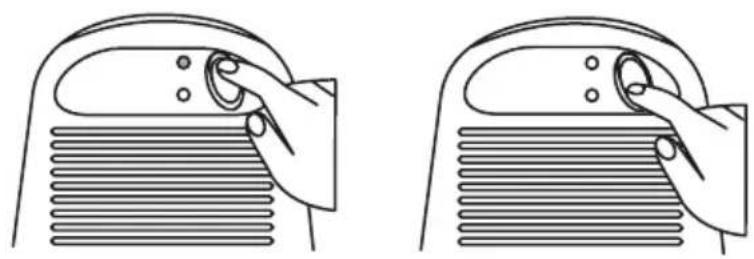
PARTS LIST

-
"On" green indicator light
-
On/Off switch
-
AC plug with power cord
-
"Full tank" yellow indicator light
7.Water outlet hole
-
DC power jack
-
Air inlet
-
Water tank
-
AC/DC charger
-
Removable water tank
-
Float switch
-
DC Power socket
-
Dry air outlet
-
Rubber foot
The water tank has a capacity of 500ml . When the tank gets full, the appliance will turn off automatically and a yellow light will come on (2).
- Always turn the appliance off before removing the water tank (8).
- Remove the water tank and empty it in the sink.
- Place the water tank back into the appliance and turn it on to continue dehumidifying.
CLEANING AND MAINTENANCE
Always unplug the appliance before cleaning and maintenance.
Wipe the outer surface of the appliance with a soft damp cloth and use a brush to dust the air inlet grille (3).
You should clear the dry air outlet (5) from time to time.
In compliance with Directives: 2012/19/EU and 2015/863/EU on the restriction of the use of dangerous substances in electric and electronic equipment as well as their waste disposal. The symbol with the crossed dustbin shown on the package indicates that the product at the end of its service life shall be collected as separate waste. Therefore, any products that have reached the end of their useful life must be given to waste disposal centres specialising in separate collection of waste electrical and electronic equipment, or given back to the retailer at the time of purchasing new similar equipment, on a one for one basis. The adequate separate collection for the subsequent start-up of the equipment sent to be recycled, treated and disposed of in an environmentally compatible way contributes to preventing possible negative effects on the environment and health and optimises the recycling and reuse of components making up the apparatus. Abusive disposal of the product by the user involves application of the administrative sanctions according to the laws.
Brand : Create
Model : DRYZONE
Category : Dehumidifier