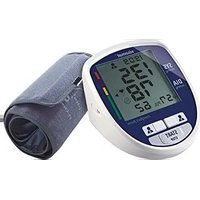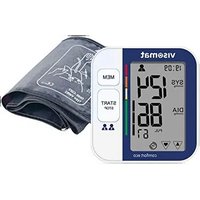
Visomat double comfort - Blood pressure monitor UEBE - Free user manual and instructions
Find the device manual for free Visomat double comfort UEBE in PDF.


User questions about Visomat double comfort UEBE
0 question about this device. Answer the ones you know or ask your own.
Ask a new question about this device
Download the instructions for your Blood pressure monitor in PDF format for free! Find your manual Visomat double comfort - UEBE and take your electronic device back in hand. On this page are published all the documents necessary for the use of your device. Visomat double comfort by UEBE.
USER MANUAL Visomat double comfort UEBE
text_image
Medical device diagram with numbered labels pointing to blood pressure measurement and blood pressure monitor readingsManschette
text_image
11 10 9 8 7 6 No.88/88 1 M 2 888 :888 :888 188 4 5® double comfort software
® double comfort software
® double comfort software
5. Start des Programmes
text_image
Material File File Name: Lina Material Description: Description: 100% Description: 100% Description: 100%® double comfort software
® double comfort software
® double comfort software
97877 Wertheim, Germany
Table of contents Table of contents
A Intended use 48
B Safety instructions
1. Important instructions for patients 50
2. Important technical details 51
C Operating the unit
1. Unit description 53
2. Displays 54
3. Important instructions for use 55
4. Initial operation of the unit 56
5. Inserting/replacing batteries 56
6. Setting the date/time 57
7. Attaching the cuff 59
8. Measuring blood pressure 60
9. WHO traffic light function 62
10. Pulse pressure 63
11. Irregular pulse waves and cardiac arrhythmia 63
12. Using the memory 64
13. Transferring the data to a PC 65
D visomat® double comfort software
1. Important information 66
2. System requirements 66
3. Installing the software 67
4. Installing the USB driver 69
5. Starting the program 70
6. Layout of the main window 70
7. User management 71
8. Data transfer from the blood pressure monitor 71
9. Evaluating the measured data 73
10. Printing the blood pressure pass 74
11. Exporting data 76
12. Transferring data to a new computer 77
13. Terms and conditions of use 77
14. visomat® service hotline 78
E What you should know about blood pressure 79
1. Systolic and diastolic blood pressure values 79
2. Why you measure different values 79
3. Why you should measure blood pressure regularly 79
F Technical information 1. Failure and error messages 80 2. Customer service 82 3. Technical data 82 4. Original spare parts and accessories 84 5. Technical Inspection / calibration check 84
G General provisions 1. Explanation of symbols 85 2. Disposal 86 H Maintaining the unit 87 I Warranty 88
A
Intended use
Thank you for choosing the visomat ^® double comfort upper arm blood pressure monitor (also referred to in the following as the unit).
It's determined for measuring blood pressure and pulse at the upper arm, those of people 15 years of age and over. This unit is recommended for patients with unstable blood pressure for domestic self administration blood pressure control and treatment support. It is suitable for patients with cardiac arrhythmia.
This unit uses two different measurement methods, the Korotkow method and the oscillometric method, for measuring blood pressure. This makes the values obtained very reliable and precise.
With the Korotkow method, a highly sensitive microphone inside the cuff records the noises generated during blood pressure measurement by the turbulence of the blood inside the artery. Blood pressure measurement with a stethoscope as used by a doctor also uses this method.
The oscillometric method usual for fully automatic blood pressure measurements uses a sensor to pick up the small pressure fluctuations (oscillations) inside the cuff resulting from the expansion and retraction of the arteries in the arm (caused by the heartbeat).
visomat ^® double comfort compares the values obtained by the two measuring methods and shows the result in the display.
As well as indicating blood pressure and pulse, the unit offers additional displays for determining irregular pulse and pulse pressure. Irregular pulse may be an indication of an irregular heartbeat but also of restlessness during the measurement. Increased pulse pressure provides important indications of possible hardening of the blood vessels.
A memory stores the last 60 measurement results separately for two users.
EN-48EN-49
Intended use
A
You can use the USB interface to transfer the measured values obtained to your PC for evaluation.
visomat* double comfort has a radio clock that automatically sets the date and time when it is put into service, and also changes by itself from summertime to wintertime and back.
These instructions are intended to help you use the unit reliably and effectively. Keep the instructions together with the unit at all times.
visomat ^® double comfort must be used in accordance with the methods detailed in these instructions and may not be used for other purposes. Read these instructions carefully before using the unit.
B
1. Important instructions for patients
- Blood pressure measurements on children require specialist knowledge! Please consult your doctor if you wish to measure the blood pressure of a child. Do not under any circumstances use the unit on a baby/infant.
- The cuff has been specially developed for this unit and must not be used with other units. It is designed for an upper arm circumference of 23-43 cm.
- The measurement results of automatically measuring blood pressure monitors may be falsified by pregnancy, irregular heartbeat or arteriosclerosis. Measure your own blood pressure in consultation with your doctor.
- Do not under any circumstances place the cuff on or over any critical point, e.g. wound, aneurysm, etc. Risk of injuries! The supply via an intravascular access (infusion) or other medical monitoring devices might be interrupted.
- Do not use the unit without first consulting your doctor if you are undergoing dialysis treatment or taking anticoagulants, platelet aggregation inhibitors or steroids. Internal bleeding may be caused under these conditions.
- If you have had a mastectomy, do not measure blood pressure on the side of the body where the breast has been removed together with the lymph nodes from the armpit.
- Make sure the air hose is not kinked. A kinked air hose can prevent the cuff from deflating and thereby interrupt the blood flow in the arm for too long.
- The unit contains small parts which could be swallowed by children. It should therefore be kept out of the reach of children at all times. The airhose poses a risk of strangulation. Please follow instructions regarding the handling of cuff to avoid such risk.
- Measuring your own blood pressure does not constitute treatment. On no account modify of your own accord the dosage of drugs/medication prescribed by your doctor.
EN-50EN-51
Safety instructions Safety instructions
B
- Please refer to the chapter "Important instructions for use" (Page EN-55) before conducting any measurements yourself.
2. Important technical details
- A consistently good power supply to the unit is essential for trouble-free blood pressure measurements.
- Please use long-life alkaline batteries only (LR6).
- When replacing batteries, always replace all the batteries at the same time.
- You will need 4 x 1.5 V AA/LR6 batteries. Rechargeable batteries have a voltage of only 1.2 V and are thus not suitable.
- When using the unit with a mains adapter, please use only the type A1 mains adapter specially tested for medical devices.
- Make sure when operating the unit with the mains adapter that the unit can be disconnected from the mains power supply at all times.
-
If the unit is not used for an extended period of time, please remove the batteries. Essentially, all batteries can leak.
-
If the unit has been stored at temperatures below 0 °C, let it stand at room temperature for at least 1 hour before use.
- The unit must only be operated with original parts. The warranty will be invalidated if the unit is damaged by non-approved accessories!
- Using the unit in the immediate vicinity of mobile phones, microwave appliances or other devices with strong electromagnetic fields may result in impaired functioning. Maintain a minimum distance of 3 m from such devices when using this unit.
- The display of the pulse frequency is not suitable for checking the frequency of cardiac pacemakers. Cardiac pacemakers and blood pressure monitors do not influence each other in their mode of operation.
B
Safety instructions
- Never open or modify the unit or the cuff - this is a medical device and may only be opened by authorised specialists. (Exception: replacing batteries). If the unit has been opened, it must be subjected to a metrological inspection by an authorised institution.
• The cuff may be inflated on the arm only. - Please comply with the specified operating conditions for measurement. See Technical data, Page EN-82.
- The inflating and measuring procedure can be Stoped by pressing the Start/Stop button. In this case, the unit stops the inflation procedure and deflates the cuff.
Operating the unit
C
- Unit description
text_image
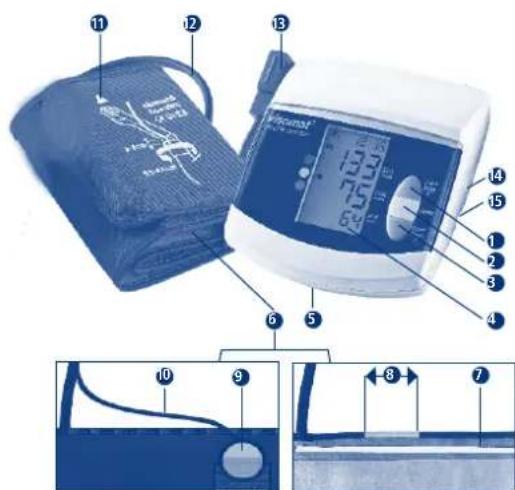
Medical device diagram with numbered labels pointing to blood pressure measurement and blood pressure monitor readingsCuff
1 Start/Stop button for user 1
2 Memory recall button
3 Start/Stop button for user 2
4 Displays
5 Battery compartment (removable battery compartment cover)
6 Cuff
7 Marking for arm circumference
8 Artery marking
9 Microphone
10 Microphone cable
Measurement arrow for arm circumference
12 Air hose and microphone cable
13 Cuff socket
14 USB connecting socket
15 Connecting socket for mains adapter
EN-53
C
- Displays
text_image
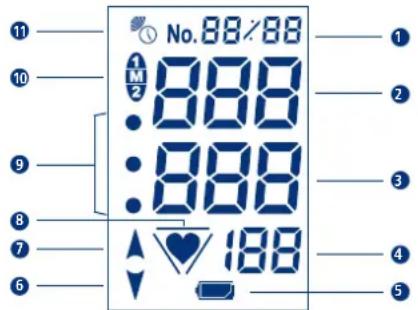
11 10 9 8 7 6 No. 88/88 1 M 2 888 888 888 188 1 2 3 4 51
2 SYS = Systole
(upper blood pressure value)
3 DIA = Diastole
(lower blood pressure value)
4 PUL 1/min = Pulse
calculated pulse frequency per minute
5 Battery check display
⑥ Deflating cuffStorage location or date/time
⑦ Inflating cuff
8 Pulse signal display or irregular pulse waves (Page EN-63)
9 WHO classification (Page EN-62)
10 User and memory code
Radio clock signal display
Failure and error messages (Page EN-80)
EN-54EN-55
Operating the unitOperating the unit
C
3. Important instructions for use
- Refrain from drinking alcoholic or caffeinated beverages and smoking at least one hour before measuring.
- Please rest at least 5 minutes before measuring. Depending on the previous degree of stress/exertion, this can even require up to one hour.
- Expose the upper arm. Clothing must not impair the blood flow in or from the arm, as this influences the blood pressure at the measurement point.
• Body posture must be relaxed:
- For this purpose, sit at a table (if possible the height of a dining table, not a coffee table!).
— Rest your back against the backrest of the chair.
— Rest your forearm completely flat, with the palm of your hand facing upwards
— Place your feet on the floor and do not cross your legs.
- It is absolutely essential to sit still and remain quiet. Irregular movements, vibrations (shaking), talking and breathing heavily will affect and may even falsify the measurement. Look out for irregular pulse signals in the display; if necessary, repeat the measurement under more favourable conditions.
- Unusual measurement results are possible with all automatically measuring blood pressure measurement systems from time to time. Check yourself: did you comply with the instructions for use above? If necessary, repeat the measurement after allowing the blood circulation in the arm to recuperate briefly; rest for about 3-5 minutes for this purpose. Tip: Remain seated, your monitor will switch off automatically about 3 minutes after a measurement. Afterwards, we recommend that you repeat the measurement.
- In order to rule out differences between left and right and to obtain comparable measurement results, it is important always to take blood-pressure measurements on the same arm. Ask your doctor which arm he/she recommends you take your measurements on.
C
- Blood pressure is not a fixed value. It may fluctuate upwards or downwards by more than 20 mmHg on patients within a few minutes.
4. Initial operation of the unit
Insert the supplied batteries into the unit. Wait for the date and time to be determined automatically by the radio signal.
If the unit is to be operated from the mains power supply, the cable plug of the mains adapter (not included in the scope of delivery) must be inserted into the connection socket on the right side of the unit. The batteries are switched off automatically.
Please use only the UEBE type A1 mains adapter. See original spare parts and accessories, Page EN-84.
5. Inserting/replacing batteries:
- Opening the battery compartment Remove the cover of the battery compartment on the underside of the unit.
- Inserting batteries Remove the old batteries from the unit and insert the new ones. Please observe proper polarity (marking in battery compartment).
- Closing the battery compartment Close the battery compartment by clipping the battery cover back into the unit.
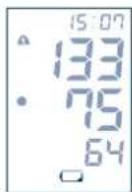
When the display shows the "Flat battery" symbol for the first time, the unit will still have enough charge for about 30 measurements. Please change the batteries during this period.
EN-56EN-57
Operating the unitOperating the unit
C
6. Setting the date/time
The unit has a radio-controlled clock that activates by itself when the batteries are inserted. While the unit is receiving the time signal, the radio clock symbol in the display flashes; the time display starts at 12:00. This process can take several minutes, depending on the reception quality of the signal.
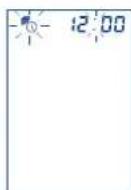
Once the unit has successfully received the time signal, the correct time is displayed and the radio clock symbol stays on.
If you are outside the range of the DCF77 time transmitter, the unit will be unable to receive a time signal. In this case, the clock must be set manually.
At night, the unit automatically synchronises the saved time with the signal of the time transmitter. It also reacts to the summertime/wintertime change so that it always displays the correct time.
If you are outside the Central European time zone and the signal of the DCF77 time transmitter does not tally with local time, you can set the clock time manually. The radio clock function is therefore switched off to prevent any updating with the signal from the time transmitter. To reactivate the radio clock function, briefly press one of the Start/Stop buttons while the unit is switched off, and immediately after that the MEM button while the full display test is still in progress. The unit starts to receive the time signal and indicates this with the flashing radio clock symbol.
If the plug-in mains adapter available as an accessory is used, unfavourable ambient conditions can cause delays in time signal reception.
C
Manual setting of date and time
With the unit switched off, briefly press a Start/Stop button and immediately afterwards, while the full display test is still in progress, press the MEM memory recall button for at least 2 seconds until the year in the display starts to flash (Fig. 1).
Set the year using the two Start/Stop buttons (button 1 = one number up, button 2 = one number down). Press the MEM button to memorise the input for the year and proceed to setting the month (Fig. 2).
Use the two Start/Stop buttons to set the month and confirm your input using the MEM button. Follow the same procedure for setting the day, the hours and the minutes (Fig. 3).
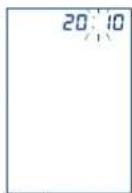
Fig. 1
Fig. 2
Fig. 3
EN-58EN-59
Operating the unitOperating the unit
C
7. Attaching the cuff
- Expose the upper arm.
- Push the cuff onto the upper arm until the lower edge of the cuff is 2-3 cm above the crook of the arm (Fig. 1, Fig. 2).
- When using the unit on the left arm, the air hose runs to the unit through the middle of the crook of the arm so that the 4 cm long artery marking is automatically located centrally above the pulse position (Fig. 3).
- When using the unit on the right arm, the cuff must be rotated to the left until the artery marking is on the pulse position. The air hose then runs along the inside of the upper arm (Fig. 4).
- Please fit the cuff so that the microphone rests on the skin. Tip:
- Bend your arm slightly.
- The upper arm muscle is tensioned slightly.
- This slightly increases the circumference of the arm.
- Now pull the free cuff end tight and close the Velcro fastener (Fig. 5)
- Check if the measurement arrow on the cuff is inside the "marking for arm circumference" at the edge of the cuff.
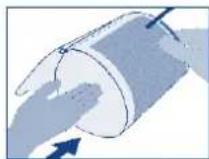
Fig. 1
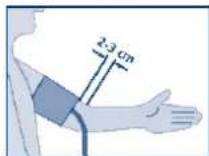
Fig. 2
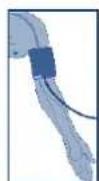
Fig. 3
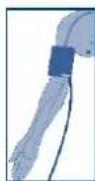
Fig. 4
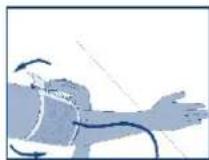
Fig. 5
C
- Lay your extended and relaxed arm with the cuff on the dining table and do not move it during the measurement; do not talk. The palm should be facing upwards.
- Connect the cuff connector to the cuff socket on the left-hand side of the unit. Make sure the connector is fully inserted into the unit.
8. Measuring blood pressure
The unit is designed for two users and has two Start/Stop buttons: User 1 presses Start/Stop button 1 for measurement, User 2 uses Start/Stop button 2. The values of the two users are saved separately and can also be evaluated separately.
You can also use the two user memories for separate evaluation of morning and evening measurements. To do so, use Start/Stop button 1 in the mornings and Start/Stop button 2 in the evenings.
- Switch on the unit by pressing the Start/Stop button. The following display appears. Fig. 1
- The automatically controlled inflating process begins once the unit has completed its calibration against the ambient air pressure.
- The number of storage locations already taken up is displayed during the inflation process. In Figure 2 the latest measurement is displayed with No. 01 and the taken-up storage locations with 55. This display indicates when the maximum number of 60 storage locations is taken up and thereby old measurements are overwritten by new ones. This helps you to identify the current take-up status of the measured value memory.
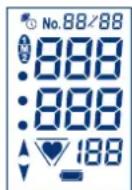
Fig. 1
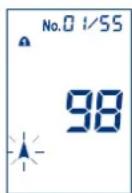
Fig. 2
EN-60EN-61
Operating the unitOperating the unit
C
- The actual measurement takes place with the start of deflation. The “♥” symbol in the display flashes until the pulse frequency is displayed. Fig. 3
- A long beep signals the end of measurement, and the cuff automatically deflates.
- The determined values of systole, diastole and pulse and the pulse pressure (PP) (see Page EN-63) are shown in alternating sequence in the display. Fig. 4
- The unit switches off automatically after about 3 minutes.
If there is interference noise during measurement due to movements, the microphone integrated in the cuff cannot record the Korotkow noise of the bloodstream properly.
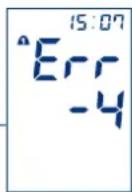
In this case, the measured values are obtained using the oscillometric method (see Page EN-48). After the measured values have been displayed, error message Err-4 appears. In this case, please check that the cuff and the microphone are correctly fitted, then repeat the measurement.
If error message Err-4 keeps appearing during every measurement (Fig. 5), the microphone or the connecting cable may be faulty. In this event, please contact visomat® Customer Service. For further failure and error messages, see Page EN-80.
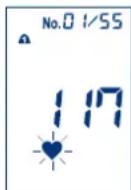
Fig. 3
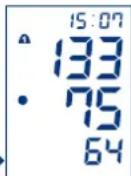
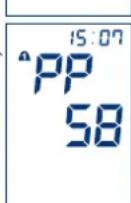
Fig. 4
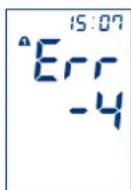
Fig. 5
C
9. WHO traffic light function
The unit categorises the blood pressure readings according to the recommendations of the World Health Organisation (WHO). You can use the coloured fields next to the display to read the categorisation of each reading:
• Upper dot (Red) signifies high pressure*
• Middle dot (Yellow) signifies borderline value*
• Lower dot (Green) signifies normal value
| WHO 2003 | Systolic pressure = Upper value mmHg** | Diastolic pressure = Lower value mmHg** |
| Red from | 140* from 90* | |
| Yellow | 120 to 139 80 to 89 | |
| Green below | 120 below 80 |
* It is sufficient for one of the values to be raised.
** millimetres of mercury
The categorisation according to WHO is stored with the readings and can be called up again together with the readings from the memory.
EN-62EN-63
Operating the unitOperating the unit
C
10. Pulse pressure
The pulse pressure – not to be confused with the pulse beat – provides an indication of the stretchability of the blood vessels. A hard system of vessels can have a negative effect on the cardiovascular system. Studies show that the cardiovascular risk increases if the pulse pressure value is permanently higher than 65 mmHg.
The heart works in two phases, the contraction phase (systole) and the relaxation phase (diastole). The pressure difference between systole and diastole is called the pulse pressure or pulse amplitude. The higher the pulse pressure, the harder the vessels.
| High pulse pressure above 65 mmHg | |
| Increased pulse pressure 55 to 65 mmHg | |
| Normal pulse pressure below 55 mmHg |
If your pulse pressure is permanently above 55 mmHg, consult your doctor.
11. Irregular pulse waves and cardiac arrhythmia
If the “*” symbol for irregular pulse waves flashes after a measurement, the unit has recorded irregular pulses during the measurement. This can be set off by an irregular heartbeat (arrhythmia), disturbance caused by movement, talking or even breathing in deeply. The symbol is stored with the respective measurement.
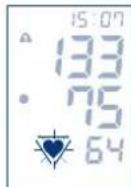
If the symbol appears more frequently, this must be discussed with your doctor! Measurement with irregular pulse waves should therefore be viewed as critical and repeated under more favourable conditions.
C
12. Using the memory
The unit has two measured value memories (one per user), each with 60 storage locations and average value display (A). Measured results are automatically stored in the memory. If more than 60 measurements are saved, the oldest value (No. 60) is deleted to make way for the latest value (No. 1).
Recalling data
Press the MEM memory recall button. The memory display appears and the two user numbers flash. Press Start/Stop 1 button or Start/Stop 2 button to select the user whose memory values you wish to recall. Fig. 1
The average values of the stored results are shown with "A", the values for systole, diastole and pulse and the pulse pressure (PP) are shown in alternating sequence in the display. Fig. 2
Press the MEM button again to display the value (No. 1) last measured. Systole, diastole and pulse are displayed in alternating sequence with the memory number (Fig. 3) and date (Fig. 4), then the pulse pressure (PP) with the time (Fig. 5). Press the MEM button repeatedly to recall further measured values.
The stored data are visible in the display for about 30 seconds. The unit then switches off automatically.
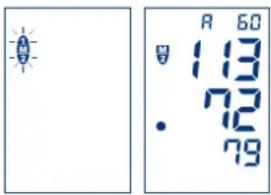
text_image
R 60 113 72 79Fig. 1 Fig. 2
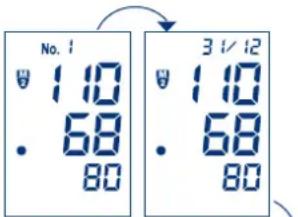
text_image
No. 1 1.10 68 80 3 1/12 1.10 68 80Fig. 3 Fig. 4
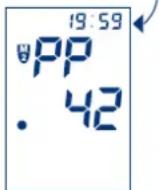
Fig. 5
EN-64EN-65
Operating the unitOperating the unit
C
Deleting data
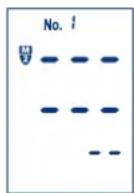
To delete individual values, press the memory recall button several times to obtain the measured value required. Press the MEM button again and hold it until the value first flashes and then is replaced by dashes.
To delete the entire memory for a user, recall the relevant average value display (A) and press the MEM button again, holding it down until the mean value first flashes and is then replaced by dashes.
If no value is stored, dashes are shown.
13. Transferring the data to a PC
The unit features a USB interface. Using the USB connecting cable provided and the visomat ^® evaluation software, you can transfer the measured values from the blood pressure monitor to your PC for evaluation.
If the blood pressure monitor is to be connected to external equipment, make sure that this equipment conforms to the latest safety standards (e.g. IEC 60950).
D
® double comfort software
1. Important information
The visomat ^® double comfort software is used to transfer the data measured by the visomat ^® double comfort upper-arm blood pressure monitor to a PC and to evaluate the data.
The software is specifically matched to this blood pressure monitor and may only be used with this monitor.
The information from the visomat ^® double comfort software is not a substitute for an individual medical consultation or examination.
To operate the software you will require a PC with a Windows® operating system, a CD-ROM drive and a USB port.
2. System requirements
Supported operating systems: Windows Vista, Windows Vista x64, Windows XP, Windows XP x64, Windows 2000, Windows 98, Windows ME, Windows 7, Windows 7 x64, Windows 8, Windows 8.1
Required hard disk memory: max. 20 MB
You will need a PDF Reader on your PC to be able to display and read out your measurement results. A free version of Acrobat Reader is included on the software CD.
You can also download the latest versions of the visomat® double comfort software and of Acrobat Reader from www.visomat.de in the Service – Download section.
EN-66EN-67
visomat® double comfort softwarevisomat
D
3. Installing the software
Insert the visomat ^® double comfort software CD in your CD or DVD drive. The Autorun function will start the installation program automatically.
If the installation program fails to start automatically, please start it manually via Windows Explorer by double-clicking on [Drive]:\DE\setup.exe – [Drive] here stands for the letter of your CD/DVD drive.
This installation procedure may differ, depending on the operating system used.
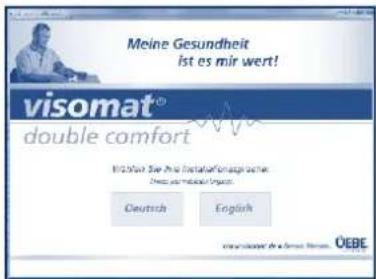
Select the language which you would like to guide you through the installation process.

text_image
File Download - Security Warning Do you want to run or save this file? Name: setup.exe Type: Application, 495 KB From: OnDB Run Save Cancel While file from the Internet can be useful, this file type can potentially harm you to computer. If you do not trust the source, do not run or save this software. What is the risk?If the message "File download" appears, please confirm this with "Run".
D
® double comfort software
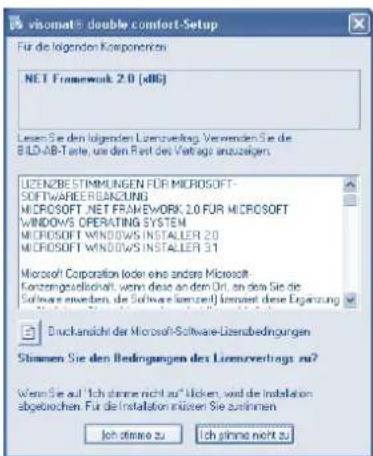
text_image
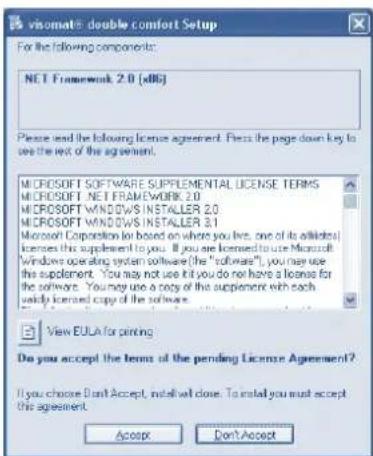
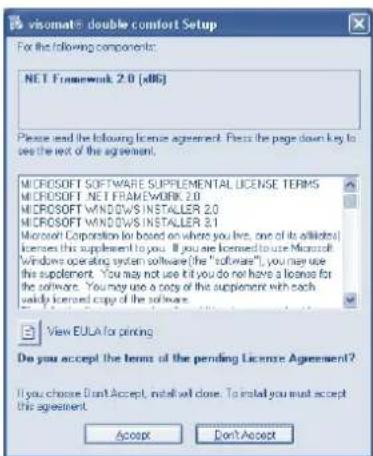
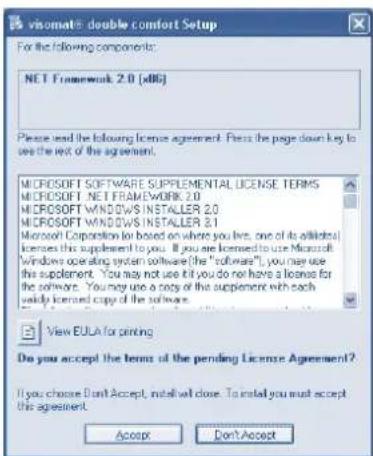
Visomatis double comfort Setup For the following components: NET Framework 2.0 (xBG) Please read the following license agreement. Press the page down key to see the text of the agreement. MICROSOFT SOFTWARE SUPPLEMENTAL LICENSE TERMS MICROSOFT NET FRAMEWORK 2.0 MICROSOFT WINDOWS INSTALLER 2.0 MICROSOFT WINDOWS INSTALLER 3.1 Microsoft Corporation (or based on where you use, one of its affiliates) licenses the supplement to you. If you are licensed to use Microsoft Windows operating system software (the "software"), you may use the supplement. You may not use it, you do not have a license for the software. You may use a copy of the supplement with each only licensed copy of the software. View EULA for printing. Do you accept the items of the pending License Agreement? If you choose Don't Accept, install will close. To install you must accept the agreement. Accept Don't AcceptIf the software is not already installed on your computer, the terms and conditions of use of the .NET Framework used will appear first. Please confirm these with "Agree".

text_image
visorat+ double comfort Setup Installing NET Framework 2.3 (e6) 取消您要使用网络连接或连接您是否需要连接? CancelThis brings up the message that .NET Framework is being installed.
The installation may take a few minutes, depending on the hardware configuration.
Follow the installation program instructions and confirm the individual details by clicking on "Next".
EN-68EN-69
visomat® double comfort softwarevisomat
D
text_image
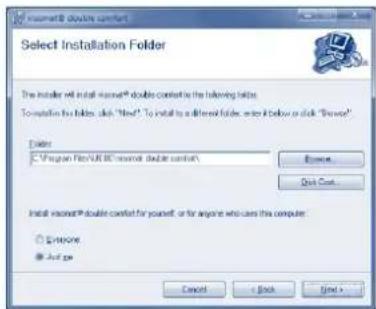
Select Installation Folder The installer will install wireless® double comfort in the following table. To install the folder, click "Hello" To install to a different folder, write it below or click "Browse" Delete ✓ Program Files/UK wireless double comfort\ Browse Quick Cost Install wireless® double comfort for yourself, or for anyone who uses the computer ✓ Extensions ✓ Add up Cancel < Back Next >A standard directory for installing the program will be suggested in the "Select installation folder" window. If you want to install the program in a different memory location, you can specify this location here. Otherwise, confirm the standard folder with "Next".
The "Installation finished" window appears once installation has been successfully completed. Click on "Close" to close the installation program.
4. Installing the USB driver
To be able to transfer the measured data from the blood pressure monitor to your PC, you must first install the USB driver for the monitor on your PC.
To do so, connect the blood pressure monitor to your PC using the supplied USB cable.
This installation procedure may differ greatly, depending on the operating system used.
If you experience problems when installing the visomat ^® double comfort software, please call our visomat ^® service hotline, which is open from Mondays to Thursdays from 8.00 am to 5.00 pm and on Fridays until 4.30 pm, or send us an e-mail.
text_image
visomat® Tel.: + 49 (0) 93 42 / 92 40 40 info@uebe.comD
® double comfort software
5. Starting the program
A "visomat ^ double comfort" program symbol was added to your desktop when the program was installed. Double-click on this symbol to start the program.
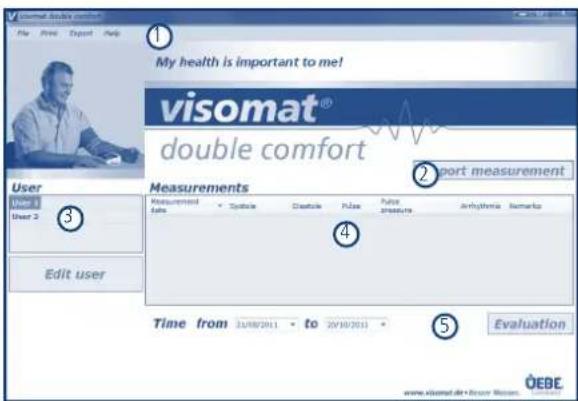
Once the program has started, you will be taken automatically to the main window. You can access all the functions from this main window.
6. Layout of the main window
Menu line
Data transfer from the blood pressure monitor
User management
Measured value table
Data evaluation/blood pressure pass
text_image
My health is important to me! visomat® double comfort User Measurements Measurements Sales Balance Balance Pulse Pulse Pressure Anhydromia Remarks Edit user Time from 21/08/2011 - to 20/10/2011 Evaluation www.visomat.de+user.biosc. OEBEEN-70EN-71
visomat® double comfort softwarevisomat
D
7. User management
The visomat ^® double comfort blood pressure monitor is designed for 2 users and therefore has 2 separate measured value memories.
The two users are identified as standard as "User 1" and "User 2". But you also have the option of adding the names of the users.
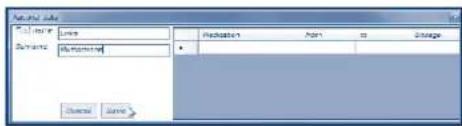
To do so, highlight in User management the user you would like to edit and click on "Edit user". This opens the "Personal data" window.
text_image
Material Material Name Reduction From To Change Name Source NameIn this window you can enter the first name and surname and record regular intakes of medication. These are displayed in the blood pressure evaluation and permit conclusions to be made in the event of changes in blood pressure.
Click on "Save" to finish editing the user data. This will take you back to the main window.
8. Data transfer from the blood pressure monitor
Connect the blood pressure monitor to your PC using the supplied USB connecting cable.
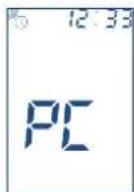
When successfully connected, the letters "PC" flash in the blood pressure monitor's display.
D
® double comfort software
Click in the main window of the double comfort software on "Import measurement".
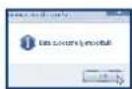
Now the measured data from the user memories of the blood pressure monitor are transferred to the program and assigned to Users 1 and 2. When data transfer is completed, the message "Data successfully imported!" appears. Confirm this message by clicking on "OK".
The blood pressure monitor stores up to 60 measurements for each user. To ensure that no measured data are lost, you should in good time, but no later than after 60 new measurements, transfer the measured data from the monitor to the software.
The software can store an unlimited volume of data. You can therefore view and evaluate older measured data.
Important: No new blood pressure measurements can be taken while the monitor is connected to the PC. To take a new measurement, simply remove the USB cable from the monitor. The letters "PC" disappear from the blood pressure monitor's display. Now you can take a new blood pressure measurement.
EN-72EN-73
visomat® double comfort softwarevisomat
D
9. Evaluating the measured data
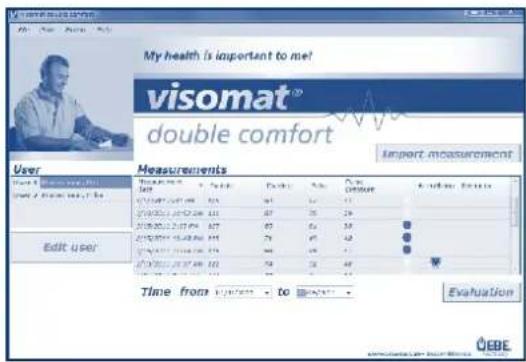
Click in User management on the user whose readings you would like to evaluate.
text_image
My health is important to me? visomat® double comfort Import measurement User Measurements Time from 12/03/2017 to 12/03/2018 Edit user Time from 12/03/2017 to 12/03/2018 EvaluationAll the stored measured data for this user are displayed in the measured value table.
By clicking on a column heading, you can sort the measurements by this criterion in ascending or descending order. You can record a comment or remark in text form for each measurement. To do so, highlight the measurement, click the right mouse button and select "Process remark" to open the recording window. Enter the comment in the window and click on "Delete". To delete individual measurements, highlight the desired message with the left mouse button. Then click the right mouse button and select "Delete measured value". Confirm the delete security question that now appears with "Yes".
D
® double comfort software
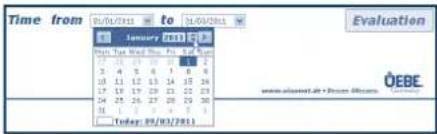
To limit the time period for which the measured values are displayed and evaluated, enter the desired time period below the measured value table.
You can either enter the date directly in the field or activate the calendar function by clicking on the blue arrow to the right of the data field:
text_image
Time from 01/01/2011 to 31/01/2011 January 2011 From The World Day: Fri 5:48 PM 17:26:29:30 31:17:31 2:4:5:6:7:8:9 10:12:13:14 15:34 17:18:19:20 23:22:23 24:25:26:27 28:29:30 31:30:31:32 4:4:5:6 Today: 09/01/2011 Evaluation ÖEBEIn the calendar function use the arrow keys to advance to the previous or next month. By clicking on the year, you activate the buttons to advance to the previous or next month.
The measured data for the selected time period are now displayed in the measured value table. Click on "Evaluation" to obtain an evaluation of the data in graphic form.
The program now creates a PDF document in which values for blood pressure, pulse and pulse pressure are displayed as curves. You can print out or save this PDF document.
10. Printing the blood pressure pass
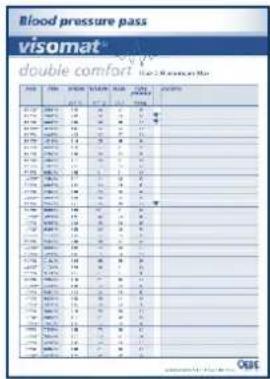
With the visomat® double comfort software you can create a blood pressure pass in table and graphic form from the stored data. You can, for example, take the blood pressure pass with you to your next doctor's appointment.
To do so, select in User management the user whose readings you would like to evaluate.
EN-74EN-75
visomat® double comfort softwarevisomat
D
Define the time period in the main window below the measured value table. The measurements of the last 60 days are preassigned as the standard setting.
To create a blood pressure pass in table form, select "Print - Table blood pressure pass" in the menu line. For a blood pressure pass in graphic form, in which the readings are displayed as curves, select "Print - Graphic blood pressure pass".
The program now creates the desired blood pressure pass as a PDF document. You can print out or save this PDF document.
text_image
Blood pressure pass visomat® double comfort Men > 2 Minutes Mean HR 100% 9.5% 9.5% 9.5% 9.5% 9.5% 9.5% 9.5% 9.5% 9.5% 9.5% 9.5% 9.5% 9.5% 9.5% 9.5% 9.5% 9.5% 9.5% 9.5% 9.5% 9.0% HR 100% 10% 10% 10% 10% 10% 10% 10% 10% 10% 10% 10% 10% 10% 10% 10% 10% 10% 10% 10% 10% 10% 10% 10% 10% 10% 9.5% HR 100% 10% 10% 10% 10% 10% 10% 10% 10% 10% 10% 10% 10% 10% 10% 10% 10% 10% 10% 9.5% HR 100% 10% 10% 10% 12% 8.3% HR 100% 10% 10% 10% 8.3% HR 100% 10% 10% 8.3% HR 100% 10% 10% 8.3% HR 100% 10% 10% 8.3% HR 100% 10% 8.3% HR 100% 10% 8.3% HR 100% 10% 8.3% HR 100% 10% 8.3% HR 100% 10% 8.3% HR 100% 10% 8.3% HR 100% 10% 8.4% HR 100% 10% 8.4% HR 100% 10% 8.4% HR 100% 10% 8.4% HR 100% 10% 8.4% HR 100% 10% 8.4% HR 100% 10% 8.4% HR 100% 12% HR 12% HR 12% HR 12% HR 12% HR 7% HR 7% HR 7% HR 7% HR 7% HR HR HR HR HR HR HR HR HR HR HR HR HR HR HR HR HR HR HR HR HR HR HR HR HR HR HR HR HR HR HR HR HR HR HR HR HR HR HR HR HR HR HR HR HR HR HR HR HR HR HR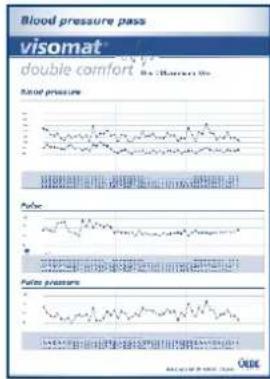
text_image
Blood pressure pass visomat double comfort Rapid pressure Rapid pressure pass Rapid pressure pass Rapid pressure pass Rapid pressure pass Rapid pressure pass Rapid pressure pass Rapid pressure pass Rapid pressure pass Rapid pressure pass Rapid pressure pass Rapid pressure pass Rapid pressure pass Rapid pressure pass Rapid pressure pass Rapid pressure pass Rapid pressure pass Rapid pressure pass Rapid pressure pass Rapid pressure pass Rapid pressure pass Rapid pressure pack Rapid pressure pack Rapid pressure pack Rapid pressure pack Rapid pressure pack Rapid pressure pack Rapid pressure pack Rapid pressure pack Rapid pressure pack Rapid pressure pack Rapid pressure pack Rapid pressure pack Rapid pressure pack Rapid pressure pack Rapid pressure pack Rapid pressure pack Rapid pressure pack Rapid pressure pack Rapid pressure pack Rapid pressure pack Rapid pressure plan Rapid pressure plan Rapid pressure plan Rapid pressure plan Rapid pressure plan Rapid pressure plan Rapid pressure plan Rapid pressure plan Rapid pressure plan Rapid pressure plan Rapid pressure plan Rapid pressure plan Rapid pressure plan Rapid pressure plan Rapid pressure plan Rapid pressure plan Rapid pressure plan Rapid pressure plan Rapid pressure plan Rapid pressure plan Rapid pressure plansD
® double comfort software
11. Exporting data
The program offers you the option of exporting the measured data so that they can be evaluated with other software already installed on your PC.
A file is created in the CSV format for this purpose. This file format can be opened in or imported into many popular database and calculation programs.
To do so, select in User management the user whose readings you would like to export.
Define the time period in the main window below the measured value table.
Select "Export - CSV Export" in the menu line.
Select a memory location for the CSV file and confirm with "Save".
Now you can open or import the CSV file with your own software from this memory location.
If you wish to process the data with Microsoft ^® Excel ^® calculation program, select "Export - Excel Export" in the menu line. The Microsoft Excel software must be installed on your computer for this purpose.
The program now creates a CSV file. Enter a memory location for the file and confirm with "Save".
The file is now automatically opened with Microsoft Excel.
EN-76EN-77
visomat ^® double comfort softwarevisomat
D
12. Transferring data to a new computer
If you want to carry on using the data from the double comfort software on another computer (e.g. if you have bought a new computer), you can carry over all the user settings and measured values.
To do so, click in the menu line on "File - Save data".
Select a memory location for the transfer file from where you can transfer the file to the new computer and confirm with "Save".
Transfer the file to the new computer.
After installing the double comfort software on the new computer, click there in the menu line on "File - Load data".
Select the memory location where the transfer file from the old computer can be found.
You now have at your fingertips all the data from the double comfort software on the new computer.
13. Terms and conditions of use
By installing, copying or otherwise using this software you acknowledge the limitations of liability set out below.
UEBE Medical GmbH and its suppliers refuse - to the greatest possible extent permitted by the applicable law - all liability for any specific, accidental, indirect or consequential damage (including but not limited to damage from loss of prospective profits, interruption of business, loss of business information or any other economic loss) which occurs as a result of the use of the software or as a result of the fact that it cannot be used; this also applies if UEBE Medical GmbH was advised
D
visomat ^® double comfort software
of the possibility of such damage beforehand. In this case the liability of UEBE Medical GmbH and its suppliers shall be limited in accordance with this agreement to the amount you actually paid for the software if the effect of this clause has not been specifically excepted by the applicable law.
Any lending or unauthorised copying, citing or transmission of the information contained on the data medium is a violation of the applicable law. This software license agreement is subject to German law.
14. visomat® service hotline
You have no doubt read our instructions for using the visomat ^® double comfort software carefully and familiarised yourself with the functions.
However, you may have questions about using or handling the monitor, particularly in the initial period after purchase. In such cases please call our visomat ^® service hotline, which is open from Mondays to Thursdays from 8.00 am to 5.00 pm and on Fridays until 4.30 pm, or send us an e-mail.

visomat®
Tel.: +49 (0) 93 42 / 92 40 40 info@uebe.com
Our team of advisers is looking forward to taking your call.
EN-78
What you should know about blood pressure
E
1. Systolic and diastolic blood pressure values
The cardiovascular system has the important function of supplying all organs and tissues in the body with sufficient amounts of blood and of transporting metabolites. To do so, the heart contracts and expands at a regular rate of about 60 to 80 times per minute. The pressure of the flowing blood on the artery walls caused by the heart contracting is termed systolic. The pressure in the ensuing relaxation phase, when the heart refills with blood, is termed diastolic. During daily measurement you determine both values.
2. Why you measure different values
Our blood pressure responds to internal and external influences like a sensitive measuring instrument. It can be affected by even slight changes. This explains why values measured by a doctor or pharmacist are higher than those measured at home in the environment you are used to. Changes in the weather, climate changes, or physical or psychological stress can have effects as well.
3. Why you should measure blood pressure regularly
Even the time of day has an influence on your blood pressure. During the day the values are generally higher than during the periods of rest at night. One-off and irregular measurements therefore say little about your actual blood pressure. A reliable assessment is possible only when measurements are taken regularly. Discuss the measurement values with your doctor.
EN-79
F
- Failure and error messages
| Failure encountered | Possible cause Corrective action | |
| Display Err - 300 | Excessive cuff pressure. Cuff inflated to maximum due to movement of the arm or body.The hose may be kinked or the air connector blocked. | - Repeat measurement- Do not move arm- Do not talk- Check that hose with air connector is clear (unobstructed) |
| Display Err - 1 | Measurement error. Measure- ment could not be carried out due to movement of the arm or body. | - Repeat measurement- Do not move arm- Do not talk |
| Display Err - 2 | Inflation error, pressure built up too quickly or too slowly. | Check that air connector is correctly fitted, repeat measurement. |
| Fault was recognised. Cuff is not correctly fitted. | - Repeat measurement- Do not move arm- Do not talk | |
| Display Err - 3 | Deflation rate too high or too low. | Keep still during measurement. Call the Service Hotline if this fault occurs repeatedly. |
| Display Err - 4 | Microphone error - Insert con | ector fully into the unit- Check for correct fitting of the cuff and the microphone- If necessary remove any clothing between the cuff and the upper arm- Repeat the measurement- Rest lower arm flat with palm of hand facing upwardsIf the problem persists, call our Service Hotline. |
| Display 00 | Start/Stop button accidentally pressed while battery was being changed. | Switch unit off and then on again with Start/ Stop button; if necessary, activate time signal reception of radio clock again. See Page EN-57. |
| Irregular heartbeat, disrup- tive movements, shaking, wobbling (objects), breathing in deeply, etc. | Repeat measurement after 3-5 minutes rest.Possible factors (depending on the severity of the arrhythmia) affecting the measurement results must be discussed with your doctor. | |
EN-80EN-81
Technical information Technical information
F
| Failure encountered | Possible cause Corrective action | |
| Measured values / pulse values are extremely high or low | Too little rest before the measurement. Movement or talking during measurement. | Repeat measurement after a break of approx. 3-5 mins. Observe instructions for use Page EN-55. |
| Has the proper cuff been selected? Cuffs that are too small result in excessive blood pressure values. | Measure your arm circumference in the middle of the upper arm and compare this with the details given on the cuff. | |
| Incorrect measurement position. Repeat measurement, ensuring correct body posture. (Page EN-55) | ||
| Consecutive measurements produce different measured values (readings). | Blood pressure is not a fixed quantity. It may vary in the upward or downward direction within a few minutes by more than 20 mmHg. | ---- |
| Measurement was interrupted and cuff first deflated and then inflated | Unit detects a fault or that diastolic value is too low. | Unit shows no fault. Repeat measurement. |
| Movement during measurement If necessary, interrupt measurement, measure again after a break of 5 minutes. | ||
| No display after unit is switched on | Batteries inserted incorrectly. Check position of batteries. | |
| Batteries flat. Change batteries. | ||
| Battery contacts dirty. Clean battery contacts. | ||
| Dashes in display after Memory button is pressed | No measured values stored. No display when no measured values are stored. | |
| Measurement interrupted | Batteries flat | Change batteries. |
F
2. Customer service
The unit may only be repaired by the manufacturer or by an expressly authorised organisation.
Please contact:
UEBE Medical GmbH
Zum Ottersberg 9
97877 Wertheim, Germany
Phone: +49 (0) 9342/924040
Fax: +49 (0) 9342/924080
E-mail: info@uebe.com
Internet: www.uebe.com
3. Technical data
| Unit type: Digital automatic unit with electric pump for measuring blood pressure on upper arm | |
| Dimensions: L = 115 mm x W = 150 mm x H = 54 mm | |
| Weight: 330 g not including batteries | |
| Display: LCD display (liquid crystal display) for measured values and check displays | |
| Memory: 2 memories each with 60 measured values (stored automatically) and average value (A) | |
| Measurement procedure: | Combines auscultatoric and oscillometric determination of systole, diastole and pulse |
| Reference procedure of clinical testing: | Auscultatoric measurement |
| Inflating pressure: approx. 30-40 mmHg above systolic blood pressure | |
| Pressure display range: D-300 mmHg | |
EN-82EN-83
Technical information Technical information
F
| Measurement range | Systolic: 50-250 mmHgDiastolic: 40-150 mmHgPulse: 40-160 pulses/min |
| Error limits: | Blood pressure measurement: corresponds to EN 1060 Part 3Pressure measurement: ± 3 mmHgPulse measurement: ± 5% |
| Serial number: | The unit bears a serial numberSNwhich provides clear identification. |
| Power supply: | Battery type: 4 x 1.5 V AA alkali manganese (LR 6) or lithium (FR 6) round cells, service life: more than 800 measurements in 2 years |
| Optional: Stabilised type A1 mains adapter, output 6 VDC, minimum 600 mA | |
| Cuff with microphone: | Metal ring cuff for arm circumferences of 23-43 cm, type UWK |
| Operating conditions: | Ambient temperature 10 to 40 °C, Rel. air humidity up to 85% not condensing,Air pressure 700 to 1040 hPa |
| Storage and transport conditions: | Ambient temperature -5 to +50 °C,Relative humidity up to 85%, non-condensing |
| Air deflation valve: | Electronically controlled |
| Automatic switch-off | approx. 3 minutes after end of measurement |
| Radio clock signal: | DCF77 |
| Protection class IP: | IP 20: Protected against solid foreign particles with a diameter of more than 12.5 mm, no protection against water. |
| Expected service life: | 5 years |
| Classification: | Internal power supply by battery |
F
Technical information
4. Original spare parts and accessories:
The following original spare parts and accessories are available from specialist dealers:
• Universal cuff 23-43 cm type UWK Part. no. 2405001 PZN 07514096
• Mains adapter type A1 Part. no. 2401020 PZN 03558547
• Cuff 14-23 cm type USK Part. no. 2405005 PZN 07514104
• USB cable Art. Nr. S2405090 Type A USB / Type Mini USB
- visomat ^® double comfort software download under www.visomat.de
Subject to technical modifications.
Manufacturer: UEBE Medical GmbH
Zum Ottersberg 9
97877 Wertheim, Germany
5. Technical Inspection / calibration check
Basically, a metrological inspection is recommended at intervals of 2 years. However, professional users in Germany are obligated to comply with the aforementioned according to "Regulation for Operators of Medical Devices".
This can be implemented either by UEBE Medical GmbH, an authority responsible for metrology, or authorised maintenance services. For this, please observe your national provisions.
Upon request, responsible authorities or authorised maintenance services receive a "Test instruction for metrological inspection" from the manufacturer.
Important: No modifications, e.g. opening the unit (except to replace the batteries) may be made to this unit without the manufacturer's prior permission.
EN-84
General provisions
G
1. Explanation of symbols

This product complies with the Council Directive 93/42/EC from 5 September 2007 regarding medical devices and bears the mark CE 0123 (TÜV SÜD Product Service GmbH).

Degree of protection against electric shock: TYP BF

Please observe instructions for use

Storage and transportation conditions Ambient temperature -5 to +50 °C

Relative humidity up to 85%, non-condensing

Keep dry
IP20
Protected against solid foreign particles with a diameter of more than 12.5 mm, no protection against water.

Manufacturer

Mains adapter specifications:
If using the optionally available mains adapter:
Equipment class II (double-insulated)

Internal fuse

For indoor use only
Internal polarity positive
EN-85
G
General provisions
2. Disposal
Batteries and technical appliances must not be disposed of with domestic waste, but should be handed in at the appropriate collection and disposal points.
EN-86
Maintaining the unit
H
Maintaining the unit
- The unit contains sensitive parts and must be protected against strong variations in temperature, air humidity, dust and direct sunlight.
- Make sure when storing the unit that no heavy objects are left lying on the unit or on the cuff and that the air hose is not kinked.
- The unit is neither impact-resistant nor shock-proof. We recommend that you have the intactness and accuracy of the display checked after heavier falls or impacts.
• The unit is not water-proof. - If the unit becomes dirty during use, use a soft, dry cloth to clean it. Do not use benzene, thinners or other strong solvents.
- Do not scrub or machine-wash the cuff. If the cuff gets dirty during use, use a synthetic cleaner and softly rub the surface.
- If the unit has been opened, it must be subjected to a metrological inspection conducted by an authorised organisation.
- Make sure that liquid cannot get into the air hose and microphone. Dry thoroughly.
EN-87
1
Warranty furnished
The device has been manufactured and tested with great care. However, in the unlikely event of a defect being detected after delivery, we provide warranty in accordance with the following terms and conditions:
- During the warranty period of 3 years from the date of purchase we reserve the right either to repair any such defect at our expense or to supply a perfect replacement unit. The cost of returning the unit to our factory shall be borne by the sender. UEBE shall refuse to accept return deliveries that have not been paid for by the sender.
- Excluded from the warranty are parts subject to normal wear and tear as well as damage caused by non-compliance with the instructions for use, improper handling (e.g. unsuitable power sources, breakages, leaking batteries) and/or disassembly of the unit by the purchaser. Furthermore, no claims for damages against us are substantiated by the warranty.
- Warranty claims can only be advanced in the warranty period and by presenting proof of purchase. In the event of a warranty claim, the unit must be sent to the following address together with the proof of purchase and a description of the complaint:
UEBE Medical GmbH
Service-Center
Zum Ottersberg 9
97877 Wertheim
Germany
The cost of returning the unit to our factory shall be borne by the sender. UEBE shall refuse to accept return deliveries that have not been paid for by the sender.
- In the case of defectiveness of the goods, the contractual rights of the purchaser to claim against the seller in accordance with § 437 German Civil Code are not limited by the warranty.
EN-88EN-89
Warranty Warranty
|
Please note:
In the event of a warranty claim it is essential to attach the proof of purchase.
SommaireSommaire
text_image
Medical device diagram with numbered parts and corresponding close-up images of blood pressure measurementBrassard
® double comfort software
1. Remarques importantes
text_image
File Downloaded - Security Warning Do you want to run or save this file? Name: setup.exe Type: Application, 495 KB Fins: DADE Run Save Cancel Whole file from the Internet can be useful. This file type can potentially harm your computer. If you do not trust the source, do not run or save this software. What is the risk?® double comfort software
text_image
Visomate double comfort Setup For the following components: NET Framework 2.0 (xBG) Please read the following license agreement. Pass the page down key to see the text of the agreement. MICROSOFT SOFTWARE SUPPLEMENTAL LICENSE TERMS MICROSOFT NET FRAMEWORK 2.0 MICROSOFT WINDOWS INSTALLER 2.0 MICROSOFT WINDOWS INSTALLER 3.1 Microsoft Corporation (or based on where you live, one of its affiliates) licenses the supplement to you. If you are licensed to use Microsoft Windows operating system software (the "software"), you may use the supplement. You may not use it, you do not have a license for the software. You may use a copy of the supplement with each only licensed copy of the software. View EULA for pricing Do you accept the terms of the pending License Agreement? If you choose Don't Accept, install will close. To install you must accept this agreement. Accept Don Accepttext_image
Select Installation Folder The installer will install wireless double comforting the following folder. To install the folder, click "Next" To install to a different folder, enter it below or click "Browse" Delete: ○ Visions File/USB double comfort\ Remove Quick Add... Install wireless double comfort for yourself, or for anyone who uses this computer. ○ Extensions ● Quick4. Installation driveur USB
® double comfort software
text_image
Name: Description Description Description® double comfort software
® double comfort software
® double comfort software
text_image
Medical device diagram with numbered labels pointing to blood pressure measurement and blood pressure monitor readingsBracciale
® double comfort software
text_image
File Download - Security Warning Do you want to run or save this file? Name: setup.exe Type: Application, 495 KB Time: DRIVE Run Save Cancel Wiki file from the Internet can be useful. This file type can potentially harm your computer. If you do not test the source, do not run or save this software. What is the next?® double comfort software
text_image
Visomatis double comfort Setup For the following components: NET Framework 2.0 (xBG) Please read the following license agreement. Pass the page down key to see the text of the agreement. MICROSOFT SOFTWARE SUPPLEMENTAL LICENSE TERMS MICROSOFT NET FRAMEWORK 2.0 MICROSOFT WINDOWS INSTALLER 2.0 MICROSOFT WINDOWS INSTALLER 3.1 Microsoft Corporation (or based on where you live, one of its affiliates) licenses this supplement to you. If you are licensed to use Microsoft Windows operating system software (the "software"), you may use this supplement. You may not use it if you do not have a license for the software. You may use a copy of the supplement with each only licensed copy of the software. View EULA for printing. Do you accept the terms of the pending License Agreement? If you choose Don't Accept, install will close. To install you must accept the agreement. Accept Don'Accepttext_image
Select Installation Folder The installed will install wireless double comfort in the following fields. To install this folder, click "Yes" to install a different folder, enter it below or click "Noose" Options: ○ Visions Film/MLB wireless double comfort OK Cancel Install wireless double comfort for yourself, or for anyone who uses the computer: ○ Excessive ● Justly Cancel < Back Next >® double comfort software
® double comfort software
® double comfort software
® double comfort software
© Copyright 2013 UEBE Medical GmbH