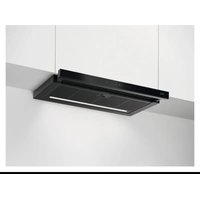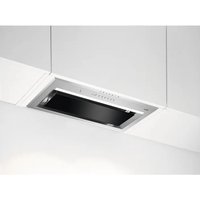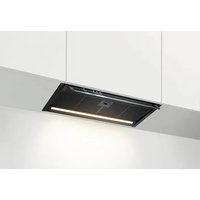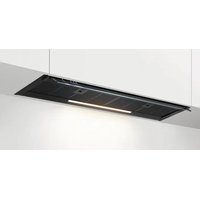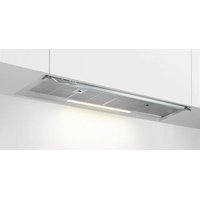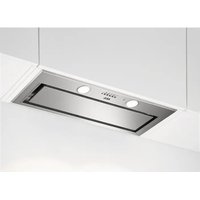
DGK5861HM - Basket AEG - Free user manual and instructions
Find the device manual for free DGK5861HM AEG in PDF.

 FR
FR
 BG
BG
 CA
CA
 CS
CS
 DA
DA
 DE
DE
 EL
EL
 EN
ES
EN
ES
 ET
ET
 FI
FI
 HU
HU
 IT
IT
 KK
KK
 LT
LT
 LV
LV
 MK
MK
 NL
NL
 NO
NO
 PL
PL
 PT
PT
 RO
RO
 RU
RU
 SK
SK
 SL
SL
 SQ
SQ
 SR
SR
 SV
SV
 TR
TR
 UK
UK
User questions about DGK5861HM AEG
0 question about this device. Answer the ones you know or ask your own.
Ask a new question about this device
Download the instructions for your Basket in PDF format for free! Find your manual DGK5861HM - AEG and take your electronic device back in hand. On this page are published all the documents necessary for the use of your device. DGK5861HM by AEG.
USER MANUAL DGK5861HM AEG
natural_image
Simple line drawing of a chimney with three dots on the base (no text or symbols)DGK5661HM
DGK5861HM
DGK5861HR
text_image
QR code with a document icon in the center, likely linking to a digital resource or webpage.text_image
Diagram showing various symbols and numbers, including Wi-Fi, sun, bird-like icons, and numbered boxes below each symbol.natural_image
Isometric line drawing of a grid-patterned panel or panel structure with an arrow pointing to one corner (no text or symbols)text_image
Diagram showing various symbols and numbers, including Wi-Fi, sun, bird-like icons, and numbered blocks below each symbol.Funcions Descripció
natural_image
Isometric line drawing of a grid-patterned panel or panel structure with an arrow indicating direction (no text or symbols)text_image
Diagram showing various symbols and numbers, including Wi-Fi, sun, Y0-1, Y2, Y3, and various circle shapes with numerical labels below.Funkce Popis
natural_image
Isometric view of a grid-patterned structure with an arrow pointing to a specific cell (no text or symbols)text_image
Diagram showing various symbols and numbers, including Wi-Fi, sun, Y0-1, Y2, Y3, and others with corresponding black blocks below.natural_image
Isometric view of a grid-patterned structure with an arrow indicating direction (no text or symbols)text_image
Diagram showing various symbols and numbers, likely representing a system or device layout with icons for sensors, suns, meters, and indicators.natural_image
Isometric line drawing of a grid-patterned panel or panel structure with an arrow indicating direction (no text or symbols)natural_image
Symbol of a trash bin crossed with a diagonal line, representing no waste or discharge (no text or labels)natural_image
Recycling symbol with three arrows forming a triangle (no text or labels)text_image
Diagram showing various symbols and numbers, including Wi-Fi, sun, bird-like icons, and numbered boxes below each symbol.natural_image
Isometric view of a grid-patterned structure with an arrow indicating direction (no text or symbols)Welcome to AEG! Thank you for choosing our appliance.

Get usage advice, brochures, trouble shooter, service and repair information:
www.aeg.com/support
Subject to change without notice.
CONTENTS
- SAFETY INFORMATION......60
- SAFETY INSTRUCTIONS.... 63
- INSTALLATION....64
- PRODUCT DESCRIPTION....64
- DAILY USE....65
- CARE AND CLEANING.... 66
- TROUBLESHOOTING....67
- ENVIRONMENTAL CONCERNS....68
1. ⚠SAFETY INFORMATION
Before the installation and use of the appliance, carefully read the supplied instructions. The manufacturer is not responsible for any injuries or damage that are the result of incorrect installation or usage. Always keep the instructions in a safe and accessible location for future reference.
1.1 Children and vulnerable people safety
- This appliance can be used by children aged from 8 years and above and persons with reduced physical, sensory or mental capabilities or lack of experience and knowledge if they have been given supervision or instruction concerning the use of the appliance in a safe way and understand the hazards involved. Children of less than 8 years of age and persons with very extensive and complex disabilities shall be kept away from the appliance unless continuously supervised.
- Children should be supervised to ensure that they do not play with the appliance.
-
Keep all packaging away from children and dispose of it appropriately.
-
Keep children and pets away from the appliance when it operates.
- Children shall not carry out cleaning and user maintenance of the appliance without supervision.
1.2 General Safety
- This appliance is intended for domestic use above hobs, cookers and similar cooking devices.
- This appliance is designed for single household domestic use in an indoor environment.
- This appliance may be used in, offices, hotel guest rooms, bed & breakfast guest rooms, farm guest houses and other similar accommodation where such use does not exceed (average) domestic usage levels.
- Before carrying out any maintenance, disconnect the appliance from the power supply.
- CAUTION: Accessible parts may become hot during use with cooking appliances.
- Use only the fixing screws supplied with the appliance if not supplied, use the screws recommended in the installation instructions. Install the appliance in a safe and suitable place that meets installation requirements.
- WARNING: Failure to install the screws or fixing device in accordance with these instructions may result in electrical hazards.
- Do not use adhesives to fix the appliance.
- The minimum distance between the hob surface on which the pans stand and the lower part of the appliance shall be at least 65 cm, unless otherwise specified in the installation instructions for the appliance or hob.
- The discharge of air must comply with local authorities regulations.
- Ensure good air ventilation in the room where the appliance is installed to avoid the backflow of gases into the room from appliances burning gas or other fuels, including open fires.
- Make sure that the ventilation openings are not blocked and the air collected by the appliance is not conveyed into a duct used to exhaust smoke and steam from other appliances (central heating systems, thermosiphons, water-heaters, etc.).
- When the appliance operates with other appliances the maximum vacuum generated in the room should not exceed 0.04 mbar.
- If the supply cord is damaged, it must be replaced by the manufacturer, its Authorised Service Centre or similarly qualified persons to avoid an electrical hazard.
- If the cord set is damaged, it must be replaced by a special cord set available from the manufacturer or its Authorised Service Centre.
- If the appliance is connected directly to the power supply, the electrical installation must be equipped with an isolating device that allows to disconnect the appliance from the mains at all poles. Complete disconnection must comply with conditions specified in the overvoltage category III. The means for disconnection must be incorporated in the fixed wiring in accordance with the wiring rules.
- Do not flambé under the appliance.
- Do not use to exhaust hazardous or explosive materials and vapours.
- Clean the appliance regularly with a soft cloth to prevent the deterioration of the surface material.
- Do not use a steam cleaner, water spray, harsh abrasive cleaners or sharp metal scrapers to clean the surface of the appliance. Use only neutral detergents.
- Clean grease filters regularly (at least every 2 months) and remove grease deposits from the appliance to prevent the risk of fire.
- Use a cloth to clean the interior of the appliance.
2. SAFETY INSTRUCTIONS
2.1 Installation

WARNING!
Risk of injury, electric shock, fire, burns or damage to the appliance.
- Only a qualified person must install this appliance.
- Do not install or use a damaged appliance.
- Follow the installation instructions supplied with the appliance.
• Always take care when moving the appliance as it is heavy. Always use safety gloves and enclosed footwear. - Before installing the appliance remove all the packaging, the labelling and the protective film.
- Do not install the exhaust air into a wall cavity, unless the cavity is designed for that purpose.
2.2 Electrical connection

WARNING!
Risk of fire and electric shock.
- All electrical connections should be made by a qualified electrician.
- Make sure that the parameters on the rating plate are compatible with the electrical ratings of the mains power supply.
- If the symbol ( ) not printed on the rating plate, the appliance must be earthed.
• Always use a correctly installed shockproof socket. - Do not let the electricity mains cable tangle.
- Do not use multi-plug adapters and extension cables.
- If the mains socket is loose, do not connect the mains plug.
- Do not pull the mains cable to disconnect the appliance. Always pull the mains plug.
-
The shock protection of live and insulated parts must be fastened in such a way that it cannot be removed without tools.
-
Make sure the appliance is installed correctly. Loose and incorrect electricity mains cable can make the terminal become too hot.
- Connect the appliance at the end of the installation. Make sure that there is access to the mains after the installation.
2.3 Use

WARNING!
Risk of injury, burns and electric shock.
- This appliance is for cooking purpose only. Do not use the appliance for other purpose.
- Do not change the specification of this appliance.
- Do not operate the appliance with wet hands or when it has contact with water.
- Use only the accessories supplied with the appliance.
- Keep flames or heated objects away from fats and oils during cooking and frying.
- Do not use uncovered electric grills.
- Do not use the appliance as a storage surface.
- Do not use magnifying glasses, binoculars or similar optical devices to look directly at the lighting of the appliance.
- If the appliance works with other devices, the maximum developed pressure must not exceed 4 Pa (4x10⁻⁵ bar).
2.4 Service
• To repair the appliance contact the Authorised Service Centre. Use original spare parts only.
- Concerning the lamp(s) inside this product and spare part lamps sold separately: These lamps are intended to withstand extreme physical conditions in household appliances, such as temperature, vibration, humidity, or are intended to signal information about the operational status of the appliance. They are not intended to be used in other applications and are not suitable for household room illumination.
2.5 Disposal

WARNING!
Risk of injury or suffocation.
- Contact your municipal authority for information on how to dispose of the appliance.
- Disconnect the appliance from the mains supply.
- Cut off the mains electrical cable close to the appliance and dispose of it.
3. INSTALLATION

WARNING!
Refer to Safety chapters.
3.1 Installation instructions

For complete information about the installation of the appliance refer to a separate installation booklet.
4. PRODUCT DESCRIPTION
4.1 Control panel overview
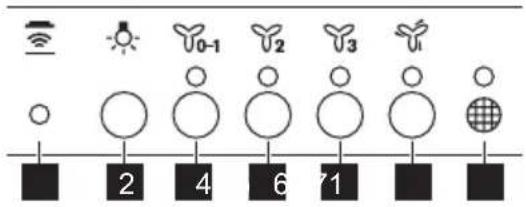
text_image
Diagram showing various symbols and numbers, including Wi-Fi, sun, Y0-1, Y2, Y3, and various circles and shapes on a grid-like scale.| Function Description | |
| 1 | Hob ^2 Hood Indicator of the function to control hood from hob. |
| 2 | Lamp Turns the lights on and off. |
| 3 | First speed / Off The motor switches to first speed level. Second press turns off the appliance. |
| 4 | Second speed The motor switches to second speed level. |
| 5 | Third speed The motor switches to third speed level. |
| 6 | Maximum speed The motor switches to maximum speed level. |
| 7 | Filter notification Reminds to change or clean the charcoal filter and clean the grease filter. |
5. DAILY USE
5.1 Using the hood
Check the recommended speed according to the table below.
 | While heating up food, cooking with covered pots. |
 | While cooking with covered pots on multiple cooking zones or burners, gentle frying. |
 | While boiling and frying big quantities of food without a lid, cooking on multiple cooking zones or burners. |
 | While boiling and frying big quantities of food without a lid, big humidity. After 6 minutes the appliance returns to previous setting. |
i
It is recommended to leave the hood operating for approximately 15 minutes after cooking.
To operate the hood:
- Press the first speed button on the appliance.
- If needed, change the speed by pressing the desired button.

i
The hoods light works independently to other hood functions. To illuminate the cooking surface press the light button
To turn off the appliance press the first speed button 📋0-1 again.
5.2 Hob ^2 Hood function
It is an automatic function which connects the hob with a hood. Both the hob and the hood have an infrared signal communicator. Speed of the fan is defined automatically on basis of mode setting and temperature of the hottest cookware on the hob. You can also operate the fan using the hob manually. The function can be activated from panel of the hob.
i
For more information how to use the function refer to the hob user manual.
5.3 Filter notification
Filter alarm reminds to change or clean the charcoal filter and clean the grease filter. The filter indicator is turned on for 30 seconds if the grease filter must be cleaned. The filter indicator flashes for 30 seconds if the charcoal filter must be replaced or cleaned.
i
Refer to cleaning the grease filter in care and cleaning chapter.
i
Refer to cleaning the charcoal filter or replacing the charcoal filter in care and cleaning chapter.
To reset the function press the button for 3 seconds.
To activate or deactivate function:
- Switch off the appliance.
- To activate function press the button for 3 seconds.
If the function is activated, the indicator flashes two times. - To deactivate function press the button _2 for 3 seconds.
If the function is deactivated, the indicator flashes once.

5.4 Remote-control
The appliance can be controlled with a remote-control. Visit local supplier to buy the remote-control.
The connection is originally enabled.
To connect or disconnect remote-control:
- Switch off the appliance.
- Press the for 3 seconds.
The indicator on control panel flashes twice if function is enabled and once if disabled.
6. CARE AND CLEANING
6.1 Notes on cleaning
Cleaning Agents
Do not use abrasive detergents and brushes.
Clean the surface of the appliance with a soft cloth with warm water and a mild detergent.
After cooking some parts of appliance can get hot. To avoid stains appliance must be cooled down and dried with clean cloth or paper towels.
Clean stains with a mild detergent.
Keep the hood
clean
Clean the appliance and grease filters each month. Clean the interior and grease filters carefully from fat. Fat accumulation or other residue may cause fire.
Follow the instructions for cleaning the accessories when filter notification is on. Refer to Filter notification in daily use chapter.
Grease filters can be washed in a dishwasher.
The dishwasher must be set to a low temperature and a short cycle. The grease filter may discolour, it has no influence on the performance of the appliance.
Charcoal filter
The time of saturation of the charcoal filter varies depending on the type of cooking and the regularity of cleaning the grease filter.
6.2 Cleaning the grease filter
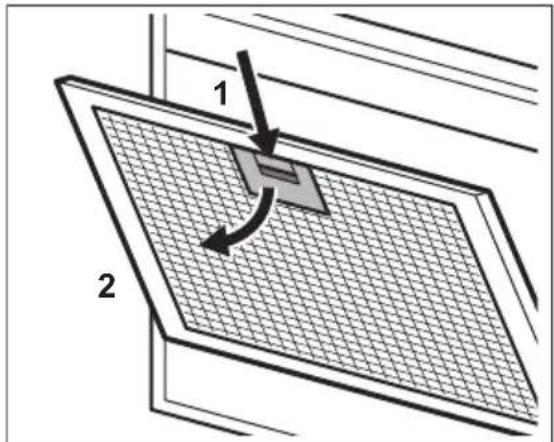
Filters are mounted with the use of clips and pins on the opposite side.
To clean the filter:
- Press the handle of the mounting clip on the filter panel underneath the hood (1).
text_image
1 2- Slightly tilt the front of the filter downwards (2), then pull.
Repeat the first two steps for all filters.
- Clean the filters using a sponge with non abrasive detergents or in a dishwasher.

The dishwasher must be set to a low temperature and a short cycle. The grease filter may discolour, it has no influence on the performance of the appliance.
- To mount the filters back follow the first two steps in reverse order.
Repeat the steps for all filters if applicable.
6.3 Replacing the charcoal filter - optional

WARNING!
The charcoal filter is non-washable!

Refer to the leaflet provided with the filter.
To replace the filter:
- Remove the grease filters from the appliance.
Refer to "Cleaning the grease filter" in this chapter.
- Press the front edge in slot towards the bottom part of the filter. Slightly tilt the front of the filter downwards.
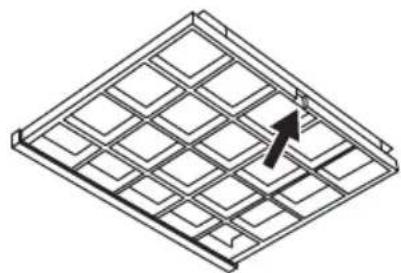
natural_image
Isometric line drawing of a grid-patterned structure with an arrow indicating direction (no text or symbols)- To install a new filter, perform the same steps in reverse order. In any case, it is necessary to replace the filters at least every four months.
6.4 Replacing the lamp
This appliance is supplied with a LED lamp. This part can be replaced by a technician only. In case of any malfunction refer to "Service" in the "Safety Instructions" chapter.
7. TROUBLESHOOTING

WARNING!
Refer to Safety chapters.
7.1 What to do if...
Problem Possible cause Remedy
| You cannot activate the appliance. The appliance is not connected to a power supply or it is connected incorrectly. | Check if the appliance is correctly connected to the electrical supply. | |
| You cannot activate the appliance. The fuse is blown. Make sure that the fuse is the cause of the malfunction. If the fuse is blown again and again, contact a qualified electrician. | ||
| You cannot activate the appliance. Cabinet doors are not aligned with the cabinet frame. | Align the cabinet doors. | |
| The lamp does not operate. The lamp is defective. Replace the lamp. Refer to the "Care and Cleaning" chapter. | ||
| Problem Possible cause Remedy | ||
| The appliance does not absorb enough vapours. | The motor speed is not adequate to the appearing vapours. | Change the speed of the motor. |
| The filter alarm indicator 📋 on. | The filter alarm is on. The grease filter must be cleaned or the charcoal filter (optional) must be replaced or cleaned. | Refer to the filter notification in "Daily use" chapter. |
8. ENVIRONMENTAL CONCERNS
Recycle materials with the symbol Put the packaging in relevant containers to recycle it. Help protect the environment and human health by recycling waste of electrical and electronic appliances. Do not dispose of
appliances marked with the symbol 📀 with the household waste. Return the product to your local recycling facility or contact your municipal office.
text_image
Diagram showing various symbols and numbers, likely representing a scientific or educational system with icons for signals, images, and data points.Función Descripción
natural_image
Isometric line drawing of a grid-patterned panel or panel structure with an arrow indicating direction (no text or symbols)text_image
Diagram showing various symbols and numbers, including Wi-Fi, sun, Y0-1, Y2, Y3, and various circles and shapes on a black background.natural_image
Isometric line drawing of a grid-patterned structure with an arrow indicating direction (no text or symbols)1. ⚠TURVALLISUUSTIEDOT
text_image
Diagram showing various symbols and numbers, likely representing a scientific or educational system with icons for sensors, suns, and objects.Toiminto Kuvaus
natural_image
Isometric line drawing of a grid-patterned panel or panel structure with an arrow indicating direction (no text or symbols)text_image
Diagram showing various symbols and numbers, including Wi-Fi, sun, bird-like icons, and numbered blocks below each symbol.natural_image
Isometric line drawing of a grid-patterned structure with an arrow indicating direction (no text or symbols)text_image
Diagram showing various symbols and numbers, including Wi-Fi, sun, Y0-1, Y2, Y3, and various circle shapes with numerical labels below.Funkcija Opis
1 Hob ^2 Hood Indikator funkcije za upravljanje napom s ploče za kuhanje.
5. SVAKODNEVNA UPORABA
5.1 Uporaba nape
natural_image
Isometric line drawing of a grid-patterned panel or panel structure with an arrow pointing to one corner (no text or symbols)- Da biste instalirali novi filtar, izvršite iste korake obrnutim redoslijedom. U svakom slučaju, potrebno je zamijeniti filtre najmanje svaka četiri mjeseca.
6.4 Zamjena žarulje
Ovaj uređaj se isporučuje s LED žaruljom. Ovaj dio može zamijeniti samo tehničar. U slučaju bilo kakvog kvara, pogledajte "Servis" u poglavlju "Sigurnosne upute".
7. RJEŠAVANJE PROBLEMA

UPOZORENJE!
text_image
Diagram showing various symbols and numbers, including Wi-Fi, sun, Y0-1, Y2, Y3, and others with corresponding black blocks below.natural_image
Isometric line drawing of a grid-patterned structure with an arrow indicating direction (no text or symbols)text_image
Diagram showing various symbols and numbers, including Wi-Fi, sun, bird-like icons, and numbered blocks below each symbol.natural_image
Isometric line drawing of a grid-patterned structure with an arrow indicating direction (no text or symbols)text_image
Diagram showing various symbols and numbers, including Wi-Fi, sun, bird-like icons, and numbered boxes below each symbol.natural_image
Isometric view of a grid-patterned structure with an arrow indicating direction (no text or symbols)text_image
Diagram showing various symbols and numbers, including Wi-Fi, sun, Y0-1, Y2, Y3, and grid, with black squares below each symbol.Funkcija Aprašymas
natural_image
Isometric line drawing of a grid-patterned structure with an arrow indicating direction (no text or symbols)text_image
Diagram showing various symbols and numbers, including Wi-Fi, sun, Y0-1, Y2, Y3, and various circle shapes with numerical labels below.Funkcija Apraksts
natural_image
Isometric line drawing of a grid-patterned structure with an arrow indicating direction (no text or symbols)text_image
Diagram showing various symbols and numbers, including Wi-Fi, sun, bird-like icons, and numbered blocks below each symbol.natural_image
Isometric view of a grid-patterned structure with an arrow indicating direction (no text or symbols)text_image
Diagram showing various symbols and numbers, including Wi-Fi, sun, bird-like icons, and numbered boxes below each symbol.natural_image
Isometric line drawing of a grid-patterned panel or panel structure with an arrow indicating direction (no text or symbols)7. PROBLEEMOPLOSSING

WAARSCHUWING!
text_image
Diagram showing various symbols and numbers, including Wi-Fi, sun, Y0-1, Y2, Y3, and others with corresponding black blocks below.natural_image
Isometric line drawing of a grid-patterned structure with an arrow indicating direction (no text or symbols)text_image
Diagram showing various symbols and numbers, including Wi-Fi, sun, bird-like icons, and numbered blocks below each symbol.natural_image
Isometric line drawing of a grid-patterned structure with an arrow indicating direction (no text or symbols)text_image
Diagram showing various symbols and numbers, including Wi-Fi, sun, bird-like icons, and numbered blocks below each symbol.natural_image
Isometric line drawing of a grid-patterned structure with an arrow indicating direction (no text or symbols)text_image
Diagram showing various symbols and numbers, including Wi-Fi, sun, bird icons, and numbered blocks below each symbol.Functie Descriere
natural_image
Isometric line drawing of a grid-patterned panel or panel structure with an arrow pointing to one corner (no text or symbols)text_image
Diagram showing various symbols and numbers, including Wi-Fi, sun, Y0-1, Y2, Y3, and others with corresponding black blocks below.Функция Описание
1
natural_image
Isometric line drawing of a grid-patterned structure with an arrow indicating direction (no text or symbols)text_image
Diagram showing various symbols and numbers on a grid-like structure, likely representing a scientific or educational system.Funkcia Popis
natural_image
Isometric line drawing of a grid-patterned panel or panel structure with an arrow indicating direction (no text or symbols)text_image
Diagram showing various symbols and numbers, including Wi-Fi, sun, Y0-1, Y2, Y3, and a grid-like icon with numbers 2, 4, 6, 7, 1.natural_image
Isometric line drawing of a grid-patterned panel or panel structure with an arrow pointing to one corner (no text or symbols)4. PËRSHKRIM I PRODUKTIT
text_image
Diagram showing various symbols and numbers, including Wi-Fi, sun, Y0-1, Y2, Y3, and grid, with black squares below each symbol.natural_image
Isometric line drawing of a grid-patterned structure with an arrow indicating direction (no text or symbols)text_image
Diagram showing various symbols and numbers, including Wi-Fi, sun, bird-like icons, and numbered blocks below each symbol.natural_image
Isometric line drawing of a grid-patterned structure with an arrow indicating direction (no text or symbols)natural_image
Isometric line drawing of a grid-patterned structure with an arrow indicating direction (no text or symbols)text_image
Diagram showing various symbols and numbers, including Wi-Fi, sun, Y0-1, Y2, Y3, and various shapes with numerical labels below.Fonksiyon Açıklama
natural_image
Isometric line drawing of a grid-patterned panel or panel structure with an arrow pointing to one corner (no text or symbols)ELECTROLUX APPLIANCES AB
BUSINESS SECTOR EMA-EMEA (SEE)
ST GÖRANSGATAN 143
SE-105 45 STOCKHOLM
SWEDEN
TEL: +46 (8) 738 60 00
FAX: +46 (8) 738 63 35
www.electrolux.com