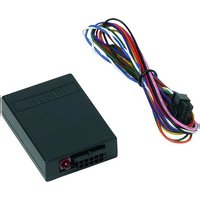
MagicSpeed CBI 150 - Electronic interface WAECO - Free user manual and instructions
Find the device manual for free MagicSpeed CBI 150 WAECO in PDF.


| Brand | WAECO |
| Model | MagicSpeed CBI 150 |
| Product type | CAN bus interface |
| Article number | 9101400060 |
| Supply voltage | 12 V |
| Power consumption (max) | 0.5 A |
| Standby consumption | max. 1 mA |
| Operating temperature | -40 °C to +85 °C |
| Main functions | Decoding of CAN signals, analog outputs (handbrake, reverse gear, ignition, speed, engine speed, clutch) |
| Status indicator | LED (flashes when vehicle recognized, permanently lit when not recognized) |
| Connection | OBD-II connector via connection cable (white and blue wires for CAN High/Low) |
| Installation | In the vehicle interior, away from airbags and heat sources, protected from moisture |
| Electrical protection | Max. 5 A fuse on the red power wire |
| Delivery contents | Interface, connection cable, vehicle list |
| Vehicle compatibility | Passenger vehicles with CAN bus (list available online) |
| Warranty | Applicable statutory warranty (contact manufacturer or dealer) |
| Disposal | Recycle according to local regulations |
| Customer service | Dometic WAECO (Germany) – info@dometic-waeco.de |
Frequently Asked Questions - MagicSpeed CBI 150 WAECO
User questions about MagicSpeed CBI 150 WAECO
0 question about this device. Answer the ones you know or ask your own.
Ask a new question about this device
Download the instructions for your Electronic interface in PDF format for free! Find your manual MagicSpeed CBI 150 - WAECO and take your electronic device back in hand. On this page are published all the documents necessary for the use of your device. MagicSpeed CBI 150 by WAECO.
USER MANUAL MagicSpeed CBI 150 WAECO
natural_image
Isometric line drawing of a rectangular electronic device with a central connector and top panel (no text or symbols)MagicSpeed CBI 150
DE 2 CAN-Bus Interface
Installation and Operating Manual
FR 14 Interface de bus CAN
natural_image
Pure geometric diagram with crosshair and circular shapes without any text or symbolsMagicSpeed CBI 150 Lieferumfang

natural_image
Pure geometric diagram with crosshair and circular shapes without any text or symbolsSafety and installation instructions MagicSpeed CBI 150
Please read this manual carefully before installing and starting up, and store it in a safe place. If you pass on the system to another person, hand over this instruction manual along with it.
Table of contents
1 Safety and installation instructions....8
2 Scope of delivery 9
3 Intended use 9
4 Control elements ..... 10
5 CAN bus interface 10
6 Connecting the CAN bus interface.... 11
7 Guarantee 12
8 Disposal 12
9 Technical data 13
1 Safety and installation instructions
See fig. 1
The following texts are only a supplement to the illustrations on the supplementary sheet. They do not contain the full installation and operating instructions. Please observe the illustrations on the supplementary sheet.
Please observe the prescribed safety instructions and stipulations from the vehicle manufacturer and service workshops.
The manufacturer will not be held liable for claims for damage resulting from the following:
● Damage to the product resulting from mechanical influences and excess voltage
● Alterations to the product without express permission from the manufacturer
● Use for purposes other than those described in the operating manual




natural_image
Pure geometric diagram with crosshair and circular shapes without any text or symbolsMagicSpeed CBI 150 Scope of delivery

- Observe the applicable legal regulations.
● Install the system in the vehicle interior. - Secure the system in such a way that it cannot become loose under any circumstances (sudden braking, accidents) and cause injuries to the occupants of the vehicle.
- Do not fit the system where an airbag may open. This could cause injury if the airbag deploys.
- Maintain a sufficient interval to intense sources of heat.
- Do not expose the control electronics to moisture.
- Connecting the device to other operating voltages than those specified may cause hazardous situations.
● After a data protocol update by the vehicle manufacturer, the device may no longer function according to the instructions.
2 Scope of delivery
See fig. 2
No. Quantity Designation Item no.
1 1 CAN bus interface 9101400060
2 1 Connection cable
- 1 Vehicle list
3 Intended use
MagicSpeed CBI 150 (item no. 9101400060) is an interface for converting digital CAN bus signals into analogue signals. CBI 150 decodes the digital signals from the on-board vehicle electronics and transmits analogue signals to the outputs.
MagicSpeed CBI 150 is designed for installation in passenger vehicles with a CAN bus port.







Control elements MagicSpeed CBI 150
4 Control elements
See fig. 3
No. Designation
1 S t a t u s L E D
2 10-pin socket
3 Software version for the module
5 CAN bus interface
See fig. 4
No. Designation
1 Pink cable: "Handbrake applied" signal
2 Brown cable: "Reverse gear engaged" signal
3 Violet cable: "Ignition switched on" signal
4 Green cable: Speedometer signal
5 Yellow cable: Engine speed signal
6 Orange cable: "Clutch applied" signal
7 White cable: Connection to CAN High
8 Blue cable: Connection to CAN Low
9 Black cable: Connection to earth
10 Red cable: Connection to a cable which is protected with max. 5 A



natural_image
Pure geometric diagram with crosshair and circular shapes without any text or symbolsMagicSpeed CBI 150 Connecting the CAN bus interface
6 Connecting the CAN bus interface

NOTE
The configuration of the OBD-II plug can be found in fig. 6.
Supplementary to fig. 5
Before installation, make sure that the output signals you need for your vehicle are available from CBI150.
You can find a detailed vehicle list at: http://www.dometic-waeco.de/cbi150.

NOTE
Only connect the cables to the CAN bus cables in the vehicle which are specified in the vehicle list.
▶Connect the white and the blue cables with the CAN bus cables as described in the vehicle list.
▶ Insert the plug of the connection cable into the socket of the CAN bus interface.
▶Switch on the ignition.
√The status LED indicates the system status.
Status LED flashes: the vehicle type has been recognised
You can use the CAN bus interface.
You can test the functions as follows:
▶Switch the ignition and all the consumer units off.
▶Remove the ignition key.
▶Close and lock all the vehicle doors.
√The status LED goes out after a delay time (depending on the model).






Guarantee MagicSpeed CBI 150
Status LED is lit: the vehicle type is not recognised
▶Check whether:
– the vehicle type is included in the vehicle list.
– the CAN bus cables are correctly connected.
– the CAN bus cables are detected in the right position in the vehicle (see vehicle list)
Status LED is switched off
▶Check whether:
– the power supply is 12 V
– the CAN bus cables are correctly connected.
7 Guarantee
The statutory warranty period applies. If the product is defective, please contact the manufacturer's branch in your country (see the back of the instruction manual for the addresses) or your retailer.
For repair and guarantee processing, please send the following items:
- Defect components
● A copy of the receipt with purchasing date
● A reason for the claim or description of the fault
8 Disposal
▶Place the packaging material in the appropriate recycling waste bins wherever possible.
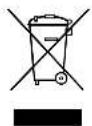
If you wish to finally dispose of the product, ask your local recycling centre or specialist dealer for details about how to do this in accordance with the applicable disposal regulations.




natural_image
Pure geometric diagram with crosshair and circular shapes without any text or symbolsMagicSpeed CBI 150 Technical data
9 Technical data
| MagicSpeed CBI 150 | |
| Item no. 9101400060 | |
| Voltage: 12 V | |
| Power consumption (at 12 V): maximum 0.5 A | |
| Quiescent current consumption: max. 1 mA | |
| Operating temperature: -40 °C to +85 °C | |
| Certification: | e11 |
Different versions, technical modifications and delivery options reserved.
natural_image
Pure geometric diagram with crosshair and circular shapes without any text or symbolsnatural_image
Pure geometric diagram with crosshair and circular shapes without any text or symbolsMagicSpeed CBI 150
natural_image
Pure geometric diagram with crosshair and circular shapes (no text or symbols)natural_image
Pure geometric diagram with concentric circles and radial lines, no text or symbols presentMagicSpeed CBI 150 Garantía legal
natural_image
Pure geometric diagram with crosshair and circular shapes without any text or symbolsnatural_image
Pure geometric diagram with crosshair and circular shapes without any text or symbolsnatural_image
Pure geometric diagram with crosshair and circular shapes without any text or symbolsMagicSpeed CBI 150 Betjeningselementer
4 Betjeningselementer
Se fig. 3
Nr. Betegnelse
natural_image
Pure geometric diagram with crosshair and circular shapes (no text or symbols)natural_image
Pure geometric diagram with crosshair and circular shapes without any text or symbolsMagicSpeed CBI 150 Reglage, knappar
4 Reglage, knappar
Se bild 3
Nr Beteckning
1 Status-lysdiod
2 10-poligt uttag
3 Modulens mjukvaruversion
natural_image
Pure geometric diagram with concentric circles and radial lines, no text or symbols presentnatural_image
Pure geometric diagram with crosshair and circular shapes without any text or symbolsnatural_image
Pure geometric diagram with crosshair and circular shapes without any text or symbolsnatural_image
Pure geometric diagram with crosshair and circular shapes without any text or symbolsMagicSpeed CBI 150 Tekniset tiedot
9 Tekniset tiedot
①Dometic Italy S.p.A.
Via Virgilio, 3
I-47100 Forli
+39 0543 754901
+39 0543 756631
Mail: info@dometic.it
Overseas + Middle East
AUS Dometic Australia
1 John Duncan Court
Varsity Lakes QLD 4227
+61 7 55076000
+61 7 55076001
Mail: sales@dometic-waeco.com.au
CH Dometic Switzerland AG
Riedackerstrasse 7a
CH-8153 Rümlang (Zürich)
+41 44 8187171
吕 +41 44 8187191
Mail: info@dometic-waeco.ch
N Dometic Norway AS
Skolmar 24
N-3232 Sandefjord
+47 33428450
吕 +47 33428459
Mail: firmapost@waeco.no
(HK) WAECO Impex Ltd.
Suites 2207-2211 · 22/F · Tower 1
The Gateway · 25 Canton Road,
Tsim Sha Tsui · Kowloon
Hong Kong
+852 24611386
+852 24665553
Mail: info@dometic-waeco.com.hk
DK Dometic Denmark A/S
Nordensvej 15, Taulov
DK-7000 Fredericia
+45 75585966
吕 +45 75586307
Mail: info@waeco.dk
NL Dometic Benelux B.V.
Ecustraat 3
NL-4879 NP Etten-Leur
+31 76 5029000
吕 +31 76 5029090
Mail: info@dometic.nl
ROC WAECO Impex Ltd.
Taipei Office
2 FL-3 · No. 56 Tunhua South Rd, Sec 2
Taipei 106, Taiwan
+886 2 27014090
+886 2 27060119
Mail: marketing@dometic-waeco.com.tw
E Dometic Spain S.L.
Avda. Sierra del Guadarrama, 16
E-28691 Villanueva de la Cañada
Madrid
+34 902 111 042
+34 900 100 245
Mail: info@dometic.es
s Dometic Scandinavia AB
Gustaf Melins gata 7
Regional Office Middle East
P O Box 74775
Dubai, United Arab Emirates
+971 4 321 2160
+971 4 321 2170
Mail: info@dometic.ae
F Dometic S.N.C.
Dometic House · The Brewery
Blandford St. Mary
Dorset DT11 9LS
+44 844 626 0133
+44 844 626 0143
Mail: sales@dometic.co.uk
USA Dometic Marine Division
2000 N. Andrews Ave. Extension
Pompano Beach, FL 33069 USA
+1 954 973 2477
+1 954 979 4414
Mail: marinesales@dometicusa.com
FIN Dometic Finland OY
Mestarintie 4
FIN-01730 Vantaa
+358 20 7413220
吕 +358 9 7593700
Mail: info@dometic.fi
www.dometic-waeco.com







- MagicSpeed CBI 150
- DE 2 CAN-Bus Interface
- FR 14 Interface de bus CAN
- MagicSpeed CBI 150 Lieferumfang
- Table of contents
- Safety and installation instructions
- MagicSpeed CBI 150 Scope of delivery
- Scope of delivery
- See fig. 2
- Intended use
- Control elements MagicSpeed CBI 150
- Control elements
- See fig. 3
- No. Designation
- CAN bus interface
- See fig. 4
- Connecting the CAN bus interface
- NOTE
- Supplementary to fig. 5
- Status LED flashes: the vehicle type has been recognised
- Guarantee MagicSpeed CBI 150
- Status LED is lit: the vehicle type is not recognised
- ▶Check whether:
- Status LED is switched off
- Guarantee
- Disposal
- Technical data
- MagicSpeed CBI 150 Garantía legal
- MagicSpeed CBI 150 Betjeningselementer
- Betjeningselementer
- Se fig. 3
- Nr. Betegnelse
- Reglage, knappar
- Se bild 3
- Nr Beteckning
- MagicSpeed CBI 150 Tekniset tiedot
- Tekniset tiedot
- Overseas + Middle East
Brand : WAECO
Model : MagicSpeed CBI 150
Category : Electronic interface