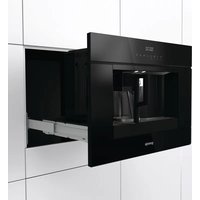
CMA9200BG - Basket GORENJE - Free user manual and instructions
Find the device manual for free CMA9200BG GORENJE in PDF.


| Product type | Automatic coffee machine with grinder |
| Brand | Gorenje |
| Model | CMA9200BG |
| Power supply | 220-240 V, 50/60 Hz, 10 A |
| Coffee types | Coffee beans, pre-ground coffee |
| Prepared beverages | Espresso, long coffee, cappuccino, hot water |
| Water tank | Removable, capacity approx. 1.8 L (not exactly specified) |
| Bean container | Capacity approx. 250 g (estimated) |
| Dregs drawer | Capacity approx. 14 coffee grounds doses |
| Drip tray | With water level indicator |
| Milk jug | Removable, max capacity 750 ml, froth adjustment |
| Grind adjustment | Rotary knob with multiple notches |
| Coffee strength adjustment | 5 levels: extra light to extra strong |
| Temperature adjustment | 3 levels: low, medium, high |
| Quantity programming | Coffee, hot water, milk for cappuccino |
| Automatic functions | Rinse, descaling, delayed shut-off (30 min to 2 h) |
| Display | Digital display with menu |
| Cleaning | Regular cleaning of brewing unit, dregs drawer, water tank, nozzles, milk jug |
| Safety | Automatic shut-off, burn protection, child lock (not specified) |
| Installation | Built-in, can be placed above a ventilated oven (max 3 kW) |
| Standby consumption | Compliant with EC Directive 1275/2008 |
| Dimensions (approx.) | Height: 45 cm, Width: 59 cm, Depth: 45 cm (estimated for built-in) |
| Weight (approx.) | Approximately 25 kg (estimated) |
Frequently Asked Questions - CMA9200BG GORENJE
User questions about CMA9200BG GORENJE
0 question about this device. Answer the ones you know or ask your own.
Ask a new question about this device
Download the instructions for your Basket in PDF format for free! Find your manual CMA9200BG - GORENJE and take your electronic device back in hand. On this page are published all the documents necessary for the use of your device. CMA9200BG by GORENJE.
USER MANUAL CMA9200BG GORENJE
What you should pay attention to 7
Use
Preparation 11
Operation 12
Settings
Using menu options 21
Maintenance
Cleaning 28
Messages
Faults table 35
Troubleshooting 35
Installation instructions
What you should pay attention to 38
Building in 39
Appendices
Disposal of appliance and packaging 41
Technical data 41
This coffee machine will make delicious cups of coffee, espresso and cappuccino. You can customise the settings of the machine to suit your personal preferences and tastes.
Coffee has been used in the factory to test the appliance and it is therefore completely normal that there are traces of coffee in the mill. This appliance is however guaranteed to be new.

First read the user instructions carefully and completely before starting to use the appliance, and keep them carefully for future reference.

Preventative maintenance
Your coffee machine requires preventative maintenance. To guarantee that the coffee machine works well and reliably, gorenje recommends having the machine serviced once every 2 to 3 years (after a maximum 8,000 cups).
Pictograms used

Important information
Danger! Elektrical appliance
Danger of burns
Tip
The parts which could come into contact with coffee or milk conform to the provisions of the EEC directive 1935/2004 relating to materials suitable for contact with foodstuffs.
This appliance is marked according to the European directive 2004/108/EC on Waste Electrical and Electronic Equipment (WEEE).
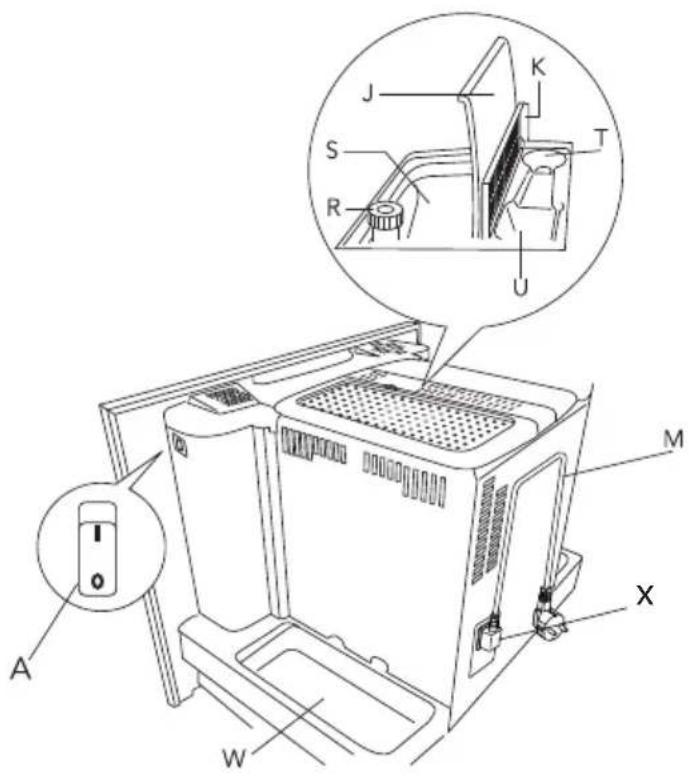
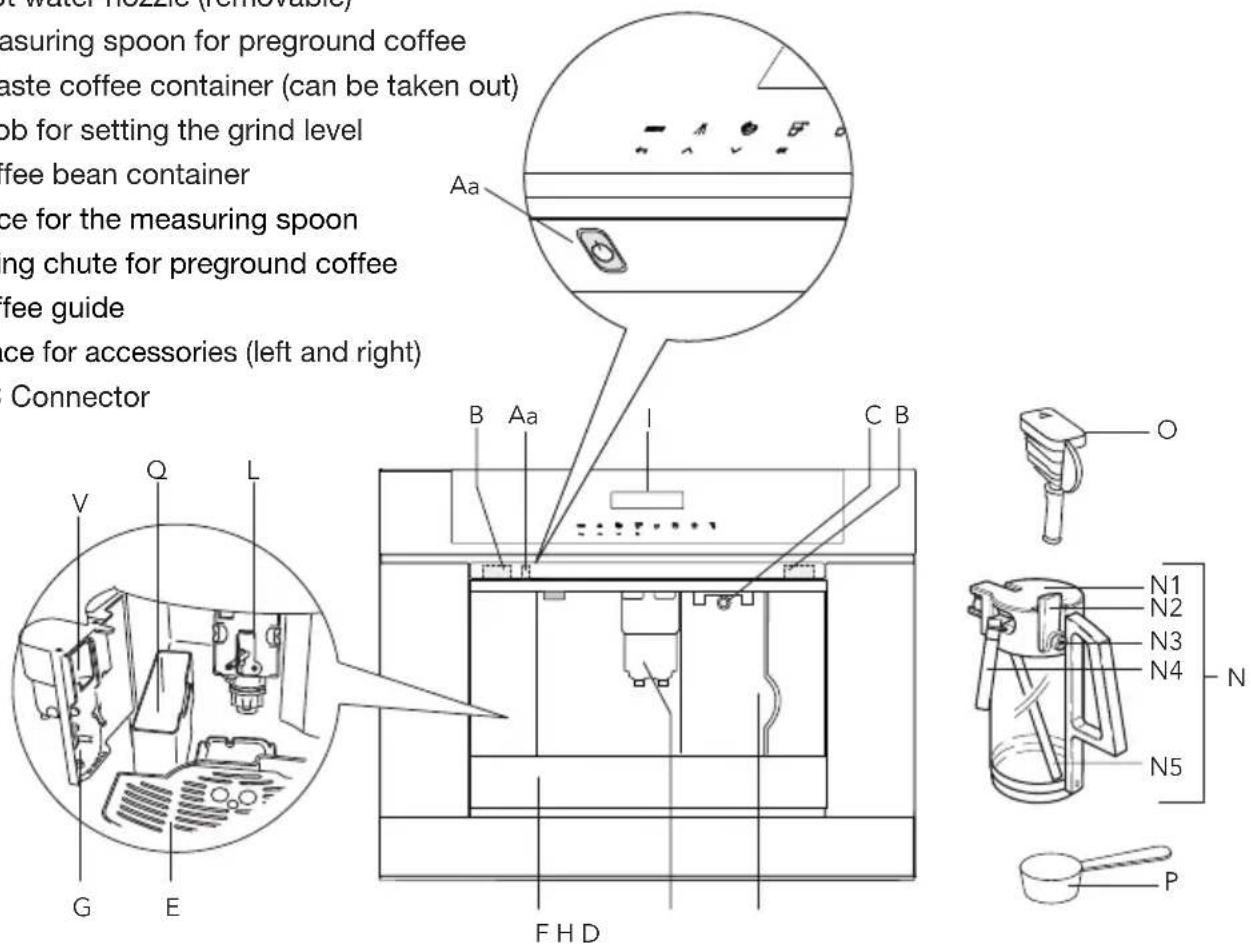
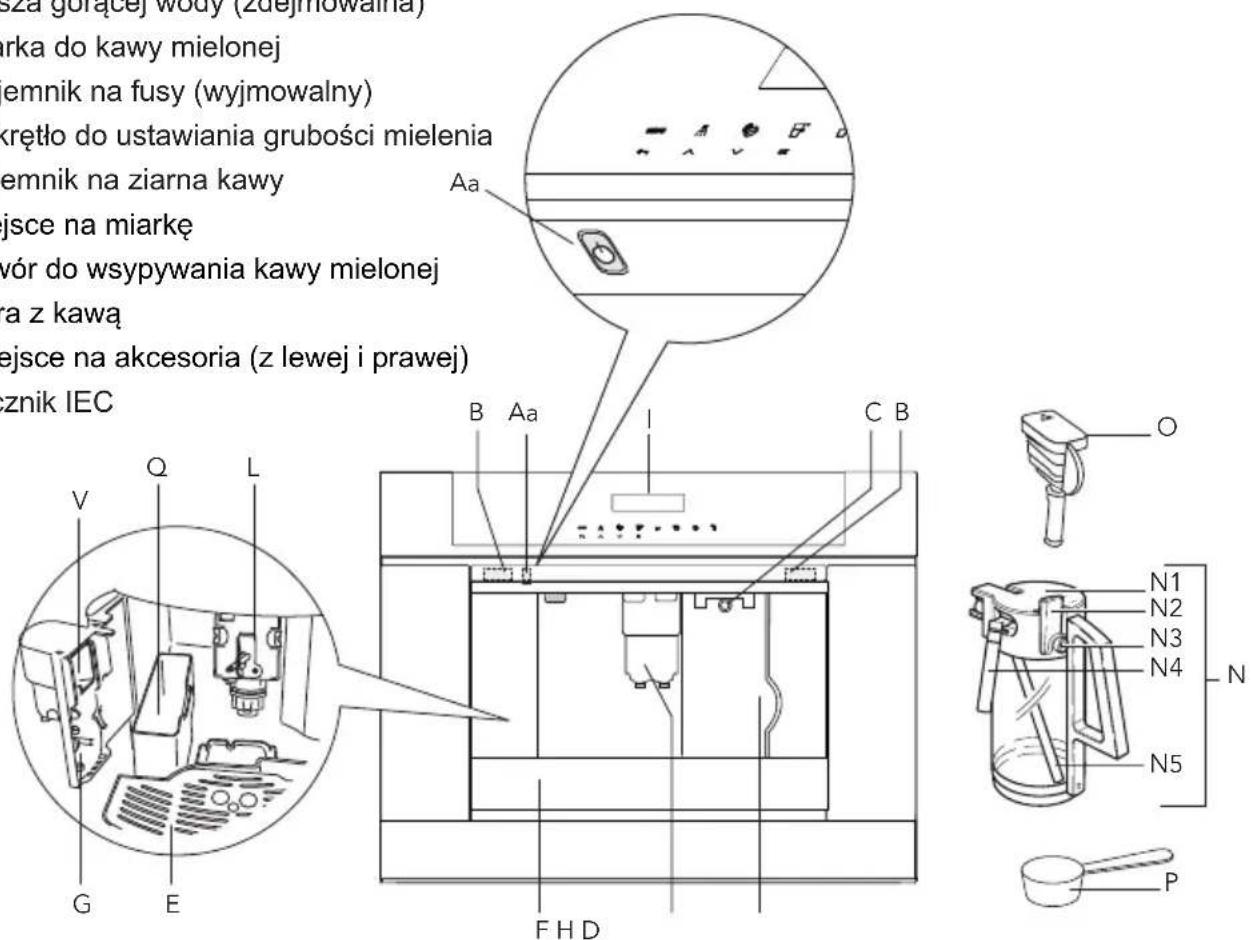
A. Main switch / Aa. On/Stand-by button
B. Handles
C. Nozzle
D. Water tank (removable)
E. Cup tray
F. Drip tray grill (removable)
G. Service door
H. Height adjustable coffee dispenser
I. Control panel
J. Coffee bean holder cover
K. Ground coffee chute cover
L. Brewing unit
M. Power cable
N. Milkcontainer:
N1. Cover (removable)
N2. Slider CAFFELATTE/CAPPUCCINO (removable)
N3. CLEAN button
N4. Milk dispenser pipe (removable)
N5. Suction pipe (removable)
O. Hot water nozzle (removable)
P. Measuring spoon for preground coffee
Q. Waste coffee container (can be taken out)
R. Knob for setting the grind level
S. Coffee bean container
T. Place for the measuring spoon
U. Filling chute for preground coffee
V. Coffee guide
W. Place for accessories (left and right)
X. IEC Connector
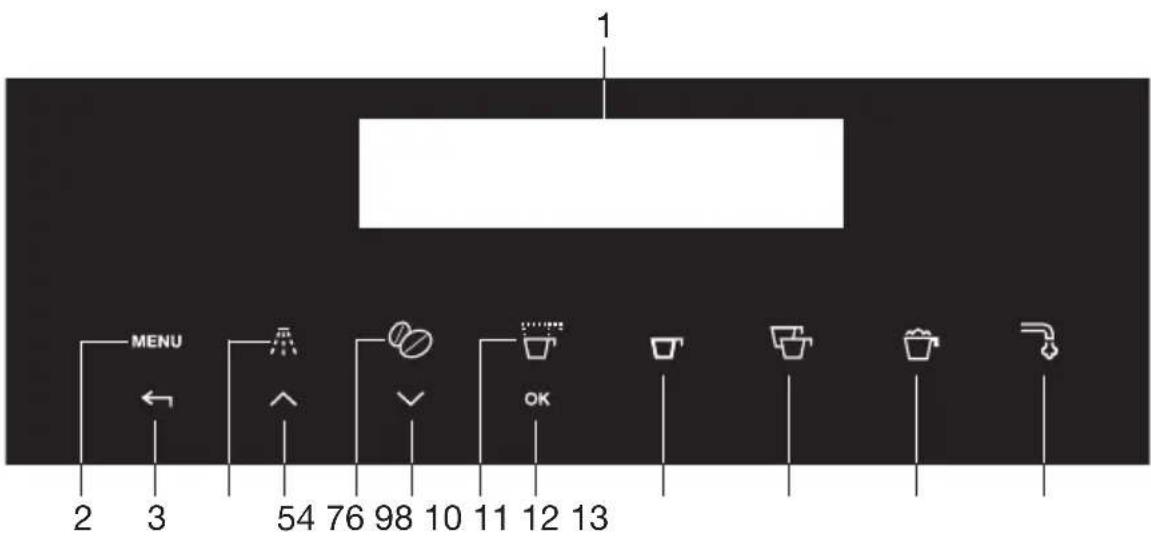
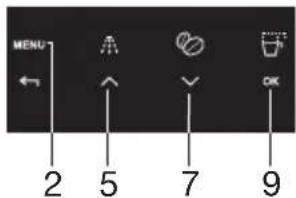
- Display
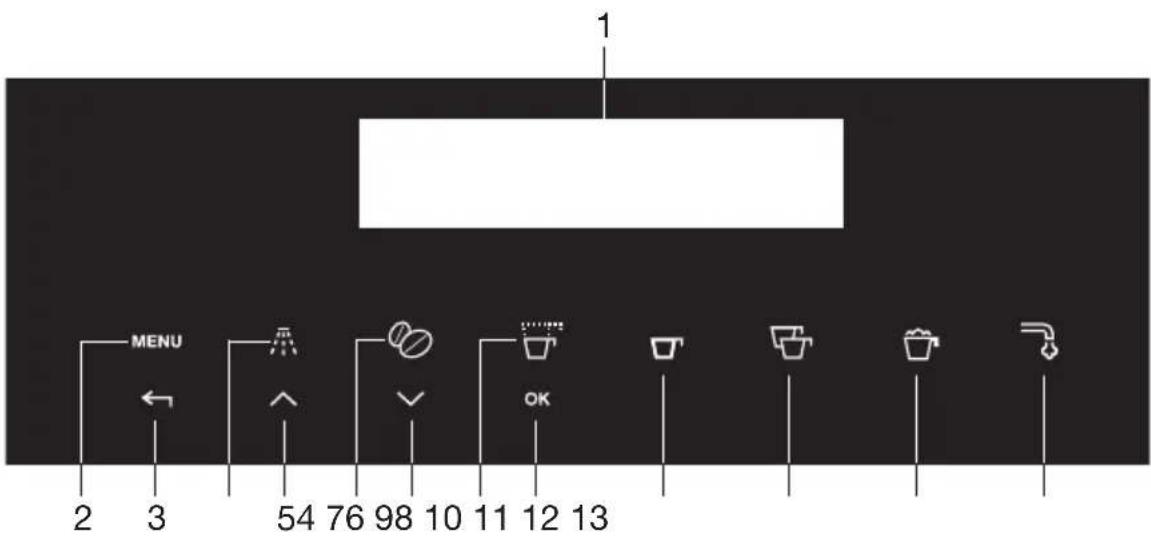
- Touch key 'MENU' to activate or deactivate menu
- Touch key 'RETURN' to exit the selected mode
- Touch key 'Rinse'
- Touch key 'SCROLL' to scroll forwards through the menu and display
- Touch key 'Coffee strength' to select strength or preground
- Touch key 'SCROLL' to scroll backwards through the menu and display
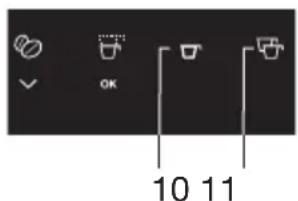
- Touch key to select the type/quantity of coffee (espresso, small cup, medium cup, large cup, mug)
- Touch key 'OK' to confirm the selected function
- Touch key 'One cup of coffee deliver'
- Touch key 'Two cups of coffee deliver'
- Touch key 'Cappuccino deliver'
- Touch key 'Hot water deliver'
What you should pay attention to

- WARNING: The appliance and its accessible parts become hot during use. Care should be taken to avoid touching heating elements.
- The surface of the heating element remains hot after use and the outside of the appliance may retain the heat for several minutes depending on use.
- The appliance is not intended for use by persons (including children) with reduced physical, sensory or mental capabilities, or lack of experience and knowledge, unless they have been given supervision or instruction concerning use of the appliance by a person responsible for their safety.
- WARNING: Models with glass surfaces: do not use the appliance if the surface is cracked.
- Children should be supervised to ensure that they do not play with the appliance.
- Cleaning and user maintenance shall not be made by children without supervision.
- CAUTION: To prevent damage to the appliance do not use alkaline cleaning agents when cleaning, use a soft cloth and a mild detergent.
- Never immerse the appliance in water.
- Clean all the components thoroughly, taking particular care with parts in contact with the coffee and milk.
- This is an household appliance only. It is not intended to be used in: staff kitchen


areas in shops, offices and other working environments; farm houses; by clients in hotels, motels and other residential type environments; bed and breakfast type environments.
- Designated use: this appliance is designed and made to prepare coffee and milk based beverages and hot water. Any other use is considered improper and thus dangerous. The manufacturer is not liable for damage deriving from improper use of the appliance.
- If the plug or power cable is damaged, it must be replaced by customer services only to avoid all risk.
- Appliances with removable cord: avoid splashes of water on the power cord connector or socket at the back of the appliance.
For european markets only:

- This appliance can be used by children aged from 8 years and above if they have been given supervision or instruction concerning use of the appliance in a safe way and if they understand the hazard involved. Cleaning and user maintenance shall not be made by children unless they are older than 8 and supervised. Keep the appliance and its cord out of the reach of children aged less than 8 years.
- Appliances can be used by persons with reduced physical, sensory or mental

capabilities or lack of experience and knowledge if they have been given supervision or instruction concerning use of the appliance in a safe way and understand the hazards involved.
- Children shall not play with the appliance.
- When not in use and before cleaning, always unplug the appliance.
- Surfaces marked with this symbol become hot during use (the symbol is present in certain models only).
- This appliance is intended for domestic use only (around 3000 cups a year). Any other use is considered improper and in that case no guarantee will be given.
- This appliance is designed to “make espresso coffee” and “heat drinks”. Use it with care to avoid scalds from the water and steam jets or through incorrect use.
- Do not lean or hang on the machine when it has come out of the cabinet and do not place heavy or unstable objects on the machine.
- This appliance can be installed over a built-in oven if the latter is fitted with a cooling fan at the rear (maximum microwave power: 3 kW).
- The manufacturer is not liable for damage caused by improper, incorrect or unreasonable use of the appliance.
- When using the appliance, do not touch the hot surfaces. Use the knobs or handles.
- In case of failures, make sure the appliance is not connected to the mains power supply.



Turn the main power switch on the right side (behind the front panel) to 0. Refer to our service department for repairs.
- Only ask for original spare parts to be used. Failure to respect the above could reduce the safety of the appliance.
- Do not put objects containing liquids, inflammable or corrosive materials on the machine.
- Use the accessories holder to contain coffee accessories (for example coffee beans).
- Never touch the appliance with damp hands.
- Unplug directly from the plug only.
- Never pull the power cable as you could damage it.
- To disconnect the appliance completely, place the main switch on the side of the appliance in the 0 (off) position.
Preparation
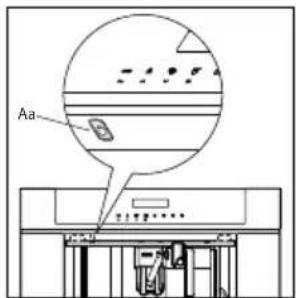
The first time you switch on the appliance with the main switch (see 'A' page 5) and every time that it is plugged in, the appliance executes a "SELF-DIAGNOSIS" action. Then the appliance switches off.
To turn it on, press the On/stand by button (Aa/see fig. 1) on the left site underneath the control panel.
- Coffee has been used to factory test the appliance and it is therefore completely normal for there to be traces of coffee in the mill.
- Customise water hardness as soon as possible following the instructions in the “Setting water hardness” section.
- Connect the appliance to the mains supply.
- Switch on the appliance with the main switch (see 'A' page 5).
- Start the appliance with the on/stand by button (see 'Aa').
- Set the required language.
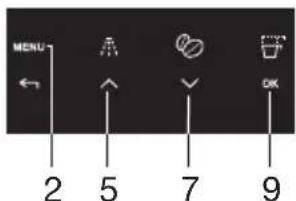
- Choose the required language using the 'scroll' touch keys (5 and 7). When the message "PRESS OK TO CHOOSE ENGLISH" is displayed, press and hold the touch key 'Ok' (9). If you set the wrong language, follow the instructions in the "Setting the language" section. If your language is not available, select one from those displayed. The instructions refer to the English version. Then follow the instructions displayed:
-
After 5 seconds, the appliance displays "ENGLISH INSTALLED".
-
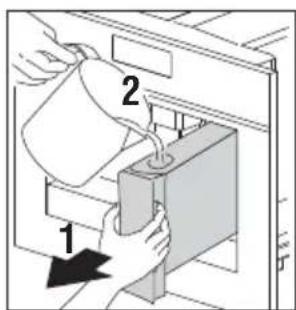
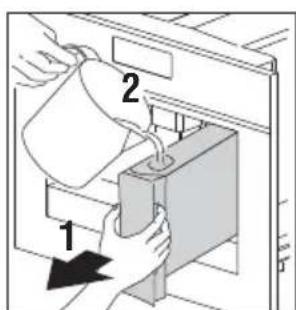
Extract the water tank, rinse and fill with fresh water without exceeding the MAX line.
-Replace and push as far as it will go. -
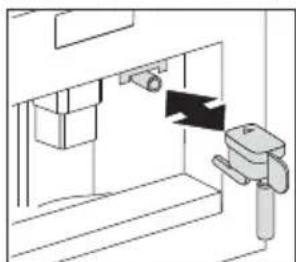
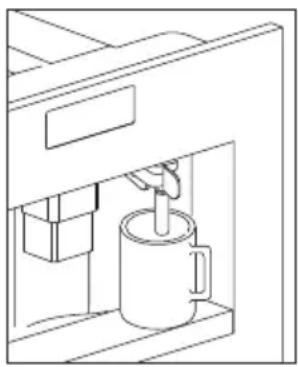
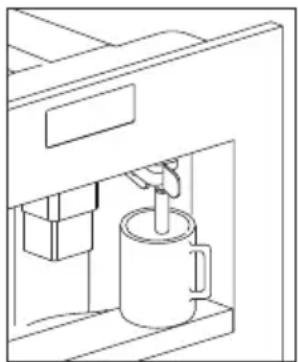
Place a cup under the hot water spout (If the hot water spout is not inserted, the appliance displays "INSERT WATER SPOUT".
The appliance displays: "HOT WATER PRESS OK". Press the touch key 'OK' (9) and after a few seconds a little water comes out of the spout.
- The machine now displays "TURNING OFF...PLEASE WAIT" and goes off.
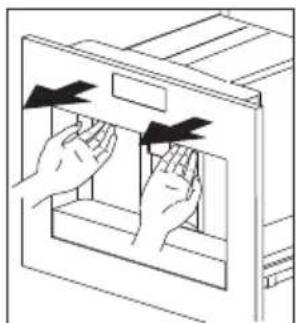
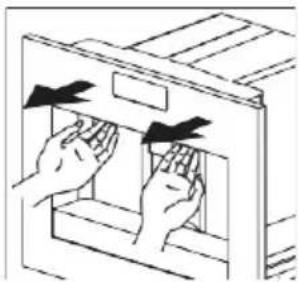
- Extract the appliance by pulling it out using the handles. Open the lid and fill the container with coffee beans, then close the lid and push the appliance in. The coffee maker is now ready for normal use.
Only fill the water tank with cold water. Never use other liquids such as mineral water or milk.
natural_image
Diagram of a mechanical device with a lever and handle, showing no text or symbols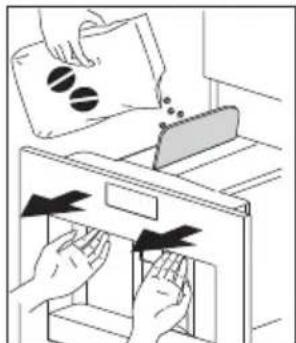
natural_image
Illustration of hands removing a bag into a drawer with arrows indicating process (no text or symbols)

Operation
To prevent malfunctions, never fill with ground coffee, frozen or caramelised coffee beans or anything else that could damage the appliance.
- When using the appliance for the first time, you need to make 4-5 cups of coffee and 4-5 cappuccinos before the appliance gives satisfactory results.
- Each time you turn the coffee maker on by the main switch (A), it performs a “SELF-DIAGNOSIS” cycle and then goes off. To turn it on again, press the On/stand by button (Aa).
Preparing coffee (using coffeebeans)
- The appliance is preset to make coffee with a normal taste. You can also choose coffee with an extra mild, mild, standard, strong or extra-strong taste. There is also a pre-ground coffee option.
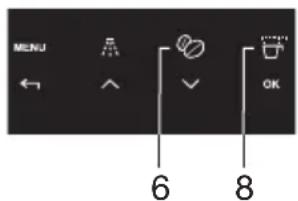
- To choose the required taste, press more times the touch key ‘Coffee strength’ (6). The required coffee taste is displayed.
natural_image
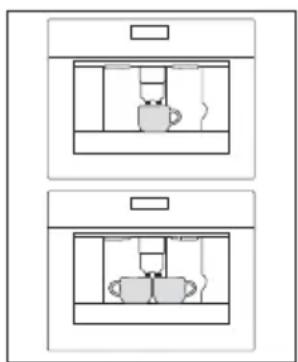
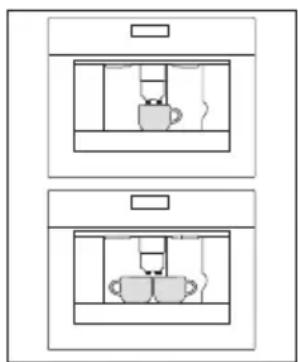
Two identical rectangular diagrams showing internal compartments with no text or symbols, likely representing a room plan or layout (no text or symbols present)- Place 1 cup under the spouts to make 1 coffee or 2 cups for 2 coffees.
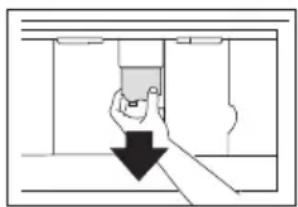
- Lower the spouts as near as possible to the cup for a creamier coffee.
-
Press the 'type of coffee' touch key (8) to select the type of coffee:
• ESPRESSO CUP
•SMALL CUP
•MEDIUM CUP
• LARGE CUP
•MUG -
Press the ‘one cup of coffee deliver’ touch key (10) if you want to make one coffee and the ‘two cup of coffee deliver’ touch key (11) if you want to make two coffees.
natural_image
Diagram showing a hand pressing down a component into a control panel (no text or symbols)- The appliance now grinds the beans and starts delivering the coffee into the cup.
- Once the set amount of coffee has been delivered, the machine stops delivery automatically and expels the exhausted waste coffee into the waste coffee container.
• After a few seconds, the appliance is ready for use again.
natural_image
Illustration of a hand inserting a card into a filing cabinet, with a circular arrow indicating rotation (no text or symbols)- To turn the appliance off, press the ‘On-off’ button (Aa / see page 5). Before going off, the appliance performs an automatic rinse cycle. Take care to avoid scalds.
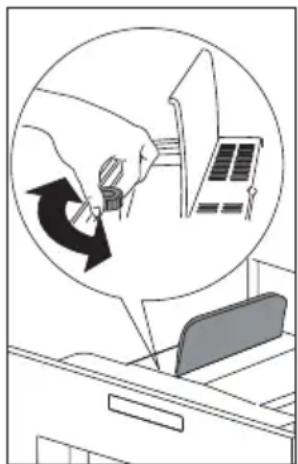
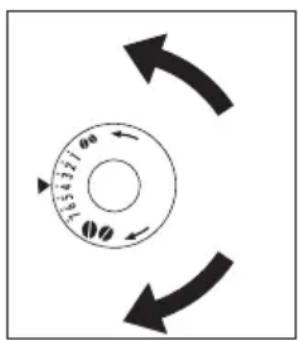
- If the coffee only comes out in drips or not at all, the knob for setting the grind level must be turned by one position clockwise (see "Setting the grind level"). Turn one click at a time until the coffee is delivered satisfactorily.
- If the coffee comes out too fast and the cream does not meet your taste, turn the knob by one position anti-clockwise). Make sure that you do not turn the knob for setting the grind level too far, as coffee may come out in drips when dispensing 2 cups.
Tips to make hotter coffee
- After 3 minutes since you last made coffee, you can preheat the brewing unit by using the menu setting "RINSING (see Rinsing). Run off the water into the underlying drip tray or alternatively use this water to fill (and then empty) the cup to be used for the coffee.
- Do not use cups that are too thick, as they will absorb too much heat.
- You can stop the coffee from dispensing by pressing the ‘One cup of coffee deliver’ touch key 910) or ‘Two cup of coffee deliver’ touch key (11) again, or by selecting “ESPRESSO CUP” with the ‘Type/quantity of coffee’ touch key (8).
- After the coffee has finished dispensing (the progress bar reaches 100%), you can increase the amount of coffee by pressing and holding the ‘One cup of coffee’ touch key until the desired amount of coffee is reached.
- When the display shows the message "FILL TANK!", you must fill the tank, otherwise the appliance cannot make any coffee. It is normal that there is some water left in the water tank when the message is displayed.
- Every 14 single coffees (or 7 doubles) the appliance displays "EMPTY WASTE COFFEE CONTAINER". This means that the waste coffee container is full and must be emptied and cleaned.
- The appliance counts the number of coffees made. As long as the waste coffee container is not cleaned, this message remains in
natural_image
Diagram of a mechanical device with a rotating arrow indicating motion (no text or symbols)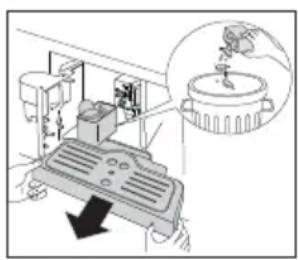
natural_image
Diagram of a mechanical device with an inset showing a component (no text or symbols present)
place and the coffee machine cannot make any coffee. To clean, open the service door at the front by pulling the coffee spout, remove the drip tray, empty it and clean it.
Important!
Always completely extract the drip tray, to avoid that it falls when removing the grounds container. Empty the grounds container and clean thoroughly, making sure all residues deposited on the bottom are removed.
Every time you pull the drip tray out, the waste coffee container must also be emptied, even if it is not completely full. If this process is not carried out, the waste coffee container may overfill when coffee is made and the machine may get blocked.
Never remove the water tank when the appliance is dispensing coffee. Otherwise, the appliance will not be able to make the coffee. If the appliance malfunctions, do not contact the service centre straight away, but first look at the troubleshooting guide. If this does not help, contact the customer service.
Changing the quantity of coffee
The appliance is factory preset to automatically deliver the following quantities of coffee:
- ESPRESSO CUP;
- SMALL CUP;
- MEDIUM CUP;
- LARGE CUP;
• MUG.
To change these quantities, proceed as follows:
- Press the touch key ‘MENU’ (2) and press the ‘Scroll’ touch keys (5 and 7) until the menu option “PROGRAM COFFEE” appears. Confirm the menu option with the touch key ‘OK’ (9).
-
Select the cup size you want to change with the scrolling touch keys (5 and 7). When the desired cup size is displayed, confirm it with the touch key 'OK' (9).
-
A bar appears on the display, which can be made bigger or smaller; this represents the cup filling quantity. A different quantity can be selected using the scrolling touch keys (5 and 7) in 10 steps. A full bar indicates that the maximum cup filling quantity of 220 ml is selected.
- Select the desired cup filling quantity and confirm it with the touch key 'OK' (9) to program this setting. If you don't press the touch key 'OK' 9), the appliance automatically returns to the coffee mode after 120 seconds without saving.
After programming the display automatically jumps back to the menu option for setting the filling quantity. To go back to the coffee mode immediately, press the touch key ‘MENU’ (2) twice or wait about 120 seconds until the appliance automatically returns to the coffee mode.
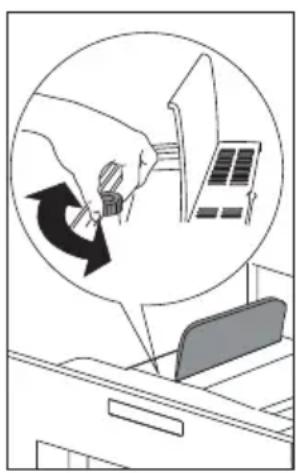
Setting the grind level
If coffee is dispensed too quickly or too slowly (in drips), you can change the grind level.
Only change the grind level during the milling process. Otherwise, the coffee machine may be damaged.
natural_image
Illustration of a hand holding a small object with a circular arrow indicating rotation, next to a file folder (no text or symbols present)- Turn anti-clockwise to obtain finer ground coffee, slower delivery and a creamier appearance.
- Turn clockwise for coarser ground coffee and faster delivery (not a drop at a time).
The adjustment will be evident after at least 2 cups of coffee are made.
Preparing espresso coffee using ground coffee
- Press the ‘Coffee strength’ touch key (6) and select “PRE-GROUND”.
- Extract the machine by pulling it outwards using the handles.
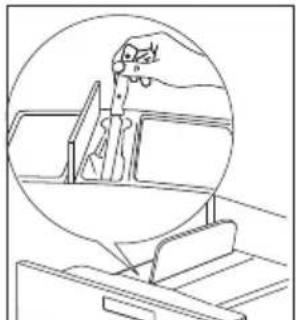
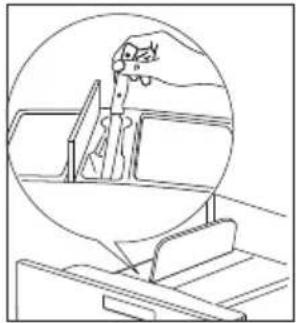
- Lift the central lid, place one measure of preground coffee in the funnel push the appliance back and proceed as described in the section "Making coffee using coffee beans". You can make just one coffee at a time by pressing the 'One cup deliver' touch key (10).
natural_image
Illustration of hands inserting or removing a device into a cabinet (no text or symbols)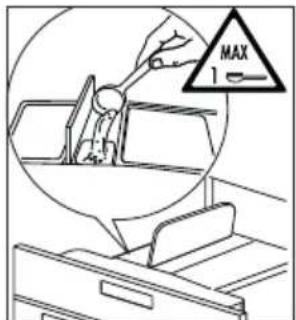
natural_image
Line drawing of a hand holding a tool near a ladder, enclosed in a circular frame (no text or symbols)
natural_image
Simple line drawing of a door with a handle and internal components, no text or symbols present- After using the machine with pre-ground coffee, to go back to making coffee using beans, deactivate the pre-ground coffee function by pressing the 'Coffee strength' touch key (6).
Notes
- Never introduce pre-ground coffee when the machine is off or it could spread through the inside of the appliance.
- Never add more than 1 measure, otherwise the appliance will not make the coffee.
- Use the measure provided only.
- Introduce only pre-ground coffee for espresso coffee machines into the funnel.
- If more than one measure of pre-ground coffee is used and the funnel clogs, push the coffee down with a knife then remove and clean the brewing unit and machine as described in the “Cleaning the brewing unit” section.
Preparing hot water
Hot water can be used to warm up cups and to make hot drinks, such as tea or packet soups.
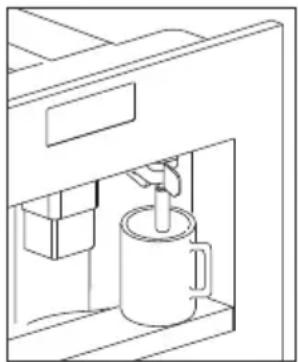
Warning! Escaping hot water can lead to scalds! Only activate the hot water nozzle when there is a receptacle underneath it.
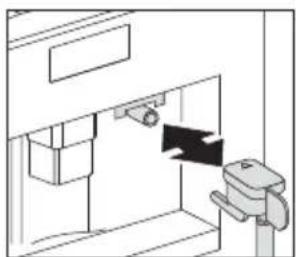
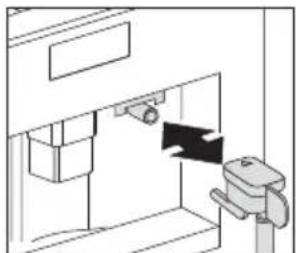
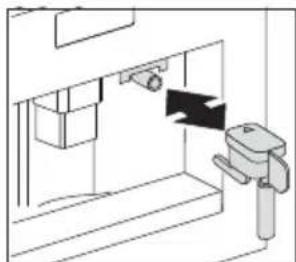
- Put the hot water nozzle in place.
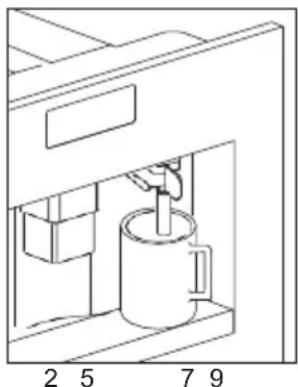
- Place a container underneath the hot water nozzle.
-
Press the 'Hot water' touch key (13).
The display shows "HOT WATER PRESS OK". -
Press the touch key 'OK' (9).
Hot water is dispensed; the display shows "HOT WATER". Once the programmed amount of hot water is dispensed, dispensing stops automatically.
For a few seconds the display shows "PLEASE WAIT". After that the appliance is ready to make coffee again and the last selected coffee setting appears on the display.
Changing the quantity of hot water
The machine is set by default to automatically delivery 150 ml of hot water. To change these quantities, proceed as follows:
- Place a container underneath the water spout.
- Press the touch key 'MENU'(2) to enter the menu
natural_image
Line drawing of a coffee maker with a cup inside a machine (no text or symbols)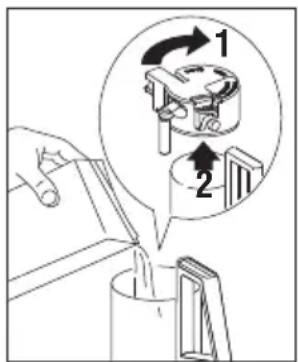
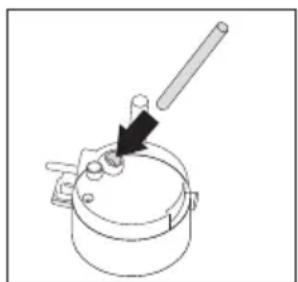
natural_image
Simple line drawing of a pot with a handle and arrow indicating direction (no text or symbols)- Press the Scroll touch keys (5 and 7) until "PROGRAM HOT WATER" is displayed.
- Press the touch key 'OK' (9) to confirm.
- Select the required quantity of water by pressing scroll touch keys (5 and 7). The progress bar shows the quantity of water selected.
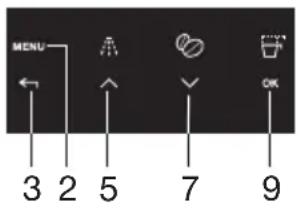
- Press the touch key 'OK' (9) to confirm (or the 'Return' touch key (3) to cancel the operation.
- Press the 'Return' touch key (3) to exit the menu.
- The appliance is now reprogrammed with the new settings and is ready.
Making cappuccino
The machine is set by default to automatically delivery a standard cappuccino.
- Select the taste of the coffee you want to use to make the cappuccino by pressing the 'Coffee strength' touch key (6).
- Remove the lid of the milk container.
-
Fill the container with about 100 grams of milk for each cappuccino to be prepared. Never exceed the MAX level (corresponding to about 750 ml) marked on the container. You should ideally use skimmed or semi skimmed milk at refrigerator temperature (about 5°C).
-
Make sure the intake tube is correctly inserted in the rubber washer. Then replace the milk container lid.
-
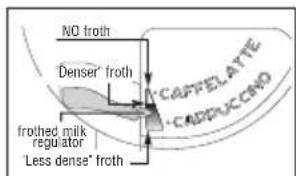
Position the frothed milk regulator (N2) between the words CAPPUCCINO and CAFFELATTE printed on the milk container lid.
-
The quantity of froth can be adjusted by moving the regulator towards the word CAFFELATTE for a denser froth. Moving it towards the word CAPPUCCINO obtains a less dense froth.
-
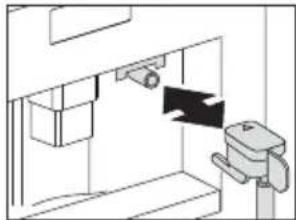
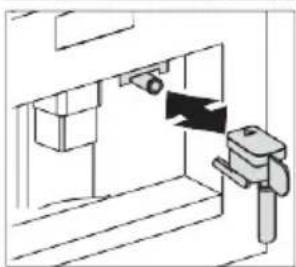
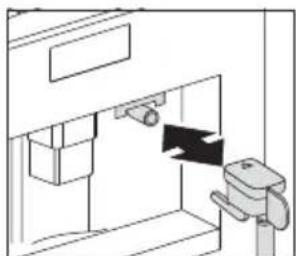
Remove the hot water spout and attach the milk container to the nozzle.
-
Position the milk spout and then place a sufficiently large cup under the coffee and milk spouts.
-
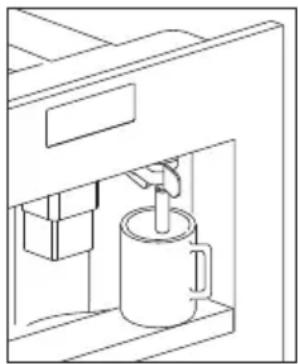
Press the ‘Cappuccino deliver’ touch key (12). “CAPPUCCINO” is displayed and after a few seconds, frothed milk flows out of the milk spout into the cup below (delivery stops automatically).
-
The appliance delivers coffee.
-
The cappuccino is now ready. Sweeten to taste and, if desired, sprinkle the froth with a little cocoa powder.
natural_image
Pure technical diagram of a mechanical assembly without any text, numbers, or symbols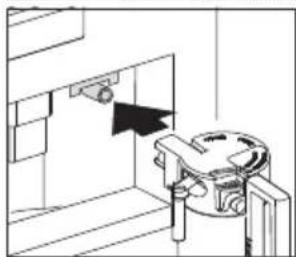
natural_image
Technical line drawing of a mechanical assembly or mounting bracket with a directional arrow (no text or symbols)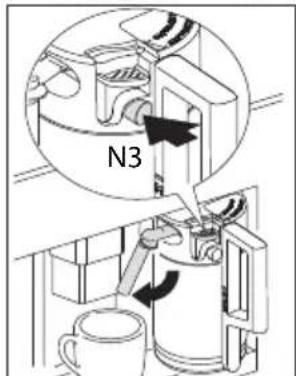
Notes
- While making cappuccino, the flow of frothed milk or coffee can be interrupted by pressing the ‘Cappuccino deliver’ touch key (12).
- If the milk in the container finishes while delivering frothed milk, remove the container and add milk. Then re-attach it and press the 'Cappuccino deliver' touch key (12) to request cappuccino again.
- To ensure the complete cleanliness and hygiene of the milk frother, always clean the circuits in the milk container lid after making cappuccino. "PRESS CLEAN!" flashes on the display.
- Place a recipient under the milk spout.
- Press the CLEAN button on the lid (N3) and hold down for at least 5 seconds to start the cleaning function. The appliance displays the message “CLEANING” above a progressive bar. You should not release the CLEAN button until the bar is complete indicating that cleaning is concluded. When the CLEAN button is released, the function stops. After cleaning, remove the milk container and place in the refrigerator. The milk should not be left out of the refrigerator for more than 15 minutes.
- To change the quantity of coffee or frothed milk the appliance delivers automatically into the cup, proceed as described in the section “Changing the quantity of coffee and milk for cappuccino”.
Changing the quantity of milk and coffee for cappuccino
The appliance is set by default to automatically deliver a standard cappuccino. To change these quantities, proceed as follows:
Changing the quantity of milk
- Fill the container with milk up to the maximum level indicated on the container.
- Press the touch key 'MENU' (2) to enter the menu.
- Press the 'Scroll' touch keys (5 and 7) until "PROGRAM CAPPUCCINO" is displayed.
- Press the touch key 'OK' (9) to confirm. "PROGRAM MILK" is displayed.
- Press the touch key 'OK' (9) again.
- Select the quantity of milk required by pressing the 'Scroll' touch keys (5 and 7). The progress bar shows the quantity of milk selected.
- Press the touch key 'OK' (9) to confirm or the 'Return' touch key (3) to cancel the operation).
- Press the 'Return' touch key (3) twice to exit the menu.
Changing the quantity of coffee
- Press the touch key 'MENU' (2) to enter the menu.
- Press the 'Scroll' touch keys (5 and 7) until "PROGRAM CAPPUCCINO" is displayed.
- Press the touch key 'OK' (9) to confirm.
- Press the 'Scroll' touch keys (5 and 7) until "COFFEE FOR CAPPUCC." is displayed.
- Press the touch key 'OK' (9) again.
- Select the quantity of coffee required by pressing the Scroll touch keys (5 and 7). The progress bar shows the quantity of coffee selected.
- Press the touch key 'OK' (9) to confirm or the 'Return' touch key (3) to cancel the operation.
- Press the 'Return' touch key (3) twice to exit the menu.

Cleaning the nozzles
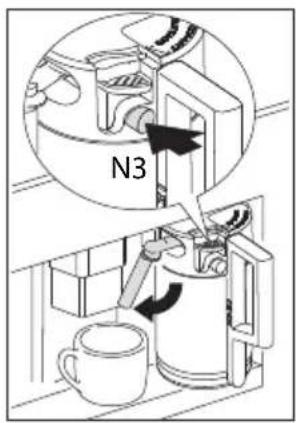
Clean the nozzles on the milk container every time after heating milk or making cappuccino. Otherwise, remains of milk may set hard.
- Place a container under the milk dispenser pipe and press on the CLEAN button (N3) on the milk container for at least 5 seconds. The display shows "CLEANING"!
Warning! Risk of scalding from steam and hot water escaping from the milk dispenser pipe.
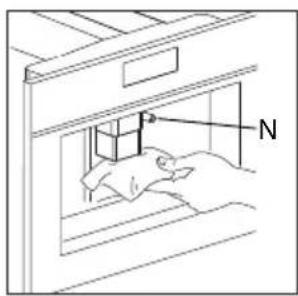
- Remove the milk container and clean the nozzles on the appliance with a damp cloth.
natural_image
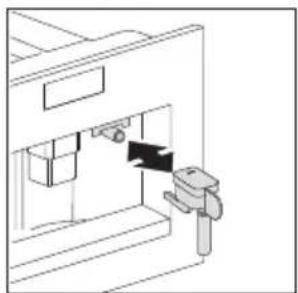
Technical line drawing of a mechanical assembly with no visible text or symbols- Put the hot water nozzle back in.

After you finished cleaning, remove the milk container and place it in the fridge, as the milk should not stay out of the fridge for longer than 15 minutes. See “Cleaning the nozzles and the milk container” for information on cleaning the milk container.
Using menu options
The menu options are used to change and save the appliance's factory settings, start programs and look up information.
They are:
- Language (see "Setting the language" on page 19)
- Auto shut off time (see "Setting the switch-off time" on page 21)
- Set clock
- Start time (auto)
- Auto start
- Temperature (see "Setting the coffee temperature" on page 21)
• Water hardness (see "Water hardness" on page 20) - Coffee program (see “Changing the quantity of coffee” on page 17)
- Cappuccino program (see “Setting the cappuccino program” on page 15)
- Hot water (see "Preparing hot water" on page 14)
- Descale (see “Carrying out the descaling program” on page 21)
- Reset to default (see “Resetting the appliance to factory settings” on page 24)
• Statistics (see "Statistics" on page 23)
- Buzzer
- Contrast

If you don't press OK after you change a setting, the appliance automatically returns to the coffee mode after 120 seconds without saving the entries.
To go back to the coffee mode, press the 'Return' touch key (3).
Setting the language
You can choose between several languages.
A different language can be selected as follows:
-
Press the touch key ‘MENU’ and press the scroll touch keys (5 and 7) until the menu option “CHOOSE LANGUAGE” appears. Confirm the menu option with the touch keys ‘OK’ (9).
-
The language set appears on the display. Press the scroll touch keys (5 and 7) until the desired language appears. When the desired language is displayed, confirm with the touch keys 'OK' (9).
Water hardness
A “PLEASE DESCALE!” message is displayed after the appliance has been operated for a factory set period of time, calculated on the basis of the maximum quantity of lime scale which may be contained in the water used. If necessary, this period of operation can be extended, making descaling less frequent, by programming the appliance based on the actual lime content in the water used. Proceed as follows:
- Remove the "Total Hardness Test" strip (in front of your manual). Dip it fully in the water for a few seconds. Remove it and wait 30 seconds until its colour changes and a number of red dots are formed. For example, if there are 3 red dots on the test strip, you must set the water hardness level to 3.

If you no longer have a water hardness test, you can find the data in the table below.
- Press the touch key 'MENU' (2) and press the scroll touch keys (5 and 7) until the menu option "WATER HARDNESS" appears. Confirm the menu option with the touch key 'OK' (9).
- The display shows the current setting. Press the scroll touch keys (5 and 7) until the established hardness level is displayed. Confirm the selection with the touch key 'OK'. The appliance is now programmed to provide the descaling warning when necessary, based on the actual hardness of the water.

Information on the hardness of the water in your area can be obtained from the local water board. The table below shows the water hardness setting your machine requires.
| German hardness | French hardness | Water hardness machine |
| 0 - 6 dH 0 - 11 f | H 1 | |
| 7 - 13 dH 12 - 17 | fH 2 | |
| 14 - 20 dH 18 - 36 | fH 3 | |
| >21 dH >37 f | 4 |
Setting the coffee temperature
You can choose between three temperature levels.
The coffee temperature levels are defined as follows:
• TEMPERATURE LOW
• TEMPERATURE MEDIUM
• TEMPERATURE HIGH
The factory setting is TEMPERATURE HIGH. You can change this as follows:
- Press the touch key 'MENU' (2) and press the scroll touch keys (5 and 7) until the menu option "TEMPERATURE" appears. Confirm the menu option with the touch key 'OK' (9).
- The display shows the current setting. Select another temperature with the scroll touch keys (5 and 7). When the desired temperature is displayed, confirm it with the touch key 'OK' (9).
Setting the switch-off time
The appliance is set by default to go off automatically 30 minutes after the last coffee has been made. To change this interval (max. 120 min), proceed as follows:
• AUTO SHUTOFF TIME 1/2 hour
• AUTO SHUTOFF TIME 1 hour
• AUTO SHUTOFF TIME 2 hour
You can change this as follows:
-
Press the touch key 'MENU' (2) and press the scroll touch keys (5 and 7) until the menu option "AUTO SHUTOFF TIME" appears. Confirm the menu option with the touch key 'OK' (9).
-
Select another switch-off time with the scroll touch keys (5 and 7). When the desired switch-off time is displayed, confirm it with the touch key 'OK' (9).
natural_image
Pure technical line drawing of a mechanical assembly without any text, numbers, or symbolsCarrying out the descaling program
When the display shows "PLEASE DESCALE!", the appliance must be descaled.
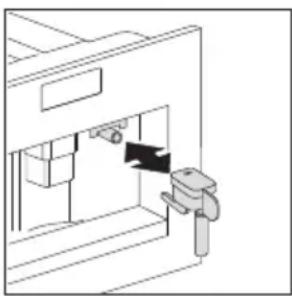
- Insert the hot water nozzle.
- Press the touch key ‘MENU’ (2) and press the scroll touch keys (5 and 7) until the menu option “DESCALE” appears. Confirm the menu option with the touch key ‘OK’ (9).
- The display shows "PLEASE CONFIRM". Confirm with the touch key 'OK' (9). The descaling program starts.
The top line of the display alternates between “ADD DESCALER” and “PLEASE CONFIRM”.

natural_image
Line drawing of a coffee maker with a mug inside a container (no text or symbols)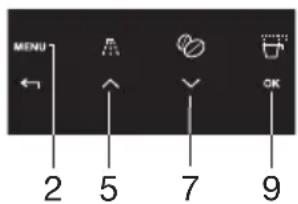
- Empty the tank of water, pour the contents of the descaler bottle into the tank respecting the instructions given on the descaler pack, then add water. For subsequent descaling operations, descaling solution can be purchased from authorised technical service centres.
Make sure that any splashes from the descaling product do not come into contact with surfaces that are sensitive to acids, such as marble, limestone and ceramic.
- Put a container with a capacity of at least 2 litres underneath the hot water nozzle.
- Press the touch key 'OK' (9). The display shows "DESCALING". The descaling liquid runs out of the hot water nozzle.
The descaling program automatically goes through a series of rinses and pauses to remove limescale deposits from the inside of the coffee machine. After about 30 minutes the water tank is empty and the top line of the display alternates between “DESCALE COMPLETE” and “PLEASE CONFIRM”.
- Press the touch key 'OK' (9). The display shows "RINSING, FILL TANK". The appliance is now ready for a rinsing process with clean water.
- Empty the container under the hot water nozzle and put it back under the hot water nozzle.
-
Take out the water tank and fill it with clean water.
-
Put the water tank back in place. The display shows: "PLEASE CONFIRM".
-
Press the touch key 'OK' (9). A rinsing process takes place with clean water and the rinsing water runs out of the hot water nozzle. After a few minutes the water tank is empty and the display shows "PLEASE CONFIRM".
- Press the touch key 'OK' (9). The display shows "RINSING COMPLETE CONFIRM".
- Press the touch key 'OK' (9). The display shows "DESCALE COMPLETE" and then "FILL TANK!"
- Take out the water tank, fill it with clean water and put it back in place.
The appliance is now ready for use again and is back to the last coffee mode selected.
If the descaling cycle is interrupted before completion, the appliance


continues to display the descale message and the program must be started again from the beginning.
Failure to descale the appliance invalidates the guarantee.
Rinsing
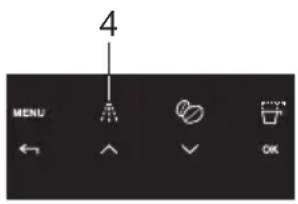
If 2/3 minutes have passed, since you last made coffee, you should first rinse the system to preheat the brewing unit. Select the rinsing function from the appropriate menu. Let the water run into the drip tray underneath. You can also use this water to warm up the cup that you are using for the coffee. In this case simply let the hot water run into the cup (and then empty it).
- Press the touch key 'RINSE' (4).
- The appliance performs an automatic rinse cycle (a little hot water runs out of the spouts and is collected in the drip tray beneath).
Statistics
You can look up the following information values:
- total number of coffees made with the appliance up to that point;
• number of descaling procedures carried out;
• number of cappuccinos made. - Numbers of liters of water.
2 cups of coffee dispensed at the same time are counted as 2 cups.
Proceed as follows to look up the values:
- Press the touch key 'MENU' (2) and press the scroll touch keys (5 and 7) until the menu option "STATISTICS" appears. Confirm the menu option with the touch key 'OK' (9).
- The number of cups dispensed so far appears on the display, e.g. "TOT. COFFEES 135".
- Repeatedly press the scroll touch key (7) to show the number of descaling procedures carried out, e.g. "TOT. DESCALES 5", "TOTAL WATER" and then number of cappuccino's, e.g. "TOT. CAPPUCCINO 135".
Resetting the appliance to factory settings
This function resets previously changed values to the factory settings.
The following settings or saved data are affected:
• coffee, water and cappuccino quantity
- water hardness;
- coffee temperature;
- switch-off time.
- Switch-on time
- Contrast
The factory default values can be reset as follows:
- Press the touch key 'MENU' (2) and press the scroll touch keys (5 and 7) until the menu option "RESET TO DEFAULT" appears. Confirm the menu option with the touch key 'OK' (9).
- The display shows "PLEASE CONFIRM".
- Confirm the menu option with the touch key 'OK' (9).
Setting the clock
- Press the touch key 'MENU' (2) to enter the menu and then the scroll touch keys (5 and 7) until "SET CLOCK" is displayed.
- Press the touch key 'OK' (9).
- Use the icons (B7) and (B8) to set the hour, then press the OK icon (B9) to confirm.
- Use the scroll touch keys (5 and 7) to set the minutes, then press the touch key 'OK' (9) to confirm.
- Press the touch key 'RETURN' (3) to exit the menu.
Setting auto-start time
This function programmes the time the machine will come on automatically.
- Make sure the clock on the appliance has been set.
- Press the touch key 'MENU' (2) to enter the menu and then the scroll touch keys (5 and 7) until "START TIME" is displayed.
- Press the touch key 'OK' (9).
- Use the scroll touch keys (5 and 7) to set the auto-start time, then press the touch key 'OK' (9) to confirm.
- Use the scroll touch keys (5 and 7) to set the minutes, then press the touch key 'OK' (9) to confirm.
Auto-start
- Press the scroll touch keys (5 and 7) to activate the auto-start function until "AUTO START" is displayed.
- Press the touch key 'OK' (9) to confirm. The 'clock' symbol appears
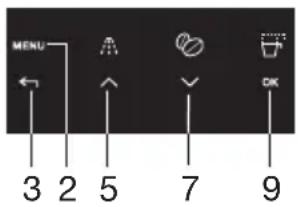
on the display.
- Press the touch key 'RETURN' (3) to exit the menu.
- To deactivate the automatic start-up function, press the touch key 'MENU' (2), then press the scroll touch keys (5 and 7) until the appliance displays the message "AUTO START". Press the touch key 'OK' (9). "CONFIRM" will appear on the display. Press the touch key 'RETURN' (3) to deactivate and the 'clock' symbol will disappear.
Buzzer
This activates or deactivates the buzzer emitted by the machine each time an icon is pressed or an accessory is inserted/removed.
N.B.! The buzzer is active by default.
- Press the touch key 'MENU' (2) to enter the menu and then the scroll touch keys (5 and 7) until "BUZZER" is displayed.
- Press the touch key 'OK' (9). "BUZZER PLEASE CONFIRM" is displayed.
- Press the touch key 'RETURN' (3) to disable or the touch key 'OK' (9) to enable the buzzer.
- Press the touch key 'RETURN' (3) to exit the menu.
Adjusting contrast
To increase or reduce the contrast of the display, proceed as follows:
- Press the touch key 'MENU' (2) to enter the menu and then the scroll touch keys (5 and 7) until "CONTRAST" is displayed.
- Press the touch key touch key 'OK' (9).
- Press the scroll touch keys (5 and 7) until the required display contrast is reached. The progressive bar indicates the level of contrast selected.
- Press the touch key 'OK' (9) to confirm.
- Press the touch key 'RETURN' (3) once to exit the function or twice to exit the menu.
Cleaning

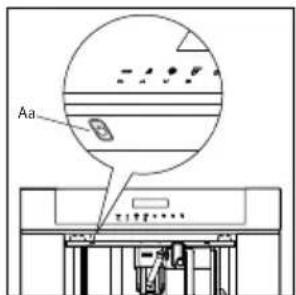
Before performing any cleaning operations, the machine must be turned off by pressing the main switch (A) and unplugged from the mains power supply. Never immerse the coffee maker in water.
Cleaning the coffee machine
Do not use solvents or abrasive detergents to clean the coffee maker. A soft damp cloth will suffice. Never wash any of the components of the coffee maker in the dishwasher.
The following parts of the machine must be cleaned regularly:
- Waste coffee container (Q).
- Drip tray (F).
- Water tank (D).
- Coffee spouts (H)
• Pre-ground coffee funnel (U). - Inside of the machine, accessible after opening the service door (G).
- Brewing unit (L).
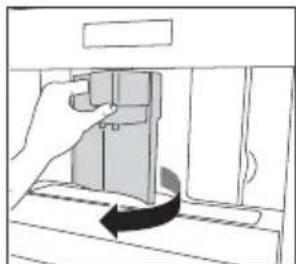
natural_image
Diagram of a hand pressing down a mechanical component with an arrow indicating rotation (no text or symbols present)Cleaning the waste coffee container (Q)
When "EMPTY WASTE COFFEE CONTAINER" is displayed, the waste coffee container must be emptied and cleaned. To clean:
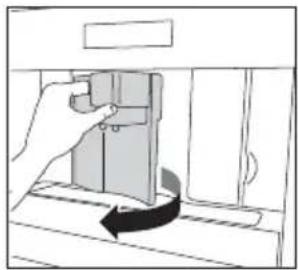
- Open the service door on the front of the appliance, extract the drip tray and clean.
- Clean the waste coffee container thoroughly.
Important! When extracting the drip tray, the waste coffee container must always be emptied.
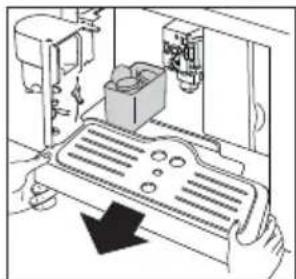
natural_image
Diagram of a mechanical device with a rotating component and directional arrow (no text or symbols)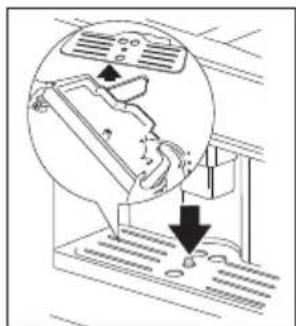
natural_image
Diagram showing airflow around a vehicle with exhaust pipe and valve (no text or symbols)Cleaning the drip tray (F)
Important! If the drip tray is not emptied the water might overflow. This could damage the machine. The drip tray is fitted with a level indicator (red) showing the level of water it contains. Before the indicator protrudes from the cup tray, the drip tray must be emptied and cleaned.
natural_image
Line drawing of a hand opening a door with a curved arrow indicating rotation (no text or symbols)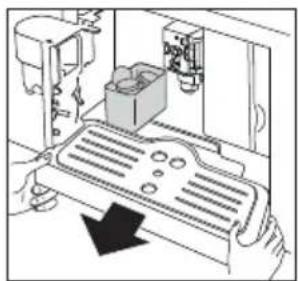
natural_image
Diagram of a mechanical device with a component and directional arrow (no text or symbols)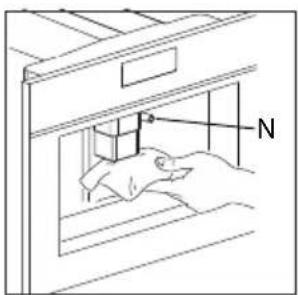
natural_image
Line drawing of a hand using a tool to adjust or install a component, no text or symbols present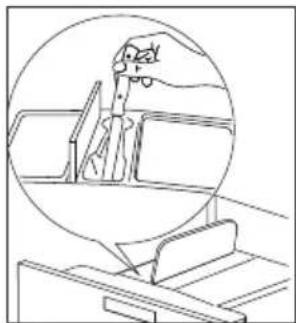
natural_image
Line drawing of a hand holding a tool inside a circular frame, with no visible text or symbolsTo remove the drip tray (F):
- Open the service door.
- Remove the drip tray and the waste coffee container.
- Clean the drip tray and waste coffee container.
- Replace the drip tray and waste coffee container.
- Close the service door.
Cleaning the water tank (D)
- Clean the water tank regularly (about once a month) with a damp cloth and a little mild washing up liquid.
- Remove all traces of washing up liquid.
Cleaning the spouts
- Clean the nozzles periodically using a sponge.
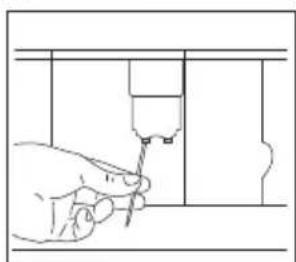
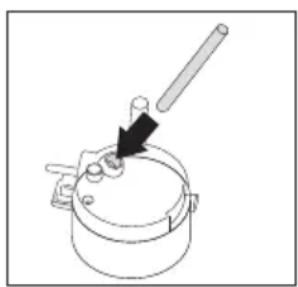
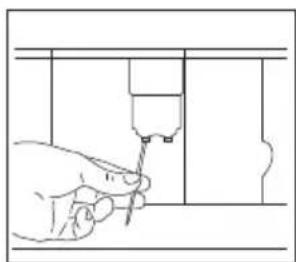
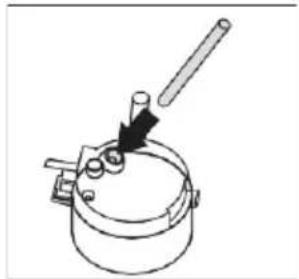
- Check regularly that the holes in the coffee spout are not blocked. If necessary, remove coffee deposits with a toothpick.
Milk residues left on the nozzle (N) and in the container may jeopardise correct operation of the appliance.
Each time you use the coffee maker, they must therefore be removed by cleaning the nozzle with a sponge.
Cleaning the pre-ground coffee funnel
- Check regularly (about once a month) that the pre-ground coffee funnel is not blocked.
Cleaning the inside of the coffee maker
natural_image
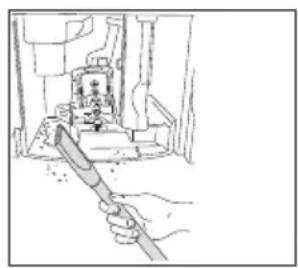
Hand holding a tool inside a device with a small component on top (no visible text or symbols)- Check regularly (about once a week) that the inside of the appliance is not dirty. If necessary, remove coffee deposits with a sponge.
- Remove the residues with a vacuum cleaner.
Cleaning the brewing unit
The brewing unit must be cleaned regularly to avoid the build-up of coffee encrustations which could cause malfunction.
The brewing unit can only be taken out when the appliance is switched off by pressing the on/stand by button (Aa). Otherwise, the coffee machine may be seriously damaged.
Proceed as follows:
- Turn the appliance off by pressing the on/stand by button (Aa) (do not switch off the main switch or unplug) and wait for the display to go off.
- Open the service door.
- Remove the drip tray and the waste coffee container.
- Press the two red release buttons inwards and at the same time pull the brewing unit outwards
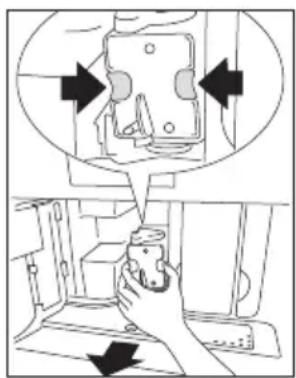
Clean the brewing unit under running tap water without using detergent. Never clean the brewing unit in the dishwasher.
Do not use washing up liquid to clean the brewing unit. It would remove the lubricant applied to the inside of the piston.
- Soak the brewing unit in water for about 5 minutes, then rinse.
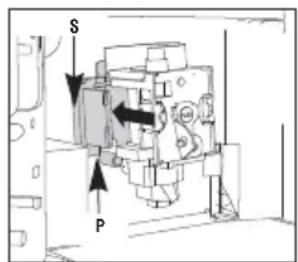
- After cleaning, replace the brewing unit (L) by sliding it onto the internal support (S) and pin (P) at the bottom, then push the PUSH symbol fully in until it clicks into place.
natural_image
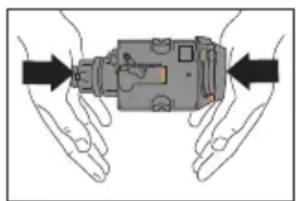
Illustration of two hands holding a mechanical component with arrows indicating direction (no text or symbols)N.B.! If the brewing unit is difficult to insert, you must first adapt it to the right dimensions by pressing it forcefully from the bottom and top.
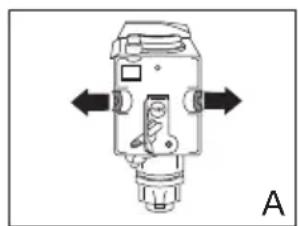
- Once inserted, make sure the two red buttons have snapped back out, otherwise the service door cannot be closed.
natural_image
Mechanical component diagram with directional arrows indicating movement or force (no text or symbols)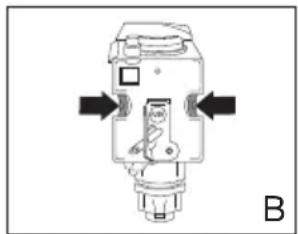
natural_image
Pure mechanical component diagram without any text, numbers, or symbols•The two red buttons are correctly snapped out (A).
•The two red buttons are not snapped out (B).
-
Replace the drip tray and waste coffee container.
-
Close the service door.
Notes
- If the brewing unit is not put in place correctly, the service door cannot be closed.
- If it is difficult to insert the brewing unit, it must be made into the right height (before inserting) by pressing the brewing unit firmly together from top and bottom.
-
If it is still difficult to insert the brewing unit:
-
Leave it out of the appliance, place the drip tray, close the service door, switch the main switch on the back of the appliance to 'off' and then to 'on' again.
- Wait for all the lights to go off, then open the door, remove the drip tray and replace the brewing unit.
- Replace the drip tray, together with the grounds container.
- Close the service door.
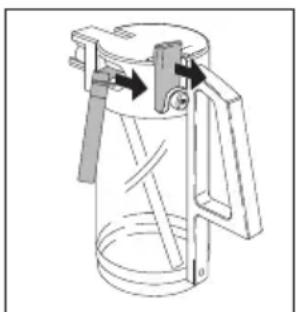
Cleaning the milk container (N)
Always clean the tubes inside the milk container when you prepare milk. If there is still milk in the container, do not leave it out of the refrigerator for longer than strictly necessary. Clean the container each time you prepare milk as described in the section “Making cappuccino”.
All components can be washed in a dishwasher, placing them in the top basket of the dishwasher.
natural_image
Technical line drawing of a mechanical device with lever and handle (no text or symbols)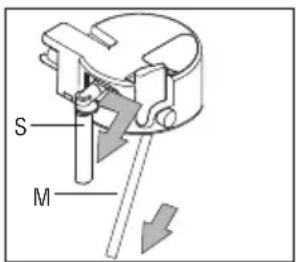
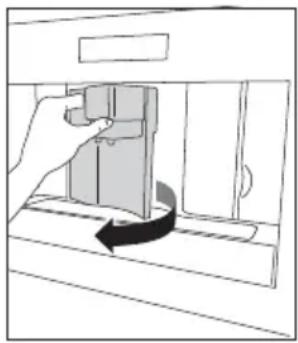
- Turn the milk container lid clockwise then remove it.
- Remove the milk spout (S) and intake tube (M).
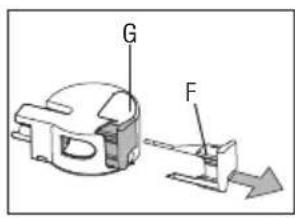
- Remove the frothed milk regulator (F) by pulling it outwards.
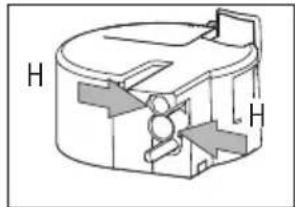
- Wash all the components thoroughly with hot water and mild
natural_image
Technical line drawing of a mechanical component with labeled H (no text or symbols present)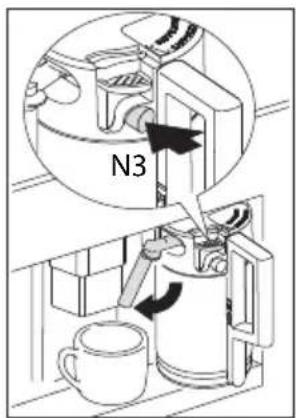
washing-up liquid. Make sure there are no milk residues left inside the holes (H) and the groove (G) on the fine end of the frothed milk regulator (F).
- Check that the intake tube and spout are not clogged with milk residues.
- Replace the frothed milk regulator, milk spout and intake tube.
- Replace the milk container lid.
Cleaning the nozzles
Clean the nozzles on the milk container every time after heating milk or making cappuccino. Otherwise, remains of milk may set hard.
- Place a container under the milk dispenser pipe and press on the CLEAN button (N3) on the milk container for at least 5 seconds. The display shows "CLEANING"!
Warning! Risk of scalding from steam and hot water escaping from the milk dispenser pipe.

| MESSAGE MEANING WHAT | TO DO | |
| FILL TANK! The water tank is | empty or not properly in place. | Fill the water tank and insert it according to the instructions. |
| The water tank is dirty or limescale deposits have built up inside it. | Rinse out or descale the water tank. | |
| GROUND TOO FINE ADJUST MILL + PRESS 'OK' | Coffee comes out too slowly. | Turn the knob for the grind level setting clockwise by one position (see “Setting the grind level”). |
| The coffee machine cannot make any coffee. | Place a container underneath the hot water nozzle and press the ‘hot water’ touch key (13). | |
| EMPTY WASTE COFFEE CONTAINER | The waste coffee container is full. | Empty, clean and replace the waste coffee container. |
| INSERT WASTE COFFEE CONTAINER | The waste coffee container was not replaced after cleaning. | Open the service door and insert the waste coffee container. |
| ADD PRE-GROUND COFFEE | No ground coffee was put into the filling chute after selecting the preground coffee function. | Add ground coffee as described in “Preparing espresso coffee using ground coffee”. |
| FILL BEAN CONTAINER There | are no more coffee beans in the coffee bean container. | Fill the coffee bean container,. |
| If the mill mechanism starts sounding very loud, this can mean that a small stone from the coffee beans has blocked the mill mechanism. | Consult customer services. | |
| MESSAGE MEANING WHAT TO DO | ||
| PLEASE DESCALE! Shows that | the coffee machine is encrusted with limescale. | The descaling program must be carried out as soon as possible (see “Carrying out the descaling program”. |
| CLOSE DOOR! The service door is open. Close the service door. | If the service door cannot be closed, make sure that the brewing unit is correctly inserted (see “Cleaning the brewing unit”. | |
| INSERT BREWING UNIT! Someone probably forgot to put the brewing unit back in the coffee machine after cleaning it. | Insert the brewing unit, (see “Cleaning the brewing unit”. | |
| GENERAL ALARM! The inside of the machine is very dirty. | Carefully clean the inside of the machine (see “Cleaning the coffee machine”. If the coffee machine still shows this message once it has been cleaned, please consult customer services. | |
Faults table
If the appliance does not work properly, this does not always mean that it is defective. If the coffee machine does not work and a message is displayed, refer to the problem solving information of chapter 7. If no message is displayed, try to find a solution first by checking the points mentioned in the table below, or contact the service department. (See the guarantee certificate for details.)
| FAULT CAUSE SOLUTION | ||
| Coffee is not hot. The cups were not preheated.The brewing unit is too cold. | Preheat the cups by rinsing them out with warm water (see “Tips to make hotter coffee”).Warm up the brewing unit with the rinsing program before making coffee (see “Rinsing”). | |
| The coffee does not have enough crema. | The coffee is too coarsely ground.The coffee blend is not suitable. | Turn the knob for the grind level setting one position anti-clockwise (see “Setting the grind level”).Use a coffee blend suited to fully automated coffee machines. |
| Coffee comes out too slowly. | The coffee is ground too fine. Turn the knob for the grind level setting one position clockwise (see “Setting the grind level”). | |
| Coffee comes out too quickly. | The coffee is too coarsely ground. | Turn the knob for the grind level setting one position anti-clockwise (see “Setting the grind level”). |
| Coffee only comes out of one of the spouts on the coffee dispenser. | The holes on the spouts are blocked. | Remove the dry coffee residues with a needle (see “Cleaning the coffee machine”). |
| The machine does not switch on when the on/stand by button is pressed | The main switch on the right side of the appliance is not switched on or the mains plug is not plugged in. | Check that the main switch is in the ‘ON’ position and that the power lead is plugged in the socket properly. |
| The brewing unit cannot be taken out for cleaning. | The coffee machine is switched on. The brewing unit can only be removed when the machine is switched off. | Switch the appliance off and remove the brewing unit (see “Cleaning the brewing unit”).IMPORTANT:The brewing unit can only be taken out when the appliance is switched off. If you try to take out the brewing unit whilst the coffee machine is switched on, this could be seriously damaged. |
| Water comes out of the spouts instead of coffee. | Too much preground coffee was inserted. | Remove the brewing unit and carefully clean the insided of the machine (see “Cleaning the coffee machine” and “Cleaning the brewing unit”). Repeat the process using a maximum of 2 level measuring spoons of ground coffee. |
| Ground coffee was used (instead of coffee beans) and the machine will not dispense any coffee. | Preground coffee was inserted whilst the machine was switched off. | Remove the brewing unit and carefully clean the insided of the machine (see “Cleaning the coffee machine” and “Cleaning the brewing unit”). Repeat the process with the machine switched on. |
| Coffee does not come out of the spouts on the coffee dispenser but out of the service door at the side. | The holes on the coffee dispenser are blocked with dried on coffee.The swing drawer on the inside of the service hatch is blocked and will not move. | Remove the dried on coffee with a needle (see “Cleaning the coffee machine”).Carefully clean the swing drawer, particularly in the area around the hinges so that these continue to move. |
| Milk is frothed up too much or too little. | Wrong setting of the slider on the lid of the milk container.If the milk is not frothy enough, the milk container may not be correctly in place. | You can set the amount of froth on the milk to any level using the slider on the lid: ‘CAPPUCCINO’ (very frothy milk) or ‘CAFFELATTE’ (not so frothy milk).Put the milk container correctly in place. |
What you should pay attention to

- After removing the packaging, make sure the product is complete and undamaged. If in doubt, do not use the appliance and contact a qualified professional.
- Installation must be carried out by a qualified technician and in compliance with current regulations.
- Packing elements (plastic bags, polystyrene etc.) must not be left within reach of children as they may represent a hazard.
- Never install the appliance in environments where the temperature may reach 0 °C or lower (the appliance may be damaged if the water freezes).
- Make sure the mains voltage corresponds to the voltage indicated on the appliance rating plate. Connect the appliance to an efficiently earthed socket with a minimum current rating of 10A only. The manufacturer may not be considered liable for possible incidents caused by the failure to adequately earth the mains.
- Make sure the socket used is freely accessible at all times, enabling the appliance to be unplugged when necessary.
- Never touch the plug with damp hands.
- Never pull the power cable as you could damage it.
- This appliance can be installed over a built-in oven it he latter is fitted with a cooling fan at the rear (maximum power: 3KW).
- Do not use multiple plug adapters or extension leads.
- The power cable on this appliance must not be replaced by the user as this operation requires the use of special tools. If the cable is damaged or requires replacing, contact an authorised service centre only to avoid all risks.
- You should personalise water hardness as soon as possible following the instructions.
Building in
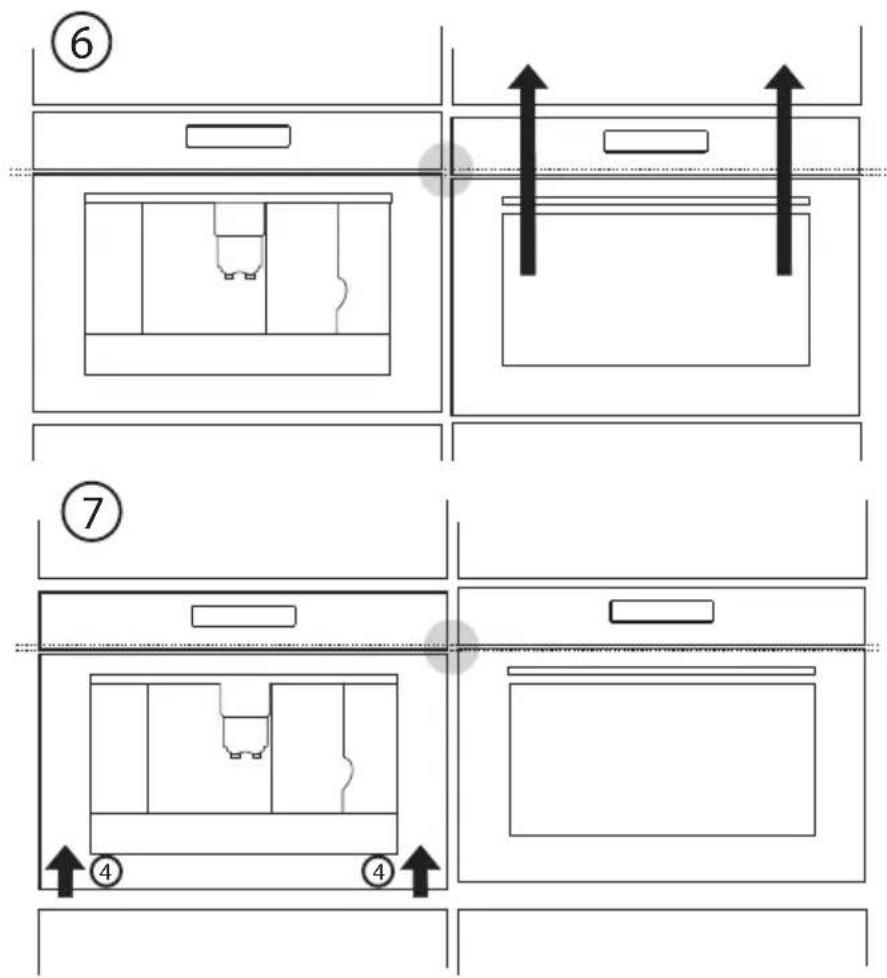
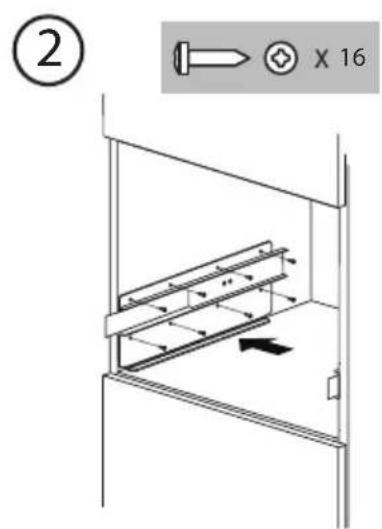
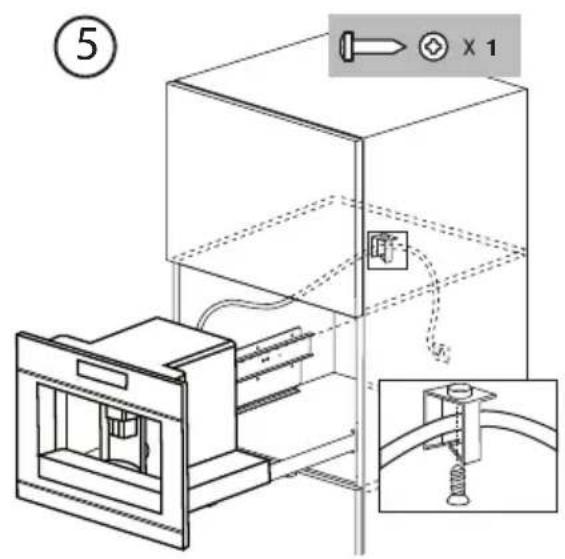
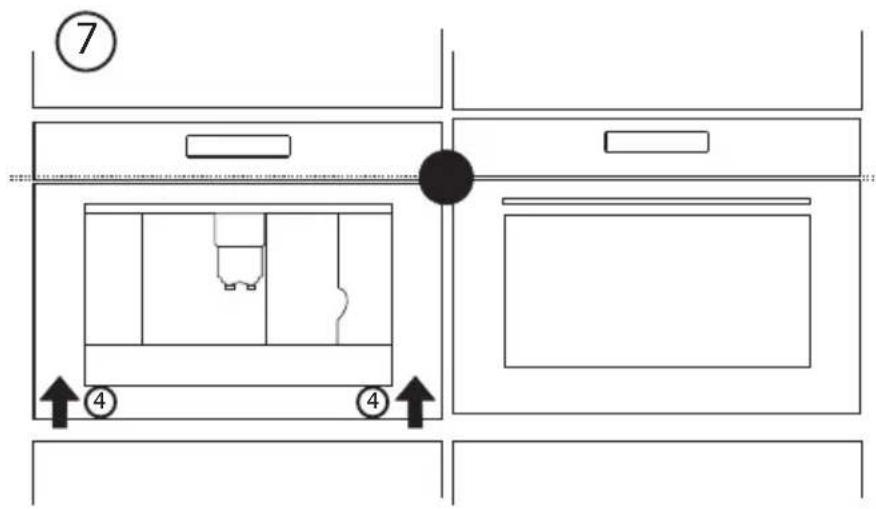
Please check the minimum measures necessary to the proper installation of the appliance. The coffee maker must be installed in a column unit, which must in turn be fixed to the wall.
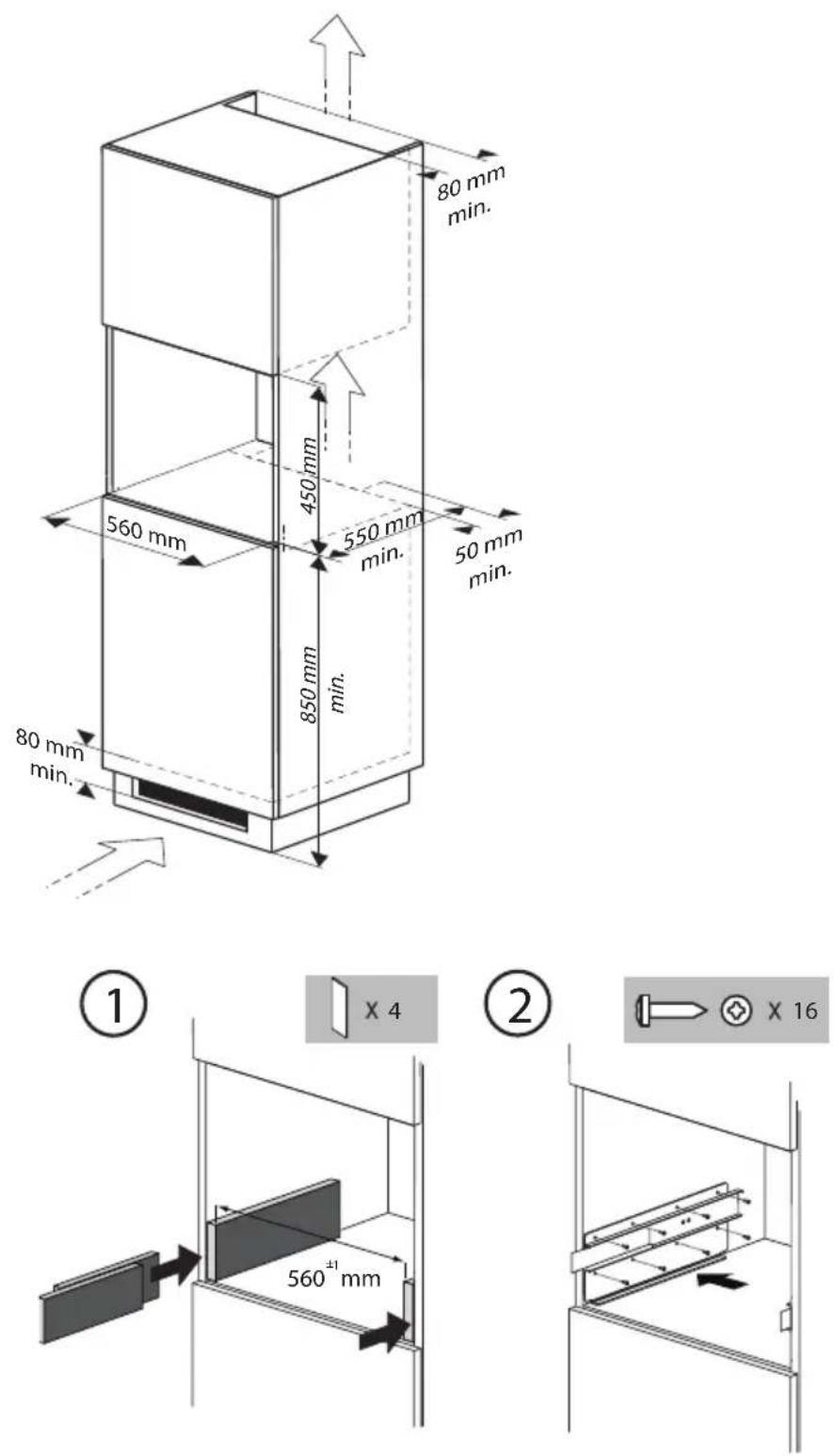
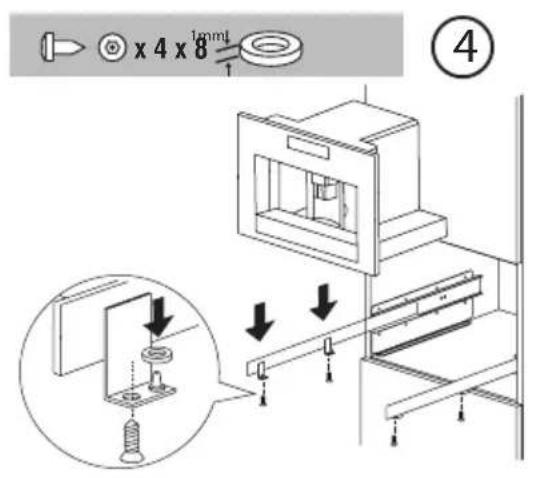
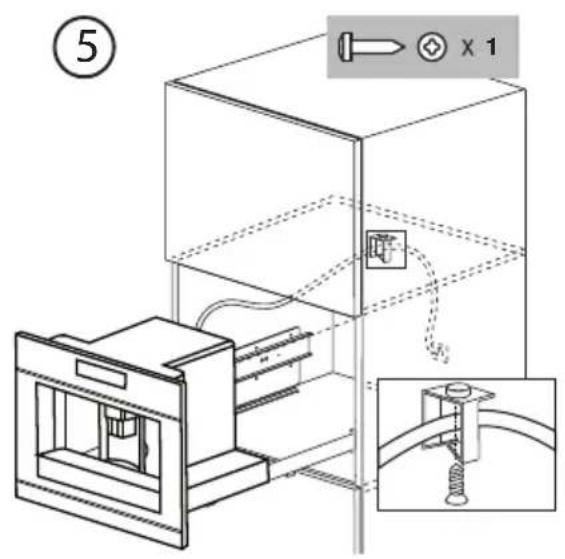
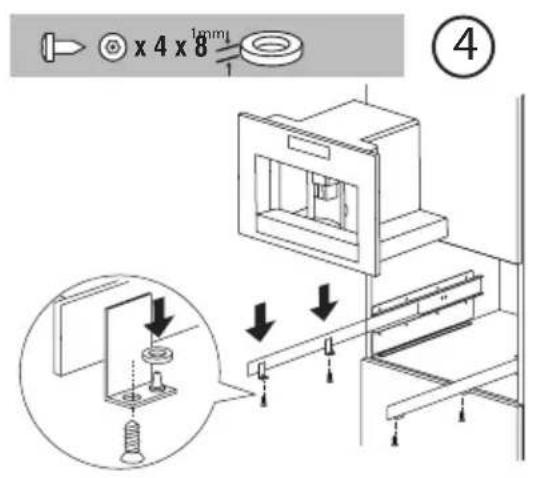
- Position the appliance on the rail, making sure the pins are correctly inserted in the housing, then fix it with the screws supplied.
- If the height of the appliance requires adjusting, use the spacer disks provided.
Disposal of appliance and packaging
The packaging of this appliance is recyclable and may have been made of:
- cardboard
- paper
- polythene foil (PE)
• CFC-free polystyrene (PS hard foam)
• polypropylene tape (PP).
Dispose of these materials in a responsible manner and in accordance with government regulations.
natural_image
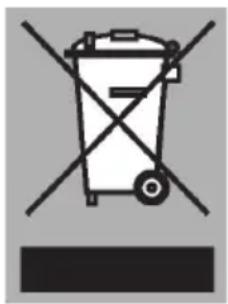
Symbol of a trash bin with crossed x-marks and no text or numbers presentThe appliance carries the symbol of a crossed-out dustbin to state that segregated processing is compulsory to avoid any negative effects on the environment and public health. This means that at the end of its working life, you must hand it in at a special refuse collection centre run by your local authority or dealer.
Segregated processing enables the recovery of the materials used in the production of this appliance, thus saving considerably in terms of raw materials and energy.
CE
Declaration of conformity
We declare that our products meet the applicable European Directives, Decisions and Regulations and the requirements listed in the standards referenced.
EC Regulation 1275/2008 for standby
Technical data
The data plate on the side of the appliance states the total load when connected, the required voltage and frequency.
Présentation
natural_image
Diagram of a mechanical device with a lever and handle, showing no text or symbolsnatural_image
Illustration of hands removing a bag into a drawer with arrows indicating process flow (no text or symbols)natural_image
Two identical rectangular diagrams showing internal mechanical or architectural components, no text or symbols present.natural_image
Simple line drawing of a hand pressing down a component into a container (no text or symbols)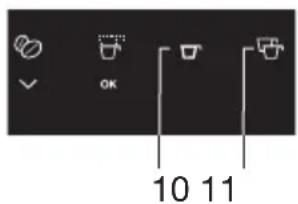
natural_image
Illustration of a hand using a tool to rotate a circular arrow, with a small icon depicting a battery (no text or symbols present)natural_image
Diagram of a mechanical device with an arrow indicating rotation or movement (no text or symbols present)natural_image
Diagram of a mechanical device with an inset showing a component being inserted into a pot (no text or symbols present)Important!
natural_image
Illustration of a hand inserting a card into a file folder, with a circular arrow indicating rotation (no text or symbols)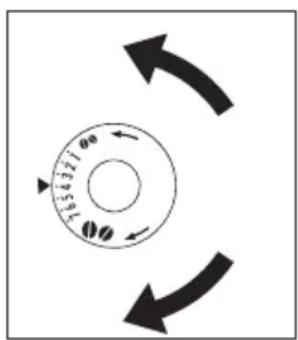
natural_image
Illustration of hands inserting or removing a device into a cabinet (no text or symbols)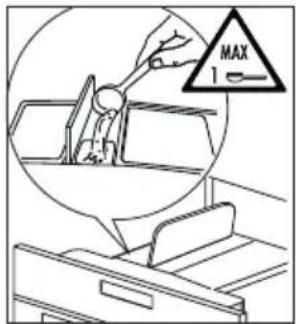
natural_image
Line drawing of a hand using a tool to interact with a device, enclosed in a circular frame (no text or symbols)
natural_image
Simple line drawing of a door with a handle and arrow indicating direction (no text or symbols)natural_image
Line drawing of a coffee maker with a cup inside a container (no text or symbols)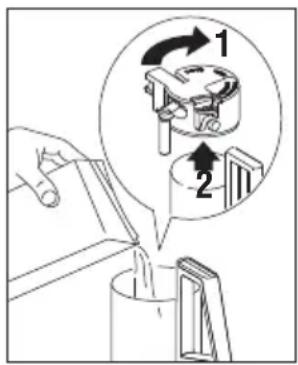
natural_image
Simple line drawing of a pot with a handle and arrow indicating direction (no text or symbols)natural_image
Diagram of a kitchen sink with a directional arrow indicating movement or force (no text or symbols present)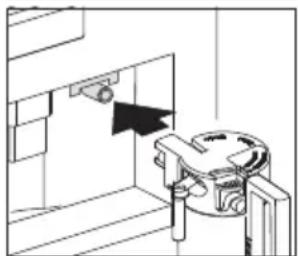
natural_image
Technical line drawing of a mechanical assembly with a bracket and mounting bracket (no text or symbols)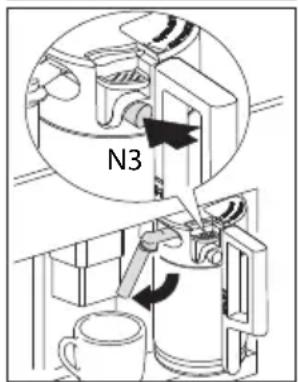
moins mousseux.
natural_image
Technical line drawing of a mechanical device with a handle and internal components (no text or symbols)natural_image
Pure technical line drawing of a mechanical assembly without any text, numbers, or symbols
natural_image
Line drawing of a coffee maker machine with a mug inside (no text or symbols)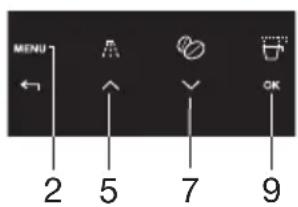
natural_image
Diagram of a hand pressing down a mechanical component with an arrow indicating rotation (no text or symbols present)natural_image
Diagram of a mechanical device with a black arrow indicating direction (no text or symbols present)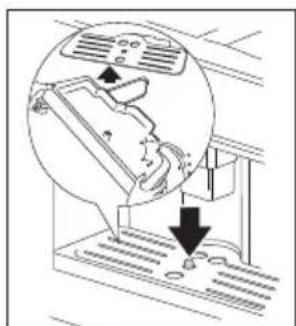
natural_image
Diagram showing airflow around a vehicle with a magnified inset of the air gap (no text or symbols)natural_image
Diagram of a hand operating a device with a curved arrow indicating rotation (no text or symbols present)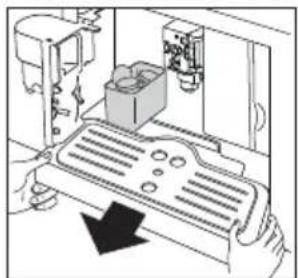
natural_image
Diagram of a robotic device with a box and control panel, showing a hand operating the component (no text or symbols present)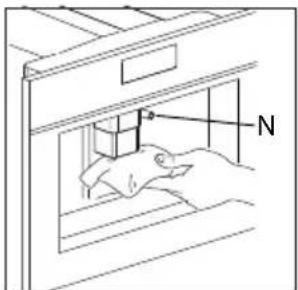
natural_image
Line drawing of a hand using a tool to apply or install a component, no text or symbols present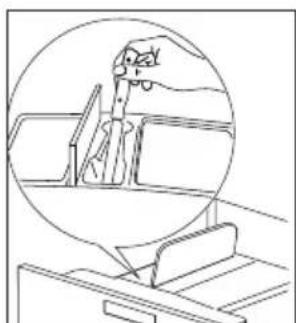
natural_image
Line drawing of a car interior with a hand holding a tool, enclosed in a circular frame (no text or symbols)natural_image
Line drawing of a hand using a tool to adjust or install a component inside a device (no text or symbols visible)natural_image
Illustration of two hands holding a mechanical component with arrows indicating direction (no text or symbols)natural_image
Mechanical component diagram with bidirectional arrows indicating movement or force (no text or symbols)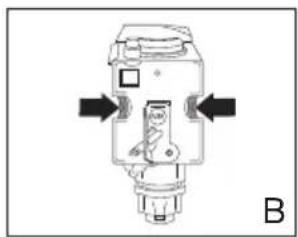
natural_image
Mechanical component diagram with arrows indicating directional movement (no text or symbols)natural_image
Technical line drawing of a mechanical device with lever and handle (no text or symbols)natural_image
Technical line drawing of a mechanical component with labeled H (no text or symbols beyond labels)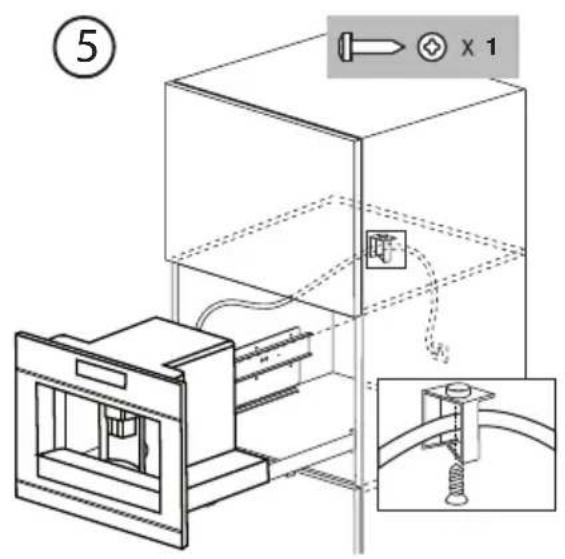
natural_image
Symbol of a trash bin crossed with no visible text or labels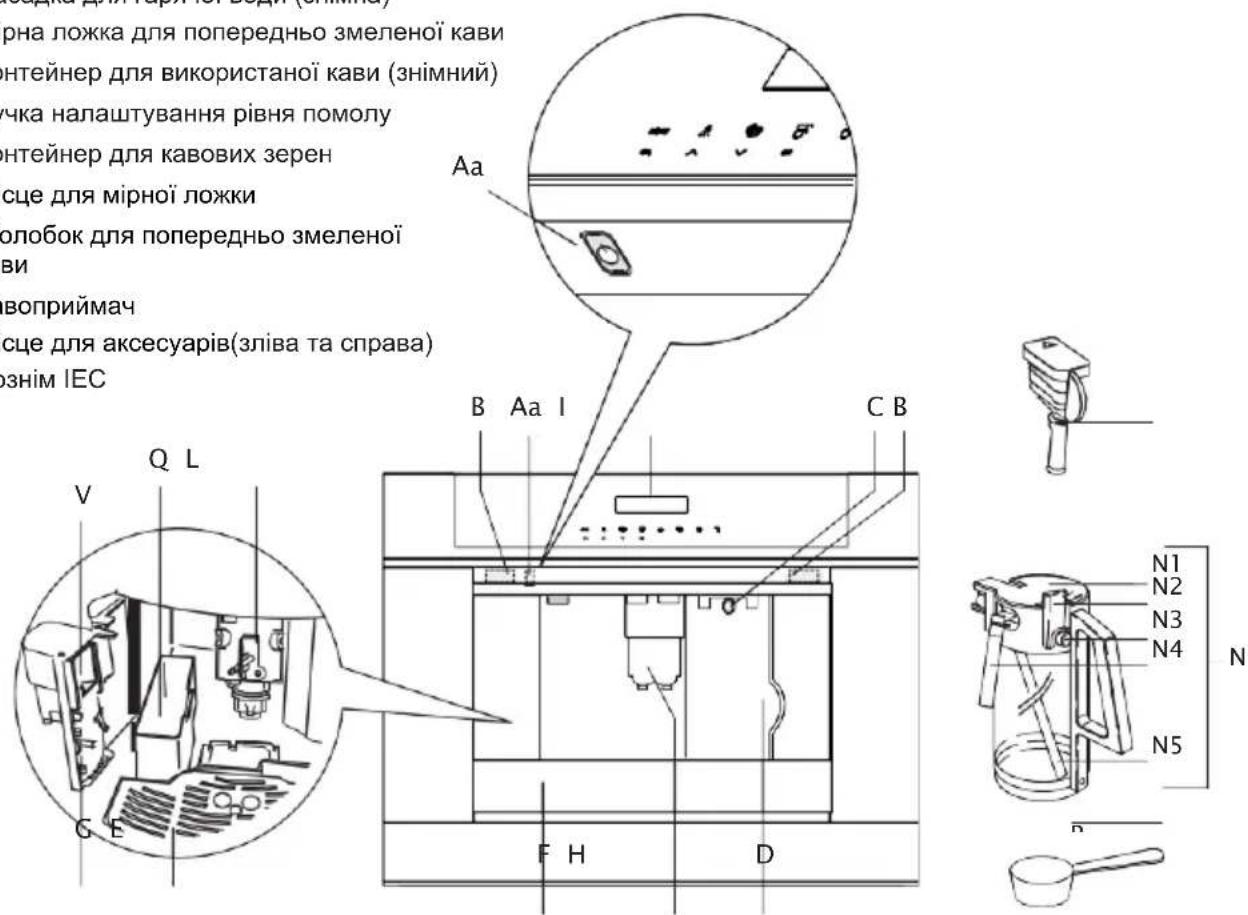
natural_image
Simple line drawing of a door with a handle and arrow indicating direction (no text or symbols)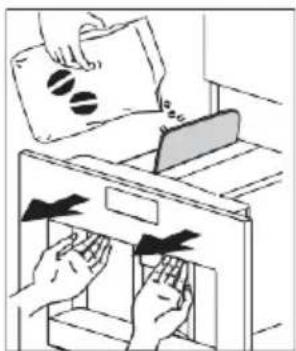
natural_image
Illustration of hands removing a file into a drawer (no text or symbols present)natural_image
Two identical rectangular diagrams showing a coffee machine inside, with no text or symbols present.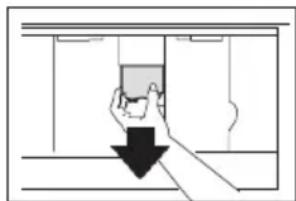
natural_image
Simple line drawing of a hand holding a small object through a doorway, with a black arrow pointing downward (no text or symbols)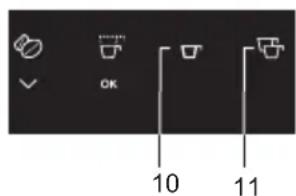
natural_image
Illustration of a hand holding a card with a circular arrow indicating rotation, next to a file folder (no text or symbols)natural_image
Diagram of a hand pressing down a mechanical component with an arrow indicating rotation (no text or symbols present)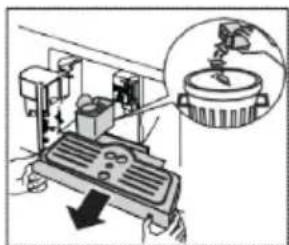
natural_image
Mechanical device with a magnified inset showing a component (no visible text or symbols)
Важливо!
natural_image
Illustration of two hands inserting objects into a device (no text or symbols)natural_image
Diagram of a door with a hand inserting a device into a cabinet (no text or symbols visible)natural_image
Line drawing of a coffee maker with a cup inside a container (no text or symbols)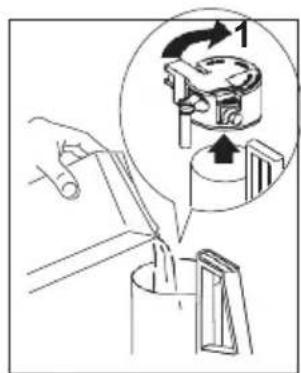
natural_image
Simple line drawing of a mechanical device with a handle and lever, no text or symbols presentnatural_image
Line drawing of a hand inserting a component into a device (no text or symbols)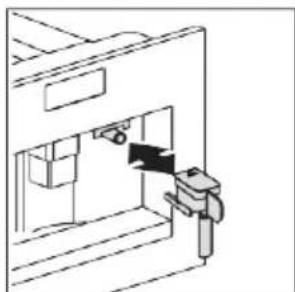
natural_image
Technical line drawing of a mechanical assembly or device with no visible text or symbolsОчищення форсунок
natural_image
Pure technical line drawing of a mechanical assembly without any text, numbers, or symbols
natural_image
Line drawing of a mechanical device with numbered components (no text or symbols)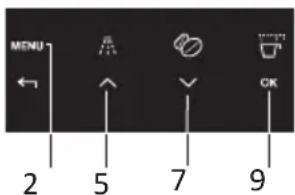
natural_image
Line drawing of a hand using a tool to adjust or install a mechanical component (no text or symbols visible)natural_image
Diagram of a printer's internal structure with a black arrow indicating compression or disassembly (no text or symbols present)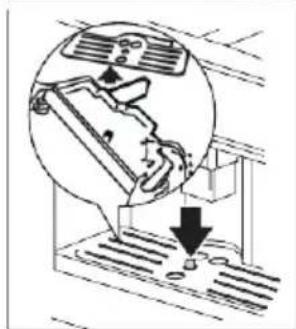
natural_image
Diagram showing a person using a device to press down on stairs, with a magnified inset highlighting the mechanism (no text or symbols present)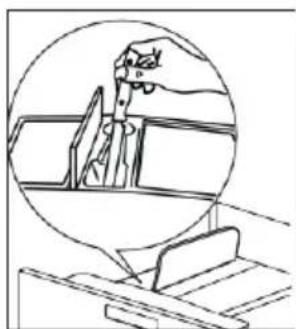
natural_image
Line drawing of a hand holding a tool, viewed through a circular frame (no text or symbols)natural_image
Line drawing of a hand using a tool to clean or install a mechanical component (no text or symbols visible)natural_image
Technical diagram of a mechanical component with directional arrows, labeled A and B (no text or symbols beyond labels)natural_image
Technical line drawing of a mechanical device with lever and handle (no text or symbols)natural_image
Technical diagram of a mechanical component with labeled parts H (no text or symbols beyond labels)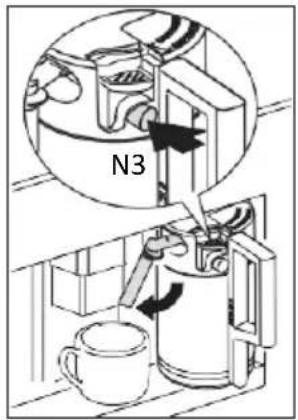
CE
natural_image
Pure technical diagram of a mechanical assembly without any text, numbers, or symbols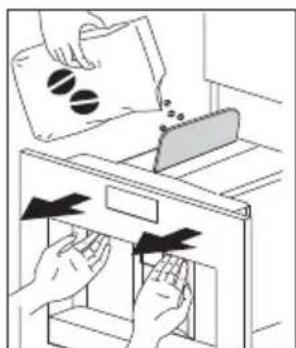
natural_image
Two identical rectangular cabinets with internal compartments showing a coffee mug and two cups (no text or symbols)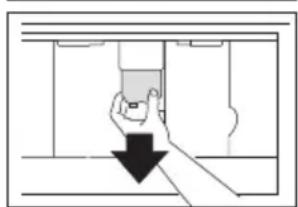
natural_image
Simple line drawing of a hand holding a device inside a room with a black downward arrow indicating motion (no text or symbols)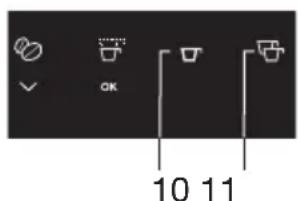
natural_image
Illustration of a hand inserting a device into a file folder, with no visible text or symbols.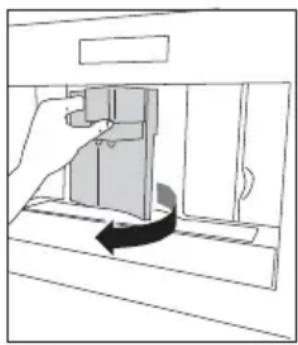
natural_image
Diagram of a door handle mechanism with a hand pressing a button, showing a curved arrow indicating rotation (no text or symbols present)
natural_image
Diagram of a mechanical device with an arrow indicating downward motion, and a magnified inset showing a component (no text or symbols present)natural_image
Illustration of a hand holding a battery with a circular arrow indicating rotation, next to a filing cabinet (no text or symbols)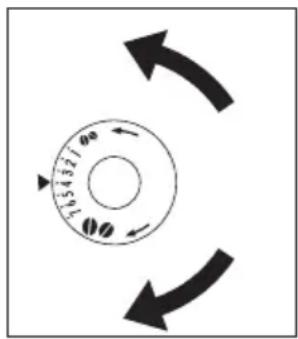
natural_image
Illustration of hands inserting or removing a device into a cabinet (no text or symbols)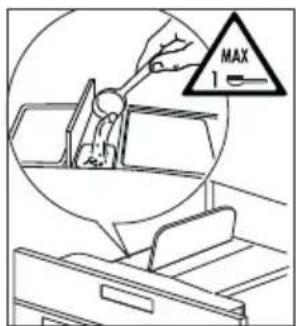

natural_image
Line drawing of a person standing in a vehicle, enclosed in a circular frame (no text or symbols)
natural_image
Diagram of a door mechanism with a valve and handle, showing no text or symbolsnatural_image
Line drawing of a coffee maker machine with a mug inside (no text or symbols)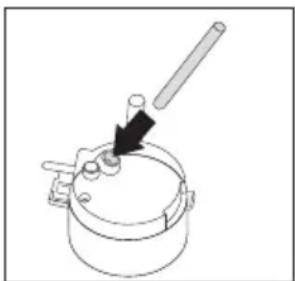
natural_image
Simple line drawing of a mechanical lever or pivot device with a black arrow indicating direction (no text or symbols)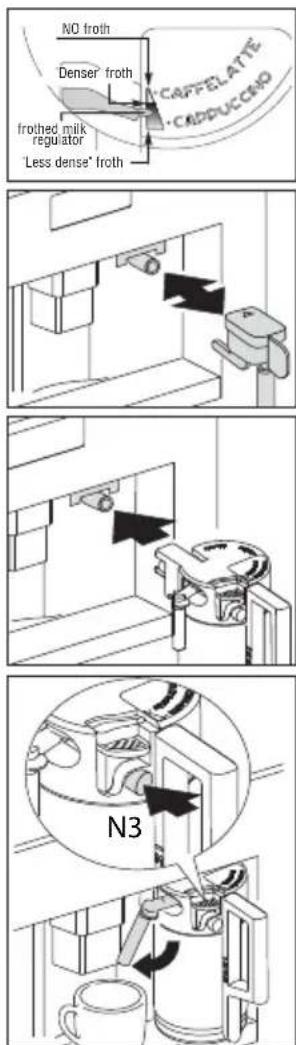
Uwagi
natural_image
Technical line drawing of a mechanical device with internal components and a handle (no text or symbols)natural_image
Diagram of a door mechanism with a handle and arrow indicating direction (no text or symbols)
natural_image
Line drawing of a coffee maker with a mug inside the container (no text or symbols)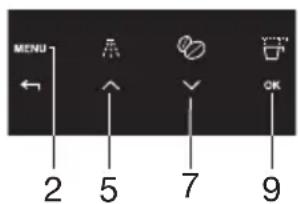
natural_image
Two gray warning symbols: a lightbulb above a triangular warning triangle with an exclamation mark below (no text or labels)natural_image
Diagram of a mechanical device with an arrow indicating rotation or movement (no text or symbols present)natural_image
Diagram of a mechanical device with a lever and control panel, showing no text or symbols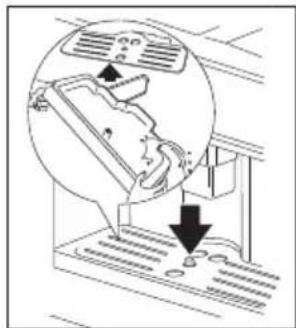
natural_image
Diagram showing a person using a device with airflow indicators (no text or symbols)natural_image
Diagram of a door handle mechanism with an arrow indicating clockwise motion (no text or symbols)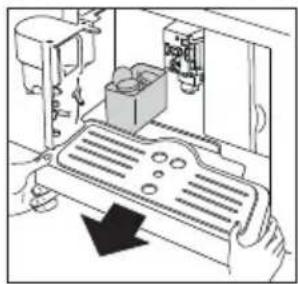
natural_image
Diagram of a robotic device with a box and control panel, showing no text or symbols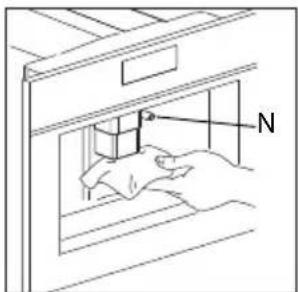
natural_image
Line drawing of hands inserting a component into a cabinet (no text or symbols)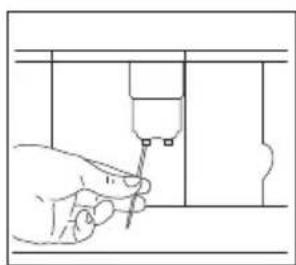
natural_image
Line drawing of a hand using a tool to adjust or install a component, no text or symbols present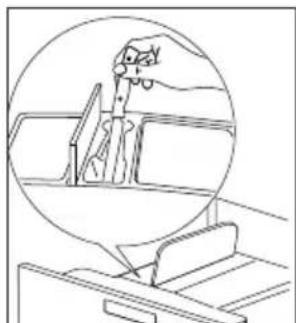
natural_image
Line drawing of a hand operating a vehicle, enclosed in a circular frame (no text or symbols)natural_image
Line drawing of a hand holding a tool near a mechanical device (no text or symbols)natural_image
Diagram of a hand holding a jar with arrows indicating movement or process (no text or symbols present)natural_image
Illustration of two hands holding a mechanical component with arrows indicating direction (no text or symbols)natural_image
Mechanical component diagram with bidirectional arrows indicating movement or force (no text or symbols)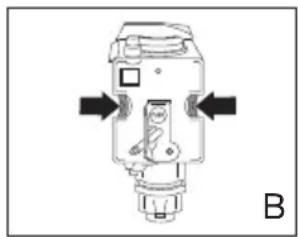
natural_image
Pure mechanical component diagram without any text, numbers, or symbolsnatural_image
Technical line drawing of a mechanical device with lever and handle (no text or symbols)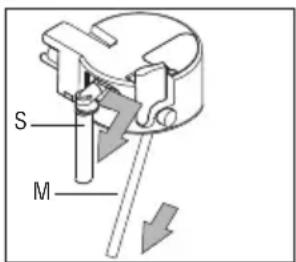
natural_image
Technical diagram of a mechanical device with labeled parts H (no text or symbols beyond labels)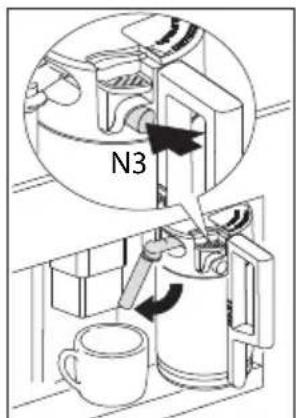
natural_image
Symbol of a trash bin crossed with no visible text or labelsAddress: Partizanska 12,
3503 Velenje,
Slovenia
Phone: +386 (0)3 899 10 00
Fax: +386 (0)3 899 28 00
www.gorenje.com

- Use
- Settings
- Maintenance
- Messages
- Troubleshooting 35
- Installation instructions
- Appendices
- Preventative maintenance
- Pictograms used
- What you should pay attention to
- For european markets only:
- Preparation
- Operation
- Preparing coffee (using coffeebeans)
- Tips to make hotter coffee
- Important!
- Changing the quantity of coffee
- To change these quantities, proceed as follows:
- Setting the grind level
- Only change the grind level during the milling process. Otherwise, the coffee machine may be damaged.
- Preparing espresso coffee using ground coffee
- Notes
- Preparing hot water
- Warning! Escaping hot water can lead to scalds! Only activate the hot water nozzle when there is a receptacle underneath it.
- Changing the quantity of hot water
- Making cappuccino
- Changing the quantity of milk and coffee for cappuccino
- Changing the quantity of milk
- Cleaning the nozzles
- Using menu options
- They are:
- Setting the language
- Water hardness
- Setting the coffee temperature
- Setting the switch-off time
- Carrying out the descaling program
- Failure to descale the appliance invalidates the guarantee.
- Rinsing
- Statistics
- Resetting the appliance to factory settings
- Setting the clock
- Setting auto-start time
- Auto-start
- Buzzer
- Adjusting contrast
- Cleaning
- Cleaning the coffee machine
- Cleaning the waste coffee container (Q)
- Cleaning the drip tray (F)
- To remove the drip tray (F):
- Cleaning the water tank (D)
- Cleaning the spouts
- Milk residues left on the nozzle (N) and in the container may jeopardise correct operation of the appliance.
- Cleaning the pre-ground coffee funnel
- Cleaning the inside of the coffee maker
- Cleaning the brewing unit
- Proceed as follows:
- Cleaning the milk container (N)
- All components can be washed in a dishwasher, placing them in the top basket of the dishwasher.
- Faults table
- Building in
- Disposal of appliance and packaging
- Declaration of conformity
- Technical data
- Présentation
- Важливо!
- Очищення форсунок
- Uwagi
Brand : GORENJE
Model : CMA9200BG
Category : Basket