Helios 75 - Coffee grinder EUREKA - Free user manual and instructions
Find the device manual for free Helios 75 EUREKA in PDF.


User questions about Helios 75 EUREKA
0 question about this device. Answer the ones you know or ask your own.
Ask a new question about this device
Download the instructions for your Coffee grinder in PDF format for free! Find your manual Helios 75 - EUREKA and take your electronic device back in hand. On this page are published all the documents necessary for the use of your device. Helios 75 by EUREKA.
USER MANUAL Helios 75 EUREKA
text_image
EUREKA 1920HELIOS
natural_image
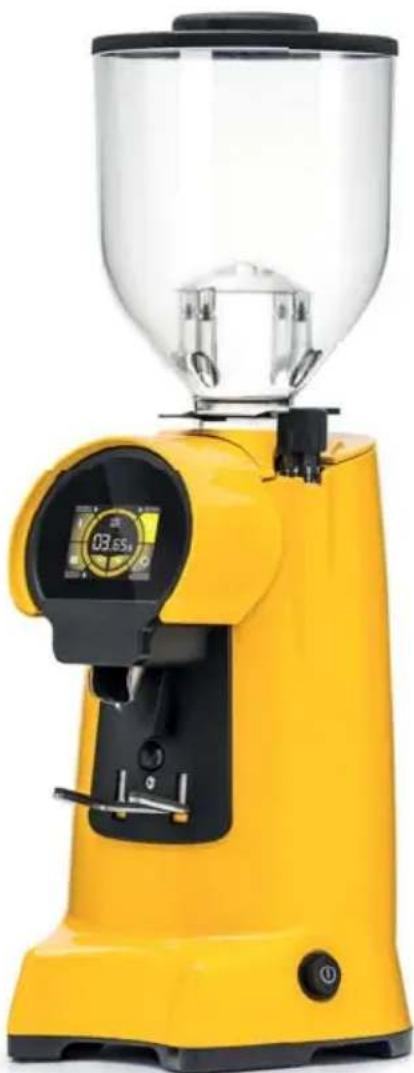
Yellow portable coffee maker with clear glass top and digital display (no visible text or symbols)LIBRETTO ISTRUZIONI
The producer has reasonably considered every precaution possible, so to assure user's safety. Anyway, in installing and using the grinder, various conditions may create uncontrollable and unpredictable events; so, it's always necessary to evaluate any risks and consider what follows:
- Before connecting the grinder, it's necessary to verify that plate data match with electric net ones.
- Both installation and repair must respect safety instructions and the inforce rules of the country in which the grinder is installed.
- The grounding wire is necessary, like the installation. Both must respect the inforce rules of the country in which the grinder is installed.
- Adaptors, multiple outlets and extension cables are not suggested.
- Do not use this grinder if it is damaged on the cable. In case of malfunctioning, switch off the grinder and take it to the closest authorised service center.
- Do not immerse the grinder, the cable or the plug into water or other liquids. It's necessary to avoid that internal parts enter in contact with other liquids.
- Do not use any water jets, unsuitable detergents or steam-cleaners to clean.
- During its use, install the grinder on a flat and stable surface being able to sustain the weight of the grinder.
- The grinder is intended to be used only to grind roasted coffee beans. A different use is considered unsuitable and dangerous. The producer cannot be considered responsible for possible damages related to misuse or erroneous and unreasonable actions.
- The grinder cannot be used in extreme environmental conditions. In any case, use the grinder just between -5^ C ÷ +30^ C degrees.
- This grinder has been conceived for commercial use, like restaurant kitchen, cantines, hospitals and shops, like bakeries and butchers. It is not suitable for continuous food production.
- Do not allow children or untrained people to use the grinder.
- The grinder can be used by children being 8 years old or above and by people with reduced physical, sensory or mental capabilities; by people without adequate experience just when monitored and if these have received user instruction on the grinder. Cleaning cannot be performed by unmonitored children.
IMPORTANT WARNINGS
- Do not pull the cable or the grinder itself to disconnect its power cable.
- Do not use the grinder with wet or damp hands.
- Do not use the grinder when you are barefoot.
• Before cleaning or servicing, unplug the grinder from the electric net.
- Do not leave the grinder switched on when not necessary. When it is not working, unplug the grinder.
- Do not obstruct the fan or heat elimination systems. Do not enter any water or liquids
- While the grinder is working, do not enter spoons, forks or other utensils in the spout or the coffee container to perform anything.
- To solve any blockage in the spout, always switch off the grinder before.
- In case of failure of the motor, switch off the grinder and contact an authorised service center.
- Prevent the grinder to be used under any weather conditions (sun, rain, ecc.).
• Children must be monitored to prevent they play with the grinder. - The owner is responsible for monitoring the installation of the grinder, so to assure it has been installed in environmental conditions that will not create a safety or health danger for the users.
- If you decide not to use anymore this grinder, we suggest to make it inoperative. After having it unplugged, cut the cable. In case of failure, switch it off and do not tamper with.
CONSERVATION OF THE MANUAL
This manual must always be at any user disposal. The user must be informed on the correct use of the grinder and on potential risks. It must be conserved in a dry, clean and heat-protected place. Use the manual so to avoid any damage to itself. Do not remove, rip or write on any manual parts. In case you cannot find the manual, take contact with the re-seller or the producer for further information.
UNPACKING THE GRINDER
- It's necessary to check out that there is not any damage on the grinder, looking at the external packaging
• After having removed the packing, check out there are no damages on the grinder. - Check out the entirety of all components. In case of defects or damages, inform immediately the authorised reseller.
- The packing (box, cellophane, metallic parts, styrofoam, etc.) can cut, wound or be dangerous if mismanaged. Prevent children or non-responsible people entering in contact with the packing.
- This symbol on the grinder or on the packing informs that the grinder cannot be

considered like a usual home waste; it must be delivered to a suitable waste collection facility that recycle electric and electronic devices. If this grinder is correctly disposed of, you will prevent potential damages to both environment and health; these damages may occur in case the grinder is not correctly disposed of. Waste recycling protects natural sources. For further information on the recycling of this product, you can contact your local authority, local recycling center or the reseller you purchased the grinder from.
IMPORTANCE OF THE MANUAL
This manual is addressed to the user of the grinder and it is considered part of this product. It shares information on its correct use and maintenance, including information on user's safety. This manual must be held during all the grinder's lifespan and must be transmitted to any user or future owner. All information in this manual do not replace safety rules and technical data on the installation and functioning of the grinder and its packing. This manual reflects the nowadays state of the art and it cannot be considered inadequate just because revised on the base of new technologies. The producer may modify the manual without revising previous editions, except in special cases. A misuse of the grinder, or a different use than the one described on the manual, will invalidate any warranty or responsibility of the producer. The grinder can be used just by a responsible adult. It's necessary to preserve the manual, as the producer cannot be held responsible for any damage on people or things, or any damage on the grinder in case it is misused or in case safety and maintenance rules are not respected.
CONSERVATION DU MANUEL
IMPORTANCE DU MANUEL
text_image
Technical diagram of a sewing machine with numbered parts for identification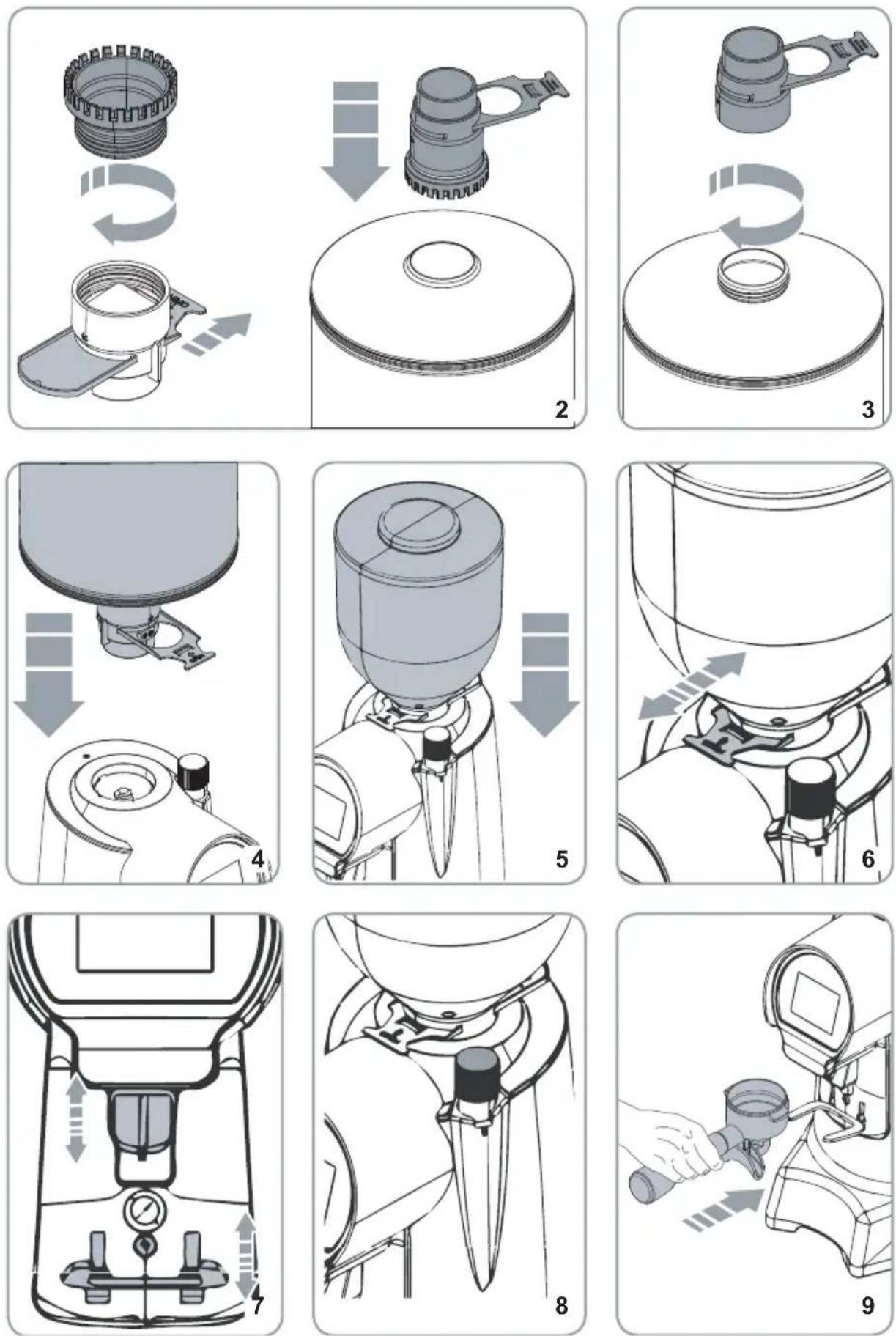
EC DECLARATION OF CONFORMITY

Declare under our responsibility, that the product:
MACINADOSATORE PER CAFFE' MODELLI:
COFFEE GRINDER MODELS:
HELIOS 65 - HELIOS 80
VERSIONE/VERSION: 220-240V/50-60Hz; 220V/60Hz
EQUIPAGGIATE CON DOSATORE ELETTRONICO
MATRICOLA DAL / SERIAL Nr. FROM : XX XXX 19 45 XXXX
To which this declaration relates, following the provisions of the directives:
Low Voltage Directive (LVD) 2014/35/EU - RED Directive 2014/53/EU - EMC Directive 2014/30/EU
RoHS Directive 2011/65/EU - MD Directive 2006/42/EC - WEEE
Directive 2012/19/EU
following the provisions of the regulation:
UNI EN 12100/1-2; UNI EN ISO 13857; CEI EN 55014-1/2; CEI EN 61000-3-2/3;
CEI EN 60335-1; CEI EN 60335-2-64; CEI EN 62233; EN 60704-1:1994;
we authorize the following person to compile the technical file:
Sig. Filippo Conti – Via Luigi Longo, 39/41 – 50019 Sesto Fiorentino (FI) - ITALY
Date : Luglio 2020
The legal representative:
Filippo Conti
• VERSIONE ITALIANA 22
• ENGLISH VERSION 36
• DEUTSCHE VERSION 48
• VERSION FRANÇAISE 62
• VERSIÓN ESPAÑOLA 76
4.2 ACCENSIONE MACCHINA
text_image
A B C D E F 00.00s 0 M L I H G s Q R S T U5 PROGRAMMAZIONE MACCHINA
text_image
PARTIAL DOSES I + II + III 05.2.2 CONTATORI ASSOLUTI
text_image
TOTAL DOSES I + II + III 05.2.4 PASSWORD
text_image
DISPLAY COLOUR REDtext_image
LOGO ON OFF6.2.7 STANDBY
text_image
BLOCK DOSES ON OFF SETTING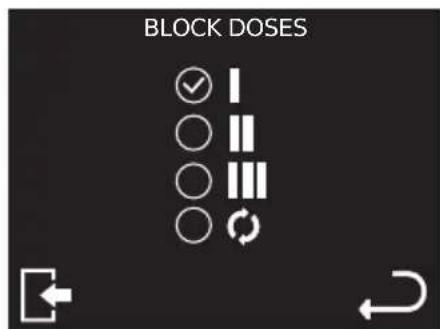
text_image
BLOCK DOSES ✓ I ○ II ○ III ○ ○ ↕
ATTENZIONE
(*)The value given is for the actual revolutions of the burrs.
HELIOS 65
HELIOS 75 - HELIOS 80
- Ton: 30 s
- Ton: 30 ~s
- Toff: 270 s
- Toff: 160 s
3 GRINDER DESCRIPTION
- Lid hopper
- Cof fee beans hopper
- Regulation knob
- Power button
-
Filter-holder fork
-
Micro-switch
- Cof fee outlet
- Touch-screen display
- Opening/closing tab for cof fee beans
4 SETTING AND USE
4.1 PREPARATORY OPERATIONS
It is necessary to set up the grinder before working with it, considering the kind of coffee (more or less roasted) and the grinding type.
- In case you are using metal cans, install the adapter in the joint slot (Fig.2) or use the adapter via the screw (Fig.3). Then, install the hopper in the right spot (Fig.4).
• In case of coffee-beans hoppers (2), install it in the right spot (Fig. 5).
• Take off the lids (1) from the hopper (2) and fill it up with coffee beans.
• Install back the lid (1) and push the tab (9) so to let the coffee beans pass trough.

ATTENTION
When you take off the coffee beans hopper (2) while the grinder is on, the display is switching off and so does the grinder. When you install back the hopper, the display turns on, and so does the grinder.
4.2 SWITCHING ON THE GRINDER
Press the button (4) to switch on the grinder (the led button is switching on).
At first, the grinder is set in the mode originally set by the company. Then, it will always keep the same mode previously set before switching off.
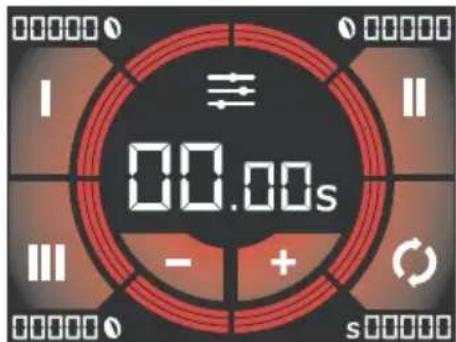
When you switch it on, the operation screen will appear on the display.
text_image
00.00s4.3 GRINDING REGULATION
To set the grinding, use the regulation knob (3), turning it clockwise to grind finer or counterclockwise to grind it coarser (like displayed on the knob). There is no block; grinding regulation must be gradually performed, grinding a little bit of coffee each 2 steps maximum.

ATTENTION
If the knob is turned a full round when the motor is not working, the grinder can stop
4.4 DISPENSING SYSTEM REGULATION
Considering the filter holder and the type of coffee, set the dispensing chute (7) in height and grade so to have a correct coffee outlet.
4.5 REGULATE THE FILTER HOLDER FORK
- The fork is suitable to all filter holders in the market.
- With a crosshead screwdriver, loosen the fixing screw of the filter holder fork (5).
- Raise or lower the fork depending on the filter holder size.
- Once you find the right position, tighten the fixing screw of the fork (5).
4.6 FUNCTIONING
Select the dose to be dispensed trough the buttons (B), (L) or (C). Lay the filter holder on the fork (5), so to have it right under the chute (7) (Fig. 7) and push it forward so to press the micro-switch (6).
Dispensing stops when the set time is over and the grinding time returns to the original pre-set time and the grinder is ready to work again. If the continuous mode is on (H) the dispensing lasts the same time you keep the microswitch pressed (6).
When you release the button (6), continuous mode stops and the grinder sets back the automatic dose selection

ATTENTION
It's possible to stop the automatic dispensing before the grinding time is over. During dispensing, use the filter holder to press the microswitch so to stop dispensing (5):
- Press again the microswitch (6) to restore the dispensing for the remaining time;
- Press any dose button to stop dispensing. The grinding time comes back to the one previously set.
text_image
A B C D E F 00.00s - + s M I II L I H G P O N Q R S T U5 PROGRAMMING THE GRINDER
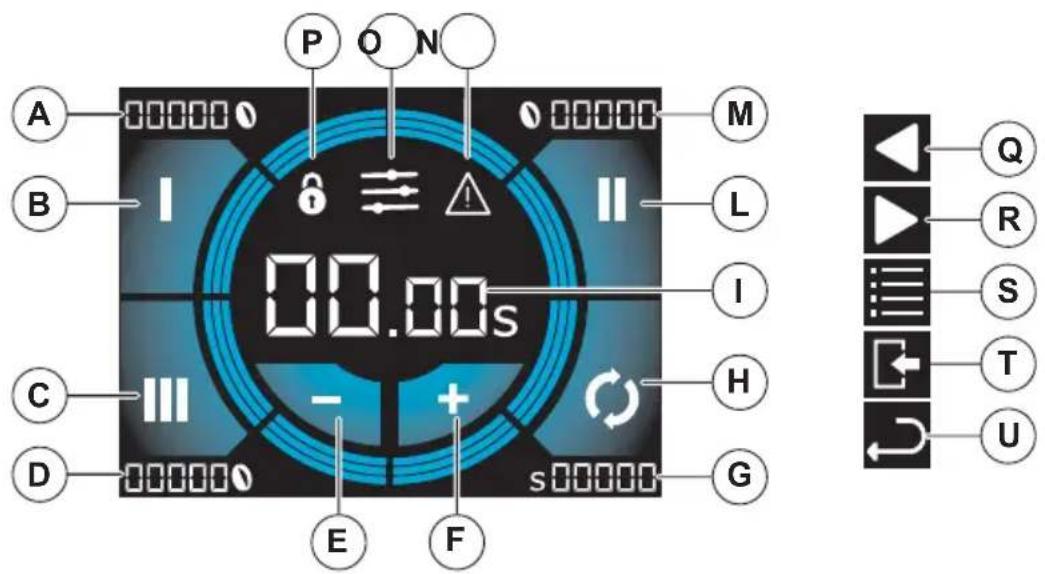
A. Partial 1 dose counter
B. Select dose 1
C. Select dose 3
D. Partial 3 dose counter
E. Deacreasing key
F. Increasing key
G. Counter partial dose
H. Select continuous dose
I. Displaying time of the selected dose
L. Select dose 2
M. Partial 2 dose counter
N. Alarm on
O. Menu access
P. Locked programming
Q Previous page
R. Next page
S. Access to technical menu
T. Exit menu
U. Back
5.1 DOSE REGULATION
- Press a button (B), (L) or (C) to select a dose to set.
- Press buttons (E) or (F) to decrease or increase the dispensing time of the selected dose up to 5 hundredths of second. If pressed longer, time is increased or decreased depending on the pression of the button.
5.1.1 LOCKING DOSES REGULATION
Press longer the buttons (E)+(F) to lock the time regulation of dose dispensing. On the screen, you will see (P).
Press again longer buttons (E)+(F) to unlock.
5.2 MAIN MENU
To access the main menu, press (O) on the home screen.
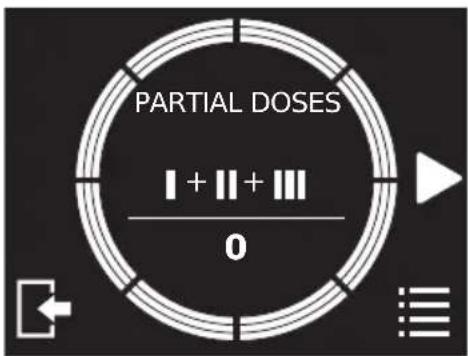
5.2.1 SUM OF PARTIAL COUNTERS
This screen displays the sum of the partial doses (resettable) dispensed. The sum considers each dose 2 to be twice dose 1 and each dose 3 to be three times dose 1. For example, if 5 x dose 1, 5 x dose 2 and 5 x dose 3 have been dispensed, the sum will be 30.
text_image
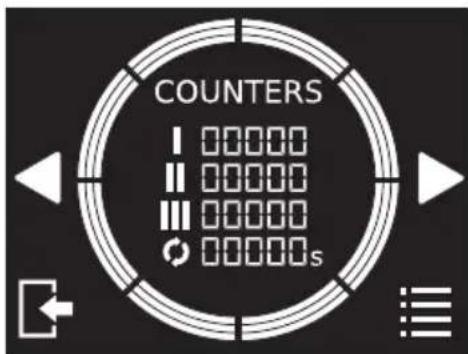
PARTIAL DOSES I + II + III 05.2.2 COUNTERS
The screen displays the overall counters (not resettable) for each dispensed dose.
text_image
COUNTERS I 00000 II 00000 III 00000 IV 00000s5.2.3 SUM OF ABSOLUTE COUNTERS
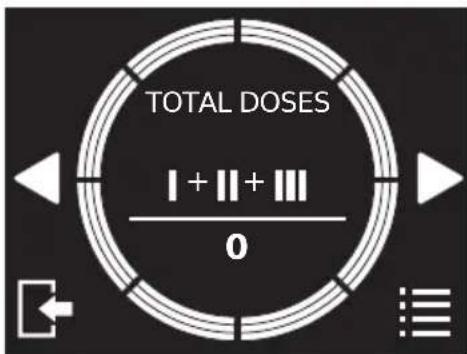
This screen displays the sum of the total doses (not resettable) dispensed. The sum considers each dose 2 to be twice dose 1 and each dose 3 to be three times dose 1. For example, if 5 x dose 1, 5 x dose 2 and 5 x dose 3 have been dispensed, the sum will be 30.
text_image
TOTAL DOSES I + || + ||| 05.2.4 PASSWORD
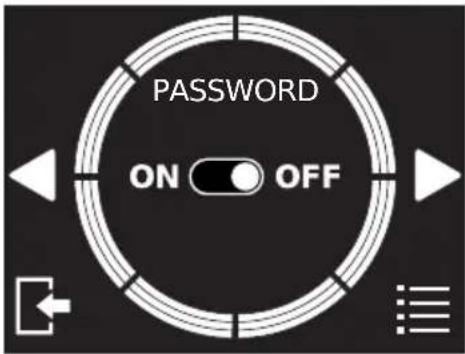
This screen displays to set the password of the grinder. When on, the password is mandatory to access the technical menu, to lock/unlock dose regulation and disable the password.
• ON: password on.
- OFF: password off.
text_image
PASSWORD ON OFFTo set the password, it's necessary press ON and insert a 4-numbers code. After having pressed CONFIRM, you need to type it again and press SAVE.

text_image
NEW PASSWORD 0 0 0 0 ① ② ③ ④ ⑤ ⑥ ⑦ ⑧ ⑨ ⑩ CONFIRM
text_image
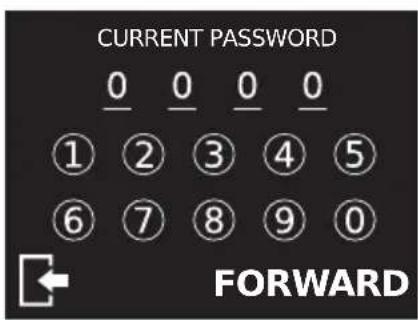
CONFIRM PASSWORD 0 0 0 0 ① ② ③ ④ ⑤ ⑥ ⑦ ⑧ ⑨ ⑩ SAVETo change the password, press SETTING. It is necessary to digit before the password previously set. After having pressed NEXT, it will be possible to digit and confirm the new password.
text_image
CURRENT PASSWORD 0 0 0 0 ① ② ③ ④ ⑤ ⑥ ⑦ ⑧ ⑨ ⑩ FORWARD
text_image
NEW PASSWORD 1 1 1 1 ① ② ③ ④ ⑤ ⑥ ⑦ ⑧ ⑨ ⑩ CONFIRM
text_image
CONFIRM PASSWORD 1 1 1 1 ① ② ③ ④ ⑤ ⑥ ⑦ ⑧ ⑨ ⑩ SAVE5.2.5 GRINDER INFORMATION
This screen displays information of the model and the firmware of the grinder. These are mandatory for any technical assistance.
6 TECHNICAL MENU
To access the technical menu, press on the screen of the main menu.
6.2.1 RESET PARTIAL COUNTERS
This screen allows to reset partial counters for each dispensed dose, as displayed on the home screen. Press longer RESET to reset the counters.
6.2.2 DISPLAY BRIGHTNESS
This screen allows to set the brightness of the display from 0 to 10, using
buttons
6.2.3 DISPLAY COLOUR
This screen allows to set the color of the display, using buttons.

text_image
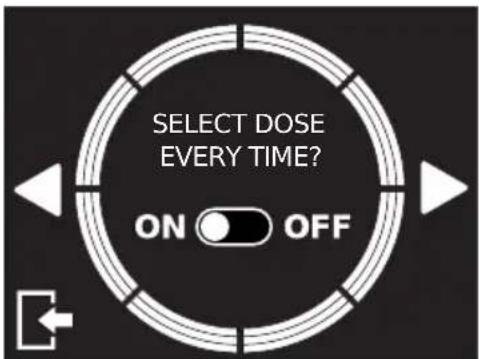
DISPLAY COLOUR RED6.2.4 SELECTION DOSE MODE
This screen allows to set the selection dose mode
• ON: you must select the dose for each dispensing.
• OFF: you keep selected the last dispensed dose.
text_image
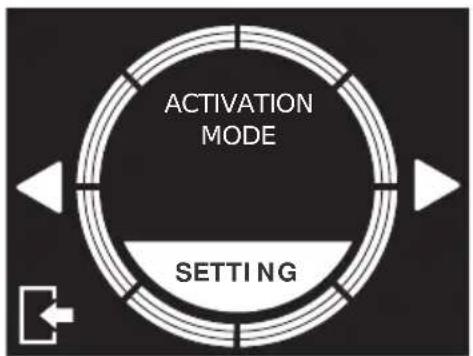
SELECT DOSE EVERY TIME? ON OFF6.2.5 GRINDING ACTIVATION MODE
This screen allows to set the grinding activation mode.
flowchart
graph TD
    A["Activation Mode"] --> B["Setting"]
    B --> C["Arrow Left"]
    B --> D["Arrow Right"]
    B --> E["Arrow Down"]
    style A fill:#f9f,stroke:#333
    style B fill:#ccf,stroke:#333

text_image
DISPLAY MICROSWITCHAfter pressing SETTING button, it's possible to choose whether triggering grinding pressing the dose button on the display (B,L,C,H) or trough the grinding activation button (6). It's also possible to select both modes.
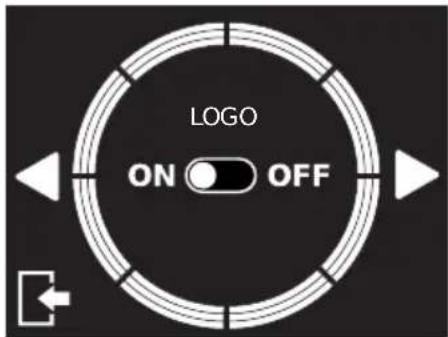
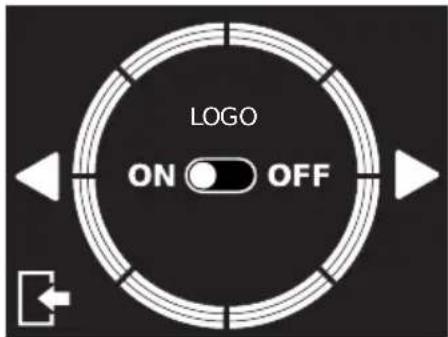
6.2.6 LOGO
On this screen it is possible to set the logo display. When enabled, the logo will be displayed when the machine is switched on and, if active, during standby.
• ON: logo visible.
• OFF: logo not visible.
text_image
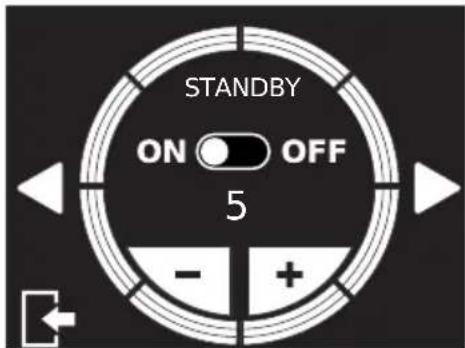
LOGO ON OFF6.2.7 STANDBY
On this screen it is possible to set standby mode.
The number of minutes of inactivity before the machine enters standby mode can be set using the keys.
• ON: standby enabled.
• OFF: standby disabled.
To exit standby mode, press anywhere on the screen.
text_image
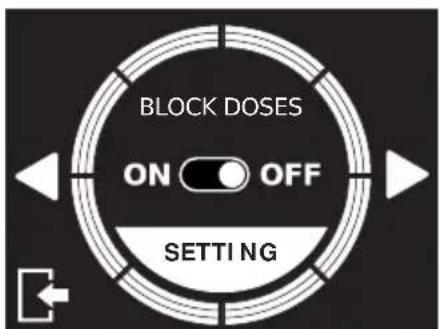
STANDBY ON OFF 5 - +6.2.8 DOSE LOCK
On this screen it is possible to deactivate the dose keys on the home page. When enabled, press the SET key to select the doses to be deactivated. The deactivated doses will not be visible on the home page.
• ON: dose lock enabled.
• OFF: dose lock disabled.
text_image
BLOCK DOSES ON OFF SETTING
text_image
BLOCK DOSES ✓ I ○ II ○ III ○ ○ ↕
ATTENTION
If all the dose keys are locked, dose 1 key will still be active.
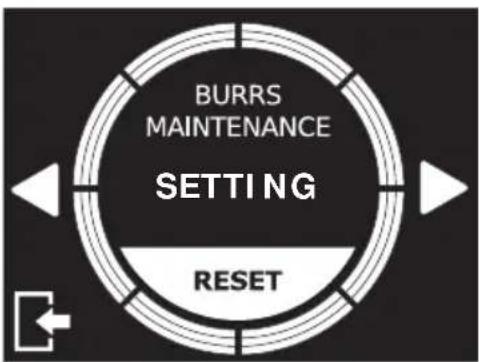
This screen allows to reset the counter of burrs maintenance and enable/disable the burrs maintenance alert. Press longer RESET to reset the counter of burrs maintenance (invisible on the display).
flowchart
graph TD
    A["BURRS MAINTENANCE"] --> B["SETTING"]
    B --> C["RESET"]
    C --> D["Arrow Left"]
    C --> E["Arrow Right"]
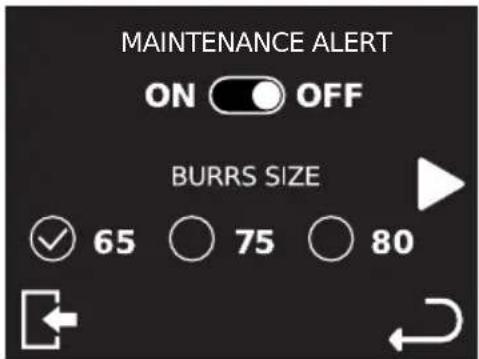
Pressing SETTING, you have access to the menu to enable/disable the burrs maintenance alert and you can set both the size and the type of the burrs.
This screen allows to select the language. The current language is displayed on the screen as a preview. Pressing SETTING button, it's possible to select the language among those listed.

text_image
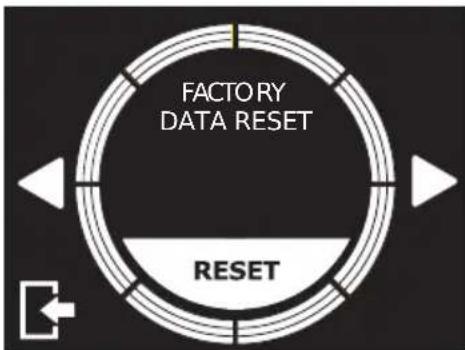
LANGUAGE ENGLISH SETTING6.2.11 RESTORING FACTORY SETTINGS
This screen allows to restore the grinder to factory settings. Press longer RESET to restore factory settings.
flowchart
graph TD
    A["FACTORY DATA RESET"] --> B["RESET"]
    B --> C["↔"]
    style A fill:#f9f,stroke:#333
    style B fill:#ccf,stroke:#333
    style C fill:#fff,stroke:#333
7 CLEANING AND MAINTENANCE

ATTENTION
Unplug the grinder from the electrical net before performing any cleaning and maintenance. Do not pull the feeding cable or the grinder itself to unplug.

ATTENTION
Maintenance must be performed by trained technicians, authorised by the producer.

ATTENTION
Do not perform any approximate maintenance and always use original spare parts.
7.1 CLEANING
Cleaning is fundamental for the correct use of the grinder. A neglected grinder can negatively impact on the coffee dispensing and on the precision of the dose and the grind. Before cleaning, check if the grinder is unplugged.
7.2 HOPPER CELANING
After having removed the hopper, clean the internal parts of it with water and neutral soap, taking off any oil left by the coffee beans. Rinse and dry it carefully. Perform the same on the cover. Do not use the dish-washer.
7.3 GRINDING SYSTEM CLEANING
After having removed the lid, open the upper burr holder. Then, clean the blades and the other internal parts with a brush or a dry cloth. If necessary, use a vacuum cleaner or an air compressed jet. After having installed back the upper burr holder and the lid, install the hopper. For a complete cleaning, use detergent pills.

ATTENTION
Any cleaning operation must be performed with food use approved products.
7.4 MAINTENANCE
To ensure correct operation of the appliance check and possibly replace the blades every 250 kg of coffee. For burrs maintenance, unplug the grinder from the electric net and remove the coffee beans container. Then, unscrew the screw being on the lid and the screws fixing the upper burr holder. To clean the blades, use a brush or a dry cloth. If necessary, use a vacuum cleaner or air compressed jet.

ATTENTION
Maintenance must be performed only by trained technicians, authorised by the producer.

ATTENTION
Do not perform any approximate maintenance and always use original spare parts.
8 TROUBLESHOOTING
If the problem persists, contact trained personnel.
| GRINDER CONDITION CAUSE POSSIBLE SOLUTION | ||
| When starting by means of the key (4), the display does not turns on. | Coffee containers (2) not inserted or not inserted properly. | Check the position of the coffee container (2) and insert it properly. |
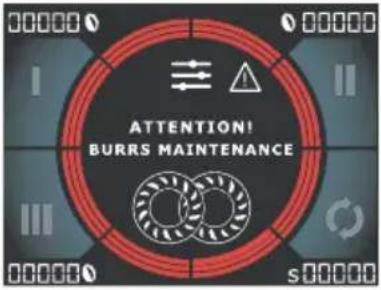 | Request of burr replacement.The operation of the grinder is not jeopardised, but the outcome could not be optimal.This message is also shown for some seconds every time the grinder is switched on, whilethe light [IMAGE] remains on even during operation. | Contact a skilled technician for replacement of the burrs.After replacement, reset the counter in the maintenance screen of the burrs and set the size and the type of burrs installed. |
1 ALLGEMEINE INFORMATIONEN
HERSTELLER:
CONTI VALERIO - Via Luigi Longo 39/41 - 50019 Sesto Fiorentino (FI) - ITALY
MODELLE:
HELIOS 65 - HELIOS 80
2 DATI TECNICI
text_image
A B C D E F 00.00s M L I H G S T U Q R S T Utext_image
PARTIAL DOSES I + II + III 0text_image
TOTAL DOSES I + || + || 05.2.4 PASSWORD
text_image
DISPLAY COLOUR RED6.2.4 DOSIS-AUSWAHLMODUS
text_image
LOGO ON OFF6.2.6 STANDBY
text_image
BLOCK DOSES ON OFF SETTING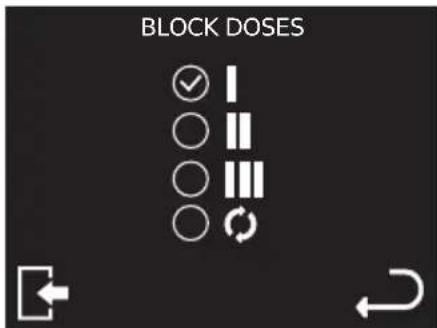
text_image
LANGUAGE ENGLISH SETTINGtext_image
A B C D E F 00.00s M L I H G s Q R S T U13 PROGRAMMER LE MOULIN
text_image
PARTIAL DOSES I + II + III 013.2.2 COMPTEURS
text_image
TOTAL DOSES I + II + III 013.2.4 MOT DE PASSE
text_image
DISPLAY COLOUR RED14.2.4 SELECTIONNER LA MODALITE DE LA DOSE
• ON: logo visible.
• OFF: logo non visible.
text_image
LOGO ON OFF14.2.7 MODE VEILLE
text_image
BLOCK DOSES ON OFF SETTING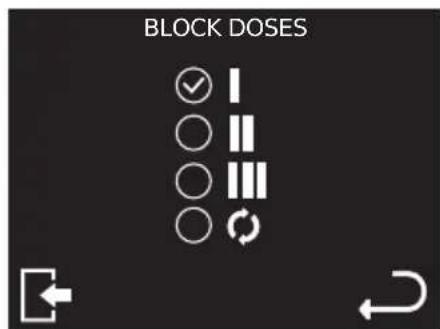
text_image
BLOCK DOSES ✓ I ○ II ○ III ○ ○ ↕
ATTENTION
text_image
LANGUAGE ENGLISH SETTING14.2.11 RETABLIR LES REGLAGES D'USINE
text_image
A B C D P O N 00.00s I II M L I H G E F stext_image
PARTIAL DOSES I + II + III 021.2.2 CONTADOSIS TOTAL
text_image
TOTAL DOSES I + II + III 021.2.4 CONTRASEÑA
text_image
DISPLAY COLOUR REDtext_image
LOGO ON OFF22.2.7 STANDBY
text_image
BLOCK DOSES ON OFF SETTING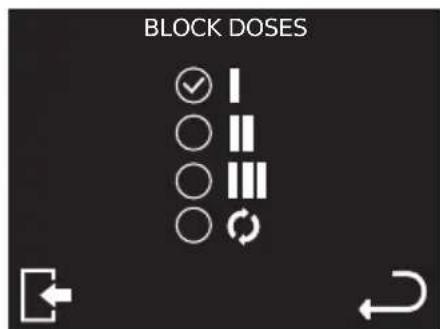
text_image
BLOCK DOSES ✓ I ○ II ○ III ○ ○ ↕