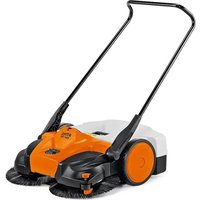
KGA 770 - Vacuum Cleaner STIHL - Free user manual and instructions
Find the device manual for free KGA 770 STIHL in PDF.


| Product type | Cordless electric sweeper (battery vacuum) |
| Weight (without battery) | 16.9 kg |
| Power supply | STIHL AP series lithium-ion battery, 36 V |
| Tank capacity | 40 liters |
| Theoretical sweeping performance | 3250 m²/h |
| Maximum incline | 45° (100%) |
| Compatible battery type | STIHL AP series (AP 300 S, AP 500 S, etc.) |
| Bluetooth interface | Yes (on certain batteries, for connection to the STIHL Connected app) |
| Side brush adjustment levels | 7 levels |
| Overload protection | Yes, with reset button |
| Maintenance | Cleaning the air filter, brushes, lubricating the transmission case |
| Safety | Automatic shutdown, overload protection, detailed safety instructions |
| Spare parts | Genuine STIHL parts (brushes, roller, filters, etc.) |
| Warranty | Limited warranty (see manual) |
| Operating temperature | -20 °C to 50 °C |
| Storage temperature | -20 °C to 70 °C |
| Charging temperature | -20 °C to 50 °C |
| Brand | STIHL |
| Model | KGA 770 |
Frequently Asked Questions - KGA 770 STIHL
User questions about KGA 770 STIHL
0 question about this device. Answer the ones you know or ask your own.
Ask a new question about this device
Download the instructions for your Vacuum Cleaner in PDF format for free! Find your manual KGA 770 - STIHL and take your electronic device back in hand. On this page are published all the documents necessary for the use of your device. KGA 770 by STIHL.
USER MANUAL KGA 770 STIHL
natural_image
Exterior view of a Stinkler vacuum cleaner (no text or symbols visible)2 - 26 Instruction Manual
Read Instruction Manual thoroughly before use and follow all safety precautions – improper use can cause serious or fatal injury.

ADVERTENCIA
1 Introduction....2
2 Guide to Using this Manual....2
3 Main Parts....2
4 Safety Symbols on the Products......3
5 IMPORTANT SAFETY INSTRUCTIONS....4
6 Battery Safety....9
7 Maintenance, Repair and Storage...... 10
8 Before Starting Work....11
9 Charging the Battery.... 11
10 LED Diagnostics.... 12
11 Bluetooth® Radio Interface....13
12 Assembling the Sweeper.... 13
13 Inserting and Removing the Battery......13
14 Switching the Sweeper On and Off.....14
15 Checking the Controls....15
16 During Operation....15
17 After Finishing Work....17
18 Transporting....17
19 Storing....18
20 Cleaning....19
21 Inspection and Maintenance.... 20
22 Troubleshooting Guide....21
23 Specifications....22
24 Replacement Parts and Equipment...... 24
25 Disposal.... 25
26 Limited Warranty....25
27 Trademarks....25
28 Addresses.... 26
1 Introduction
Thank you for your purchase. The information contained in this manual will help you receive maximum performance and satisfaction from your STIHL sweeper and, if followed, reduce the risk of injury from its use.
SAVE THIS MANUAL!

Because this sweeper is battery-powered special safety precautions must be observed to reduce the risk of personal injury.

Read this instruction manual thoroughly before use and periodically thereafter. Follow all safety precautions. Careless or improper use of the sweeper can cause serious or fatal injury.
Do not lend or rent your sweeper without this instruction manual. Allow only persons who fully understand the information in this manual to operate the sweeper.
For further information, or if you do not understand any of the instructions in this manual, please go to USA: www.stihlusa.com or Canada: www.stihl.ca or contact your authorized STIHL servicing dealer.
2 Guide to Using this Manual
2.1 Signal Words
This manual contains safety information that requires your special attention. Such information is introduced with the following symbols and signal words:

DANGER
■ Indicates a hazardous situation which, if not avoided, will result in death or serious injury.

WARNING
■ Indicates a hazardous situation which, if not avoided, could result in death or serious injury.
NOTICE
■ Indicates a risk of property damage, including damage to the machine or its individual components.
2.2 Symbols in Text
The following symbol is included to assist you with the use of the manual:

Refers to a designated chapter or subchapter in this instruction manual.
3 Main Parts
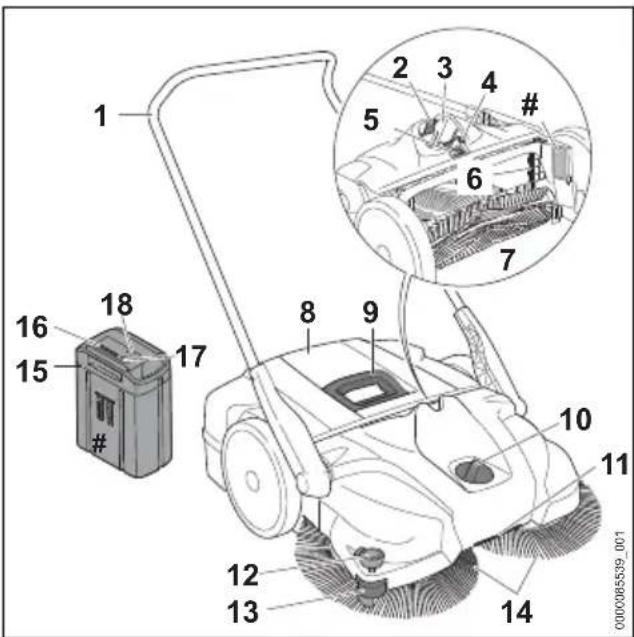
3.1 Sweeper and Battery
4 Safety Symbols on the Products English
1 Handle
For controlling the sweeper.
2 Locking Lever
Secures the battery in the battery compartment.
3 Battery Compartment
Holds the battery.
4 Reset button
Resets the electrical overload protection.
5 Power Switch
Switches the sweeper on and off.
6 Air Filter
Filters the air drawn in.
7 Sweeping roller
Guides the dirt into the container.
8 Container
Collects dirt during sweeping.
9 Handle
To remove and carry the container.
10 Rotary switch
To adjust the height of the side brushes.
11 Transport handle
For transporting the sweeper.
12 Downholder
Pushes the bristles of the side brushes onto the ground.
13 Guide roller
Guides the sweeper along walls or curbs.
14 Side brushes
Sweep the dirt.
15 Battery
Supplies electrical power to the motor.
16 Battery LEDs
Indicate the battery's state of charge and display error messages regarding potential malfunctions in the battery or power tool.
17 Push Button
Activates the battery's LEDs. Activates and deactivates the Bluetooth® interface (if applicable).
18 "BLUETOOTH®" LED (only for batteries with

Indicates whether the Bluetooth® interface is enabled or disabled.
# Rating Plate
Contains electrical information and the product's serial number.
4 Safety Symbols on the Products
4.1 Sweeper
The following safety symbols are found on the sweeper:

To reduce the risk of injury, follow the specified safety precautions.

Read and follow all safety precautions in the instruction manual. Improper use can lead to serious or fatal personal injury or property damage.
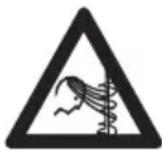
To reduce the risk of personal injury, keep hair and loose-fitting clothing away from the side brushes and sweeping roller, 5.4.

To reduce the risk of injury or property damage from unintended activation, remove the battery any time the sweeper is not in use, 5.5.
4.2 Battery
The following safety symbols are found on the AP series battery:

To reduce the risk of injury, follow the specified safety precautions.

Read and follow all safety precautions in the battery's instruction manual and the manual for the STIHL tool powered by this battery. Improper use can lead to serious or fatal personal injury or property damage.

To reduce the risk of personal injury or property damage from fire, explosion or burns, including chemical burns, do not disassemble, crush, drop, damage or heat above 212 °F (100 °C). Never expose to fire or incinerate, 6.1.

To reduce the risk of personal injury or property damage from a short circuit, fire or explosion, keep dry. Never immerse in water or other liquids, 16.1.
Batteries sold separately.
5 IMPORTANT SAFETY INSTRUCTIONS
5.1 General Safety Warnings and Instructions
This section contains the prescribed general safety warnings and instructions for battery-powered sweepers. Additional important warnings and instructions are provided in subsequent sections of this manual.
WARNING
When using an electric sweeper, basic safety precautions should always be followed to reduce the risk of fire, electric shock and personal injury, including the following:
READ ALL INSTRUCTIONS BEFORE USING THE SWEEPER
a) Do not leave appliance unattended when the battery is inserted. Switch off the sweeper and remove the battery when not in use and before servicing.
b) Do not expose to rain. Store indoors.
c) Do not allow to be used as a toy. Close attention is necessary when used by or near children.
d) Use only as described in this manual. Use only manufacturer's recommended attachments.
e) Do not use with a damaged battery. If the sweeper is not working as it should, has been dropped, damaged, left outdoors, or dropped into water, return it to a service center.
f) Do not handle battery or appliance with wet hands.
g) Do not put any object into openings. Do not use with any opening blocked; keep free of dust, lint, hair, and anything that may reduce air flow.
h) Keep hair, loose clothing, fingers, and all parts of body away from openings.
i) Turn off all controls before removing the battery.
j) Do not use to pick up flammable or combustible liquids, such as gasoline, or use in areas where they may be present.
k) Do not pick up anything that is burning or smoking, such as cigarettes, matches, or hot ashes.
I) Do not use with damaged or missing container and/or filters in place.
WARNING
SAVE THESE INSTRUCTIONS!
5.2 Intended Use
WARNING
■ This sweeper is designed to remove dirt, leaves, grass, paper and similar materials from flat and hard surfaces.
■ To reduce the risk of serious personal injury from fire, explosion or exposure to dangerous airborne particulate, never use around explosive liquids or vapors. Never sweep:
- Asbestos or asbestos-containing materials.
- Hot ashes, coals, glowing cigarettes or other hot particles.
- Magnesium or aluminium dust, leaded dust, or similar materials.
- Dust or dirt containing mold or pathogenic agents.
- Gasoline, oil, paint thinner, solvents or any flammable or combustible liquids.
- Acids, Iyes, or similar materials.
- Salt water or saline solutions.
■ Use the sweeper and battery only as described in this manual. Do not use it for other purposes, since misuse may result in personal injury or property damage, including damage to the sweeper or battery.
- Never attempt to modify or override the sweeper's controls or safety devices in any way.
– Never use a sweeper that has been modified or altered from its original design.
■ This power tool may be powered by a STIHL AP series battery.
The STIHL AP battery with Guses Bluetooth ^® technology to exchange information with mobile devices running the STIHL connected App.
Batteries, chargers and other accessories are sold separately.
5.3 Operator
WARNING
■ Working with the sweeper can be strenuous. The operator must be in good physical condition and mental health. To reduce the risk of personal injury:
5 IMPORTANT SAFETY INSTRUCTIONS English
- Check with your doctor before using the sweeper if you have any health condition that may be aggravated by strenuous work.
- Do not operate the sweeper while under the influence of any substance (drug, alcohol or medication, etc.) that might impair vision, balance, dexterity or judgment.
- Be alert. Do not operate the sweeper when you are tired. Take a break if you become tired.
- Do not permit minors to use the sweeper.
– Bystanders, especially children, and animals should not be allowed in the area where the sweeper is in use.
- According to STIHL's current knowledge, the electric motor of this sweeper should not interfere with a pacemaker.
- However, persons with a pacemaker or other implanted medical device should consult their physician and device manufacturer before operating this sweeper.
5.4 Personal Protective Equipment
WARNING
■ Loss of control and severe injuries may result if hair, clothing or apparel are drawn into the side brushes or sweeping roller or otherwise become entangled in the components of the sweeper. To reduce the risk of severe personal injury:

▶ Wear sturdy and snug-fitting clothing that also allows complete freedom of movement.
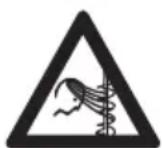
- Avoid loose-fitting jackets, scarves, neckties, flared or cuffed pants, jewelry and any other apparel that could be drawn into the side brushes or sweeping roller.
- Secure hair above shoulder level before starting work.
■ Good footing is very important. To help maintain a secure footing and reduce the risk of injury while working:

▶ Wear substantial footwear with non-slip soles. Do not wear sandals, flip-flops, open-toed or similar footwear.
■ To help reduce the risk of personal injury caused by loss of control during operation:

▶ STIHL recommends wearing heavy-duty non-slip work gloves made of leather or another wear-resistant material when handling the sweeper or its container.
5.5 Sweeper
WARNING
■ To reduce the risk of electric shock, fire and explosion:
- Do not expose the sweeper to rain, water or excessive moisture.
– Never immerse the sweeper in water or other liquids. - Store the sweeper indoors.
—Never use your sweeper if the casing around the motor is cracked or damaged.
■ This battery-powered sweeper is intended only to remove dirt, leaves, grass, paper and similar materials from flat and hard surfaces. Use for other purposes may increase the risk of personal injury and property damage.
- Read and follow the operating instructions in this manual for approved applications, 16.
■ To reduce the risk of personal injury to the operator and bystanders:
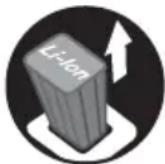
▶ Always switch off the sweeper and remove the battery before assembling, transporting, adjusting, inspecting, cleaning, servicing, maintaining or storing the sweeper, and any other time it is not in use.
- Switch off the sweeper and remove the battery before clearing jammed material.
– Never leave the sweeper unattended when the battery is inserted.
Although certain unauthorized attachments may fit your STIHL sweeper, their use may be extremely dangerous. Only attachments supplied by STIHL or expressly approved by STIHL for use with this specific model are recommended.
– Use only attachments supplied or expressly approved by STIHL.
– Never modify this sweeper in any way.
– Never attempt to modify or override the sweeper's controls or safety devices in any way.
– Never use a sweeper that has been modified or altered from its original design.
■ If the sweeper is dropped or subjected to similar heavy impacts:
English 5 IMPORTANT SAFETY INSTRUCTIONS
- Check that it is undamaged, in good condition and functioning properly before continuing work.
- Check that the controls and safety devices are working properly.
- Check the LEDs on the battery for error messages, 122.
- Check that the battery has not been damaged. Never use or charge a malfunctioning, damaged, cracked, leaking or deformed battery.
– Never work with a damaged or malfunctioning sweeper or battery. In case of doubt, have the sweeper and battery checked by your authorized STIHL servicing dealer.
If the sweeper or battery is damaged, not working properly, has been left outdoors or exposed to rain, its components may no longer function properly and safety devices may be inoperative. To reduce the risk of personal injury and property damage:
- Take the sweeper to your authorized STIHL servicing dealer to be checked before further operation.
■ Genuine STIHL replacement parts are specifically designed to match your sweeper and meet safety and performance requirements. Use of parts that are not authorized or approved by STIHL may cause serious or fatal injury or property damage.
– STIHL recommends that only identical STIHL replacement parts be used.
5.6 Using the Sweeper
5.6.1 Before Operation
WARNING
■ Misuse or unauthorized use may result in personal injury and property damage.
- Use the sweeper only as described in this instruction manual.
■ Using a sweeper that is modified, damaged, improperly adjusted or maintained, or not completely and securely assembled can lead to a malfunction and increase the risk of serious personal injury or death.
– Never operate a sweeper that is modified damaged, improperly maintained or not completely and securely assembled.
- Always check your sweeper for proper condition and operation before starting work.
– Never attempt to modify or override the controls or safety devices in any way.
- If your sweeper or any part is damaged or does not function properly, take it to your
authorized STIHL servicing dealer. Do not use the sweeper until the problem has been corrected.
■ Before inserting the battery:
- Check the contacts in the battery compartment for corrosion or other foreign matter and keep clean.
- Never insert or use a malfunctioning, damaged, cracked, leaking or deformed battery.
- Read and follow the instructions on switching on the sweeper, 4.1.
■ To help reduce the risk of serious personal injury from unintentional starting:
- Be sure the power switch is in the off position before inserting the battery.

▶ Switch off the sweeper and remove the battery before assembling, transporting, adjusting, inspecting, cleaning, servicing, maintaining or storing the sweeper, and any other time it is not in use.
– Never leave the sweeper unattended when the battery is inserted.
– Never store the battery in the sweeper.
5.6.2 Holding and Controlling the Sweeper
natural_image
Illustration of a person holding a long, flexible object with hands extended (no text or symbols)WARNING
■ To maintain a firm grip and properly control your sweeper:
- Keep the handle clean and dry at all times. Keep it free of moisture, pitch, oil, grease and resin.
■ To reduce the risk of serious injuries to the operator or bystanders from loss of control:
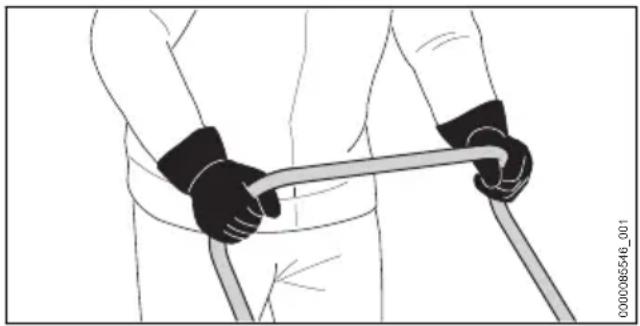
- Always hold the handle firmly with both hands when you are working.
– Wrap your fingers tightly around the handle. - Position the sweeper in such a way that all parts of your body are clear of the side brushes and sweeping roller whenever the battery is inserted.
- Be extremely cautious when working on slopes or uneven ground.
5 IMPORTANT SAFETY INSTRUCTIONS English
- Do not use the sweeper for transporting persons or objects.
- Do not attach objects to the handle.
■ To reduce the risk of injury from loss of control:
- Do not overreach. Keep proper footing and balance at all times.
5.6.3 Working Conditions
USA Working Conditions
WARNING
■ Operate your sweeper only under good visibility during favorable daylight conditions.
- Postpone the work if the weather is windy, foggy, rainy or inclement.
■ Your sweeper is a one-person machine.
- Do not allow other persons in the general work area.
– Bystanders, especially children, and animals should not be allowed in the area where it is in use.
■ To reduce the risk of injury to the operator, bystanders and unauthorized users:
– Never leave the sweeper unattended when the battery is inserted.
- Switch off the sweeper and remove the battery during work breaks and any other time the sweeper is not in use.
■ Sparks generated from operation of the sweeper may be capable of igniting combustible gases, liquids, vapors, dusts or other combustible materials and substances. To reduce the risk of fire and explosion:
– Never operate the sweeper in a location where combustible gases, liquids, vapors, dusts or other combustible materials and substances are present.
- Read and follow recommendations issued by government authorities (e.g., OSHA) for identifying and avoiding the hazards of combustible gases, liquids, vapors, dusts or other combustible materials and substances.
■ Use of this sweeper can generate dust and other substances containing chemicals known to cause respiratory problems, cancer, birth defects and other reproductive harm.
- Consult governmental agencies such as EPA, OSHA, CARB and NIOSH and other authoritative sources on hazardous materials if you are unfamiliar with the risks associated with the particular substances with which you are working.
■ Dust created by sweeping may contain chemicals known to the State of California and other authorities to cause cancer, birth defects, or other reproductive harm.
- This sweeper is not designed for the collection of asbestos-containing materials, lead paint, respirable crystalline silica or other harmful or toxic substances. Use for such purposes is prohibited.
■ Inhalation of certain dusts, especially organic dusts such as mold or pollen, can cause susceptible persons to have an allergic or asthmatic reaction. Substantial or repeated inhalation of dust or other airborne contaminants, especially those with a smaller particle size, may cause respiratory or other illnesses.
– Control dust at the source where possible.
- To the extent possible, operate the sweeper so that the wind or operating process directs any dust, mist or other particulate matter raised by the sweeper away from the operator.
- When respirable dust or other particulate matter cannot be kept at or near background levels, always wear a respirator that is approved by NIOSH and rated for work-site-specific conditions. Follow the recommendations of governmental authorities (e.g., OSHA/NIOSH) and occupational and trade associations.
- When emptying the container, cleaning the air filter or foam inserts, wear appropriate respiratory protection approved by PHAC to reduce inhalation hazards.
■ Breathing asbestos dust is dangerous and can cause severe or fatal injury, respiratory illness or cancer, including mesothelioma. The use and disposal of asbestos-containing products is strictly regulated by OSHA and EPA.
- Stop work immediately and contact the relevant state and local authorities and/or EPA, your employer or local OSHA representative if you have reason to believe that you might be disturbing asbestos.
Canada Working Conditions
WARNING
■ Operate your sweeper only under good visibility during favorable daylight conditions.
- Postpone the work if the weather is windy, foggy, rainy or inclement.
■ Your sweeper is a one-person machine.
- Do not allow other persons in the general work area.
English 5 IMPORTANT SAFETY INSTRUCTIONS
– Bystanders, especially children, and animals should not be allowed in the area where it is in use.
■ To reduce the risk of injury to the operator, bystanders and unauthorized users:
– Never leave the sweeper unattended when the battery is inserted.
- Switch off the sweeper and remove the battery during work breaks and any other time the sweeper is not in use.
■ Sparks generated from operation of the sweeper may be capable of igniting combustible gases, liquids, vapors, dusts or other combustible materials and substances. To reduce the risk of fire and explosion:
– Never operate the sweeper in a location where combustible gases, liquids, vapors, dusts or other combustible materials and substances are present.
- Read and follow recommendations issued by government authorities (e.g., CCOHS) for identifying and avoiding the hazards of combustible gases, liquids, vapors, dusts or other combustible materials and substances.
■ Use of this sweeper can generate dust and other substances containing chemicals known to cause respiratory problems, cancer, birth defects and other reproductive harm.
- Consult governmental agencies such as ECCC, CCOHS and PHAC and other authoritative sources on hazardous materials if you are unfamiliar with the risks associated with the particular substances with which you are working.
■ Dust created by sweeping may contain chemicals known to the State of California and other authorities to cause cancer, birth defects, or other reproductive harm.
- This sweeper is not designed for the collection of asbestos-containing materials, lead paint, respirable crystalline silica or other harmful or toxic substances. Use for such purposes is prohibited.
■ Inhalation of certain dusts, especially organic dusts such as mold or pollen, can cause susceptible persons to have an allergic or asthmatic reaction. Substantial or repeated inhalation of dust or other airborne contaminants, especially those with a smaller particle size, may cause respiratory or other illnesses.
– Control dust at the source where possible.
- To the extent possible, operate the sweeper so that the wind or operating process directs any dust, mist or other particulate matter
raised by the sweeper away from the operator.
- When respirable dust or other particulate matter cannot be kept at or near background levels, always wear a respirator that is approved by PHAC and rated for work-site-specific conditions. Follow the recommendations of governmental authorities (e.g., CCOHS/PHAC) and occupational and trade associations.
- When emptying the container, cleaning the air filter or foam inserts, wear appropriate respiratory protection approved by PHAC to reduce inhalation hazards.
■ Breathing asbestos dust is dangerous and can cause severe or fatal injury, respiratory illness or cancer, including mesothelioma. The use and disposal of asbestos-containing products is strictly regulated by CCOHS and ECCC.
- Stop work immediately and contact the relevant state and local authorities and/or ECCC, your employer or local CCOHS representative if you have reason to believe that you might be disturbing asbestos.
5.6.4 Operating Instructions
WARNING
■ In the event of an emergency:
- Switch off the motor immediately and remove the battery.
■ To reduce the risk of fire/explosion resulting in serious or fatal injury or property damage:
▶ Never sweep flammable or combustible liquids such as gasoline or use in areas where they may be present.
▶ Never sweep anything that is burning or smoking, such as cigarettes, matches, or hot ashes.
▶ Never sweep fluids that contain solvents or acids (e.g., gasoline, heating oil, paint thinner or acetone).
- Never cover the sweeper or its air intake port. Always ensure adequate motor ventilation to prevent overheating and damage.
- Switch off the sweeper before changing or adjusting any attachment or accessory.
■ To reduce the risk of serious injuries to the operator or bystanders from rotating side brushes or sweeping roller contact:
- Keep hands, feet and other parts of your body away from the rotating side brushes and the sweeping roller.
6 Battery Safety English
- Wear heavy-duty work gloves when handling the sweeper or its rotating side brushes and the sweeping roller
- Do not touch the rotating side brushes and the sweeping roller while the battery is inserted.
- Never touch the moving rotating side brushes or the sweeping roller with your hand or any other part of your body.
- Never remove jammed material without first switching off the sweeper and removing the battery.
■ To reduce the risk of severe personal injuries from unintentional starting:
- Never touch the rotating side brushes or the sweeping roller with your hand or any other part of your body when the battery is inserted.
■ Sweeping herbicides, pesticides, fertilizers or other chemical substances can be dangerous and may cause serious or fatal injury to persons and damage to the environment.
– Never use the sweeper to collect chemicals of any kind.
■ Using the sweeper without the filters and foam inserts can damage the sweeper.
– Never operate your sweeper with a damaged or missing air filter or foam inserts.
- Replace any damaged air filters or foam inserts.
■ To reduce the risk of injury to bystanders:
- Do not allow other persons in the general work area.
■ To reduce the risk of falling objects, scaffolding or shelving resulting in serious injury or property damage:
– Never hit objects, scaffolding or shelving with the sweeper while sweeping.
6 Battery Safety
6.1 Warnings and Instructions
WARNING
- Read and follow the safety precautions on the battery and all warnings and instructions that accompany it.
■ Use of unauthorized batteries can damage the power tool and result in fire, explosion and personal injury and property damage.
– Use only genuine STIHL AP series batteries with this power tool.
■ Use of STIHL AP series batteries for any purpose other than powering STIHL products could be extremely dangerous.
- Use STIHL AP series batteries only to power compatible STIHL products.
■ Use of unauthorized chargers can damage the battery and result in fire, explosion and personal injury and property damage.
– Charge STIHL AP series batteries only with genuine STIHL AL 101, AL 301, AL 301-4 or AL 501 series chargers.
■ The battery contains safety features and devices which, if damaged, may allow the battery to generate heat, rupture, leak, ignite or explode.

▶ Never heat the battery above 212 °F (100 °C).
▶ Never incinerate or place the battery on or near fires, stoves or other high-temperature locations.
– Never use or charge a malfunctioning, damaged, cracked, leaking or deformed battery.
– Never open, disassemble, crush, drop, subject to heavy impact or otherwise damage the battery.
– Never expose the battery to microwaves or high pressures.
– Never insert objects into the battery's cooling slots.
■ Extreme temperatures may cause the battery to generate heat, rupture, leak, ignite or explode, resulting in severe or fatal personal injury and property damage.
- Never charge, use or store the battery outside the specified ambient temperature limits, 23.3.
■ To reduce the risk of personal injury and property damage in the event the battery emits smoke, has an unusual smell or feels unusually hot while using, charging or storing:
– Immediately discontinue using or charging the battery. Contact the authorities in the event of fire or explosion.
■ To reduce the risk of a short circuit, which could lead to electric shock, fire and explosion:

▶ If a STIHL AP battery has been exposed to rain during work, remove it from the product and allow it to dry indoors. Make sure it is completely dry before charging or using.
▶ Do not handle the battery with wet hands.
▶ Never immerse any STIHL battery in water or other liquids.
– Never bridge the battery terminals with wires or other metallic objects.
English 7 Maintenance, Repair and Storage
- Keep a battery that is not in use away from small metal objects capable of conducting electricity (e.g., paper clips, nails, coins, keys).
- Store the battery indoors in a dry room.
– Never store the battery in damp or corrosive environments or in conditions that could lead to corrosion of its metal components.
– Never store the battery in the power tool. - When storing the battery, maintain a charge of 40% to 60% for STIHL AP series batteries (2 green LEDs).
- If storing the battery in the charger, disconnect the charger from the outlet.
- Protect the battery from exposure to corrosive agents such as garden chemicals and de-icing salts.
- Protect the battery from exposure to conductive liquids such as salt water.
- Do not attempt to repair, open or disassemble the battery.
■ Leaking battery fluid is potentially harmful and can cause skin and eye irritation, chemical burns and other serious personal injury.
– Avoid contact with skin and eyes.
– Use an inert absorbent such as sand on spilled battery fluid.
– In the event of accidental contact, immediately rinse the contact area thoroughly with mild soap and water.
- If fluid gets into your eye(s): do not rub. Rinse water over the open eye(s) for at least 15 minutes and seek medical attention.
■ A battery fire can be dangerous. To reduce the risk of severe personal injury and property damage in the event of fire:
- Evacuate the area. Fire can spread rapidly. Stay clear of any vapors generated and maintain a safe distance.
- Contact the fire department.
- Although water can be used to put out a battery fire, use of a multi-purpose dry chemical fire extinguisher is preferable.
- Consult the fire department regarding proper disposal of a burned battery.
■ Dropping the battery could result in personal injury or property damage. To prevent the battery from falling during removal:
- Place the sweeper on a level surface.
– Use care when ejecting the battery.
7 Maintenance, Repair and Storage
7.1 Warnings and Instructions
WARNING
■ To reduce the risk of fire, electric shock or other personal injury and property damage:
– Strictly follow the cleaning and maintenance instructions in the appropriate sections of this instruction manual.
– STIHL recommends that all repair work be performed by authorized STIHL servicing dealers.
■ Unintentional starting may result in personal injury or property damage. To reduce the risk of personal injury and property damage from unintentional starting:
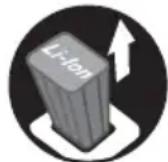
▶ Switch off the sweeper and remove the battery before inspecting the sweeper or carrying out any cleaning, maintenance or repair work, before storing, and any other time the sweeper is not in use.
■ Use of parts that are not authorized or approved by STIHL may cause serious or fatal injury or property damage.
– STIHL recommends that only identical STIHL replacement parts be used for repair or maintenance.
■ To reduce the risk of short circuit, fire or explosion:
– Never use your sweeper if the casing around the motor is cracked or damaged.
■ To reduce the risk of short circuit and fire:
- Keep the battery guides free of foreign matter. Clean as necessary with a dry cloth or soft, dry brush.
■ Improper storage can result in unauthorized use, damage to the sweeper and battery, and an increased risk of fire, electric shock and other personal injury or property damage.
- Remove the battery from the sweeper before storing.
– Never store the sweeper with the battery inserted. - When storing the battery, maintain a charge of 40% to 60% for STIHL AP series batteries (2 green LEDs).
- If storing the battery in the charger, disconnect the charger from the outlet.
- Store the sweeper and battery indoors in a dry, secure place that cannot be accessed by children or other unauthorized users.
8 Before Starting Work English
– Never store the battery in the sweeper or in a container with small metal objects capable of conducting electricity (e.g., paper clips, nails, coins, keys).
■ Dropping the battery could result in personal injury or property damage. To prevent the battery from falling during removal:
– Use care when ejecting the battery.
SAVE THESE INSTRUCTIONS!
8 Before Starting Work
8.1 Preparing the Sweeper for Operation
Before starting work:
▶ Fully charge the battery, ☐9.
▶ Mount the handle, 12.1.
- Adjust the height of the side brushes, 16.1.
▶ Check the controls for proper function and condition, 5.1.
- Place the sweeper on flat and firm ground or other solid surface in an open area.
8.2 Connecting to the STIHL connected App
- Turn on your mobile device's Bluetooth® interface.
▶ Turn on the battery's Bluetooth ^® interface, 11.1
▶ Download the STIHL connected App from Google Play or the App Store.
▶ Follow in-app instructions for creating a new user account. Returning users should log in their existing account information.
▶ Follow the step-by-step instructions for adding the battery to your equipment list.
9 Charging the Battery
9.1 Setting up the Charger

WARNING
- Read and follow the safety precautions on the battery and charger and all warnings and instructions that accompany those products. To reduce the risk of short circuit, which could lead to electric shock, fire and explosion, make sure the charger and its components are dry and not damaged. Read and follow the warnings and instructions in your charger's manual. For optimum performance, observe the recommended ambient temperature ranges, 23.4.

WARNING
■ A typical household electric circuit is between 15 and 20 amps. A single STIHL AL 501 charger draws approximately 4.8 amps. A single AL 301 or AL 301-4 charger draws approximately 4.4 amps and an AL 101 approximately 1.3 amps. To reduce the risk of fire from overloading an electrical circuit:
- Ensure the electrical system is rated to withstand the expected electrical draw before charging your battery.
- Charge multiple batteries one at a time or on separate circuits, unless you know your circuit can handle the total expected draw from multiple chargers.

WARNING
■ Since the charger heats up during the charging process, do not operate the charger on a combustible surface or in a location where combustible gases, liquids, vapors, dusts or other materials and substances are present.
To set up the charger:
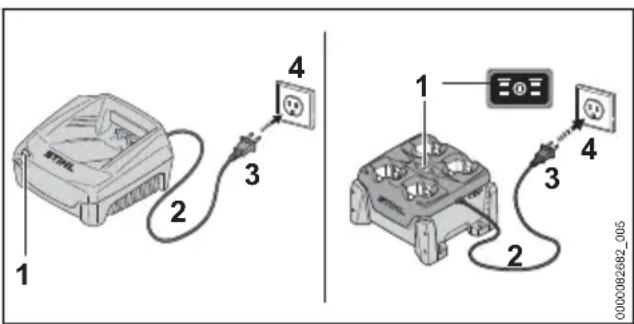
- Insert the plug (3) into a properly installed electrical outlet (4) matching the voltage and electrical frequency stated on the charger's rating plate.
The charger runs a self-test immediately after it is plugged in. The charger LED (1) will glow green for about 1 second, then it will glow red briefly before going out. Once the LED goes out, the self-test is complete and the charger is ready to charge the battery.
▶ Position the power supply cord (2) so that it will not be stepped on, tripped over, come in contact with sharp objects or moving parts or otherwise be subjected to damage or stress.
9.2 Charging

WARNING
■ STIHL batteries contain safety features and devices which, if damaged, may allow the battery to generate heat, rupture, leak, ignite or explode. Never charge a malfunctioning, damaged, cracked, leaking or deformed battery or use a charger that has been damaged. Never insert a wet battery or adapter. Never use a wet charger. Follow all product-specific warnings and instructions accompanying your battery and charger.
A battery is not fully charged when it ships from the factory. STIHL recommends that you fully charge the battery before using it the first time.
Read and follow the warnings and instructions in your charger's manual. For optimum performance, observe the recommended ambient temperature ranges, 23.4.
The battery heats up during operation of the power tool. If a hot battery is connected to the charger, it may be necessary for it to cool down before charging starts. The charging process begins only after the battery has cooled down sufficiently.
Charging time depends on a number of factors, including battery condition and the ambient temperature. For a complete list of approximate charging times, see www.stihl.com/charging-times.
To charge an AP battery:
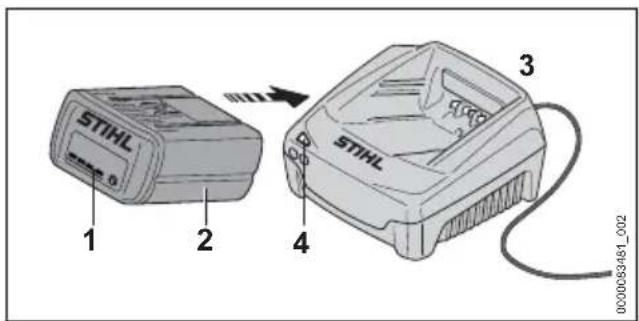
▶ Push the battery (2) into the charger (3) until it stops.
The LED on the charger glows green when the battery is charging.
The LEDs (1) on the battery glow green and show the state of charge.
When the LEDs on the battery go out, the charging process is complete and the charger will shut itself off. The battery can be removed from the charger.
▶ Disconnect the power supply cord from the electrical outlet when the charger is not in use for extended periods of time.
▶ Charge STIHL AP series batteries only with genuine STIHL AL 101, AL 301, AL 301-4 or AL 501 series chargers.
10 LED Diagnostics
10.1 STIHL AP Battery
10.1.1 Battery Status
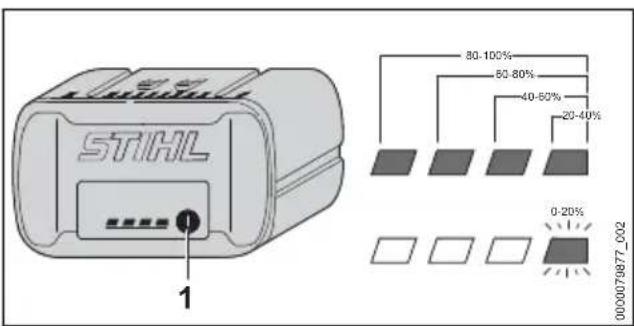
Four LEDs show the status of the battery. These LEDs can glow or flash green or red.
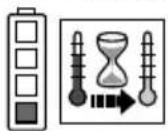
If one LED glows red continuously: the battery is either too hot or too cold. Allow the battery to warm up or cool down gradually at an ambient temperature of about 50 °F to 68 °F (10 °C to 20 °C).
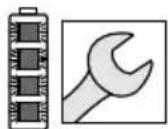
If all 4 LEDs flash red: the battery has a malfunction and must be replaced. Do not attempt to charge, use or store the battery.
10.1.2 Sweeper Status
When the battery is inserted in the sweeper, the same LEDs on the battery will indicate the status of the sweeper.
If three LEDs glow red continuously: the sweeper is too hot. Allow the sweeper to cool down.
If three LEDs flash red when you activate the power button: the sweeper has an electrical malfunction. Do not operate the sweeper. Have it checked by an authorized STIHL servicing dealer before use or storage.
For troubleshooting information, 22.1.
10.1.3 Charge Status
The LEDs on the battery also show the battery's state of charge.
To determine the battery's state of charge:
11 Bluetooth® Radio Interface English
▶ Press the button (1) on the battery. The LEDs on the battery will glow or flash green for about 5 seconds and indicate the state of charge (see illustration).
For example:
If four green LEDs glow continuously: full charge.
If one green LED is flashing: less than 20 % charge.
11 Bluetooth® Radio Interface
11.1 Turning the Bluetooth® Interface On
- Press and hold the push button for about 3 seconds. If the Bluetooth® LED next to the connected symbol glows blue for about 3 seconds, the battery's Bluetooth® interface is on.
11.2 Turning the Bluetooth® Interface Off
- Press and hold the push button for about 3 seconds. If the Bluetooth® LED flashes blue six times, the Bluetooth® interface is off.
11.3 Resetting the Battery to Factory Settings via Bluetooth® (AP 300 S and AP 500 S only)
Resetting the battery to the factory setting means that all user-specific data will be deleted.
- Press the push button four (4) times in quick succession and keep it pressed on the fourth time until the "BLUETOOTH®" LED next to the Ⓐ symbol flashes blue.
- Then release the push button immediately. - Connect the battery to the STIHL connected App to confirm that all user-specific data has been deleted.
12 Assembling the Sweeper
12.1 Mounting the Handle
WARNING
■ To reduce the risk of injury from unintended activation, make sure the battery is removed from the sweeper before starting assembly.
WARNING
■ To reduce the risk of injury from loss of control, ensure that the handle is properly and securely mounted before starting work. Use caution and avoid pinching fingers between the parts.
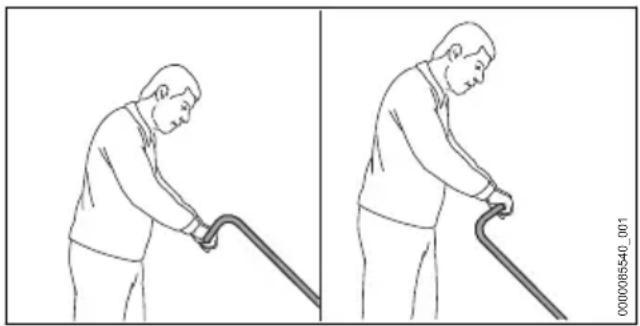
The handle can be mounted in 2 positions depending on the height of the user.
natural_image
Illustration of a person using a walking cane, shown in two sequential frames (no text or symbols)To mount the handle:
▶ Switch off the sweeper, 14.2.
▶ Remove the battery, 13.2.
- Position the sweeper on a level surface.
- Position the handle to suit the height of the user.

▶ Position both holders (1) upright.
- Push the handle (2) into the holders (1) at the same time.
The handle will engage with an audible click.
13 Inserting and Removing the Battery
13.1 Inserting the Battery
WARNING
■ To reduce the risk of personal injury or property damage from fire or electric shock, never use a malfunctioning, damaged, cracked, leaking or deformed battery, 6. Never charge, use or store the battery outside the specified ambient temperature limits, 23.3.
English 14 Switching the Sweeper On and Off

WARNING
■ To reduce the risk of unintended activation, never store the battery in the sweeper, 19.2.
To insert the battery:
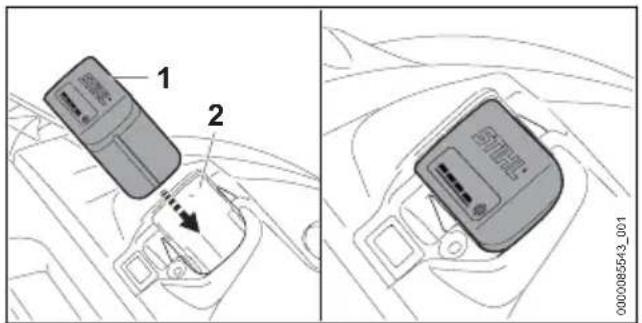
- Insert the battery (1) into the battery compartment (2) until it stops. The battery is properly inserted when you hear an audible click. In this position, there is electrical contact between the battery and the sweeper.
Since a new battery is not fully charged, STIHL recommends that you fully charge the battery before using it the first time, 9.
13.2 Removing the Battery

WARNING
■ To reduce the risk of severe personal injury from unintended activation, always remove the battery before assembling, transporting, adjusting, cleaning, servicing, maintaining or storing the sweeper, and any other time it is not in use.

WARNING
■ Use care when ejecting the battery to prevent it from falling and causing personal injury or property damage.
To remove the battery:
- Place the sweeper on a level surface.
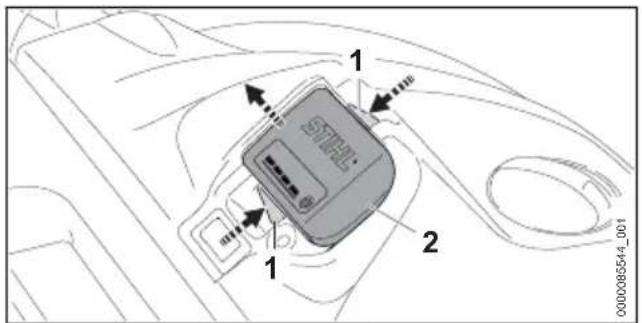
▶ Compress the locking lever (1) to eject the battery (2) from the battery compartment.
NOTICE
- Avoid exposing the battery to excessive heat or prolonged periods of direct sunlight. Use or storage outside the recommended ambient temperature range can reduce the performance of the battery.
14 Switching the Sweeper On and Off
14.1 Switching On

WARNING
■ Never operate your sweeper if it is damaged, improperly adjusted or maintained, not completely and securely assembled or not functioning properly, 5.5.
Before switching on:
▶ Make sure you have a secure and firm footing.
▶ Stand upright.
▶ Always hold and operate the sweeper with two hands firmly on the handle.
To switch the sweeper on:
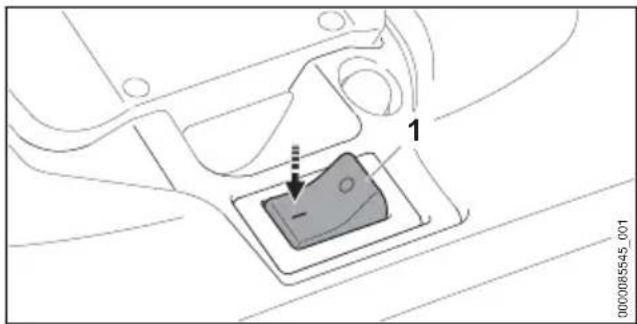
▶ Move the power switch (1) to position I by hand. The side brushes and the sweeping roller start to rotate.
14.2 Switching Off

WARNING
■ The side brushes and the sweeping roller will continue to move for a short while after the sweeper is switched off. To avoid serious injury, avoid contact with the moving side brushes and the sweeping roller. To reduce the risk of personal injury from unintended activation or unauthorized use, switch off the sweeper, ensure the side brushes and the sweeping roller have stopped and remove the battery before transporting the unit.
To switch the sweeper off:
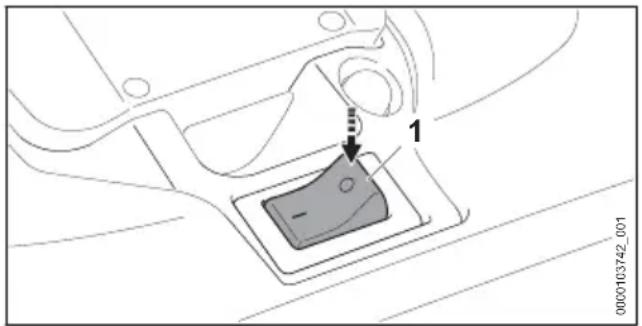
▶ Move the power switch (1) to position 0.
The side brushes and the sweeping roller will continue to move for a short time after the power switch is depressed. Take care to avoid contact after depressing the power switch and when setting down the sweeper.
15 Checking the Controls
15.1 Testing the Controls

WARNING
■ To reduce the risk of serious injuries, keep hands, feet and other parts of your body away of the side brushes and sweeping roller, 5.6.2. Keep bystanders out of the area while testing the controls.
To test the controls:
▶ Insert the battery.
▶ Move the power switch to position I.
The side brushes and the sweeping roller start to rotate.
▶ If 3 LEDs flash red, remove the battery and take the sweeper to an authorized STIHL servicing dealer to be repaired before use.
▶ Move the power switch to position 0.
▶ Wait until the side brushes and the sweeping roller stop moving.
▶ If the side brushes and the sweeping roller do not stop moving after the power switch is set to 0, remove the battery and take the sweeper to an authorized STIHL servicing dealer to be repaired before use.
16 During Operation
16.1 Adjusting the Height of the Side Brushes
The height of the side brushes can be adjusted in 7 levels depending on the surface to be cleaned:
– Level 1 and level 2: flat surfaces
– Level 3 and level 4: uneven surfaces, wet leaves or sand
– Level 5 to level 7: re-adjusting worn bristles
The bristles of the side brushes should rest on the surface with slight pressure. Excessive pressure increases wear and reduces the operating time of the battery.
To adjust the height of the side brushes:
▶ Switch off the sweeper, 14.2.
- Place the sweeper on a level surface.
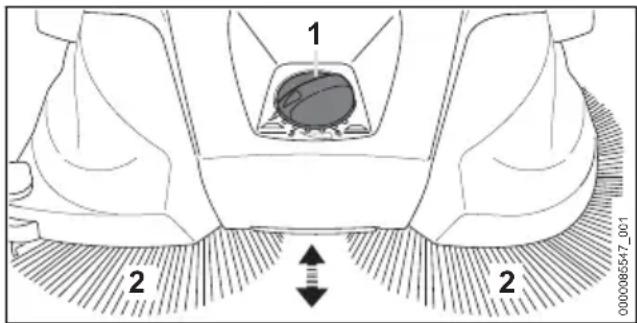
- Set the rotary switch (1) to the desired position.
The bristles (2) of the side brushes rest on the surface with slight pressure.
16.2 Sweeping

WARNING
■ To reduce the risk of personal injury, never work with the sweeper in the rain or in wet or damp conditions, 5.5. Work carefully and maintain proper control of the sweeper, 5.6.2.

WARNING
■ To avoid serious injury, avoid contact with the rotating side brushes and the sweeping roller. Switch off the sweeper and remove the battery before clearing jammed material, 5.6.4.
natural_image
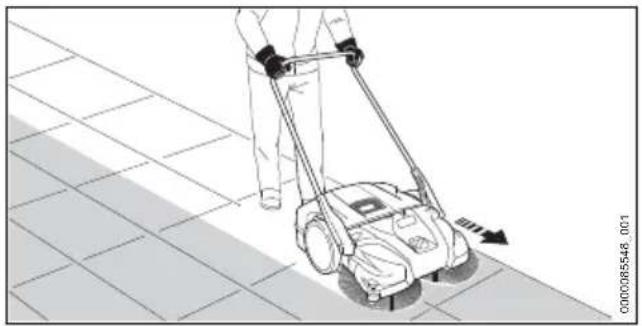
Line drawing of a person using a lawn mower on tiled floor (no text or symbols)▶ Push the sweeper forward slowly and in a controlled manner, keeping two hands on the unit at all times.
- Adapt speed to the surroundings.
▶ Move over small elevations of 0.78 - 1.2 in.
(2 - 3 cm) by gently pressing down the handle.
For optimum performance, observe the recommended ambient temperature ranges, 23.4.
Observe all applicable laws, regulations, standards and ordinances.
16.3 Emptying the Container

WARNING
■ To reduce the risk of personal injury from sharp objects in the container, always wear heavy-duty work gloves when emptying the container, 5.4.

WARNING
■ When emptying the container, cleaning the air filter or foam inserts, wear appropriate respiratory protection approved by NIOSH/MSHA to reduce inhalation hazards.
STIHL recommends to empty the container only outdoors.
The container is full when the collected dirt emerges from the side.
To remove the container:
▶ Switch off the sweeper, 14.2.
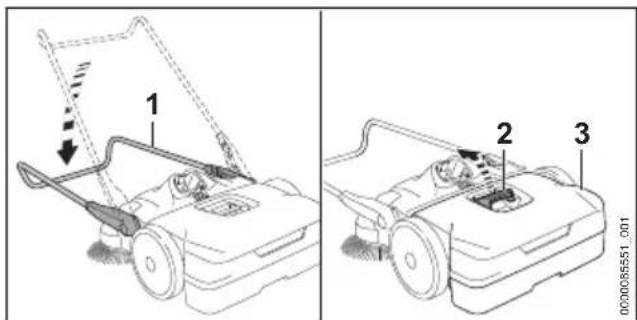
- Position the sweeper on a level surface.
▶ Fold down the handle (1).
▶ Pull the handle (2) upwards.
▶ Remove and empty the container (3).
To mount the container:
▶ Switch off the sweeper, 14.2.
▶ Position the sweeper on a level surface.
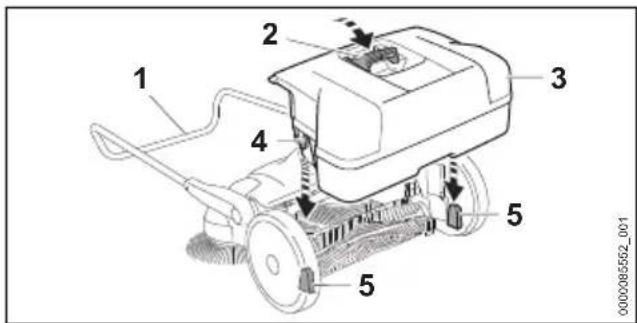
▶ Insert the container (3) into the sweeper so that the cut-outs (4) on the container fit into the brackets (5) on the sweeper.
▶ Press the handle (2) down.
▶ Fold the handle (1) upwards.
16.4 Resetting the Overload Protection
The sweeper has an electrical overload protection mechanism. If the sweeper is subject to mechanical overload, the overload protection interrupts the electric current to the sweeper. Activation of the overload protection helps protect the sweeper from an over-supply of electrical current.
To reset the overload protection:
▶ Switch off the sweeper and remove the battery, 14.2.
▶ Allow the sweeper to cool down.
- Remove jammed material on the side brushes or sweeping roller.
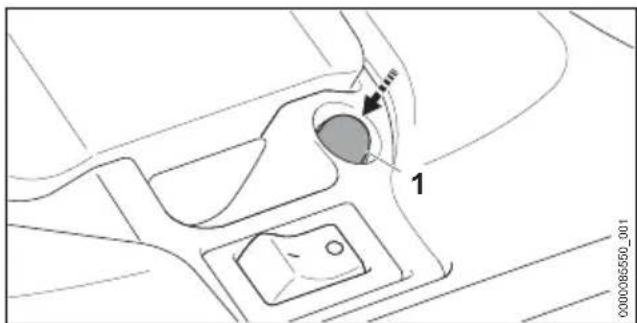
▶ Depress the reset button (1).
If the reset button engages, the electric circuit is no longer interrupted.
▶ If the reset button does not engage, the sweeper has not cooled down properly. Let the sweeper cool down and press the button again.
- Insert the battery and switch on the sweeper.
17 After Finishing Work English
17 After Finishing Work
17.1 Preparing for Transportation or Storage

WARNING
■ To reduce the risk of personal injury from unintended activation or unauthorized use, switch off the sweeper, ensure the side brushes and the sweeping roller have stopped and remove the battery before transporting the sweeper.
To prepare the sweeper for transportation or storage:
▶ Switch off the sweeper, 14.2.
▶ Remove the battery, 13.2.
▶ If the battery or sweeper became damp or wet during operation, allow them to dry separately and completely before charging or storing, 23.4.
18 Transporting
18.1 Sweeper

WARNING
■ To reduce the risk of personal injury from unintended activation, never transport the sweeper with the battery inserted.
When transporting the sweeper:
- Push the sweeper forward slowly and in a controlled manner.
Transporting the sweeper by hand:
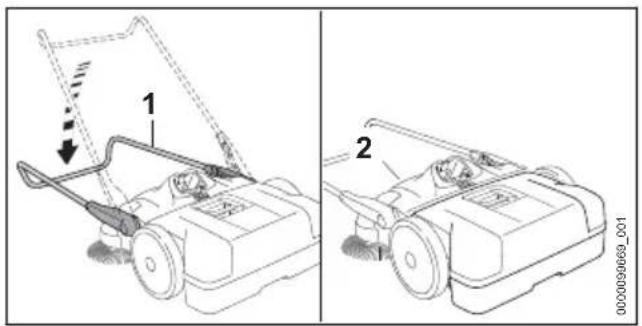
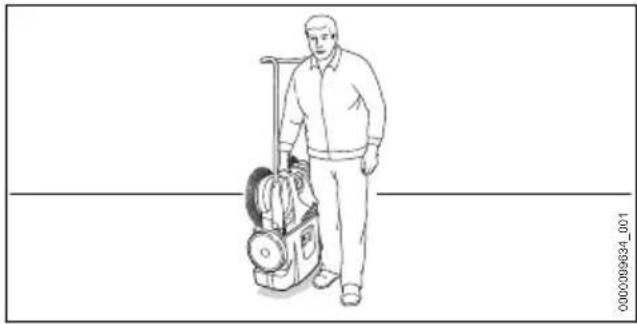
- When carrying the sweeper by hand, fold down the handle (1) and hold it by the grip (2) and set it up vertically.
natural_image
Line drawing of a person standing beside a laptop and backpack (no text or symbols)- Carry the sweeper by the grip with the side brushes and the sweeping roller pointing away from your body.
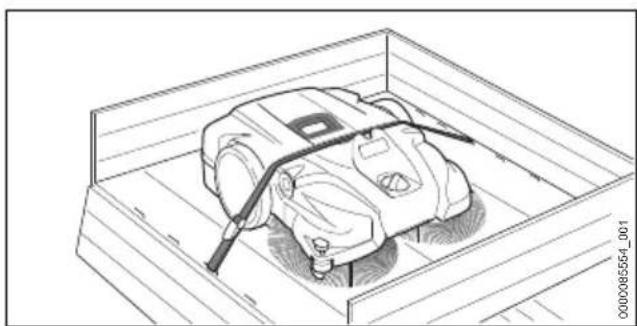
Transporting the sweeper in a vehicle:
natural_image
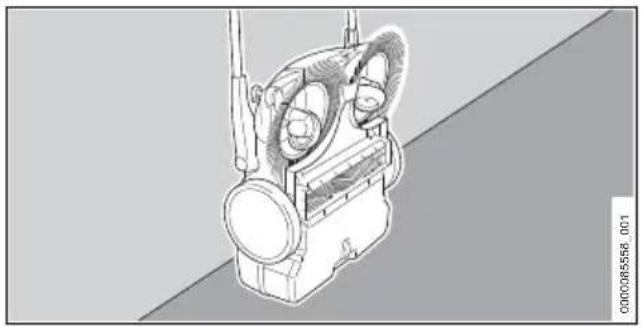
Line drawing of a robotic vacuum cleaner inside a transparent enclosure (no text or symbols)- When transporting the sweeper in a vehicle, secure and position the sweeper to prevent turnover, impact and damage.
If the sweeper needs to be transported in a compact way, the handle with attached brackets can be removed.
To remove the handle:
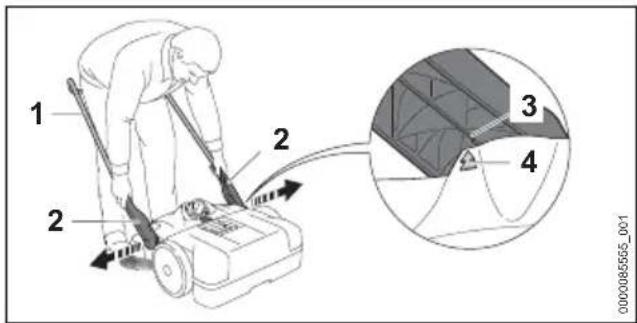
▶ Set the handle (1) at a 45^ angle. The arrows (4) on the housing are aligned with the bar (3) on the bracket (2).
▶ Pull the bracket slightly apart and remove.
To mount the handle:
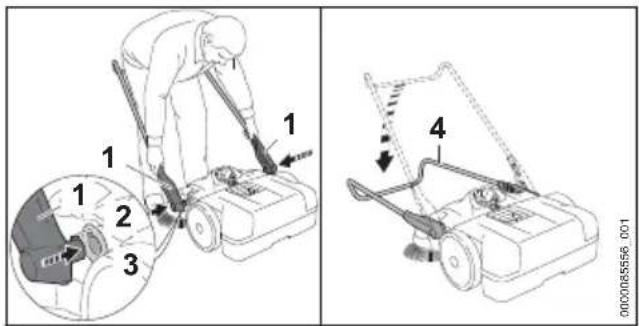
▶ Pull the bracket (1) slightly apart and hold it.
- Insert the snap-in noses (2) into the cut-outs (3).
▶ Fold the handle (4) down until it engages with an audible click.
The handle is mounted.
18.2 Battery

WARNING
■ To reduce the risk of a short circuit, which could lead to electric shock, fire and explosion, never transport the battery with small metal objects capable of conducting electricity (e.g., paper clips, nails, coins, keys), 6.
When transporting the battery:
- Secure the battery in a container against impact or damage. Never transport the battery with small metal objects capable of conducting electricity (e.g., paper clips, nails, coins, keys).
▶ If you are transporting the battery in a vehicle, secure it and its container to prevent turnover, impact and damage.
STIHL batteries comply with the requirements set forth in UN-Manual of Tests and Criteria, Part III, Subsection 38.3.
Commercial air, vessel and ground transportation of lithium ion cells and batteries is regulated. The battery is classified as a UN 3480, Class 9, packaging group II product. Shipping it, either as a complete tool or the battery, requires compliance with all applicable shipping regulations. Check with the ground, vessel, air cargo or passenger airline to determine if transport is prohibited or subject to restrictions or exemptions prior to shipping or travel.
Normally, no further conditions have to be met by the user in order to transport STIHL batteries by road to the power tool's operating site. Check and comply with any special regulations that may apply to your situation.
For further information please go to USA: www.stihlusa.com/battery-transportation-safety or Canada: www.stihl.ca.
19 Storing
19.1 Storing the Sweeper

WARNING
■ Store the sweeper indoors in a dry, secure place that is inaccessible to children and other unauthorized users, 5.5. Never store the battery in the sweeper. Improper storage can result in unauthorized use and damage to the sweeper, 5.5.
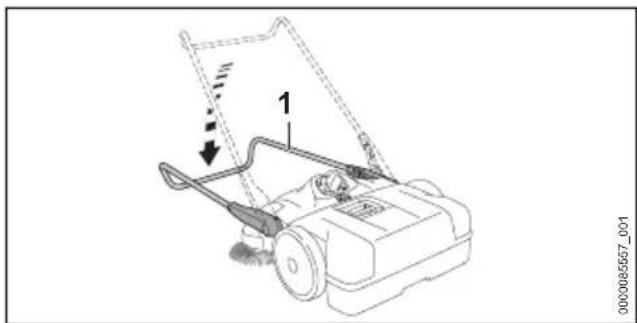
When storing the sweeper:
▶ Clean the sweeper, 20.1.
natural_image
Line drawing of a lawn mower with a handle and blade, showing mechanical components and motion arrows (no text or symbols)▶ Fold down the handle (1).
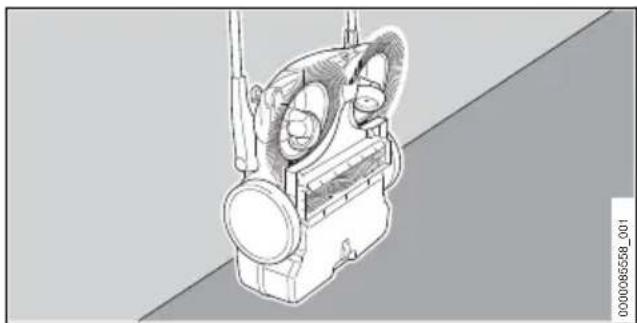
natural_image
Technical line drawing of a mechanical device with no visible text or symbols▶ Set up the sweeper vertically.
- Secure and position the sweeper to prevent turnover, impact and damage.
- Secure the handle against unintentional folding down.
- Store the sweeper indoors in a dry and secure location, out of the reach of children and other unauthorized persons.
19.2 Battery

WARNING
■ To reduce the risk of a short circuit, which could lead to electric shock, fire and explosion, never store the battery with small metal objects capable of conducting electricity (e.g., paper clips, nails, coins, keys), 6. If the battery is damp or wet, allow it to dry thoroughly before storing, 6.

WARNING
■ Extreme temperatures can damage the battery and may also cause the battery to generate heat, rupture, leak, ignite or explode, resulting in severe or fatal personal injury or property damage. Never charge, use or store the battery outside the specified ambient temperature limits, 23.3.
To properly store the battery:
- Remove the battery from the sweeper.
- When storing the battery, maintain a charge of 40 % to 60 % for STIHL AP series batteries (2 green LEDs).
▶ If storing the battery in the charger, disconnect the charger from the outlet.
▶ Make sure the battery is dry and store it indoors in a dry and secure location. - Keep it out of the reach of children and other unauthorized persons.
- Protect the battery against dampness and corrosive agents such as garden chemicals and de-icing salts.
- Protect the battery from exposure to conductive liquids such as salt water.
For maximum battery life, store the battery at an ambient temperature between 50 °F and 68 °F (10 °C and 20 °C) with a charge between 40 % and 60 % for STIHL AP series batteries (2 green LEDs).
- Do not leave spare batteries unused. Use them in rotation.
NOTICE
■ A battery that is not stored properly may experience deep discharge, which can result in permanent damage. To avoid deep discharge:
- Remove the battery from the sweeper after finishing work.
- For maximum battery life, store the battery with a charge between 40% and 60% for STIHL AP series batteries (2 green LEDs).
- If storing the battery in the charger, disconnect the charger from the outlet.
- For maximum battery life, store the battery at an ambient temperature between 50^ and 68^ (10 °C and 20 °C).
20 Cleaning
20.1 Cleaning the Sweeper and Battery

WARNING
■ To reduce the risk of personal injury from unintended activation, remove the battery before carrying out any cleaning work, ☐7.1.
To clean the sweeper and battery:
- Clean the sweeper's polymer components with a slightly dampened cloth. Do not use detergents or solvents. They may damage the polymer components.
▶ Do not use a pressure washer to clean the sweeper or otherwise spray it with water or other liquids. - Keep the battery housing and guides free from foreign matter and clean as necessary with a soft brush or soft, dry cloth.
20.2 Cleaning the Side Brushes and Sweeping Roller

WARNING
■ To reduce the risk of personal injury from unintended activation, remove the battery before carrying out any cleaning work, ☐.1.
To clean the side brushes and sweeping roller:
▶ If the side brushes or the sweeping roller are blocked: Carefully remove coiled or jammed material.
- Clean the side brushes and sweeping roller with a damp cloth.
English 21 Inspection and Maintenance
20.3 Cleaning the Air Filter

WARNING
■ To reduce the risk of personal injury from unintended activation, remove the battery before carrying out any cleaning work, ☐7.1.

WARNING
■ When emptying the container, cleaning the air filter or foam inserts, wear appropriate respiratory protection approved by USA: NIOSH or Canada: PHAC to reduce inhalation hazards.
To clean the air filter:
▶ Remove the container, 16.3.
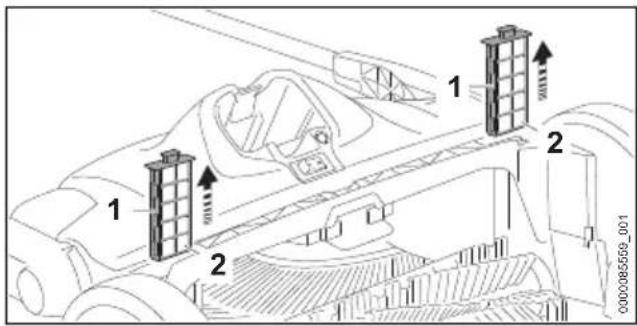
▶ Pull out the air filters (1).
▶ Remove the foam inserts (2).
▶ Rinse the foam inserts under running water.
▶ Allow the foam inserts to air dry.
▶ If the air filter is damaged, replace it.
- Insert the foam inserts into the air filters.
- Insert the air filters into the sweeper.
21 Inspection and Maintenance
21.1 Inspection and Maintenance Chart
| The following maintenance intervals are examples and apply for normal operating conditions. Actual use and your experience will determine the frequency of required inspection and maintenance. | Before starting work | After finishing work or daily | Every 50 working hours | Relevant Chapter | |
| Complete Machine Visual inspection X | |||||
| Clean | X | 20 | |||
| Controls Check function and condition | X | 15.1 | |||
| Gearbox Lubricating | X | 15.1 | |||
| Air filter and foam inserts Clean | X | 20.3 | |||
21.2 Straightening Bristles
To straighten bent bristles:
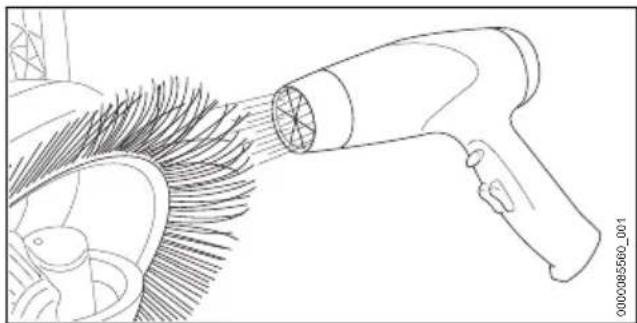
natural_image
Line drawing of a hair dryer emitting powder from a fan (no text or symbols)▶ Gently heat the bristles with a hot air blower (e.g. hair dryer) and straighten them.
NOTICE
■ Excessive temperatures, excessively hot air or open flames will permanently damage the bristles.
- Use a hot air blower to align the bristles.
21.3 Lubricating the Gearbox
To lubricate the gearbox:
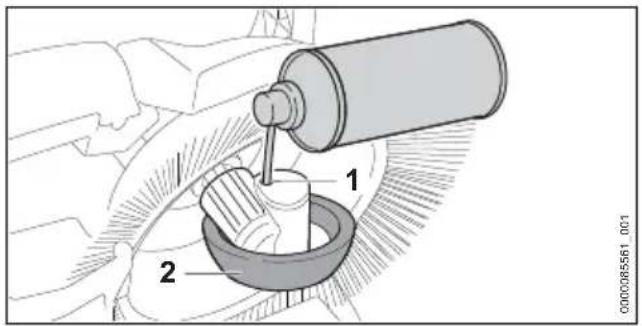
▶ Set up the sweeper vertically.
▶ Spray an alcohol-based silicone spray through the opening (1) in the housing of the wheel (2).
22 Troubleshooting Guide
22.1 Sweeper and Battery
Always switch off the sweeper and remove the battery before carrying out any inspection, cleaning or maintenance.
| Condition LEDs on Battery | Cause Remedy | |
| The sweeper does not start when switched on. | No electrical contact between sweeper and battery. | Remove the battery, 13.2.Visually check the electrical contacts in the bat-tery compartment and on the battery.Reinsert the battery, 13.1. |
| 1 LED flashes green. | Battery has low charge. | |
| 1 LED glows red. | Battery too hot / too cold. | |
| 4 LEDs flash red. | Malfunction in battery. | |
| 3 LEDs glow red. | Sweeper too hot. | |
| 3 LEDs flash red. | Malfunction in sweeper. | |
| Sweeper cuts out during operation. | 1 LED glows red. | Battery too hot / too cold. |
| 3 LEDs glow | red. | Sweeper too hot. |
| The overload | protection has released. | |
| Run-time is too short. | Battery not fully charged. | Charge the battery, 9. |
| Useful life of | battery has been reached or exceeded. | |
| Battery is not being charged even though LED on charger glows green. | 1 LED glows red. | Battery too hot / too cold. |
| The sweeper is hard to push. | The side brushes or the sweeping rollers are blocked. | Remove the battery, 13.2.Remove jammed material, 20.2. |
| The pressure of | the side brushes is too high. | |
| The gearbox is | stiff. | |
| Dirt is leaking from the side. | The container is full. | Remove the battery, 13.2.Empty the container. |
| The sweeping performance is too low. | The container is full or the dirt in the container is too heavy. | Remove the battery, 13.2.Empty the container. |
| The side brushes | or the sweeping roller are worn out. | |
| Battery cannot be found with the STIHL connected App. | Bluetooth® interface at the bat-tery or at your mobile device is not turned on. | |
| Distance | between the bat-tery and your mobile device is too large. |
23 Specifications
23.1 STIHL KGA 770.0
- Approved battery type: STIHL AP series
- Theoretical sweeping performance: 34983 sq. ft./h (3250 m²/h)
- Container capacity: 10.57 gal (40 l)
- Weight ( m_min ) without battery: 37.5 lbs (16,9 kg)
– Maximum incline: 100 % (45°)
For technical information regarding the STIHL AP series batteries, see the product information accompanying your battery.
For technical information regarding the STIHL AL 101, 301, 301-4 and 501 series chargers, see
the product information accompanying your charger.
Batteries, chargers and other accessories sold separately. Contact your authorized STIHL servicing dealer for pricing and availability.
23.2 STIHL AP Series Battery
Approved charger types: STIHL AL 101, AL 301, AL 301-4, AL 501.
– Battery technology: Lithium-Ion
- Voltage: 36 V
- Rated capacity in Ah^1 : See rating plate
- Stored energy in Wh ^2 : See rating plate
– Weight in kg: See rating plate
23 Specifications English
- Bluetooth® interface (only for batteries with

- Data transmission protocol: Bluetooth® 5.1. The mobile receiving devices must be compatible with Bluetooth® Low Energy 5.0 and support the Generic Access Profile (GAP).
– Frequency band: ISM band 2.4 GHz - Radiated maximum transmission power: 1 mW
- Bluetooth® signal range: maximum 33 ft. (10 m). The signal range may vary depending on ambient conditions and the performance of the designated receiving device, i.e., smartphone or tablet. The Bluetooth® range may be significantly limited when the signal is transmitted through metallic barriers (e.g., walls, shelving units, etc.) or near strong electromagnetic fields.
- Minimum mobile terminal device (e.g., tablet, smartphone) system requirements: Android or iOS (in current version or higher)
For a complete list of approximate charging times, see www.stihl.com/charging-times.
For a complete list of approximate battery run-times, see www.stihl.com/battery-life.
Bluetooth®
The Bluetooth ^® word mark and logos are registered trademarks owned by Bluetooth SIG, Inc. These word mark/logos are used by STIHL under license.
If the battery is equipped with a Bluetooth ^® interface, local operating restrictions (in aircraft or hospitals, for example) must be observed.
Other Trademarks
Apple and the Apple logo are trademarks of Apple Inc., registered in the U.S. and other countries.
App Store is a service mark of Apple Inc.
Google Play and the Google Play logo are trademarks of Google Inc.
23.3 Ambient Temperature Limits

WARNING
■ Extreme temperatures can damage the battery and may also cause it to generate heat, rupture, leak, ignite or explode, resulting in severe or fatal personal injury or property damage. Never charge, use or store the battery outside the ambient temperature limits specified below.
- Do not charge the battery below - 4 °F (-20 °C) or above 122 °F (50 °C).
- Do not use the sweeper or battery below - 4 °F (- 20 °C) or above 122 °F (50 °C).
- Do not store the sweeper or battery below - 4 °F (- 20 °C) or above 158 °F (70 °C).
23.4 Ambient Temperature Recommendations
For optimum performance, observe the following ambient temperature ranges for the sweeper and battery:
- Charging: 41 °F to 104 °F (5 °C to 40 °C)
- Use: 14 °F to 104 °F (- 10 °C to 40 °C)
- Storage: - 4 °F to 122 °F (- 20 °C to 50 °C)
Charging, using or storing the battery outside the recommended ambient temperature ranges may reduce performance.
If the battery became damp or wet during operation, allow it to dry at least 48 hours at temperatures between 59 °F (15 °C) and 122 °F (50 °C) and relative humidity below 70 % before charging or storing. Higher humidity can extend the drying time.
23.5 Symbols on the Sweeper and Battery
| Symbol Explanation | |
| Ah Ampere hour | |
| V Volt | |
| Wh Watt hour | |
| m Weight | |
| IPX3 Protection against spraying water. | |
| DC Direct current | |

Certification/listing mark of MET
English 24 Replacement Parts and Equipment
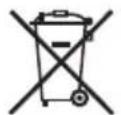
STIHL products must not be disposed of in the household trash, but only in accordance with local, state and federal laws and regulations and as provided in this manual, 25.
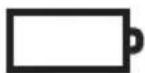
STIHL AP
This product is designed for use with a STIHL battery. Permissible batteries are listed in this User Manual.
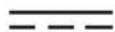
Direct current

Number of cells and stored energy according to cell manufacturer's specification. Usable energy will be less.

The RBRC seal indicates that STIHL has prepaid for battery recycling.
Manufacturer Code

The contact pressure is high.
The contact pressure is low.
Turn in this direction to increase the contact pressure.
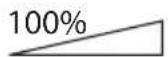
Observe the maximum incline.

The battery is equipped with Bluetooth® and can be connected with the STIHL connected App.
23.6 Engineering Improvements
STIHL's philosophy is to continually improve all of its products. As a result, engineering changes and improvements are made from time to time. Therefore, some changes, modifications and improvements may not be covered in this manual. If the operating characteristics or the appearance of your machine differs from those described in this manual, please contact your STIHL dealer or the STIHL distributor in your area for assistance.
23.7 Compliance Statement
USA FCC 15 Compliance Statement
This device complies with part 15 of the FCC Rules.
Operation is subject to the following two conditions:
1) This device may not cause harmful interference, and
2) this device must accept any interference received, including interference that may cause undesired operation.
Note: This equipment has been tested and found to comply with the limits for a Class B digital device, pursuant to part 15 of the FCC Rules. These limits are designed to provide reasonable protection against harmful interference in a residential installation. This equipment generates, uses and can radiate radio frequency energy and, if not installed and used in accordance with the instructions, may cause harmful interference to radio communications. However, there is no guarantee that interference will not occur in a particular installation.
If this equipment does cause harmful interference to radio or television reception, which can be determined by turning the equipment off and on, the user is encouraged to try to correct the interference by one or more of the following measures:
– reorient or relocate the receiving antenna,
– increase the separation between the equipment and receiver,
- connect the equipment to an outlet on a circuit different from that to which the receiver is connected,
- consult an authorized STIHL servicing dealer or an experienced radio/TV technician for help.
Do not change or modify this product in any way unless specifically allowed in this manual, since this could void your authority to operate it.
Canada EMC Compliance Statement for Power Tool and Charger
This Class B digital apparatus complies with Canadian ICES-003.
24 Replacement Parts and Equipment
24.1 Genuine STIHL Replacement Parts
STIHL recommends the use of genuine STIHL replacement parts. Genuine STIHL parts can be identified by the STIHL part number, the STIHL logo and, in some cases, by the STIHL parts symbol. The symbol may appear alone on small parts.
25 Disposal
25.1 Disposal of the Power Tool
STIHL products must not be thrown in household trash or disposed of except as outlined in this manual.
▶ Take the power tool, accessories and packaging to an approved disposal site for environmentally friendly recycling.
- Contact your authorized STIHL servicing dealer for the latest information on disposal and recycling.
25.2 Battery Recycling

WARNING
■ Handle discharged/depleted batteries carefully. Even if believed to be discharged, lithium ion batteries may never totally discharge and still may deliver a dangerous short circuit current. If damaged or exposed to extreme temperatures, they may leak, generate heat, catch fire or explode.
- Observe all federal, state and local disposal rules and regulations.
- Contact your authorized STIHL servicing dealer for the latest information on waste disposal.
▶ Recycle depleted batteries promptly.
- Keep batteries away from children. Do not disassemble and do not dispose of in fire.

STIHL is committed to the development of products that are environmentally responsible. This commitment does not stop when the product leaves the authorized STIHL servicing dealer. STIHL has partnered with the RBRC (Rechargeable Battery Recycling Corporation) to promote the collection and recycling of spent STIHL lithium ion batteries in the United States and Canada.
The RBRC seal indicates that STIHL has prepaid for battery recycling. RBRC has a toll free phone number (1-800-822-8837) that connects you to information on battery recycling locations and information on battery disposal bans or restrictions in your area. You can also return your spent battery to any authorized STIHL servicing dealer for recycling free of charge.
26 Limited Warranty
26.1 Limited Warranty Policy
USA STIHL Incorporated
This product is sold subject to the STIHL Incorporated Limited Warranty Policy, available at www.stihlusa.com/warranty.html. It can also be obtained from your authorized STIHL dealer or by calling 1-800-GO-STIHL (1-800-467-8445).
Canada STIHL Limited
This product is sold subject to the STIHL Incorporated Limited Warranty Policy, available at www.stihl.ca/en/warranty.html (English) www.stihl.ca/fr/garantie.html (French). It can also be obtained from your authorized STIHL dealer or by calling 519-681-3000.
27 Trademarks
27.1 Registered Trademarks
STIHL® FARM BOSS®
STIHL iCademy®
G. MAGNUM®
STIHL Cutquik® MasterWrench Service®
ROCK BOSS ^® MotoMix ^®
KISS MY AXE ^® OILOMATIC ^®
AutoCut ^® STIHL DUROMATIC ^®
YARD BOSS® STIHL Quickstop®
STIHL ROLLO- STIHL WOOD BOSS®
WOOD BOSS® TIMBERSPORTS®
DIRT BOSS ^® iMOW ^®


The color combination orange-grey (U. S. Registrations 2,821,860; 3,010,057; 3,010,058; 3,400,477; and 3,400,476)

27.2 Common Law Trademarks
4-MIX™ STIHL Injection™
BioPlus™ STIHL PowerSweep™
Easy2Start™ Team STIHL™
EasySpool™ HEXA™
ElastoStart™ IntelliCarb™
Ematic™ Master Control Lever™
STIHL Precision Ser- STIHL OUTFITTERS™ ies™
FixCut™ STIHL PICCO™
Micro™ TrimCut™
Pro Mark™ STIHL M-Tronic™
TapAction™ On A Single Charge™
Quiet Line™ STIHL PolyCut™
STIHL Moto4 ^TM STIHL RAPID ^TM
STIHL SuperCut™
This listing of trademarks is subject to change.
Any unauthorized use of these trademarks without the express written consent of ANDREAS STIHL AG & Co. KG, Waiblingen is strictly prohibited.
28 Addresses
28.1
USA STIHL Incorporated
STIHL Incorporated
536 Viking Drive
P.O. Box 2015
Virginia Beach, VA
23452-2015
Canada STIHL Limited
STIHL Limited
1515 Sise Road
Box 5666
London, ON. N6A 4L6
CANADA
Contenido
natural_image
Illustration of a person holding a long rod or bar, wearing gloves (no text or symbols)ADVERTENCIA
natural_image
Illustration of a person using a walking cane, shown in two sequential frames (no text or symbols)natural_image
Line drawing of a person using a lawn mower on tiled flooring (no text or symbols)natural_image
Line drawing of a lawn mower with a handle and blade, showing motion direction (no text or symbols)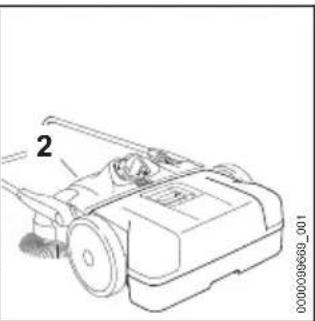
natural_image
Technical line drawing of a mechanical device with labeled component '2' (no text or symbols beyond label)natural_image
Line drawing of a person standing beside a laptop and backpack (no text or symbols)natural_image
Technical line drawing of a mechanical device inside a housing (no text or symbols)natural_image
Technical line drawing of a lawn mower with labeled component (no text or symbols)natural_image
Technical line drawing of a mechanical device with no visible text or symbolsnatural_image
Line drawing of a hair dryer emitting powder from a fan (no text or symbols)CONSERVEZ CE MANUEL!

natural_image
Illustration of a person holding a long rod or cable, wearing gloves and winter clothing (no text or symbols)▲ AVERTISSEMENT
natural_image
Illustration of a person using a walking cane, shown in two sequential frames (no text or symbols)natural_image
Diagram of a person working on a vehicle with directional arrows indicating movement (no text or symbols)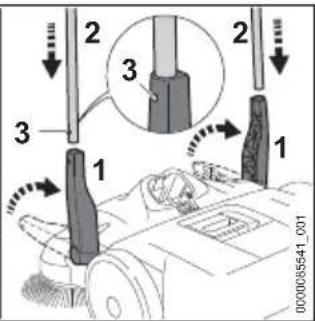
natural_image
Line drawing of a car seatbelt device with no visible text or symbolsnatural_image
Line drawing of a person using a lawn mower on tiled ground, with no text or symbols presentnatural_image
Line drawing of a lawn mower with a lever and handle, showing motion direction (no text or symbols)▶ Rabattez le guidon (1).
natural_image
Technical line drawing of a mechanical device with internal components and mounting brackets (no text or symbols)natural_image
Line drawing of a hair dryer emitting powder from a fan (no text or symbols)MasterWrench Service®
MotoMix®
OIOMATIC®
STIHL DUROMATIC®
STIHL Quickstop®
STIHL WOOD BOSS®
TIMBERSPORTS®
iMOW®
Use of this sweeper can generate dust containing chemicals known to the State of California to cause cancer, birth defects or other reproductive harm.

WARNING
This sweeper and battery contain chemicals known to the State of California to cause cancer, birth defects or other reproductive harm.

ADVERTENCIA
0458-769-8801-A
- ADVERTENCIA
- Introduction
- SAVE THIS MANUAL!
- Guide to Using this Manual
- Signal Words
- DANGER
- WARNING
- NOTICE
- Symbols in Text
- Main Parts
- Sweeper and Battery
- Safety Symbols on the Products
- Sweeper
- Battery
- IMPORTANT SAFETY INSTRUCTIONS
- General Safety Warnings and Instructions
- READ ALL INSTRUCTIONS BEFORE USING THE SWEEPER
- Intended Use
- Operator
- IMPORTANT SAFETY INSTRUCTIONS English
- Personal Protective Equipment
- Sweeper
- English 5 IMPORTANT SAFETY INSTRUCTIONS
- Using the Sweeper
- Before Operation
- Holding and Controlling the Sweeper
- Working Conditions
- USA Working Conditions
- Canada Working Conditions
- Operating Instructions
- Battery Safety English
- Battery Safety
- Warnings and Instructions
- Maintenance, Repair and Storage
- Warnings and Instructions
- Before Starting Work English
- Before Starting Work
- Preparing the Sweeper for Operation
- Connecting to the STIHL connected App
- Charging the Battery
- Setting up the Charger
- Charging
- LED Diagnostics
- STIHL AP Battery
- Battery Status
- Sweeper Status
- Charge Status
- Bluetooth® Radio Interface English
- Bluetooth® Radio Interface
- Turning the Bluetooth® Interface On
- Turning the Bluetooth® Interface Off
- Resetting the Battery to Factory Settings via Bluetooth® (AP 300 S and AP 500 S only)
- Assembling the Sweeper
- Mounting the Handle
- Inserting and Removing the Battery
- Inserting the Battery
- Removing the Battery
- Switching the Sweeper On and Off
- Switching On
- Switching Off
- Checking the Controls
- Testing the Controls
- During Operation
- Adjusting the Height of the Side Brushes
- Sweeping
- Emptying the Container
- Resetting the Overload Protection
- After Finishing Work
- Preparing for Transportation or Storage
- Transporting
- Sweeper
- Battery
- Storing
- Storing the Sweeper
- Battery
- Cleaning
- Cleaning the Sweeper and Battery
- Cleaning the Side Brushes and Sweeping Roller
- Cleaning the Air Filter
- Inspection and Maintenance
- Inspection and Maintenance Chart
- Straightening Bristles
- Lubricating the Gearbox
- Troubleshooting Guide
- Sweeper and Battery
- Specifications
- STIHL KGA 770.0
- STIHL AP Series Battery
- Specifications English
- Bluetooth®
- Other Trademarks
- Ambient Temperature Limits
- Ambient Temperature Recommendations
- Symbols on the Sweeper and Battery
- English 24 Replacement Parts and Equipment
- Engineering Improvements
- Compliance Statement
- Replacement Parts and Equipment
- Genuine STIHL Replacement Parts
- Disposal
- Disposal of the Power Tool
- Battery Recycling
- Limited Warranty
- Limited Warranty Policy
- Trademarks
- Registered Trademarks
- Common Law Trademarks
- Addresses
- Contenido
- CONSERVEZ CE MANUEL!
- ▲ AVERTISSEMENT
Brand : STIHL
Model : KGA 770
Category : Vacuum Cleaner