
CBT3518FWUA - Fridge CANDY - Free user manual and instructions
Find the device manual for free CBT3518FWUA CANDY in PDF.


User questions about CBT3518FWUA CANDY
0 question about this device. Answer the ones you know or ask your own.
Ask a new question about this device
Download the instructions for your Fridge in PDF format for free! Find your manual CBT3518FWUA - CANDY and take your electronic device back in hand. On this page are published all the documents necessary for the use of your device. CBT3518FWUA by CANDY.
USER MANUAL CBT3518FWUA CANDY
Discover extra contents and create your inventory list


Summary
PRODUCT DESCRIPTION 2
USE 3
Use 3
Display StandBy 4
Mode 4
Fridge Temp Setting 4
Freezer Temp Setting 4
Customized temperature 5
Super Cool function 5
Super Freeze function 6
Eco mode. 6
Holiday function. 7
Defrosting. 7
Demo mode 7
Error codes. 7
In app pairing procedure. 8
Wi-Fi Use 9
TROUBLESHOOTING. 10
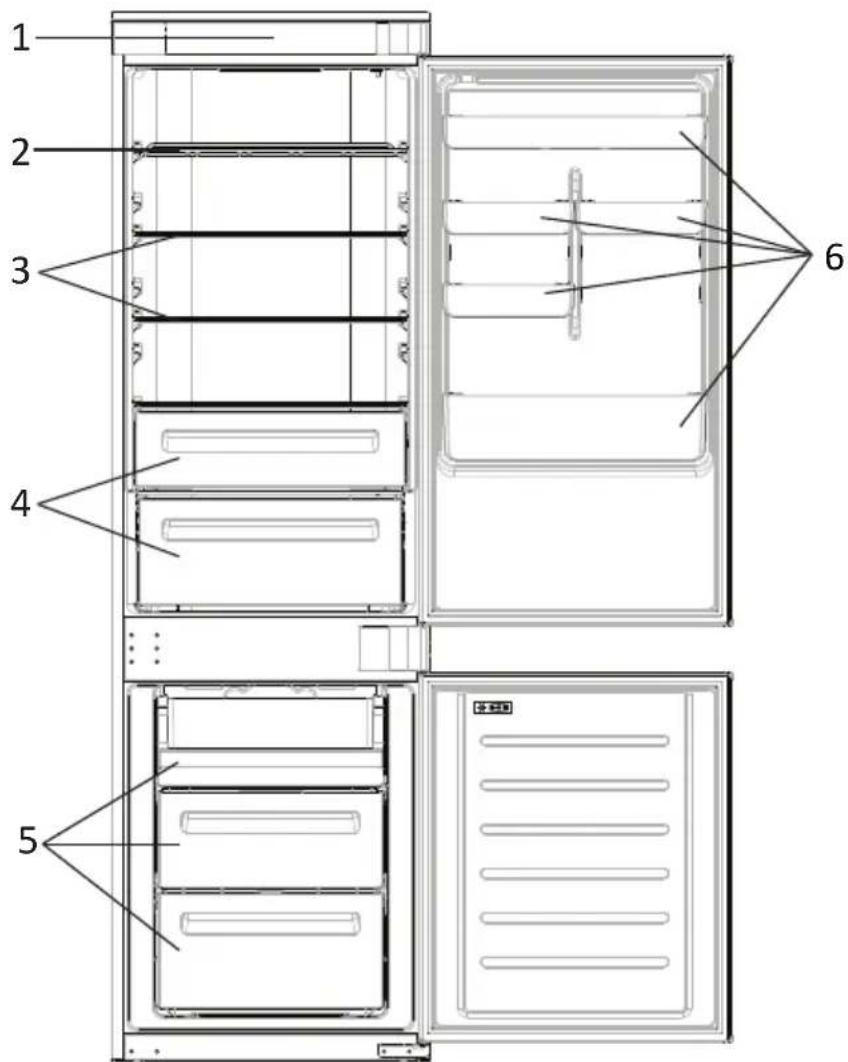
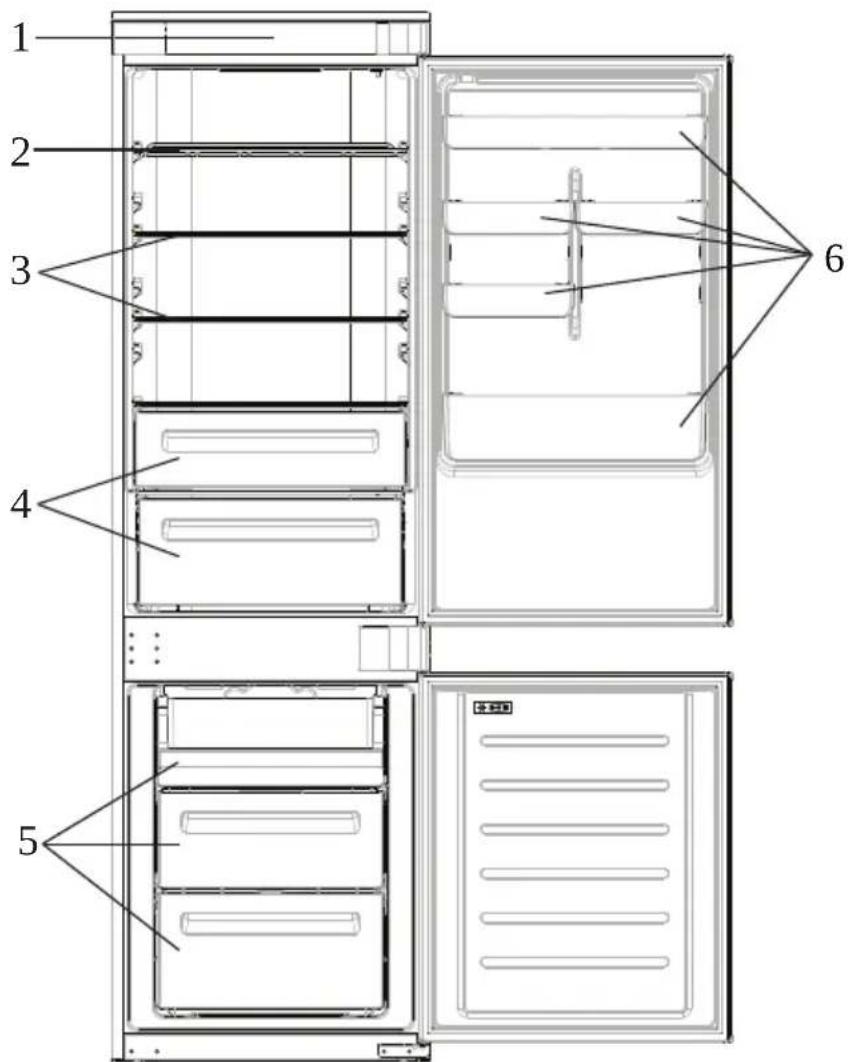
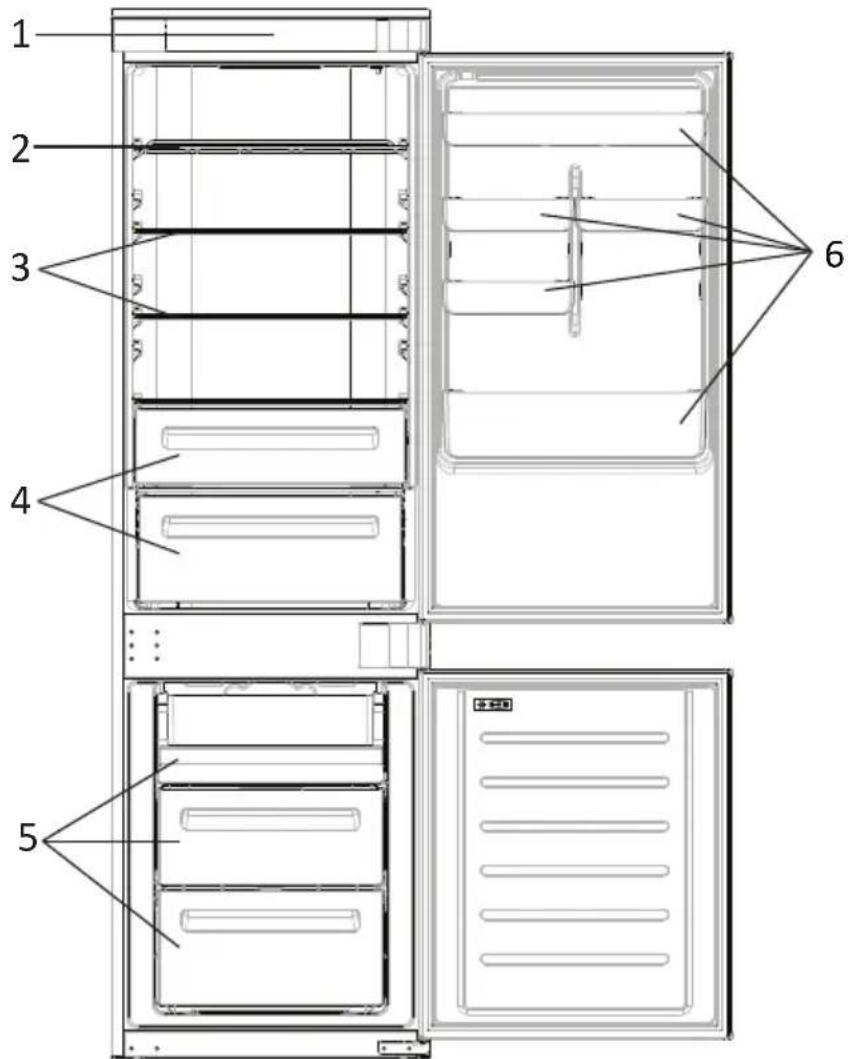
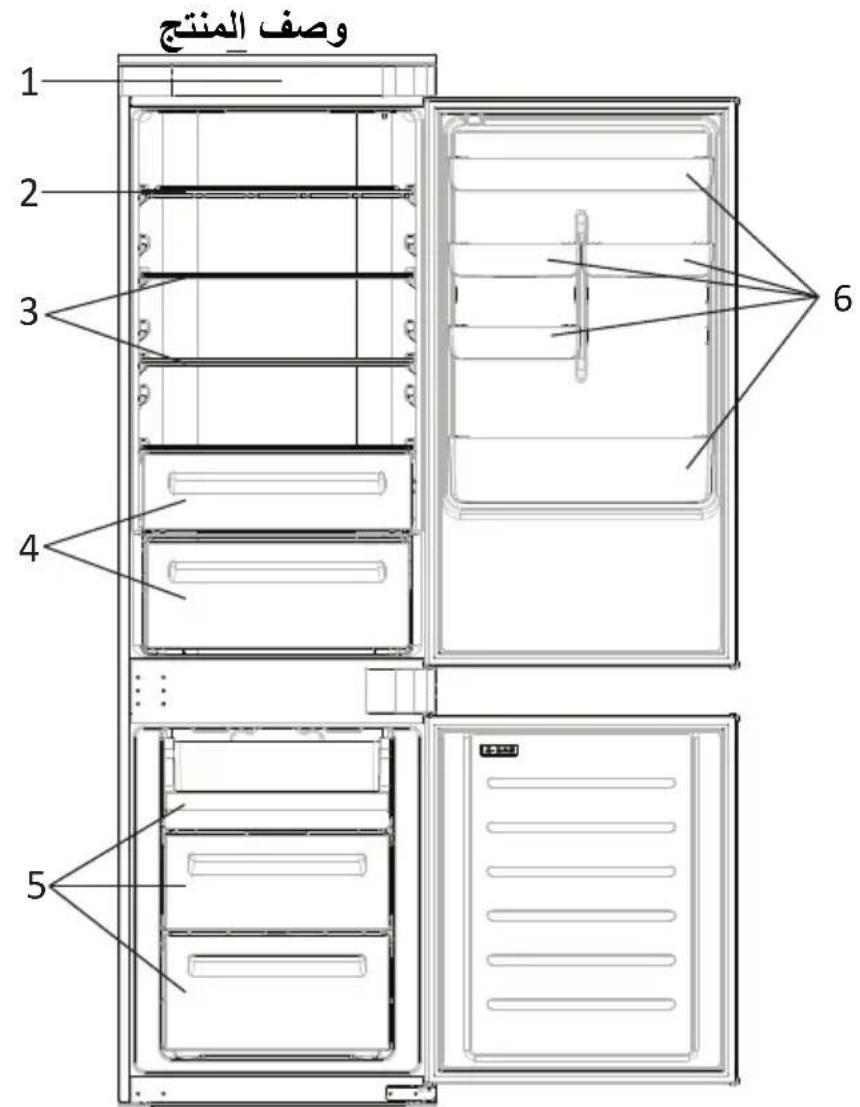
PRODUCT DESCRIPTION
- Control Panel
- Wine Rack
- Shelves
- Crisper
- Freezer Boxes
-
Door Rack
-
The most energy-saving configuration requires drawers, food box and shelves to be positioned in the product and fan to be off, please refer to the above pictures.
** The pictures above are only for reference. The actual configuration will depend on the physical product or statement by the distributor.
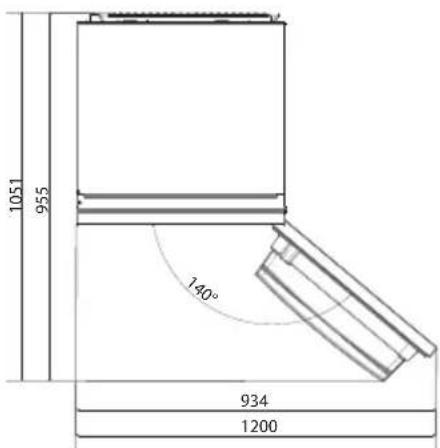
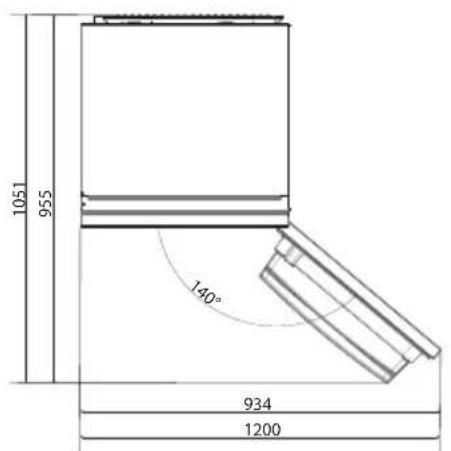
Space requirements
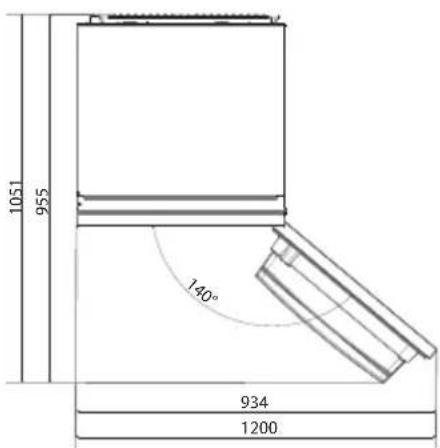
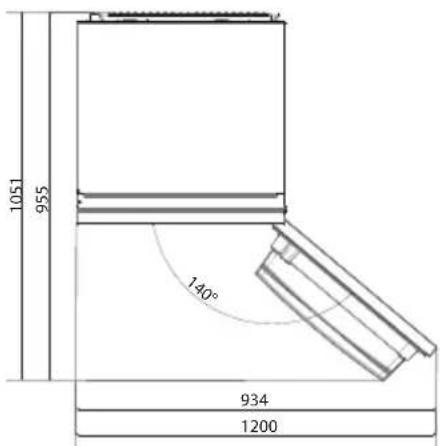
The unit's door must be able to fully open as shown. Spare enough space for convenient opening of the doors and drawers.
Keep a distance of at least 50~mm between the side walls of the product and adjacent parts.
540 mm Cabinet: Width: 934 mm
Depth: 955 mm
700 mm Cabinet: Width: 1200 mm
Depth: 1051 mm
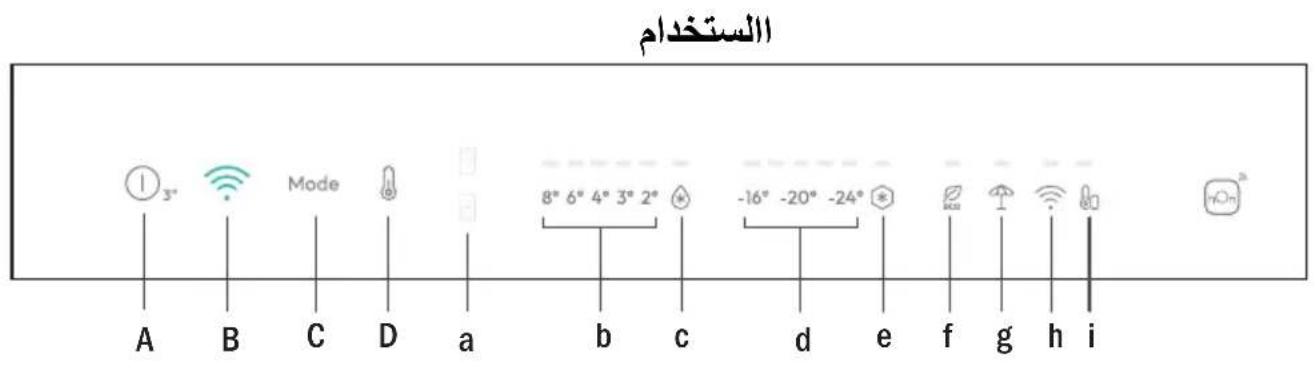
USE
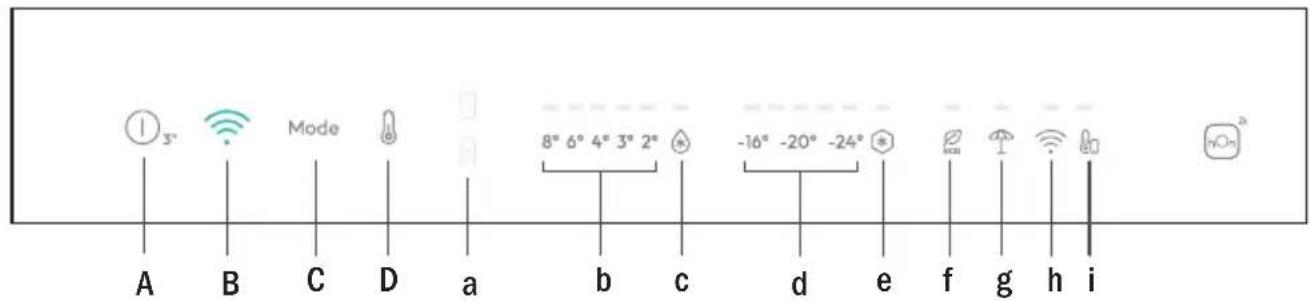
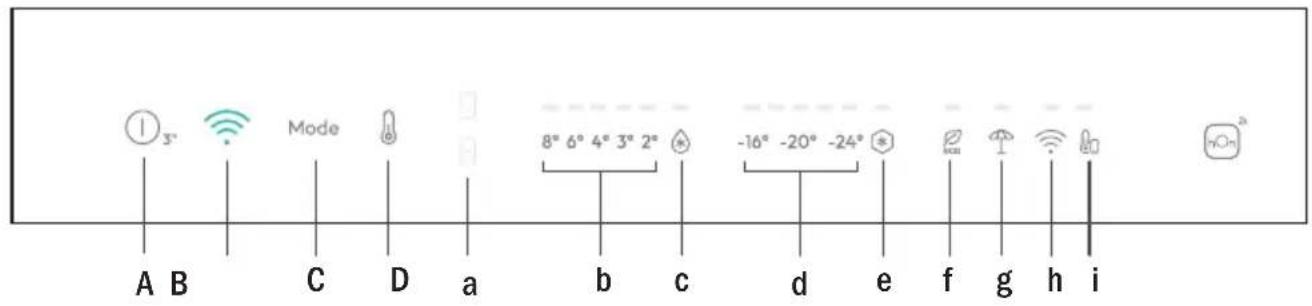
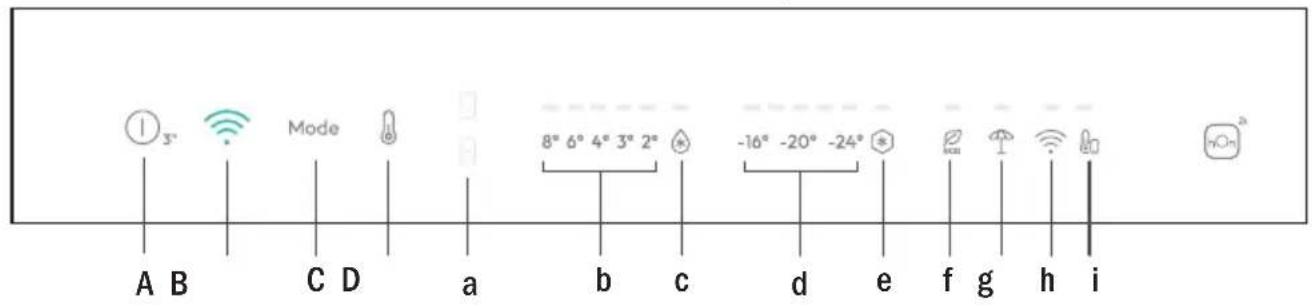
A. ON/OFF key, push for 3 seconds. Appliance turns on with a long acoustic feedback (1sec)
B. Wi-Fi key, used to connect the appliance
C. Mode key, used to select between Fridge, Freezer, Eco and Holiday
D. TEMP key, used to select between temperatures levels (also Super Cool and Super Freeze)
a. Fridge/Freezer area icon, shows which compartment of the appliance is selected
b. Fridge temperature levels, shows which is the selected temperature
c. Super Cool icon, shows if the Super Cool function is activated
d. Freezer temperature levels, shows which is the selected temperature in the freezer
e. Super Freeze icon, shows if the Super Freeze function is activated
f. Eco mode icon, shows whether the Eco mode is activated
g. Holiday function icon, shows whether the holiday function is activated
h. Wi-Fi icon, shows whether the Wi-Fi is working and the appliance is connected
i. Customized temperature icon, shows if the temperature has been selected by app
Use • Plug in the appliance and it automatically turns on with a long acoustic feedback (1 sec) All LEDs turn on (1 sec), then the Fridge temperature LED and Freezer LED turn on fixed.
The temperature will automatically set at 4^ in the fridge and -18^ in the freezer.
NOTE: wait at least 2/3 hours before putting food in the appliance, so as to ensure the temperature inside the fridge.
In case of power loss, the last cooling level set will be restored.
- To restore the default setting, keep pressed the door switch inside the refrigerator and simultaneously press the ON/OFF key for 5 seconds.
- Under the normal operating condition (in spring and autumn), it is recommended to set the temperature at 4^ . In summer when the ambient temperature is high, it is recommended to set temperature at 6 8^ , so as to guarantee the fridge and freezer temperatures and reduce the refrigerator continuous running time; and in winter when the ambient temperature is low, it is recommended to set temperature at 3 4^ to avoid frequent start/stop of the refrigerator.
Display stand by mode management
- If the door is closed -> display in standby (all LEDs switched off)
- If the door is open -> current fridge temperature LED and freezer temperature LED are turned on (fixed).
- ECO mode LED + Holiday mode LED are turned on (fixed) if previously selected.
- Display is ready to receive inputs (no need to activate it by touch).
Mode
The mode button is used to switch between the different modes.
The related LED turns on and selection is immediately confirmed (no blink).
Short acoustic feedback confirms the selection
Fridge temperature setting
When display panel is on, select the "fridge temperature setting" pushing the MODE button.
The fridge area LED turns on. Push the "TEMP" button until the desired temperature is set.
The temperature value changes in this way: 8^ 6^ 4^ 3^ 2^ super cooling >8^ ...
The related LED turns on and selection is immediately confirmed (no blink).
Short acoustic feedback confirms the selection.
Freezer temperature setting
When display panel is on, select the "freeze temperature setting" pushing the MODE button. The freezer area LED turns on.
Push the "TEMP" button until the desired temperature is set.
The temperature value changes in this way: -16^ -18^ -20^ -22^ -24^ Super freezing- > - 16^ ...
The related LED turns on and selection is immediately confirmed (no blink).
Short acoustic feedback confirms the selection.
Note
Switching from fridge to freezer areas and vice versa is immediate when the user pushes the MODE button, and the selection is immediately active.
Temperature LEDs do not blink.
Customized temperature
From the app it is possible to customize the temperature for both fridge and freezer. The temperature can be set with 1^ sensitivity. It is possible to select a temperature from 2^ to 8^ in the fridge, and from -16^ to -24^ in the freezer.
When the temperature is selected by the app, the customized temperature icon turns on, while all the temperature LED lights of the affected compartment are turned off (i.e. if the refrigerator temperature is selected from the app, LEDs from 2^ to 8^ are turned off. If the freezer temperature is selected from the app, LEDs from -16^ to -24^ are turned off).
If only a single area (freezer or fridge) has the customized temperature, the temperature selection of the other area is not changed and the LED light of the selected temperature of that area remains on. An acoustic signal is made every time the temperature is changed.
Long acoustic feedback (1 sec) confirms connection is completed.
Super Cool function
It is suggested to switch on the Super Cool function if a large quantity of food should be stored (for example after the purchase). The Super-Cool function accelerates the cooling of fresh food and protects the goods already stored from undesirable warming. When the function is activated, the temperature of the fridge is automatically set at 2^ .
How to use the Super Cool function:
- The function can be activated by long pressing TEMP key to select the fridge compartment, and then quick pressing the TEMP key until the Super Cool icon led is turned on, or it can be turned on from the app. When the function is activated, the Super Cool LED is always ON.
- To exit the Super Cool function, press the TEMP key or turn it off from the app.
- The Super Cool function automatically ends when the function has lasted for more than 12 hours.
- When the Super Cool ends, the icon of the control panel is switched off and the previously set cooling level is restored.
Note: Super Cool and Super Freeze function cannot be activated simultaneously.
Super Freeze function
The super freezing function accelerates the freezing of fresh food and protects the goods already stored from undesirable warming. If a large amount of food has to be freeze, it is recommended to set the Super-Freeze function on 24h before the usage. When the function is activated, the temperature is automatically set at -28^ .
How to use the Super Freeze function:
- The function can be launched by long pressing TEMP key to select the freezer compartment, and then quick pressing TEMP key until the Super Freeze icon led is turned on, or it can be turned on from the app. When the function is activated, the Super Freeze LED is always ON.
- To exit the Super Freeze function, press the TEMP key or turn it off from the app.
- The Super Freeze function automatically ends when the function has lasted for more than 50 hours.
- When the Super Freeze ends, the icon of the control panel is switched off and the previously set freezing level is restored.
Note: Super Cool and Super Freeze function cannot be activated simultaneously.
Eco mode
The Eco mode can be activated to optimize the performance of the appliance, whereas obtaining the best food storage. The Eco mode will automatically set the temperature at 4^ in fridge and at -18^ in the freezer.
How to use the Eco mode:
- The function can be activated from control panel by pressing the "mode" key until the Eco mode icon turns on (an acoustic signal confirms the selection), or by selecting the function from the app. When the function is activated, the Eco mode icon is always ON.
- To exit the Eco turn it off from the app or chose another function from the control panel.
- When the Eco Mode ends, the icon of the control panel is switched off and the previously set cooling levels are restored.
Holiday function
The Holiday function can be used to reduce the energy consumption of the appliance, when it is not used regularly. When the function is on, the LED lights will be off (even if the door is open) and the fridge will work on low power consumption mode, whereas the freezer will keep working normally.
How to use the Holiday function:
- The function can be activated from control panel by pressing the "mode" key until the Holiday icon turns on (an acoustic signal confirms the selection), or by selecting the function from the app. When the function is activated, the Holiday icon is always ON.
- To exit the Holiday function, turn it off from the app or chose another function from the control panel.
- When the Holiday function ends, the icon of the control panel is switched off and the previously set cooling levels are restored.
Defrosting
The defrosting of the refrigerator and freezer compartment are done automatically: no manual operation is needed.
Slider
Near the vegetable basket there is a slider that allows you to adjust the humidity inside it: moving it to the right decreases the humidity, moving it to the left increases the humidity.
Demo mode
To enter the demo mode, with the display unlocked, keep pressed the Wi-Fi key (B) and press the MODE key (C) 5 times within 5 seconds. To exit the demo mode, perform the same operation or power off the refrigerator.
Error Codes
Communication error
[-16^; - 18^; - 20^; - 22^; - 24^] Lights in the fridge turn on sequentially, it means there has been a communication error between the main control board and the display board. Please, contact the technical assistance to help solve the problem
Fan
[-16^; -20^; -22^; -24^] lights in the fridge flashing simultaneously if the fan is not working properly. Please, contact the technical assistance to help solve the problem
WI-FI USE
In app pairing procedure
Step 1
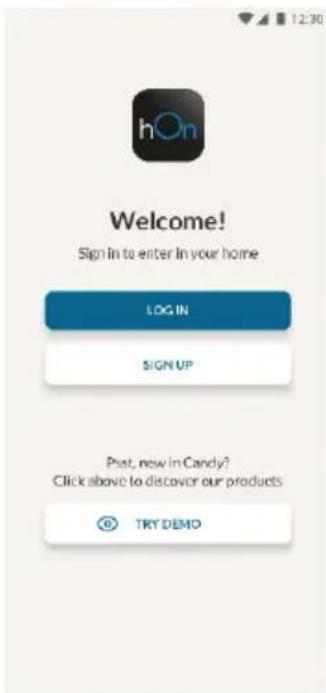
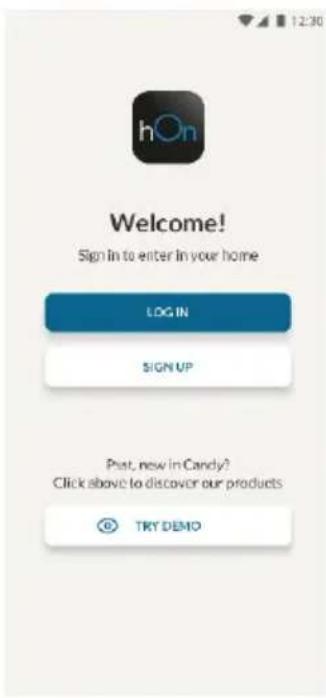
- Download the hOn app on the stores


Step 2
- Create your account on the hOn App or log in if you already have an account
Step 3
- Follow pairing instructions in the hOn App
Wi-Fi Use
When display panel is on, a short push of the Wi-Fi button starts the sync and Wi-Fi LED starts blinking. Follow instructions on the App to complete the connection.
Long acoustic feedback (1 sec) confirms that the connection is established and the LED stays on fixed.
If the Wi-Fi has not been configured yet, when the refrigerator turns on, it will automatically enter the configuration mode and keep this status for 30 minutes. To use the configuration mode:
- Press the Wi-Fi key for 2s, the refrigerator enters the Wi-Fi configuration mode and an acoustic signal is made. The Wi-Fi icon starts blinking.
- Follow in app instructions to configure the Wi-Fi (see above).
- Once the Wi-Fi is configured and the connection established, the Wi-Fi icon is on and fixed.
After 30 minutes without performing any operation, the Wi-Fi will automatically exit the configuration mode. - If the Wi-Fi has already been configured, it will automatically reconnect according to the configuration information.
To reset the Wi-Fi, long press the Wi-Fi key and Mode for 2s, the Wi-Fi is reset and an acoustic signal is made. After this, the Wi-Fi will automatically enter the configuration state (Wi-Fi icon will start blinking again).
To turn off the Wi-Fi, press the Wi-Fi key for 3s.
Radio-module - Technical data
| Frequency rate (OFR) | 2400 MHz-2843.5 MHz |
| Channel frequencies | 2412...2472 MHz(step size 5 MHz) |
| Maximum power(EIRP) | 100 mW |
Radio equipment type is in compliance with Directive 2014/53/EU.
TROUBLESHOOTING
| The inside light bulb does not turn on. | ·No electricity. | ·The power cable is not properly plugged in. ·Check if the appliance is switched off (see Temperature Adjustment). ·Check the power socket is working correctly (e.g. with another electric device). |
| ·Holiday Mode is activated. | ·Deactivate Holiday mode. | |
| The internal temperature of the refrigerator and/or freezer is not cold enough. | ·The doors are not closed. | ·Check that the door and gaskets close properly. |
| ·The doors are frequently opened. | ·Avoid opening the doors unnecessarily for some time. | |
| ·Incorrect temperature setting. | ·Check the temperature setting and, if possible, set a lower temperature (see Temperature Adjustment). | |
| ·The refrigerator and/or freezer are too full. | ·Wait for the temperature of the refrigerator/ freezer to stabilise. ·Avoid filling the refrigerator and freezer excessively. | |
| ·The surrounding temperature is too low. | ·Move the unit to a warmer place or heat the current room. | |
| ·Warm items have been stored. | ·Always allow items to cool before storing them. | |
| The food in the refrigerator freezes. | ·Incorrect temperature setting. | ·Check the temperature setting and, if possible, increase the temperature. |
| ·Food in contact with the back wall. | ·Keep the food away from the refrigerator's back wall. | |
| The bottom of the refrigerator compartment is wet or water droplets are present. | ·The drain hose could be clogged. | ·Clean the drain hose with a stick or similar item to allow the water to drain. |
| Presence of drops of water or frost on the rear wall of the refrigerator. | ·Depending on the function, drops of water or frost form on the rear wall of the refrigerator during operation. | ·It is not a defect. |
| ·Warm items have been stored. | ·Always allow items to cool before storing them. | |
| ·There are open food containers or liquids. | ·Always cover food and liquids. | |
| ·The doors are not closed. | ·Check that the door and gaskets close properly. | |
| ·The doors are frequently opened. | ·Avoid opening the doors unnecessarily for some time. | |
| Presence of water in the vegetable drawer. | ·Lack of air circulation. | ·Verify that your appliance is not too full. |
| ·Vegetables and fruit with too much moisture. | ·Wrap the fruit and vegetables in plastic materials, e.g. cling film, bags or containers. | |
| The motor runs continuously. | ·The doors are not closed. | ·Make sure the doors are closed and check the seals close properly. |
| ·The doors are opened frequently. | ·Avoid opening the doors unnecessarily for some time. | |
| ·Ambient temperature is very high. | ·Verify that the ambient temperature is in the range set out in the specifications on the appliance tag. ·Set the display screen/thermostat to a warmer temperature. | |
| ·The appliance has been off (no power) for some time. | ·It normally takes the appliance 8-12h to cool completely. | |
| The frozen food is thawing. | ·Surrounding temperature is too low. | ·Move the unit to a warmer place or heat the current room. |
| ·The freezer door is not closed. | ·Make sure the door is closed and that the gasket is sealing properly. | |
| Fridge door alarm. | ·Fridge door alarm (acoustic beep) activates whenever the door is left open for more than 3 minutes. | ·Avoid leaving the door open when not needed. The beep ceases when the door is closed. |
| The appliance makes noises such as gurgling, buzzing, clicking, creating. | ·No breakdowns. An engine is running, e.g. refrigeration unit, fan. The refrigerant flows into the pipes. Motor, switches and solenoid valves are switched on or off. | ·No action needed. |
| ·The appliance is not located on level ground. | ·Adjust the feet to level the appliance. | |
| ·The appliance touches an object around it. | ·Remove objects around the appliance. | |
| The appliance does not cool, the temperature and lighting indicators are on. | ·Demo mode is activated. | ·Deactivate DEMO mode. |
| Strong ice and frost in the freezer compartment. | ·The items were not adequately packaged. | ·Always pack the items well. |
| ·A door/drawer of the appliance is not tightly closed. | ·Close the door/drawer. | |
| ·The door/drawer has been opened too frequently or for too long. | ·Do not open the door/drawer too frequently. | |
| ·The door/drawer gasket is dirty, worn, cracked or mismatched. | ·Clean the door/drawer gasket or replace it with a new one. | |
| ·Something on the inside prevents the door/drawer from closing properly. | ·Reposition the shelves, door racks or internal containers to allow the door/drawer to close. | |
| The sides of the appliance are warm. | ·This is normal. |
Pe3HMe
HactpoKa Ha TempepaTpaTa Ha XlaAnHHka
Korato naneJIbT ha dinCnpeE bKnIOueH, n36peTe ,HaCTpoNka Ha TempepaTypaTa Ha XnaIINHka", kato HATNCHeTe 6yToHa MODE. CBeToNDobT OT 30HaTa Ha XnaIINHka CBETBa. HatNCHeTe 6yToHa ,TEMP", dOKaTO ce HAcTPOJ KeJaHaTa TEMpepaTypa.
CtoHocTtHa TeMnepaTypaTa ce npomeH no cIeHNHaunH: 8^ 6^ 4^ 3^ 2^ C-> cynepe oxnaqdahe -> 8^ ...
CbOTBETHnT CBeToDIOc Ce BkIIOUBa N I36OpT Ce NtBbPxJaBA BeHaRa (6e3 npIMrBaHe).
KpaTka 3BykoBa INHdkaunr noTBbpxdaBa n3bopa.
HactpoKa Ha TempeaTypaHa pns3epa
Korato naneBt Ha dinCnIe e BkJIIOueH, n36peTe ,HaCTpoIka Ha TempeaTypaTa Ha φpns3epa", kaTo HATNCHeTe 6yToHa MODE. CBeTOnIOJbT OT 3oHaTa Ha φpns3epa CBETBa.
HaTnchete 6yToHa ,TEMP" ,doKaTo ce Hactpon JeJaHata TempepaTypa.
CtoHocTtHa TeMnepaTypaTa ce npomeHa no cneHna HauHH: -16 ^ C ->-18 ^ C ->-20 ^ C ->-22
°C -> -24 °C -> Cynepe 3ampa3raBaHe->-16 °C...
CbOTBETNATCBETOIOIDCE BKNIOUBAuN36OpBTceNTBbpxdabaBeHara(6e3 npMnIRbaHe).
KpaTka 3BykoBa INHnKaUaIg NtBbPkJaBa I36opa.
ImaTe npedBnD:
PpeBknHbHeTo OT XnAaHJH NkM FpN3epH N 3OHN O6paTHo CTaba He3a6aBHO, KOraTOnOTpe6nteIHT HaTNCHe 6yToHa MODE n 36OpbTe He3a6abHO aKtNBHe.
CBeToIIOJnte 3a Tempepatypa He MmraT.
Download on the App Store

EXPLORE IT ON AppGallery
Krok 2
Download on the App Store

EXPLORE IT ON AppGallery
Trin 2
Download on the App Store

EXPLORE IT ON AppGallery
Paso 2
Download on the App Store

EXPLORE IT ON AppGallery
Étape 2
Download on the App Store

EXPLORE IT ON AppGallery
2. korak
Download on the App Store

EXPLORE IT ON AppGallery
Fase 2
PRODUCTBESCHRIJVING 2
GEBRUK 3
Gebruik 3
Superfriesing -> -16 °C ...
I app-paringsprosedyren
Trinn 1
Download on the App Store

EXPLORE IT ON AppGallery
Passo 2
540 mm Dulap: Latime: 934 mm
Adancime: 955 mm
700 mm Dulap: Latime: 1200 mm
Adancime: 1051 mm
UTILIZAREA
RIESENIE PROBLEMOV 10.
POPIS PRODUKTU
Download on the App Store

EXPLORE IT ON AppGallery
Steg 2
Skapa ditt konto i hOn-appen uller logga in om du redan harett konto
Steg 3
HanaWtYBaHHa TeMnepaTpyn MOpO3nIbHoI KaMepn.4
IIndnBiyalbHe HanaTuBaHHa Tempeatypn 5
Функци Super Cool 5
Функци Super Freeze 6
PexnM Eco 6
Функциа Holiday 7
Po3MopoxyBaHHa 7
DemohctraiHn peXm 7
BNIKOPNUCTAHNWAI-FI 7
PpoeDypa noEHaHnB DoaTKy 8
BnKopncTaHnWi-Fi 9
ПОШУКТАУСУHEннЯHEСПРABHOCTeI 10
ONIC PPOJyKTy
1.Панель ynpablinHHa
2.BuHa cTiKa
3.BHHbI WkaΦ
4.Полицi
5.Яшкдя OBOUiB iФpykTiB
6.ЯшкIMopo3nIbHOIkamepn
7.Дверна
ПОЛИСА
*IgMaKcHMaNbHO eKOHOMiUHOI 0oO eHeproCNoXuBaHHaKoHphiIpyaui y npnaiMaec 6yTN BCTaHOBJIeHO BVcYBHI aUNIK, aunik dIy npOdyKTIB Ta noJNUci, a BeHTNJIaTOp BmKHeHNI BiINOBIDHO Do 3O6paKeHb BNue.
** 3óBXeHHa Bnue HaBeDeHo IiWe dIg O3HaHOMJIeHHa. ΦaKTNUHa KOHφiypaia npnaady 3aJExNTb BiD MoIeI a6o cneuΦikaui DiNCTpn6'IoTopa.
BnMOrn do po3miueHn
Дверцята пиладу мань BiDaily Tnca nobHicTIO,як поka3aHo.3a6e3neuTe DoCTaTHbO BilbHOrO Micua ДпЯ 3pyHoro BiDyHeHHa DberpI i BucyBHX RaNKiB. DOpTpMMyTeCb BiDcTaHb He MeHwe 50 MM Mix 6iYHMn CTIHkAMN BINO6y Ta cycIDHIM NaCTINHAM.
540 MM Wafa: WnpHa: 934 MM
TIN6nHa:955MM
700 MM 7a: 1200 MM
Tn6Ha:1051 MM
EKCπΠγATAUIA
A. Khonka YBIMK/BIMK, HaTnchItb npotyrom 3 cekyHd. Ppinaad ymkaetbcra 3 TpNBaIIM 3ByKOBM CNrHaIOM CNCTeM N 3BOPoTHoro 3B'ra3ky (1c).
B. Khonka Wi-Fi, BnKopncToByeTbc8d nIpiKJIIOueHH npiJaNy
C. Khonka Mode, BnKOpNCToBcTbCra IЯ Bn6Opy MIX XOJIoJIbHnKOM, MOpO3nIbHnKOM, eKO Ta BiDnyCTKOIO
D. Khonka TEMP, виславы сада вибору mix piHЯMu TempepaTpy (Takox Super Cool i Super Freeze)
a. 3HaUOK 3OHN XOLOINbHOro BiDcIky/MOpO3INbHOi KaMepN, IIO NOKa3Ye, AKN BIDcIK npnnaNy Bn6paHo
b. PIBHI TEMNEPAtPy B xOJIoNlBnHnky, rKi IOKa3yIOT bN6paHy TEMNEPAtpy
c.Пiktorpama Super Cool, noka3ye, chn akTINBOBaHa Функця Super Cool
d. PIBHI TemnepaTpyn B MOpO3NJIbHi Kamepi, kI NOKa3yIOb BV6paHy TemnepaTpyu MOpO3NJIbHi Kamepi
e.Пiktorpama Super Freeze,пoka3у,чнakтувована Функця Super Freezef.Пiktorpama pexIMy Eco,пoka3у,чнakтувовано ржIM Eco
g.Пiktorpama Функцi Holiday, nokakitb,чаaknBOBaHO Функцio BiDnyctkn h. Пiktorpama Wi-Fi, noka3ye,чи npaцюс Функця Wi-Fi i chn niiknIOyeH noPnlaI
i.Пiktorpama iHdNBIyaNbHOro HanaStyBaHHra TemnepaTpy, noka3ye, cn Bn6paHO TemnepaTpyBdoTaKy
Eknpnyataciia
-Пдкючыприлддо мерекi, i BiH abTomatuHOB BBIMKHeTBc3 TprBaIIM 3BykOBm CnHaJOM (1 cekyHda). Yci cBITIOIOHN 3acBITbTc8 (1 cekyHda),notim cBITIOIOHI INdNKaTopN TeMnepaTyPn XOLOINbHnKa Ta MOp03INbHnKa 3acBITaTBcNoCTiHo.
TemnepaTpa aBtOMaTHO BCTaHOBIOBaTMeTbCra Ha pIBhi 4 ^ C y xonoDINbHomy BiDckiy Ta-18 ^ C y MOpO3nIbHi Kamepi. PIMITKA. 3aueKaIte IooHaMHeHwe 2/3 roDHH, nepu HIX NOKJAcTn npOdyKTN B npIna, dnn 3a6e3neUeHH HaJeXHOI TemnpaTpyn BCEpeDiHx ONoOnlbHnka.
- Y BUNaIky npuyeHnE neKtponocTaahn6ynde BiDHOBneHo OCTaHHIOCTaHOBNeHPIBeHb OxOJODKeHH.
- 506 BiIDHOBHTn HanaIITyBaHHra 3a 3AMOBUByAHNM, HaTNCHtB Ha DBepHn BIMKau BCEpeDHI XOIOINbHnka i BOHOuac HAtnCKaTe KhoNky YBMK/BIMK npOTAROM 5ceKyHd.
- Y HopMaJIbHnX yMOBax ekCnIyatauII (HaBeChi Ta BoCeHN) peKOMeHnyETbcra BCTaHOBIOBaTn TEMpepaTy 4 °C. BnITky, KOJI N TeMnepaTypa DoBKiINr BnCOKa, peKOMeHnyETbcra BCTaHOBtN TeMnepaTy 6~8 °C, ΜO6 rapaHTyBaTn TEMpepaTy XOJIoNJIbHOrO BiDcIKy Ta MOpO3NJIbHOI KaMepri 3MeHNITn Yac 6e3nepepbHOi pOBoTI XoJIoNJIbHnKA; a B3IMKy, KOJI N TeMnepaTypa DoBKiINr Hn3bKa, peKOMeHnyETbcra BCTaHOBtN TEMpepaTy 3~4 °C, ΜO6 yHnKHyTN qactnx 3anyckIB/3ynHHOK XoJIoNJIbHnKa.
KepyBaHHpeXIMOM ouiKyBaHHIncJIpe
-ЯкwoДверцаяЗаунеHi->Диспелу ржимочikybaHHa (yci CBITLOODIOHi iHdNKaTOpN BUMKHeHi).
-Якuto Дверцая Вдун Hei -> CBITLOДIOДи iHДИКaTOpN NOTOUHOI Tempepatypn XOLOdINbHnka MOpO3INbHOI KaMepN BBIMKHeHi (noCTiHo).
- CbITnoiOHi iHdNkaTopn peKmib ECO + Holiday yBIMKHeHi (noCTiH0), kso ix 6yNo Bn6paHo paHiwe.
-Диспл征 roTOBn Do BBeDeHЯ daHnx (aKTHyBaTn Ioro DoTNKOM He noTppi6Ho).
PeknM
Khonka Mode (Pekm) BnKOpncToBcTbcra dna nepemkaHnA mix pi3Hmnpekmamn:
BiiNobiHn CBIIOIOHn iHdkaTOp yBIMKHeTbcra, a Bn6paHn BapiaHT 6yde BiDpa3y niTBePdxKeHo
(6e3 6JIIMaHHnHa).
Bn6ip 6ynde niTBePdxKeHO 3a DOnOMOrO KOPOTKoro 3ByKOBOr CnHaIy CNCTeMn 3BOPOTHO 3B'J3Kv.
HanaTuBaHHa TemnepaTypn XoJIoNJIbHnKa
Iicra BBIMKHeHHaDCnneHoi NaHei BnBepitb OnciHO HanaWtYBaHHa TeMnpaTpyxOIOINbHnka HaTnCKaHHaM KhoNk MODE. YbIMKHeTBcra CbitIOIOHN iHnKaTop xOIOINbHoro BiDckiy.
HaTnckaIte KhoNky TEMP,doKn He 6yde BCTaHOBJeHO notpi6Hy TempepaTy.
3HaueHHaTeMnepaTypn 3miHoeTbcra TaK: 8^ 6^ 4^ 2^ i HteHCNBHe OXoJIoDxKeHHa 8^
BiINOBiHn CBiTNOIOHn iHdNKaTOp yBIMKHeTbcra, a Bn6paHn BapiaHT 6yde BiDpa3y niTBePdxKeHO (6e3 6JImMaHH). Bn6ip 6yde NiTBePdxKeHO 3a DOnOMOIO KOPOTKOro 3ByKOBOrO CNHaNcCTEmN 3BOPOTHO 3B'3ky.
HanaTByaHHa Tempeatypn MOpO3NJIbHOI KaMepn
HaTnckaTe KhoNky TEM,doKn He 6yde BcTaHOBneHo nOtpi6Hy TempepaTypy.
3NaueHHa TemnepaTpyn 3miHIOeTbcra TaK: -16 ^ C -> -18 ^ C -> -20 ^ C -> -22 ^ C -> -24 ^ C -> iHTeHCNBHe 3amOpoxyBaHHa -> -16 ^ C ...
BIDNOBIDHn CBITIOIOHN iHdkaTOp yBIMKHeTbcra, a Bn6paHn BapiaHT 6yde BiDpa3y niTBePdxKeHo
(6e3 6JIIMMaHHN).
Bn6ip 6ynde nIiTBePdKeHO 3a DOnOMoroKoPoTKoro 3ByKOBOrO CnHany CnCTeMn 3BOPOTHO 3B'3Ky.
3BepHItb yBary!
IepemkaHn 3 xoJIOINbHO rHa MOpO3INbHr BiDcIK i HABnAKn BiIDyBaETbcra BIDpa3y, KOJI KOpNCtYBauchATNCKaE KONKy MODE.Bu6paHn BapiaHT heraHObAKTNByeTbcra.
CbitnoioDiHi iHdkaTOpn Tempeatypn He 6JImaIOTb
IhDnBiDyalbHe HanaWTyBaHNa TeMnepaTpy
Дяхолдуньоги BiDciky Moxha Bn6paTn Tempepatpy BiD 2do8°C, aДя Мороиьhoi kameprn — BiD -16 do-24°C.Якso Tempepatpy Bn6paHO BdoaTkY,akTNByeTbcra nIKtorpama iHdNbiayalboHaIauStoBaHOI Tempeatpyu, a Bci cBtNoioDiHi iHdkaTopn TEmpepatny BiIDnoiHoro BiDciky BmHKaIObC3.3okpema, y pa3i Bn6opy Tempepatny XOLOdInbHoro BiDciky BdoaTkCy CBITNOIOHi iHdkaTopn BiD 2do8°C BmHKaIObC3r. RaKso JydoaTKy Bn6paHo Tempepatpy Mop0sInbHOI kameprn, BmMKHyTObC3cBtIOIOHi iHdkaTopn BiD -16 do-24°C.
Ikyuio hndnBiyalbHe HanaaTyBaHnre TemnepaTpyn 3diChEno Inue dny OndHoro BiDciKy (Mop03nHoro a6o XoJIoNlBHorO), TemnepaTpya, Bv6paHa dny dpYrOro BiDciKy, He 3MiHIOCTbcra, BOHOUC cBITIOJIOHN iHdNKaTOp BV6paHOi dny HbOro TeMnpaTpyn 3aIIuAocTbcra BBIMKHeHM.
TpBaan 3ByKOBn CnHaJ CnCTeMn 3BOpOTHO 3B'3ky (1 c) niTBePdJxye 3aBepHHe Hn iD'cHaHH.
Функци Super Cool
PekomeHdyetbCBAIMKHyTn yHKciIO Super Cool, kIIO notpi6HO nOKnaCTn Ha 36epirAHN BEniKy kiIbKiCtB npOyKTIB (HaNPnKlaI, nicJn Pokyn). FyHKci Super Cool npinckopoe oxoJodKeHHcBIXoi iXi Ta 3axuae npOyKTn, IIO 36epiraOTbcB npInaDi, BiD HebaxaHoro HarpBaHH. KOn FyHKciIO aKTHBOBaHo, ABTomATNUHO BCTaHOBIIeTbcT SempepaTypa xoJOnIbHOro BiDckiy 2^
KopncTyBaTnca yHKciEIO Super Cool:
- LIO ΦyHKciIO MOxHa aKTbByBaTn DOBtHM HaTtCKaHHaM KHONKI TEMP, 106 Bn6patn XoJIoNbHm BiDcIK 3 HAcTyNHm 5BnIDKM HAtNcKaHHaM KHONKI TEMP, nOKn He BBIMKHeTbcra nikTorpama Super Cool; a6o 10 o yHKciIO MOxHa BBIMKHyTN BdoTaKy. KOni OyHKciIO aKTbBOBaHO, CBITIOIOHN iHdNKaTOP Super Cool 6yde 3abXdn BBIMKHeHn.
- Κιοδ BινΜΚΗγΤη φυΗκιήσο Super Cool,ΗατιχίΤβ ΚΗΟΝΚΑ ΕΥΜΚΗΙΤβ ζύ φυΗκιήσο ΒάραΤΚ.
- Φункця Super Cool abTomatunHOBIMKHeTbcra, KOJI MInHe 6iNbwe 12 roJnH nicJra ii akTUBaui.
- Picra BmKHeHHa yHKci Super Cool niktorpama Ha naHeni kepyBaHHa BmKAcTbca, i BiIDHOBIOEtbcA nonepeHbO BCTaHOBHeHn pIBeHb OxJIoJXeHHa.
Pnmitka. FyHKi Super Cool i Super Freeze HEMOXNIBO aKINByBaTN OJHOaCHO.
Функци Super Freeze
Функця сунерзаморожуваньл пискорюс 3amopoxувань CBixnx npodyktib xapuybaHH Ta 3axuac Bxe 3bepejkeH TOBAPN BiD HebaxaHOro HarpiBaHH. Jkso notpi6no 3amopozHTn BeINky KINbKicTB npodyKTIB, pekomehnyetbcra BBIMKHyTN Функцio Super Freeze 3a 24 roDHN Do BnKOpncTahnn. Koln Функцio aKTHBOBaHO, TempepaTypa abTomatUH BCTaHOBIOCTbca Ha -28 °C.
JrkopncTyBaTnca yHkciEo Super Freeze:
- LIO FyHKUIO MOxHa 3aynCTnTIO DOBIM HAITNCKAHHKM KHOKN TEMP, 0o6 Bn6paTN MOpO3nJIbHy KaMepy 3 HAcTyINHM WBNIDKIM HAITNCKAHHKM KHOKN TEMP, nOKn He BBIMKHeTbcn iKTorpama Super Freeze; a6o IIO FyHKUIO MOxHa BBIMKHyTN BdoTaKy. KoI N FyHKUIO AKTINBOBaHo, CBiTNOJIOHN iHdIKatop Super Freeze 6yde NoCTiHOB BBIMKHeHNI.
- Κοδ ВИМКнуТи Φункцию Super Freeze, haTиСhiTb KhoNky TEMP; a6o ВИМКнiTb zuO φyнкцию BdoTaTKy.
-Функця Super Freeze abTomatuHOBUMKHeTbCra, KOIN MInHe 6iNbwe 50 roHnnicna ii AKTuBaui.
-Пись ВИМКненна Функци Super Freeze nikTorpama Ha naHeNi KepyBaHHa BUMNkaTbcra, i BiДНовЛЮЕТбсЯ NONepeДнвОВАнь pIbeHb 3amopoKxYBaHHa.
Pnmitka. FyHKi Super Cool i Super Freeze HEMOXNBO aKTHByBaTN OJHOaCHO.
Pexm Eco
PexnM ECO MoXHa BBIMKHyTn DJI ONTmI3aCi II npOdyKTbBHOCTI npNlaTy 3 OndohachnM 3a6e3neueHHaM HauKpaux yMOB 36epirAHH iKi. PexnM Eco aBtoMaTHuHO BCTaHOBtB Tempeatpy 4 ^ B xOnoINbHomy BiDckiy Ta -18 ^ B Mopo-3nJbHi KaMepi.
KopntyBaTcpeKMOM Eco:
- Φункцio moхha akTbByBaTHn 3 nAneIi kepyBaHHra, HATnCKaOuH KNHkny "mode", nOKn He BBIMKHeTbcra nIKtorpama pexmy Eco (3BykoBn cnrHaI niIDTBepdkye Bn6ip); a6o moxHa Bn6paTn pfynkuio B doaTky. IicnaakTbauqii uei i cyHKqii nIKtorpama pexmy Eco 6yde 3abXdn BBIMKHeHa.
- Κοδ Bnɪtn 3 pēχɪmMy Eco, BnɪkHɪt b ŽɔrO B dɔdʌtky a6o Bnɪbepɪt b iHʌy φγнкцɪno Ha næneɪi KepyBaHHa.
- Iicna BmKHeHHa pexmy Eco niktorpama Ha naHei kepyBaHHa BmKaetbca, i BiHOBIOIObca paHie BCTaHOBneHi piBHi OxOIOKeHHa.
Функця Holiday
Функцию Holiday Moxна ВИКОПСТОВУВАТи ДЯ 3MeHшЕнгя eHEproCNoXnBaHHЯ npиаду, якso BIn He ВИКОПСТОВУETься PeryJЯрно. KoJN Φункця уВIMKHeHa, CBITLOIODHi IHNiKAtOpn BUMNKaIOTbcR (HabITЯкso ДверцЯТa BiDUnHeni), a XOJIO-DINbHn BiICIKпepeMkHETbcr y peKm Hn3bKOro eHEproCNoXnBaHHЯ, TOniЯK MOPo3nJIbHa KaMepa npaIcOBaTIme HopMaJIbHo.
YK BnKOpncToByBaTu ΦyHKcIHO Holiday:
- Φункцio MOxHa aKtNbByBaTn 3 NaHeni KepyBaHHa, HATNCKaOuH KNOKy "mode", NOKn He BBIMKHeTbcra NiKTOrpamaФункцii Holiday (3bYkoBn CnHaN nIDTBepdJxue Bn6ip); a6o MoxHa Bn6paTnФункцio BdoaTk. KolnФункцio aKtNbBOaHo, NiKTOrpama Holiday 6ynde 3abXKn BBIMKHeHa.
- Ⅲo6 BmKHyTn ΦyHKciio Holiday, BmKHiTb ii B doataky a6o Bn6epiTB iHsy ΦyHKciio Ha naHeni kepyBaHHra.
- IicnBmKHeHHa yHKuH Holiday nikTorpama Ha naHei kepyBaHHa BmHKaEtbca, i BiHOBIOHTbca paHlwe BCTaHOBneHi pIBhi oxOJOnJKeHH.
Po3MopoKyBaHHa
Po3MOPOxyBaHHxOJIoNIIbHOro Ta MOpO3NJIbHOrO BiIcIKIB 3DiIChHOeTbcr ABTOMa-TnH0:pyHe KepyBaHH He noTppi6He.
NOB3yHOK
Bilka OOyIe NOB3yHok, KIN DO3BOJpeRyIOBaTH BOIoricb BCEpHi: nepemieHH BnpaBO 3MeHwE BOIoricb, nepemieHH BnIBO 3ibwE BOIoricb.
BNIKOPNUCTAHHRIWI-FL
Пюцетура поеднань в ддату
Kpok 1
- 3aBaHTaXTe DoTaTOK hOn


GET IT ON
Google Play

Download on the
App Store

EXPLORE IT ON
AppGallery
Kpok 2
CTbopitb obniKOBn 3annc y doataKy hOn a6o yBiinItb y cInTeMy, kUO y BAC BKe e oBNIKOBn 3annc
Kpok 3
- DoTpMmYntecBkazIBOK i3 NOeHHaHHB DOnaTk y hOn
BukopncTaHHa Wi-Fi
Iicra BBIMKHeHHaDCnneHoi naHeni 3anycitb cnHxpoHiaqio KOpOTkHM HATNCKaHHaMKoHONKi Wi-Fi, icna yoro cBITnoiOHDn iHNkaTOp Wi-Fi noUHe 6JImaTu. Uo6 3aBepuHTn nID'EDHaHHa, dOtpmMyTeCb IHcTpkyu y doaTkU.
YCTaHOBHeHHa 3'EDHaHHa 6yJe NiITBepDxKeHO TpNBaHIM 3ByKOBIM CNrHaIOM CnCTeMM 3BOPoTHoro 3B'ay3ky (1c), nicra yoro cBiTIOJIOHN iHnKaTop 3aJIuNHTbcg BBIMKHeHM.
Ku Wo Wi-Fi He HanaaTOBaHo, nicra BBIMKHeHHx XoJOnIbHnK aBTOMaTnHOB BiJe y pexim KOHcIpyBaHHi 3aIIuHTbcra B cboMy cTaHi Ha 30 xbuiH. Uo6CKOpNCtATnCRA peXmOM KOHcIpyBaHH:
- HatnckaIte KhoNky Wi-Fi npoTgrom 2 cekyHd; xOJIoNlBHNK yBiIe B peXIM HaJaUHTyBaHHra Wi-Fi i BnDaCTb 3ByKObN cnHaJ. PIKTORpama Wi-Fi noUHe 6JIUMATn.
- IotpmytecBkazibok ydoataky, 6b hanaTuBatn Wi-Fi (DnB. Bnue).
-Пися налштуваши Wi-Fi Ta BCTaHOBNeHHЯ 3'Енання niktorpama Wi-Fi BBIMKHeTbcr Ta CBITNTUMetbcr HenepepbHO. - Yepe3 30 xBnHn 6e3iJIbHOCTi cyHKci Wi-Fi aBTOMaTNUHO BnIe 3 peKIMy HanaSTyBaHHra.
- YKIO Wi-Fi Bxe HanaSTOBaHO, 3'EDHaHHaBtOMaTHUHO BiHOBNTbCBAIDNOiDHO Do daHIX KOHphiIpyBaHHa.
Lio6 cknhytn hanaaHTyBaHnry Wi-Fi, hatackaiTe Ta ytpmyte KhoNky Wi-Fi Mode npotrarom 2 cekynd; hanaaHTyBaHnry Wi-Fi 6yde cknhyto, i npnaad Buaactb 3BykoBni CnHaJ. Pic7aZbOro fynKciJg Wi-Fi aBTOMaTnUHO nepeJe B cTaH KOhphiirpyBaHHn (niktorpama Wi-Fi 3HOby noUHe 6bnmatn).
Uo6 BmKHyTuФyHKuIHO Wi-Fi,HaTnCiHb KhONkyWi-Fi npotrarom 3s.
Padiomodylb -TexhiHidaiHi
- (J) stand by
4 MODE
4
4
4
5 SuperCool - "Super Freeze
- Eco
6.Holiday - 7 HCS
- 1
8
9 Wi-Fi
10.
521 2.1
JUJLJ0.2
3
4
5
i 1
alwaii cihiia
J 50 50
934:540
955:
1200:700
1051
Ji jj j j j j j j j j j j j j j j j j j j j j j j j j j j j j j j j j j j j j j j j j j j j j j j j j j j j j j j j j j j j j j j j j j j j j j j J J J J J J J J J J J J J J J J J J J J J J J J J J J J J J J J J J J J J J J J J J J J J J J J J J J J J J J J J J J J J J J J J J J J J J J J J J J J J J J J J J J J J J J J J J J J J J J J J J J J
a Super Cool a b Super Freeze a Super Freeze a e Eco Eco Eco Holiday Holiday g Holiday
J 111111111111111111111111111111111111111111111111
4 4 4 4 4 4 4 4 4 4 4 4 4 4 4 4 4 4 4 4 4 4 4 4 4 4 4 4 4 4 4 4 4 4 4 4 4 4 4 4 4 4 4 4 4 4 4 4 4 4 4
)stand by
LED LED 1
S OBC = S COD + S_ BOC
Hiday + ECO LED
.
Mode
Aeall 1000000 mode j
()()
yill 5ti 1e o aell gall lai jai
c
MODE jz biaaill dna "aylll aarhba" 22, jieeell gag ygaaerall aeg aag Lioic biay (o) TEMP jz biaai. aylll aabai sall LED caa .(s) 4 < - 6 < - 8 :aalb
8 2<-a 3<-
.()
yill 516 o yall ygll Jaxi
#
MODE 1
. 1
aalall aall aagaaee (aall) TEMP 2
22-<-aagaa 20-<-aagaa 18-<-aagaa 16-
16 24-<-
()
yill 516 0 yall 4y
边
J (g)MODE 1
jaiie
LED
aaiiaai jai
a a a a a a a a a a a a a a a a a a a a a a a a a a a a a a a a a a a a a a a a a a a a
"Super Cool
Joo. (e) Jolal 10000000000000000000000000000000000000000000000000000000000000000000000000000000000000000000
blll a llll blll Temp 1e 1y 10 10 10 10 10 10 10 10 10 10 10 10 10 10 10 10 10 10 10 10 10 10 10 10 10 10 10 10 10 10 10 10 10 10
Super Freeze, Super Cool
"Super Freeze
28- 28- 28- 28- 28- 28- 28- 28- 28- 28- 28- 28- 28- 28- 28- 28- 28- 28- 28- 28- 28- 28- 28- 28- 28- 28-
Super Freeze
bll 1 aall 3 2 1 1 1 1 1 1 1 1 1 1 1 1 1 1 1 1 1 1 1 1 1 1 1 1 1 1 1 1 1 1 1 1 1 1 1 1
. Super Freeze a jg w jg .
Jusss sasss sssss sssss sssss sssss sssss Sper Freeze eaeil dsc . Super Freeze Super Freeze Super Cool
Eco
Eco 18-4 26
:Eco
Eco 0e 00
Eco 1
Eco Mode
Holiday
aagaaagaaagaaagaaagaaagaaagaaagaaagaaagaaagaaagaaagaaagaaagaaagaaagaaagaaagaaagaaagaaagaaagaaagaaagaaagaaagaaagaaagaaagaaagaaagaaagaaagaaagaaagaaagaaagaaagaaagaaagaaagaaagaaagaaagaaagaaagaaagaaagaaagaaagaaa
aaii
Holid
5) Holiday jouy jus "mode" 1e aie bau kail aol no n
Holiday joo n 100
J 1
Holliday 1
Hidday aag aegie
.
()
y 1
a jiaai
J 1