imageRUNNER ADVANCE C5051i - Printer CANON - Free user manual and instructions
Find the device manual for free imageRUNNER ADVANCE C5051i CANON in PDF.


User questions about imageRUNNER ADVANCE C5051i CANON
0 question about this device. Answer the ones you know or ask your own.
Ask a new question about this device
Download the instructions for your Printer in PDF format for free! Find your manual imageRUNNER ADVANCE C5051i - CANON and take your electronic device back in hand. On this page are published all the documents necessary for the use of your device. imageRUNNER ADVANCE C5051i by CANON.
USER MANUAL imageRUNNER ADVANCE C5051i CANON
Read this guide first.
Please read this guide before operating this product.
After you finish reading this guide, store it in a safe place for future reference.
The manuals for this machine are divided as follows. Please refer to them for detailed information.

Guides with this symbol are printed manuals.
Basic Information •

Guides with this symbol are included on the accompanying CD-ROM.
User's Guide (This Document)

- Precautions for Using Your Machine and Settings Required after Machine Installation
Quick Reference for Basic and Useful Operations•
Maintenance and Troubleshooting•
Frequently Asked Questions and Answers•
Windows Printer Driver Installation and Instructions•
• Mac Printer Driver Installation and Instructions The Mac UFR II Driver Guide and the Mac PS Driver Guide
Windows Fax Driver Installation and Instructions•
Windows Network ScanGear Installation and Instructions•
Getting Started
Quick Reference
Maintenance Guide
Frequently Asked Questions
Printer Driver Installation Guide
Mac Printer Driver Installation Guide
Fax Driver Installation Guide
Network ScanGear Installation Guide


- Comprehensive Manual for Basic Operations and Handling Your Machine
e-Manual

- Before You Start Using This Machine
- How to Use This Manual
- Basic Operations
- Optional Products
- Settings/Registration
- Problem Solving
- Maintenance
- Practical Workflows
- Copy
- Fax
- Scan and Send
- Scan and Store
- Access Stored Files
- Fax/I-Fax Inbox
- Secured Print
- Web Access
- Scanner
- Quick Menu
- Status Monitor/Cancel
- Network
- Remote UI
- MEAP
- Security
- Software
Includes the specifications of the main unit and optional equipment.
Contents
Preface....vii
How To Use This Manual....vii
Symbols Used in This Manual....vii
Keys and Buttons Used in This Manual ......vii
Displays Used in This Manual ...... viii
Illustrations Used in This Manual....viii
Abbreviations Used in This Manual ix
Trademarks....x
Operations and Terms Used in This Manual ....xii
Legal Notices....xiii
Product Name xiii
EMC requirements of EC Directive xiii
Laser Safety......xiii
Additional Information......xiii
International ENERGY STAR Program....xiv
IPv6 Ready Logo xiv
WEEE Directive....xiv
R & TTE Directive .....xiv
Information Security Standard (IEEE 2600) ...... xv
Copyright....xv
Third Party Software ......xv
The Software Subjected to the Other Conditions ..... xvi
The Software Licensed under Open Source Licenses....xvi
Disclaimers ...... xvi
Legal Limitations on the Usage of Your Product and the Use of Images.... xvi
Super G3....xvii
Important Safety Instructions.... xviii
Installation....xviii
Power Supply xix
Handling xix
Maintenance and Inspections ...... xxi
Consumables ....xxii
Other Warnings ....xxii
Periodic Inspection of the Breaker xxiii
Checking the Breaker xxiii
Check Sheet for the Periodic Inspection of the Breaker ....xxv
e-Manual.... xxvi
System Requirements.... xxvi
Installing e-Manual.... xxvi
Uninstalling the e-Manual....xxvii
e-Manual Menu....xxvii
e-Manual Topics....xxviii
Chapter 1 Appendix
Specifications 1-2
Main Unit....1-2
Duplex Color Image Reader Unit-B1 1-4
Color Image Reader Unit-B1 1-5
Color Image Reader Unit-B2 1-6
Cassette Feeding Unit-AD1 1-6
Paper Deck Unit-B1 1-7
Envelope Feeder Attachment-D1 1-7
Inner Finisher-A1....1-7
Staple Finisher-C1....1-9
Booklet Finisher-C1 1-10
External 2 Hole Puncher-B1/External 2/4 Hole Puncher-B1/External 4 Hole Puncher-B1....1-12
Inner Finisher Additional Tray-A1 1-12
Inner 2 Way Tray-F1 1-13
Copy Tray-J1 1-13
Card Reader-C1 1-13
Copy Card Reader-F1....1-14
Super G3 FAX Board....1-14
Send Function 1-15
Network Environment....1-17
Hardware Specifications 1-17
Software Specifications 1-17
Printer Settings 1-17
Software Specifications 1-17
Provide Adequate Installation Space....1-18
Preface
Thank you for purchasing the Canon imageRUNNER ADVANCE C5051/C5051i/C5045/C5045i/C5035/C5035i/C5030/C5030i. Please read this manual thoroughly before operating the machine to familiarize yourself with its capabilities, and to make the most of its many functions. After reading this manual, store it in a safe place for future reference.
The System Manager or the System Administrator (Administrator) for SSO-H (Single Sign-On H) can specify all of the system settings for the machine. Unless otherwise stated, "administrator" in this manual indicates the System Manager or the System Administrator (Administrator). For information on the types of administrators, see e-Manual > Security.
How To Use This Manual
Symbols Used in This Manual
The following symbols are used in this manual to explain procedures, restrictions, handling precautions, and instructions that should be observed for safety.

Indicates a warning concerning operations that may lead to death or injury to persons if not performed correctly. To use the machine safely, always pay attention to these warnings.

Indicates a caution concerning operations that may lead to injury to persons, or damage to property if not performed correctly. To use the machine safely, always pay attention to these cautions.

Indicates operational requirements and restrictions. Be sure to read these items carefully to operate the machine correctly, and avoid damage to the machine.

Indicates a clarification of an operation, or contains additional explanations for a procedure. Reading these notes is highly recommended.
Keys and Buttons Used in This Manual
The following symbols and key/button names are a few examples of how keys and buttons to be clicked or pressed are expressed in this manual:

text_image
Buttons on Computer Operation Screens: [Button Name] Example: [OK] [Add]Displays Used in This Manual
Screen shots of the touch panel display used in this manual are those taken when the following optional equipment is attached to the imageRUNNER ADVANCE C5051 : the Duplex Color Image Reader Unit-B1, Super G3 FAX Board, Inner Finisher-A1, and Cassette Feeding Unit-AD1.
Note that functions that cannot be used depending on the model or options, are not displayed on the touch panel display.
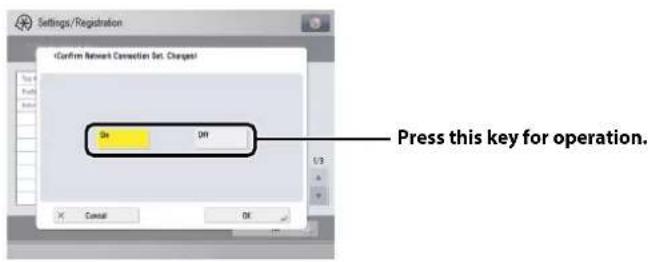
The keys or buttons which you should click or press are marked with a , as shown below.
When multiple buttons or keys can be clicked or pressed, they will be highlighted and mentioned in the order in which they should be clicked or pressed.
Screen shots used in this manual may differ from the ones you actually see.
1 On the Network screen, press [Confirm Network Connection Set. Changes]—specify the following.
text_image
Settings/RegistrationIllustrations Used in This Manual
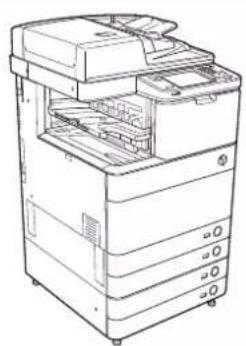
natural_image
Line drawing of a multi-chamber office printer with visible internal components (no text or labels)Abbreviations Used in This Manual
Microsoft Windows 2000: Windows 2000
Microsoft Windows 2000 Professional: Windows 2000 Professional
Microsoft Windows 2000 Server: Windows 2000 Server
Microsoft Windows Server 2003: Windows Server 2003
Microsoft Windows XP: Windows XP
Microsoft Windows XP Professional: Windows XP Professional
Microsoft Windows Vista operating system: Windows Vista
Microsoft Windows 7 operating system: Windows 7
Microsoft Windows Server 2008: Windows Server 2008
Microsoft Windows operating system: Windows
Novell NetWare: NetWare
Apple Macintosh: Macintosh
Apple Mac: Mac
Trademarks
MEAP and the MEAP logo are trademarks of Canon Inc.
Apple, AppleTalk, EtherTalk, LocalTalk, Macintosh, Mac, Mac OS, and Safari are trademarks of Apple Inc., registered in the U.S. and other countries.
Windows, Windows logo, Windows Vista, and Windows Vista logo are trademarks or registered trademarks of Microsoft Corporation in the U.S. and/or other countries.

Adobe® PostScript® 3™
Adobe, PostScript, and the PostScript logo are either registered trademarks or trademarks of Adobe Systems Incorporated in the United States and/or other countries.
Copyright © 2007 -08 Adobe Systems Incorporated. All rights reserved.
Protected by U.S. Patents 5,737,599; 5,781,785; 5,819,301; 5,929,866; 5,943,063; 6,073,148; 6,515,763; 6,639,593; 6,754,382; 7,046,403; 7,213,269; 7,242,415; Patents pending in the U.S. and other countries.
All instances of the name PostScript in the text are references to the PostScript language as defined by Adobe Systems Incorporated unless otherwise stated. The name PostScript also is used as a product trademark for Adobe Systems' implementation of the PostScript language interpreter.
Except as otherwise stated, any reference to a "PostScript printing device," "PostScript display device," or similar item refers to a printing device, display device or item (respectively) that contains PostScript technology created or licensed by Adobe Systems Incorporated and not to devices or items that purport to be merely compatible with the PostScript language.
Adobe, the Adobe logo, PostScript, the PostScript logo, and PostScript 3 are either registered trademarks or trademarks of Adobe Systems Incorporated in the United States and/or other countries.
Linux is a registered trademark of Linus Torvalds. Microsoft and Windows are either registered trademarks or trademarks of Microsoft Corporation in the United States and/or other countries.

The PDF logo is a trademark or registered trademark of Adobe Systems Incorporated in the United States and other countries.
Copyright © 2008 Adobe Systems Incorporated. All rights reserved.
Protected by U.S. Patents 6,185,684; 6,205,549; 7,213,269; 7,272,628; 7,278,168; Patents pending in the U.S. and other countries.
All instances of the name PostScript in the text are references to the PostScript language as defined by Adobe Systems Incorporated unless otherwise stated. The name PostScript also is used as a product trademark for Adobe Systems' implementation of the PostScript language interpreter.
Except as otherwise stated, any reference to a "PostScript printing device," "PostScript display device," or similar item refers to a printing device, display device or item (respectively) that contains PostScript technology created or licensed by Adobe Systems Incorporated and not to devices or items that purport to be merely compatible with the PostScript language.
Adobe, the Adobe logo, PostScript, the PostScript Logo, and PostScript 3 are either registered trademarks or trademarks of Adobe Systems Incorporated in the United States and/or other countries.
Other product and company names herein may be the trademarks of their respective owners.
Operations and Terms Used in This Manual
This machine makes effective use of memory to perform print operations efficiently. For example, as soon as the machine has scanned the original that you want to copy, it can immediately scan the next person's original. You can also print from this machine, using a function other than the Copy function. In this machine, these operations take place in a complex way, so that not only copies, but also various kinds of prints may sometimes have to wait their turn before they can be printed.
To avoid confusion when reading this manual, the terms "scanning," "printing," and "copying," used throughout this manual, are defined below. When making a copy, the process of scanning originals and printing copies may be described as separate functions.
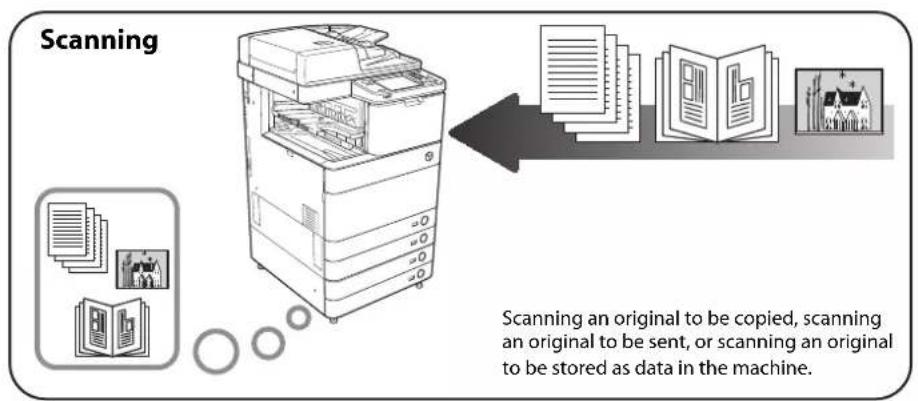
flowchart
graph LR
    A["Scanning"] --> B["Scanning an original to be copied, scanning an original to be sent, or scanning an original to be stored as data in the machine"]
    B --> C["File Icon: 1000000"]

flowchart
graph LR
    A["Printing"] --> B["Outputting a copy, publishing data stored in the machine, or publishing data sent from the computer to the machine"]
    B --> C["Printing"]
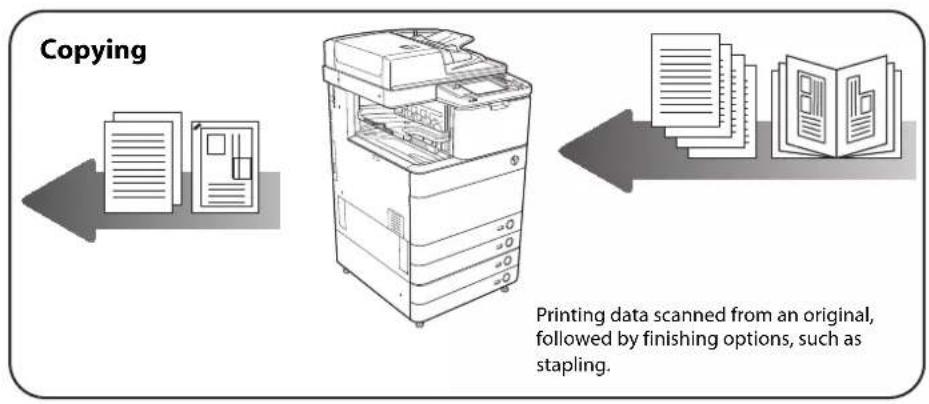
flowchart
graph LR
    A["Printing data scanned from an original, followed by finishing options, such as stapling."] --> B["Copying"]
    B --> C["File scanning and Paper handling"]
    C --> D["Final Packaging with Paper and Paper"]
Product Name
Safety regulations require the product's name to be registered. In some regions where this product is sold, the following name(s) in parenthesis may be registered instead.
- imageRUNNER ADVANCE C5051/C5051i, imageRUNNER ADVANCE C5045/C5045i (F154100)
- imageRUNNER ADVANCE C5035/C5035i, imageRUNNER ADVANCE C5030/C5030i (F154300)
EMC requirements of EC Directive
This equipment conforms with the essential EMC requirements of EC Directive. We declare that this product conforms with the EMC requirements of EC Directive at nominal mains input 230 V, 50 Hz although the rated input of the product is 220 to 240 V, 50/60 Hz. Use of shielded cable is necessary to comply with the technical EMC requirements of EC Directive.
Laser Safety
This Product is certified as a Class I laser product under IEC60825-1:2007 and EN60825-1:2007. This means that the product does not produce hazardous laser radiation.
Since radiation emitted inside the product is completely confined within protective housings and external covers, the laser beam cannot escape from the machine during any phase of user operation.
Do not remove protective housings or external covers, except as directed by the equipment's manual.
Additional Information
When servicing or adjusting the optical system of the product, be careful not to place screwdrivers or other shiny objects in the path of the laser beam. Also, accessories such as watches and rings should be removed before working on the product. The reflected beam, even though visible or invisible, can permanently damage your eyes.
The label shown below is attached to the paper drawer's right cover and toner supply port cover.
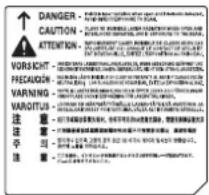
This Product has been classified under IEC60825-1:2007 and EN60825-1:2007, which conform to the following classes;
CLASS 1 LASER PRODUCT
LASER KLASSE 1
APPAREIL Á LASER DE CLASSE 1
APPARECCHIO LASER DI CLASSE 1
PRODUCTO LÁSER DE CLASE 1
APARELHO A LASER DE CLASSE 1
LUOKAN 1 LASER-TUOTE
LASERPRODUKT KLASS 1

CAUTION
Use of controls, adjustments, or performance of procedures other than those specified in the manuals for this machine may result in hazardous radiation exposure.
International ENERGY STAR Program

text_image
energy ENERGY STARAs an ENERGY STAR® Partner, Canon Inc. has determined that this machine meets the international ENERGY STAR Program for energy efficiency.
The International ENERGY STAR Office Equipment Program is an international program that promotes energy saving through the use of computers and other office equipment. The program backs the development and dissemination of products with functions that effectively reduce energy consumption. It is an open system in which business proprietors can participate voluntarily. The targeted products are office equipment, such as computers, displays, printers, facsimiles, and copiers. The standards and logos are uniform among participating nations.
IPv6 Ready Logo

The protocol stack included in this machine has obtained the IPv6 Ready Logo Phase-1 established by the IPv6 Forum.
WEEE Directive

European Union (and EEA) only.
These symbols indicate that this product is not to be disposed of with your household waste, according to the WEEE Directive (2002/96/EC), the Battery Directive (2006/66/EC) and/or your national laws implementing those Directives.
If a chemical symbol is printed beneath the symbol shown above, in accordance with the Battery Directive, this indicates that a heavy metal (Hg = Mercury, Cd = Cadmium, Pb = Lead) is present in this battery or accumulator at a concentration above an applicable threshold specified in the Battery Directive.
This product should be handed over to a designated collection point, e.g., on an authorized one-forone basis when you buy a new similar product or to an authorized collection site for recycling waste electrical and electronic equipment (EEE) and batteries and accumulators. Improper handling of this type of waste could have a possible impact on the environment and human health due to potentially hazardous substances that are generally associated with EEE.
Your cooperation in the correct disposal of this product will contribute to the effective usage of natural resources.
For more information about the recycling of this product, please contact your local city office, waste authority, approved scheme or your household waste disposal service or visit www.canon-europe.com/environment.
(EEA: Norway, Iceland and Liechtenstein)
R & TTE Directive

This equipment (F154100/F154300) conforms with the essential requirements of EC Directive 1999/5/EC and is usable in EU. (Only for models with facsimile functionality.)
(For Europe Only) Canon Inc./Canon Europa N. V.
Information Security Standard (IEEE 2600)
This machine is compliant with IEEE Std 2600 ^™ - 2008 (hereinafter referred to as IEEE 2600), a global information security standard for multifunction peripherals and printers, and is able to achieve the security requirements defined in IEEE 2600.*
For information on how this machine meets the security requirements defined in IEEE 2600, see e-Manual > Security > IEEE 2600 Security Standard.
* IEEE 2600.1 CC Authentication has not been obtained for this machine by itself.
Copyright
Copyright 2010 by Canon Inc. All rights reserved.
No part of this publication may be reproduced or transmitted in any form or by any means, electronic or mechanical, including photocopying and recording, or by any information storage or retrieval system without the prior written permission of Canon Inc.
Third Party Software
A. This product includes third-party software modules. Use and distribution of this software modules, including any updates of such software modules (collectively, the "SOFTWARE") are subject to conditions (1) through (9) below.
(1) You agree that you will comply with any applicable export control laws, restrictions or regulations of the countries involved in the event that this product including the SOFTWARE is shipped, transferred or exported into any country.
(2) Rights holders of the SOFTWARE retain in all respects the title, ownership and intellectual property rights in and to the SOFTWARE. Except as expressly provided herein, no license or right, expressed or implied, is hereby conveyed or granted by rights holders of the SOFTWARE to you for any intellectual property of rights holders of the SOFTWARE.
(3) You may use the SOFTWARE solely for use with the Canon product you purchased (the "PRODUCT").
(4) You may not assign, sublicense, market, distribute, or transfer the SOFTWARE to any third party without prior written consent of rights holders of the SOFTWARE.
(5) Notwithstanding the foregoing, you may transfer the SOFTWARE only when (a) you assign all of your rights to the PRODUCT and all rights and obligations under the conditions to transferee and (b) such transferee agrees to be bound by all these conditions.
(6) You may not decompile, reverse engineer, disassemble or otherwise reduce the code of the SOFTWARE to human readable form.
(7) You may not modify, adapt, translate, rent, lease or loan the SOFTWARE or create derivative works based on the SOFTWARE.
(8) You are not entitled to remove or make separate copies of the SOFTWARE from the PRODUCT.
(9) The human-readable portion (the source code) of the SOFTWARE is not licensed to you.
B. In case this product includes software modules and/or related documentations made by Adobe Systems Incorporated, use and distribution of software modules and/or related documentations (the "ADOBE SOFTWARE") are subject to conditions below in addition to (1) through (9) above.
The ADOBE SOFTWARE is a "commercial item," as that term is defined at 48 C.F.R. 2.101 (Oct 1995), consisting of "commercial computer software" and "commercial computer software documentation," as such terms are used in 48 C.F.R. 12.212 (Sept 1995). Consistent with 48 C.F.R. 12.212 and 48 C.F.R. 227.7202-1 through 227.7202-4 (June 1995), all U.S. Government End Users shall acquire The ADOBE SOFTWARE with only those rights set forth herein.
C. Notwithstanding A and B above, in case the other conditions accompany third-party software modules including open source software, these software modules are subject to the other conditions.
The Software Subjected to the Other Conditions
Please refer to e-Manual on a CD-ROM bundled with this product, for more detail and corresponding license conditions.
The Software Licensed under Open Source Licenses
If you need source code of certain open source, under respective Open Source Licenses, used for this product, please send email in English or Japanese at: oipossg@canon.co.jp
Please refer to e-Manual on a CD-ROM bundled with this product, for more detail and corresponding license conditions.
Disclaimers
The information in this document is subject to change without notice.
CANON INC. MAKES NO WARRANTY OF ANY KIND WITH REGARD TO THIS MATERIAL, EITHER EXPRESS OR IMPLIED, EXCEPT AS PROVIDED HEREIN, INCLUDING WITHOUT LIMITATION, THEREOF, WARRANTIES AS TO MARKETABILITY, MERCHANTABILITY, FITNESS FOR A PARTICULAR PURPOSE OR USE, OR NON-INFRINGEMENT. CANON INC. SHALL NOT BE LIABLE FOR ANY DIRECT, INCIDENTAL, OR CONSEQUENTIAL DAMAGES OF ANY NATURE, OR LOSSES OR EXPENSES RESULTING FROM THE USE OF THIS MATERIAL.
Legal Limitations on the Usage of Your Product and the Use of Images
Using your product to scan, print or otherwise reproduce certain documents, and the use of such images as scanned, printed or otherwise reproduced by your product, may be prohibited by law and may result in criminal and/or civil liability. A non-exhaustive list of these documents is set forth below. This list is intended to be a guide only. If you are uncertain about the legality of using your product to scan, print or otherwise reproduce any particular document, and/or of the use of the images scanned, printed or otherwise reproduced, you should consult in advance with your legal advisor for guidance.
Paper Money•Travelers Checks•
Money Orders•Food Stamps•
• Certificates of Deposit
- Passports
• Postiagret Span Papers •
(cancelled or uncancelled)
Identifying Badges or Insignias•Internal Revenue Stamps
-cancelled or uncancelled)
- Selective Service or Draft Papers
• Bonds or Other Certificates of Indebtedness
- Checks or Drafts Issued by Governmental Agencies
• Stock Certificates
• Motor Vehicle Licenses and Certificates of Title
• Copyrighted Works/Works of Art without Permission of Copyright Owner
■ To Avoid Unauthorized Use of the Machine
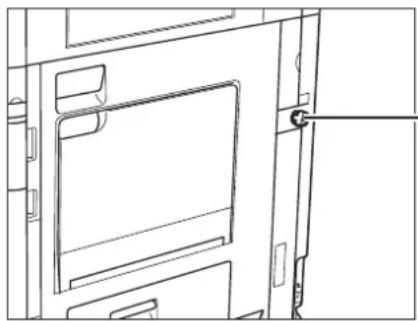
Unauthorized copies can be prevented by using the key switch unit to manage the operation of the imageRUNNER ADVANCE C5051/C5051i/C5045/C5045i/C5035/C5035i/C5030/C5030i. The use of this key should be strictly supervised to help prevent unauthorized copying.
natural_image
Line drawing of a door frame with a closed lid and handle, no text or symbols presentSecurity Key
When using the machine, insert the security key into the key switch unit, and then turn it to the right.
Super G3

Super G3 is a phrase used to describe the new generation of fax machines that use ITU-T V.34 standard 33.6 Kbps* modems. Super G3 High Speed Fax machines allow transmission times of approximately 3 seconds* per page which results in reduced telephone line charges.
* Approximately 3 seconds per page fax transmission time based on CCITT/ITU-T No.1 Chart, (JBIG, Standard Mode) at 33.6 Kbps modem speed. The Public Switched Telephone Network (PSTN) currently supports 28.8 Kbps modem speeds or slower, depending on telephone line conditions.
Please read these "Important Safety Instructions" thoroughly before operating the machine. As these instructions are intended to prevent injury to the user or other persons or destruction of property, always pay attention to these instructions. Also, since it may result in unexpected accidents or injuries, do not perform any operation unless otherwise specified in the manual. Improper operation or use of this machine could result in personal injury and/or damage requiring extensive repair that may not be covered under your Limited Warranty.
Installation

WARNING
- Do not install the machine near alcohol, paint thinner, or other flammable substances. If flammable substances come into contact with electrical parts inside the machine, it may result in a fire or electrical shock.
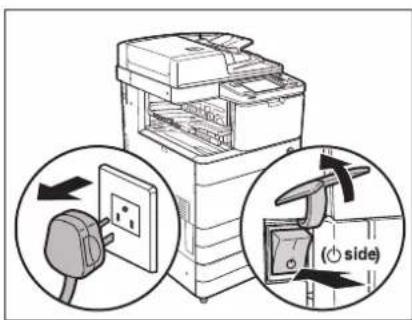
- Do not place the following items on the machine. If these items come into contact with a high-voltage area inside the machine, it may result in a fire or electrical shock. If these items are dropped or spilled inside the machine, immediately turn OFF the main power switch, and disconnect the power cord from the power outlet. Then, contact your local authorized Canon dealer.
- Necklaces and other metal objects
- Cups, vases, flowerpots, and other containers filled with water or liquids
text_image
Diagram illustrating the installation of an air conditioner unit with a plug and side-mounted fan, showing electrical connection and rotation direction.
CAUTION
- Do not install the machine in unstable locations, such as unsteady platforms or inclined floors, or in locations subject to excessive vibrations, as this may cause the machine to fall or tip over, resulting in personal injury.
- Never block the ventilation slots and louvers on the machine. These openings are provided for proper ventilation of working parts inside the machine. Blocking these openings can cause the machine to overheat. Never place the machine on a soft surface, such as a sofa or rug.
-
Do not install the machine in the following locations:
-
A damp or dusty location
- A location near water faucets or water
- A location exposed to direct sunlight
- A location subject to high temperatures
- A location near open flames
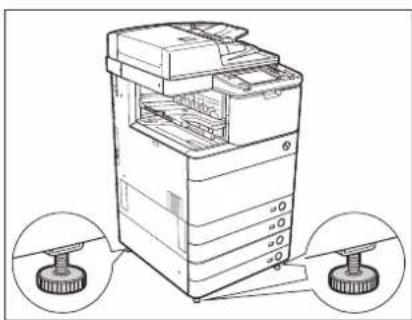
- Do not remove the machine's leveling feet after the machine has been installed, as this may cause the machine to fall or tip over, resulting in personal injury.
natural_image
Line drawing of a file organizer with two circular insets showing base and top components (no text or symbols)Power Supply

WARNING
- Do not damage or modify the power cord. Also, do not place heavy objects on the power cord, or pull on or excessively bend it, as this could cause electrical damage and result in a fire or electrical shock.
- Keep the power cord away from a heat source; failure to do this may cause the power cord coating to melt, resulting in a fire or electrical shock.
- Do not connect or disconnect the power cord with wet hands, as this may result in electrical shock.
- Do not connect the power cord to a multiplug power strip, as this may cause a fire or electrical shock.
- Do not bundle up or tie the power cord in a knot, as this may result in a fire or electrical shock.
- Insert the power plug completely into the power outlet, as failure to do so may result in a fire or electrical shock.
- Do not use power cords other than the power cord provided, as this may result in a fire or electrical shock.
- As a general rule, do not use extension cords. Using an extension cord may result in a fire or electrical shock.

CAUTION
- Do not use power supplies with voltages other than those specified herein, as this may result in a fire or electrical shock.
- Always grasp the power plug when disconnecting the power cord. Pulling on the power cord may expose or snap the core wire, or otherwise damage the power cord. If the power cord is damaged, this could cause current to leak, resulting in a fire or electrical shock.
- Leave sufficient space around the power plug so that it can be unplugged easily. If objects are placed around the power plug, you will be unable to unplug it in an emergency.
Handling

WARNING
- Do not attempt to disassemble or modify the machine. There are high-temperature and high-voltage components inside the machine which may result in a fire or electrical shock.
- If the machine makes strange noises, or gives off smoke, heat, or strange smells, immediately turn OFF the main power switch, and disconnect the power cord from the power outlet. Then, contact your local authorized Canon dealer. Continued use of the machine in this condition may result in a fire or electrical shock.
- Do not use highly flammable sprays near the machine. If gas from these sprays comes into contact with the electrical components inside the machine, it may result in a fire or electrical shock.
- To avoid damage to the power cord and creating a fire hazard, always turn OFF the main power switch, and unplug the interface cable when moving the machine. Otherwise, the power cord or interface cable may be damaged, resulting in a fire or electrical shock.
- Make sure that the power plug is firmly inserted into the power outlet if the machine was moved. Do not use the machine while the connection is loose, as doing so may cause a fire.
- Do not drop paper clips, staples, or other metal objects inside the machine. Also, do not spill water, liquids, or flammable substances (alcohol, benzene, paint thinner, etc.) inside the machine. If these items come into contact with a high-voltage area inside the machine, it may result in a fire or electrical shock. If these items are dropped or spilled inside the machine, immediately turn OFF the main power switch, and disconnect the power cord from the power outlet. Then, contact your local authorized Canon dealer.
- Do not use the product for uses other than as a color digital multitasking machine.

CAUTION
- Do not place heavy objects on the machine, as they may tip over or fall resulting in personal injury.
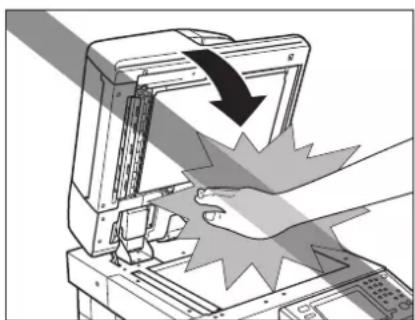
- Close the feeder/platen cover gently to avoid catching your hands, as this may result in personal injury.
natural_image
Illustration of a computer monitor with a hand pressing down on a tray, showing a black arrow indicating compression or disassembly (no text or symbols present)- Do not press down hard on the feeder/platen cover when using the platen glass to make copies of thick books. Doing so may damage the platen glass and result in personal injury.
- Do not touch the finisher while the machine is printing, as this may result in personal injury.
- Paper that has just been output from the machine may be hot. Be careful when removing or aligning paper from the output
tray. Touching paper right after it is output may result in low-temperature burns.
- Turn OFF the control panel power switch for safety when the machine will not be used for a long period of time, such as overnight. Also, turn OFF the main power switch, and disconnect the power cord for safety when the machine will not be used for an extended period of time, such as during consecutive holidays.
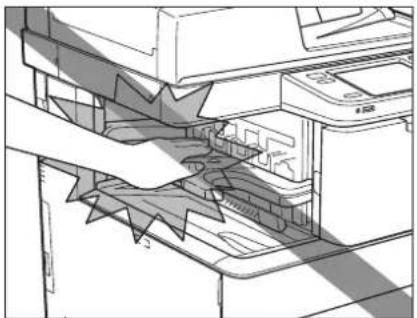
- Do not place your hands, hair, clothing, etc., near the exit and feed rollers. Even if the machine is not in operation, your hands, hair, or clothing may get caught in the rollers, which may result in personal injury or damage if the machine suddenly starts printing.
- Do not place your hands in the part of the tray where stapling is performed (near the rollers) when a finisher is attached, as this may result in personal injury.
natural_image
Technical line drawing of a printer's internal structure showing paper feeding into a printer (no text or symbols present)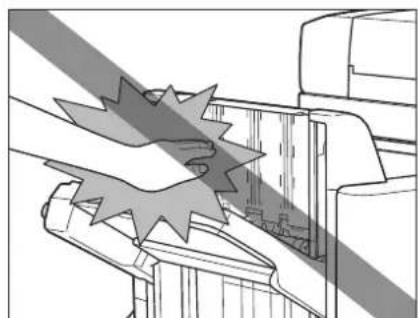
natural_image
Technical line drawing of a mechanical assembly with no visible text or symbolsStaple Finisher-C1/Booklet Finisher-C1Inn
- The laser beam can be harmful to human bodies. Since radiation emitted inside the product is completely confined within protective housings and external covers, the laser beam cannot escape from the machine during any phase of user operation. Read the following remarks and instructions for safety.
- Never open covers other than those instructed in the manuals for this machine.
- Do not remove the following caution label which is attached to the machine. If the label has been removed, contact your local authorized Canon dealer.
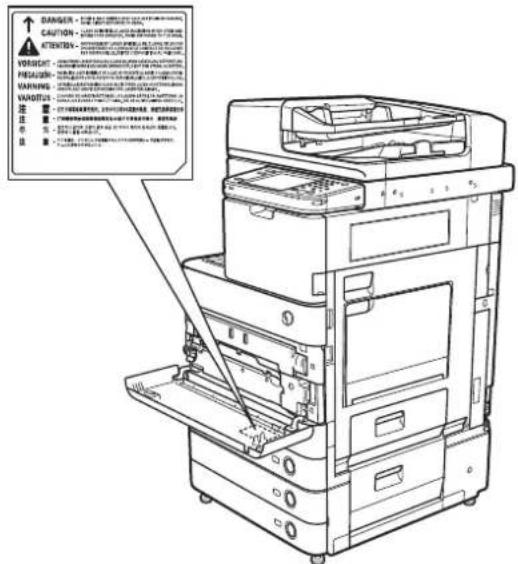
- If the laser beam escapes from the machine, exposure may cause serious damage to your eyes.
- Controlling, adjusting, or operating the machine in ways not mentioned in the manuals for this machine may cause dangerous radiation to escape from the machine.

WARNING
- When cleaning the machine, first turn OFF the main power switch, then disconnect the power cord. Failure to observe these steps may result in a fire or electrical shock.
- Disconnect the power cord from the power outlet regularly, and clean the area around the base of the power plug's metal pins and the power outlet with a dry cloth to ensure that all dust and grime is removed. If the power cord is connected for a long period of time in a damp, dusty, or smoky location, dust can build up around the power plug and become damp. This may cause a short circuit and result in a fire.
- Clean the machine using a slightly dampened cloth with a mild detergent mixed with water. Do not use alcohol, benzene, paint thinner, or other flammable substances. Check detergent for flammability prior to use. If flammable substances come into contact with a high-voltage area inside the machine, it may result in a fire or electrical shock.
- There are some areas inside the machine which are subject to high-voltages. When removing jammed paper or when inspecting the inside of the machine, do not allow necklaces, bracelets, or other metal objects to touch the inside of the machine, as this may result in burns or electrical shock.
- Do not burn or throw used toner cartridges into open flames, as this may cause the toner remaining inside the cartridges to ignite, resulting in burns or a fire.
- Make sure that the power plug is firmly inserted into the power outlet after cleaning the machine. Do not use the machine while the connection is loose, as doing so may cause a fire.
- Check the power cord and power plug regularly. If the following conditions occur, contact your local authorized Canon dealer, as the condition may cause a fire:
- There are burn marks on the power plug.
- The blade on the power plug is deformed or broken.
- The power goes OFF and ON when the power cord is bent.
- There are cuts, cracks, or indentations on the power cord.
- A part of the power cord becomes hot.
- Check the power cord and power plug regularly to make sure that they are not handled in the following manner, as this may result in a fire or electrical shock:
- The connection part of the power plug is loose.
- Stress is being applied to the power cord by a heavy object or by affixing it with staples.
- The power plug is loose.
- The power cord is tied in a bundle.
- The power cord protrudes into a walkway.
- The power cord is in front of a heater.

CAUTION
- The fixing unit and its surroundings inside the machine may become hot during use. When removing jammed paper or when inspecting the inside of the machine, do not touch the fixing unit and its surroundings, as doing so may result in burns or electrical shock.
- When removing jammed paper or when inspecting the inside of the machine, do not expose yourself to the heat emitted from the fixing unit and its surroundings for a prolonged period of time. Doing so may result in low temperature burns, even though you did not touch the fixing unit and its surroundings directly.
- If a paper jam occurs, follow the directions on the touch panel display to remove any jammed paper from inside the machine. Do not insert your fingers into any parts not indicated on the touch panel display, as doing so may result in personal injury or burns.

text_image
DO NOT TOUCH. It may cause burns.- When removing jammed paper or replacing the toner cartridge, take care not to allow the toner to come into contact with your hands or clothing, as this will dirty your hands or clothing. If they become dirty, wash them immediately with cold water. Washing them with warm water will set the toner, and make it impossible to remove the toner stains.
- When removing paper which has become jammed inside the machine, remove the jammed paper gently to prevent the toner on the paper from scattering and getting into your eyes or mouth. If the toner gets into your eyes or mouth, wash them immediately with cold water and immediately consult a physician.
- When loading paper or removing jammed originals or paper, take care not to cut your hands on the edges of the originals or paper.
- When removing paper which has become jammed inside the machine, take care not to cut your hands or injure yourself on the inside of the machine. If you cannot remove the paper, contact your local authorized Canon dealer.
- When removing a used toner cartridge, remove the cartridge carefully to prevent the toner from scattering and getting into your eyes or mouth. If the toner gets into your eyes or mouth, wash them immediately with cold water and immediately consult a physician.
- Do not dismantle the toner cartridge, as doing so may cause toner to fly out and enter your eyes or mouth. If toner gets into your eyes or mouth, wash them immediately with cold water and immediately consult a physician.
- If toner escapes from the toner cartridge, make sure not to ingest the toner or allow it to directly touch your skin. If toner touches your skin, wash it away with soap and water. If your skin still feels irritated after washing it, or you ingest toner, consult a doctor immediately.
Consumables

WARNING
- Do not burn or throw used toner cartridges into open flames, as this may cause the toner remaining inside the cartridges to ignite, resulting in burns or a fire.
- Do not store toner cartridges or copy paper in places exposed to open flames, as this may cause the toner or paper to ignite, resulting in burns or a fire.
- When discarding used toner cartridges, put the cartridges into a bag to prevent the toner remaining inside the cartridges from scattering, and dispose of them in a location away from open flames.

CAUTION
- Keep toner and other consumables out of the reach of small children. If these items are ingested, consult a physician immediately.
- Do not dismantle the toner cartridge, as doing so may cause toner to fly out and enter your eyes or mouth. If toner gets into your eyes or mouth, wash them immediately with cold water and immediately consult a physician.
- If toner escapes from the toner cartridge, make sure not to ingest the toner or allow it to directly touch your skin. If toner touches your skin, wash it away with soap and water. If your skin still feels irritated after washing it, or you ingest toner, consult a doctor immediately.
Other Warnings

WARNING
For cardiac pacemaker users:
This product emits low level magnetic flux. If you use a cardiac pacemaker and feel abnormalities, please move away from the product and consult your doctor.
This machine has a breaker that detects excess current or leakage current. Make sure to test the breaker once or twice a month using the following procedure.

IMPORTANT
- Make sure that the main power is turned OFF, before inspecting the breaker.
- If a malfunction occurs after an inspection, contact your local authorized Canon dealer.
Checking the Breaker
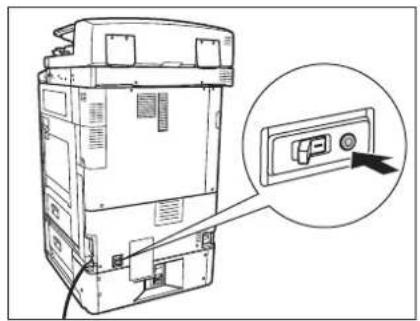
1 Push the test button on the rear of the machine with the tip of a ball-point pen, or a similar object.
natural_image
Diagram of a computer tower with an inset showing a control panel (no text or symbols present)
IMPORTANT
Briefly push the test button.

NOTE
• The breaker is located on the rear of the machine.
- For more information on the location of the breaker, see e-Manual > Before You Start Using This Machine.

Confirm that the breaker lever is switched to the OFF (" " side) position.
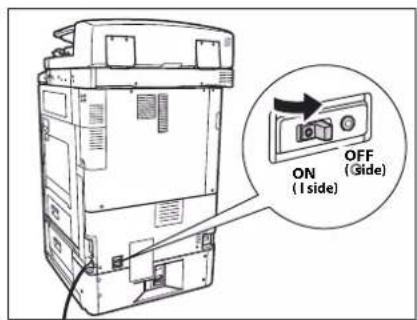
text_image
ON (I side) OFF (Gide)
IMPORTANT
- Do not use the test button to turn the power ON and OFF.
- If the breaker lever does not switch to the OFF ("◎side) position, repeat step 1.
- If the breaker lever does not switch to the OFF ("O" side) position, despite carrying out the above procedure two or three times, contact your local authorized Canon dealer.
3 Switch the breaker lever to ON ("I" side).
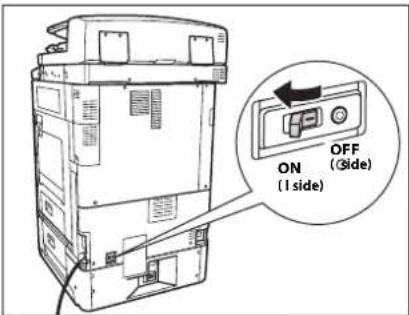
text_image
ON (1 side) OFF (Side)4 Press the main power switch to the ON ("I" side) position.
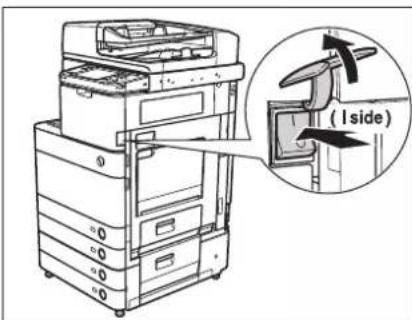
text_image
(I side)5 Fill in the check sheet, located on the next page, to document your periodic inspections of the breaker.
Check Sheet for the Periodic Inspection of the Breaker
Copy this page for future use, and store it in a safe place near the machine to document your periodic inspections of the breaker.
■ How to Inspect the Breaker Periodically
Follow the procedure described in "Periodic Inspection of the Breaker," on p. xxiii, once or twice a month.
■ How to Fill in This Check Sheet
Fill in the date of inspection and the name of the inspector.
When the inspection is completed successfully, write a check mark under √
If not, contact your local authorized Canon dealer. (Also, write a check mark under "X.")
| Date of Inspection | Inspector Inspector | Result Result | |
| √ | X | ||
| Date of Inspection | |||
| √ | X | ||
The e-Manual (this manual) is an html manual.
You can use the e-Manual on your computer by following the items below.
System Requirements
The e-Manual is guaranteed to operate in the following system environments.
■ OS (Operating System)
Windows 2000 SP4, Windows XP, Windows Vista, Windows Server 2008, Windows 7
Even if you are using Windows 2000 SP4, Internet Explorer 6.0 or later is required.
Mac OS X v10.4.x
Web Browser
Windows: Internet Explorer 6.0, 7.0 or 8.0
Mac: Safari 2.0.x
Flash Player
Flash Player 8.0 or later

NOTE
- The memory and CPU required to run each operating system are also required.
- A display resolution of 1024 x 768 pixels or higher is required.
- The e-Manual may not operate correctly if Flash Player is not installed or a version of Flash Player earlier than the above is installed in your computer.
Installing e-Manual
■ If you are using Windows:
- Insert the e-Manual CD-ROM in your computer.
- Select the language for the e-Manual.
- Select [Install] or [Display Manual].
If [Install] is selected, the e-Manual is saved in the [My Documents] (Windows Vista/Server 2008/7: [Documents]) folder on your computer.
If the shortcut icon created on the Desktop or if the [index.html] file is double-clicked, the e-Manual is displayed.
If [Display Manual] is selected, the e-Manual is displayed.
■ If you are using Macintosh:
- Insert the e-Manual CD-ROM in your computer.
- Double-click the [e-Manual] icon → drag-and-drop the [uk_iRADV_C5051_Manual] folder to the location where you want to save it.
- Double-click [index.html] in the [uk_iRADV_C5051_Manual] folder, and the e-Manual is displayed.

NOTE
Depending on the operating system you are using, a security protection message may be displayed. In this case, allow the contents to be displayed.
Uninstalling the e-Manual
■ If you are using Windows:
- Open the My Documents (Windows Vista/Server 2008/7: [Documents]) folder → select [uk_iRADV_C5051_Manual] from the Canon folder.
- Drag-and-drop the folder to the Recycle Bin, or right-click the folder and select [Delete]. Also, if you have a shortcut to the e-Manual on your Desktop, move the shortcut key to the Recycle Bin in the same way as the folder.
- Empty the Recycle Bin.
■ If you are using Macintosh:
- Drag-and-drop [uk_iRADV_C5051_Manual] folder to the Trash icon.
- Empty the Trash.
e-Manual Menu
When you start the e-Manual, the following screen (the top page) is displayed.
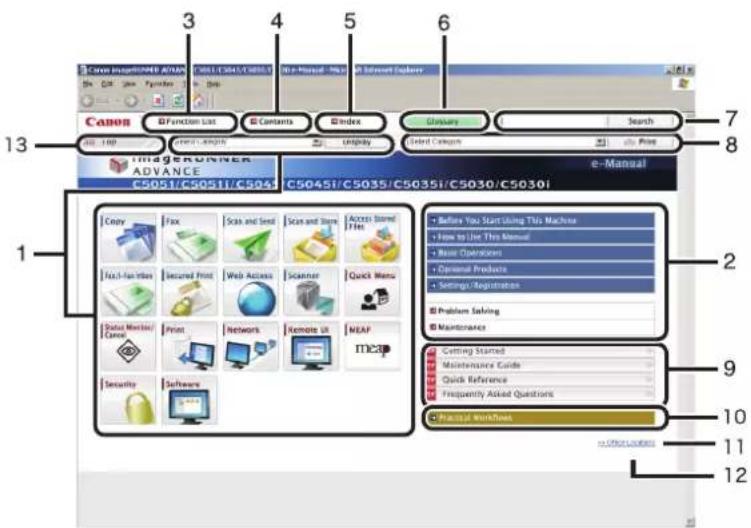
text_image
3 4 5 6 7 8 13 Function List Contents Index Clarity Search ImageRUNNER ADVANCE C5045i/C5035/C5035i/C5030/C5030i e-Manual Copy Fox Scan and Send Scan and Sign Access Stored Has Before You Start Using This Machine How to Use This Manual Base Operations Optional Products Settings/Registration Problem Solving Maintenance Cutting Stored Maintenance Guide Quick Reference Frequently Asked Questions Financial Workforce 12 Next-Last Misses Locked Print Web Access Scanner Quick Menu Digital Marketing/ Canvas Print Network Remote UI MEAP ITIC3D Security Software① Function Categories
Select a category from the drop-down list and click [Display], or click the button to display a list of image icons. Click an image icon to display the topic pages. If you click [Display Function List] displayed in the list of image icons, a list of all the topic page titles is displayed. When there are also sub-categories, they can be selected from the drop-down list in the image icon list.
② Appendix Categories
Select an appendix category to display topic pages such as the maintenance and optional equipment topics.
③ [Function List]
Click to display the topic pages for function categories.
④ [Contents]
Click to display the contents for the function categories and appendix categories in a separate window.
⑤ [Index]
Click to display the index for the function categories and appendix categories in a separate window.
⑥ [Glossary]
Click to display the glossary in a separate window.
⑦ [Search]
Click to display a list of the page titles that includes the phrase you enter and the category names that they belong to. Click a title to display the corresponding page.
⑧ [Print]
Click to print all categories or a single category. When there are subcategories, you can print them separately.
⑨ PDF Guides
Click to display the Getting Started, Quick Reference, Maintenance Guide, and Frequently Asked Questions in the PDF format.
⑩ [Practical Workflows]
Click to display the Practical Workflows that introduce functions of the machine for each purpose.
⑪ [Important Notice]
Click to display important notices in a separate window. Only displayed when there are important notices.
⑫ [Office Locations]
Click to display Canon contact details in a separate window.
⑬ [Top]
Click to return to the top page.
![CANON imageRUNNER ADVANCE C5051i - ⑬ [Top] - 1](/content/2026/04/666694/images/4cd2254e022c84b7723b2431e6284564048f6a12595479e8e6206e93dfe70e05.jpg)
NOTE
- If the Windows CD-ROM auto play feature is not enabled, click [Start] on the Windows task bar → [My Computer]. (Windows Vista/Server 2008/7: click [start] on the Windows task bar → [Computer].) (Windows 2000/XP: double-click [My Computer] on the Windows desktop.) Open the CD-ROM icon, then double-click start.exe.
- Depending on the environment of your computer and the phrase you enter, the correct search results may not be displayed or may take time to be displayed. Also, a confirmation screen may be displayed before executing the search.
- If you are using Safari and search results are not displayed, click [View] → [Reload Page] from the menu bar.
- Topic pages can be printed by category or topic.
- The background colour and images of the Topic Page may not be printed, depending on the web browser settings.
e-Manual Topics
The explanatory pages under each category in the e-Manual are called "topics." They are displayed in a screen similar to the one below.

text_image
1. Select Air_Copy from the Main Menu screen. 2. Flow of Copy Operations This section describes the flow of basic copy operations. 3. Select Copy Operations 4. Select Copy Operations 5. Print (This Topic) 6. Print (This Category) Display Image List 1. Select Air_Copy from the Main Menu screen. 7. Select Air_Copy 8. Select Air_Copy 9. Select Air_Copy 10. Select Air_Copy 11. Select Air_Copy 12. Select Air_Copy 13. Select Air_Copy 14. Select Air_Copy 15. Select Air_Copy 16. Select Air_Copy 17. Select Air_Copy 18. Select Air_Copy 19. Select Air_Copy 20. Select Air_Copy 21. Select Air_Copy 22. Select Air_Copy 23. Select Air_Copy 24. Select Air_Copy 25. Select Air_Copy 26. Select Air_Copy 27. Select Air_Copy 28. Select Air_Copy 29. Select Air_Copy 30. Select Air_Copy 31. Select Air_Copy 32. Select Air_Copy 33. Select Air_Copy 34. Select Air_Copy 35. Select Air_Copy 36. Select Air_Copy 37. Select Air_Copy 38. Select Air_Copy 39. Select Air_Copy 40. Select Air_Copy 41. Select Air_Copy 42. Select Air_Copy 43. Select Air_Copy 44. Select Air_Copy 45. Select Air_Copy 46. Select Air_Copy 47. Select Air_Copy 48. Select Air_Copy 49. Select Air_Copy 50. Select Air_Copy 51. Select Air_Copy 52. Select Air_Copy 53. Select Air_Copy 54. Select Air_Copy 55. Select Air_Copy 56. Select Air_Copy 57. Select Air_Copy 58. Select Air_Copy 59. Select Air_Copy 60. Select Air_Copy 61. Select Air_Copy 62. Select Air_Copy 63. Select Air_Copy 64. Select Air_Copy 65. Select Air_Copy 66. Select Air_Copy 67. Select Air_Copy 68. Select Air_Copy 69. Select Air_Copy 70. Select Air_Copy 71. Select Air_Copy 72. Select Air_Copy 73. Select Air_Copy 74. Select Air_Copy 75. Select Air_Copy 76. Select Air_Copy 77. Select Air_Copy 78. Select Air_Copy 79. Select Air_Copy 80. Select Air_Copy 81. Select Air_Copy 82. Select Air_Copy 83. Select Air_Copy 84. Select Air_Copy 85. Select Air_Copy 86. Select Air_Copy 87. Select Air_Copy 88. Select Air_Copy 89. Select Air_Copy 90. Select Air_Copy 91. Select Air_Copy 92. Select Air_Copy 93. Select Air_Copy 94. Select Air_Copy 95. Select Air_Copy 96. Select Air_Copy 97. Select Air_Copy 98. Select Air_Copy 99. Select Air_Copy① Display Image List/Display Function List
Click to switch the content displayed in the left panel.
② Topic Page Describes how to use the machine, etc.
③ Breadcrumbsb List Displays the path to the current topic. Click to jump to a higher level.
④ Step Anchors These are links to the various steps inside the topic. Click them to jump to the various steps.
⑤ Print (This Topic) Click to print the currently displayed topic page.
⑥ Print (This Category) Click to print the currently displayed category.
Appendix
1
CHAPTER
This chapter provides the specifications of the main unit and optional equipment.
Specifications....1-2
Main Unit 1-2
Duplex Color Image Reader Unit-B1.... 1-4
Color Image Reader Unit-B1 1-5
Color Image Reader Unit-B2 1-6
Cassette Feeding Unit-AD1 1-6
Paper Deck Unit-B1.... 1-7
Envelope Feeder Attachment-D1 1-7
Inner Finisher-A1.... 1-7
Staple Finisher-C1 1-9
Booklet Finisher-C1 1-10
External 2 Hole Puncher-B1/External 2/4 Hole Puncher-B1/External 4 Hole Puncher-B1 1-12
Inner Finisher Additional Tray-A1 1-12
Inner 2 Way Tray-F1 1-13
Copy Tray-J1 1-13
Card Reader-C1 1-13
Copy Card Reader-F1 1-14
Super G3 FAX Board....1-14
Send Function 1-15
Network Environment.... 1-17
Printer Settings 1-17
Provide Adequate Installation Space.... 1-18
Specifications are subject to change without notice for product improvement or future release.
Main Unit
| Item Specification | |||||
| Name Canon imageRUNNER ADVANCE C5051/C5051i/C5045/C5045i/C5035/C5035i/C5030/C5030i | |||||
| Type Reader-Printer Separated, Desktop | |||||
| Colour Supported Full Colour | |||||
| Available Paper | Paper Drawers:Weight:52 to 209 g/m2Type:Thin, Plain, Recycled, Color, Pre-Punched, Bond, Heavy 1(106 to 163 g/m2), Heavy 2 (164 to 209 g/m2), Transparency, Tab, and EnvelopesMulti-Purpose Tray:Weight:52 to 256 g/m2Type:Thin, Plain, Recycled, Color, Pre-Punched, Bond, Heavy 1(106 to 163 g/m2), Heavy 2 (164 to 209 g/m2), Heavy 3 (210 to 256 g/m2), Tracing, Coated, Labels, Transparency, Tab, and Envelopes | ||||
| Paper Sizes | Paper Drawer1:A4, A4R, A5R, and Custom size (139.7 mm x 182 mm to 304.8 mm x 390 mm)Paper Drawer2:305mm x 457 mm, A3, A4, A4R, A5R, Custom size (139.7 mm x 182 mm to 304.8 mm x 457.2 mm) and EnvelopesMulti-Purpose Tray:305mm x 457 mm, 320mm x 450 mm (SRA3), A3, A4, A4R, A5, A5R, Custom size (99 mm x 139.7 mm to 320 mm x 457.2 mm), and Envelopes | ||||
| Warm-Up Time | After Powering ON:38 secondsReturning from the Sleep mode:imageRUNNER ADVANCE C5051/C5051i/C5045/C5045i: 18 secondsimageRUNNER ADVANCE C5035/C5035i/C5030/C5030i: 15 secondsActivation time may vary depending on the environment and conditions under which the machine is being used. (At a room temperature of 20 °C in all above cases.) | ||||
| First Copy Time | Full Colour:imageRUNNER ADVANCE C5051/C5051i/C5045/C5045i: 6.5 secondsimageRUNNER ADVANCE C5035/C5035i/C5030/C5030i: 8.9 secondsBlack-and-White:imageRUNNER ADVANCE C5051/C5051i/C5045/C5045i: 4.0 secondsimageRUNNER ADVANCE C5035/C5035i/C5030/C5030i: 5.5 seconds | ||||
| Item Specification | |||||
| Copy Speed(Except when paper is fed from the Multi-Purpose Tray) | 1:1 (sheet/minute) | ||||
| imageRUNNER ADVANCE C5051/C5051i | imageRUNNER ADVANCE C5045/C5045i | imageRUNNER ADVANCE C5035/C5035i | imageRUNNER ADVANCE C5030/C5030i | ||
| 305mm x 457 mm | 20 | 20 | 15 | 15 | |
| A3 | 26 | 26 | 18 | 18 | |
| A4 | 51 | 45 | 35 | 30 | |
| A4R | 26 | 26 | 18 | 18 | |
| A5R | 13 | 13 | 13 | 13 | |
| Resolution for Writing 1,200 x 1,200 dpi | |||||
| Margin | Top: 4.0 mmLeft and Right: 2.5 mmBottom: 2.5 mm | ||||
| Paper Feeding System/ Capacity | Paper Drawers:550 sheets x 2 cassettes (80 g/m2)Multi-Purpose Tray:100 sheets (80 g/m2) | ||||
| Memory Capacity 2.5 GB | |||||
| Hard Disk Capacity Standard: 80 GB, Maximum: 250 GB | |||||
| Power Source 220 - 240 V AC, 50/60 Hz, 8.7A | |||||
| Maximum Power Consumption | imageRUNNER ADVANCE C5051/C5051i/C5045/C5045i: 1.8 kWimageRUNNER ADVANCE C5035/C5035i/C5030/C5030i: 1.3 kW | ||||
| Dimensions (H x W x D) | Only the Main Unit:801 mm x 620 mm x 735 mmWith the Duplex Color Image Reader Unit-B1:982 mm x 620 mm x 760 mmWith the Color Image Reader Unit-B1:938 mm x 620 mm x 735 mmWith the Color Image Reader Unit-B2:826 mm x 620 mm x 735 mm | ||||
| Weight | Only the Main Unit:Approximately 133 kgWith the Duplex Color Image Reader Unit-B1:Approximately 172 kgWith the Color Image Reader Unit-B1:Approximately 153 kgWith the Color Image Reader Unit-B2:Approximately 148 kg | ||||
| Installation Space (W x D) | 850 mm x 735 mm(when the multi-purpose tray is extended) | ||||
Duplex Color Image Reader Unit-B1
| Item Specification | |
| Original Feeding Mechanism Automatic Document Feeder | |
| Size and Weight of Originals | A3, A4, A4R, A5, A5R1-sided scanning: 42 to 128 g/m^2 2-sided scanning: 50 to 128 g/m^2 |
| Original Tray Capacity 150 sheets (80g/m ^2 ) | |
| Original Scanning Speed | Copying:1-sided scanning: 70 sheets/minute (A4 in Black-and-White at 600 dpi)2-sided scanning: 35 sheets/minute (A4 in Black-and-White at 600 dpi)1-sided scanning: 51 sheets/minute (A4 in Full Colour at 600 dpi)2-sided scanning: 25.5 sheets/minute (A4 in Full Colour at 600 dpi)Scanning:1-sided scanning: 70 sheets/minute (A4 in Black-and-White/Full Colour at 300 dpi)2-sided scanning: 50 sheets/minute (A4 in Black-and-White/Full Colour at 300 dpi) |
| Resolution for Reading 600 x 600 dpi | |
| Number of Tones 256 | |
| Acceptable Originals Sheet, book, three dimensional objects (up to 2 kg) | |
| Magnification | Regular paper size: Same Ratio1:1Reduction1:0.70 (A3 → A4R)1:0.50 (A3 → A5R)1:0.25Enlargement1:1.41 (A4R → A3)1:2.00 (A5R → A3)1:4.00Copy Ratio: 25 to 400 % (in 1% increments) |
| Multiple Copies 1 to 999 sheets | |
| Power Source/Consumption | Feeder: From the main unit/133 WScanner: From the main unit/17 W |
| Dimensions (H x W x D) | Feeder: 181 mm x 618 mm x 603 mmScanner (Platen Glass): 72 mm x 620 mm x 564 mm |
| Weight | Feeder: Approximately 26.8 kgScanner: Approximately 12 kg |
Color Image Reader Unit-B1
| Item Specification | |
| Original Feeding Mechanism Automatic Document Feeder | |
| Size and Weight of Originals | A3, A4, A4R, A5, A5R1-sided scanning: 42 to 128 g/m^2 2-sided scanning: 50 to 128 g/m^2 |
| Original Tray Capacity 100 sheets (80 g/m ^2 ) | |
| Original Scanning Speed | Copying:1-sided scanning: 46 sheets/minute (A4 in Black-and-White/Full Colour at 600 dpi)Scanning:1-sided scanning: 46 sheets/minute (A4 in Black-and-White/Full Colour at 300 dpi) |
| Resolution for Reading 600 x 600 dpi | |
| Number of Tones 256 | |
| Acceptable Originals Sheet, book, three dimensional objects (up to 2 kg) | |
| Magnification | Regular paper size: Same Ratio1:1Reduction1:0.70 (A3 → A4R)1:0.50 (A3 → A5R)1:0.25Enlargement1:1.41 (A4R → A3)1:2.00 (A5R → A3)1:4.00Copy Ratio: 25 to 400 % (in 1% increments) |
| Multiple Copies 1 to 999 sheets | |
| Power Source/Consumption | Feeder: From the main unit/45 WScanner: From the main unit/17 W |
| Dimensions (H x W x D) | Feeder: 137 mm x 620 mm x 537 mmScanner (Platen Glass): 72 mm x 620 mm x 564 mm |
| Weight | Feeder: Approximately 8.7 kgScanner: Approximately 12 kg |
Color Image Reader Unit-B2
| Item Specification | |
| Resolution for Reading 600 x 600 dpi | |
| Number of Tones 256 | |
| Acceptable Originals Sheet, book, three dimensional objects (up to 2 kg) | |
| Magnification | Regular paper size: Same Ratio1:1Reduction1:0.70 (A3 → A4R)1:0.50 (A3 → A5R)1:0.25Enlargement1:1.41 (A4R → A3)1:2.00 (A5R → A3)1:4.00Copy Ratio: 25 to 400 % (in 1% increments) |
| Multiple Copies 1 to 999 sheets | |
| Power Source/Consumption From the main unit/40 W | |
| Dimensions (H x W x D) | Platen Cover: 25 mm x 561 mm x 493 mmScanner (Platen Glass): 72 mm x 620 mm x 564 mm |
| Weight | Platen Cover: Approximately 1.7 kgScanner: Approximately 12 kg |
Cassette Feeding Unit-AD1
| Item Specification | |
| Paper Sizes | 305mm x 457 mm, A3, A4, A4R, A5R, and Custom size (139.7 mm x 182 mm to 304.8 mm x 457.2 mm) |
| Paper Drawers Capacity 550 sheets x 2 cassettes (80 g/m ^2 ) | |
| Power Source/Maximum Power Consumption | From the main unit/Approximately 30W |
| Dimensions (H x W x D) 251 mm x 620 mm x 700 mm | |
| Weight Approximately 27.5 kg | |
Paper Deck Unit-B1
| Item Specification | |
| Paper Size A4 | |
| Paper Deck Capacity 2,700 sheets (80 g/m ^2 ) | |
| Power Source/Consumption From the main unit/Approximately 45 W | |
| Dimensions (H x W x D) 473 mm x 372 mm x 603 mm | |
| Weight Approximately 37 kg | |
| Installation Space Including the Main Unit (W x D) | 992 mm x 735 mm |
Envelope Feeder Attachment-D1
| Item Specifications | |
| Acceptable Envelopes COM10 No.10, Monarch, DL, ISO-B5, ISO-C5 | |
| Capacity 50 sheets (or 30 mm in height) | |
| Feeding Speed | 10 cpm |
| Dimensions (H x W x D) | 81 mm x 439 mm x 307 mm |
| Weight | Approximately 1.2 kg |
Inner Finisher-A1
| Item Specification | |
| Paper Size/Weight/Type | Size:305 mm x 457 mm, 320 mm x 450 mm (SRA3), A3, A4, A4R, A5, A5R, Custom size (99 mm x 139.7 mm to 320 mm x 457.2 mm), and EnvelopesWeight:52 to 256 g/m2Type:Thin, Plain, Recycled, Color, Pre-Punched, Bond, Heavy 1(106 to 163 g/m2), Heavy 2 (164 to 209 g/m2), Heavy 3 (210 to 256 g/m2), Tracing, Coated, Labels, Transparency, and Envelopes |
| Capacity Per Tray(Standard Tray) | No Collating, Collate, Group mode:305 x 457 mm, A3, A4, A4R:500 sheets (or 62.5 mm in height)(when the Inner Finisher Additional Tray-A1 is not attached)200 sheets (or 25 mm in height)(when the Inner Finisher Additional Tray-A1 is attached)Collate (Shift), Group (Shift) mode:305 x 457 mm, A3:200 sheets (or 62.5 mm in height)A4, A4R:500 sheets (or 62.5 mm in height)(when the Inner Finisher Additional Tray-A1 is not attached)200 sheets (or 25 mm in height)(when the Inner Finisher Additional Tray-A1 is attached)Staple mode:A3, A4, A4R:30 sets (or 62.5 mm in height)No Collating, Collate, Group mode with different paper sizes:200 sheets (or 25 mm in height)Staple mode with different paper sizes:30 sets (or 25 mm in height) |
| Capacity Per Tray(Additional Tray) | No Collating, Collate, Group mode:305 x 457 mm, A3, A4, A4R:100 sheets (or 12.5 mm in height)Staple mode:A3, A4, A4R:8.1 mm in heightNo Collating, Collate, Group mode with different paper sizes:100 sheets (or 12.5 mm in height)Staple mode with different paper sizes:8.1 mm in height |
| Max. Stapling Capacity/Available Staple Size | A4:50 sheets (52 to 81 g/m2)30 sheets (82 to 105 g/m2)2 sheets (106 to 256 g/m2)A3, A4R:30 sheets (52 to 81 g/m2)20 sheets (82 to 105 g/m2)2 sheets (106 to 256 g/m2)Corner Staple/Double Staple mode:A3, A4, A4R |
| Power Source/Maximum Power Consumption | From the main unit/Approximately 50 W |
| Dimensions (H x W x D) | 234 mm x 602 mm x 540 mm(when the auxiliary tray is extended) |
| Weight Approximately 13 kg (when the optional Inner Finisher Additional Tray-A1 is attached) | |
| Installation Space Includingthe Main Unit (W x D) | 1,095 mm x 735 mm(when the multi-purpose tray and the auxiliary tray are extended) |
Staple Finisher-C1
| Item Specification | |
| Paper Size/Weight/Type | Size:305mm x 457 mm, 320mm x 450 mm (SRA3), A3, A4, A4R, A5, A5R, and EnvelopesWeight:52 to 256 g/m2Type:Thin, Plain, Recycled, Color, Pre-Punched, Bond, Heavy 1(106 to 163 g/m2), Heavy 2 (164 to 209 g/m2),Heavy 3 (210 to 256 g/m2), Tracing, Coated, Labels, Transparency, and Envelopes |
| Capacity Per Tray (Upper Output Tray) | No Collating, Collate, Group modeA4, A5, A5R:1,300 sheets (or 188 mm in height)A3, A4R:650 sheets (or 96 mm in height)Collate (Shift), Group (Shift) modeA4:1,300 sheets (or 188 mm in height)A3, A4R:650 sheets (or 96 mm in height)Staple modeA4:1,300 sheets/30 sets (or 188 mm in height)A3, A4R:650 sheets/30 sets (or 96 mm in height)No Collating, Collate, Group mode with different paper sizes:650 sheets (or 96 mm in height)Staple mode with different paper sizes:650 sheets/30 sets (or 96 mm in height) |
| Capacity Per Tray (Lower Output Tray) | No Collating, Collate, Group modeA4, A5, A5R:1,700 sheets (or 243 mm in height)A3, A4R:650 sheets (or 96 mm in height)Collate(Shift), Group(Shift) modeA4:1,700 sheets (or 243 mm in height)A3, A4R:650 sheets (or 96 mm in height)Staple modeA4:1,700 sheets/30 sets (or 243 mm in height)A3, A4R:650 sheets/30 sets (or 96 mm in height)No Collating, Collate, Group mode with different paper sizes:650 sheets (or 96 mm in height)Staple mode with different paper sizes:650 sheets/30 sets (or 96 mm in height) |
| Max. Stapling Capacity/Available Staple Size | A4:50 sheets (52 to 81 g/m2)30 sheets (82 to 105 g/m2)2 sheets (106 to 256 g/m2)A3, A4R:30 sheets (52 to 81 g/m2)20 sheets (82 to 105 g/m2)2 sheets (106 to 256 g/m2)Corner Staple/Double Staple mode:A3, A4, A4R |
| Power Source/Maximum Power Consumption | From the main unit/Approximately 70 W |
| Dimensions (H x W x D) | 1,097 mm x 677 mm x 646 mm(when the auxiliary tray is extended) |
| Weight Approximately 46 kg | |
| Installation Space Including the Main Unit (W x D) | 1,527 mm x 735 mm(when the multi-purpose tray and the auxiliary tray are extended)1,634 mm x 735 mm(When the optional Puncher is attached, the multi-purpose tray and the auxiliary tray are extended) |
Booklet Finisher-C1
| Item Specification | |
| Paper Size/Weight/Type | Size:305mm x 457 mm, 320mm x 450 mm (SRA3), A3, A4, A4R, A5, A5R, and EnvelopesWeight:52 to 256 g/m2Type:Thin, Plain, Recycled, Color, Pre-Punched, Bond, Heavy 1(106 to 163 g/m2), Heavy 2 (164 to 209 g/m2),Heavy 3 (210 to 256 g/m2), Tracing, Coated, Labels, Transparency, and Envelopes |
| Capacity Per Tray (Upper Output Tray) | No Collating, Collate, Group modeA4, A5, A5R:1,300 sheets (or 188 mm in height)A3, A4R:650 sheets (or 96 mm in height)Collate (Shift), Group (Shift) modeA4:1,300 sheets (or 188 mm in height)A3, A4R:650 sheets (or 96 mm in height)Staple modeA4:1,300 sheets/30 sets (or 147 mm in height)A3, A4R:650 sheets/30 sets (or 96 mm in height)No Collating, Collate, Group mode with different paper sizes:650 sheets (or 96 mm in height)Staple mode with different paper sizes:650 sheets/30 sets (or 96 mm in height) |
| Capacity Per Tray (Lower Output Tray) | No Collating, Collate, Group modeA4, A5, A5R:1,700 sheets (or 243 mm in height)A3, A4R:650 sheets (or 96 mm in height)Collate(Shift), Group(Shift) modeA4:1,700 sheets (or 243 mm in height)A3, A4R:650 sheets (or 96 mm in height)Staple modeA4:1,700 sheets/30 sets (or 147 mm in height)A3, A4R:650 sheets/30 sets (or 96 mm in height)No Collating, Collate, Group mode with different paper sizes:650 sheets (or 96 mm in height)Staple mode with different paper sizes:650 sheets/30 sets (or 96 mm in height) |
| Max. Stapling Capacity/Available Staple Size | A4:50 sheets (52 to 81 g/m2)30 sheets (82 to 105 g/m2)2 sheets (106 to 256 g/m2)A3, A4R:30 sheets (52 to 81 g/m2)20 sheets (82 to 105 g/m2)2 sheets (106 to 256 g/m2)Corner Staple/Double Staple mode:A3, A4, A4R |
| Max. Saddle Stitch Capacity/Available Saddle Stitch Size | Saddle Stitch :16 sheets (52 to 81 g/m2)10 sheets (82 to 105 g/m2)Saddle Folding :1 sheet (52 to 256 g/m2)Size :A3, A4R |
| Power Source/Maximum Power Consumption | From the main unit/Approximately 117 W(When the optional Puncher is attached) |
| Dimensions (H x W x D) | 1,097 mm x 789 mm x 646 mm(when the auxiliary tray is extended) |
| Weight Approximately 75 kg | |
| Installation Space Including the Main Unit (W x D) | 1,639 mm x 735 mm(when the multi-purpose tray and the auxiliary tray are extended)1,746 mm x 735 mm(When the optional Puncher is attached, the multi-purpose tray and the auxiliary tray are extended) |
External 2 Hole Puncher-B1/External 2/4 Hole Puncher-B1/External 4 Hole Puncher-B1
| Item Specifications | |
| Paper Size/Weight/Type | Size:External 2 Hole Puncher-B1:Two Holes: A3, A4, A4RExternal 2/4 Hole Puncher-B1:Two or Four Holes: A3, A4External 4 Hole Puncher-B1:Four Holes: A3, A4, A4RWeight:52 to 256 g/m2Type:Thin, Plain, Recycled, Color, Heavy 1(106 to 163 g/m2), Heavy 2 (164 to 209 g/m2), Heavy 3 (210 to 256 g/m2) |
| Punch Hole Quantity, Hole Diameter | Two or Four holes: 6.5 mm |
| Distance between Punch Holes | Two Holes: 80 mm (External 2 Hole Puncher-B1/External 2/4 Hole Puncher-B1)Four Holes: 80 mm (External 2/4 Hole Puncher-B1)Four Holes: 21 mm / 70 mm / 21 mm (External 4 Hole Puncher-B1) |
| Paper Size in Which Holes Can be Punched | Two Holes:(External 2 Hole Puncher-B1/External 2/4 Hole Puncher-B1): A3, A4, A4RFour Holes:(External 2/4 Hole Puncher-B1): A3, A4(External 4 Hole Puncher-B1): A3, A4, A4R |
| Punch Waste Tray Capacity Approximately 2,500 sheets (80 g/m ^2 ) | |
| Power Source From the main unit | |
| Dimensions (H x W x D) 908 mm x 107 mm x 623 mm | |
| Weight Approximately 7.2 kg | |
Inner Finisher Additional Tray-A1
| Item Specifications | |
| Paper Size/Weight/Type | See specification of "Paper Size/Weight/Type" in Inner Finisher-A1. |
| Capacity Per Tray | See specification of "Capacity Per Tray (Additional Tray)" in Inner Finisher-A1. |
| Dimensions (H x W x D) 57 mm x | 207 mm x 450 mm |
| Weight Approximately 1.4 kg |
Inner 2 Way Tray-F1
| Item Specifications | |
| Paper Size/Weight/Type | Size:305mm x 457 mm, 320mm x 450 mm (SRA3), A3, A4, A4R, A5, A5R, Custom size (99 mm x 139.7 mm to 320 mm x 457.2 mm), and EnvelopesWeight:52 to 256 g/m2Type:Thin, Plain, Recycled, Color, Pre-Punched, Bond, Heavy 1(106 to 163 g/m2), Heavy 2 (164 to 209 g/m2), Heavy 3 (210 to 256 g/m2), Tracing, Coated, Labels, Transparency, and Envelopes |
| Capacity | Tray A: 250 sheets (80 g/m2)Tray B: 100 sheets (80 g/m2) |
| Dimensions (H x W x D) 76 mm x | 426 mm x 407 mm |
| Weight Approximately 574 g | |
| Installation Space Including the Main Unit (W x D) | 850 mm x 735 mm (when the multi-purpose tray is extended) |
Copy Tray-J1
| Item Specification | |
| Paper Size/Weight/Type | Size:A3, A4, A4R, A5RWeight:52 to 209 g/m2Type:Thin, Plain, Recycled, Color, Pre-Punched, Bond, Heavy 1(106 to 163 g/m2), Heavy 2 (164 to 209 g/m2), and Tab |
| Capacity 100 sheets (80 g/m) | ^2 |
| Dimensions (H x W x D) 144 mm | x 365 mm x 373 mm (When the auxiliary tray is extended) |
| Weight Approximately 438 g | |
| Installation Space Including the Main Unit (W x D) | 967 mm x 735 mm (When the auxiliary tray is extended) |
Card Reader-C1
| Item Specifications | |
| Available Cards Magnetic, Optical | |
| Card Readout Method Magnetic/Optical readout | |
| Magnetic Card Reading Direction Face up | |
| Store/Replay Replay | |
| Power Source From the main unit | |
| Dimensions (H x W x D) 32 mm x 88 mm x 100 mm (Excluding the attachment kit and cable) | |
| Weight Approximately 295 g (Including the attachment kit and cable) |
Copy Card Reader-F1
| Item Specifications | |
| Available Cards Magnetic | |
| Card Readout Method Magnetic readout | |
| Magnetic Card Reading Direction Face up | |
| Store/Replay Replay | |
| Power Source From the main unit | |
| Dimensions (H x W x D) 40 mm x 88 mm x 96 mm (Excluding the attachment kit and cable) | |
| Weight Approximately 191 g (Including the attachment kit and cable) |
Super G3 FAX Board

NOTE
Specifications remain the same even when the Super G3 2nd Line FAX Board is installed.
| Item Specifications | |
| Telephone Line Used1 | Public Switched Telephone Network |
| Scan line Density(Scan, Transmission) | Normal: 8 pels ^2 /mm x 3.85 line/mmFine: 8 pels ^2 /mm x 7.7 line/mmSuper-Fine: 8 pels ^2 /mm x 15.4 line/mmUltra-Fine: 16 pels ^2 /mm x 15.4 line/mm |
| Transmission Speed Super G3: 33.6 kbps, G3: 14.4 kbps | |
| Compression Method MH, MR, MMR, JBIG | |
| Transmission Type Super G3, G3 | |
| Sending Original Sizes | A3, A4, A4R, A5*, A5R**Sent as A4 |
| Receiving Paper Sizes A3, A4, A4R, A5 | A5R |
| Transmission Times | ECM-MMR: Approximately 3.2 secondsG3MR method: Approximately 13 secondsG3MH method: Approximately 13 secondsJBIG: Approximately 2.6 seconds |
| Auto Dial Function | Address Book: 1,800 destinations(including destinations stored in one-touch buttons) |
| Image Memory | Approximately 6,000 pages |
*1 When using an IP telephone service, facsimile communication may not be performed normally via an IP telephone line. It is recommended to use facsimile communication via a general telephone (Public Switched Telephone Network) line.
^x 2 Pels stands for picture elements (pixels).
■ Scan Features
| Item Specifications | |
| Communication Protocol FTP (TCP/IP), SMB (TCP/IP), WebDAV | |
| Data Format TIFF, JPEG, PDF, XPS, OOXML | |
| Resolution | 100 x 100 dpi, 150 x 150 dpi, 200 x 100 dpi, 200 x 200 dpi, 200 x 400 dpi, 300 x 300 dpi, 400 x 400 dpi, 600 x 600 dpi |
| System Environment | Windows 2000 Server SP4, Windows XP Professional SP3, Windows Server 2003 R2 SP2, Windows Vista SP2, Windows Server 2008 SP2, Windows Server 2008 R2 SP2, Windows 7, Solaris 10, MacOS X 10.4.x/10.5.x, RedhatLinux 9 |
| Interface 1000BASE-T, 100BASE-TX, 10BASE-T | |
| Colour Mode | Automatic-Color Select (Full Color/Grayscale), Automatic-Color Select (Full Color/Black-and-White), Full Color, Grayscale, Black-and-White |
| Original Type Text, Text/Photo, Photo | |
| Others Preview, Browse Windows (SMB) File Server | |
| Optional PDF/XPS/OOXML Functions | Compact *2, Trace and Smooth *1, Encryption*1, OCR, Divice Signature2, User Signature *2, Optimization for Web*, PDF/A1, Reader Extensions *1 |
*1 PDF only.
*2 PDF/XPS only.
E-mail and I-Fax Features
| Item Specifications | ||
| Communication Protocol SMTP | POP3 | |
| I-Fax Communication Mode Simple, Full | ||
| Resolution | For Sending E-mail | 100 x 100 dpi, 150 x 150 dpi,200 x 100 dpi, 200 x 200 dpi,200 x 400 dpi, 300 x 300 dpi,400 x 400 dpi, 600 x 600 dpi |
| For Sending I-Fax | Black-and-White200 x 100 dpi, 200 x 200 dpi,200 x 400 dpi, 300 x 300 dpi,400 x 400 dpi, 600 x 600 dpiColour100 x 100 dpi, 200 x 200 dpi,300 x 300 dpi, 400 x 400 dpi600 x 600 dpi* Available after setting RX conditions of the destination | |
| Format | E-mail TIFF, JPEG, PDF, XPS, OOXML | |
| I-Fax | Black-and-WhitetIFF (MH, MR; MMR*)ColourTIFF (Profile-C)* Available after setting RX conditions of the destination | |
| Original Size | E-mail A3, A4, A4R, A5, A5R | |
| I-Fax | A3, A4, A4R, A5*, A5R** Sent as A4 | |
| Server Software | Microsoft Exchange 2003 SP2, Microsoft Exchange 2007 SP1, Sendmail 8.12.8, Lotus Domino R7.0 | |
| Other Searches a destination via the LDAP Server, Preview | ||
| Optional PDF/XPS Functions (E-mail only) | Compact*, Trace and Smooth*, Encryption*, OCR, Divice Signature*, User Signature*, Optimization for Web*, PDF/A*, Reader Extensions*1 | |
*1 PDF only.
*2 PDF/XPS only.
Network Environment
Hardware Specifications
| Network Interface 10Base-T/100Base-TX/1000Base-T (RJ-45) |
Software Specifications
| Protocol Supported | ||
| TCP/IP Frame type: | Print applications: | Ethernet IILPD/Raw/IPP/IPPS/FTP/WSD |
| IPX/SPX Frame type: | Print applications: | Ethernet II/Ethernet 802.2/Ethernet 802.3/Ethernet SNAP/Auto DetectBindery PServer/NDS PServer/RPrinter/NPrinter |
| NetBIOS*1 Frame type: | Print application: | Ethernet IISMB |
| AppleTalk Frame type: | Print application: | Ethernet SNAPPAP (Printer Access Protocol) |
*1 IPv6 is not supported.
Printer Settings
Software Specifications
| Command Language PCL5e, PCL6, PostScript 3 | |
| Resident Fonts | PCL: 93 Scalable fonts, 2 OCR fonts, and 10 Bitmap fontsPS: 138 Scalable fonts |
| Printable Area | PCL5e, PCL6:Reduced to 4.23 mm from the top, bottom, left, and right edges of the paper.PostScript 3:Reduced to 4 mm from the top, bottom, left, and right edges of the paper. |
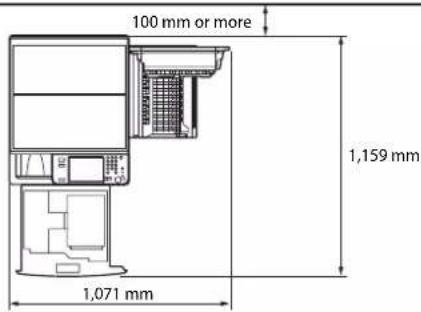
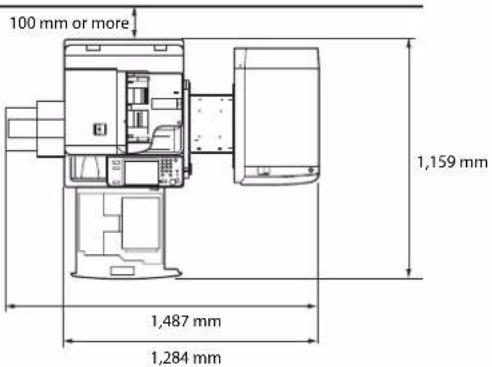
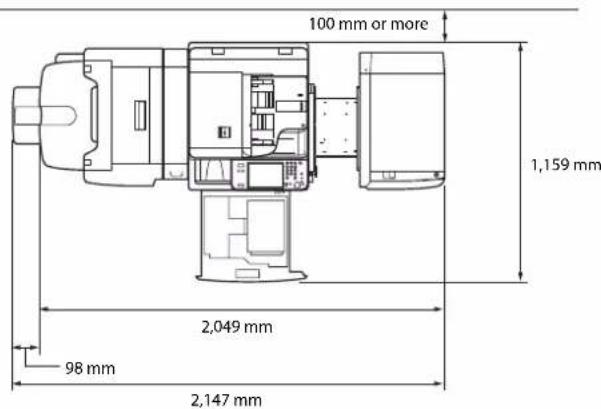
■ Provide enough space on each side of the machine for unrestricted operation.
The Color Image Reader Unit-B2 is attached.
text_image
100 mm or more 1,159 mm 1,071 mmThe Duplex Color Image Reader Unit-B1, Inner Finisher-A1, and Paper Deck Unit-B1 are attached.
text_image
100 mm or more 1,159 mm 1,487 mm 1,284 mmThe Duplex Color Image Reader Unit-B1, Puncher, Booklet Finisher-C1, Buffer Pass Unit-G1, and Paper Deck Unit-B1 are attached.
text_image
100 mm or more 1,159 mm 2,049 mm 98 mm 2,147 mmimageRUNNER ADVANCE C5051/C5051i/C5045/C5045i/ C5035/C5035i/C5030/C5030i Guide de l’utilisateur

Guides de la machine
Directive R & TTE....xv
natural_image
Line drawing of a multi-tiered printer or scanner device with visible internal components (no text or labels)Copyright © 2007 -08 Adobe Systems Incorporated. All rights reserved.
Protected by U.S. Patents 5,737,599; 5,781,785; 5,819,301; 5,929,866; 5,943,063; 6,073,148; 6,515,763; 6,639,593; 6,754,382; 7,046,403; 7,213,269; 7,242,415; Patents pending in the U.S. and other countries.
All instances of the name PostScript in the text are references to the PostScript language as defined by Adobe Systems Incorporated unless otherwise stated. The name PostScript also is used as a product trademark for Adobe Systems' implementation of the PostScript language interpreter.
Except as otherwise stated, any reference to a "PostScript printing device," "PostScript display device," or similar item refers to a printing device, display device or item (respectively) that contains PostScript technology created or licensed by Adobe Systems Incorporated and not to devices or items that purport to be merely compatible with the PostScript language.
Adobe, the Adobe logo, PostScript, the PostScript logo, and PostScript 3 are either registered trademarks or trademarks of Adobe Systems Incorporated in the United States and/or other countries.
Linux is a registered trademark of Linus Torvalds. Microsoft and Windows are either registered trademarks or trademarks of Microsoft Corporation in the United States and/or other countries.

Copyright © 2008 Adobe Systems Incorporated. All rights reserved.
Protected by U.S. Patents 6,185,684; 6,205,549; 7,213,269; 7,272,628; 7,278,168; Patents pending in the U.S. and other countries.
All instances of the name PostScript in the text are references to the PostScript language as defined by Adobe Systems Incorporated unless otherwise stated. The name PostScript also is used as a product trademark for Adobe Systems' implementation of the PostScript language interpreter.
Except as otherwise stated, any reference to a "PostScript printing device," "PostScript display device," or similar item refers to a printing device, display device or item (respectively) that contains PostScript technology created or licensed by Adobe Systems Incorporated and not to devices or items that purport to be merely compatible with the PostScript language.
Adobe, the Adobe logo, PostScript, the PostScript Logo, and PostScript 3 are either registered trademarks or trademarks of Adobe Systems Incorporated in the United States and/or other countries.
CLASS 1 LASER PRODUCT
LASER KLASSE 1
APPAREIL Á LASER DE CLASSE 1
APPARECCHIO LASER DI CLASSE 1
PRODUCTO LÁSER DE CLASE 1
APARELHO A LASER DE CLASSE 1
LUOKAN 1 LASER-TUOTE
LASERPRODUKT KLASS 1

ATTENTION
text_image
Energy ENERGY STARThe ADOBE SOFTWARE is a "commercial item," as that term is defined at 48 C.F.R. 2.101 (Oct 1995), consisting of "commercial computer software" and "commercial computer software documentation," as such terms are used in 48 C.F.R. 12.212 (Sept 1995). Consistent with 48 C.F.R. 12.212 and 48 C.F.R. 227.7202-1 through 227.7202-4 (June 1995), all U.S. Government End Users shall acquire The ADOBE SOFTWARE with only those rights set forth herein.
natural_image
Technical line drawing of a door frame with a handle and mounting bracket (no text or symbols)Clé de sécurité
text_image
Diagram illustrating electrical outlet installation with labeled components and directional arrows indicating charging or discharging paths.
ATTENTION
natural_image
Line drawing of a multi-chamber office with two circular insets showing base and top components (no text or symbols)natural_image
Diagram of a computer monitor with an arrow indicating compression or disassembly process (no text or symbols present)natural_image
Diagram of a printer's internal structure showing paper feeding into a printer (no text or symbols present)Module de finition interne-A1
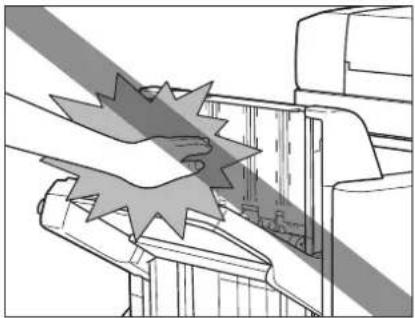
natural_image
Technical line drawing of a mechanical assembly with no visible text or symbolsModule de finition agrafage-C1/ Module de Finition P.A.C.-C1
natural_image
Technical line drawing of a device rear panel with an inset showing a button (no text or symbols present)
IMPORTANT
- Status Monitor/Abbruch
- Netzwerk
- Remote UI
- MEAP
- Sicherheit
- Software
Installation....xviii
Stromquelle xix
Handhabung xix
Duplex Color Scanner B1 1-4
Color Scanner B1....1-5
Color Scanner B2....1-6
Kassetteneinheit AD1 1-6
Papiermagazin B1....1-7
Finisher (intern) A1....1-7
Finisher C1....1-9
Broschürenfinisher C1....1-10
natural_image
Line drawing of a multi-tiered printer or scanner device with no visible text or symbolsNovell NetWare: NetWare
Apple Macintosh: Macintosh
Apple Mac: Mac
Warenzeichen
Copyright © 2007 -08 Adobe Systems Incorporated. All rights reserved.
Protected by U.S. Patents 5,737,599; 5,781,785; 5,819,301; 5,929,866; 5,943,063; 6,073,148; 6,515,763; 6,639,593; 6,754,382; 7,046,403; 7,213,269; 7,242,415; Patents pending in the U.S. and other countries.
All instances of the name PostScript in the text are references to the PostScript language as defined by Adobe Systems Incorporated unless otherwise stated. The name PostScript also is used as a product trademark for Adobe Systems' implementation of the PostScript language interpreter.
Except as otherwise stated, any reference to a "PostScript printing device," "PostScript display device," or similar item refers to a printing device, display device or item (respectively) that contains PostScript technology created or licensed by Adobe Systems Incorporated and not to devices or items that purport to be merely compatible with the PostScript language.
Adobe, the Adobe logo, PostScript, the PostScript logo, and PostScript 3 are either registered trademarks or trademarks of Adobe Systems Incorporated in the United States and/or other countries.
Linux is a registered trademark of Linus Torvalds. Microsoft and Windows are either registered trademarks or trademarks of Microsoft Corporation in the United States and/or other countries.

Copyright © 2008 Adobe Systems Incorporated. All rights reserved.
Protected by U.S. Patents 6,185,684; 6,205,549; 7,213,269; 7,272,628; 7,278,168; Patents pending in the U.S. and other countries.
All instances of the name PostScript in the text are references to the PostScript language as defined by Adobe Systems Incorporated unless otherwise stated. The name PostScript also is used as a product trademark for Adobe Systems' implementation of the PostScript language interpreter.
Except as otherwise stated, any reference to a "PostScript printing device," "PostScript display device," or similar item refers to a printing device, display device or item (respectively) that contains PostScript technology created or licensed by Adobe Systems Incorporated and not to devices or items that purport to be merely compatible with the PostScript language.
Adobe, the Adobe logo, PostScript, the PostScript Logo, and PostScript 3 are either registered trademarks or trademarks of Adobe Systems Incorporated in the United States and/or other countries.
CLASS 1 LASER PRODUCT
LASER KLASSE 1
APPAREIL Á LASER DE CLASSE 1
APPARECCHIO LASER DI CLASSE 1
PRODUCTO LÁSER DE CLASE 1
APARELHO A LASER DE CLASSE 1
LUOKAN 1 LASER-TUOTE
LASERPRODUKT KLASS 1

VORSICHT
text_image
Energy ENERGY STARThe ADOBE SOFTWARE is a "commercial item," as that term is defined at 48 C.F.R. 2.101 (Oct 1995), consisting of "commercial computer software" and "commercial computer software documentation," as such terms are used in 48 C.F.R. 12.212 (Sept 1995). Consistent with 48 C.F.R. 12.212 and 48 C.F.R. 227.7202-1 through 227.7202-4 (June 1995), all U.S. Government End Users shall acquire The ADOBE SOFTWARE with only those rights set forth herein.
natural_image
Technical line drawing of a door frame with a handle and mounting bracket (no text or symbols)text_image
Diagram illustrating the installation of an electrical outlet with a plug and a switch, showing directional arrows and labeled section (Seite)
VORSICHT
natural_image
Diagram of a multi-chamber office with two circular insets showing base and top screws (no text or labels)Stromquelle

WARNUNG
natural_image
Illustration of a hand pressing down on a computer monitor with a downward arrow indicating compression (no text or symbols present)natural_image
Diagram of a printer's internal structure showing paper feeding into a printer (no text or symbols present)Finisher (intern) A1
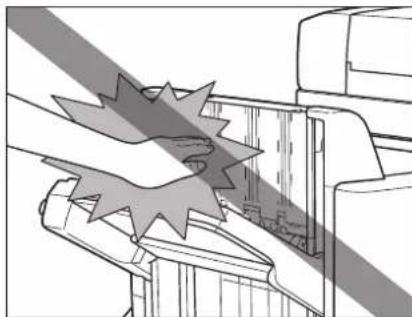
natural_image
Technical line drawing of a mechanical assembly with no visible text or symbolsFinisher C1/Broschürenfinisher C1
natural_image
Technical line drawing of a device rear panel with an inset showing a button labeled '按钮' (button), no text or symbols present.
WICHTIG
Duplex Color Scanner B1 1-4
Color Scanner B1 1-5
Color Scanner B2....1-6
Kassetteneinheit AD1 1-6
Papiermagazin B1 1-7
Finisher (intern) A1 1-7
Finisher C1.... 1-9
Broschürenfinisher C1 1-10
Duplex Color Scanner B1
Finisher (intern) A1
Paper Deck Unit-B1 1-7
Envelope Feeder Attachment-D1 1-7
Inner Finisher-A1....1-7
Staple Finisher-C1....1-9
Booklet Finisher-C1 1-10
External 2 Hole Puncher-B1/External 2/4 Hole Puncher-B1/External 4 Hole Puncher-B1....1-12
Inner Finisher Additional Tray-A1 1-12
Inner 2way Tray-F1 1-13
Copy Tray-J1 1-13
Card Reader-C1 1-13
Copy Card Reader-F1....1-14
Super G3 FAX Board....1-14
natural_image
Line drawing of a multi-tiered printer or scanner device with visible internal components (no text or labels)Novell NetWare: NetWare
Apple Macintosh: Macintosh
Apple Mac: Mac
Marchi di fabbrica
Copyright © 2007 -08 Adobe Systems Incorporated. All rights reserved.
Protected by U.S. Patents 5,737,599; 5,781,785; 5,819,301; 5,929,866; 5,943,063; 6,073,148; 6,515,763; 6,639,593; 6,754,382; 7,046,403; 7,213,269; 7,242,415; Patents pending in the U.S. and other countries.
All instances of the name PostScript in the text are references to the PostScript language as defined by Adobe Systems Incorporated unless otherwise stated. The name PostScript also is used as a product trademark for Adobe Systems' implementation of the PostScript language interpreter.
Except as otherwise stated, any reference to a "PostScript printing device," "PostScript display device," or similar item refers to a printing device, display device or item (respectively) that contains PostScript technology created or licensed by Adobe Systems Incorporated and not to devices or items that purport to be merely compatible with the PostScript language.
Adobe, the Adobe logo, PostScript, the PostScript logo, and PostScript 3 are either registered trademarks or trademarks of Adobe Systems Incorporated in the United States and/or other countries.
Linux is a registered trademark of Linus Torvalds. Microsoft and Windows are either registered trademarks or trademarks of Microsoft Corporation in the United States and/or other countries.

Copyright © 2008 Adobe Systems Incorporated. All rights reserved.
Protected by U.S. Patents 6,185,684; 6,205,549; 7,213,269; 7,272,628; 7,278,168; Patents pending in the U.S. and other countries.
All instances of the name PostScript in the text are references to the PostScript language as defined by Adobe Systems Incorporated unless otherwise stated. The name PostScript also is used as a product trademark for Adobe Systems' implementation of the PostScript language interpreter.
Except as otherwise stated, any reference to a "PostScript printing device," "PostScript display device," or similar item refers to a printing device, display device or item (respectively) that contains PostScript technology created or licensed by Adobe Systems Incorporated and not to devices or items that purport to be merely compatible with the PostScript language.
Adobe, the Adobe logo, PostScript, the PostScript Logo, and PostScript 3 are either registered trademarks or trademarks of Adobe Systems Incorporated in the United States and/or other countries.
flowchart
graph LR
    A["Stampa"] --> B["Document with Paper Icon"]
    B --> C["Computer with Printer Icon"]
    C --> D["Output: Paper Icon with Text Icon"]
    style A fill:#f9f,stroke:#333
    style D fill:#bbf,stroke:#333
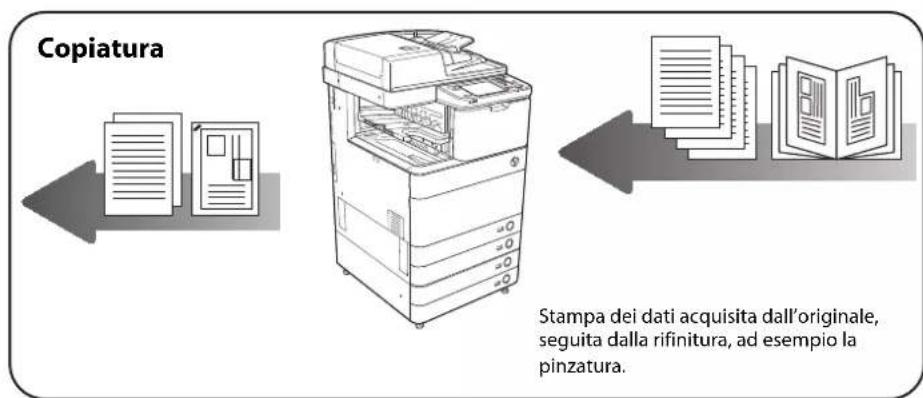
CLASS I LASER PRODUCT
LASER KLASSE 1
APPAREIL Á LASER DE CLASSE 1
APPARECCHIO LASER DI CLASSE I
PRODUCTO LASER DE CLASE I
APARELHO A LASER DE CLASSE I
LUOKAN 1 LASER-TUOTE
LASERPRODUKT KLASS 1

ATTENZIONE
text_image
Energy ENERGY STARThe ADOBE SOFTWARE is a "commercial item," as that term is defined at 48 C.F.R. 2.101 (Oct 1995), consisting of "commercial computer software" and "commercial computer software documentation," as such terms are used in 48 C.F.R. 12.212 (Sept 1995). Consistent with 48 C.F.R. 12.212 and 48 C.F.R. 227.7202-1 through 227.7202-4 (June 1995), all U.S. Government End Users shall acquire The ADOBE SOFTWARE with only those rights set forth herein.
natural_image
Technical line drawing of a door frame with a handle and mounting bracket (no text or symbols)Chiave di sicurezza
text_image
Diagram illustrating a printer's internal structure with an electrical plug and a labeled component (lato), showing directional arrows.
ATTENZIONE
natural_image
Line drawing of a file organizer with two close-up insets showing base and top screws (no text or symbols)natural_image
Illustration of a computer monitor with a hand pressing down on its screen, showing a black arrow indicating compression or disassembly (no text or symbols present)natural_image
Line drawing of a printer's internal structure showing paper feeding into a printer (no text or symbols)Inner Finisher-A1
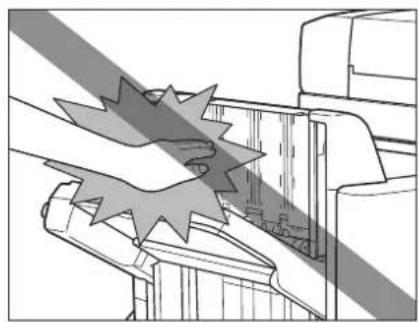
natural_image
Technical line drawing of a mechanical assembly with no visible text or symbolsStaple Finisher-C1/Booklet Finisher-C1
natural_image
Technical line drawing of a device rear panel with an inset showing a button (no text or symbols present)
IMPORTANTE
text_image
ON (lato I) OFF (lato C)
IMPORTANTE
text_image
ON (lato I) OFF (lato ○)text_image
Canon Image Runner Canon Image Runner Image Runner Image Runner Image Runner Image Runner Image Runner Image Runner Image Runner Image Runner Image Runner Image Runner Image Runner Image Runner Image Runner Image Runner Image Runner Image Runner Image Runner Image Runner Image Runner Image Runner Image Runner Image Runner Image Runner Image Runner Image Runner Image Runner Image Runner Image Runner Image Runner Image Runner Image Runner Image Runner Image RunnerPaper Deck Unit-B1.... 1-7
Envelope Feeder Attachment-D1 1-7
Inner Finisher-A1.... 1-7
Staple Finisher-C1 1-9
Booklet Finisher-C1 1-10
External 2 Hole Puncher-B1/External 2/4 Hole Puncher-B1/External 4 Hole Puncher-B1 1-12
Inner Finisher Additional Tray-A1 1-12
Inner 2way Tray-F1....1-13
Copy Tray-J1 1-13
Card Reader-C1 1-13
Copy Card Reader-F1 1-14
Super G3 FAX Board....1-14
Funzione invio 1-15
Inner Finisher Additional Tray-A1
natural_image
Line drawing of a multi-tiered printer or scanner device with visible internal components (no text or labels)Novell NetWare: NetWare
Apple Macintosh: Macintosh
Apple Mac: Mac
Marcas comerciales
Copyright © 2007 -08 Adobe Systems Incorporated. All rights reserved.
Protected by U.S. Patents 5,737,599; 5,781,785; 5,819,301; 5,929,866; 5,943,063; 6,073,148; 6,515,763; 6,639,593; 6,754,382; 7,046,403; 7,213,269; 7,242,415; Patents pending in the U.S. and other countries.
All instances of the name PostScript in the text are references to the PostScript language as defined by Adobe Systems Incorporated unless otherwise stated. The name PostScript also is used as a product trademark for Adobe Systems' implementation of the PostScript language interpreter.
Except as otherwise stated, any reference to a "PostScript printing device," "PostScript display device," or similar item refers to a printing device, display device or item (respectively) that contains PostScript technology created or licensed by Adobe Systems Incorporated and not to devices or items that purport to be merely compatible with the PostScript language.
Adobe, the Adobe logo, PostScript, the PostScript Logo, and PostScript 3 are either registered trademarks or trademarks of Adobe Systems Incorporated in the United States and/or other countries.
Linux is a registered trademark of Linus Torvalds. Microsoft and Windows are either registered trademarks or trademarks of Microsoft Corporation in the United States and/or other countries.

Copyright © 2008 Adobe Systems Incorporated. All rights reserved.
Protected by U.S. Patents 6,185,684; 6,205,549; 7,213,269; 7,272,628; 7,278,168; Patents pending in the U.S. and other countries.
All instances of the name PostScript in the text are references to the PostScript language as defined by Adobe Systems Incorporated unless otherwise stated. The name PostScript also is used as a product trademark for Adobe Systems' implementation of the PostScript language interpreter.
Except as otherwise stated, any reference to a "PostScript printing device," "PostScript display device," or similar item refers to a printing device, display device or item (respectively) that contains PostScript technology created or licensed by Adobe Systems Incorporated and not to devices or items that purport to be merely compatible with the PostScript language.
Adobe, the Adobe logo, PostScript, the PostScript Logo, and PostScript 3 are either registered trademarks or trademarks of Adobe Systems Incorporated in the United States and/or other countries.
flowchart
graph TD
    A["Lectura"] --> B["Document"]
    B --> C["Document with open pages"]
    C --> D["Document with open pages and text"]
    D --> E["Document with open pages and text"]
    E --> F["Document with open pages and text"]
    F --> G["Document with open pages and text"]
    G --> H["Document with open pages and text"]
    H --> I["Document with open pages and text"]
    I --> J["Document with open pages and text"]
    J --> K["Document with open pages and text"]
    K --> L["Document with open pages and text"]
    L --> M["Document with open pages and text"]
    M --> N["Document with open pages and text"]
    N --> O["Document with open pages and text"]
    O --> P["Document with open pages and text"]
    P --> Q["Document with open pages and text"]
    Q --> R["Document with open pages and text"]
    R --> S["Document with open pages and text"]
    S --> T["Document with open pages and text"]
    T --> U["Document with open pages and text"]
    U --> V["Document with open pages and text"]
    V --> W["Document with open pages and text"]
    W --> X["Document with open pages and text"]
    X --> Y["Document with open pages and text"]
    Y --> Z["Document with open pages and text"]
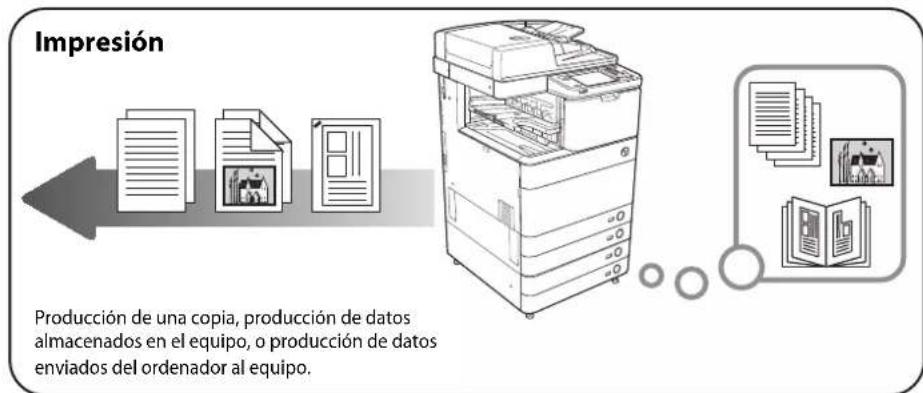
CLASS 1 LASER PRODUCT
LASER KLASSE 1
APPAREIL Á LASER DE CLASSE 1
APPARECCHIO LASER DI CLASSE 1
PRODUCTO LASER DE CLASE I
APARELHO A LASER DE CLASSE 1
LUOKAN 1 LASER-TUOTE
LASERPRODUKT KLASS 1

ATENCIÓN
text_image
Energy ENERGY STARThe ADOBE SOFTWARE is a "commercial item," as that term is defined at 48 C.F.R. 2.101 (Oct 1995), consisting of "commercial computer software" and "commercial computer software documentation," as such terms are used in 48 C.F.R. 12.212 (Sept 1995). Consistent with 48 C.F.R. 12.212 and 48 C.F.R. 227.7202-1 through 227.7202-4 (June 1995), all U.S. Government End Users shall acquire The ADOBE SOFTWARE with only those rights set forth herein.
natural_image
Technical line drawing of a door frame with a handle and mounting bracket (no text or symbols)Llave de seguridad
text_image
Diagram illustrating the installation of an electrical outlet with a plug and a switch, showing directional arrows and a labeled component (lado).
ATENCIÓN
natural_image
Diagram of a file organizer with two circular insets showing base and top components (no text or labels)natural_image
Illustration of a computer monitor with an arrow indicating compression or disassembly (no text or symbols present)natural_image
Diagram of a printer's internal structure showing paper feeding into a printer (no text or symbols present)natural_image
Technical line drawing of a mechanical assembly with no visible text or symbolsnatural_image
Technical line drawing of a device with an inset showing a button labeled '按钮' (button), no text or symbols present.
IMPORTANTE
30-2, Shimomaruko 3-chome, Ohta-ku, Tokyo 146-8501, Japan
CANON U.S.A., INC.
One Canon Plaza, Lake Success, NY 11042, U.S.A.
CANON CANADA INC.
6390 Dixie Road Mississauga, Ontario L5T 1P7, Canada
CANON EUROPA N.V.
Bovenkerkerweg 59-61 1185 XB Amstelveen, The Netherlands
(See http://www.canon-europe.com/ for details on your regional dealer)
CANON LATIN AMERICA, INC.
703 Waterford Way Suite 400 Miami, Florida 33126 U.S.A.
CANON AUSTRALIA PTY. LTD
1 Thomas Holt Drive, North Ryde, Sydney, N.S.W. 2113, Australia
CANON CHINA CO., LTD
15F Jinbao Building No.89 Jinbao Street, Dongcheng District, Beijing 100005, China
CANON SINGAPORE PTE. LTD.
1 HarbourFront Avenue #04-01 Keppel Bay Tower, Singapore 098632
CANON HONGKONG CO., LTD
19/F., The Metropolis Tower, 10 Metropolis Drive, Hunghom, Kowloon, Hong Kong