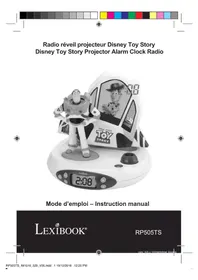
Disney Toy Story RP505TS - Radio LEXIBOOK - Free user manual and instructions
Find the device manual for free Disney Toy Story RP505TS LEXIBOOK in PDF.


| Product type | Projection alarm clock radio |
| Brand | Lexibook |
| Model | RP505TS |
| Range | Disney Toy Story |
| Dimensions (L x W x H) | 180 x 160 x 195 mm |
| Power supply | 4 AA/LR6 1.5V batteries (not included) |
| Recommended battery type | Alkaline |
| Radio frequency | FM 87.5 - 108 MHz |
| Main functions | Clock, Alarm, FM Radio, Ceiling time projector, Night light, 4 melodies |
| Buttons | MODE, RADIO, VOL., UP, DOWN, Buzz, PROJECT |
| Screen | LCD |
| Projector | Projects time onto ceiling, fades out gradually |
| Night light | Activated by pressing the base, duration 15 minutes |
| Alarm | Radio or buzzer, snooze 5 minutes |
| Warranty | 2 years |
| Maintenance | Soft clean cloth, slightly dampened with warm non-soapy water |
| Safety | Do not expose to heat, respect battery polarity, use in temperate/tropical climate |
| After-sales service | Contact: supporttechnique@support.lexibook.com or 01 84 88 58 59 |
| Manufacturing | Made in China, designed and developed in Europe |
Frequently Asked Questions - Disney Toy Story RP505TS LEXIBOOK
User questions about Disney Toy Story RP505TS LEXIBOOK
0 question about this device. Answer the ones you know or ask your own.
Ask a new question about this device
Download the instructions for your Radio in PDF format for free! Find your manual Disney Toy Story RP505TS - LEXIBOOK and take your electronic device back in hand. On this page are published all the documents necessary for the use of your device. Disney Toy Story RP505TS by LEXIBOOK.
USER MANUAL Disney Toy Story RP505TS LEXIBOOK
size: 105 x 150mm format: Booklet
SIVON
http://www.lexibook.com/doc/rp505ts/rp505ts_1.pdf

Yiu Wai Man
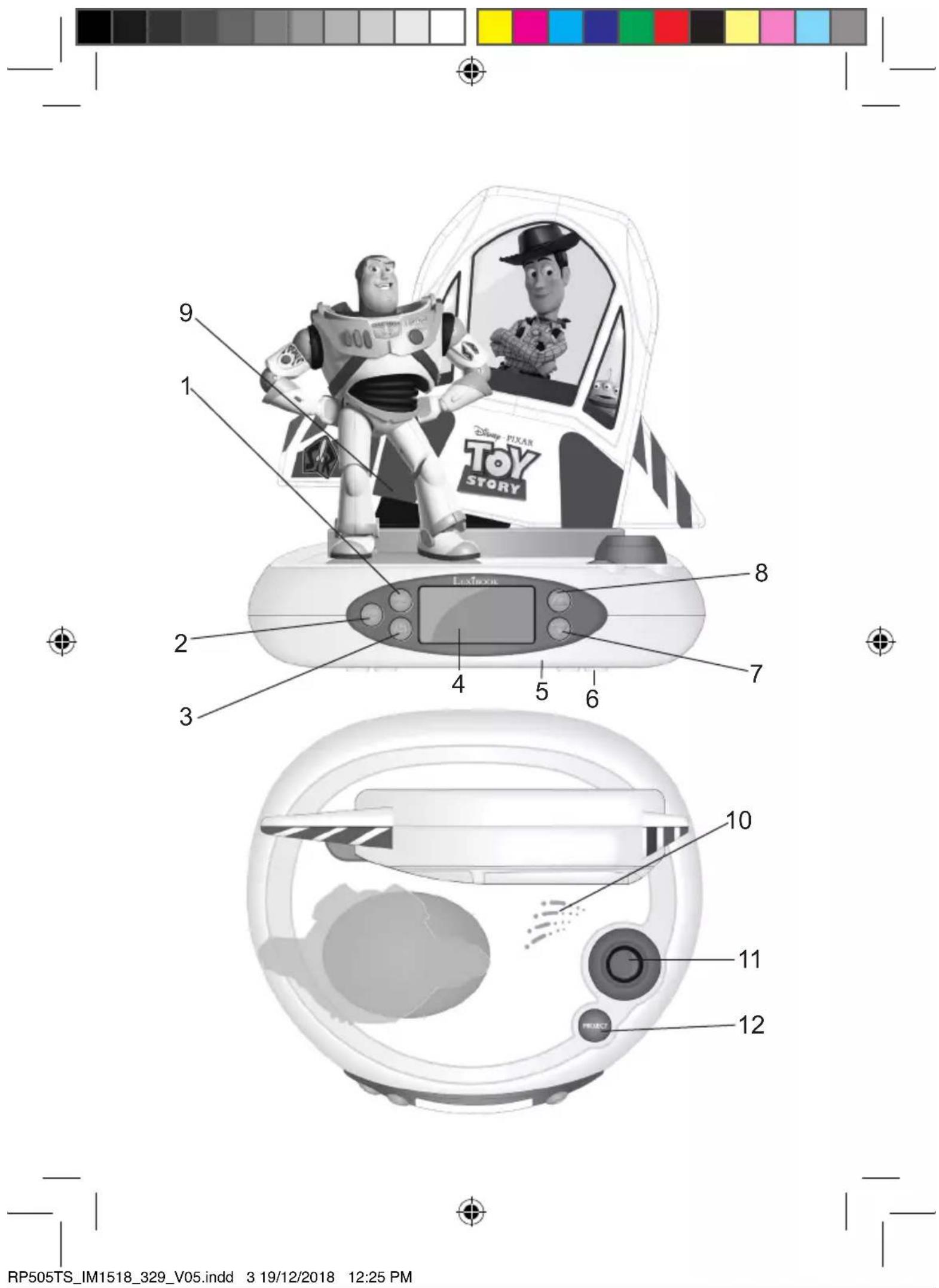
- MODE button: selects the setting mode.
- RADIO button: press this button to turn the radio on or off and to snooze the alarm
- VOL. button: Press once and then press on UP or DOWN to change the volume for the radio. Press twice and then press on UP or DOWN to change the volume for the sound effects.
- LCD screen
- Battery compartment (at the bottom of the unit)
- Night-light rubber feet
- DOWN button: press this button to change the radio frequency or to turn the volume down.
- UP button: press this button to change the radio frequency or to turn the volume up.
- Buzz button
- Speaker
- Projector
- PROJECT button: projects the time onto the ceiling.
Battery information
Your Disney Toy Story Radio Alarm Clock Projector works with 4 × 1.5V = -
AA / LR6 type batteries (not included).
When you use the RP505TS for the first time:
- Using a screwdriver, open the battery compartment cover located at the bottom of the unit.
- Install the 4 × AA / LR6 1.5 ~V batteries (not included) observing the polarity markings inside the battery compartment.
- Close the battery compartment and tighten the screw.
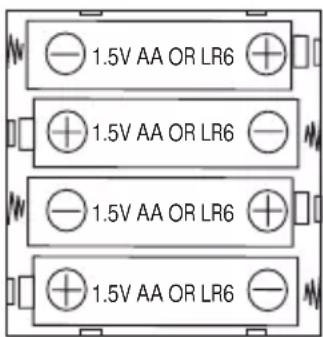
IMPORTANT NOTE: For better performance, it is recommended to use alkaline batteries with this product.
Non-rechargeable batteries are not to be recharged. Rechargeable batteries are to be removed from the product before being charged. Rechargeable batteries are only to be charged under adult supervision. Different types of batteries or new and used batteries are not to be mixed. Only batteries of the same or equivalent type as recommended are to be used. Batteries are to be inserted with the correct polarity. Exhausted batteries are to be removed from the product. The supply terminals are not to be short circuited. Do not throw batteries into a fire. Remove the batteries if you are not going to use the product for a long period of time. Battery shall not be exposed to excessive heat such as sunshine, fire or the like.
WARNING: Malfunction or loss of memory may be caused by strong frequency interference or electrostatic discharge. Should any abnormal function occur, press the RESET button or remove the batteries and insert them again.
- Keep a minimum distance around the device for sufficient ventilation;
- The openings should never be blocked by newspapers, curtains, tablecloths, etc.;
- Do not place the device on open flames such as lighted candles;
-
Batteries should be disposed properly. Take them to the collection container in order to protect the environment;
-
Device for use in a temperate and/or tropical climate.
Installation
Unpacking the device
When unpacking, ensure that the following elements are included:
1 x Disney Toy Story Radio Alarm Clock Projector
1 x instruction manual
WARNING: All packaging materials, such as tape, plastic sheets, wire ties and tags are not part of this product and should be discarded.
Settings
CLOCK
- To set the clock, press and hold the MODE key.
- Press UP/DOWN to set 12H/24H.
- Press MODE key again.
- Press UP/DOWN to set hour.
- Press MODE key again.
- Press UP/DOWN to set minutes.
- Press MODE key to come back to the Clock Mode.
ALARM
- To set the alarm, press MODE once. "ON" appears on the screen. Press and hold MODE, "ON" is flashing, and press MODE again to set up the time.
- Press UP/DOWN to set hour.
- Press MODE key again.
- Press UP/DOWN to set minutes.
- Press MODE key again.
- Press UP/DOWN to set if you want to hear the radio (RAD) or the alarm (VOI).
- If you choose the Radio, press UP/DOWN to choose the radio frequency.
- Press MODE key to finish.
When the alarm sounds, press RADIO key to snooze the alarm for 5 minutes (the bell icon will flash), or press any other keys to turn it off.
RADIO
- Press RADIO key to turn on/off the Radio.
- Press UP/DOWN to choose the radio frequency.
- Press and hold UP / DOWN for 2 seconds, it will jump to the next channel.
- If you want to change the volume, press VOL. key, and then press UP/DOWN to monitor the volume.
- Under the radio mode, press MODE to have the clock back on the screen.
MELODIES
Press Buzz to play one of the 4 preloaded melodies.
NIGHTLIGHT
Press once on the base of the clock to switch on the nightlight. Press again to stop it.
Note: when activated, the nightlight will stay on for 15 minutes.
PROJECTOR
Press PROJECT to project the time onto the ceiling. The projection will gradually fade out after a few seconds.
Specifications
Simplified eu declaration of conformity
| FM tuner 87.5 - 108MHZ |
| Dimensions (L)180 x (W)160 x (H)195mm |
| Batteries 4 x AA/LR6 1.5V |
We, Lexibook® S.A.
6 avenue des Andes
91940 Les Ulis
France
Kind of product: Disney Toy Story Projector Alarm Clock Radio
Type designation: RP505TS
Hereby, Lexibook Limited declares that the radio equipment type RP505TS is in compliance with Directive 2014/53/EU.
The full text of the EU declaration of conformity is available at the following internet address:
http://www.lexibook.com/doc/rp505ts/rp505ts_01.pdf
Yiu Wai Man
Product Development Manager
(Hong Kong)
Maintenance
The finish on your unit may be cleaned with a dust cloth and cared for as other furniture. Use a soft, clean cloth moistened with plain, lukewarm water to clean the exterior of the unit. Use caution when cleaning and wiping the plastic parts. Mild soap and a damp cloth may be used on the front panel.
Warranty
This product is covered by our 2-years warranty.
For any claim under the warranty or after sale service, please contact your distributor and present a valid proof of purchase. Our warranty covers any manufacturing material and workmanship defect, with the exception of any deterioration arising from the non-observation of the instruction manual or from any careless action implemented on this item (such as dismantling, exposition to heat and humidity, etc.). It is recommended to keep the packaging for any further reference.
In a bid to keep improving our services, we could implement modifications on the colors and the details of the product shown on the packaging.
NOTE: Please keep this instruction manual, it contains important information.
Reference: RP505TS
Designed and developed in Europe - Made in China
Lexibook®
©Disney
United Kingdom & Ireland
For after-sales service, please contact us at customerservice@support.lexibook. com or +33 1 84 88 58 59.

This product is not a toy.

Environmental Protection
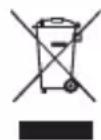
Unwanted electrical appliances can be recycled and should not be discarded along with regular household waste! Please actively support the conservation of resources and help protect the environment by returning this appliance to a collection centre (if available).
http://www.lexibook.com/doc/rp505ts/rp505ts_01.pdf

Yiu Wai Man
Gerente de desenvolvimento de produits
(Hong Kong)
Garantía
Dimensoes A195x C180 x L160mm
Pilhas 4 x AA/LR6 1,5V
DECLARATION ue de conformidade simplificada
Nós, Lexibook® S.A.
6 avenue des Andes
91940 Les Ulis
Franca
http://www.lexibook.com/doc/rp505ts/rp505ts_01.pdf

Yiu Wai Man
http://www.lexibook.com/doc/rp505ts/rp505ts_01.pdf

Yiu Wai Man
http://www.lexibook.com/doc/rp505ts/rp505ts_01.pdf
Yiu Wai Man
http://www.lexibook.com/doc/rp505ts/rp505ts_01.pdf

Yiu Wai Man