TFN-214470 - Fan Emerio - Free user manual and instructions
Find the device manual for free TFN-214470 Emerio in PDF.


| Product Type | Bladeless Tower Fan |
| Brand | Emerio |
| Model | TFN-214470 |
| Supply Voltage | 220-240 V ~ 50-60 Hz |
| Nominal Power | 50 W |
| Power Consumption (measured) | 36.3 W |
| Maximum Air Flow | 17.11 m³/min |
| Sound Power Level | 60.97 dB(A) |
| Maximum Air Velocity | 1.74 m/s |
| Service Value | 0.47 (m³/min)/W |
| Standby Consumption | 0.43 W |
| Number of Speeds | 3 (Low, Medium, High) |
| Operating Modes | Normal, Natural, Sleep |
| Timer | 0.5 h to 7.5 h (in 0.5 h increments) |
| Oscillation | Yes (horizontal rotation) |
| Control Type | Touch panel + remote control |
| Remote Control Battery | CR2025 |
| Warranty | 2 years |
| Maintenance | Clean with a damp cloth; do not immerse |
| Safety | Do not use near water; do not insert objects into the air outlet |
Frequently Asked Questions - TFN-214470 Emerio
User questions about TFN-214470 Emerio
0 question about this device. Answer the ones you know or ask your own.
Ask a new question about this device
Download the instructions for your Fan in PDF format for free! Find your manual TFN-214470 - Emerio and take your electronic device back in hand. On this page are published all the documents necessary for the use of your device. TFN-214470 by Emerio.
USER MANUAL TFN-214470 Emerio
natural_image
White and blue electric fan tower with a digital display, no visible text or symbols on the device body.Instruction manual – English ...... - 2 -
Before use make sure to read all of the below instructions in order to avoid injury or damage, and to get the best results from the appliance. Make sure to keep this manual in a safe place. If you give or transfer this appliance to someone else make sure to also include this manual.
In case of damage caused by user failing to follow the instructions in this manual the warranty will be void. The manufacturer/importer accepts no liability for damages caused by failure to follow the manual, a negligent use or use not in accordance with the requirements of this manual.
- This appliance can be used by children aged from 8 years and above and persons with reduced physical, sensory or mental capabilities or lack of experience and knowledge if they have been given supervision or instruction concerning use of the appliance in a safe way and understand the hazards involved.
- Children shall not play with the appliance.
- Cleaning and user maintenance shall not be made by children without supervision.
- If the supply cord is damaged, it must be replaced by the manufacturer, its service agent or similarly qualified persons in order to avoid a hazard.
- Before inserting the plug into the mains socket, please check that the voltage and frequency comply with the specifications on the rating label.
- Disconnect the mains plug from the socket when the appliance is not in use and before cleaning.
- Ensure that the mains cable is not hung over sharp edges and keep it away from hot objects and open flames.
- Do not immerse the appliance or the mains plug in water or other liquids. There is danger to life due to electric shock!
- To remove the plug from the plug socket, pull the plug. Do not pull the power cord.
- Do not touch the appliance if it falls into water. Remove the plug from its socket, turn off the appliance and send it to an authorized service center for repair.
- Do not plug or unplug the appliance from the electrical outlet with a wet hand.
- Never attempt to open the housing of the appliance, or to repair the appliance yourself. This could cause electric shock.
- Never leave the appliance unattended during use.
- This appliance is not designed for commercial use.
- Do not use the appliance for other than intended use.
- Do not wind the cord around the appliance and do not bend it.
- Keep the appliance away from damp, and protect from splashes.
- Use the appliance on a flat, dry and heat resistance surface.
- Do not store or operate the appliance in the open air.
- Keep the appliance in a dry place for storage, inaccessible to children (in its packaging).
- Do not point the air flow at people for a long time.
- This appliance is for indoor use only.
- Do not clean the appliance by spraying it or immersing it in water.
- Never use the plug as a switch to start and turn off the appliance. Use the provided power button located on the control panel.
- Always place the appliance on a dry and stable surface. Do not move or tilt the appliance.
- High velocity fans are designed to create rapid air movement, therefore make sure the fan is not placed near curtains or any objects that may be drawn into the fan inlet.
- The appliance should not be used in laundry or wet rooms.
- Do not use this appliance in environments with flammable and explosive gases.
- Avoid keeping the appliance in direct sunlight for a long period of time.
-
Avoid touching any moving parts of the appliance.
-
Never insert fingers, pencils or any other objects though the air outlet.
- One piece of CR2025 battery is to be used with the remote control; keep out of reach of small children. Seek medical advice if swallowed.
- Remove the battery from the remote control before storage, or if exhausted to prevent leakage.
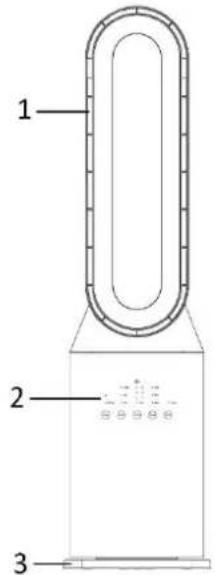
PARTS DESCRIPTION
- Air outlet
- Control panel
- Base
- Remote control
Remote control
a) On/off button
b) Speed button
c) Mode button
d) Timer button
e) Swing button
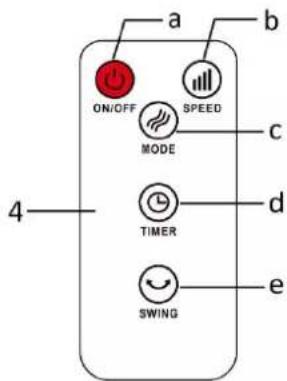
One piece of CR2025 battery is to be used with the remote control. If you want to change the battery, please refer to the instruction behind the remote control. If it is not in use for a long time, please take the battery out of the remote control. Keep button cell batteries out of reach of small children.
The functions of the remote control buttons are the same as of the touch buttons on the control panel.
Please align the remote control to the remote control receiver on the unit; the remote control will not work if the receiver is blocked.
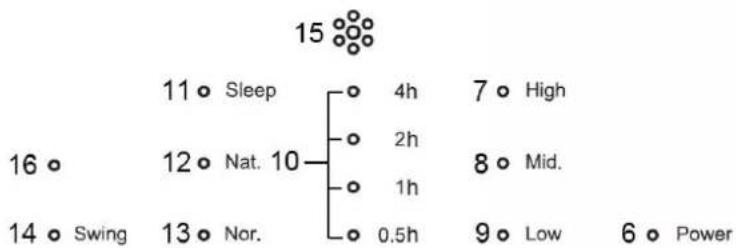
Control panel
- On/off button
- Speed button
- Timer button
- Mode button
- Swing button
- Power indicator light
- High speed indicator light
- Mid speed indicator light
- Low speed indicator light
- Timer indicator lights
- Sleeping mode indicator light
- Natural mode indicator light
- Normal mode indicator light
- Swing indicator light
- Signal receptor
- No function, for Bluetooth model only
other
| Time Interval | Value | | :--- | :--- | | Sleep | 11 | | High | 7 | | Nat. | 12 | | Mid. | 8 | | Swing | 14 | | Nor. | 13 | | Low | 9 | | Power | 6 |
OPERATING INSTRUCTIONS
Connect the appliance to a suitable power source. Then press the buttons on the control panel or remote control to choose your desired functions.
- On/off: Press the on/off button to turn the appliance on or off.
- Speed: Press the speed button to adjust the speed.
Low → Mid → High → Low ... (repeating). - Timer: Press this button to set your desired working time from 0.5h →1h →1.5h →... →7.5h→off → 0.5h ... (Repeating). When the set time has elapsed, the fan will be off.
- Mode: Press the mode button to choose the functions from Normal → Natural → Sleeping → Normal ... (Repeating). You can press the speed button to choose your desired speed level.
1) Normal mode: under this mode, the motor works with the preset speed.
2) Natural mode: under this mode, the appliance runs according to the natural mode program, generating softer and more comfortable air volume. You feel like the wind from the nature.
3) Sleeping mode: under this mode, the appliance runs according to the sleeping mode program. Air volume will weaken with the decrease of body temperature when you fall asleep, which will protect you from catching cold.
- Swing: Press the swing button to control the horizontal rotation function on or off.
CLEANING AND MAINTENANCE
- Before servicing the fan and after each occasion of use, switch off the appliance and unplug the mains cable from the socket.
- Never immerse the appliance in water (danger of short-circuit). To clean the appliance, only wipe it down with a damp cloth and dry it carefully. Always take out the mains plug first.
- Take care that excessive dust does not build up in the air-intake and air-outlet grille, and clean it occasionally using a dry brush or vacuum cleaner.
- Warning: Do not use any cleaning chemicals such as detergents and abrasives. Do not allow the interior to get wet as this could create a hazard.
- Place the appliance in its original box or cover the appliance to protect it from dust. Store it in a cool dry place.
TROUBLESHOOTING
Do not repair or disassemble the unit by yourself. Unauthorized repair attempts will invalidate the warranty and may cause personal injuries.
| Issue | Possible Reason | Solution |
| No power | 1. Power cord is unconnected.2. There is no power from socket. | 1. Connect the power cord.2. Check that socket is turned on. |
| Odour emission from unit | New unit. When the unit is used for the first time the fan motor may produce an odour which will dissipate within a week of use. | No action required. |
| Strong vibrations and noise | 1. Fan is not used on a flat surface.2. Fan may be damaged. | 1. Place on a flat surface. May put an anti-vibration mat underneath.2. If fan is damaged discontinue use and contact customer service. |
If the above solutions do not resolve the problem, please contact the customer service.
TECHNICAL DATA
Operating voltage: 220-240V \~ 50-60Hz
Power consumption: 50W
GUARANTEE AND CUSTOMER SERVICE
Before delivery our devices are subjected to rigorous quality control. If, despite all care, damage has occurred during production or transportation, please return the device to your dealer.
For the purchased device we provide 2 years guarantee, commencing from the day of sale. If you have a defective product, you can directly go back to the point of purchase.
Defects which arise due to improper handling of the device and malfunctions due to interventions and repairs by third parties or the fitting of non-original parts are not covered by this guarantee. Always keep your receipt, without the receipt you can't claim any form of warranty. Damage caused by not following the instruction manual, will lead to a void of warranty, if this results in consequential damages then we will not be liable. Neither can we hold responsible for material damage or personal injury caused by improper use if the instruction manual is not properly executed. Damage to accessories does not mean free replacement of the whole appliance. In such case please contact our service department. Broken glass or breakage of plastic parts is always subject to a charge.
Defects to consumables or parts subjected to wearing, as well as cleaning, maintenance or the replacement of said parts are not covered by the warranty and are to be paid.
The crossed out wheelie bin symbol means that this product shall not be disposed of with normal household waste. Electronic and Electrical Equipment not included in the selective sorting process are potentially dangerous for the environment and human health due to the presence of hazardous substances. Please dispose of responsibly at an approved waste or recycling facility.


BATTERY MUST BE RECYCLED OR DISPOSED OF PROPERLY. DO NOT OPEN. DO NOT DISPOSE OR
IN FIRE OR SHORT CIRCUIT.
Emerio B.V.
Oudeweg 115
2031 CC Haarlem
The Netherlands
Customer service:
"T: +31 (0) 23 3034369"
www.emerio.eu/service
Kundeninformation:
" T: +49 (0) 3222 1097 600
www.emerio.eu/service
Klantenservice:
T: +31 (0) 23 3034369
www.emerio.eu/service
Looking for spare parts? Have a look at https://spareparts.emerio.eu
Declare that the product detailed below:
Information requirements
| Information to identify the TFN-214470 to which the information relates to [Bladeless tower fan] | |||
| Description | Symbol | Value | Unit |
| Maximum fan flow rate | F | 17,11 | m^3/min |
| Fan power input | P | 36,3 | W |
| Service value | SV | 0,47 | (m^3/min)/W |
| Standby power consumption | P_SB | 0,43 | W |
| Fan sound power level | L_WA | 60,97 | dB(A) |
| Maximum air velocity | c | 1,74 | meters/sec |
| Measurement standard for service value | IEC 60879:2019 | ||
| Contact details for obtaining more information | Emerio B.V.Oudeweg 1152031 CC HaarlemThe Netherlands | ||
Satisfies the requirement of the Council Directives:
COMMISSION REGULATION (EU) No 206/2012 of 6 March 2012 and Amending COMMISSION REGULATION (EU) 2016/2282 implementing Directive 2009/125/EC of the European Parliament and of the Council with regard to ecodesign requirements for air conditioners and comfort fans
Regarding information for consumers on how to install, use and maintain the product, WEEE information, please check the instruction manual provided with packaging.
SICHERHEITSHINWEISE
Looking for spare parts? Have a look at https://spareparts.emerio.eu
Looking for spare parts? Have a look at https://spareparts.emerio.eu
Looking for spare parts? Have a look at https://spareparts.emerio.eu
tree
| Node | Duration | Value | |---|---|---| | 1 | Sleep | 11 | | 2 | Sleep | 4h | | 3 | Sleep | 7 | | 4 | High | 16 | | 5 | Nat. | 12 | | 6 | Nat. | 10 | | 7 | Mid. | 8 | | 8 | Mid. | 14 | | 9 | Low | 13 | | 10 | Nor. | 13 | | 11 | Nor. | 14 | | 12 | Nor. | 13 | | 13 | Nor. | 13 | | 14 | Power | 6 | The chart displays a hierarchical structure with nodes labeled by activity type and their corresponding durations.
GEBRUIKSWIJZE
Looking for spare parts? Have a look at https://spareparts.emerio.eu
Looking for spare parts? Have a look at https://spareparts.emerio.eu
Looking for spare parts? Have a look at https://spareparts.emerio.eu

Brand : Emerio
Model : TFN-214470
Category : Fan