
HF-212898 - Fan Emerio - Free user manual and instructions
Find the device manual for free HF-212898 Emerio in PDF.


| Product Type | Fan |
| Model | HF-212898 |
| Brand | Emerio |
| Color | White/Black |
| Dimensions (H x W x D) | 100 cm x 30 cm x 30 cm |
| Weight | 3.5 kg |
| Power Supply | 220-240 V, 50 Hz |
| Power Consumption | 45 W |
| Speed Settings | 3 levels |
| Oscillation | Yes, 90° |
| Timer | 0-7.5 hours |
| Remote Control | Yes |
| Control Type | Touch buttons + Remote |
| Blade Material | Plastic |
| Safety Features | Overheat protection, tip-over switch |
| Cleaning & Maintenance | Wipe with a soft, dry cloth; do not immerse in water |
| Spare Parts & Repairability | Contact customer service for replacement parts |
| Included Accessories | Remote control, user manual |
Frequently Asked Questions - HF-212898 Emerio
User questions about HF-212898 Emerio
0 question about this device. Answer the ones you know or ask your own.
Ask a new question about this device
Download the instructions for your Fan in PDF format for free! Find your manual HF-212898 - Emerio and take your electronic device back in hand. On this page are published all the documents necessary for the use of your device. HF-212898 by Emerio.
USER MANUAL HF-212898 Emerio
natural_image
White cylindrical water purifier with a power button and three base legs (no text or symbols visible)Thank you very much for purchasing our product. In order to ensure correct operation, please read this manual and instruction carefully before use.
IMPORTANT INSTRUCTIONS
When using electrical appliances, basic precautions should always be followed to reduce the risk of fire, electric shock, burns and other injuries.
-
Read and save these instructions. Attention: pictures in the IM are for reference only.
-
This appliance can be used by children aged from 8 years and above and persons with reduced physical, sensory or mental capabilities or lack of experience and knowledge if they have been given supervision or instruction concerning use of the appliance in a safe way and understand the hazards involved.
-
Children shall not play with the appliance.
-
Cleaning and user maintenance shall not be made by children without supervision.
-
If the supply cord is damaged, it must be replaced by the manufacturer, its service agent or similarly qualified persons in order to avoid a hazard.
-
This appliance is intended to be used in household and similar applications.
-
Unplug the appliance during filling and cleaning.
-
Regarding maintenance, filling, cleaning and descaling of the appliance, please refer to the related paragraphs of the manual.
-
Before inserting the plug into the mains socket, please check that the voltage and frequency comply with the specifications on the rating label.
-
Disconnect the mains plug from the socket when the appliance is not in use and before cleaning.
-
Ensure that the mains cable is not hung over sharp edges and keep it away from hot objects and open flames.
- Do not plug or unplug the appliance from the electrical outlet with a wet hand.
- Never attempt to open the housing of the appliance, or to repair the appliance yourself. This could cause electric shock.
- Do not add detergents, chemical solutions in the appliance. Keep detergents and chemical solutions away from children.
- Rinse with clear water when detergents & chemical solutions splash into mouth & eyes, consulting doctors when necessary.
- Do not change attachments otherwise you might get injured.
- If there is any abnormal smell during normal operation, please switch off and disconnect power supply and ask qualified technician for repairing.
- Do not touch water in the water tank & components in the water when the unit is working.
- Fill the tank with fresh, distilled or demineralized water. Do not pour hot water into the water tank, i.e. at a temperature in excess of 40^ C.
- Do not switch on the appliance without water in the water tank.
- Do not pour anything but water into the water tank.
- Do not let water splash into inner base unit to avoid components damage.
- Indoor and domestic use only.
- When moving the appliance, lift it by the base unit; not by the water tank.
- Do not put items like clothing or towels on top of the appliance. If the nozzle is obstructed, this may cause the malfunction.
- Never use this appliance in a room where aerosol products (sprays) are used or in a room or where oxygen is being administered.
- Always place the appliance on a hard, flat and level surface. Avoid exposure to direct sunlight and always keep it away from walls and heat sources such as stoves, radiators, etc.
Warning: The appliance may not work correctly if it is not placed on a level surface.
- Unplug the appliance before cleaning it or removing the tank.
- Do not immerse the appliance or the mains cable or plug in water or other liquids.
- Never scrape the transducer with a hard tool. The appliance must be cleaned regularly. To do this, refer to the cleaning instructions in this manual.
- Do not use the appliance if the air in the room is already sufficiently humid.
- The ideal relative humidity level for human comfort is in fact between 45% and 65% . Excess humidity shows up in the form of condensation on cold surfaces or cold walls in the room. To measure the room's humidity correctly, use a hygrometer available in most specialist shops and hypermarkets.
Working Principle: This product uses the ultrasonic high-frequency oscillator to break up water into tiny water particles with the diameter of about 1-5um. The ventilation system blows out this water into the dry air where the unit evaporates to give the required humidity. The clearly visible smooth and even fog can be seen out of the humidifier.
Features:
• High efficient in humidification with large output.
• Low energy consumption, save 85-90 percent of electricity than normal stream humidifier.
- Long lifetime.
• Automatic control of humidity level, lack-of-water security protection.
- Base with aroma cotton, to wet it with aromatic oil.
Correct Humidity Level:
What exactly is relative humidity: Relative humidity is the amount of water vapor in the air, expressed as a percentage of the maximum amount that the air could hold at the given temperature. We normally mark it with %RH, like 45%RH. Atmospheric air always contains water vapor, the percentage of which depends on the meteorological conditions. The higher the temperature is the more the air keeps water vapor. Therefore, we use the concept of “relative humidity”. In winter, when the cold air is heated up to the comfort temperature, the relative percentage of the water vapor falls which means the relative humidity drops. In order to keep a comfortable and healthy environment at home, we need some artificial addition of water or water vapor to the room air- that’s air humidification.
Ideal relative humidity levels under different situations.
The most comfortable RH for human being: 45-65%RH
Ideal RH for prophylactic and curative purpose: 40-55%RH
Computer and telecom apparatuses: 45-60%RH
Furniture and musical instruments: 40-60%RH
Library, art gallery and museums: 40-60%RH
Water filter
- Ceramic balls can soften the hard water.
- Ceramic filter can eliminate the strange smell in the water.
Aroma box
Press out the aroma box (A) from the base, and then add the aroma oil into the aroma cotton (B).

Operation Instruction
- First operation, put the humidifier in the room temperature for half of an hour before running.
• It is recommended to use the humidifier under temperature of 20^ C, relative humidity less than 80%RH. - Use clear water not over 40^ C .
- Check the water basin; make sure it is clear.
PARTS DESCRIPTION
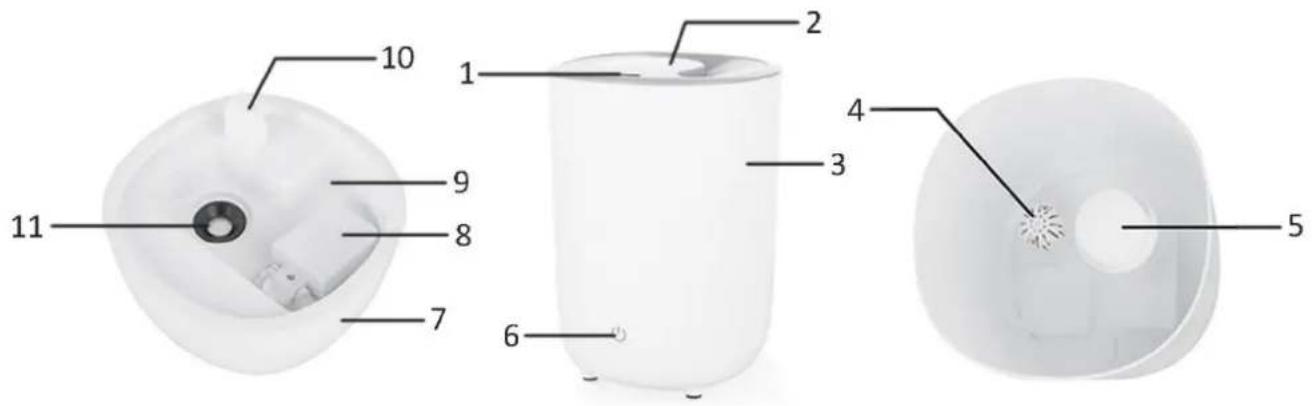
-
Nozzle
-
Top cover
-
Water tank
-
Ceramic filter with ceramic balls inside
-
Fog cover (removable)
-
Switch button with indicator light
-
Base
-
Buoy
-
Water basin
-
Air outlet
-
Transducer
INSTRUCTIONS FOR USAGE
- Put the humidifier on a flat surface.
- Take out the top cover, fill water into the water tank, and then put the top cover back.
- Put the water tank on the main base.
- Check if the rated voltage meets the input voltage, and plug into the socket. The humidifier will go into the standby status.
- First touch the switch button, if the water tank is waterless, the inicator light of the button will show red. Touch the button again, the humidifier will be off.
- If water is enough in the water tank, at the first button touching the indicator light will turn purple and the appliance will work in the lowest speed. At the second button touching the indicator light will turn green and the appliance will work in the middle speed. At the third button touching the indicator light will turn blue and the appliance will work in the highest speed. At the fourth button touching the humidifier will be off. Total 3 options for the speed selection.
- With each button touching, the humidifier will send out the beep sound. When water is in shortage, the humidifier will send out 3 beeps as a warning and the indicator light of the button will turn red. Refill water, the humidifier will work as the previous status.
Note: When the appliance is humidifying, if you lift up the water tank, the appliance will stop working and the indicator light will be red. Put the water tank back the appliance will work as the previous status.
Caution
- Never run the humidifier when there is no water in water tank and water basin.
- Only drop aroma oil into aroma cotton. Do not drop any liquid except clean water into the water tank or water basin.
CLEANING AND MAINTENANCE
In case when the water is hard which means water contains too much calcium and magnesium, they can cause “white powder (limestone)” problem and may cause heavy sediments on the surface of the water basin, transducer and inner surface of the water tank. Sediments on the surface of the transducer could influence proper function.
We recommend:
1) Use cold boiled water or distilled water.
2) Clean the transducer, water tank and basin unit every week.
3) Change water in water tank frequently to avoid "white powder" / limestone.
4) Pour away the water first, clean the whole unit, and make sure that all parts of the unit are dried completely before storing the unit for a long period of time. Keep the appliance away from children in a dry cool place.
Caution: before cleaning and filling, turn off and unplug the appliance first.
How to clean the transducer:
1) Put 5-10 drops of decalcifying agent or citric acid on the surface of the transducer; wait for 2-5 minutes.
2) Brush off the scale deposit from the surface and then rinse the transducer with clean water.
3) Never use sharp or solid objects to clean the transducer.
How to clean the water basin:
1) Clean the water basin with soft cloth or use citric acid if there is scale in it.
2) If the scale is covered on the buoy, drop citric acid for 2-5 mins on the scale and clean it out with a brush.
3) Rinse the water basin with clean water.
How to clean the ceramic filter:
1) Clean the ceramic filter after using 1000L water regularly. Depend on the water quality, if the ceramic balls are dirty, the filter needs to be cleaned more frequently.
2) It can be dipped in vinegar about 5 minutes. Then rinse it with clean water.
3) Put the filter under the sun for 4\~6 hours.
TROUBLE SHOOTING GUIDE
Any trouble found in normal operation; please kindly refer to the following points:
| Trouble | Possible Cause | Solution |
| Indicator light is off when switched on. | Humidifier is not plugged in. | Plug the humidifier into a powered electrical socket. |
| Power cord is damaged. | Immediately discontinue use and contact customer support. | |
| Humidifier is defective or malfunctioning. | ||
| Indicator light is in red. | No water in the tank. | Refill the water tank and wait at least 1 minute. |
| Water level is low. | ||
| The water level required has not yet reached the water basin. | Wait at least 1 minute. | |
| The water tank isn’t well positioned. | Check the positioning of tank on the base. | |
| The humidifier isn’t on a flat surface. | Check the positioning of the humidifier. | |
| Humidifier produces an unusual smell. | Humidifier is new.Dirty water or water is sitting too long. | Take out water tank, open cover, let it stay 12 hours in cool position.Clean water tank, fill with clear water. |
| Residual smell from diffusing aroma oil on the aroma cotton. | Remove the aroma cotton, rinse it under clean water and allow it to dry. | |
| Humidifier makes a loud or unusual sound. | Resonant in water tank when water is too low. | Fill water into water tank. |
| Humidifier is on an unstable surface. | Move the humidifier to a stable flat surface. | |
| The water tank isn’t well positioned. | Check the positioning of tank on the base. | |
| Humidifier is malfunctioning. | Immediately discontinue use and contact customer support. | |
| The humidification capacity is too low. | There is natural or artificial air replacement in the room which interfere the increase of %RH. | Check if doors and windows are closed. |
| Check if there is no air conditioning working in the room. | ||
| The nozzle could be blocked. | Remove any blocking items from the nozzle. | |
| Too much scale in the water basin. | Clean the transducer. | |
| The working speed is too low. | Press the switch button to increase the mist output speed. | |
| Water is too dirty or water is kept too long in the tank. | Clean water tank, change to fresh clear water. | |
| There is condensation in the room. | The room temperature is too low. | Heat the room up. |
| The mist suddenly stops coming out. | Indicator light is in red. | Refill water tank. |
| Switch button does not work. | Humidifier has malfunctioned. | Contact customer support. |
| White dust appears around the humidifier. | Water being used has a high mineral content. | Use distilled water with the humidifier. If distilled water is not available, use purified or filtered water. Remember to clean water tank at least once a week. |
| Humidifier was not properly cleaned after last use. | Clean the humidifier. | |
| Mist is coming out from the base. | It’s normal. | Wait several seconds; the msit will disappear. |
| Mist is coming out from around the nozzle. | It’s normal. | Wait several seconds; the msit will disappear. |
| The humidifier does not work after press the switch button for the first time. | The new humidifier was not unlocked during manufacturing in factory. | Press the switch button 2 – 3 times to unlock the appliance. |
TECHNICAL DATA
Operating voltage: 220-240V \~ 50/60Hz
Power consumption: 30W
GUARANTEE AND CUSTOMER SERVICE
Before delivery our devices are subjected to rigorous quality control. If, despite all care, damage has occurred during production or transportation, please return the device to your dealer. In addition to statutory legal rights, the purchaser has an option to claim under the terms of the following guarantee:
For the purchased device we provide one year guarantee, commencing from the day of sale. If you have a defective product, you can directly go back to the point of purchase.
Defects which arise due to improper handling of the device and malfunctions due to interventions and repairs by third parties or the fitting of non-original parts are not covered by this guarantee. Always keep your receipt, without the receipt you can't claim any form of warranty. Damage caused by not following the instruction manual, will lead to a void of warranty, if this results in consequential damages then we will not be liable. Neither can we hold responsible for material damage or personal injury caused by improper use if the instruction manual are not properly executed. Damage to accessories does not mean free replacement of the whole appliance. In such case please contact our service department. Broken glass or breakage of plastic parts is always subject to a charge.
Defects to consumables or parts subjected to wearing, as well as cleaning, maintenance or the replacement of said parts are not covered by the warranty and are to be paid.
ENVIRONMENT FRIENDLY DISPOSAL

Recycling – European Directive 2012/19/EU
This marking indicates that this product should not be disposed with other household wastes. To prevent possible harm to the environment or human health from uncontrolled waste disposal, recycle it responsibly to promote the sustainable reuse of material resources. To return your used device,
please use the return and collection systems or contact the retailer where the product was purchased. They can take this product for environmental safe recycling.

- IMPORTANT INSTRUCTIONS
- Features:
- Correct Humidity Level:
- Water filter
- Aroma box
- Operation Instruction
- PARTS DESCRIPTION
- INSTRUCTIONS FOR USAGE
- Caution
- CLEANING AND MAINTENANCE
- We recommend:
- How to clean the transducer:
- How to clean the water basin:
- How to clean the ceramic filter:
- TROUBLE SHOOTING GUIDE
- TECHNICAL DATA
- GUARANTEE AND CUSTOMER SERVICE
- ENVIRONMENT FRIENDLY DISPOSAL
Brand : Emerio
Model : HF-212898
Category : Fan