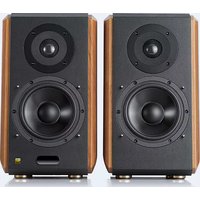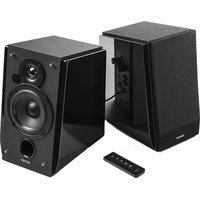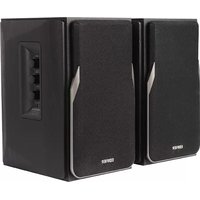
R1380DB - Speaker EDIFIER - Free user manual and instructions
Find the device manual for free R1380DB EDIFIER in PDF.


User questions about R1380DB EDIFIER
0 question about this device. Answer the ones you know or ask your own.
Ask a new question about this device
Download the instructions for your Speaker in PDF format for free! Find your manual R1380DB - EDIFIER and take your electronic device back in hand. On this page are published all the documents necessary for the use of your device. R1380DB by EDIFIER.
USER MANUAL R1380DB EDIFIER
EN Important safety instruction
-
Please read the instructions carefully. Keep it in safe place for future reference.
-
Use only accessories approved by the manufacturer.
-
Install the instrument properly by following the instructions in the device connection section.
-
Using the product in a 0-35 C environment is recommended.
-
To reduce the risk of fire and electric shock, do not expose the product to rain or moisture.
-
Do not use this product near water. Do not immerge the product into any liquid or have it exposed to dripping or splashing.
-
Do not install or use this product near any heat source (e.g. radiator, heater, stove, or other devices that generate heat).
-
Do not place any object filled with liquids, such as vases on the product; neither should any open fire, such as lighted candles be placed on the product.
-
Do not block any ventilation openings. Do not insert any object into ventilation openings or slots. It may cause fire or electric shock.
-
Keep sufficient clearance around the product to maintain good ventilation (minimum 5cm is recommended).
-
Do not force a plug into the jack. Before connection, check for blockage in the jack and whether the plug matches the jack and is oriented to the right direction.
-
Keep the provided accessories and parts (such as screws) away from children to prevent from being swallowed by mistake.
-
Do not open or remove the housing yourself. It may expose you to dangerous voltage or other hazardous risks. Regardless the cause of damage (such as damaged wire or plug, exposure to liquid splash or foreign object falling in, exposure to rain or moisture, product not working or being dropped, etc.), the repair has to be performed by an authorized service professional immediately.
-
Before cleaning the product with dry cloth, always turn off the product and disconnect the power plug first.
-
Never use strong acid, alkali, gasoline, alcohol, or other chemical solvents to clean the product surface. Use only neutral solvent or clear water for cleaning.


Excessively loud music may lead to hearing loss. Please keep the volume in a safe range.
Correct Disposal of this product. This marking indicates that this product should not be disposed with other household wastes throughout the EU. To prevent possible harm to the environment or human health from uncontrolled waste disposal, recycle it responsibly to promote the sustainable reuse of material resources. To return your used device, please use the return and collection systems or contact the retailer where the product was purchased. They can take this product for environmental safe recycling.
Use only with the cart, stand, tripod, bracket, or table specified by the manufacturer, or sold with the apparatus. When a cart is used, use caution when moving the cart/apparatus combination to avoid injury from tip-over.
Important safety instruction
Power warning:
- Place the product near the power outlet for easy use.
- Before use, make sure that the operating voltage is the same as your local power supply. Correct operating voltage can be found on the product plate.
- For safety purpose, unplug the product during lightning storms or when unused for extended periods of time.
- Under normal conditions, the power supply may get hot. Please keep good ventilation in the area and exercise caution.
- Safety warning labels on the housing or bottom of the product or power adaptor.

This symbol is to alert the user to the presence of un-insulated dangerous voltage within the product's enclosure that may be of sufficient magnitude to constitute a risk of electric shock to persons.

This symbol is to warn the user not to disassemble the enclosure of the product and there is no user-replaceable part inside. Take the product to an authorized service center for repair.

This symbol indicates that the product is for indoor use only.

This symbol indicates that the product is a CLASS II or double insulated electrical device with no earth requirement.
The MAINS plug is used as the disconnect device, the disconnect device shall remain readily operable.
For wireless product:
- Wireless product may generate shortwave radio frequencies and interfere with the normal use of other electronic devices or medical equipment.
- Turn off the product when it's disallowed. Do not use the product in medical facilities, on airplane, at gas stations, near automatic gates, automatic fire alarm system or other automated devices.
- Do not use the product in the vicinity of a pacemaker within a 20cm range. The radio waves may affect the normal operation of the pacemaker or other medical devices.
Box contents
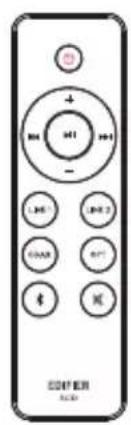
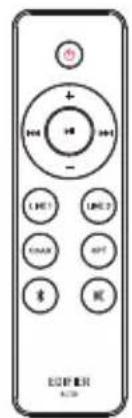
Remote control
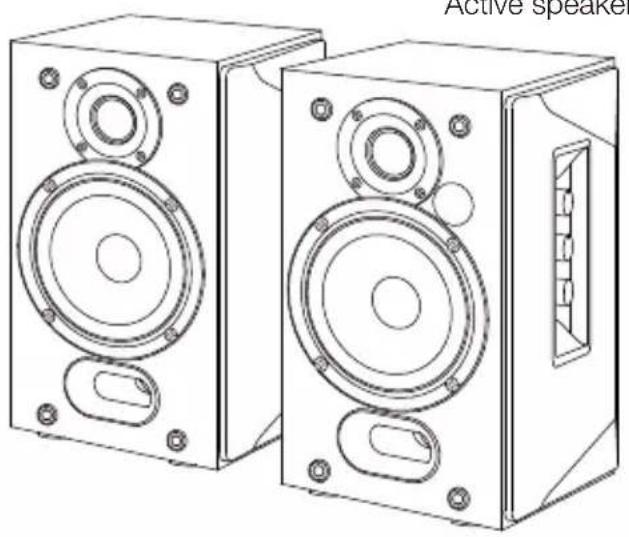
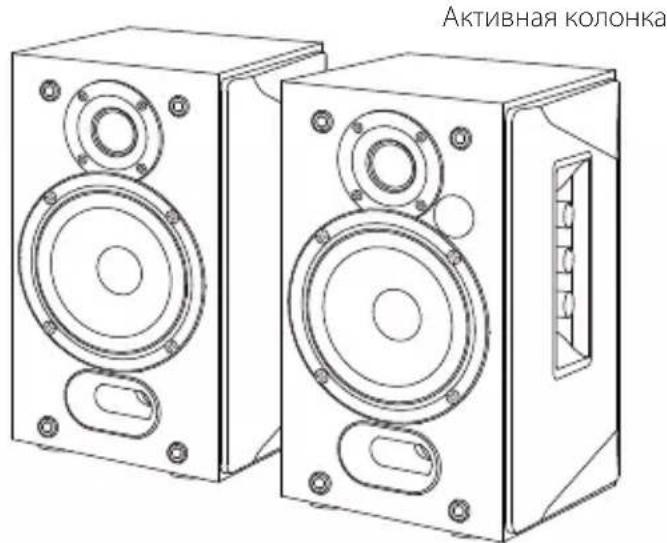
Passive speaker

Speaker connecting cable
RCA-RCA audio cable

3.5mm-RCA audio cable

Fiber optic audio cable
User manual
Note: Images are for illustrative purposes only and may differ from the actual product.
Illustration
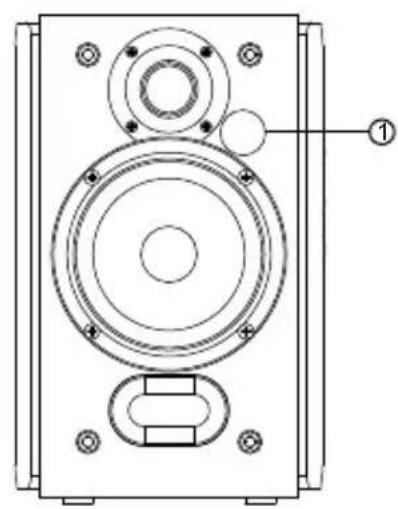

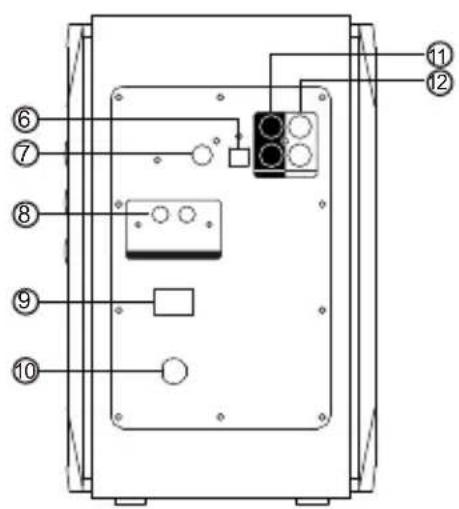
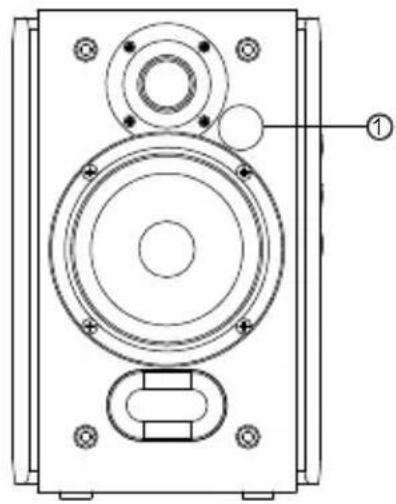
- Infrared receiver/input indicator
Red: Optical/Coaxial mode
Blue: Bluetooth mode
Green: Line In 1/Line In 2 mode
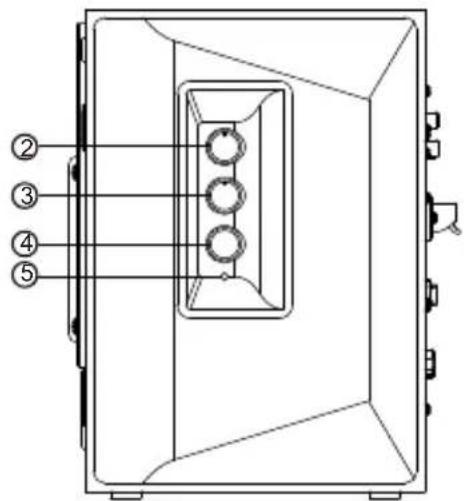
- Treble dial
- Bass dial
- Master volume control/input selection
Press: input mode switch
(Line In 1 Line In 2 Optical Coaxial Bluetooth)
Press and hold: standby
- Power indicator
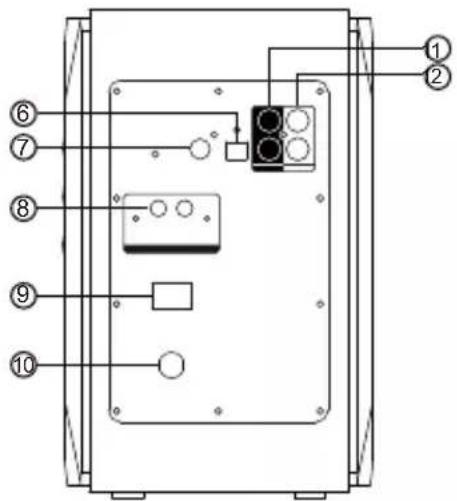
- Optical input
- Coaxial input
- Connect to passive speaker
-
Power switch
-
Power cable
- Line In 1 input
- Line In 2 input
Remote control
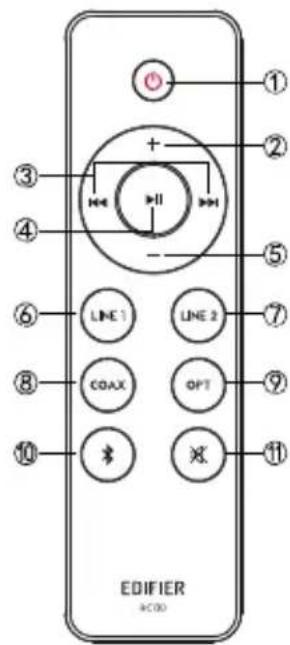
- Power on/off
- Volume up
- Previous track/next track (Bluetooth mode)
- Pause/play (Bluetooth mode)
- Volume down
- Line In 1 mode
- Line In 2 mode
- Coaxial mode
- Optical mode
- Bluetooth mode Press and hold to disconnect Bluetooth
- Mute
Battery loading:
Please refer to the illustration to open the battery compartment, insert the CR2032 battery and close the compartment.
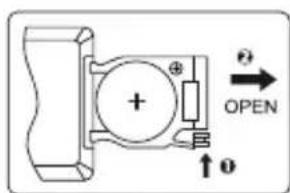

WARNING!
- Don't swallow the battery; danger of chemical burn.
- The product includes a wafer battery. Swallowing this battery may lead to injury or death. Do not place the new or old battery in where children can get to it.
- Don't use the product if the battery cover is missing or not closed, and keep the remote inaccessible to children.
- Please go to the hospital immediately if the battery is swallowed.
Note:
- Do not place the remote control in places that are hot and humid.
- Do not charge the batteries.
- Remove the batteries when unused for a long period of time.
- The battery should not be exposed to excessive heat such as direct sun, fire or similar.
- Danger of explosion if battery is incorrectly replaced. Replace only with the same or equivalent type.
Connection
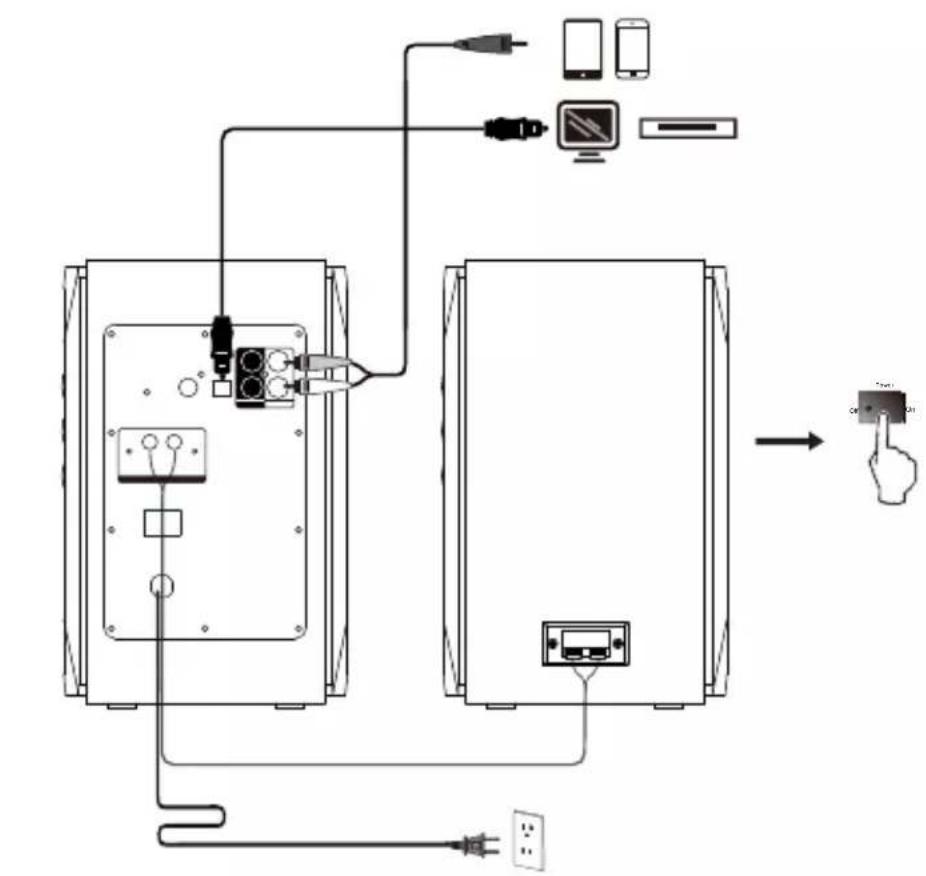

Line In mode
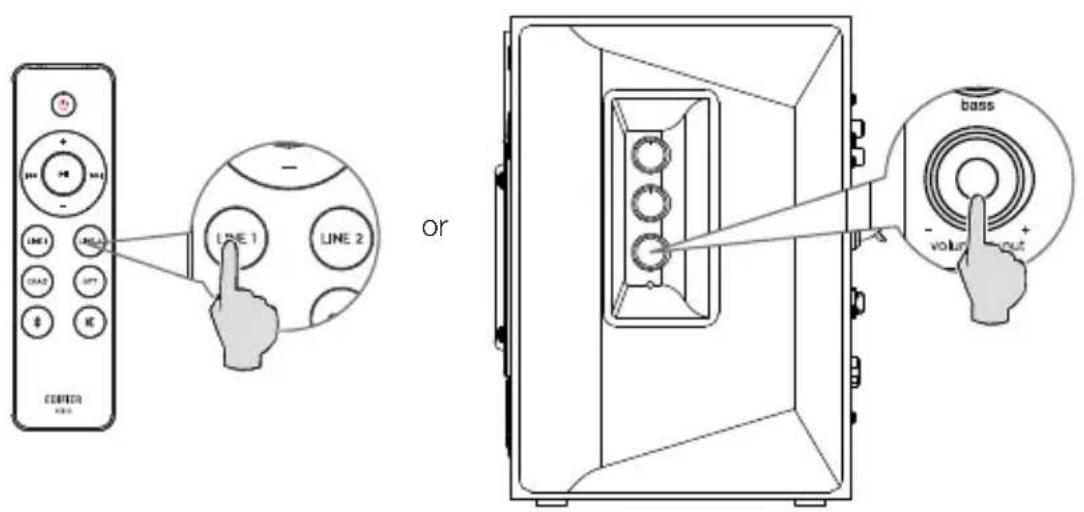
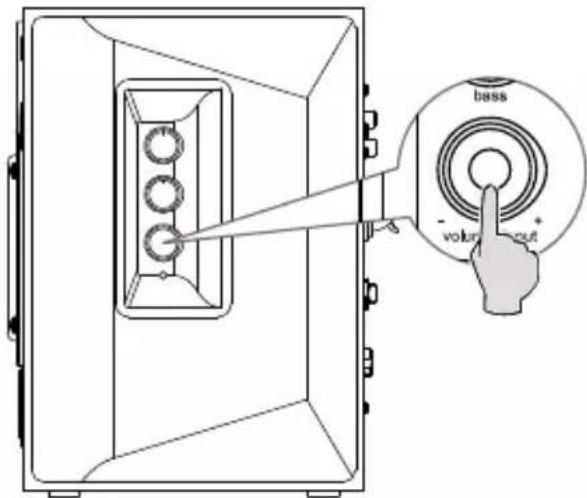
- Press the "LINE1"/"LINE2" button on the remote control, or press the "volume输入" button on the side panel of the active speaker to switch to Line In mode, and the green LED will be lit.
- Connect audio source (mobile phone, tablet, etc.) to the "Line In 1" or "Line In 2" input port (note color matching) on the rear panel of the active speaker using audio cable.
- Play music on the connected device and adjust the settings to a desired level.
Optical/coaxial mode
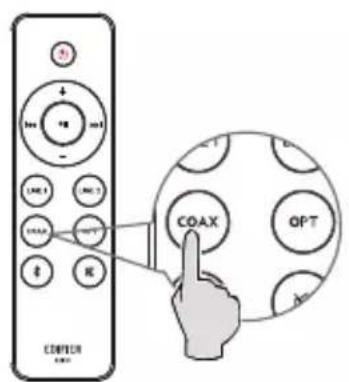
or
- Press the "COAX"/"OPT" button on the remote control, or press the "volume/Input" button on the side panel of the active speaker to switch to coaxial/optical mode, and the red LED will be lit.
- Connect audio source (Set Top Box, Blu-ray player etc.) to the "OPT"/"COAX" input port on the rear panel of the active speaker using fiber optic audio cable or coaxial cable (coaxial cable not included).
- Play music on the connected device and adjust the settings to a desired level.
Note:
Only the standard PCM audio signals (44.1KHz/48KHz) function in optical/coaxial mode.
Bluetooth mode

Bluetooth
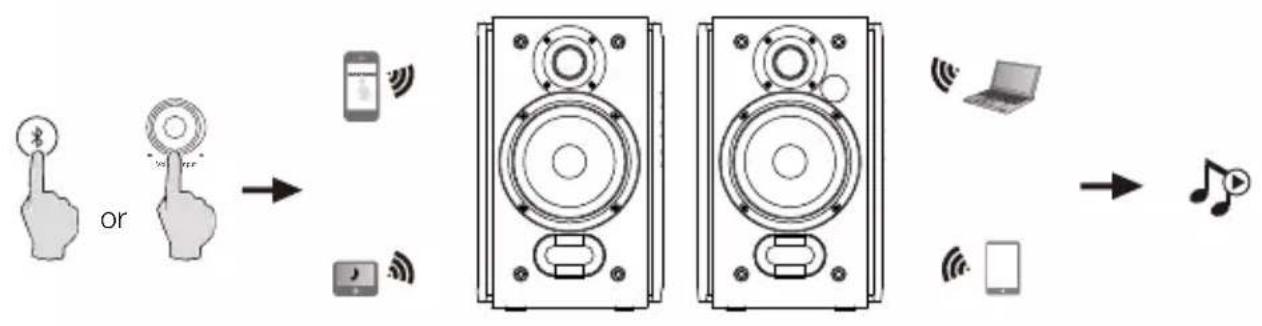
- Press the " " button on the remote control, or press the "volume输入" button on the side panel of the active speaker to switch to Bluetooth mode, and the blue LED will be lit.
- Set your Bluetooth device to search for and connect to "EDIFIER R1380DB".
- Play music on the connected device and adjust the settings to a desired level.
- To disconnect Bluetooth, please press and hold the " × " button for 2 seconds.
Note:
- To enjoy all Bluetooth functions of this product, please ensure your audio source device has A2DP (Advanced Audio Distribution Profile) profile.
- Bluetooth connectivity and compatibility may differ amongst different source devices, depending on the software versions of source devices.
Pin code for connection is "0000" if needed.
Specifications
Power output: 21W+21W
Frequency response: 55Hz-20KHz
Audio inputs: Optical, Coaxial, Line In, Bluetooth
Troubleshooting
No sound
- Check if the speaker is ON.
- Try to turn up the volume using the volume control or remote control.
- Ensure the audio cables are firmly connected and the input is set correctly on the speaker.
- Check if there is a signal output from the audio source.
Cannot connect via Bluetooth
- Make sure the speaker is switched to Bluetooth input. If it is in other audio input modes, Bluetooth will not connect. Disconnect from any Bluetooth device by pressing and holding the " × " button, then try again.
- Effective Bluetooth transmission range is 10 meters; please ensure that operation is within that range.
- Try another Bluetooth device for connection.
The R1380DB does not turn on
- Check if main power is connected, or if the wall outlet is switched on.
Noise coming from speakers
- EDIFIER speakers generate little noise, while the background noise of some audio devices are too high. Please unplug audio cables and turn the volume up, if no sound can be heard at 1 meter away from the speaker, then there is no problem with this product.
To learn more about EDIFIER, please visit www.edifier.com
For EDIFIER warranty queries, please visit the relevant country page on www.edifier.com and review the section titled Warranty Terms.
USA and Canada: service@edifier.ca
South America: Please visit www.edifier.com (English) or www.edifierla.com (Spanish/Portuguese) for local contact information.



@Edifier_Global @Edifier_Global@Edifierglobal
Model: EDF100035
Edifier International Limited
P.O.Box 6264
General Post Office
Hong Kong
Tel: +852 2522 6989
Fax: +852 2522 1989
www.edifier.com
© 2021 Edifier International Limited. All rights reserved.
Printed in China
NOTICE:
For the need of technical improvement and system upgrade, information contained herein may be subject to change from time to time without prior notice.
Products of EDIFIER will be customized for different applications. Pictures and illustrations shown on this manual may be slightly different from actual product. If any difference is found, the actual product prevails.
NcnoB3yTe TOnbKO ONo6peHHbIe N3rOToBHTeMe IIN BxOJaIe B KOMnKeT NoCTaBKn TeJeKky, NOCTaBky, IIATMb, KPOHtEHN HIN CTON. Pn nepemueHnn H3dEnn BmecTe C TeJeXko Co6HpaTe OCTopoXHOCTb, YTObI N36ExKaTb TpaMbI npn ONpOKnDbHaHH.
BaxKbIe HnCTpyKcHm ITO TexHnke 6e3ONaCHocTn
PpeynpexdneHnO63JektpoNTaHIM
1.ДлгудбсвИнрьзовиуctановite npi6ob ряdomсpozeTkponntaHnA.
2. IpeenIOB3OBaHHeM y6eNTecb B corlaobaaHHOCTn pa6oeryo Haprrxehn C MeCTbIM 3neKtpOnrTaHHeM.
PpaBnIbHoe pa6ooyee HAnpJxKeHHe MoKHeO y3HaTb Ha 3TuKeTke yCTpoiCTBa.
3.BoBpemr rpo3bI nIe He IpaHpyETcN CNOJIb3ObaTb yCTPOINCTBO B TeueHne DInTeNbHO BpemeHn,OTKIOHTe erO OT cTeuJNEKTponNTaHn NO npUHHAM 6e30NaCHOCTn.
4. B obchybix ycIOBnIX CTouHnK nHTaHn MOxET CtaTb rOpAum. IoxaIyIcTa, o6ecneueTe xopoOuYIO BEHTINJraIIO B OKpykaioeoi 0bnactn 6byte octopokhbl.
5. 3nkeTn npdynpckdHn8 o6 onachoCTHa KOpnyce n BnH3y yctpoCTBa n aanTepa nTaHna.

TOT CIMBOI yBeDMJET O HAIUH N OAnCHORO HAnpXeHnB 63 n0JIuIN BHyTpN KOpNyCa yCTpoiCTBa, KOToPoE MOKeT IMeTB BeHUY,IOCTaTOHyIO IIN POpXeHn JIODeI eNEKTPueCKM TOKOM.

3TOT CnMBON npedynpekjaet noB3OBaTeNa 0 3anpe Ta6bOpKn KOpnyCa yCTpoiCTBa N OTCyTCTBn BHTPN Hero peMOHTnpyEmbIX nOlb3OBaTeN MaCTe. Dna pemOnTa nepeaTe yCTPOINCTBO BYIIOHOMOeHHHyHO HA 3TO cepBnCHyIO cnlyx6y.

TOT CMBOL yKa3bIaET Ha IcNIOb3OBaHne yCTpoIcTBa TOnbKO B NOMEueHnX.

3TOT CINB0I OTMeuAeT O6OpUdoBaHne KnaCa II, T.e. 3NeKtpnueckoe yCTpOInCTBO C DBOHOn I3OJIaCnei 6e3 Tpe6oBAHH K 3a3emJIeHHIO.
Bnka 3JIeKTPoNTAHN cnyknt dna OTknueHn yctpoCTba, KOTOpoe nocne 3Toro octaTc rTOOBm K pa6ote.
JH6ecnpoBOHbXyCTPOINCTB:
- BecnpoBOnHbIe yCTpOaCTBa MOrT rHeepuPoBaT b KOpToKOBONHOBbIe paNouAcToTHbIe CnHaIbI N Co3DaBaTb NOMExn O6bHuHOpa6ote 3NeKTPOHHbIX pIn6OpOB IN MeiUnHcKOro 06OpyDoBaHN.
- Bbiknouite yctpoiCTBO, korgeraero npimHeHne 3aPpeJeHO.He nCnoB3yTe yctpoiCTBO BMeuHckx CEHTpax, H BO3dyhBix cydax, ABTOMO6nIbHbIX 3aPapBOHybIX CTaHcNrx, PdOM C aBTOMaTHueCKMIM BOPOTAMN, aBTOMaTHueCKMIM IPOTIBONOXAPHBIM CNTeMaMIM N DpyTM ABTOMaTHueCKM O6OpYDoBAHNEM.
- He npimehnTe yctpoCTBO 6nke dnaana30Ha B 20 cm OT nKToPONbIX CTmYJATOpOB cepua. PaIOOBONHb MOrT BnIaTb HOPMaJIbHyO pa6Oy 3neKToPONbIX CTmYJATOpOB cepua n DpyroE MeINHcCKoe O6OpUoBaHne.
Copexmoeynakobkn
NylbTINCTaHcNoHHOynpabHeHHA
NaCCBHa KJIOHka

Ka6eIb noKlnuoyehn KJIOHKn
Aydinoka6ebRCA-RCA

Aydinoka6eNb 3.5mm-RCA

BolokoHooTnueckn ayuNoka6eb
PykoBOOCTBO NOIb3OBaTeJIa
PnmeuHne: N3o6paKeHne npBedeHO dna cnpaBKn. KoHCTpyKun MoKeT OTnuaTbcra.
IJIIOCTpaun
- INHpaKaPaChbI npHeMnK/ BXoHDHou INHdNkAtop
Kpachbl: onTnueckn/koakcnalbHbI pekIM
Tolbyo: pekm Bluetooth
3eJHbI:peKIMnHeHbI BXoD 1/InHeHbI BXoD 2
- Perylantop B4
- Perynatop HU
- Perylantop o6uien rpmkocn/peeknouateIb BXoIOB Haxmte: peeknouateIb pexkma BxOa
(BXOHaHn1→BXoHaHn1nHn2→OnTnueckn→
KoakcnaJIbHbI Bluetooth)
Haxmte uyepejmbaite: pexim roTOBHOCTN
5.Индикаторптаня
6. ONTNueckn BXOD
7. KoakcnaJIbHbI BxOJ
8.Подклоченke naccubHOn KonoHKe
9.ПepekniouataTeN pntaHn
10. Kaebnb nTaHnA
11.IINHeHbI BxOd 1
12.Пинейнь BXOД 2
BbIXoHaMoUHocTb:21BT+21BT
YachToTHbIy dnaana3OH:55T-20K
3ByKOBOI BXoI: ONTnueckn, KoakcnalbHbI, IInHeHbI BXoI, Bluetooth
Kolonka R1380DB He BkIouaetc
- Y6eHNTecb, yTO KOJIOHKa NOKJIIOUeHa K CETn 3JeKTPoONITAHIN, nHTO PO3eTKa CETN BKNIOUeHa.
PomexnOTdHAMNKOB
KoHKn HnPmB EDIFIER reHeppyIOT He6bIWe NOMExn, B TO BpeMa KaK fOHOBIE NOMEXn HEKOtOpbix ayNo yCTpoiCTB RAJIOTcA OueH 6OJIbShIMN. OTcoeINHInTe ayNo Ka6eJn UyBeJnUte rPOMKocTb, ecn Ha paCCToAHnn 1 M n3 DnHaMnKa HnueRo He CbIuHO, 3NaHT Y 3TOrO n3dEInna Het npo6nem.
Дононтульные сбedingу O EDIFIER cm. Ha Be6-caite www.edifier.com Для заюсов K EDIFIER no rapaHTиньIM oba3aTeJBCTBam NOcETITE CTpaHnCy COOTBeTCTByIOUeY Страны на WWW.edifier.com и OЗнakOMbTeCb C pa3dEnOM rapaHTиньIX oba3aTeJIbCTB. СИА и Канада: service@edifier.ca
IoxnAmepka:HOpMaunO MeCTbIX npeCTaBnteBCTbax CM. Ha Be6-caTe www.edifier.com (aHnnckn 3bIK) nnw www.ediferla.com (ncnAnckn/npTyraBckn 3bIK).



@Edifier_Global @Edifier_Global@Edifierglobal
MoeBb:EDF100035
Edifier International Limited
P.O.Box 6264
General Post Office
Hong Kong (ToHkoHr)
Tei.: +852 2522 6989
c: + 85225221989
www.edifier.com
Edifier International Limited, 2021 r. Bce npaba 3aunueHbI.
HaneuataHO B Kntae
ПРIMECHAHNE.
BcIeCTBne ycoBepseHCTBOBaHn I MoedePHN3aun CnCTembl HOpMaun, npeCTabHeHHa B daHHOM pykoBoDCTBe, moKet 6bItb N3MeHeHa 6e3 npEBApuTeBHorO yBeDoMHeHn.
Ipoodykua EDIFIER hactpaunBaetcna pa3nHbix o6laCTe npimeHeHn. 13o6paxKeHn u nllIOCTpaun B hactoamem pykoBODCTBe moryt hemHoro otNauatcbra ot pealhbyx n3denn. B cnyae pa3nHn npnopntet OTdaETcpealbHomy n3dennio.
Declaration for EU
Frequency Band: 2.402GHz ~ 2.480GHz
RF Power output: ≤ 20 dBm (EIRP)
There is no restriction of use.
FCC ID: Z9G-EDF124
IC: 10004A-EDF124

Bluetooth,
The Bluetooth® word mark and logos are registered trademarks owned by Bluetooth SIG, Inc. and any use of such marks by EDIFIER is under license. Other trademarks and trade names are those of their respective owners.

Qualcomm aptX HD
Qualcomm aptX is a product of Qualcomm Technologies, Inc. and/or its subsidiaries.
Qualcomm is a trademark of Qualcomm Incorporated, registered in the United States and other countries.
aptX is a trademark of Qualcomm Technologies International, Ltd., registered in the United States and other countries.