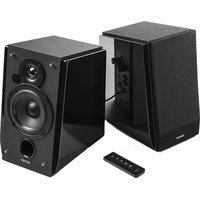
R1800BT - Speaker EDIFIER - Free user manual and instructions
Find the device manual for free R1800BT EDIFIER in PDF.


User questions about R1800BT EDIFIER
0 question about this device. Answer the ones you know or ask your own.
Ask a new question about this device
Download the instructions for your Speaker in PDF format for free! Find your manual R1800BT - EDIFIER and take your electronic device back in hand. On this page are published all the documents necessary for the use of your device. R1800BT by EDIFIER.
USER MANUAL R1800BT EDIFIER
16th Floor, Tower II.
Lippo Centre,
89 Queensway
Hong Kong
Tel: +852 2522 6989
Fax: +852 2522 1969
www.edifier-international.com
© 2015 Edifier International Limited. All rights reserved.
Printed in China.
NOTICE:
For the need of technical improvement and system upgrade, information contained herein may be subject to change from time to time without prior notice.
Products of EDIFIER will be customized for different applications. Pictures and illustrations shown on this manual may be slightly different from actual product. If any difference is found, the actual product prevails.
User manual | Manuel d'utilisateur | Manual de usuario | Bedienungsanleitung | Manuale dell'utente | Manual do utilizador
Important safety instruction
WARNING: To reduce the risk of fire or electric shock, do not expose this apparatus to rain or moisture.
Thank you for purchasing this Edifier product. For generations, Edifier tries to provide powered speaker products to satisfy the need of our end customers, even the most demanding ones. This product can add to your home entertainment, personal computer, and mini home theater great sound performance. Please read this manual carefully to obtain the best of this system.

The lightning flash with arrowhead inside the triangle, is intended to alert the user to the presence of un-insulated dangerous voltage within the product's enclosure that may be of a sufficient magnitude to constitute a risk of electric shock to persons.
To prevent the risk of electric shock, do not remove cover (or back). No user-serviceable Parts inside. Refer servicing to qualified Service personnel only.

The excamination point inside the triangle is intended to alert the user to the presence of important operating and maintenance (servicing) instructions in the literature accompanying the product.
- Read these instructions.
- Heed all warnings.
- Do not use this apparatus near water.
- Do not block any ventilation openings. Install in accordance with the manufacturer's instructions.
- Do not install near any heat sources such as radiators, heat registers, stoves, or other apparatus (including amplifiers) that produce heat.
- Do not defeat the safety purpose of the polarized or grounding-type plug. A polarized plug has two blades with one wider than the other. A grounding type plug has two blades and a third grounding prong. The wide blade or the third prong are provided for your safety. If the provided plug does not fit into your outlet, consult an electrician for replacement of the obsolete outlet.
- Protect the power cord from being walked on or pinched particularly at plugs, convenience receptacles, and the point where they exit from the apparatus.
- Only use attachments/accessories specified by the manufacturer.
- Unplug this apparatus during lightning storms or when unused for long period of time.
- Refer all servicing to qualified service personnel. Servicing is required when the apparatus has been damaged in any way, such as power-supply cord or plug is damaged, liquid has been spilled or objects have fallen into the apparatus, the apparatus has been exposed to rain or moisture, does not operate normally, or has been dropped.
- The MAINS plug or an appliance coupler is used as the disconnect device, the disconnect device shall remain readily operable.


Use only with the cart, stand, tripod, bracket, or table specified by the manufacturer, or sold with the apparatus. When a cart is used, use caution when moving the cart/apparatus combination to avoid injury from tip-over,
Correct Disposal of this product. This marking indicates that this product should not be disposed with other household wastes throughout the EU. To prevent possible harm to the environment or human health from uncontrolled waste disposal, recycle it responsibly to promote the sustainable reuse of material resources. To return your used device, please use the return and collection systems or contact the retailer where the product was purchased. They can take this product for environmental sale recycling.
This equipment is a Class II or double insulated electrical appliance. It has been designed in such a way that it does not require a safety connection to electrical earth.
WARNING
DO NOT INGEST BATTERY, CHEMICAL BURN HAZARD
This product contains a coin/button cell battery. If the coin/button cell battery is swallowed, it can cause severe internal burns in just 2 hours and can lead to death.
Keep new and used batteries away from children, if the battery compartment does not close securely, stop using the product and keep it away from children.
If you think batteries might have been swallowed or placed inside any part of body, seek immediate medical attention. The battery (in remote control) shall not be exposed to excessive heat such as sunshine, fire or the like.
1
English
Unpack the Box
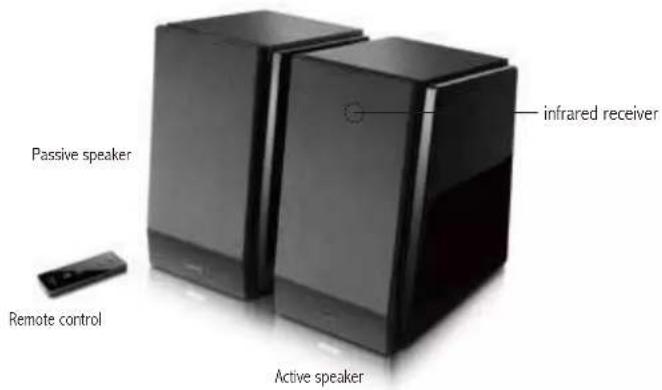
Box contents:
text_image
Passive speaker Remote control infrared receiver Active speaker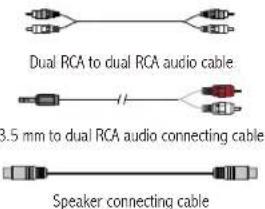
text_image
Dual RCA to dual RCA audio cable 3.5 mm to dual RCA audio connecting cable Speaker connecting cable
English
text_image
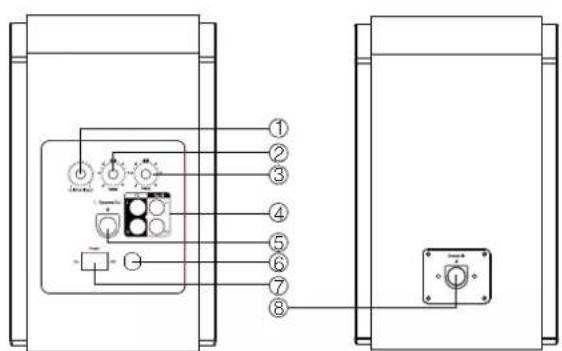
Technical diagram showing labeled components of an electrical or mechanical device with numbered parts and connections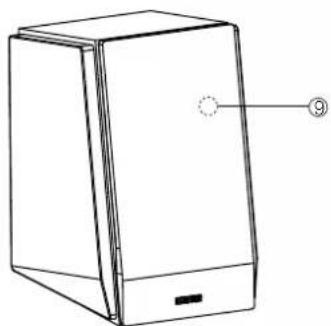
natural_image
Line drawing of a rectangular electronic device with a label pointing to its side (no text or symbols present)① Master volume dial
line in/Bluetooth:Press once
② Bass dial
③ Treble dial
④ Audio input connector port
⑤ Connect to passive speaker
⑥ Power cord
⑦ Power switch
⑧ Connect to active speaker
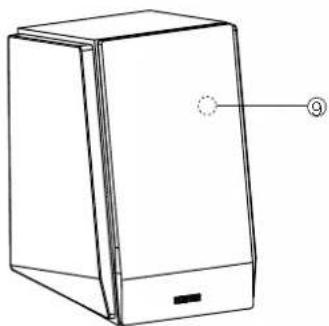
⑨ Indicator light Green:line in Blue:Bluetooth
3 English
Illustrationsllust
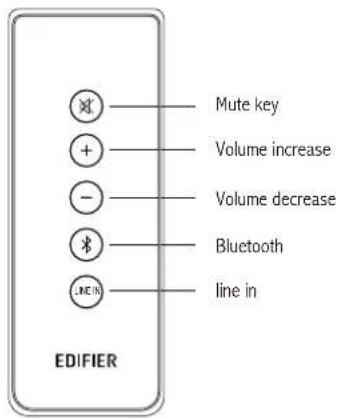
Remote control
text_image
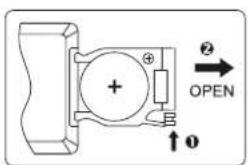
Mute key Volume increase Volume decrease Bluetooth line in EDIFIERBattery: Please refer to the illustration to open the battery compartment, insert the CR 2025 battery and close the compartment.
text_image
Diagram of a mechanical or electrical component with labeled ports and directional arrows, including symbols like +, +, ⊕, and ②.Note:
- Do not place the remote control in places that are hot and humid.
- Do not charge the batteries.
- Remove the batteries when unused for a long period of time.
- The battery should not be exposed to excessive heat such as direct sun, fire, ect.
4
English
Connectivity & Operational guide Connectivity & Operational
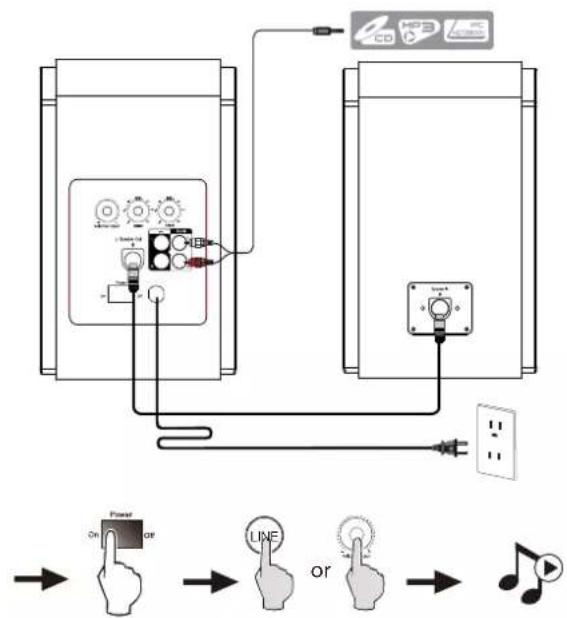
flowchart
graph TD
    A["CD"] -->|Signal| B["Power Switch"]
    C["HBS"] -->|Signal| B
    D["Audio Output"] -->|Signal| B
    B --> E["Output"]
    style A fill:#f9f,stroke:#333
    style C fill:#f9f,stroke:#333
    style D fill:#f9f,stroke:#333
5
English
flowchart
graph LR
    A["Hand icon with 'or' gesture"] --> B["Switcher"]
    B --> C["Mobile phone icons"]
    C --> D["Laptop with 'or' signal"]
    D --> E["Audio controller with 'or' icon"]
    E --> F["Monitor"]
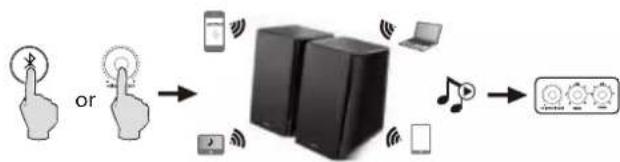
① Set your device (mobile phone, tablet device, MP3/MP4 player etc.) to search and select "EDIFIER R1800BT".
② Pair your device with "EDIFIER R1800BT".
③ Play the audio on your device and adjust the volume to a desired level.
④ To disconnect Bluetooth: Press & hold
Note:
- Bluetooth connectivity and compatibility may be different between different source devices, depending on the software versions of source devices.
- To enjoy the full Bluetooth functions of this product, please ensure your mobile device has A2DP profile.
- PIN code for connection is "0000" if needed.
6
English
Specifications Troubleshooting
Power output: RMS 16W × 2 (treble) + 19W × 2 (bass)
Signal to noise ratio: ≥85dBA
Distortion: ≤0.5%
Frequency response: 60Hz \~ 20KHz (+/-6dB)
Input type: PC / AUX /Bluetooth
Input sensitivity: PC: 700mV ± 50mV
AUX: 550mV ± 50mV
Treble unit: 19mm silk dome tweeter
Bass unit: 4 inch (116mm)
- Switch the EDIFIER R1800BT off then on and reconnect to the audio source.
- Ensure Bluetooth function is enabled on your Bluetooth devices.
- Move the devices closer and retry the connection.
- Try another Bluetooth device for connection.
- Check the power cord connection and make sure the wall outlet is on.
- Switch the system off then on and reconnect to the audio source.
- Confirm that the system is ON and not in STBY mode.
- Check the master volume and confirm that it is turned up.
- Check for proper connections of the audio input cable.
- Check audio source to confirm that it is functioning properly.
Thank you for purchasing this EDIFIER product. For warranty information regarding your new purchase please visit www.edifier.com
If you have any further questions or concerns regarding EDIFIER Products anywhere in the world. please visit our website at: www.edifier.com, or email EDIFIER Support for further assistance at: main@edifier.com.
To contact us by phone : 1-877-EDIFIER (334-3437) in US and Canada; for South America: Please visit www.edifier.com (English) or www.edifierla.com (Spanish/Portuguese) for detailed local contact information.
Consignes de securite importantes
text_image
Technical diagram showing two electrical or electronic device setups with numbered components and connections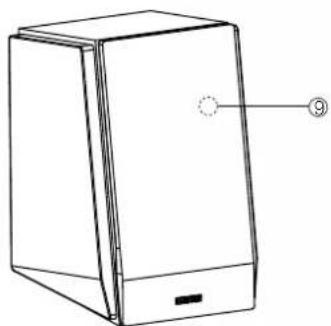
natural_image
Line drawing of a rectangular electronic device with a labeled component (no text or symbols present)11
Français
text_image
Diagram of a mechanical or electrical component with labeled ports and an open button, showing directional arrows and symbols.Remarque :
flowchart
graph LR
    A["Input Touch Icon"] --> B["Ou"]
    B --> C["Device with Smartphones"]
    C --> D["Device with Bluetooth"]
    D --> E["Device with Smartphone"]
    E --> F["Device with Laptop"]
    F --> G["Device with Audio System"]
    G --> H["Control Unit"]
text_image
Technical diagram showing labeled components of an electrical or electronic device with numbered parts and connections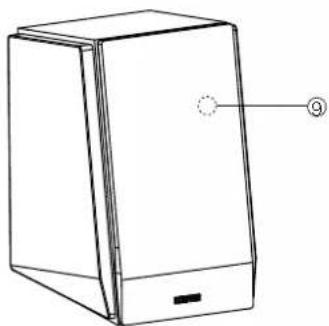
natural_image
Line drawing of a rectangular electronic device with a labeled component (no text or symbols present)text_image
Diagram of a mechanical or electrical component with labeled terminals and directional arrows indicating 'OPEN' and '②'.Nota:
flowchart
graph LR
    A["Hand icon: finger"] --> B["Phone icon"]
    C["Hand icon: phone"] --> D["Smartphone icon"]
    E["Hand icon: phone"] --> F["Laptop icon"]
    G["Hand icon: phone"] --> H["Audio device icon"]
    I["Hand icon: phone"] --> J["Laptop icon"]
    K["Hand icon: phone"] --> L["Audio device icon"]
text_image
Technical diagram showing labeled components of an electrical or electronic device with numbered parts and connections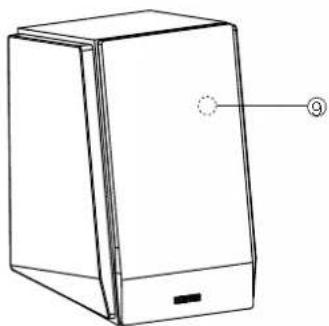
natural_image
Line drawing of a rectangular electronic device with a labeled component (no text or symbols present)text_image
Diagram of a mechanical or electrical component with labeled terminals and directional arrows indicating 'OPEN' and '②'.Hinweis:
text_image
Technical diagram showing labeled components of an electrical or electronic device with numbered parts and connections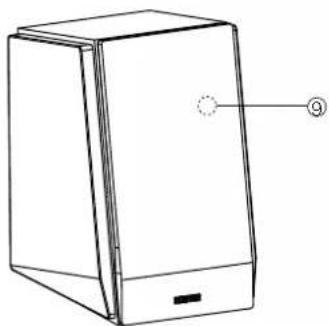
natural_image
Line drawing of a rectangular electronic device with a labeled component (no text or symbols present)text_image
Diagram of a mechanical or electrical component with labeled terminals and directional arrows indicating 'OPEN' and '2'Note:
text_image
Technical diagram showing labeled components of an electrical or electronic device with numbered parts and connections