BT-X60 - Speaker MusicMan - Free user manual and instructions
Find the device manual for free BT-X60 MusicMan in PDF.


| Product Type | Waterproof Floating Bluetooth Speaker |
| Brand | MusicMan |
| Model | BT-X60 |
| Dimensions (L x W x H) | 13.5 x 13.5 x 15 cm |
| Weight | 730 g |
| Power Supply | Li-ion battery 3.7V 2000mAh, charging via USB-C (5V DC) |
| Battery Life | Up to 8 hours |
| Charging Time | 2-3 hours |
| Wireless Technology | Bluetooth V5.0 |
| Bluetooth Range | 10 m |
| Speaker Power | 8 W (mono) |
| Impedance | 4 Ω |
| Waterproof Rating | IP67 |
| Hands-Free Function | Yes, with built-in microphone |
| LED Lighting | Multi-color (white, red, green, blue, color change, music sync) |
| Materials | ABS, PC, Silicone |
| Package Contents | BT-X60 speaker, USB-C charging cable, user manual |
| Care and Cleaning | Rinse with clean water after use in salt/chlorinated water; dry with a cloth; do not use abrasive products. |
| Operating/Storage Temperature | 5°C to 45°C |
| Safety | Do not immerse deeper than 1 m; do not use in a whirlpool; do not expose to extreme heat. |
| Repairability | All repairs must be carried out by the manufacturer; do not open yourself. |
Frequently Asked Questions - BT-X60 MusicMan
User questions about BT-X60 MusicMan
0 question about this device. Answer the ones you know or ask your own.
Ask a new question about this device
Download the instructions for your Speaker in PDF format for free! Find your manual BT-X60 - MusicMan and take your electronic device back in hand. On this page are published all the documents necessary for the use of your device. BT-X60 by MusicMan.
USER MANUAL BT-X60 MusicMan
MusicMan \* User manual Pool Speaker BT-X60
Before using the appliance for the first time, please read the user manual and the safety instructions carefully.

natural_image
Technical line drawing of a mechanical component with ribbed base and circular top (no text or symbols)This appliance is not intended for use by persons (including children) with reduced physical, sensory or mental capabilities, or lack of experience and knowledge, unless they have been given supervision or instruction concerning use of the appliance by a person responsible for their safety. Children should always be supervised by an adult during use. Not suitable for children under 3 years of age.
Keep this user manual in a safe place for future reference or for passing on the product. Also keep the original accessories for this product. In the event of a warranty claim, please contact the dealer or store where you purchased this product.
Have fun with your product * Share your experiences and opinions on any of the popular internet portals.
Table of Contents
Warnings 3
Safety instructions .... 3
Features 4
Product overview 4
Technical specifications .... 5
Package contents 5
First startup....5
Function overview 6
Charging 6
Switch on/off....7
Connecting to Bluetooth devices....7
Play music....8
Accept/reject phone calls....8
Set light mode 8
Adjust volume....8
Change title....8
Care and maintenance....9
Declaration of Conformity 10
Disposal....10
Warnings
- Keep packaging parts away from children. They are not part of the product. - Keep the product away from extreme heat. - Never immerse the product in liquids other than water. - Technical specifications are subject to change without notice. - Never fully discharge the battery, as this will shorten its useful life. - Clean the product with clean water after each use in salt water or alkaline/chlorine water. - Water resistance can only be guaranteed in clear water. Never use the product in other liquids. - Not suitable for use in whirlpools! - Risk of burns from battery acid! The battery can be life-threatening if swallowed. In case of contact with battery acid, rinse the affected area with clean water and seek medical attention immediately! If the battery needs to be stored, it is recommended to store it with 30% of its charge capacity. Ideal storage temperature: 10-20°C. Keep the product away from small children.
Safety instructions
- Conversion or modification of the product will affect product safety. ●All changes and repairs to the device or accessories are to be carried out exclusively by the manufacturer or by persons expressly authorized by the manufacturer. ●The independent opening of the product and the performance of any repairs is not permitted! Handle the device with care. It can be damaged by shocks, impacts or even by falling from a low height. ●Never heat the battery above 60°C, do not drop it and do not throw it into a fire. There is a danger of explosion/fire! ●Do not short-circuit the battery terminals. ●Do not subject the battery to mechanical stress. Do not drop the battery, subject it to impact, bend, twist, or disassemble it. If the battery overheats, stop charging immediately. A battery that overheats or deforms during charging is defective and should not be used.
Features
• Water protected floating speaker
- Bluetooth V5.0
- Handsfree function with integrated microphone
• LED light in white, red, green and blue
• Mono speaker with 8W
• Operating time of up to 8 hours
Product overview
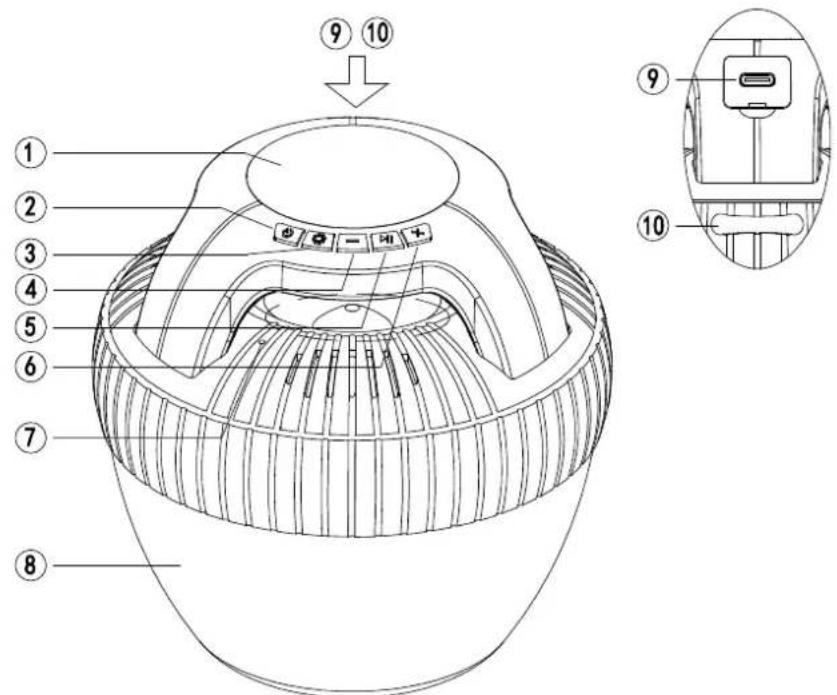
text_image
Technical diagram of a helmet with numbered parts and labeled buttons, including a close-up inset showing internal components.| 1 | LED light / charging indicator | 6 | Volume / Title + |
| 2 | power button | 7 | Microphone |
| 3 | LED Mode Selection | 8 | LED light |
| 4 | Volume / Title - | 9 | USB-C charging plug |
| 5 | Play / Pause | 10 | Loop ring |
Technical specifications
• Water protected according to IP67
- Bluetooth V5.0
- Hands-free function
• Transmission range up to 10 m
• BT transmission protocol A2DP, HSP, HFP, AVRCP
- LED light (WRGB)
- 8 W loudspeaker
- Impedance 4 Ω
• 2000 mAh Li-Ion battery 3.7 V
• Power supply 5 V DC / USB-C charging socket
- Operating time up to 8 hours
- Charging time 2-3 hours
- Operating/storage temperature 5°C to 45°C
• Material ABS, PC, silicone
• Device weight: approx. 730 g
• Device dimensions: approx. 13.5(L) x 13.5(W) x 15(H) cm
Package contents
MusicMan® BT-X60, USB-C charging cable, user manual
First startup
Connect the speaker to a suitable USB power adapter using the USB-C charging cable (not included). The speaker is fully charged in 2 to 3 hours.
Press and hold the On/Off button (2) for two seconds until the switch-on signal is heard. The device can now be paired.
Activate the Bluetooth function of the device you want to connect and enter the settings. Select "MusicMan BT-X60" from the list of available devices.
Function overview
Charging
Connect the USB-C to USB charging cable to a standard USB power adapter to charge the speaker.
Open the protective cap to expose the USB-C charging connector (9). Connect the narrow part of the USB-C charging cable to the speaker. The charging indicator (1) lights up red.
The charging indicator goes out when fully charged. The charging cable can now be removed.
The current battery level can be read on your smartphone when BT connection is established.
Important: Water resistance is only guaranteed if the protective cap is correctly fitted. Make sure that the connections are closed correctly.
Switch on/off
To switch on, press and hold the On/Off button (2) for at least 2 seconds until the speaker plays a sound. The speaker is now in pairing mode and can now be used.
To switch off the loudspeaker, please press and hold the On/Off button again for at least 2 seconds. The loudspeaker signals the switch-off with a tone.
Connecting to Bluetooth devices
Pairing establishes a connection between the BT-X60 and a Bluetooth device. If there is no pairing for 2 minutes, the speaker will cancel the pairing process and turn off.
Note that the speaker must already be turned on before initiating the pairing process.
Note: Activate the Bluetooth function on your mobile phone and set it to search for Bluetooth devices in the vicinity. For information on how to do this, refer to the operating instructions of your mobile phone.
Now select the speaker "MusicMan BT-X60" from the list of available devices and establish a connection. When prompted to enter the PIN code, please enter "0000" to pair the speaker with your phone.
If the pairing process was successful, you will hear a connection tone and the speaker can be used.
Play music
To play music from a mobile phone with Bluetooth, you need:
a media player and music files
or
a music app (Spotify, radio player, etc.) *
(*requires an internet connection)
Accept/reject phone calls
The loudspeaker can be used to accept or reject calls.
If you are called during an active Bluetooth connection, your set ringtone will sound.
By pressing the Play / Pause button (5) you can accept / hang up the call.
By pressing the Play / Pause button (5) twice, you can reject the call.
Set light mode
The light effects can be changed with the LED mode button (3). The following modes are available:
Light off, white light, blue light, green light, red light, color change, color change to music.
Adjust volume
To change the volume, briefly press the + or - button (4 / 6) on the speaker.
Change title
To change the title, long press the + or - button (4 / 6) on the speaker.
Care and maintenance
Clean the product with clean water after each use in salt water or alkaline / chlorinated water. Dry the device only with a cloth. Do not use abrasive cleaners to clean the device.
Since this device is an electronic product, avoid the following practices to prevent damage to the product:
- Using the product in extremely high or low temperatures.
- Submerging the product deeper than 1 meter for long periods.
- Throwing and/or dropping.
If the product needs to be stored, it is recommended to store it at 30% of its load capacity.
Ideal storage temperature: 10 – 20 °C.
Service phone No. for technical support: 01805 012643* (14 cent/minute from German fixed-line and 42 cent/minute from mobile networks). Free Email: support@technaxx.de
*The support hotline is available Mon-Fri from 9 am to 1 pm & 2 pm to 5 pm.
Declaration of Conformity

The EU Declaration of Conformity can be requested at the address www.technaxx.de/ (in the lower bar "Declaration of Conformity").
Disposal

Disposal of the packaging. Dispose of the packaging according to type.
Dispose of cardboard and carton in the waste paper. Foil to the recyclables collection.

Disposing of old equipment (Applies in the European Union and other European countries with separate collection (collection of recyclable materials) Old equipment must not be disposed of with household waste! Every consumer is legally obliged to dispose of old devices that can no longer be used separately from household waste, e.g. at a
collection point in his municipality or district. This ensures that the old devices are properly recycled and that negative effects on the environment are avoided. For this reason, electrical appliances are marked with the symbol shown here.

Batteries and rechargeable batteries must not be disposed of in household waste! As a consumer, you are legally obliged to hand in all batteries and rechargeable batteries, regardless of whether they contain harmful substances* or not, at a collection point in your municipality/city or in the trade, so that they can be disposed of in an environmentally friendly way.
Can be disposed of gently.
* marked with: Cd = cadmium, Hg = mercury, Pb = lead. Return your product to your collection point with the battery installed and only in a discharged state!
Made in China
Distributed by:
Technaxx Germany GmbH & Co KG
Konrad-Zuse-Ring 16-18,
61137 Schöneck, Germany
Pool Speaker BT-X60
natural_image
Technical line drawing of a mechanical component with ribbed base and circular top (no text or symbols)text_image
Technical diagram of a device with numbered parts and labeled buttons, likely for assembly or labeling.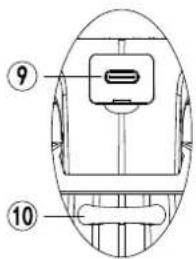
text_image
⑨ ⑩61137 Schöneck, Germany
natural_image
Technical line drawing of a mechanical component with ribbed base and circular top (no text or symbols)text_image
Technical diagram of a helmet with numbered parts and labeled buttons, including a close-up inset showing internal components.natural_image
Technical line drawing of a mechanical component with ribbed base and circular top (no text or symbols)text_image
Technical diagram of a smart speaker dome with numbered components and labeled partsnatural_image
Technical line drawing of a mechanical component with ribbed base and circular top (no text or symbols)61137 Schöneck, Germany
natural_image
Technical line drawing of a mechanical component with ribbed base and circular top (no text or symbols)text_image
Technical diagram of a smart speaker with numbered parts and labeled buttons, including a close-up inset showing internal components.| 1 | LED-lampje / laadindicator | 6 | Volume / Titel + |
| 2 | Aan-/uitknop | 7 | Microfoon |
| 3 | LED-modus selectie | 8 | LED-lampje |
| 4 | Volume / Titel - | 9 | USB-C-laadplug |
| 5 | Afspelen / Pauze | 10 | Lusring |
Technische specificaties
natural_image
Technical line drawing of a mechanical component with ribbed base and circular top (no text or symbols)natural_image
Technical line drawing of a mechanical component with no visible text or symbolstext_image
Technical diagram of a smart speaker with numbered components and labeled parts in Chinese61137 Schöneck, Germany