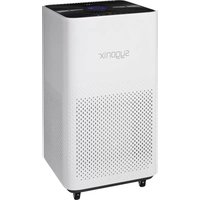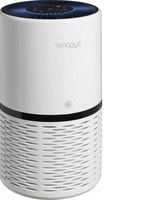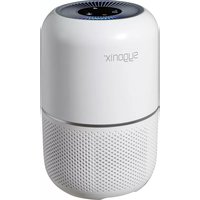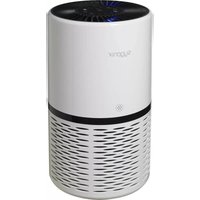
VK-6082AUV - Air purifier Sygonix - Free user manual and instructions
Find the device manual for free VK-6082AUV Sygonix in PDF.


User questions about VK-6082AUV Sygonix
0 question about this device. Answer the ones you know or ask your own.
Ask a new question about this device
Download the instructions for your Air purifier in PDF format for free! Find your manual VK-6082AUV - Sygonix and take your electronic device back in hand. On this page are published all the documents necessary for the use of your device. VK-6082AUV by Sygonix.
USER MANUAL VK-6082AUV Sygonix
GB Operating Instructions
UV-C air purifier
Item no. 2452220 Page 19 - 34
© Notice d'emploi
text_image
Labeled diagram of a white smart air purifier with numbered parts and a terminal plug, showing internal structure and component layout.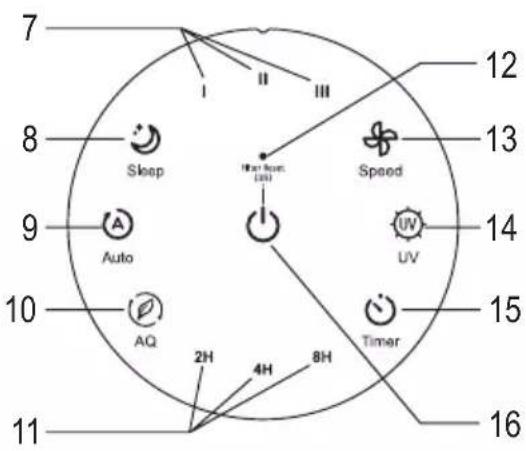
text_image
7 8 9 10 11 12 13 14 15 16 Sleep A Auto AQ 2H 4H 8H Speed UV Timernatural_image
Close-up of a hand inserting a plug into a white electrical socket (no text or symbols visible)natural_image
Diagram of a cylindrical device with internal structure and rotation arrows indicating motion (no text or symbols)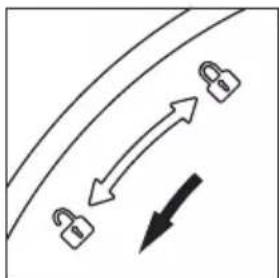
natural_image
Diagram showing three padlock icons moving along a curved path with an arrow indicating direction (no text or symbols)natural_image
Diagram of a cylindrical device with internal components and directional arrows indicating flow or movement (no text or symbols)natural_image
Illustration of two cylindrical containers with a coiled tube and a cylindrical container, no text or symbols present.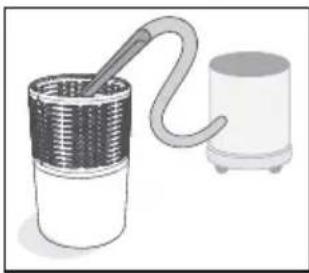
natural_image
Illustration of a coiled tube connected to a cylindrical container (no text or symbols)
natural_image
Diagram of a cylindrical device with internal components and directional arrows indicating flow or movement (no text or symbols)natural_image
Diagram showing two lock icons moving along a curved path with an upward arrow, no text or symbols presentnatural_image
Close-up of a white electrical socket with a black arrow pointing to its plug (no text or symbols visible)natural_image
Diagram of a cylindrical device with internal grid structure and rotating arrows indicating rotation (no text or symbols)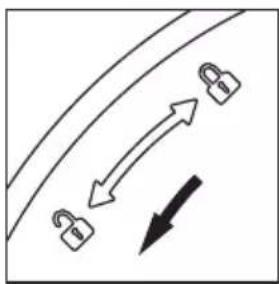
natural_image
Simple line diagram showing a curved path with two padlock icons and directional arrows, no text or symbols present.natural_image
Diagram of a cylindrical device with internal components and directional arrows indicating flow or movement (no text or symbols)natural_image
Cross-sectional diagram of a mechanical component with internal gears and a central hub (no text or symbols)
Achtung!
natural_image
Diagram of a cylindrical device with internal components and directional arrows indicating flow or movement (no text or symbols)natural_image
Diagram showing two lock icons moving along a curved path with bidirectional arrows, no text or symbols present- Introduction......20
- Explanation of symbols....20
- Intended use....21
- Delivery content....21
- Safety information....22
a) Important safety information....22
b) General information....22
c) Place of operation....23
d) How to connect....23
e) Handling and use....24
f) Cleaning and maintenance....24
-
Operating elements 25
-
Setup and operation 26
a) Setup and connection....26
b) Switching on and off 26
c) Changing fan speed 26
d) Automatic mode....27
e) Sleep mode 27
f) Timer mode 27
g) Turning UV-C light on/off 27
h) Operation without a particle sensor....28
i) Filter cleaning / replacement LED indicator....28
- Cleaning and maintenance....29
a) General information....29
b) Removing/installing the filter....29
c) Replacing the UV-C emitter....31
-
Troubleshooting 33
-
Disposal 34
- Specifications....34
1. Introduction
Dear customer,
Thank you for purchasing this product.
This product complies with statutory, national and European regulations.
To ensure that the product remains in this state and to guarantee safe operation, always follow the instructions in this manual.

These operating instructions are part of this product. They contain important information on setting up and using the product. Do not give this product to a third party without the operating instructions. Therefore, retain these operating instructions for reference!
If there are any technical questions, please contact: www.conrad.com/contact
2. Explanation of symbols
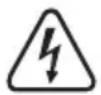
The symbol with the lightning in the triangle is used if there is a risk to your health, e.g., due to an electric shock.

The symbol with an exclamation mark in a triangle is used to highlight important information in these operating instructions. Always read this information carefully.

The arrow symbol indicates special information and tips on how to use the product.

The product is designed according to protection class II (reinforced or double insulation, protective insulation).

This product must only be used in dry, enclosed areas; it must not become damp or wet.

Do not use this product in a bathtub or shower or over a sink filled with water.

Always follow the instructions in this manual.
3. Intended use
The product is intended solely for cleaning indoor air.
The product has a built-in variable speed fan that sucks indoor air through the HEPA filter. This filter removes dust and other particles up to a certain size from the air.
The product also has an integrated UV-C light that disinfects the air and thus cleans it from infectious pathogens (viruses, bacteria, germs). The UV-C radiation either kills viruses, bacteria or germs or prevents their growth.
Exposure to dangerous UV-C radiation is ruled out since disinfection takes place within the housing.
For safety and approval purposes, do not rebuild and/or modify this product. Using the product for purposes other than those described above may damage the product. In addition, improper use can cause hazards such as a short circuit, fire or electric shock.
Before using the product for the first time, read the operating instructions carefully and keep them in a safe place. Only make this product available to third parties together with its operating instructions.
This product complies with statutory, national and European regulations. All company and product names contained herein are trademarks of their respective owners. All rights reserved.
4. Delivery content
• Air purifier
- Operating instructions
Up-to-date operating instructions
Download the latest operating instructions at www.conrad.com/downloads or scan the QR code shown. Follow the instructions on the website.

5. Safety information
Damage caused due to failure to observe these instructions will void the warranty. We shall not be liable for any consequential damage!
We shall not be liable for damage to property or personal injury caused by incorrect handling or failure to observe the safety information! Such cases will void the warranty/guarantee.
a) Important safety information
- The product has a replaceable UV-C emitter.
WARNING: Ultraviolet radiation is harmful to human skin and eyes. Never use the UV-C emitter (UV-C light source) outside the device.
- This device can be used by children aged from 8 years and above and persons with reduced physical, sensory or mental capabilities or lack of experience and knowledge if they have been given supervision or instruction concerning the use of the device in a safe way and understand the hazards involved.
- Children must be supervised to make sure they do not play with appliance in.
- Children shall not carry out cleaning and user maintenance of the device without supervision.
b) General information
- The product is not a toy and should be kept out of the reach of children. Keep it out of the reach of children and pets. Children could attempt to poke objects into the product.
- The product must be protected from exposure to extreme temperatures, direct sunlight, strong shocks/vibrations, flammable gases, humidity and moisture, vapours and solvents.
- Handle the product carefully. Jolts, impacts or a fall even from a low height may damage the product. Do not place the product under any mechanical stress.
- Do not leave the packaging material lying around carelessly as it may be a danger to children.
- The unauthorised conversion and/or modification of the product is prohibited for safety and approval reasons.
- Always comply with the accident prevention regulations for electrical equipment when using the product in industrial facilities.
- If you are not sure how to operate the product correctly, or if you have any questions that are not answered in these operating instructions, contact us or another specialist.
c) Place of operation
- The product must be installed on a level, horizontal, stable, sufficiently large surface. Ensure a minimum distance of 40 cm between the device and the nearest objects.
- The product may only be used in dry, enclosed, indoor areas. It must not become damp or wet! Never set up the product in the direct vicinity of a bathroom, shower, bathtub or similar. There is a risk of fatal electric shock!
- The mains outlet used to connect the product must be located close to the product and easily accessible.
- Make sure that the air inlet and air outlets are never blocked. Do not place anything on top of the product and do not sit on the product. The product must be kept away from curtains or the like. If you have long hair, it must be kept clear of the product. Long hair could get caught up in moving parts, causing injury.
- Do not operate the device in environments where there are high levels of dust, flammable gases, vapours or solvents. There is a danger of fire and explosion!
• Only use the product in temperate climates. It is not suitable for use in tropical climates. - The product does not serve as a substitute for proper ventilation, regular vacuum-cleaning or the use of a cooker hood.
d) How to connect
- Do not use the product if it has a damaged housing and/or power cord. There is a risk of fatal electric shock!
If the product damage is revealed when it is connected to the mains supply, de-energise the mains socket by switching off the corresponding automatic circuit breaker/residual current operated circuit breaker or removing the safety fuse. Then you can unplug the product from the mains socket. Do not continue to use the product. Any further use of the product is not allowed. Bring it to a specialised workshop or dispose of it in an environmentally friendly way. - It is assumed that safe operation is no longer possible if the product (e.g. its housing, power cord, filter) shows visible damage; malfunctions or does not work at all (emits smoke or burning smell, audible crackling noises, discolouration); has been stored under adverse ambient conditions for an extended period of time or has been exposed to considerable strain during transport.
- Never connect the product to the power supply immediately after it has been transferred from a cold room into a warm one (e.g. during transport). The condensation that develops in such cases could damage the device or cause an electric shock! Let the product reach room temperature first. Wait until the condensation has evaporated; this may take several hours. Only after this should the product be plugged into the power supply and put into use.
- Never plug in or unplug the product with damp or wet hands. There is a risk of fatal electric shock!
- Check that the voltage indicated on the rating plate matches that of the local network before connecting the product to the mains supply.
- Fully unwind the power cord before connecting it. The power cord must not be pinched or damaged by contact with sharp edges. Do not place any objects on the cord, and do not allow it to become kinked. Place the power cord away from open spaces where it will not present a trip hazard. The power cord must be easily accessible. Do not install the power cord under carpets or the like.
• Always pull a mains plug on the gripping surface intended for this purpose. Never unplug the mains plug from a mains socket by pulling the cord!
- Never connect the product via a dimmer, speed controller or the like and always plug it directly into the mains socket (wall outlet) of the utility grid.
e) Handling and use
• Always fully disconnect the product from the mains supply before cleaning it or when it will not be used for a long time.
- Never pour any liquids above or next to the product. This constitutes a serious fire hazard and may result in a fatal electrical shock.
Do not touch the device if it has been exposed to any liquid. De-energise the mains socket to which the device is connected by switching off the corresponding automatic circuit breaker/residual current operated circuit breaker or removing the safety fuse. Then you can unplug the product from the mains socket. Discontinue use of the product. Any further use of the product is not allowed. Bring it to a specialised workshop or dispose of it in an environmentally friendly way.
- The product only removes dust, other particles up to a certain size and infectious pathogens (viruses, bacteria, germs) from the indoor air passing through it. The product cannot remove carbon monoxide (CO), carbon dioxide (CO _2 ), other gases or even radiation from the indoor air.
Therefore, the product offers no protection e.g. against incorrect combustion processes (e.g. faulty heating) or chemicals.
- Misuse of the product or damage to the housing may result in hazardous UV-C radiation exposure. UV-C radiation, even in small doses, may cause harm to the eyes and skin.
- The UV-C emitter must never be used as a substitute for a conventional lamp for the illumination of premises. UV-C radiation causes damage to unprotected eyes or skin!
f) Cleaning and maintenance
- Adjustment or repair work may only be carried out by a specialist/technician of a specialised workshop, who is familiar with the hazards involved and the relevant regulations.
- The product must always be disconnected from the mains supply before replacing the UV-C emitter. The same is true for cleaning or replacing the HEPA filter.
- Direct exposure to the light emitted by the device can cause damage to the eyes or skin.
- The UV-C emitter may only be replaced by an emitter with the same rating and specifications (see "Specifications" at the end of these operating instructions).
- Likewise, the HEPA filter may only be replaced by an original filter with the same rating in order to prevent possible UV-C radiation exposure.
• More information on maintenance and cleaning can be found in section 8.
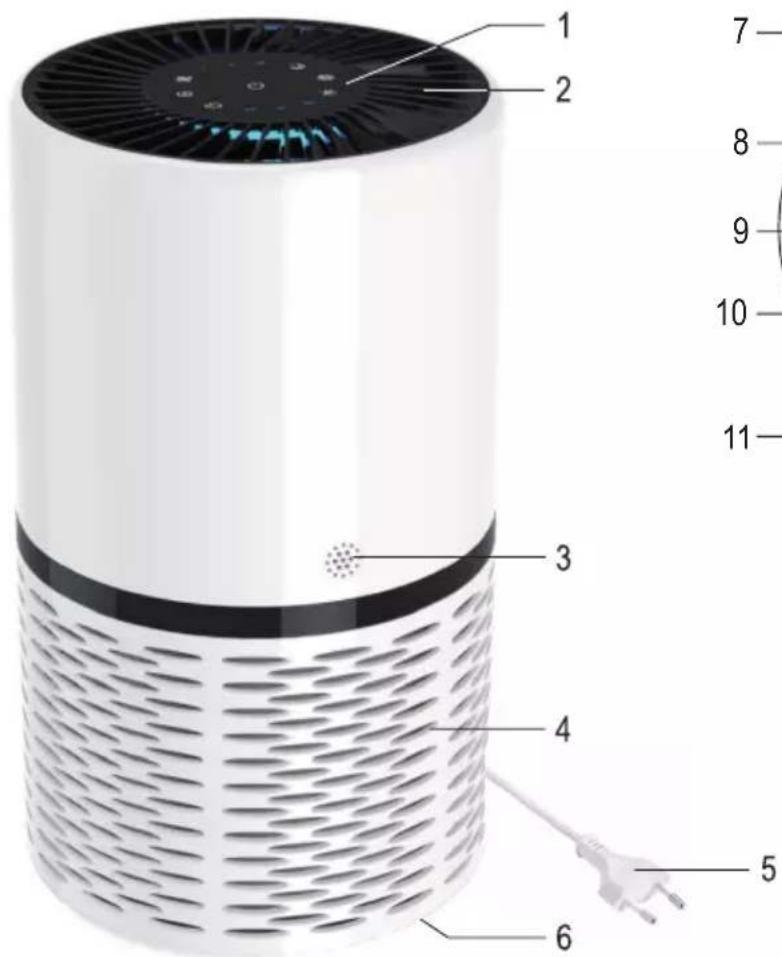
6. Operating elements
text_image
Labeled diagram of a white smart air purifier with numbered parts for identification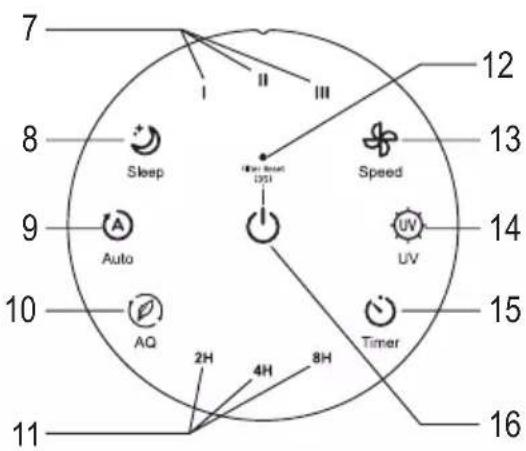
text_image
7 8 Sleep 9 Auto 10 AQ 2H 4H 8H 11 12 13 Speed 14 UV Timer 15 161 Control panel
2 Air outlets (the colour of an LED ring indicates the air quality)
3 Sensor opening
4 Air inlets
5 Power plug
6 Lid (for filter cleaning or replacement or emitter replacement)
7 Fan speed LED indicators (I, II or III)
8 Sleep mode button 😊
9 Automatic mode button Ⓐ
10 Button for operation without a particle sensor
11 Timer LED indicator (2H, 4H, 8H)
12 Filter cleaning / replacement LED indicator
13 Fan speed adjustment button ⚙, II or III)
14 UV-C light on/off button
15 Timer adjustment button 🔊
16 On/off button (press briefly) / filter reset button (keep pressed for 3 seconds)
7. Setup and operation

Details can be found under "Safety information".
a) Setup and connection
- The air purifier should be installed on a level, horizontal, stable, sufficiently large surface. The installation place should be large enough to accommodate the air purifier and withhold its weight. Peel a protective film (if any) off the control panel.
- Insert the mains plug into a mains socket. You will then hear a faint beep, after which all LEDs on the control panel will light up briefly and then go off.
• The air purifier is now in standby mode and ready for use.
b) Switching on and off
• To turn the air purifier on or off, briefly press the on/off button. You will then hear a confirmation beep.
- When turned on for the first time, the device works at fan speed I and the LED indicator "I" lights up.

The air purifier saves the most recent settings. The air purifier starts work with the settings that applied before it was turned off.
Since the UV-C light is always disabled for safety reasons when turning on the air purifier, use the corresponding button to switch it on (see section 7. g).
- The colour of the LED ring behind the control panel (which is visible through the air outlets) indicates the air quality. The particle sensor is located behind the sensor opening (3), as shown in section 6.
| LED colour Blue Green Orange | Red | |||
| Air quality Very good Good | Poor Bad |

If the LED indicator lights up orange or red, we recommend that you ventilate the room.
- Turn on the air purifier.
- Briefly press the ✿ button several times to change the fan speed (you can choose between 3 different speeds). You will then hear a confirmation beep.
• The fan speed is indicated by the corresponding LED indicator I, II or III.
d) Automatic mode
- Turn on the air purifier.
- The button turns the automatic mode on or off. You will hear a confirmation beep.
- In automatic mode, the particle sensor monitors the indoor air and adjusts the fan speed automatically.
→ Behind the control panel you can see the LED ring (which is visible through the air outlets). Its colour indicates the air quality.
| LED colour Blue Green Orange | Red | |||
| Fan speed Sleep mode I II III | ||||
| Air quality Very good Good Poor | Bad |

If the LED ring lights up orange or red, we recommend that you ventilate the room.
e) Sleep mode
- Turn on the air purifier.
• The button turns the sleep mode on or off.
With the sleep mode enabled, the fan runs quietly at the lowest speed and the LEDs are dimmed.
f) Timer mode
• Turn on the air purifier.
- The ⏻ button turns the timer on/off and enables timer setting (2 hours, 4 hours or 8 hours).
When the timer is enabled, the ⏻ button and the selected timer setting are white backlit. When the timer is disabled, the LEDs are off.
The timer restarts when you change the timer setting.
• Once the set time has elapsed, the air purifier turns off automatically.
g) Turning UV-C light on/off
The air purifier has a built-in UV-C emitter that disinfects the air passing through it. The UV-C light inactivates viruses, bacteria, and germs. Exposure to dangerous UV-C radiation is ruled out since disinfection takes place within the housing.
- Turn on the air purifier and select the desired mode (automatic, sleep or timer mode).
• The UV button turns the UV-C light on or off.
When the UV-C light is activated, the Ⓞ control button is red backlit.

Avoid turning the UV-C light on and off multiple times in quick succession. This can shorten the service life of the device.
h) Operation without a particle sensor
The particle sensor is always active in all modes and uses the LED ring to indicate the air quality (the corresponding colour codes can be found in table in section 7. b).
The device can be operated without the particle sensor as follows:
• Turn on the air purifier.
- Select the fan speed or set the timer if necessary. You can also activate the UV-C light.
• Use the button to turn the particle sensor on or off.
When the particle sensor is disabled, the button backlight and the LED ring indicating the air quality go off.
i) Filter cleaning / replacement LED indicator
An LED indicator (12) can be found above the on/off button. When this LED indicator lights up, always check the filter for soiling and clean or replace it if necessary. Follow the instructions in section 8. b).
The indicator goes on after a certain time of operation based on the particle sensor data.
If the place of installation is exposed to low dust levels, dust will be barely visible on the filter. In this case, the filter requires no replacement and should instead be carefully cleaned with a vacuum cleaner or a clean, soft brush.
The operation time can also be reset manually:
• Turn on the air purifier.
- When the LED indicator (12) is off, keep the ⏻ button pressed for about 3 seconds until it lights up. Release the button.
- Keeping the ⏻ button pressed for about 3 seconds turns the LED indicator (12) off. The operation time is now reset.
8. Cleaning and maintenance
a) General information
Ensure the product is turned off and disconnected from the mains supply (unplugged from the mains socket) before each maintenance or cleaning.
Use a dry, lint-free cloth to clean the outside of the device.
Never use aggressive detergents, rubbing alcohol or other chemical solutions, as they can cause discolouration or erase button inscriptions.
Use a vacuum cleaner and a long-haired, clean, soft brush to remove dust.

In the following sections you will find information about replacement and cleaning of the air filter and replacement of the UV-C emitter. Maintenance or repair work may only be carried out by a specialist or technician of a specialised workshop.
b) Removing/installing the filter
Perform the following steps:
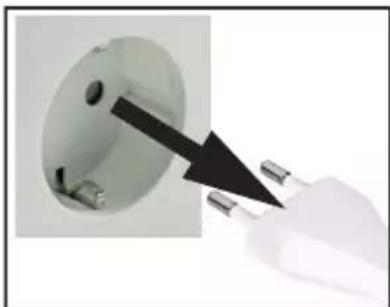
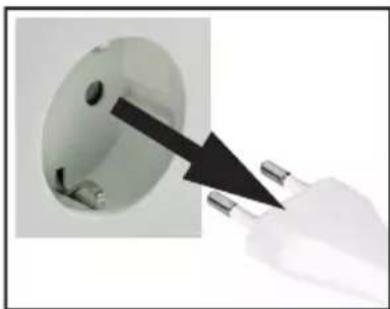
1 Turn off the air purifier and unplug it from the mains socket.
natural_image
Close-up of a white electrical socket with metal pins being inserted, showing a black arrow pointing to the socket (no text or symbols visible)2 Turn the air purifier upside down (by 180°) and place it on a soft surface, e.g. a blanket.
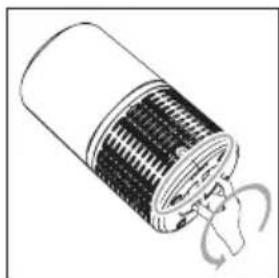
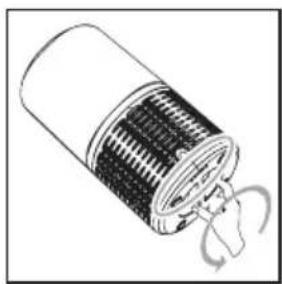
Turn the lid on the bottom of the air purifier slightly to the left (counter-clockwise) to unlock.
natural_image
Diagram of a cylindrical device with internal components and a rotating arrow indicating rotation (no text or symbols)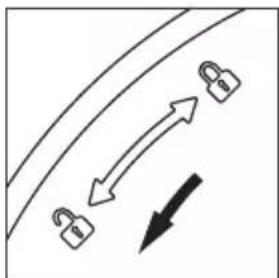
natural_image
Diagram showing three padlock icons moving along a curved path with an arrow indicating direction (no text or symbols)3 Take off the lid and pull out the filter.
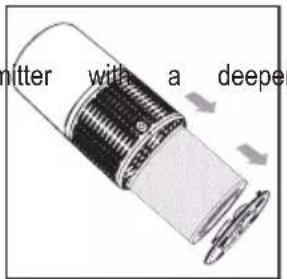
Pay attention to the orientation (the filter faces the UV-C opening; on the outside you can see two textile strips by which you can pull the filter out).
text_image
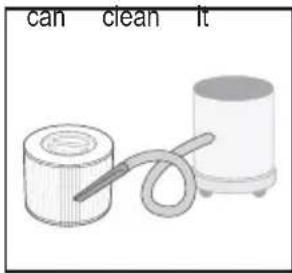
nitter with a deeper4 If the filter is only slightly soiled, you carefully with a vacuum cleaner and a clean, soft brush.
Make sure you remove any dust or hair from the air inlets of the air purifier.
If the filter is heavily soiled, always replace it with a new one with the same rating.
text_image
can clean it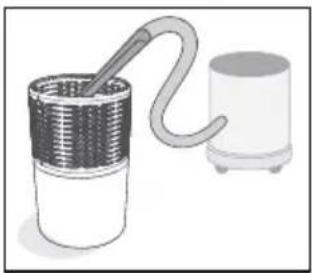
natural_image
Illustration of a coiled tube connected to a cylindrical container (no text or symbols)
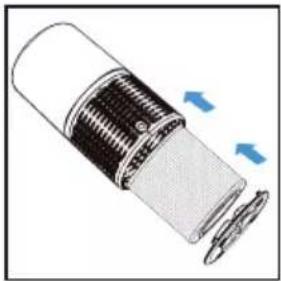
Make sure you insert the filter correctly (a deeper opening in the filter should face the UV-C emitter; two textile strips for easy removal of the filter should face outside).
Do not use force when inserting the filter! If you insert the filter incorrectly, the UV-C emitter will be permanently damaged!
natural_image
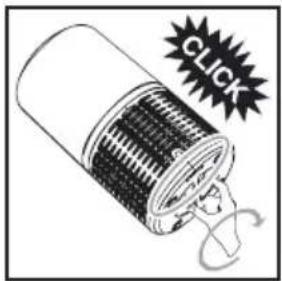
Diagram of a cylindrical device with internal components and directional arrows indicating flow or movement (no text or symbols)5 Replace the lid on the air purifier again correctly and lock it in place by turning it to the right (clockwise) until it audibly clicks into place.
The lid can only be replaced and locked in place correctly if the filter has been inserted correctly in the air purifier.
text_image
CLICK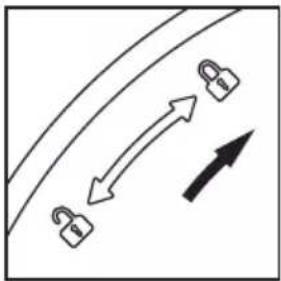
natural_image
Diagram showing two lock icons moving along a curved path with bidirectional arrows, no text or symbols present6 Turn the air purifier over again and place it correctly.
7 Insert the mains plug into a mains socket. You will then hear a faint beep, after which all LEDs on the control panel will light up briefly and then go off.
8 Turn on the air purifier by briefly pressing the on/off button ⏻. You will hear a confirmation beep.
9 With the LED indicator (12) on after filter change and powering on the air purifier, press and hold down the button for about 3 seconds until the LED indicator goes off. This is how you reset the internal counter for filter check (or filter replacement).
10 The air purifier is now ready for use.

Attention!
The air purifier has a safety switch. The UV-C emitter can only be enabled if the filter has been inserted correctly. The safety switch is operated via the filter ring.
Never attempt to operate the safety switch with any other items, bypass it or otherwise hinder its function. Otherwise, this may result in uncontrolled UV-C radiation exposure. This, in turn, may cause damage to the eyes and skin!
c) Replacing the UV-C emitter
Perform the following steps:
1 Turn off the air purifier and unplug it from the mains socket.
natural_image
Close-up of a white electrical socket with a black arrow pointing to its socket (no text or symbols visible)2 Turn the air purifier upside down (by 180^ ) and place it on a soft surface, e.g. a blanket.
Turn the lid on the bottom of the air purifier slightly to the left (counter-clockwise) to unlock.
natural_image
Diagram of a cylindrical device with internal structure and rotation arrows indicating motion (no text or symbols)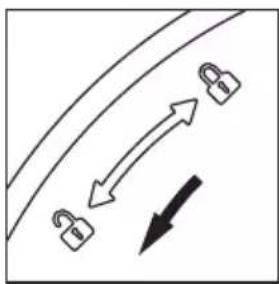
natural_image
Simple line diagram showing a curved path with two padlock icons and directional arrows, no text or symbols present.3 Take off the lid and pull out the filter.
Pay attention to the orientation (the filter faces the UV-C opening; on the outside you can see two textile strips by which you can pull the filter out).
We recommend that you check the filter for soiling and clean it, if necessary, at the same time (see section 8. b.).
text_image
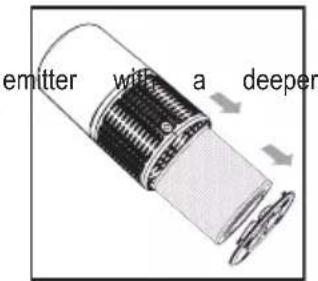
emitter with a deeper4 Let the faulty emitter cool down completely before replacing it. Make sure it is cool before touching it or pulling it out. Use heat-resistant gloves or a cloth if necessary.
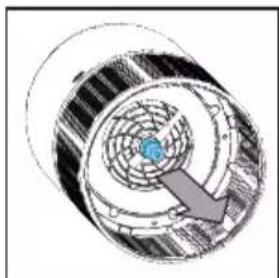
Remove the UV-C emitter and replace it with the one of identical rating (same type, same configuration, same electrical and optical data).
Do not use force when replacing the emitter.
Never touch the emitter with bare hands. You can use e.g. a clean cloth. Fingerprints or soiling left on the emitter glass can cause glass turbidity under the action of heat, thus reducing the strength of UV-C radiation and its disinfection capacity.
natural_image
Cross-sectional diagram of a mechanical component with internal gears and a central blue component (no text or symbols)
Attention!
Never use any other emitter, for example, the one with a higher capacity. This can damage the air purifier and cause hazardous UV-C radiation exposure.
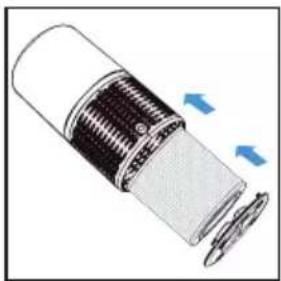
5 Insert the filter.

Make sure you insert the filter correctly (a deeper opening in the filter should face the UV-C emitter; two textile strips for easy removal of the filter should face outside).
Do not use force when inserting! If you insert the filter incorrectly, the UV-C emitter will be permanently damaged!
natural_image
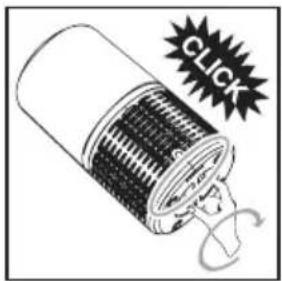
Diagram of a cylindrical device with internal components and directional arrows indicating flow or movement (no text or symbols)6 Replace the lid on the air purifier correctly and lock it in place by turning it to the right (clockwise) until it audibly clicks into place.
The lid can only be replaced and locked in place correctly if the filter has been inserted correctly.
text_image
CLICK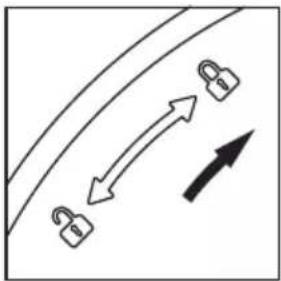
natural_image
Diagram showing two padlock icons moving along a curved path with bidirectional arrows (no text or symbols)7 Turn the air purifier over again and place it correctly.
8 Insert the mains plug into a mains socket. You will then hear a faint beep, after which all LEDs on the control panel will light up briefly and then go off.
9 The air purifier is now ready for use.

Attention!
The air purifier has a safety switch. The UV-C emitter can only be enabled if the filter has been inserted correctly. The safety switch is operated via the filter ring.
Never attempt to operate the safety switch with any other items, bypass it or otherwise hinder its function. Otherwise, this may result in uncontrolled UV-C radiation exposure. This, in turn, may cause damage to the eyes and skin!
Attention, danger!
The UV-C emitter must never be used as a substitute for a conventional lamp for the illumination of premises. UV-C radiation may result in damage to unprotected eyes or skin!
9. Troubleshooting
The air purifier will not switch on
- Check the voltage/power supply or whether the mains socket (e.g. of a socket strip) is turned on.
Insufficient air volume during operation
- Check the filter, clean or replace it if necessary. Clean the air inlets of the air purifier, as described in section 8. b).
- Choose a higher fan speed.
Poor cleaning performance
• The air purifier is suitable for premises up to 30 sq.m.
- Dust exposure is too high. The air purifier is only intended for premises with normal dust exposure (e.g. living rooms), but not for premises with working machinery (e.g. grinding machines) or similar equipment.
- Check the filter, clean or replace it if necessary. Clean the air inlets of the air purifier, as described in section 8. b).
UV-C emitter does not work
- Replace the UV-C emitter with a new one. Make sure you use the UV-C emitter with identical rating (same type, same configuration, same electrical and optical data).
- The filter is installed incorrectly or there is no filter in the air purifier. The air purifier has a safety switch. The UV-C emitter can only be enabled if the filter has been inserted correctly. The safety switch is operated via the filter ring.

Attention!
attempt to operate the safety switch with any other items, bypass it or otherwise hinder its function.
Otherwise, this may result in uncontrolled UV-C radiation exposure. This, in turn, may cause damage to the eyes and skin!
The fan does not turn or generates abnormal noises
- The filter is blocked or its functionality is impaired (e.g. due to an object that has fallen onto the air purifier). Discontinue use of the product or turn it off and disconnect from the mains supply. Have it checked by a specialist.
The air purifier emits a continuous beep
- Discontinue use of the product or turn it off and disconnect from the mains supply. Have it checked by a specialist.
10. Disposal
The crossed-out wheeled bin symbol stands for the separate collection of waste electrical and electronic equipment. It indicates that the disposal of WEEE as household waste (unsorted municipal waste) is prohibited.
At the end of its service life, dispose of the product in accordance with applicable regulatory guidelines. You thus fulfil your statutory obligations and contribute to environmental protection.
11. Specifications
Operating voltage 220 - 240 V/AC, 50 - 60 Hz
Power consumption....Operation: max. 26 W, standby: <0.8 W
Protection class....II
Fan speeds....4 (speed I, II, III and sleep mode)
Timer ....yes, 2 h, 4 h or 8 h
UV-C emitter....3 W, 11 V, base G9, type UV-10V3W-G9, item no. 2498117
Filter type....HEPA combination filter, item no. 2484385
Air flow rate....max. 250 m³/h
Noise level....28 - 49 dB, depending on the fan speed
Recommended room size.....up to 30 m²
Place of operation....dry indoor areas
Ambient conditions....Operating temperature: -5 to +42 °C, ≤85% relative humidity, non-condensing
Storage temperature: -25 to +65 °C, ≤85% relative humidity, non-condensing
Dimensions....233 x 400 mm (∅ x H)
Weight .....approx. 3.65 kg
Page
France (email) : technique@conrad-france.fr
text_image
Labeled diagram of a white cylindrical smart air purifier with numbered components and a separate inset showing numbered parts.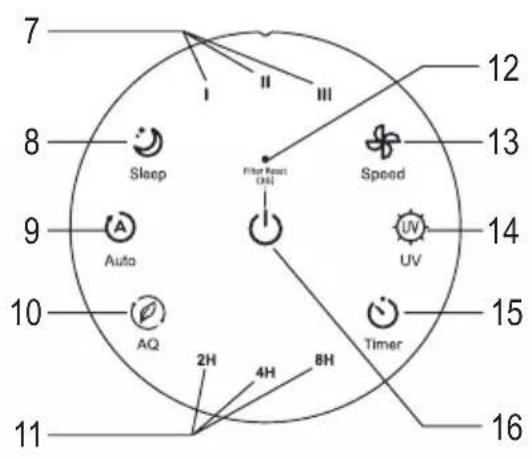
text_image
7 8 Sleep Filter Flux [Ω] 9 Auto AQ 2H 4H 8H 10 Timer 11 12 13 14 UV 15 16natural_image
Diagram showing a curved path with two padlock icons and directional arrows, no text or symbols present.natural_image
Diagram of a cylindrical device with internal components and external airflow arrows (no text or symbols)natural_image
Illustration of a coiled tube connected to a cylindrical device (no text or symbols)
natural_image
Diagram of a cylindrical device with internal components and directional arrows indicating flow or movement (no text or symbols)natural_image
Diagram showing two lock icons moving along a curved path with bidirectional arrows, no text or symbols presentnatural_image
Simple line diagram showing a curved path with two padlocks and directional arrows, no text or symbols present.natural_image
Diagram of a cylindrical device with internal components and directional arrows indicating flow or movement (no text or symbols)natural_image
Cross-sectional diagram of a mechanical component with internal gear and central hub (no text or symbols)natural_image
Diagram of a cylindrical device with internal mesh structure and blue directional arrows indicating flow or movement (no text or symbols)natural_image
Diagram showing two lock icons moving along a curved path with an upward arrow, no text or symbols presenttext_image
Labeled diagram of a white smart air purifier with numbered parts and a terminal plug, showing internal structure and component annotations.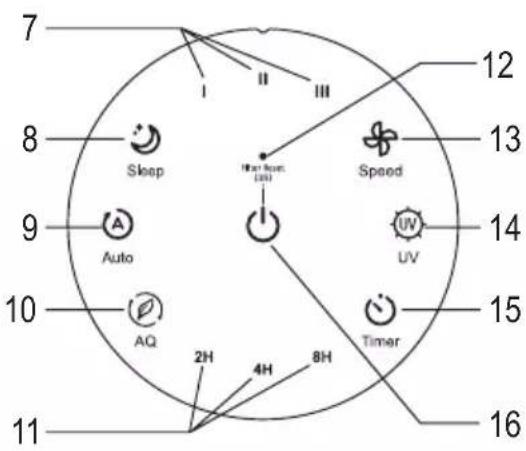
text_image
7 8 9 10 11 12 13 14 15 16 Sleep A Auto AQ 2H 4H 8H Speed UV Timernatural_image
Close-up of a white electrical socket with metal pins being inserted, showing a black arrow pointing to the socket (no text or symbols visible)natural_image
Diagram of a cylindrical device with internal components and a rotating arrow indicating rotation (no text or symbols)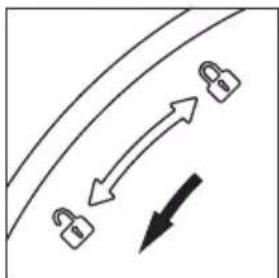
natural_image
Diagram showing three padlock icons moving along a curved path with an arrow indicating direction (no text or symbols)natural_image
Diagram of a cylindrical device with internal components and directional arrows indicating flow or movement (no text or symbols)natural_image
Illustration of two cylindrical containers with a coiled tube and a cylindrical container, no text or symbols present.
natural_image
Illustration of a coiled tube connected to a cylindrical container (no text or symbols)
natural_image
Diagram of a cylindrical device with internal components and blue directional arrows indicating flow or movement (no text or symbols)natural_image
Diagram showing two lock icons moving along a curved path with bidirectional arrows, no text or symbols presentnatural_image
Close-up of a white electrical socket with a black arrow pointing to its socket (no text or symbols visible)natural_image
Diagram of a cylindrical device with internal grid structure and curved arrows indicating rotation (no text or symbols)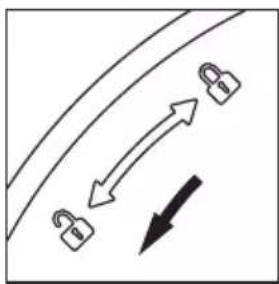
natural_image
Simple line diagram showing a curved path with two padlock icons and directional arrows, no text or symbols present.natural_image
Diagram of a cylindrical device with internal components and directional arrows indicating flow or movement (no text or symbols)natural_image
Cross-sectional diagram of a mechanical component with internal gear and a blue component, no visible text or symbols