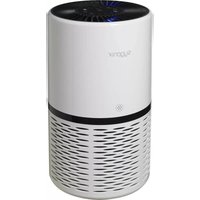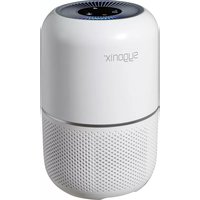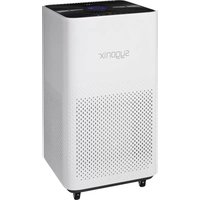
SY-4535294 - Air purifier Sygonix - Free user manual and instructions
Find the device manual for free SY-4535294 Sygonix in PDF.


User questions about SY-4535294 Sygonix
0 question about this device. Answer the ones you know or ask your own.
Ask a new question about this device
Download the instructions for your Air purifier in PDF format for free! Find your manual SY-4535294 - Sygonix and take your electronic device back in hand. On this page are published all the documents necessary for the use of your device. SY-4535294 by Sygonix.
USER MANUAL SY-4535294 Sygonix
GB Operating Instructions
Air Purifier 40 W 36 - 40 m², White
Item No. 2267647 Page 16 - 29
F Mode d'emploi
text_image
Technical diagram of a desktop computer tower with numbered parts labeled 5, 6, 7, and 8natural_image
Circular pattern with evenly spaced white dots on a dark background, no text or symbols presentnatural_image
Illustration of a white air purifier next to a cylindrical filter unit with blue directional arrows indicating airflow or ventilation (no text or symbols present)natural_image
Illustration of a clean air filter unit with three cylindrical washers and airflow direction indicators (no text or symbols)natural_image
Technical illustration of a server rack with an inset close-up showing internal structure details (no text or symbols)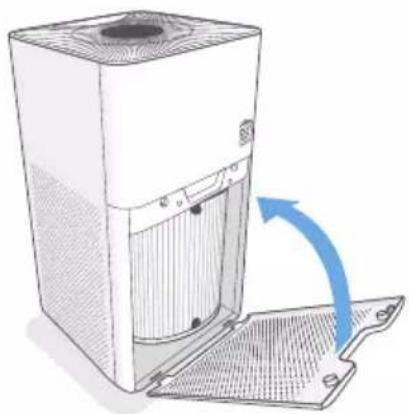
natural_image
Illustration of a white industrial air purifier with a blue arrow indicating airflow or ventilation direction (no text or symbols)9. Betrieb
natural_image
Illustration of a cylindrical filter and a mechanical device with a coiled cable (no text or symbols)
natural_image
Diagram of a refrigerant appliance with a close-up view showing its internal components (no text or symbols present)natural_image
Illustration of a two-cylinder air purifier with blue arrows indicating flow direction, next to a cup (no text or symbols)natural_image
Illustration of a clean air filter unit with three cylindrical washers and airflow direction indicators (no text or symbols)natural_image
Diagram of a computer tower with an open door and cable, showing internal components and a close-up of the cable (no text or symbols present)natural_image
Illustration of a portable air purifier with a hose and lid, no text or symbols present- Introduction....17
- Explanation of symbols....17
- Intended use....17
- Delivery content....17
- Up-to-date operating instructions ....18
- Safety instructions ....18
a) General information....18
b) Plug and cable....19
c) Product....19
- Operating elements ......20
a) Air purifier 20
b) Control panel / LED display....21
c) Air quality indicator 22
d) Air quality indicator chart....22
- Getting started 23
- Operation....24
a) General operation....24
b) Auto mode 24
c) Automatic shutoff....25
d) Sleep mode 25
e) Timer 25
f) Air filter indicator....25
g) Reset the air filter indicator / lifetime 25
- Care and cleaning....26
a) Air purifier 26
b) Filter....26
c) Sensor cover 26
- Replacing the air filter 27
- Troubleshooting....28
- Disposal....29
- Technical data....29
a) General....29
b) Filter....29
1. Introduction
Dear customer,
Thank you for purchasing this product.
This product complies with the statutory national and European requirements.
To maintain this status and to ensure safe operation, you as the user must observe these operating instructions!

These operating instructions are part of this product. They contain important notes on commissioning and handling. Also consider this if you pass on the product to any third party. Therefore, retain these operating instructions for reference!
If there are any technical questions, please contact: www.conrad.com/contact
2. Explanation of symbols

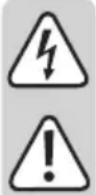
The symbol with the lightning in the triangle is used if there is a risk to your health, e.g. due to an electric shock.

The symbol with the exclamation mark in the triangle is used to indicate important information in these operating instructions. Always read this information carefully.

The arrow symbol indicates special information and advice on operation.
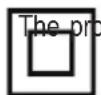
duct is designed according to protection Class II (reinforced or double insulation, protective insulation).
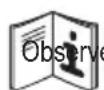
e the operating instructions!
3. Intended use
The product is intended for use as an air purifier for household use under normal operating conditions.
It is intended for indoor use only. Do not use it outdoors. Contact with moisture, e.g. in bathrooms, must be avoided under all circumstances.
For safety and approval purposes, you must not rebuild and/or modify this product. If you use the product for purposes other than those described above, the product may be damaged. In addition, improper use can result in short circuits, fires, electric shocks or other hazards. Read the instructions carefully and store them in a safe place. Make this product available to third parties only together with its operating instructions.
All company names and product names are trademarks of their respective owners. All rights reserved.
4. Delivery content
- Air purifier - Air filter (pre-installed) - Operating instructions
5. Up-to-date operating instructions
Download the latest operating instructions at www.conrad.com/downloads or scan the QR code shown. Follow the instructions on the website.

6. Safety instructions
Read the operating instructions carefully and especially observe the safety information. If you do not follow the safety instructions and information on proper handling in this manual, we assume no liability for any resulting personal injury or damage to property. Such cases will invalidate the warranty/guarantee.
- The appliance is not to be used by persons (including children) with reduced physical, sensory or mental capabilities, or lack of experience and knowledge, unless they have been given supervision and instruction.
• Children should be supervised not to play with the appliance. - A damaged mains cable may only be replaced by the manufacturer, a workshop commissioned by the manufacturer or a similarly qualified person, so as to prevent any danger.
a) General information
- The device is not a toy. Keep it out of the reach of children and pets.
- Do not leave packaging material lying around carelessly. This may become dangerous playing material for children.
- Protect the appliance from extreme temperatures, direct sunlight, strong jolts, high humidity, moisture, flammable gases, steam and solvents.
- Do not place the product under any mechanical stress.
-
If it is no longer possible to operate the product safely, take it out of operation and protect it from any accidental use. Safe operation can no longer be guaranteed if the product:
-
is visibly damaged,
- is no longer working properly,
- has been stored for extended periods in poor ambient conditions or
- has been subjected to any serious transport-related stresses.
- Please handle the product carefully. Jolts, impacts or a fall even from a low height can damage the product.
- Consult an expert when in doubt about the operation, safety or connection of the appliance.
- Maintenance, modifications and repairs must only be completed by a technician or an authorised repair centre.
- If you have questions which remain unanswered by these operating instructions, contact our technical support service or other technical personnel.
b) Plug and cable
- The mains outlet must be located near to the device and be easily accessible.
- Never pull the mains plug from the socket by pulling at the cable. Always pull it from the mains socket using the intended grips.
- Unplug the mains plug from the mains socket if you do not use the device for an extended period of time.
- Disconnect the mains plug from the mains socket in thunderstorms for reasons of safety.
- Make sure that the mains cable is not squeezed, bent, damaged by sharp edges or put under mechanical stress. Avoid excessive thermal stress on the mains cable from extreme heat or cold. Do not modify the mains cable. Otherwise the mains cable may be damaged. A damaged mains cable can cause a deadly electric shock.
- Do not touch the mains cable if it is damaged. First, power down the respective mains socket (e.g. via the respective circuit breaker) and then carefully pull the mains plug from the mains socket. Never use the product if the mains cable is damaged.
- Never plug in or unplug the mains plug when your hands are wet.
c) Product
- Keep your air purifier away from water, wet or damp areas.
- Avoid environments that may cause moisture to build up inside the purifier (such as rooms with major temperature changes, or underneath an air conditioner).
- Keep your air purifier away from heat sources.
- Do not use the appliance near gas appliances, heating devices or fireplaces.
- Do not place anything into any opening on the air purifier, unless directed by the manual.
- Do not block the air inlet and outlet, e.g. by placing items on the air outlet or in front of the air inlet.
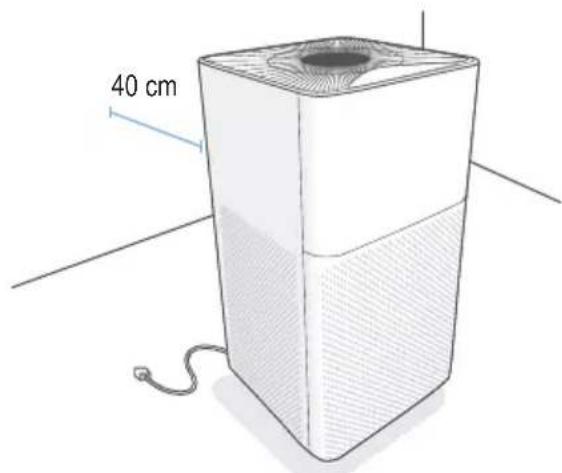
- Leave at least 40 cm free space around and above the appliance.
- Do not place any objects on top of the appliance.
- Always disconnect your air purifier from the power supply before servicing (for example, changing the air filter).
- This appliance is not a substitute for proper ventilation, regular vacuum cleaning or use of an extractor hood or fan while cooking.
- Only use the original filters specially intended for this appliance. Do not use any other filters.

Important: Do not use this air purifier with solid-state speed controls (such as a dimmer switch).
7. Operating elements
a) Air purifier
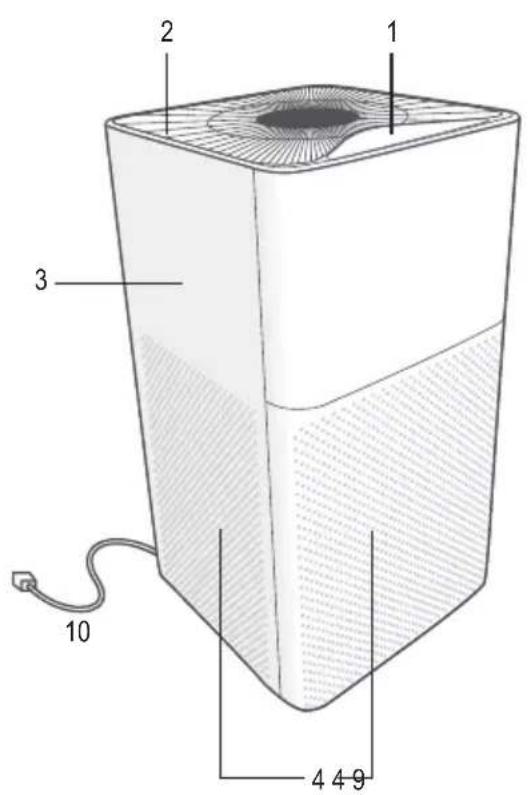
text_image
1 2 3 4 4 9 10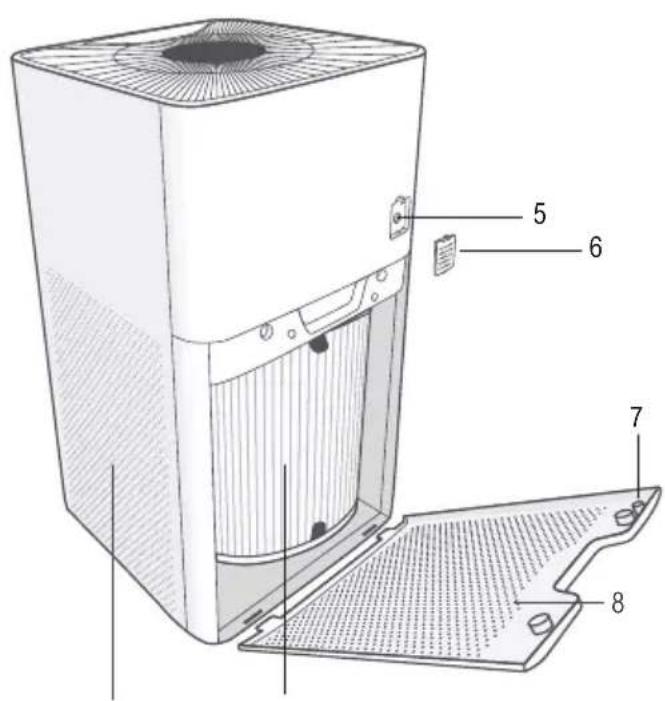
text_image
Technical diagram of a desktop computer with labeled parts including front panel, rear panel, and cover plate1 Control panel / LED display
2 Air outlet
3 Housing
4 Air intake
5 Sensor
6 Sensor cover
7 Safety trigger
8 Filter cover
9 Air filter
10 Power cord
b) Control panel / LED display
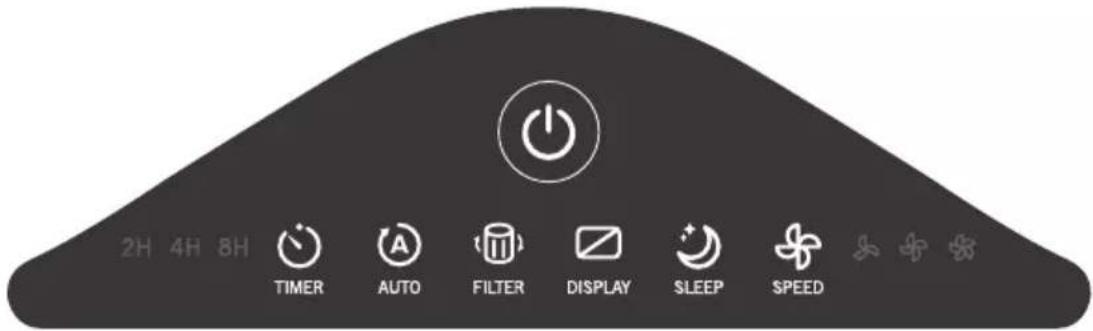
text_image
2H 4H 8H TIMER AUTO FILTER DISPLAY SLEEP SPEED| Icon Description | |
 | ON / OFF button |
 | Timer buttonSet the timerCycle through timer durations |
 | Auto mode buttonTurn auto mode on |
 | Check filter button / filter indicatorLights red to remind you to check the air filter |
 | Sleep mode buttonTurn sleep mode on |
 | Display buttonTurn the display lights offPress any button (except) to turn the display lights back on |
 | Fan speed buttonCycle through fan speeds: Low medium , high. |
c) Air quality indicator

natural_image
Circular pattern with evenly spaced white dots on a dark background, no text or symbols present.- Indicates air quality using the sensor inside the air purifier.
- The air quality indicator will always light up blue when the air purifier is first turned on, and changes based on the detected air quality.
• The air purifier may take up to 30 second detect air quality.
- Change the brightness by touching the air quality indicator.
d) Air quality indicator chart
| Colour Air quality Particle amount (ug/m | 3) | ||
 | Blue Very good 0 - 50 | ||
 | Green Good 50 - 100 | ||
 | Yellow Moderate 100 - 150 | ||
 | Red Bad 150+ | ||
8. Getting started

If you are not planning to use the air purifier for a long period of time, we recommend leaving the filter inside its plastic packaging until it is ready to be used, to keep it clean.
-
Pull the handle of the filter cover to open the housing and remove the air filter.
-
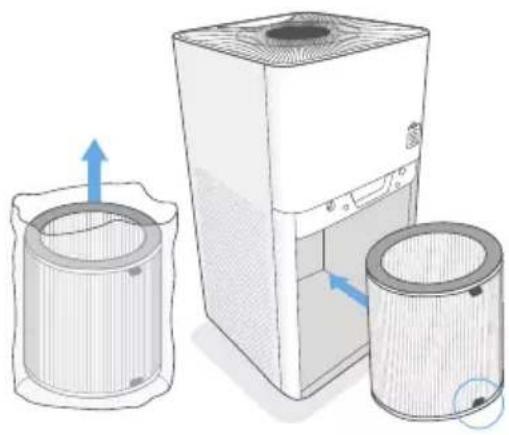
Remove the filter from the plastic packaging, then install it into the housing. Make sure the pull tabs on the filter are facing out.
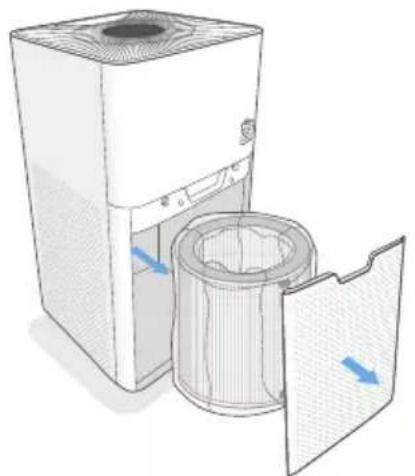
natural_image
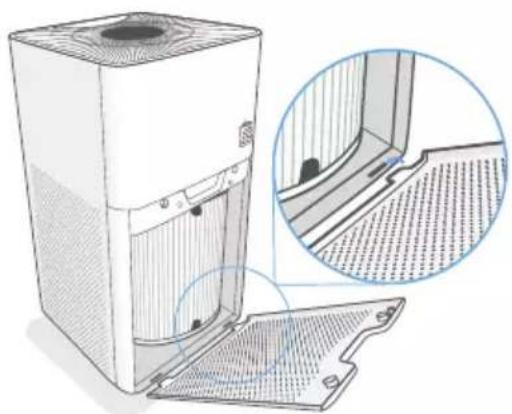
Diagram of a white air purifier with a filter array and airflow direction arrows (no text or symbols)- Replace the filter cover by lining up the cover tabs with the slots on the bottom of the housing.
natural_image
Illustration of a desktop air purifier with two cylindrical washers and one base unit, showing airflow direction (no text or symbols)- Push the cover securely closed.
The air purifier uses a magnetic safety trigger to make sure that the filter cover is closed. If not properly closed, the air purifier will not turn on.
natural_image
Technical illustration of a white server unit with ventilation grilles and a magnified inset showing internal structure details (no text or symbols)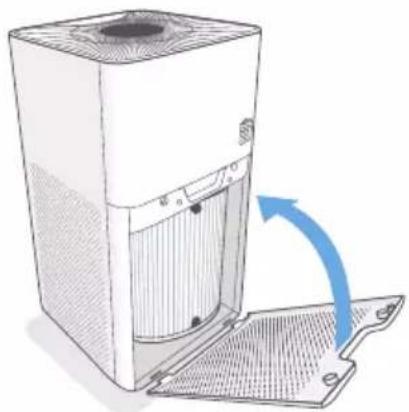
natural_image
Illustration of a white server unit with a blue arrow indicating rotation or ventilation (no text or symbols present)9. Operation
a) General operation
- Place the air purifier on a hard, flat surface. Leave 40 cm of clearance on all sides of the purifier.
- Connect the power plug to a power outlet.
- Press to turn the air purifier ON. The air purifier fan will start automatically.
- Optionally, press to change fan speed. You can also select "auto mode, sleep mode, or set a timer."
- For best results, run the air purifier at maximum speed for 15 to 20 minutes before using a lower speed or "auto mode".
- Keep windows closed while the purifier is operating.
text_image
40 cm-
Press to turn the air purifier OFF.
-
The air purifier will remember its programmed settings when turned OFF, and will resume these settings when turned back ON.
- The air purifier will not recall timers.
b) Auto mode
This mode uses the sensor inside the air purifier to adjust the fan speed automatically based on air quality.
For example, if the air quality is bad, the fan will automatically be set to high speed.
- Press to turn auto mode on.
- Press or to exit auto mode.
| Colour Air quality Fan speed Particle amount (ug/m) | 3) | |||
 | Blue Very good Very low 0 - 50 | |||
 | Green | Good | Low | 50 - 100 |
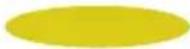 | Yellow | Moderate | Medium | 100 - 150 |
 | Red | Bad | High | 150+ |
c) Automatic shutoff
The air purifier uses a magnetic safety trigger to make sure that the filter cover is closed. The air purifier will automatically turn off if the filter cover is removed.
d) Sleep mode
Sleep mode uses the lowest possible fan speed to operate quietly.
- Press to turn sleep mode on.
- Press or to exit sleep mode.
e) Timer
- Press repeatedly to turn the timer on or off, and to cycle through timer options (2 hours, 4 hours, 8 hours).
- The air purifier will automatically power off when the timer is finished.
- Press cancel the timer.
f) Air filter indicator
- w/night up as a reminder to check if the air filter needs to be cleaned or replaced.
• See section "10. Care and cleaning" on page 26.
g) Reset the air filter indicator / lifetime
Reset filter lifetime
The filter lifetime should be reset if the icon lights up after replacing the filter with a new one.
- Connect the air purifier to the power supply and press ⏻ to turn the power on.
- Press and hold for 3 seconds until the light turns off.
Hard filter lifetime
When using the air purifier in an environment of heavy pollution, the lifespan of the air filter may be significantly reduced. You can change filters even if the filter light does not light up.
After replacing the filter, follow the steps below to perform a hard reset:
- In standby mode, when the air purifier is plugged in but the power is off, press and hold 📄 for 3 seconds until the lights up.
- Press and hold for 3 seconds again until the light turns off.
10. Care and cleaning

Do not use any aggressive cleaning agents, rubbing alcohol or other chemical solutions as they can cause damage to the housing and malfunctioning.
Disconnect the product from the mains before each cleaning.
a) Air purifier
- Wipe the outside of the air purifier with a dry fibre-free cloth.
- Do not clean with water or any other liquid, to avoid risk of electric shock.
b) Filter
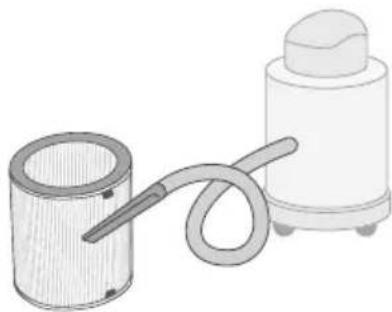
- Clean the outside of the filter with a soft brush or vacuum each month to prevent buildup of hair or dust.
- Do not clean the filter with water or other liquid.
-
You may need to replace the filter after cleaning if there is:
-
Increased noise
- Decreased airflow
- An unusual odor
- Visible clogging
natural_image
Illustration of a cylindrical container connected to a coiled tube and a cylindrical device (no text or symbols)
See section "11. Replacing the air filter" on page 27.
c) Sensor cover
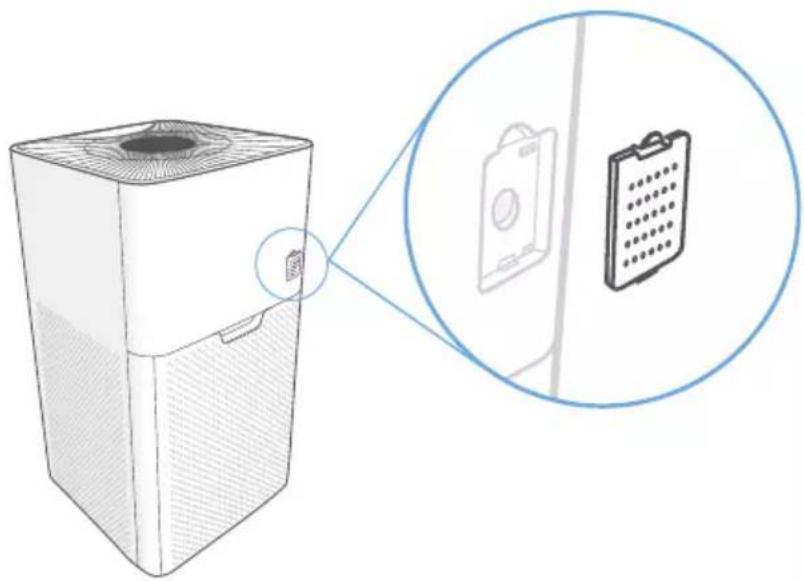
Make sure that the sensor cover is not dusty or dirty. This may prevent the sensor from correctly detecting air quality.
natural_image
Illustration of a portable air conditioner unit with a close-up inset showing its internal components (no text or symbols)- Remove the sensor cover.
- Wipe the cover with a dry cloth.
- Replace the sensor cover.
11. Replacing the air filter
You may need to replace your air fill 8 months (sooner or later) depending on how often it is used and how polluted the environment is.
Signs of an expired filter:
- Increased noise when the air purifier is on
• Decreased airflow - Unusual odors
-
Visibly clogged filter
-
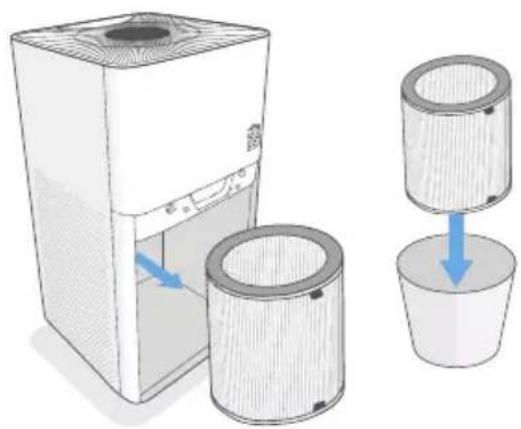
Remove the old air filter and properly dispose of it.
natural_image
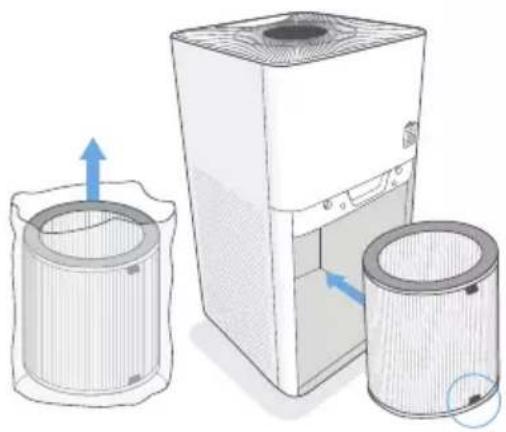
Diagram showing a desktop computer with two cylindrical washers and a separate cup, illustrating the process of cooling or drying (no text or symbols present)- Unwrap the new air filter and place it into the housing. Make sure the pull tabs are facing out.

Save the bag for storing / disposing filters.
natural_image
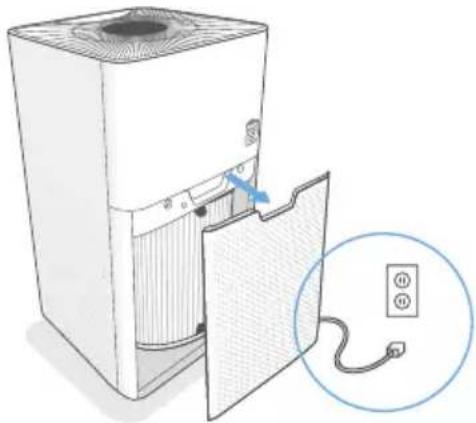
Illustration of a clean air filter unit with three cylindrical containers and an open lid, showing airflow direction (no text or symbols)Switch the aitpurifier off and disconnect it from the power supply, then remove the filter cover.
natural_image
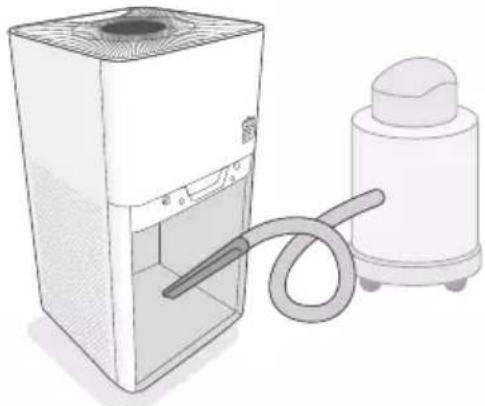
Diagram of a computer tower with an open door and cable, showing internal components and a close-up of the cable (no text or symbols present)- Clean any remaining dust and dirt from inside of the housing using a vacuum.
natural_image
Illustration of a white appliance with a coiled hose connected to a smaller white spray bottle (no text or symbols)-
Replace the filter cover.
-
Press and hold to 3 seconds to reset it. See "g) Reset the air filter indicator / lifetime" on page 25.

text_image
The not pc cover correct
The air purifier not power on if the cover is not replaced correctly.
will
12. Troubleshooting
| Problem Suggested solution(s) | |
| Air purifier will not turn on or respond to button controls. | Connect the air purifier to the power supply, or connect the air purifier into a different power outlet.Check to see if the power cord is damaged.Check if the filter cover is replaced correctly, so that the safety switch is activated.See “8. Getting started” on page 23. |
| Air purifier makes an unusual noise while the fan is on. | Make sure the air filter is installed correctly. See “8. Getting started” on page 23.Press to increase the fan speed.The air purifier may be damaged, or a foreign object may be inside. Stop using the air purifier and contact our technical support service. Do not open the air purifier.Replace the air filter. See “11. Replacing the air filter” on page 27. |
| Significantly reduced airflow | Check if the filter packaging has been removed.Replace the air filter. See “11. Replacing the air filter” on page 27.Check there is enough clearance on all sides of the purifier (≥40 cm). |
| Poor air purification quality. | Make sure no objects are blocking the air intakes or outlets.Make sure the air filter is installed correctly. See “8. Getting started” on page 23.Make sure the room is within the suggested room size. The air purifier may not be effective in larger rooms.Replace the air filter. See “11. Replacing the air filter” on page 27. |
| The air purifier is producing an unpleasant odor. | Make sure the air purifier is in a room where the relative humidity is <85% RH.Higher humidity levels may cause mildew to grow on the air filter.Replace the air filter. See “11. Replacing the air filter” on page 27. |
 is still illuminated after replacing the air filter. is still illuminated after replacing the air filter. | Reset the air filter indicator See “g) Reset the air filter indicator / lifetime” on page 25. |
13. Disposal

Electronic devices are recyclable waste and must not be disposed of in the household waste. At the end of its service life, dispose of the product in accordance with applicable regulatory guidelines.

thus fulfill your statutory obligations and contribute to the protection of the environment.
14. Technical data
a) General
Input voltage / current....230 V/AC, 50/60 Hz
Power consumption....max. 40 W
Standby power consumption ....<0.5 W
Protection class ......II
Dust sensor ....yes
Fan speed....4 levels
Noise level....30 - 54 dB
Filter life.... approx. 6 - 8 months*
*depending on usage and operating environment
Suggested room size....36 - 40 m²
CADR (clean air delivery rate)....350m³/h
Operating conditions....5 to 45 °C, 25 – 85 % RH (non-condensing)
Storage conditions....5 to 75 °C, 25 – 85 % RH (non-condensing)
Dimensions (L x W x H)....561 x 285 x 285 mm
Weight 6 kg
b) Filter
Type....HEPA filter + activated carbon filter + prefilter
Table des matières
Page
France (email): technique@conrad-france.fr
Suisse: www.conrad.ch ____
2. Explication des symboles

text_image
Technical diagram of a desktop computer with labeled parts including ventilation slots and cover platenatural_image
Circular pattern with evenly spaced white dots on a dark background, no text or symbols presentnatural_image
Illustration of a clean air filter unit with airflow direction arrows (no text or symbols)natural_image
Illustration of a clean air purifier with three cylindrical containers and airflow direction indicators (no text or symbols)natural_image
Technical illustration of a white industrial air purifier with a magnified inset showing internal structure details (no text or symbols)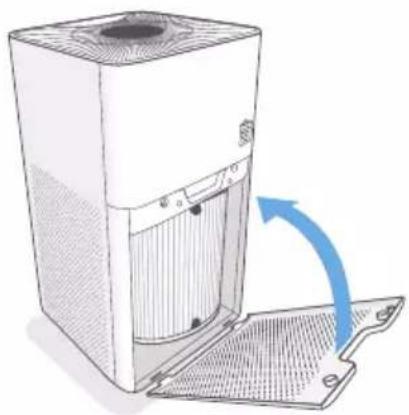
natural_image
Diagram of a server rack with ventilation duct and fan, showing airflow direction (no text or symbols)9. Fonctionnement
natural_image
Illustration of a cylindrical container connected to a coiled tube and a cylindrical device (no text or symbols)
natural_image
Diagram of a rectangular air conditioner unit with a close-up inset showing its internal components (no text or symbols present)natural_image
Diagram showing a kitchen air purifier with two circular filter units and a container with blue arrows indicating flow (no text or symbols)natural_image
Diagram showing three cylindrical containers with arrows indicating flow or movement, next to a white industrial machine (no text or symbols present)natural_image
Diagram of a computer tower with an open door and cable, showing internal components and a close-up of the cable (no text or symbols present)natural_image
Illustration of a desktop kitchen appliance with a coiled hose and a smaller cylindrical device (no text or symbols)text_image
Technical diagram of a device with numbered parts, showing internal components and labeled parts.natural_image
Circular pattern with evenly spaced white dots on a dark background, no text or symbols present.natural_image
Illustration of a white air purifier with airflow direction arrows, next to a circular filter or cover (no text or symbols)natural_image
Illustration of a desktop air purifier with two cylindrical washers and a central tower, showing airflow direction (no text or symbols)- Druk de afdekking stevig dicht.
natural_image
Illustration of a white server rack with ventilation grilles and a magnified inset showing internal structure details (no text or symbols)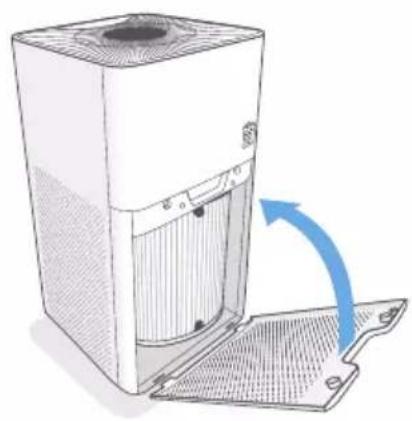
natural_image
Illustration of a desktop computer tower with a blue arrow indicating airflow or ventilation (no text or symbols present)9. Bediening
a) Algemene bediening
natural_image
Illustration of a cylindrical container connected to a coiled tube and a cylindrical device (no text or symbols)
natural_image
Diagram of a portable air purifier with a close-up inset showing its internal components (no text or symbols present)natural_image
Diagram showing a clean air filter unit and its three empty cup, with arrows indicating flow direction (no text or symbols)natural_image
Illustration of a desktop air purifier with two cylindrical washers and one open chamber, showing airflow direction (no text or symbols)natural_image
Diagram of a desktop computer tower with an open door and cable, showing internal components and a close-up of the cable (no text or symbols present)natural_image
Illustration of a portable air purifier next to a cylindrical device with a coiled hose (no text or symbols)Copyright 2020 by Conrad Electronic SE.
GB This is a publication by Conrad Electronic SE, Klaus-Conrad-Str. 1, D-92240 Hirschau (www.conrad.com).
All rights including translation reserved. Reproduction by any method, e.g. photocopy, microfilming, or the capture in electronic data processing systems require the prior written approval by the editor. Reprinting, also in part, is prohibited. This publication represents the technical status at the time of printing.
Copyright 2020 by Conrad Electronic SE.
Copyright 2020 by Conrad Electronic SE.
Copyright 2020 by Conrad Electronic SE.