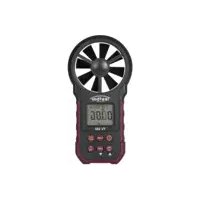
TV 350 - Measuring equipment Testboy - Free user manual and instructions
Find the device manual for free TV 350 Testboy in PDF.


| Product type | Multifunction digital anemometer |
| Brand | Testboy |
| Model | TV 350 |
| Dimensions (L x W x H) | 165 x 85 x 38 mm |
| Weight | Approx. 200 g (with battery) |
| Power supply | 1 9V battery type 6F22 |
| Display | LCD screen with backlight |
| Wind speed measuring ranges | 0.80 ~ 40.00 m/s; 1.40 ~ 144.0 km/h; 1.30 ~ 131.20 ft/s; 0.80 ~ 77.70 knots; 78 ~ 7874 ft/m; 0.90 ~ 90.00 mi/h |
| Wind speed accuracy (up to 30 m/s) | ±(2.0% of reading + 50 digits) |
| Temperature measuring range | -10 °C ~ 60 °C (14 °F ~ 140 °F) |
| Temperature accuracy | ±1.5 °C / ±2.7 °F |
| Relative humidity measuring range | 20 ~ 80% RH (accuracy ±3% RH); <20 or >80% RH (accuracy ±5% RH) |
| Main functions | Wind speed, volumetric flow, ambient temperature, humidity, dew point, wet bulb temperature, value hold, min/max, backlight, real-time USB transfer |
| Measurement units | °C/°F, m/s, km/h, mi/h, ft/m, ft/s, knots, CMS, CMM, CFM, m², ft² |
| PC interface | USB (with software at www.testboy.de) |
| Auto power off | Yes, can be disabled (hold FUNC 3 s) |
| Low battery indicator | Yes (icon on screen) |
| Operating conditions | 0 °C ~ 40 °C, 0 ~ 85% RH (non-condensing); rotor: -20 °C ~ 80 °C, 0 ~ 95% RH |
| Storage conditions | -10 °C ~ 50 °C, 0 ~ 80% RH (non-condensing) |
| Maximum operating altitude | 2000 m |
| Maintenance and cleaning | Clean the housing with a damp cloth and mild detergent; blow the rotor blades with clean air |
| Battery replacement | Open the battery compartment cover, replace with a new 9V battery |
| Warranty | Manufacturer's warranty (see conditions) |
| Certification | CE, compliance with applicable standards |
| Included accessories | 9V battery, USB cable, software (download), user manual |
Frequently Asked Questions - TV 350 Testboy
User questions about TV 350 Testboy
0 question about this device. Answer the ones you know or ask your own.
Ask a new question about this device
Download the instructions for your Measuring equipment in PDF format for free! Find your manual TV 350 - Testboy and take your electronic device back in hand. On this page are published all the documents necessary for the use of your device. TV 350 by Testboy.
USER MANUAL TV 350 Testboy
Sources of danger are, for example, mechanical parts, which may cause serious personal injury.
Objects are also at risk (e.g. damage to the instrument).
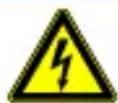
WARNING
An electric shock can result in death or serious personal injury and endanger the function of objects (e.g. damage to the instrument).

WARNING
Never point the laser beam towards the eyes directly or indirectly via reflective surfaces. Laser radiation can cause irreparable damage to the eyes. The laser beam must be deactivated when testing close to people.
General safety notes

WARNING
Unauthorised modification and / or changes to the instrument are not permitted, for reasons of safety and approval (CE). In order to ensure safe and reliable operation using the instrument, you must always comply with the safety instructions, warnings and the information contained in the section "Intended use".

WARNING
Comply with the following specifications before using the instrument:
Do not operate the instrument anywhere near electric welding equipment, induction heaters or other electromagnetic fields.
The instrument must be allowed to adjust to the new ambient temperature for approx. 30 minutes after abrupt temperature fluctuations and before use in order to stabilise the IR sensor.
Do not expose the instrument to high temperatures for a long period of time.
Avoid dusty and humid environments.
Measuring instruments and their accessories are not toys, and must be kept out of the reach of children!
When working in industrial facilities, comply at all times with the specifications of the accident prevention regulations for electrical systems and equipment as established by the employer's liability insurance association.

Comply with the five safety rules:
Disconnect
Ensure that the instrument cannot be switched back on again
Ensure isolation from the power supply (check that there is no voltage on both poles)
Earth and short-circuit
Cover adjacent live parts
Intended use
The instrument is intended strictly for use in applications described in the operating instructions. Any other usage is forbidden, and may result in accidents or destruction of the instrument. Any such usage will result in the immediate expiry of all guarantee and warranty claims on the part of the operator against the manufacturer.

Remove the batteries if the instrument is not in use for a long period of time, in order to protect the instrument from damage.

We assume no liability for damage to property or personal injury resulting from improper handling or non-compliance with the safety instructions. Any warranty claim expires in such cases. An exclamation mark in a triangle indicates safety instructions in the operating instructions. Read the instructions through before beginning initial commissioning. This instrument is CE-approved and thus fulfils the required guidelines.
All rights reserved to alter specifications without prior notice.
© 2016 Testboy GmbH, Germany
Disclaimer

The warranty claim expires in cases of damage caused by failure to comply with the instructions! We assume no liability for any resulting damage!
Testboy is not responsible for damage resulting from
failure to observe the instructions,
changes to the product that have not been approved by Testboy or
the use of spare parts that have not been manufactured or approved by Testboy
The use of alcohol, drugs or medication.
Accuracy of the operating instructions
These operating instructions have been compiled with due care and attention. No guarantee is given that the data, illustrations and drawings are complete or correct. All rights reserved with regard to changes, printing mistakes and errors.
Disposal
Dear Testboy customer, purchasing our product gives you the option of returning the instrument to suitable collection points for waste electrical equipment at the end of its lifespan.
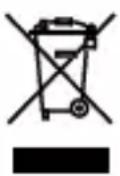
The WEEE directive regulates the return and recycling of electrical appliances. Manufacturers of electrical appliances are obliged to take back and recycle all electrical appliances free of charge. Electrical devices may then no longer be disposed of through conventional waste disposal channels. Electrical appliances must be recycled and disposed of separately. All equipment subject to this directive is marked with this logo.
Disposal of used batteries
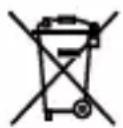
As an end user, you are legally obliged (battery law) to return all used batteries; disposal in the normal domestic waste is prohibited.
Batteries containing contaminant material are labelled with this symbol indicating that they may not be disposed of in normal domestic waste.
The abbreviations used for the crucial heavy metals are:
Cd = cadmium, Hg = mercury, Pb = lead.
You can return your used batteries to collection points in your community or anywhere where batteries are sold free-of-charge.
Certificate of quality
All activities and processes carried out within Testboy GmbH relating to quality are subject to ongoing monitoring within the framework of a Quality Management System. Furthermore, Testboy GmbH confirms that the testing equipment and instruments used during the calibration process are subject to an ongoing inspection process.
Declaration of conformity
The product conforms to the most recent directives. For more information, go to www.testboy.de
Operation
Thank you for purchasing the Testboy ® TV 350.
Please read the following safety information carefully before use and operate the anemometer in accordance with the specifications of the operating instructions; failure to do so could result in its damage. The anemometer will only work satisfactorily given correct use and protection.
Use
The measuring instrument must be used in the temperature and humidity range specified.
Should you determine any anomalous behaviour or outages, do not use the device.
Do not store or use the measuring instrument under direct sunlight or at high temperatures or humidity.
Do not allow any excessive forces to impact on the rotor blades.
To avoid measurement errors, do not subject the rotor blades to strong sources of light.
Maintenance
Blow off any dust from the rotor blades with clean air or wipe them with a damp cloth and a little mild cleaning agent.
Clean the measuring instrument with a damp cloth and a mild cleaning agent. Do not use any aggressive materials or solvents.
The measuring instrument should be switched off when it is not in use.
When switched off, the measuring instrument has a low current consumption of ≤ 5 µA . Remove the batteries when not using the instrument over a longer period, so as to prevent damage.
Description
This measuring instrument is a digital anemometer for the measurement of the ambient temperature, humidity, dew-point, wet-bulb temperature, wind speed and air volume flow.
This device is a mobile professional measuring instrument with a large backlighting LC display and conversion function for the use of various units.
This measuring instrument can be hand-held or installed.
This measuring instrument can measure and display the maximum and minimum values. It is fitted with an indicator for low battery voltage and real-time data transfer functions via USB.
Component designations
(1) Rotor
(2) LCD display
(3) "FUNC" → Function change button
(4) “”→ On/Off button
(5) "UNIT" → Unit change button
(6) Maximum-minimum value button
(7) "HOLD/MODE" Caps Lock button for the display, temperature mode switch
(8) “ /USB” → Backlighting data transfer functions in real-time via USB
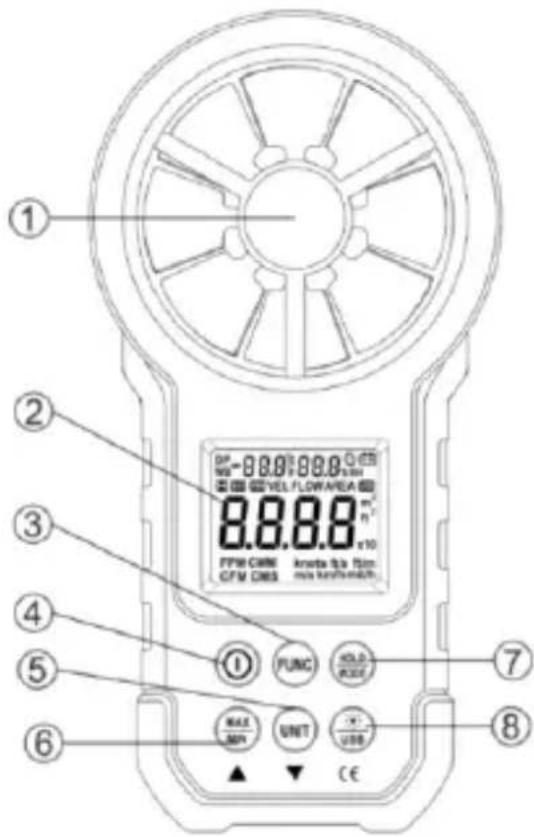
Description of the buttons

/USB
HOLD/MODE
FUNC
Switching the measuring instrument on and off
Switching the backlighting on and off and USB transfer.
To determine the measured value and the temperature mode.
To switch between functions of wind speed measurement, surface area setting and air flow measurement. Hold depressed for three seconds to activate or deactivate the "Auto Power-Off" function (automatic deactivation).
MAX/MIN
UNIT
Switch between maximum-minimum-normal mode; hold depressed to leave.
Switching the unit, surface ( m2 , ft2 ), hold depressed to switch between ( °C , °F ) windspeed (m/s, km/h, mil/h, ft/m, ft/s, knots), air flow volume (CMS, CMM, CFM).
Explanation of the display

Shows the automatically switched-off state
H Measured value
VEL Wind speed measurement
FLOW Air volume flow measurement
AREA Surface area required to measure the air flow volume
DP Indicates that the device is in the mode for measuring the dew-point.
WB Indicates that the device is in the mode for measuring the wet-bulb temperature.
°C, °F Temperature unit
%RL Relative humidity
USB Indicates that real-time data transfer via USB has been activated.
MAX Displays the maximum with selection of the maximum-minimum value operation.
MIN Displays the minimum with selection of the maximum-minimum value operation.
m2 Indicates that the current surface area setting is square metres.
ft 2 Indicates that the current surface area setting is square feet.
CMM Cubic metres per minute
CMS Cubic metres per second
CFM Cubic feet per minute
Knots Nautical miles per hour, 1850 metres per hour
ft/s Feet per second
ft/m Feet per minute
m/s Metres per second
Km/h Kilometres per hour
mil/h Nautical miles per hour

Indicator for low battery voltage
Specifications
Ambient temperature 23±5 °C, relative humidity < 75 %
| Measuring range | Resolution | Measurement accuracy |
| 0.80 ~ 30.00 m/s | 0.01 m/s | ±(2.0 % measured value + 50 digit) |
| 30.00 ~ 40.00 m/s | Only for reference purposes |
| 1.40 ~ 108.00 km/h | 0.01 km/h | ±(2.0 % measured value + 50 digit) |
| 108.0 ~ 144.0 km/h | Only for reference purposes |
| 1.30 ~ 98.50 ft/s | 0.01 ft/s | ±(2.0 % measured value + 50 digit) |
| 98.50 ~ 131.20 ft/s | Only for reference purposes |
| Measuring range | Resolution | Measurement accuracy |
| 0.80 ~ 58.30 knots | 0.01Knots | ±(2.0 % measured value + 50 digit) |
| 58.30 ~ 77.70 knots | Only for reference purposes |
| Measuring range | Resolution | Measurement accuracy |
| 0.90 ~ 67.20 mil/h | 0.01 mil/h | ±(2.0 % measured value + 5 digit) |
| 67.20 ~ 90.00 mil/h | Only for reference purposes |
| Measuring range | Resolution | Measurement accuracy |
| 78 ~ 5900 ft/m | 1 ft/m | ±(2.0 % measured value + 5 digit) |
| 5900 ~ 7874 ft/m | Only for reference purposes |
Unit for air volume
| CFM | 0 – 99990 | (Surface area) 0 - 9.999 ft 2 |
| CMM | 0 – 99990 | (Surface area) 0 - 9.999 m 2 |
| CMS | 0 – 9999 | (Surface area) 0 - 9.999 m 2 |
Ambient temperature, dew-point temperature, wet-bulb temperature
| Measuring range | Resolution | Measurement accuracy |
| -10 °C~60 °C | 0.1 °C | ±1.5 °C |
| 14°F~+140°F | 0.1°F | ±2.7°F |
Relative air humidity
| Measuring range | Resolution | Measurement accuracy |
| (20~80)%RL | 0.1 %RL | ±3 %RL@25 °C |
| (<20 or >80)%RL | 0.1 %RL | ±5 %RL@25 °C |
Operating instructions
Switching On/Off
Actuate the “” button to switch the anemometer on or off.
Determining the measured value
To continue displaying the result of the measuring procedure, actuate the "HOLD" button and display the HOLD symbol. Press the button again to end the display.
Please note:
Once the measured value has been determined, the "FUNC", "MAX/MIN" and "UNIT" buttons do not have a function.
Backlighting
If the ambient illumination is too weak to read off the measured value, press the “” button to activate the backlighting. The backlighting remains active for 15 seconds. During this period, you can actuate the “” button to switch off the backlighting.
Please note:
The backlighting consists of a LED with a high operating current. Often use shortens the service life of the battery. Only use the backlighting when required.
When the battery voltage ≤ 7 V the “-+” symbol is displayed (battery voltage low). When using a battery voltage for the backlighting which is ≥ 7 V the high current draw can cause the voltage to fall; the “-+” symbol could be displayed (if the “-+” symbol is displayed, it is not possible to guarantee an exact measurement). In this case, replace the battery only if the “-+” symbol appears during normal use without backlighting.
Wind speed measurement
Position the converter (rotor) in the test environment. Display of "VEL" means that the measurement can be performed with the rotor surface at right-angles to the wind direction.
Please note:
if the converter (rotor) does not point into the direction of the wind, this will result in measurement errors.
With equal wind, the converter (rotor) best measures when it is aligned with the wind.
Wind speed measurement
When using the measuring instrument to measure the air flow volume you can actuate the "UNIT" button to select the desired measurement unit (m/s, km/h, mil/h, ft/m, ft/s, Knots).
Setting the surface area
To measure the air flow volume you must first determine the surface area to be measured.
The procedure for setting the surface area:
①. Press the "FUNC" button to access the "AREA" view.
②. Use the “MAX/MIN” and “UNIT” buttons to adapt the value and unit after selecting the surface area unit ( m2 , ft2 ). Press “MAX/MIN” to confirm. A signal tone will sound once the surface area has been entered and the settings are saved.
③. Please repeat step ② to change the surface area setting.
Air volume flow measurement
Position the converter (rotor) in the test environment. Use the "FUNC" button to set the measuring instrument to air volume flow measurement, the symbol "FLOW" is shown in the display.
The measurement is performed with the rotor surface at right angles to the wind direction.
Please note:
If the converter (rotor) is not aligned to the wind direction, the measurement can provide incorrect results.
With equal wind, the converter (rotor) best measures when it is aligned with the wind.
Selecting the unit for the air volume
When using the measuring instrument to measure the air flow volume you can actuate the "UNIT" button to select the desired measurement unit (CMS, CMM, CFM).
Selecting the temperature unit
Hold the "UNIT" button depressed for 3 seconds in order to change the temperature unit (°C, °F).
Selecting the temperature mode
Hold the "HOLD/MODE" button for 3 seconds to change the temperature mode (ambient temperature, dew point, wet-bulb temperature).
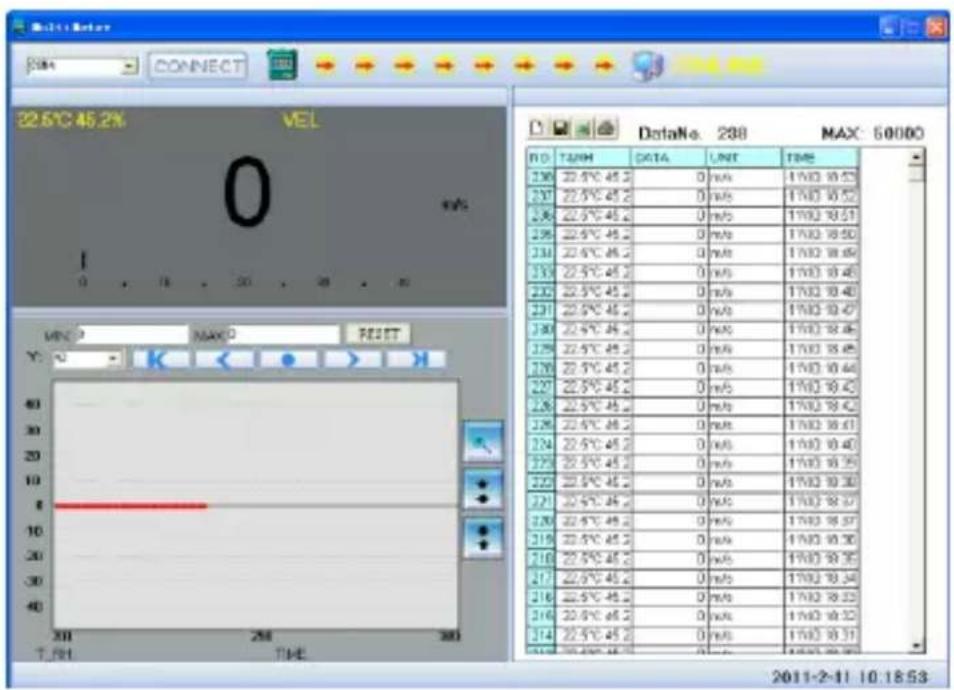
USB real-time data transfer
Install the software and the USB driver on your PC.
Switch on the measuring instrument and connect it with your computer per USB cable.
Start the PC software.
The software is available under www.testboy.de.
Hold the “/USB” button depressed for 3 seconds to activate / deactivate the real-time transfer via USB.
The PC software displays the data and diagrammes.
Replacing the battery
The “” symbol indicates the need to replace the battery. Switch off the measuring instrument and remove the battery cover. Replace old batteries. Replace the battery cover correctly.
Technical data
The measuring instrument should be recalibrated annually at 18 °C\~28 °C and a relative humidity of <75 %.
| Altitude | max 2000 m |
| Operation mode | Scan frequency of the wind speed |
| Display | LC display |
| Max display value | 9999 |
| Scan duration | C. 0.4 s/scanning |
| Indicator for low battery voltage | is shown on the LCD display |
| Voltage supply | 1×9-V battery type 6F22 |
| Conditions of use | Relative humidity → 0~85 %RL, non-condensingTemperature → 0 °C~40 °C, non-condensing |
| Operating conditions of the converter (rotor) | Relative humidity → 0~95 %RL, non-condensingTemperature → -20 °C~80 °C, non-condensing |
| Storage conditions | Relative humidity → 0~80 %RL, non-condensingTemperature → -10 °C~50 °C, non-condensing |
| Dimensions | 165 x 85 x 38 mm |
| Weight | C. 200 g |
Consignes
Cd = Cadmium, Hg = mercure, Pb = plomb.
| CFM | 0 – 99990 | (surface) 0 - 9,999 ft2 |
| CMM | 0 – 99990 | (surface) 0 - 9,999 m2 |
| CMS | 0 – 9999 | (surface) 0 - 9,999 m2 |
Cd = cadmium, Hg = kwik, Pb = lood.
Testboy GmbH Tel: 0049 (0)4441 / 89112-10
Germany info@testboy.de



- WARNING
- GENERAL SAFETY NOTES
- INTENDED USE
- DISCLAIMER
- ACCURACY OF THE OPERATING INSTRUCTIONS
- DISPOSAL
- DISPOSAL OF USED BATTERIES
- CERTIFICATE OF QUALITY
- DECLARATION OF CONFORMITY
- OPERATION
- USE
- MAINTENANCE
- DESCRIPTION
- COMPONENT DESIGNATIONS
- DESCRIPTION OF THE BUTTONS
- HOLD/MODE
- FUNC
- MAX/MIN
- UNIT
- EXPLANATION OF THE DISPLAY
- SPECIFICATIONS
- OPERATING INSTRUCTIONS
- SWITCHING ON/OFF
- DETERMINING THE MEASURED VALUE
- PLEASE NOTE
- BACKLIGHTING
- WIND SPEED MEASUREMENT
- SETTING THE SURFACE AREA
- AIR VOLUME FLOW MEASUREMENT
- SELECTING THE UNIT FOR THE AIR VOLUME
- SELECTING THE TEMPERATURE UNIT
- SELECTING THE TEMPERATURE MODE
- USB REAL-TIME DATA TRANSFER
- REPLACING THE BATTERY
- TECHNICAL DATA
- CONSIGNES
Brand : Testboy
Model : TV 350
Category : Measuring equipment