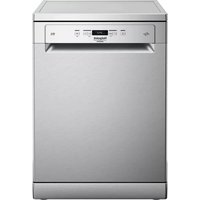
HFC 3C26 CW X - Dishwasher HOTPOINT - Free user manual and instructions
Find the device manual for free HFC 3C26 CW X HOTPOINT in PDF.



| Product type | Dishwasher |
| Brand | Hotpoint |
| Model | HFC 3C26 CW X |
| Wash programs | Eco, Auto Intensive, Auto Mixed, Auto Quick Wash, Quick 30', Good Night, Anti-Bacterial, Soak, Self-Clean |
| Available options | Zone Wash 3D, Short Time, Tablet, Delay, Drain |
| Drying system | ActiveDry (convection with automatic door opening) |
| Water consumption (Eco program) | 9.5 l/cycle |
| Energy consumption (Eco program) | 0.95 kWh/cycle |
| Duration of Eco program | 3 h 10 min |
| Water hardness setting | 5 levels (from very soft to very hard) |
| Regeneration salt reservoir | Capacity approx. 1 kg |
| Rinse aid dispenser | Capacity 110 ml, adjustable from 1 to 5 |
| Detergent dispenser | With Tablet button for all-in-one detergents |
| Height-adjustable upper basket | Yes, two positions without lever |
| Foldable flaps | Yes, adjustable positions |
| Zone Wash 3D | Additional jets for intensive washing (lower or upper basket) |
| Key lock | Yes, via Zone Wash 3D button (3 seconds) |
| Filter cleaning | 3-piece filter assembly, monthly cleaning recommended |
| Spray arm cleaning | Removable, clean with non-metallic brush |
| Water softener | Automatic regeneration with salt |
| After-sales service and spare parts | Available up to 7-10 years, contact details in warranty booklet |
Frequently Asked Questions - HFC 3C26 CW X HOTPOINT
User questions about HFC 3C26 CW X HOTPOINT
0 question about this device. Answer the ones you know or ask your own.
Ask a new question about this device
Download the instructions for your Dishwasher in PDF format for free! Find your manual HFC 3C26 CW X - HOTPOINT and take your electronic device back in hand. On this page are published all the documents necessary for the use of your device. HFC 3C26 CW X by HOTPOINT.
USER MANUAL HFC 3C26 CW X HOTPOINT
PRODUCT. In order to receive a more complete
assistance, please register your appliance on:
www.hotpoint.eu/register
PLEASE SCAN THE QR CODE ON YOUR APPLIANCE IN ORDER TO HAVE MORE DETAILED INFORMATION

Before using the appliance carefully read Safety Instructions.
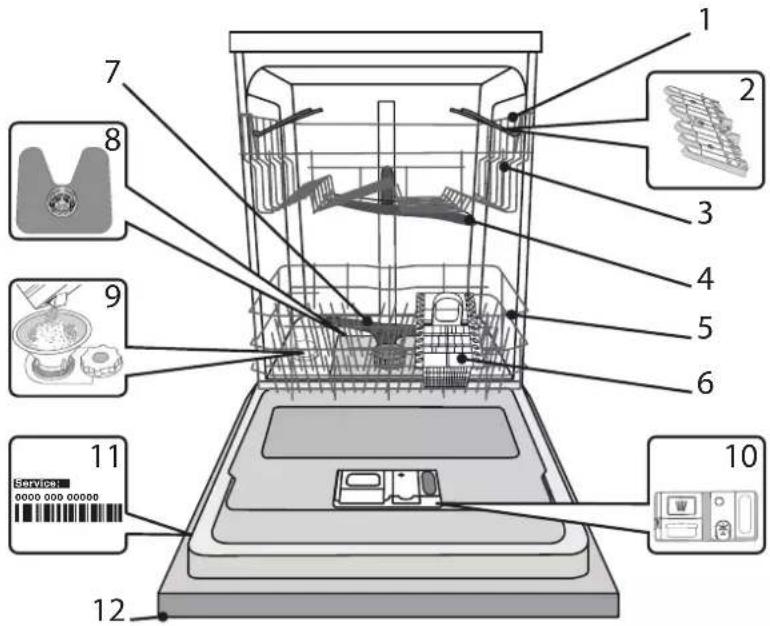
PRODUCT DESCRIPTION
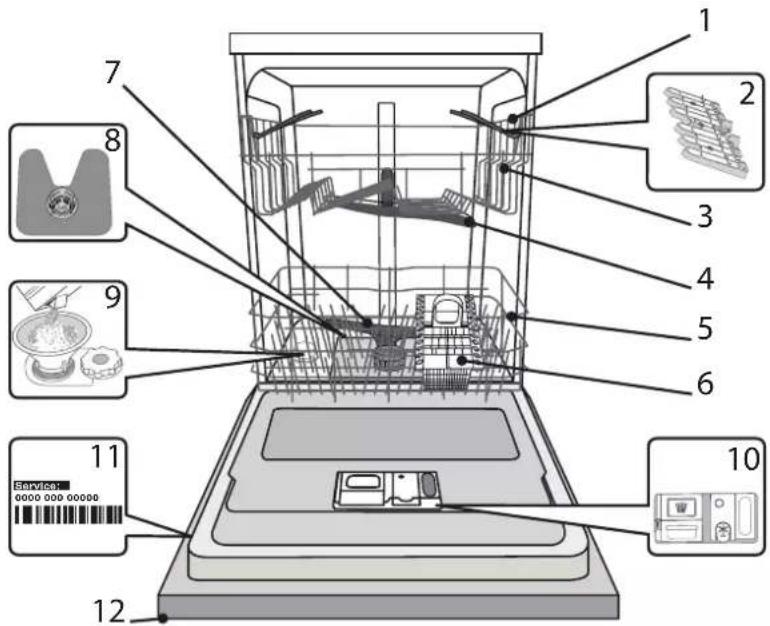
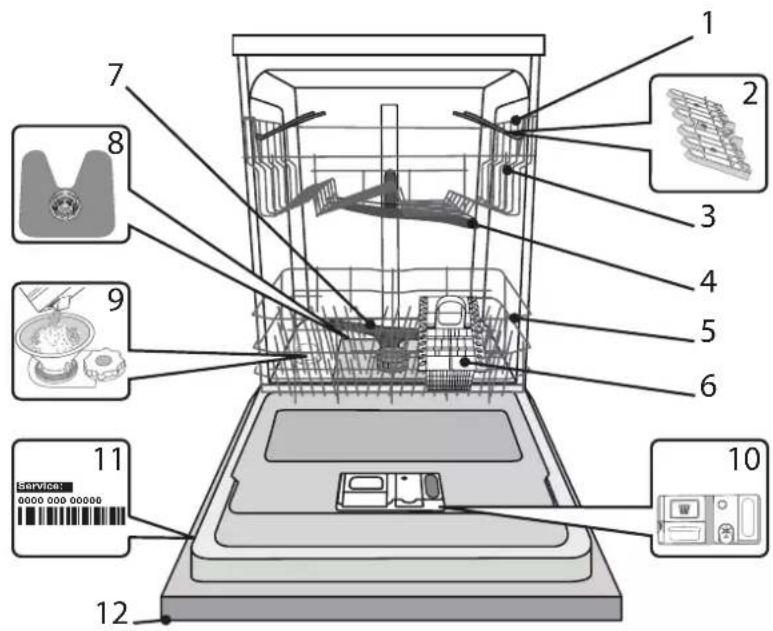
APPLIANCE
- Upper rack
- Foldable flaps
- Upper rack height adjuster
- Upper spray arm
- Lower rack
- Cutlery basket
- Lower spray arm
- Filter Assembly
- Salt reservoir
- Detergent and Rinse Aid dispensers
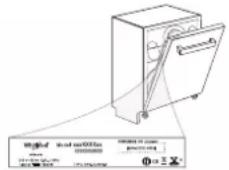
- Rating plate
- Control panel
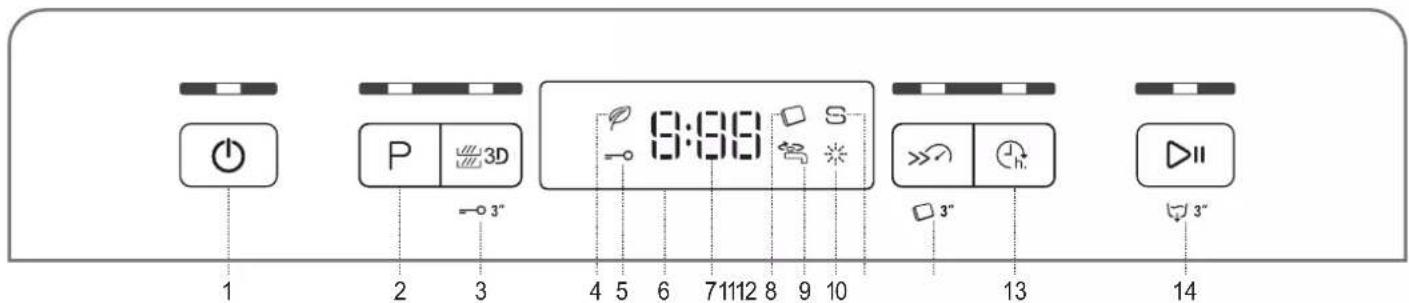
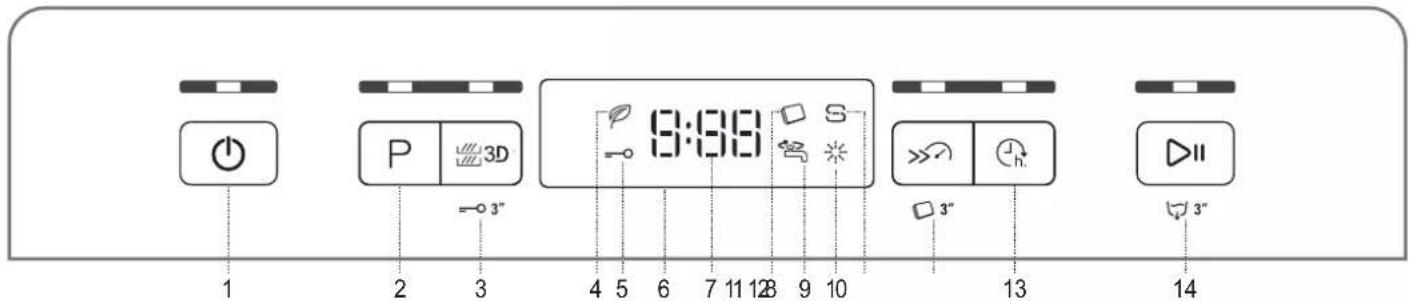
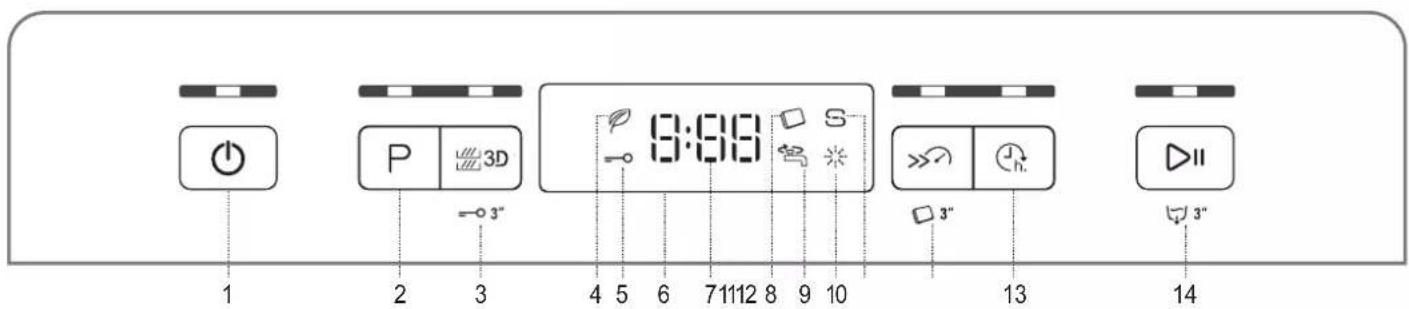
CONTROL PANEL
- On-Off / Reset button with indicator light
- Program selection button with indicator light
- Zone Wash 3D button with indicator light / Keylock
- Eco program indicator light
- Keylock indicator light
- Display
-
Program number and remaining time indicator
-
Tablet (Tab) indicator light
- Closed water tap indicator light
- Rinse Aid refill indicator light
- Salt refill indicator light
- Short Time button with indicator light / Tablet (Tab)
- Delay button with indicator light
- Start/Pause button with indicator light / Drain out
FIRSTTIMEUSE
SALT, RINSE AID AND DETERGENT
ADVICE REGARDING THE FIRST TIME USE
After installation, remove the stoppers from the racks and the retaining elastic elements from the upper rack.
FILLING THE SALT RESERVOIR
The use of salt prevents the formation of LIMESCALE on the dishes and on the machine's functional components.
It is mandatory that THE SALT RESERVOIR BE NEVER EMPTY.
It is important to set the water hardness.
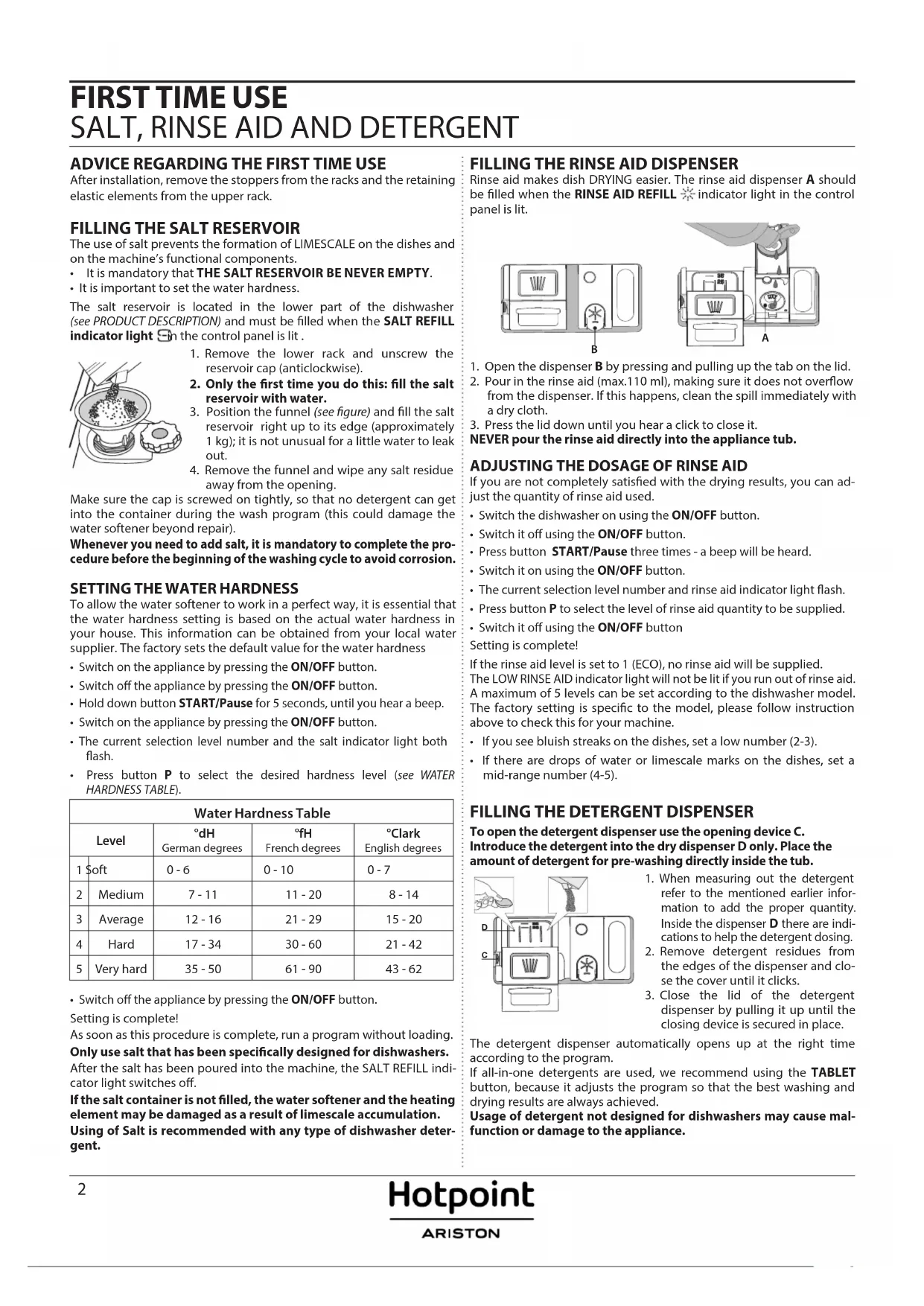
The salt reservoir is located in the lower part of the dishwasher (see PRODUCT DESCRIPTION) and must be filled when the SALT REFILL indicator light in the control panel is lit.
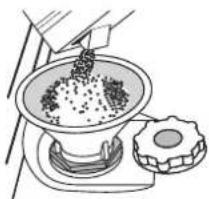
- Remove the lower rack and unscrew the reservoir cap (anticlockwise).
- Only the first time you do this: fill the salt reservoir with water.
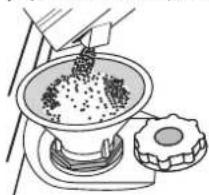
- Position the funnel (see figure) and fill the salt reservoir right up to its edge (approximately 1kg ); it is not unusual for a little water to leak out.
- Remove the funnel and wipe any salt residue away from the opening.
Make sure the cap is screwed on tightly, so that no detergent can get into the container during the wash program (this could damage the water softener beyond repair).
Whenever you need to add salt, it is mandatory to complete the procedure before the beginning of the washing cycle to avoid corrosion.
SETTING THE WATER HARDNESS
To allow the water softener to work in a perfect way, it is essential that the water hardness setting is based on the actual water hardness in your house. This information can be obtained from your local water supplier. The factory sets the default value for the water hardness
- Switch on the appliance by pressing the ON/OFF button.
- Switch off the appliance by pressing the ON/OFF button.
- Hold down button START/Pause for 5 seconds, until you hear a beep.
- Switch on the appliance by pressing the ON/OFF button.
- The current selection level number and the salt indicator light both flash.
- Press button P to select the desired hardness level (see WATER HARDNESS TABLE).
| Water Hardness Table | ||||
| Level | °dH German degrees | °fH French degrees | °C Clark English degrees | |
| 1 | Soft | 0 - 6 | 0 - 10 | 0 - 7 |
| 2 | Medium | 7 - 11 | 11 - 20 | 8 - 14 |
| 3 | Average | 12 - 16 | 21 - 29 | 15 - 20 |
| 4 | Hard | 17 - 34 | 30 - 60 | 21 - 42 |
| 5 | Very hard | 35 - 50 | 61 - 90 | 43 - 62 |
- Switch off the appliance by pressing the ON/OFF button.
Setting is complete!
As soon as this procedure is complete, run a program without loading. Only use salt that has been specifically designed for dishwashers.
After the salt has been poured into the machine, the SALT REFILL indicator light switches off.
If the salt container is not filled, the water softener and the heating element may be damaged as a result of limescale accumulation. Using of Salt is recommended with any type of dishwasher detergent.
FILLING THE RINSE AID DISPENSER
Rinse aid makes dish DRYING easier. The rinse aid dispenser A should be filled when the RINSE AID REFILL indicator light in the control panel is lit.
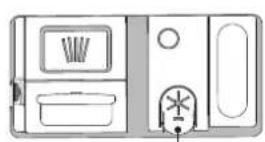
B
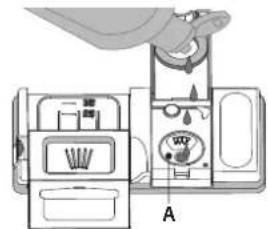
- Open the dispenser B by pressing and pulling up the tab on the lid.
- Pour in the rinse aid (max.110 ml), making sure it does not overflow from the dispenser. If this happens, clean the spill immediately with a dry cloth.
- Press the lid down until you hear a click to close it.
NEVER pour the rinse aid directly into the appliance tub.
ADJUSTING THE DOSAGE OF RINSE AID
If you are not completely satisfied with the drying results, you can adjust the quantity of rinse aid used.
- Switch the dishwasher on using the ON/OFF button.
- Switch it off using the ON/OFF button.
- Press button START/Pause three times - a beep will be heard.
- Switch it on using the ON/OFF button.
- The current selection level number and rinse aid indicator light flash.
- Press button P to select the level of rinse aid quantity to be supplied.
- Switch it off using the ON/OFF button
Setting is complete!
If the rinse aid level is set to 1 (ECO), no rinse aid will be supplied.
The LOW RINSE AID indicator light will not be lit if you run out of rinse aid. A maximum of 5 levels can be set according to the dishwasher model. The factory setting is specific to the model, please follow instruction above to check this for your machine.
If you see bluish streaks on the dishes, set a low number (2-3).
- If there are drops of water or limescale marks on the dishes, set a mid-range number (4-5).
FILLING THE DETERGENT DISPENSER
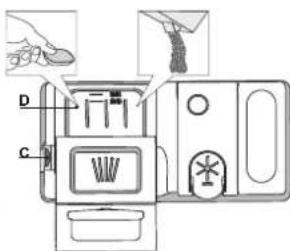
To open the detergent dispenser use the opening device C. Introduce the detergent into the dry dispenser D only. Place the amount of detergent for pre-washing directly inside the tub.
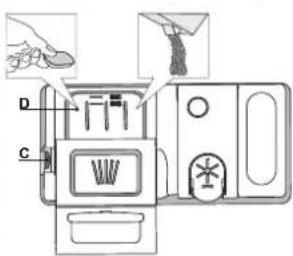
- When measuring out the detergent refer to the mentioned earlier information to add the proper quantity. Inside the dispenser D there are indications to help the detergent dosing.
- Remove detergent residues from the edges of the dispenser and close the cover until it clicks.
- Close the lid of the detergent dispenser by pulling it up until the closing device is secured in place.
The detergent dispenser automatically opens up at the right time according to the program.
If all-in-one detergents are used, we recommend using the TABLET button, because it adjusts the program so that the best washing and drying results are always achieved.
Usage of detergent not designed for dishwashers may cause malfunction or damage to the appliance.
PROGRAMSTABLE
| Program | Drying phase | ActiveDry | Available options* | Duration of wash program (h:min)** | Water consumption (litres/cycle) | Energy consumption (kWh/cycle) |
| 1. Eco ECO 50° | ✓ | ✓ | □ □ h. | 3:10 9.5 0.95 | ||
| 2. Auto Intensive 65° A | ✓ | ✓ | □ □ □ □ □ □ h. | 2:00 - 3:10 14.0 | -17.0 1.50 -1.85 | |
| 3. Auto Mixed 55° □ □ A | ✓ | ✓ | □ □ □ □ □ □ □ h. | 1:30 - 2:30 14.5 | -16.0 1.15 -1.30 | |
| 4. Auto Fast Wash □ □ A 50° | - | - | □ □ h. | 0:55 - 1:20 13.0 | -14.5 1.15 -1.25 | |
| 5. Rapid 30' 50° | - | - | □ □ □ □ □ □ h. | 0:30 9.0 0.50 | ||
| 6. Good Night 50° | ✓ | ✓ | □ □ h. | 3:30 15.0 1.15 | ||
| 7. Sanitizing 65° | ✓ | - | □ □ h. | 1:40 10.0 1.30 | ||
| 8. Soak | - | - | □ □ □ □ □ □ h. | 0:12 4.5 0.01 | ||
| 9. Self-Clean 65° | - | - | □ □ h. | 0:50 8.0 0.85 |
ECO program data is measured under laboratory conditions according to European Standard EN 60436:2020.
Note for Test Laboratories:
For information on comparative EN testing conditions, please send an email to the following address: dw_test_support@whirlpool.com
Pre-treatment of the dishes is not needed before any of the programs.
) Not all options can be used simultaneously.
*) Values given for programs other than the program Eco are indicative only. The actual time may vary depending on many factors such as temperature and pressure of the incoming water, room temperature, amount of detergent, quantity and type of load, load balancing, additional selected options and sensor calibration. The sensor calibration can increase program duration up to 20 min.
PROGRAMS DESCRIPTION
Instructions on wash cycle selection.
1 ECO
Eco programme is suitable to clean normally soiled tableware, that for this use, it is the most efficient programme in terms of its combined energy and water consumption, and that it is used to assess compliance with the EU Ecodesign legislation.
2 AUTO INTENSIVE
Automatic program for heavily soiled dishes and pans (not to be used for delicate items).
3 AUTO MIXED
Automatic program for normally soiled pans and dishes.
4 AUTO FAST WASH
Automatic program for limited quantity of normally soiled crockery. Ensures optimal cleaning performance in shorter time.
5 RAPID 30^
Program to be used for half load of lightly-soiled dishes with no dried food residues. Does not have drying phase.
6 GOOD NIGHT
Suitable for night-time operation of the appliance. Ensures optimal cleaning and drying performance with the lowest noise emission.
7 SANITIZING
Normally or heavily soiled crockery, with additional antibacterial wash. Can be used to perform maintenance of the dishwasher.
8 SOAK
Use to refresh crockery planned to be washed later. No detergent to be used with this program.
9 SELF-CLEAN
Program to be used to perform maintenance of the dishwasher, to be carried out only when the dishwasher is EMPTY using specific detergents designed for dishwasher maintenance.
Notes:
Please note that cycle Rapid 30^ is dedicated for lightly soiled dishes.
OPTIONS AND FUNCTIONS
OPTIONS can be selected directly by pressing the corresponding button (see CONTROL PANEL).
If an option is not compatible with the selected program see PROGRAMS TABLE, the corresponding LED flashes rapidly 3 times and beeps will sound. The option will not be enabled.
3D ZONE WASH 3D
Option works with one rack at once. In particular, we recommend to use it with Mixed and Intensive cycles - thanks to the additional 3D water jets placed on the bottom o the cavity, ZONE WASH 3D option allows to save energy or to increase the washing performance of the dishwasher:
- ZONE WASH 3D + MIXED CYCLE: it allows to reduce energy consumption up to 40% .
- ZONE WASH 3D + INTENSIVE CYCLE: it increases the washing performances up to 40% . Ideal for very soiled mixed loads, e.g. pans and saucepans, dishes with heavy encrustation or difficult-to-clean crockery (grater, vegetable mill, dirty cutlery).
How to activate the option:
- Select a compatible cycle
- By default the appliance washes dishes in all racks. To wash only the specific rack, press this button repeatedly:
shown on the display (only lower rack)
-1 shown on the display (only upper rack)
OFF shown on the display (option is OFF and the appliance will wash dishes in all racks).
Remember to load the upper or lower rack only, and to reduce the amount of detergent accordingly.
If upper rack is removed, please apply detergent directly to tub instead of detergent dispenser.
=O KEYLOCK
A long press (for 3 seconds) of ZONE WASH 3D button, will activate the KEYLOCK function. The KEYLOCK function will block the control panel except the ON/OFF button. To deactivate the KEYLOCK, long press again.

WATER TAP CLOSED - Alarm
Flashes when there is no inlet water or water tap is closed.
SHORT TIME
This option can be used to reduce the duration of the main programs while maintaining the same washing and drying performance levels.
After selecting the program, press the SHORT TIME button and the indicator light will switch on. To deselect the option, press the same button again.
TABLET (Tab) This setting allows
This setting allows you to optimize the performance of the program according to the type of detergent used.
A long press (for 3 seconds) of the SHORT TIME button (the corresponding symbol will light up), will activate the function if you use combined detergents in tablet form (rinse aid, salt and detergent in 1 dose).
If you use powder or liquid detergent, this option should be off.
DELAY h. The start of
DELAY
The start of the program may be delayed for a period of time between 0:30 and 24 hours.
- Select the program and any desired options. Press the DELAY button (repeatedly) to delay the start of the program. Adjustable from 0:30 to 24 hours. With each press of the button, the delay start increases by: 0:30 if selection below 4 hours, 1:00 if selection is below 12 hours, 4 hours if selection is above 12 hours. If 24 hours reached, and the button is pressed, the delayed start is deactivated.
- Press the START/PAUSE button: the timer will begin counting down;
- Once this time has elapsed, the indicator light switches off and the program begins automatically.
If at the time of the countdown the START/PAUSE button is pressed again the DELAY option is cancelled and the selected program starts automatically.
The DELAY function cannot be set once a program has been started.
DRAIN OUT To stop and cap
To stop and cancel the active cycle, the Drain Out function can be used.
A long press of START/PAUSE button, will activate the DRAIN OUT function. The active program will be stopped and the water in the dishwasher will be drained out.
ActiveDry
ActiveDry is a convection drying system which automatically opens the door during/after drying phase to ensure exceptional drying performance every day. Door opens at the temperature that is safe to your kitchen furniture, thus door will not be opened when the option of SHORT TIME is on.
As additional steam protection, special designed protection foil is added together with the dishwasher (depending on the model type - can be the need to buy it). To see how to mount protection foil please refer to (INSTALLATION GUIDE).
ActiveDry functionality could be disabled by the user as follows:
- To DISABLE: Switch On, then switch Off. Keep the P button pressed for 5 sec., at the end of 5 sec the dishwasher plays a short beep. Switch On the machine, the display shows "0OF".
- To ENABLE: Switch On, then switch Off the machine. Keep the P button pressed for 5 sec., at the end of 5 sec the dishwasher plays a short beep. Switch On the machine, the display shows "0On".
LOADING THE RACKS
UPPER RACK

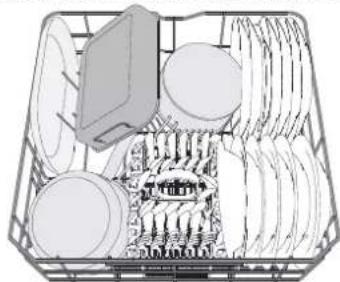
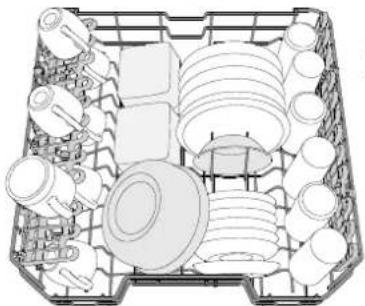
Load delicate and light dishes: glasses, cups, saucers, low salad bowls.
(loading example for the upper rack)
ADJUSTING THE HEIGHT OF THE UPPER RACK
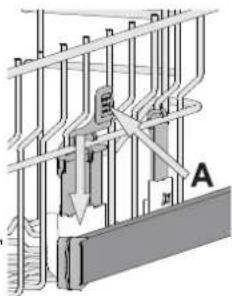
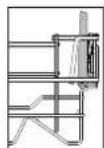
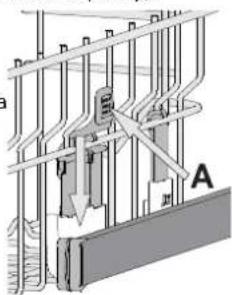
The height of the upper rack can be adjusted: high position to place bulky crockery in the lower basket and low position to make the most of the tip-up supports by creating more space upwards and avoid collision with
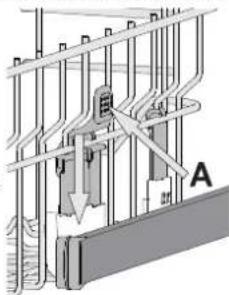
The upper rack is equipped with a Upper Rack height adjuster (see figure), without pressing the levers, lift it up by simply holding the rack sides, as soon as the rack is stable in its upper position. To restore to the lower position, press the levers A at the sides of the rack and move the basket downwards.
We strongly recommend that you do not adjust the height of the rack when it is loaded. NEVER raise or lower the basket on one side only.
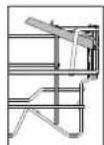
FOLDABLE FLAPS WITH ADJUSTABLE POSITION
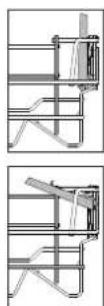
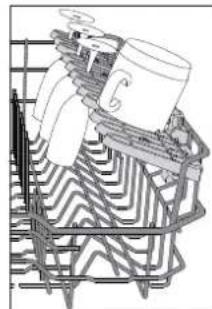
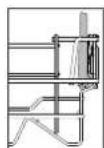
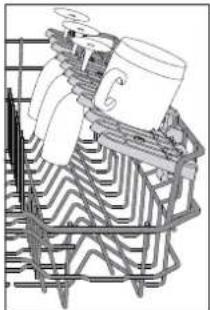
The side foldable flaps can be fold or unfold to optimize the arrangement of crockery inside the rack.
Wine glasses can be placed safely in the foldable flaps by inserting the stem of each glass into the corresponding slots.
Depending on the model:
to unfold the flaps there is needed to slide it up and rotate or release it from the snaps and pull it down.
- to fold the flaps there is needed to rotate it and slide flaps down or pull it up and attach flaps to the snaps.
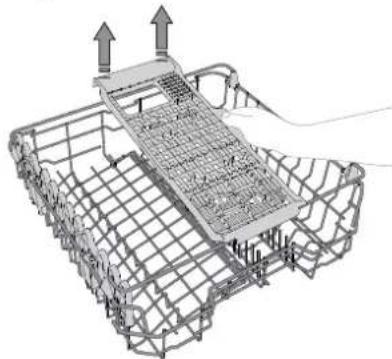
SLIDING TRAY
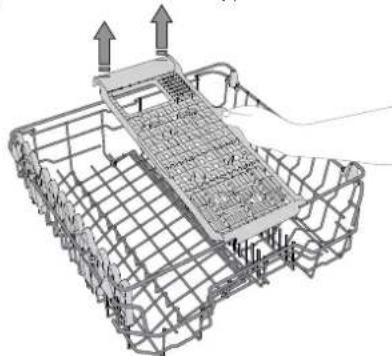
The upper rack is fitted with a sliding tray which can be used to hold small crockery and cutlery. For optimum washing performance, avoid positioning bulky crockery directly below the tray. The tray is removable.
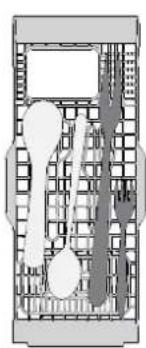
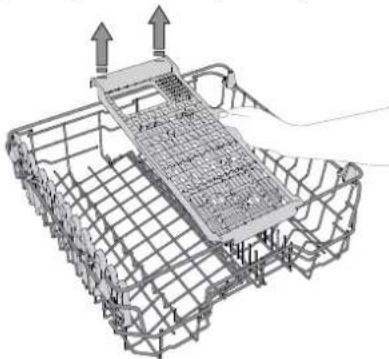
LOWER RACK
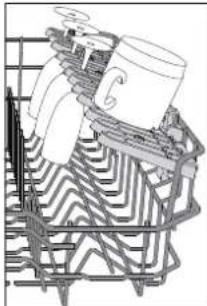
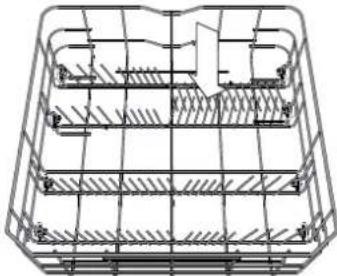
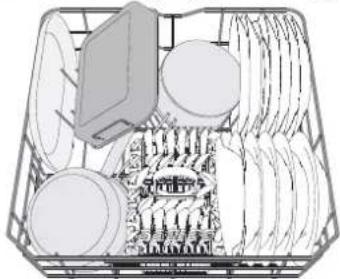
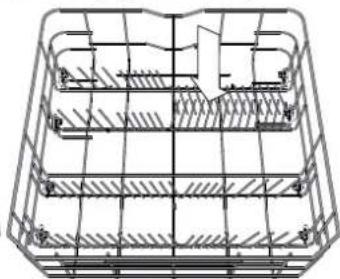
For pots, lids, plates, salad bowls, cutlery etc. Large plates and lids should ideally be placed at the sides to avoid interferences with the spray arm. The lower rack has tip-up supports which can be used in a vertical position when arranging plates or in a horizontal position (lower) to load pans and salad bowls easily.
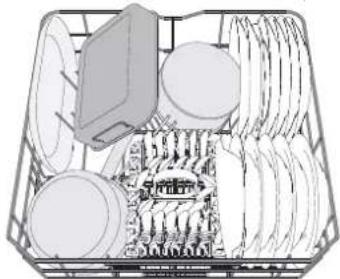
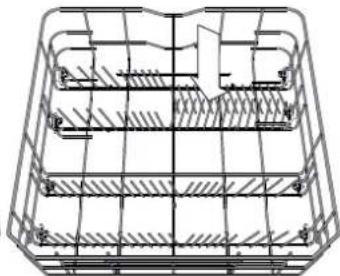
(loading example for the lower rack)
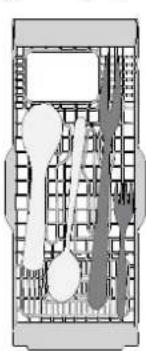
CUTLERY BASKET
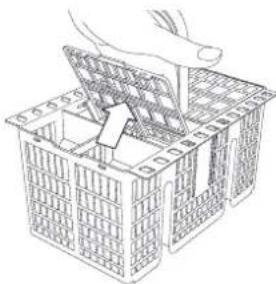
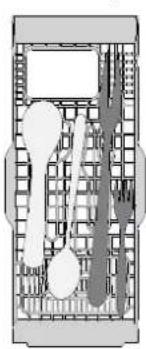
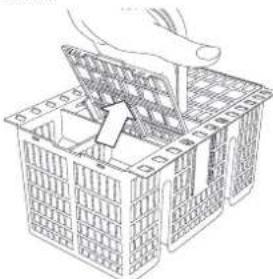
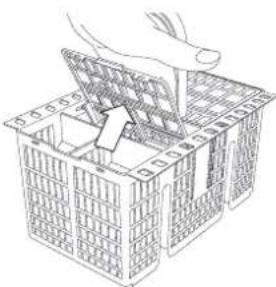
The basket is equipped with top grilles for improved cutlery arrangement. The cutlery basket should be positioned only at the front of the lower rack.
Knives and other utensils with sharp edges must be placed in the cutlery basket with the points facing downwards or they must be positioned horizontally in the tip-up compartments on the upper rack.
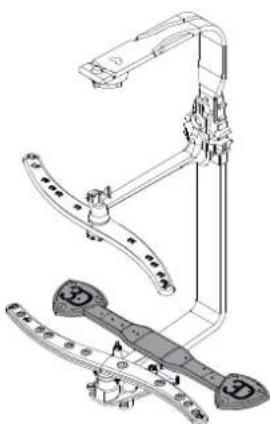
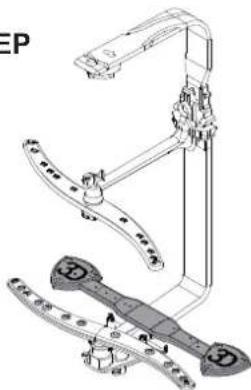
ZONE WASH 3D
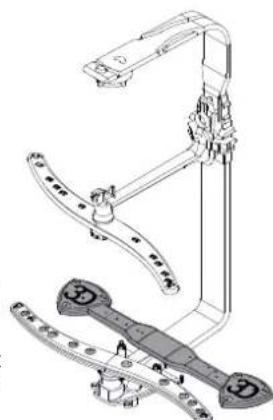
Zone Wash 3D uses additional water jets located both: in the lower and upper part of the dishwasher (marked with orange color) to wash more intensively heavily soiled items by increasing water coverage on dishes. Example: Load pots and casseroles facing lower part of Zone Wash 3D components and activate the Zone Wash 3D option on the panel.
DAILYUSE
1. CHECK WATER CONNECTION
Check that the dishwasher is connected to the water supply and that the tap is open.
2. SWITCH ON THE DISHWASHER
Press the ON/OFF button.
3. LOAD THE RACKS
(see LOADING THE RACKS).
4. FILLING THE DETERGENT DISPENSER
5. CHOOSE THE PROGRAM AND CUSTOMISE THE CYCLE
Select the most appropriate program in accordance with the type of crockery and its soiling level (see PROGRAMS DESCRIPTION) by pressing the P button.
Select the desired options (see OPTIONS AND FUNCTIONS).
6. START
Start the wash cycle by pressing the START/Pause button. When the program starts you hear a beep.
7.END OF WASH CYCLE
The end of the wash cycle is indicated by beeps and the display shows End. Open the door and switch off the appliance by pressing the ON/OFF button.
Wait for a few minutes before removing the crockery - to avoid burns. Unload the racks, beginning with the lower one.
The machine will switch off automatically during certain extended periods of inactivity, in order to minimise electricity consumption. If the crockery is only lightly soiled or if it has been rinsed with water before being placed in the dishwasher, reduce the amount of detergent used accordingly.
MODIFYING A RUNNING PROGRAM
If a wrong program was selected, it is possible to change it, provided that it has only just begun: press and hold the ON/OFF button, the machine will switch off. Switch the machine back on using the ON/OFF button and select the new wash cycle and any desired options; start the cycle by pressing the START/PAUSE button.
ADDING EXTRA CROCKERY
Without switching off the machine, open the door (be ware of HOT steam!) and place the crockery inside the dishwasher. Close the door and press the START/Pause button the cycle will begin from the point at which it was interrupted.
ACCIDENTAL INTERRUPTIONS
If the door is opened during the wash cycle, or if there is a power cut, the cycle stops. Once the door has been closed or the electricity supply is restored, to start again the cycle from where it was interrupted, press the START/Pause button.
To disable the DEMO MODE the following actions must be carried out in sequence, without breaks. Switch the machine ON and then switch it OFF again. Press the DELAY button until the buzzer is heard. Switch the machine on again. The "dOF" indicator flashes and then turns OFF.
ADVICE AND TIPS
TIPS
Before loading the baskets, remove all food residues from the crockery and empty the glasses. You do not need to rinse beforehand under running water.
Arrange the crockery so that it is held in place firmly and does not tip over; and arrange the containers with the openings facing downwards and the concave/convex parts placed obliquely, thus allowing the water to reach every surface and flow freely.
Warning: lids, handles, trays and frying pans do not prevent the spray- er arms from rotating.
Place any small items in the cutlery basket.
Very soiled dishes and pans should be placed in the lower basket because in this sector the water sprays are stronger and allow a higher washing performance.
After loading the appliance, make sure that the sprayer arms can rotate freely.
UNSUITABLE CROCKERY
- Wooden crockery and cutlery.
- Delicate decorated glasses, artistic handicraft and antique crockery. Their decorations are not resistant.
- Parts in synthetic material which do not withstand high temperatures.
Copper and tin crockery. - Crockery soiled with ash, wax, lubricating grease or ink.
The colours of glass decorations and aluminium/silver pieces can change and fade during the washing process. Some types of glass (e.g. crystal objects) can become opaque after a number of wash cycles too.
DAMAGE TO GLASS AND CROCKERY
- Only use glasses and porcelain guaranteed by the manufacturer as dishwasher safe.
- Use a delicate detergent suitable for crockery
- Collect glasses and cutlery from the dishwasher as soon as the wash cycle is over.
TIPS ON ENERGY SAVING
- When the household dishwasher is used according to the manufacturer's instructions, washing tableware in a dishwasher usually consumes less energy and water than hand dishwashing.
- In order to maximize dishwasher efficiency it is recommended to initiate the wash cycle once dishwasher is fully loaded. Loading the household dishwasher up to the capacity indicated by the manufacturer will contribute to energy and water savings. Information on correct loading of tableware can be found in LOADING THE RACKS chapter.
- In case of partial loading it is recommended to use dedicated wash options if available (Half load/ Zone Wash, Multizone), filling up only selected racks. Incorrect loading or overloading the dishwasher may increase resources usage (such as water, energy and time, as well as increase noise level), reducing cleaning and drying performance.
- Manual pre-rinsing of tableware items leads to increased water and energy consumption and is not recommended.
HYGIENE
To avoid odour and sediment which can be accumulated in the dishwasher please run a high temperature program at least one a month. Use a tea spoon of detergent and run it without the loading to clean your appliance.
CARE AND MAINTENANCE
CLEANING THE FILTER ASSEMBLY
Regularly clean the filter assembly so that the filters do not clog and that the waste water flows away correctly.
Using dishwasher with clogged filters or foreign objects inside filtration system or sprayarms may cause unit malfunction resulting in lose of performance, noisy work or higher resources usage.
The filter assembly consists of three filters which remove food residues from the washing water and then recirculate the water.
The dishwasher must not be used without filters or if the filter is loose.
At least once per month or after each 30 cycles, check the filter assembly and if necessary clean it thoroughly under running water, using a non-metallic brush and following the instructions below:
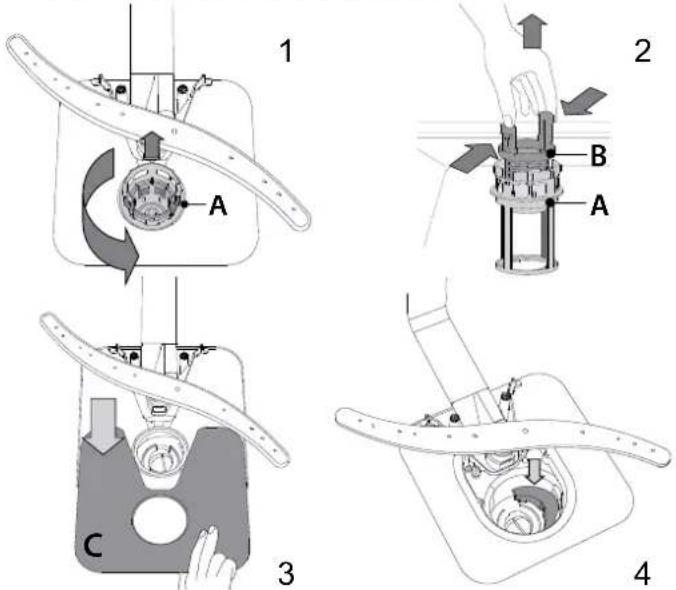
- Turn the cylindrical filter A in an anti-clockwise direction and pull it out (Fig 1).
- Remove the cup filter B by exerting a slight pressure on the side flaps (Fig 2).
- Slide out the stainless-steel plate filter C (Fig 3).
- In case you find foreign objects (such as broken glass, porcelain, bones, fruit seeds etc.) please remove them carefully.
- Inspect the trap and remove any food residues. NEVER REMOVE the wash-cycle pump protection (black detail) (Fig 4).
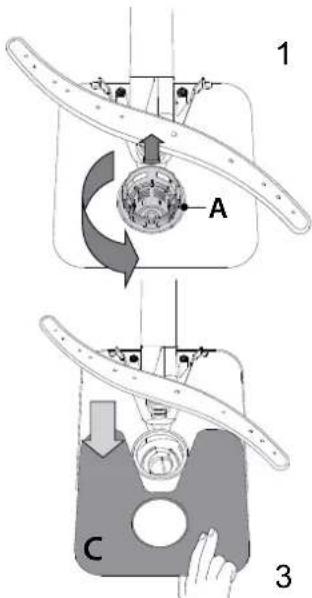
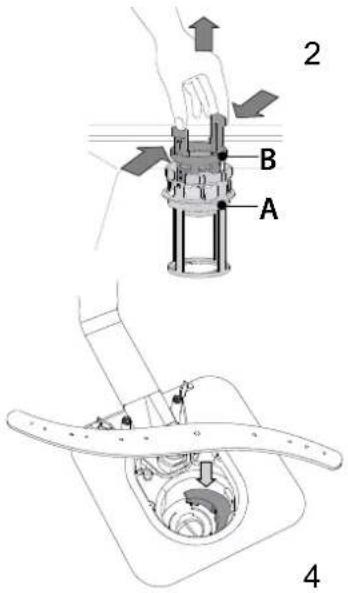
After cleaning the filters, re-place the filter assembly and fix it in position correctly; this is essential for maintaining the efficient operation of the dishwasher.
CLEANING THE WATER INLET HOSE
If the water hoses are new or have not been used for an extended period of time, let the water run to make sure it is clear and free of impurities before performing the necessary connections. If this precaution is not taken, the water inlet could become blocked and damage the dishwasher.
CLEANING THE SPRAY ARMS
On occasions, food residue may become encrusted onto the spray arms and block the holes used to spray the water. It is therefore recommended that you check the arms from time to time and clean them with a small non-metallic brush.
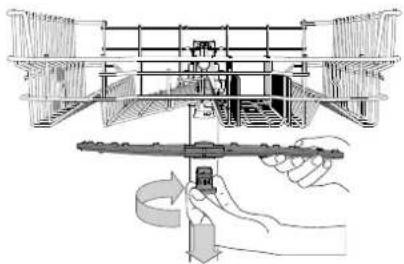
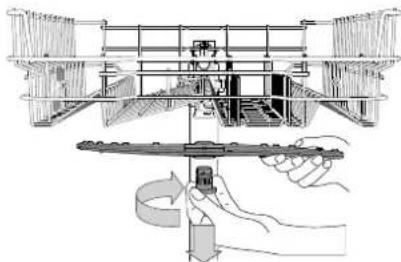
To remove the upper spray arm, turn the plastic locking ring in a clockwise direction. The upper spray arm should be replaced so that the side with the greater number of holes is facing upwards.
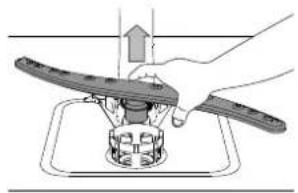
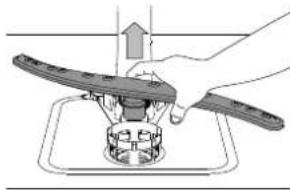
The lower spray arm may be removed by pulling it upwards.
WATER SOFTENING SYSTEM
Water softener automatically reduces water hardness, consequently preventing scale buildup on heater, contributing also to better cleaning efficiency.
This system regenerates itself with salt, therefore it is required to refill salt container when empty.
Frequency of regeneration depends on water hardness level setting - regeneration takes place once per 6 Eco cycles with water hardness level set to 3.
Regeneration process starts in final rinse and finishes in drying phase, before cycle ends.
- Single regeneration consumes: 3.5L of water;
- Takes up to 5 additional minutes for the cycle;
Consumes below 0.005kWh of energy.
TROUBLESHOOTING
In case your dishwasher doesn't work properly, check if the problem can be solved by going through the following list. For other errors or issues please contact authorized After-sales Service which contact details can be found in the warranty booklet. Spare parts will be available for a period of either up to 7 or up to 10 years, according to the specific Regulation requirements.
| PROBLEMS | POSSIBLE CAUSES SOLUTIONS | |
| Salt indicator is lit | Salt reservoir is empty (after refill the salt indicator may remain lit for several wash cycles). | Refill reservoir with salt (for more information - see page 2).Adjust water hardness (see table, page 2). |
| Rinse aid indicator is lit | Rinse aid dispenser is empty (after refill the rinse aid indicator may remain lit for several wash cycles). | Refill dispenser with rinse aid (for more information - see page 2). |
| The dishwasher won't start or does not respond to commands. | The appliance has not been plugged in properly. Insert the plug into the socket. | |
| Power outage. | For safety reasons, dishwasher will not restart automatically when power returns. Press the START/Pause button to resume the cycle. | |
| The dishwasher door is not closed.ActiveDry pin is not pulled in. | Vigorously push the door until you hear the "click". | |
| Cycle is interrupted by door opening for >4 sec. | Close the door and press START/Pause. | |
| It does not respond to commands.Display shows: F9 or F12 and both On/Off and START/Pause LEDs are blinking rapidly. | Switch off the appliance by pressing the ON/OFF button, switch it back on after approximately one minute and restart the program. If problem persists, unplug the appliance for 1 minute, then plug it back in. | |
| The dishwasher won't drain. Display shows: F3 and both On/Off and START/Pause LEDs are blinking rapidly. | The wash cycle has not finished yet. Wait until the wash cycle finishes. | |
| The drain hose is bent. Check that the drain hose is not bent (see INSTALLATION INSTRUCTION). | ||
| The sink drain pipe is blocked. Clean the sink drain pipe. | ||
| The filter is clogged up with food residues. Clean the filter (see CLEANING THE FILTER ASSEMBLY). | ||
| The dishwasher makes excessive noise. | The dishes are rattling against each other. | Position the crockery correctly (see LOADING THE RACKS). |
| An excessive amount of foam has been produced. | The detergent has not been measured out correctly or it is not suitable for use in dishwashers (see FILLING THE DETERGENT DISPENSER). Restart dishwasher by pressing the DRAIN button (see OPTIONS AND FUNCTIONS) and run new program without detergent. | |
| The dishes are not clean. | The crockery has not been arranged properly. | Arrange the crockery correctly (see LOADING THE RACKS). |
| The spray arms cannot rotate freely, being hindered by the dishes. | Arrange the crockery correctly (see LOADING THE RACKS). | |
| The wash cycle is too gentle. Select an appropriate wash cycle (see PROGRAMS TABLE). | ||
| An excessive amount of foam has been produced. | The detergent has not been measured out correctly or it is not suitable for use in dishwashers (see FILLING THE DETERGENT DISPENSER). | |
| The cap on the rinse aid compartment has not been shut correctly. | Make sure the cap of the rinse aid dispenser is closed. | |
| The filter is soiled or clogged. Clean the filter assembly (see CARE AND MAINTENANCE). | ||
| There is no salt. Fill the salt reservoir (see FILLING THE SALT RESERVOIR). | ||
| The dishwasher does not fill the water. Display shows: and F6, both On/Off and START/Pause LEDs are blinking rapidly. | No water in the water supply or the tap is closed. | Make sure there is water in the water supply or the tap running. |
| The inlet hose is bent. | Make sure the inlet hose is not bent (see INSTALLATION) reprogram the dishwasher and reboot. | |
| The sieve in the water inlet hose is clogged; it is necessary to clean it. | After having carried out the verification and cleaning, turn off and turn on the dishwasher and restart a new program. | |
| Dishwasher finishes the cycle prematurely. Display shows: F15 and both On/Off and START/Pause LEDs are blinking rapidly. | Drain hose positioned too low or siphoning into home sewage system. | Check if end of drain hose is placed at correct height (see INSTALLATION).Check for siphoning into home sewage system, install air admittance valve if necessary. |
| Air in water supply. | Check water supply for leaks or other issues letting air inside. | |

Policies, standard documentation, ordering of spare parts and additional product information can be found by:
- Visiting our website docs hotpoint.eu and parts-selfservice.whirlpool.com
Using QR Code - Alternatively, contact our After-sales Service (See phone number in the warranty booklet). When contacting our After-sales Service, please state the codes provided on your product's identification plate.
The model information can be retrieved using the QR-Code reported in the energy label. The label also includes the model identifier that can be used to consult the portal of the registry at https://eprel.ec.europa.eu.
GUIDE D'UTILISATION QUOTIDIENNE
D'UTILISATION QUOTIDIENNE

MERCI D'AVOIR CHOISI UN PRODUIT HOTPOINT ARISTON.
www.hotpoint.eu/register
MERCIDE SCANNER LE OR CODE
SUR VOTRE APPAREIL POUR
OBTENIR DES INFORMATIONS
PLUS DETAILLEES


OPTIONS ET FONCTIONS
INTERRUPTIONS IMPRÉVUES
www.hotpoint.eu/register
TOJIbIK AKNAPAT ANY YUH
KYPbIINFbIDAFblQRKOdbIH
CKAHEPJIeHI3

KypbIFbHbI naIdaIaHa6ac 6ypbIH Kayinci3ik HycKayIbIFbIH MyKNrT OKbIHbI3.
OHIM CINATTAMACbI
KYPbINFbl
- KorfpbI cepe
- XnHaMaIbI bICbIPMaIap
- KofapfblcepenH 6nikTiririn peTteri
- KofapfbcnpeyTtkacbl
- Temehri cepe
- Ac kypaapanapbI ce6eti
- Temenhi cnpe tykacbi
8.Cy3rJxHaFbI - Ty3 KOnMaCbI
- Ta3anay Kypalb MeH WAI O Kypalb bIDbcB
- 3aybTTaKtaHaaCbI
- Backapy naheji
BACKAPY NAHENI
1.Индікаторшамыбар кocу-шічір/ысьртугімeci
2. INDnKaTOp 7aMbI 6ap 6afnapnaMaHbTaHay Tymecci
3. INdikaTop 7ambl6ap Zone Wash 3D Tymeci / nephe Kullbl
4. 3ko6aFapnamacbHbIH INHdkaTOp wAmbl
5. Nephe KylnbI INHdkaTOp WAmbl
6.Дистпец
7. Bardapama Hemipi MeH KaJraH yaKbI INHINKaTOpB
- Ta6JIeTka (Ta6) INHdNkATOp 7aMbI
- Cy kpaHbI Jka6bIK uHdNkaTOp WAmbl
- WAO KypalbIH TOJTBipy HINKaTOP wambl
- Ty3dbI ToTbipy HnDnKaTOp WAmbl
12.ИнданкаторшамыбapShortTimeTuMeci/Ta6Jnetka(Ta6) - INHdkaTOp 7ambl6ap KeWikTipy Tymecci
14.ИндikatopшамыбapБаctay/TokTatyТуМeci/Ta3anay
ANFAUKbI PET NAIДАЛAHY T¥3, WIANFBIISH KYPALT MEH JyfbIiS KYPALI
AJFAUKBI PET PAIDAJAHYFA KATbICTbl KEHEC
OpHaTkaHann KeiHn Top cepenepDen TbIfbIpbkTapblXaHe yctHiTop cepehen TbIfb3daBliw cepinneni 3JeMeHTTepei anbin TacTaHbI3.
TY3BAFbIH TOJITbIPY
Ty3dbI KOJdaHy bIbIcTapJa XeHe KypblfHbHIn XyMbIC KypamDaCTapBHaKAK Ty3jNViHiAnDbH anaDbI.
-¥3 CAYbItbH EUKKAUH BOC KANDbIPMAYdbH MaHbI3bl 30p
CydbIH KepeMeKTIIN OPhaTyDbIH MaHbI3bI 3Op.
(KORAPrBcpeHIN KJKMeyMbICaJIbI)
KOFAPbI COPEHIH BNIKTITIH PETTEY
Korapfbl cepenih 6nkiTirih petteyre 6oana: TeMeHri Xaikke Ke n bIbc cany yuH Jxorapfbk KaBn Xe He Kofapb kaTApda Kebipek 6oc opbHbJ kacay apKnbl anbHbAnbTIpeKTePdiH KeBH Xacayf a npHaHaF h TemeHri KaBn XeHe TemeHri Cepere caBHHraH
3aTTapMeH KaBtIbFbICTb Tyfbl3ay.
Korapfbcpe TetikTeepdi 6acnai,
KoRapfbce XorapfbcepeHH
6nIKTirH petteriunen (cypetti Kepehi3
XabkTAJadbl, cepe XoRapfbKaJIbInka
KoBilFaH 60nda, kai rHa capeHH
6yipneH yctan OHki KeTepiH3.
TeMeHI KANbITb KannbHa KeTIpy ysiH,
cepeHH 6yipnePiDeeri A TetikTeepdi 6acbl,
XeWKTI TeMH KApai 6acblH3.
On canbIHraH coH, cpeHH 6nIKTirH peTTMeeydi ycbiHaMbI3.
ELUKAAUH Xaikrih TeK 6ip XaRbH XorapbI KeTepeMei3 Hemece TEmeH TycipMei3.
PETTEJETIH KAIINbI BAP XINHAJIIMALbl bICbIPMAJIAP
blbic-ayktbiTOPcepe biHaBbOpHanaCTbpyyWih, XnHaIMMaJIb BcIbPMaJapdbi XnHAn, KaTAtawyfa60nAbbl. 1bHbI ctaKaHdApdbIep6ip CTakaHHbIH TyTKacBHcKeC yFa cany apKbIbXnHaMnbl bCbIPMaJapraKayinc3etin calya60nAbbl. YnireBaNaHBCTbl:

bCbipMaIapdbI aUy yuH,Ohblcbipfbltn,aHaNdbpyKaXeT
Hemece imMeKTepehen 6ocatbn, uBifapbn any KepeK.
- bICbIPManapdbI KINHAY yUH, OHbI aHNDbipIn, bICbIPManapdbITemEn Kapai cbPbTy KaKET HeMeCE OHbI Xorapbi KapaiTapTbIn, bICbIPManapdbI imMeKTepre 6eKiTy KepeK.
CYbIPMAJIbI TAPTIIA
Kofapfbcpe Kikkehta BdbicTb XeHe ac iWeiH caMaHb cany yuH kondahyra 60nabH cybpMaBt TaptnacbMeH bepinei. OHTaBb Jyy eHimdIniri YwH YNKeH bDcTb TikeJe HayaHbH actbHa cannahb3.Taptna anh6anb6oana.
ACTbIHfbl TOP C0PE
blbc-akTbTOPcepe bHfainbOpHaactbipy yuH 6yipderi KaibpmaIb KynakwanaapdbI yTuypni KaibnKa KoHafo bana.
BbHbCTaKaHdpabAp6ip CTakaHHbIH TyTkacbi CcKeK yFa cany apkbln XunHanmAbbCibpMa npA kayinc3 etin canyfa bana.
blbc-akXakcb Ke6yi YuuH kaiPmbaIb KynakwanaapabKe6ipeK
6ykeh3.EHeeHTydi e3repy yuH xHnAnmAbb CbcpMaHb TaTbn aBnHb3 da,a3dan cbipfbTbHb3 XHe Kaanaf H KaibnKa KObHb3.
(acombIHbI mop cepee bIObcMbI cany Mbicanbl)
ПьИЖAKTAPFA APHAJIFAH HAYA
Cebet ac KypanapbH xakcbipak opHaanactbipyra apHanrA yCTIHr Topnapmeh XabkTnFaH. NbIaKTapra apHaanr HayaHb TeMeHi CpeHH anBihfJ XaRbHa rHa KOKepeK. OTKip yWtapb6ap nbIaKaTp mEn Baca ac y KypanapbH 6eHIN TeMeH Kapatbn NbIaKTapra apHaanr Hayara CanbHb3 HeMece onapdbXofapfb CepeHH XInhanMaJIb 6eJIkTePiHe KeJeHeHHe canyra 6oanaJI.
ZONE WASH 3D KOMNOHEHTTETP
Zone Wash 3D KocbIMwa eki
KaTah apHaBbl cy afbHdapbIMeh
nainananaaba bIbIC kyy MaunHacbIHda
YCTHIe XkHe TMeH XkaTa (kbI3rblT
capbl Tycneh TaHbAnaHraH) bIDBCa
CydbH KaMTyib apTTbipy KemerimE
KaTbI KipNeHren BcNWeKTePdi kyyra
BoaIb. MbCanb: KcTpEnpeMn Kblu
KMybpanapbH Zone Wash 3D TemHi
6enlime6et XkTne H KyKeTHi3 Xke He Zone
Wash 3D onuRcbH KocbHb3.
KYHdEJIkTI PAnDaJIaHy
1.CYBAHJAHbICbIH TEKCEPY
blbcxyfbiMmaunHaBHcYy6bipbHaXaJIFaHraHbIH XHeUWMekTih aBbIK ekeHH TeKcepiH3.
- bIDbc KYfblu MAunHahbl ICKE KOCY
KOCYbI/0UIPyJI TYIMecIHbI3.
- COPEJIEPJ KYKTEY
(COPEJIEPDI JXYKTEY KapaHbI3).
- TA3AJAY KYPAJblbIbIbICbIH TOITbIPY
5.BAFDAPJAMAHbI TAHdAN, AHAJIbIMdbI PETTEY bIbIcTapdbH TyPi MeH OHbH NaCTaHy DeHReiHe 6aBnAhbICTbI (BAFDPAMAJAP CNIATTAMACbI KapaHb3), P TYImeciH bacy apKbIbI caikec 6aRapJamAhbTaHaHb3. KaIarah onuJnapDb TaHaHb3 (COPEJIEPDI JXYKTEY KapaHb3
- BACTAY
BACTAY/TOKTATY Tymecin bacy apkblbky aHaJIbIMbIH 6actaHb3.BaIapnama cHrHan ectireHe 6actaJaB.
- Kyy AINHAJBIMbIHbIH COhbl
Kyy aHaHbMbHbHcHb CnHapMeH aHbKTanaDbjXHe
Dncnne END.KOCY/0UIPY Tymecin bacy apkblnb ecKi
kaybn, KpyblfBbI eupipi3. Ac iweTih caMaHdbI aMmac
6bybn Kyin KanImay yuHb BipHe MEyHT KytH3.
TeMeHriciHe 6actan cepenepdi Hxyri UbIrapbn anbHb3.
3NeKtp 3HeprnacBihH TyTbHbIyBH a3aTu ywiH, eHXkapJIbIKtBn apHaBbl y3apTbIraH Mep3iMe3iHde Kypblfbl ABTomattbI Typde eWipineDi.
Ac iueiH caimAhbl a3dAn JactaHaH 6oJca Hemece bIDbc JyfbI MaunHara caJIbIH6ac 6ypbH cymen WaBInFaH 6oJca, caiKeciHwe KOnDaHbINFaH Ta3aJaly KypaBbIHbIMeWepiH a3aTbHbI3.
ICKEKOCbIJFAH BAFAPJAMAHbI 33REPTY
DpybE mec 6aFapnama TaHdaTfah 60nca, on XaHa fHa
6actanfah 6oNca, OhB e3epTre 60nab: KOCY/ewIPy
TyMecin 6acbin YcTan TpybHb3, KpybJrfb Ewipinei.
KOCY/OWIPY TyMecin KOnDaHIn KpybInfbHbKepi KocbHb3,
XaHa Jyy aHnblmbH XeHe KaNaraf ONuIaNapdb TaHaDb3;
BACTAY/TOKTATy TYmecin 6acbHb3.
KOCAJKbI AC IJETIH CAIMAHdbI KOCY
Kypbifhbl OwipMei, eciTi awhih3 (BCTbIK 6y 60nAtbHbIH
ecte caKaTah3!XHE bIDCTbI bIDbc XyfbTIbIH iHIe
caJIbH3. EciTi Xa6bHbI3 XHe BACTAY/TOKTATY TVIMecIH
6acbH3,aHaNbIM TOKTTbIFAH KepDeH 6actanaBl.
KE3DENCOK KEDEPITIEP
Kyy aHaHbIMb KeiHne ecik aWbInaTbH 60nca Hemece TOK eWetih 60nca, aHaHbIM TOkTaIbI. Ecik Ka6bInFaH Hemece 3NeKtp Torbl KaNNbHa KeNTipINrEh COH, aHaHbIM TOKtTaBnFAH XepiHeH KaTaNan 6bactay yuH, BACTAY/TOKTATy Tymecin BaCbHb3.
DEMO peximdi eipipy yuiH, TEmeHderi apekeTepdi biipHeh coh biipapacbHa y3inic caImaOpbHday kaxet. MaunhaHbIKocbi, cocbi KaTa eipipH3. KOhbpaydbH dl6bcI bIbKaHua, KELIKTIPy 6aTbPmacbi H bacIn typbH3. MaunhaHkaTAKocbiH3. "dOF" INDnKATopbl XbInblkTan, codah coH eWedi.
AKbIJI-KEHEC
KEHECTEP
Kawiktepei jyKtemec 6byh, bldicapdaan 6apblk Taram KaIbIKTapbiH anbIn TaTan, ctaKaHdapbl 6ocatbHb3. Onapbl anbIn ana arbiH cydbH acTbHda Jxyydbn Kaxetj xok. On opBHa mblTan caBHbAaiHwa JxHe cbIpTBHa 5bIfrapJMaBihua bIbCTapbl peTehi3; JxHe bIbCTapbl ay3bH TEmH kapaTbn XHe ouBflb/whBtHKnbl 6enKiTeep HekinT canBbHb3, 6yn CbHn ap6ip beTkeire TINOHe JxHe epKin aFByHbMymkiDik 6bebepdi
Eckey: KaKnakTapbl, TykanaPbI, Hayanapbl KHe Kybpy Tabanapbl 1aMbpaTkBll TTKanapbl aHaNyFA Keepri KeTTipMey Kepek. KiKehTaN bDyCTapbl ac IWeTIH caMaHApJxWliriHe cAnbHb3. KaTbI NaCTAHran bDbCTapMe HTabApDbTeMeHRI XeWiikke KOKEPeK, ce6ebi 6yn 6bnikte cy WauBpaTbIwTAPKaTbI 60nAbjXHe KaTbI Jxy EHHIMinirHE MymKINIK 6pepi.
KypblfblHb JxkyTereh COH, WauBpaTkbiu TyTKanapbHbH OaaiHaNhybHa MymkiHdk bepiH3.
KOLAIJIbIEMECbIDbICTAP
Araatah xacanfah bIbICTap Meh ac iWeTin caMaHnap.
H3izpiiIMdIeRrHcTakHdap, eUeKeJI KOnDaH XacaJFaH XHe aHTIKBapnATbIK bIDbICTap. eUeKeJIepi Te3IMdi emec.
KofapbI TemnepaTypaTe3IM aImaTbIH cHTeTKaNbIK MaTePnAnDbH 6enikTepi.
MbICxHe xhiike bDbc.
KyIMHeH,BAKcpeH,MaJIaHTbIH MaIMeH HEmec CnMaMeH JIactaHaH bIDbCTap.
CTaKaH 3eKeNepiH TcyTepe MeH AIOOMHHKymic 6eJIKTepi Kyy Ke3HJe e3epTiny XeHe TycHH 03eptiny MyMkiH. CTaKaHHbIe Ke6ip TpyPeI (MbIC, xypCTaB 3aTap) bipHeWe kyy aHaJIbIMbIHbCaHBHaH KeHH 6yblHbIP 6oNa6TaAdbI.
CTAKAHFA XKHE AC IJWEIH bIDICTAPFA 3AKbIM KEJTIPY
- ΘHdipywi bIDbc JyfbI MaunHaJa Jyyf a 60naIbI den KeninDeme 6epiInre H bHbJ KHe qapop bIbCTapbl rHa KaIdaHbHb3.
- Apopop bIDbICKaJaNbIKTbI KymCaK KyfblW KypaIbI NaIdaIaHbIHb3
Kyy aHaJIbIMbi aKaTaNFaH coH cTaKaHap MeH ac iWetIH caMaHdApDbI bDcIC KyfblMaUNHaadH bipDeH sbIFapbn anBbHb3.
3HEPTYHEMDEY BOBbIHWA KEHECTEP
Typmbictbik bIdbc KxyfblMaunHa eHidipywi TanaTapbHa ceKec naIaNanHaBnca, aDeTe bIdbc KxyfblMaunHa da bIdbc KyyuHIN KOImHe KxYFaHra KaparaHda cy MeH 3Heprna KeJEMa3bpak XyMcanaDbI.
bIbIC KJyFbIH MaunHahBn TNIMinirih 6apbHwa apTbipy yuH, Jyy uKNIH MaunHara bIbICTapdbI TObnkCanbn BonfAHn HKeIN Hana GactayDbY CbHnAmbi. TyPmbCTbIK bIbDC JyFbIH MaunHa CbimDbNtBIfc EHHpywi KepCETKe HEnreRe DeHHa FA TOITbpblca,Cy MeH 3Heprn YHeMDeyre centiriH TneDi. bIbIC-aaKTapdbI Dypbc Cany TypaJIb AknapaTbI COPELEPDI TONTbIPy TapaybiHn Taba anacb3 MaunHara Japblnai rha BIDc CanaTbH XarDaia, TeK KaKetTI cOpelre BIDCTapdbIOphanaTbPbin, KOJXeTImi OUnIAPdbH iWHeH (XApTbInai ToNTbpy/ 3OnaJIb Xyy/ MyNbTu30Ha) aPhaJI bJy OnuRnApbH TaNDayFa KeHece 6peMi3. bIbIC JyFbIH MaunHara bIDCTapdbI Dypbc CanMay HEmec TeBIM Ken Cany HeTNKecIHpe PecypCTapdbH TYbHBny KeIemi (Cy, 3Heprn XHe YaKblt, CoHNan-Ak WY KeIemi KeBeoi MyMkiH) apTbIn, bIDCTbI Jyy XHe KeNTipy eHIMdiIRi TEMHeDeyi MYMKIH.
bIbIcTapblaIbIH ana KONMeH WAO apKbIbI cy MeH 3Heprn TytBHy KJIeMI apTaTbIHbIKTaH, OHdai TcCijDi KOnDaHyFa KEHec bepMeM13.
TINHEHA
PbIbIc Kfblu MaunHaJa XnHaflanH nic nen Kipdi KeTipy yuiH KEMIHde bip ai uiHne XofapBti Tempepatyba 6aFapnaMacbiH icke Kocblb3. Ta3aiay KypalbHih Wai KaCbfH KOndaHbIn, KpyblfblbTa3aiay yuiH OHbi KxKTeMei Icke Kocblb3.
KYTIM JXHE TEXHnKAJIbIK KbI3MET KOpCETY
CY3ΓI KINHAFbIH TA3AJAY
Cy3rinepi 6tienin KanmaybXeHe KaNdbK cydbH npbC aByi yuH cy3ri XnHaBbH KaNbINTb Type TeKcepin TpybHb3.
Cy3rinepi 6iTeHReH Hemece cy3y KjYncie 6eTHe 3aTTap Hemece 6ypiKiw KypanDap Tycin KeTKeH bIDc KjYbIi MaWHaHbI KOJaHaTBiH 6oCa, Kypblfbl 6y3bln, OHbH eHIMdiJiri TeMeHdEn, Wby Ke6einn, pecypctapdbI KapkblHdbI TybHa 6actaDbI.
Cy3rinep XnHaBf yw cy3riEn TpyaBbl, onap bIbIC KyraH CydaBt TaFAM KaNbIKTapBH KeTipin, codah KeiH cyDbl KaTa aHaNDbipadbl.
blbc xyfbiu MaunhaHb cyrinepei canma Hemece cy3ri 6oc 6onca, kondahyfa 6oMaIdbI.
Kem dereHne aibHa 6ip pet HeMece ap 30 uKn caiBn, cy3ri t36erin Tekcepin, OHJI Ta3aIay KaKet Bonca, TEmHe de bepinre HycKaynapdbOpbIHdA OtbIPbIN, MetaJIeMec UeTKaMeH aBIn TyprAn CydbH actbIHDA MyKJrT Kybln AblHbI3:
1.LINHdpnIK cy3riHl A carat tiniH 6aftbIbHa KapcbI 6ypaHbI3 Da, Taptbn WlfapbIH3 (1-cypet).
2. Byip kynakwana pra a3an kyw cana otbipbn, B Toctak cy3rihi anbln lbbfblh3 (2-cypet).
3. Tot 6acnaiTbH 6oJaTTah XacaIraH Ta6aKaHa cy3riHi cbIpBtBn 1bIrapbHb3 C (3-cypet).
4. BTeH 3aTtap (MeCeIeH, CbIHraH eHKeK, fapdop, cyKeTep, KEMic-KuIeK dHepi XeHe T.6.) TaYbIn ancaHb13, onapDbXaIan aIbIn TaCTaHb13.
5. TykbiuTekcepin, Taram KaIbIkapbI 60nca, anIn TactaHbI3. Kyy uKbnHbIH copf b KoprafbuH (kapa TycI 6eWek) EUKAUAH DA ANMAHbI3 (4-cypet).
Cy3rinepTa Ta3aIHaH COH, cy3ri XnHaBIn KaTAt CaBn, OHbI KaNbHa peTTeH3; 6yI bIDc KfYbIi MaunHaHbIH TNIMDi XyMbICbIH Xacay yuH MaHb3DbI.
CY KEJETIH WJAHHRIH TA3AJAY
Cy Kenetin Shnahrinej KaHa Hemece y3ak yaKbIT 60nbiHa KondaHbImarah 6onca, KaxeTTI KocblIMapdbOpbHdAmac 6ypbIH KaNbIK 3aTAPdbH KOKtBfBiH XHe OHbIH Ta3aNbIFbIH Tekcepy yuiH cy etki3iH3. OcbCaKtbIKwaapanapbOpbHdAmMaTbIH 6oNca, cy kipiciHH 6iteNy iXHe bDbic JyfbuMaaUNHa 3Akbl KeNTipy MymkH.
BYPIKKIISTEPDI TA3AJAY
ITaraF kAnDbikTapbi 6ypikkiwTepi Ka6b6bn KanBn, cy 6ypkinetTEcikTepe 6iten TactaraH KArDaJa. Yakbl eTe 6ypikkiwTepi TeKcepin, onapdbI metanl emec KiUKeHTa WETKEMeH Ta3aanTpyraH XeH.
YctHri bypikkiTi anbIn sbIry yuIN nJaTnK 6ekTIkw sbIbfipdb carat ti bafbTbmen bpaHb3. YcTHi bypikkiTi TeciKTePdi Kebici xofapbi kapan TypaTbHd anetin aybcIbpy Kepek.
Actihfb6ypikkiuwiXKofapbI Kapai tapTbn anbin blyfya 6oana.
CYKYMCAPTYKYNECI
Cy JxMCapTKbIABTOMaTTI Typc CydbH KepMeKTiriH TeMeHdetIN, Kbl3DbIPfBtTa KaKTBiHN XHaNByhBiH aAdbH anaDbI, OcbIaNwTa Ta3apTy TImmDiniri de apTadbl.
Byn kyn e3iH-3e Tsy36eH perehepaunnaDbl, coHdbkTah ty3 caytbl 6oc 6onfAHa, OHb epdaBIM TONTbipbIn Typ KaKeT.
Perehepaunj xiniriy KepeMeKTiri DeHreinni 6anTaybHa 6aanbHcIbTepeKweneHei - perehepaunr ap 63ko zukni caBH 6ip pet 3-Ke KoiBilFaH cy KepeMeKTiri DeHreHHdeOpbHdaanaBbl.
Perehepaun npoueci cofbi wao zuknihen KeinbactaIbn, zukn aKaTaNFAHra dein h Kentipy fazacbHa daaykTaJala.
Bip petrik perehepaunr TytbHaNb: 3.5 n cy;
-BipzIKfKaKocbIMwa5MnHyTJyMcanaDb;
0.005 KBT/caf-Tah a3 3Heprn TytbHaBbl.
AKAYIbIKTAPdbI WEEWY
Erep ci3dn bIbIC yfblMaunHbI Tnicti DeHreJe JyMbIc ICTemr Typca, on MoceneHi TeMeHderi TiImHeH eTIn WuyTre 60naMa, anDe 60lmam Ma, TekcepiH3. 33re de akaynap MeH MaceleIep TybHaRaH JaFdaJa, CaBtAn aHaHHa KeiHri Kbi3Met KepCeyOpTaNbHa Hcy Ohtmeh 6aIIaHbCy aKnapatbKeiNdiK TaHObIHDa KepCetIITReH. Kocanbl 6eJIeKTeP apNaHb HopMaTnBTIK TaIantapFa CaiKec 7 HeMece 10 kblra deH kon keTImdi 60anaBl.
| AKAYLBYKTAP bIKTMM | AN CESENTPEI WELIMDEP | ||
| Ty3 uHdNKATOpbl XaHbIN Tpy | Ty3 caYbIb 6oc. (Ty3 canraHHan KeiH, Ty3 uHdNKATOpbl 6ipHeSe JyU cKNI KI 6oBly XaHbIN Tpyb MyMkhIN). | KoHTeHepRe kaHTaHaN Tu3 TOTlbpBHyB3 (KocbIMHa aKnapar any yuHIn 2-6etTi kaparh3). Cydln KepeMeKTtH peTten3 - KeCTehi KaPAh3, 2-6et. | |
| ShaRbH uHdNKATOpbl XaHbIN Tpy | ShaRbH duinCenHepe 6oc. (Ty3 canraHHan KeiH, ShaRbH uHdNKATOpbl 6ipHeSe JyU cKNI KI 6oBly XaHbIN Tpyb MyMkhIN). | DinCtencepRe kaHTaHaN shaRbH suCybIKbTKbTI TOITbpybH3 (KocbIMHa aKnapar any yuHIn 2-6etTi kaparh3). | |
| bIbIC xMyBbMaMHa bactalmaHbIb Hemece nepmendepre jayan becpmeid. | KpbIbIb duYbcJxqAanHan6aRan. AushbIb po3 | ETKaFA caIbHb3. | |
| ToKbH eShy.i. | Kayincizlik uHapanaBP Heirzihde, Kyat KauMbHa KeIeHne bIbC KyaBbH MaMHa abTomATb Tpyde JyKytKeMmei. LcKNDi KaYta Bactay yuHIn, Bactay/TOKTHATy bAtbpMaBcH bcsbH3. | ||
| bIbIC xMyBbMaMHa eciri Jxabik EmeC. ActiveDry icti cIbHb6aRan. | "cbipt" etKhen dIb6ic cctImMeKInHwe, ecKi TkaTb JxabHb3. | ||
| Ecik 4 cekyntdan arptbK yakuItka aIbIbHraJa, cIbIK TOKTalaDb. | EciKti JxabHb3 Jxane H BACTAY/TOKTHATY Tymecin H bcybHb3. | ||
| On napeMendepre jayan becpmeid. | KOCV/8UIPy bAtbpMaBcH bacy arkpBbIb KypbIbHb EwipH3 de, YAMAMeh 6ip MMHT yKcO/Yuipy InDkkatopbl MeH Bactay/TOKATy InDkkatopbl Katat Te3 XbIbMbltkTaib. | ||
| bIbIC xMyBbMaMHa cybl aknaiBbIb Dinsrllneide mbHaalap kepcTeinei: F3 xKehe Koc/ ΘshyRu uHdNKATOpbl MeH Bactay/ ToKbTaY uHdNKATOpbl Katat Te3 | Kyya aHaiAblmbl oJIy AyeTAMarAH. Kyya aiH | aIbIMbIb aYrTaFAnHa KytIH3. | |
| ABy3Z uHahriCi byrIn kcanfA. | Cy teretih shaHrHin bkyteoiin kammarabHbN TKCEpiH3 (OPHATY HYCKAYbIFbIH KApHb3). | ||
| ABy3Z yXyueCinH KbybIb 6iteTrelRan. ABy3Z y | Ymeci KbybHbTazalAnH3. | ||
| Cy3r I Taram KauDbkTapbMEN 6iteTrelRan | Cy3rH I TazalAnH3 (CY3IIEP JXHAFbIH TA3AIAY mapaYbH KApHb3). | ||
| bIbIC xMyBbMaMHa aRtBbIy shyIbRaIb. | bIbIC 6-bip6ipHe cokTbFbCIn rypcindeyde. | bIbIC-aRbMbIduybcI ampanacmbbHb3 (TOP C@PEPEP BldCbC- -A#KbTbCATy mapaYbH KApHb3) | |
| KenipuiKtH aRtBb MienWeepi shyIbRaftan. | Kyrbbl KypaI duYbC eJHsEHNer Hemece on bIbC JxbyB MaMHa MauHada KQALDAHFA apHannmaH a(Kyfbbl KYPAN bIDCbCIN TOILbPY MAPaYbH KApHb3). | ||
| AFb3Y Tymecin bcy aRbMbI duYbC JxbyB MaMHa MauHada MauHada KQALDAHFA Kanlha H keIpin (OIIYINAP MEH ΦYHKLIIAIAP mapaYbH KApHb3), Jxha 6afaparnamaH bxybH KpAcb3 icke KocbHb3. | |||
| bIbIC 7TAP Ta3a emec. | Ac iJeuTb ldbc duYbc peTtenMeRcH. | bIbIC-aRbMbI duYbcSTan opHannactbpybH3 (TOP C@PEPEP bldCbC-A#KbTb CATy mapaYbH KApHb3) | |
| Cnpel Tukkanbpl bIdcTcAmpMeH apalanacbIn epKin Kozrafa anMalDb. | bIbIC-aRbMbI duYbcSTan opHannactbpybH3 (TOP C@PEPEP bldCbC-A#KbTb CATy mapaYbH KApHb3) | ||
| Kyyu zKunbl TbM xKeHil. Dpybc Keletin JyU | LcKUnbl TazdaH3 (BAFGAPAMANAP KECTECIN KApHb3). | ||
| KenipuiKtH aRtBb MienWeepi shyIbRaftan. | Kyrbbl KypaI duYbC eJHsEHNer Hemece on bIbC JxbyB MaMHa MauHada KQALDAHFA apHannmaH a(Kyfbbl KYPAN bIDCbCIN TOILbPY MAPaYB H KApHb3). | ||
| ShaIO KypaI bclNirH KcKNaFbI duYbC Xa6bIIMarAH. | ShaIO KypaI bclNirH KcKNaFbI KcKNaFbI Kx6bIIMARAH. | ||
| Cy3r I NaTahran Hemece 6iteTrelRan. | Cy3rIep JxnaHbH TazalAnH3 (KYTIYCTAY JXHE JXEHDEY mapaYbH KapHb3). | ||
| Ty3 Koo. | Ty3 bIbCSbH TOILbPyHb3 (TY3 bIbCSbH TOILbPY MAPaYbH KApHb3). | ||
| bIbIC xMyBbMaMHa cy ToTbIbMauDb. INDkkATOpbl KataP Te3 XyblbKtTaeDb. Dinsrllneide Mbnahan KepcTeinei: F15 xKehe Kocy/ ΘshyRu uHdNKATOpbl MeH Bactay/ ToKbTaY uHdNKATOpbl Katat Te3 XbIbMbltkTaiaDb. | Cy kpaHbHa cy JxO KHeMece Kpan Jxabik | Cy kpaHbHa cy yapEkenH Hemece KpanHbH JxabIMarAHbH TckcepH3. | |
| Cy kypaTb lshaHr 6yRinin klanfA. | Cy kypaTb lshaHr 6yRinin KpanMarAHbHa K33 JxekH3sin, (OPHATY tapaYbH KapHb3) 6afaparnamaH bKalTadAn OpatbTIn, KajT aIcE KocbHb3 | ||
| Cy kypaTb lshaHrHIn Topb 6iteTrelin klanfA; | Tekcepin, taZanlan BofanfA coH, bIbC JxbyB MaMHa MauHah bIeipin, kajT aKocbHb3 Jxene Jxha H 6afaparnamaH bIcKocBbH. |

CaeratneH cTaNapt TypaIbI TOnbIK KyKaTTama, KocalkbI 6eJWeKTepre Tancbipbc I KHe eHIM TypaIbI ToNbIK aKnapaTbI MbiHa XepDeH Taba anacbl3:
- Bi3diH caTka kipin wblfbHb3 docs hotpoint.eu XeHe parts-selfservice.ingesit.com
- KypblfBbIH QR KOdbIH KOJaHaHbI3
- Hemece, 613dHcAtyDAn KeiHri KbI3MeKepCteTy optaIbIbHa xa6apnacbIb3 (TenefoH hemipih KeiIeMe WapTTapbHaH KapaHb3).KeiIqk BoiBHa Ka3MeT KepCteTy optaIbIbHa xa6apnackaHa, eHIMH TexHkaJIbIK keCTecIHde KepCetTIreH KOITapdbX6apnabH3.
Ynire KaTbICTb aknapaTTb 3hepretnkakbnk 3at6enrige KepeTeirre QR-KoTbIH Kemerimekapayfa 60ana. CoHdai-ak 6yI 3at6enrige ynlri cKekeTeHNipriwi 6ap, OHIs https://eprel.ec.europa.eu MEKeHkaBHaFaTb Tipkey nopTaBHaH KeHeC any yuHIN KonDaHyfa 60ana.
GUIA DE REFERÊNCIA DE RESOLUÇÂO DE PROBLEMAS

OBRIGADO POR TER ADQUIRIDO UM PRODUCTOHOTPOINT ARISTON.
nonHou Texnueecko NoepkK3apeRnCTpnpyTe BaW np6op Ha: www.hotpoint.eu/register
OTCKAHIPYIte QR-KOD HA BAWE M YCTPOINCTBE,HTObblIOJyHtB BOJIe IOIDPOBHyIO INΦOPMAUIO

IpeepnBbIM nCNoB3OBAHHeM np60pa BHMaTeNbHO 03HaKOMbTecb CnHCTpyKcnei no TexHKe 6e3OnaChOCTn.
ОпИСАне ИЗДЕЛЯ
ПРИБОР
- BepxHЯ KOp3nHa
- OTKnIhIbe IIOLOUKN
- PerynTop BbICOTbBepxHei KOp3HbI
- BepxHn pa36pb3rNBaTeNb
- Huxkny Kop3nHa
- Kop3nHaДЯ CTOnObBIX np6oPoB
- Hxhni pa36pbizrmbaTeNb
8.Фильтуpoшиузел - Baoyok JIaIa CoJI
- Oo3aTopbMoOuero cpeCTBa n onoJaACKnBaTeTn
- NaCnOpTNa Ta6IuNka
- NaheB ynpaBneHn
NAHEJb ynpABLeHnA
- Khonka "Bkn.-Bbik./C6poc" cnHnkaTopoM
- Khonka Bb6opa nporpaMMbIC nHdkaTopoM
- Khonka "3oHa 3D"c nHnKaTOpOM / bNoKnpOBKa KHO
- INHnkaTop nporpamMbI"3ko"
5.Индкаторбнokировки КногК - Ducnnnei
7.Индикатop HOMepa nporpamMbI N OCTaIOUeOcR BpeMeHn
8.Индикатop"Ta6neTka"
9.ИнДикатop"КранзakpbT"
10.ИнданаTop"ОсутCTBne onOlaacknBaTeJI"
11.Индикатop"ОтсутCTBUE coJIN"
12. Khonka "Быстры" "сунд /Та /
13. KhoIka "OTnoXeHHbI CTapT CnHdNkATOpOM
14. Khoika "Ctapt/Play3a" cHnDkaTOpOM / CnB
IEPBOE IcNoJb3OBAHNE
COJIb, OПОЛACKINBATEЛь И MOЮШЕСРДСТВО
IPEEDEPBbIMNCIOJIb3OBAHHEM
NocIe yCTaHOBKn ydaIInTe PkCaTOpbl C KOp3Hn yDePknBaIOUne 3NaCTuHbIe 3JeMeHTbl C BepXHeK OOp3HbI.
3ATPY3KA PEREHEPUPYIOUEN COIN
IcnoB3OBAHne coi npedOBpaaet o6pa3oBaHne I3BECTKOBTO HAJETA ha nocyde n fynkuHOHaBbIX KOMNOHeHTax nocydomoeHou MaunHbl.
BAOKIINHKOIRHEIOJXEH OCTABATbCnyCTbIM.
-063aTeIbHo yCTAHOBnTe yPoBeH JKeCTKoCTN.
BaOK dIra CoIN paCNOJoxKe H NIXKe H qACTn NOcyDmOeHoi MaINHbI (cm. OITCAHHe I3DEJINRA). Ero Heo6xOIMo 3aONHrTb, KOrJa Ha NaHeHy npabNeHn 3aropaeTc HNDkATOp OTCYCTBNE COIN S
1.BbHbTe HxKHO KOp3uHy n OTBHTnTe KpbIku6aKa (npotmb uacobO CTpeKn).
2. BbInonHreTc TOnbKO npn nepBOM nCnoJb3oBaHHm:3aeneTe BOy B 6aOH kIra CONN.
3.BCTaBbTe BOPOHky (cm. pncyHOK) n 3anonHnHTe 6aoyK cOblIO DO KpaEB (npmepHO 1 Kr).Pn ETOM n3 6aHa Ka MoKet BbITEb He6oJbwoe KOINHECTBO BObl.
4. BbHbTe BOPOHKy IN pOtpnTe yAcTOK BOKpyr OTBepCTNR OT OCTaTKOB CONI.
IIOHTHO 3ABHNTTE KpbILKU, YTObI BO BPEMa MOKNB EMKOCtHe IONaIATOMOUe e CpeCTBO (HnHaue YMnHTeB BOJb MOKeT BblTN N3 CTPOJ.
Ecn HxKHOo6aBnT coNb, Heo6xoHMo 3aBepuHT npoueypy do NaHaJcKla MoKn YTo6bI N36exKaT Kopp03nn.
YCTAHOBKA XECTKOCTN BOdBi
Ie oecneeyn npabunbho pa6oTb ymarrnten npametp KcKcOCTN BOdb IOxKeH COOTBeCTBOBaT b aKTnuecko JcKcKOCTN BOdb B BaWEM DOME. COOTBeCTBHyOuYIO INHOpMaUIO MOXHO NONYHTB MecTHOH BOOCHaKaIoUe OPraHn3aUN.
3HaueHHe no yMOnuHnIO Ia JKeCTKocT BoDbl, YcTaHOBNEHHoe Ha 3aBoDe.
BknHouHTe np6op HaxaTne KhoNkBKN./BbIKJ.
- BbIKIIOUHTe np6Op HaxaTneM KHOKN BKJ./BbIKJ.
- YdepKnBaTe HaxaToi KhoNky CTAPT/NAy3A B TeueHne 5 ckyH, noka He pa3dactc3ByKOBO CMHaI.
BKnHouTe np6op HaKaTneM KhoNkIe BKJ./BbIKJ.
Ha naHEny npabneHn Mrraet nHnKATOp, COOTBeTCTBHyOuN TeKyUeMy yPOBHi, n HnDKaTOP cOnn.
HaxMnTe KhoNky P, YTo6bI Bb6paTb HyxHbIn ypoBeHb JecTKoCTN (CM. TabJIuLY XECTKOCTN BOJbl).
HUKORDA He 3aunBaTe onoJACKuBATEnb HENOCpeCTBeHHO B Moeuyo KaMepy.
PERYIINPOBKA DO3bl ONOJACKBATEJI
EcnBac He yIOBnTbOpReT KauecTBo cyuK,MOxHO OtperynIpOBaTb Do3npOBky onoJaCKBaTeN
BkIIOHTe NocydomoeyHy MaunHy HaxaTne KHOIKN BKJ./BbIKJ.
- BbIKIouHTe np6Op HaxKaTneM KHOKNBKJ./BbIKJ.
Haxmnte Tpu p3a KHONky CTAPT/NAV3A: pa3daCTcBAyKOBo CMHnA.
BKNIOHTe np6Op HaxaTne KHOKN BKN./BbIKN.
Ha naheyn ynpablenm Mnrae t HdkaTOp onoNackBaTeJ.
Hakimar KhoNky P, Bb6epTe ypoBeH noDaun onoJaCKBaTeTn.
- BbIKIIOHTe npu6op HaxKaTHeM KHOKNBKL./BbIKI.
Hactpoika 3aBepweHa!
YpOBeHb onoJaCKBaTeMa MoKHO yCTaHOBnTb Ha 1 (3KO), B 3tOM cIyae onoJaCKBaTeH He nCNoJb3yETc, npuem HnDnkaTOp OTCYCTBNE OTIOJAckNBATEJI He 3aropaeTc, daXe eCIn Do3aTOp npCT. B 3abNCUMocTN OT MOnEIN NocyDnOMoEChN MaunHb DcOTynH Do5 ypOBHe HAcTPOKn. 3aBODcKne HAcTPOKn YkA3aHb dN MaDEIn, UTObI y3HaTb HAcTPOKn dN CBOe MaunHb, cNeDyTe PnPBeDeHHo BBIwe IHCTpyKmN.
- Ecnn Ha nocyu de octaOTc CnHeBaTbIe pa3BObl, yCTaHOBITe MeHbWee 3NaueHne (2-3).
- Ecnn Ha nocyu de octaIOTcKaNNB0dbI NnNnTnHa HAcNn, yCTaHOBNTe 6oone BbICOKoe 3NaueHne (4-5).
3AΓPY3KA MOIOUSEO CPEICTBA
IINOTKpbTnIO3aTopaMOUeOcrepCTBaNcNoB3yIte
fIKcatopC.3arpy3nte MOUee cpeCTBO TOnbKO B cyXoI IO3aTO
D.MoUoe cpeCTBO IINPpeBapHTenbHOJ MoKn NOMeCTuTe
HenocpeCTBeHHo B MoeHyIO KaMepy.
1.ДЯ onpeDeneHn Tpe6yemoro KOINHeCTBa MOUeero CpeCTBa CM. yka3aHnBbIe.C BHyTpneHHei CTOpOHbI JOTKa DHaHeceHbI MePbIe OTMeKn, NO3BOJIAOuNe IpaBnIbHO DO3NPOBaTb MOUoee CpeCTBO.
2. ydaNTe octaTkn MOUero cpeCTBa C KpaEB Do3aTopa 3akpoTe KpbIky Co ueyKOM.
3. 3akpoTRe KpbIuKy Do3aTopa MoIOUero cpeiCTBa, NotHvB ee BBepx Do BO3BpTa Ha MeTo fNkCaTopa.
I03aTOp MOUoIero CpeDCTBa OTKpbIbAEcra ABTomaTHueckn B HxKhbl MOMeHT BpemeHn corglaCHO bIbpaHHo Iporpamme.
PnncnoB3OBAHNNMOUxxCpeCTB“BCE B ODHOM"peKOMeHnyETc HaxaTb KONky TABNETKA: daHHa yHKun aanTnpyET nporpaMMY DnI NOBbHEHNA KaeeCTBa MOKN CYWKN.
IcnoIb3OBAHHe MIOUHX CpeCTB, He npEHa3HaueHHbIX dIa nocydomoeeHbIX MaunH, MoKeT npuBeCTN K HapyuHnAM yHKnOHnpOBAHn I NOBpeKDeHnIO np60pa.
TAbIuCA IPOrPAMM
A B T O M A T N U C E C K A P I P O R P A M M A D N H O P M A N B H O 3 a r p a 3 H e H b i X C K O B O P O D N C T O L O B O N N O C Y D I.
4 ABTO-5bICTPA MOIKA
AbTomuTnecka nporpaMMA nIg OrpaHueHHoro KOnuYeCTBa Nocydbi co CpeHne CTeNeHbIO 3aIrp3HeHHoCTN. ObcneuBAe TOnMaJIbHyIO 3fKeKTHBHOCTb OHCTKN 3a KOpOTKoe Bpemr.
5 BbICTPAR 30
Iporpamma Inq Tauchnoi 3aRpy3Kn NERKO 3aRpa3HeHHo nocdyb6e3 acoxux octaTkoB Niu. Be3 eTana cyuKn.
6 CnOKoHoiHOuN!
IopxOaHITnncnoB3oAHnB HohHoe Bpem.ObecneuBaet onTmMaibHyIO 0fkeKTUBHOCTb ONUCTKN BbICyUWBaHn npn Hn3KOM yPOBHe Wyma.
7 DE3MHΦEKLIA
Pporpamma dIa HopMaJIbHO mIcMbHO 3arpa3HeHHo nocyblcdoONHHTeBbIM aHTn6akTePnaHBbIM oOnaACKBaHneM. MoKet 6bTbNCNlOB3OBAHa dIa OcCyXkBaHn NOCyDOMoeHo MaINHbl.
8 BbIMAYUBAHNE
NcnoB3yETCn 3aMaunBaHHN NOcybl, KOTopaa 6ydt BbIMbTa no3DHe. Ta nporpamma He nCNOB3yET MOIOue CpeCTBO.
9 CAMOQUHCTKA
PporpammyTexnueckoro 06cnykunBaHna Heo6xOIMO BbInOnHrB npN PY-CTOINocydomoeuHO MaunHe,NCIObn3yra CneuaNbHbIe MOUune cpeCTBa,IpeHa3NaueHHbe Ira O6CnyKunBaHna NocydomoeuHO MaunHbI.
Приимechanical:
06paTte BnHMaHne, yTo LKnBbCTpa 30' noDxOaNT dna nERKO 3aRpa3-HeHHoNocybl.
ONZI IN OYHKZIN
ONLIMN BbIbIpaHOcHHeIOpeCTBeHHbIM HaKaTneM COOTBcTcByIOuNX KHOJOK (CM. PAHEJIb YNPABJEHnR).
Ecn onu HecOBMeTmua C Bb6paHno nporpammo (cm. TAbNlU4 IPOPAMM), COOTBeTCTByounn uHdNKaTOP MHRET 3 pa3n pa3daTcra 3BykoBoCnHa. Onu He 6ydt noKnluyeha.
3D3OHA3D
Функця pa6oTaet npn OJHOn yCtAHOBHeHHO KOp3Ine. B qactHOCTn, ee peKOMeHdyEtcN cNoIb3ObaTb B CMeuaHHbI N U INHTecnBbHbI PEXKIME. BlaqOaJaD anOJHnHTeBbHbIM 0bemHbIM CTpyrM BObl, BbIXoJMym Co dHa KaMepbl, ONUIN 《3OHA 3D》no3BOJare TcKOHOmMb TJIeKToP3HeprnIO nn IOBbICNTb 3fFekTnBHOCTb MoKN B NOcydmoEeyHoi MaWInHe:
3OHA 3D + CMEUAAHHbI LUKJI: no3BOJrE TCHNtB HeprnonTope6JeHne (do 40%
3OHA 3D + INHTEHCBHbI ΚUKJI: noBbIwaET ΕΦΦEKNBHOCTb BbIMbIbAHnI (do 40%). ΙealbHo NOxOaNTДЯ OueHb rpa3HOH NocyDbI CMeuHaHHOr TINa, HAnpIMep, KAcTphOB n COTeuHKOB, TapeJOK C 3acoxUHMIOCTaTKAMNIIuN, TpydHooUHaeMbIX npedMeTOB (TepK, OBOUepe3KN, rpa3HbIe CTOLOBbIe np6Opbl).
YTO6bI BKNIOUHTb ONUIO:
1.Bb6epnte coBmecTmbluKJI
2. No yMOnuHaHMoAunHa MoEt NocUy Bo BCex KOp3nHax. YTo6bI Bbl6paTb onpeDeneHHyIO KOp3nHy, HAXMnTe KHOJKy HeCKoJIbKO pa3:
HaDnCnPee(ToIbKO HIXKHNKOp3NHa)
Ha dncnnee (Tolbko BepxHna KOp3nHa)
Ha Dnucnnee (onuBbIKNoeHa, np6Op MoT nocyDy BO BCex KOp3HHax).
3aRpyKaIeToTolbKO HmXHIOU INI ToIbKO BepXHIOKOp3uHy, COOTBeCTBENHO yMeHbINB KOINueCTBO MOIOUero CpeDCTBa. Ecnn BepxHnA KOp3nHa n3BneueHa, do6abnTe MoIOUee CpeDCTBO npAmO B 6ak, a He B NtOK dna MOIOUX CpeDCTB.
-0 BLOKUPOBKA KHONOK
Длnteьhoeнхатne(6oee3cekyH)KhONKn 3OHA 3D BBOINB DeiCtBne yHKnIO BLOKIPOBKN KHONO.KyHKnBLOKIPOBKN KHOJOK 6IoknyETBCIO naHEnb ynpabLeHna 3a NCKIOUeHHem KhoNKn BKJI./BblKI.5IOKIPOBKA KHOJOK OTMeHReTc NOBTOPbIM DlnteBbHbIM HaKaTneM.

KPAH IODAU BODI 3AKPbIT - Ppeynpekdenne
INHnKaTOp MnaeT,ecnB MaunHy He NoCTynaet BOJa (3aKpbT BOOnpOBOhbl KpaH).
>>bblCTPbI
DanHnOUPNIO3BONAEtCOKpaTntbIINTEbHOCTbOCHOBHIX nporpamM pnpcoxpaHEHN KaueCTBa MoKN N CyuKN Ha NCXODHom yPOBHe.
Iocne Bb6opa nporpaMMbHaXMMTe KhONKy BblCTPbII.Ha naHei 3arOpNTc COOTBetCTByIOUm INHdkaTOp. JnO TMeHbI onuHHAKMTe KhONky epe pa3.

CJMB
YTo6bl npepBaT BbInonHeHne Tekyuee nporpaMMbl, moXHO nCnOlb3OBA Tb yHKuio "CnIB".
Динтьhoeнхатne KHONKnCTAPT/ПАY3A BBOBNTBdeIcTBne Функцю CINIB: Tekyuaя nporpaMa OctaHaBnBaeTcN nocydomoeyna MaunHa CInBaet BOy.
TABJETKA
3Ta HaCTpoIka N03BOJAEoTOnTUMN3nUpOBA Tb DeiCTBne nporpaMMbI B COOTBeTCTBMn C TINOM npImeHReMOro MOUcero CpeCTBa.HaXMMte UydepKuBaIe KONkY 5blCTPbl: B TeueHne3 cekyHd (3aoropTcra COOTBeTCTByIOuI CNMBOL 3aoropTc),ecnn BY bncolb3yeTe KO6HNpOBaHHbe MOUcne CpeCTBa B Ta6NetkA (OOnaACKBaTeIb, CoIb NMOUee CpeCTBO B ODHOM npodkyTe).
Ecnn Bbl nonb3yeTecb nopoWkoBbIM nnKnKMM MOIOUm cpeCTBOM, He BKIOuayTe 3Ty onCuIO.
OTJIOXEHHbI CTAPT 3anyck nporpaMMbl MOxHO OTIO
- BbI6epnTe nporpaMMy n HUxHbIe OIuIN. YcTaHOBnTe Bpemr OTCPOQKn NocneIOBaTeNbHbIM HaKaTneM KHONKn OTJIOXEHbIi CTAPT. 3HaueHne MeHReTcB DnAna3oHe ot 30 MInHyT Do 24 cAcob. Ppi KaJdOM HxKATnn KONKn OTCPOQka 3aNycka yBeNnHbAeTcRa 30 MInHyT (B INTEPbaNe do 4 cAcob), Ha 1 cac (B INTEPbaNe do 12 cAcob) nn Ha 4 caca (B INTEPbaNe 6Oee 12 cAcob). Nocne DocTNKeHnra 24 cAcob NocneDyUoOee HxKaTne KHONKn OTMeHReT OTcPOQky 3aNycka.
- Haxmnte KhoNky CTAPT/IIAY3A: cTapTyet o6paTHbI OTCHTaIMepa.
3.Поссе Истechеня зан HorO Врмени ИндikaTop ratetN nporpamma abTomatueckn 3anyckaetcra.
EcnnB npoecce OTCeta BpemeHn cHOba HkaKaTb KOnkY CTAPT/AY3A,OnuNr OTIOXeHHbI CTAPT OTMeHReTcMaunHa aBTOMaTNueCKn pNCTynaeK KBInONHeHIO nporpaMMbl. OYHKcN r OTIOXeHHbI CTAPT HeOocTyNa,ecnn nporpaMma yKe BBInONHeTc.
AKTNBHcUka
Akmubha Cyuka npedctabnaretco6o cnCTemy KOHBeKIOHOH cyu, ABtOMaTneCKN OTKpbIbAOUyO DBepuy BO BPem/ nocne 3Tana cyu, T06bl oecneHTb exeHHeBHOpeBOcXoHDoe KaueCTBO cyu. DBePua OTKpbIbAEtC npi TemnepaType, 6eOnaCHO JnkyxOHHO Me6en, noTOMy DBepua He 6ydet OTKpbIBaTbcn npi BKJIoueHHo ONmN BblCTPbI.
B KaueCTBe DOnonHnTeNbHO 3aunbToI npapaocydomooeHaMaunHa KOMnneKTyEtcaneaNaHbHO 3aunTHOH PHeHKo (B 3aBNCUMOCTN OT Tnna MoJeM MoKeT BO3HKnHyTB Heo6xoDnMoCTb NOKyn).PnpdoK yCTaHOBKn CneuaHbHO 3aunTHOH PNeHKn OIncaH B (PYKOBOJCTBE IIO YCTAHOBKE).
Ponb3oBateMb moxet OTKIOHTb fYHKUIO AkmueHra CyuKa cneDyUOM 6pa30m:
-OTKIOUHINRA: BKNIOHTe, 3aTeM BBKIOHTe MaunHy. YdepXnBaIte KNONKy P HaxaToB TteYeHne 5 cekyHd, B KOHcpe NaTOI CEkyHdbI pa3daCTc KOPOTKn 3ByKOBOi CnHAn. BbIKIOHTe MaunHy, Ha DCNpnee NOBUTcra "oOF".
Дя BKJIIOUEHIN: BKJIOUHTe, 3aTeM BbIKJIOUHTe MaunHy. YdepXnBaIte KhoNky P HaxaToB B TeueHne 5 cekyHd, B KOHcpe NaToI CEkyHdbI pa3daCTcK OPOTKN 3ByKOBoI CnHaI. BKJIOUHTe MaunHy, n Ha ducnnee NOBUTcra "oOn".
3AΓPy3KA KOP3иH
BEPXHЯ KOP3nHA
3a KOp3nHa npedHa3HaueHa nIeNko NOBpeKdaemOn IerKo Nocybl: cKaHb, uAkwu, 6Iouua, MeNKne caTaTHuBl.
(npumep 3a2py3ku 8epxHeu Kop3uHbl)
PEYUNPOBKA BbICOTbI BEPXHEI KOP3INHbI
BbICOTy BepxHHe KOp3NbI MoKHO perynipObaTb: BepxHHe NIOXeHne — DnBa BO3MOxHOCTn pa3MeueHn KpyHNO NOCyDb B HIXHe KOp3HNe, HIXHHe NIOXeHne — DnA NCNoB3oBAHn B NOHm Mepe OTKnIDhix DepkaTeJe (DnA yBeNueHn CBO6OJHO rpoCTpaHCTBa CBepxY 6e3 co3aHn NOMex DnA NOCyDbl, 3arpyKeHHoB HINKHOIO KOp3HHy).
BepxHnKOp3nHa Cha6KeHa
npncnooc6neHnem dnerpeynnpOBKn
BbICOTbl (CM. pucyHok).YTo6bl NOHNrTb
BepxHIOKop3Hy, npocTo nOHTHe ee Bbepx 3a Kpa, He HaJImaPbUaRn, Noka OHa He 3aIMET yCTOnuBOe NOJooKeHne Bbepxy.
TObbBepHybKOp3Hb HnXHee NIOKeHne, HaxMITEpbuHaA,paCNOJooKeHHbIe Ha ee 6OKOBbIX CTOPoHAx,NCMeCTVE KOp3Hb BYHn3.
He perynpyte BbICOTy BepxHei Kop3HbI, KOrdaB Hee 3aRpyKeHa nocya. HNKoRAA He NOHMaTe H He onyckaiTe Kop3uHy, B3aBmncb 3a Hee TOnbKO c OdHO CTOpOHbl.
OTKnIhBIE DEPKATEJI N3MEHReEMbIM NOJIOXEHNEM
Bokoble OTKnHbIe depKaTeIN MOXHO CKNaDbIbAT NIN packKnaDbIbATb, 4TO6bl ONTMMNUPoBaTB paONOKeHne NOcybl Ha peWetke. BHHbIe 60kaIbMoXHO HApExKHO 3aKpeNTB B OTKnDhBX DepKaTeJAX, BCTABIN IX HOKKB CNEuaNbHbIe npope3n.
B3aBcIMoCTOnOTMoDEJI:
yTO6bI pa3NOKHTb DEpXaTeEN, HEO6xOdIMo CdBnHyTb IN BBepx IN NOBepHyTb INN IN3BNeYb IN3 3aUeON K NOTaHtB BH3.
TO6bI CNOKNTb DepeKaTeNn, Heo6xOIMMO NOBepHyTb IN N CDBHHTb BHN3 ININ NOTAHyTb BBepx IN PpIKpeNtB DepeKaTeNk 3aueKam.
BbIDBUNKHOJLOTOK
BepxHnA Kop3nHa OChaueHa BbIBNkHbIM IOTKOM, KOTOpB MoKeT nCnoIb3OBAbCra Iy pa3MeUeHn MeNKo NocyDbI CToIOBbIX np6opOB. Iy NOBbIeHn KaecTBa MoKn He pa3MeuaTe KpyHyIO nocydy HEnocpeDCTBeHHo ND IOTKOM. LoTOK ABJREcTc CbeMHbIM.
HIXKHA KOP3NHA
3Ta KOp3Ha NpeHa3HaueHa Dnla KaCtpOJIb, KpbIWeK, TapeIOK, CanaTHNtU, CTOnOBbIX Pnp6OpOB nT.N. BoJbWne TapeINu KpbIiKnnyUwe pa3MeuATb No KpaM, YTO6bl OHn He MeuaNN DBNXeHNOIOnactn-pa36pbIsrmbaTeN. HxHnA Kop3Ha IMeET OTKnIDHbIe DepKaTeN, Ko- TopBle MOxHO yCTaHOBNTB B BePTNKaJIbHoE NOLOKeHHe dJa pa3MeueHnna TapeIOK INo6o B Ropn3OHTaNbHOe (HNXHe) NOLOKeHHe -dNyD06HO 3arpy3Kn CKBOPoD n CanaTHNtU.
(npumep 3a2py3ku HuxHeu Kop3uHbl)
KOP3MHKAДЛАCTOLOBbIXПИБОРВ
Kop3HnKa Cha6KeHa BepxHnMpeeTeKa-MnIy6Oone yI06HoN yKnaKn CTOnOBbX np6OpOB. MoynbHyo Kop3nHky Heo6-XoIMo pa3MeuTaTb TOnkB NpepeHeu cactn HnKHei Kop3nHbl.
Hoxn npytnoe octpblpeMeTbI cJeNykaadlbBaTB B Kop3NHky dIa CTOnOBbIX np6OpOB OCTpbIMKpaAMBHN3 N60 KnaCTb RopN3OHTaNbHOHaOTKnDhble CeKunBepxHeKOP3INbI.
3D-KOMTNOHEHTbI 3OHbIMbITbR
Onu3D B 30HeMbITbI ppeyMcTpnaBaeT npIMHeHHe NDOONHtEnbHbIX BOaRbIX CTpy, BbIXoJauNX n3 HxNHeN BepXHeN aCTeN oocydoMoEHO MaunHbI (O6O3HaueHbI opaHKeBbIM CBetOM) DnI 6Oone INTEHCNBHO OTMbIBaHnCnLbHbX 3aqrA3HeHn 6bnlaOapar6obJbWeMy OXBaty NocdyBoOIN. PImep: 3aRpy3nTe KACTPOniN rOpouKIn, paBepHyB IN B CTOPOHy HxNkHX 3D-KOMNoHEHTOB 30HbMbITbI aKTINBpuyTe onuio «3OHA 3D» Ha naHenn.
USTRAFIN YUKSEKLIGINNAYARLANMASI
07/2023 as - Xerox Fabriano

- PRODUCT DESCRIPTION
- FIRSTTIMEUSE
- SALT, RINSE AID AND DETERGENT
- ADVICE REGARDING THE FIRST TIME USE
- FILLING THE SALT RESERVOIR
- SETTING THE WATER HARDNESS
- FILLING THE RINSE AID DISPENSER
- ADJUSTING THE DOSAGE OF RINSE AID
- FILLING THE DETERGENT DISPENSER
- PROGRAMS DESCRIPTION
- ECO
- AUTO INTENSIVE
- AUTO MIXED
- AUTO FAST WASH
- RAPID 30^
- GOOD NIGHT
- SANITIZING
- SOAK
- SELF-CLEAN
- Notes:
- OPTIONS AND FUNCTIONS
- 3D ZONE WASH 3D
- =O KEYLOCK
- WATER TAP CLOSED - Alarm
- SHORT TIME
- TABLET (Tab) This setting allows
- DELAY h. The start of
- DELAY
- DRAIN OUT To stop and cap
- ActiveDry
- LOADING THE RACKS
- UPPER RACK
- ADJUSTING THE HEIGHT OF THE UPPER RACK
- FOLDABLE FLAPS WITH ADJUSTABLE POSITION
- SLIDING TRAY
- LOWER RACK
- CUTLERY BASKET
- ZONE WASH 3D
- DAILYUSE
- CHECK WATER CONNECTION
- SWITCH ON THE DISHWASHER
- LOAD THE RACKS
- FILLING THE DETERGENT DISPENSER
- CHOOSE THE PROGRAM AND CUSTOMISE THE CYCLE
- START
- 7.END OF WASH CYCLE
- MODIFYING A RUNNING PROGRAM
- ADDING EXTRA CROCKERY
- ACCIDENTAL INTERRUPTIONS
- ADVICE AND TIPS
- TIPS
- UNSUITABLE CROCKERY
- DAMAGE TO GLASS AND CROCKERY
- TIPS ON ENERGY SAVING
- HYGIENE
- CARE AND MAINTENANCE
- CLEANING THE FILTER ASSEMBLY
- The dishwasher must not be used without filters or if the filter is loose.
- CLEANING THE WATER INLET HOSE
- CLEANING THE SPRAY ARMS
- WATER SOFTENING SYSTEM
- TROUBLESHOOTING
- Policies, standard documentation, ordering of spare parts and additional product information can be found by:
- GUIDE D'UTILISATION QUOTIDIENNE
- D'UTILISATION QUOTIDIENNE
- OPTIONS ET FONCTIONS
- INTERRUPTIONS IMPRÉVUES
- OHIM CINATTAMACbI
- ANFAUKbI PET NAIДАЛAHY T¥3, WIANFBIISH KYPALT MEH JyfbIiS KYPALI
- AJFAUKBI PET PAIDAJAHYFA KATbICTbl KEHEC
- TY3BAFbIH TOJITbIPY
- KOFAPbI COPEHIH BNIKTITIH PETTEY
- PETTEJETIH KAIINbI BAP XINHAJIIMALbl bICbIPMAJIAP
- CYbIPMAJIbI TAPTIIA
- ACTbIHfbl TOP C0PE
- ПьИЖAKTAPFA APHAJIFAH HAYA
- ZONE WASH 3D KOMNOHEHTTETP
- KYHdEJIkTI PAnDaJIaHy
- ICKEKOCbIJFAH BAFAPJAMAHbI 33REPTY
- KOCAJKbI AC IJETIH CAIMAHdbI KOCY
- KE3DENCOK KEDEPITIEP
- AKbIJI-KEHEC
- KEHECTEP
- KOLAIJIbIEMECbIDbICTAP
- CTAKAHFA XKHE AC IJWEIH bIDICTAPFA 3AKbIM KEJTIPY
- 3HEPTYHEMDEY BOBbIHWA KEHECTEP
- TINHEHA
- KYTIM JXHE TEXHnKAJIbIK KbI3MET KOpCETY
- CY3ΓI KINHAFbIH TA3AJAY
- CY KEJETIH WJAHHRIH TA3AJAY
- BYPIKKIISTEPDI TA3AJAY
- CYKYMCAPTYKYNECI
- AKAYIbIKTAPdbI WEEWY
- GUIA DE REFERÊNCIA DE RESOLUÇÂO DE PROBLEMAS
- ОпИСАне ИЗДЕЛЯ
- IEPBOE IcNoJb3OBAHNE
- COJIb, OПОЛACKINBATEЛь И MOЮШЕСРДСТВО
- IPEEDEPBbIMNCIOJIb3OBAHHEM
- 3ATPY3KA PEREHEPUPYIOUEN COIN
- YCTAHOBKA XECTKOCTN BOdBi
- PERYIINPOBKA DO3bl ONOJACKBATEJI
- 3AΓPY3KA MOIOUSEO CPEICTBA
- ABTO-5bICTPA MOIKA
- BbICTPAR 30
- CnOKoHoiHOuN!
- DE3MHΦEKLIA
- BbIMAYUBAHNE
- CAMOQUHCTKA
- Приимechanical:
- ONZI IN OYHKZIN
- 3D3OHA3D
- -0 BLOKUPOBKA KHONOK
- KPAH IODAU BODI 3AKPbIT - Ppeynpekdenne
- >>bblCTPbI
- CJMB
- TABJETKA
- OTJIOXEHHbI CTAPT 3anyck nporpaMMbl MOxHO OTIO
- AKTNBHcUka
- 3AΓPy3KA KOP3иH
- BEPXHЯ KOP3nHA
- PEYUNPOBKA BbICOTbI BEPXHEI KOP3INHbI
- OTKnIhBIE DEPKATEJI N3MEHReEMbIM NOJIOXEHNEM
- BbIDBUNKHOJLOTOK
- HIXKHA KOP3NHA
- KOP3MHKAДЛАCTOLOBbIXПИБОРВ
- 3D-KOMTNOHEHTbI 3OHbIMbITbR
- USTRAFIN YUKSEKLIGINNAYARLANMASI
Brand : HOTPOINT
Model : HFC 3C26 CW X
Category : Dishwasher