USER MANUAL RF-CR-200 Renkforce
- FM: 87-108 MHz
• AM: 520-1710 kHz
• SW: 3-10 MHz (SW1), 10-18 MHz (SW2)
e) Radio hören
GB Operating Instructions
Emergency wind-up radio
Item No. 2347403
Intended use
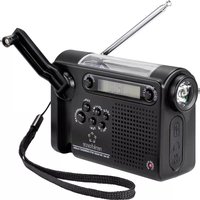
This emergency radio can be charged by either the built-in solar panel or hand crank and features an LED torch, LCD display, storage of up to 100 radio stations, headphone socket and USB port for charging mobile phones.
It is intended for indoor use only. Do not use it outdoors. Contact with moisture, e.g. in bathrooms, must be avoided under all circumstances.
For safety and approval purposes, you must not rebuild and/or modify this product. If you use the product for purposes other than those described, the product may be damaged. In addition, improper use can result in short circuits, fires, electric shocks or other hazards. Read the instructions carefully and store them in a safe place. Make this product available to third parties only together with its operating instructions.
This product complies with the statutory national and European requirements. All company names and product names are trademarks of their respective owners. All rights reserved.
Delivery content
• Emergency wind-up radio
- Strap
• Lithium rechargeable battery
- Hook
- USB charging cable
- Operating instructions
Up-to-date operating instructions
Download the latest operating instructions at www.conrad.com/downloads or scan the QR code shown. Follow the instructions on the website.
Explanation of symbols

The symbol with the lightning in the triangle is used if there is a risk to your health, e.g. due to an electric shock.

The symbol with the exclamation mark in the triangle is used to indicate important information in these operating instructions. Always read this information carefully.

The arrow symbol indicates special information and advice on operation.
Safety instructions

Read the operating instructions carefully and especially observe the safety information. If you do not follow the safety instructions and information on proper handling in this manual, we assume no liability for any resulting personal injury or damage to property. Such cases will invalidate the warranty/guarantee.

• The device is not a toy. Keep it out of the reach of children and pets.
- Do not leave the packaging material lying around carelessly. This may become dangerous playing material for children.
- Protect the appliance from extreme temperatures, direct sunlight, strong jolts, high humidity, moisture, flammable gases, steam, and solvents.
- Do not place the product under any mechanical stress.
- If it is no longer possible to operate the product safely, take it out of operation and protect it from any accidental use. Safe operation can no longer be guaranteed if the product:
- is visibly damaged,
- is no longer working properly,
- has been stored for extended periods in poor ambient conditions or
- has been subjected to any serious transport-related stress.
- Please handle the product carefully. Jolts, impacts, or a fall, even from a low height, can cause damage to the product.
- Consult an expert when in doubt about the operation, safety, or connection of the appliance.
- Maintenance, modifications, and repairs must only be completed by a technician or an authorised repair centre.
- If you have questions that remain unanswered by these operating instructions, contact our technical support service or other technical personnel.
Caution:
- To avoid damaging the components, do not attempt to open or repair the product without professional guidance.
- The operating range may be affected by environmental factors and nearby sources of interference.
• Proper use helps to prolong the lifespan of the product.

b) Connected devices
Also observe the safety and operating instructions of any other devices which are connected to the product.

c) (Rechargeable) batteries
- Correct polarity must be observed while inserting the (rechargeable) batteries.
- The (rechargeable) batteries should be removed from the device if it is not used for a long period of time to avoid damage through leaking. Leaking or damaged (rechargeable) batteries may cause acid burns when in contact with skin, therefore always use suitable protective gloves to handle damaged (rechargeable) batteries.
- (Rechargeable) batteries must be kept out of reach of children. Do not leave (rechargeable) batteries lying around, as there is risk that children or pets may swallow them.
- All (rechargeable) batteries should be replaced at the same time. Mixing old and new (rechargeable) batteries in the device can lead to (rechargeable) battery leakage and device damage.
- (Rechargeable) batteries must not be dismantled, short-circuited or thrown into fire. Never recharge nonrechargeable batteries. Risk of explosion!
Features
• Emergency alarm, torch and mobile phone charger
• Charges via solar panel or hand crank
• FM, AM and SW radio reception with automatic scanning
• Memory for storing 100 radio stations
- Clock and alarm clock
- 40mm speaker
- Earphone jack
• LCD display with backlight
• Large capacity 2000 mAh 3.7 V lithium-ion battery
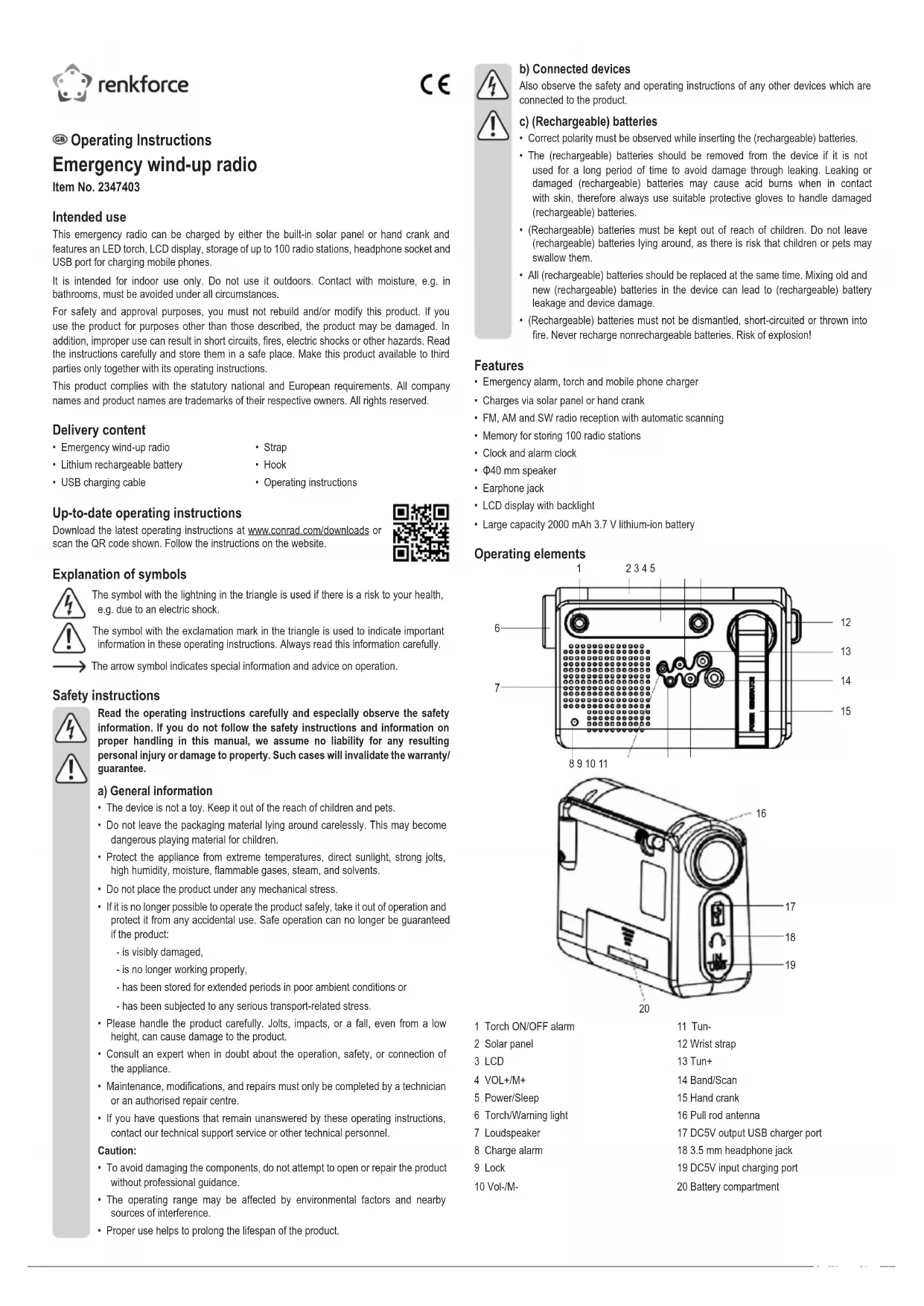
Operating elements
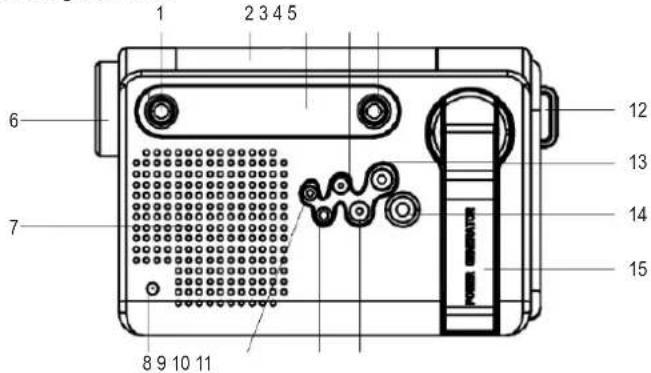
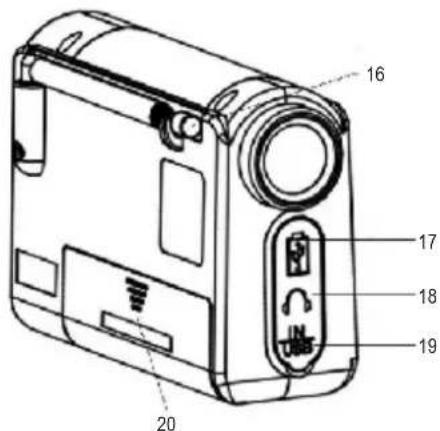
1 Torch ON/OFF alarm
2 Solar panel
3 LCD
4 VOL+/M+
5 Power/Sleep
6 Torch/Warning light
7 Loudspeaker
8 Charge alarm
9 Lock
10 Vol-/M-
11 Tun-
12 Wrist strap
13 Tun+
14 Band/Scan
15 Hand crank
16 Pull rod antenna
17 DC5V output USB charger port
18 3.5 mm headphone jack
19 DC5V input charging port
20 Battery compartment
LCD display symbols
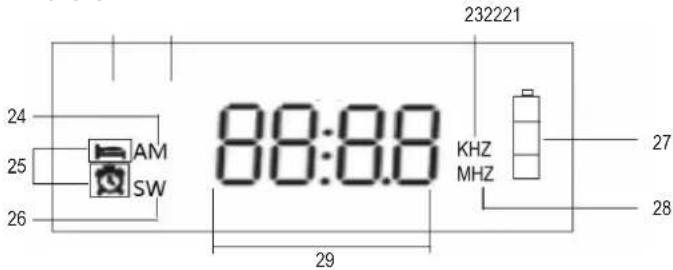
21 FM
25 Sleep time
22 Full automatic scanning and memory station
26 SW
23 AM unit
27 Battery symbol
28 FM, SW unit
24 AM
29 Frequency point/time/station address
Operation
a) Turning the radio on/off
- Open the battery compartment and insert the 2000 mAh battery, ensuring correct polarity. Remove the battery if the device is not going to be used for a long period. To continue use, charge the radio using the hand crank or solar panel for 5-10 minutes before inserting the battery.
- Close the battery compartment. The LCD display will show the time status.
- Press the Power key until 'On' is displayed. The radio is now turned on.
- Press the Power key again until 'Off' is displayed. The radio is now turned off.
b) Setting the sleep timer
- Press and hold the Sleep key until '90' is displayed, meaning that the radio will automatically power off after 90 minutes.
- Press the Sleep key again to switch between 80, 70, 60, 50, 40, 30, 20, 10 and Off to set the sleep timer as needed.
c) Using the antenna
• FM radio
Pull out the antenna and change its length and orientation to receive the best signal. If there is strong interference and two or more stations are being received at once, shorten the antenna.
• AM radio
A built-in magnetic antenna is used to receive medium-wave radio. The best signal may be achieved by rotating the direction of the radio unit rather than the antenna.
- SW radio
Pull out the antenna and change its length and direction to receive the best signal.
d) Broadcast receiving mode
Press the Band key to select the required receiving band modes, which consist of:
- FM: 87-108 MHz
• AM: 520-1710 kHz
• SW: 3-10 MHz (SW1), 10-18 MHz (SW2)
e) Listening to the radio
- Fine adjustment of minimum step values
Press the Tun+ or Tun- key to increase or decrease the radio frequency step value. The minimum step values are 0.1 MHz for FM, 9 kHz for AM and 0.005 MHz for SW.
• Automatic radio scan
Long press the Tun+ or Tun- key for 1 second to rapidly increase or decrease the radio frequency until a broadcast is automatically found.
• Full-automatic radio scan
Long press the Scan key to rapidly search between the lowest and highest frequencies for radio broadcasts and store them in the memory according to the address number (from P01 to P25).
f) Operating the radio
- Selecting a station
Press the M+ or M- keys to select the saved channels. If either of these keys are not pressed after 2 seconds, the radio will default to the station that was listened to last. If there are no saved channels, 'Em' (empty) will be displayed.
- Adjusting the volume
Long press the Vol+ or Vol- key to adjust the volume between the 31 levels.
- Radio lock
Long press the Lock key for 1 second to lock all key functions; will be displayed. Long press the Lock key again for 1 second to remove the lock.
- Charging the radio
-
Charging can be performed by either turning the hand crank clockwise or counterclockwise, connecting the DC5V charger or using the solar panel. When the battery is charging, the charging indicator will flash and the battery symbol will be displayed. When the battery is fully charged, the charging indicator will turn off and the battery symbol will show full charge.
-
Torch
Press the Torch On/Off key to use the torch.
- Emergency alarm
Long press the Alert On/Off key for 1 second to sound the emergency alarm. The torch and display will flash.
- USB charger
Plug the USB charging cable into the DC5V output port to charge a mobile phone or similar device.
- Adjust the time
Long press the Vol-key for 1 second and press the Tun+ and Tun-keys to adjust the time. Press the Vol-key to cycle between hours and minutes, and then press the Vol-key to confirm the time.
- Set the alarm clock
Press the Vol+ key to display the clock, press the Vol+ key again for 1 second and press the Tun+ and Tun- keys to adjust the alarm clock time. Press the Vol+ key to cycle between hours and minutes, and then press the Vol+ key to confirm the alarm clock time. When the radio turns on at the set alarm clock time, press any key to turn it off. If the alarm is not turned off, the alarm will sound continuously for 1 hour and then turn off automatically.
Care and cleaning
- Disconnect the product from the mains before cleaning.
- Do not use any aggressive cleaning agents, rubbing alcohol, or other chemical solutions as they can cause damage to the housing and functioning of the product.
- Clean the product with a dry, fibre-free cloth.
Conrad Electronic SE, Klaus-Conrad-Straße 1, D-92240 Hirschau hereby declares that this product conforms to the 2014/53/EU directive.
- Click on the following link to read the full text of the EU declaration of conformity: www.conrad.com/downloads
Enter the product item number in the search box. You can then download the EU declaration of conformity in the available languages.
Disposal
a) Product

This symbol must appear on any electrical and electronic equipment placed on the EU market. This symbol indicates that this device should not be disposed of as unsorted municipal waste at the end of its service life.
Owners of WEEE (Waste from Electrical and Electronic Equipment) shall dispose of it separately from unsorted municipal waste. Spent batteries and accumulators, which are not enclosed by the WEEE, as well as lamps that can be removed from the WEEE in a non-destructive manner, must be removed by end users from the WEEE in a non-destructive manner before it is handed over to a collection point.
Distributors of electrical and electronic equipment are legally obliged to provide free take-back of waste. Conrad provides the following return options free of charge (more details on our website):
• in our Conrad offices
• at the Conrad collection points
- at the collection points of public waste management authorities or the collection points set up by manufacturers or distributors within the meaning of the ElektroG
End users are responsible for deleting personal data from the WEEE to be disposed of.
It should be noted that different obligations about the return or recycling of WEEE may apply in countries outside of Germany.
b) (Rechargeable) batteries
Remove batteries/rechargeable batteries, if any, and dispose of them separately from the product. According to the Battery Directive, end users are legally obliged to return all spent batteries/rechargeable batteries; they must not be disposed of in the normal household waste.

Batteries/rechargeable batteries containing hazardous substances are labelled with this symbol to indicate that disposal in household waste is forbidden. The abbreviations for heavy metals in batteries are: Cd = Cadmium, Hg = Mercury, Pb = Lead (name on (rechargeable) batteries, e.g. below the trash icon on the left).
Used (rechargeable) batteries can be returned to collection points in your municipality, our stores or wherever (rechargeable) batteries are sold. You thus fulfil your statutory obligations and contribute to environmental protection.
Batteries/rechargeable batteries that are disposed of should be protected against short circuit and their exposed terminals should be covered completely with insulating tape before disposal.
Even empty batteries/rechargeable batteries can contain residual energy that may cause them to swell, burst, catch fire or explode in the event of a short circuit.
Technical data
Power supply......Built-in lithium-ion rechargeable battery (2000 mAh, 3.7 V)
USB port output.....Max. 5 V/DC, 2.4 A
Receiving frequency range..... FM: 87-108 MHz
AM: 520-1710 kHz
SW1: 3-10 MHz
SW2: 10-18 MHz
Receiving sensitivity ...... FM: 8 dB
AM: 86 dB
SW: 10 dB
Signal-noise ratio..... FM: 32 dB
AM: 20 dB
SW: 30 dB
Dimensions....120x 76 x 43 mm
Weight 208 g
F Mode d'emploi
c) Batterie (rechargeable)
20
b) Batterie (rechargeable)