KAOSS Replay - DJ Equipment KORG - Free user manual and instructions
Find the device manual for free KAOSS Replay KORG in PDF.



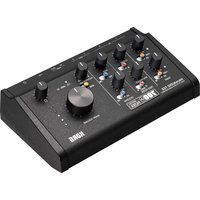
| Product type | Audio performance station with sampler and KAOSS effects |
| Brand | Korg |
| Model | KAOSS Replay |
| Dimensions (W x D x H) | 85 x 284 x 56 mm |
| Weight | 2.0 kg |
| Power supply | AC adapter 5V DC / 3 A (included) |
| Main functions | Audio clip playback, real-time KAOSS effects, recording and sampling, sequencer, trigger pad control |
| Audio inputs | LINE/PHONO (RCA), MIC (6.3 mm jack), AUX (3.5 mm mini-jack) |
| Audio outputs | LINE OUT (RCA), HEADPHONES (6.3 mm stereo jack) |
| Connectivity | USB micro-B (audio MIDI), MIDI IN/OUT (DIN 5-pin via USB), foot switch input (6.3 mm jack) |
| External storage | microSD / microSDHC card up to 32 GB (class 10 recommended) |
| Display | LCD screen (precision, may have always dark or bright pixels due to technical characteristics) |
| Included accessories | Quick start guide, microSDHC card, USB cable, AC adapter |
| Maintenance and cleaning | Clean with a clean, dry cloth. Do not use benzene, thinner, or flammable products. |
| Safety | Avoid exposure to sunlight, heat, moisture, dust. Do not place liquids nearby. Unplug if an object intrudes. |
| Spare parts and repairability | Contact your Korg dealer or authorized service center for any repair or spare part. |
Frequently Asked Questions - KAOSS Replay KORG
User questions about KAOSS Replay KORG
0 question about this device. Answer the ones you know or ask your own.
Ask a new question about this device
Download the instructions for your DJ Equipment in PDF format for free! Find your manual KAOSS Replay - KORG and take your electronic device back in hand. On this page are published all the documents necessary for the use of your device. KAOSS Replay by KORG.
USER MANUAL KAOSS Replay KORG
About the owner's manual En-3
About the HTML version of owner's manual....En-3
Setup En-3
Checking the accessories En-3
Connecting En-3
Specifications (Outline) En-5
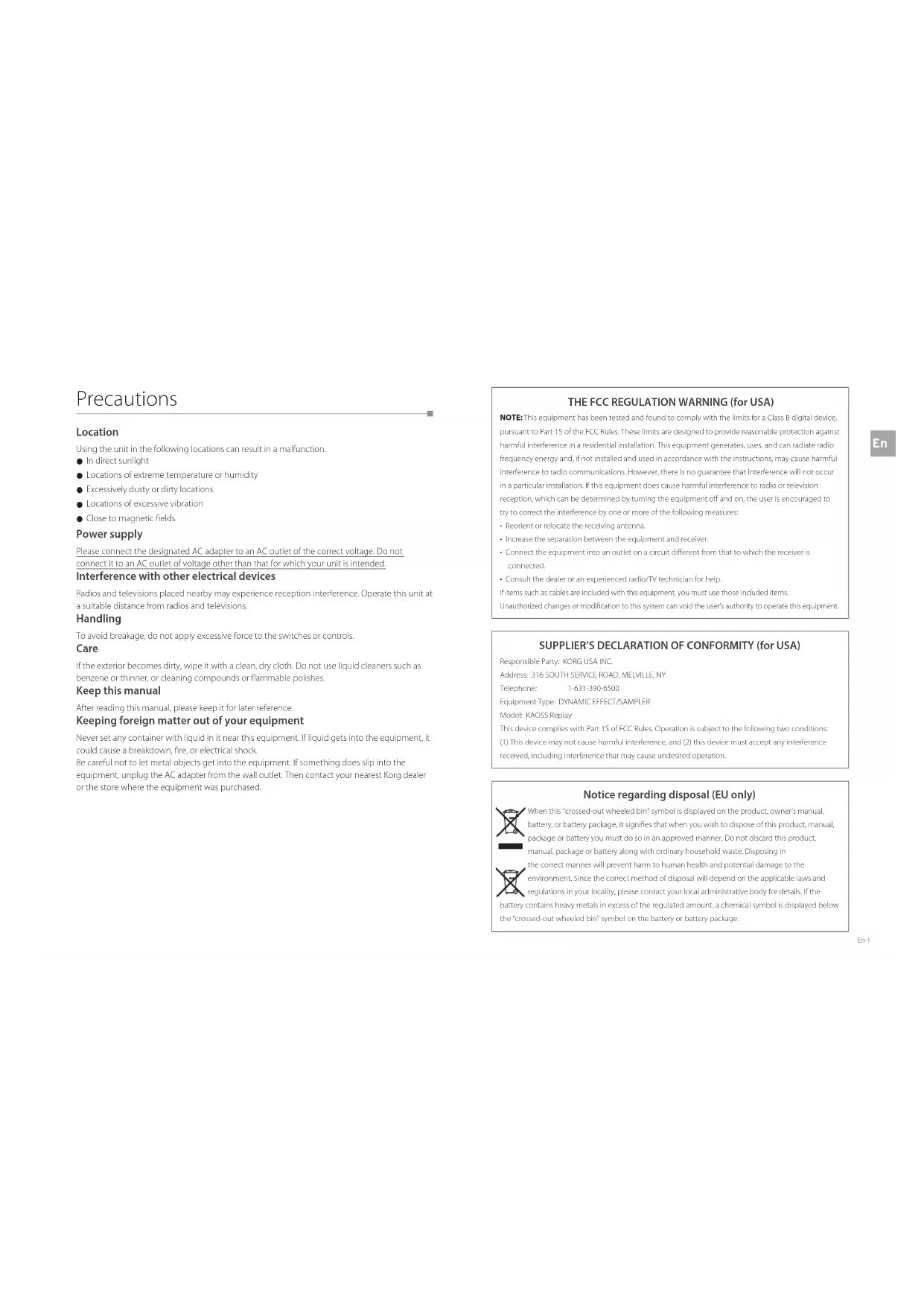
Using the unit in the following locations can result in a malfunction.
- In direct sunlight
● Locations of extreme temperature or humidity
● Excessively dusty or dirty locations
● Locations of excessive vibration - Close to magnetic fields
Power supply
Please connect the designated AC adapter to an AC outlet of the correct voltage. Do not connect it to an AC outlet of voltage other than that for which your unit is intended.
Interference with other electrical devices
Radios and televisions placed nearby may experience reception interference. Operate this unit at a suitable distance from radios and televisions.
Handling
To avoid breakage, do not apply excessive force to the switches or controls.
Care
If the exterior becomes dirty, wipe it with a clean, dry cloth. Do not use liquid cleaners such as benzene or thinner, or cleaning compounds or flammable polishes.
Keep this manual
After reading this manual, please keep it for later reference.
Keeping foreign matter out of your equipment
Never set any container with liquid in it near this equipment. If liquid gets into the equipment, it could cause a breakdown, fire, or electrical shock.
Be careful not to let metal objects get into the equipment. If something does sip into the equipment, unplug the AC adapter from the wall outlet. Then contact your nearest Korg dealer or the store where the equipment was purchased.
THE FCC REGULATION WARNING (for USA)
NOTE: This equipment has been tested and found to comply with the limits for a Class B digital device, pursuant to Part 15 of the FCC Rules. These limits are designed to provide reasonable protection against harmful interference in a residential installation. This equipment generates, uses, and can radiate radio frequency energy and, if not installed and used in accordance with the instructions, may cause harmful interference to radio communications. However, there is no guarantee that interference will not occur.
in a particular installation, if this equipment does cause harmful interference to radio or television reception, which can be determined by turning the equipment off and on, the user is encouraged to try to correct the interference by one or more of the following measures:
• Reorient or relocate the receiving antenna.
+ Increase the separation between the equipment and receiver
- Connect the equipment into an bullet on a circuit different from that to which the receiver is connected.
- Consult the dealer or an experienced radio/IV technician for help.
If items such as cables are included with this equipment, you must use these included items.
Unauthorized changes or modification to this system can void the user's authority to operate this equipment.
SUPPLIER'S DECLARATION OF CONFORMITY (for USA)
Responsible Party: KORG USA, INC.
Address: 316 SOUTH SERVICE ROAD, MELVILLE, NY
Telephone: 1-631-390-6500
Equipment Type: DYNAMIC EFFECT/SAMPLER
Model: KAOSS Replay
This device complies with Part 15 of FCC Rules. Operation is subject to the following two conditions:
(1) This device may not cause harmful interference, and (2) this device must accept any interference received, including interference that may cause undes red operation.
Notice regarding disposal (EU only)

When this "crossed-out wheeled bin" symbol is displayed on the product, owner's manual, battery, or battery package, it signifies that when you wish to dispose of this product, manual, package or battery you must do so in an approved manner. Do not discard this product, manual, package or battery along with ordinary household waste. Disposing in

the correct manner will prevent harm to human health and potential damage to the environment. Since the correct method of disposal will depend on the applicable laws and regulations in your locality, please contact your local administrative body for details. If the
battery contains heavy metals in excess of the regulated amount, a chemical symbol is displayed below the "crossed-out wheeled bin" symbol on the battery or battery package.
IMPORTANT NOTICE TO CONSUMERS
This product has been manufactured according to strict specifications and voltage requirements that are applicable in the country in which it is intended that this product should be used. If you have purchased this product via the internet, through mail order, and/or via a telephone sale, you must verify that this product is intended to be used in the country in which you reside.
WARNING: Use of this product in any country other than that for which it is intended could be dangerous and could invalidate the manufacturer's or distributor's warranty.
Please also retain your receipt as proof of purchase otherwise your product may be disqualified from the manufacturer's or distributor's warranty.
Regarding the LCD screen
The KAOSS Replay LCD screen is a precision device, and careful attention has been paid to its product quality. Although you may notice some of the issues listed below, please be aware that these are due to the characteristics of LCD screens, and are not malfunctions.
● There may be pixels in the screen that are always dark (unit) or always bright (lit).
● Depending on the displayed content, the brightness of the screen may appear uneven.
● Depending on the displayed content, horizontal stripes of shading may be visible.
● Depending on the displayed content, flickering or moire patterns may be visible.
Data handling
Incorrect operation or malfunction may cause the contents of memory to be lost, so we recommend that you save important data on USB storage devices or other media. Please be aware that Kong will accept no responsibility for any damages which may result from loss of data.
COPYRIGHT WARNING
- This professional device is intended only for use with works for which you yourself own the copyright, for which you have received permission from the copyright holder to publicly perform, record, broadcast, sell, and duplicate, or in connection with activities which constitute "fair use" under copyright law.
If you are not the copyright holder, have not received permission from the copyright holder, or have not engaged in fair use of the works, you may be violating copyright law, and may be liable for damages and penalties.
KORG TAKES NO RESPONSIBILITY FOR ANY INFRINGEMENT COMMITTED THROUGH USE OF KORG PRODUCTS.
- The content that is built into this product or included with it may not be extracted, recorded, or stored in a form similar to its original state, and distributed or made publicly available on the internet.
The content of this product (such as sound programs, style data, accompaniment patterns, MIDI data, PCM sample data, audio data, operating system etc.) is the copyrighted property of KORG Inc. or is copyrighted material used by KORG Inc. under license from a third party.
You do not need permission from KORG Inc. to use the above content to produce or perform musical works, or to record and distribute such works.
* All product names and company names are the trademarks or registered trademarks of their respective owners.
Introduction
Thank you for purchasing the KORG KAOSS Replay.
To take full advantage of this product's functions and ensure you enjoy long and continued use, please read this manual carefully before use.
About the owner's manual
The KAOSS Replay comes with the following owner's manuals:
Only the Quick Start Guide includes a printed version.
● Quick Start Guide (This book: Printed version, PDI)
- Owner's manual (HTML)
| About the HTML version of owner's manual
Please view the HTML version of the owner's manual on the KORG website.
It can be viewed on a PC, smartphone, tablet, or similar devices that are connected to the Internet. It is also useful when you want to check more detailed ways to use this unit, or when you want to search for technical terms.
https://korg.com/html_manual/kaoss:replay/
Setup
| Checking the accessories
This unit includes the following accessories:
- Quick Start Guide
- microSDHC Card (inserted into the microSD card slot of the main body at time of shipment.)
● USB cable (Type-A to Micro USB Type-B) - AC adapter
| Connecting
This section describes how to connect an audio player or musical instrument to this unit, output sound through speakers or headphones, and start playing.

NOTE
- Make sure that all devices are turned off before connecting. A careless operation may cause an electric shock, damage the speaker system, or result in a malfunction.
- If you connect an electric guitar or electric bass directly to this unit, loud noises may be generated. We recommend that you connect such a device to this unit via a direct box or amp simulator.
- When connecting this unit to your Windows PC using the USB cable to use USB AUDIO, install the KORG KaossReplay Audio Driver.
Download the software from the KORG website.
- Connect the included AC adapter cable to the [DC IN] jack on the rear panel of the unit.
- Plug the AC adapter to an outlet.
- Connect instruments and external devices as needed.
(Connection example)
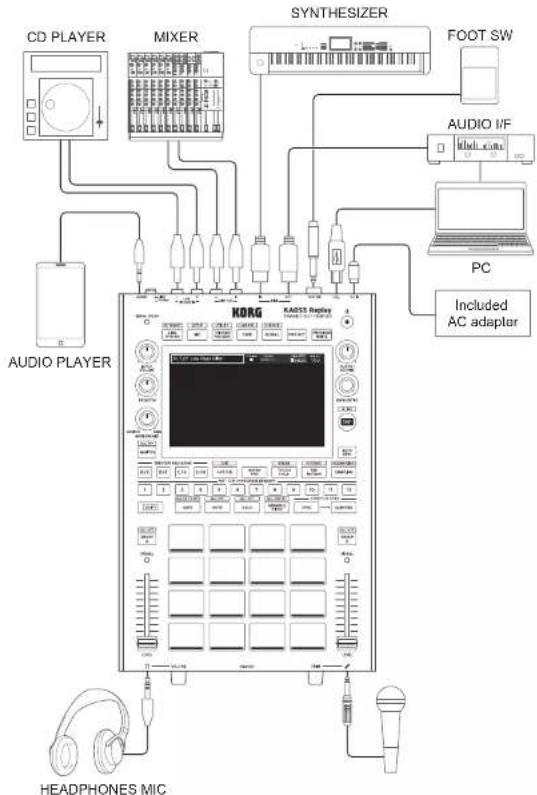
flowchart
graph TD
    A["CD PLAYER"] --> B["MIXER"]
    B --> C["SYNTHESIZER"]
    C --> D["FOOT SW"]
    D --> E["AUDIO I/F"]
    E --> F["PC"]
    F --> G["Included AC adapter"]
    H["AUDIO PLAYER"] --> I["KORG KADS Adapter"]
    I --> J["HEADphones MIC"]
    I --> K["Ground"]

NOTE
Use a cable that's no more than 3 m long when connecting your external devices to this unit.
4. Set the volume of all the devices to the minimum level.
To adjust the volume of this unit, use the following keys.
- Adjustment of input volume level
[LINE/PHONO IN]: [INPUT VOLUMF] knob
[MIC] jack: [MICTRIM] knob
• Adjustment of output volume level
- [AUX IN] input and [LINE OUT]: [OUTPUT VOLUME] knob
- GROUP A(/B): LEVEL] fader of GROUP A(/B)
- Headphones: [PHONES VOLUME]: knob
5. Turn on this unit and the external device.

NOTE
Be sure to follow the order described below. If an excessively loud sound is output, it may lead to a hearing impairment or device failure.
- Turn the unit/devices on in the following order: input device -> this unit -> output device
- Turn the unit/devices off in the following order: output device -> this unit -> input device
• [POWER] switch: Turns the unit on and off
(To turn the power off, hold down this switch for a few seconds.)
6. Adjust the volume of the [LINE/PHONO IN] jack.
- Press the [LINE/PHONO] button (the button lights up), and turn on the LINE/PHONO input.
- Play the input device such as a CD player.
- Adjust the volume level using the [INPUT VOLUME] knob until the [SIGNAL/PEAK] LED momentarily lights up red.
![KORG KAOSS Replay - Adjust the volume of the [LINE/PHONO IN] jack. - 1](/content/2026/04/660776/images/970361895519b84b64970bc1ba613bc36cdd657b9f93f9fe4000359a645fa4e2.jpg)
HINT
- If the LED does not light up, also adjust the output volume of the CD player or other devices.
• To connect a record player, set the [INPUT SEL] switch to [PHONO] (pressed state).
* Before operating the [INPUT SEL] switch, be sure to set the volume of this unit and the connected devices to the minimum level.
- Use the [PHONO GAIN] switch to adjust the gain as needed.
* Before operating the [PHONO GAIN] switch, be sure to turn off this unit and all the devices connected to this unit.
7. Adjust the level of the microphone connected to the [MIC] jack.
- Press the [M/C] button (which lights up), and turn on the microphone input.
- While holding down the [SHIFT] button, press the [MIC] button. The "Mic Setup" screen is displayed.
- Adjust the input level using the [MIC TRIM] knob until the "CLIP" indicator on the screen momentarily lights up red.
8. Play Demo Project.
Use the Demo sound source in the SD card to output sound.
- Check that the following knobs are set to the minimum level (turned all the way to the left).
• [OUTPUTVOLUME]: knob
• IP HONES VOLUME: knee - Press the trigger pad that is lit to play an audio clip (audio).
- If you press any trigger pad, an audio clip is played.
- The method for making sound differs depending on which color the trigger pad lights up.
- Turn the [OUTPUT VOLUME] knob and [PHONES VOLUME] knob slowly clockwise to adjust the output volume level.
- Adjust the output volume level to the powered speakers or headphones.
- If no MAN OUT sound is outout from the [PHONES] jack, turn the [MONITOR MIX] knob to the MAN side.
9. Adjust the volume level of the output devices such as the powered speakers and headphones.
- If no sound is produced from the output device connected to the LINE OUT jack, check whether the volume on the output side is appropriately adjusted.
Specifications (Outline)
| Audio input LINE/PHONG | IN jack: RCA pin jack (Selco, LINE or PHONO.) |
| PHONO GAIN switch (.0/H) | |
| MIC IN jack: Standard phone jack (p 6.3 mm; monaural TS)* Exclusive for Dynamic Microphone | |
| AUX IN jack: Stereo mini jack (p 3.5 mm)* Mix directly to LINE OUT. | |
| Audio output LINE OUT | Jack RCA pin jack |
| HEADPIONES jack: Standard stereo phone jack (p 6.3 mm) | |
| Controller input FOOT SW | Jack Standard phone jack (p 6.3 mm, TS)* Connect the optional PS-1 or PS-3. |
| USB jack micro8 (MIDI), Audio (IN x 2ch, OUT x 34ch (48 kHz/16 bits, You need to installthe KORS KoversReplay Audio Driver in the Windows environment)) | |
| MIDI jack IN/OUT (DIN scn); and the MIDI function are exclusive to the USB jack (IN x 1port, OUT x 1 port). | |
| External storage microSD | card, microSD IC card (32GB Max)* Class10 or higher, UIIS-I (UI); recommended (However, this does notguarantee operations with all cards.) |
| Product dimensions 185 | W) x 284 (D) x 56 (l l) mm |
| Product weight 2.0 kg | * Excluding microSD card and AC adapter. |
| Power supply DC 5V/3A | |
| Accessories Owner's manual | ual (Quick Start Guide) |
| AC adapter* | |
| USB cable (Type A to micro8, 1 m) | |
| microSD IC Card (inserted into the microSD card slot of the main body at timeof shipment.) | |
• The specifications are subject to change without notice for the purpose of improvement.
- Various names, company names, product names, etc., described in the text are trademarks or registered trademarks of their respective companies. Some ^™ and ^* marks are not used in the text.
Précautions
Emplacement
[LINE/PHONO IN]: commande [NPUT VOLUME]
Prise [MIC]: commande MICTRIM
This warranty is valid only in Japan.
This Product is only suitable for sale in Japan. Properly qualified service is not available for this product if purchased elsewhere. Any unauthorised modification or removal of original serial number will disqualify this product from warranty protection.
お客様相談窓口

0570-666-569
This product has been manufactured according to strict specifications and voltage requirements that are applicable in the country in which it is intended that this product should be used. If you have purchased this product via the internet, through mail order, and/or via a telephone sale, you must verify that this product is intended to be used in the country in which you reside.
WARNING: Use of this product in any country other than that for which it is intended could be dangerous and could invalidate the manufacturer's or distributor's warranty. Please also retain your receipt as proof of purchase otherwise your product may be disqualified from the manufacturer's or distributor's warranty.
REMARQUE IMPORTANTE POUR LES CLIENTS

- Power supply
- Interference with other electrical devices
- Handling
- Care
- Keep this manual
- Keeping foreign matter out of your equipment
- THE FCC REGULATION WARNING (for USA)
- SUPPLIER'S DECLARATION OF CONFORMITY (for USA)
- Notice regarding disposal (EU only)
- IMPORTANT NOTICE TO CONSUMERS
- Regarding the LCD screen
- Data handling
- COPYRIGHT WARNING
- Introduction
- About the owner's manual
- | About the HTML version of owner's manual
- Setup
- | Checking the accessories
- | Connecting
- Set the volume of all the devices to the minimum level.
- Turn on this unit and the external device.
- Adjust the volume of the [LINE/PHONO IN] jack.
- Adjust the level of the microphone connected to the [MIC] jack.
- Play Demo Project.
- Adjust the volume level of the output devices such as the powered speakers and headphones.
- Précautions
- Emplacement
- REMARQUE IMPORTANTE POUR LES CLIENTS
Brand : KORG
Model : KAOSS Replay
Category : DJ Equipment