PS391 - Shredder Duronic - Free user manual and instructions
Find the device manual for free PS391 Duronic in PDF.



| Brand | Duronic |
| Model | PS391 |
| Product Type | Document Shredder |
| Cutting Capacity | Up to 3 A4 sheets / 6 A6 sheets |
| Input Width | 115 mm |
| Operating Cycle | 2 minutes 30 seconds maximum |
| Functions | Auto, Forward, Reverse, Stop |
| Motor Protection | Automatic protection circuit in case of jam or overload |
| Indicator Light | Present (operation indicator) |
| Power Supply | European plug (230V) |
| Warranty | 1 year (Shine-Mart Ltd) |
| Recommended Use | Home use |
| Cleaning | Turn off and unplug before cleaning. Do not use sprays. |
| Safety | 4-position switch, automatic stop, finger protection (do not insert hands) |
Frequently Asked Questions - PS391 Duronic
User questions about PS391 Duronic
0 question about this device. Answer the ones you know or ask your own.
Ask a new question about this device
Download the instructions for your Shredder in PDF format for free! Find your manual PS391 - Duronic and take your electronic device back in hand. On this page are published all the documents necessary for the use of your device. PS391 by Duronic.
USER MANUAL PS391 Duronic
Creative Consumer Products

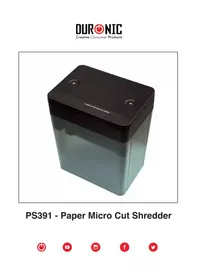
PS391 - Paper Micro Cut Shredder


Contents
English Manual 3
-
Never allow children to shred or to play with the paper shredder, or else, serious injury could occur.
-
Do not place hands or fingers into the shredde, as it could result in serious injury.
-
Never spray canned air or any type of lubricant into the shredder, while the shredder is plugged in.
-
Never place any lubricants or cleaning solutions into the paper shredder, as it could result in serious injury.
-
Keep all loose articles of clothing; ties, jewelry, hair or other items away from the feed opening, in order to prevent injury.
-
Remove all paper clips and staples from paper before shredding. The shredder will cut staples and small paper clips, however, discretion is recommended.
-
Keep the shredder turned off or unplugged, when not in use for prolonged periods of time.
-
When manually changing feed direction, pause long enough for the motor to stop, to avoid possible damage to the motor.
-
Turn off and unplug the shredder prior to moving, cleaning or emptying the wastebasket.
-
Empty the wastebasket frequently to avoid possible paper jams caused by shredded material being pulled back into the cutter assembly.
Setup
-
After removing all of the packing material from the shredder, place the wastebasket on a flat surface The shredder head can now be placed on top of the wastebasket. The wastebasket is designed to accept the shredder head, in either direction. Ensure the shredder head fits flush on top of the wastebaske
-
Plug the power cord into a standard 230-240V AC outlet, which is installed near the shredder.
-
To open and power on the shredder, place thumbs in the recess areas on the top cover and slide the cover towards the read until the feed opening and switch selector is accessible.
-
Place the switch in the auto position. The Power LED will light up, which means, the shredder is ready to use.
Operation
With the electrical cord plugged in, the switch in the auto position and the shredder assembled, the power LED will light up.
This means the the shredder is now set for operation.
When paper is inserted into the feed opening, the shredding process will start, and stop when the paper has completed its travel through the feed opening.
The main switch is located on the top of the shredder, the main switch has four settings.
- When the auto switch is selected, the shredding process will start when paper is inserted into the feed opening and will continue until it has passed through the opening.
- The reverse switch is used to assist in the removal of a paper jam, which reverses the shredding process, prior to a completed forward cycle. When switching from auto to reverse, always stop in the off position, in order to prevent possible damage to the motor.
- The off Position is also used to terminate the AC power to the shredder. It is recommended to slide to the off position, while emptying the wastebasket or when the shredder is not in use for a prolonged period of time.
- The forward switch is used to assist in clearing any excess paper from the cutter after the completion of a shred cycle.
Shredder Capacity
The PS391 will shred up to 3 sheets of A6 paper, and will accept paper widths up to 115mm.
When shredding small materials like envelopes or receipts, insert them into the middle of the paper feed opening.
Note
The Power LED will not light up if the unit is in the off position, or if the shredder head is not positioned on top of the wastebasket.
Paper Jams and Motor Overload Protection Circuit
The PS391 is equipped with an automatic motor overload protection circuit. The manufacturer's suggested running time at maximum capacity is 3 sheets of A4 / 6 sheets of A6 paper. The continuous running time is 2 minutes on and 30 minutes off. The PS391 will automatically terminate power in case of the following abnormal situations:
- Operating the shredder at the maximum 3-sheet A4 paper capacity continuously for a prolonged period of time.
- Exceeding the shredding capacity, eg, inserting more than 3 sheets of A4 paper in one pass, or if the paper is not fed squarely into the feed opening.
Both abnormal operations might result in the activation of the automatic thermal motor overload protection circuit, which terminates the power to the shredder.
A paper jam could cause the thermal motor overload protection to terminate AC Power to the motor. Never allow the shredder to remain in a jammed condition with the AC power turned on.
In case of a minor paper jam:
- Place the slide switch into the reverse position and pull the remaining sheets of paper out of the feed opening. Remove the un-shredded portion of paper from the top and clear any excess paper shreds from the feed opening. Be sure to keep fingers and personal effects from the throat of the feed opening, while the shredder cutters are in motion.
In case of a major paper jam:
- Place the main switch into the off position or unplug the power cord from the AC outlet and wait at least 30 minutes for the thermal overload protection to reset.
-
Plug in the AC power cord and place the switch into the auto position. If paper was left inside the feed opening prior to the overload, place the switch into the reverse position and grasp the excess paper from the top and pull it out. Be careful not to place fingers near the feed opening, or it could result in serious harm. Clear excess paper shreds from the feed opening.
-
The paper shredder is now ready to be used.
DURONIC
Warranty
1 Year Guarantee from Shine-Mart Ltd, Trademark owners of Duronic Products.
NOTE: THESE STATEMENTS DO NOT AFFECT YOUR STATUTORY RIGHTS AS A CONSUMER
This product has been manufactured under the strictest or quality control procedures, and using the highest quality of materials, to ensure excellent performance and reliability. It will give very good and long lasting service, provided it is properly used and maintained. The product is guaranteed for 1 years from the date of original purchase. If any defect arises due to a faulty materials or poor workmanship, the faulty product must be returned to the original place of purchase. Refund or replacement is at the discretion of that company.
Duronic Products are offered with a 1 year guarantee under the following conditions:
- The product must be returned to the retailer with original proof of purchase.
- The product must be installed and used in accordance with the instructions contained in this operating manual.
- It must be used only for domestic purposes.
- It does not cover wear and tear, malicious damage, misuse, neglect, inexpert repairs or consumable parts.
- Shine-Mart Ltd has no responsibilities for accidental or consequential loss or damage.
- Shine-Mart Ltd are not liable to carry out any type of servicing work, under the guarantee
- Valid in the UK only
This product is fitted with CE:1363 plug and fuse Imported by Shine-Mart Ltd, RM3 8SB

Information on waste Disposal for Consumers of Electrical & Electronic Equipment.
This mark on a product and/or accompanying documents indicates that when it is to be disposed of, it must be treated as Waste Electrical & Electronic Equipment, (WEEE).
Any WEEE marked products must not be mixed with general household waste, but kept separate for the treatment, recovery and recycling of the materials used.
For proper treatment, recovery and recycling; please take all WEEE marked waste to your Local Authority Civic waste site, where it will be accepted free of charge.
If customers dispose of Waste Electrical & Electronic Equipment correctly, they will be helping to save valuable resources and preventing any potential negative effects upon human health and the environment, of any hazardous materials that the waste may contain.
Follow Us




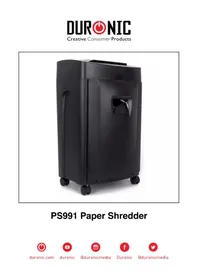
Brand : Duronic
Model : PS391
Category : Shredder