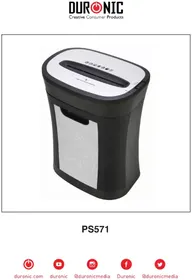
PS571 - Shredder Duronic - Free user manual and instructions
Find the device manual for free PS571 Duronic in PDF.

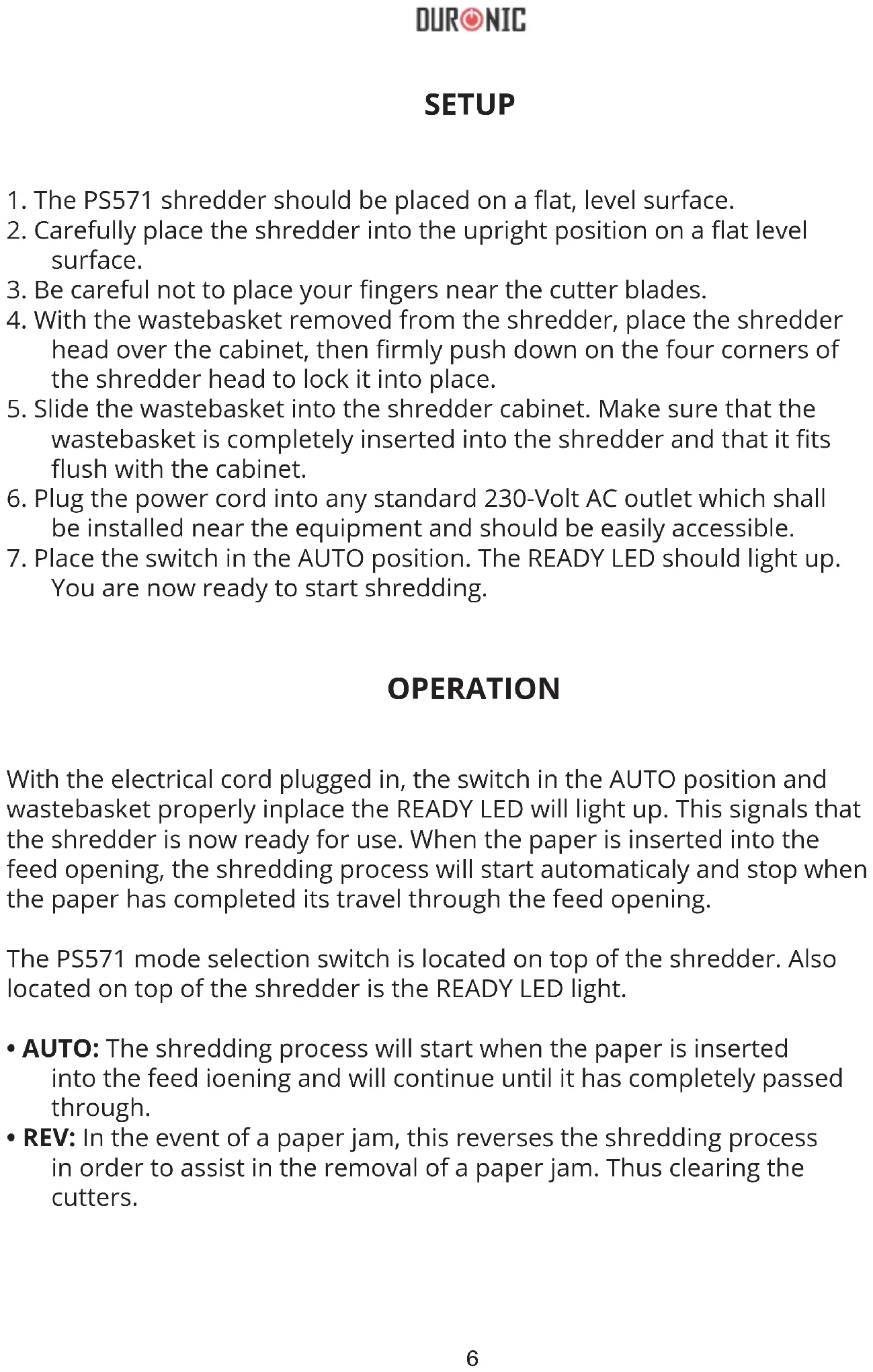


| Product type | Document shredder |
| Brand | Duronic |
| Model | PS571 |
| Cut type | Cross cut (4 x 33 mm) |
| Sheet capacity | 10-12 sheets (80 g/m² A4) or 1 credit card |
| Throat width | 220 mm |
| Run cycle | 2 minutes on / 30 minutes off |
| Power supply | 220-240 V |
| Main functions | Auto start (AUTO), reverse (REV), stop (OFF) |
| Indicator light | READY indicator light to confirm bin insertion and power on |
| Overload protection | Automatic shut-off in case of jam or overheating |
| Document types destroyed | Paper, envelopes, receipts, credit cards |
| Care and cleaning | Unplug before cleaning; use lukewarm water and a soft cloth for the exterior and bin |
| Safety instructions | Do not insert fingers into the opening; keep out of reach of children; do not use flammable liquids |
| Warranty | 1 year (under conditions, household use) |
| Intended use | Indoor only, household use |
| Included accessories | Waste bin, power cable, European plug |
Frequently Asked Questions - PS571 Duronic
User questions about PS571 Duronic
0 question about this device. Answer the ones you know or ask your own.
Ask a new question about this device
Download the instructions for your Shredder in PDF format for free! Find your manual PS571 - Duronic and take your electronic device back in hand. On this page are published all the documents necessary for the use of your device. PS571 by Duronic.
USER MANUAL PS571 Duronic
Creative Consumer Products

PS571

duronic.com

duronic

@duronicmedia

Duronic

@duronicmedia
DURONIC
Contents
English Manual 4
SPECIFICATIONS
Shred Type: Crosscut Shred Size: 4mm x 33mm Shredding Capacity: 12 Sheets Duty Cycle: 2 min ON / 30 min OFF Feed Opening: 220mm Input: 220 - 240V, 50-60Hz, 2A
SETUP
- The PS571 shredder should be placed on a flat, level surface.
- Carefully place the shredder into the upright position on a flat level surface.
- Be careful not to place your fingers near the cutter blades.
- With the wastebasket removed from the shredder, place the shredder head over the cabinet, then firmly push down on the four corners of the shredder head to lock it into place.
- Slide the wastebasket into the shredder cabinet. Make sure that the wastebasket is completely inserted into the shredder and that it fits flush with the cabinet.
- Plug the power cord into any standard 230-Volt AC outlet which shall be installed near the equipment and should be easily accessible.
- Place the switch in the AUTO position. The READY LED should light up. You are now ready to start shredding.
OPERATION
With the electrical cord plugged in, the switch in the AUTO position and wastebasket properly inplace the READY LED will light up. This signals that the shredder is now ready for use. When the paper is inserted into the feed opening, the shredding process will start automatically and stop when the paper has completed its travel through the feed opening.
The PS571 mode selection switch is located on top of the shredder. Also located on top of the shredder is the READY LED light.
- AUTO: The shredding process will start when the paper is inserted into the feed ioening and will continue until it has completely passed through.
- REV: In the event of a paper jam, this reverses the shredding process in order to assist in the removal of a paper jam. Thus clearing the cutters.
DURONIC
- OFF: It is recommended to turn the shredder off when it is not being used for a prolonged period of time.
- READY: When the READY LED is lit up, it lets the user know that the wastebasket is correctly inserted and the shredder is on and ready for use. If the READY LED does not light up, make sure the shredder is plugged in and the wastebasket is inserted correctly.
CAPACITY
The PS571 will shred up to 12 sheets up paper and will accept paper widths up to 220mm. When shredding envelopes, receipts or credit cards, insert them into the middle of the feed opening.
PAPER JAMS AND OVERLOADS
The PS571 is equipped with an automatic motor overload protection circuit. The duty cycle for the PS571 is rated for 2 Min ON / 30 Min OFF. The PS571 will automatically terminate power in case of the following situations.
- Operating the shredder at the maximum capacity of twelve (12) sheets continuously for a prolonged period of time.
- Exceeding the shredding capacity by inserting more than 12 sheets of paper in one pass or if the paper is not fed squarely into the feed opening.
Both abnormal operations may result in the activation of the automatic thermal motor overload protection circuit, which terminates the power to the shredder. A paper jam could cause the thermal motor overload protection to terminate AC to power the motor. Never allow the shredder to remain in a jammed condition with the AC power turned on. If this occurs you should:
In case of a minor paper jam:
Place the switch in the REV and pull the remaining sheets of paper out of the feed opening. Remove the excess portion of paper from the top and clear any excess paper shreds from the feed opening. When the excess paper has been removed, place the switch back into the AUTO position.
In case of a major paper jam:
- Turn off or unplug the power cord from the AC outlet and wait at least 30 minutes for the thermal overload protection to reset.
- Plug in the AC power cord and place the switch back into the AUTO position. If paper was left inside the feed opening prior to the overload, place the switch in REV and grasp the excess paper from the top and pull it out. Be careful not to place your fingers near the feed opening or serious harm could occur.
- Place the switch back into the AUTO position. You are now ready to resume normal shredding.
SAFETY INFORMATION
Important - Please read these instructions fully before installation
BEFORE USE
- Dispose of all packaging carefully and responsibly.
- This appliance is designed for indoor use only. Do not use outdoors.
- Do not use this shredder for industrial and commercial use, or any other purpose.
- The shredder MUST be positioned on a firm level base before and during use.
- Ensure the power cable is not caught under the appliance.Des
- Ensure the correct power supply is used (230V AC).
- Keep power cord away from hot surfaces.
- Do not place the shredder near a heat source or in direct sunlight.
DURONIC
- Do not operate under or near curtains or other combustible materials.
- Do not immerse the machine in water or any other liquid to protect against electric shock.
- Keep out of reach of children.
- Do not spray any flammable synthetic oil, petroleum-based or aerosol products onto this shredder as it may cause a fire.
- Do not allow the shredder to be exposed to rain or any other moisture.
DURING USE
- WARNING! Keep loose articles of clothing; ties, jewellery, hair or other objects away from the feed opening in order to prevent injury.
- Never insert fingers into the feed opening. Serious injury may result!
- This appliance is not intended for use by persons (including children) with reduced physical, sensory or mental capabilities, or lack of experience and knowledge, unless they have been given supervision or instruction concerning use of the appliance by a person responsible for their safety.
- Do not leave children unattended with the shredder.
- ALWAYS keep the shredder off and unplugged when not in use.
- DO NOT attempt to feed more sheets of paper into the feeder than specified.
- ALWAYS limit continuous shredding to the specified time as suggested in the instruction manual.
- DO NOT attempt to shred materials other than paper and credit cards in the provided feed slot.
- To avoid overheating the shredder, limit continuous shredding to the specified time as suggested in this instruction manual.
- Do not operate the shredder if the cord or plug are damaged or if the shredder has malfunctioned in any way.
- ALWAYS unplug the shredder when moving, cleaning or emptying the wastebasket.
- DO NOT attempt to operate the shredder if the shredder is experiencing any kind of problem.
- If your machine stops working, do not attempt to repair it yourself! Contact Duronic (Shine-Mart) for assistance.
CLEANING AND MAINTENANCE
Important: Always unplug the appliance from the power socket during cleaning and maintenance.
- Never use any sharp instruments or abrasive substances, soap, household cleaner, detergent or wax polish for cleaning.
- Never clean the appliance with flammable fluids. It could cause a damage and fire hazard.
- Use lukewarm water on a cloth to clean the cabinet and wastebasket of the appliance and wipe it dry.
- Ensure the unit is dry before connect to the mains

DURONIC
Warranty
1 Year Guarantee from Shine-Mart Ltd, Trademark owners of Duronic Products. NOTE: THESE STATEMENTS DO NOT AFFECT YOUR STATUTORY RIGHTS AS A CONSUMER
This product has been manufactured under the strictest or quality control procedures, and using the highest quality of materials, to ensure excellent performance and reliability. It will give very good and long lasting service, provided it is properly used and maintained. The product is guaranteed for 1 years from the date of original purchase. If any defect arises due to a faulty materials or poor workmanship, the faulty product must be returned to the original place of purchase. Refund or replacement is at the discretion of that company.
Duronic Products are offered with a 1 year guarantee under the following conditions:
- The product must be returned to the retailer with original proof of purchase.
- The product must be installed and used in accordance with the instructions contained in this operating manual.
- It must be used only for domestic purposes.
- It does not cover wear and tear, malicious damage, misuse, neglect, inexpert repairs or consumable parts.
- Shine-Mart Ltd has no responsibilities for accidental or consequential loss or damage.
- Shine-Mart Ltd are not liable to carry out any type of servicing work, under the guarantee
- Valid in the UK only

This product is fitted with CE:1363 plug and fuse Imported by Shine-Mart Ltd, RM3 8SB

Information on waste Disposal for Consumers of
Electrical & Electronic Equipment.
This mark on a product and/or accompanying documents indicates that when it is to be disposed of, it must be treated as Waste Electrical & Electronic Equipment, (WEEE).
Any WEEE marked products must not be mixed with general household waste, but kept separate for the treatment, recovery and recycling of the materials used.
For proper treatment, recovery and recycling; please take all WEEE marked waste to your Local Authority Civic waste site, where it will be accepted free of charge.
If customers dispose of Waste Electrical & Electronic Equipment correctly, they will be helping to save valuable resources and preventing any potential negative effects upon human health and the environment, of any hazardous materials that the waste may contain.
Follow Us

duronic.com

duronic

@duronicmedia

Duronic

@duronicmedia
Spécifications
Voltage:220-240V,50-60Hz,2A
DURONIC
Installation
TECHNISCHE DATEN
ESPECIFICACIONES
SPECIFICHE
SPECYFIKACJA
- CREATIVE CONSUMER PRODUCTS
- CONTENTS
- SPECIFICATIONS
- SETUP
- OPERATION
- DURONIC
- CAPACITY
- PAPER JAMS AND OVERLOADS
- IN CASE OF A MINOR PAPER JAM
- IN CASE OF A MAJOR PAPER JAM
- SAFETY INFORMATION
- BEFORE USE
- DURING USE
- CLEANING AND MAINTENANCE
- WARRANTY
- FOLLOW US
- SPÉCIFICATIONS
- INSTALLATION
- TECHNISCHE DATEN
- ESPECIFICACIONES
- SPECIFICHE
- SPECYFIKACJA
Brand : Duronic
Model : PS571
Category : Shredder