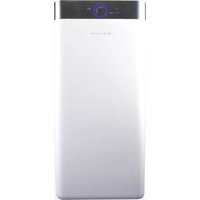
USER MANUAL EPUR660 EAS Electric
natural_image
Abstract geometric pattern of dark and light gray triangles arranged in a grid (no text or symbols)

EAS ELECTRIC
SMART TECHNOLOGY
PURIFICADOR DE AIRE
AIR PURIFIER
PURIFICATEUR D'AIR
PURIFICADOR DO AR
MANUAL DE INSTRUÇÕES

natural_image
Illustration of a hand placing a blue arrow into a gray rectangular box (no text or symbols)
natural_image
Illustration of hands installing or removing a grid-patterned device into a container (no text or symbols)
natural_image
Illustration of a hand inserting a card into a file into a folder (no text or symbols visible)

natural_image
Simple 3D diagram of a folded object with a blue arrow pointing to it, no text or symbols present.
5678 Monte el filtro HEPA
Monte el prefiltro
natural_image
Illustration of hands installing a wall-mounted device into a rectangular container (no text or symbols visible)
natural_image
Illustration of hands placing a plastic bag into a recycling bin with blue arrows indicating motion (no text or symbols)
natural_image
Diagram of a trash bin with arrows indicating flow direction (no text or symbols)
natural_image
Illustration of hands installing a wall-mounted panel into a rectangular device (no text or symbols visible)
4
V.2
natural_image
Line drawing of a hand cleaning a rectangular trash bin with a cloth (no text or symbols)
natural_image
Illustration of a hand using a brush to clean or brush the surface on a rectangular base (no text or symbols)

natural_image
Line drawing of a box with a lid and an arrow indicating rotation (no text or symbols)
natural_image
Illustration of hands installing or removing a grid device into a trash bin (no text or symbols visible)
natural_image
Two identical gray 3D rectangular blocks side by side, no text or symbols present.
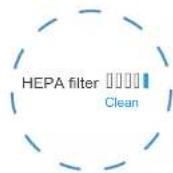
3 Quite el filtro HEPA
natural_image
Illustration of hands installing a wall-mounted panel into a rectangular storage unit (no text or symbols)
natural_image
Simple 3D illustration of a bed with a blue arrow pointing to the front panel (no text or symbols)
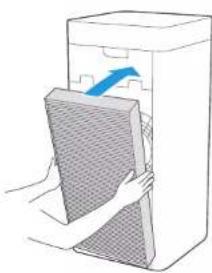
Monte el filtro
natural_image
Illustration of hands placing a textured rectangular object into a box with an arrow indicating direction (no text or symbols)
- This section describes the contents and importance of the safety matters to prevent personal injuries or property damages to the users or others. Please read the text on the basis of full understanding of the following contents, and be sure to abide by the safety matters as described.
Do not use this appliance in wet or high temperature environment (like bathroom, toilet and kitchen).
- Before replacing the filter, please stop this appliance and cut off power.
• Do not place other items on top of the appliance, and forbid sitting or standing on this appliance.
- Please use the original filter provided by the factory. In case of other filters, the best results cannot be achieved. Do not use damaged or aged power cords; Forbid replacing the power cord without authorization. If the power cord is damaged, it must be replaced by the manufacturer, its service department or professional from similar department to avoid danger
- This appliance is only subject to 220-240V power supply, and please unplug the power cord when it is not used for a long time.
- Do not insert the fingers or objects into the air inlets or air outlets to prevent the product from physical damages or malfunction.
- Please unplug the power cord immediately and contact the service center in time when the appliance suffers abnormal sound or burnt smell or smoke.
This appliance can be used by children aged from 8 years and above and persons with reduced physical, sensory or mental capabilities or lack of experience and knowledge if they have been given supervision or instruction concerning use of the appliance in a safe way and understand the hazards involved. Children shall not play with the appliance. Cleaning and user maintenance shall not be made by children without supervision. Prior to cleaning or other maintenance, the appliance must be disconnected from the supply mains.
⚠ Matters that may Cause Minor Injury or Property Damages
- Do not spray flammable substances near the appliance; Do not spray water directly on the appliance or use chemical cleaners like alcohol or hydrochloric acid, etc.; Do not place water containers, medicines, or flammable materials on the appliance.
- Do not block the air inlets/outlets of the appliance with any item;
- This appliance cannot replace natural ventilation and other appliances like the vacuum cleaner, kitchen ventilator, etc.
- When the appliance is working, it must be placed on a dry, flat and stable floor, with at least 30cm space reserved around it.
- Do not put it in a place with direct sunlight.
- To prevent electromagnetic disturbance, the appliance must keep a certain distance from the TV, radio, microwave oven and others.
- The mist produced by the ultrasonic humidifier may affect the PM2.5 detection of this appliance, and both should maintain a certain distance.
- Do not disassemble or modify this appliance without authorization to avoid accidents.
- Do not pull the power cord to move the appliance.
- Please take care of the children and make sure that the children do not touch the appliance to avoid accidents.
Product Profile

Notes
Name of components

- The pictures contained in the Manual are for reference only, and please be subject to the physical product in the packing box
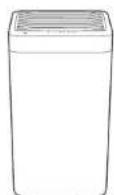
Main machine
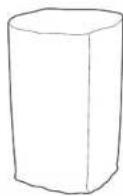
Protective bag
1
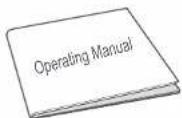
Manual
3
Assembly Instructions
Assembly procedures
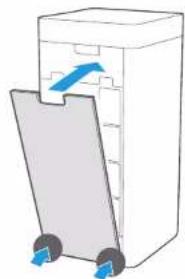
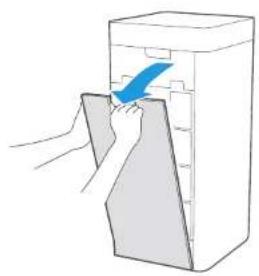
1 Take down the air inlet grill
natural_image
Illustration of a hand placing a blue arrow into a gray rectangular block (no text or symbols)
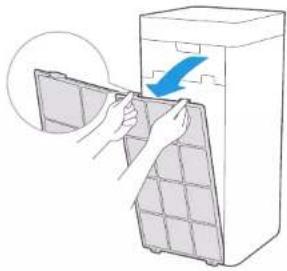
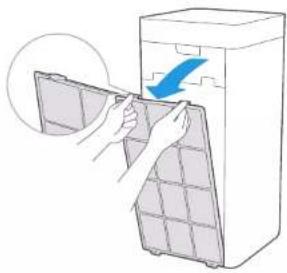
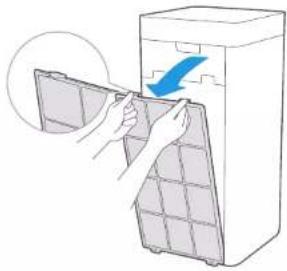
Take out the Pre-Filter Press the U-shaped buckle to pull outward, and take out the Pre-Filter
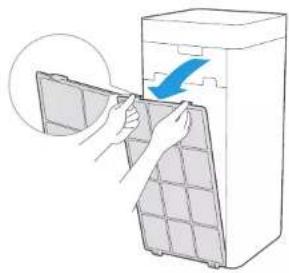
natural_image
Illustration of hands installing or removing a grid-patterned device into a container (no text or symbols visible)
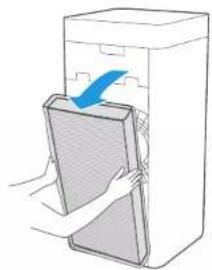
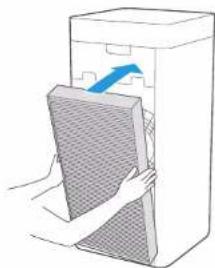
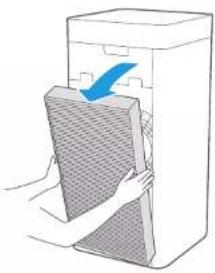
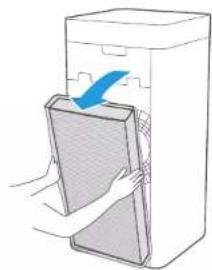
Take out the HEPA filter
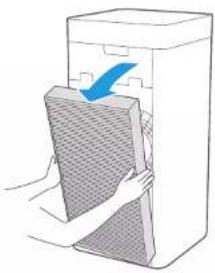
Hold both sides of the HEPA filter with both hands, and take out the HEPA filter
natural_image
Illustration of a hand inserting a card into a rectangular device (no text or symbols)
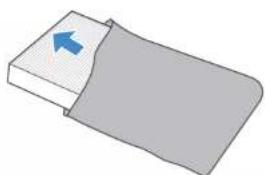
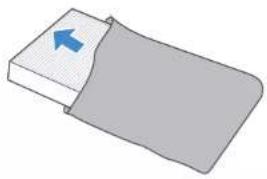
Remove the protective film of the filter
natural_image
Simple 3D illustration of a bed with a blue arrow pointing to the front panel (no text or symbols)
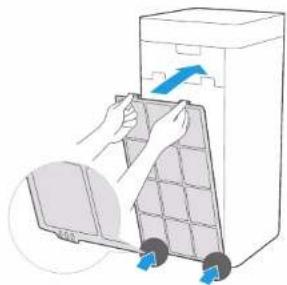
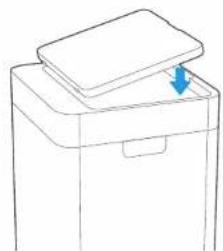
Assemble the air inlet grill
Align the slot position at the bottom, press both sides of the upper part of the air inlet grill, and buckle up the air inlet grill
Assemble the filter on the other side
Repeat Steps 1-7 to assemble the filter on the other side, and then power on for operation
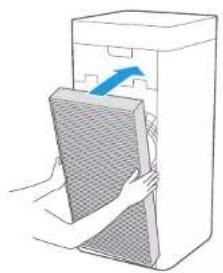
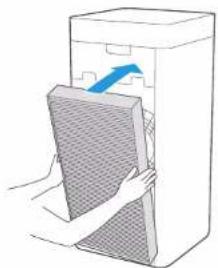
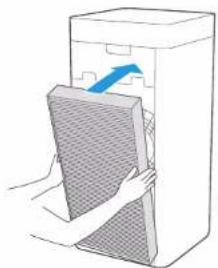
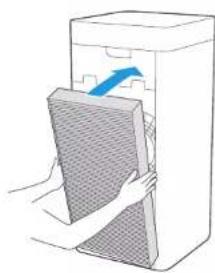
5 Assemble the HEPA filter
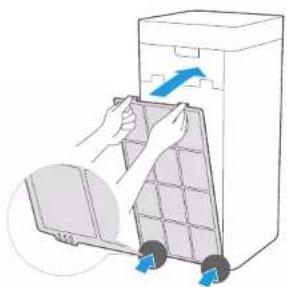
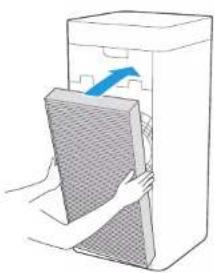
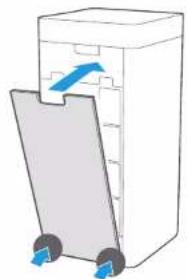
Assemble the Pre-Filter Align the slot position at the bottom, and buckle up the upper U-shaped buckle
natural_image
Illustration of hands installing a wall-mounted device into a rectangular box (no text or symbols visible)
natural_image
Illustration of hands removing a plastic bag into a trash bin (no text or symbols)
4

natural_image
Diagram of a trash bin with arrows indicating flow direction (no text or symbols)
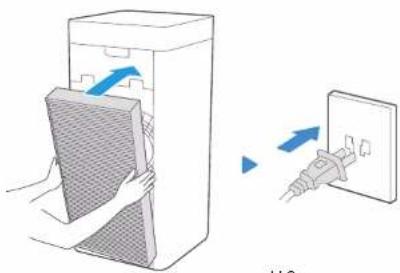
V.2
Operating Manual

Trial operation

Notes
- This appliance is provided with a disassembly protection function; the appliance can only operate normally after the air inlet grill and air outlet grill are assembled properly.
• In case of continuous electricity, enter the working mode before the standby state, after each power on.
- The appliance is connected to the power again after unexpected power outage (when the power is off or the power cord is unplugged during normal operation), and then restores to the working state before the power outage.
1 Preparations
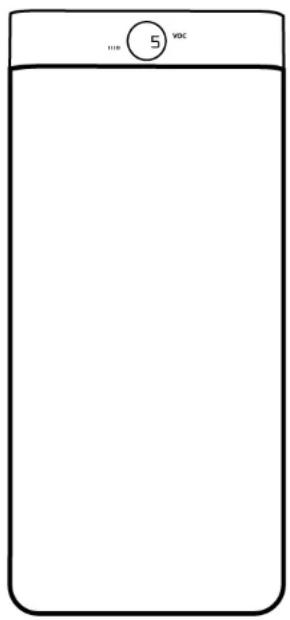
Power on for the first time, the display panel flashes for 1s, and then the screen is turned off. The whole appliance is the standby state;
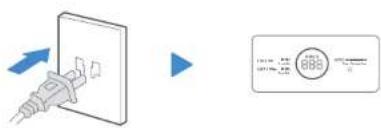

Flash for 1s
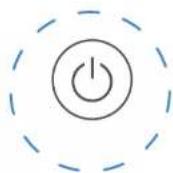
2 Switch
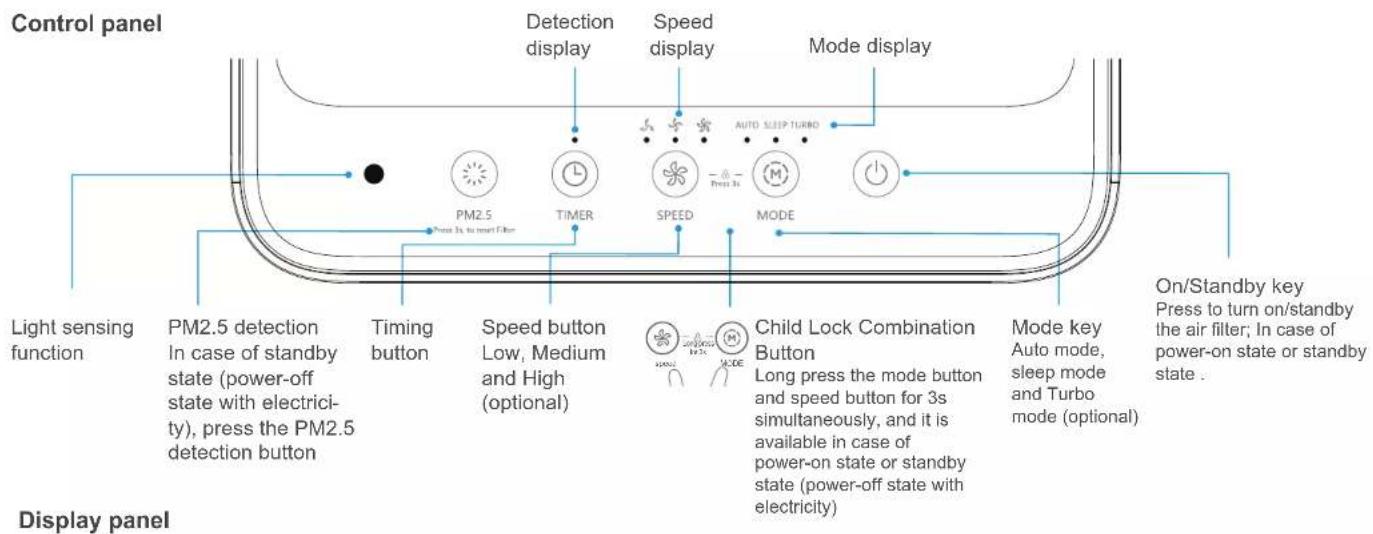
Press the On/Standby Button
3 Pre-heating
The particle sensor enters the preheating state, and PM2.5 sensor digitally displays "----", and the then displays normally after 10s;

4 Work
The purifier is powered on for the first time and then enters the Auto mode.
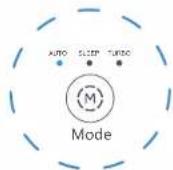
Cleaning and Maintenance
Body cleaning
Notes
- Be sure to turn it off before any maintenance, and cut off power.
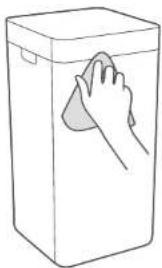
Main machine
Wipe the body with a soft towel
natural_image
Line drawing of a hand cleaning a rectangular trash bin (no text or symbols)
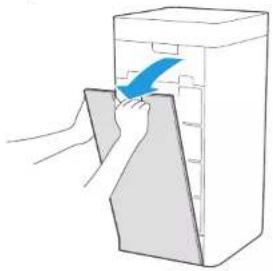
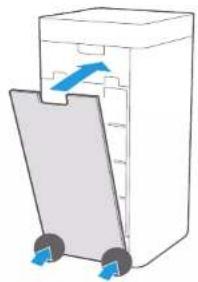
Air inlet grill
Open the air inlet grill, vacuum up dust with a vacuum cleaner, and wipe it with a cloth
natural_image
Illustration of a hand placing a blue arrow into a gray container (no text or symbols)
▶

▶
natural_image
Diagram of a trash bin with arrows indicating flow direction (no text or symbols)
Air outlet grill
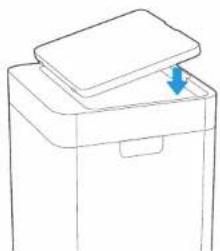
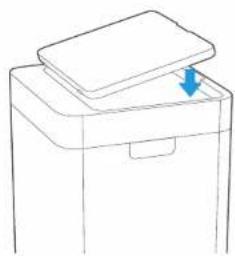
Open the air outlet grill, vacuum up dust with a vacuum cleaner, and wipe it with a cloth

natural_image
Illustration of a hand using a brush to clean or brush the surface of a rectangular object (no text or symbols)
▶
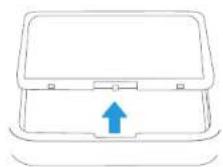
natural_image
Line drawing of a printer or printer with a lid and base, showing no text or symbols.
Cleaning of the filter components
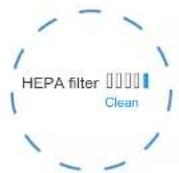
1 2 When the last bar of the progress bar turns red and the cleaning indicator light is on, it prompts that the Pre-Filter needs to be cleaned

Unplug the power cord, and take out the Pre-Filter

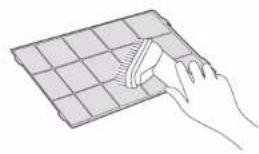
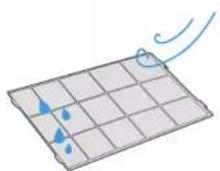
Vacuum up dust with a vacuum cleaner or wipe it with a cloth
natural_image
Hand using a tool to clean or spread a grid-patterned surface (no text or symbols visible)
If there is a lot of dirt, the common diluted kitchen detergent is used to soak, and then clean it
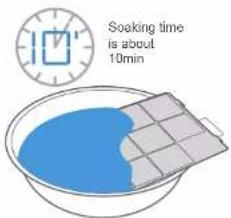
5 Dry the Pre-Filter
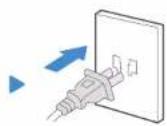
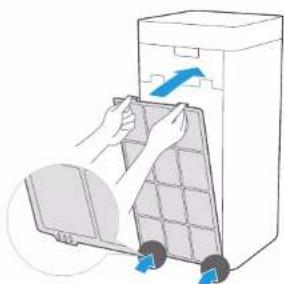
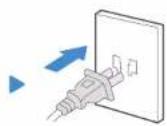
6 Assemble the Pre-Filter Plug the power cord, and start up
natural_image
Illustration of hands placing a space drawer into a trash bin with blue arrows indicating motion (no text or symbols)

Long press the PM2.5 detection button for 3s, the cleaning indicator light is off, and the Pre-Filter is restored.

Replacement of the filter components
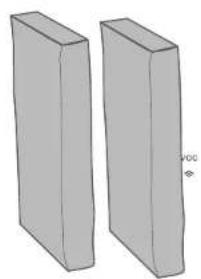
1 Filter model: EF660 (includes 2) When the last bar of the progress bar turns red and the replacement indicator light is on, it prompts that the HEPA filter needs to be replaced
natural_image
Two 3D rectangular prisms with no text or symbols, one labeled 'voc' (no other text or symbols)
3 Take out the HEPA filter
natural_image
Illustration of a person opening a large rectangular object with a blue arrow indicating direction (no text or symbols)
4 Remove the protective film of the filter Assemble the composite filter

natural_image
Simple 3D diagram of a rectangular block with a blue arrow pointing to its top surface, partially covered by a gray rectangle (no text or symbols)
natural_image
Illustration of hands holding a gray panel next to a white box with a blue arrow pointing to the top section (no text or symbols)
Long press the PM2.5 detection button for 3s, the cleaning indicator light is off, and the HEPA filter is restored.

9
V.2
Service Guide
Faults Handling

Notes
Please confirm the following contents before the entrusted maintenance
| Faults Troubleshooting |
| The display screen shows "E3" | The speed is beyond control; Contact the after-sales office for treatment |
| The display screen shows "E0" | Master EEPROM hardware faults: Contact the after-sales office for treatment |
| The display screen shows "E1" | The disassembly protection is faulty, and the air inlet grill is not assembled properly: Assemble the air inlet grills and air outlet grills properly. |
| The display screen shows "Eb" | The communication between the button board and main control panel is faulty: Contact the after-sales office for treatment |
| The display screen shows "Eu" | PM2.5 sensor communication fault: Contact the after-sales office for treatment |
| The purifier is not working | Firstly, check whether the power cord is plugged into the power socket; the loose plug caused by the movement of the purifier may affect the energizing; Secondly, check whether the air inlet grill and air outlet grill of the purifier are assembled properly. This appliance is provided with a disassembly protection function. If the air inlet grill and air outlet grill are not assembled properly, the product cannot work. |
| The purifier has a small amount of air and is noisy | Firstly, check whether the foreign bodies block the air inlet grill and air outlet grill; if any, remove those foreign bodies; Then, check whether the Pre-Filter becomes dirty or reaches the end of its service life; if any, clean the Pre-Filter; Finally, check whether the HEPA filter is full of dust or reaches the end of its service life; if any, the replacement of the HEPA filter is required. |
| The air outlet smells odor | When the appliance is operated for the first time, it smells slightly plastic, which is normal; If this appliance works in places (like smoking area or rotisserie, etc.) with strong smell for a long time, you need to change the filter element frequently and reset it. Check whether the air inlet/outlet grill and Pre-Filter are full of dust or dirt; if any, maintain the appliance and clean the dust and dirt on the air inlet/outlet grill and Pre-Filter. |
| Whether the wheels are pulled out after inserted | Yes, tilt the machine at a small angle and pull them out with a little effort. If not, try to pull the wheels out while rotating them. |
| Whether the purifier can be used with the humidifier | The wet environment has a greater impact on the filter element, and the mist produced by the ultrasonic humidifier may cause abnormality in the PM2.5 detection of this appliance, so that simultaneous operation is avoided as much as possible. |
Product Parameters
| Model | EPUR660 |
| Rated power | 220-240V |
| Rated power | 38W |
| CADR (particulate matters) | 550m3/h |
| Purification energy efficiency rating of the particulate matters | Efficient level |
| Noise | <56dB |
• The various performance parameters in the table are measured in the factory and for reference only.
- If the appliance is modified, the parameters may be changed, and please be subject to the parameters on the nameplate.
- Purification principle: The fan of the air purifier draws air into the body for filtrating through the built-in filter element, which plays a main role in filtering the dust (like PM2.5, etc.), formaldehyde, odor, sterilization and so on.
Environment-friendly List
| Name of components | Harmful substances |
| Plumbum (Pb) | Mercury (Hg) | Cadmium (Cd) | | Hexavalent chromium (Cr(VI)) | Polybrominated biphenyls (PBB) |
| Shell components | ○ | ○ | ○ | ○ | ○ | ○ |
| Power cord components | × | ○ | ○ | ○ | ○ | ○ |
| Motor components | ○ | ○ | ○ | ○ | ○ | ○ |
| Appliance components | ○ | ○ | × | ○ | ○ | ○ |
| Wheel components | ○ | ○ | ○ | ○ | ○ | ○ |
| Circuit board components | × | ○ | × | ○ | ○ | ○ |
| Filter components | ○ | ○ | ○ | ○ | ○ | ○ |
This table is formulated in line with the RoHS directive.
"○" indicates that the contents of the RoHS directive controlled substances or elements in all homogeneous materials are below the limits as specified;
"×" indicates that the contents of the RoHS directive controlled substances or elements in all homogeneous materials exceed the limits as specified;
Disposal provision

DISPOSAL: Do not dispose this product as unsorted municipal waste. Collection of such waste separately for special treatment is necessary.
The european directive 2012/19 /UE on wasted electrical and electronic equipments (WEEE), requires that household electrical appliances must not be disposed of in the normal unsorted municipal waste stream. appliances must be collected separately in order to optimize the recovery and recycling of the materials they contain, and reduce the impact on human health and the environment.
The crossed out “wheeled bin” symbol on the product reminds you of your obligation, that when you disposed of the appliances, it must be separately collected. Consumers should contact their local authority or retailer for information concerning the correct disposal of their old appliance.
Note: All contents herein have been carefully reviewed. If there are any printing errors & omissions or misunderstandings, please consult us.
Notes: If the product is improved technically, these improvements will be incorporated in the new Manual, without prior notice. If the appearance and calor of the product are changed, please be subject to the physical product.
COMMERCIAL GUARANTEE CONDITIONS FOR AIR CONDITIONING
This product has a two-year repair guarantee from the date of sale, against all manufacturing malfunctions, including repairwork and replacement parts, and a five-year guarantee on the compressor (component only). To justify the purchase date, it will be mandatory to present the end user's invoice or purchase receipt and the installation company data. This guarantee will only be effective in Spain.
EXCLUSIONS FROM THE GUARANTEE
- Devices used improperly, in a manner not in accordance with the instructions for use.
- Maintenance or upkeep of the appliance: gas charges, periodic reviews, adjustments, greasing.
- The devices disassembled or manipulated by the user or persons outside the authorized technical services.
- Materials broken or deteriorated due to wear or normal use of the device: remote controls, gaskets, plastics, filters, etc.
- Devices that do not have the factory serial number identified or in which it has been altered or erased.
-
Faults caused by fortuitous causes or accidents of force majeure, or as a result of abnormal, negligent or inappropriate use of the device.
-
Civil liabilities of any nature.
-
Loss or damage to software or information media.
-
Faults produced by external factors such as current disturbances, electrical surges, excessive or incorrect voltage supply, radiation and electrostatic discharges including lightning.
-
Installation defects, such as lack of ground connection between indoor and outdoor units, lack of ground connection in the home, alteration of the order of the phases and the neutral, flare in poor condition or connection with refrigeration pipes of different diameter.
-
When there is a pre-installation, the damage caused by not carrying out an adequate preliminary cleaning of the installation with nitrogen and checking for air-tightness.
-
External device linkages (such as Wi-Fi connections). This can never lead to unit change.
- Substitutions and / or repairs to equipment or devices installed or located at a height equivalent to or greater than 2'20 meters from the ground.
- Damage by freezing in plate and / or tube exchangers, and in condensers and water chillers.
- Damage to fuses, blades, lamps, flow switch, filters and other elements derived from normal wear and tear due to the operation of the equipment.
- Faults that have their origin or are a direct or indirect consequence of: contact with liquids, chemicals and other substances, as well as conditions derived from the climate or the environment: earthquakes, fires, floods, excessive heat or any other external force, such as insects, rodents and other animals that may have access to the interior of the machine or its connection points.
- Damages derived from terrorism, riot or popular tumult, legal or illegal demonstrations and strikes; facts of actions of the Armed Forces or the State Security Forces in times of peace; armed conflicts and acts of war (declared or not); nuclear reaction or radiation or radioactive contamination; vice or defect of the goods; facts classified by the Government of the Nation as "national catastrophe or calamity".
Design and specifications are subject to change without prior notice for product improvement.

EAS ELECTRIC
SMART TECHNOLOGY
www.easelectric.es
Appareil principal
1

Sac de protection

Manuel
3
natural_image
Illustration of a hand placing a blue arrow into a gray rectangular box (no text or symbols)
natural_image
Illustration of hands installing or removing a grid-patterned device into a container (no text or symbols visible)
natural_image
Illustration of a hand inserting a card into a box, with a blue arrow indicating the card's direction (no text or symbols present)
natural_image
Simple 3D diagram of a bed with a blue arrow pointing to the front panel (no text or symbols)
5 6 7 8
e filtre HEPA
natural_image
Illustration of hands installing a mesh panel into a rectangular device (no text or symbols)

natural_image
Illustration of hands installing or removing a grid device into a trash bin (no text or symbols visible)

natural_image
Diagram of a trash bin with arrows indicating flow direction (no text or symbols)
natural_image
Illustration of hands installing a wall-mounted panel into a rectangular device (no text or symbols visible)
V.2
natural_image
Line drawing of a hand cleaning a rectangular trash bin (no text or symbols)
natural_image
Illustration of a hand using a brush to clean or brush the surface of a rectangular object (no text or symbols)

natural_image
Line drawing of a printer or printer with a blue arrow pointing to the lid (no text or symbols)
natural_image
Illustration of hands placing a grid into a trash bin with arrows indicating motion (no text or symbols)
natural_image
Two identical gray 3D rectangular prisms arranged side by side (no text or symbols)
natural_image
Illustration of hands placing a textured rectangular object into a rectangular container with a blue arrow indicating direction (no text or symbols)
natural_image
Simple 3D diagram of a rectangular block with a blue arrow pointing to its top surface, partially covered by a gray rectangle (no text or symbols)
5 Monter le filtre

natural_image
Illustration of hands installing a wall-mounted panel into a rectangular box (no text or symbols)
9
EXCLUSIONS DE LA GARANTIE
natural_image
Illustration of a hand placing a blue arrow into a gray rectangular box (no text or symbols)
natural_image
Illustration of hands installing or removing a grid-patterned device into a container (no text or symbols)
natural_image
Illustration of a hand inserting a card into a box, with a blue arrow indicating the card's direction (no text or symbols present)
natural_image
Simple 3D diagram of a bed with a blue arrow pointing to the front panel (no text or symbols)
5 6 7 8 Montano filtro HEPA
natural_image
Illustration of hands installing a mesh panel into a rectangular device (no text or symbols)

natural_image
Illustration of hands placing a grid into a trash bin with blue arrows indicating motion (no text or symbols)
natural_image
Diagram of a trash bin with arrows indicating flow direction (no text or symbols)
natural_image
Illustration of hands holding a meshed panel inside a rectangular device with an arrow indicating direction (no text or symbols)

4
V.2
natural_image
Line drawing of a hand cleaning a rectangular trash bin with a cloth (no text or symbols)
natural_image
Illustration of a hand using a brush to clean or brush the surface of a rectangular object (no text or symbols)


natural_image
Line drawing of a box with a lid and an arrow indicating rotation (no text or symbols)
Limpeza dos componentes do filtro
natural_image
Illustration of hands installing or removing a grid device into a trash bin (no text or symbols visible)
natural_image
Two identical gray 3D rectangular prisms arranged side by side (no text or symbols)
natural_image
Illustration of hands installing a wall-mounted panel into a rectangular storage unit (no text or symbols)
natural_image
Simple 3D illustration of a folded paper or sheet with a blue arrow pointing to it (no text or symbols)
Montar o filtro
natural_image
Illustration of a hand opening a rectangular box with a blue arrow indicating direction (no text or symbols)
natural_image
Abstract arrangement of dark and light gray triangles pointing right (no text or symbols)
Visítanos en:
www.easelectric.es
f

EAS ELECTRIC
SMART TECHNOLOGY
EAS ELECTRIC SMART TECHNOLOGY, S.L.
Polígono industrial Codonyers, C/ Principal, 4
natural_image
Abstract geometric pattern of overlapping gray and white triangles (no text or symbols)