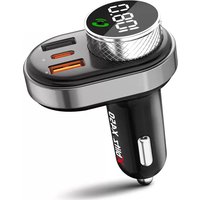
X450 - Phone Xblitz - Free user manual and instructions
Find the device manual for free X450 Xblitz in PDF.



User questions about X450 Xblitz
0 question about this device. Answer the ones you know or ask your own.
Ask a new question about this device
Download the instructions for your Phone in PDF format for free! Find your manual X450 - Xblitz and take your electronic device back in hand. On this page are published all the documents necessary for the use of your device. X450 by Xblitz.
USER MANUAL X450 Xblitz
Thank you for purchasing the Xblitz X450 hands-free FM transmitter. The device will enable you to play and transmit music (from SD memory cards, memory sticks, and
smartphones) to your car's audio system via the car radio signal. It has a Bluetooth module and an MP3 decoding function. It connects to a smartphone via Bluetooth and can be used as a hands-free kit for hands-free calling.
Please read the enclosed instructions and safety precautions before use.
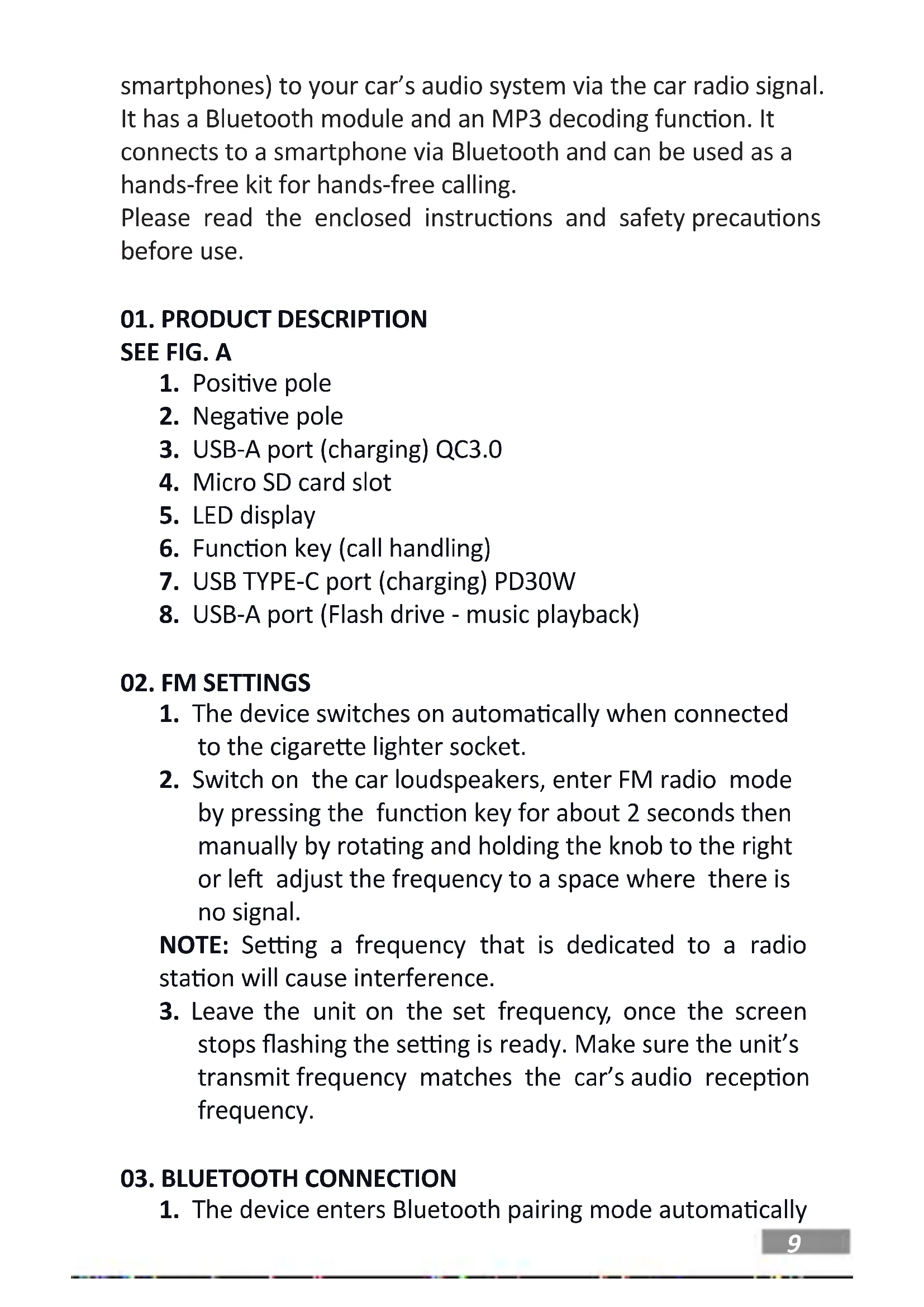
01.PRODUCT DESCRIPTION
SEE FIG.A
- Positive pole
- Negative pole
- USB-A port (charging) QC3.0
- Micro SD card slot
- LED display
- Function key (call handling)
- USB TYPE-C port (charging) PD30W
- USB-A port (Flash drive - music playback)
02. FM SETTINGS
- The device switches on automatically when connected to the cigarette lighter socket.
- Switch on the car loudspeakers, enter FM radio mode by pressing the function key for about 2 seconds then manually by rotating and holding the knob to the right or left adjust the frequency to a space where there is no signal.
NOTE: Setting a frequency that is dedicated to a radio station will cause interference.
- Leave the unit on the set frequency, once the screen stops flashing the setting is ready. Make sure the unit's transmit frequency matches the car's audio reception frequency.
03. BLUETOOTH CONNECTION
- The device enters Bluetooth pairing mode automatically
when switched on.
-
Turn on the Bluetooth connection on your phone, search for the name "Xblitz X450" from the list, and click on it to connect.
-
Once the device is successfully paired with the phone, the Xblitz X450 will transmit audio to the FM radio waves. When the device is activated a second time, the paired phone will automatically connect, without the need to reconnect on the phone.
04. DEVICE FUNCTIONS
-
Bluetooth music playback/Pendrive/Micro SD memory card The device has several modes of operation: via Bluetooth, you can listen to music on the car speakers, you can also insert a USB Flash Drive or micro SD card in the corresponding input, and the device will automatically identify the music files and start playing the songs. Playback priority is Bluetooth, Flash drive and memory card.
-
Hands-free car kit In any state of play, Bluetooth, USB, or micro SD card, the device recognizes the priority of an incoming call. A short press of the rotary knob answers the call, during a call a short press of the rotary knob ends the call. During an incoming call, pressing the rotary knob for approximately 2 seconds rejects the call. When the call ends, the last music playing will resume.
-
Dialoging the last number Press the knob twice to call the last number dialed.
-
Adjusting the volume Turn the knob to the left and hold it to decrease the volume. Turn the knob to the right and hold it to increase the volume.
-
Moving between tracks
In the music play mode, turn the knob to the left to go to the previous track. Turn the knob right to skip to the next track.
- Moving between playback modes
Press the knob for 5 seconds to switch to FM broadcast mode, then press it for another 5 seconds to switch between Bluetooth, SD, and USB modes.
05. TECHNICAL SPECIFICATIONS
BT version: 5.0 (range up to 10m) | FM frequency range: 87.5-108.0 MHz | Input: 12-24V | Outputs: charging - 1 x USB-A port (QC 3.0) - 5V/4.5A, 9V/3A, 12V/2.5A, 1 x USB Type-C port (PD30W) - 5V/3A, 9V/3A, 12V/2.5A, 15V/2A, 20V/1.5A | Max output - 5V/3A | Additional ports: 1 x USB-A (memory stick), 1 x micro SD memory card slot (max. 128GB) | Supported audio formats: MP3/WMA/APE/WAV/FLAC | Operating modes: USB/micro SD/BT | Overcurrent, overvoltage, short-circuit and overheat protection | Dimensions: 75x56x36mm| Weight: 40g | Maximum RF power emitted in the frequency range: 1.11 dBm | Frequency range: 2.402-2.480GHz
06. FAQ
- Why doesn't the device switch on/pair automatically?
Some lighter models have a fixed electrical design. The device cannot detect a change in voltage, so it cannot be switched on. In this situation, simply remove the Xblitz X450 and reinsert it into the cigarette lighter.
- Why is the music/sound from the phone poorly audible?
Turn up the Bluetooth volume on your phone or increase the volume of your car radio when playing music/calls.
- Why can't the device be switched on or does it make a loud noise after being used for a while?
Check if the contact point of the device and the cigarette lighter are dirty, which may cause a weak signal. Remove
the dirt and use the Xblitz X450.
4. Why does the volume of the device decrease on its own after being used for a long while?
Check the microphone input located on the button.
Clean it and use the product again.
CAUTION: Do not connect the device directly to the 220/230V power supply. Failure to do so will result in damage to the device and other dangerous situations.
07. TIPS
The principle of this device is wireless transmission. When driving, the different power of external radio signals in different regions will cause interference with the device. Therefore, you will sometimes hear a slight noise at low volume or in a muted state. This is a normal occurrence. We recommend setting the volume of this product or mobile phone below 90% for better sound quality. If you need a higher volume, adjust it using the vehicle's volume control. If you are not playing music, lower the volume by adjusting the volume in the car to avoid noise.
08. WARRANTY/COMPLAINT CARD
The product comes with a 24-month warranty. Warranty conditions can be found at: https://xblitz.pl/gwarancja/ Complaints should be made using the complaint form available at: http://reklamacje.kgktrend.pl/
Details, contact information, and service address can be found at: www.xblitz.pl.
Technical specifications and kit contents are subject to change without notice, We apologise for any inconvenience. KGK Trend declares that the Xblitz X450 complies with the essential requirements of Directive 2014/53/EU. The text of the declaration can be found at the following link: https:// xblitz.pl/download/DOC/deklaracja-CE-Xblitz-X450.pdf
BEDIENUNGSANLEITUNG
01. PRODUKTA APRAKSTS SKATIT A FIG.
- Pozitivais polis
- Negativais polis
- USB-A ports (uzlade) QC3.0
-
Micro SD kartes slots
-
LED displejs
- Funkciju taustiš (zvanu apstrade)
- USB TYPE-C ports (uzlade) PD30W
- USB-A ports (zibatminas diskdzinis - muzikas atskanošana)
02. FM IESTATJUMI
- lericce iesledzas automatiski, kad ir pieslegta cigaresu aizdedzinataja kontaktligzdai.
- lesledziet automasinas skajrunus, iesledziet FM radio rezimu, nospiezot funkciju taustiŋu aptuveni 2 sekundes, pec tam manuali, pagriežot un turot pogu pa labi vai pa kreisi, noregulejiet frekvenci uz vietu, kur nav signala.
PIEZIME: Frekvences iestatisana, kas ir veltita kadai radiostacijai, radis traucejumus.
- Atstajiet ierici iestatitajā frekvence, kad ekrans pärtrauks mirgot, iestatijums ir gatavs. Pärliecinieties, vai ierices raidišanas frekvence atbilst automasinas audio uztverşanas frekvencei.
03. BLUETOOTH SAVIENOJUMS
- 3aaso My3nkata/3ByKbT OT TelefoHa He ce cyBa do6pe?
YBéniyeTe cnlaTa Ha 3Byka Ha Bluetooth Ha TelefoHa cn nIyBéniyeTe cnlaTa Ha 3Byka Ha aBTOMo6nHOTO paIIO, KOraTO Bb3Pon3BexKdaTe My3Nka/pa3roBOpN.
- 3aio yctpoiCTBOTO He MoKe da 6bJe BkIIOyeHO nIn n3daBa cnIeH wym, cIeD kaTo e 6nIo n3noJ3BaHO n3BeCTHO BpeMe?
Пювере дали Контakнота Точka на устpoйстботои за палкata 3a сигари He e 3ambpceha, koetomonже ддовеadingо слабсгнal . Oтстра_HETe 3ambpcaBaHeTo И n3ползВайтExblitz X450.
- 3aaso cnlaTa Ha 3Byka Ha yCTpoiCTBOTO ce HamaIyBa cama, cIeI KaTo e n3NoI3BaHo dIbIro BpeMe?
Ha cIeHNia IInK: https://xblitz.pl/download/DOC/
MANUEL D'INSTRUCTIONS
The crossed out trash can symbol indicates that unuable electrical or electronic devices, its accessories (such as power supplies, cores) or components (for example batteries, if included) cannot be disposed of alongside with household waste. In order to dispose of the devices or its components (for example, batteries) deliver the device to the collection point, where it will be accepted free of Disposal. Is subject to the recast version of the WEEE Directive 19/EU and the Directive on batteries and accumulators (2006/66 / proper disposal of the device prevents degradation of the natural environment. Information about the collection points of the facilities is by the competent local authorities, incorrect disposal of waste is to penalties provided for by the law in force in the given area.
DE

KGK TREND Sp. z o.o.
(dawniej KGK Trade Sp. z o.o. Sp. K.)
ul. Ujastek 5b, 31-752 Kraków, Polska.
Wyprodukowano w PRC
Manufacturer:
KGK TREND Sp. z o. o.
(formerly KGK Trade Sp. z o.o. Sp. K.)
st. Ujastek 5b, 31-752 Cracow, Poland.
Made in PRC