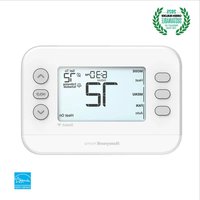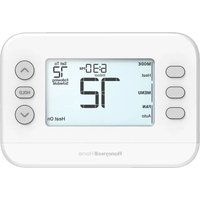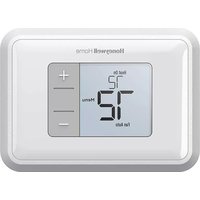
RTH5160D1003/E - Thermostat HONEYWELL - Free user manual and instructions
Find the device manual for free RTH5160D1003/E HONEYWELL in PDF.


User questions about RTH5160D1003/E HONEYWELL
0 question about this device. Answer the ones you know or ask your own.
Ask a new question about this device
Download the instructions for your Thermostat in PDF format for free! Find your manual RTH5160D1003/E - HONEYWELL and take your electronic device back in hand. On this page are published all the documents necessary for the use of your device. RTH5160D1003/E by HONEYWELL.
USER MANUAL RTH5160D1003/E HONEYWELL
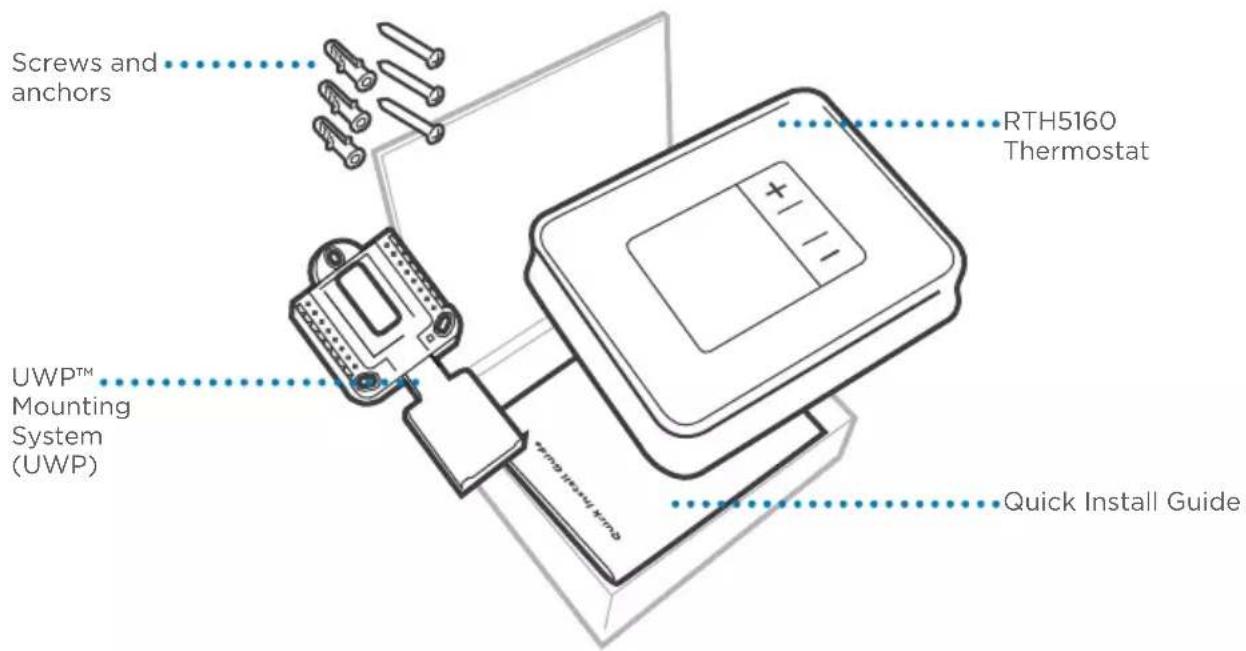
Included in your box
text_image
Screws and anchors RTH5160 Thermostat UWP™ Mounting System (UWP) Quick Install GuideTools you will need Tools you may need
text_image
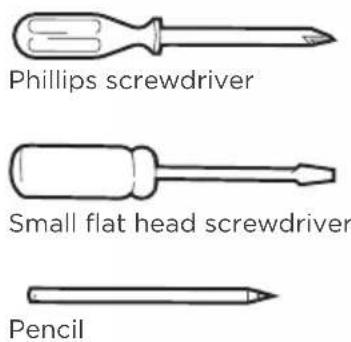
Phillips screwdriver Small flat head screwdriver Pencil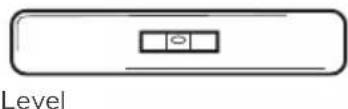
text_image
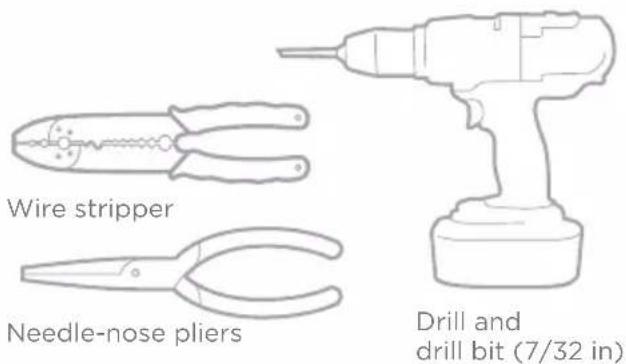
Wire stripper Needle-nose pliers Drill and drill bit (7/32 in)Removing your old thermostat
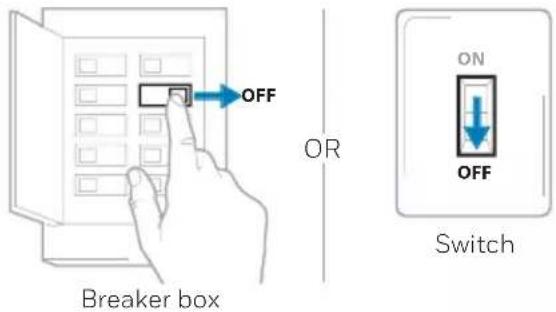
1 Turn power OFF.

To protect yourself and your equipment, turn off the power at the breaker box or the switch that controls your heating/cooling system.
text_image
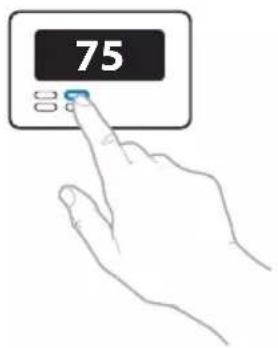
OFF OR Breaker box ON OFF Switch2 Check that your system is off.
Change the temperature on your old thermostat to be above room temperature in heat mode or below it in cool mode. If you don't hear the system turn on within 5 minutes, the power is off.
Note: If you have a digital thermostat that has a blank display, skip this step.
text_image
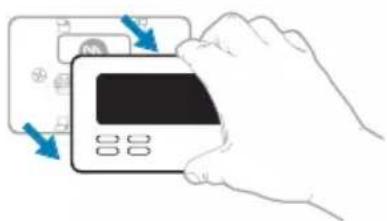
753 Remove the old thermostat's faceplate.
On most thermostats, you can take off the faceplate by grasping and gently pulling. Some thermostats may have screws, buttons, or clasps.
natural_image
Illustration of a hand inserting a credit card into a bank card (no text or symbols visible)
Do not remove any wires from your thermostat at this time!
4 Make sure there are no 120/240V wires.

Do you have thick black wires with wire nuts?

Is your thermostat 120V or higher?
If you answered yes to either of these questions, you have a line voltage system and the thermostat will not work.
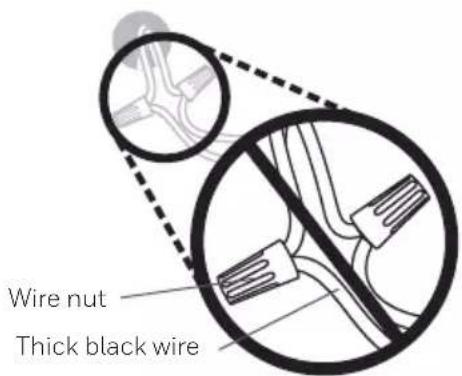
text_image
Wire nut Thick black wire5 Take a picture of how your wiring looks right now.
Be sure to include the letters next to the terminals where the wires are inserted. This will be a helpful reference when wiring your new thermostat.
Tip: If the color of your wires has faded or if 2 terminals have the same wire color, use the wire labels provided in the package to label each wire.
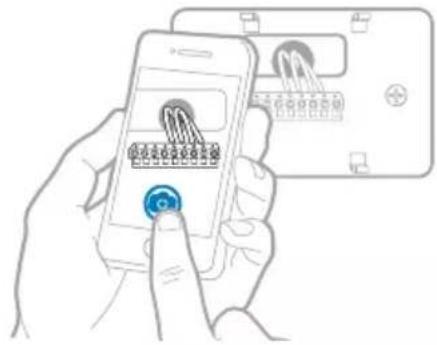
text_image
Hand-drawn illustration showing a smartphone screen with connector pins and a close-up of the device's cable, likely illustrating a mobile connection or security system.6 Record which R-wire(s) you have and write down the color of the wire(s).
Note: Do not include jumpers as a part of your count. The thermostat does not need jumpers.
Terminal Wire Color
□ R ____
□ RH ____
□ Rc ____
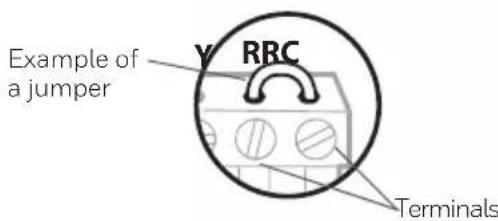
text_image
Example of a jumper Y RRC Terminals7 Record the remaining wires and write down the color of the wires.
Check mark the wires that are connected to terminals. Next to the check mark, write down the color of the wire. Do not include jumpers as a part of your count.
Check all that apply (Not all will apply):
Terminal Wire Color
□ Y ____
□ G ____
□ C ____
Terminal Wire Color
□ A or L/A
□ O/B
□ W2 or AUX
□ E ____
□W
□ K ____
NOTES:
- C does not power the thermostat display or operations; batteries are always required.
- If K was used on old thermostat you have a wire-saver at the equipment. Re-wiring would need to be done so that Y and G are used instead of K.
• The RTH5160 thermostat does not support L/A, S, or U terminals. - If there are wires in terminals that are not listed, you will need additional wiring support. Visit yourhome.honeywell.com/support to find out if the thermostat will work for you.
Quick Installation Guide
8 Disconnect the wires and remove the old wall plate.
Use a screwdriver to release wires from terminals. Then, use a wire label to identify each wire as it's disconnected. The letter on the wire label should match the letter on the terminal.
Tip: To prevent wires from falling back into the wall, wrap the wires around a pencil.
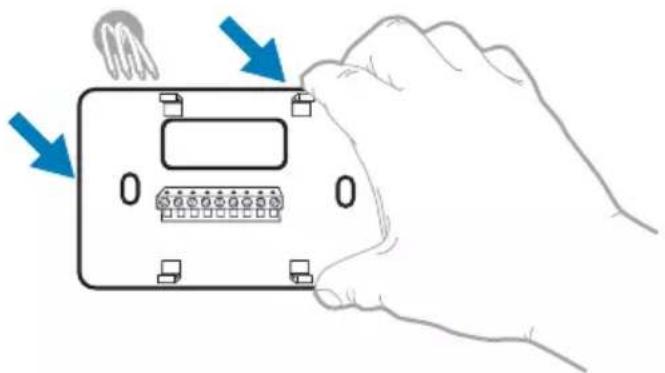
natural_image
Hand holding a device with labeled ports and arrows indicating action (no text or symbols present)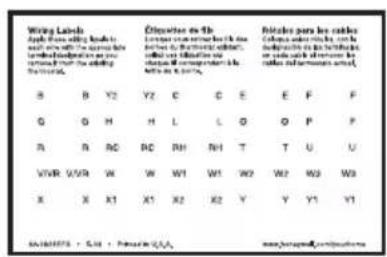
text_image
Wing Labels Apply the following rules: and/or use the same label and/or use the same label and/or use the same label Section 10 B Y2 Y2 C C E F F G G H H L C O O P P R R RC RC RH NH T T U U VWR WWR W W W1 W1 W2 W2 W3 W3 X X1 X1 X2 X2 Y Y1 Y1 SALADERS • S.A • Personal People www.bosup.org/locate/salesInstalling your RTH5160 thermostat
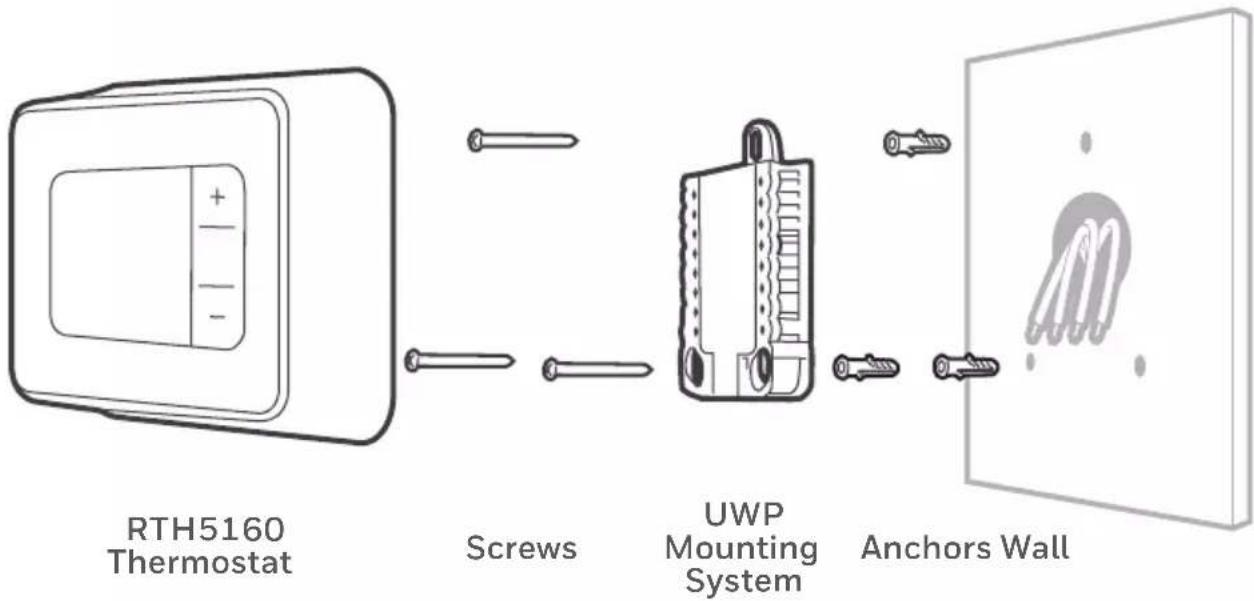
flowchart
graph LR
    A["RTH5160 Thermostat"] --> B["Screws"]
    B --> C["UWP Mounting System"]
    C --> D["Anchors Wall"]
    style A fill:#f9f,stroke:#333
    style B fill:#ccf,stroke:#333
    style C fill:#cfc,stroke:#333
    style D fill:#fcc,stroke:#333
9 Bundle and insert wires through the UWP.
Pull open the UWP and insert the bundle of wires through the back of the UWP.
Make sure at least 1/4 inch of each wire is exposed for easy insertion into the wire terminals.
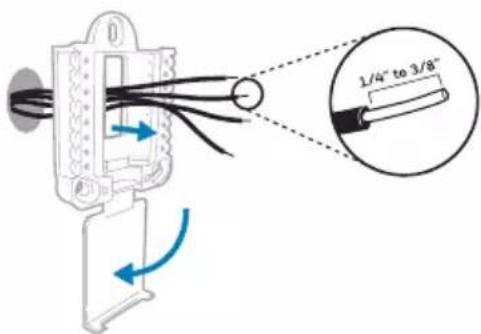
text_image
1/4" to 3/8"10 Insert the wall anchors.
It is recommended that you use the wall anchors included in the box to mount your thermostat.
You can use the UWP to mark where you want to place the wall anchors.
a) Level the wall plate.
b) Mark the location of the wall anchors using a pencil.
c) Drill the holes.
d) Insert wall anchors.
e) Make sure anchors are flush with wall.
Tip: Use a 7/32 drill bit.
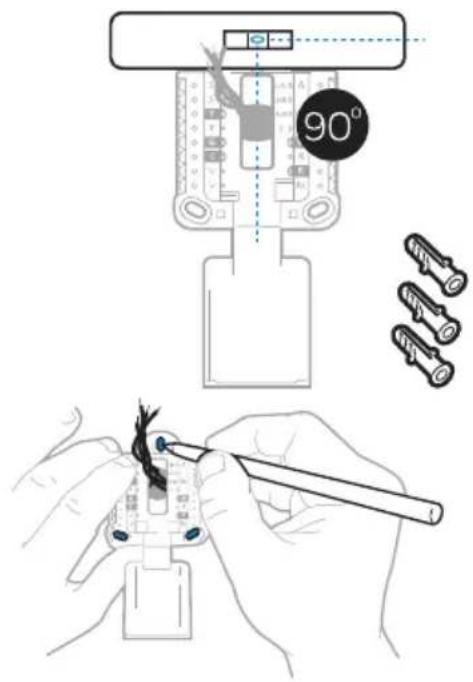
text_image
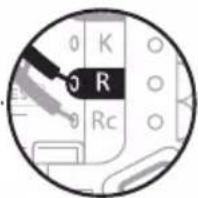
90°11 Set R-switch position and insert R-wire(s).
Set the R-switch up or down based on your wiring notes in Step 6.

Insert wires into the inner holes of the terminals on the UWP. The tabs will stay down once the wire is inserted.
NOTE: Alternate wiring options are shown on pages 11-12.
If you have 1 R-wire (R, Rh, or Rc)
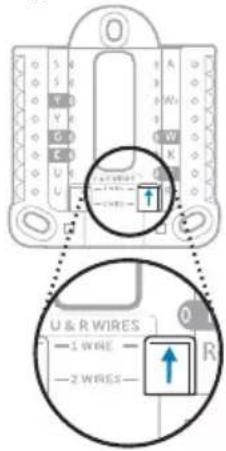
text_image
U & R WIRES 1 WIRE 2 WIRE- Set R-switch to the up position.
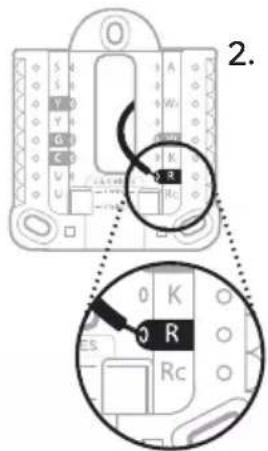
text_image
2.- Insert your R-wire (R, Rh or Rc) into R-terminal.
or
If you have 2 R-wires (R or Rh, and Rc)
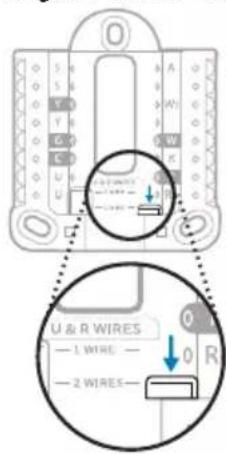
text_image
U & R WIRES — 1 WIRE — — 2 WIRES—- Set R-switch to the down position.
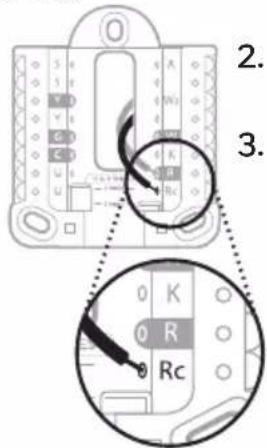
text_image
2. 3.- Insert your Rc wire into Rc-terminal
- Insert your R or Rh wire into R-Terminal.
text_image
0 K 0 R 0 RcQuick Installation Guide
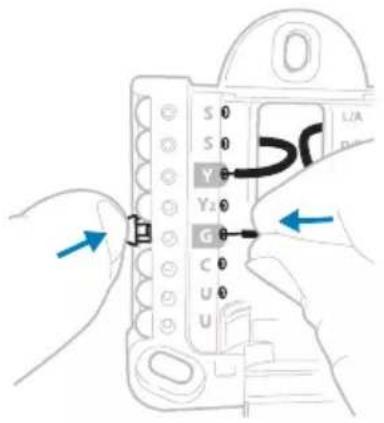
12 Connect remaining wires.
Depress the tabs to put the wires into the inner holes of the corresponding terminals on the UWP (one wire per terminal) until it is firmly in place.
Gently tug on the wires to verify they are secure.
Tip: If you need to release a wire again, push down the corresponding terminal tab on the side of the UWP.
NOTE: Alternate wiring options are shown on pages 11-12.
text_image
S 0 S 0 Y 0 Y2 0 G 0 C 0 U 0 UThis wiring is just an example, yours may vary.
13 Confirm wiring matches snapshot.
Please confirm wiring matches terminals from the photo you took in Step 5.
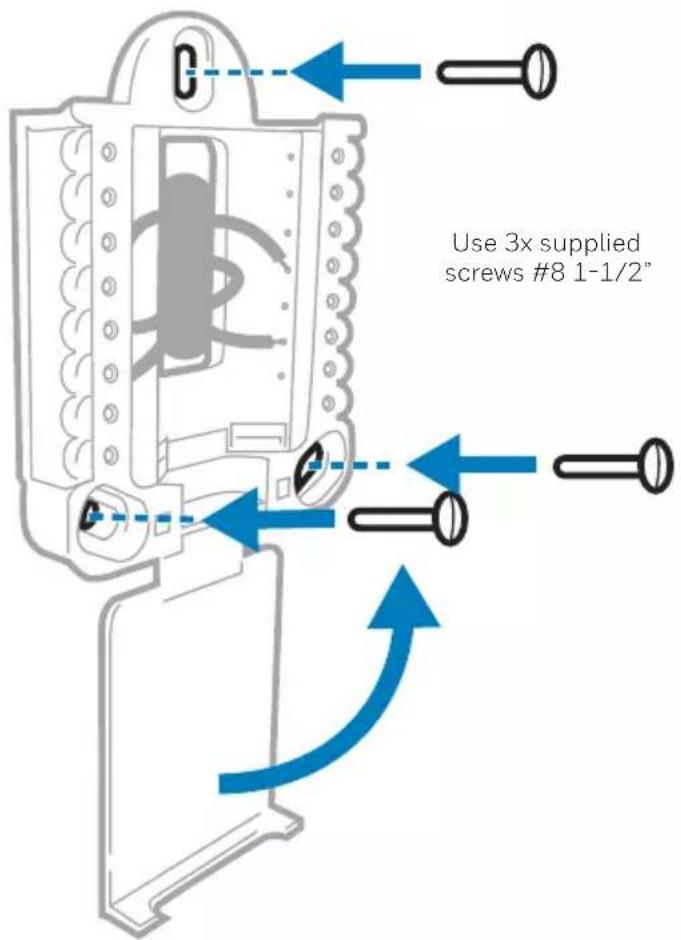
14 Mount the UWP and close the door.
Mount the UWP using the provided screws. Install all three screws for a secure fit on your wall. Close the door after you're finished.
text_image
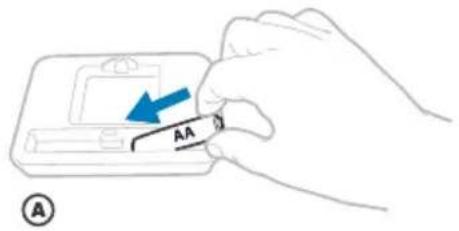
Use 3x supplied screws #8 1-1/2"15 Install batteries.
Insert two AA alkaline batteries in the back of the thermostat as shown.
text_image
AA A
text_image
AA ⑧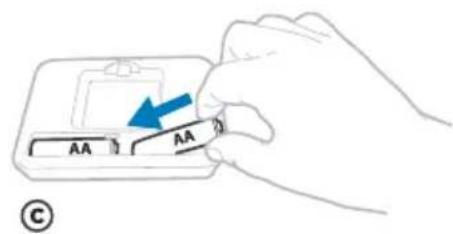
text_image
AA AA C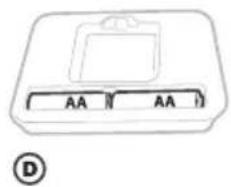
text_image
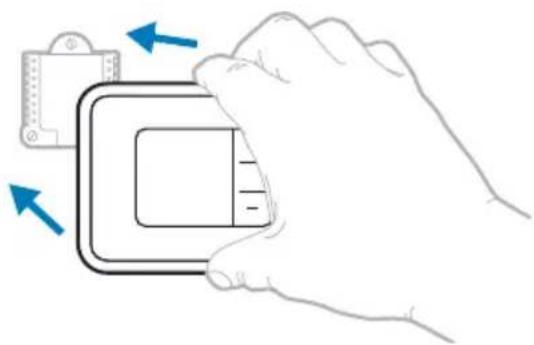
AA AA D16 Attach your thermostat.
Align the thermostat onto the UWP and firmly snap it into place.
natural_image
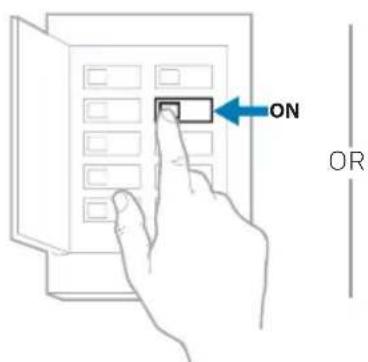
Illustration of a hand holding a device with blue arrows indicating direction (no text or symbols)17 Turn your power ON.
Turn on the power at the breaker box or switch that controls the heating/ cooling system.
text_image
ON OR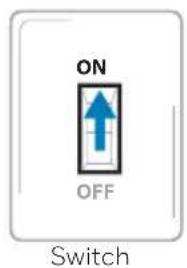
text_image
ON OFF SwitchBreaker box
Quick Installation Guide
System Setup
Now that you have installed your thermostat, please follow the steps below to setup your system and personalize your thermostat.
18 Select System Setup options.
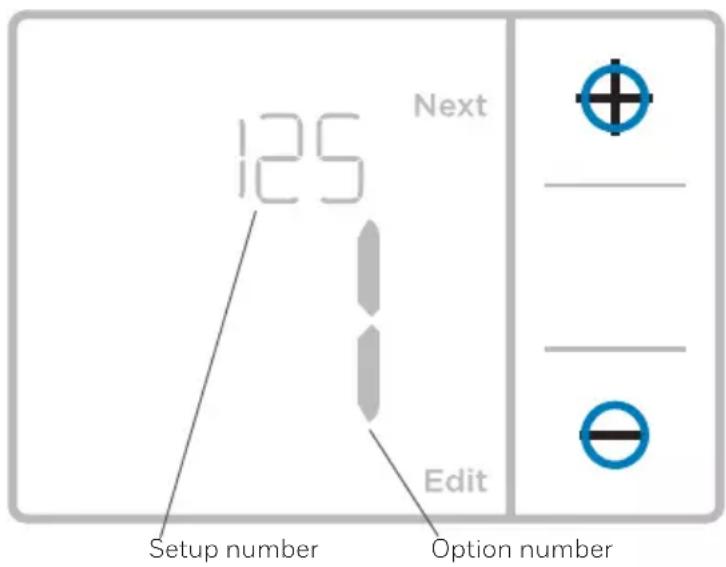
Press Edit (-) to change values or select from available options. Then press Next (+) to save changes and advance to the next System Setup number.
See “System Setup options” on the next page for a full list of System Setup numbers and options.
Repeat until all of the System Setup options have been set, and then press Done. The thermostat will save and exit to the home screen.
19 Continue to "System operation settings" on page 10.
text_image
125 Next Edit Setup number Option number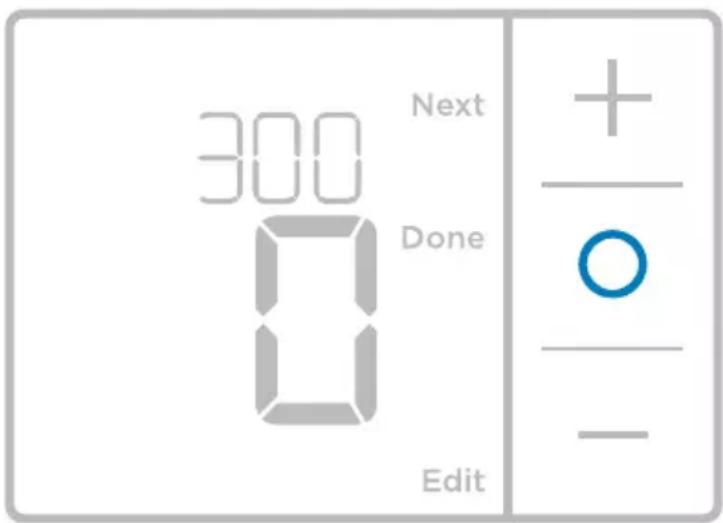
text_image
300 Next Done Edit
NOTE: To re-enter the System Setup from the Home Screen, press and hold the Menu button for approximately 5 seconds.
System Setup options
| System Setup Number and Description | Options (factory default in bold) |
| 125 = Temperature Indication Scale | O = Fahrenheit1 = Celsius |
| 200 = Heating System Type | 1 = Conventional Forced Air Heat2 = Heat Pump3 = Radiant Heat (Boiler)5 = None (Cool Only) |
| Note: This option selects the basic system type your thermostat will control. | |
| 205 = Heating Equipment Type | Conventional Forced Air Heat:1 = Standard Efficiency Gas Forced Air2 = High Efficiency Gas Forced Air3 = Oil Forced Air4 = Electric Forced Air5 = Hot Water Fan CoilHeat Pump:7 = Air to Air Heat PumpRadiant Heat:9 = Hot Water Radiant Heat12 = Steam |
| Note: This option selects the equipment type your thermostat will control. This feature is NOT displayed if feature 200 is set to Cool Only. | |
| 218 = Reversing Valve O/B | O = O (O/B in Cool)1 = B (O/B in Heat) |
| Note: This option is only displayed if the Heat Pump configured. Select whether reversing valve O/B should energize in cool or in heat. | |
| 220 = Cool Stages / Compressor Stages (200=Conv / 200=HP) | 0, 1, 2 |
| Note: Select how many Cool or Compressor stages of your equipment the thermostat will control. Maximum of 2 Cool stages or 1 Compressor stage. Set value to 0 if you do not have Cool Stage/Compressor Stage. | |
| 221 = Heat Stages / Backup Heat Stages | Heat Stages: 1, 2Backup Heat Stages: 0, 1 |
| Note: Select how many Heat or Aux/E stages of your equipment the thermostat will control. Maximum of 2 Heat Stages for conventional systems. Maximum of 1 Aux/E stage for systems with more than 1 heating equipment type. Set value to 0 if you do not have Heat Stage/Backup Heat Stage. | |
| 300 = System Changeover | O = Manual1 = Automatic |
| Note: Thermostat can automatically control both heating and cooling to maintain the desired indoor temperature. To be able to select “automatic” system mode on thermostat home screen, turn this feature ON. Turn OFF if you want to control heating or cooling manually. |
NOTE: Once you have cycled through all of the System Setup numbers, press Done to save and exit to the home screen.
Setup Complete
You have now finished installing and setting up your thermostat.
System operation settings
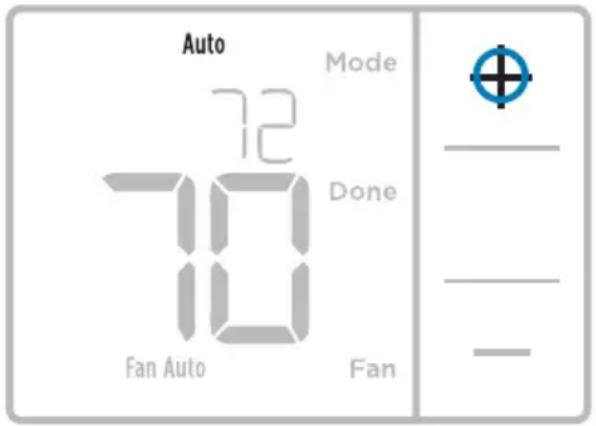
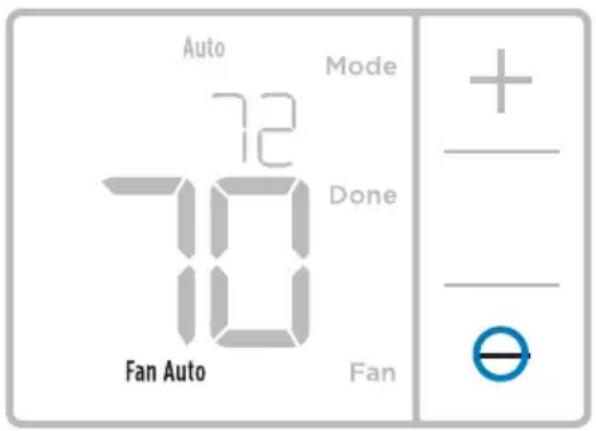
1 Press Menu, and then press the Mode (+) button to cycle to the next available System mode.
2 Cycle through the modes until the required System mode is displayed, and then press Done.
NOTE: Available System modes vary by model and system settings.
System modes:
- Auto: Thermostat selects heating or cooling as needed.
- Heat: Thermostat controls only the heating system.
- Cool: Thermostat controls only the cooling system.
- Em Heat (only for heat pumps with auxiliary heat): Thermostat controls Auxiliary Heat. Compressor is not used.
- Off: Heating and cooling system is off. Fan will still operate if fan is set to On.
NOTE: Heat On/Cool On may flash for 5 minutes due to compressor protection.
text_image
Auto 72 Mode Done 10 Fan Auto FanFan operation settings
1 Press Menu, and then press the Fan (-) button to cycle to the next available Fan mode.
2 Cycle through the modes until the required Fan mode is displayed, then press Done.
NOTE: Available Fan modes vary with system settings.
Fan modes:
- Auto: Fan runs only when the heating or cooling system is on.
- On: Fan is always on.
text_image
Auto 72 Mode Done Fan Auto Fan + - -Wiring—conventional systems
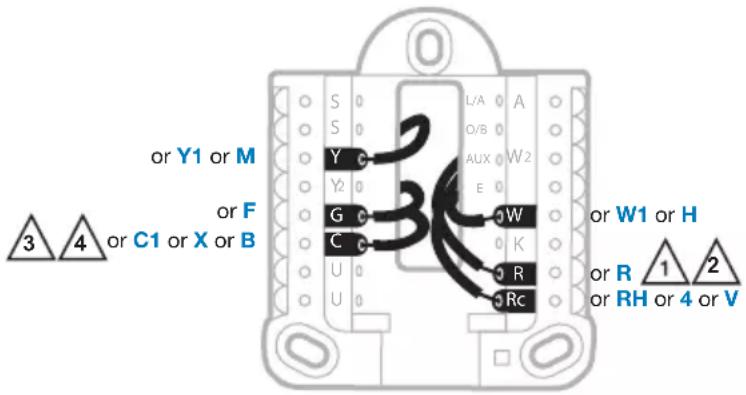
Alternate wiring (conventional systems)
If labels do not match terminals, connect wires as shown below (see notes, below).
NOTES:
- If you must connect both R and Rc wires, set the R Slider Tab to the down position (2 wires).
- If your old thermostat had both R and RH wires, set the R Slider Tab to the down position (2 wires). Then connect the R wire to the Rc terminal, and the RH wire to the R terminal.
- If your old thermostat had only 1 C or C1 wire, connect it to the C terminal. If your old thermostat had 2 C or C1 wires, wrap each separately with electrical tape and do not connect them.
- C does not power the thermostat display or operations; batteries are always required.
text_image
or Y1 or M or F or C1 or X or B 3 4 L/A A O/B AUX W2 E G W C K R Rc or W1 or H or R 1 2 or RH or 4 or VWiring—heat pump
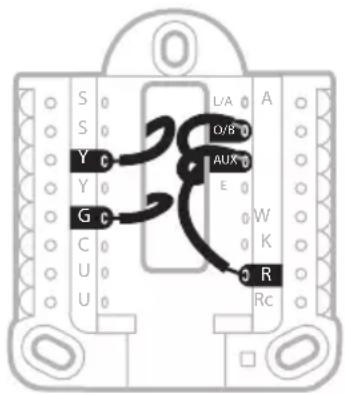
Connect wires: heat pump
1 Match each labeled wire with same letter on new thermostat.
2 Insert the wires into the matching terminal.
NOTE: If you have difficulty inserting wires, you may have to press down the terminal push button next to the corresponding terminal.
Labels don't match?
If labels do not match letters on thermostat, see "Alternate wiring (conventional systems)" above.
text_image
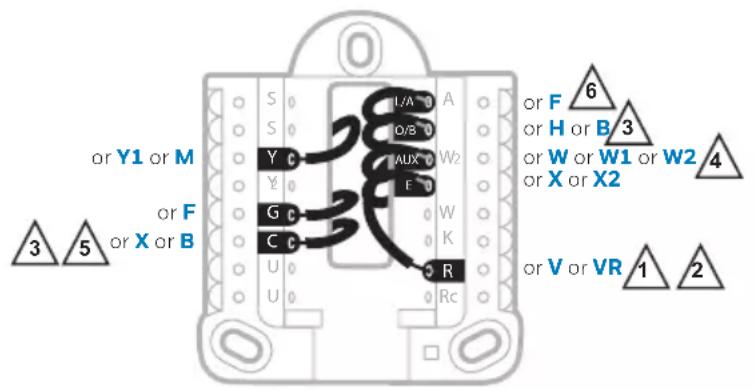
S Y G C U U L/A A O/B AUX E W K R RcAlternate wiring (for heat pumps only)
NOTES:
- Keep R Slider Tab in the up position (1 wire).
- If your old thermostat had both V and VR wires, stop now and contact a qualified contractor for help.
- If your old thermostat had separate O and B wires, attach the B wire to the C terminal. If another wire is attached to the C terminal, stop now and contact a qualified contractor for help.
- If your old thermostat had Y1, W1 and W2 wires, stop now and contact a qualified contractor for help.
- C does not power the thermostat display or operations; batteries are always required.
- This model doesn't support the heat pump fault alert (L/A terminal). If this is desired, please contact a contractor for replacement model.
text_image
or Y1 or M or F or X or B 3 5 S Y G C U U U/A A D/B AUX W2 E W K R Rc or F or H or B 3 or W or W1 or W2 or X or X2 4 or V or VR 1 2Battery replacement
Batteries are required to provide power. Install fresh batteries immediately when the low battery icon appears. The icon appears about two months before the batteries are depleted.
Even if the low battery icon does not appear, you should replace batteries once a year, or before leaving home for more than a month.
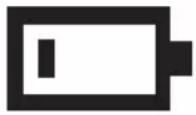
If batteries are inserted within two minutes, the time and day will not have to be reset. All other settings are permanently stored in memory, and do not require battery power.
NOTE: When replacing batteries, alkaline batteries are recommended.
Alerts screen
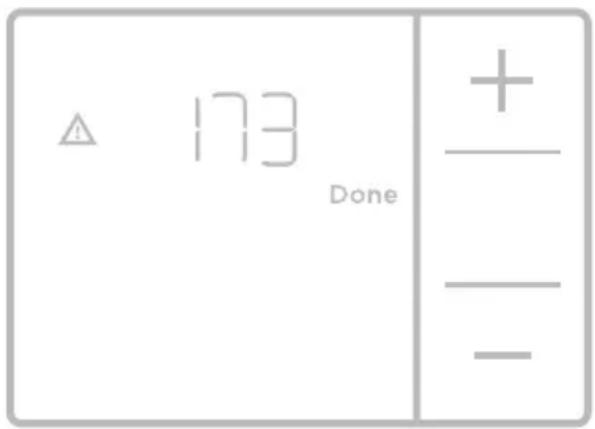
1 You will see the alert icon and the alert number on the screen.
text_image
173 Done +_ -2 Press Next (+) to see additional alerts, if any. Then press Done to go back to the home screen.
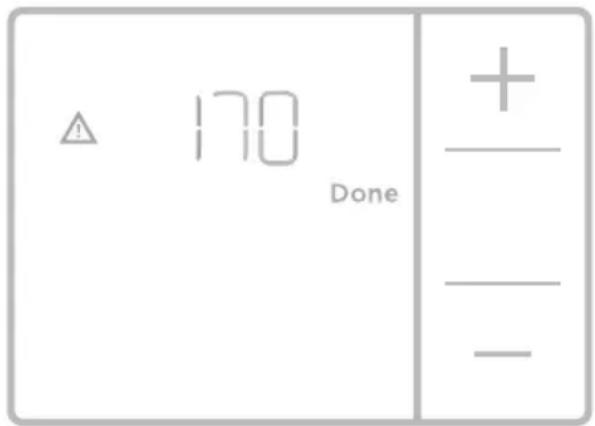
NOTE: If the alert is a critical alert, you may not be able to access the home screen and should call a HVAC professional.
text_image
⚠️ 170 Done + — — —Alerts codes
| Number | Alert/Reminder Definition | |
| 170 | Internal Memory Error | The memory of the thermostat has encountered an error. Please replace the thermostat. |
| 173 | ThermostatTemperature Sensor Error | The sensor of the thermostat has encountered an error. Please replace the thermostat. |
| 405 | Low Battery Alert The batteries are getting low. Replace them within two months. | |
| 407 | Critical Low Battery The batteries are almost depleted and should be replaced as soon as possible. | |
Troubleshooting
If you have difficulty with your thermostat, please try the following suggestions. Most problems can be corrected quickly and easily.
Display is blank Make sure fresh AA alkaline batteries are properly installed (see page 7).
Cannot change system setting to Cool Check System Setup Option 220 to make sure the options are set to either 1 or 2 (see page 9).
Fan does not turn on when heat is required Check System Setup Option 205 to make sure it is set to match your heating equipment (see page 9).
Heating system is running in cool mode Check System Setup Option 200 or 218 to make sure it is set to match your heating and cooling equipment (see see page 9).
Heating or cooling system Press Menu and then Mode to set system to Heat. Make sure the does not respond temperature is set higher than the Inside temperature.
Press Menu and then Mode to set system to Cool. Make sure the temperature is set lower than the Inside temperature.
Check circuit breaker and reset if necessary.
Make sure power switch at heating & cooling system is on.
Make sure furnace door is closed securely.
Wait 5 minutes for the system to respond.
Heat On / Cool On flashing on the screen Compressor protection feature is engaged. Wait 5 minutes for the system to restart safely, without damage to the compressor.
Heat pump issues cool air in heat mode, or warm air in cool mode Check System Setup Option 200 or 218 to make sure it is set to match your heating and cooling equipment (see page 9).
1-year limited warranty
Honeywell warrants this product, excluding battery, to be free from defects in the workmanship or materials, under normal use and service, for a period of one (1) year from the date of purchase by the consumer. If at any time during the warranty period the product is determined to be defective or malfunctions, Honeywell shall repair or replace it (at Honeywell's option).
If the product is defective,
(i) return it, with a bill of sale or other dated proof of purchase, to the place from which you purchased it; or
(ii) call Honeywell Customer Care at 1-800-468-1502. Customer Care will make the determination whether the product should be returned to the following address: Honeywell Return Goods, Dock 4 MN10-3860, 1985 Douglas Dr. N., Golden Valley, MN 55422, or whether a replacement product can be sent to you.
This warranty does not cover removal or reinstallation costs. This warranty shall not apply if it is shown by Honeywell that the defect or malfunction was caused by damage which occurred while the product was in the possession of a consumer.
Honeywell's sole responsibility shall be to repair or replace the product within the terms stated above. HONEYWELL SHALL NOT BE LIABLE FOR ANY LOSS OR DAMAGE OF ANY KIND, INCLUDING ANY INCIDENTAL OR CONSEQUENTIAL DAMAGES RESULTING, DIRECTLY OR INDIRECTLY, FROM ANY BREACH OF ANY WARRANTY, EXPRESS OR IMPLIED, OR ANY OTHER FAILURE OF THIS PRODUCT. Some states do not allow the exclusion or limitation of incidental or consequential damages, so this limitation may not apply to you.
THIS WARRANTY IS THE ONLY EXPRESS WARRANTY HONEYWELL MAKES ON THIS PRODUCT. THE DURATION OF ANY IMPLIED WARRANTIES, INCLUDING THE WARRANTIES OF MERCHANTABILITY AND FITNESS FOR A PARTICULAR PURPOSE, IS HEREBY LIMITED TO THE ONE-YEAR DURATION OF THIS WARRANTY.
Some states do not allow limitations on how long an implied warranty lasts, so the above limitation may not apply to you. This warranty gives you specific legal rights, and you may have other rights which vary from state to state.
If you have any questions concerning this warranty, please write Honeywell Customer Relations, 1985 Douglas Dr, Golden Valley, MN 55422 or call 1-800-468-1502. In Canada, write Retail Products ON15-02H, Honeywell Limited/Honeywell Limitée, 35 Dynamic Drive, Toronto, Ontario M1V4Z9.

CAUTION: ELECTRICAL HAZARD
Can cause electrical shock or equipment damage. Disconnect power before beginning installation.

CAUTION: MERCURY NOTICE
If this product is replacing a control that contains mercury in a sealed tube, do not place the old control in the trash. Contact your local waste management authority for instructions regarding recycling and proper disposal.

ALERT: HHW PROPER DISPOSAL
This product is an electronic device and considered Household Hazardous Waste (HHW). It should not be disposed of with other household waste.
Contact your local waste management authority for instructions regarding recycling and proper disposal.
Customer assistance
For assistance with this product, please visit
http://yourhome.honeywell.com.
Or call Honeywell Customer Care toll-free at 1-800-468-1502.
text_image
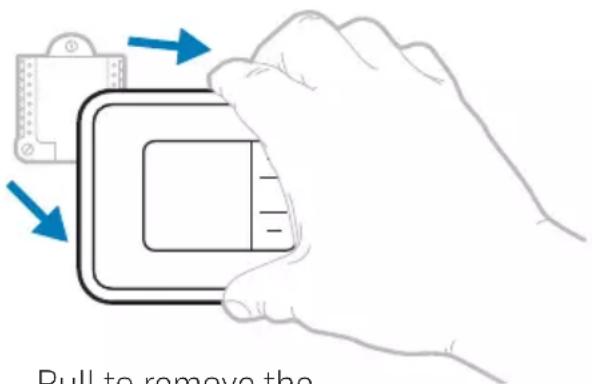
Pull to remove thePull to remove the thermostat from the UWP.
Home and Building Technologies
In the U.S.:
Honeywell
1985 Douglas Drive North
Golden Valley, MN 55422-3992
customer.honeywell.com
^® U.S. Registered Trademark.
© 2017 Honeywell International Inc.
33-00200EF-01 M.S. 08-17
Printed in U.S.A.
Honeywell
text_image
Black and white barcode image with vertical lines forming a pattern of repeating patterns33-00200EF-01
Honeywell | Home
Série RTH5160
Thermostat non programmable
natural_image
Illustration of a hand inserting a credit card into a bank card (no text or symbols visible)
text_image
Illustration showing a hand holding a smartphone displaying a payment interface with icons and text, alongside a document with logos and a plus button.text_image
□ R □ RH □ Rc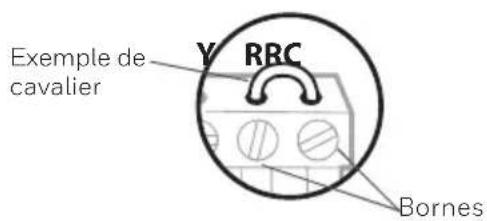
text_image
Exemple de cavalier Y RRC Bornesnatural_image
Hand holding a device with labeled ports and arrows indicating action (no text or symbols present)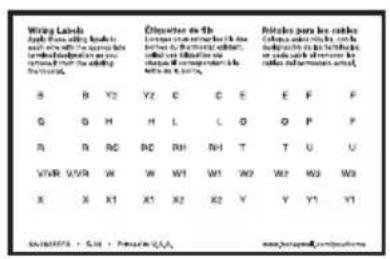
text_image
Wiring Labels Apply the wire, which is used to be a wire or cable. The wire is labeled as 'wired'. The wire is labeled as 'wired'. The wire is labeled as 'wired'. The wire is labeled as 'wired'. The wire is labeled as 'wired'. The wire is labeled as 'wired'. The wire is labeled as 'wired'. The wire is labeled as 'wired'. The wire is labeled as 'wired'. The wire is labeled as 'wired'. The wire is labeled as 'wired'. The wire is labeled as 'wired'.text_image
1/4" to 3/8"10 Insérez les ancres murales.
text_image
U & R WIRES - 2 WIRE - - 2 WIRES -text_image
U & R WIRES — 1 WIRE — — 2 WIRES—text_image
S 0 S 0 Y Y₂ 0 G C U 0 U L/A O/B A/Unatural_image
Illustration of a hand holding a device with blue arrows indicating motion or change (no text or symbols)text_image
300 Next Done Edit
text_image
Auto 72 Mode Done 10 Fan Auto FanModes de système :
text_image
S Y G C U U L/A O/B AUX E W K R Rctext_image
173 Done +_ -MISE EN GARDE : AVIS RELATIF AU MERCURE
Home and Building Technologies
Aux États-Unis:
Honeywell
1985 Douglas Drive North
Golden Valley, MN 55422-3992
customer.honeywell.com
Honeywell