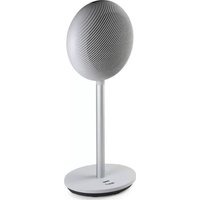
DO7352H - Heating DOMO - Free user manual and instructions
Find the device manual for free DO7352H DOMO in PDF.



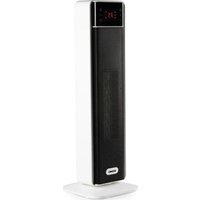
| Product Type | Fan heater |
| Brand | DOMO |
| Model | DO7352H |
| Nominal thermal power | 2.0 kW |
| Minimum thermal power | 1.3 kW |
| Temperature range | 15 °C to 35 °C |
| Power settings | 2 levels (low and high) |
| Timer | 1 to 24 hours (automatic shutdown or automatic start) |
| Oscillation | Yes, from left to right |
| Eco function | Yes, automatic power regulation according to ambient temperature |
| Overheating protection | Yes, automatic shutdown in case of overheating |
| Tip-over protection | Yes, automatic shutdown in case of tipping |
| Automatic shutdown after 12h | Yes (if no timer is set) |
| Memory function | Yes (retains settings if turned off by the on/off button, but not if the switch is cut off) |
| Remote control | Yes, with CR2032 battery included |
| Remote control battery type | CR2032 |
| Filter cleaning | Monthly, with warm soapy water and mild detergent |
| Warranty | 2 years (accessories and wearing parts: 6 months) |
| Included accessories | Base, tube, heating section, remote control, battery |
| Spare parts and repairability | Contact DOMO after-sales service for any repair or original part |
| General maintenance | Do not immerse, use a slightly damp cloth for the exterior |
Frequently Asked Questions - DO7352H DOMO
User questions about DO7352H DOMO
0 question about this device. Answer the ones you know or ask your own.
Ask a new question about this device
Download the instructions for your Heating in PDF format for free! Find your manual DO7352H - DOMO and take your electronic device back in hand. On this page are published all the documents necessary for the use of your device. DO7352H by DOMO.
USER MANUAL DO7352H DOMO
natural_image
Modern office desk lamp with a metallic stand and circular headplate (no visible text or symbols)DO7352H
| Handleiding Keramische verwarming |
| Mode d'emploi Chauffage céramique |
| Gebrauchsanleitung Keramikheizung |
| Instruction booklet Ceramic heater |
| Manual de instrucciones Calentador cerámico |
| Istruzioni per l'uso Riscaldamento ceramico |
| Návod k použití Keramické topení |
| Návod na použitie Keramické kúrenie |
natural_image
Two black-and-white icons: a triangular warning symbol with an exclamation mark and a stack of open books (no text or symbols present)⚠PRODUCTSPECIFIEKE WAARSCHUWINGEN

natural_image
Close-up of a black circular mechanical component with a central hole and a shaft (no visible text or symbols)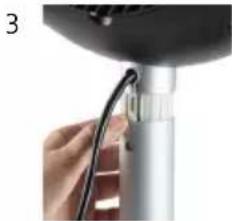
natural_image
Close-up of a hand holding a cable inserted into a cylindrical device (no visible text or symbols)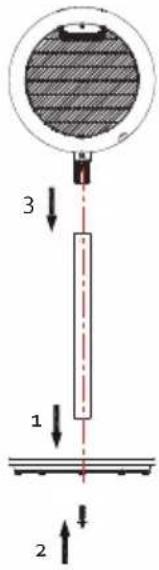
AFSTANDSBEDIENING
GEBRUIK
natural_image
Technical illustration of three views of a mechanical component with hatched shading (no text or symbols)SPECIFICATIES
Modelaanduiding(en): DO7352H
natural_image
Recycling symbol icon with three chasing arrows forming a triangle (no text or labels)natural_image
Symbol of a trash bin crossed out by two diagonal lines, representing no waste or discharge (no text or labels)⚠ AVERTISSEMENTS SPÉCIFIQUES AU PRODUIT
natural_image
Close-up of a black circular mechanical component with a central hole and a shaft (no visible text or symbols)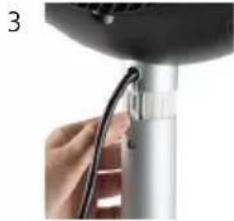
natural_image
Close-up of a hand holding a cable inserted into a cylindrical device (no visible text or symbols)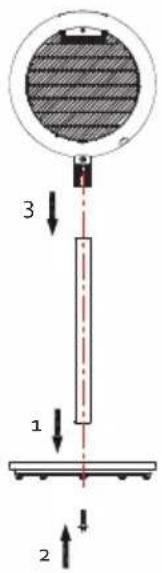
TÉLÉCOMMANDE
UTILISATION
natural_image
Technical illustration of three views of a circular mechanical component with internal hatching (no text or symbols)CARACTÉRISTIQUES TECHNIQUES
natural_image
Recycling symbol icon with three chasing arrows forming a triangle (no text or labels)natural_image
Symbol of a trash bin crossed with no text or numbers, indicating no waste or discharge (no text present)BATTERIE AMOVIBLE
natural_image
Close-up of a black circular mechanical component with a small metallic part and a shaft (no visible text or symbols)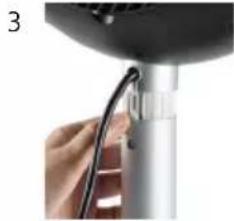
natural_image
Close-up of a hand holding a cable inserted into a cylindrical device (no visible text or symbols)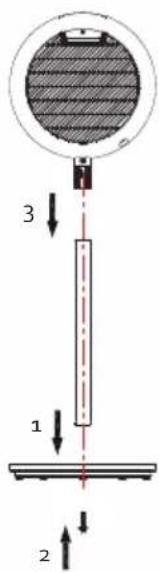
FERNBEDIENUNG
GEBRAUCH
natural_image
Technical illustration of three views of a circular mechanical component with internal hatching (no text or symbols)SPEZIFIKATIONEN
natural_image
Recycling symbol icon with three chasing arrows forming a triangle (no text or labels)natural_image
Symbol of a trash bin crossed with no text or numbers, representing waste sorting or disposal (no text present)HERAUSNEHMBARE BATTERIE
All of our products are always submitted to a strict quality control before they are sold to you.
Should you nevertheless experience problems with your device, we sincerely regret this. In that case, we kindly request you to contact our customer service.
Our staff will gladly assist you.

+32 14 21 71 91

info@linea2000.be
Monday – Thursday: 8.30 – 12.00 and 13.00 – 17.00
Friday: 8.30 - 12.00 and 13.00 - 16.30
This appliance has a two year warranty period. During this period the manufacturer is responsible for any failures that are the direct result of construction failure. When these failures occur the appliance will be repaired or replaced if necessary. The warranty will not be valid when the damage to the appliance is caused by wrong use, not following the instructions or repairs executed by a third party. The guarantee is issued with the original till receipt. All parts, which are subject to wear, are excluded from the warranty. If your device breaks down within the 2-year warranty period, you can return the device together with your receipt to the shop where you purchased it.
The guarantee on accessories and components that are liable to wear-and-tear is only 6 months.
The guarantee and responsibility of the supplier and manufacturer lapse automatically in the following cases:
- If the instructions in this manual have not been followed.
· In case of incorrect connection, e.g. electrical voltage that is too high.
· In case of incorrect, rough or abnormal use.
· In case of insufficient or incorrect maintenance.
In case of repairs or alterations to the device by the consumer or non-authorised third parties. - If the customer used parts or accessories that are not recommended or provided by the supplier / manufacturer.
SAFETY INSTRUCTIONS
When using electrical appliances, basic safety precautions should always be taken, including the following:
- Read all instructions carefully. Keep this manual for future reference.
- Make sure all packaging materials and promotional stickers have been removed before using the appliance for the first time. Make sure children cannot play with the packaging materials.
· This appliance is intended to be used in household and similar applications such as:
- staff kitchen areas in shops, offices and other working environments;
· farm houses; - by clients in hotels, motels and other residential type environments;
- bed and breakfast type environments.
· Children should be supervised to ensure that they do not play with the appliance.
· This appliance can be used by children aged from 16 years and above and persons with reduced physical, sensory or mental capabilities or lack of experience and knowledge if they have been given
supervision or instruction concerning use of the appliance in a safe way and understand the hazards involved. Children shall not play with the appliance. Cleaning and user maintenance shall not be made by children unless they are older than 16 and supervised.
- Keep the appliance and its cord out of reach of children younger than 16 years.
· All repairs should be carried out by the manufacturer or its aftersales service.
- Any injury or damage caused by failure to comply with these rules are at your own risk. Neither the manufacturer, importer, or the supplier may be held liable.
▲ELECTRICAL WARNINGS
- In order to avoid a hazard this appliance must not be supplied through an external switching device, such as a timer or a separate remote control, or connected to a circuit that is regularly switched on and off by the utility.
- The appliance must be disconnected from its power source when not in use, during service and when replacing parts. Allow to cool before putting on or taking off parts, and before cleaning the appliance. To disconnect, turn controls to "OFF" or "o" position, then remove the plug from the wall. Never pull the cord or appliance to remove the plug from the socket.
- Check carefully that the voltage and frequency of the power net match the indications on the rating label of the appliance.
- The plug must be plugged into an appropriate outlet that is installed and grounded in accordance with all local standards and requirements.
- Do not let the power supply cord hang over the edge of a counter, or touch hot surfaces.
- Keep the power cord away from hot parts and don't cover the appliance.
- Unwrap the cord completely to prevent overheating of the cord. Do not allow the power cord supply to run underneath or around the unit.
- The appliance may not be used with an extension lead or a multiple socket.
- Do not operate this appliance with a damaged cord or plug or in the event the appliance malfunctions or has been damaged in any manner. Return the appliance to the DOMO Service Department or its service agent for examination, repair, or electrical or mechanical adjustment. Do not try to repair the appliance yourself.
⚠️INSTALLATION
- Do not place near flammable materials, gases or explosives.
- Do not use or store this appliance outdoors.
· Always use the appliance on a steady, dry and level surface.
- Never place this appliance near a gas stove or electrical stove or in a place where it may come into contact with a warm appliance.
⚠ USE
- Do not use this appliance for other than intended use.
- Only use the appliance for domestic use. The manufacturer cannot be held responsible for accidents that result from improper use of the appliance or not following the instructions described in this manual.
- Never leave the appliance unattended while it is functioning.
· Do not operate the appliance with wet hands.
- The use of accessories that are not recommended or sold by the manufacturer can cause fire, electrical shock or injuries. Only use the utensils delivered with the appliance.
⚠ CLEANING AND MAINTENANCE
• To protect against electrical shock or burns, do not immerse unit, cord, or plug in water or other liquid.
- Failure to maintain this appliance in a clean condition could adversely affect the life of the appliance and possibly result in a hazardous situation.
⚠️PRODUCT-SPECIFIC WARNINGS


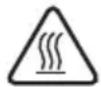
The appliance can become hot during use. Keep the power cord away from hot parts.
Don't cover the appliance.
· Do not operate the unit when your feet are bare.
- Do not cover the cord, do not place any objects on the cord, and do ensure that the cord does not pose a tripping hazard.
- Avoid contact with the hot unit and ensure that the electrical cord is not too close to the hot unit.
- Keep flammable materials such as cushions/pillows, clothing, curtains, etc. away from the unit.
· Do not expose the unit to rain, sunshine, etc.
- If the unit is damaged, turn it off and remove the plug from the socket. Above all, do not try to fix it yourself. Consult an electrician or the manufacturer's aftersales service to ensure that original parts are used.
- If you decide never to use the unit again, we recommend that you cut the electrical cord off the unit after removing the cord from the socket. We also recommend that you dispose of any parts that could be dangerous for children.
- Installation of the unit must be carried out in accordance with the manufacturer's instructions. Incorrect installation can lead to accidents involving people or animals or damage to things. The manufacturer cannot be held responsible for this.
- Do not leave the unit switched on and remove the plug from the socket when you do not need it. Do not place the unit against or directly under a socket.
- The appliance is not intended for use in the bathroom, washing area or other damp areas. A person who is in the bathtub or shower should not be able to touch the appliance, the power cord or the control knobs.
· This product is only suitable for well insulated spaces or occasional use.
- CAUTION – Some parts of this product may become very hot and cause burns. Special attention should be paid to the presence of children and vulnerable people.
- Do not use this unit in confined spaces when these are used by people who are unable to leave the room on their own, unless they are under constant supervision.
· Do not use the heater if it has fallen over.
- Never insert foreign objects into the air inlet or outlet.
· Do not spray insecticides or flammable sprays around the product.
- Avoid blowing the airstream on small children for a long time.
- If the unit emits a strange odour or noise when in use, stop using it immediately and unplug it from the socket.
· Do not bend the cord.
- This product contains a button cell battery. Do not swallow the battery; there is a risk of chemical burns. If the button battery is swallowed, it can cause severe internal burns and death in just two hours. Get medical attention immediately.
- Keep new and used batteries out of the reach of children.
- If the battery compartment does not close properly, do not use the product and keep it away from children.
- Batteries contain materials that are harmful to the environment; they must be removed from the unit before disposal and disposed of safely.
SAVE THESE INSTRUCTIONS FOR FUTURE REFERENCE
PARTS
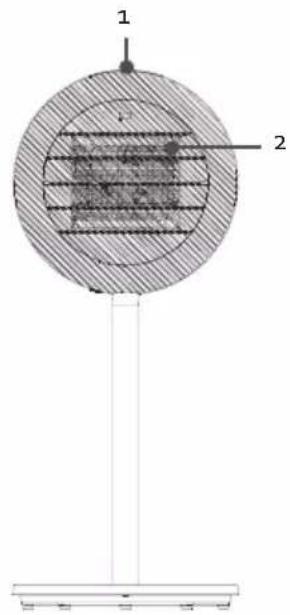
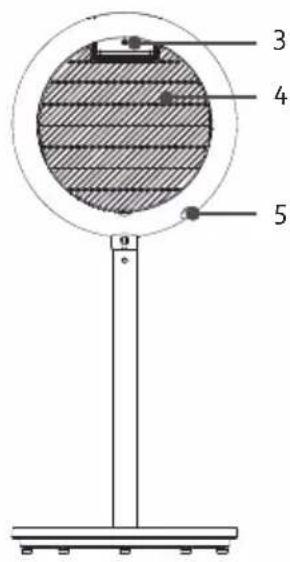
- Control panel with display
- Air outlet
- Handle + remote control holder
- Air inlet
- On/off switch
- Remote control
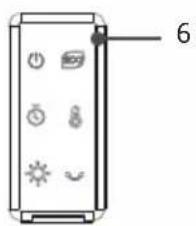
CONTROL PANEL
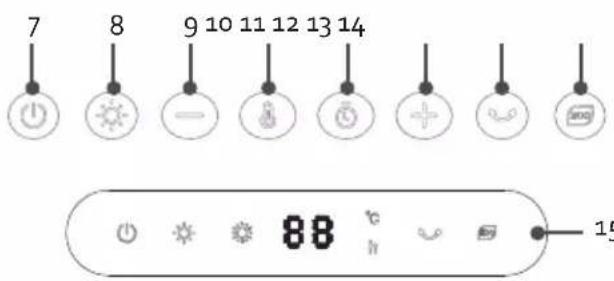
- On/off
- Power setting
- Decrease
- Temperature
- Timer
- Increase
- Oscillation
- Eco mode
- Display
BEFORE THE FIRST USE
- The heater should only be operated at a minimum distance of 50 cm from any wall or other object that could disturb its operation.
- Position the air flow in order to optimise the heating of the room. Avoid corners, small volumes, floors and ceilings.
- Place the appliance on a smooth, stable surface.
- When the appliance is switched on for the first time, a slight smell may be emitted. Please ensure sufficient ventilation. This smell will disappear very quickly.
ASSEMBLY
Remove all parts from the packaging. Remove all packaging materials and any promotional stickers.
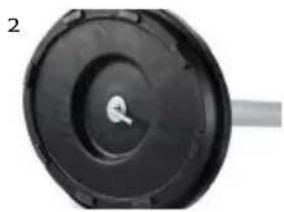
- Place the tube on the base. Note the groove in the tube so that it corresponds to the tongue in the base.
- Use the supplied screw and nut to screw the tube into place on the underside of the base.
- Place the heating component on top of the tube. Note the groove in the tube so that it corresponds to the tongue in the heating component. Press the buckle and push the heater into the tube until it clicks into place.
natural_image
Close-up of a black circular mechanical component with a central hole and a shaft (no visible text or symbols)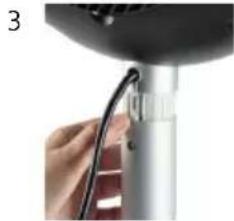
natural_image
Close-up of a hand holding a cable or wire attached to a metallic cylindrical device (no visible text or symbols)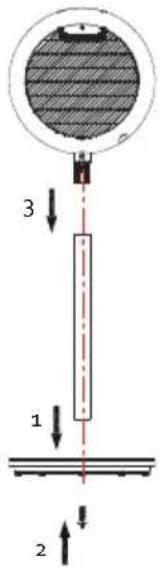
REMOTE CONTROL
Before using the appliance with the remote control, a coin cell battery (CR2032) must be placed in the remote control. Follow the instructions below.
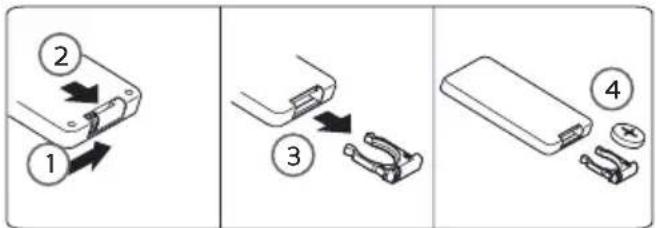
USE
Before you use the appliance: plug in the appliance and turn on the on/off switch at the back of the device. The unit emits an audible signal to indicate that the device is in standby mode. You can set the appliance using the control panel, but also using the remote control. You can make the settings in the same way. The display will show you the selected settings. Each time a button is pressed, the device emits an audible signal to indicate that the user is making a setting or adjustment.
ON/OFF SWITCH

Push the on/off switch to turn on or off the appliance. 35°C and the symbol ✿ appear on the display when the device is switched on. This is the default setting. When you switch off the unit, the fan still works for a few seconds before it stops completely.
Note: when the device is switched off via this button, the device goes into standby mode. This means it is not completely disabled. You can only switch the device off completely via the on/off switch on the back of the device.
POWER SETTING

You can choose from two power settings.
- Low: this is the default setting
· High
To use this, press the power setting button.
TEMPERATURE

You can set the temperature between 15^ C and 35^ C. First press the temperature button to activate this mode. You can now use the decrease and increase buttons to set the desired temperature. The temperature will flash on the display. If you do not press the button again for 5 seconds, the setting is saved and you can read off the set temperature.
When the set temperature has been reached, the heater will switch off and the unit goes into standby mode. If the ambient temperature falls to 2^ C below the set temperature, the unit will switch on again.
TIMER

Automatic switch-off
When the unit is switched on, you can set a timer so that it goes into standby mode after a certain amount of time.
-
Press the button to set the timer. The symbol will appear on the display and 'o' will flash.
-
You can set the timer between 1 and 24 hours by using the decrease and increase buttons. You can also keep this button pressed until you reach the desired setting. If you do not press the button again for 5 seconds, the setting is saved and you can read off the timer and the set temperature alternately on the display.
-
When the time has elapsed, the unit will switch off.
If you set the timer to o h, the mode will be cancelled.
Automatic switch-on
When the unit is in standby mode, you can set a timer so that the unit will automatically turn itself on after a period of time.
-
Press the button to set the timer. The h symbol will appear on the display and 'o' will flash.
-
You can set the timer between 1 and 24 hours by using the decrease and increase buttons. You can also keep this button pressed until you reach the desired setting. If you do not press the button again for 5 seconds, the setting is saved. The time will flash on the display.
-
When the time has elapsed, the unit will switch on.
If you set the timer to o h, the mode will be cancelled.
OSCILLATION

Press the oscillation button to allow the heater to oscillate the air from left to right and vice versa. The oscillation icon will appear on the display. Press this button again to stop this. If you switch the device off with the on/off button, this function stops even if you have not pressed the oscillation button.
ECO MODE

The unit uses the Eco mode to measure the ambient temperature and determine the power setting itself in order to operate in the most energy-efficient way. Press the Eco mode button to activate this mode.
The indicator lamp on the display will light up :
- If the ambient temperature is lower than or equal to 18^ C , the unit will operate on high. ✿ will appear on the display.
· If the ambient temperature is higher than 18°C and lower than 25°C, the unit will operate on low.

will appear on the display.
· If the ambient temperature is equal to or greater than 25^ C, all modes will be disabled.
OTHER MODES
Overheat protection
This heater is protected with an overheat protection that switches off the heater automatically in case of overheat, e.g. due to the total or partial obstruction of the grids. The overheating shut-off switches off the temperature inside when the appliance exceeds the normal running temperature. The heating element will automatically stop working. In this case, unplug the appliance. If this happens, switch off the unit and wait until it has cooled down sufficiently ( ± 10 minutes). Make sure that the air outlet is not covered. Then switch it back on as described above. The appliance should operate normally. Should the problem persist, please contact the nearest customer service.
Tip-over safety
The appliance will turn off when it tips over. When you set the unit upright again, it will go back into standby mode.
Automatic switch-off
If no timer is set, the unit will automatically switch off after 12 hours of operation. This is to prevent an accident if you forget to turn it off. The 12 hours start counting from the last key touch.
Memory mode
If you switch the unit off with the on-off button, but do not turn off the switch or unplug the cord, the unit will remember the last settings (except timer settings). If you turn off the switch or unplug the power cord, the default settings will be used when it is switched back on (35°C and low power setting).
CLEANING AND MAINTENANCE
- Before cleaning the appliance, ensure it is disconnected from the power supply and has cooled down completely.
- To avoid the risk of electric shock, do not clean the heater with water and do not immerse it. Clean the housing with a damp cloth.
- Do not use petrol, thinners, corrosive cleaning agents, solvents, or chemicals.
- We recommend cleaning the filters once a month to keep the unit running at its best.
Dust particles in the appliance may cause over-heating.
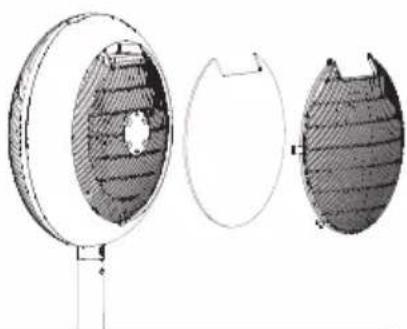
- Remove dust from the air outlet with a vacuum.
- Remove the air intake vent and filter.
natural_image
Technical illustration of three views of a circular mechanical component with hatched shading (no text or symbols)· Clean both the vent and the filter in warm soapy water and mild detergent. Dry thoroughly.
- Once dry, reinstall them in the original position.
- Store the appliance in a clean and dry place. When not in use, store the unit in its packaging.
SPECIFICATIONS
| Model identifier(s): DO7352H | |||||
| Item Symbol Value Unit Item Unit | |||||
| Heat output Type of heat input, for electric storage | local space heaters only | ||||
| Nominal heat output Pnom | 2.0 kW manual heat charge control, with integrated thermostat | N/A | |||
| Minimum heat output (indicative) | Pmin 1.3 kW manual heat charge control with room and/or outdoor temperature feedback | N/A | |||
| Maximum continuous heat output | Pmax 2.0 kW electronic heat charge control with room and/or outdoor temperature feedback | N/A | |||
| Auxiliary electricity consumption | --- --- fan assisted heat output N/A | ||||
| At nominal heat output | elmax | N/A | kW | Type of heat output/room temperature control | |
| At minimum heat output | elmin N/A | kW | single stage | heat output and no room temperature control | No |
| In standby mode | eISB | 0.21 | W | Two or more manual stages, no room temperature control | No |
| with mechanic thermostat room temperature control | No | ||||
| with electronic room temperature control | Yes | ||||
| electronic room temperature control plus day timer | No | ||||
| electronic room temperature control plus week timer | No | ||||
| Other control options | |||||
| room temperature control, with presence detection | No | ||||
| room temperature control, with open window detection | No | ||||
| with distance control option No | |||||
| with adaptive start control No | |||||
| with working time limitation | Yes | ||||
| with black bulb sensor No | |||||
| Contact details Linea 2000 | BV Dompel g - 2200 Herentals - Belgium | ||||
ENVIRONMENTAL GUIDELINES
This symbol on the product or on its packaging indicates that this product may not be treated as household waste. Instead it must be brought to the applicable collection point for recycling of electrical and electronic equipment. By ensuring this product is disposed of correctly, you will help prevent potential negative consequences for the environment and human health, which could otherwise be caused by inappropriate waste handling of this product. For more detailed information about recycling of this product, please contact your local city office, your household waste disposal service or the shop where you purchased the product.
natural_image
Recycling symbol icon with three chasing arrows forming a triangle (no text or labels)The packaging is recyclable. Please treat the packaging ecologically.
natural_image
Symbol of a trash bin crossed out by two diagonal lines, representing no waste or discharge (no text or numbers present)REMOVABLE BATTERY
The appliance is battery-operated, and the battery must not be disposed of with household waste, even after use. You can take the appliance to a collection point for discarded electrical appliances (Recupel) in your neighbourhood (container park, specialist shop, etc.). Batteries contain substances that are dangerous to human health and to the environment. Remove the battery from the appliance before disposal as described in this manual. Recycle the battery in accordance with local laws and regulations.
Never pierce the battery or expose it to high temperatures; this may cause the battery to explode. Battery leakage may occur under extreme conditions. If the liquid from the battery comes into contact with the skin, immediately wash it off with soap and water or neutralise it with a mild acid such as lemon juice or vinegar. If the liquid comes into contact with the eyes, rinse them abundantly with water for at least 10 minutes and contact a doctor.
GARANTIA
USO
natural_image
Technical line drawing of three views of a circular mechanical component with internal hatching (no text or symbols)ESPECIFICACIONES
natural_image
Recycling symbol icon with three chasing arrows forming a triangle (no text or labels)natural_image
Symbol of a trash bin crossed with two diagonal lines, no text or numbers presentBATERÍA EXTRAÍBLE
UTILIZZO
natural_image
Technical illustration of three views of a circular mechanical component with internal hatching (no text or symbols)SPECIFICHE TECNICHE
natural_image
Recycling symbol icon with three chasing arrows forming a triangle (no text or labels)natural_image
Symbol of a trash bin crossed with two crossed lines, no text or numbers presentBATTERIA RIMOVIBILE
natural_image
Close-up of a black circular mechanical component with a central hole and a shaft (no visible text or symbols)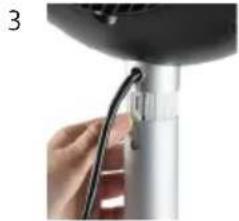
natural_image
Close-up of a hand holding a cable with a small connector, next to a white cylindrical device (no visible text or symbols)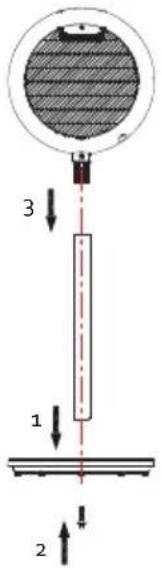
DÁLKOVÉ OVLÁDÁNÍ
POUŽITÍ
natural_image
Technical illustration of three views of a circular mechanical component with internal hatching (no text or symbols)SPECIFIKACE
OHLED NA ŽÍVOTNÍ PROSTŘEDÍ
natural_image
Recycling symbol icon with three chasing arrows forming a triangle (no text or labels)natural_image
Symbol of a trash bin crossed with no text or numbers, indicating no waste or discharge (no text present)VYJÍMATELNÉ/VYMĚNITELNÉ BATERIE
natural_image
Close-up of a black circular mechanical component with a central hole and a gray shaft (no visible text or symbols)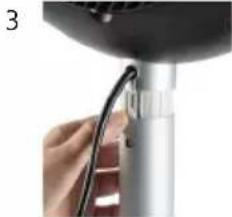
natural_image
Close-up of a hand holding a cable or wire attached to a metallic device (no visible text or symbols)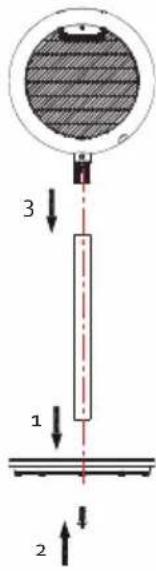
DIALKOVÉ OVLÁDANIE
POUŽITIE
natural_image
Technical line drawing of three views of a circular mechanical component with internal hatching (no text or symbols)ŠPECIFIKÁCIE
natural_image
Recycling symbol icon with three chasing arrows forming a triangle (no text or labels)natural_image
Symbol of a trash bin crossed with no text or numbers, indicating no waste or discharge (no text present)VYBERATEL'NÉ/VYMENITEL'NÉ BATÉRIE
natural_image
Two cylindrical containers with white liquid, one with a small label on top (no visible text or symbols)
natural_image
Three product photos: square-wrapped cards, a clear glass coffee maker with black handle, and a dark container (no text or symbols visible)of scan hier:
ou scannez ici:
oder hier scannen:
or scan here:



- DO7352H
- ⚠PRODUCTSPECIFIEKE WAARSCHUWINGEN
- AFSTANDSBEDIENING
- GEBRUIK
- SPECIFICATIES
- ⚠ AVERTISSEMENTS SPÉCIFIQUES AU PRODUIT
- TÉLÉCOMMANDE
- UTILISATION
- CARACTÉRISTIQUES TECHNIQUES
- BATTERIE AMOVIBLE
- FERNBEDIENUNG
- GEBRAUCH
- HERAUSNEHMBARE BATTERIE
- SAFETY INSTRUCTIONS
- ▲ELECTRICAL WARNINGS
- ⚠️INSTALLATION
- ⚠ USE
- ⚠ CLEANING AND MAINTENANCE
- ⚠️PRODUCT-SPECIFIC WARNINGS
- SAVE THESE INSTRUCTIONS FOR FUTURE REFERENCE
- PARTS
- CONTROL PANEL
- BEFORE THE FIRST USE
- ASSEMBLY
- REMOTE CONTROL
- USE
- ON/OFF SWITCH
- POWER SETTING
- TEMPERATURE
- TIMER
- Automatic switch-off
- Automatic switch-on
- OSCILLATION
- ECO MODE
- OTHER MODES
- Overheat protection
- Tip-over safety
- Memory mode
- CLEANING AND MAINTENANCE
- ENVIRONMENTAL GUIDELINES
- REMOVABLE BATTERY
- GARANTIA
- USO
- ESPECIFICACIONES
- BATERÍA EXTRAÍBLE
- UTILIZZO
- BATTERIA RIMOVIBILE
- DÁLKOVÉ OVLÁDÁNÍ
- POUŽITÍ
- SPECIFIKACE
- OHLED NA ŽÍVOTNÍ PROSTŘEDÍ
- VYJÍMATELNÉ/VYMĚNITELNÉ BATERIE
- DIALKOVÉ OVLÁDANIE
- POUŽITIE
- VYBERATEL'NÉ/VYMENITEL'NÉ BATÉRIE
Brand : DOMO
Model : DO7352H
Category : Heating