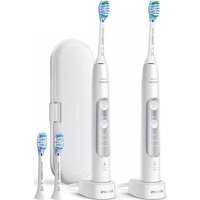
Sonicare ExpertClean 7300 HX9611 - Electric toothbrush PHILIPS - Free user manual and instructions
Find the device manual for free Sonicare ExpertClean 7300 HX9611 PHILIPS in PDF.
 FR
FR
 AZ
AZ
 BG
BG
 CS
CS
 DA
DA
 DE
DE
 EL
EL
 EN
EN
 ES
ES
 ET
ET
 FI
FI
 HE
HE
 HU
HU
 HY
HY
 IT
IT
 KA
KA
 KK
KK
 KY
KY
 LT
LT
 LV
LV
 MK
MK
 NL
NL
 NO
NO
 PL
PL
 PT
PT
 RO
RO
 RU
RU
 SK
SK
 SL
SL
 SQ
SQ
 SV
SV
 TG
TG
 TK
TK
 UK
UK
 UZ
UZ
| Product Type | Sonic Electric Toothbrush |
| Brand | Philips |
| Model | Sonicare ExpertClean 7300 HX9611 |
| Technology | Sonic technology (31,000 movements/min) |
| Brushing Modes | Clean, Deep Clean+, Gum Health, White+ (depending on model) |
| Intensity Levels | 3 (low, medium, high) |
| Timer | BrushPacer (6 segments, 2 min total) and SmarTimer (auto shut-off) |
| Pressure Sensor | Yes (visual alert and vibration change) |
| EasyStart | Yes (gradual power over 14 brushings) |
| Brush Head Replacement Reminder | Yes (BrushSync technology, orange indicator) |
| Automatic Mode Selection | Yes (based on smart brush head) |
| Battery | Rechargeable Li-ion, up to 28 brushings (2 min) or about 14 days |
| Charging Time | Up to 24 h for first charge |
| Power Supply | Inductive charging (base or UV sanitizer) or USB (travel case), 5 V DC |
| Connectivity | Bluetooth for Sonicare app (iOS/Android) |
| Compatible Brush Heads | Smart BrushSync heads (G3, W3, etc.) |
| UV Sanitizer | Optional, 10-minute cycle |
| Cleaning | Waterproof handle (rinse with water), rinse head after use, wipe charger and sanitizer |
| Safety | UV protection, auto shut-off, pressure monitoring |
| Warranty | 2 years (subject to conditions, see leaflet) |
| Weight (handle) | Approx. 120 g |
| Dimensions (handle) | Approx. 18 cm (height) |
| Included Accessories | Handle, 1 smart brush head, charger/base, UV sanitizer (depending on version), travel case, USB cable, wall adapter |
Frequently Asked Questions - Sonicare ExpertClean 7300 HX9611 PHILIPS
User questions about Sonicare ExpertClean 7300 HX9611 PHILIPS
0 question about this device. Answer the ones you know or ask your own.
Ask a new question about this device
Download the instructions for your Electric toothbrush in PDF format for free! Find your manual Sonicare ExpertClean 7300 HX9611 - PHILIPS and take your electronic device back in hand. On this page are published all the documents necessary for the use of your device. Sonicare ExpertClean 7300 HX9611 by PHILIPS.
USER MANUAL Sonicare ExpertClean 7300 HX9611 PHILIPS

natural_image
Illustration of an open book with a grid pattern on the left and a curved arrow pointing to the right (no text or symbols)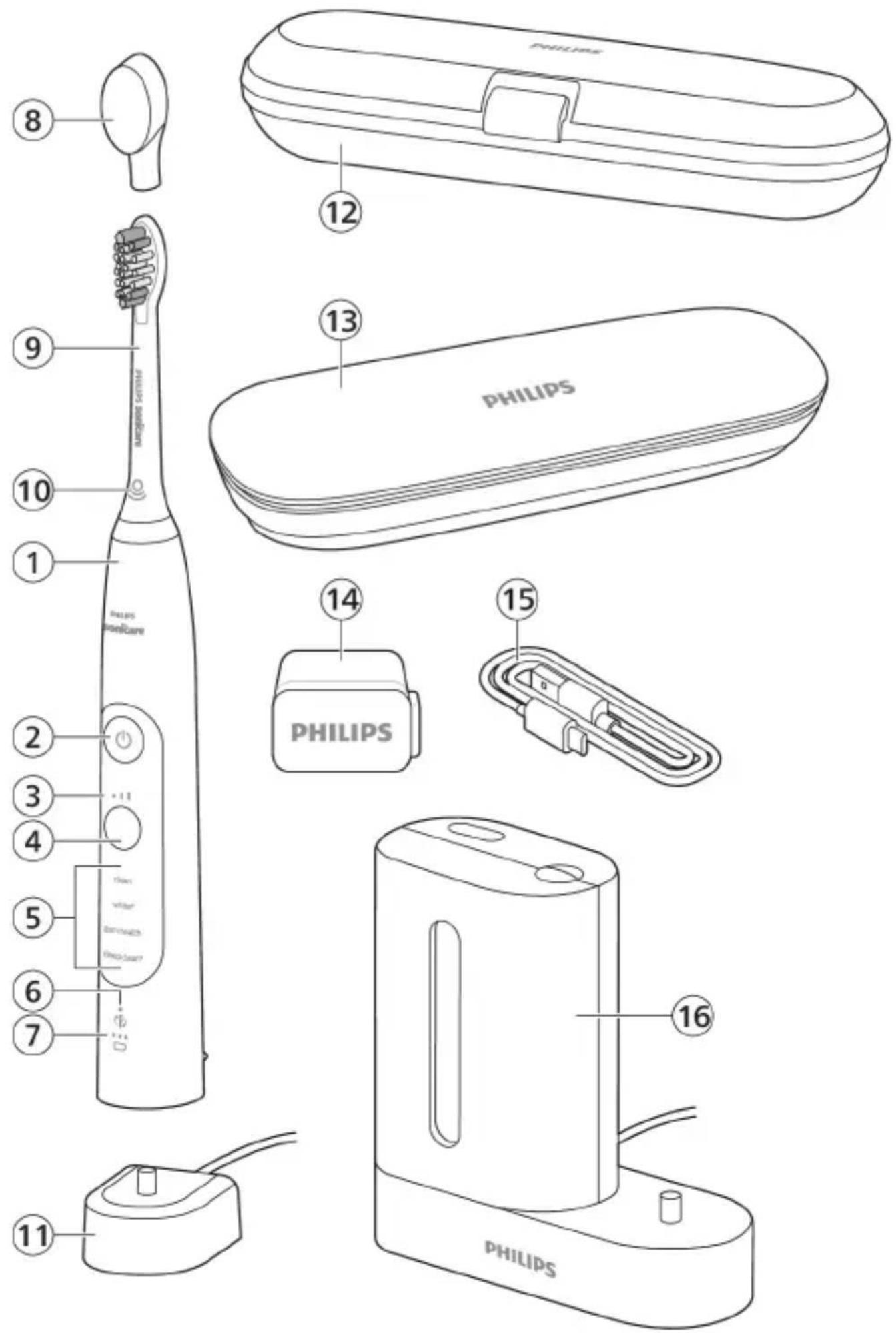
English 6
Azərbaycanca 29
Čeština 54
Dansk 78
Deutsch 102
Eesti 129
Español 153
Français 178
Hrvatski 203
Italiano 228
Latviešu 253
Lietuviškai 276
Magyar 301
Nederlands 326
Norsk 351
O'zbek 374
Polski 399
Português 425
Română 450
Shqip 475
Slovenščina 500
Slovensky 523
Srpski 548
Suomi 572
Svenska 597
Türkmençe 620
Ελληνικά 644
Български 672
Кыргызча 699
Македонски 725
Русский 752
Точикй 781
Українська 808
Қазақша 834
Ruijtntu 859
Jusmygno 865 888
הכלה 916
Introduction
Welcome to the Philips Sonicare family! This toothbrush enables you to obtain superior plaque removal, whiter teeth and healthier gums. Using Sonicare's combination of gentle sonic technology and clinically developed and proven features, you can be confident that you're getting the very best clean, every time.
Further support and product registration are available to you at: www.philips.com/support
Important safety information
Only use the product for its intended purpose. Read this important information carefully before you use the product and its batteries and accessories, and save it for future reference. Misuse can lead to hazards or serious injuries.
Warnings
- Keep the chargers and UV sanitizer away from water.
- After cleaning, make sure the charger and/or sanitizer is completely dry before you connect it to the wall socket.
- This appliance can be used by children and persons with reduced physical, sensory or mental capabilities or lack of experience and knowledge if they have been given supervision or instruction concerning use of the appliance in a safe way and understand the hazards involved. Cleaning and user maintenance shall not be made by children without supervision.
- Children shall not play with the appliance.
- Only use original Philips accessories or consumables. Only use the charger provided with the product. If supplied, only use the original USB cable and USB power supply unit.
- This appliance contains no user-serviceable parts. If the appliance is damaged, stop using it and contact the Consumer Care Center in your country. Devices with cord only: If the cord is damaged, replace the charger with sanitizer with a new one.
-
Do not use the charger and/or sanitizer outdoors or near heated surfaces.
-
Do not clean any part of the product in the dishwasher.
- This appliance has only been designed for cleaning teeth, gums and tongue.
- Keep the sanitizer out of the reach of children at all times.
- Stop using the sanitizer if the UV light bulb remains on when the door is open. UV light can be harmful to the human eye and skin.
- Only operate the sanitizer with the protective screen in place.
- Do not touch the UV sanitizer's UV light bulb when it is hot.
- Stop using a brush head with crushed or bent bristles. Replace the brush head every 3 months or sooner if signs of wear appear.
- Avoid direct contact with products that contain essential oils or coconut oil. Contact may result in bristles dislodging.
- Stop using the appliance and consult your dentist/doctor if excessive bleeding occurs after use, if bleeding continues to occur after 1 week of use or if you experience discomfort or pain.
- If you have had oral or gum surgery in the previous 2 months, consult your dentist before you use this appliance.
- If you have a pacemaker or other implanted device, contact your doctor or the manufacturer of the implanted device prior to use.
- If you have medical concerns, consult your doctor before you use this appliance.
- This appliance is a personal care device and is not intended for use on multiple patients in a dental practice or institution.
Battery safety instructions
- This appliance contains batteries that are only to be removed by skilled persons
- Only use the product for its intended purpose. Read this information carefully before you use the product and its batteries and accessories, and save it for future reference. Misuse can lead to hazards or serious injuries. Accessories supplied may vary for different products.
- Only use original Philips accessories and consumables. Only use detachable supply unit TCBxxxx, HX6100, HX6110, HX6160 or WAAxxxx.
- Keep product and batteries away from fire and do not expose them to direct sunlight or high temperatures.
- If the product becomes abnormally hot or smelly, changes color or if charging takes longer than usual, stop using and charging the product and contact Philips.
- Do not place products and their batteries in microwave ovens or on induction cookers.
- Do not open, modify, pierce, damage or dismantle the product or battery to prevent batteries from heating up or releasing toxic or hazardous substances. Do not short-circuit, overcharge or reverse charge batteries.
- This appliance contains batteries that are non-replaceable. When the battery is at end of life, the appliance shall be properly disposed of, see section on recycling.
- If batteries are damaged or leaking, avoid contact with the skin or eyes. If this occurs, immediately rinse well with water and seek medical care.
- When you handle batteries, make sure that your hands, the product and the batteries are dry.
- To avoid accidental short-circuiting of batteries after removal, do not let battery terminals come into contact with metal object (e.g. coins, hairpins, rings). Do not wrap batteries in aluminium foil. Tape battery terminals or put batteries in a plastic bag before you discard them.
- Charge and use the product at a temperature between 0 °C and 40 °C (32°F and 104°F).
Storage and transportation conditions
Temperature -10°C to 60°C (14 °F to 140 °F).
Electromagnetic fields (EMF)
This Philips appliance complies with all applicable standards and regulations regarding exposure to electromagnetic fields.
Radio Equipment Directive
Hereby, Philips declares that electric toothbrushes with radio equipment type (Bluetooth, NFC) are in compliance with Directive 2014/53/EU.
- The Bluetooth radio frequency interface in applicable products operates at 2.4 GHz.
- The maximum output power by the Bluetooth appliance is 3 dBm.
- The NFC radio frequency interface in applicable products operates at 13.56 MHz.
- The maximum RF power transmitted by the appliance is 30.16 dBm.
The full text of the EU declaration of conformity is available at the following internet address:
www.philips.com/support
Note: The Features of different models may vary. Some models may not be equipped with Bluetooth or NFC.
The following symbols may appear on the product: Read Operator's Manual.

natural_image
Simple line drawing of an open book with no text or symbols visible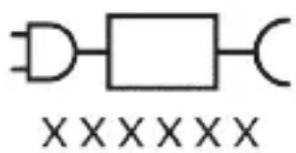
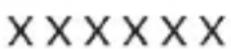
Detachable Power Supply Part: The "xxxxx" indicates the model number of the approved chargers to be used. (TCBxxxx, HX6100, HX6110, HX6160 or WAAxxxx)
Intended use
Sonicare ExpertClean power toothbrushes are intended to remove adherent plaque and food debris from the
teeth to reduce tooth decay and improve and maintain oral health. Sonicare ExpertClean power toothbrushes are intended for personal use. Use by children should be with adult supervision.
Your Philips Sonicare (Fig 1.)
1 Handle
2 Power on/off button
3 Intensity indicator
4 Mode/intensity button
5 Mode indicator
6 Brush Head Replacement Reminder
7 Battery indicator
Accessories:
8 Brush head cap
9 Smart brush head(s)
10 BrushSync symbol
11 Charging stand
12 Travel case
13 Charging travel case
14 USB-A wall adapter
15 USB-A cable
16 UV sanitizer and charger
Note: Accessories included may vary based on the model purchased.
Sonicare app - Getting started
The Sonicare app pairs with your toothbrush to provide you a connected experience. By connecting your toothbrush to your Sonicare app account, you will be able to:
- Track your brushing progress
- Receive personalized tips and actionable recommendations to improve your oral health
- Access the full range of benefits and receive ongoing upgrades
The app is compatible with a wide range of mobile devices.
To start using the Sonicare app:
1 Download the Sonicare app to your phone.
2 Ensure that Bluetooth for your device is turned on.
3 Pick up your toothbrush to ensure it is active (lights on).
4 Open the app and follow the steps.
5 Pair your toothbrush with the app.
6 Create your account via the app. Complete firmware update, if prompted, to access the latest improvements and features.
7 Brush regularly with your toothbrush connected to the app. When you regularly sync the toothbrush with the app, you will receive updates to help improve your oral healthcare.
8 Sync regularly.
9 Keep your phone close to your toothbrush for optimal data transfer.
To sync manually: Pair/connect your toothbrush with the app every two weeks to benefit from the app features/capabilities.
To sync automatically: Allow location permission while setting up the app. By allowing location permission, your phone knows when it is in the connection range of your toothbrush and can refresh your brushing data in the app to provide the latest insights and recommendations.
Note: Make sure your phone's Bluetooth is switched on when using the app so that your toothbrush can transfer and update your brushing data in the app. If you have questions about why your brushing data is collected, be sure to review the Sonicare Privacy Statement, available throughout the app setup process.
App features
Your Sonicare power toothbrush is equipped with smart sensors to provide you with feedback about your brushing habits, including:
- Daily brushing sessions
- Time spent during each brushing session
- Applied brushing pressure
- Personalized tips and actionable recommendations
- Brush head replacement reminder (based on actual use)
The Sonicare app collects the data provided by the smart sensors and tracks your brushing habits over time.
Getting started
Attaching the brush head
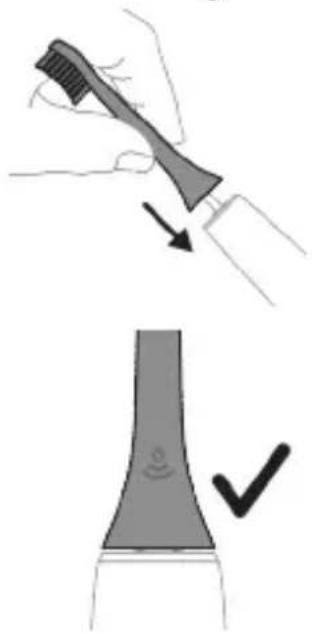
1 Align the brush head so the bristles point in the same direction as the front of the handle.
2 Firmly press the brush head down onto the metal shaft until it will not go any further.
Note: It is normal to see a slight gap between the brush head and the handle.
Using your Philips Sonicare toothbrush
If you are using your Sonicare toothbrush for the first time, it is normal to feel more vibration than when using a non-electric toothbrush. It is common for first-time users to apply too much pressure. Only apply gentle pressure and let the toothbrush do the brushing for you. Please follow the brushing instructions below for the best experience.
To help you transition to your new Sonicare power toothbrush, use a lower setting for the first 1-2 weeks then transition to a higher setting.
Brushing instructions
natural_image
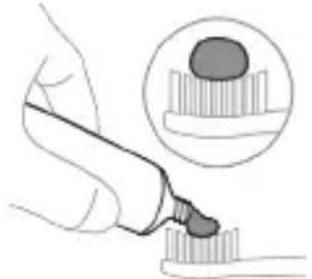
Illustration of a hand using a pen to apply a product to a textured surface, with an inset showing a magnified view of the product (no text or symbols present)1 Wet the bristles and apply a small amount of toothpaste.
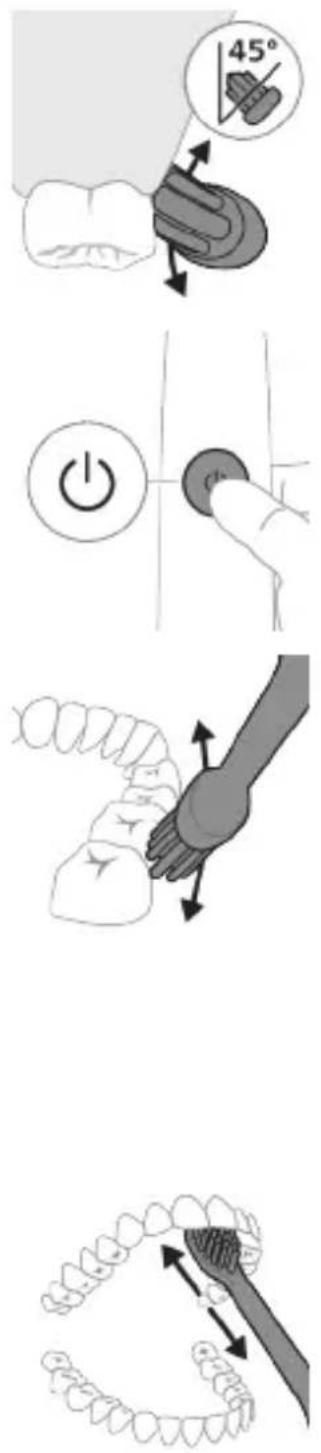
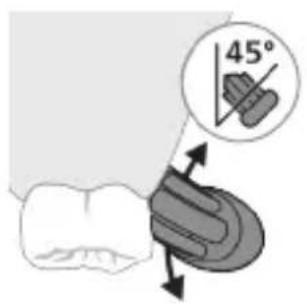
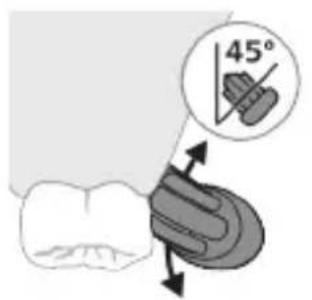
2 Place the toothbrush bristles against the teeth at a slight angle (45 degrees). Pressing firmly to make the bristles reach the gumline or slightly beneath the gumline.
Note: Keep the center of the brush in contact with the teeth at all times.
3 Press the power on/off button to switch on the Philips Sonicare.
4 Gently keep the bristles placed on the teeth and in the gumline. Brush your teeth with small back and forth motion so the bristles reach between the teeth. Continue this motion throughout your brushing cycle.
Note: The bristles should slightly flare. It is not recommended to scrub as you would with a manual toothbrush.
Note: If you apply too much pressure, you will be alerted by a change in vibration of the handle and the brush head replacement reminder flashing amber.
5 To clean the inside surfaces of the front teeth, tilt the brush handle semi-upright and make several vertical overlapping brushing strokes on each tooth.
6 After you have completed the brushing cycle, you can spend additional time brushing the chewing surfaces of your teeth and areas where staining occurs. You can also brush your tongue, with the toothbrush switched on or off, as you prefer.
Note: Your Philips Sonicare toothbrush is safe to use on braces (brush heads wear out sooner when used on braces) and dental restorations (fillings, crowns, veneers) if they are properly adhered and not compromised.
BrushPacer
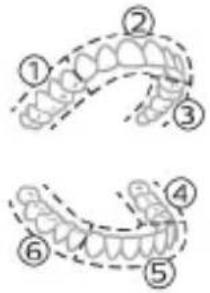
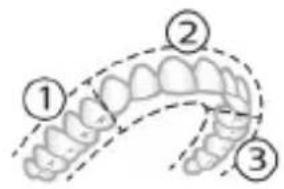
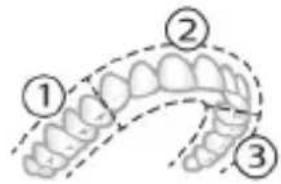
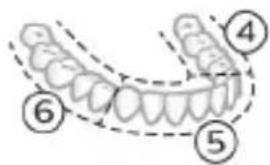
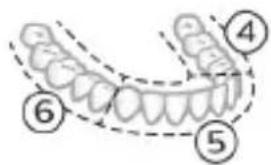
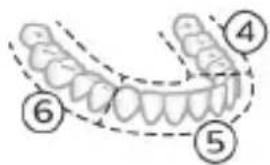
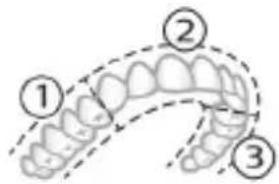
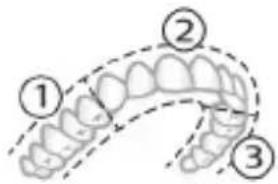
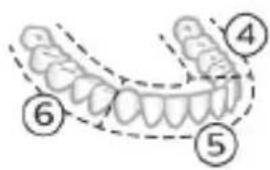
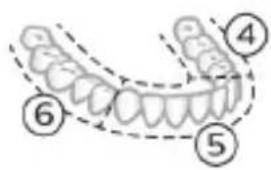
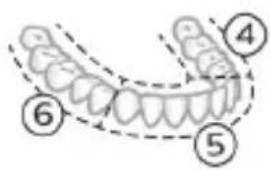
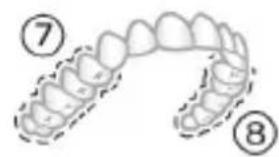
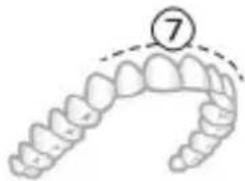
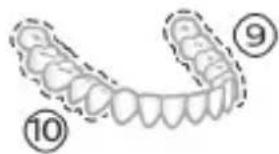
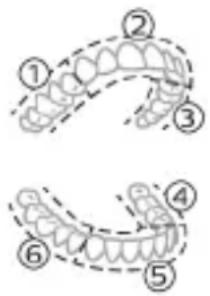
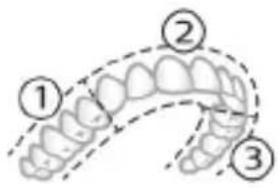
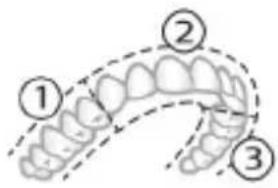
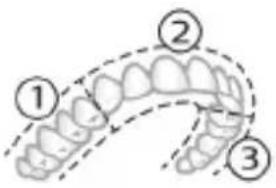
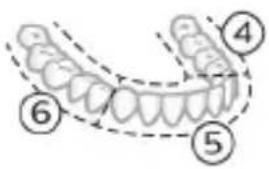
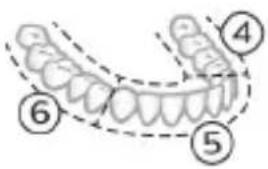
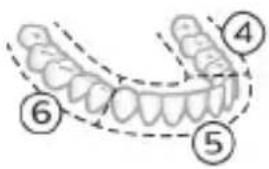
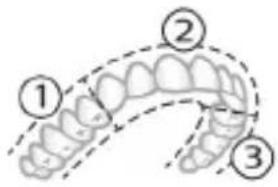
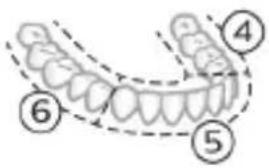
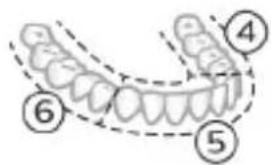
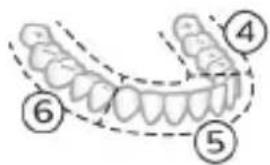
To make sure you brush evenly throughout the mouth, divide your mouth into 6 sections using the BrushPacer feature. The BrushPacer divides the brushing time into 6 equal segments and indicates when you should move to the next area. The segments are indicated with a brief pause in vibration. The toothbrush automatically stops at the end of the brushing session.
Note: Additional time may be added when you use the White+ or Gum Health modes.
Modes
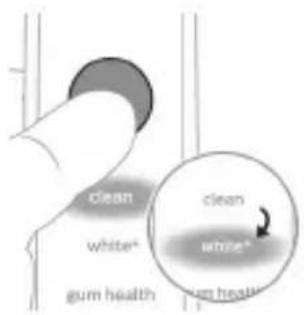
Your power toothbrush is equipped with up to 4 different modes: Clean, Deep Clean+, Gum Health and White+ (specific models only).
Based on the smart brush head you use, the optimal mode and intensity will be selected automatically by the BrushSync technology.
To manually change the mode, press the mode/intensity button when the toothbrush is off. All brush heads work with each mode.
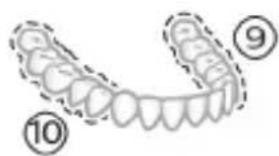
Clean and Deep Gum Health White+ Clean+
| Benefit Plaque removal Plaque removal | Plaque and surface stains removal | ||
| and gum massage | |||
| Recommended intensity level | High High High | ||
| Total brushing time | Clean: 2 minutesDeep Clean+: 3 minutes* | 3 minutes and 20 seconds | 2 minutes and 40 seconds |
Clean and Deep Gum Health White+ Clean+
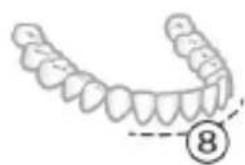
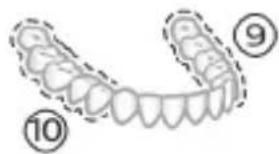
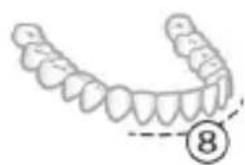
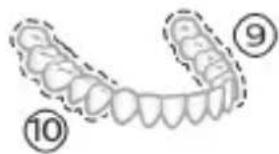
How to brush Clean: Brush each segment 20 seconds.
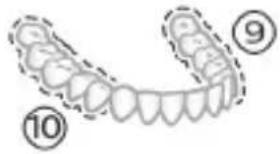
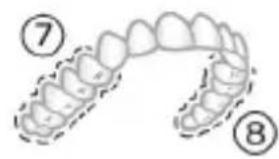
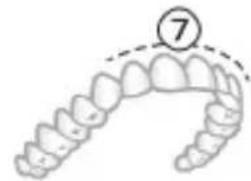
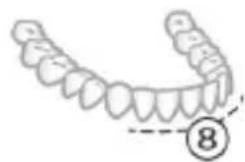
Brush each segment for 20 seconds,
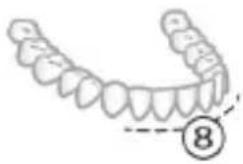
Brush each segment for 20 seconds,
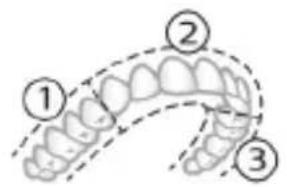
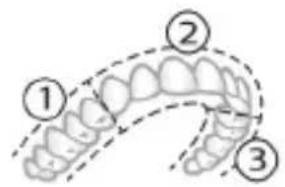
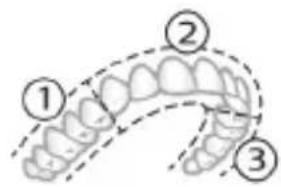
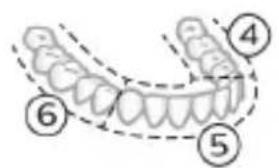
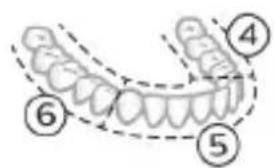
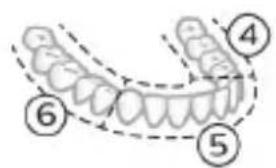
Deep clean+: Brush each segment for 30 seconds.*
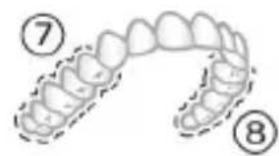
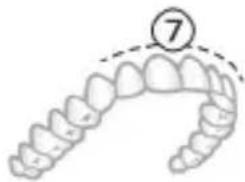
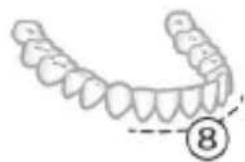
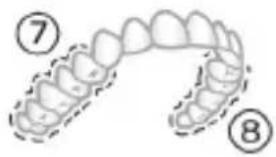
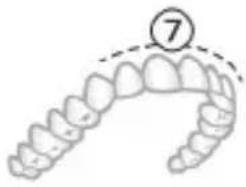
then brush segments 7,8,9 and 10 for 20 seconds each.
then brush segments 7 and 8 for 20 seconds each.
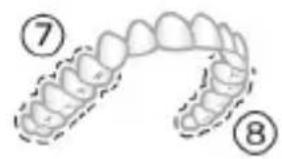
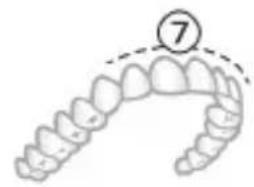
natural_image
Illustration of a dental arch with a numbered circle highlighting the tooth (number 7), no text or symbols present.
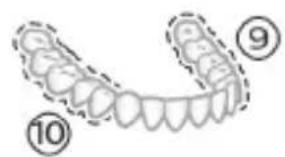
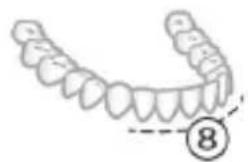
natural_image
Illustration of a human tooth with teeth and jawbone structure, marked with number 8 (no text or symbols on the main diagram)*Note: When brushing with the Philips Sonicare app in 'Deep Clean+' mode, the brushing time will be 2 minutes when connected to the app and 3 minutes when not connected to the app
Intensities
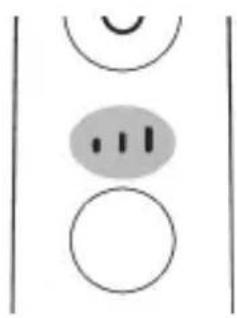
Your power toothbrush comes with 3 different intensity settings:
- low intensity (one bar)
- medium intensity (two bars)
- high intensity (three bars)
natural_image
Simple diagram with three circles and two curved lines, no text or symbols presentWhen attached to the handle, the smart brush head will automatically select the recommended intensity/ If you wish to change to a different intensity, you can do so by pressing the mode/intensity button while brushing. The intensity cannot be changed as long as the handle is powered off or paused.
BrushSync technology
natural_image
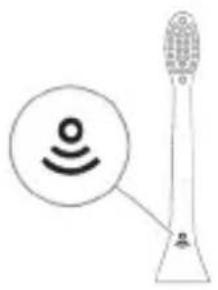
Diagram of a microphone with signal icon and sensor symbol (no text or labels)BrushSync technology enables your brush head to communicate with your handle using a microchip. The symbol at the bottom of the brush head indicates that the brush head is equipped with this technology.
BrushSync technology enables:
- Brush head replacement reminder
- BrushSync mode pairing
Philips Sonicare offers a wide range of smart brush heads, equipped with BrushSync technology. To explore our full range of toothbrush brush heads, and find the brush head that is best for you, go to
www.philips.com/toothbrush-heads for more information.
Features
- Pressure Sensor Feedback
- BrushPacer
- SmarTimer
- EasyStart
- Brush Head Replacement Reminder
- Brush Head Mode Pairing
Pressure Sensor Feedback
natural_image
Pure electrical circuit lines without any symbolsYour Sonicare toothbrush measures the pressure you apply while brushing, to protect your gums and teeth from damage.
If you apply excess pressure, the handle changes its vibration and the brush head replacement reminder light on the handle flashes amber until you reduce the pressure.
Note: Your product comes with the Pressure Sensor activated. To deactivate this feature (see 'Activating or deactivating features').
BrushPacer
The BrushPacer is an interval timer that helps you to brush evenly through the mouth by dividing your mouth into 6 sections.
SmarTimer
The SmarTimer indicates that your brushing cycle is complete by automatically switching off the toothbrush at the end of the brushing cycle. Dental professionals recommend brushing no less than 2 minutes twice a day.
Note: If you press the power on/off button after you started the brushing cycle, the toothbrush pauses. After a pause of 30 seconds, the SmarTimer resets.
EasyStart
This Philips Sonicare model comes with the EasyStart feature deactivated. The EasyStart feature gently increases the power over the first 14 brushings to help you get used to brushing with the Philips Sonicare. The EasyStart feature works with all modes.
Disclaimer
When the Philips Sonicare toothbrush is used in clinical studies, it must be used at high intensity with the handle fully charged and the EasyStart feature deactivated.
To activate EasyStart (see 'Activating or deactivating features').
Brush Head Replacement Reminder
Your Philips Sonicare is equipped with BrushSync technology that tracks the wear of your brush head.
Note: This feature only works with Philips Sonicare smart brush heads with BrushSync technology.
natural_image
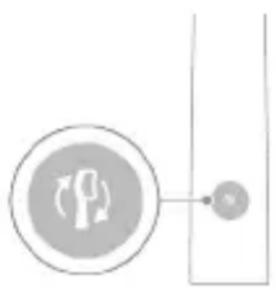
Simple diagram showing a circular icon with a traffic symbol and a small circle connected by an arrow (no text or labels)1 When you attach a new smart brush head for the first time, the handle recognizes that you have a Philips brush head with BrushSync technology and begins tracking brush head wear.
2 Over time, based on the pressure you apply and the total time the brush head has been used, the handle tracks brush head wear in order to determine the optimal time to replace your brush head. This feature guarantees the best cleaning and care of your teeth.
3 When the Brush Head Replacement Reminder indicator lights up amber, you should replace your brush head.
Note: All smart brush heads come with the brush head replacement reminder feature activated. To deactivate the brush head replacement reminder see 'Activating or deactivating features'.
Brush head mode pairing
Brush heads with BrushSync technology are equipped with a microchip which communicates with the handle and automatically pairs it with the recommended mode and intensity. Most brush heads with BrushSync technology will auto pair to Clean Mode. Brush heads with specific benefits will pair with the corresponding mode (when available), examples include:
- G3 Premium Gum Care: Gum Health Mode
- W3 Premium White or W(c) DiamondClean(compact): White+ Mode
Note: If you choose to change mode/intensity from the recommended setting, the brush head will remember the your chosen setting for future brushing sessions.
Activating or deactivating features
You can activate or deactivate the following features of your toothbrush:
- EasyStart
- Brush Head replacement reminder
- Pressure Sensor Feedback
Note: You can only activate or deactivate the brush head replacement reminder when a smart brush head is on the handle.
From handle:
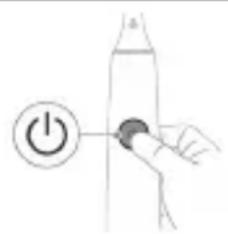
Step 1: Place the handle on a plugged in charger/charging travel case.
natural_image
Hand holding a power button next to a bottle, no text or symbols presentStep 2: Press and hold power on/off button for:
EasyStart Brush Head Replacement Reminder Pressure Sensor Feedback
Up to 3 seconds Up to 5 seconds Up to 7 seconds

Step 3: Let go of the power on/off button when you hear:
1 beep 1 beep and then 1 beep, 2 beeps and then 3 beeps 2 beeps
Together with:
natural_image
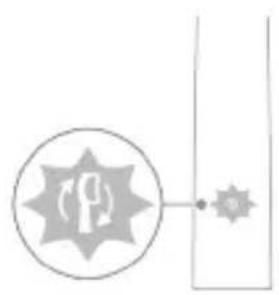
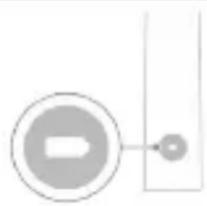
Simple diagram with a circular symbol and a vertical line, no text or labels presentIf you see the left LED for the battery indicator flash green 2 times and hear 3 tones low to high, then the feature has been activated.
OR
natural_image
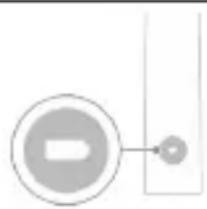
Simple diagram with a circular arrow and a small circle connected by a line, no text or symbols present.If you see the left LED for the battery indicator flash amber 1 time and hear 3 tones high to low, then the feature has been deactivated.
UV sanitizer
natural_image
Three-step diagram illustrating a mechanical assembly process: tool insertion, component disassembly, and final assembled view (no text or symbols)Note: Accessories included may vary based on the model purchased.
With the UV sanitizer you can clean your brush head after every use.
Unplug the sanitizer, discontinue use and call Consumer Care if:
- The UV light bulb remains on when the door is open.
- The window is broken or missing from the sanitizer.
- The sanitizer gives off smoke or a burning smell while it is operating.
Note: UV light can be harmful to the human eye and skin. This device should be kept out of reach of children at all times.
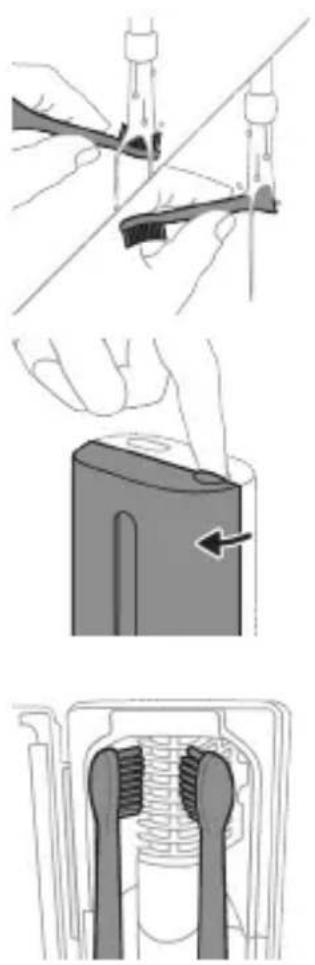
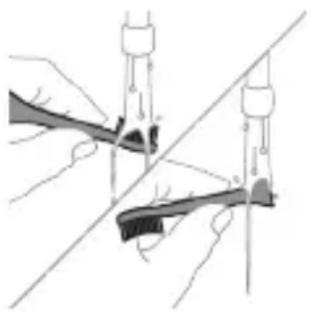
1 After brushing, rinse the brush head and shake off excess water.
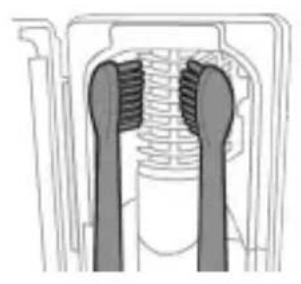
Warning: Make sure that the brush head cap is not on the brush head when the brush head is being cleaned in the sanitizer.
2 Place your finger in the door recess on top of the sanitizer and pull open the door.
3 Place the brush head on one of the 2 pegs in the sanitizer with the bristles facing the light bulb.
Note: Only clean Philips Sonicare snap-on brush heads in the sanitizer.
Note: Do not clean Philips Sonicare for Kids brush heads in the sanitizer.
4 Make sure the sanitizer is plugged into a live outlet of appropriate voltage.
natural_image
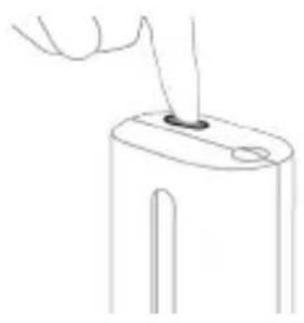
Line drawing of a hand holding a small object on a cylindrical base (no text or symbols)5 Close the door and press the green power on/off button once to select the UV clean cycle.
Note: you can only switch on the sanitizer if the door is properly closed.
Note: the sanitizer stops operating if you open the door during the sanitizer cycle.
Note: The sanitizer cycle takes approximately 10 minutes and then switches off automatically.
The sanitizer is in operation when the light glows through the window.
Charging and battery status
This Philips Sonicare toothbrush is designed to provide at least 28 brushing sessions, each session lasting 2 minutes (14 days if used twice per day) on a fully charged battery. The battery indicator shows the battery status when you complete the 2-minute brushing session, when you pause the toothbrush, or while it is charging.
Note: It can take up to 24 hours to fully charge the battery before first use, but you can use the Philips Sonicare toothbrush before it is fully charged.
Charging
natural_image
Simple line drawing of a device with a starburst symbol above it, no text or symbols present.Charging on charger or UV Sanitizer
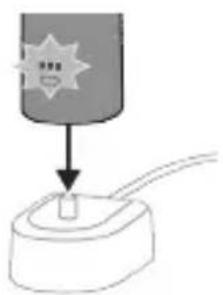
1 Plug the charger or sanitizer into an electrical outlet.
2 Place the handle on the charger or sanitizer.
- The handle emits 2 short beeps to confirm that the handle is placed properly.
- The flashing light of the battery indicator shows that the toothbrush is charging.
- When the handle is fully charged on the charger, the battery indicator lights up green for 30 seconds and then switches off.
Charging with the travel case
natural_image
Illustration of a handheld electric toothbrush with a curved cable and connector (no text or symbols)Note: Accessories included may vary based on the model purchased.
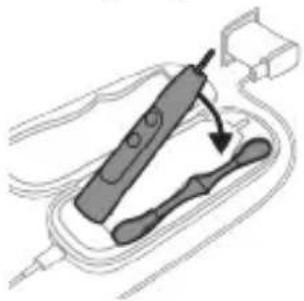
1 Insert the USB cable to the charging travel case.
2 Connect the attached USB cable to the 5V DC input power either from:
- The USB adapter provided.
- A UL-listed or certified to ANSI/UL 60950-1 personal computer's standard USB connector.
- A UL-listed or certified to ANSI/UL 60950-1 LPS power supply with USB output port.
- A UL-listed or certified 1310 Class 2 power supply.
Important: The wall adapter must be a safe extra low voltage source, compatible with the electrical ratings marked on the bottom of the device.
3 Place the handle in the charging travel case.
- The handle emits 2 short beeps to confirm that the handle is placed properly.
- The flashing light of the battery indicator shows that the toothbrush is charging.
4 The travel case will charge your toothbrush until your toothbrush is fully charged.
- When the handle is fully charged, the battery indicator lights up green for 30 seconds and then switches off.
Note: Charging the handle with the charging travel case may take longer than on the charger.
Battery status
Battery status (handle on plugged-in charger/charging travel case)
When the handle is placed on the charger or in the charging travel case, the battery indicator shows the battery level.
Battery status Number of flashing LEDs
LED color
Low 1 Flashing green
Partially full 2 Flashing green
Full 3 Flashing green until full,
then green for 30
seconds and then
switches off
Battery status (when handle is not on plugged-in charger/charging travel case)
When the toothbrush is awake, the battery indicator at the bottom of the handle shows the battery level.
Battery status Number of LEDs LED color
| Full 3 Solid green | |
| Partially full 2 Solid green | |
| Low 1 Solid green | |
| Empty 1 with beeps Flashes amber | |
| Note: To save energy, the battery indicator will switch off when not in use. | |
| Note: When the battery is completely empty, the toothbrush switches off. Place the toothbrush on the charger to charge it. | |
| Note: To keep the battery fully charged at all times, you may keep your toothbrush on the charger when not in use. | |
Cleaning
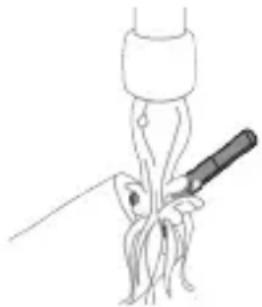
Toothbrush handle
natural_image
Line drawing of a fork being inserted into a tube (no text or symbols)1 Remove the brush head and rinse the metal shaft area with warm water. Make sure you remove any residual toothpaste.
Caution: Do not push on the rubber seal on the metal shaft with sharp objects, as this may cause damage.
2 Wipe the entire surface of the handle with a damp cloth.
Note: Do not tap the handle on the sink to remove excess water.
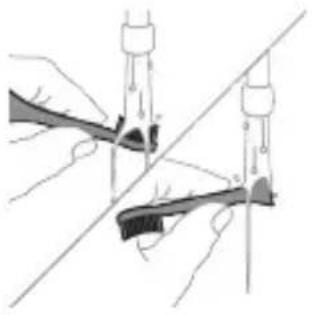
Brush head
natural_image
Illustration of two hands using a tool to tie a pair of wires (no text or symbols present)1 Rinse the brush head and bristles after each use.
2 Remove the brush head from the handle and rinse the brush head connection with warm water at least once a week. Rinse the travel cap as often as needed.
Charger
1 Unplug the charger before you clean it.
2 Wipe the surface of the charger with a damp cloth.
Travel case
Rinse with warm water and use a damp cloth to clean inside of travel case.
Charging travel case
1 Unplug the charging travel case before cleaning.
2 Use damp cloth to wipe the surface of the travel case.
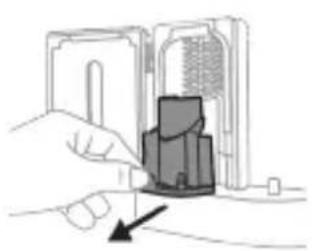
UV Sanitizer
Warning: Do not immerse the sanitizer in water or rinse it under the faucet.
Warning: Do not clean the sanitizer when the UV light bulb is hot.
For optimal effectiveness, it is recommended to clean your sanitizer weekly.
natural_image
Illustration of a hand inserting a component into an open device (no text or symbols visible)1 Unplug the sanitizer.
2 Pull the drip tray straight out. Rinse the drip tray and wipe it clean with a damp cloth.
3 Clean all interior surfaces with a damp cloth.
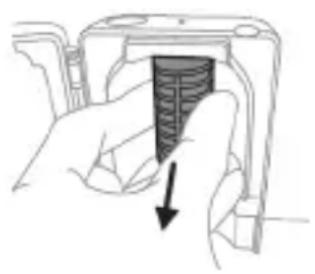
4 Remove the protective screen in front of the UV light bulb.
natural_image
Hand holding a device with a black arrow pointing to a textured interior (no text or symbols visible)To remove the screen, grasp the edges next to the snaps, gently squeeze and pull out the protective screen.
5 Remove the UV light bulb.
To remove the light bulb, grasp it and pull it out of the metal clasp.
6 Clean the protective screen and the UV light bulb with a damp cloth.
7 Reinsert the UV light bulb.
To reinsert the light bulb, align the bottom of the light bulb with the metal clasp and push the bulb into the clasp.
8 Reinsert the protective screen.
To reinsert the screen, align the pegs on the screen with the slots on the reflective surface near the UV light bulb. Push the screen straight into the slots on the sanitizer.
9 Place the drip tray back in the UV sanitizer.
10 After cleaning, make sure the sanitizer is completely dry before you connect it to the mains.
Storage
If you are not going to use the product for an extended period of time, unplug it from the electrical outlet, clean it and store it in a cool and dry place away from direct sunlight.
Replacement
Replace Philips Sonicare brush heads every 3 months to achieve optimal results. Use only Philips Sonicare replacement brush heads.
Locating the model number
Look on the bottom of the Philips Sonicare toothbrush handle for the model number (HX9600)
Warranty and support
If you need information or support, please visit www.philips.com/support or read the international warranty leaflet.
Warranty exclusions
What is not covered under warranty:
- In mouth attachments including brush heads and nozzles.
- Damage caused by use of unauthorized replacement parts or unauthorized brush heads.
- Damage caused by misuse, abuse, neglect, alterations or unauthorized repair.
- Normal wear and tear, including chips, scratches, abrasions, discoloration or fading.
- UV light bulb.
Recycling
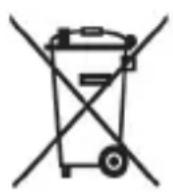
- This symbol means that electrical products and batteries shall not be disposed of with normal household waste.
- Follow your country's rules for the separate collection of electrical products and batteries.
- The UV light bulb of the sanitizer contains mercury. Do not throw the UV light bulb away with the normal household waste at the end of its life. Hand it in at an official collection point for recycling.
Removing the rechargeable battery
The built-in rechargeable battery must only be removed by a qualified professional when the appliance is discarded. Before removing the battery, make sure that the battery is completely empty.
Take any necessary safety precautions when you handle tools to open the appliance and when you dispose of the rechargeable battery. Be sure to protect your eyes, hands, fingers, and the surface on which you work.
When you handle batteries, make sure that your hands, the product and the batteries are dry.
To avoid accidental short-circuiting of batteries after removal, do not let battery terminals come into contact with metal objects (e.g. coins,
hairpins, rings). Do not wrap batteries in aluminum foil. Tape battery terminals or put batteries in a plastic bag before you discard them.
To remove the rechargeable battery, you need a towel or cloth, a hammer and a flat-head (standard) screwdriver. Observe basic safety precautions when you follow the procedure outlined below.
1 To deplete the rechargeable battery of any charge, remove the handle from the charger, turn on the toothbrush and let it run until it stops. Repeat this step until you can no longer turn on the toothbrush.
2 Remove and discard the brush head. Cover the entire handle with a towel or cloth.
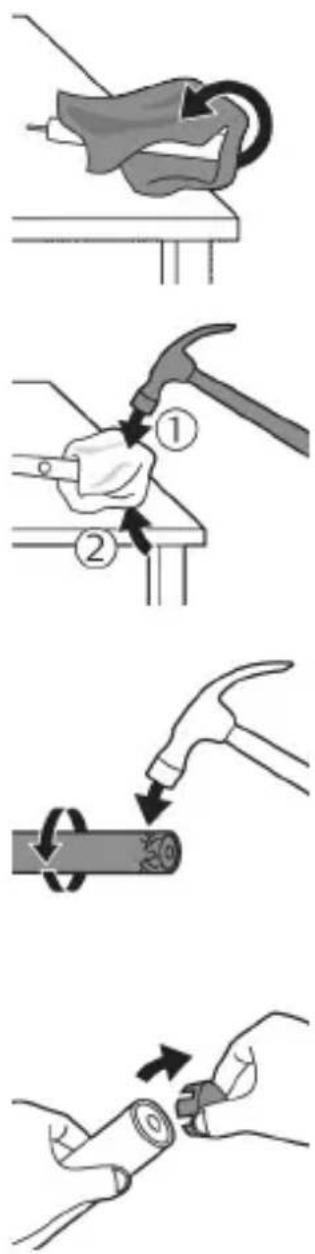
3 Hold the top of the handle with one hand and strike the handle housing 0.5 inch above the bottom end. Strike firmly with a hammer on all 4 sides to eject the end cap.
Note: You may have to hit on the end several times to break the internal snap connections.
4 Remove the end cap from the toothbrush handle. If the end cap does not release easily from the housing, repeat step 3 until the end cap is released.
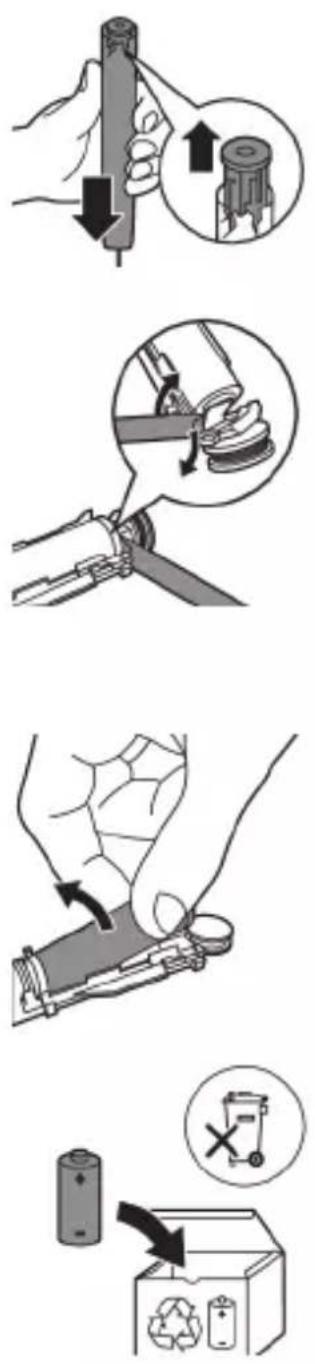
5 Holding the handle upside down, press the shaft down on a hard surface. If the internal components do not easily release from the housing, repeat step 3 until the internal components are released.
6 Wedge the screwdriver between the battery and the black frame at the bottom of the internal components. Then pry the screwdriver away from the battery to break the bottom of the black frame.
7 Insert the screwdriver between the bottom of the battery and the black frame to break the metal tab connecting the battery to the green printed circuit board. This will release the bottom end of the battery from the frame.
8 Grab the battery and pull it away from the internal components to break the second metal battery tab.
Caution: Be aware of the sharp edges of the battery tabs so as to avoid injury to your fingers.
9 Cover the battery contacts with tape to prevent any electrical short from residual battery charge.
The rechargeable battery can now be recycled and the rest of the product discarded appropriately.
Note: Do not throw away the appliance with the normal household waste at the end of its life, but hand it in at an official collection point for recycling. By doing this, you help to preserve the environment.
Giriş
www.philips.com/support
natural_image
Simple line drawing of an open book with no text or symbols visible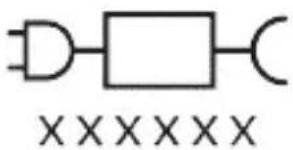
natural_image
Illustration of a hand holding a toothbrush with a directional arrow indicating force or movement (no text or symbols)natural_image
Simple line drawing of a curved object with a checkmark mark (no text or symbols)natural_image
Illustration of a hand applying a toothbrush to a nail, with an inset showing a nail being inserted (no text or symbols present)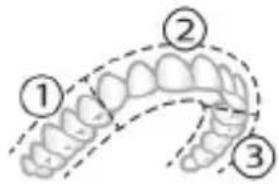
natural_image
Illustration of a dental arch with a numbered callout (7) indicating the upper part of the arch.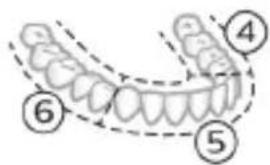
natural_image
Illustration of a human tooth with dental structures and a numbered marker (8) at the base, no text or symbols present.natural_image
Simple diagram with three circles and two curved lines, no text or symbols presentnatural_image
Illustration of a microphone with a circular icon showing signal waves (no text or symbols)natural_image
Simple diagram with a circular symbol containing a vehicle and a starburst shape connected to a vertical line (no text or labels)natural_image
Simple diagram showing a circular icon with a traffic symbol and a small circle connected by an arrow (no text or labels)natural_image
Simple line drawing of a hand pressing a button on a cylindrical object with an 'Power' icon (no text or symbols)natural_image
Simple diagram with a circular element and a small circle connected by lines, no text or symbols present.natural_image
Simple diagram with a circular arrow and a small circle connected by a line (no text or symbols)natural_image
Illustration of two hands using a tool to measure a mechanical component, no text or symbols presentnatural_image
Illustration of a hand holding a device with a circular arrow pointing to the side (no text or symbols)natural_image
Diagram of a mechanical component with two textured surfaces and internal structure (no text or symbols)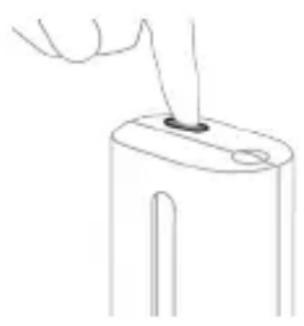
natural_image
Line drawing of a hand holding a small object with a hole, no text or symbols presentnatural_image
Illustration of a handheld electronic device with a hand holding a connector (no text or symbols visible)natural_image
Line drawing of a medical procedure showing a tool interacting with an anatomical structure (no text or symbols)natural_image
Illustration of hands using a tool to adjust or install a mechanical component, with no visible text or symbols.natural_image
Hand inserting a component into a device (no text or symbols visible)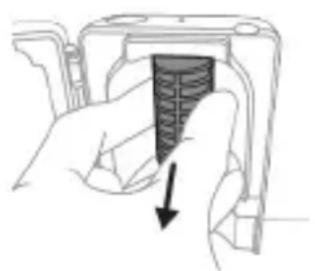
natural_image
Hand holding a device with a black arrow pointing to a textured interior (no text or symbols visible)natural_image
Simple line drawing of a mechanical component or tool with a curved arrow indicating motion (no text or symbols)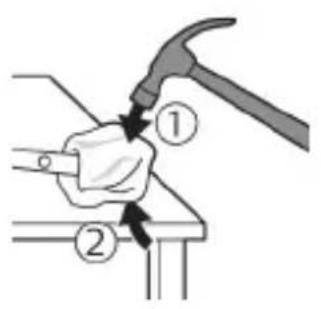
natural_image
Illustration of a hand using a hammer to tighten a cylindrical object with a circular arrow (no text or symbols)natural_image
Illustration of hands fastening a cylindrical object with a belt, no text or symbols presentnatural_image
Illustration of a hand holding a pen with an arrow indicating downward motion, and a magnified inset showing the same pen tip (no text or symbols)natural_image
Mechanical assembly diagram showing a clamping tool interacting with a mechanical component, with no visible text or symbols.natural_image
Illustration of a hand holding a device with a black arrow indicating rotation (no text or symbols)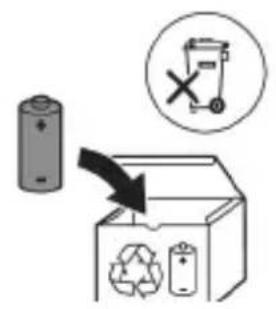
www.philips.com/support
natural_image
Simple line drawing of an open book with no text or symbols visible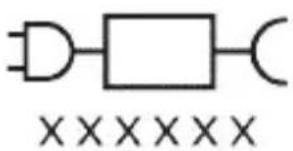
natural_image
Illustration showing a hand brushing a tooth with a brush, and a close-up of the tooth being examined with a circular sensor (no text or symbols present)natural_image
Illustration of a hand using a pipette to apply a substance to a surface, with an inset showing a magnified view of the object (no text or symbols present)natural_image
Illustration of a hand holding a curved object with directional arrows indicating movement or force (no text or symbols)natural_image
Diagram of dental arching with a tool interacting with teeth (no text or labels)Clean a Deep Clean+ Gum Health White+
Clean a Deep Clean+ Gum Health White+
natural_image
Illustration of a dental arch with a numbered callout (7) indicating a specific tooth position (no text or symbols present)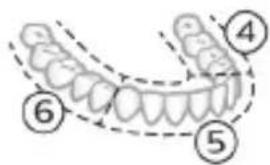
natural_image
Illustration of a human tooth with dental arches and teeth, marked with number 8 (no text or symbols on the main subject)natural_image
Simple diagram with three circles and a central oval, no text or symbols presentnatural_image
Diagram of a microphone with a sensor icon and connection point (no text or symbols)natural_image
Simple line diagram showing a gear symbol with a starburst icon and a small star-like shape connected by a line (no text or labels)natural_image
Simple diagram showing a circular icon with a traffic symbol and a small circle connected by an arrow (no text or labels)natural_image
Hand holding a power button next to a bottle (no text or symbols visible)natural_image
Simple diagram with a circle containing an internal symbol and a small circle connected by a line (no text or labels)natural_image
Simple diagram with a circular icon containing a white rectangle and a small circle connected by a line (no text or symbols)natural_image
Illustration of a handheld electronic device with a hand holding a cable and a connector (no text or symbols visible)natural_image
Line drawing of a squid being fed with a pen (no text or symbols)natural_image
Illustration of two hands using a tool to connect a mechanical component, with no visible text or symbols.natural_image
Illustration of a hand inserting a component into a device (no text or symbols visible)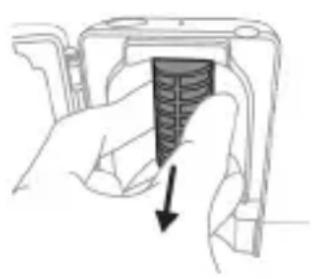
natural_image
Hand holding a device with a textured internal component and a downward arrow indicating action (no text or symbols)natural_image
Illustration of a hand holding a device with a circular component, no text or symbols present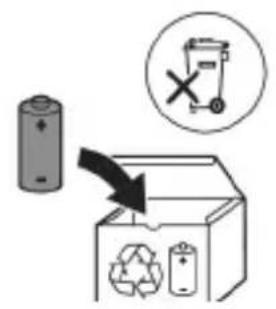
www.philips.com/support
natural_image
Simple line drawing of an open book with no text or symbols visible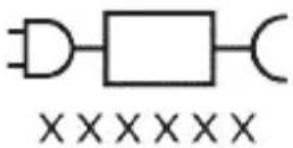
natural_image
Illustration showing a hand brushing a tooth with a brush and arrow indicating direction, next to a close-up of a tooth with a circular mark and checkmark (no text or symbols)natural_image
Illustration of a hand using a tool to apply a product to a toothbrush, with an inset showing a textured surface (no text or symbols)natural_image
Illustration of a hand holding a small object with directional arrows indicating movement or force (no text or symbols)natural_image
Diagram of dental arching with tooth structure and tooth removal (no text or labels)natural_image
Simple diagram with three circles and a central oval, no text or symbols presentnatural_image
Diagram of a microphone with a sensor icon and signal symbol (no text or labels)natural_image
Simple diagram with a circular icon containing a traffic light symbol and a starburst shape connected to a vertical line (no text or labels)natural_image
Simple diagram showing a circular icon with a traffic signal and a small circle connected to a vertical line (no text or symbols)natural_image
Simple diagram with a circle containing an internal rectangle and a small circle connected by a line (no text or symbols)natural_image
Simple diagram with a circular symbol and a vertical line, no text or labels presentnatural_image
Illustration showing two-step procedure: hand holding a tool with a clip, and close-up of a device with a handle (no text or symbols)natural_image
Diagram of a mechanical component with two textured surfaces and internal structure (no text or symbols)
natural_image
Line drawing of a hand holding a small object with a hole, no text or symbols presentnatural_image
Illustration of a handheld electronic device with a hand holding a connector (no text or symbols visible)natural_image
Line drawing of a hand holding a pen inserted into a bundle of noodles (no text or symbols)natural_image
Illustration of two hands using a tool to connect a mechanical component, with no visible text or symbols.natural_image
Hand inserting a component into an electronic device (no text or symbols visible)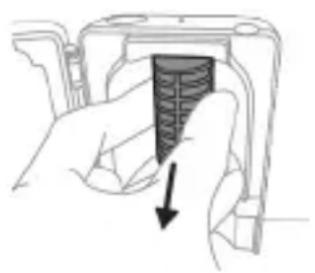
natural_image
Hand holding a device with a black arrow pointing to a textured interior (no text or symbols visible)natural_image
Diagram of a mechanical or electrical component with a curved arrow indicating rotation (no text or symbols)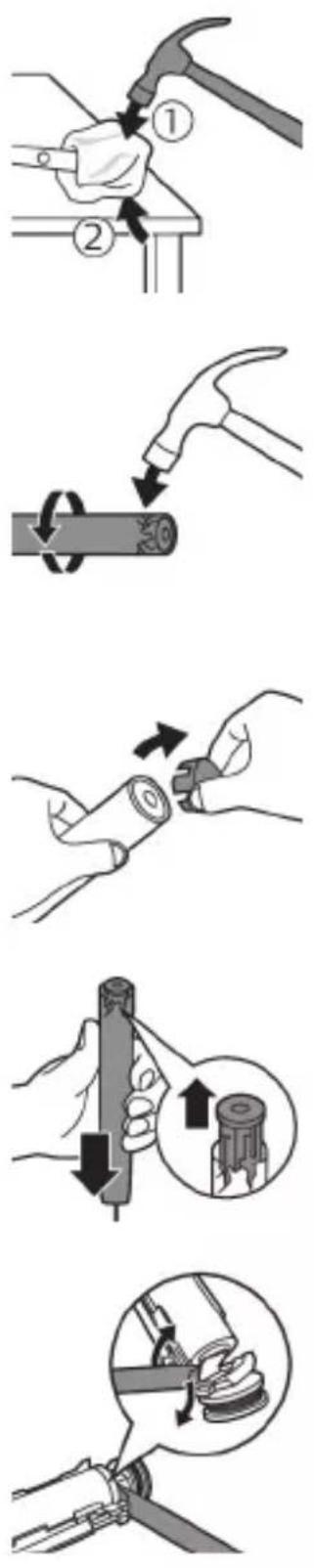
natural_image
Illustration of a hand holding a small electronic device with a black arrow indicating rotation (no text or symbols)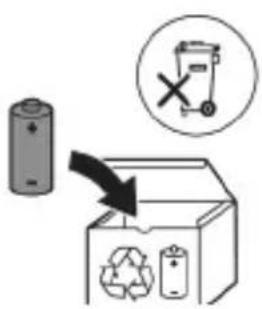
www.philips.com/support
www.philips.com/support
natural_image
Simple line drawing of an open book with no text or symbols visible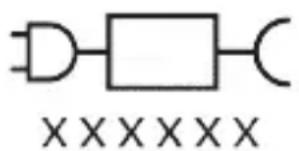
natural_image
Pure electrical circuit lines without any symbolsnatural_image
Illustration of a hand using a pipette to apply a sample onto a surface, with an inset showing a magnified view of the sample (no text or symbols present)natural_image
Illustration of a hand holding a segmented object with directional arrows indicating movement (no text or symbols)natural_image
Diagram showing dental alignment with a tool interacting with teeth (no text or labels)natural_image
Simple diagram with three circles and a central oval, no text or symbols presentnatural_image
Diagram of a microphone with a circular icon showing signal waves (no text or symbols)natural_image
Simple line diagram showing a circular symbol with a gear-like design and a star-shaped connector (no text or labels)- G3 Premium Gum Care: Gum Health Putzprogramm
natural_image
Simple line drawing of a hand pressing a button on a bottle with a power symbol (no text or labels)natural_image
Illustration of two hands using a tool to adjust or install a mechanical component, with no visible text or symbols.natural_image
Illustration of a hand holding a device with a circular button and an arrow pointing to it (no text or symbols)natural_image
Cross-sectional diagram of a mechanical component with two curved surfaces (no text or symbols)natural_image
Line drawing of a hand holding a small object with a pointed tip, no text or symbols presentnatural_image
Simple line drawing of a device with a starburst symbol above it, showing a downward arrow pointing to a small component (no text or symbols present)natural_image
Illustration of a handheld electronic device with a hand holding a connector (no text or symbols visible)natural_image
Line drawing of a hand holding a tool over a bundle of noodles (no text or symbols)natural_image
Illustration of hands using a tool to adjust or install a mechanical component, no text or symbols presentLadegerät
natural_image
Illustration of a hand inserting a component into an electronic device (no text or symbols visible)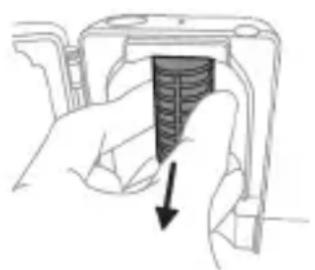
natural_image
Hand holding a device with a black arrow pointing to a textured surface (no text or symbols visible)natural_image
Mechanical assembly diagram showing a lever and gear mechanism (no text or labels)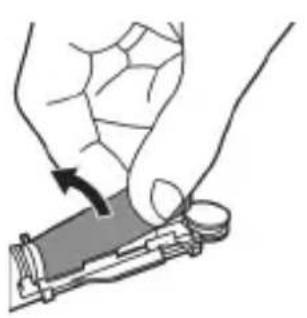
natural_image
Illustration of a hand holding a device with a circular button, showing a curved arrow indicating motion (no text or symbols present)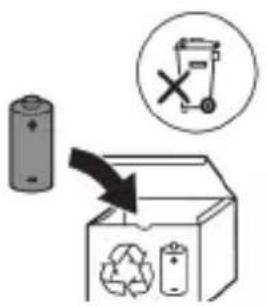
natural_image
Simple line drawing of an open book with no text or symbols visible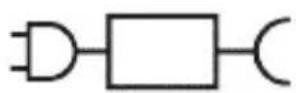

natural_image
Simple diagram with three circles and a central oval, no text or symbols presentnatural_image
Diagram of a microphone with a sensor icon and connection point (no text or symbols)www.philips.com/toothbrush-heads.
Omadused
natural_image
Simple diagram with a circular symbol containing a traffic light icon and a small star-like shape connected to a vertical line (no text or labels)natural_image
Simple diagram showing a circular icon with a traffic signal inside and a connected circle with an '+' symbol (no text or labels)natural_image
Simple diagram with a circular element and a small circle connected by lines, no text or symbols present.natural_image
Simple diagram with a circular symbol and a vertical line, no text or labels presentnatural_image
Illustration showing two-step procedure: hand holding a tool, then holding a battery pack with an arrow indicating the process (no text or symbols present)natural_image
Diagram of a mechanical component with two symmetrical slots and textured surfaces (no text or symbols)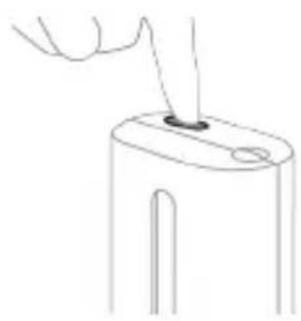
natural_image
Line drawing of a hand holding a small object with a pointed tip, no text or symbols presentnatural_image
Simple line drawing of a device with a button and cable, no text or symbols presentnatural_image
Diagram of a handheld electronic device with a cable and connector (no text or symbols)natural_image
Line drawing of a hand holding a pen inserted into a bundle of noodles (no text or symbols)natural_image
Illustration of hands using a tool to adjust or install a mechanical component, no text or symbols presentnatural_image
Hand inserting a component into a device (no text or symbols visible)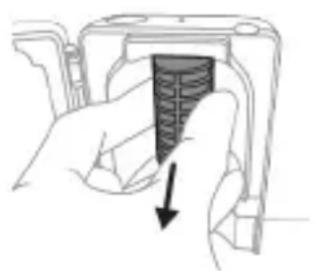
natural_image
Hand holding a device with a black arrow pointing to a textured interior (no text or symbols visible)natural_image
Illustration of a mechanical component with a curved arrow indicating rotation (no text or symbols)
natural_image
Illustration of a hand holding a device with a circular component, no text or symbols present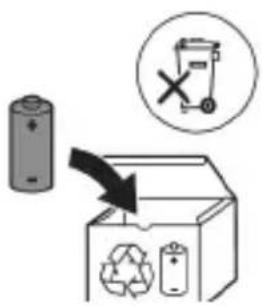
natural_image
Simple line drawing of an open book with no text or symbols visiblenatural_image
Illustration of a hand holding a tool with a brush and arrow indicating direction (no text or symbols)natural_image
Simple line drawing of a curved object with a checkmark mark (no text or symbols)natural_image
Illustration of a hand using a tool to apply a product to a toothbrush, with an inset showing a magnified view of the tooth (no text or symbols present)BrushPacer
natural_image
Simple diagram with three circles and a central oval, no text or symbols presentnatural_image
Diagram of a microphone with signal icon and connection point (no text or symbols)natural_image
Simple line diagram showing a gear icon and a star symbol connected by a line (no text or labels)natural_image
Simple diagram showing a circular icon with a traffic signal inside and a vertical line with a circle labeled 'B' (no text or symbols beyond the label)natural_image
Simple line drawing of a hand pressing a button on a cylindrical object with an 'Power' icon (no text or symbols)natural_image
Simple diagram with a circular arrow and a small circle connected by a line, no text or symbols present.natural_image
Simple diagram with a circular arrow and a small circle connected by a line (no text or symbols)natural_image
Illustration of two hands using a tool to connect two objects, no text or symbols presentnatural_image
Three-step illustration showing a hand inserting a device into a battery, then to insert a plug into a socket (no text or symbols present)natural_image
Illustration of a handheld electronic device with a curved cable and connector (no text or symbols)natural_image
Line drawing of a hand holding a pen inserted into a squid (no text or symbols)natural_image
Illustration of two hands using a tool to adjust or install a mechanical component, with no visible text or symbols.natural_image
Illustration of a hand inserting a component into an open device (no text or symbols visible)natural_image
Hand holding a device with a black arrow pointing to a textured interior (no text or symbols visible)natural_image
Illustration of a hand holding a cylindrical object with arrows indicating force direction, and an inset showing a magnified view of the same object (no text or symbols present)natural_image
Mechanical assembly diagram showing a lever mechanism with a magnified inset (no text or symbols)natural_image
Illustration of a hand holding a device with a circular button, showing a curved arrow indicating rotation (no text or symbols present)www.philips.com/support
natural_image
Illustration of a hand holding a toothbrush with a directional arrow indicating force or movement (no text or symbols)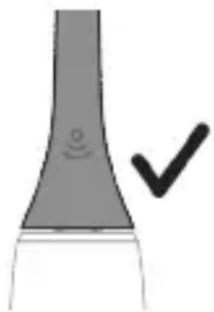
natural_image
Simple line drawing of a curved object with a circular mark and a checkmark (no text or symbols)natural_image
Illustration of a hand holding a pen with a magnified inset showing a droplet on a surface (no text or symbols)natural_image
Illustration of a hand holding a segmented object with directional arrows indicating movement or force (no text or symbols)natural_image
Diagram showing dental alignment with a toothbrush and jawbone (no text or labels)natural_image
Simple diagram with three circles and a central oval, no text or symbols presentnatural_image
Diagram of a microphone with signal icon and connection point (no text or symbols)natural_image
Simple line diagram showing a circular icon with a parking sign and a star-shaped symbol connected to a vertical line (no text or labels)natural_image
Simple diagram showing a circular icon with a traffic symbol and a small circle connected by an arrow (no text or labels)natural_image
Simple line drawing of a hand pressing a button on a bottle with a power symbol (no text or labels)natural_image
Illustration of a handheld electric shaver with a cable, showing no text or symbolsnatural_image
Line drawing of a medical procedure involving an incision or needle inserted into tissue (no text or symbols)natural_image
Illustration of two hands using a tool to adjust or install a mechanical component, with no visible text or symbols.natural_image
Illustration of a hand inserting a component into a device housing (no text or symbols visible)natural_image
Hand holding a device with a black arrow pointing to a textured section (no text or symbols visible)natural_image
Simple line drawing of an open book with no text or symbols visible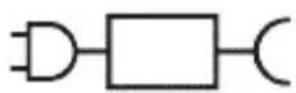

Odvojiv dio jedinice za napajanje: „xxxxx” označava broj modela punjača odobrenih za uporabu. (TCBxxxx, HX6100, HX6110, HX6160 ili WAAxxxx)
Namjena
Električne četkice za zube Sonicare ExpertClean namijenjene su za uklanjanje naslaga i ostataka hrane sa zuba kako bi se smanjilo propadanje zuba te poboljšalo i održavalo oralno zdravlje. Električne četkice za zube Sonicare ExpertClean namijenjene su za osobnu uporabu. Djeca četkicu trebaju upotrebljavati uz nadzor odrasle osobe.
Vaš Philips Sonicare (Slika 1)
1 drška
2 gumb za uključivanje/isključivanje
3 indikator intenziteta
4 gumb za način rada / intenzitet
5 indikator načina rada
6 podsjetnik o zamjeni glave četkice.
7 Indikator baterije
Dodaci:
8 poklopac glave četkice
9 pametne glave četkice
10 simbol značajke BrushSync
11 postolje za punjenje
12 putna kutija
13 Putna kutija za punjenje
14 zidni USB-A prilagodnik
15 USB-A kabel
16 Uređaj za UV dezinfekciju i punjač
Napomena: priloženi dodaci mogu se razlikovati ovisno o kupljenom modelu.
Aplikacija Sonicare – početak
Aplikacija Sonicare uparuje se s vašom četkicom za zube kako bi vam omogućila povezivanje. Povezivanjem četkice za zube s vašim računom u aplikaciji Sonicare moći ćete:
natural_image
Illustration showing a hand brushing a tooth with a brush, and a close-up of the tooth being checked (no text or symbols present)natural_image
Illustration of a hand using a pipette to apply liquid onto a surface, with an inset showing a droplet on a surface (no text or symbols present)1 Smočite čekinje i nanesite malu količinu paste za zube.
natural_image
Illustration of a hand holding a curved object with directional arrows indicating movement or force (no text or symbols)natural_image
Diagram showing dental alignment with a tool interacting with teeth (no text or labels)Da biste ručno promijenili način rada, pritisnite gumb za način rada / intenzitet dok je četkica za zube isključena. Sve glave četkice rade u svakom načinu rada.
Clean i Deep Gum Health White+ Clean+
| Prednost uklanjanje naslaga | uklanjanje naslaga i masaža desni | uklanjanje naslaga i površinskih mrlja | |
| Preporučena razina intenziteta | visoka visoka visoka | ||
| Ukupno vrijeme četkanja | Clean: 2 minuteDeep Clean+: 3 minute* | 3 minute i 20 sekundi | 2 minute i 40 sekundi |
Clean i Deep Clean+ Gum Health White+
| Kako četkati Clean: četkajte svaki segment20 sekundi. | Četkajte svaki segment20 sekundi, | Četkajte svaki segment20 sekundi, |
 |  |  |
 |  |  |
| Deep Clean+:četkajte svaki segment30 sekundi.* | a zatim segmente 7,8,9 i 10 četkajte svakog po20 sekundi. | a zatim segmente 7 i 8 četkajte svakog po20 sekundi. |
 |  |  |
 |  |  |
*Napomena: pri četkanju uz aplikaciju Philips Sonicare u načinu rada Deep Clean+ vrijeme četkanja bit će 2 minute ako ste povezani s aplikacijom odnosno 3 minute ako niste povezani s aplikacijom.
Jačine
Vaša električna četkica za zube ima tri različite postavke intenziteta:
natural_image
Simple diagram with three circles and two vertical lines, no text or symbols presentnatural_image
Diagram of a microphone with signal icon and sensor symbol (no text or labels)Tehnologija BrushSync omogućava glavi četkice da komunicira s drškom s pomoću mikročipa. Simbol na donjem dijelu glave četkice naznačuje da je glava četkice opremljena tom tehnologijom.
Tehnologija BrushSync omogućuje:
natural_image
Simple diagram with a circular symbol containing a gear and a starburst, connected by a line to a vertical bar (no text or labels)natural_image
Simple diagram showing a circular icon with a traffic symbol and a small circle connected by an arrow (no text or labels)natural_image
Hand holding a power button next to a bottle (no text or symbols visible)natural_image
Simple diagram with a circular element and a vertical line, no text or symbols presentnatural_image
Simple diagram with a circular element and a vertical line, no text or symbols presentAko lijeva LED žaruljica indikatora baterije jednom zatreperi u narančastoj boji i oglase se tri zvučna signala od visokog do niskog, to znači da je značajka deaktivirana.
natural_image
Illustration showing two-step procedure: hand holding a tool, then holding a battery pack with an arrow indicating the process (no text or symbols present)1 Nakon četkanja isperite glavu četkice i otresite višak vode.
Upozorenje: Pri čišćenju glave četkice u uređaju za dezinfekciju pazite da kapica glave četkice nije na četkici.
2 Stavite prst u utor za vratašca pri vrhu uređaja za dezinfekciju i otvorite vratašca.
natural_image
Diagram of a mechanical component with two textured surfaces and a central shaft (no text or symbols)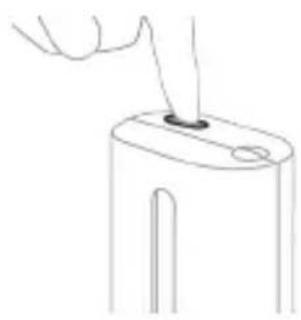
natural_image
Line drawing of a hand inserting a small object into a cylindrical device (no text or symbols)3 Stavite glavu četkice na jedan od dva nastavka u uređaju za dezinfekciju tako da vlakna budu okrenuta prema žarulji.
natural_image
Simple line drawing of a mechanical component with a starburst symbol and a base, no text or symbols present.Punjenje na punjaču ili u uređaju za UV dezinfekciju
1 Priključite punjač ili uređaj za dezinfekciju u električnu utičnicu.
2 Postavite dršku na punjač ili uređaj za dezinfekciju.
- Drška će emitirati dva kratka zvučna signala kao potvrdu da je drška pravilno postavljena.
- Treperenje indikatora baterije pokazuje da se četkica puni.
- Kad je drška na punjaču potpuno napunjena,
indikator baterije svijetli 30 sekundi u zelenoj boji prije
nego što se isključi.
natural_image
Illustration of a handheld electronic device with a hand holding a plug, showing internal components and wiring (no text or symbols)Napomena: priloženi dodaci mogu se razlikovati ovisno o kupljenom modelu.
1 Umetnite USB kabel u putnu torbicu za punjenje.
2 Povežite umetnuti USB kabel s ulaznim napajanjem istosmjerne struje od 5 V iz:
- isporučenog USB prilagodnika
- standardnog USB priključka osobnog računala s UL oznakom ili certifikatom ANSI/UL 60950-1
- LPS napajanja s USB izlaznim priključkom s UL oznakom ili certifikatom ANSI/UL 60950-1
- napajanja klase 2 s oznakom UL ili certifikatom 1310.
natural_image
Line drawing of a medical procedure showing a needle inserted into tissue (no text or symbols)1 Odvojite glavu četkice i isperite metalnu osovinu toplom vodom. Pobrinite se da uklonite svu preostalu zubnu pastu.
Oprez: Nemojte koristiti oštre predmete za guranje gumene brtve na metalnu osovinu jer to može prouzročiti oštećenja.
2 Cijelu površinu drške obrišite vlažnom tkaninom.
Napomena: Nemojte lupkati drškom po umivaoniku kako biste uklonili višak vode.
Glava četkice
natural_image
Illustration of two hands using a tool to adjust or install a mechanical component, with no visible text or symbols.natural_image
Illustration of a hand inserting a component into an electronic device (no text or symbols visible)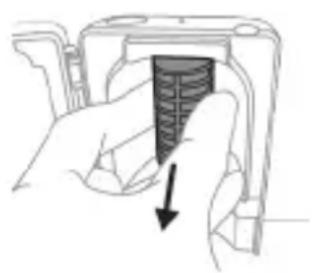
natural_image
Hand holding a camera lens with a black arrow pointing to the lens area (no text or symbols)Da biste uklonili štitnik, uhvatite rubove štitnika pokraj nosača, nježno pritisnite i zatim izvucite štitnik.
5 Izvadite UV žarulju.
Kako biste izvadili žarulju, primite ju i izvucite iz metalne kopče.
6 Štitnik i UV žarulju očistite vlažnom krpom.
7 Vratite UV žarulju na mjesto.
Kako biste vratili žarulju, poravnajte dno žarulje s metalnom kopčom i gurnite žarulju u kopču.
8 Vratite štitnik na mjesto.
Kako biste vratili štitnik, poravnajte klinove na štitniku s utorima na površini koja stvara odsjaj blizu UV žarulje. Gurnite štitnik izravno u utore na uređaju za dezinfekciju.
9 Stavite pladanj za ocjeđivanje natrag u uređaj za UV dezinfekciju.
10 Nakon čišćenja provjerite je li uređaj za dezinfekciju potpuno suh prije no što ga priključite na napajanje.
Pohrana
natural_image
Diagram of a mechanical or electrical component with a curved arrow indicating rotation (no text or symbols)
Punjiva baterija se sada može reciklirati a ostatak proizvoda se može odbaciti na odgovarajući način.
Napomena: Aparat koji se više ne može koristiti nemojte odlagati s uobičajenim otpadom iz kućanstva, nego ga odnesite u predviđeno odlagalište na recikliranje. Time pomažete u očuvanju okoliša.
Introduzione
www.philips.com/support
natural_image
Simple line drawing of an open book with no text or symbols visiblenatural_image
Illustration of a hand holding a toothbrush with a downward arrow indicating force or pressure (no text or symbols)natural_image
Simple line drawing of a curved object with a checkmark (no text or symbols)natural_image
Illustration of a hand holding a tool with a magnified inset showing a textured surface (no text or symbols)natural_image
Simple diagram with three circles and two curved lines, no text or symbols presentnatural_image
Diagram of a microphone with signal icon and magnified view (no text or symbols)natural_image
Simple diagram with a starburst symbol containing a gear and a small circle connected to a vertical line (no text or labels)natural_image
Simple diagram showing a circular icon with a traffic symbol and a small circle connected by a line (no text or labels)natural_image
Simple line drawing of a hand pressing a button on a bottle with a power symbol (no text or labels)natural_image
Simple diagram with a circular symbol and a vertical line, no text or labels presentnatural_image
Simple diagram with a circular symbol containing a white rectangle and a small circle connected by an arrow (no text or labels)natural_image
Three-step diagram illustrating a mechanical assembly process: tool positioning, component insertion, and final assembled view (no text or symbols)natural_image
Line drawing of a hand inserting a small component into a device (no text or symbols)natural_image
Simple line drawing of a mechanical component with a star-shaped head and a base, no text or symbols present.natural_image
Diagram of a handheld electronic device with a curved cable and connector (no text or symbols)natural_image
Line drawing of a medical procedure showing a tool interacting with an anatomical structure (no text or symbols)natural_image
Illustration of two hands holding a tool with a pointed tool, connected by wires (no text or symbols)natural_image
Illustration of a hand inserting a component into an electronic device (no text or symbols visible)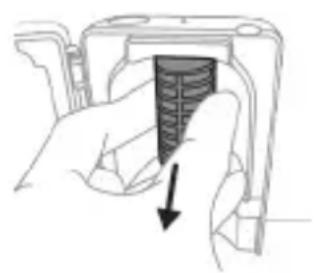
natural_image
Hand holding a camera module with a black arrow pointing to the screen area (no text or symbols visible)natural_image
Illustration of a hand holding a small electronic device with a circular button, no text or symbols present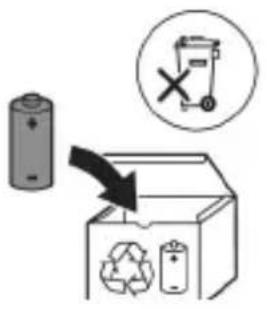
www.philips.com/support
www.philips.com/support
natural_image
Simple line drawing of an open book with no text or symbols visible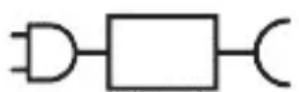
natural_image
Illustration of a hand using a pen to apply a sample on a surface, with an inset showing a magnified view of the sample (no text or symbols present)1 Samitriniet sarus un uzklājiet mazliet zobu pastas.
natural_image
Illustration of a hand holding a curved object with directional arrows indicating movement or force (no text or symbols)natural_image
Diagram showing dental alignment with a tool interacting with teeth (no text or labels)natural_image
Simple diagram with three circles and a central oval, no text or symbols presentnatural_image
Simple line drawing of a microphone with a circular icon showing signal waves (no text or symbols)natural_image
Simple line diagram showing a circular symbol with directional arrows and a starburst shape connected to a vertical line (no text or labels)natural_image
Simple diagram showing a circular icon with a traffic sign and a small circle connected by an arrow (no text or symbols)natural_image
Simple line drawing of a hand pressing a button on a bottle, with a power button icon nearby (no text or symbols)natural_image
Simple diagram with a circular arrow and a small circle connected by a line, no text or symbols present.natural_image
Simple diagram with a circular element and a small circle connected by lines, no text or symbols present.natural_image
Line drawing of a hand inserting a small component into a cylindrical device (no text or symbols)natural_image
Simple line drawing of a device with a star-shaped component and a cable, no text or symbols present.natural_image
Illustration of a handheld electronic device with a hand holding it, showing internal components and wiring (no text or symbols)natural_image
Line drawing of a medical procedure showing a tool interacting with an anatomical structure (no text or symbols)natural_image
Illustration of two hands using a tool to tie or connect a pair of wires (no text or symbols present)natural_image
Illustration of a hand inserting a component into a device (no text or symbols visible)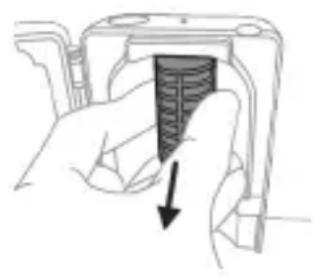
natural_image
Hand holding a device with a black arrow pointing to a textured section (no text or symbols visible)natural_image
Simple line drawing of an open book with no text or symbols visible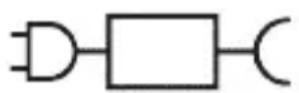
XXXXXX
natural_image
Illustration showing a hand holding a toothbrush and a close-up of a tooth with a circular mark, no text or symbols present.natural_image
Illustration of a hand using a pipette to apply a sample onto a surface, with an inset showing a magnified view of the sample (no text or symbols present)natural_image
Illustration of a hand holding a tool interacting with a textured object (no text or symbols)natural_image
Diagram of dental arching with tooth structure and tooth removal (no text or labels)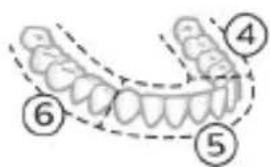
natural_image
Illustration of a dental arch with a numbered label (7) indicating a specific tooth position (no text or symbols beyond the number)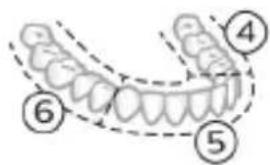
natural_image
Illustration of a human tooth with teeth and dental structures, marked with circled number 8 (no text or symbols present)natural_image
Simple diagram with three circles and two curved lines, no text or symbols presentnatural_image
Diagram of a microphone with a circular icon showing signal waves, no text or symbols presentnatural_image
Abstract diagram with a starburst symbol containing a road sign and a small starburst shape connected by lines (no text or labels)natural_image
Simple diagram showing a circular icon with a traffic symbol and a small circle connected by a line (no text or labels)natural_image
Simple line drawing of a hand pressing a button on a bottle with a power button (no text or symbols)natural_image
Simple diagram with a circular arrow and a small circle connected by a line, no text or symbols present.natural_image
Simple diagram with a circular arrow and a small circle connected by a line, no text or symbols present.natural_image
Illustration of two hands using a tool to measure a mechanical component, with no visible text or symbols.natural_image
Illustration of a hand pressing down on a mechanical component with an arrow indicating the process (no text or symbols present)natural_image
Cross-sectional diagram of a mechanical component with two symmetrical slots and textured surfaces (no text or symbols)natural_image
Line drawing of a hand holding a small object with a pointed tip, no text or symbols presentnatural_image
Simple line drawing of a mechanical component with a starburst symbol above it, no text or symbols present.Ikrovimas naudojant ikroviklj arba UV nukenksminimo jrenginj
natural_image
Illustration of a handheld electronic device with a hand holding a plug and cable (no text or symbols visible)natural_image
Line drawing of a hand holding a pen above a bundle of noodles (no text or symbols)natural_image
Illustration of hands using a tool to adjust or install a mechanical component, no text or symbols presentnatural_image
Illustration of a hand inserting a component into a device housing (no text or symbols visible)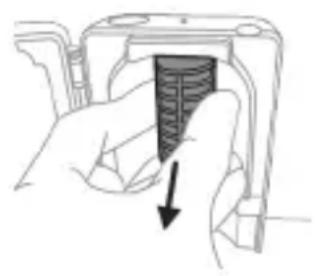
natural_image
Hand holding a device with a black arrow pointing to a textured section (no text or symbols visible)natural_image
Diagram of a mechanical or electrical component with a curved arrow indicating rotation (no text or symbols)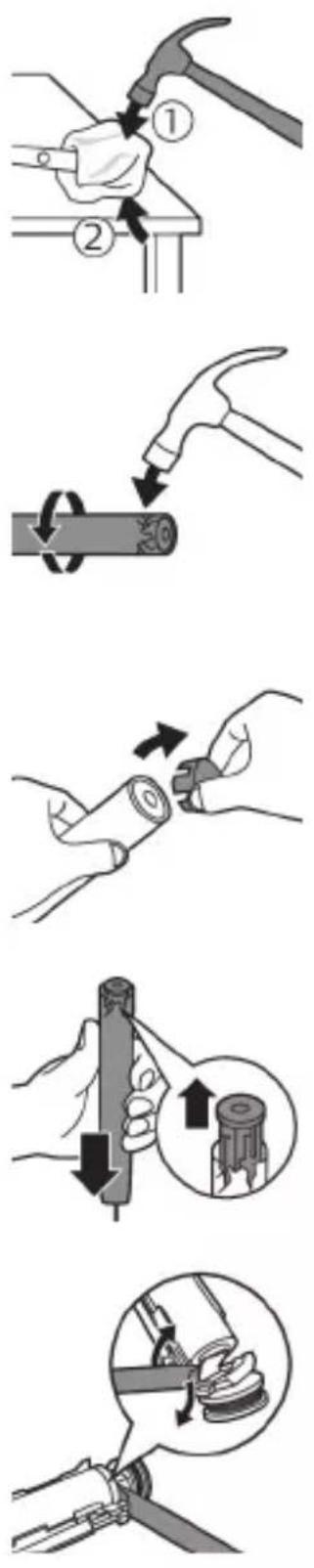
natural_image
Illustration of a hand holding a device with a black arrow indicating rotation (no text or symbols)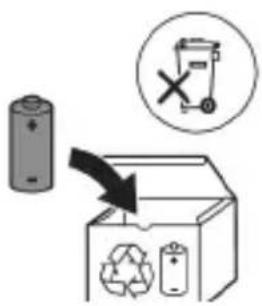
www.philips.com/support
natural_image
Simple line drawing of an open book with no text or symbols visible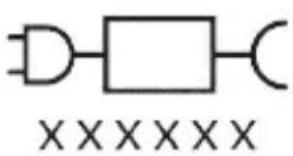
natural_image
Illustration of a hand holding a toothbrush with a downward arrow indicating force or pressure (no text or symbols)natural_image
Simple line drawing of a curved object with a checkmark mark (no text or symbols)natural_image
Illustration of a hand using a pipette to apply liquid onto a surface, with an inset showing a droplet on a surface (no text or symbols present)natural_image
Diagram of dental arching with tooth structure and tool (no text or labels)natural_image
Simple diagram with three circles and two curved lines, no text or symbols presentnatural_image
Diagram of a microphone with a circular icon showing signal waves (no text or symbols)natural_image
Pure electrical circuit lines without any symbolsnatural_image
Simple diagram showing a circular icon with a traffic symbol and a vertical line with a small circle containing an 'n' at the bottom (no text or labels)natural_image
Simple line drawing of a hand pressing a button on a bottle, with a power button icon nearby (no text or symbols)natural_image
Simple diagram with a circle containing a minus sign and a small circle connected by a line (no text or symbols)natural_image
Simple diagram with a circular arrow and a small circle connected by a line (no text or symbols)natural_image
Three-step diagram illustrating a mechanical assembly process: tool insertion, close-up of component, and final assembled view (no text or symbols)natural_image
Line drawing of a hand holding a small object with a pointed tip, next to a cylindrical device (no text or symbols)natural_image
Simple line drawing of a device with a starburst symbol above it, no text or symbols present.natural_image
Illustration of a handheld electronic device with a curved cable and connector (no text or symbols)natural_image
Line drawing of a medical procedure showing a needle inserted into tissue (no text or symbols)natural_image
Illustration of hands using a tool to adjust or install a mechanical component, no text or symbols presentnatural_image
Hand inserting a component into a device (no text or symbols visible)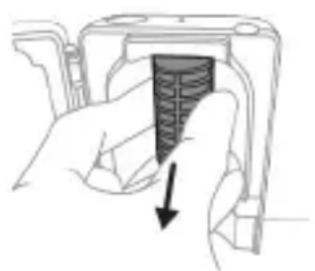
natural_image
Hand holding a device with a black arrow pointing to a textured interior (no text or symbols visible)natural_image
Illustration of a hand holding a device with a circular component, showing a mechanical assembly (no text or symbols)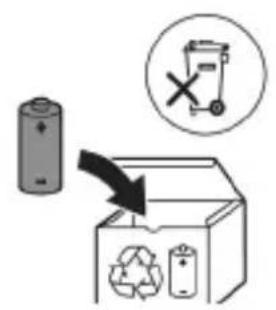
www.philips.com/support
natural_image
Simple line drawing of an open book with no text or symbols visiblewebsite: www.philips.com/support
natural_image
Illustration showing a hand brushing a tooth with a brush, and a close-up of the tooth being checked (no text or symbols present)natural_image
Illustration of a hand using a tool to apply a product to a toothbrush, with an inset showing a textured surface (no text or symbols)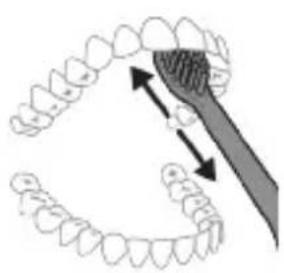
natural_image
Diagram of dental arching technique showing tooth arrangement and tooth penetration (no text or labels)Clean en Deep
Clean+
Gum Health White+
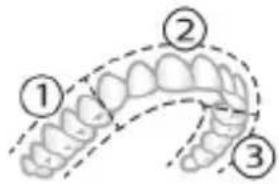
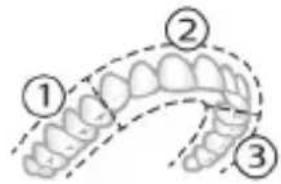
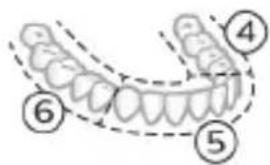
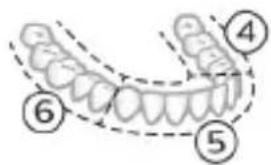
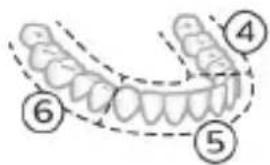
Deep Clean+: poets elk segment 30 seconden lang.*
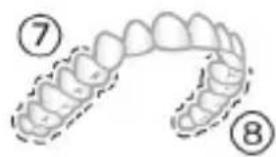
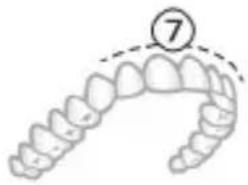
natural_image
Illustration of a dental arch with a numbered callout (7) indicating a specific tooth position (no text or symbols beyond the number)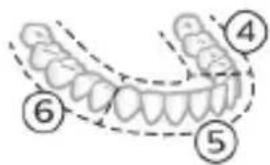
natural_image
Illustration of a human upper dental arch with teeth and jawbone, marked with number 8 (no text or symbols on the arch itself)natural_image
Simple diagram with three circles and two curved lines, no text or symbols presentnatural_image
Illustration of a microphone with a circular icon showing signal waves (no text or symbols)natural_image
Simple line diagram showing a gear icon with directional arrows and a starburst symbol, connected to a vertical line (no text or labels)natural_image
Simple diagram with a circular element and a vertical line, no text or symbols presentnatural_image
Simple diagram with a circular element and a small circle connected by an arrow (no text or symbols)natural_image
Illustration of hands using a tool to measure a mechanical part, no text or symbols presentOpladen op oplader of UV-reiniger
natural_image
Illustration of a handheld electric toothbrush with a pointed tip, partially enclosed in a cable (no text or symbols)natural_image
Line drawing of a medical procedure showing a tool interacting with tissue manipulation (no text or symbols)natural_image
Illustration of two hands using a tool to lift or adjust a mechanical component (no text or symbols present)natural_image
Hand inserting a component into a device (no text or symbols visible)natural_image
Hand holding a mechanical component with a downward arrow indicating force or direction (no text or symbols)natural_image
Illustration of a hand holding a cylindrical object with arrows indicating force direction, plus an inset showing a magnified view of the object (no text or symbols present)
natural_image
Diagram of a mechanical assembly with a magnified inset showing a component being inserted (no text or symbols present)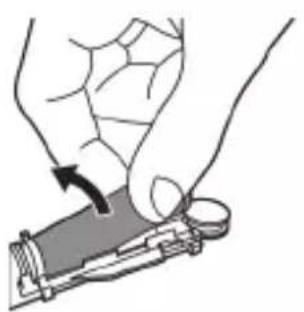
natural_image
Illustration of a hand holding a device with a circular arrow indicating rotation (no text or symbols)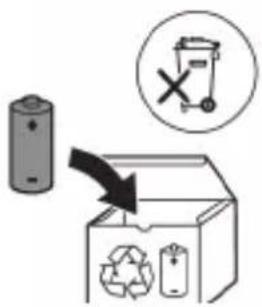
natural_image
Simple line drawing of an open book with no text or symbols visible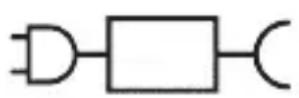

natural_image
Illustration showing a hand brushing a tooth with a brush, and a close-up of the tooth being examined with a checkmark (no text or symbols present)natural_image
Illustration of a hand using a pipette to apply liquid onto a surface, with an inset showing a droplet on a surface (no text or symbols present)natural_image
Illustration of a hand holding a curved object with directional arrows indicating movement or force (no text or symbols)natural_image
Diagram showing dental tool interacting with teeth (no text or labels)natural_image
Simple diagram with three circles and a central oval, no text or symbols presentnatural_image
Diagram of a microphone with signal icon and connection point (no text or symbols)natural_image
Simple line diagram showing a circular symbol with a road sign and a starburst shape connected to a vertical line (no text or labels)natural_image
Simple diagram showing a circular icon with a traffic sign and a small circle connected by an arrow (no text or symbols)natural_image
Simple line drawing of a hand pressing a button on a bottle, with a power button icon nearby (no text or symbols)natural_image
Simple diagram with a circular element and a vertical line, no text or symbols presentnatural_image
Simple diagram with a circular symbol and a small circle connected by lines, no text or labels present.natural_image
Illustration of a dental tool manipulation step showing tool positioning, cutting, and disassembly (no text or symbols)Lading i lader eller UV-renser
1 Koble laderen eller renseren til et strømuttak.
2 Plasser håndtaket på laderen eller i renseren.
- Håndtaket avgir 2 korte pip for å bekrefte at håndtaket er riktig plassert.
- Det blinkende lyset på batteriindikatoren viser at tannbørsten lades.
- Når håndtaket er fulladet på laderen, lyser batteriindikatoren grønt i 30 sekunder og slår seg deretter av.
natural_image
Illustration of a handheld electronic device with a curved cable and connector (no text or symbols)natural_image
Line drawing of a medical procedure showing a tool interacting with an anatomical structure (no text or symbols)1 Ta av børstehodet, og skyll metallstangen i varmt vann. Pass på at du har fjernet alle tannkremrester.
Forsiktig: Ikke bruk skarpe gjenstander mot gummiforseglingen på metallstangen. Den kan bli ødelagt.
2 Tørk hele overflaten på håndtaket med en fuktig klut.
natural_image
Illustration of two hands using a tool to lift or stand (no text or symbols present)natural_image
Illustration of a hand inserting a component into an electronic device (no text or symbols visible)natural_image
Hand holding a device with a black arrow pointing to a textured interior (no text or symbols visible)natural_image
Diagram of a mechanical assembly with a magnified inset showing a tool interacting with a component (no text or symbols present)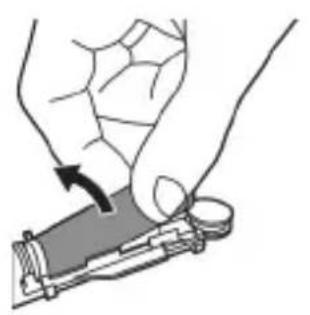
natural_image
Illustration of a hand holding a device with a circular button, showing a mechanical component (no text or symbols)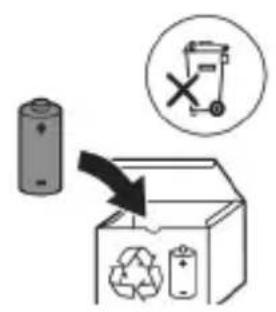
natural_image
Simple line drawing of an open book with no text or symbols visible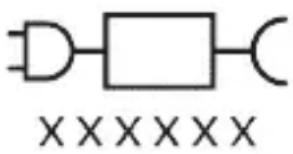
natural_image
Pure electrical circuit lines without any symbolsnatural_image
Illustration of a hand holding a toothbrush with a downward arrow indicating force or pressure (no text or symbols)1 Cho'tka tuklari dastaning old qismi bilan bir xil yo'nalishda bo'lishi uchun cho'tka kallagini tekislang.
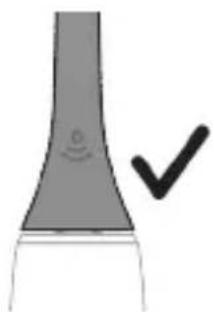
natural_image
Simple line drawing of a vertical pipe or duct with a checkmark indicating a detail (no text or symbols present)2 Cho'tka kallagini u boshqa kirmagunigacha metall valga qattiq bosing.
Izoh: Cho'tka kallagi va dasta orasida kichik tirqish ko'rinishi – normal holat.
Philips Sonicare tish pastangizdan foydalanish
Agar Sonicare tish pastasidan birinchi marta foydalanayotgan bo'lsangiz, elektr bo'Imagan tish cho'tkasidan foydalanishga qaraganda ko'proq tebranish sezish normal holat. Odatda birinchi marta foydalanayotgan foydalanuvchilar ortiqcha bosim beradi. Faqat yumshoq bosib bering va tish cho'tkasi siz uchun tozalashiga imkon bering. Eng yaxshi taassurot uchun tish tozalash ko'rsatmalariga amal qiling.
Yangi Sonicare motorli tish cho'tkasiga o'tishingizga yordam berish uchun ilk 1-2 hafta pastroq sozlamada foydalaning, keyin yuqoriroq sozlamaga o'ting.
Tish tozalash ko'rsatmalari
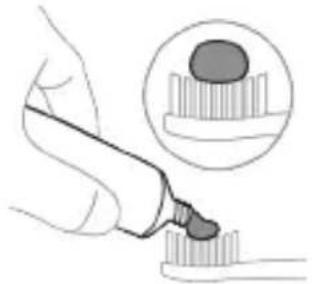
natural_image
Illustration of a hand using a pipette to apply a substance to a sample (no text or symbols present)1 Cho'tkani namlang va unga kam miqdorda tish pastasi surting.
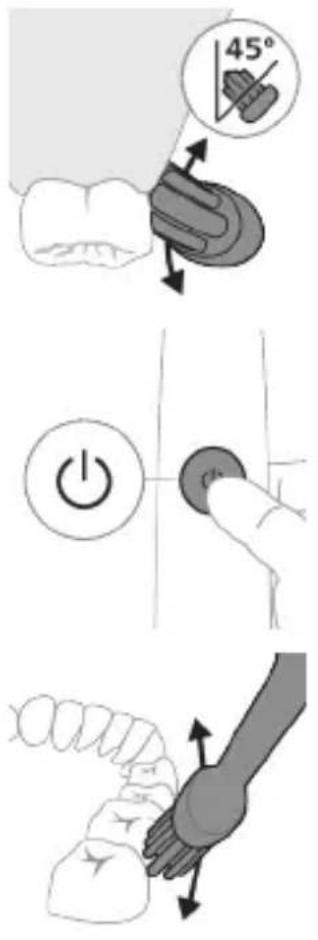
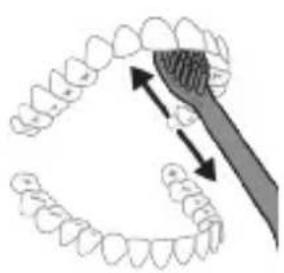
natural_image
Diagram showing dental tool interacting with teeth and jawbone structure (no text or labels)2 Tish cho'tkasini tishlar qarshisida kichik (45 daraja) burchak ostida tuting. Cho'tkalar milk chizig'iga yoki uning tagiga yetishi uchun uni qattiq bosing.
Izoh: Cho'tka markazini tishlarga doimi to'liq tekkizib turing.
3 Philips Sonicare qurilmasini yoqish uchun yoqish/o'chirish tugmasini bosing.
4 Cho'tkani tishlar va milk chizig'iga yengil tutib turing. Cho'tkalar tishlar orasiga kirishi uchun cho'tka kallagini oldinga-orqaqa kichik harakatlar bilan tishlaringizni tozalang. Bu harakatlarni tish tozalash siklingiz yakunlangunga qadar bajaring.
Motorli tish cho'tkangiz 4 tagacha turli rejim bilan jihozlangan: Clean, Deep Clean+, Gum Health va White+ (faqat alohida modellarda).
Siz ishlatayotgan aqli cho'tka kallagidan kelib chiqib, maqbul rejim va jadallik BrushSync texnologiyasi tomonidan avtomatik ravishda tanlanadi.
Bu rejimni oddiy usulda almashtirish uchun tish cho'tkasi o'chiq paytda rejim/jadallik tugmasini bosing. Barcha cho'tka kallaklari alohida rejim bilan ishlaydi.
Clean va Deep Gum Health White+ Clean+
| Foydasi Qasmoqlarniketkazish | Qasmoqlarniketkazish vamilklarni uqalash | Qasmoqlarni va yuzadagidog’larniketkazish | |
| Tavsiya etilganjadallik darajasi | Yuqori Yuqori Yuqori | ||
| Jami tishtozalash vaqti | Clean: 2 daqigaDeep Clean+: 3 daqiga* | 3 daqiga va 20soniya | 2 daqiga va 40soniya |
Clean va Deep Clean+
Gum Health White+
Tozalash usuli Clean: Har bir segmentni 20 soniyadan tozalang.
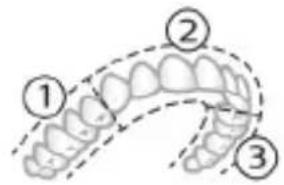
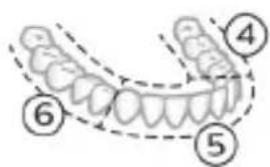
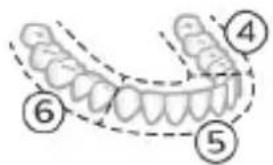
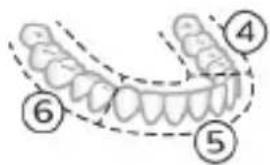
Deep clean+: Har bir segmentni 30 soniyadan tozalang.*
7,8,9- va 10-segmentlarning har birini 20 soniyadan tozalang.
7- va 8- segmentlarning har birini 20 soniyadan tozalang.
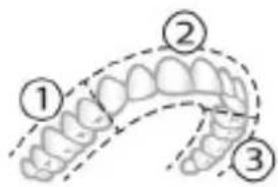
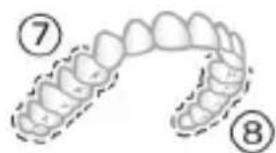
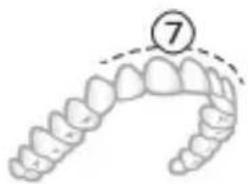
natural_image
Illustration of a dental arch with a numbered circle highlighting the tooth (no text or symbols present)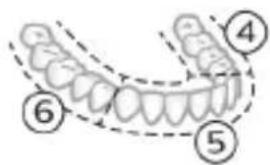
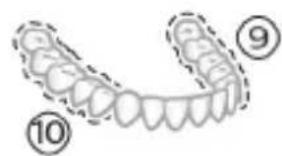
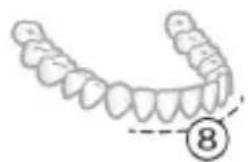
natural_image
Illustration of a dental arch with teeth and jawbone, marked with number 8 (no text or symbols on the arch itself)*Izoh: Philips Sonicare ilovasi bilan "Deep Clean+" rejimida tozalaganingizda tish tozalash vaqti ilovaga ulanganda 2 daqiga va ilovaga ulanmaganda 3 daqiga vaqt oladi
Intensivlik
Motorli tish cho'tkangiz 3 turdagi jadallik sozlamalari bilan jihozlangan:
- past jadallik (bitta chiziq)
- o'rta jadallik (ikkita chiziq)
-yuqori jadallik (uchta chiziq)
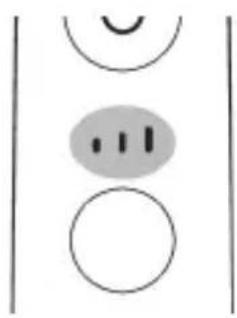
natural_image
Simple diagram with three circles and two curved lines, no text or symbols presentDastaga biriktirilganida smart cho'tka kallagi tavsiya etilgan jadallikni avtomatik ravishda tanlaydi/ Agar boshqa jadallikka o'zgartirishni xohlasangiz, tish tozalash paytida rejim/jadallik tugmasini bosish orqali buni bajarishingiz mumkin. Dasta o'chirilgani yoki pauza qilingani uchun jadallikni o'zgartirish imkonsiz.
BrushSync texnologiyasi
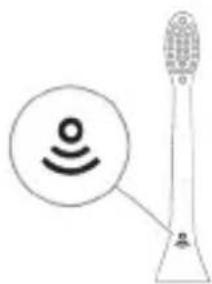
natural_image
Diagram of a microphone with a circular icon showing signal waves, no text or symbols presentBrushSync texnologiyasi cho'tka kallagining dasta bilan mikrochip orgali muloqot qilishiga yordam beradi.
Cho'tka kallagi ostidagi belgisi cho'tka kallagi ushbu texnologiya bilan jihozlanganini anglatadi.
BrushSync texnologiyasi quyidagilarni faollashtiradi:
- Cho'tka kallagini almashtirishni eslatish funksiyasi
- BrushSync rejimini jiftlash
Philips Sonicare BrushSync texnologiyasiga ega keng turdagi smart cho'tka kallaklarini taklif qiladi. Tish cho'tkasining cho'tka kallaklari to'liq ko'lami bilan tanishish va sizga eng mos keladigan cho'tka kallagini topish uchun www.philips.com/toothbrush-heads veb-saytiga kiring.
Funksiyalar
- Bosim sensori bildirgisi
- BrushPacer
- SmarTimer
- EasyStart
- Cho'tka kallagini almashtirishni eslatish funksiyasi
- Cho'tka kallagini juftlash rejimi
natural_image
Simple diagram with a circular symbol containing a vehicle and a starburst shape connected to a vertical line (no text or labels)Sonicare tish cho'tkangiz miklar va tishlaringiz shikastlanishining oldini olish uchun tish tozalash vaqtida qo'llangan bosimni o'Ichaydi.
Ortiqcha bosim qo'llasangiz, bosimni kamaytirmaguningizgacha dasta tebranishini o'zgartiradi va dastadagi cho'tka kallaklarini almashtirish eslatma chirog'i sariq rangda miltillaydi.
Izoh: Mahsulotingizda bosim sensori faol holatda taqdim etiladi. Bu funksiyani faolsizlantirish uchun (qarang "Funksiyalarni faollashtirish yoki faolsizlantirish").
BrushPacer
natural_image
Simple diagram showing a circular icon with a traffic symbol and a small circle connected by a line (no text or labels)Izoh: Bu funksiya BrushSync texnologiyasiga ega Philips Sonicare aqlli cho'tka kallaklari bilan ishlaydi.
1 Yangi smart cho'tka kallagini birinchi marta biriktirganingizda dasta sizda BrushSync texnologiyasiga ega Philips cho'tka borligini aniqlaydi va cho'tka kallagi eskirishini kuzatadi.
2 Vaqt o'tgani sari siz qo'llagan bosim va cho'tka ishlatilgan jami vaqtga qarab dasta cho'tka kallagingizni o'zgartirish uchun optimal vaqtni aniqlash maqsadida cho'tka kallagini kuzatadi. Bu funksiya tishlaringizni eng yaxshi tozalash va parvarishlashni kafolatlaydi.
3 Cho'tka kallagini almashtirish haqida eslatuvchi indikator sariq rangda yonganida cho'tka kallagingizni almashtirishingiz kerak.
Izoh: Barcha aqlli cho'tka kallaklari cho'tka kallaklarini almashtirishni eslatish funksiyasi yoqilgan holatda yetkaziladi. Cho'tka kallagini almashtirishni eslatish funksiyasini faolsizlantirish uchun qarang: "Funksiyalarni faollashtirish yoki faolsizlantirish".
Cho'tka kallagini juftlash rejimi
BrushSync texnologiyasiga ega cho'tka kallaklari, dasta bilan muloqot qiladigan hamda uni tavsiya qilingan rejim va jadallik bilan dastaga juftlaydigan mikrochip bilan jihozlangan. BrushSync texnologiyasiga ega ko'pchilik cho'tka kallaklari Clean rejimida avtomatik juftlanadi. Ma'lum afzalliklarga ega cho'tka kallaklari tegishli rejim bilan juftlanadi (mavjud bo'lganda), masalan:
- G3 Premium Gum Care: Gum Health rejimi
- W3 Premium White yoki W(c) DiamondClean (ixcham): White+ rejimi
Izoh: Agar tavsiya etilgan sozlamadan rejim/jadallikni o'zgartirishni tanlasangiz, cho'tka kallagi kelgusida tozalash seanslari uchun tanlagan sozlamangizni yodda saqlaydi.
Funksiyalarni faollashtirish yoki faolsizlantirish
2-bosqich: Quyidagi uchun yoqish/o'chirish tugmasini bosib turing:
EasyStart Cho'tka kallagini almashtirishni eslatish funksiyasi
natural_image
Simple diagram with a circular symbol containing a minus sign and a small circle connected by a line (no text or labels)Agar batareya quvvati indikatori uchun chap LED yashil rangda 2 marta miltillaganini ko'rsangiz va 3 ta pastdan yuqoriga ohangni eshitsangiz, demak funksiya faollashtirilgan.
YOKI
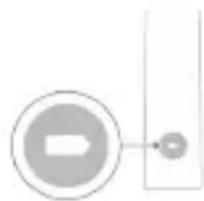
natural_image
Simple diagram with a circular element and a vertical line, no text or symbols presentAgar batareya quvvati indikatori uchun chap LED sariq rangda 1 marta miltillaganini ko'rsangiz va 3 ta yuqoridan pastga ohangni eshitsangiz, demak, funksiya faolsizlantirilgan.
Ultrabinafsha sanitayzer
Izoh: Qadoqdagi aksessuarlar xarid qilingan modelga qarab farqlanishi mumkin.
Ultrabinafsha nur sanitayzeri bilan cho'tka kallagingizni har foydalanishda tozalashingiz mumkin.
Quyidagi holatlarda sanitayzerni uzing, foydalanishni to'xtating va Mijozlarga yordam xizmatiga telefon qiling:
- Ultrabinafsha chiroq eshik ochilganda ham yonib tursa.
- Oyna singan bo'lsa yoki sanitayzerda bo'lmasa.
- Sanitayzer ishlayotganida tutasa yoki undan kuygan hid kelsa.
Izoh: Ultrabinafsha nur odam ko'ziga va terisiga zararli bo'lishi mumkin. Bu qurilmani har doim bolalardan uzoqda tuting.
1 Tish tozalagandan keyin cho'tka kallagini chaying va ortiqcha suvni silkiting.
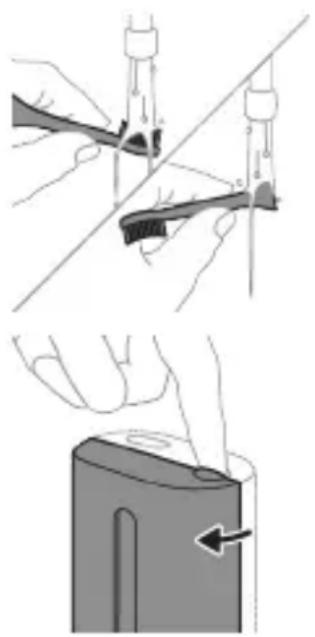
natural_image
Illustration showing two-step procedure: adding a tool to a device, then applying a power plug to a battery cover (no text or symbols present)Ogohlantirish: Cho'tka kallagi sanitayzerda tozalanayotganida cho'tka kallagi qopqog'i cho'tka kallagida emasligini tekshiring.
natural_image
Diagram of a mechanical component with two textured surfaces and internal channels (no text or symbols)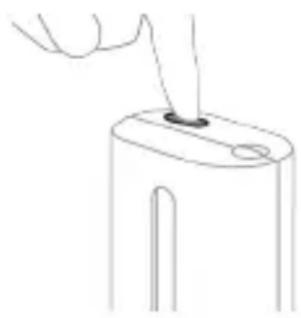
natural_image
Line drawing of a hand holding a small object with a hole, no text or symbols present3 Cho'tka kallagini sanitayzerdagi 2 ta ilgakdan biriga cho'tkalarini chiroqqa qaratgan holda joylang.
Izoh: Sanitayzerda faqat Philips Sonicare biriktiriladigan cho'tka kallaklarini tozalang.
Izoh: Sonicare for Kids cho'tka kallaklarini sanitayzerda tozalamang.
4 Sanitayzer mos keladigan kuchlanishdagi rozetkaga ulanganini tekshiring.
5 Eshikni yoping va ultrabinafsha nur tozalash siklini tanlash uchun yashil quvvatni yoqish/o'chirish tugmasini bir marta bosing.
natural_image
Simple line drawing of a device with a button and cable, no text or symbols present2 Dastani quvvatlagich yoki sanitayzerga joylang.
- Dasta quvvatlash moslamasiga to'g'ri o'rnatilganini tasdiqlash uchun 2 marta qisqa signal chaladi.
- Batareyaning miltillovchi indikatori tish cho'tkasi quvvatlanayotganini bildiradi.
- Quvvatlagichdagi dasta to'liq quvvatlansa, batareya indikatori 30 soniya yashil rangda yonadi va keyin o'chadi.
Sayohat g'ilofi bilan quvvatlash
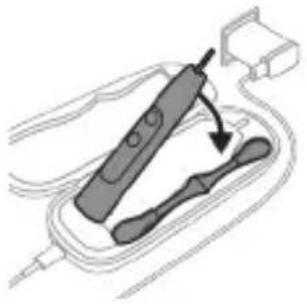
natural_image
Illustration of a handheld electronic device with a hand holding a connector (no text or symbols visible)Izoh: Qadoqdagi aksessuarlar xarid qilingan modelga qarab farqlanishi mumkin.
1 USB kabelni sayohat quvvatlagich g'ilofiga kiriting.
2 Biriktirilgan USB kabelni quyidagi 5V kuchlanishli doimiy tokka ulang:
- Taqdim etiladigan USB adapter.
- UL bilan qayd etilgan yoki ANSI/UL 60950-1 bilan sertifikatlangan shaxsiy kompyuter USB konnektori.
- UL bilan qayd etilgan yoki ANSI/UL 60950-1 LPS bilan sertifikatlangan, USB chiqish portiga ega quvvat ta'minoti.
- UL bilan qayd etilgan yoki 1310 Toifa 2 bilan sertifikatlangan quvvat ta'minoti.
natural_image
Line drawing of a hand holding a pen inserted into a bundle of noodles (no text or symbols)1 Cho'tka kallagini chiqarib oling va metall val atrofini iliq suv bilan yuving. Har qanday tish pastasi qoldig'ini tozalaganingizni tekshiring.
Ogohlantirish: Metall valdagi rezina zichlagichni o'tkir narsalar bilan bosmang, bu shikastlanishga olib kelishi mumkin.
2 Dastaning butun yuzasini nam mato bilan artib oling.
Izoh: Ortiqcha suvni yo'qotish uchun dastani rakovinaga urmang.
Cho'tka kallagi
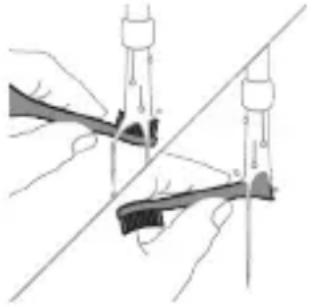
natural_image
Illustration of hands using a tool to adjust or install a mechanical component, no text or symbols present1 Cho'tka kallagi va cho'tkani har foydalanishdan keyin yuving.
2 Cho'tka kallagini dastadan chiqarib oling va cho'tka kallagi ulanish qismini kamida haftada bir marta iliq suv bilan yuving. Sayohat qopqog'ini zarur bo'lgancha tez-tez yuvib tashlang.
Quvvatlash moslamasi
1 Tozalashdan avval, quvvatlagichni tarmoqdan uzing.
2 Quvvatlash moslamasining butun yuzasini nam mato bilan artib oling.
Sayohat g'ilofi
Iliq suv bilan yuving va sayohat g'ilofi ichini tozalash uchun nam matodan foydalaning.
Quvvatlash sayohat g'ilofi
1 Tozalashdan oldin sayohat quvvatlagich g'ilofini uzing.
2 Sayohat g'ilofi yuzasini artish uchun nam matodan foydalaning.
Ultrabinafsha sanitayzer
Ogohlantirish: Sanitayzerni suvga botirmang yoki jo'mrak ostida chaymang.
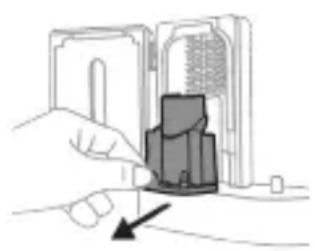
natural_image
Hand inserting a component into a device (no text or symbols visible)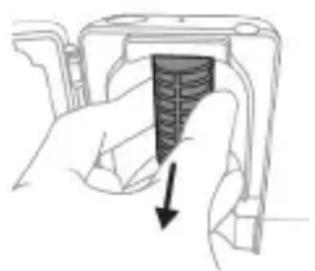
natural_image
Hand holding a device with a black arrow pointing to a textured interior (no text or symbols visible)Ogohlantirish: Sanitayzerning ultrabinafsha chirog'i issiqligida sanitayzerni tozalamang.
Optimal samaradorlik uchun sanitayzeringizni har hafta tozalash tavsiya etiladi.
1 Sanitayzerni tarmoqdan uzing.
2 Tomchi tomini to'g'riga tortib chiqaring. Tomchi novini chaying va uni nam mato bilan tozalab arting.
3 Barcha ichki yuzalarini nam mato bilan tozalang.
4 Ultrabinafsha chiroqdan himoya plyonkasini chiqarib oling.
Plyonkani chiqarib olish uchun qisqichlar yonidagi chetlaridan ushlab, himoya plyonkasini tortib oling.
5 Ultrabinafsha chiroqni chiqarib oling.
Chiroqni chiqarib olish uchun uni ushlang va metall qisqichdan tortib chiqaring.
6 Himoya plyonkasi va ultrabinafsha chiroqni nam mato bilan tozalang.
7 Ultrabinafsha chiroqni qayta kiriting.
Chiroqni qayta kiritish uchun chiroq quyi qismini metall qisqich bilan tekislang va chiroqni qisqichga itaring.
8 Himoya plyonkasini qayta kiriting.
Plyonkani qayta kiritish uchun plyonkadagi ilgaklarni ultrabinafsha chiroq yaqinidagi aks ettiruvchi yuzadagi uyalar bilan tekislang. Plyonkani to'g'ri sanitayzerdagii uyalarga itaring.
9 Tomchi novini ultrabinafsha nur sanitayeriga qayta joylang.
10 Tozalashdan keyin sanitayzer elektr tarmoqqa ulanishdan oldin to'liq quriganiga ishonch hosil qiling.
Xotira
natural_image
Illustration of a hand holding a device with a circular component, no text or symbols present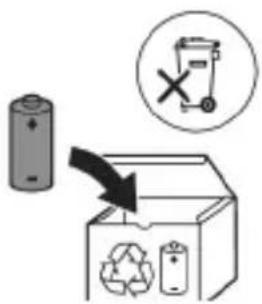
7 Batareyani yashil bosma plata bilan ulab turadigan metall tilchani sindirish uchun otvertkani batareya osti va qora korpus orasiga kiriting. Bu batareyaning ostki uchini korpusdan chiqarib oladi.
8 Ikkinchi metall tilchani sindirish uchun batareyani oling va uni ichki qismlarga teskari tarafga torting.
Ogohlantirish: Barmog'ingizni tilib olmaslik uchun batareya tilchasining o'tkir qirralaridan ehtiyot bo'ling.
www.philips.com/support
natural_image
Simple line drawing of an open book with no text or symbols visible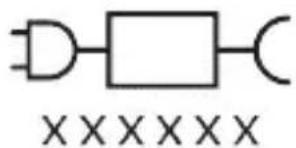
natural_image
Illustration showing a hand brushing a tooth with a brush, and a close-up of a tooth being examined with a circular sensor (no text or symbols present)natural_image
Illustration of a hand applying a toothbrush to a nail, with an inset showing a nail being inserted (no text or symbols present)natural_image
Simple diagram with three circles and a central oval, no text or symbols presentnatural_image
Simple line drawing of a microphone with a circular icon showing signal waves (no text or symbols)natural_image
Simple line diagram showing a circular icon with a traffic light symbol and a starburst shape connected to a vertical line (no text or labels)natural_image
Simple diagram showing a circular icon with a traffic sign and a small circle connected by a line (no text or symbols)natural_image
Simple line drawing of a hand pressing a button on a bottle with an 'Power' icon (no text or symbols)natural_image
Simple diagram showing a device with a starburst symbol above it, connected to a small component (no text or symbols present)natural_image
Diagram of a handheld electronic device with a hand holding a cable, showing internal components and a directional arrow (no text or symbols)natural_image
Line drawing of a medical procedure showing a needle inserted into tissue with a tool (no text or symbols)natural_image
Illustration of two hands using a tool to measure a mechanical component, no text or symbols presentnatural_image
Illustration of a hand inserting a component into an electronic device (no text or symbols visible)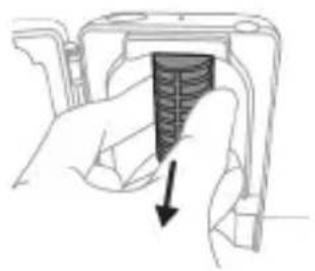
natural_image
Hand holding a mechanical component with a downward arrow indicating a force or direction (no text or symbols present)natural_image
Illustration of a hand holding a device with a circular button, showing a mechanical component (no text or symbols)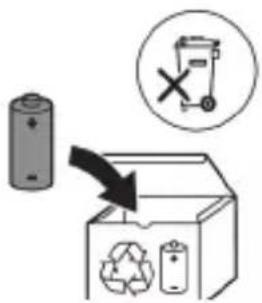
www.philips.com/support
natural_image
Simple line drawing of an open book with no text or symbols visible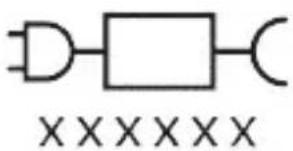
natural_image
Illustration of a hand holding a toothbrush with a directional arrow indicating force or movement (no text or symbols)natural_image
Simple line drawing of a curved object with a checkmark (no text or symbols)natural_image
Illustration of a hand applying a toothbrush to a tooth, with an inset showing a magnified view of the tooth (no text or symbols present)natural_image
Diagram of dental arching technique showing tooth arrangement and tooth penetration (no text or labels)Clean e Deep Gum Health White+ Clean+
Clean e Deep Clean+ Gum Health White+
natural_image
Simple diagram with three circles and a central oval, no text or symbols presentnatural_image
Illustration of a microphone with a circular icon showing signal waves (no text or symbols)natural_image
Simple line drawing of a gear mechanism with a circular target and starburst symbol (no text or labels)natural_image
Simple diagram showing a circular icon with a traffic symbol and a vertical line with a small circle (no text or labels)natural_image
Simple diagram with a circular arrow and a small circle connected by a line, no text or symbols present.natural_image
Simple diagram with a circular element and a small circle connected by lines, no text or symbols present.natural_image
Illustration showing two-step cleaning procedure: top shows tool positioning on a surface, bottom shows close-up of a device with a handle (no text or symbols)natural_image
Diagram of a mechanical component with two textured surfaces and internal structure (no text or symbols)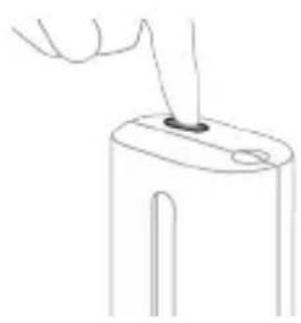
natural_image
Line drawing of a hand holding a small object with a pointed tip, next to a cylindrical device (no text or symbols)natural_image
Simple line drawing of a mechanical component with a starburst symbol and a base, no text or symbols present.natural_image
Diagram of a handheld electronic device with a hand holding a connector (no text or symbols visible)natural_image
Line drawing of a medical procedure involving a tool and tubing (no text or symbols)natural_image
Illustration of two hands using a tool to connect two objects, with no visible text or symbolsnatural_image
Illustration of a hand inserting a device into a device housing (no text or symbols visible)natural_image
Hand holding a device with a black arrow pointing to a textured section (no text or symbols visible)natural_image
Diagram of a mechanical assembly with a magnified inset showing a tool interacting with a component (no text or symbols present)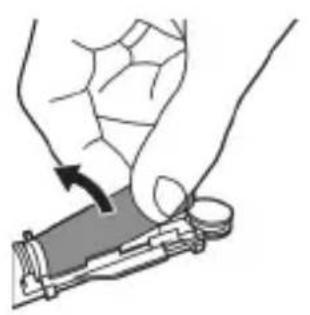
natural_image
Illustration of hands holding a device with a curved arrow indicating rotation (no text or symbols)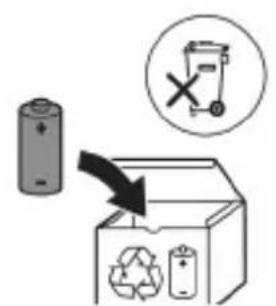
www.philips.com/support
www.philips.com/support
natural_image
Simple line drawing of an open book with no text or symbols visiblenatural_image
Illustration of a hand holding a toothbrush with a downward arrow indicating force or pressure (no text or symbols)natural_image
Simple line drawing of a curved object with a checkmark mark (no text or symbols)natural_image
Illustration of a hand using a tool to apply a sample onto a surface, with an inset showing a magnified view of the sample (no text or symbols present)natural_image
Simple diagram with three circles and two vertical lines, no text or symbols presentnatural_image
Diagram of a microphone with signal icon and connection point (no text or symbols)natural_image
Simple line drawing of a gear with a circular head and starburst pattern, connected to a vertical line (no text or symbols)natural_image
Simple diagram showing a circular icon with a traffic symbol and a vertical line with a small circle (no text or labels)natural_image
Simple diagram with a circular arrow and a small circle connected by a line (no text or symbols)natural_image
Simple diagram with a circular element and a vertical line, no text or symbols presentnatural_image
Three-step diagram illustrating a mechanical assembly process: tool insertion, component insertion, and final assembly (no text or symbols)natural_image
Line drawing of a hand holding a small object with a pointed tip, no text or symbols presentnatural_image
Simple line drawing of a device with a star-shaped label and an arrow pointing to a small component (no text or symbols)natural_image
Illustration of a hand holding a handheld electronic device with a curved cable or connector (no text or symbols visible)natural_image
Line drawing of a hand holding a pen inserted into a bundle of noodles (no text or symbols)natural_image
Illustration of two hands using a tool to tie a pair of objects, no text or symbols presentnatural_image
Illustration of a hand inserting a component into a device (no text or symbols visible)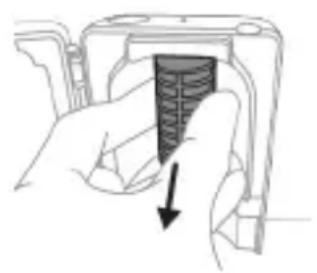
natural_image
Hand holding a device with a black arrow pointing to a textured interior (no text or symbols visible)natural_image
Diagram of a mechanical or electrical component with a curved arrow indicating rotation (no text or symbols)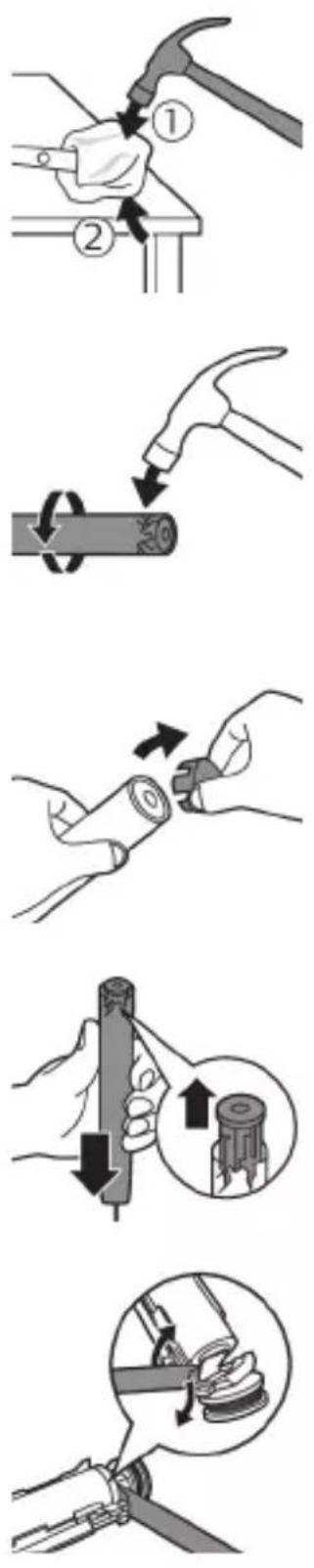
natural_image
Illustration of a hand holding a device with a black arrow indicating rotation (no text or symbols)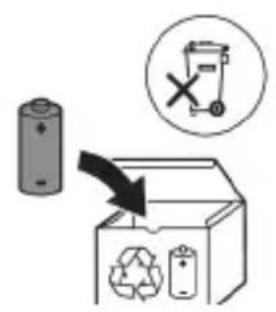
www.philips.com/support
natural_image
Simple line drawing of an open book with no text or symbols visible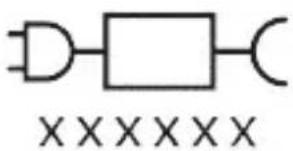
natural_image
Illustration of a hand holding a toothbrush with a downward arrow indicating force or pressure (no text or symbols)natural_image
Simple line drawing of a curved object with a checkmark mark (no text or symbols)natural_image
Illustration of a hand using a tool to apply a product to a textured surface, with an inset showing a magnified view of a textured surface (no text or symbols present)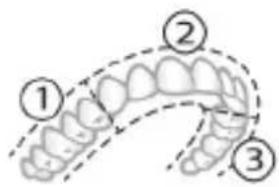
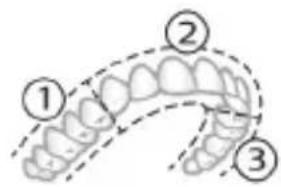
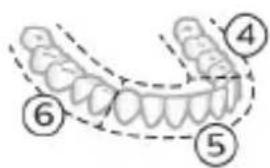
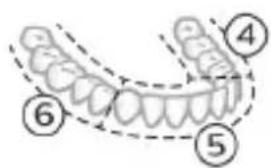
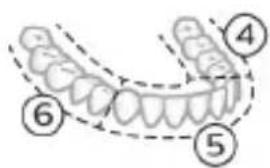
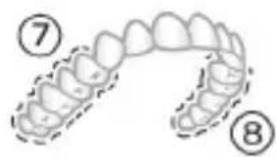
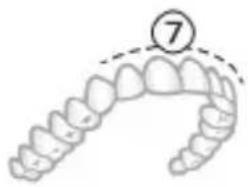
natural_image
Illustration of a dental arch with a numbered circle highlighting the tooth (number 7), no text or symbols present.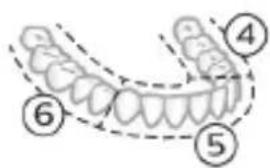
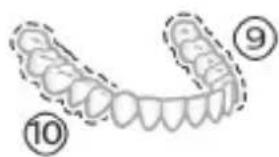
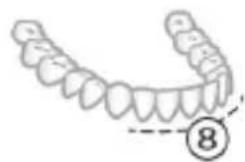
natural_image
Illustration of a human upper dental arch with teeth and jawbone, marked with number 8 (no text or symbols on the arch itself)natural_image
Simple diagram with three circles and a central oval, no text or symbols presentnatural_image
Diagram of a microphone with a circular icon showing signal waves (no text or symbols)natural_image
Simple line diagram showing a gear icon with directional arrows and a starburst symbol, connected by a small arrow (no text or labels)natural_image
Simple diagram with a circular element and a vertical line, no text or symbols presentnatural_image
Simple diagram with a circular element and a small circle connected by lines, no text or symbols present.natural_image
Illustration of two hands using a tool to measure a mechanical component, no text or symbols presentnatural_image
Simple line drawing of a device with a starburst symbol above it, no text or symbols present.natural_image
Illustration of a handheld electronic device with a hand holding a cable, showing internal components and a directional arrow (no text or symbols)natural_image
Line drawing of a hand holding a pen inserted into a plant stem (no text or symbols)natural_image
Illustration of hands using a tool to adjust or install a mechanical component (no text or symbols visible)natural_image
Illustration of a hand inserting a device into a device housing (no text or symbols visible)natural_image
Hand holding a device with a black arrow pointing to a textured interior (no text or symbols visible)natural_image
Diagram of a mechanical assembly with a magnified inset showing a rotating component (no text or symbols)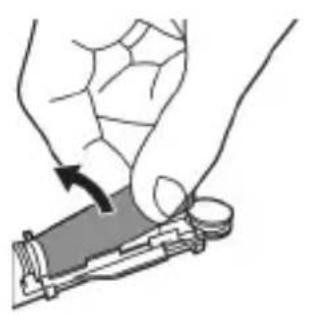
natural_image
Illustration of a hand holding a small electronic device with a black arrow indicating rotation (no text or symbols)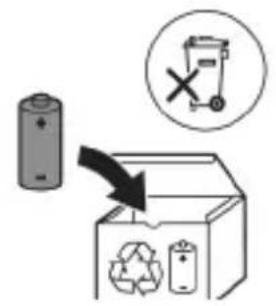
natural_image
Simple line drawing of an open book with no text or symbols visible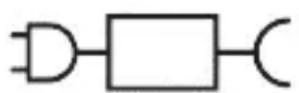

natural_image
Illustration showing a hand brushing a tooth with a brush and arrow indicating direction, next to a close-up of a tooth with a circular mark and checkmark (no text or symbols)natural_image
Illustration of a hand using a pipette to apply a product to a toothbrush, with an inset showing a textured surface (no text or symbols)3 Zobno ščetko Philips Sonicare vklopite tako, da pritisnete gumb za vklop/izklop.
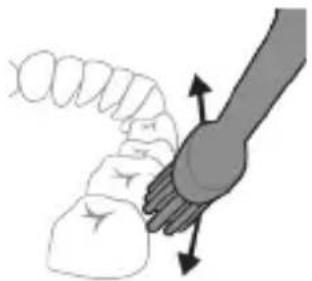
natural_image
Illustration of a hand holding a curved object with directional arrows indicating movement or force (no text or symbols)natural_image
Diagram showing dental tool interacting with teeth (no text or labels)Clean in Deep Clean+ Gum Health White+
Clean in Deep Clean+ Gum Health White+
natural_image
Simple diagram with three circles and two vertical lines, no text or symbols present- visoka intenzivnost (tri črtice)
natural_image
Diagram of a microphone with signal icon and connection point (no text or symbols)natural_image
Simple line diagram showing a circular icon with a parking sign and a star-shaped arrow pointing to a small star symbol (no text or labels)natural_image
Simple diagram showing a circular icon with a traffic symbol and a small circle connected by a line (no text or labels)- G3 Premium Gum Care: Način Gum Health
- W3 Premium White ali W(c) DiamondClean(compact): Način White+
natural_image
Simple line drawing of a hand pressing a button on a cylindrical object with an 'Power' icon (no text or symbols)Korak 2: Pritisnite in pridržite gumb za vklop/izklop:
natural_image
Four-step diagram showing a hand holding a tool, a close-up of a device with a button, a cross-section view of the device, and a final close-up of the device's handle (no text or symbols present)natural_image
Simple line drawing of a device with a starburst symbol above it, no text or symbols present.natural_image
Diagram of a handheld electronic device with a hand holding a cable, showing internal components and an arrow indicating motion (no text or symbols present)natural_image
Line drawing of a medical procedure showing a tool inserted into tissue using a needle (no text or symbols)natural_image
Illustration of hands using a tool to adjust or install a mechanical component, no text or symbols presentnatural_image
Illustration of a hand inserting a component into a device (no text or symbols visible)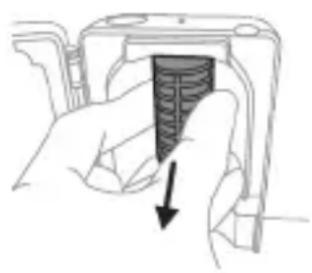
natural_image
Hand holding a device with a textured internal component and an arrow indicating direction (no text or symbols)natural_image
Illustration of a hand holding a device with a black arrow indicating rotation (no text or symbols)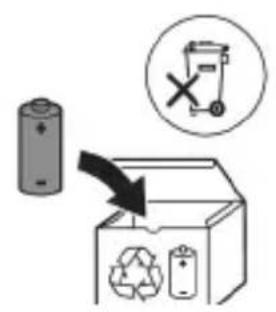
8 Baterijo primite in jo odmaknite od notranjih delov, da prelomite drugi kovinski jeziček baterije.
Opozorilo: Pazite, da si z ostrimi robovi jezičkov baterije ne poškodujete prstov.
9 Stike baterije prekrijte z lepilnim trakom, da preprečite kratek stik zaradi preostale napetosti v bateriji.
natural_image
Simple line drawing of an open book with no text or symbols visible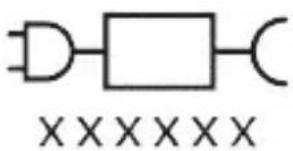
natural_image
Illustration of a hand holding a toothbrush with a directional arrow indicating force or movement (no text or symbols)natural_image
Simple line drawing of a curved object with a checkmark (no text or symbols)natural_image
Illustration of a hand using a tool to apply a product to a textured surface, with an inset showing a magnified view of a textured surface (no text or symbols present)natural_image
Illustration of a hand holding a curved object with directional arrows indicating movement or force (no text or symbols)4 Jemne udržujte štetiny v polohe na zuboch a d'asnách. Zuby čistite krátkymi pohybmi dopredu a dozadu tak, aby štetiny dosahovali do priestorov medzi zubami. Tento pohyb opakujte počas celého čistiaceho cyklu.
natural_image
Diagram showing dental tool interacting with teeth (no text or labels)BrushSync automaticky vyberie optimálny režim a intenzitu.
natural_image
Simple diagram with three circles and two vertical lines, no text or symbols presentnatural_image
Diagram of a microphone with a sensor icon and connection point (no text or symbols)natural_image
Simple diagram with a circular arrow and starburst symbol connected to a vertical line (no text or labels)natural_image
Simple diagram showing a circular icon with a traffic symbol and a vertical line with an arrow pointing to it (no text or labels)natural_image
Hand holding a power button next to a cylindrical object (no text or symbols visible)natural_image
Simple diagram with a circle containing a minus sign and a small circle connected by a line (no text or symbols)natural_image
Simple diagram with a circle containing an internal symbol and a small circle connected by lines (no text or labels)natural_image
Line drawing of a hand holding a small object with a hole, no text or symbols present5 Zatvorte dvierka a raz stlačte zelené tlačidlo zap./vyp., čím vyberiete čistiaci UV cyklus.
natural_image
Simple line drawing of a mechanical component with an arrow pointing to a base (no text or symbols)natural_image
Illustration of a hand holding a handheld electronic device with a curved cable or connector (no text or symbols visible)natural_image
Line drawing of a medical procedure showing a tool interacting with an anatomical structure (no text or symbols)natural_image
Illustration of two hands using a tool to tie a pair of wires (no text or symbols present)natural_image
Illustration of a hand inserting a component into an electronic device (no text or symbols visible)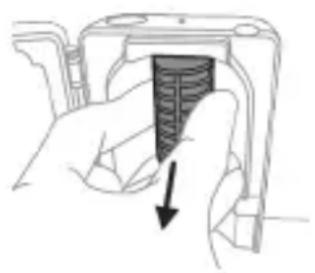
natural_image
Hand holding a device with a textured interior and arrow indicating direction (no text or symbols)natural_image
Simple line drawing of a mechanical component or tool with a curved arrow indicating motion (no text or symbols)
natural_image
Illustration of a hand holding a small electronic device with a black arrow indicating rotation (no text or symbols)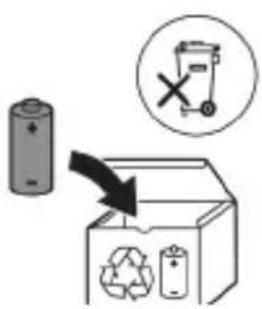
natural_image
Simple line drawing of an open book with no text or symbols visible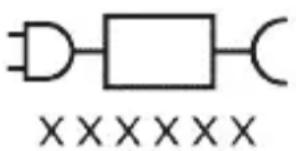
Deo napajanja koji se može skinuti: Oznaka „xxxxx“ predstavlja broj modela odobrenih punjača koji bi trebalo da se koriste. (TCBxxxx, HX6100, HX6110, HX6160 ili WAAxxxx)
Namena
Električne četkice za zube Sonicare ExpertClean namenjene su za uklanjanje nakupljenog kamenca i ostataka hrane sa zuba u cilju sprečavanja karijesa i poboljšavanja oralnog zdravlja. Električne četkice za zube Sonicare ExpertClean namenjene su za ličnu upotrebu. Deca treba da koriste proizvod uz nadzor odraslih.
Philips Sonicare četkice za zube (slika 1)
1 Drška
2 Dugme za uključivanje/isključivanje
3 Indikator intenziteta
4 Dugme za režim/intenzitet
5 Indikator režima
6 Podsetnik za zamenu glave sa četkicom
7 Indikator baterije
Dodaci:
8 Poklopac glave četkice
9 Pametne glave četkice
10 Simbol tehnologije BrushSync
11 Postolje za punjenje
12 Putna torbica
13 Putna torbica za punjenje
14 USB-A zidni adapter
15 USB-A kabl
16 UV aparat za dezinfekciju i punjač
Napomena: Uključeni dodaci mogu da se razlikuju u zavisnosti od kupljenog modela.
natural_image
Illustration showing a hand brushing a tooth with a brush, and a close-up of the tooth being checked (no text or symbols present)1 Poravnajte glavu četkice tako da su vlakna okrenuta u istom smeru kao i prednja strana drške.
2 Čvrsto pritisnite glavu četkice na metalnu osovinu do kraja.
natural_image
Diagram of dental arching technique showing tooth arrangement and tooth penetration (no text or labels)Električna četkica za zube ima do 4 različita režima rada: Clean, Deep Clean+, Gum Health i White+ (samo određeni modeli).
Na osnovu pametne glave sa četkicom koju koristite, BrushSync tehnologija će automatski izabrati optimalan režim i intenzitet.
Da biste ručno promenili režim, pritisnite dugme za režim/intenzitet kad je četkica za zube isključena. Sve glave sa četkicom rade u svakom režimu.
Clean i Deep Clean+ Gum Health White+
| Pogodnost Uklanjanje plaka Uklanjanje plaka i masaža desni | Uklanjanje plaka i mrlja sa površina | ||
| Preporučeni nivo intenziteta | Visoka Visoka Visoka | ||
| Ukupno vreme pranja zuba | Clean: 2 minuta Deep Clean+: 3 minuta* | 3 minuta i 20 sekundi | 2 minuta i 40 sekundi |
| Kako se pere Clean: perite svaki segment 20 sekundi. | perite svaki segment 20 sekundi, | perite svaki segment 20 sekundi, | |
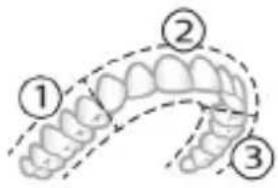 | 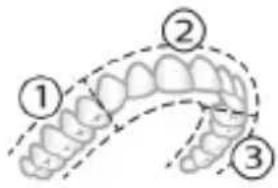 | 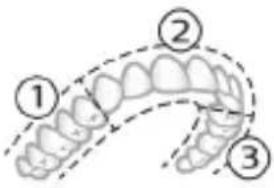 | |
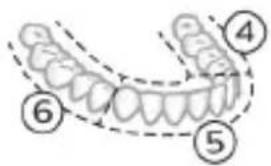 |  | 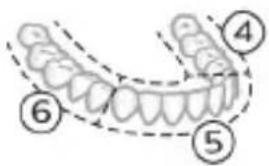 | |
| Deep Clean+: perite svaki segment 30 sekundi.* | a zatim perite segmente 7,8,9 i 10, svaki po 20 sekundi. | a zatim perite segmente 7 i 8, svaki po 20 sekundi. | |
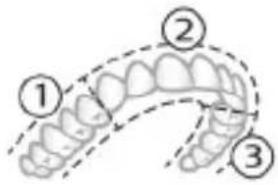 | 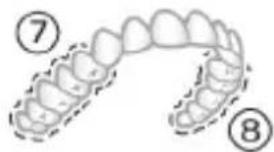 | 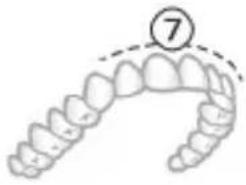 | |
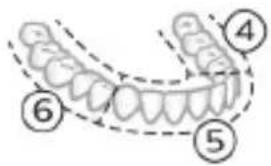 | 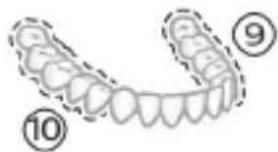 | 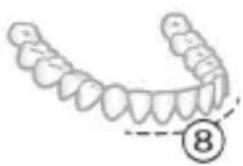 | |
natural_image
Simple diagram with three circles and two vertical lines, no text or symbols presentElektrična četkica za zube ima 3 različitih postavki za intenzitet:
- nizak intenzitet (jedna crta)
- srednji intenzitet (dve crte)
- visok intenzitet (tri crte)
Kada je prikačena na dršku, glava sa četkicom automatski izabira preporučeni intenzitet / Ako želite da promenite intenzitet, pritisnite dugme za režim/intenzitet dok perete zube. Intenzitet ne može da se promeni dok god je drška isključena ili je njen rad pauziran.
Tehnologija BrushSync
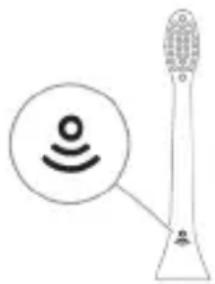
natural_image
Diagram of a microphone with a circular icon showing signal waves (no text or symbols)natural_image
Simple line diagram showing a gear icon inside a starburst circle connected to a small gear symbol (no text or labels)Ako prekomerno pritiskate, drška će promeniti vibraciju, lampica podsetnika za zamenu glave sa četkicom na drški će treptati žutonarandžastom bojom dok ne smanjite pritisak.
Napomena: Proizvod se isporučuje sa aktiviranim senzorom pritiska. Da biste deaktivirali ovu funkciju (pogledajte 'Aktiviranje ili deaktiviranje funkcija').
BrushPacer
Napomena: Sve pametne glave četkice imaju aktiviranu funkciju podsetnika za zamenu glave četkice. Da biste deaktivirali podsetnik za zamenu glave četkice, pogledajte odeljak „Aktiviranje ili deaktiviranje funkcija“.
Režim uparivanja glave sa četkicom
Glave sa četkicom sa BrushSync tehnologijom imaju mikročip koji komunicira sa drškom i automatski je uparuju sa preporučenim režimom i intenzitetom. Većina glava četkica sa BrushSync tehnologijom će se automatski upariti sa režimom Clean (Čišćenje). Glave sa četkicom sa određenim pogodnostima će se upariti sa odgovarajućim režimom (kada je dostupno), primeri obuhvataju: - G3 Premium Gum Care: Režim Gum Health - W3 Premium White ili W(c) DiamondClean(compact): Režim White+
Napomena: Ako odaberete da promenite režim/intenzitet u odnosu na preporučene postavke, glava sa četkicom će zapamtiti odabranu postavku za buduće sesije pranja zuba.
Aktiviranje ili deaktiviranje funkcija
natural_image
Simple line drawing of a hand pressing a button on a bottle with an 'Power' icon (no text or symbols)natural_image
Simple diagram with a circular element and a vertical line, no text or symbols presentAko vidite da leva LED lampica indikatora baterije trepće zelenom bojom 2 puta i čujete 3 zvuka, od slabog do jakog, onda je funkcija aktivirana.
ILI
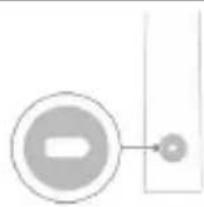
natural_image
Simple diagram with a circular arrow and a small circle connected by a line, no text or symbols present.Ako vidite da leva LED lampica indikatora baterije trepće žutonarandžasto 1 put i čujete 3 zvuka, od slabog do jakog, onda je funkcija deaktivirana.
natural_image
Illustration showing two-step procedure: hand holding a tool, then applying a device to a surface (no text or symbols)1 Nakon pranja zuba isperite glavu četkice i otresite višak vode.
natural_image
Diagram of a mechanical component with two textured surfaces and internal structure (no text or symbols)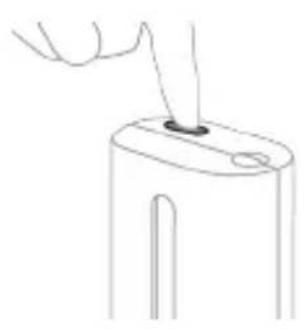
natural_image
Line drawing of a hand holding a small object on a cylindrical base (no text or symbols)3 Postavite glavu četkice na jedan od 2 klina u aparatu za dezinfekciju tako da vlakna budu okrenuta ka lampi.
Napomena: U uređaju za sanitizaciju čistite isključivo Phillips Sonicare glave četkice za lako postavljanje.
Napomena: nemojte da čistite glave četkice Philips Sonicare for Kids u aparatu za dezinfekciju.
4 Uređaj za sanitizaciju mora biti uključen u funkcionalnu utičnicu ili na odgovarajući napon.
5 Zatvorite poklopac i jedanput pritisnite zeleno dugme za uključivanje/isključivanje da biste izabrali ciklus UV čišćenja.
natural_image
Simple line drawing of a mechanical component with a starburst symbol and a base, no text or symbols present.Punjenje na punjaču ili na UV aparatu za dezinfekciju
natural_image
Diagram of a handheld electronic device with a hand holding a cable, showing internal components and an arrow indicating motion (no text or symbols present)Napomena: Uključeni dodaci mogu da se razlikuju u zavisnosti od kupljenog modela.
1 Umetnite USB kabl u putnu torbicu za punjenje.
2 Povežite priloženi USB kabl na ulazno napajanje jednosmernom strujom od 5 V sa:
- priloženim USB adapterom;
natural_image
Line drawing of a medical procedure showing a needle inserted into tissue (no text or symbols)1 Uklonite glavu četkice i isperite oblast oko metalne osovine toplom vodom. Obavezno uklonite sve ostatke paste za zube.
Oprez: Nemojte da gurate gumenu zaptivku na metalnoj osovini oštrim predmetima pošto to može da dovede do oštećenja.
2 Čitavu površinu drške obrišite vlažnom krpom.
Napomena: Nemojte da udarate ručkom o sudoperu da biste uklonili višak vode.
Glava četkice
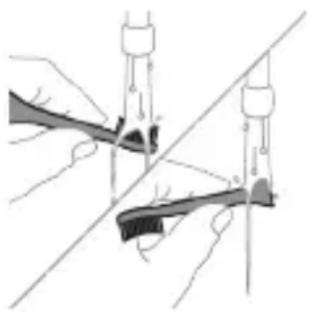
natural_image
Illustration of two hands using a tool to adjust or install a mechanical component, with no visible text or symbols.1 Glavu četkice i vlakna isperite nakon svake upotrebe.
2 Bar jednom nedeljno skinite glavu četkice sa drške i toplom vodom isperite njen priključak. Isperite poklopac za putovanja kad god je potrebno.
Punjač
1 Isključite punjač iz električne mreže pre čišćenja.
2 Obrišite površinu punjača vlažnom krpom.
Putna futrola
Isperite toplom vodom i izbrišite unutrašnjost putne futrole vlažnom krpom.
Putna futrola za punjenje
1 Prije čišćenja isključite putnu futrolu za punjenje iz utičnice.
2 Površinu putne futrole izbrišite vlažnom krpom.
natural_image
Illustration of a hand inserting a component into a device (no text or symbols visible)1 Isključite uređaj za sanitizaciju.
2 Izvucite posudu za sakupljanje tečnosti. Isperite posudu za sakupljanje tečnosti i obrišite je vlažnom krpom.
3 Očistite sve unutrašnje površine vlažnom krpom.
4 Uklonite zaštitnu foliju koja se nalazi ispred UV lampe.
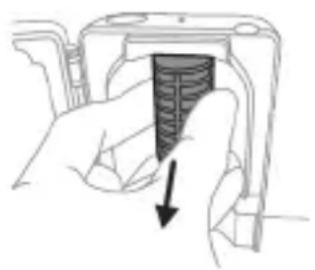
natural_image
Hand holding a device with a textured internal component and a downward arrow indicating action (no text or symbols)natural_image
Diagram of a mechanical or electrical component with a curved arrow indicating rotation (no text or symbols)
9 Kontakte na bateriji zaštitite trakom kako preostali napon baterije ne bi prouzrokovao kratak spoj. Punjivu bateriju sada je moguće reciklirati, a ostatak proizvoda odložiti na odgovarajući način.
Napomena: Aparat koji se više ne može upotrebljavati nemojte da odlažete u kućni otpad, već ga predajte na zvaničnom prikupljalištu za reciklažu. Na taj način pomažete očuvanju životne sredine.
Johdanto
www.philips.com/support
natural_image
Simple line drawing of an open book with no text or symbols visible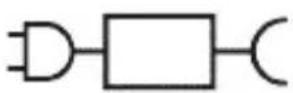

natural_image
Illustration showing a hand brushing a tooth with a brush and a close-up of the tooth being smoothed (no text or symbols)natural_image
Illustration of a hand gripping a segmented object with directional arrows indicating movement (no text or symbols)natural_image
Diagram of dental arching technique showing tooth arrangement and tooth penetration (no text or labels)Clean ja Deep Gum Health White+ Clean+
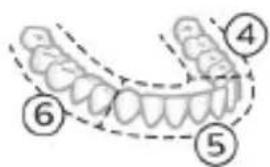
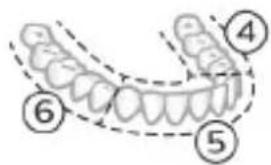
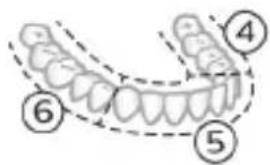
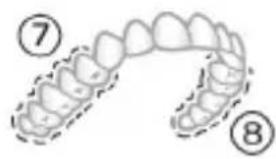
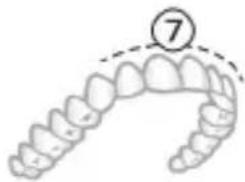
natural_image
Illustration of a dental arch with a numbered callout (7) indicating the upper part of the arch.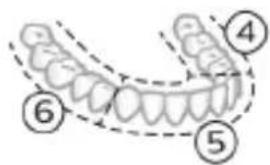
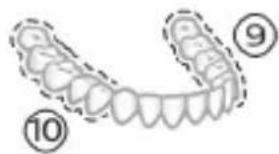
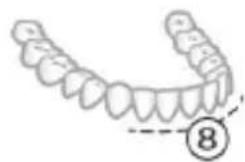
natural_image
Illustration of a human tooth with segmented teeth and a circled number 8 (no text or symbols present)natural_image
Simple diagram with three circles and two curved lines, no text or symbols presentnatural_image
Diagram of a microphone with signal icon and magnified view (no text or symbols)natural_image
Simple line diagram showing a circular symbol with a gear and directional arrow, connected to a vertical line (no text or labels)natural_image
Simple diagram showing a circular icon with a traffic symbol and a vertical line with a small circle labeled 'n' (no text or symbols beyond the label)natural_image
Simple diagram with a circular element and a vertical line, no text or symbols presentnatural_image
Simple diagram with a circle containing an internal symbol and a small circle connected by lines, no text or labels present.natural_image
Illustration showing two-step procedure: hand holding a tool, then applying a device to a battery (no text or symbols present)natural_image
Diagram of a mechanical component with two symmetrical slots and textured surfaces (no text or symbols)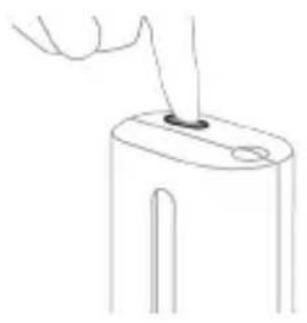
natural_image
Line drawing of a hand holding a small object on a device (no text or symbols)natural_image
Simple line drawing of a device with a button and cable, no text or symbols presentnatural_image
Illustration of a handheld electronic device with a hand holding a connector (no text or symbols visible)natural_image
Line drawing of a hand holding a pen inserted into a bundle of noodles (no text or symbols)natural_image
Illustration of two hands using a tool to connect two objects, with no visible text or symbolsnatural_image
Illustration of a hand inserting a component into a device (no text or symbols visible)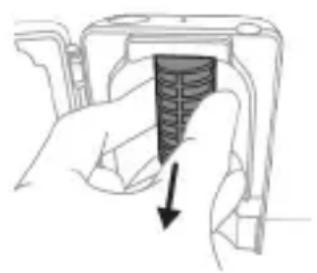
natural_image
Hand holding a device with a black arrow pointing to a textured interior (no text or symbols visible)natural_image
Illustration of a mechanical component with a curved arrow indicating motion (no text or symbols)
natural_image
Illustration of a hand holding a small electronic device with a circular button, no text or symbols present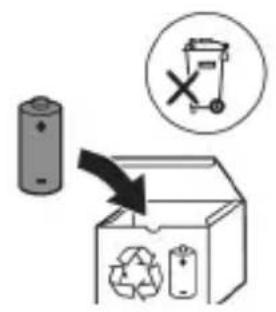
natural_image
Simple line drawing of an open book with no text or symbols visible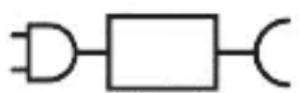

natural_image
Illustration of a hand holding a pen with a magnified inset showing a droplet on a surface (no text or symbols)natural_image
Illustration of a hand holding a curved object with directional arrows indicating movement or force (no text or symbols)natural_image
Diagram showing dental alignment with a tool interacting with teeth (no text or labels)natural_image
Simple diagram with three circles and a central oval, no text or symbols present- hög intensitet (tre staplar)
natural_image
Diagram of a toothbrush with a sensor icon and signal symbol (no text or labels)natural_image
Abstract geometric design with a star-like shape containing a central symbol and a small star-like shape beside it (no text or symbols present)natural_image
Simple diagram showing a circular icon with a traffic symbol and a small circle connected by a line (no text or labels)natural_image
Hand holding a power button next to a bottle (no text or symbols visible)natural_image
Simple diagram with a circular symbol and a small circle connected by lines, no text or labels present.natural_image
Simple diagram with a circular symbol and a vertical line, no text or labels presentnatural_image
Three-step diagram illustrating a mechanical assembly process: tool insertion, close-up of component, and final assembled view (no text or symbols)natural_image
Line drawing of a hand inserting a small component into a device (no text or symbols)natural_image
Simple line drawing of a device with a starburst symbol above it, no text or symbols present.natural_image
Illustration of a handheld electric shaver with a hand holding it, showing internal wiring and a small component (no text or symbols)natural_image
Line drawing of a hand holding a pen inserted into a plant stem (no text or symbols)natural_image
Illustration of two hands using a tool to lift or adjust a mechanical component, with no visible text or symbols.natural_image
Hand inserting a component into an electronic device (no text or symbols visible)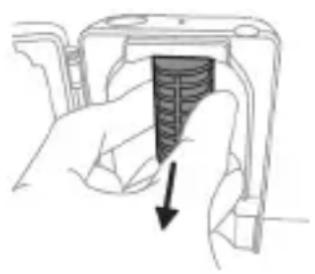
natural_image
Hand holding a device with a black arrow pointing to a textured interior (no text or symbols visible)natural_image
Illustration of a hand holding a cylindrical object with arrows indicating direction, and an inset showing a magnified view of the same object (no text or symbols present)natural_image
Diagram of a mechanical assembly with a magnified inset showing a gear mechanism (no text or symbols)natural_image
Illustration of a hand holding a small object with an arrow indicating rotation (no text or symbols)www.philips.com/support

natural_image
Simple line drawing of an open book and a circuit symbol (no text or labels)Bellik: Dürli modelleriň ayratynlyklary dürlüçe bolup bilýär. Käbir modeller Bluetooth ýa-da NFC bilen enjamlaşdyrylmadyk bolup biler.
natural_image
Illustration showing a hand brushing a tooth with a brush, and a close-up of the tooth being checked (no text or symbols present)natural_image
Illustration of a hand using a pipette to apply liquid onto a surface, with an inset showing a droplet on a surface (no text or symbols present)1 Gyllary öllään we üstüne azajyk diş pastasyny çalyň.
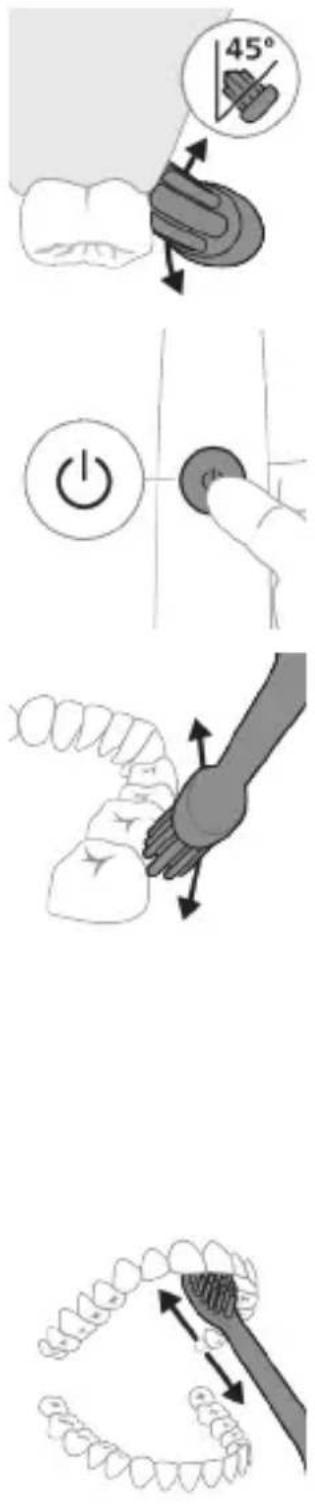
Elektrikli diş çotgaňyz 4 dürli tertip bilen enjamlaşdyrylandyr: Clean, Deep Clean+, Gum Health we White+ (diñe belli bir modellerde).
Ulanýan akylly nasadkaňyza baglylykda, optimal tertip we ýygjamlyk BrushSync tehnologiýasy tarapyndan awtomatik saýlanylar.
Clean we Deep Gum Health White+ Clean+
| Yeňillik Daş aýrymak Daş aýrymak wediş eti massažy | Daş we üst tegmiller aýrymak | ||
| Maslahat berilýan ýygjamlyk derejesi | Ýokary Ýokary Ýokary | ||
| Jemi çotgalama wagty | Clean: 2 minutDeep Clean+: 3 minut* | 3 minut we 20 sekunt | 2 minut we 40 sekunt |
Clean we Deep Gum Health White+ Clean+
Çotgalaýys usuly
Clean: Her segmenti 20 sekunt çotgalaň.
Her segmenti 20 sekunt çotgalaň,
Her segmenti 20 sekunt çotgalaň,
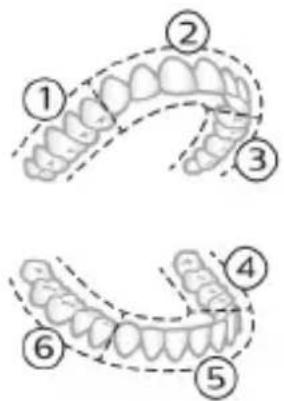
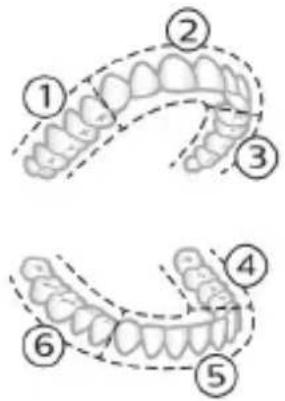
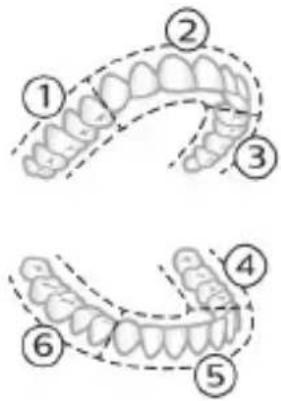
Deep Clean+: Her segmenti 30 sekunt çotgalaň.*
soňra segment 7,8,9 bilen 10-iň her birini 20 sekunt çotgalaň.
soňra segment 7 bilen 8-iň her birini 20 sekunt çotgalaň.
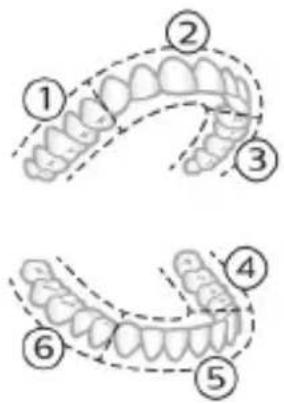
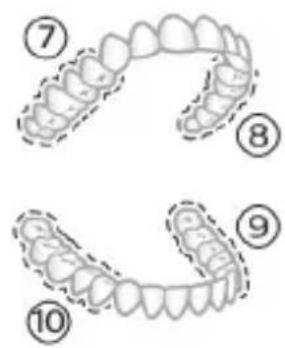
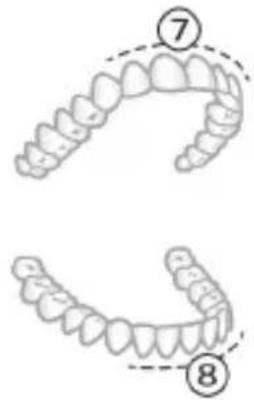
*Bellik: "Deep Clean+" tertibinde Philips Sonicare programmasy bilen çotgalaýarkaňyz, programma birigen bolsa, çotgalama wagty 2 minut, programma birikmedik bolsa, 3 minut dowam eder
Ýygjamlyklar
Elektrikli diş çotgaňyz 3 dürli ýygjamlyk sazlamasy bilen gelýär:
natural_image
Simple diagram with three circles and two curved lines, no text or symbols presentTutawaja dakylgy wagty, akylly nasadka maslahat berilýän ýygjamlygy awtomatik sayılar/ Başga bir ýygjamlyga üýtgetmek isleseňiz, çotgalap durkaňyz, şeýtmek üçin tertip/ýygjamlyk düwmesini basyp bilersiňiz. Tutawaç öçük ýa-da ságindirilgi wagty, ýygjamlygy üýtgedip bolmaýar.
natural_image
Diagram of a microphone with signal icon and magnified view (no text or symbols)natural_image
Simple diagram with a starburst symbol containing a gear and directional arrows, connected to a vertical line (no text or labels)natural_image
Simple diagram showing a circular icon with a traffic symbol and a vertical line with a small circle containing an 'n' at the bottom (no text or labels)- G3 Premium Gum Care: Gum Health tertibi
- W3 Premium White ya-da W(c)
DiamondClean(compact): White+ tertibi
natural_image
Simple line drawing of a hand pressing a button on a bottle, with a power button icon nearby (no text or symbols)natural_image
Simple diagram with a circular symbol and a vertical line, no text or labels presentnatural_image
Simple diagram with a circular arrow and a small circle connected by a line, no text or symbols present.natural_image
Three-step diagram illustrating a mechanical assembly process: tool insertion, component disassembly, and final assembled view (no text or symbols)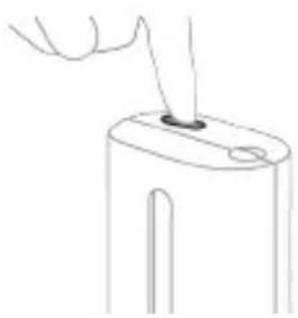
natural_image
Line drawing of a hand holding a small object with a pointed tip, resembling a device or tool (no text or symbols present)5 Gapagy yapyň we ultramelewşe arassaçylyk döwresini saylamak üçin açyan/öçüryän düwmâni bir gezek basyň.
Bellik: dezinfektory diñe gapagy talabalaýyk ýapyk wagty işledip bilersiňiz.
Bellik: dezinfektor döwresiniň dowamynda gapagy açsaňyz, dezinfektor işlemegini togtadar.
Bellik: Dezinfektoryň döwresi takmynan 10 minuda çekýär we soňra awtomatik öçýär.
natural_image
Simple line drawing of a device with a starburst symbol and an arrow pointing to a small component (no text or symbols present)Zarýadnikde ýa-da ultramelewše dezinfektorda zarád bermek
natural_image
Illustration of a handheld electronic device with a hand holding a cable, showing internal components and wiring (no text or symbols)natural_image
Line drawing of a person holding a pen over a bundle of noodles (no text or symbols)natural_image
Illustration of hands using compasses to measure a tool, no text or symbols present1 Her ulanyşdan soň nasadkany we gyllary ýuwup durlaň.
2 Azyndan hepdede bir gezek nasadkany tutawaçdan aýryp, nasadkanyň birikmesini ýyly suw bilen ýuwup durlaň. Syýahat gapagyny näçe ýygylykda zerur bolsa ýuwup durlaň.
Zarýadnik
natural_image
Hand inserting a component into an electronic device (no text or symbols visible)natural_image
Hand holding a device with a black arrow pointing to a textured interior (no text or symbols visible)natural_image
Illustration of hands holding a cylindrical battery with an arrow indicating rotation (no text or symbols)4 Uçky gapajygy diş çotgasynyň tutawajyndan ayryň. Eger uçky gapajyk koprusdan ÿeñillik bilen sypmasa, tä uçky gapajyk sypýança ädim 3-i gaýtalaň.
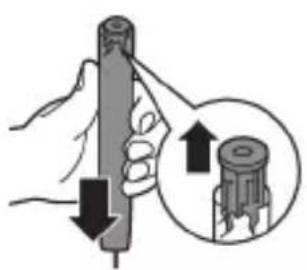
natural_image
Illustration of a hand holding a cylindrical object with arrows indicating force direction, and an inset showing a magnified view of the object (no text or symbols)5 Tutawajy başasak saklap, waly gaty üste basyň. Eger içerki komponentler koprusdan YEňillik bilen sypmasa, tâ içerki komponentler sypýança ädim 3-i gaytalaň.
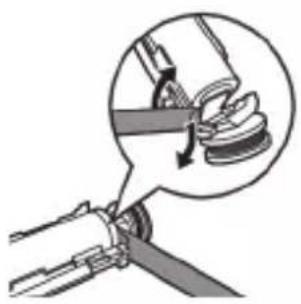
natural_image
Mechanical assembly diagram showing a rotating component with a magnified inset view (no text or symbols)6 Batareya bilen içerki komponentleriň aşagyndaky gara çarçuwanyň arasyna towlaýjyny sokuň. Soňra batareýany towlaýjy arkaly galdyryp, gara çarçuwanyň aşagyny döwüň.
natural_image
Illustration of a hand holding a device with a black arrow indicating rotation (no text or symbols)Bellik: Hyzmat ömri guataransoň, enjamy adaty hojalyk zibiline taşlamaň-da, resmi utilizasiýa ýygnaýyş nokadyna tabşyryň. Şeyle etmek bilen, daşky gurşawy gorap saklamaga kömek edýärsiňiz.
Εισαγωγή
www.philips.com/support
natural_image
Simple line drawing of an open book with no text or symbols visible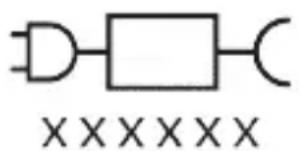
natural_image
Pure electrical circuit lines without any symbolsnatural_image
Illustration of a hand holding a toothbrush with a downward arrow indicating force or pressure (no text or symbols)natural_image
Simple line drawing of a curved object with a checkmark (no text or symbols)natural_image
Illustration of a hand holding a pen with a magnified inset showing a droplet on a surface (no text or symbols)Clean kai Deep Gum Health White+ Clean+
Clean kai Deep Gum Health White+ Clean+
natural_image
Simple diagram with three circles and a central oval, no text or symbols presentnatural_image
Diagram of a microphone with signal icon and connection point (no text or symbols)natural_image
Simple line diagram showing a circular icon with a traffic light symbol and a star-shaped connector (no text or labels)natural_image
Simple diagram showing a circular icon with a traffic symbol and a small circle connected by a line (no text or labels)natural_image
Illustration of a hand holding a rifle with a diagonal line crossing through it (no text or symbols)natural_image
Illustration of a hand holding a cylindrical device with a knob, showing a right-hand rule (no text or symbols)natural_image
Diagram of a mechanical component with two textured surfaces and internal structure (no text or symbols)natural_image
Line drawing of a hand inserting a small component into a cylindrical device (no text or symbols)natural_image
Simple line drawing of a device with a button and cable, no text or symbols presentnatural_image
Diagram of a handheld electronic device with a hand operating it, showing internal components and wiring (no text or symbols)natural_image
Line drawing of a medical procedure involving a tool and a tool tip, with no visible text or symbolsnatural_image
Illustration of two hands using a tool to connect two objects, with no visible text or symbolsnatural_image
Illustration of a hand inserting a component into a device (no text or symbols visible)natural_image
Hand holding a device with a shaded internal component and an arrow indicating direction (no text or symbols)natural_image
Simple line drawing of a mechanical component with a curved arrow indicating rotation (no text or symbols)
natural_image
Illustration of a hand holding a device with a circular button, no text or symbols present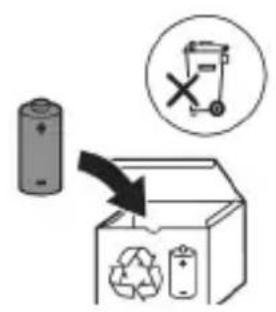
natural_image
Illustration showing a hand brushing a tooth with a brush, and a close-up of the tooth being examined with a checkmark (no text or symbols present)natural_image
Illustration of a hand using a pipette to apply a sample onto a surface, with an inset showing a magnified view of the sample (no text or symbols present)natural_image
Illustration of a human hand holding a curved object, with arrows indicating movement or force direction (no text or symbols)natural_image
Diagram of dental arching with tooth structure and tooth removal (no text or labels)Clean и Deep Gum Health White+ Clean+
Clean и Deep Gum Health White+ Clean+
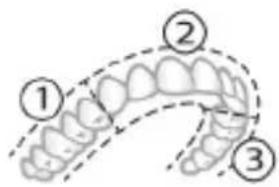
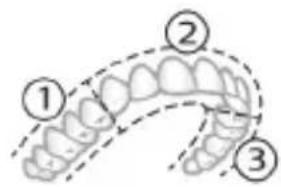
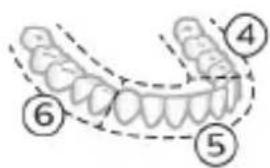
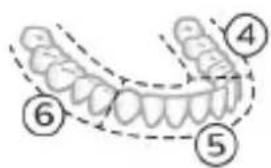
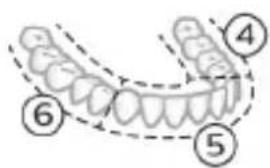
Deep clean+: Четкайте всеки сегмент за 30 секунди.*
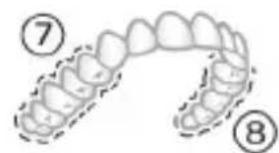
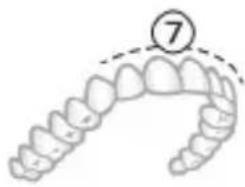
natural_image
Illustration of a dental arch with a numbered circle highlighting the tooth (number 7), no text or symbols present.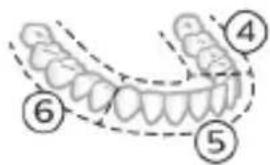
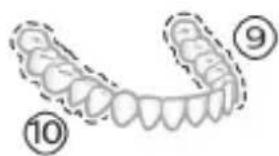
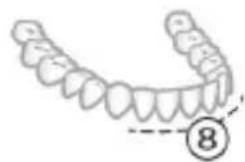
natural_image
Illustration of a human upper dental arch with teeth and jawbone, marked with number 8 (no text or symbols on the arch itself)natural_image
Simple diagram with three circles and two curved lines, no text or symbols presentnatural_image
Illustration of a microphone with a circular icon showing wireless signal (no text or symbols)natural_image
Simple line diagram showing a gear icon with directional arrows and a starburst symbol (no text or labels)natural_image
Simple diagram showing a circular icon with a traffic signal inside and a vertical line with a labeled circle (no text or symbols)natural_image
Simple diagram with a circle containing an internal symbol and a small dot connected by lines (no text or labels)natural_image
Simple diagram with a circle containing an 'B' and a small dot connected by lines, no text or symbols present.natural_image
Illustration of two hands using a tool to adjust or install a mechanical component, with no visible text or symbols.natural_image
Illustration of a hand holding a device with a circular button and an arrow pointing to it (no text or symbols)natural_image
Cross-sectional diagram of a mechanical component with two symmetrical slots and textured surfaces (no text or symbols)natural_image
Line drawing of a hand holding a small object with a pointed tip, no text or symbols presentnatural_image
Simple line drawing of a mechanical component with a star-shaped head and a base, no text or symbols present.natural_image
Diagram of a handheld electronic device with a hand holding a cable, showing internal components and wiring (no text or symbols)natural_image
Line drawing of a medical procedure showing a needle inserted into a bulbous structure (no text or symbols)natural_image
Illustration of two hands using a tool to connect two objects, with no visible text or symbolsnatural_image
Illustration of a hand inserting a component into an open device (no text or symbols visible)natural_image
Hand holding a device with a black arrow pointing to a textured section (no text or symbols visible)natural_image
Illustration of a hand holding a cylindrical object with arrows indicating force direction, plus an inset showing a magnified view of the tool (no text or symbols)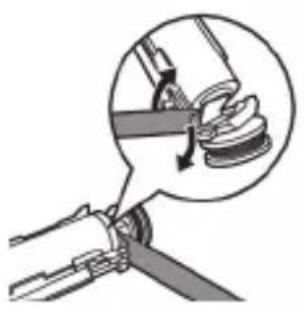
natural_image
Diagram of a mechanical assembly with a magnified inset showing a component being inserted (no text or symbols present)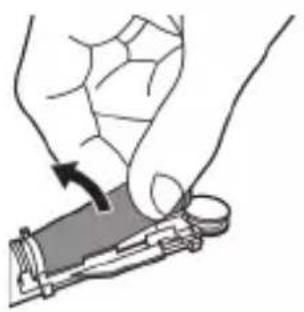
natural_image
Illustration of a hand holding a device with a circular button, showing a mechanical component (no text or symbols)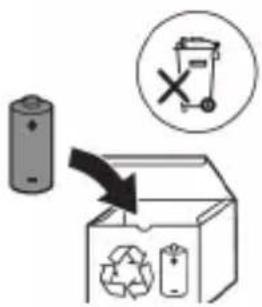
www.philips.com/support
natural_image
Simple line drawing of an open book with no text or symbols visible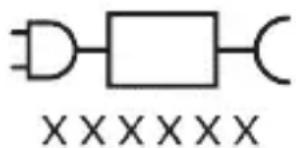
natural_image
Illustration showing a hand brushing a tooth with a brush, and a close-up of the tooth being smoothed (no text or symbols)natural_image
Illustration of a hand using a pen to apply a sample onto a surface, with an inset showing a magnified view of the sample (no text or symbols present)natural_image
Illustration of a hand holding a curved object with directional arrows indicating movement or force (no text or symbols)natural_image
Diagram showing dental alignment with a toothbrush and jawbone structure (no text or labels)natural_image
Simple diagram with three circles and two vertical lines, no text or symbols presentnatural_image
Diagram of a microphone with a circular icon showing signal waves (no text or symbols)natural_image
Simple line diagram showing a circular icon with a road sign and a starburst symbol connected to a vertical line (no text or labels)natural_image
Simple diagram showing a circular icon with a traffic symbol and a small circle connected by a line (no text or labels)natural_image
Simple line drawing of a hand pressing a button on a bottle with a power button (no text or symbols)2-кадам: Күйгүзүү/өчүрүү баскычын коё бербей басып туруңуз:
natural_image
Simple diagram with a circular icon containing a white rectangle and connected to a small circle (no text or symbols)natural_image
Simple diagram with a circular arrow and a small circle connected by a line, no text or symbols present.natural_image
Illustration of two hands using a tool to adjust or install a mechanical component, with no visible text or symbols.natural_image
Illustration of a hand holding a device with a circular button and an arrow pointing to it (no text or symbols)2 Манжаңызды санитайзердин эшигинин оюгуна салып, эшикти тартып ачыңыз.
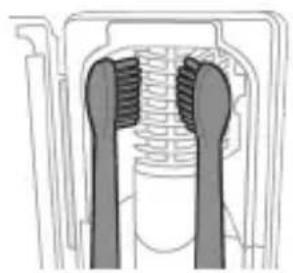
natural_image
Cross-sectional diagram of a mechanical component with two symmetrical slots and textured surfaces (no text or symbols)natural_image
Diagram of a handheld electronic device with a curved arm and connector (no text or symbols)natural_image
Line drawing of a hand holding a pen over a bundle of noodles (no text or symbols)natural_image
Illustration of two hands using a tool to tie a pair of pins (no text or symbols present)natural_image
Illustration of a hand inserting a component into a device (no text or symbols visible)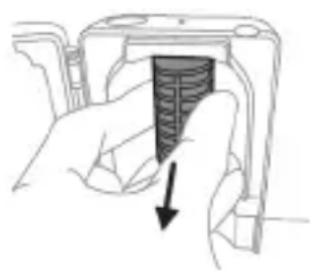
natural_image
Hand holding a device with a black arrow pointing to a textured interior (no text or symbols visible)www.philips.com/support
www.philips.com/support
natural_image
Simple line drawing of an open book with no text or symbols visible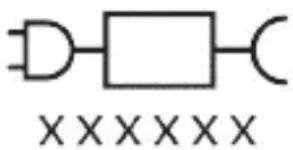
natural_image
Pure electrical circuit lines without any symbolsnatural_image
Illustration of a hand holding a toothbrush with a directional arrow indicating force or movement (no text or symbols)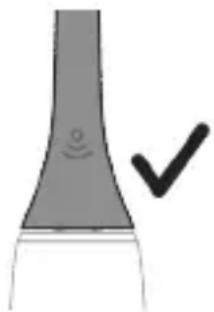
natural_image
Simple line drawing of a curved object with a checkmark (no text or symbols)natural_image
Illustration of a hand using a pipette to apply a product to a textured surface, with an inset showing a magnified view of the product (no text or symbols present)natural_image
Illustration of a hand holding a curved object with directional arrows indicating movement or force (no text or symbols)natural_image
Diagram of dental arching with tooth structure and tooth removal (no text or labels)natural_image
Simple diagram with three circles and a central oval, no text or symbols presentnatural_image
Diagram of a microphone with signal icon and speech bubble, no text or symbols presentnatural_image
Simple line diagram showing a circular symbol with a road sign and a star-shaped connector (no text or labels)natural_image
Simple line drawing of a hand pressing a button on a cylindrical object with an 'Power' icon (no text or symbols)natural_image
Simple diagram with a circular arrow and a small circle connected by a line (no text or symbols)natural_image
Simple diagram with a circle containing a minus sign and a small circle connected by lines (no text or symbols)natural_image
Illustration of two hands using a tool to measure a mechanical component, with no visible text or symbols.natural_image
Illustration of a hand pressing down on a device component with an arrow indicating the left side (no text or symbols present)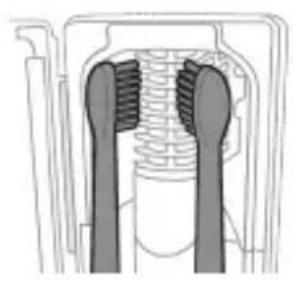
natural_image
Diagram of a mechanical component with two vertical supports and textured surfaces (no text or symbols)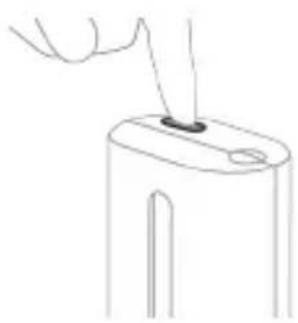
natural_image
Line drawing of a hand holding a small object with a pointed tip, no text or symbols presentnatural_image
Diagram of a handheld electronic device with a hand holding a cable, showing internal components and wiring (no text or symbols)natural_image
Simple line drawing of a squid being held by a pen (no text or symbols)natural_image
Illustration of two hands using a tool to connect a mechanical component, with no visible text or symbols.natural_image
Illustration of a hand inserting a component into an open device (no text or symbols visible)natural_image
Hand holding a device with a black arrow pointing to a textured interior (no text or symbols visible)natural_image
Illustration of a mechanical component with a curved arrow indicating motion (no text or symbols)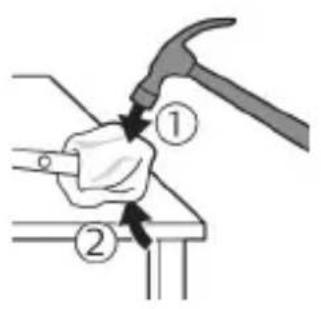
natural_image
Illustration of a hand using a hammer to tighten a cylindrical object with a circular arrow (no text or symbols)natural_image
Illustration of hands holding a battery with a magnifying glass, no text or symbols presentnatural_image
Illustration of a hand holding a pen with an arrow indicating downward motion, and a magnified inset showing the same pen tip (no text or symbols)natural_image
Mechanical diagram showing a lever mechanism with a magnified inset highlighting the joint detail (no text or symbols present)natural_image
Illustration of a hand holding a device with a circular button, showing a mechanical component (no text or symbols)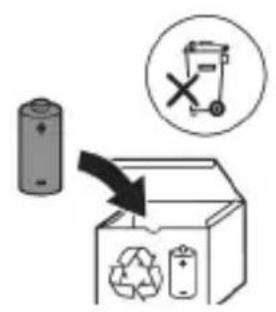
www.philips.com/support
www.philips.com/support
natural_image
Simple line drawing of an open book with no text or symbols visiblenatural_image
Illustration showing a hand brushing a tooth with a brush, and a close-up of the tooth being smoothed (no text or symbols)natural_image
Illustration of a hand using a pipette to apply liquid onto a surface, with an inset showing a droplet on a surface (no text or symbols present)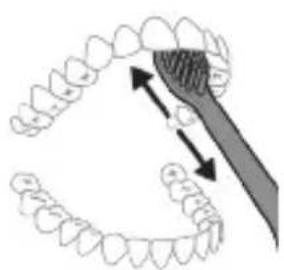
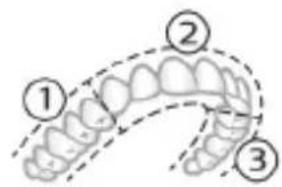
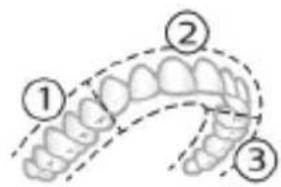
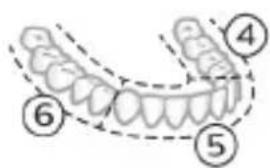
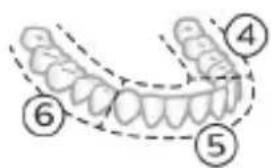
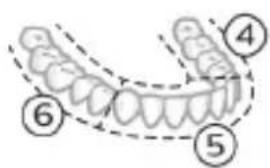
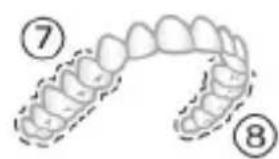
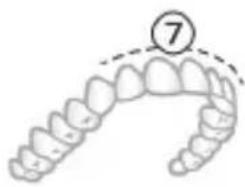
natural_image
Illustration of a dental arch with a numbered marker (7) indicating a specific tooth position, no text or symbols present.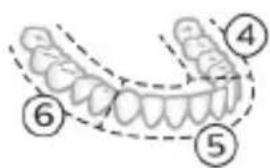
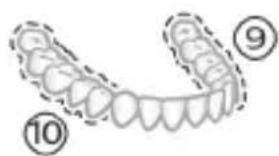
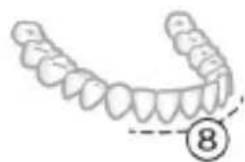
natural_image
Illustration of a human tooth with segmented teeth and a circled number 8 (no text or symbols)natural_image
Simple diagram with three circles and a central oval, no text or symbols presentnatural_image
Diagram of a microphone with a circular icon showing signal waves (no text or symbols)natural_image
Simple diagram with a circular emblem containing a road sign and a starburst symbol, connected by a line to a vertical line (no text or labels)natural_image
Simple diagram showing a circular icon with a traffic symbol and a vertical line with a dot (no text or labels)natural_image
Simple line drawing of a hand pressing a button on a cylindrical object with an 'Power' icon (no text or symbols)natural_image
Simple line drawing of a mechanical component with a star-shaped head and a base, no text or symbols present.natural_image
Illustration of a handheld electronic device with a hand holding a connector (no text or symbols visible)natural_image
Simple line drawing of a fork being inserted into a bulb (no text or symbols)natural_image
Illustration of two hands using a tool to lift or stand, no text or symbols presentnatural_image
Illustration of a hand inserting a component into a device (no text or symbols visible)natural_image
Hand holding a device with a black arrow pointing to a textured interior (no text or symbols visible)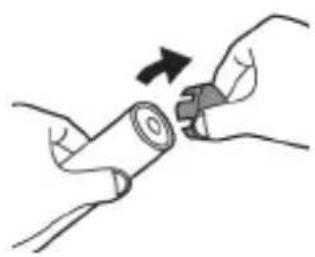
natural_image
Illustration of hands holding a cylindrical battery with an arrow indicating rotation (no text or symbols)natural_image
Mechanical assembly diagram showing a clamping tool interacting with a mechanical component (no text or symbols visible)natural_image
Illustration of a hand holding a small electronic component with an arrow indicating rotation (no text or symbols)www.philips.com/support
www.philips.com/support
natural_image
Simple line drawing of an open book with no text or symbols visible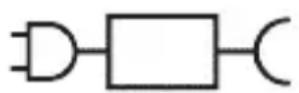
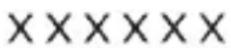
Кисми чудошавандаи таъминоти барк: «xxxxх» раками намунавии баркпуркунандахоеро, ки бояд истифода шавад, нишон медихад. (TCBxxxx, HX6100, HX6110, HX6160 ё WAAxxxx)
natural_image
Illustration showing a hand brushing a tooth with a brush, and a close-up of the tooth being smoothed (no text or symbols)natural_image
Illustration of a hand using a tool to apply a product to a textured surface, with an inset showing a magnified view of a textured surface (no text or symbols present)3 Барои фаьол кардани «Philips Sonicare» тугмаи фаьол/хомўшро пахш кунед.
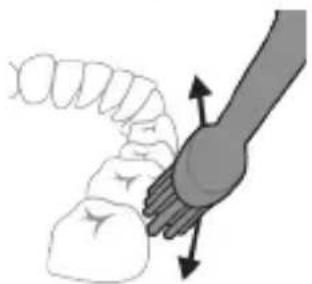
natural_image
Illustration of a hand holding a curved object with directional arrows indicating movement or force (no text or symbols)4 Лифхои чўткаро болои дандонхо ва дар хати милки дандонхо ба таври дуруст чойгир кунед. Дандонхои худро бо харакатхои хурди пасу пеш тоза кунед, то ки лифхои чўтка байни дандонхо гузарад. Ин харакатро дар тамоми давраи дандоншўии худ идома дихед.
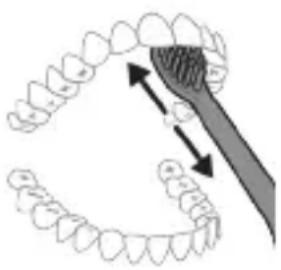
natural_image
Diagram showing dental alignment with a toothbrush and tooth arrangement (no text or labels)Шарх: Мўйякхои чўтка бояд каме васеъ шаванд. Тавсия дода намешавад, ки шумо дандонхоро мисли бо чўткаи дандоншуии дасти тоза кунед.
Чуткаи дандоншўии шумо бо то 4 речаи шиддати гуногун таўмин шудааст: «Clean», «Deep Clean+», «Gum Health» ва «White+» (танхо моделхои мушаххас).
natural_image
Simple diagram with three circles and a central oval, no text or symbols presentnatural_image
Illustration of a microphone with a circular icon showing wireless signal, no text or symbols presentnatural_image
Simple diagram with a starburst icon containing a road symbol and a small arrow pointing to it, connected by a line (no text or labels)natural_image
Simple diagram showing a circular icon with a traffic symbol and a small circle connected by an arrow (no text or labels)natural_image
Simple line drawing of a hand pressing a button on a bottle with a power symbol (no text or labels)natural_image
Illustration of two hands using a tool to adjust or install a mechanical component, with no visible text or symbols.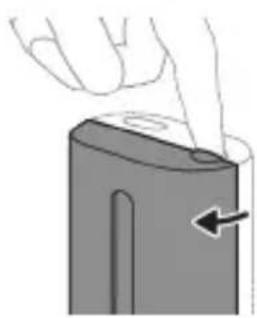
natural_image
Illustration of a hand pressing down on a mechanical component with an arrow indicating rotation (no text or symbols)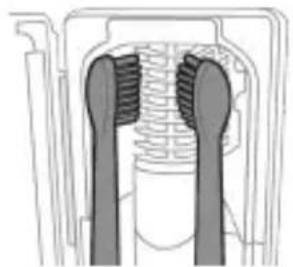
natural_image
Cross-sectional diagram of a mechanical component with two symmetrical slots and internal channels (no text or labels)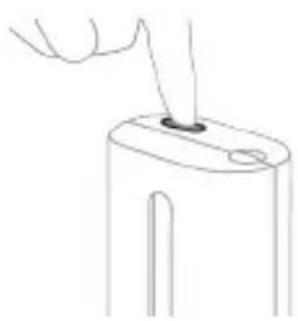
natural_image
Line drawing of a hand inserting a small object into a cylindrical device (no text or symbols)natural_image
Simple line drawing of a mechanical component with a star-shaped head and a base, no text or symbols present.natural_image
Illustration of a handheld electronic device with a hand holding a cable, showing internal components and a pointer indicating rotation (no text or symbols present)natural_image
Line drawing of a hand holding a pen inserted into a bundle of tentacles (no text or symbols)natural_image
Illustration of two hands using a tool to adjust or install a mechanical component, with no visible text or symbols.natural_image
Illustration of a hand inserting a device into a device housing (no text or symbols visible)1 Чудо кардани тамизкунанда.
2 Табакчаро барои катрахо рост кашида бароред. Табакчаро барои катрахо бо об шуед ва бо матои нам тоза кунед.
3 Хамаи сатххои дохилиро бо матои нам тоза кунед.
4 Экрани мухофизатиро пеш аз чароғи UV чудо кунед.
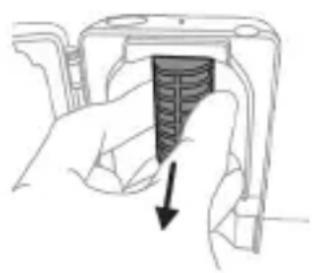
natural_image
Hand holding a device with a black arrow pointing to a textured interior (no text or symbols visible)natural_image
Illustration of a hand holding a cylindrical object with arrows indicating force direction, and an inset showing a magnified view of the same object (no text or symbols present)5 Дастакро чаппа нигох дошта, холигиро ба сатхи сахт зер кунед. Агар чузъхои дохили ба осонй аз корпус озод нашаванд, кадами 3-ро то он даме, ки чузъхои дохили озод карда шаванд, такрор кунед.
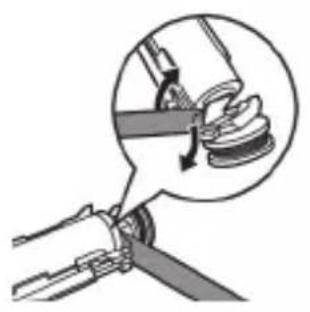
natural_image
Diagram of a mechanical assembly with a magnified inset showing a rotating component (no text or symbols)6 Мурваттобакро байни батарея ва чахорчубаи сиёх, дар поёни чузъхои дохилй пайваст кунед. Сипас, мурваттобро аз батарея боло бардошта, поёни чахорчубаи сиёхро кушоед.
natural_image
Illustration of a hand holding a device with a circular button, showing a mechanical component (no text or symbols)www.philips.com/support
natural_image
Simple line drawing of an open book with no text or symbols visible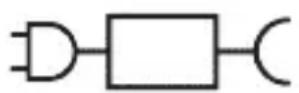
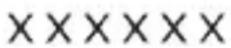
natural_image
Illustration showing a hand brushing a tooth with a brush, and a close-up of the tooth being checked (no text or symbols present)natural_image
Diagram of dental arching with tooth structure and tool (no text or labels)natural_image
Simple diagram with three circles and a central oval, no text or symbols presentnatural_image
Diagram of a microphone with a circular icon showing signal waves (no text or symbols)natural_image
Simple line diagram showing a circular icon with a parking sign and a starburst symbol connected to a vertical line (no text or labels)natural_image
Simple diagram showing a circular icon with a traffic symbol and a small circle connected by a line (no text or labels)natural_image
Hand holding a power button next to a bottle (no text or symbols visible)natural_image
Simple diagram with a circle containing a minus sign and a vertical line extending from it (no text or symbols)natural_image
Simple diagram with a circular arrow and a small circle connected by a line (no text or symbols)natural_image
Three-step diagram illustrating a mechanical assembly process: tool insertion, close-up of component, and final assembled view (no text or symbols)natural_image
Line drawing of a hand holding a small object on a cylindrical base (no text or symbols)natural_image
Simple line drawing of a device with a button and cable, no text or symbols presentnatural_image
Diagram of a handheld electronic device with a hand holding a cable, showing internal components and a directional arrow (no text or symbols)natural_image
Line drawing of a medical procedure showing a tool interacting with tissue manipulation (no text or symbols)natural_image
Illustration of two hands using a tool to lift or adjust a mechanical component, no text or symbols presentnatural_image
Hand inserting a component into a device (no text or symbols visible)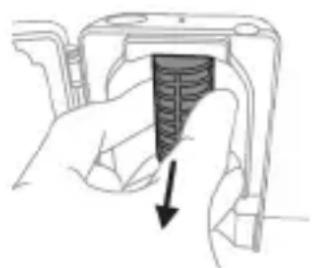
natural_image
Hand holding a camera lens with a textured screen and arrow indicating compression (no text or symbols)natural_image
Diagram of a mechanical assembly with a magnified inset showing a tool interacting with a component (no text or symbols present)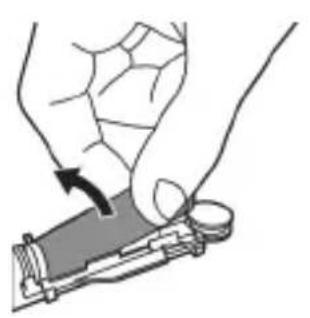
natural_image
Illustration of a hand holding a device with a circular button, showing a mechanical component (no text or symbols)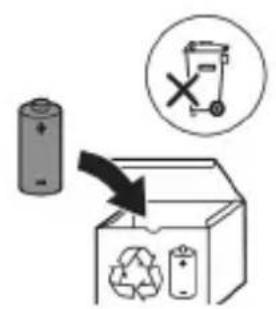
www.philips.com/support
natural_image
Simple line drawing of an open book with no text or symbols visible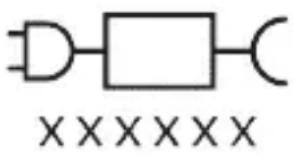
natural_image
Pure electrical circuit lines without any symbolsnatural_image
Illustration of a hand holding a toothbrush with a downward arrow indicating force or pressure (no text or symbols)natural_image
Simple line drawing of a curved object with a checkmark indicating a detail (no text or symbols)natural_image
Illustration of a hand using a tool to apply a product to a toothbrush, with an inset showing a textured surface (no text or symbols)natural_image
Simple diagram with three circles and a central oval, no text or symbols presentnatural_image
Diagram of a microphone with signal icon and speech bubble, no text or symbols presentnatural_image
Simple line diagram showing a circular symbol with a road sign and a star-shaped connector (no text or labels)natural_image
Simple diagram with a circular element and a vertical line, no text or symbols presentnatural_image
Simple diagram with a circular element and a small circle connected by lines, no text or symbols present.natural_image
Illustration of hands using a tool to measure a mechanical component (no text or symbols present)natural_image
Simple line drawing of a mechanical component with a starburst symbol above it, no text or symbols present.natural_image
Diagram of a handheld electronic device with a hand holding a connector (no text or symbols visible)natural_image
Line drawing of a fork being inserted into a tubular structure (no text or symbols)natural_image
Illustration of hands using a tool to connect two objects, no text or symbols presentnatural_image
Illustration of a hand inserting a component into a device (no text or symbols visible)natural_image
Hand holding a device with a textured internal component and a downward arrow indicating action (no text or symbols)natural_image
Diagram of a mechanical assembly with a magnified inset showing a tool interacting with a component (no text or symbols present)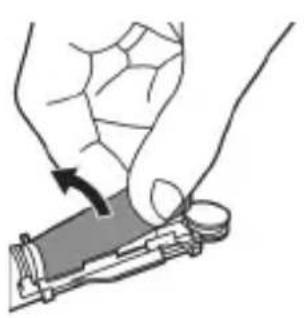
natural_image
Illustration of a hand holding a device with a circular button, showing a curved arrow indicating rotation (no text or symbols present)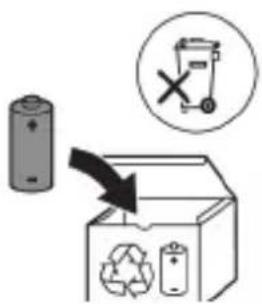
natural_image
Simple line drawing of an open book with no text or symbols visible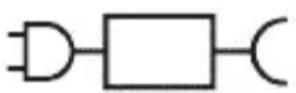
XXXXXX
ETUynwutuguwu hwunuh uuu. «xxxxxx»-n gnjg 5 unwihu hwuunwinuwd jhgpwnphzutnh uunnth hwufwn, nnn wltnp 5 oqnuwqnnduh: (TCBxxxx, HX6100, HX6110, HX6160 lwwu WAAXxxx)
Lwwinnwlywjhù oqinwqnndniú
Sonicare ExpertClean wunwùutŋn úwpntŋni tʃltynnwlywù hunqwùwlyutŋn ùwhuwinttuulwò tǔ yniuwwlyuud wunwùuwwhwnŋ u uùünwjhù uówgnnnútŋn wunwùutŋhg htrzwgutŋni hwúwn, hùzǔ oqùniú t ǜylwqtgǔti wunwùutŋh ywnhtūn u pwntliwulti lywiú wwhwlywùti ptnwùh hunnzh wnnnŋɔnipjniùn: Sonicare ExpertClean 2wnph tʃltynnwlywù wunwúh hunqwùwlyutŋn ùwhuwinttuulwò tǔ wùàuwlywù oqunwqnndúwù hwúwn: tʃnthuwutŋh ynnúhg oqunwqqnnðniún wtúnp t jħùh útδωhwwluylutŋh vtænwhulynnηnipjwiù útæpn:
2tn Philips Sonicare-n (Uy. 1.)
1 Fnǔwǔ
2 3nuwùph úhwgúwù/wùgwùnúwù lynǎwù
3 hùntùuhùnìpàwù gnighs
4 NTdhh/huuntuuhunipajwluynawly
5 Ntduhutph gnighs
6 lunqwùwlyh qlhuhlyh yhnhuwnhùuìwù hh2tgniuí
7 Uwnunlngh gnighs
Uputuniwnutn.
8 ἐnquùwǔh qǐhuìyǔ h yǔwǔngh
9 lunqwùwlyh hutlugh qlhuhy(utn)
10 BrushSync ǔ2wǔ
11 Lhgpwulnnuwu hbuwu
natural_image
Illustration of a hand holding a toothbrush with a downward arrow indicating force or pressure (no text or symbols)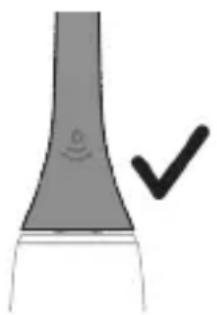
natural_image
Simple line drawing of a curved object with a circular mark and a checkmark (no text or symbols)1 bùnqùwùh qìhùln hòuǐwùwntgntp wjùwǔu, nn úwqhùyùtnù nìnnúwǒ jhùtù ǔnìjù nìnnημαjωύp, hùz pènǚwùh ṇhúwgh ynnúp:
2 Uünin utnútp hunqwùwlyh qihuhyn utnplu utunwnwlywù lhuṭnh útg, uħùzlu wju lywùq wnùh: L2niś' hunqwùwlyh qihuhyh u pnùwlyh uħzu yħnpn wǔgph wnŋuwjniŋiún ñnnúwyl 5:
2tn Philips Sonicare wunwutph hunqwuwlyh oqunwqnpnniyn
tpt wwnghù wùqwú tṛ oqunwqnδnú ðtn Sonicare winwúh hunqwùwʊŋ, wʊtɪŋ 2wɪn jənpanŋ qquwɪŋ ünnuúl ʒ' hwiútúwɪnwò nʒ ʒiṭlynnwʊywù hunqwùwʊŋ htún: lnnúwɪ ʒ, tnp wwnghù wùqwú oqunwqnδnδnútnŋ zwiuhg 2wɪn tiū utnúniú qnpδwnηνιώ: Uhwjù yhnwnztp üninp utnúniú u panjų unltp, nnwtuqh winwúh hunqwùwʊŋ ðtn yhnhuwntǔ úwpnh: hünnniú tṛp htinutl uinnnlu útnlywjwgulwò hunqwùwʊhg oqinultīni gnigniúutnhù 'lwiwrqnju' wnŋniúputn uinnuówlni hwiúwn:
Uugniun atn unn Sonicare 5thynnwlywù wunwúh hunqwùwlyhù ht2unwgutlni hwiúwn wnwghù 1-2 2wpwjaulw núpwgpniú oqinwqnndtúp wultih gwòn ywnqwuŋnniú, wjünihtuniu wǔgtp wultih pwnàn ywnqwuŋnnúwù:
Uwpnúwù hnwhwùqùtn
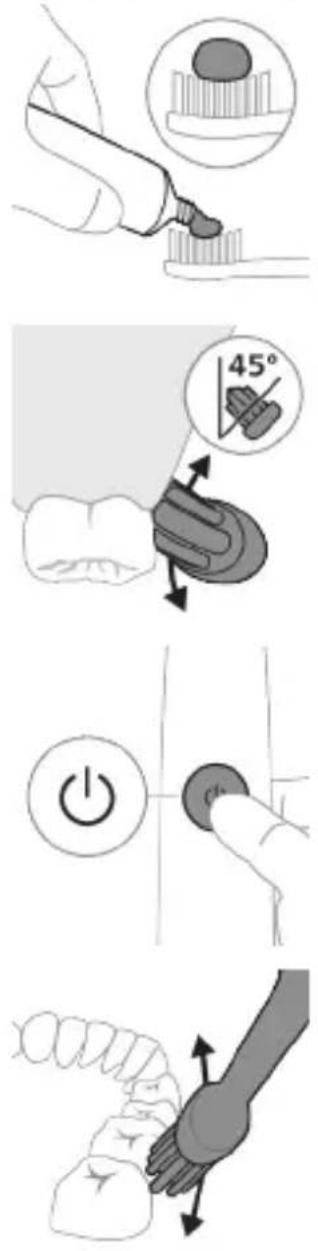
1 陰ngtp hunqwùwlyh úwqhúutnn u útngntp wunwúh úwðnilyh phz pwiùwlníjniú:
2 Umwúh hunqwúwwlyh úwqhúutpn nptp wunwuúutph unw nnn2 wùljuwù unwly (45 wuunhǎwù): Uúnín utnútp, nnwtuqh úwqhúutpn hwuútu jùntph tqnwaqóhu ywu nnuuhg útnpu:
L2niù Uúpnnq dwúwùwly hunqwùwlyh ytāunpnùn wwhtp wunwùutph htún 2yhuìwù útg:
3 Utnútp hnuwúph úhwguśwú/wǔgwùnúwú ynǎwūŋ Philips Sonicare-n úhwguśtlni hwuśwn:
4 Urpntu wuhtp hunqwùwlyh úwqtnú winwuśutnh ynw intwnwnnluwó u lúntnh tqnwaðniú: Uwpntp winwuśuttn pārəuwlyh htun ni wnwg 2wndniuśutnnu, npwtuqh hunqwùwlyh úwqhúuttn hwuùtú winwuśutnhú: Čwnniówutp wju 2wndniún ótn úwpnuśwú yhnih wúpnng núpawgpniú:
L2niù hunqwùwlyh úwqhúuttnn wgtuŋp ʒ úh ʊhnpn lwijuwùwù: hunphnnnn zh unnuíniú winnwùuttnn úwpnti l wjuwytu, hùzwtu ünip yúwpntbhp unlqnwwlywù winnwúh hunqwùwlynq:
L2niù 2wihwqwug útó áu2niú qnnðwnntbīnì ntwipniú yuunwùwp qqni2wgniu' yhhnhuh pnüwlyh rænpængn, u hunqwùwlyh qihuhlyh yhnhuúwù hh2tgúwù jniuwjhù gnighyn yuhuh pawnjatl ntúnhù qnyùnu:
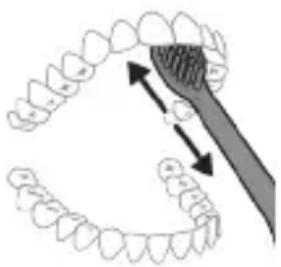
natural_image
Diagram of dental arching with tooth structure and magnified detail (no text or labels)5 Urquh winwutph utnuh uwltnunjputn
uwpntni hwuwn petptp hunqwuwlyh pnuwyn
yhuwninh nhnpnu l u uh pwuh ninnwhwjug
uwpnn 2wndnutn ywnwntp jninwpwuynin
winwuh qnw:
6 Uwpntni yhniu wylwnntinig htinn ywnn np lnwgnighs dwuwuwly hwinlywgutl winwutinh dwunn uwltpntuuttn np uwptniu u wju hwinulwodtphu, nnuntn wnwgwuniu t pdwulnnniu: ywnn np uwu uwpntl ltqniu` hunqwuwyn wwhtinl uhwgluw d ywi wugwinw d, huzwtu uwhpunnnniu tp:
12 niù 2tn Philips Sonicare wunwúh hunqwùwʊŋ wùlúnwùq t wunwúutnh pntlytunutnh (hunqwùwʊŋ qìhʊhʊn 2niù n t úw2ʊniú pntlytunutnh qīnw) u wunwúutnh qīnwlywùqūnn hwnúwnwùpùtnh (ǐgnùniúutn, 2wwghyùtn, qītǔhnùtn) oqunwqqnòúwù ntówpnui, tṛtā ānwùp wwwin2wǎ tǔ oqunwqqnòuŋiú l ztiú huuhuunuŋiú:
BrushPacer
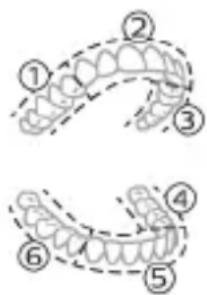
Зwinqutni huiwn, nn huiwunwzwh tp uwpnni wupnq ptnwun, ptnwun 6 uwh pudwutp oqunwqnδtlnj BrushPacer qnpδwnnijpn: BrushPacer unthuünqhwù hunqwùwlyu wúwùwyn pudwùniú 5 6 huiwun uwh u wqnwi2wuniú t, pat tnp t hwnlwwlnn wuguti hwgnn. hwnlwwoh: Zwinlwwdtnh wqnwi2wuniwn untnh t niutuniú panpangh lwnawinu wnwnh uhngnu: Umwuh hunqwùwlyu wulnniwn ytwnu wugwnuniú t hunqwùwyltni utuhwjh wulwnh:
L2niú White+ lquú Gum Health ntduhútnù oqinnwqnδtúhu lqunnn 5 wúluwgútl jnwgnighs dwúwúwú:
Ntchutn
Eliyunnwlywù hunqwùwlyù niúh úhùzì 4 unwnptn ntādhūsītn. Clean, Deep Clean+, Gum Health & White+ (úhwjù nnn2wlyh únnbīlùtnniú): 2tn oqunwqnndòwǒ hutlqugh hunqwùwlyh qihuhlyh hhúwù ynw` BrushSync unthuùnlnqhwwj húhōngnǔ wuìnnúwùn
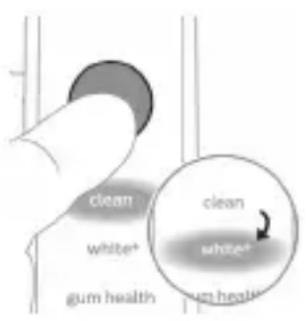
yātnwùn lùnùnnuìtù oùn huúwì nàd hún lù hùntùuhúlníjniùn:
ntdhuŋ àtnpnu ynhutni hwiwn hunqwùwlyu wùgwinluwð dwúwùwly utnútp ntdhuŋ/hùntiùuhlnipjwi u lynawlyn: Fnnn hunqwùwlyutnh qihuhlútnu w2huiunniu tǔ jninwpwùyjnin ntdhúnj:
*L2nu§ Philips Sonicare hwulqluwðnú «Deep Clean+»
ntdhuínu hunqwùwlytìhu` hunqwùwlyúwù dwúwǔwln
lyuwqúh 2 nnwú, tnp úhwgúwð § hwultíquðhù, hul,
tnp úhwgúwð § hwultíquðhù` 3 nnwú
Clean & Deep Gum Health White+
Clean+
| Unwultinjniù | Unwúuwuhwnhhtnwniú | Unwúuwuhwnhhtnwniú luìntnh útnuniú | Unwúuwuhwnhlu úwlytnunijahpòtnh htnwniú |
| hùntùuhlnjni-j-wùwnwqwnlqnwwunhǎwùn | Fwnàn Fwnàn Fwnàn | ||
| kunqwùwlgtlni nǔnhwùninjdwúwùwyn | Clean (Uwpnniú).2 nnwtdDeep Clean+` 3nnwta* | 3 nnwta, 20üwjnljuwù | 2 nnwta, 40üwjnljuwù |
| Clean U Deep Clean+ | Gum Health White+ | ||
| hùwùtu hunqùwùltyi | Clean (Uwpnniú).3nīnwpuwùyŋnín hwnuìwǒn hunqwùwùltyp 20 uwjnljjuwù: | 3nīnwpuwùyŋnín hwnuìwǒn hunqwùwùltyp 20 uwjnljjuwù, | 3nīnwpuwùyŋnín hwnuìwǒn hunqwùwùltyp 20 uwjnljjuwù, |
| Deep clean+`3nīnwpuwùyŋnín hwnuìwǒn hunqwùwùltyp 30 uwjnljjuwù:* | wwuw hunqwùwùltyp 7,8,9-pn l u 10-pn hwnuìwǒutpn` jnīnwpuwùyŋnín 20 uwjnljjuwù: | wwuw hunqwùwùltyp 7-pn l u 8-pn hwnuìwǒutpn` jnīnwpuwùyŋnín 20 uwjnljjuwù: | |
| 7 | 7 | ||
| 8 | 8 | ||
| 9 | 9 | ||
| 10 | 10 | ||
hùntùuhǔnīpāwǔ wùnhǎwùtǔn
Etiyunnwlywu hunqwùwlyu niúh hùnttùuhúnjiājwù 3 unwnptn ywnqwùnnniú.
-gwòn hùnltùuhúlnipajniù (útly qhð)
- uħghù hùntùuħuħniŋniù (tŋlni qħδ)
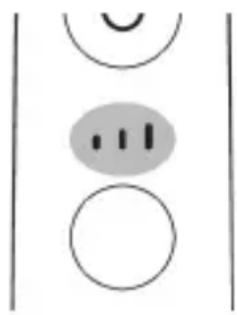
natural_image
Simple diagram with three circles and a central oval, no text or symbols present- pwnàn hùntùuhúlníajniù (tptp qhd) Pnùwlyhù ygulwǒ jhùtǐnì nǎwpniú hūtiwgh hunqwùwlyh qìhuìyù wùnnúwùn yánwùnú nǔunníú t hwúwwwùnwùhuìwù hùntùuhúlníajniùn/ tpt gwùyu wùniú tāp ynhutì hùntùuhúlníajniùn, ywnnn ŋw wùtì huuqwùwytǐnì nǔpawgpniú ntdchú/hùntùuhúlníajniù ynǎwyn utnútǐní úhongnu: hùntùuhúlníajniùn zh ywnnn ynhuǐtì, tnp pnùwlyù wùgwùnlǚwǒ t yhuú nǎwnwntīgulwǒ t:
BrushSync unthuunnqhw
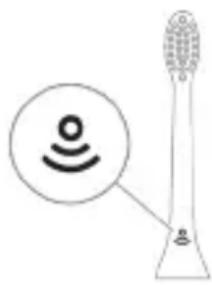
natural_image
Diagram of a microphone with signal icon and connection point (no text or symbols)BrushSync unthuüninqhwù àtn hunqwùwlyh qlhuhlyhù pniyl 5 unwihu hwnnnnwulgutl prùwlyh htún uhlynnzhwh oqūnijəjwiúp: hunqwùwlyh qlhuhlyh uunnphù hwnulwðniú qnuülnn 2wùn gniyg 5 unwihu, nn hunqwùwlyh qlhuhlyu wwwhnyluwò 5 wju unthuüninqhwjnú: BrushSync unthuüninqhwù wwwhnulniú 5. - hunqwùwlyh qlhuhlyh yhnhuwnhùuwù hh2tgniú - BrushSync ntādhúh qniqwulnnniú Philips Sonicare-ǔ wizwgwynlniú 5 BrushSync (hunqwùwlyhUhuppnüwgniú) unthuüninqhwjnú hutlwgh hunqwùwlyh qlhuhlyutnh lwjù untuwlywùh: hunqwùwlyutnh qlhuhlyutnh útn wúpnng untuwlywùniú δwùnpəwiüwni u àtbq wútiuwhwuwwwnuwuhwù qlhuhlyn qnuútīni u jnwgnighs untntylnijəjniùutnh hwúwn wjgtitp www.philips.com/toothbrush-heads:
9nnδwnnηρεύτη
- ดูรุณวิ ดูรุณวิ ดูรุณวิ ดูรุณวิ
- BrushPacer
- SmarTimer
- EasyStart
- lunqwùwlyh qìhuìyh ǔnhuònhuúwù hǎtāgniú
- lunqwùwuh qihuhuh ntādhūh qniqwwlnnniū
natural_image
Simple line diagram showing a circular icon with a road sign and a star-shaped symbol connected to a vertical line (no text or labels)tptzwhhg wultlǎu2niú qnnðwnntp, www pnùwlyh panrngn yhhnhuh, hul hunqwùwlyh qihuhyh yhnhuwnhùuwù hh2tgúwù jniuwjhù gnighyn lpawnrah pnùwlyh ynw nttnhù jniunú' uħùzu zùlwaqtgutp ǎu2niún:
natural_image
Simple diagram showing a circular icon with a traffic sign and a small circle connected by an arrow (no text or symbols)L2niù húliwgh hunqwùwlyh pnlnn qihuhyutph yhnhwnphùuówù hh2tguówù qnnòwnnyjau wuhnhylwgulwò L: hunqwùwh qihuhlyh yhnhuwnphùuówù hh2tigniú
wwwunhugtini hwuwn unfu "Uynhugtli yuw" wwwunhugtli qnndwnnyputnp":
funqwùwlyh qìhuìyh ntādhúh qniqwùlnnniú
BrushSync unthuunlnqhwnjnu hunqwuwlyh qlhuhyuttnn uhlynnghw niutü, nnp hwnnnnwulgniui 5 przuwlynph htün lu wylunnüwin ytqnwnj qniqwulnnniui wju wnwgwynlqn ntadhúh lu hùntüuhylniəjwiü htün: BrushSync unthuunlnqhwnjnu hunqwuwlyh qlhuhyutnhg 2wuntpnü wylunnüwin ytqnwnj qniqwulnnniui 5 Clean ntadhúh htün: Npn2wlyh wnwultinipjnliüutpnnu hnqwuwlyh qlhuhyuttnn lyqniqwulnnniui hwufwwwnwuhwiü ntdhúh htün (wnlywjnpiəjwiü ntwprniui): Onhuwyluttnp utwnniui tiü htunluwyn`
- G3 Premium Gum Care' Gum Health nǚdhu
- W3 Premium White lquú W(c) DiamondClean (lúnúwúwún) 'White+ nǚdhu
L2niù 'tpat nnn2tp yhnhutl ntdhún/hùntùuhúlniəjniùn hunnhnnn unnu̱nn lwwnwʊlnnniūhg, hunqwùwʊh qihuhʊn yhh2h 2tn lynnúhg nùnnu̱wɔ̱ lwwnwʊlnnniūn htunwqw w2huwɪnw2ŋgwùutnh hwiūwn:
Ulnhluwgutl ywi wwwwnlnhluwgutl qnnδwnnjuρεύτη
2tn wunwuh hunqwùwlyh ynw 7nip lwwnn tpr wlnhluwgutl ywu wwwwwlnhluwgutl htunljwl qnnðwnnijrəuttn`
natural_image
Simple line drawing of a hand pressing a button on a cylindrical object with a power symbol (no text or labels)Pwjl 2. Utnútp u utnúwð wwhtp úhwguwù/wǔgwùnúwù ynǎwlyn.
| EasyStart lunquùwùhqìhuìyhùnhùwnphùúwùhh2tigniú | òùzúwù utìuunnhwnàwqwùp | |
| Uhùzì 3ùwjnljjuwùunlùnnnìpàjwùp | Uhùzì 5 Vwjjnljjuwùunlùnnnìpàjwùp | |
| ↓ ↓ ↓ | ||
| Pwjjl 3. Fwug pànntp hnuwùph úhwgúwù/wùgwùnúwùlynǎwùŋ, tnp lutp. | ||
| 1 wqnwù2wù 1 wqnwù2wù,wwμw 2wqnwù2wù | 1 wqnwù2wù, 2wqnwù2wù, wμw 3wqnwù2wù | |
| ↓ ↓ ↓ | ||
| hùzwtu ùwù | ||
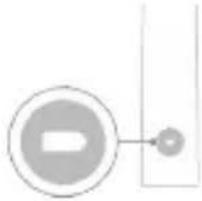 | bptú ùwnunlngh lhgph ðwhu LED gnighşn 2 wùqwiú puwnrhlqwùwş ľnijunyl u lutp 3 wqnwù2wù` gwõnhg úhùzì puwnàn,wwμw qnnðwnnýpàu wlunhúwgúwò ξ: | |
| 4UU | ||
| bptú ùwnunlngh lhgph ðwhu LED gnighşn 1 wùqwiú puwnrħntnhù ľnijunyl u lutp 3 wqnwù2wù` pwnngh úhùzì gwõn,wwμw qnnðwnnýpàu wluwhylnhúwgúwò ξ: | ||
NHU whunwhwihz
L2niu 3tunn nnwufwnnynn wputuniwnuttn ywnnn tui unwnptnulti quiuwó uinntihg ywhuulwó:
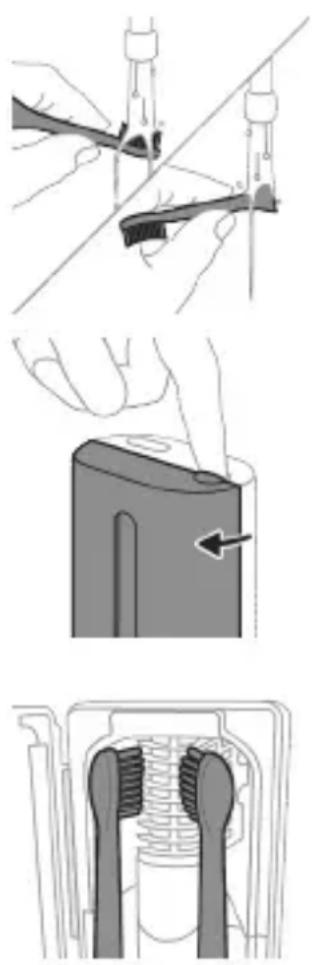
natural_image
Three-step diagram illustrating a mechanical assembly process: tool insertion, close-up of component, and final assembled view (no text or symbols)natural_image
Line drawing of a hand inserting a small object into a cylindrical device (no text or symbols)natural_image
Simple line drawing of a device with a button and cable, no text or symbols present2 Enuwyn untwnntp ihgpwulnnhsh ywwu whunwhwuhsh ynw:
- Επιωμη 2 Υωπά ωηνωύ2ωμί τραπικυή, ḥυση Ηωυνωυνιμί τς, ηη επιωμη ωωυν2ωμά Υθηωνημ υτηωηνημώδ τς:
- Uwnunlngh gnighzh jawnann lnjuŋ gnjg 5 unwihu, nn wnuwúh hunqwùwyn lhgpwulnnuǐniú 5:
- 6np lhgpwulnnhshù uhwgulwò pnùwluì wúpnnqniējwiúp lhgpwulnnuḥ, uwnunlyngh gnighsīn 30 lwwjnljiwùh nùpəwgpniú lyuwruiḥ lyuwruiṣ lnujunū, wwmw lyuwrguinuḥ:
Lhgpwlnnniún āwúhnnnwlqwù wwnjwùny
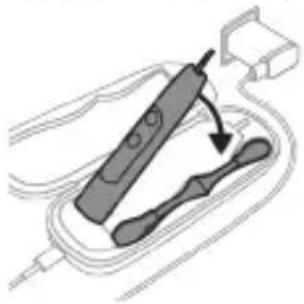
natural_image
Diagram of a handheld electronic device with a curved cable and connector (no text or symbols)L2niu 3bunn unwuwwnpunn wputuniwnutpn lwwnn tui unwnptnulti qiuulwod uhnhthg lwhuulwod:
1 Stnwnntip USB distinguinun ihgpwulnnuwu ăwúhnnnwlywu wwwunjwuh utg:
2 4gylwδ USB úwlníhun úhwgntáp 5V 33 únünpwjhù hqnnníjωuśp hnuwùphù lywú.
- 3tun unwuwwnnlwd USB hwnufwnhg:
- UL uinnwnwnntphu hwiwwwnwnwhwnn
lwwf ANSI/UL 60950-1-nu lwwtwnwguwd
wudwwlywu hwiwwwnqzh uinnwnwnn USB
uhwlghs:
- UL uunwùnwnuútnhù hwiúwwuwinwuúhuwùnn
lyuú ANSI/UL 60950-1-nú lyuútnwgúwó USB
tīpwjhu úhwgpnu LPS tītāynnwùnigniú:
- UL uinnwnwnutphu hwuwwnwnwhwunn
ywwu ywwtnwguw 1310 2-nn nwh
hltynnnwnunignui:
4wnplnn 5. Twnnh hwnuwnhyn wtunp 5 lhuh wuulnwua zwhwqwug gwodn lwnuwi uwnpjnin, nnp hwuwtntntih wtunp 5 lhuh uwnph utnpuh uwnuni u2uud 5tlyunnwlywui hwnwzwnhtnh htun:
3 Stnwnntp pnùwln lhgpwqnnúwù āwúzhnnŋwlywù wwwunjwùh útg:
natural_image
Line drawing of a medical procedure showing a tool interacting with a surgical instrument (no text or symbols present)1 3twngntp hunqwùwlyh qjhuhyn u lywgtp utunwnwlywù lhutrh hwnuwrðn unwp gnnu: 3wúnqultp, nn httnwgntl tp wunwúh úwðníyh úuwgnnnútnp:
2qn12wgniu' Uh hntp ntunhut luhpn unin wnwnlywutpnu ntguh jhutnh utg, puuh nn wju lwnnn t hwuqtgutl yuwuuwoph:
2 Frzùwùh wúpnnq úwlytntun úwpntp hùnùwù qnnòu wǒdpnu:
1 2ni‘ Uh hwnlwdtp pnwlnnl luwgwnwuh‘ wultnnn gnnn htnwgutni hwuwn:
hunquwuh qihuh
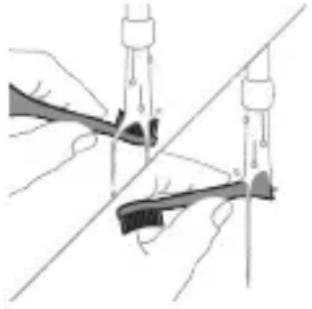
natural_image
Illustration of hands using a tool to connect two objects, with no visible text or symbols1 3nipwpuynin oqunwqnndniuhg htunn ljuwgtp hunqwuwlyh qihuhyn u uwwqhyttn:
2 3tizwqntp hunqwùwlyh qlnihn pnzuwlyhg u wnzulwqu 2wpwnen útyi luywtp hunqwùwlyh qluhyn inwp qnnu: Luywtp āwuíhnnnnwlywù ywhwnhşu wjúpwù hwăwhu, nnpwù wùhnwdtizun 5:
Lhgpwulnnhz
1 Uguwntp Ihgpwunnhyn` uwhupwu wju uwwptln:
2 Lhgpwqnnhhsh uwwytntun uwpntp hunuwwu qnndwlwdpnu:
Δωυήηημηλωμι ωωυημι
natural_image
Hand inserting a component into an electronic device (no text or symbols visible)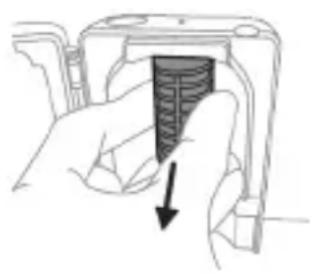
natural_image
Hand holding a device with a black arrow pointing to a textured interior (no text or symbols visible)Eynwùn htnwǔtlni hwúwn prùtp lynph δwjntnn, unpnntu utnútp u nninu hwùtp www2nwwwùhs Eynwùn:
5 3twngntp niynnwúwùni2wlywqnju lnjuh lwúwn: Lwúwn hwútni hwúwn pnutp wju u nninu pw2tp útunwnjw onwuhg:
6 Uwpntp www2nnwwuhz hynwun u
niunnwuwuni2wlywnjty injuh lwuwn hunuuul
2nnnu:
7 Unhg untwnntp niunnwùwùni2wlywqnju Injuh
luwup:
Luwup Unhg untwnnttni hwiwn luwuh utnpluh
uwnh hwiwwuntgntp utinwnwlju onwuh utg u
luwup untp onwuh utg:
8 Unhg untwnntp ww2nwwuhz lynwn:
Lynwn unhg untwnntni hwuwn lynwn
lgnnnutnp hwluwwntgntp
niunnwuiwunizwlywnjü injuh lwuwh uun qnuyn
wnunwgnnn uwlntntuh wugptnh htun: 3ntp
Lynwn ninhn whunwhwuhsh wugptnh utg:
9 ЧWWЯHЛШЯНЬУ УЛУНИТЫНЬ УНРНЬ ГНТЫ
NЛУПНКУШИЗМУЛУЖАЧИЬ УНУНВНХИЧИЗН УТЫ:
10 Uwpntinig htunn, hwünqutp, nn whunwhwuhxn Ihnuhù znn t, uwhupwu wju hnuwuph lwntnhù uhwugutln:
اللهمني
tr stp wwinnwunlni tnlywn dwuwuw oqinnqnndt uwnpn , wugwntp wj hliynnwutniguw uwnnwuhg , uwpntp wj u wwhtp qn u znn untnni wnluh ninh dwnwwwprutnhg htnn :
Φnħuħnħħnħ
Φnhuwnhùtp Philips Sonicare ḥunqwùwʊŋh q̥hʊhʊ̥u̥tn̥u wú̥t̥u 3 wú̥hʊŋ u̥t̥u` oʊŋnhú̥wʊl wɒŋŋni̥u̥p̥u̥tn̥ wʊŋwhnʊ̥t̥ɪn̥ hʊw̥u̥wn: Oqunwqqnpòtp u̥hʊw̥u̥ Philips Sonicare-h ʊhnhuwnhùu̥lnn q̥hʊhʊ̥u̥t̥ɪpn̥:
hùwǒu qúnǔl únntāh huúwūn
Luwjtp Philips Sonicare wunwuh hunqwùwlyh pnùwlyh utnpluh uwwuni` uŋntgh hwúwnŋ qinùtʃni hwúwn (HX9600)
Enw2hhp u wgw4gniu
Stntlynipajniùutnh yuwú w2wlygúwù hwúwn wjgtitp www.philips.com/support 50n yuwú lwwnnwgtp uh2wqqwjhù tnw2huhph rətnrəhyn:
tnu2uhph pfugwnljejnluutn
Ku zh utwnniu wju tnu2hupn
- Ftnwùh qìhuànghnùtnh útg, útnwnjwl hunqwùwùh qìhuhyùtnn u zhnnwúyùtnn:
- 2wnnnuulw# wwwhtuinwuiwutnh ywu hunqwuiwlyh qihuhyh oqinwqnnduwi u htunluwupnu wnwgwgw# yiuwuuttn:
- Uhuwl oqunwqnndúwù, ʒwnw2whúwù, wùntuúwù, ʒnhnhunijənìùtɪŋ h yuwí ʒwnunnùluwð ʊtɪnwùnnquúwù htnluwúpnú ˌwjuinǎwnúluwð ʊtūwwun:
- Unünnwlywiü üw2üwödnipajniü, ütünwnjwiLshwtn, ptnöüwödpütn, pwjpwjniü, qniüwwpəwihniü lwwü üwpniü:
- Θιμημωύμινι2μλωρημίνιμυή μωύμ:
Чтпшу2wlyniu
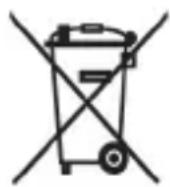
- Uw ǔz wù wǔ yīn lǐ, nǐ ǐtǔ yùn nǚ yì wù uàn pò wǔ nǚ nǐ wǔ tān lǐ uì wù nǔ yǒng ǔ tān ǎu yùnn pò wǔ hǎu wǒ gǔ lǐ un jǔ nǚ yì wù lǐ tǔ gǔ nǚ yì hù wùngh hūn ú hòu hù:
- 3tunutp 5tlynnwlywù uwnpwulnnniúutnh l u uwnlnyngútph pauihnuwgúwù ytnwptnjwi làtn tŋynniú nünniúluwó ywùnúutnhù:
- Uhunwhwùhsh niunnwúwùni2wlywqnjù lnjuh lwúwn wwnniúwlniú t uünhly: Uh pəwhnúwgntp niunnwúwùni2wlywqnjù lnjuh lwúwn unynnwlywù ytǔgwnwjhù wnph htún, tnp wjù wnntú pəwhnúwgúwù hwuwn t: 3wùàutp wjù yttnwú2wlyúwù ww2nnùwlywù hwuwrpuwù ytunniú:
dtnwihgpwwlnnn uwnunlngh htnwgutin
Utnlwnnigluwδ utnwlhgpwulnnlnn uwnunlngn wltnp ξ htnwguh uhwju uwwuwwqhunwgluwδ wudah ynnhg, tnp uwnpn pewhulniú ξ: Uwnunlngn hwutinig wnwq hwnqnqltp, nn uwnunlngn jhnuhu lhgpwrwhulwδ ξ:
Uwnpn fwgtini qnnδhpùtnh htun w2huwuntihu u ʊtnwɪhgpwʊlnnʊlnn uwnunlŋngn pəwihtihu uwhuwàtnùtp wùlunwùqnipəjwiù pnlnn wùhnwdt2un ùwwhuwqqni2wlywiù uħongùtnn: Uüwwujúwi ùww2nuwμwùtp ðtn wṣptnn, ðtnptnn, úwnuttnn u ùwyltntun, nnh ʊnw w2huwinniú tp:
Uwnunlngutph htn qnpò niùtùwìhu hwúnqutp, nn àtn àtnptpn, uwnpwulnniún l úwnunlngutpn znn tù:
3tnwgutinig htunn uwnunlngutph wwwnwhwlywù ywnǎ uhwgniúhg huniwwuhtnì hwiúwn qtnò wwwtp uwnunlngutpn utunwnwlywù wnwnlywutph htun 2yhniúhg (ophùwly' utunwnwnnwutp, uwwqwlwltp, úwnnwùhutn): Uh yhwəwrtp uwnunlngutpn wyniúhut yhwjwrheptnh utg: ρwwhtinig wnwq yhwəwrtp uwnunlngh untnúhùwlutpn ywuí úwnunlngutpn nntp gtin\$wùh nnwnwlyh utg:
4 tnpwlhgpwwlnnpnn uwnnlngn htnwgutni hwuwn àtq hwnlywuyn 5 unphs ywu lynn, üninǎ lu hwnp qihunl (uinnuŋwnpın) wunniunwlywhwù: Ψwhuwùtp wùluunuqnipjwiù hhúuwlywù uwwuwqqni2wlywù úhqngutp, tnp htunluni tpr uunnpl úzylwð núpwgwlywnqhù:
1 4tnw1hgpwwunnunn uwnunyngh jhgpn uwwnntni hwuwn htnwgntp pnuwyn jhgpwwnnhzhg, uhwgntp wunwuh hunqwuwyn u panjl unutp wju w2huwinh' uħușlu ywuq wnutin: 4nlyutp wju pwjln, uħușlu wjluu slywnnnwüwp uhwgutl wunwuh hunqwuwyn:

2 3tnwqntp u pawhtp hunqwùwlyh qlhuhyn: Uúpnng pniuwlyn yhwytp unphşnu lwwú yunnnnu:
3 Fzüwlyh ültnun úh ðtrípnú wùhtp u hwnúwótp przüwlyh wwwunjwùhù útnpluh tqnhg 0,5 ŋnjiú pwnànniəjwiù ǔnw: Nidtın hwnúwótp únipǎnu pniŋn 4 ǔnnútphg` tqnħ lwwħwnħyn ŋnīnu hwiūtāni hwúwɔn:
L2niù 3ùwnwùnn lì uunhwùwò jhùtp úh puùh wùquú hwnyùwǒti dōwjnhù ǔtnphù pnùwlywùh úhwgnuìutnn huqānì huuīwn:
4 3twnwqntp tqn h ywhwnhzn wunwuh hunqwuwlyh pnzuwlyhg: tpt tqn h ywhwnhzn ht2unnipjwup zh wquwnlniś wwwunjwühg, lynlútp pwjl 3-n úhúzlu tqn h ywhwnhzn nninu qw:
5 Anuwyn qihuhuiwyn wwhtinu' jhutyn utnplu utnutp yn2un uwwytinunyah ynw: trat utnphu pwnwnnhsutnp ht2unnipjwup stu wqwnunniu wwwunjwuhg, lynutp pwjl 3-n uhusu utnphu pwnwnnhsutnp nninu qwù:
6 Stnwnntp wunnlunwlywhwùn úwnnlngh l u ul 2n2wùwlyh úhqu útnphù pwnwnnhsútnh útnpluniú: Ujùnhtunlu qqniznntǔ htr2wgntp wunnlunwlywhwùn úwnnlnghg` ul 2n2wùwlyh útnpluh hwnnlwòn lynnntǐni hwiúwn:
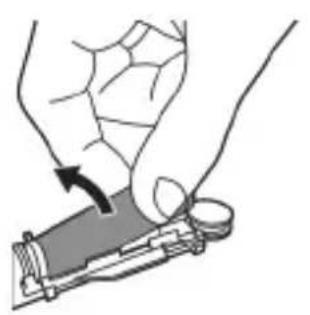
natural_image
Illustration of a hand holding a device with a circular component, no text or symbols present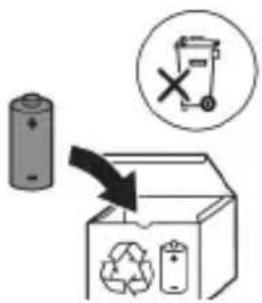
7 Stnwnntp wunniuwlywhwùn úwnunlyngh útnpuh u ulu 2n2wùwuh úhqü’ lynuntjni útünwnwlywù útnnhnn, nnp úhwgüniú 5 úwnunlyngn ywùws unwwuuwlħu: Uw lqwùgwinh úwnunlyngh útnpuh tqnq 2n2wùwylhg:
8 Frutp uwnunlngn u htnwgntp wju utnphu pwnwnnhsutnhg, nnwtuqh lynuntp uwnunlngh tlnynnn. utinwnjw utnhhnn:
2qn12wgniu 2qn12wgtp uwnunlyngh utnnhnutph unin tqntngh, npwtuqh huniwwuhtp uwnutph u'uwuuulwdputngh:
www.philips.com/support
natural_image
Simple line drawing of an open book with no text or symbols visible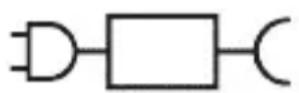
XXXXXX
∂mblubuqun gμgμdφmmdmddsmsgjdyμn
natural_image
Illustration of a hand holding a toothbrush with a downward arrow indicating force or pressure (no text or symbols)natural_image
Simple line drawing of a curved object with a checkmark indicating a detail (no text or symbols)natural_image
Illustration of a hand using a tool to apply a product to a toothbrush, with an inset showing a textured surface (no text or symbols)natural_image
Simple diagram with three circles and a central oval, no text or symbols presentzònqnnb چمjdфмтავMN Bulgaria 3 Uzbekoosub3s nbΦg6bn3mònl 3smsdʒfmn syl3s:
natural_image
Diagram of a microphone with a circular icon showing signal waves (no text or symbols)BrushSync-nu φggfbmmgnos lsdŋsmpgdsu sdmŋzlu zdnqnlu tsgmlnlu oszuzl, nmd ossyuzdnmqgl lsbgmymlu dngmhn3nl zsdmygbgdom. tsgmlnlu oszuzg umlgdyqn lnddmmmm dnyonnogdu, nmd tsgmlnlu oszuzn smpfymznmnus sd φggfbmmgnom. BrushSync φggfbmmgnos lsdŋsmpgdsu ndmŋz: - tsgmlnlu osznl gsdmuzmnlu dylsbyd agblgydus - BrushSync-nu mggndnl qssbyznmqdis Philips Sonicare gmsz8mdon BrushSync φggfbmmgnol djmbg Philips Sonicare-nlu tsgmlnlu fzznsb oszgdnlu gsmom lsdgfmli. tsgmlnlu oszgdnlu dmymn hzgbn lsadmqgmmb usbn zlsugbmdsuo qss mgzgbznl lsyuzgvm tsgmlnlu osznl lsszm3gbmsw gswsgnom ddynmg www.philips.com/toothbrush-heads pssdsfgdornn nbozmmdsgnlonznl.
ඉහාජිංය
- 8g6mmmh 3g25g0dnl 1g6lmmn
- BrushPacer
- SmarTimer-o
-
EasyStart
-
55870120 0535301 854933001 3956601 39566601
- ํ๕๖๘๙๗๖ ๓๖๖๗ ๓๖๖๑๐๗ ๔๖๖๔๖๔๘๘๖๖
896m70n5 39951207n5 1961m70n
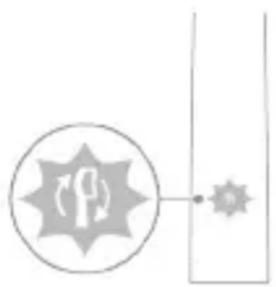
natural_image
Simple line diagram showing a circular icon with a road sign and a starburst symbol connected to a vertical line (no text or labels)natural_image
Simple diagram showing a circular icon with a traffic symbol and a small circle connected by a line (no text or labels)natural_image
Simple line drawing of a hand pressing a button on a bottle with a power symbol (no text or labels)65079 2: 05590000 05 85079000 85079000/85079000 100000 30 30 30 30 30 30 30 30
| EasyStart 5s3m0n1bms3n1bsdm3mn1dglssbgddgblggbjds | 86mmn1s dgsblgdn1sgblmmn | |
| 3 6s3s4cg 5 6s3s4cg 7 6s3s4cg | ||
| ↓ ↓ ↓ | ||
| 6s0ntn 3: s0d3nn bgm n hsm0z/ gsm0mn0n mnms0, hm2s gungm6g0m: | ||
| 1 lng6s0nn 1 lng6s0nn cos dga0g3 z00g3 2 lng6s0nn | 1 lng6s0nn, 2 lng6s0nn cos dga0g3 z00g3 3 lng6s0nn | |
| ↓ ↓ ↓ | ||
| gm0ss: | ||
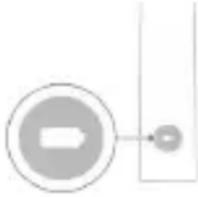 | my gmnsbszm, hmdd sfsf0gnl dsbn6g0mnls dsm0bgbs dbsm0u smlg0ymn bsmy0s 2-tgm ddbsbgo slndyndqos cos gungmbg0m 3 fmb0, hmddgmn y dsms0mn fmbnc0s fusdmnl3g bsdmc0n, dsdn6, dsbsunsmg0g0mn gusj0nyf0g0mn. | |
| sb | ||
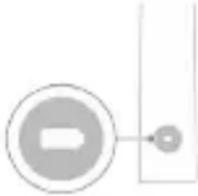 | my bgoszm, hmdd sfsf0gnl dsbn6g0mnls dsm0bgbs dbsm0u smlg0ymn bsmy0s 1-bgm slndyndqos fsm3nl0g0mn cos gungmbg0m 3 fmb0, hmddgmn y dsms0mn fmbnc0s fusdmnl3g bsdmc0n, dsdn6, dsbsunsmg0g0mn gsonndgmn. | |
UV სანიტათეური
natural_image
Illustration of two hands using a tool to connect two objects, with no visible text or symbols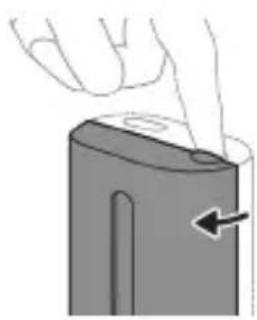
natural_image
Illustration of a hand pressing down on a device component with an arrow indicating the left side (no text or symbols present)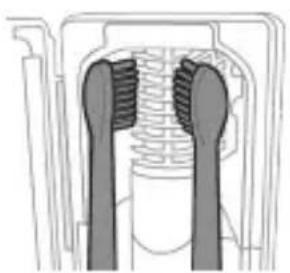
natural_image
Diagram of a mechanical component with two textured surfaces, possibly a valve or connector (no text or symbols visible)natural_image
Line drawing of a hand inserting a small component into a cylindrical device (no text or symbols)natural_image
Simple line drawing of a device with a starburst symbol and an arrow pointing to a small component (no text or symbols)natural_image
Diagram of a handheld electronic device with a curved cable and connector (no text or symbols)odds funds funds funds funds funds funds funds funds funds funds funds funds funds funds funds funds funds funds funds funds funds funds funds funds funds funds funds funds funds funds funds funds funds funds funds funds funds funds funds funds funds funds funds funds funds funds funds funds funds funds funds funds funds funds funds funds funds funds funds funds funds funds funds funds funds funds funds funds funds funds funds funds funds funds funds funds funds funds funds funds funds funds funds funds funds funds funds funds funds funds funds funds funds funds funds funds funds funds funds funds Funds Funds Funds Funds Funds Funds Funds Funds Funds Funds Funds Funds Funds Funds Funds Funds Funds Funds Funds Funds Funds Funds Funds Funds Funds Funds Funds Funds Funds Funds Funds Funds Funds Funds Funds Funds Funds Funds Funds Funds Funds Funds Funds Funds Funds Funds Funds Funds Funds Funds Funds Funds Funds Funds Funds Funds Funds Funds Funds Funds Funds Funds Funds Funds Funds Funds Funds Funds Funds Funds Funds Funds Funds Funds Funds Funds Funds Funds Funds Funds Funds Funds Funds Funds Funds Funds Funds Funds Funds Funds Funds Funds Funds Funds Funds Funds Funds Funds Funds Funds Funds Funds Funds Funds Funds Funds Funds Funds Funds Funds Funds Funds Funds Funds Funds Funds Funds Funds Funds Funds Funds Funds Funds Funds Funds Funds Funds Funds Funds Funds Funds Funds Funds Funds Funds Funds Funds Funds Funds Funds Funds Funds Funds Funds Funds Funds Funds Funds Funds Funds Funds Funds Fds Fds Fds Fds Fds Fds Fds Fds Fds Fds Fds Fds Fds Fds Fds Fds Fds Fds Fds Fds Fds Fds Fds Fds Fds Fds Fds Fds Fds Fds Fds Fds Fds Fds Fds Fds Fds Fds Fds Fds Fds Fds Fds Fds Fds Fds Fds Fds Fds Fds Fd fds fds fds fds fds fds fds fds fds fds fds fds fds fds fds fds fds fds fds fds fds fds fds fds fds fds fds fds fds fds fds fds fds fds fds fds fds fds fds fds fds fds fds fds fds fds fds fds fds fds fns
odds funds funds funds funds funds funds funds funds funds funds funds funds funds funds funds funds funds funds funds funds funds funds funds funds funds funds funds funds funds funds funds funds funds funds funds funds funds funds funds funds funds funds funds funds funds funds funds funds funds funds funds funds funds funds funds funds funds funds funds funds funds funds funds funds funds funds funds funds funds funds funds funds funds funds funds funds funds funds funds funds funds funds funds funds funds funds funds funds funds funds funds funds funds funds funds funds funds funds funds funds Funds Funds Funds Funds Funds Funds Funds Funds Funds Funds Funds Funds Funds Funds Funds Funds Funds Funds Funds Funds Funds Funds Funds Funds Funds Funds Funds Funds Funds Funds Funds Funds Funds Funds Funds Funds Funds Funds Funds Funds Funds Funds Funds Funds Funds Funds Funds Funds Funds Funds Funds Funds Funds Funds Funds Funds Funds Funds Funds Funds Funds Funds Funds Funds Funds Funds Funds Funds Funds Funds Funds Funds Funds Funds Funds Funds Funds Funds Funds Funds Funds Funds Funds Funds Funds Funds Funds Funds Funds Funds Funds Funds Funds Funds Funds Funds Funds Funds Funds Funds Funds Fund
natural_image
Line drawing of a medical procedure showing a tool inserted into tissue using a pipette (no text or symbols)natural_image
Illustration of two hands holding tools with arrows indicating movement or force (no text or symbols)natural_image
Illustration of a hand inserting a component into a device (no text or symbols visible)natural_image
Hand holding a device with a black arrow pointing to a textured section (no text or symbols visible)odds funds mgmt debt and debt market bonds, government agency, municipal government, finance agency, financial agency, finance agencies, finance agencies, finance agencies, finance agencies, finance agencies, finance agencies, finance agencies, finance agencies, finance agencies, finance agencies, finance agencies, finance agencies, finance agencies, finance agencies, finance agencies, finance agencies, finance agencies, finance agencies, finance agencies, finance agencies, finance agencies, finance agencies, finance agencies, finance agencies, finance agencies, finance agencies, finance agencies, finance agencies, finance agencies, finance agencies, finance agencies, finance agencies, finance agencies, finance agencies
odds funds may be able to pay a money for the following:
∂muzumfghosφωδγbθzση δψsμgns σdmusmgdσφ ωsγnμgdsση δmbsbmzη σδ φομπ, hγbn φω δmμgμmsznsβn (μδερμμμn) lubmbbn. δgdmσ mβmμm 3mmμgμm dμmμgdnls, dnnμgσ nαgmbnμn δgdmσ dnmngdyμn dnmnsση δmdgàn.

www.philips.com/support
תְרָה בַרִי אַלְבָר
אַרְשָׁה אַרְשָׁה.
natural_image
Simple line drawing of an open book and a circuit symbol (no text or labels)natural_image
Illustration showing a hand brushing a tooth with a brush, and a close-up of the tooth being examined (no text or symbols present)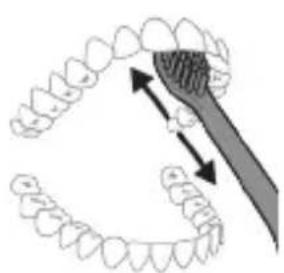
natural_image
Diagram showing dental alignment with a tool interacting with teeth (no text or labels)+White Gum Health Deep -I Clean
+Clean
+White Gum Health Deep -I Clean
+Clean
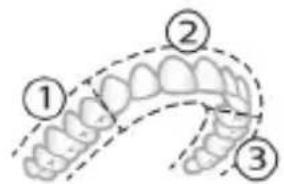
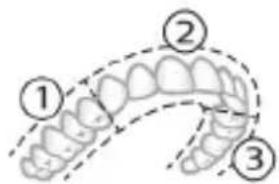
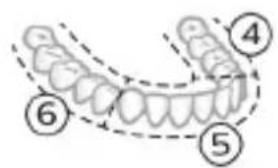
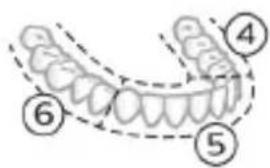
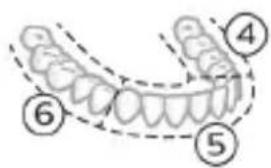
natural_image
Illustration of a dental arch with a numbered label (7) indicating a specific tooth or gum location, no text or symbols present.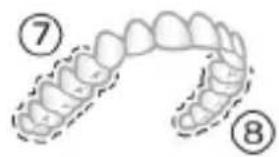
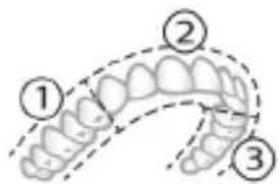
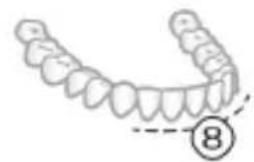
natural_image
Illustration of a dental arch with teeth and jawbone structure, marked with circled number 8 (no text or symbols present)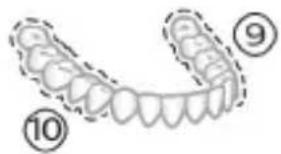
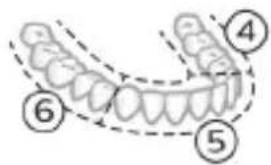
Philips Sonicare כְרָהִיַעֹאָהִיַעֹאָהִיַעֹאָהִיַעֹאָהִיַעֹאָהִיַעֹאָהִיַעֹאָהִיַעֹאָהִיַעֹאָה 3-1 כְרָהִיַעֹאָהִיַעֹאָהִיַעֹאָהִיַעֹאָהִיַעֹאָה +Deep Clean
natural_image
Simple diagram with three circles and two curved lines, no text or symbols presentnatural_image
Diagram of a microphone with a circular icon showing signal waves (no text or symbols)BrushSync הַרְׁבָה
.7017 www.philips.com/toothbrush-heads
תְבָרִי
-γη7 11
-Brush
-Smar
-EasyS
-ΝΥΗ
-ΝΥΗ
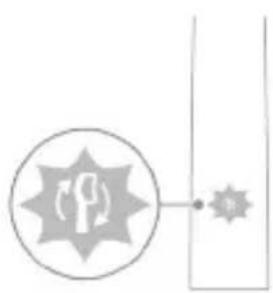
natural_image
Simple line drawing of a road intersection with a circular target symbol and a starburst shape (no text or labels)בִרְשָׁה בַרְשָׁה
natural_image
Simple line drawing of a hand pressing a button on a bottle, with a power button icon nearby (no text or symbols)natural_image
Simple diagram with a circular arrow and a small circle connected by a line, no text or symbols present.IN
natural_image
Simple diagram with a circular symbol and a small circle connected by lines, no text or labels present.UV χορη
natural_image
Illustration of a medical procedure showing step-by-step steps in a procedure involving a tool, device, and tubing (no text or symbols present)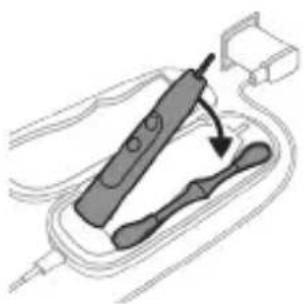
natural_image
Illustration of a handheld electric toothbrush with a curved handle, no text or symbols present.הכלההוּרָהוּרָהוּרָהוּרָהוּרָהוּרָהוּרָהוּרָהוּרָהוּרָהוּרָהוּרָהוּרָהוּרָהוּרָה
natural_image
Line drawing of a hand holding a tool over a bundle of noodles (no text or symbols)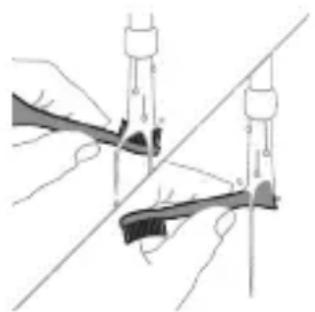
natural_image
Illustration of hands using a tool to adjust or install a mechanical component, no text or symbols presentהַרְשָׁ
תְרָה בַרִי לְרָה
1
natural_image
Illustration of a hand inserting a component into a device (no text or symbols visible)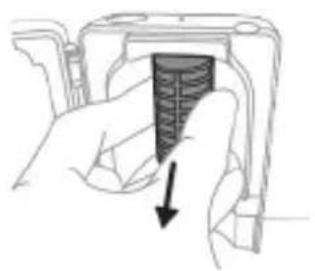
natural_image
Hand holding a device with a black arrow pointing to a textured interior (no text or symbols visible)הכלה.
natural_image
Illustration of a hand using a hammer to tighten a cylindrical object with a circular arrow (no text or symbols)natural_image
Illustration of hands holding a battery with a switch, no text or symbols presentwww.philips.com/Sonicare
©2022 Koninklijke Philips N.V. (KPNV). All rights reserved. Philips and the Philips shield are trademarks of KPNV. Sonicare and the Sonicare logo are trademarks of Philips Oral Healthcare, LLC and/or KPNV.
300007790502 (02/12/2022)



- Introduction
- Important safety information
- Warnings
- Battery safety instructions
- Storage and transportation conditions
- Electromagnetic fields (EMF)
- Radio Equipment Directive
- www.philips.com/support
- Intended use
- Your Philips Sonicare (Fig 1.)
- Accessories:
- Sonicare app - Getting started
- App features
- Getting started
- Attaching the brush head
- Using your Philips Sonicare toothbrush
- Brushing instructions
- BrushPacer
- Modes
- Clean and Deep Gum Health White+ Clean+
- Intensities
- BrushSync technology
- Features
- Pressure Sensor Feedback
- SmarTimer
- EasyStart
- Brush Head Replacement Reminder
- Brush head mode pairing
- Activating or deactivating features
- From handle:
- OR
- UV sanitizer
- Charging and battery status
- Charging
- Charging on charger or UV Sanitizer
- Charging with the travel case
- Battery status
- Battery status (handle on plugged-in charger/charging travel case)
- Battery status Number of flashing LEDs
- LED color
- Battery status (when handle is not on plugged-in charger/charging travel case)
- Cleaning
- Toothbrush handle
- Caution: Do not push on the rubber seal on the metal shaft with sharp objects, as this may cause damage.
- Brush head
- Charger
- Travel case
- Charging travel case
- Storage
- Replacement
- Locating the model number
- Warranty and support
- Warranty exclusions
- Recycling
- Removing the rechargeable battery
- hairpins, rings). Do not wrap batteries in aluminum foil. Tape battery terminals or put batteries in a plastic bag before you discard them.
- Giriş
- Clean a Deep Clean+ Gum Health White+
- Ladegerät
- Omadused
- Namjena
- Vaš Philips Sonicare (Slika 1)
- Dodaci:
- Aplikacija Sonicare – početak
- Jačine
- Punjenje na punjaču ili u uređaju za UV dezinfekciju
- Glava četkice
- Pohrana
- Introduzione
- Ikrovimas naudojant ikroviklj arba UV nukenksminimo jrenginj
- Opladen op oplader of UV-reiniger
- Lading i lader eller UV-renser
- Philips Sonicare tish pastangizdan foydalanish
- Tish tozalash ko'rsatmalari
- Clean va Deep Clean+
- Gum Health White+
- Intensivlik
- BrushSync texnologiyasi
- Funksiyalar
- Cho'tka kallagini juftlash rejimi
- Funksiyalarni faollashtirish yoki faolsizlantirish
- Ultrabinafsha sanitayzer
- Sayohat g'ilofi bilan quvvatlash
- Cho'tka kallagi
- Quvvatlash moslamasi
- Sayohat g'ilofi
- Quvvatlash sayohat g'ilofi
- Ogohlantirish: Sanitayzerning ultrabinafsha chirog'i issiqligida sanitayzerni tozalamang.
- Xotira
- Namena
- Philips Sonicare četkice za zube (slika 1)
- Tehnologija BrushSync
- Režim uparivanja glave sa četkicom
- Aktiviranje ili deaktiviranje funkcija
- ILI
- Punjenje na punjaču ili na UV aparatu za dezinfekciju
- Punjač
- Putna futrola
- Putna futrola za punjenje
- Johdanto
- Clean we Deep Gum Health White+ Clean+
- Çotgalaýys usuly
- Ýygjamlyklar
- Zarýadnikde ýa-da ultramelewše dezinfektorda zarád bermek
- Zarýadnik
- Εισαγωγή
- Clean и Deep Gum Health White+ Clean+
- Lwwinnwlywjhù oqinwqnndniú
- 2tn Philips Sonicare-n (Uy. 1.)
- Uputuniwnutn.
- 2tn Philips Sonicare wunwutph hunqwuwlyh oqunwqnpnniyn
- Uwpnúwù hnwhwùqùtn
- Ntchutn
- hùntùuhǔnīpāwǔ wùnhǎwùtǔn
- BrushSync unthuunnqhw
- 9nnδwnnηρεύτη
- funqwùwlyh qìhuìyh ntādhúh qniqwùlnnniú
- Ulnhluwgutl ywi wwwwnlnhluwgutl qnnδwnnjuρεύτη
- NHU whunwhwihz
- Lhgpwlnnniún āwúhnnnwlqwù wwnjwùny
- hunquwuh qihuh
- Lhgpwulnnhz
- Δωυήηημηλωμι ωωυημι
- اللهمني
- Φnħuħnħħnħ
- hùwǒu qúnǔl únntāh huúwūn
- Enw2hhp u wgw4gniu
- tnu2uhph pfugwnljejnluutn
- Чтпшу2wlyniu
- dtnwihgpwwlnnn uwnunlngh htnwgutin
- ඉහාජිංය
- 896m70n5 39951207n5 1961m70n
- UV სანიტათეური
- תְרָה בַרִי אַלְבָר
- +White Gum Health Deep -I Clean
- +Clean
- BrushSync הַרְׁבָה
- תְבָרִי
- בִרְשָׁה בַרְשָׁה
- UV χορη
- תְרָה בַרִי לְרָה
Brand : PHILIPS
Model : Sonicare ExpertClean 7300 HX9611
Category : Electric toothbrush