USER MANUAL Innobot RVC-D4000SL+ WILFA
natural_image
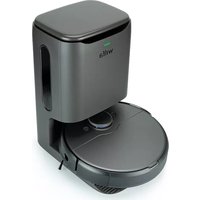
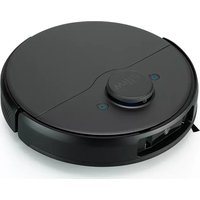
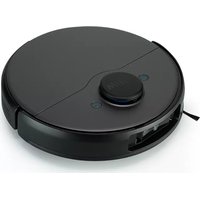
Exterior view of a Wilfa robotic vacuum cleaner with a closed lid (no text or symbols on the device itself)
INNOBOT
ROBOT VACCUUM RVC-D4000SL, RVC-D4000SL+, RVC-4000AI
EN . Instruction manual
NO . Bruksanvisning
SE . Bruksanvisning
IMPORTANT SAFETY INSTRUCTIONS
- This appliance can be used by children aged from 8 years and above and persons with reduced physical, sensory or mental capabilities or lack of experience and knowledge if they have been given supervision or instruction concerning use of the appliance in a safe way and understand the hazards involved. Children shall not play with the appliance. Cleaning and user maintenance shall not be made by children without supervision.
- This product is only used for floor cleaning in home environment, and should not be used in outdoor, non-floor, commercial or industrial environment.
- Do not let children play with the machine. Please supervise children and pets to keep them as far away as possible when the machine works.
- If the power cord is damaged, it must be replaced with a special cord or a special component purchased from its manufacturer or maintenance department.
- Do not let children, pets sit on the machine at any time.
- Do not handle this robot by using the protective cover of laser radar as handle.
- Do not use it in suspended environments without
protective fences (such as duplex floors, open balconies and furniture tops).
BATTERY AND CHARGING
- Do not use any third-party battery, power cord or base.
- Do not disassemble, repair or modify the battery or base without permission.
- Do not place the auto-clean base near the heat source (such as radiator, etc.).
- Before scrapping the machine, the power supply must be disconnected, and the battery should be taken out of the machine.
- If it is not used for a long time, please turn off the machine after being fully charged and put it in a cool and dry place.
- It is recommended to charge at least once a month.
INSTRUCTIONS ON ENVIRONMENTAL PROTECTION
The following information is only applicable when discarding this robot, and is not a daily operation instruction:
Chemical substances contained in the built-in lithium-ion battery of this product will pollute the environment. Please remove the battery before you discard the machine, and hand it over to a professional battery recycling station for centralized disposal.
Steps to disassemble the battery:
- Let the robot run until it is low in power and cannot be cleaned without touching the auto-clean base.
- Turn the robot off.
- Disassemble the bottom shell of the robot.
- Press the buckle and pull out the connector plug of the battery, then take out the battery.
- Remove the battery cover plate and take the battery out.
NOTE:
- When disassembling the battery, make sure that the battery is exhausted and operated away from the base.
- Please disassemble the whole battery pack together, and do not damage the battery pack casing, in case of short circuit or leakage of dangerous substances.
- If you touch battery fluid, please rinse with plenty of water and get medical assistance immediately.
- This appliance contains batteries that are only replaceable by skilled persons.
- WARNING! For the purposes of recharging the battery, only use the detachable supply unit provided with this appliance.
- Only use with RVCD-D17 or D4000 supply unit.
- Detachable supply unit
SYSTEM DISCLAIMER
The list of smartphone types in the market is long and increasing. System performance can vary for different combinations of the operating system and how it is implemented in the phone model. Alterations from industry can have an impact too. Therefore, although we expect good performance in most cases, the expected performance of the app is not guaranteed. Although the app most likely will work for a long time with older hardware and software versions you need to keep your phone's operations systems updated to be sure to get the app fully functional.
Minimum requirement of January 2023:
- Android 10.0
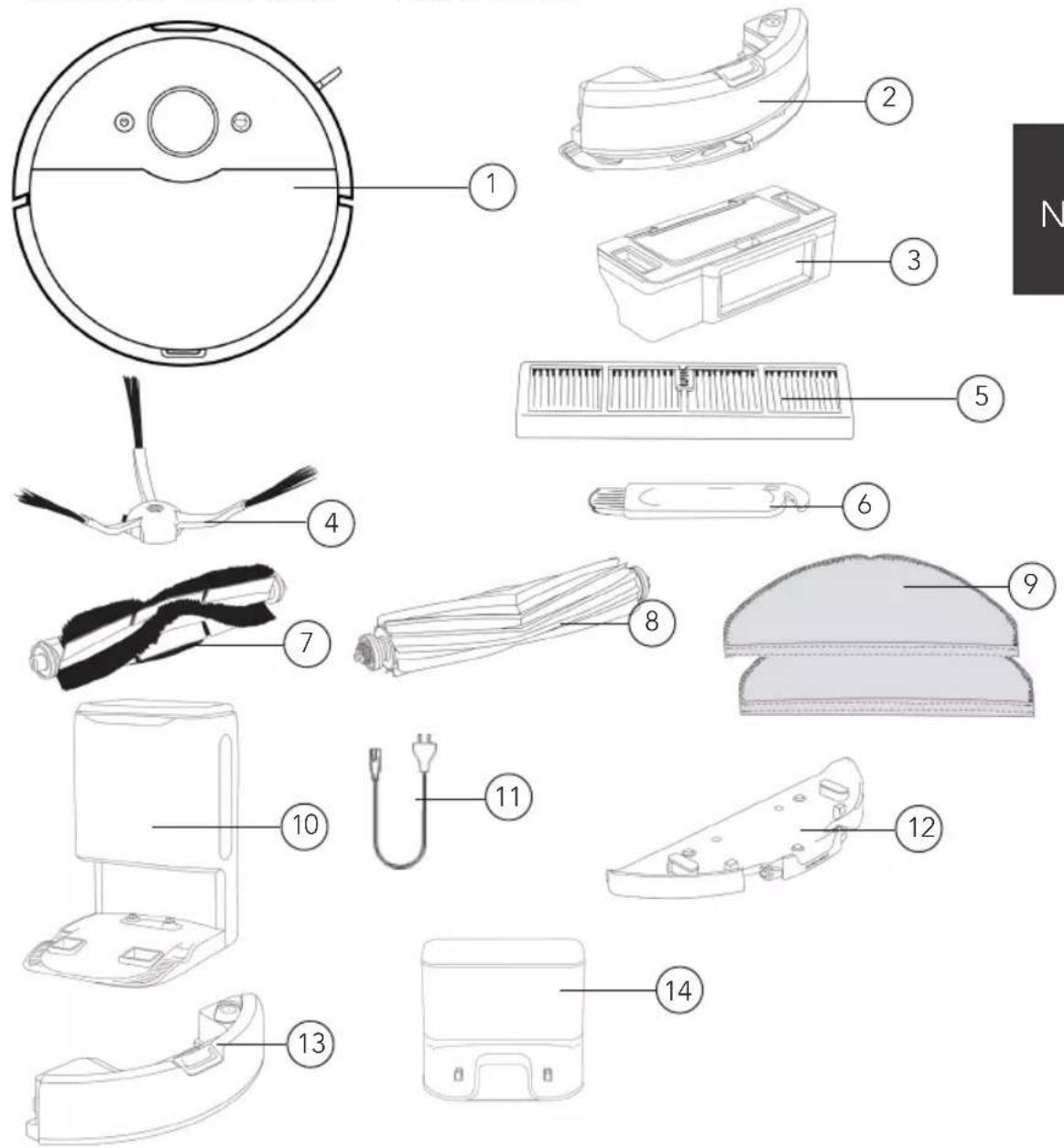
PRODUCT OVERVIEW – GENERAL
text_image
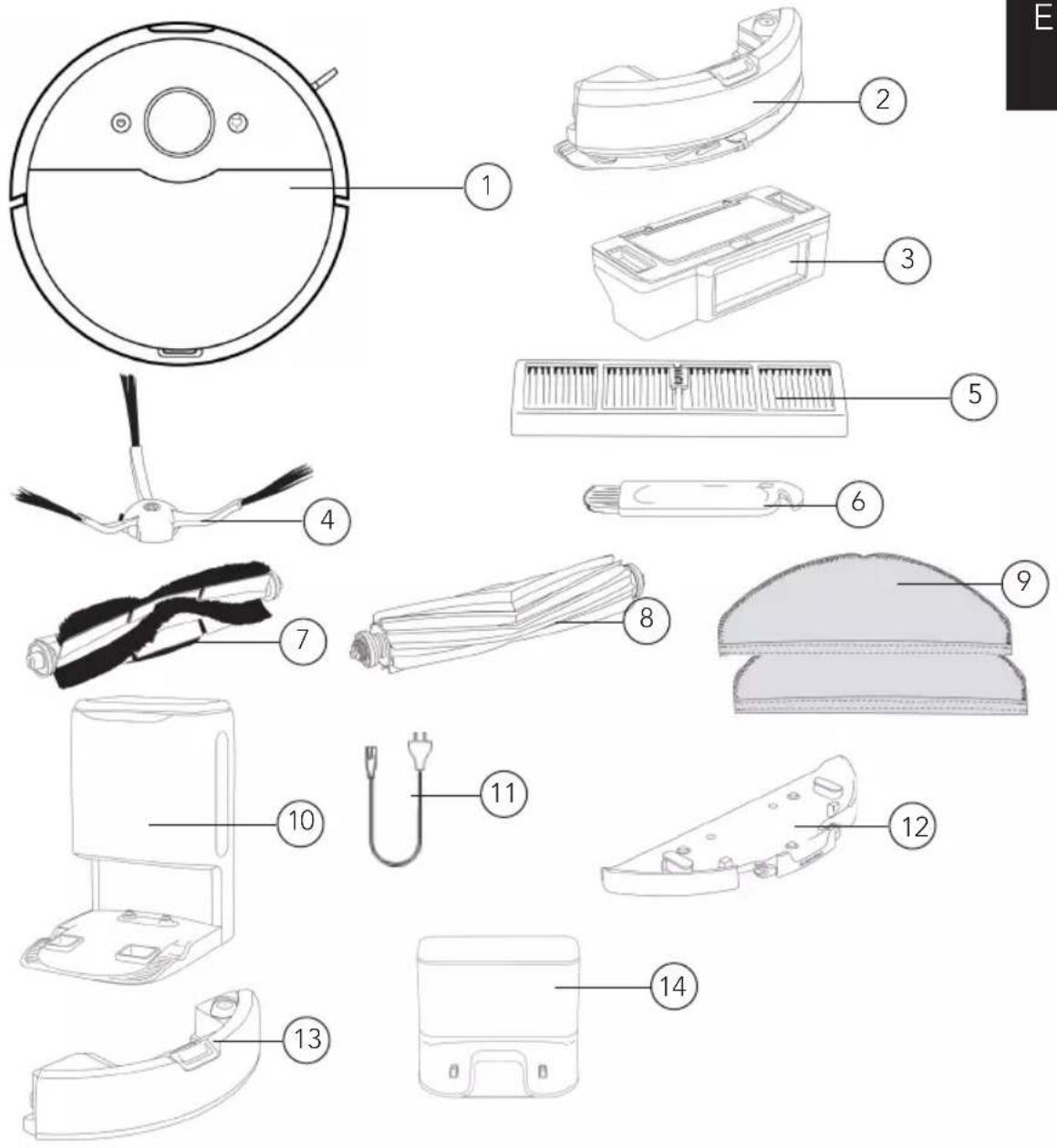
Exploded diagram of a robotic vacuum cleaner with numbered parts for identification
- Robot vacuum cleaner
Accessories:
- Vibrating Water tank
- Dust box
- Side brush
- Filter screen
- Cleaning tool
- All-round brush
-
Rubber brush
-
Wet-mop
-
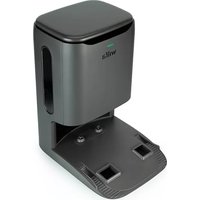
Automatic dustbin (included in RVC-D4000SL+) (Can be bought separately)
-
Power cord
- Removable mop-plate
- Water tank.
- Charging station D4000
EN
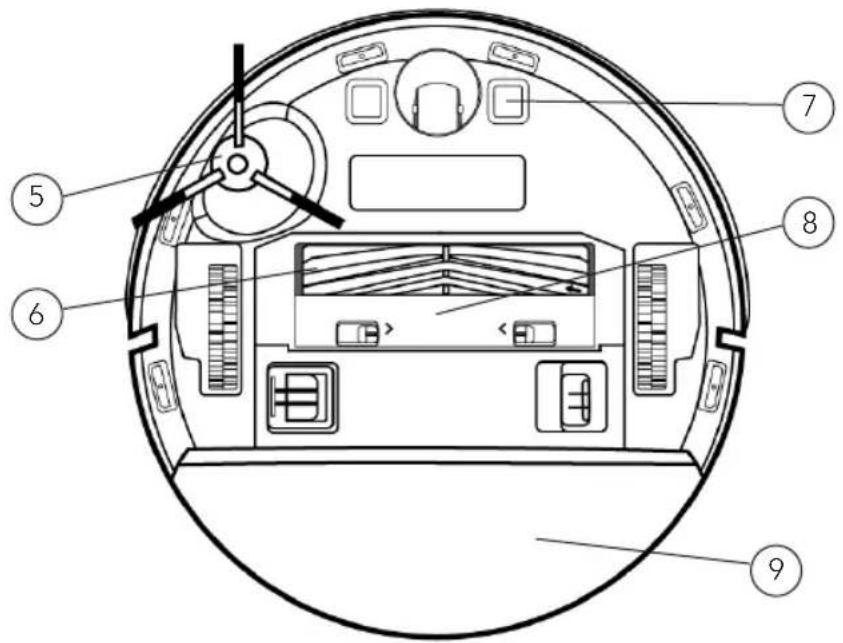
PRODUCT OVERVIEW – VACUUM CLEANER
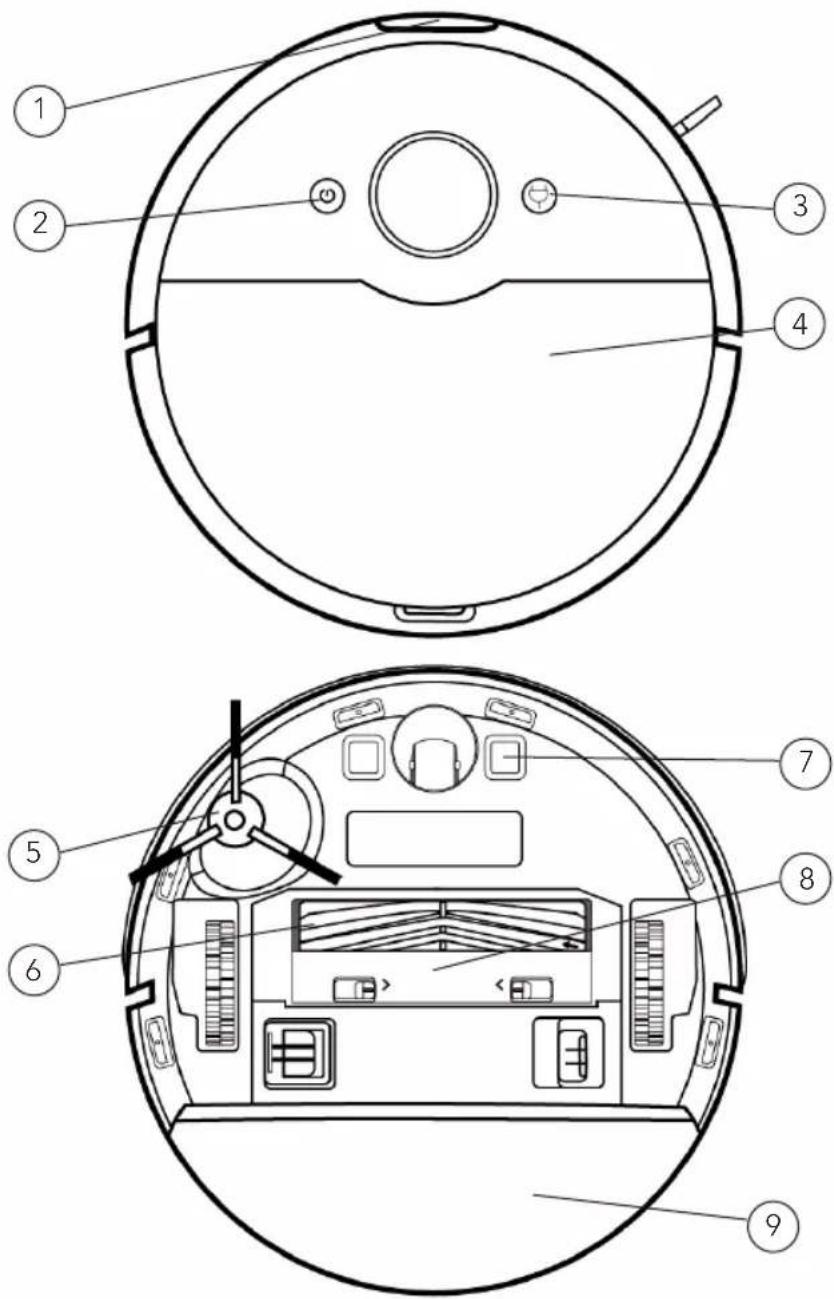
text_image
Technical diagram of a robotic vacuum cleaner with numbered parts for identification and assembly.
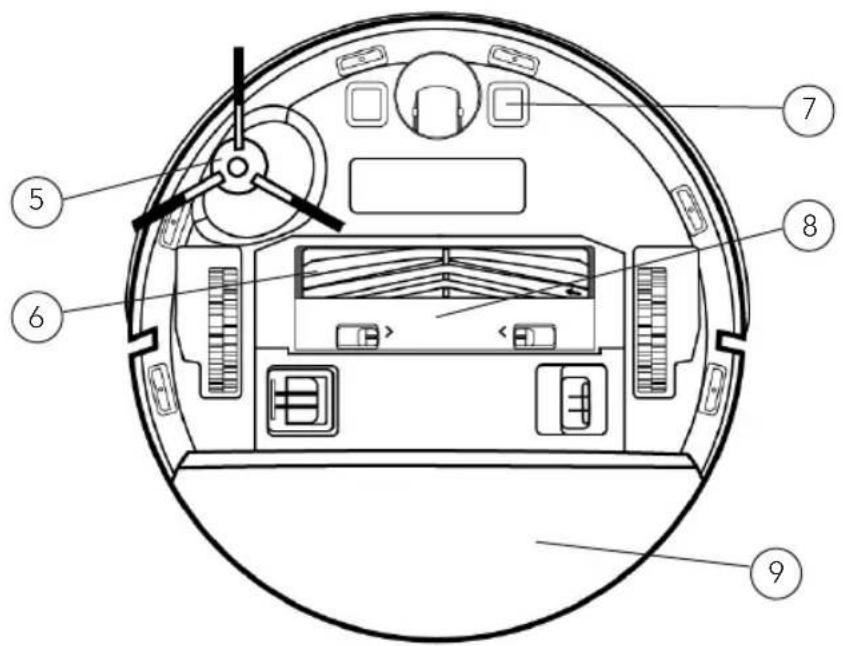
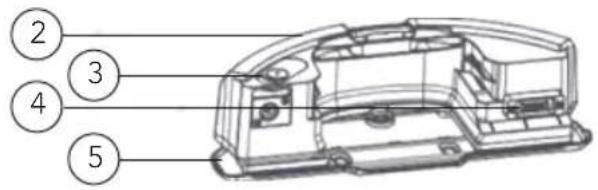
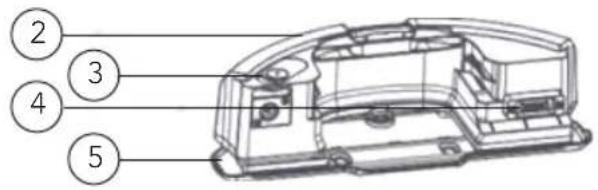
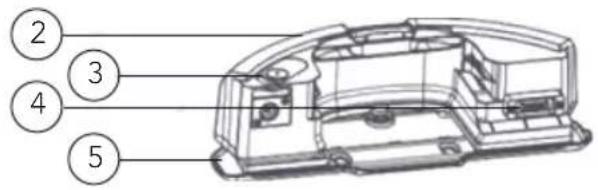
- Sensor
- ON/Off button
- Recharge button
- Cover
-
Side brush
-
Main brush
- Charging electrodes
- Main brush cover
- Wet-mop holder
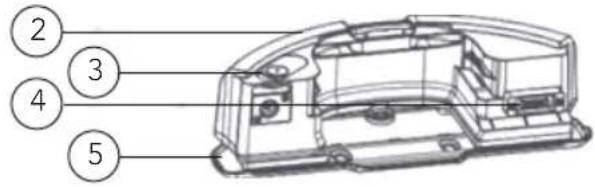
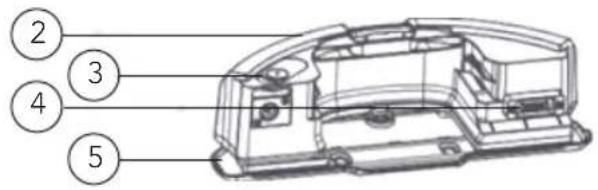
PRODUCT OVERVIEW - DETAILED
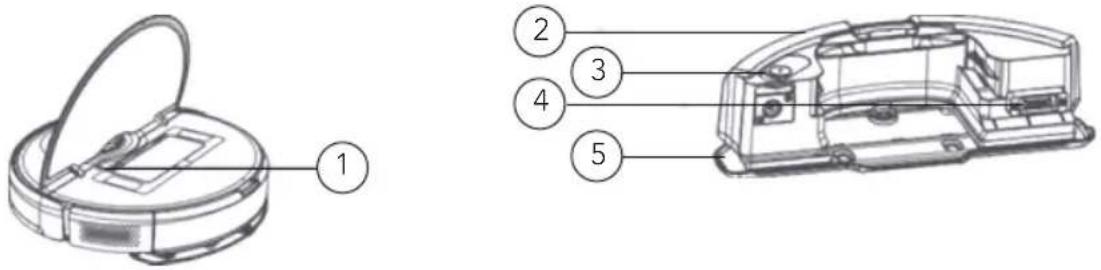
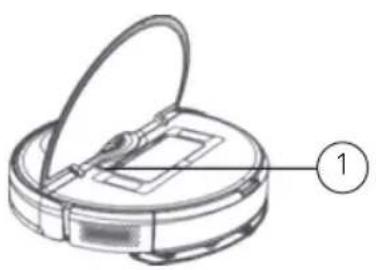
ROBOT VIBRATING WATER TANK
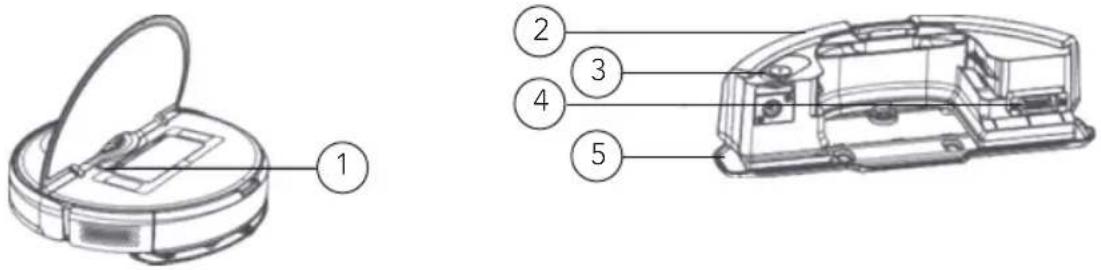
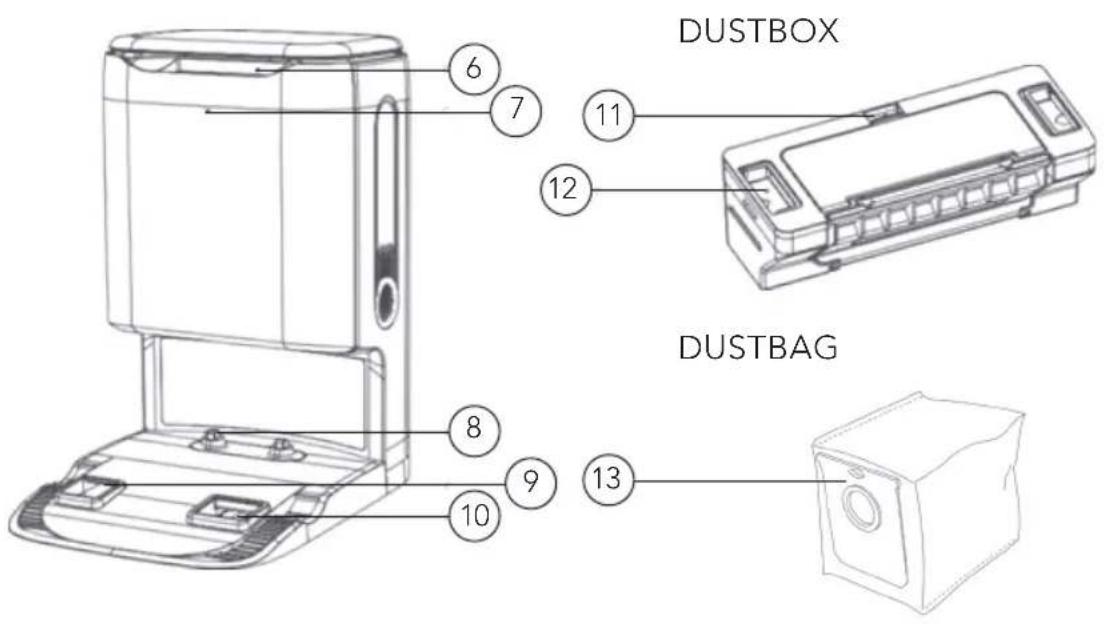
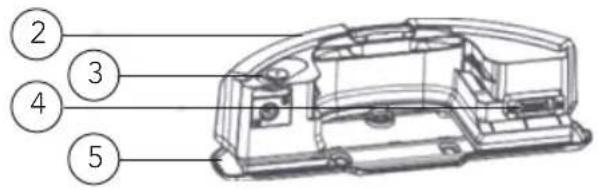
AUTO-EMPTY STATION
(Included in RVC-D4000SL+ or buy separately)
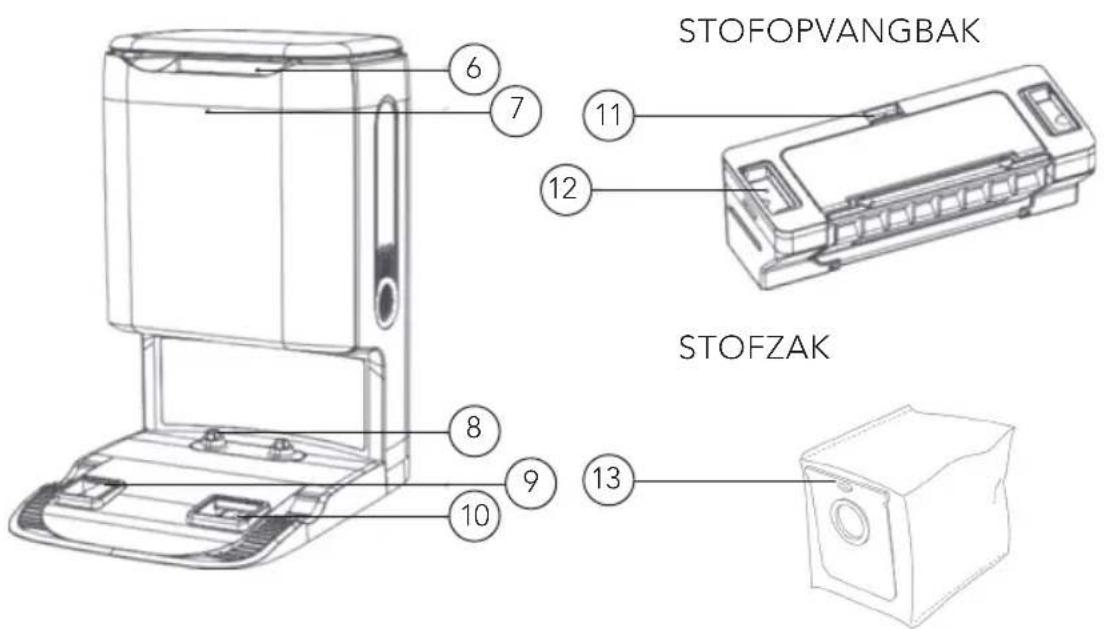
- Reset
- Fastener
- Water inlet
- Water tank metal pole
- Wet-mop
- Filter screen
-
Indicator
-
Charging electrode
- Air outlet
- Dust inlet
- Fastener
- Lock
- Dust bag
PRODUCT OVERVIEW – LIGHTS AND BUTTONS
| Blue light is always on Standby / Normal operation /Wi-Fi is connected |
| Blue light breaths Charging, power is more than 20% |
| Blue light flashes Firmware upgradein progress /Restoringfactory settings / Connecting to the network |
| Yellow light is always on WIFI is offline |
| Yellow light breaths Charging, power is lower than 20% |
| Yellow light flashes Recharging |
| Red light flashes Abnormal state |
| On/Off button Long press for 3s, power on or power off.Short press, start or pause. |
| Recharging button | In operation state, short press, robot pauses cleaning. In pause state, short press start recharging. In charging state, short press to stop recharging. |
INSTALLATION
To install the charging station, place it against the wall, and connect the power cord. Make sure there is enough space in front and on the sides of the charger.
To install the auto-empty station. Place the dustbin against the wall and connect the power cord.
Note:
- Do not place the charger in direct sunlight.
- The auto-empty station requires more than 1.5-meter space in front and more than 0.5-meter space on both sides.
• Make sure the power cord is not placed where the robot can drag it.
POWER ON AND CHARGE
Put the robot on the base and align the charging electrodes with charging contact. For daily use, you can start intelligent recharge by short pressing the button

text_image
>0.5m
>0.5m
- Robot can't start up when it has low power. Please put it on the base to recharge.
- Robot will start up automatically after connecting to the base and can't be shut down while recharging.
SWEEPING MODE
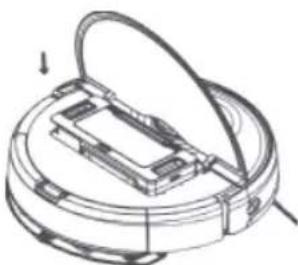
Open the cover, insert the dust box and press it down.
Note: Clean the dust box regularly in case of the dirt affecting the cleaning effect.
natural_image
Technical line drawing of a mechanical component with a curved handle and internal components (no text or symbols)
MOPPING MODE
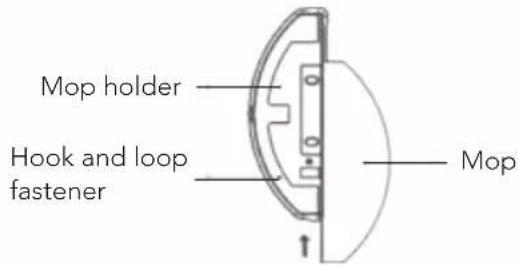
- Insert the mop along the slot of the mop holder and stick it on the hook and loop fastener.
text_image
Mop holder
Hook and loop fastener
Mop
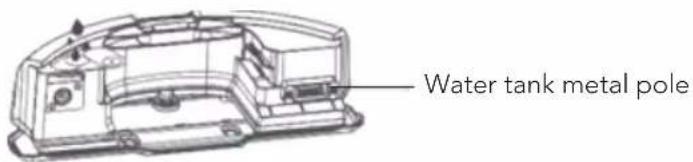
- Open the water tank cover, fill the water tank and then fasten the water tank cover.
text_image
Water tank metal pole
Note:
- Do not use detergents, disinfectants, solid cleaners or other cleaning products, or inject hot water into the water tank in case of corrosion and damage to the water tank.
-
It is forbidden to shower or soak the water tank; The water tank metal pole should be dry before performing a mopping task.
-
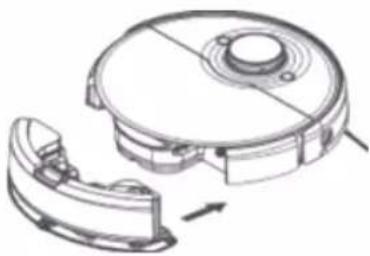
Push the water tank into the bottom of the robot, and it will make a "click" sound when it is installed in place.
natural_image
Technical line drawing of a mechanical device with a circular housing and internal components, showing no text or symbols.
Note:
- When mopping the floor, please set up virtual walls or forbidden zones in the carpet area.
- Before starting sweeping/mopping function, be sure to remove any water accumulated on the floor.
APP USE
CLEANING MODE/LEVEL SELECTION
You can choose various cleaning modes and water flow rates.
DO NOT DISTURB MODE (DND)
When Do Not Disturb mode is activated, proceeding at breakout point, scheduled cleaning and active voice reporting are unavailable in robot. Do Not Disturb mode is activated by default during the period from 22:00 to 7:00. Do Not Disturb mode can be deactivated in App.
CLEANING MODE WITHOUT MAP
When no map is stored, the robot will start cleaning each zone by a square area of 6m×6m. When a map is stored, the robot will start cleaning each room along the route planned automatically and return to base after completion.
MEMORY MAP
When memory map is activated in the App, the robot will save and update the map after finishing cleaning task and recharging successfully. After a map is completed successfully, you can split or merge zones or name any room in the App.
EDGE CLEANING MODE
When choosing edge cleaning mode in the App, the robot will automatically recognize range of the area to clean, and start cleaning along the edges, and return to base automatically after finishing cleaning.
SPECIFIED AREA CLEANING MODE
When an area to be cleaned is specified in the App, the robot will clean the specified area. Note: During cleaning, the robot may go beyond a defined area, remove any obstacle on the floor within defined area since definition of any area will not ensure safe separation.
FIXED-POINT CLEANING MODE
When choosing fixed-point cleaning and have selected a target point in the App, the robot will route cleaning task and start cleaning within a rectangular area of 2m × 2m based on the target position defined in the map in App.
SCHEDULED CLEANING MODE
User can schedule a cleaning task in App, and robot will start the cleaning task as scheduled and return to the base upon end of the task. Note: Any scheduled cleaning task will not be executed during the time when Do Not Disturb mode is activated.
EN
VIRTUAL WALL/FORBIDDEN AREA
User can define virtual wall/ restricted area in App which the robot will avoid cleaning. Note: Before using this function, you have to store a map in the App. Moving the robot or change of indoor environment may cause the original map lost and any virtual wall/ restricted area unavailable.
RESET/RESTORE SYSTEM
- By long pressing the Reset button for 3 seconds, you will not only restore factory settings, but also reset the firmware to the last version.
- By long pressing Reset button for 10 seconds, the machine will clear all network connection information, map information, scheduled task and do-not-disturb information, and customization information, and reset the suction power to the default level.
Note: After resetting/restoring the system, the robot needs to reconnect the APP, and the relevant settings in the APP are removed.
MAINTENANCE AND CLEANING
DUST BOX
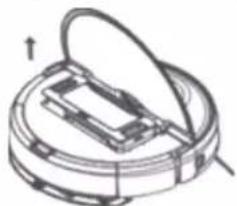
- Open the cover, press the dust box lock and take out the dust box
natural_image
Diagram of a mechanical device with an open lid and internal components, showing no text or symbols.
- Dispose the trash in dust box, and clean the box with cleaning brush
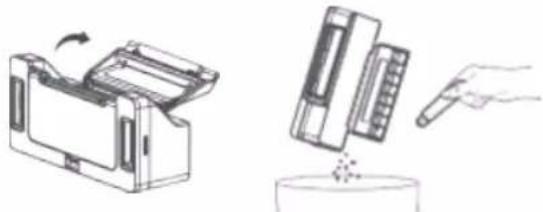
natural_image
Illustration of a printer and a mechanical device with a hand holding a pointer (no text or symbols present)
- Remove the dust box cover, take the filter screen out, dispose trash and clean the screen.
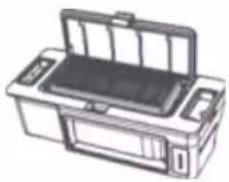
natural_image
Line drawing of a printer with open lid and base (no text or symbols)
Note:
- It is recommended to clean the dust box at least once a week. Dry the dust box and filter screen before use (at least 24 hours)
- Do not wash the dust box with water, it can damage electric components.
VIBRATING WATER TANK
- As shown in the figure, press the tank fastener down, and draw the tank out horizontally.
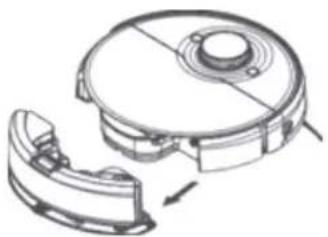
natural_image
Technical line drawing of a mechanical component with no visible text or symbols
- Turn the plastic tank cover, discharge any residual water in it and mount the cover in place.

- As shown in the figure, mount the tank properly.
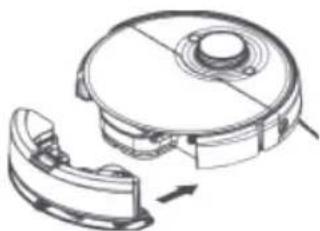
natural_image
Technical line drawing of a robotic device with a circular top and attached mechanical component (no text or symbols)
SIDE BRUSH
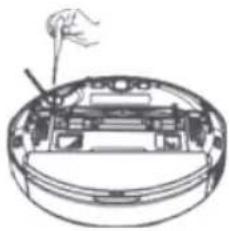
- Turn the robot over and remove the side brush fixing screws.
- Remove and clean the side brush.
- Reinstall the side brush and tighten the screws.
natural_image
Diagram of a mechanical device with internal components and a handle, no visible text or symbols
EN
Note: It is recommended to replace the side brush every 3-6 months to ensure the cleaning effect.
MAIN BRUSH
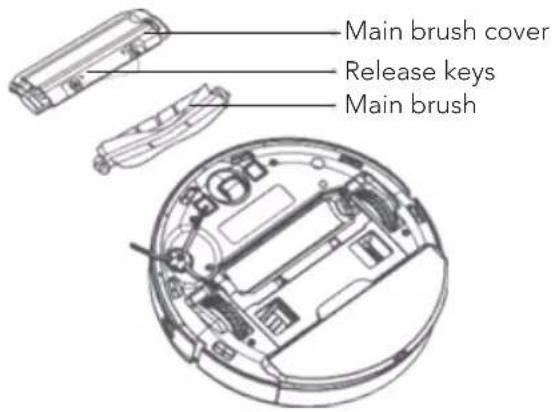
- Turn the robot over, press and hold the two release buttons to remove the main brush cover.
- Take out the main brush upwards.
- Use the knife on the cleaning brush to cut the entangled hair on the main brush and clean the main brush.
- Put back the main brush and the main brush cover, and press the main brush cover to install it in place.
Note: It is recommended to replace the main brush every 6-12 months to ensure the cleaning effect.
text_image
Main brush cover
Release keys
Main brush
BRUSH CLEANING METHOD
Use the included cleaning tool.

natural_image
Two line drawings showing a hand holding a pen-like object, with no text or symbols present.
Cut hair Clean the dirt
CLIFF SENSOR
Use a soft dry cloth to clean the cliff sensor every 3 months.

Cliff sensor
OPTICAL SENSOR
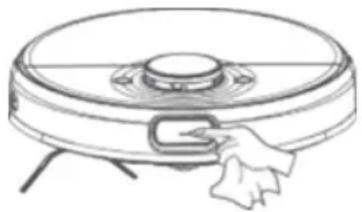
The robot contains precision optical sensor: Front sensor. Be sure to clean these sensors with soft and dust-free cloth to remove any dirt or dust on them, which, if accumulating heavily, may impair the obstacle avoidance performance of the robot. Note: Do not use chemicals such as detergent or spray to clean the sensor.
natural_image
Line drawing of a robotic vacuum cleaner with a hand adjusting the component (no text or symbols)
TROUBLESHOOTING
Problem Solution
| Unable to power on 1. The battery is low2. The ambient temperature is too low (below 0°C) or too high (above 35°C) |
| Robot fails to start sweeping Low battery level. Charge it to full battery level |
| Robot cannot return for charging | 1. Too many barriers around auto clean base. Place auto clean base in an unblocked area.2. Robot is too far from auto clean base. Place robot near auto clean base and try again. |
| Abnormal robot actions Please shut down and restart the robot |
| Abnormal sound during cleaning | Please check and clean the foreign matters on the main brush, side brush, left/right wheel after the machine is turned off. |
| Cleaning performance deteriorates or dust drops | 1. Dust box is full. Please empty the dust box.2. Filter screen is blocked. Please clean the screen.3. Main brush is blocked by any foreign object. Please clean the main brush. |
| Robot is offline 1. Weak wi-fi signals. Make sure robot is in proper coverage of Wi-Fi signals.2. Wi-Fi connection fails. Reset Wi-Fi connection and download the latest app and try again. |
| Robot fails to proceed at breakout point | 1. Make sure do not disturb mode is not activated, which will disable proceeding at breakout point.2. Proceeding at breakout point is unavailable when manually start recharging by performing operations in the app or short pressing recharging button or the appliance is moved to the auto clean base. |
| Unable to charge Make sure there is sufficient spaces around auto clean base, and there is no dust or blockage on the surface of electrode of auto clean base |
| Fail to do scheduled cleaning 1. | Make sure the equipment has been connected to the network, as disconnection from network will fail sync and scheduled cleaning task.2. Make sure Do Not Disturb mode is not activated, which will deactivate scheduled cleaning. |
| Robot is always offine Please ensure that the robot network configuration is successful and that the robot is always within the coverage of Wi-Fi signal. |
| Robot fails to connect to the app | Ensure that the robot and the auto clean base are in the area with good Wi-Fi signal; reset Wi-Fi according to the steps described in the Instruction Manual; then pair again. |
FAULT MESSAGES
| Fault messages Solution |
| Place robot on a horizontal ground and start it. | It is detected that robot stays inclined. Place robot on a horizontal ground and start it, or perform leveling in App and then restart robot. |
| Put the robot on the ground to start | The wheel is suspended. Please move to the new position to start. |
| After a long-distance displacement, start the cleaning task again | Manually moving the robot will cause routing to fail. Please start the cleaning task again. |
| The laser radar is entangled or stuck. Please clean it up. | The radar is entangled by fiber. Please remove any fiber. |
| Please make sure the laser ranging sensor is not blocked before starting. | Laser ranging sensor is blocked or jammed by foreign matter. Remove the blockage or foreign matter. If removal is impossible, relocate the robot and then start it. |
| Make sure that visual recognition sensor is not blocked. | Visual recognition sensor is blocked or jammed by foreign matter. Remove the blockage or foreign matter. If removal is impossible, relocate the robot and then start it. |
| Please confirm that the visual recognition sensor is not blocked. | The visual recognition sensor is blocked or jammed by foreign objects, please remove the obstructed object or foreign objects. If it cannot be cleared, please move the host to a new location to start. |
| Please clean the cliff sensor and move to a new position to start it. | The robot is off ground. Relocate and restart the robot. Cliff sensor is dirty. Clean the cliff sensor |
| Check the collision sensor and remove any foreign matter on it. | Collision sensor is jammed. Remove foreign matter by tapping the sensor. If there is no foreign matter, relocate and restart the robot. |
| Please clean the edge IR sensor. | Edge IR sensor may be attached with foreign matter. Please clean it. |
| The TOF sensor fails. Please check and clean the sensor. | Front sensor may be attached with foreign matter. Please clean it. |
| Please clean the surfaces of the front part of the robot and the bottom sensor to remove any dust. | Front sensor, edge IR sensor or cliff sensor is dusty. Please clean it. |
| The cliff sensor fails. Please clean and move it to a new position to start. | Cliff sensor may be attached to foreign matter or dirt. Please clean and move it to a new position to start it. |
| Laser radar is blocked. Check the laser radar | The radar on the top tower is blocked and routing fails. Remove blockage. |
| The dust box has not been cleaned for a long time. Please clean it immediately. | Dust box is full. Please empty it. |
| Virtual wall or forbidden area detected. Please move the robot out of this area. | The robot is at a virtual wall or forbidden area. Please move it out of the area. |
| Appliance is trapped. Remove any obstacle around the device and try again. Please put the appliance back onto the base. | The robot is trapped by obstacle around it. Please remove any obstacle. The robot fails to locate base. Place it manually back onto the base. |
| A new environment is detected. Please re-start cleaning task. | The robot is in a new environment and no map is created yet. Please re-start vacuuming task. |

text_image
EN

text_image
BEYOND EXPECTATIONS
5
SINCE 1948
YEAR
GUARANTEE
GUARANTEE
Wilfa issues a 5 year guarantee on this product from the day of purchase. The guarantee covers production failure or defects that arise during the guarantee period. Your purchase receipt works as proof towards retailer if claiming your guarantee.
The guarantee is valid only for products that are bought and used in private households. The guarantee is not valid if the product is used commercially. The guarantee is not valid if the product is misused, used by negligence, if not following instructions given by Wilfa, if modified or if unauthorized reparation is done. The guarantee is also not valid for normal wear of the product, misuse, lack of maintenance, use of wrong electrical voltage or:
• Overloading of product
- Parts which are normally worn down
- Parts you can expect being replaced regularly (e.g. filter, battery etc.)
Instruction manual is also available at our website; wilfa.com
PRODUCT SPECIFICATIONS
Size
350x97mm
Rated power 55 W
Rated voltage 14.8 V
Charging voltage 20 V
Battery capacity:
SL, AI, SL+ 6400 mAh
SUPPORT AND SPARE PARTS
For support please visit us at wilfa.com, and see our customer service/support page. Here you will find frequently asked questions, spare parts, tips and tricks and all our contact information.
RECYCLABILITY
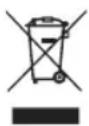
This marking indicates that this product should not be disposed with other household wastes throughout the EU. To prevent possible harm to the environment or human health from uncontrolled waste disposal, recycle it responsibly to promote the sustainable reuse of material resources. To return your used device, please use the return and collection systems or contact the retailer where the product was purchased. They can take this product for environmentally safe recycling free of charge.
NO
NO
INNHOLD
30 VIKTIGE SIKKERHETSANVISNINGER
32 BATTERI OG LADING
32 ANVISNINGER OM MILJ∅VERN
34 ANSVARSFRASKRIVELSE - SYSTEM
35 PRODUKTOVERSIKT - GENERELT
36 PRODUKTOVERSIKT - ST∅VSUGER
37 PRODUKTOVERSIKT - DETALJERT
38 PRODUKTOVERSIKT – LYS OG KNAPPER
39 INSTALLASJON
41 BRUK AV APPEN
42 VEDLIKEHOLD OG RENGJ∅RING
45 FEILS∅KING
47 FEILMELDINGER
50 GARANTI
51 PRODUKTSPESIFIKASJONER
51 SUPPORT OG RESERVEDELER
51 GJENVINNING
VIKTIGE SIKKERHETSANVISNINGER
PRODUKTOVERSIKT – GENERELT
text_image
Exploded diagram of a robotic vacuum cleaner with numbered parts for identification
- Robotstøvsuger
Tilbehør:
text_image
Technical diagram of a robotic vacuum cleaner with numbered parts for identification and assembly reference.
natural_image
Technical line drawing of a mechanical device with a circular housing and a handle, labeled with number 1 (no text or symbols on the diagram itself)
text_image
Technical diagram of a mechanical component with numbered parts labeled 2 to 5

text_image
NO
ST∅VBEHOLDERSTASJON
text_image
>0.5m
>0.5m
- Roboten kan ikke starte när den har lite strøm. Sett den på laderen for å lade den opp.
- Roboten starter automatisk når den er koblet til laderen, og kan ikke slås av mens den lader.
FEIEMODUS
natural_image
Technical line drawing of a mechanical assembly with a circular base and internal components (no text or symbols)
MOPPEFUNKSJON
natural_image
Technical line drawing of a mechanical device with a circular housing and internal components, showing no text or symbols.
OBS!
natural_image
Diagram of a mechanical device with a circular base and internal components, showing no text or symbols.
natural_image
Illustration of a printer and its internal components, showing a hand inserting a pencil into a container (no text or symbols present)
natural_image
Illustration of a printer with open lid and internal compartments (no text or symbols)
OBS!
natural_image
Technical line drawing of a mechanical component with a circular top and internal cavity, showing a separate view of a curved housing (no text or symbols)
natural_image
Technical line drawing of a robotic vacuum cleaner with a circular housing and attached clamped component (no text or symbols)
SIDEB∅RSTE
natural_image
Cross-sectional diagram of a mechanical device with internal components and a handle (no text or symbols)
natural_image
Two line drawings showing hands holding cylindrical objects, one with a probe inserted and the other with a probe inserted (no text or symbols)
natural_image
Line drawing of a robotic vacuum cleaner with a hand adjusting the component (no text or symbols)
NO
FEILS∅KING
Problem Lösning
text_image
Exploded view diagram of a robotic vacuum cleaner with numbered parts for identification
1. Robotdammsugare
Tillbehör:
text_image
Technical diagram of a circular robotic device with numbered components labeled 1 to 4
text_image
Technical diagram of a circular device interior with numbered components for identification
natural_image
Technical line drawing of a mechanical device with a circular housing and a handle, labeled with number 1 (no text or symbols on the diagram itself)
text_image
Technical diagram of a mechanical assembly with numbered parts labeled 2 to 5
DAMMBEHÅLLARSTATION
text_image
>0.5m
>0.5m
natural_image
Technical line drawing of a mechanical component with a curved opening and internal structure (no text or symbols)
MOPPNINGSLÄGE
natural_image
Technical line drawing of a mechanical device with a circular housing and internal components, showing no text or symbols.
Obs!
natural_image
Diagram of a mechanical device with a circular base and internal components, no visible text or symbols
natural_image
Illustration of a printer and a mechanical device with a hand pointing to it (no text or symbols present)
natural_image
Line drawing of a printer with open lid and base (no text or symbols)
Obs!
natural_image
Technical line drawing of a mechanical device with a circular top and internal components, showing a close-up view of a separate housing (no text or symbols)
SE
natural_image
Technical line drawing of a robotic vacuum cleaner with a circular housing and attached component (no text or symbols)
SIDOBORSTE
natural_image
Cross-sectional diagram of a mechanical device showing internal components and a handle (no text or symbols)
natural_image
Two line drawings showing hands holding pens and writing or drawing (no text or symbols present)
natural_image
Line drawing of a robotic vacuum cleaner with a hand cleaning the component (no text or symbols)
FELSÖKNING
Problem Lösning
text_image
Exploded diagram of a robotic vacuum cleaner with numbered parts for identification and assembly reference.
DK
- Robotstøvsuger
Tilbehør:
2.Vibrerendevandbeholder
text_image
Technical diagram of a circular robotic device with numbered components labeled 1 to 4
DK
text_image
Technical diagram of a circular device interior with numbered components for identification
PRODUKTOVERSIGT - DETALJERET
ROBOT VIBRERENDE VANDBEHOLDER
ST∅VBEHOLDERSTATION
text_image
>0.5m
>0.5m
natural_image
Technical line drawing of a mechanical component with a circular housing and internal components (no text or symbols)
MOPPEINDSTILLING
natural_image
Technical line drawing of a robotic vacuum cleaner with internal components and a separate housing (no text or symbols)
Bemærk:
natural_image
Diagram of a mechanical device with a circular base and an open lid, showing internal components and directional arrows (no text or symbols)
natural_image
Illustration of a printer and a mechanical device with a hand pointing to it (no text or symbols present)
natural_image
Illustration of a printer with open lid and base (no text or symbols)
Bemærk:
natural_image
Technical illustration of a robotic device with a circular top and mechanical housing (no text or symbols)
natural_image
Technical line drawing of a robotic vacuum cleaner with a circular housing and attached clamped components (no text or symbols)
SIDEB∅RSTE
natural_image
Cross-sectional diagram of a mechanical device showing internal components and a handle (no text or symbols)
natural_image
Two line drawings showing hands holding pens, one with a pen and the other with a pencil (no text or symbols)
natural_image
Line drawing of a robotic vacuum cleaner with a hand cleaning the component (no text or symbols)
FEJLFINDING
Problem Lösning
text_image
Exploded view diagram of a robotic vacuum cleaner with numbered parts for identification and assembly.
- Robotti-imuri
Lisävarusteet:
text_image
Technical diagram of a robotic vacuum cleaner with numbered parts for identification and assembly.
-
Anturi
-
Virtapainike
-
Kotipainike
-
Kansi
-
Sivuharja
-
Harja
-
Latauselektrodit
-
Harjan suojus
-
Mopin pidike
TUOTTEEN KUVAUS – YKSITYISKOHTAISET TIEDOT
ROBOTTI VESISÄILIÖ
natural_image
Technical line drawing of a mechanical device with a circular housing and a handle, labeled with number 1 (no text or symbols on the diagram itself)
text_image
Technical diagram of a mechanical component with numbered parts labeled 2 to 5
PÖLYSÄILIÖASEMA
text_image
>0.5m
>0.5m
natural_image
Technical line drawing of a mechanical component with a circular base and internal structure (no text or symbols)
MOPPAUSTILA
natural_image
Technical line drawing of a robotic device with a circular top and internal components, showing no text or symbols.
Huom.:
natural_image
Diagram of a mechanical device with a circular housing and an open lid, showing internal components and directional arrows (no text or symbols)
natural_image
Illustration of a printer and a mechanical device with a hand inserting a pencil into a container (no text or symbols)
natural_image
Illustration of a printer with open lid and base (no text or symbols)
Huom.:
natural_image
Technical line drawing of a mechanical device with a circular housing and internal components, showing a curved assembly (no text or symbols)
natural_image
Technical line drawing of a robotic vacuum cleaner with a circular housing and attached component (no text or symbols)
SIVUHARJA
natural_image
Cross-sectional diagram of a mechanical device with internal components and a handle (no text or symbols)
natural_image
Two line drawings showing hands holding pens and writing or drawing (no text or symbols present)
natural_image
Line drawing of a robotic vacuum cleaner with a hand cleaning the component (no text or symbols)
VIANMÄÄRITYS
Ongelma Ratkaisut
PRODUKTÜBERSICHT – ALLGEMEINES

text_image
Exploded diagram of a robotic vacuum cleaner with numbered parts for identification
- Saugroboter
Zubehör:
text_image
Technical diagram of a robotic vacuum cleaner with numbered parts for identification and assembly.
natural_image
Technical line drawing of a mechanical device with a circular housing and a handle, labeled with number 1 (no text or symbols on the diagram itself)
text_image
Technical diagram of a mechanical assembly with numbered parts labeled 2 to 5
STAUBBEHÄLTERSTATION
text_image
>0.5m
>0.5m
natural_image
Technical line drawing of a mechanical component with a circular base and internal structure (no text or symbols)
WISCHFUNKTION
natural_image
Technical line drawing of a mechanical device with a circular housing and a separate view showing internal components (no text or symbols)
Hinweis:
natural_image
Technical line drawing of a mechanical component with an open lid and internal structure (no text or symbols)
natural_image
Illustration of a printer and its corresponding powder being poured into a container (no text or symbols present)
natural_image
Illustration of a printer with open lid and base (no text or symbols)
Hinweis:
natural_image
Technical line drawing of a mechanical component with no visible text or symbols
natural_image
Technical line drawing of a mechanical component with no visible text or symbols
SEITENBÜRSTE
natural_image
Cross-sectional diagram of a mechanical device with a hand holding a tool, showing internal components without any text or symbols.
natural_image
Two line drawings of a mechanical component being held, showing hand positioning and tip insertion (no text or symbols)
natural_image
Line drawing of a hand pressing down on a circular mechanical component (no text or symbols)
FEHLERBEHEBUNG
text_image
Exploded view diagram of a robotic vacuum cleaner with numbered parts for identification
- Robotstofzuiger
Toebehoren:
text_image
Technical diagram of a robotic vacuum cleaner with numbered parts for identification and assembly.
(Inbegrepen in RVC-D4000SL+ of apart kopen)
NL
text_image
>0.5m
>0.5m
natural_image
Technical line drawing of a mechanical component with a circular base and internal structure (no text or symbols)
DWEILMODUS
natural_image
Technical line drawing of a robotic vacuum cleaner with internal components and a separate housing (no text or symbols)
Opmerking:
natural_image
Diagram of a mechanical device with an open lid and internal components, showing no text or symbols.
natural_image
Illustration of a printer and a mechanical device with a hand holding a pointer (no text or symbols present)
natural_image
Illustration of a printer with open lid and internal compartments (no text or symbols)
Opmerking:
natural_image
Technical line drawing of a mechanical component with no visible text or symbols
natural_image
Technical line drawing of a robotic vacuum cleaner with a circular housing and attached component (no text or symbols)
ZIJBORSTEL
natural_image
Cross-sectional diagram of a mechanical device showing internal components and a handle (no text or symbols)
natural_image
Two line drawings showing hands holding pens and writing or drawing (no text or symbols present)
natural_image
Line drawing of a robotic vacuum cleaner with a hand cleaning the component (no text or symbols)
PROBLEEMOPLOSSING
text_image
Exploded view diagram of a robotic vacuum cleaner with numbered parts for identification
text_image
Technical diagram of a robotic vacuum cleaner with numbered parts for identification and assembly.
natural_image
Technical line drawing of a mechanical device with a circular housing and a handle, labeled with number 1 (no text or symbols on the diagram itself)
text_image
Technical diagram of a mechanical component with numbered parts labeled 2 to 5
POJEMNIK NA KURZ
text_image
>0.5m
>0.5m
natural_image
Technical line drawing of a mechanical assembly with a circular base and internal components (no text or symbols)
PL
TRYB MOPA
natural_image
Technical line drawing of a mechanical device with a circular housing and internal components, showing no text or symbols.
Uwaga:
natural_image
Technical line drawing of a mechanical component with an open lid and internal components (no text or symbols)
natural_image
Illustration of a printer and its internal components, showing a hand inserting a component into a container (no text or symbols present)
natural_image
Illustration of a printer with open lid and base (no text or symbols)
PL
Uwaga:
natural_image
Technical line drawing of a mechanical component with no visible text or symbols
natural_image
Technical line drawing of a robotic vacuum cleaner with a circular housing and attached clamped components (no text or symbols)
SZCZOTKA BOCZNA
natural_image
Cross-sectional diagram of a mechanical device with internal components and a pointer (no text or symbols)
PL
natural_image
Line drawing of a robotic vacuum cleaner with a hand adjusting the component (no text or symbols)
ROZWIĄZYWANIE PROBLEMÓW
Problem Rozwiązanie
text_image
Exploded diagram of a robotic vacuum cleaner with numbered parts for identification
- Robot aspirateur
text_image
Technical diagram of a robotic vacuum cleaner with numbered parts for identification and assembly.
natural_image
Technical line drawing of a mechanical device with a circular housing and a handle, labeled with number 1 (no text or symbols on the device itself)
text_image
Technical diagram of a mechanical assembly with numbered parts labeled 2 to 5
STATION DE POUBELLE
text_image
>0.5m
>0.5m
natural_image
Technical line drawing of a mechanical assembly with a circular base and internal components (no text or symbols)
MODE SERPILLIÈRE
natural_image
Technical line drawing of a mechanical housing or enclosure component (no text or symbols visible)
natural_image
Technical line drawing of a mechanical component with a circular housing and a separate view showing internal components (no text or symbols)
Remarque :
natural_image
Diagram of a mechanical device with a circular housing and internal components, no visible text or symbols
natural_image
Illustration of a printer and its internal components being placed into a container (no text or symbols present)
natural_image
Illustration of a printer with open lid and base (no text or symbols)
Remarque :
natural_image
Technical line drawing of a mechanical component with no visible text or symbols
natural_image
Technical line drawing of a mechanical component with no visible text or symbols
BALAI LATÉRAL
natural_image
Diagram of a mechanical device with a handle and internal components (no text or symbols)
natural_image
Two line drawings showing a hand holding a small object, with no visible text or symbols.
natural_image
Line drawing of a robotic vacuum cleaner with a hand adjusting the component (no text or symbols)
DÉPANNAGE
Problème Solution
CARACTÉRISTIQUES DU PRODUIT
Taille 350 × 97 mm
Puissance nominale 55 W
Tension nominale 14,8 V
Tension de charge 20 V
text_image
FSC
www.fsc.org
100%
From well-
managed forests
FSC® C000000