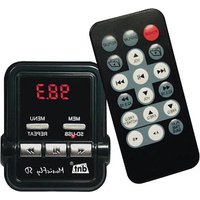
MusicFly SD - FM Radio dnt - Free user manual and instructions
Find the device manual for free MusicFly SD dnt in PDF.


User questions about MusicFly SD dnt
0 question about this device. Answer the ones you know or ask your own.
Ask a new question about this device
Download the instructions for your FM Radio in PDF format for free! Find your manual MusicFly SD - dnt and take your electronic device back in hand. On this page are published all the documents necessary for the use of your device. MusicFly SD by dnt.
USER MANUAL MusicFly SD dnt
natural_image
Color palette bar with grayscale shades and a small crosshair symbol at the bottom (no text or labels)MusicFly SD
Bedienungsanleitung
user manual
Mode d'emploi

text_image
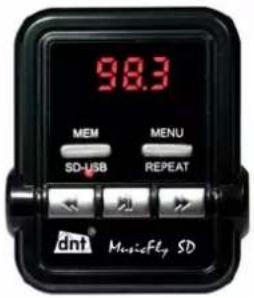
98.3 MEM MENU SD-USB REPEAT dnt MusicFly SD

MFlysdDEF.indd 1

19.05.2008 16:42:39

natural_image
Color palette bar with grayscale swatches and a small crosshair symbol at the bottom (no text or labels)Vorwort
natural_image
Color palette bar with grayscale shades and a small crosshair symbol at the bottom (no text or labels)Sicherheitshinweise
Allgemeine Hinweise
natural_image
Color palette bar with grayscale shades and a small crosshair symbol at the bottom (no text or labels)Sicherheitshinweise
Störungen
natural_image
Color palette bar with grayscale shades and a small crosshair symbol at the bottom (no text or labels)natural_image
Color palette bar with grayscale squares and a small crosshair symbol at the bottom (no text or labels)natural_image
Color palette bar with grayscale shades and a small crosshair symbol at the bottom (no text or labels)natural_image
Color palette bar with grayscale shades and a small crosshair symbol at the bottom (no text or labels)Fernbedienung
natural_image
Color palette bar with grayscale swatches and a small crosshair symbol at the bottom (no text or labels)Fernbedienung
natural_image
Color palette bar with grayscale shades and a small crosshair symbol at the bottom (no text or labels)Bedienung
Ordnerverwaltung
natural_image
Color palette bar with grayscale swatches and a small crosshair symbol at the bottom (no text or labels)Bedienung
natural_image
Color palette bar with grayscale swatches and a small crosshair symbol at the bottom (no text or labels)Kundeninformationen
natural_image
Color palette bar with grayscale swatches and a small crosshair symbol at the bottom (no text or labels)Kundeninformationen
natural_image
Color palette bar with grayscale shades and a small crosshair symbol at the bottom (no text or labels)Serviceinformationen
Serviceabwicklung
natural_image
Color palette bar with grayscale shades and a small crosshair symbol at the bottom (no text or labels)Declaration of Conformity

text_image
IS N S FN EST LT GB NL D PL F CH A I BIH MK P EHereby, dnt GmbH, declares that this MusicFly SD is in compliance with the essential requirements and other relevant provisions of Directive 1999/5/EC.
natural_image
Color palette bar with grayscale swatches and a small crosshair symbol at the bottom (no text or labels)Declaration of Conformity
natural_image
Color palette bar with grayscale swatches and a small crosshair symbol at the bottom (no text or labels)Preface
Makes your music fly by wireless transmission to your car radio. It allows to enjoy the music of portable audio devices via car audio system or home audio equipment without the need for earphones or headsets.
dnt
Content
Preface/Functions....17
Security instructions 18-19
Appliance description 19
Function description 20
Remote control 22
Getting started 24
Declaration of conformity 15
Specifications 25
Warranty regulations 27
Functions
● Use of full band channels (87.6\~107.9 MHz)
- 6 channels preset & auto shut off
- Searches, plays and displays the user defined folder: In case user makes the folder named Musicfl y, the device plays only the files in Musicfl y folder.
- Directory loading: 5-level depth, Max 50 directories
- File loading: 1999 files can be loaded at one try
- Supports directory shift
● Supports all memory devices with USB port, up to 32Gbyte (USB flash memory, Portable hard disk, Memory card)
● Supports fi le index: Once you name the number from 001 to 500 on the head of the fi le name, the fi le numbers are displayed on LCD and the fi les are played in serial order.
● Automatic play: Once you plug USB removable disk, MP3 or WMA fi les are played automatically.
● Displays remaining time of the playing file.
-17-


natural_image
Color palette bar with grayscale squares and a small crosshair symbol at the bottom (no text or labels)Security Instructions

Please read this information carefully before you use the appliance for the fl rst time.
General instructions
● Never place the appliance on an uneven surface. People may be injured if it falls down.
- Keep the appliance out of the reach of small children.
- If you connect the appliance to other electronic equipment, read the safety information and the owner's guides for this equipment as well.
- If you have any questions regarding the appliance, how it works, safety or correct connections, please contact our technical support service or ask any specialist.
● The seller does not assume liability for damage caused when the appliance is used or for claims by third parties.
● Never apply external voltage to the appliance unless this is provided directly for operations and is necessary.
Environmental conditions
- Keep the appliance away from heavy mechanical loads. Protect it from vibrations and severe impacts, and do not drop or shake it.
- Do not expose the appliance to high temperatures (above 60°C) and severe temperature fluctuations. Protect it from direct sunlight and keep it away from sources of heat.
- Protect the appliance from damp.
- Do not use the appliance in dusty places and protect it from dust.
● Parts of the appliance or accessories may contain so-called softeners, which may damage sensitive furniture and plastic surfaces. Avoid direct contact with sensitive surfaces.
Technical problems
- In case any foreign material or liquid gets into the product, please immediately remove it from the car cigarette lighter power adaptor. Before you use it again, ask your authorised dealer to check the product carefully.
-18-

natural_image
Color palette bar with grayscale shades and a small crosshair symbol at the bottom (no text or labels)Security Instructions
- Please do not hesitate to contact our service center.
Packaging material
- Please don't keep any packaging material within reach of small children. It can become a dangerous toy.
Cleaning and maintenance
- For cleaning use dry and soft cloth.

This product can be used only with 12V cigarette lighter jack power.
Delivery content
MusicFly SD / stereo cable / additional fuse / user manual
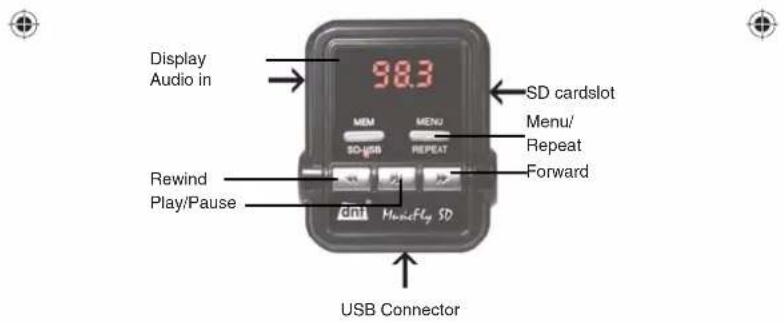
Appliance description
text_image
Display Audio in 98.3 MEM MENU SD cardslot Menu/ Repeat Forward Rewind Play/Pause dni MusicFly SD USB Connector
text_image
MFlysdDEF.indd 19 - 19 - 19.05.2008 16:43:15
natural_image
Color palette bar with grayscale shades and a small crosshair symbol at the bottom (no text or labels)Description & Functions
Setting the frequency
- Press MENU/RPT button.
- Select the frequency with ▶buttons.
- Press MENU/RPT button again.
Playback
- Press ▶ button to start playback or pause.
- When the music is playing, press briefly ▶/◀◀ buttons, to move to the next or previous title.
- Press and hold the ▶ buttons for about 2 seconds to move to the next or previous directory.
- When the playback is started, the display shows the remaining time, the frequency or the audio level depending on the display mode.
Volume

This function is available only, if a memory device is connected to the USB port.
- Press 2 x brief y the MENU/RPT button.
● The display shows a bar (7 levels). - Set the volume with the ▶buttons.
RDS display

This function is available only, if a memory device is connected to the USB port.
- Press 3 x brief y the MENU/RPT button.
- Select the RDS display method with the buttons.: NOR - In the regular mode the display shows 8 characters. SCR - In scroll mode the display scrolls at intervals of 1 second.
- Press MENU/RPT button again.
RDS Interval

This function Is available only, If a memory device is connected to the USB port.
- Press 4 x brief y the MENU/RPT button.
- Select interval time with ▶▶/◀◀ buttons for normal RDS mode (2-6 seconds).
-20-


natural_image
Color palette bar with grayscale shades and a small crosshair symbol at the bottom (no text or labels)Description & Functions
- Press MENU/RPT button again.
Display mode
The display shows remaining playback time only, If a memory device is connected to the USB port.
● During playback press ▶ button for 2 seconds.
● The display is changed in the following order:
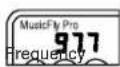
playback time
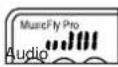
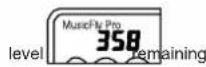
Repeat feature
This function Is available only, If a memory device is connected to the USB port.
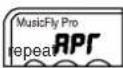
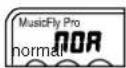
- Press and hold MENU/RPT button for 2 seconds when the music is playing. The repeat feature is then activated.
● The display is changed in the following order:
Storing frequencies
- Select the frequency with ▶buttons
- Press MEM SD-USB button until the display shows [-].
- Use ▶/◀◀ buttons to select the number of the memory and press MEM SD-USB button again.
Select stored frequencies
- Press MEM SD-USB button repeatedly until the desired frequency is selected.

natural_image
Color palette bar with grayscale shades and a small crosshair symbol at the bottom (no text or labels)Remote Control
text_image
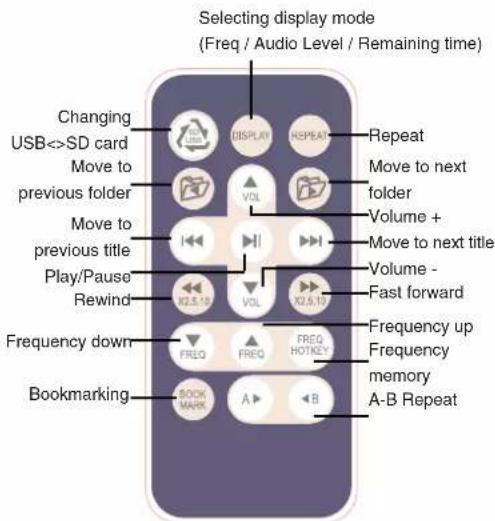
Selecting display mode (Freq / Audio Level / Remaining time) Changing USB<->SD card Move to previous folder Move to previous title Play/Pause Rewind Frequency down Bookmarking BOOK MARK A ▶ B REPEAT VOL VOL VOL VOL VOL VOL VOL VOL VOL VOL VOL VOL VOL VOL VOL VOL VOL VOL VOL VOL VOL VOL VOL VOL VOL VOL VOL VOL VOL VOL VOL VOL VOL VOLPlease use the remote control after having removed the protection sticker.

Press the button and choose the mode between SD card & USB mode.
Display Press DISPLAY button to change the display mode into frequency, remaining running time and audio level.
Repeat Press REPEAT button, the song you are listening to is played repeatedly. Press repeat button again to stop the repeat function.

Press the buttons to move to previous folder, first song of the folder is played.

Press but move to next song.
-22-


natural_image
Color palette bar with grayscale shades and a small crosshair symbol at the bottom (no text or labels)Remote Control
◀◀▶Press the buttons fastforward or rewind 2x, 5x, 10x.
Press the buttons to adjust the frequency in 0.1 MHz intervals. Hold the buttons longer than 2 seconds, the frequency is adjusted in 1 MHz intervals.
FREQ HOTKEY Press the button to select one of the stored frequencies (1-7). Press the button repeatedly until the desired frequency is selected.
A ▶ Selective replay of a part of a track. Press button to mark the starting. The playback of the song continues. Press ▶ mark the ending. To cancel press ▶ Bonce again.
BOOK MARK You can use this feature in case the playing time is long such as lecture fi le & language fi le. Before you shut the device off, press button to store the point of time. When you turn the device on again, the device plays from the point you memorized.


MFlysdDEF.indd 23
-23-

19.05.2008 16:43:16

natural_image
Color palette bar with grayscale squares and a small crosshair symbol at the bottom (no text or labels)Getting started
Getting started
- When you use MusicFly SD with portable audio device (MP3 player, CD player, portable DVD player, or mobile phone etc.) MusicFly SD lets you listen to your portable audio device (MP3 player, CD player, portable DVD player, or mobile phone etc.) through any FM radio.
● Automatically power is on once you put MusicFly SD into the car cigarette lighter power adapter.
You can also power on by pressing the MEM SD-USB button for about 2 seconds. If no audio signal is detected for 1 hour, power is automatically off.
- Turn on the radio and find a frequency that is not being used for broadcasting. Match the frequency of MusicFly SD on your radio using up/down button.
Select a frequency which sounds clear, makes less background noise than other radio stations.
- Connect portable audio device(MP3P, CDP, PMP, PDA, navigation or mobile phone etc.) to MusicFly SD with stereo cable.
● Turn on the audio device and press the play button. - Set the volume to a reasonable level to get the best signal quality. Set the volume of the audio device to medium level and control the delicate volume using radio volume.
- When you use MusicFly SD with portable memory device (USB storage, memory card or portable hard disk) you can listen to sound fi les like MP3, WMA in USB storage, through any FM radio.
- Plug USB storage into the USB port at the bottom of MusicFly, then MP3 or WMA files are played automatically stored in the USB storage.
● Support only MP3 and WMA file, the other file types and the files locked by DRM are not played. - Using USB storage Recognizee up to 32GByte, 1999 fi les. Supports directory loading up to 5-level depth, max 50 directories.
-24-

natural_image
Color palette bar with grayscale swatches and a small crosshair symbol at the bottom (no text or labels)Getting started
● Using portable hard disk
When you use portable hard disk, you need to divide the disk into under 32Gbyte and format FAT32.
MusicFly SD recognizes only the fi rst drive under 32Gbyte so you need to store the fi les that you want to listen to in the fi rst drive.

When you use portable hard disk, you must connect extra power with 'cigarette lighter Jack to USB' cable. Please ask the store or us for information about this. We do not take the responsibility of any problem caused by not connecting extra power.
Specification
Product Dimension 94 x 47 x 56mm
Weight of the product 52g
Frequency range 87.6 - 107.9MHz
Input Voltage 12V
Output power Conformity with FCC, CE, MIC
Modulation FM(F3E)
USB Rated output power 5V 200mA
Disposal of old electrical & electronic equipment

This symbol on the product indicates that this product shall not be treated as household waste. Instead it shall be handed over to the applicable collection point for recycling of electrical and electronic equipment. For more detailed information about recycling of this product, please contact your local city office or your household waste disposal service.
MFlysdDEF.indd 25
-25-

19.05.2008 16:43:17

natural_image
Color palette bar with grayscale swatches and a small crosshair symbol at the bottom (no text or labels)Features
Feature of playing defi ned folder
MusicFly SD has a feature that plays the music fi les only in defi ned folders named MP3, Musicfl y.
Name the folders MP3, Soundfl y and Musicfl y and store music fi les in those folders, then MusicFly SD plays the music fi les in those fi les. MusicFly SD supports up to 10 subdirectories per main directory and plays 50 music fi les per subdirectory, totally 500 fi les.
This feature shortens the loading speed when you use a mass storage device and lets you put the fi les in order. If you do not defi ne folder, MusicFly SD plays all MP3&WMA fi les in all folders in sequence.
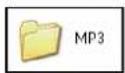
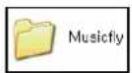
Support up to 10 subdirectories

Feature of supporting fi le index
MusicFly SD has fi le index feature that lets you set the play list as you want. If you number from 01 to 50 at the head of fi le names of each folder, MusicFly SD plays the fi les in order. If there are the fi les with given numbers and the fi les without numbers in one folder, MusicFly SD plays the fi les that have numbers fi rst and then plays the other fi les.
Tips for convenient use of MusicFly SD
The way to lessen noise
- Use MusicFly SD avoiding direct ray of light to lessen the noise caused by overheating.
- Do not put MusicFly SD near a magnet or devices which make strong electric power.
- Select the frequency that is not being used for broadcasting.
-26-


natural_image
Color palette bar with grayscale swatches and a small crosshair symbol at the bottom (no text or labels)Introduction
natural_image
Color palette bar with grayscale squares and a small crosshair symbol at the bottom (no text or labels)natural_image
Color palette bar with grayscale shades and a small crosshair symbol at the bottom (no text or labels)Mise en route
Eteindre
natural_image
Color palette bar with grayscale swatches and a small crosshair symbol at the bottom (no text or labels)Mise en route
Affi chage RDS
natural_image
Color palette bar with grayscale shades and a small crosshair symbol at the bottom (no text or labels)Mise en route
natural_image
Color palette bar with grayscale squares and a small crosshair symbol at the bottom (no text or labels)Télécommande
natural_image
Color palette bar with grayscale swatches and a small crosshair symbol at the bottom (no text or labels)Utilisation
natural_image
Color palette bar with grayscale swatches and a small crosshair symbol at the bottom (no text or labels)Foire aux questions
natural_image
Color palette bar with grayscale swatches and a small crosshair symbol at the bottom (no text or labels)Foire aux questions
natural_image
Color palette bar with grayscale swatches and a small crosshair symbol at the bottom (no text or labels)Informations service
Service client
Warranty regulations
- In general the European warranty regulations are valid. Warranty starts with receipt of unit. In a warranty case, please submit the unit together with invoice, unit pass and error description. Without these documentary evidence we are not obliged to a warranty performance.
- During warranty period we repair all constructional or material defects which are caused by a manufacturing fault. It is in the decision of the manufacturer to change or replace defective parts/units. Further claims are excluded. Changed parts will automatically go over into our property. We will not be held responsible for future damages.
- Manipulation on the unit through non-authorized companies/persons automatically leads to an end of warranty period.
- Excluded of warranty claims are damages due to improper treatment, not following the manual oxidation of batteries, permanent usage.
- The initial warranty period is not extended because of repair or replacement of parts.
- These warranty regulations are valid in the Federal Republic of Germany.