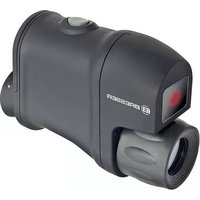
Digital Nightvision 3x20 - Night vision BRESSER - Free user manual and instructions
Find the device manual for free Digital Nightvision 3x20 BRESSER in PDF.


| Product type | Digital night vision |
| Brand | Bresser |
| Model | Digital Nightvision 3x20 |
| Magnification | 3x |
| Objective lens diameter | 20 mm |
| Camera resolution | 640 x 480 pixels |
| Maximum observation distance | 60 m (under ideal conditions) |
| Diopter compensation | +/- 5 |
| Power supply | 3 AA 1.5 V batteries (4.5 V total) |
| Battery life | 6 h (without IR) / 4 h (with IR) |
| Weight (without batteries) | 118 g |
| Weight (with batteries) | 189 g |
| Operating temperature | -10 °C to +45 °C |
| Integrated infrared illumination | Yes, 5 power modes (30, 15, 8 fps) |
| Included accessories | Bag, strap, 3 AA batteries, cleaning cloth, user manual |
| Warranty | 2 years |
| Care and cleaning | Clean the exterior with a clean, dry cloth. Do not use cleaning liquid. Remove batteries if not used for extended periods. |
| Safety | Never look directly at the sun. Keep out of reach of children. Risk of electric shock, choking, and fire. Use only recommended batteries. |
| Replacement parts and repairability | Do not disassemble the device. If damaged, contact the dealer. Repairs outside warranty are chargeable. |
Frequently Asked Questions - Digital Nightvision 3x20 BRESSER
User questions about Digital Nightvision 3x20 BRESSER
0 question about this device. Answer the ones you know or ask your own.
Ask a new question about this device
Download the instructions for your Night vision in PDF format for free! Find your manual Digital Nightvision 3x20 - BRESSER and take your electronic device back in hand. On this page are published all the documents necessary for the use of your device. Digital Nightvision 3x20 by BRESSER.
USER MANUAL Digital Nightvision 3x20 BRESSER
natural_image
Exterior view of a Bresser optical device with red lens and green screen, shown in outdoor setting (no text or symbols on main subject)DE Bedienungsanleitung · GB Instruction Manual · FR Mode d'emploi · NL Handleiding
IT Istruzioni per l'uso · ES Manual de instrucciones Art. No. 18-79000
(DE) WARNUNG!
Never look through this device directly at or near the sun. There is a risk of BLINDING YOURSELF!
Children should only use this device under supervision. Keep packaging materials away from children. There is a risk of SUFFOCATION.
(FR) ATTENTION!
This device is meant for private use. Respect others' privacy – do not use the device to look into other people's homes,
for example.
DANGER to your child! RISK of physical injury!

This device contains electronic components that are powered by either a mains connection or batteries. Never leave
a child unsupervised with this device. The device should only be used as per these instructions otherwise there is a serious RISK of ELECTRICAL SHOCK.
Children should only use this device under supervision. Keep packaging materials (plastic bags, rubber bands, etc.) away from children. There is a risk of SUFFOCATION.
Batteries should be kept out of children's reach. When inserting batteries please ensure the polarity is correct. Leaking or damaged batteries can cause injury if they come into contact with the skin. If you need to handle such batteries please wear suitable safety gloves.
DANGER of fire and explosion!
Do not expose the device to high temperatures. Use only the battery types recommended. Never short circuit the device or batteries or throw into a fire. Exposure to high temperatures or misuse of the device can lead to short circuits, fire or even explosion!
RISK of material damage!

Never take the device apart. Please consult your dealer if there are any defects. The dealer will contact our service
centre and send the device in for repair if needed.
Only use the batteries that have been recommended. Always replace low or used batteries with a completely new set of full capacity batteries. Do not combine batteries of different brand, type or capacity. Batteries should be removed from the device after long periods of disuse.
TIPS on cleaning

Remove the device from it's energy source before cleaning (remove plug from socket / remove batteries).
Clean the exterior of device with a dry cloth. Do not use cleaning fluids so as to avoid causing damage to electronic components.
Protect the device from dust and moisture. Store the device in the bag supplied or in its original packaging. Batteries should be removed from the device if it is not going to be used for a long period of time.
DISPOSAL

Dispose of the packaging material/s as legally required.
Consult the local authority on the matter if necessary.
Do not dispose of electrical equipment in your ordinary refuse. The European guideline 2002/96/EU on Electronic and Electrical Equipment Waste and relevant laws applying to it require such used equipment to be separately collected and recycled in an environment-friendly manner.
Empty batteries and accumulators must be disposed of separately. Information on disposing of all such equipment made after 01 June 2006 can be obtained from your local authority.
① Power Switch
② Mode button
③ Ocular Lens
④ Object Lens
⑤ Infrared Lighting (IR)
⑥ (a) Battery Compartment (b) Compartment door with lock
⑦ Lens caps
Technical data
Model NV 3x20 Digital
Visual magnification 3x
Objective lens diameter 20 mm
Resolution of Camera 640x480
Max. observing distance* 60 m
Dioptre correction +/- 5
Working voltage 4.5V (3 x AA, 1.5V)
Operating temperature range -10 °C to approx. +45 °C
Operating time
(with/without infrared lighting) 4 / 6 hours
Batteries: 3 pieces, type AA 1.5 V
Dimensions (L x B x H) 113 x 42 x 79 mm
Weight (with/without batteries) 189g / 118g
*Maximum distance from which a person can be recognised under ideal observation conditions (ideal observation conditions: no fog, dust etc.) with lighting of 14 moon (0.05 lux).
Includes
- Carry bag
- Hand strap
- 3 alkaline batteries, type AA, 1.5V
- Lens cleaning cloth
- Instruction manual
DC: 4.5V
(3 batteries AA)

Introduction
The Bresser NV 3x20 Digital incorporates the latest developments in the field of digital night vision technology. This device was developed for night observation in low-light conditions. The integrated infrared lighting considerably boosts the performance of the device. The Bresser NV 3x20 Digital can operate independently for up to 6 hours with three AA batteries.
User-friendly, compact and handy, the Bresser NV 3x20 Digital is the perfect choice for observations made in natural surroundings, hunting and tourism, night sporting activities and orienteering, professional and amateur fishing, boating, search and rescue operations, security services.
The infrared lighting is an external light source, which transmits a light beam that, although invisible to the human eye, can be detected by the digital chip. The night vision device can even be used in complete darkness thanks to the infrared lighting.
General information
Night vision products are electro-optical devices which support vision in conditions of virtually total darkness. This is made possible by enhancing the residual light present, e.g. from the moon or stars. Thanks to the integrated infrared lighting, which represents an external light source, observation is even possible in conditions of pitch darkness.
Your new device is a professional product, which requires careful handling and maintenance like every other high performance device. The technology included in your new night vision device is specially designed to support observations made under conditions of darkness. In comparison to binoculars, night vision devices do not incorporate exceptionally high magnifications, since these often adversely affect the resolution and the ability to enhance lighting.
Battery installation
Loosen the lock of the battery compartment door (6b) and flip down the door to open. Insert 3 AA batteries into the container. Please be careful to ensure the correct polarity (as indicated on the inside of the battery container lid). To extend the service life of the device, we recommend that alkaline batteries be used.
Flip up the battery compartment door to close it, hold it firmly and lock it.
Important!
It is advisable to remove the batteries when the device is not used for more than 24 hours. This prevents the batteries from leaking and extends their service life.
Please do not use rechargeable batteries, since the base voltage they provide is insufficient. We recommend using high performance type AA 1.5 V alkaline batteries.
Using the device
Remove the lens caps (7). Slide the Power Switch (1) to turn the device on. Look through the Ocular Lens (3) turn it to focus your eye piece until the black frame of the screen is sharp.
Line up the device with an object at a distance; turn the Object Lens (4) to focus your viewing object. You are required to re-focus your device whenever the distance between the device and your viewing object changed. While the device is turned on, press the Mode button (2) briefly to cycle through the operation modes:
| Mode 1(Initial mode) | Mode 2 Mode 3 Mode 4 Mode 5 | ||||
| IR 1/3 Full Power 2/3 Full Power Full Power | |||||
| ImageFrameRate(Exposure) | 30 fps 30 fps 15 fps 15 fps 8 fps | ||||
Slide the Power Switch (1) to turn the device off.
Special operating characteristics
The device can be used in day or night, but should not be exposed to any bright light.
If the device has initially been used in cold conditions and is then brought into a warmer room, allow it to stand in its case for at least 2-3 hours to avoid any condensation forming on the electro-optical elements.
Never immerse the device in liquids. Do not expose the device to either rain or strong sunlight. Avoid exposure to severe shock or heat sources, which may damage the device.
The following table provides a list of possible problems which may occur during the operation of the device.
WARRANTY
The period of warranty is 2 years, beginning on the day of purchase. Please keep the cash receipt as evidence of purchase. Devices which become defective during the warranty period can be returned to the dealer where the device was bought. The repaired device or a new one will then be returned to you. In the case of defects which occur after the end of the warranty period, the devices can also be returned. However, repairs which become necessary after the end of the warranty period will be subject to a service fee.
Important:
Make sure to return the device carefully packed in the original packaging in order to prevent transport damage. Please also enclose the cash receipt (or a copy). This warranty does not imply any restriction of your statutory rights.
Your dealer:
| Problem Possible cause Solution | ||
| The device cannot be switched on. Check to ensure the correct polarity of the batteries in the container. | Check to ensure the batteries are not flat. Switch the device off and then on again. | |
| Either replace the batteries or ensure they are inserted correctly. | ||
| Poor imaging quality. Check whether the eye piece and lens are appropriately adjusted. Ensure that the lenses are not bloomed or dirty. | Carefully clean the lenses with a soft and lint-free cleaning cloth (e.g. microfiber) | |
| Multiple luminous or black points (pixels) are visible on the screen of the device. | The presence of such pixels is due to the manufacturing process used to create the matrix. | This is not a defect. |
Batteries: 3 pièces, Type AA 1.5 V
Dimensions (L x L x H) 113 x 42 x 79 mm
Installation batteries
Special operating characteristics
- (DE) WARNUNG!
- (FR) ATTENTION!
- DANGER to your child! RISK of physical injury!
- DANGER of fire and explosion!
- RISK of material damage!
- TIPS on cleaning
- DISPOSAL
- Technical data
- Includes
- Introduction
- General information
- Battery installation
- Important!
- Using the device
- Special operating characteristics
- WARRANTY
- Installation batteries
Brand : BRESSER
Model : Digital Nightvision 3x20
Category : Night vision