QTP 5 - Receiver LD Systems - Free user manual and instructions
Find the device manual for free QTP 5 LD Systems in PDF.



| Product type | Touchscreen for fixed installation |
| Brand | LD Systems |
| Model | QTP 5 |
| Processor | RK3566 – Quad-core up to 1.8 GHz |
| RAM | 2 GB |
| Internal memory (storage) | 16 GB |
| Screen resolution | 1280 x 720 pixels |
| Screen brightness | 300 nits |
| Touchscreen type | 5-point capacitive IPS |
| Operating system | Android 11 |
| Connectivity | Ethernet 10/100 Mbps, Wi-Fi 2.4 GHz, Bluetooth 4.0 |
| Connection ports | Ethernet RJ45, Power In, RS485 (not functional), USB-C, TF/MicroSD card reader |
| Power supply | PoE+ (IEEE 802.3at) or external 12 V / 2 A (optional) |
| Dimensions (W x H x D) | 145.7 x 84 x 38 mm |
| Weight | 0.32 kg |
| Operating temperature | 0 to 40 °C |
| Relative humidity | < 80 % (non-condensing) |
| Mounting | EU or type 86 back box (landscape format recommended) |
| Package contents | Touchscreen, mounting plate with locking screws, manual |
| Intended use | Professional equipment for event technology (indoor) |
| Safety | Indoor use only, do not expose to water, hearing risk at high volume |
Frequently Asked Questions - QTP 5 LD Systems
User questions about QTP 5 LD Systems
0 question about this device. Answer the ones you know or ask your own.
Ask a new question about this device
Download the instructions for your Receiver in PDF format for free! Find your manual QTP 5 - LD Systems and take your electronic device back in hand. On this page are published all the documents necessary for the use of your device. QTP 5 by LD Systems.
USER MANUAL QTP 5 LD Systems
natural_image
Black rectangular electronic device with a blank screen, shown against a white background (no text or symbols visible)QTP 5
QUESTRA TOUCHSCREEN DISPLAY 5-INCH WITH ANDROID 11 AND POE LDQTP5
CONTENTS / INHALTSVERZEICHNIS / CONTENU / CONTENIDO / TREŚĆ / CONTENUTO
ENGLISH
ABOUT THIS MANUAL 3
INTENDED USE 3
SAFETY INSTRUCTIONS 3
PACKAGING CONTENT 3
CONNECTIONS, OPERATING AND DISPLAY ELEMENTS 4
INSTALLATION
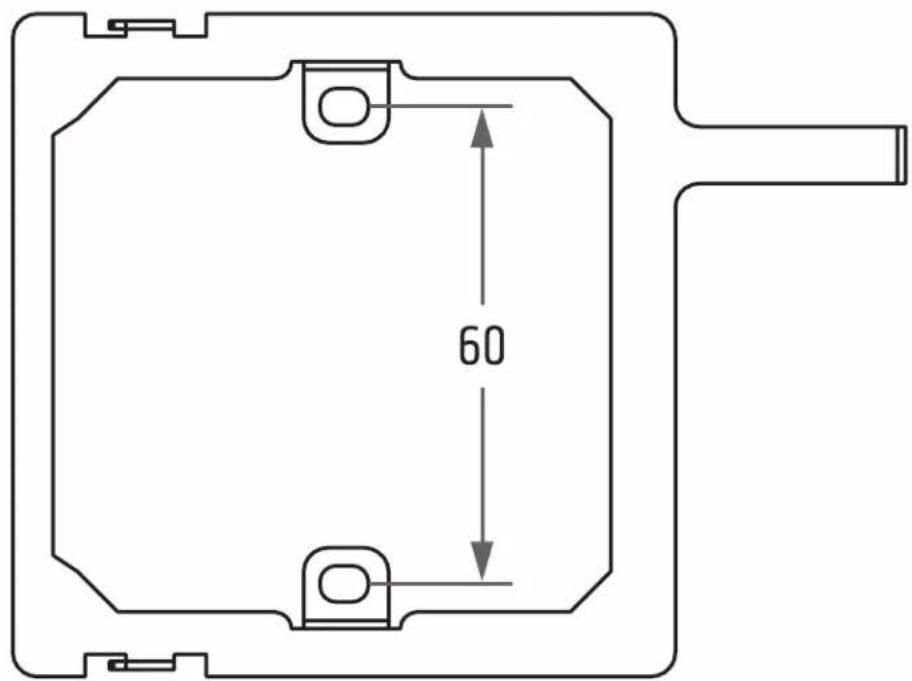
HOLE SPACING 5
AUTOSTART
IP CONFIGURATION 9
TECHNICAL DATA 9
DISPOSAL
MANUFACTURER'S DECLARATIONS 10
DEUTSCH
This device was developed and manufactured under high quality requirements to ensure many years of trouble-free operation. This is what LD Systems stands for with its name and many years of experience as a manufacturer of high-quality audio products. Please read these operating instructions carefully so that you can quickly and optimally use your new LD Systems product. You can find more information about LD Systems on our website WWW.LD-SYSTEMS.COM
ABOUT THIS MANUAL
- Read the safety instructions and the entire manual carefully before commissioning.
- Observe the warnings on the unit and in the operating instructions.
• Always keep the operating instructions within reach. - If you sell or pass on the appliance, be sure to hand over these operating instructions as well, as they are an essential part of the product.
INTENDED USE
The product is a device for professional audio installation! The product has been developed for professional use in the field of audio installation and is not intended for use in households! Furthermore, this product is intended for installation by qualified persons with specialist knowledge and for operation by instructed persons! The use of the product outside the specified technical data and operating conditions is considered as not intended! Liability for damages and third party damages to persons and property due to non-intended use is excluded! The product is not suitable for:
- Persons (including children) with limited physical, sensory or mental capabilities or lack of experience and knowledge.
• Children (children must be instructed not to play with the device).
SAFETY INSTRUCTIONS

HAZARD:
- Please read these instructions carefully.
- Keep all information and instructions in a safe place.
- Follow the instructions.
- Use the accessory in the prescribed manner only.
- Do not open or modify the product.
CHOKING HAZARD! KEEP AWAY FROM CHILDREN! THE PRODUCT CONTAINS SMALL PARTS THAT CAN BE SWALLOWED AND PACKAGING MATERIAL THAT CAN BE SWALLOWED! PLASTIC BAGS MUST BE KEPT OUT OF REACH OF CHILDREN!

CAUTION: HIGH VOLUME AUDIO PRODUCTS!
This touch panel and associated products are intended for professional use. The commercial operation is subject to the applicable national regulations and guidelines for accident prevention. Hearing damage due to high volume and continuous exposure: The use of this touch panel and related products may generate high sound pressure levels (SPL) that may cause hearing damage. Avoid exposure to high volumes!

FOR INDOOR USE ONLY:
This symbol indicates electrical equipment designed primarily for indoor use
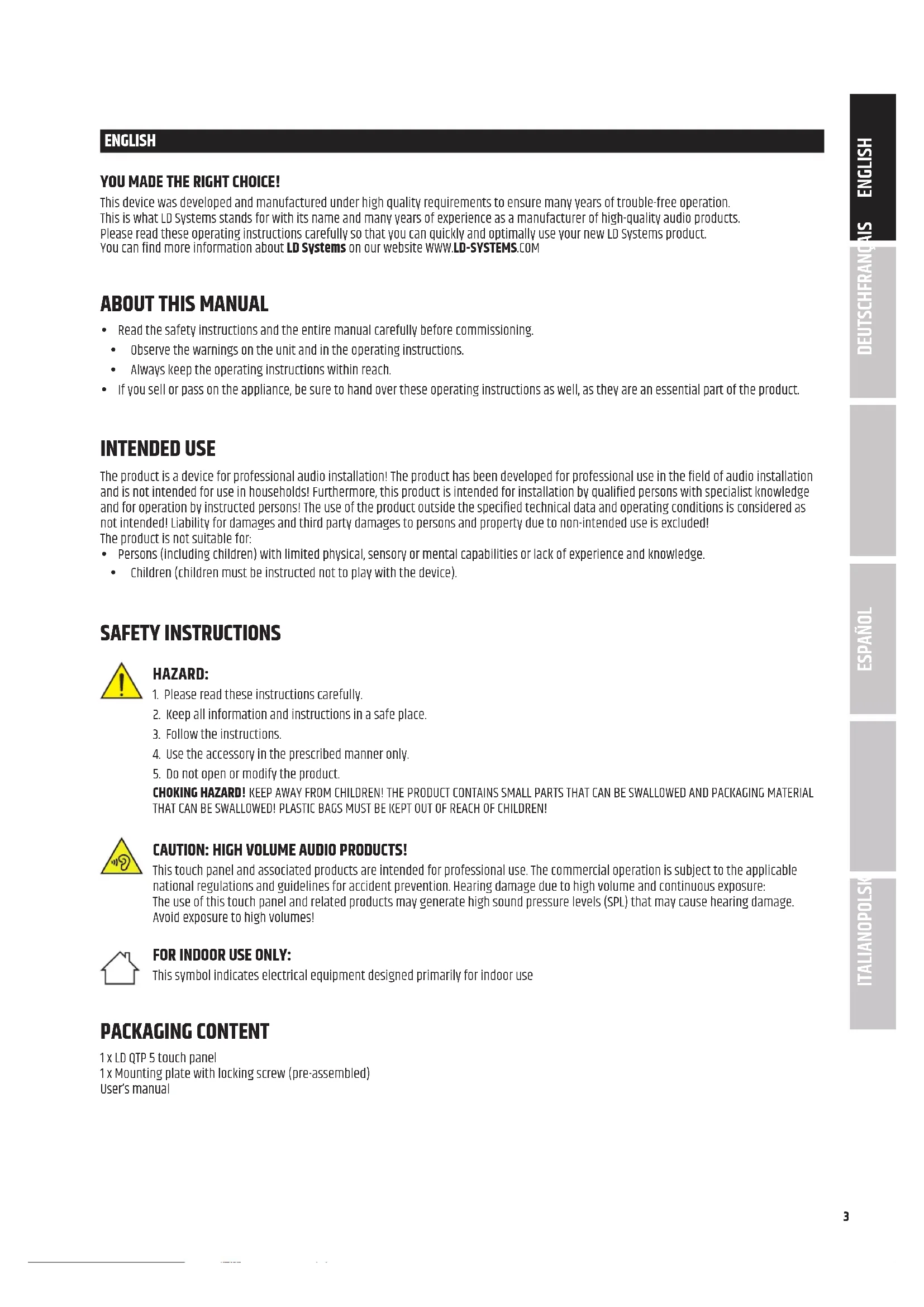
PACKAGING CONTENT
1 x LD QTP 5 touch panel
1 x Mounting plate with locking screw (pre-assembled)
User's manual
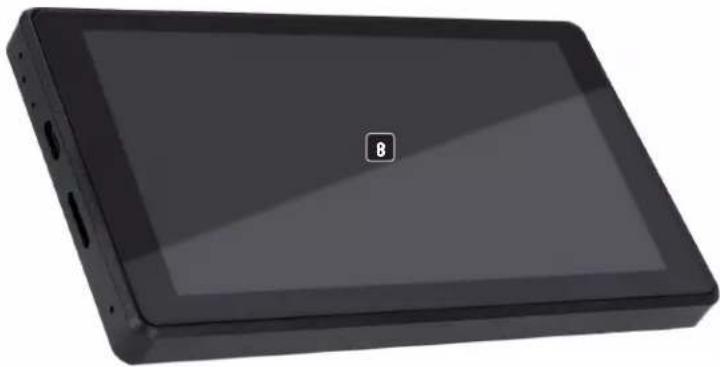
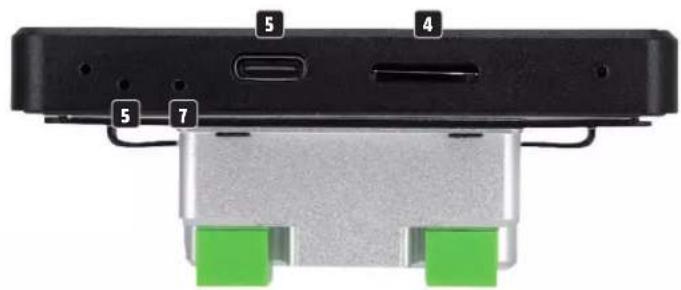
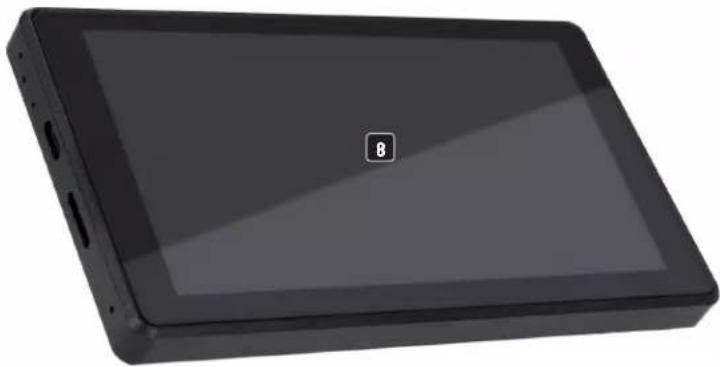
CONNECTIONS, OPERATING AND DISPLAY ELEMENTS
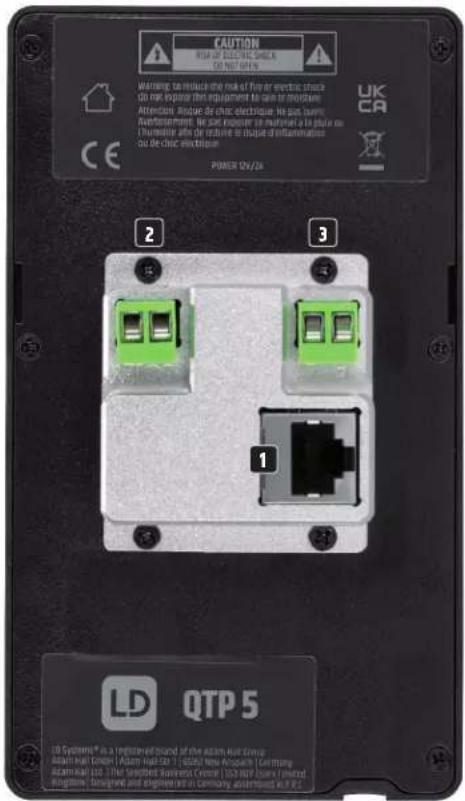
1
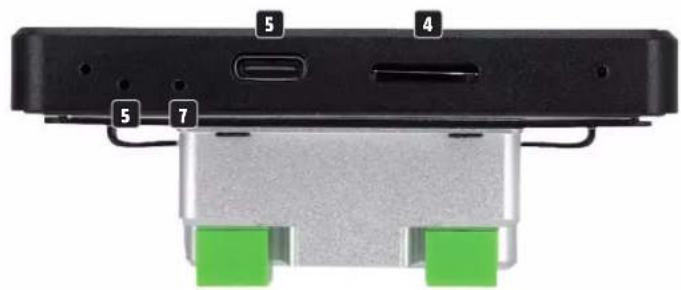
natural_image
Exterior view of a black rectangular electronic device with a display screen and a small square badge labeled '8' (no text or symbols on the device itself)1 ETHERNET CONNECTION
Ethernet connection for the data connection and power supply via PoE (Power over Ethernet).
2 POWER IN
Alternative power supply via an optionally available power supply unit (12V / 2A DC voltage, ensure correct polarity, see labelling).
3 SERIAL INTERFACE RS485
Currently without function.
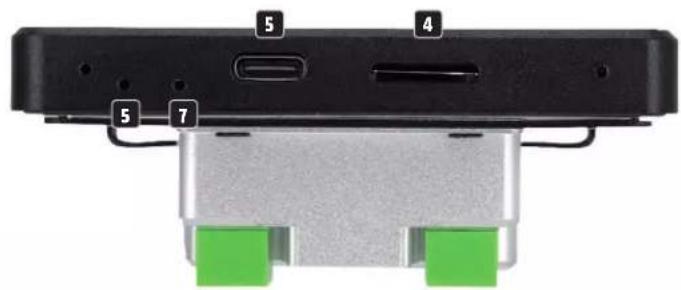
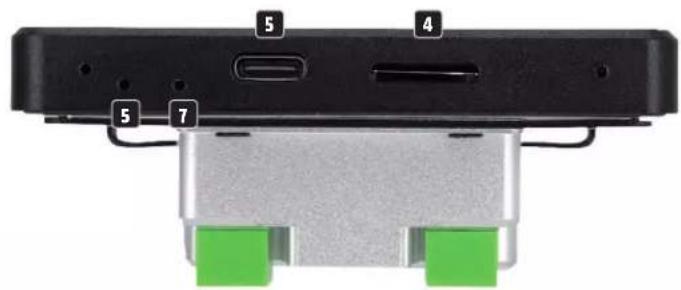
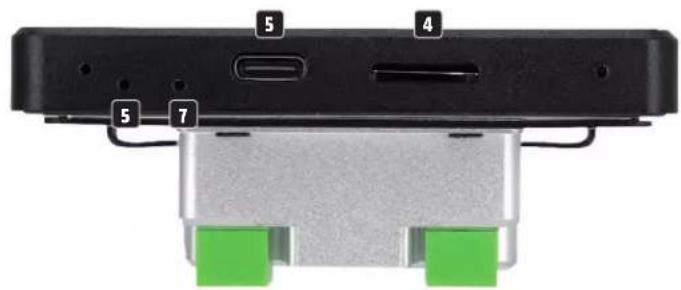
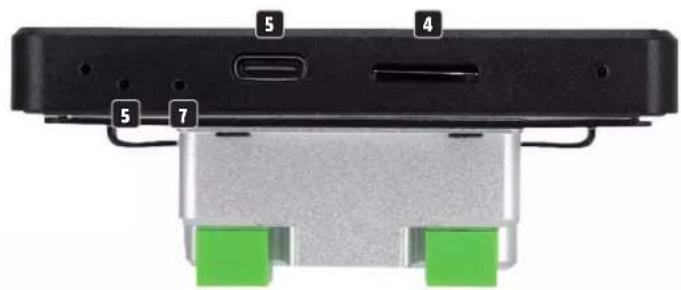
4 TF-CARD
Slot for a TF card or MicroSD card.
5 TYPE-C
USB-C port for data connection with a computer.
6 RESTART
Use a paper clip, for example, to force a restart of the unit.
7 SET
For service purposes only.
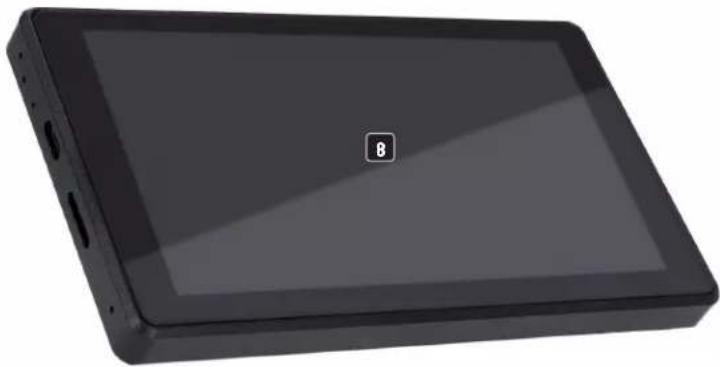
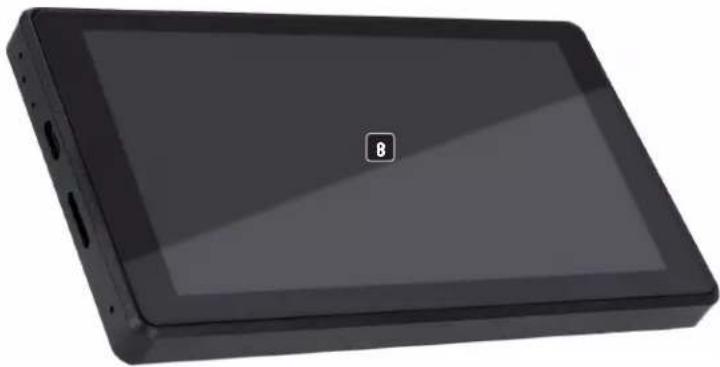
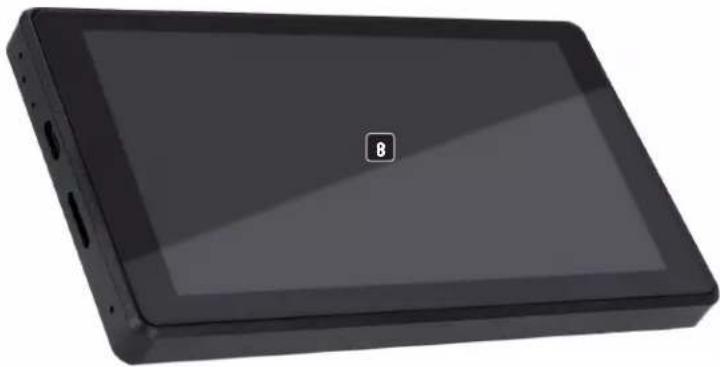
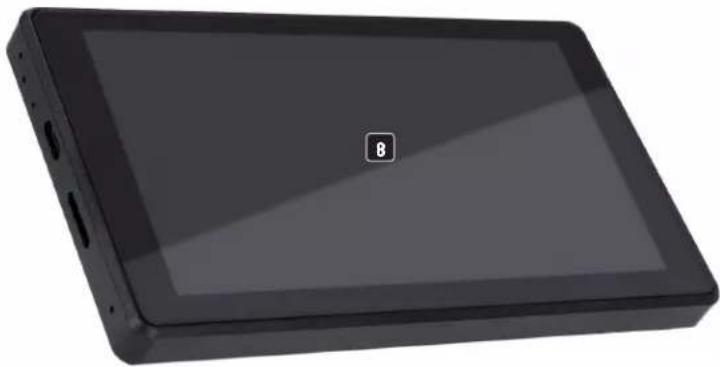
8 DISPLAY
5.5 inch touch display.
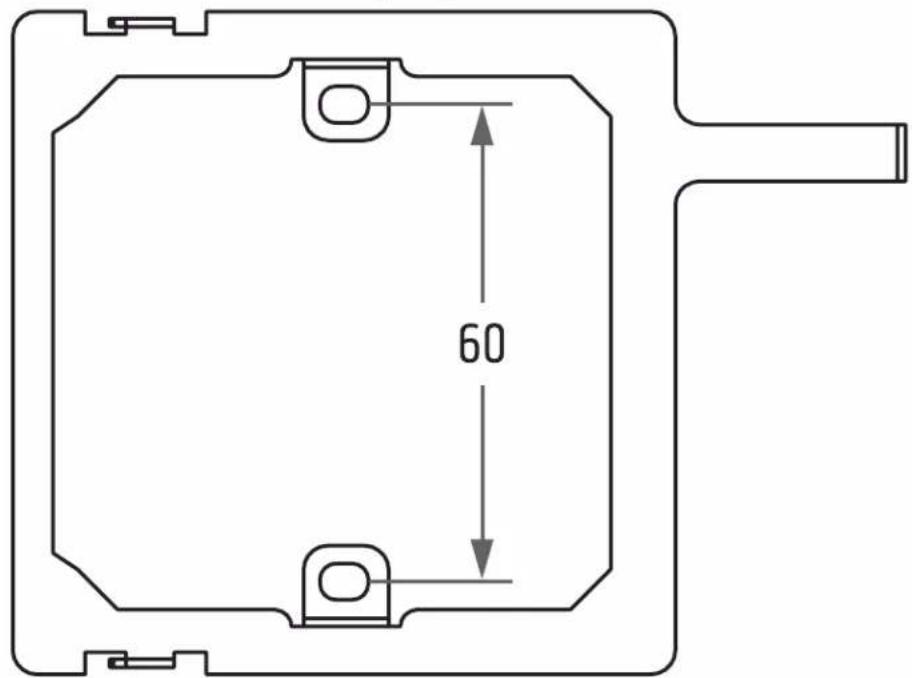
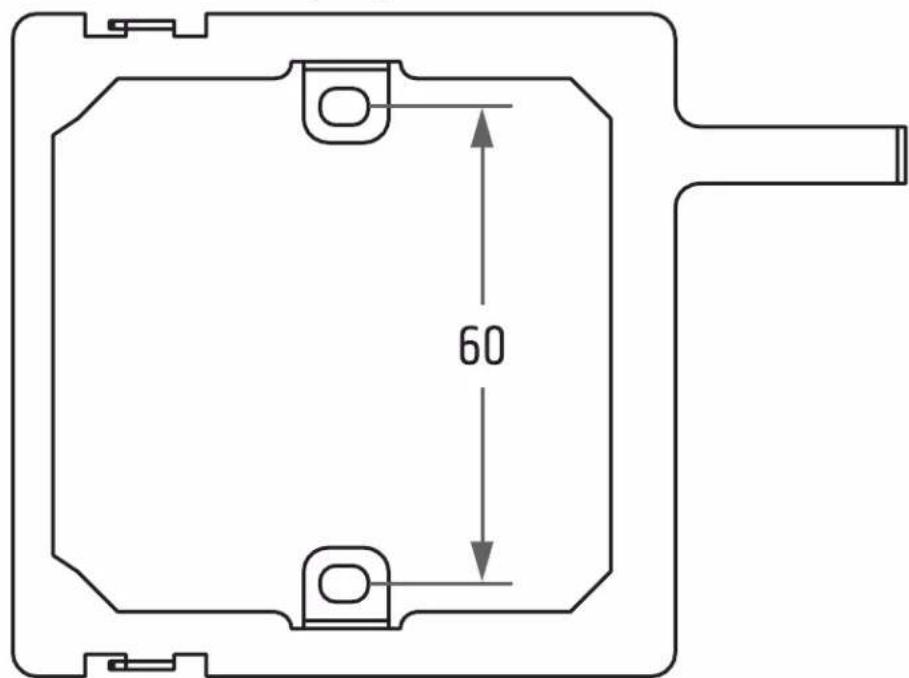
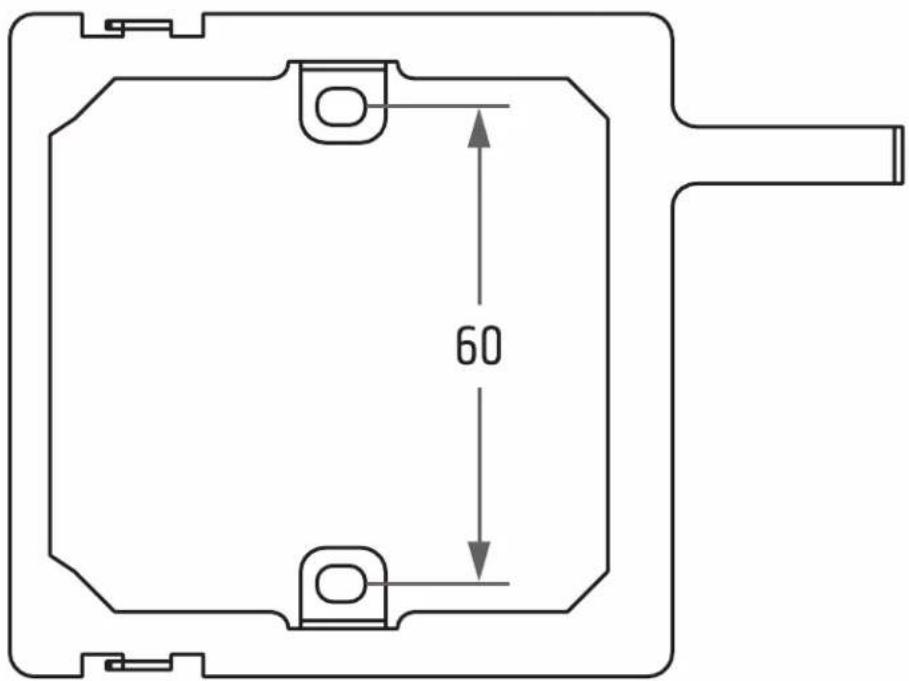
9 THREAD
Thread for fastening the mounting plate (mounting plate and locking screw included).
INSTALLATION
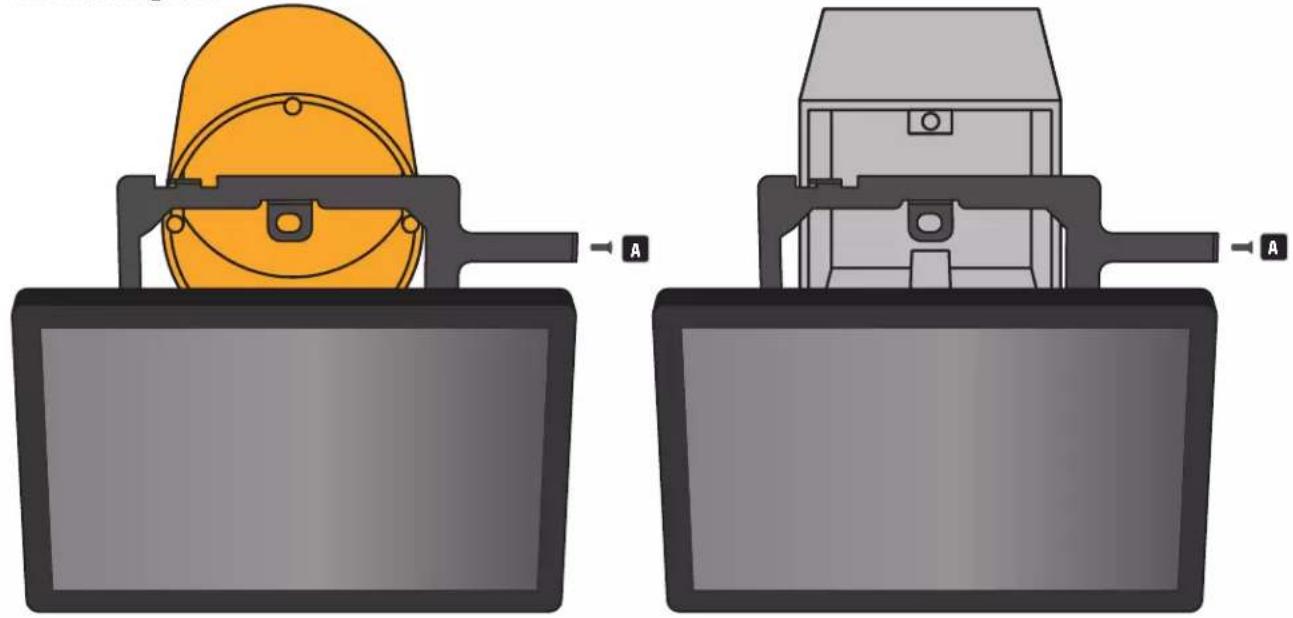
Make sure the flush-mounted box is deep enough (connection terminal plus Ethernet plug).
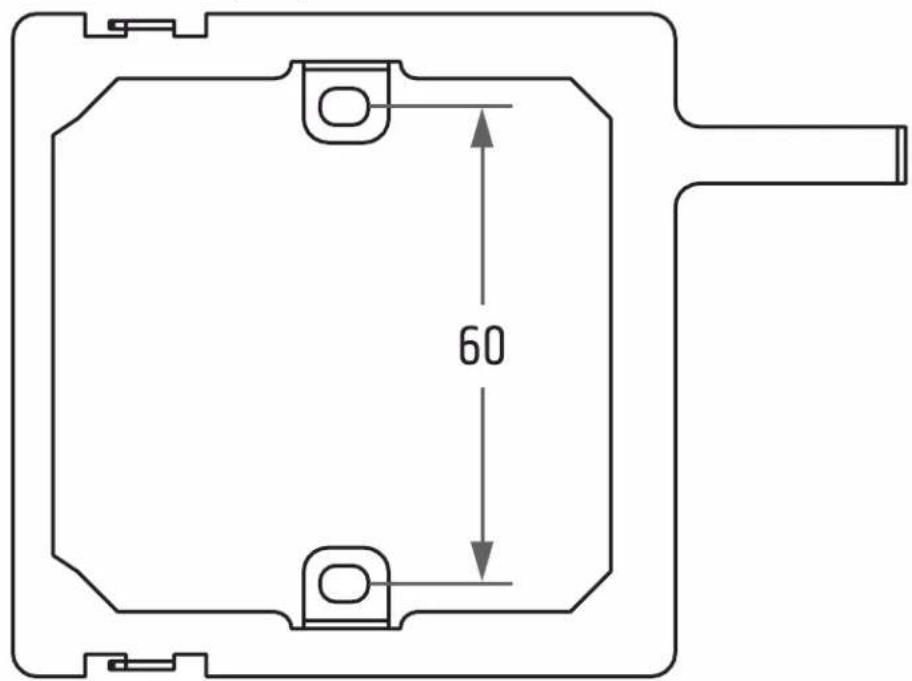
RECOMMENDATION: Mount the touch panel in landscape format with the locking screw A pointing to the right on a suitable location on a wall. The mounting plate of the QTP5 touch panel is compatible with EU type and type 86 flush-mounted boxes. Installation of the touch panel only by authorised specialist personnel and electricians. No liability is assumed for the mounted flush-mounted box and its function. Inspection by qualified personnel is required.
Loosen the locking screw A from the mounting plate, remove the mounting plate from the touch panel and fix it to the corresponding flush-mounted box. Now make the cable connections with the touch panel. Place the touch panel on the mounting plate so that the two hooks on the left side of the mounting plate engage in the corresponding recesses in the touch panel and secure the connection with the previously loosened locking screw.
natural_image
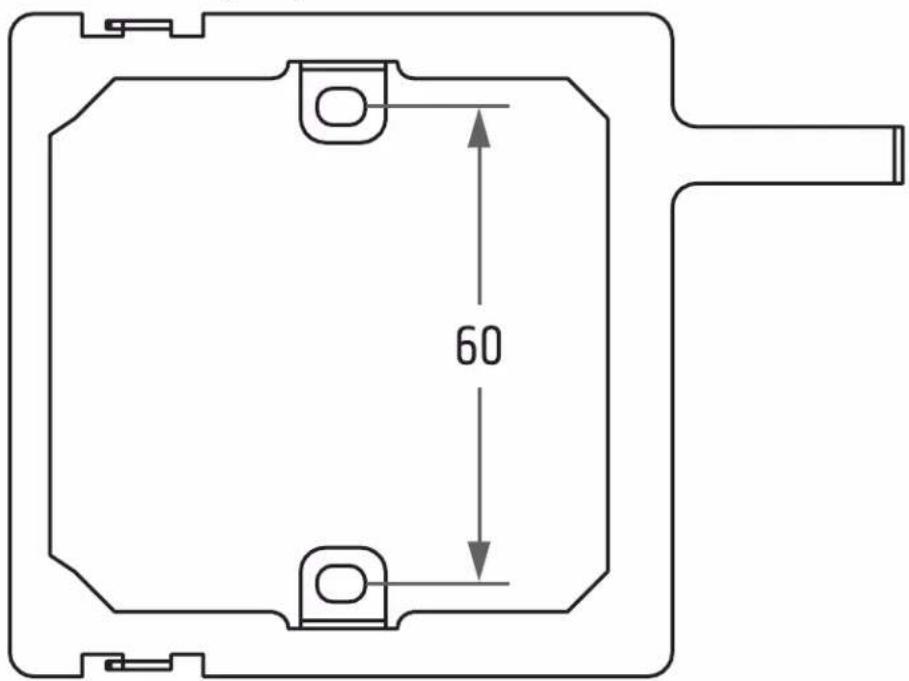
Two mechanical components with labeled parts A, showing different assembly or installation views (no text or symbols present)HOLE SPACING (mm)
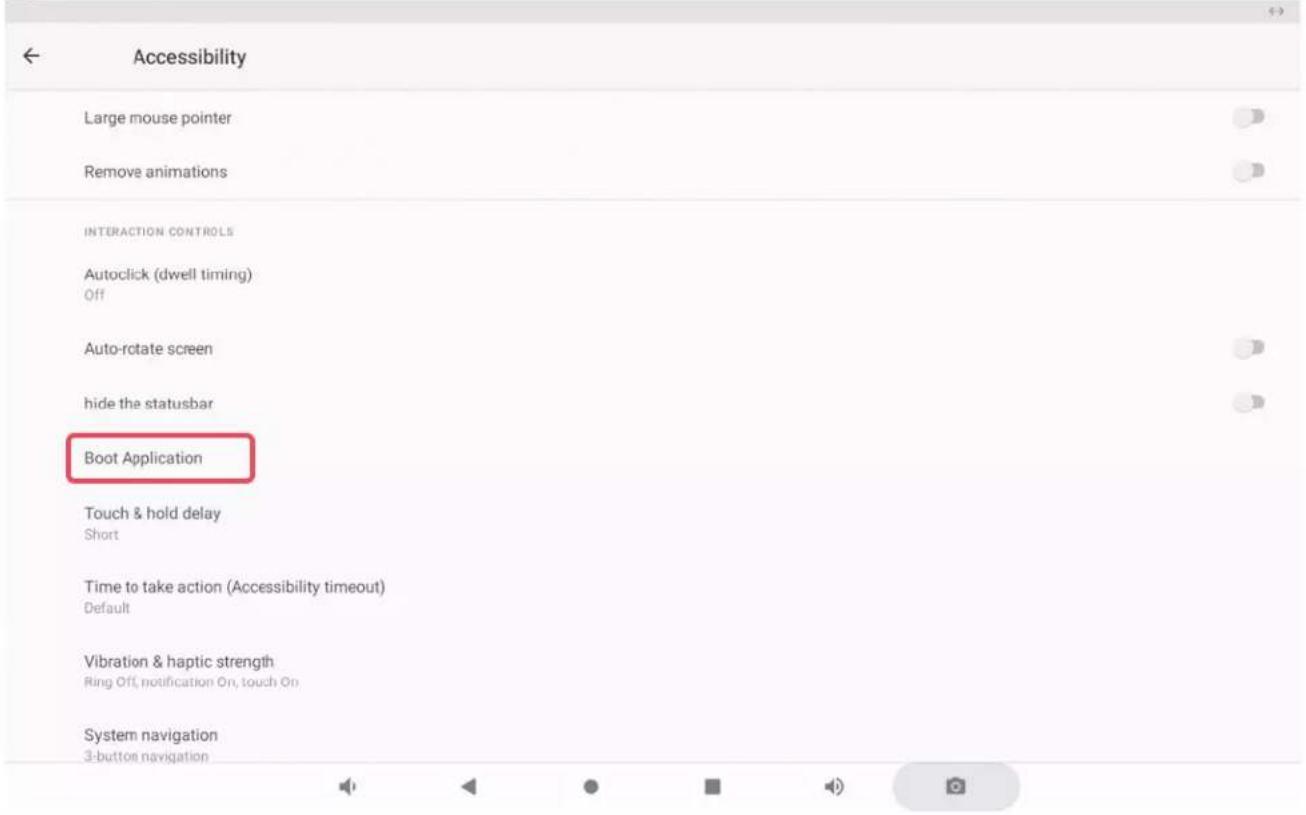
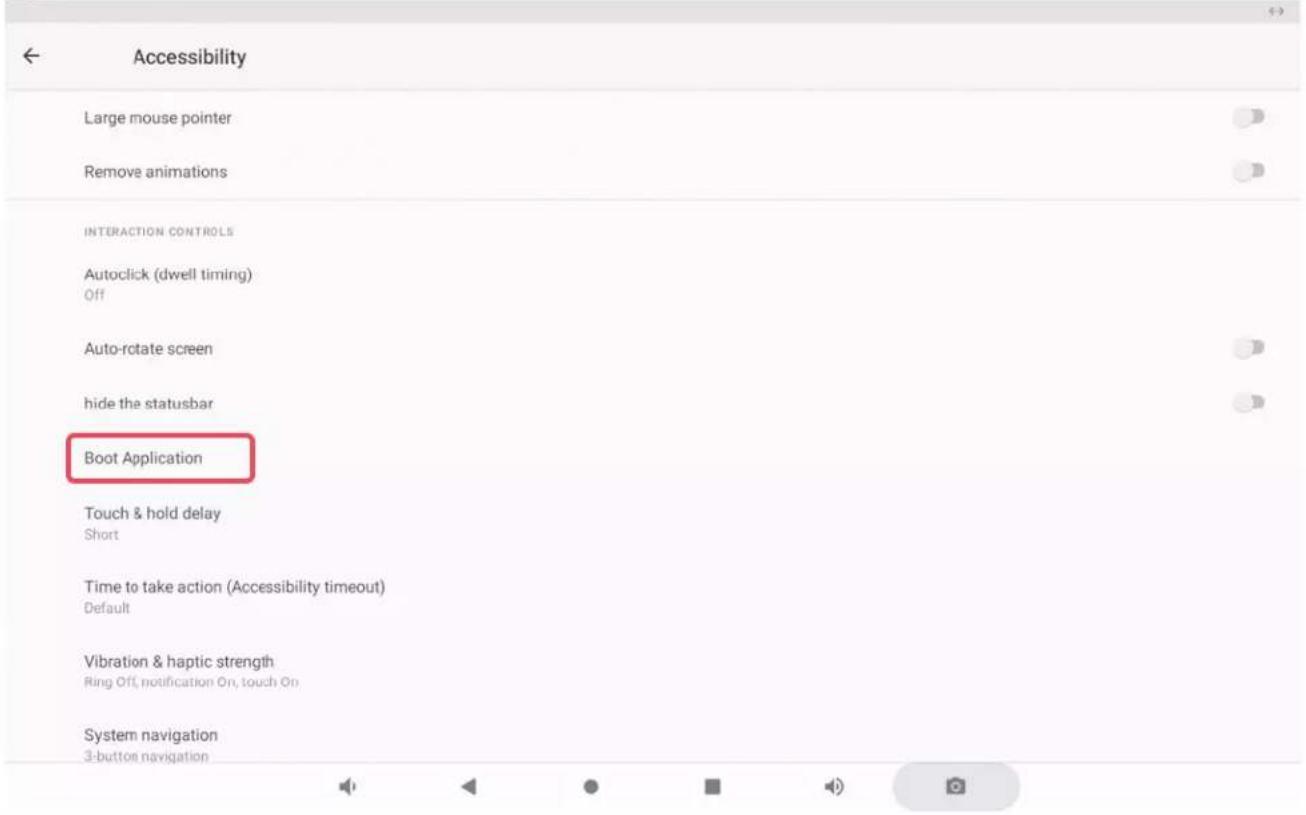
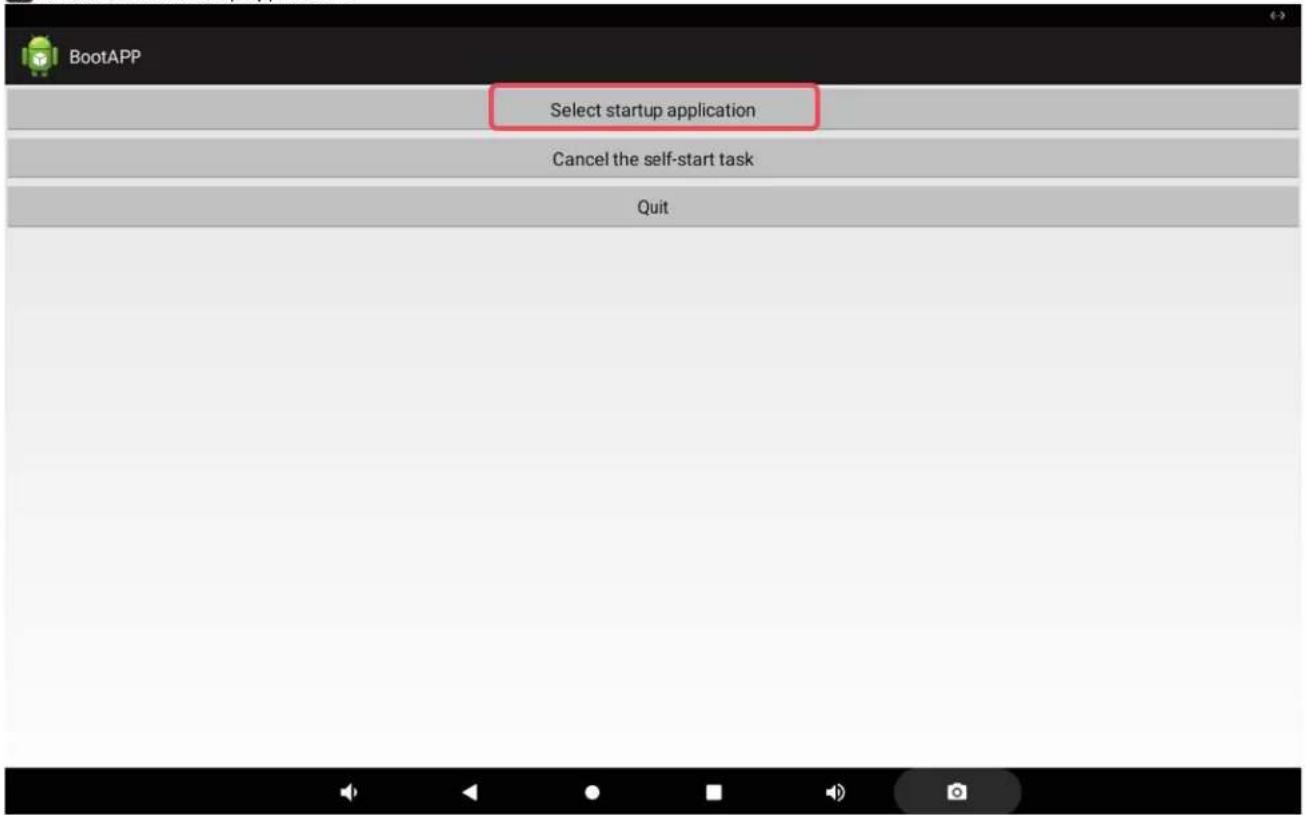
AUTOSTART
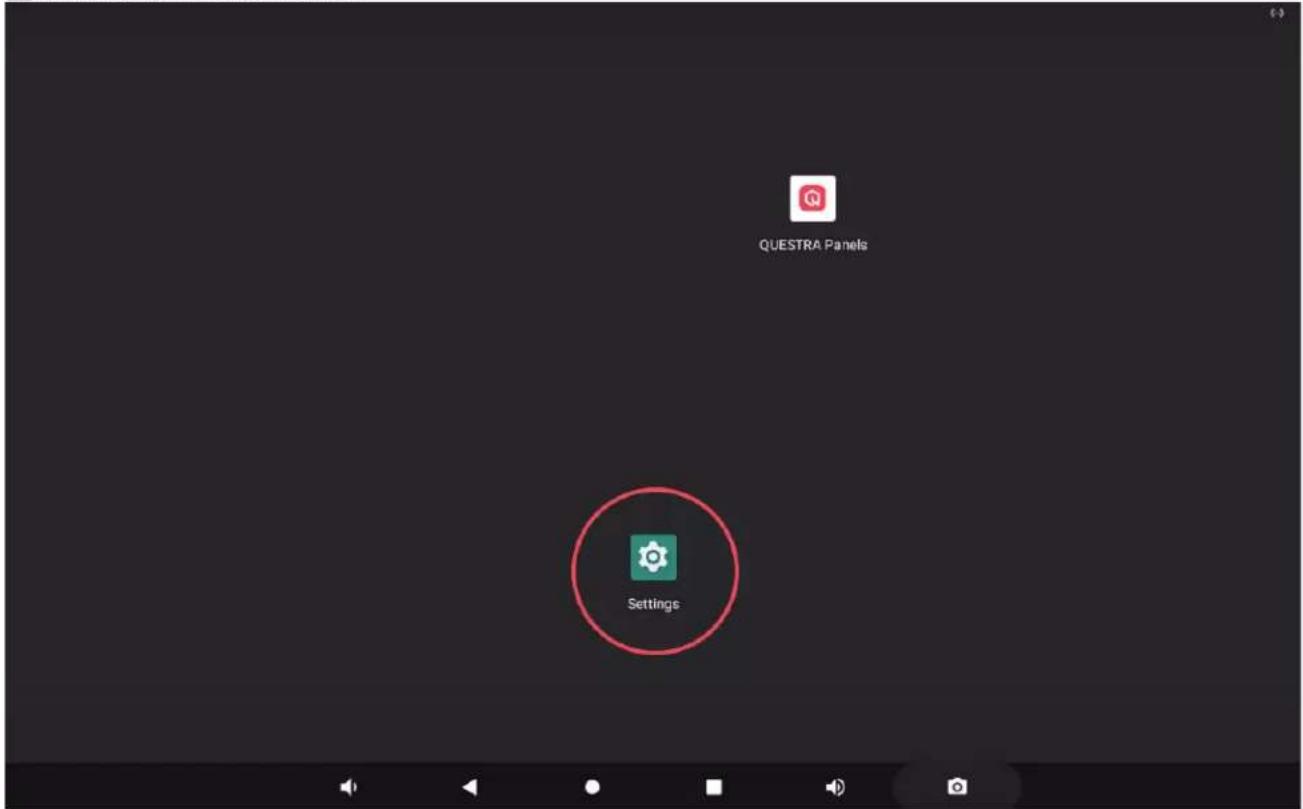
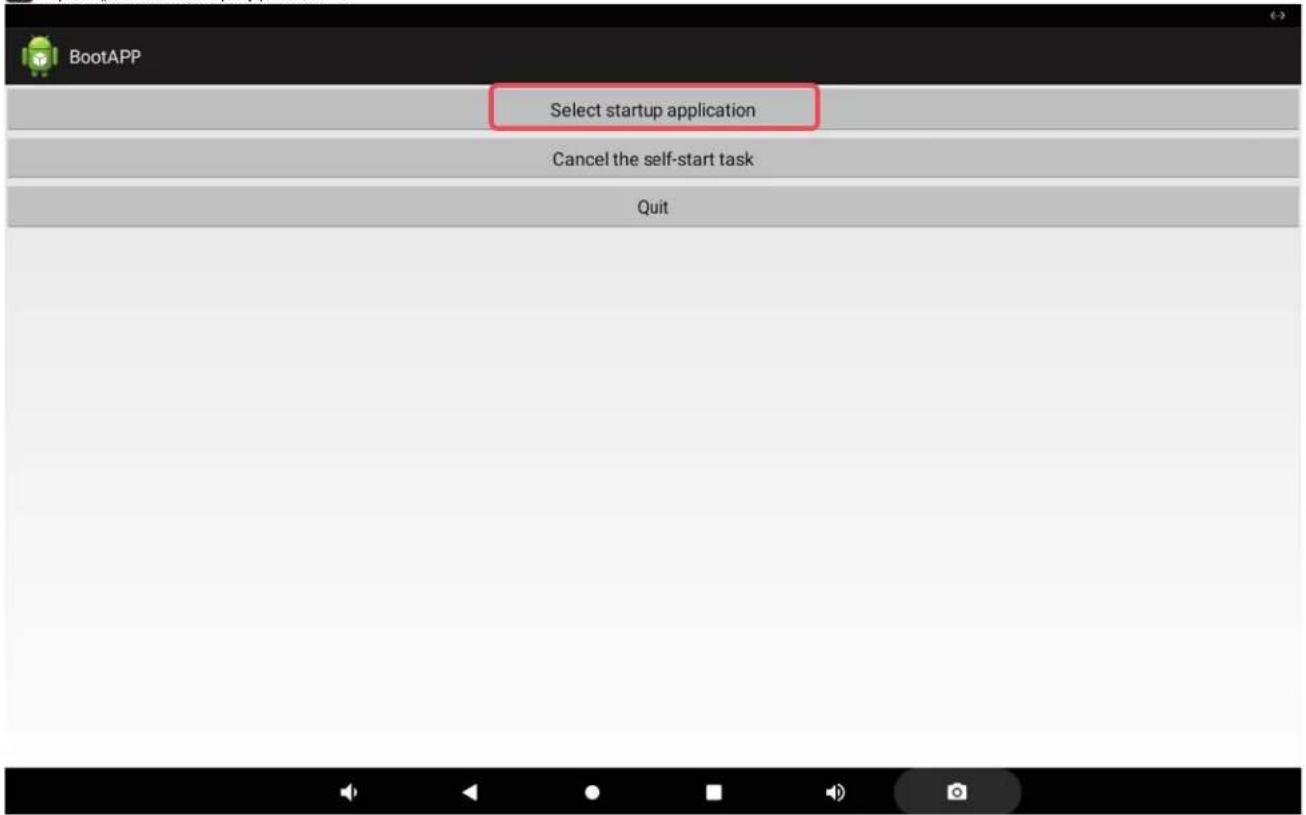
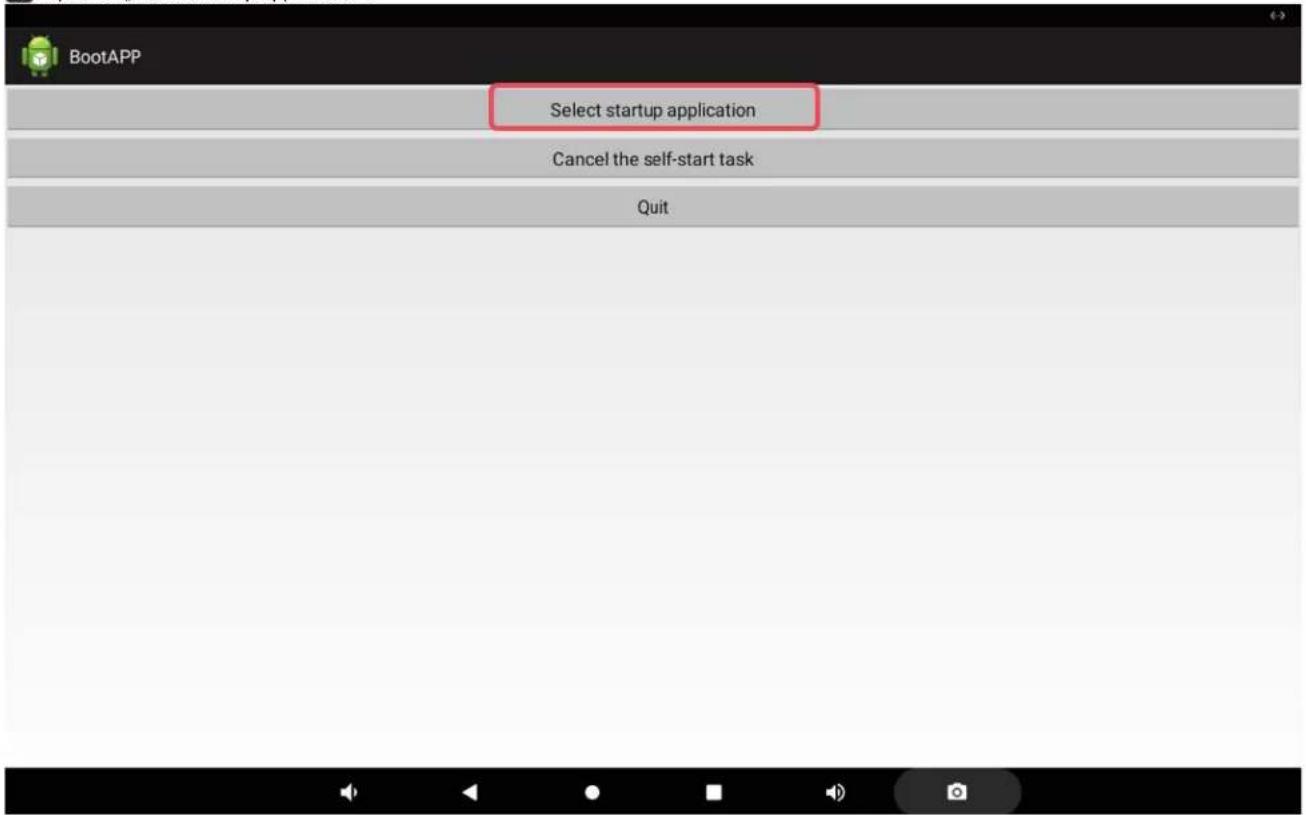
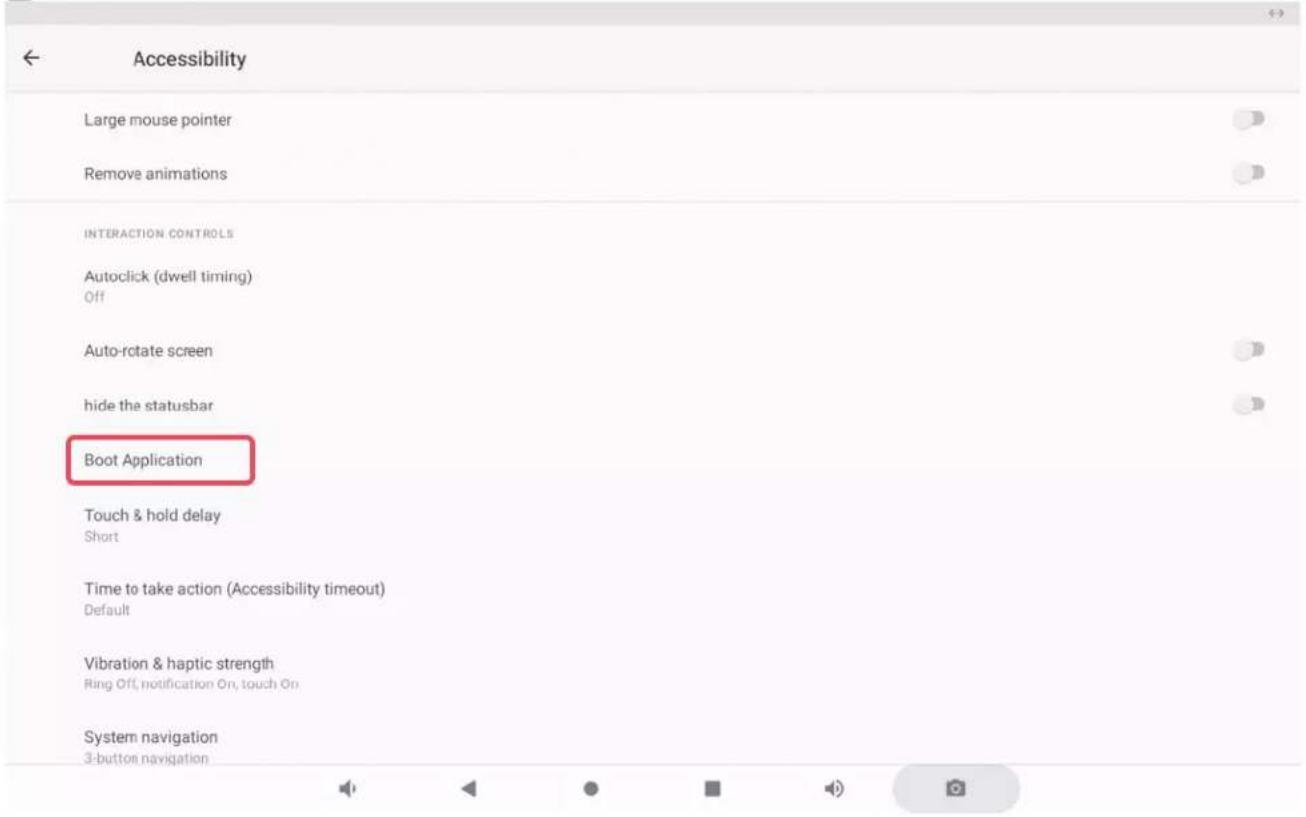
As the system language of the touch panel is English ex works, the following screenshots are also in English. The system language can be set.
1 Open the system settings „Settings“.
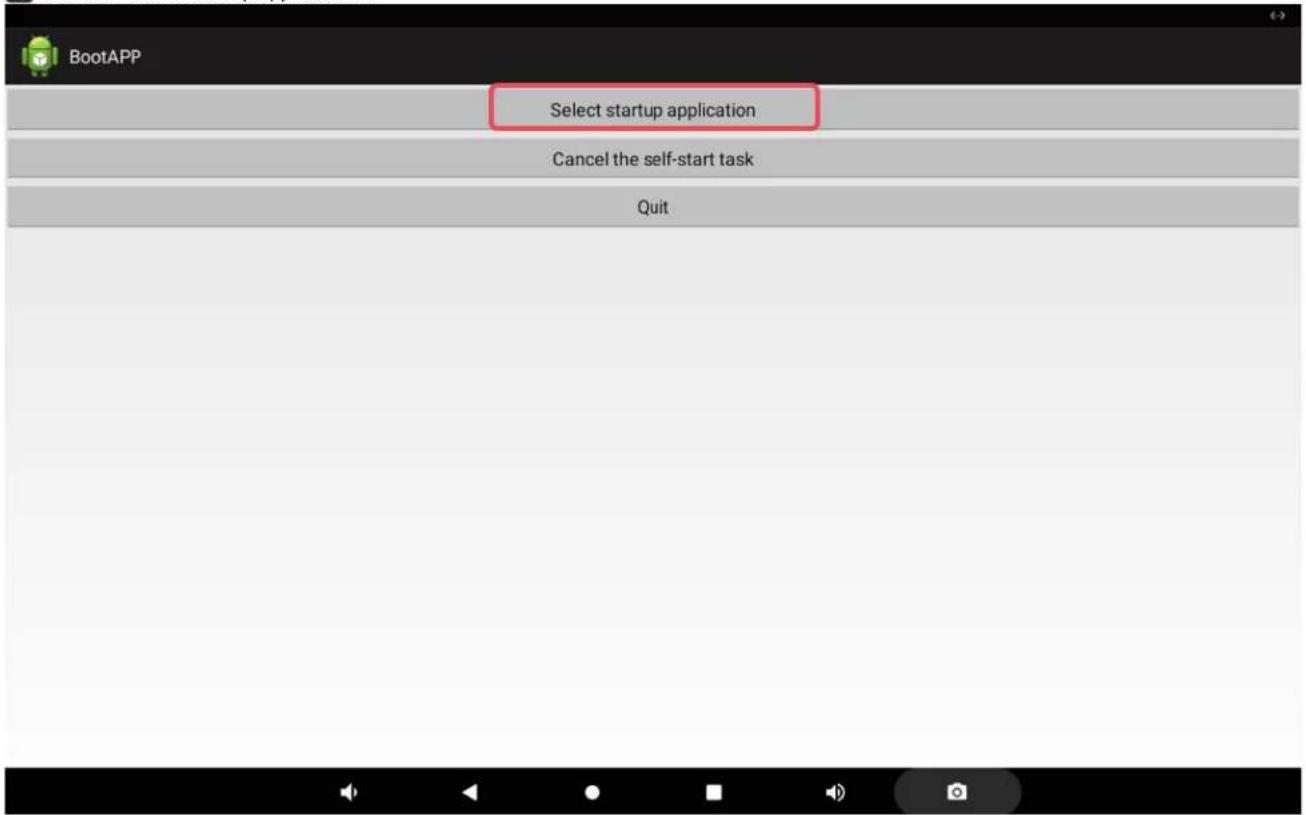
4 Tap on "Select startup application".
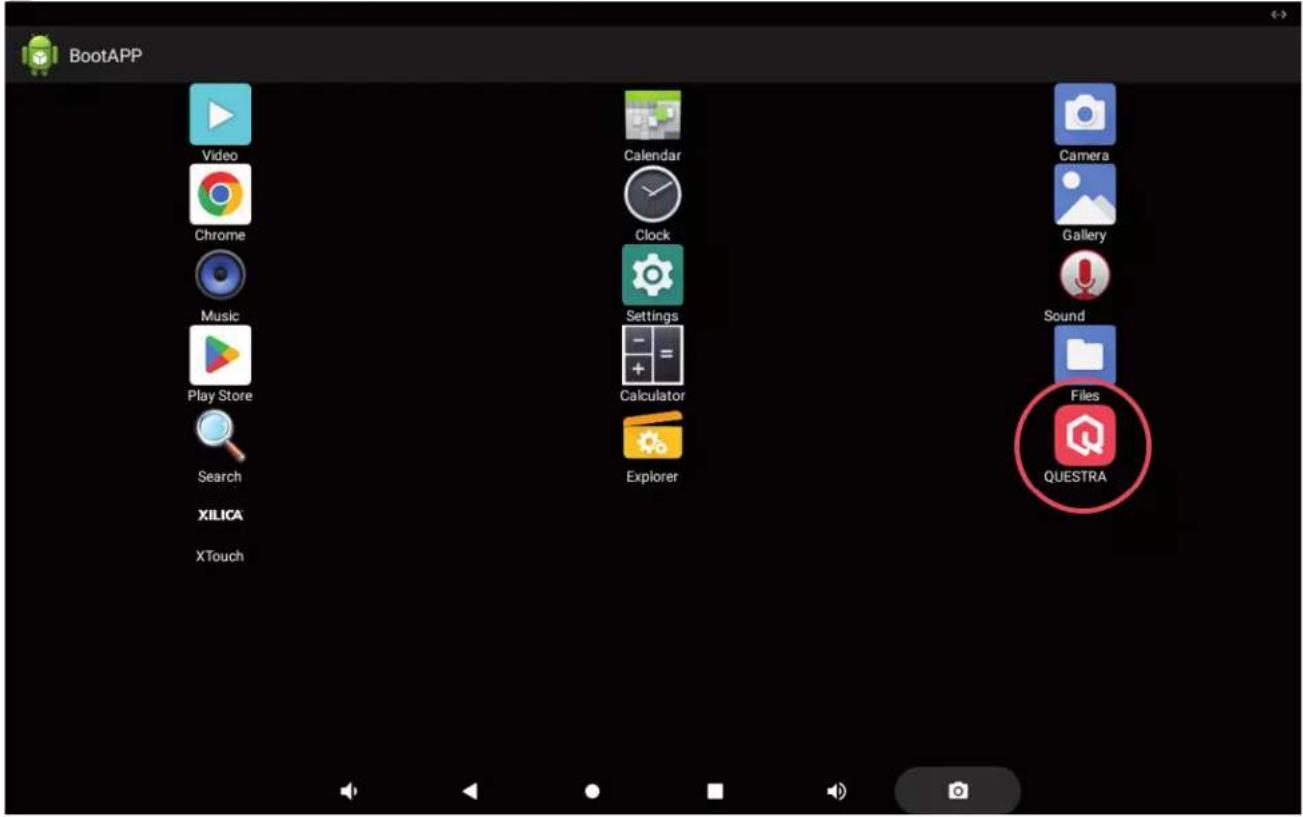
5 Now select the desired app by tapping on the corresponding icon.
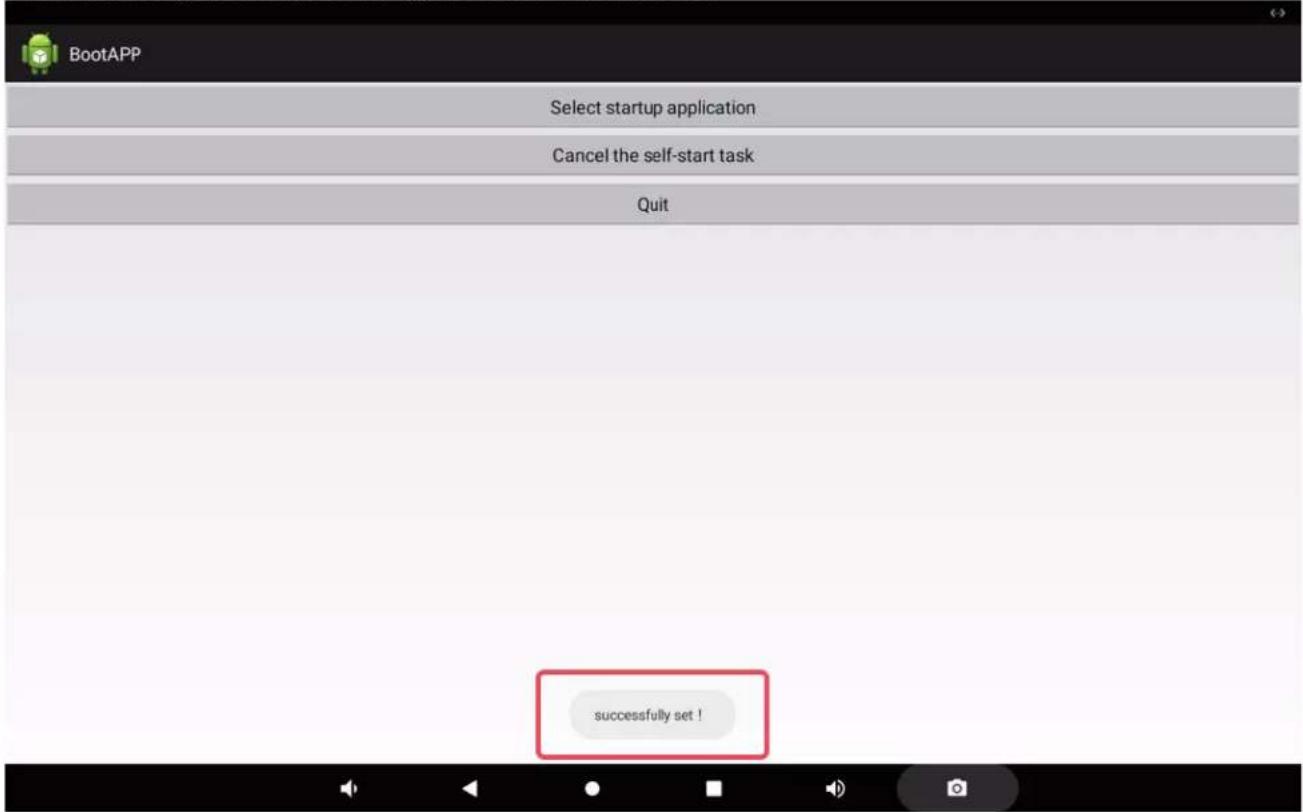
6 As confirmation, "Successfully set!" now appears at the bottom of the screen.
IP CONFIGURATION
The automatic network configuration via DHCP is activated in the delivery state. To configure the network manually, go to the settings and change the „Ethernet IP mode“ to „static“ (Settings -> Network & Internet -> Ethernet -> Ethernet IP Mode -> static -> Configure IP etc.). Restart the unit after changing the status.
TECHNICAL DATA
Article number LDQTP5
| Product type Installation equipment | |
| Type 5" QUESTRA touch panel, PoE powered | |
| Processor RK3566 - Quad-core up to 1.8 GHZ | |
| Working memory 2 GB | |
| Internal memory 16 GB | |
| Operating controls 5.5" touch display, set, restart | |
| Display resolution 1280 x 720 Pixel | |
| Display brightness 300 nits | |
| Touch Panel Type 5-points capacitive IPS touch panel | |
| Mounting position Landscape or portrait format (landscape format recommended) | |
| Operating system Android 11 | |
| Connections Ethernet RJ45, Power In, RS485 (currently without function), USB-C | |
| Card reader TF Card / MicroSD | |
| Network | 2.4G WIFI, BT 4.0, 10M/100M Ethernet |
| Power supply | PoE+ (Power over Ethernet), IEEE 802.3at compliant, external power supply 12 V DC 2 A (optionally available) |
| Mounting options EU flush-mounted box, 86-type Electrical Box | |
| Dimensions (W x H x D) | 145.7 mm x 84 mm x 38 mm |
| Weight | 0.32 kg |
| Ambient temperature | 0 - 40°C |
| Relative air humidity <80%, non-condensing | |
| Accessories (optional) | Power supply |
| Accessories included Mounting plate plus locking screw | |
DISPOSAL

PACKAGING:
- Packaging can be disposed of via the usual waste disposal channels.
- Please separate the packaging according to the waste disposal and materials regulations in your country.
DEVICE:
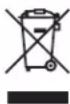
- This device is subject to the European Directive on Waste Electrical and Electronic Equipment in its applicable version. WEEE Directive-Waste Electrical and Electronical Equipment. Old devices and batteries do not belong in household waste. The old device or batteries must be disposed of via an approved waste disposal service or a municipal waste disposal facility. Follow the directives in your country!
- Follow the disposal laws in your country.
- As a private customer, you can obtain information on environmentally friendly disposal options from the retailer from whom you purchased the product or from the relevant regional authorities.
MANUFACTURER'S DECLARATIONS
MANUFACTURER'S WARRANTY & LIMITATIONS OF LIABILITY
Adam Hall GmbH, Adam-Hall-Str. 1, D-61267 Neu Anspach / E-mail Info@adamhall.com / +49 (0)6081 / 9419-0. Our current warranty conditions and limitation of liability can be found at: https://cdn-shop.adamhall.com/media/pdf/MANUFACTURERS-DECLARATIONS_LD_SYSTEMS.pdf. Contact your distribution partner for service.
UKCA-CONFORMITY
Hereby, Adam Hall Ltd. declares that this product meets the following guidelines (where applicable): Electrical Equipment (Safety) Regulations 2016 Electromagnetic Compatibility Regulations 2016 (SI 2016/1091) The Restriction of the Use of Certain Hazardous Substances in Electrical and Electronic Equipment Regulation 2012 (SI 2012/3032) Radio Equipment Regulations 2017(SI 2016/2015)
UKCA-DECLARATION OF CONFORMITY
Products that are subject to Electrical Equipment(Safety)Regulation 2016, EMC Regulation 2016 or RoHS Regulation can be requested at info@adamhall.com. Products that are subject to the Radio Equipments Regulations 2017 (SI2017/1206) can be downloaded from www.adamhall.com/compliance/
CE CONFORMITY
Adam Hall GmbH hereby confirm that this product meets the following guidelines (where applicable): R&TTE (1999/5/EC) or RED (2014/53/EU) as of June 2017. Low Voltage Directive (2014/35/EU) EMC Directive (2014/30/EU) RoHS (2011/65/EU) The complete Declaration of Conformity can be found at www.adamhall.com. Furthermore, you can also request it at info@adamhall.com.
CE DECLARATION OF CONFORMITY
Declarations of conformity for products subject to the LVD, EMC, RoHS Directive can be requested from info@adamhall.com. Declarations of conformity for products subject to RED Directive can be downloaded from www.adamhall.com/compliance/.
Subject to misprints and errors, as well as technical or other modifications!
DEUTSCH
1
natural_image
Black rectangular electronic device with a display screen and a small square badge labeled '8' (no visible text or symbols on the device body)natural_image
Two mechanical components with labeled parts A, showing different assembly or installation views (no text or symbols present)LOCHABSTAND (mm)
AUTOSTART
Volume, vibration, Do Not Disturb

Storage
41% used - 9.49 GB free

Privacy
Permissions, account activity, personal data

Location
On - 2 apps have access to location

Security
Screen lock

Accounts

Accessibility
Screen readers, display, interaction controls

Screenshot
Screenshot

Services & preferences

System
Languages, gestures, time, backup

法定代表人:张志成


IP-KONFIGURATION
https://cdn-shop.adamhall.com/media/pdf/MANUFACTURERS-DECLARATIONS_LD_SYSTEMS.pdf.
1
natural_image
Black rectangular electronic device with a display screen and a small square badge labeled '8' (no visible text or symbols on the device body)1 PORT ETHERNET
natural_image
Two mechanical components shown in different orientations: a yellow hard hat and a gray housing, both with labeled 'A' arrows indicating assembly or connection points (no text or symbols on the devices themselves)ESPACEMENT DES TROUS (mm)
AUTOSTART
2 Ouvrez „Accessibility”.
(一)

Sound
Volume, vibration, Do Not Disturb

Storage
41% used - 9.49 GB free

Privacy
Permissions, account activity, personal data

Location
On - 2 apps have access to location

Security
Screen lock

Accounts

Accessibility
Screen readers, display, interaction controls

Screenshot
Screenshot

Services & preferences

System
Languages, gestures, time, backup

2016年7月25日


4 Tapez sur „Select startup application“.
CONFIGURATION DE L'ADRESSE IP
DÉCLARATION DE CONFORMITÉ EU
1
natural_image
Black rectangular electronic device with a display screen and a small square badge labeled '8' (no visible text or symbols on the device body)natural_image
Two mechanical components shown in different orientations: a yellow hard hat and a gray housing, both with labeled 'A' arrows indicating assembly or component (no text or symbols on the devices themselves)DISTANCIA ENTRE ORIFICIOS (mm)
INICIO AUTOMÁTICO
Volume, vibration, Do Not Disturb

Storage
41% used - 9.49 GB free

Privacy
Permissions, account activity, personal data

Location
On - 2 apps have access to location

Security
Screen lock

Accounts

Accessibility
Screen readers, display, interaction controls

Screenshot
Screenshot

Services & preferences

System
Languages, gestures, time, backup

法定代表人:张


3 Abra «Boot Application».
4 Pulse en «Select startup application».
CONFIGURACIÓN IP
1
natural_image
Black rectangular electronic device with a display screen and a small square badge labeled '8' (no visible text or symbols on the device body)1 POŁACZENIE ETHERNETOWE
natural_image
Two mechanical devices with orange and gray components, connected by a valve labeled 'A' (no text or symbols on the devices themselves)ROZSTAW OTWORÓW (mm)
AUTOSTART
Volume, vibration, Do Not Disturb

Storage
41% used - 9.49 GB free

Privacy
Permissions, account activity, personal data

Location
On - 2 apps have access to location

Security
Screen lock

Accounts

Accessibility
Screen readers, display, interaction controls

Screenshot
Screenshot

Services & preferences

System
Languages, gestures, time, backup

法定代表人:张


3 Otworzyć „Boot Application“.
KONFIGURACJA IP
1
natural_image
Black rectangular electronic device with a display screen and a small square badge labeled '8' (no visible text or symbols on the device body)1 CONNESSIONE ETHERNET
natural_image
Two mechanical components with labeled parts A, showing different assembly or mounting states (no text or symbols present)DISTANZA TRA I FORI (mm)
AVVIO AUTOMATICO
2 Aprire "Accessibility".
(一)

Sound
Volume, vibration, Do Not Disturb

Storage
41% used - 9.49 GB free

Privacy
Permissions, account activity, personal data

Location
On - 2 apps have access to location

Security
Screen lock

Accounts

Accessibility
Screen readers, display, interaction controls

Screenshot
Screenshot

Services & preferences

System
Languages, gestures, time, backup

办公地址:北京市西城区


3 Aprire "Boot Application".
4 Toccare "Select startup application".
CONFIGURAZIONE IP

- QTP 5
- CONTENTS / INHALTSVERZEICHNIS / CONTENU / CONTENIDO / TREŚĆ / CONTENUTO
- ENGLISH
- DEUTSCH
- ABOUT THIS MANUAL
- INTENDED USE
- SAFETY INSTRUCTIONS
- HAZARD:
- CAUTION: HIGH VOLUME AUDIO PRODUCTS!
- FOR INDOOR USE ONLY:
- PACKAGING CONTENT
- CONNECTIONS, OPERATING AND DISPLAY ELEMENTS
- ETHERNET CONNECTION
- POWER IN
- SERIAL INTERFACE RS485
- TF-CARD
- TYPE-C
- RESTART
- SET
- DISPLAY
- THREAD
- INSTALLATION
- AUTOSTART
- IP CONFIGURATION
- TECHNICAL DATA
- DISPOSAL
- PACKAGING:
- DEVICE:
- MANUFACTURER'S DECLARATIONS
- MANUFACTURER'S WARRANTY & LIMITATIONS OF LIABILITY
- UKCA-CONFORMITY
- UKCA-DECLARATION OF CONFORMITY
- CE CONFORMITY
- CE DECLARATION OF CONFORMITY
- IP-KONFIGURATION
- PORT ETHERNET
- CONFIGURATION DE L'ADRESSE IP
- DÉCLARATION DE CONFORMITÉ EU
- INICIO AUTOMÁTICO
- CONFIGURACIÓN IP
- POŁACZENIE ETHERNETOWE
- KONFIGURACJA IP
- CONNESSIONE ETHERNET
- AVVIO AUTOMATICO
- CONFIGURAZIONE IP
Brand : LD Systems
Model : QTP 5
Category : Receiver