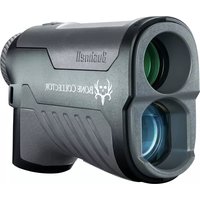
Bone Collector 1000 - Rangefinder BUSHNELL - Free user manual and instructions
Find the device manual for free Bone Collector 1000 BUSHNELL in PDF.


| Product Type | Laser Rangefinder |
| Brand | Bushnell |
| Model | Bone Collector 1000 |
| Dimensions | 112 mm x 40 mm x 73 mm |
| Weight | 180 g |
| Power Source | CR2 3V lithium battery (replaceable) |
| Maximum Range | 1000 yards / 914.4 meters |
| Minimum Range | 5 yards / 4.5 meters |
| Accuracy | +/- 1 yard |
| Optical Configuration | 6x25 |
| Field of View | 365 ft at 1000 yds (111.3 m at 1000 m) |
| Measurement Modes | Normal mode, ARC mode (angle compensation), continuous scan |
| Integrated Technologies | ARC with Ballistic Intelligence, Vivid LCD display |
| Water Resistance | IPX4 (splash resistant) |
| Laser Safety | Compliant with FDA 21CFR1040.10 and 1040.11, Class 1 |
| Regulatory Compliance | FCC Part 15, ISED RSS license exempt |
| Lens Cleaning | Blowing, microfiber cloth or isopropyl alcohol |
| Maintenance | Do not immerse, replace battery every 12 months |
| Repairability | Do not open, return to manufacturer for repair |
| Intended Use | Hunting, archery, distance estimation |
Frequently Asked Questions - Bone Collector 1000 BUSHNELL
User questions about Bone Collector 1000 BUSHNELL
0 question about this device. Answer the ones you know or ask your own.
Ask a new question about this device
Download the instructions for your Rangefinder in PDF format for free! Find your manual Bone Collector 1000 - BUSHNELL and take your electronic device back in hand. On this page are published all the documents necessary for the use of your device. Bone Collector 1000 by BUSHNELL.
USER MANUAL Bone Collector 1000 BUSHNELL
natural_image
Black Bushnell BONE COLLECTOR binoculars with green lens (no text or symbols on device body)TABLE OF CONTENTS
HOW OUR DIGITAL TECHNOLOGY WORKS 2
BATTERY ACTIVATION / BATTERY LIFE INDICATOR 3
BASIC OPERATION
DISPLAY INDICATORS/ICONS
CHOOSING DISTANCE UNITS
AUTOMATIC SCAN
ANGLE RANGE COMPENSATION (ARC) 4
CLEANING AND GENERAL CARE 4
TROUBLESHOOTING 4
WARRANTY 5
LANGUAGES
FRANÇAIS 6
ESPAÑOL 10
3 DEUTSCH 14
3ITALIANO 18
3
4
INTRODUCTION
Your Bushnell® Bone Collector™ 1000 is an ultra-compact, premium laser rangefinder that uses the latest digital technology. It provides precise range readings from 5-1000 yards/5-914.4 meters. This rangefinder features Bushnell's patented ARC™ (Angle Range Compensation with Ballistics Intelligence), a ranging engine for faster, more consistent response and readings, a vivid LCD with higher light transmission, and water resistant (IPX4) construction.
HOW OUR DIGITAL TECHNOLOGY WORKS
The Bone Collector™ 1000 laser rangefinder emits invisible, eye safe, infrared energy pulses. The Bone Collector™ 1000 rangefinder's microprocessor results in instantaneous and accurate readings every time. Sophisticated digital technology instantaneously calculates distances by measuring the time each pulse travels from the rangefinder to the target and back.

NING: AS WITH ANY LASER DEVICE, IT IS NOT RECOMMENDED TO VIEW THE EMISSIONS FOR LONG PERIODS WITH MAGNIFIED LENSES DIRECTLY.
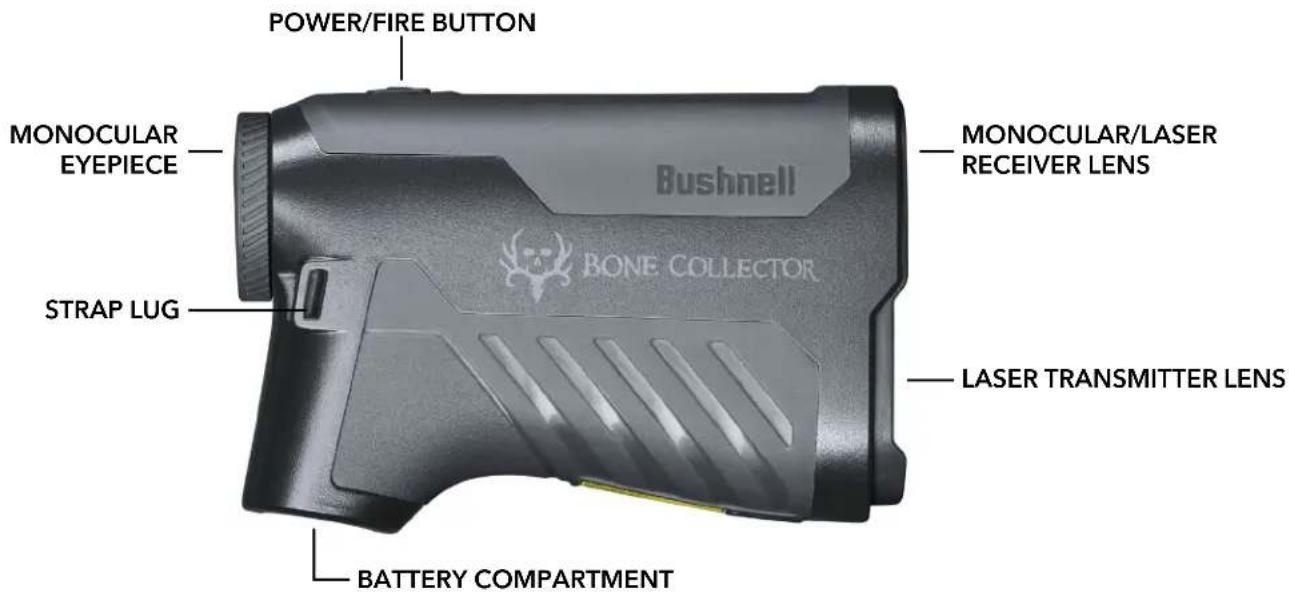
PARTS GUIDE
BATTERY ACTIVATION / BATTERY LIFE INDICATOR
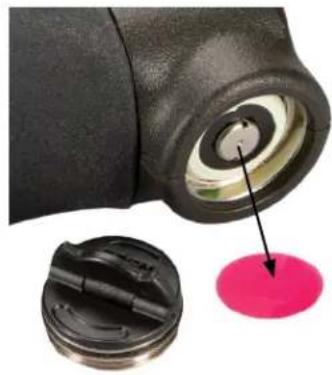
Before first use: Remove the battery compartment cover by lifting the battery cover tab and then rotating the cover counter-clockwise. Remove and discard the plastic disc covering the positive battery terminal, then replace the battery cover. NOTE: It is recommended that the CR2 3-volt lithium battery be replaced at least once every 12 months. Please insert it into the compartment's negative end first.
natural_image
Close-up of a black cylindrical device with a pink circular highlight, showing internal components and an arrow pointing to it (no text or symbols visible)Full charge
• 3/4 battery level remaining
• 1/2 battery level remaining
• 1/4 battery level remaining
Battery icon blinks - the battery needs to be replaced and unit will not be operable.
BASIC OPERATION
- While looking through the laser rangefinder, press the Power/Fire button once to activate the display.
- If the display appears blurry, rotate the rubber eyecup/diopter adjustment in either direction until the display is sharp for your vision.
- Placing the aiming circle (located in the center of the display) on a target at least 5-6 yards away, press and hold the Fire button down until the range reading is displayed below the aiming circle.
- Once a range has been acquired, you can release the Fire button. The four "crosshairs" just outside the aiming circle will go out, indicating the laser is no longer being transmitted. The display will remain on and display the last distance measurement for 30 seconds until the display automatically switches off to extend battery life.
- You can press the Fire button again at any time to check the range to a new target. To re-fire, press the button down again.
- To scan the laser across an area and get continuously updated range readings, continue to hold the Fire button down and sweep the rangefinder over multiple targets. The crosshairs outside the aiming circle will flash to indicate scan operation.

WARNING: DO NOT POINT THE LASER TRANSMITTER INTO A PERSON'S EYES.
DISPLAY INDICATORS/ICONS
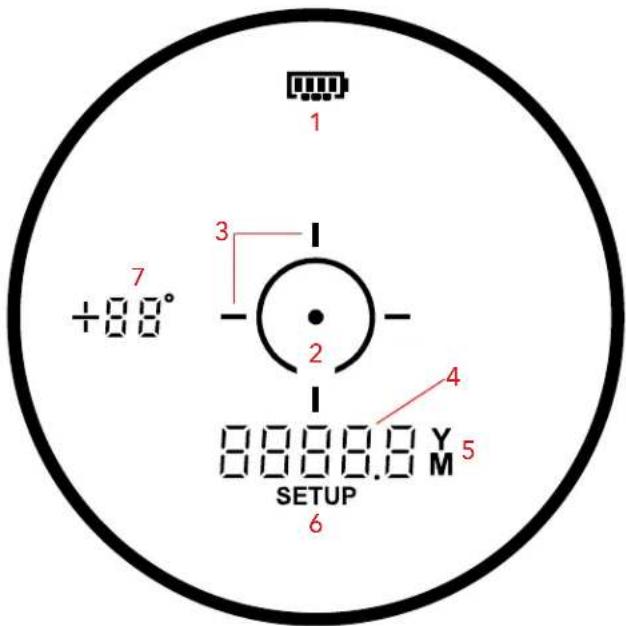
Bone Collector™ 1000 rangefinder's display elements:
- Battery Level Indicator
- Aiming Circle/Dot
- Active/Scan Laser Indicator
- Primary Numeric Display, Line-of-sight Distance
- Range (Distance) Units
- Setup Mode Indicator
- Angle Indicator
CHOOSING DISTANCE UNITS
The Setup Menu is used to select the distance units: Yards or Meters. While the unit is off, press and hold the Power/Fire button to enter the Setup Menu (6). The first setting is Yards, and "Y" will flash, indicating that the distance unit is selected. Continue to hold the Power/Fire button for three seconds to change to Meters until "M" appears. Continue to hold the Power/Fire button for three seconds to change to Feet until "FEEt" appears.
Release the Power/Fire button to confirm the distance unit option.
AUTOMATIC SCAN
To use the Automatic SCAN feature, press and hold the Fire button, then move the rangefinder from object to object while keeping the Fire button pressed. Automatic SCAN will cause the standard line of sight distance readout (4) to update as multiple objects are targeted continuously. The Active/Scan indicator lines (3) flash while scanning.
ANGLE RANGE COMPENSATION (ARC)
The Bone Collector™ 1000 rangefinder with ARC™ was specially designed for hunters. Your rangefinder features a built-in inclinometer that solves a problem hunters have faced for years. Bow and rifle hunters have struggled with extreme uphill and downhill angles because of how these angles alter the true horizontal distance to your target. The ARC™ solution: an integrated inclinometer provides angular data to a processor chip when targeting either uphill or downhill objects. This data is then combined with internal algorithmic formulas.
When the Fire button is released, the rangefinder's display will show the standard "line of sight" distance near the center of the display (4), along with the angle of the incline in degrees (- / + 70^) , indicated at the left side of the display (7).
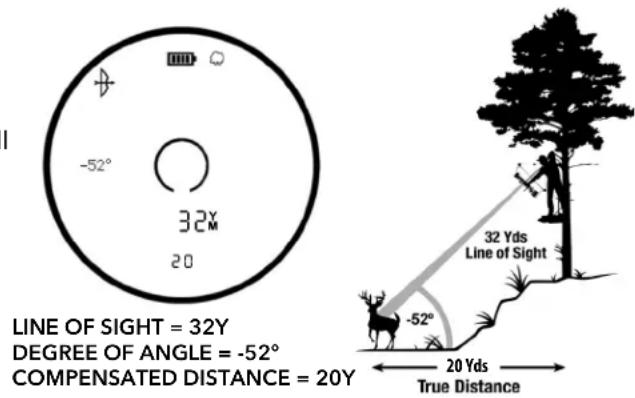
For example, a bowhunter in a tree stand may be aiming at a deer downhill at -52^ relative to his position. The line of sight distance is 32 yards, but he is likely to “overshoot” the target based on that. The THD distance (compensated for the angle) reads 20 yards. That is the distance the hunter should base their shot on.
CLEANING AND GENERAL CARE
The lenses of your Bushnell Bone Collector™ 1000 laser rangefinder are multi-coated for the highest light transmission. As with multi-coated optics, special care must be taken to clean the lenses. Follow these tips for proper lens cleaning:
- Blow away any dust or debris on the lens (or use a soft lens brush).
- To remove dirt or fingerprints, clean with the supplied microfiber cloth rubbing in a circular motion. Using a coarse cloth or unnecessary rubbing may scratch the lens surface and eventually cause permanent damage. The included washable microfiber cleaning cloth is ideal for routine optics cleaning. Breathe lightly on the lens to provide moisture, then gently rub the lens with the microfiber cloth.
- For a more thorough cleaning, photographic lens tissue and photographic-type lens cleaning fluid or isopropyl alcohol may be used. Always apply the fluid to the cleaning cloth - never directly on the lens.
The rangefinder is manufactured and tested to withstand water exposure up to IPX4 standards. It is water resistant but should not be submerged.
TROUBLESHOOTING
Never disassemble your laser rangefinder. Irreparable damage can result from unauthorized service attempts, voiding the warranty.
If the unit does not turn on, the display does not illuminate:
- Press Power/Fire button.
- Check and, if necessary, replace the battery. If the unit does not respond to button presses, replace the battery with a good quality CR2 3-volt Lithium battery.
If the unit powers down (the display goes blank when attempting to power the laser):
• The battery is either weak or low quality. Replace the battery with a new 3-volt lithium battery (CR2).
If the target range cannot be obtained:
• Make sure the display is illuminated.
• Make sure that the Power/Fire button is being pressed.
- Ensure that nothing, such as your hand or finger, is blocking the lenses at the front of the rangefinder that emits and receive the laser pulses.
- Ensure the unit is steady while pressing the Power/Fire button.
NOTE: The last range reading does not need to be cleared before ranging another target. Aim at the new target using the display reticle, press the power button, and hold until the new range reading is displayed.
TECHNICAL SPECIFICATIONS
| SKU LBC1000 | |
| Configuration 6x25 | |
| Ranging Accuracy Accurate to +/- 1 yard | |
| Range 5-1000 Yards / 5-914.4 Meters | |
| Dimensions 112mm Length x 40mm Width x 73mm Height | |
| Weight 180g | |
| Power Source 3-volt lithium (CR-2) | |
| Field Of View 365 ft. @ 1000 yards / 111.3 meters @ 1000 meters | |
| ARC Modes Bow Mode | |
| Waterproof Rating | IPX4 |
Click to read Bushnell's Warranty Information


WARNING: THIS PRODUCT USES A LITHIUM BASED BATTERY. LITHIUM BATTERIES CAN OVERHEAT AND CAUSE DAMAGE IF PHYSICALLY ABUSED. DO NOT USE BATTERIES THAT ARE DAMAGED OR SHOW SIGNS OF PHYSICAL WEAR.

WARNING: AS WITH ANY LASER DEVICE, IT IS NOT RECOMMENDED TO DIRECTLY VIEW THE EMISSIONS FOR LONG PERIODS OF TIME WITH A MAGNIFIED LENS.
FCC Statement
This device complies with part 15 of the FCC Rules. Operation is subject to the following two conditions: (1) This device may not cause harmful interference, and (2) this device must accept any interference received, including interference that may cause undesired operation.
This equipment has been tested and found to comply with the limits for a Class B digital device, pursuant to Part 15 of the FCC Rules. These limits are designed to provide reasonable protection against harmful interference in a residential installation. This equipment generates, uses and can radiate radio frequency energy and, if not installed and used in accordance with the instructions, may cause harmful interference to radio communications. However, there is no guarantee that interference will not occur in a particular installation. If this equipment does cause harmful interference to radio or television reception, which can be determined by turning the equipment off and on, the user is encouraged to try to correct the interference by one or more of the following measures:
- Reorient or relocate the receiving antenna.
- Increase the separation between the equipment and receiver.
- Connect the equipment into an outlet on a circuit different from that to which the receiver is connected.
- Consult the dealer or an experienced radio/TV technician for help.
The device does not contain any user-serviceable parts. Repairs should only be made by an Authorized Bushnell Repair center. Unauthorized repairs or modifications could result in permanent damage to the equipment, and will void warranty and your authority to operate the device under Part 15 regulations.
Specifications and design are subject to change without any notice or obligation on the part of the manufacturer.
FDA SAFETY
Class 1 laser product in accordance with IEC 60825-1:2007.
Complies with 21 CFR 1040.10 and 1040.11 except for conformance with IEC 60825-1 Ed. 3., as described in Laser Notice No. 56, dated May 8, 2019.
Caution: There are no user controls, adjustments or procedures. Performance of procedures other than those specified herein may result in access to invisible laser light.
- This product contains no user serviceable controls.
• This product must not be opened or modified by the consumer.
• This product must be returned to the manufacturer for service.
Device specifications and design are subject to change without notice or obligation on the part of the manufacturer.


Industry Canada Statement/Déclaration d'Industrie Canada :
This device complies with ISED's licence-exempt RSSs. Operation is subject to the following two conditions: (1) This device may not cause harmful interference, and (2) this device must accept any interference received, including interference that may cause undesired operation.
This device complies with the Industry Canada portable RF exposure limit set forth for an uncontrolled environment and is safe for the intended operation as described in this manual. Further RF exposure reduction can be achieved if the product can be kept as far as possible from the user's body or if the device is set to a lower output power if such function is available.
Disposal of Electric and Electronic Equipment
(Applicable in the EU and other European countries with separate collection systems)
This equipment contains electric and/or electronic parts and must therefore not be disposed of as normal household waste. Instead, it should be disposed at the respective collection points for recycling provided by the communities. For you, this is free of charge.
If the equipment contains exchangeable (rechargeable) batteries, these too must be removed before and, if necessary, in turn be disposed of according to the relevant regulations (see also the respective comments in this unit's instructions).
Further information about the subject is available at your community administration, your local waste collection company, or in the store where you purchased this equipment.
This device contains license-exempt transmitter(s)/receiver(s) that comply with Innovation, Science and Economic Development Canada's license-exempt RSS(s). Operation is subject to the following two conditions:
(1) This device may not cause interference.
(2) This device must accept any interference, including interference that may cause undesired operation of the device.
Warning: Changes or modifications not expressly approved by the party responsible for compliance could void the user's authority to operate the equipment.
FRANÇAIS
PRÉSENTATION
natural_image
Close-up of a black mechanical component with a highlighted circular pink spot, showing internal components and an arrow pointing to it (no text or symbols visible)FONCTIONNEMENT DE BASE
©2023 Bushnell Outdoor Products
Bushnell, ^™ , ^® , denote trademarks of Bushnell Outdoor Products
www.bushnell.com
ESPAÑOL
INTRODUCCIÓN
natural_image
Close-up of a black mechanical component with a highlighted circular pink highlight, showing internal structure and a magnified inset (no text or symbols)natural_image
Close-up of a black cylindrical device with a highlighted pink circular component, showing internal components and a pointer arrow (no text or symbols)natural_image
Close-up of a black mechanical component with a highlighted pink circular area, showing internal structure and a close-up of its base (no text or symbols visible)
- TABLE OF CONTENTS
- LANGUAGES
- INTRODUCTION
- HOW OUR DIGITAL TECHNOLOGY WORKS
- PARTS GUIDE
- BATTERY ACTIVATION / BATTERY LIFE INDICATOR
- BASIC OPERATION
- WARNING: DO NOT POINT THE LASER TRANSMITTER INTO A PERSON'S EYES.
- DISPLAY INDICATORS/ICONS
- CHOOSING DISTANCE UNITS
- AUTOMATIC SCAN
- ANGLE RANGE COMPENSATION (ARC)
- CLEANING AND GENERAL CARE
- TROUBLESHOOTING
- WARNING: THIS PRODUCT USES A LITHIUM BASED BATTERY. LITHIUM BATTERIES CAN OVERHEAT AND CAUSE DAMAGE IF PHYSICALLY ABUSED. DO NOT USE BATTERIES THAT ARE DAMAGED OR SHOW SIGNS OF PHYSICAL WEAR.
- WARNING: AS WITH ANY LASER DEVICE, IT IS NOT RECOMMENDED TO DIRECTLY VIEW THE EMISSIONS FOR LONG PERIODS OF TIME WITH A MAGNIFIED LENS.
- FCC Statement
- FDA SAFETY
- Industry Canada Statement/Déclaration d'Industrie Canada :
- Disposal of Electric and Electronic Equipment
- (Applicable in the EU and other European countries with separate collection systems)
- FRANÇAIS
- PRÉSENTATION
- FONCTIONNEMENT DE BASE
- ESPAÑOL
- INTRODUCCIÓN
Brand : BUSHNELL
Model : Bone Collector 1000
Category : Rangefinder