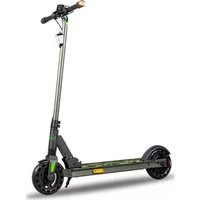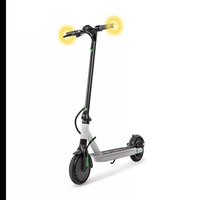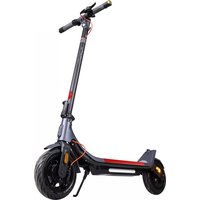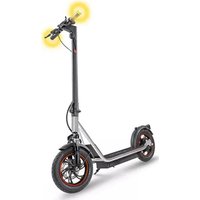
Velociptor Street ES 120EW STREET - Scooter EMG - Free user manual and instructions
Find the device manual for free Velociptor Street ES 120EW STREET EMG in PDF.


| Brand | EMG |
| Model | Velociptor Street ES 120EW STREET |
| Category | Foldable electric scooter |
| Weight | Approximately 21 kg |
| Maximum load | 120 kg (rider + luggage) |
| Tire dimensions | 12 inches (tubeless) |
| Recommended tire pressure | 35 - 60 psi (2.4 - 4.1 bar) |
| Battery type | Lithium-ion 36 V / 10 Ah |
| Charging time | Approximately 7 hours |
| Range | Up to 28 km (depending on conditions) |
| Motor power | 0.45 kW |
| Maximum speed | 25 km/h (Sport mode, private area) |
| Speed modes | ECO (6 km/h), Drive (20 km/h), Sport (25 km/h) |
| Charger input | 100-240 V~, 50/60 Hz, output 42 V / 1.5 A |
| Display | LED screen |
| Lighting | Front (white) and rear (red) LED lights |
| Brakes | Front and rear disc brakes |
| Bluetooth | Frequency 2.4 GHz, power 2.4 mW |
| App | KCQ Scooter (Android and iOS) |
| Additional features | Cruise control, turn signals, anti-theft via app |
| Maximum grade | 15% |
| Protection rating | IPX4 |
| Noise level | < 70 dB(A) |
| Recommended minimum age | 14 years |
| Maintenance | Clean with a damp cloth, no alcohol or benzene |
| Battery warranty | 6 months |
Frequently Asked Questions - Velociptor Street ES 120EW STREET EMG
User questions about Velociptor Street ES 120EW STREET EMG
0 question about this device. Answer the ones you know or ask your own.
Ask a new question about this device
Download the instructions for your Scooter in PDF format for free! Find your manual Velociptor Street ES 120EW STREET - EMG and take your electronic device back in hand. On this page are published all the documents necessary for the use of your device. Velociptor Street ES 120EW STREET by EMG.
USER MANUAL Velociptor Street ES 120EW STREET EMG
natural_image
Simple icon of a person wearing a helmet inside a circle (no text or symbols)Modello HLT-180-4201500
natural_image
Technical line drawing of a mechanical device with two views: top shows a lever mechanism, bottom shows a close-up of a mechanical component with a downward arrow indicating motion (no text or symbols present)natural_image
Technical line drawing of a mechanical device with attached components, shown in two views: top is a simple lever mechanism, bottom is a close-up of a mechanical component (no text or symbols present)PRIMO UTILIZZO
natural_image
Three-panel image showing a black electric scooter with red cable and green directional arrows indicating motion (no text or symbols)Come aprire VELOCIPTOR ES 120EW
natural_image
Three-panel image showing a black scooter with red grip and green arrows indicating motion or movement, no text or symbols present.APRIRE E RIPIEGARE IL MONOPATTINO

natural_image
Line drawing of a person riding an electric scooter with a magnified inset showing the front wheel assembly (no text or symbols)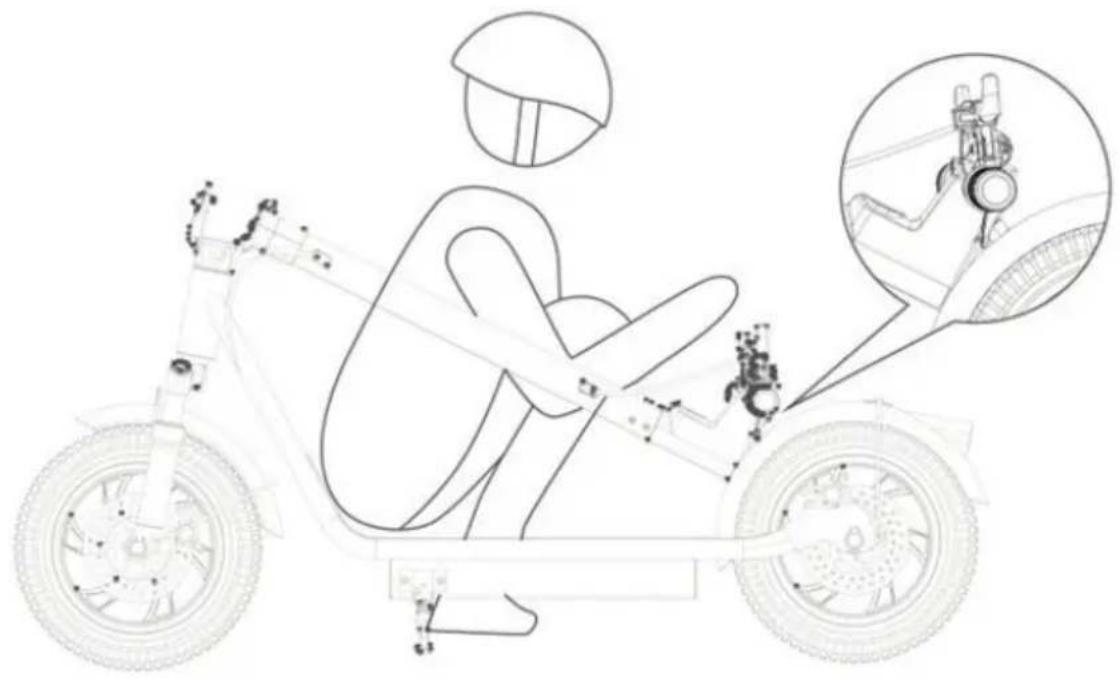
COME RICARICARE LA BATTERIA
natural_image
Close-up of a black cable with a clamping tool and wire, no visible text or symbolsCRUISE CONTROL
APPLICAZIONE PER IL CONTROLLO
DELLO SCOOTER
COME UTILIZZARE IL MONOPATTINO
natural_image
Symbol of a trash bin crossed with two opposing diagonal lines (no text or numbers present)
natural_image
Symbol of a trash bin crossed out by two diagonal lines (no text or numbers present)Thank you for purchasing the electric scooter
VELOCIPTOR ES 120EW
Please read the manual before using the product, and
keep it in a safe place for future reference.
PICTOGRAMS

natural_image
Simple icon of a helmet inside a circle (no text or symbols)Obligation to wear a protective helmet

Read the instructions before use
Note on the user guide 27
Charger specifications....27
Warnings 28
General description....32
Installation of the handlebar 33
First use.... 34
Open and fold the scooter 35
How to charge battery ....37
Autonomy 37
Display.... 38
Turning lights.... 39
Cruise control 39
App....39
Scooter control app 40
How to use the scooter 44
Technical specifications 44
Information to users of household appliances ....45
Warranty 46
NOTE ON USER GUIDE
This manual provides the user a description of the characteristics and operation.
The use of the vehicle is the sole responsibility of the driver who, after reading and understanding this manual, and after asking the seller and/or the manufacturer for any clarifications deemed necessary, considers himself suitable from a psychological and physical point of view to the use of the vehicle.
The manufacturer declines any responsibility for damages of any kind and entity caused to people or things as a result of using the vehicle.
The manufacturer reserves the right to make changes to the manual and the product without prior notice.
CHARGER SPECIFICATION
Manufacturer: Shenzhen hyleton Technology Co., Ltd.
Model: HLT-180-4201500
Input Voltage: 100-240V \~ 50/60Hz Max 2A
Output Voltage: 42V = 1,5A
Output power: 63W
Average efficiency in active mode: 87,7%
Input Power in no-load condition: 0,2W

. Before use, read the instructions in this manual
. No repairable parts inside
. Do not expose this product to rain or moisture
. For internal use only
. Disconnect the power supply in the event of an anomaly in the battery charging or overheating or rupture
. Use only the power supply supplied as standard
. Securely close the charging port cover of the scooter to protect the connector from water and dust.
. The external flex cable of this transformer cannot be replaced; if the cable is damaged, the charger must be scrapped and replaced with one new of the same model
WARNINGS
• Take the time to learn the basics of driving practice and gain experience to avoid serious accidents that can occur in the first periods of use.
- Contact the seller to be directed to an appropriate driving training organization.
- Avoid high traffic areas or congested areas.
- City traffic involves crossing many obstacles such as sidewalks or steps. It is recommended to avoid jumping over obstacles. It is important to anticipate and adapt the trajectory and speed before crossing these obstacles. It is also recommended to stop and get off the vehicle when these obstacles become dangerous due to their shape, height or the risk of skidding they present.
- In any case, anticipate your trajectory and your speed in compliance with the highway code, the type of pavement and the obstacles present.
• Make your presence known when you approach a pedestrian or cyclist, when you are not seen or heard.
• Cross the pedestrian walkways by walking.
- Park the scooter only on a flat and non-slippery surface using the special stand. Do not park the scooter on surfaces with an inclination greater than 6^ . Parking uphill or downhill involves the risk of loss of stability and falling or overturning.
• Either way, take care of yourself and others.
- Do not modify the vehicle from its original use.
• This vehicle is not intended for acrobatic use.
- Attention, the brake disc can overheat during use. Do not touch after use.
- Regularly check the tightness of the various bolted elements, especially the wheel pins, folding system, steering and brakes.
- Like any mechanical component, the vehicle is subject to severe stress and wear. Different materials and components can react differently to wear or fatigue. If the expected life of a component is exceeded, it can suddenly break and risk injuring the user. Cracks, scratches, and discoloration in high-stress areas indicate that the component has exceeded its life and needs to be replaced.
- Eliminates sharp edges caused by use.
- Do not modify or transform the vehicle.
- Avoid obstacles, smooth surfaces, snow, ice and rough surfaces.
- Avoid irregular objects that can clutter the road surface such as branches, garbage, stones, pebbles or other.
- Prolonged use of the vehicle or on uneven surfaces could lead to numerous body vibrations that could trigger certain pains; use the scooter in a reasonable way to limit these risks.
- Avoid tight spaces or spaces with obstacles.
- Do not drive on slippery roads in rain or high humidity.
- Do not drive the scooter on steep slopes which could affect the stability of the vehicle.
- Any load attached to the handlebar will affect the stability of the vehicle.
- It is forbidden to use accessories or additional elements not approved by the manufacturer.
- There is no minimum and maximum height limit for the use of the scooter.
- When using the scooter, wear appropriate shoes and clothing, as well as all necessary protective items: helmet, knee pads, elbow pads and other protective gear.
- Attention: on wet roads or with high humidity the braking distance increases, adapt the speed accordingly. It is therefore very important to adapt your driving style and speed and leave an adequate safety distance with pedestrians or other means of transport.
- It is necessary to evaluate the surface you are traveling on (flat, clean, dry, flat, wet, dirty, uneven) and adapt your driving style and speed to ensure a safe distance from pedestrians or other means of transport.
- Restrict driving in poorly lit areas, in the dark or at night. In this case, always use the lighting devices on the vehicle and use clothing equipped with high visibility devices.
• In the event of an accident, stay where you are and wait for help. - Do not lend your scooter to people who are unfamiliar with the device.
- This device can be used by persons over the age of 14 as well as by persons with reduced physical, sensory or mental abilities, if they are adequately supervised by an adult and if they have been given instructions regarding the safe use of the device and if possible risks were understood; Cleaning and maintenance of the scooter should only be done by a properly trained adult.
- It is also necessary to wear shoes when handling the scooter (maintenance, assembly, repair, etc.)
• This item is not a toy. - Use only the power supply supplied as standard.
- During use, tightly close the cover of the scooter's charging socket to protect the connector from water and dust.
- The external flex cable of the charger cannot be replaced; if the cable is damaged, the battery charger must be scrapped and replaced with one of the same type.
- Minors using the scooter must always be supervised by an adult.

- Do not ride the scooter with more than one person on the footrest as this could cause you to lose control of the vehicle.
- Do not use the scooter in situations that could be dangerous to your safety and that of the people around you.
- Do not use the vehicle under the influence of alcohol, drugs or psychotropic substances that can alter your emotional state, your sensory abilities and the control of your movements.
• Always wear appropriate clothing that does not restrict movement, as well as flat shoes (preferably sneakers with a non-slip rubber surface) that provide the necessary grip and stability.
- As with any means of transport, the use of the scooter can cause injuries to the user or to the people around, as a result of accidental falls or collisions. It is therefore necessary to always wear protective equipment (such as bicycle helmet, knee pads, elbow pads) and be very careful not to cause damage to people and things.
- The scooter should not be used in standing water, puddles or adverse weather conditions (such as rain, snow or hail). Use the scooter in dry environments to avoid damage to the motor and electrical circuits.
- Do not attempt to disassemble the product or its parts. Any repairs must be carried out by authorized personnel according to the warranty conditions.
- Disconnect the power supply before cleaning the scooter. For cleaning, use a cloth slightly moistened with water or a solution suitable for cleaning these devices. Do not use alcohol or benzene. After cleaning, dry immediately with a soft cloth.
- Before using the scooter, the handlebar must be installed on the main frame of the vehicle.
- Periodically check that all screws are well tightened, that there are no loose bolts or screws on the handlebar and mechanical parts, that the brake is properly adjusted and that the front / rear lights work correctly.
- The user must be able to use his arms and hands freely and always hold the handlebar with both hands.
- At all times, the user must be able to look freely in front of him, on both sides, and freely perform the necessary maneuvers.
- the driver must wear the reflective vest or the high visibility harness from half an hour after sunset, throughout the period of darkness and during the day, if the weather conditions require lighting.
- It is forbidden to transport other people, objects or animals, or to tow vehicles, transport animals and be towed by another vehicle.
- The scooter must not be equipped with a seat for the user because it is designed to be used standing up.
• The scooter is equipped with a bell for all beeps. - Only adults or people over the age of 14 can ride the scooter.
- Do not press the accelerator when walking next to the device.

The manufacturer declines all responsibility for damage to persons or property occurring as a result of using the product.
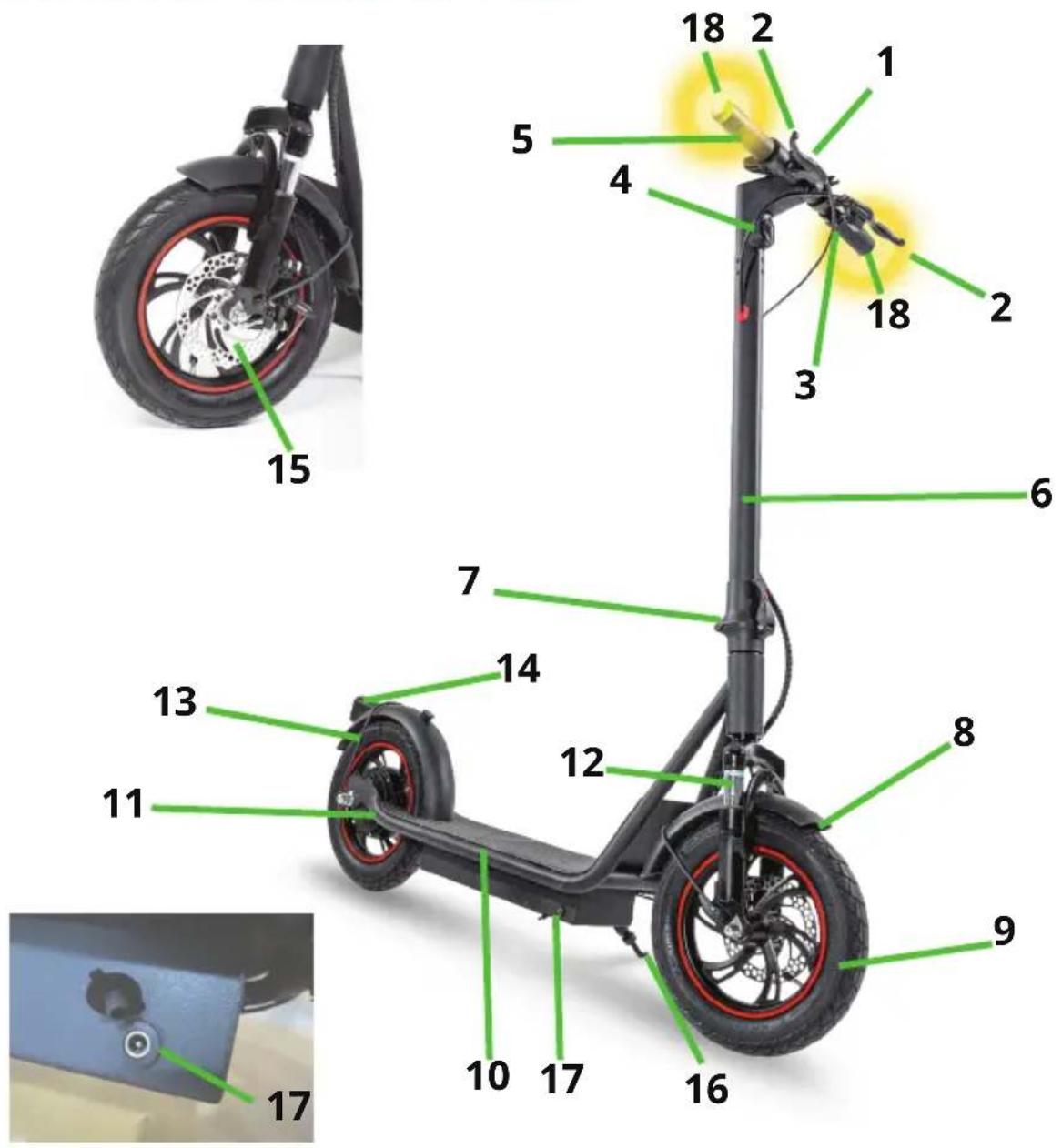
-
Handlebar with display
-
Check the disc brake
-
Horn
-
Front light
-
Accelerator
-
Steering column
-
Column closing mechanism with safety hook
-
Front fender
-
Front wheel
-
Footboard
-
Rear wheel with motor
-
Shock absorber
-
Rear mudguard
-
Rear light
-
Front disc brake
-
Stand for scooters
-
Charging socket with protection
-
Direction lights
INSTALLATION OF THE HANDLEBAR
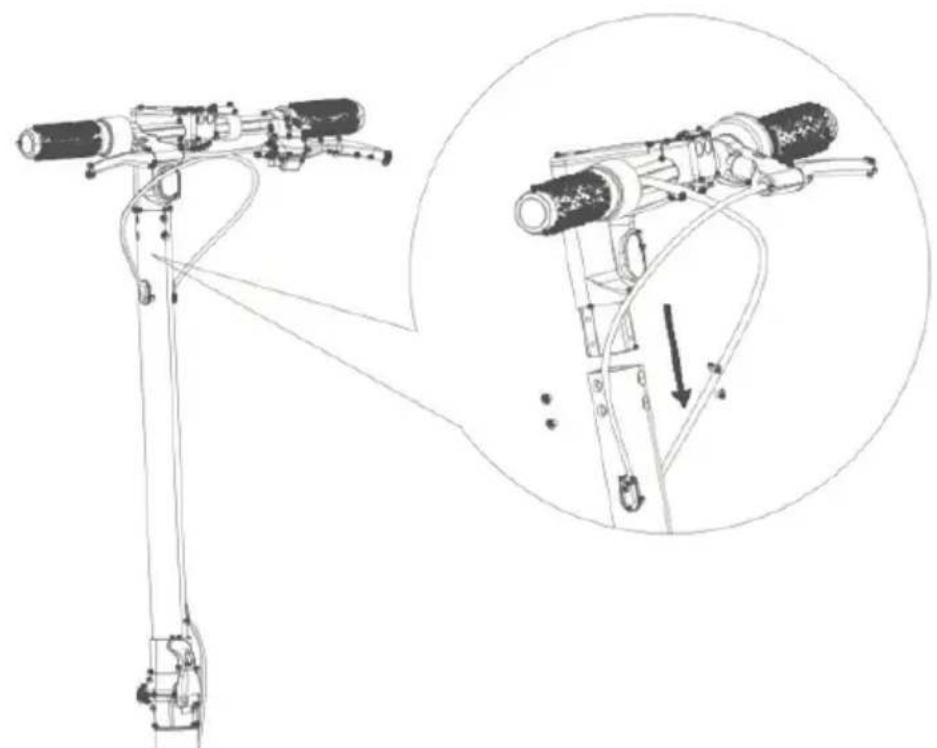
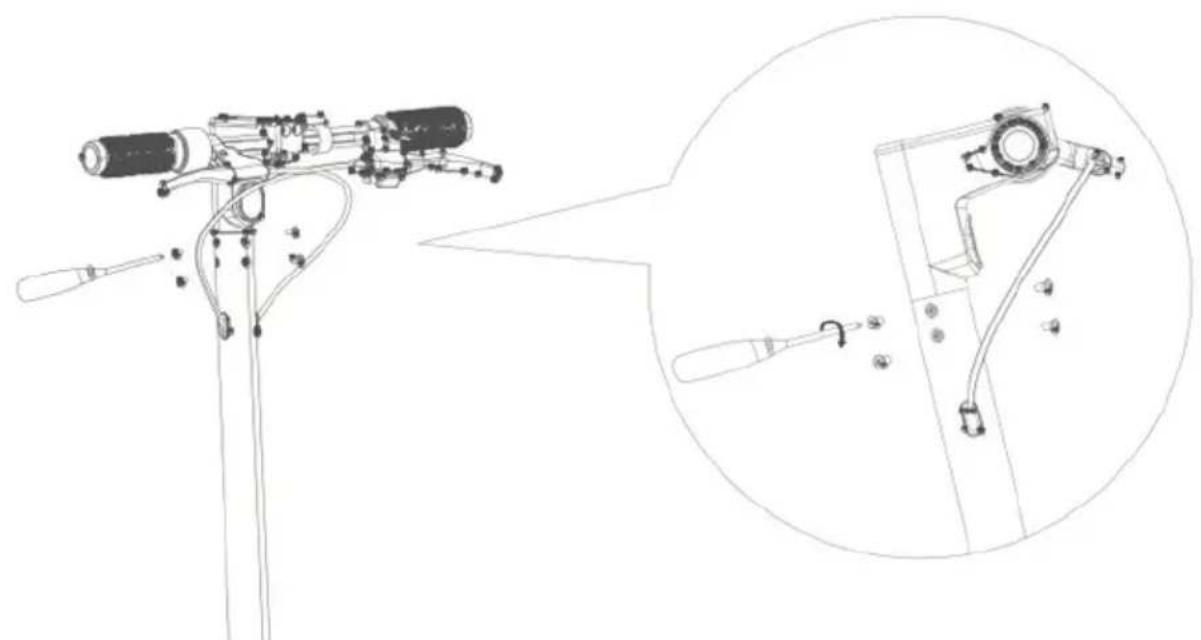
- Insert the handlebar into the scooter frame.
natural_image
Technical line drawing of a mechanical device with an inset showing a close-up of the component (no text or symbols present)- After matching the holes in the handlebar with those in the frame, insert the screws and tighten them well; repeat the operation also on the opposite side of the handlebar and in front, inserting a total of 6 screws.
natural_image
Technical line drawing of a mechanical device with a magnified inset showing internal components (no text or symbols)Before first use, it is recommended to make some adjustments in order to adapt the scooter to your driving style.
Adjusting the brake levers position
It is possible to loosen the fixing nuts of the brake levers and then change their position, so that they are comfortable and safe for use.
Once the adjustment has been made, properly tighten the nuts.
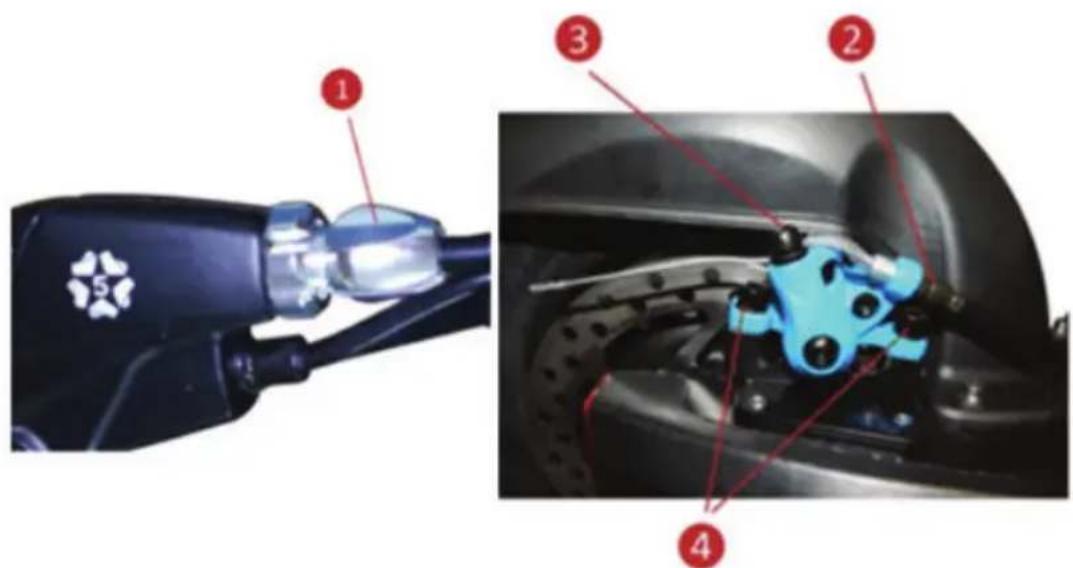
Disc brakes
Disc brakes are adjusted at the factory, but it is advisable to have them checked before first use.
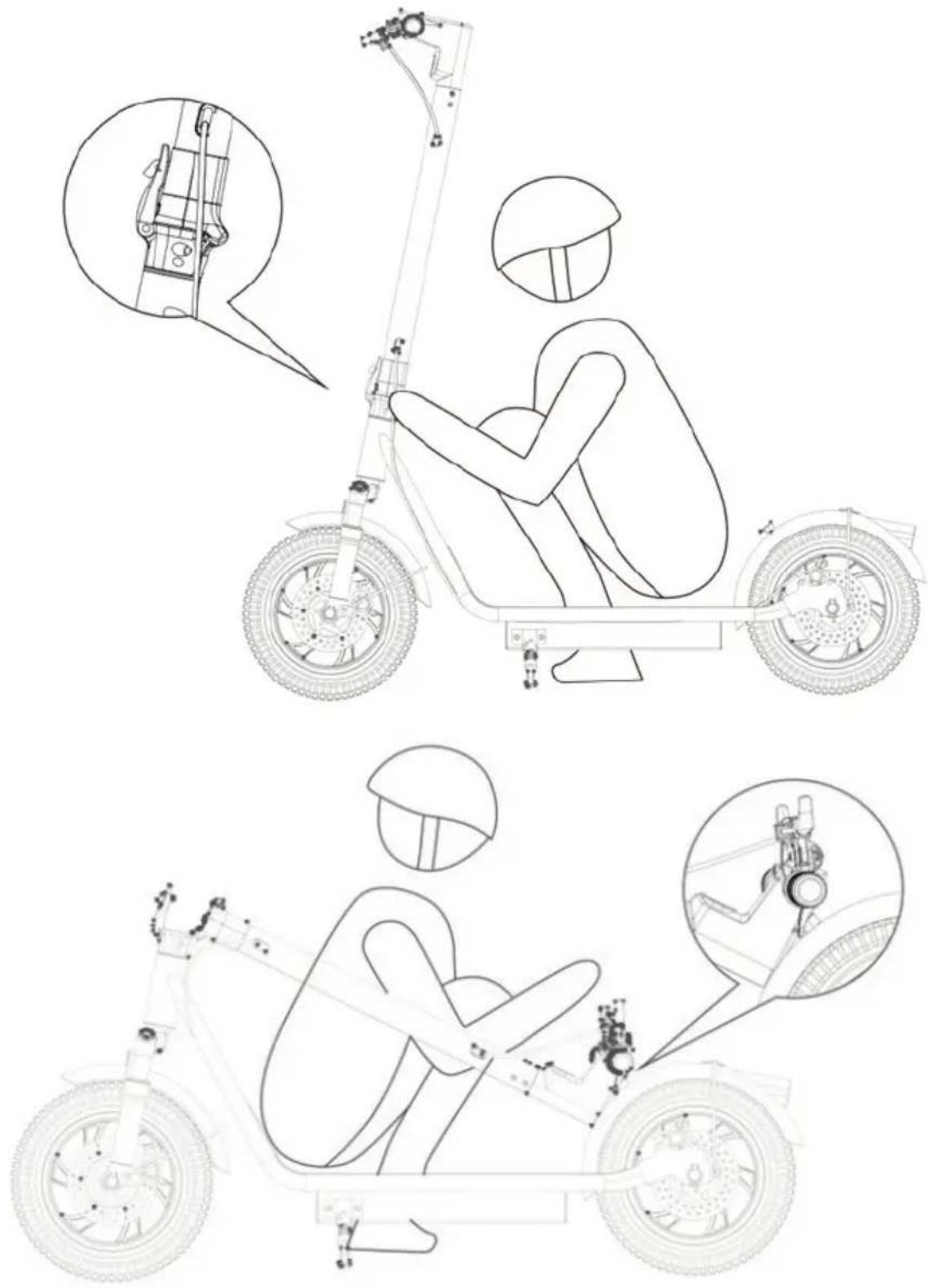
a / Braking intensity is adjusted by the screw on the brake lever (1) or by the brake mechanism (2) (3) (4).
b / The pads centering can be adjusted using the screws (4) on the brake mechanism - gently loosen the bolts, adjust the brake disc so that it is centered between the pads, then tighten the bolts.
OPEN AND FOLD THE SCOOTER
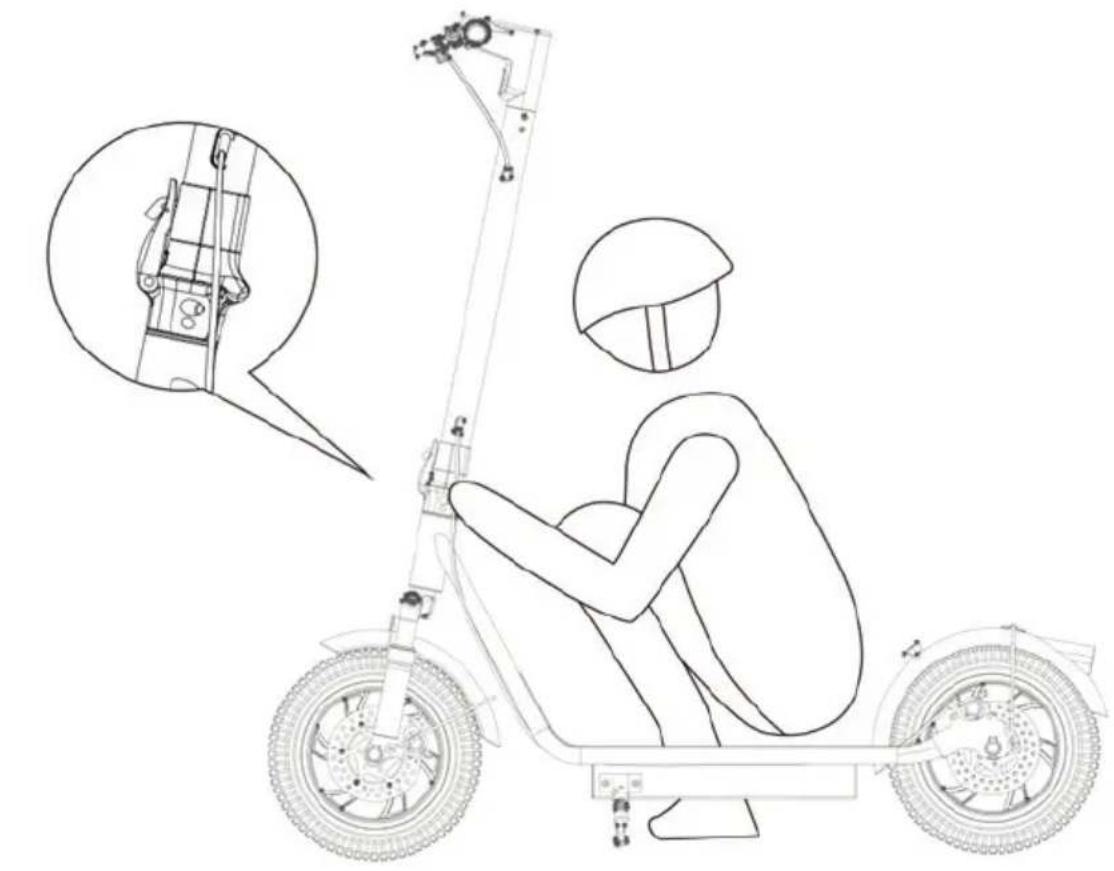
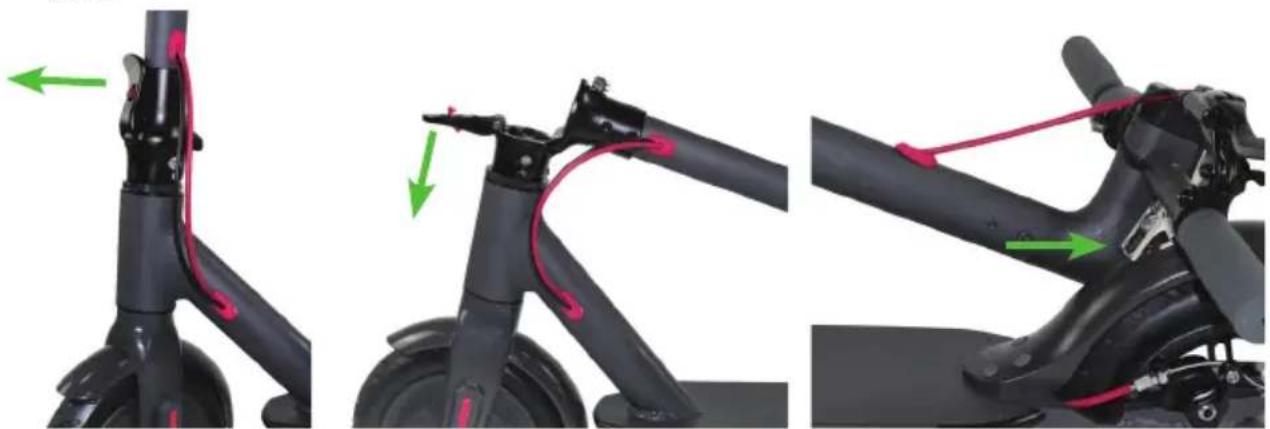
How to fold
-
Release the release lever located on the lower part of the handlebar support tube, pressing the release button and pulling the hook outwards;
-
Fully open the release lever, bringing it to 90° with respect to the support tube;
-
Guide the handlebar tube towards the rear wheel;
-
The handlebar is equipped with a hook: then hook the handlebar onto the special support, located on the rear mudguard;
-
The scooter can now be transported by gripping the handlebar support tube
natural_image
Three-panel image showing a black electric scooter with red grip and green directional arrows indicating motion (no text or symbols)How to open
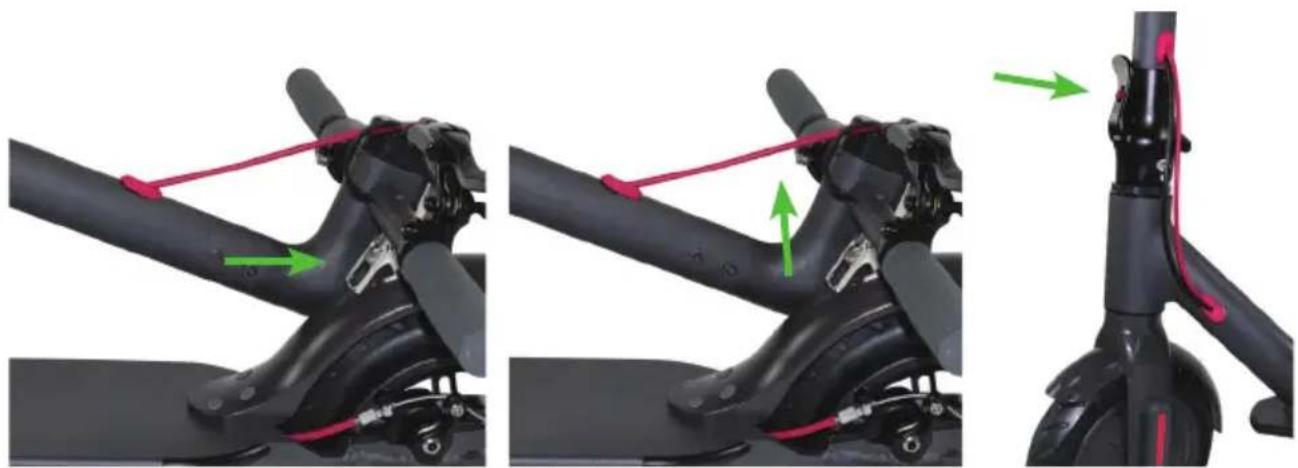
- With the scooter closed and the handlebar attached to the rear mudguard, rele-ase the handlebar by acting on the hook located on the handlebar itself;
- Lift the handlebar in a vertical position;
- Carefully close the locking lever, located on the lower part of the handlebar support tube.
natural_image
Three-panel illustration showing a black electric scooter with propeller and red cable, connected by green arrows indicating motion (no text or symbols)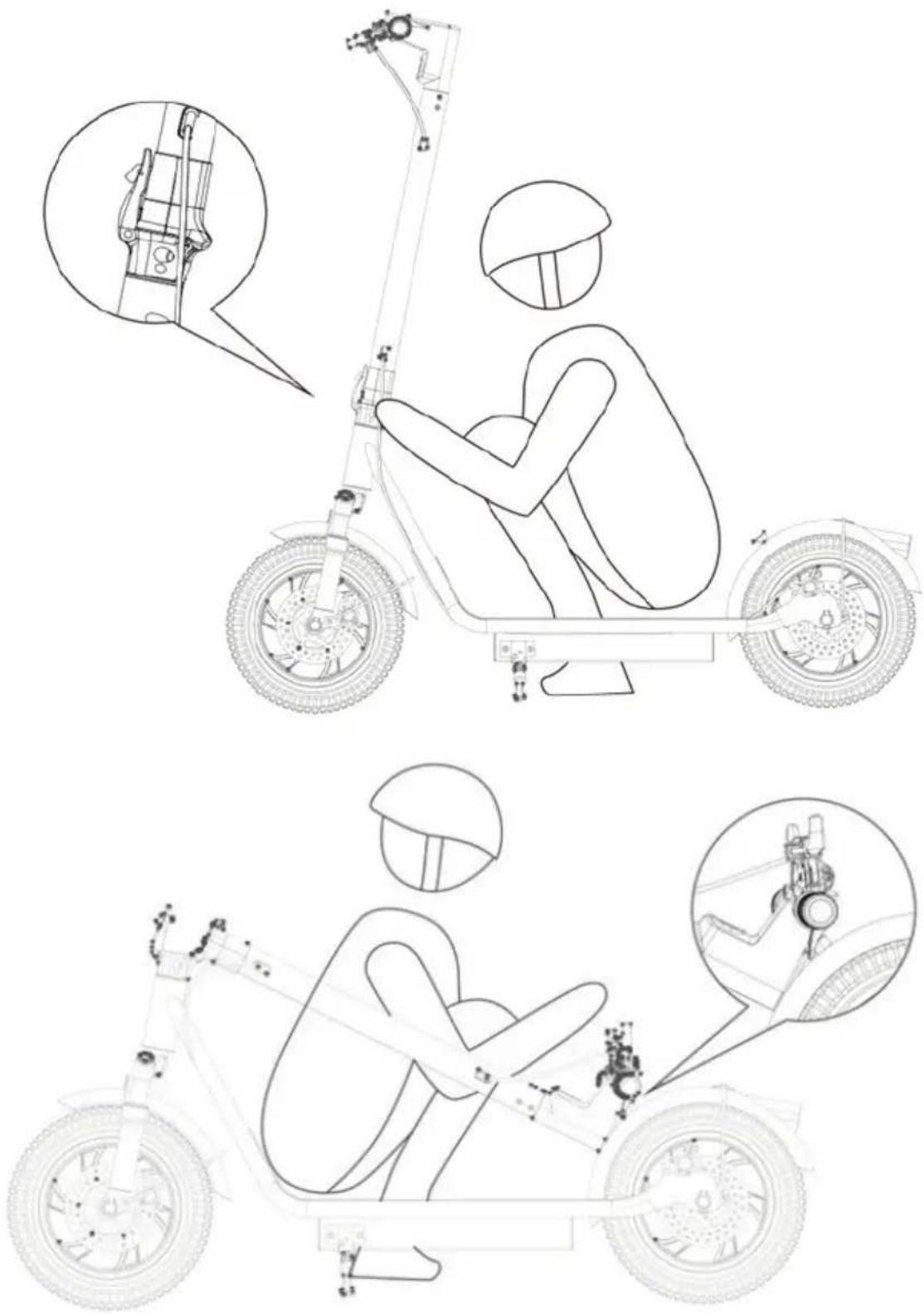
HOW TO RECHARGE THE BATTERY

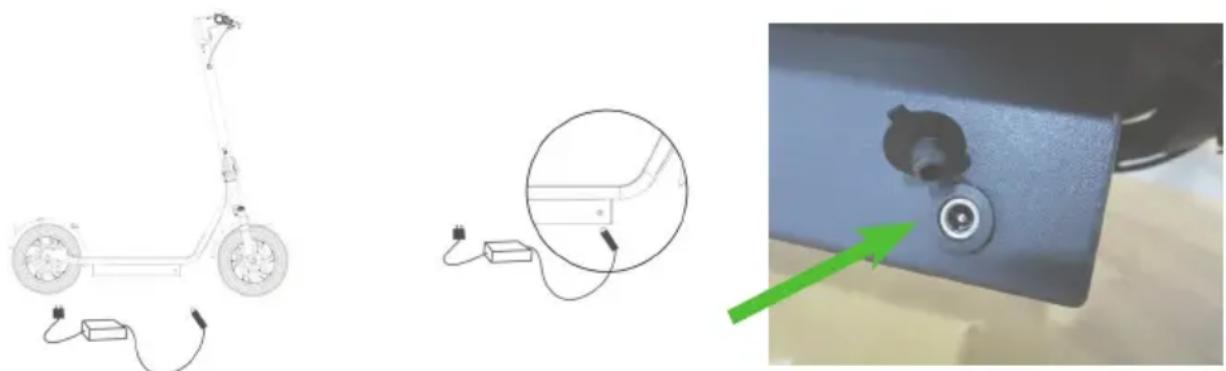
To recharge the battery, simply insert the charger into the space under the platform as shown in the illustration; for your safety, first plug the charger into the scooter, then connect to the electric current on the wall plug.
NOTE: the battery must be charged every 30 days, even if the scooter is not used; if the battery is not charged regularly, it will lose efficiency until completely dischar-ged; in this case, we cannot apply the warranty on the product.
After charging and before use, close the cover of the scooter's charging socket firmly to protect the connector from water and dust.
natural_image
Three-panel image showing a scooter outline, connected cable and plug-in device, and a close-up of a mechanical component with a green arrow indicating direction (no text or symbols)AUTONOMYY OF VELOCIPTOR

The maximum distance that can be traveled with a single battery charge is approximately 28km. However, this value must be considered indicative since it can be influenced by numerous factors.
Among the factors that can most affect battery life are the following:
- Transported weight: other conditions being equal, a greater transported weight will lead to a reduction in the battery autonomy.
- Surface: flat and sliding surfaces are less wasteful for the battery compared to uneven terrain, with slopes or that present substantial friction.
- Speed and driving style: a pace with frequent acceleration and braking will discharge the battery faster than a regular and uniform pace.
- Correct use and maintenance of the battery: a correct management of the charge and discharge cycles of the battery (see paragraph "How to recharge the battery") will help to keep the full efficiency of the battery longer and delay its natural decay.
- Environmental conditions: the presence of wind or use at low temperatures lead to a reduction in battery life.
MULTIFUNCTION BUTTON
Power on and off
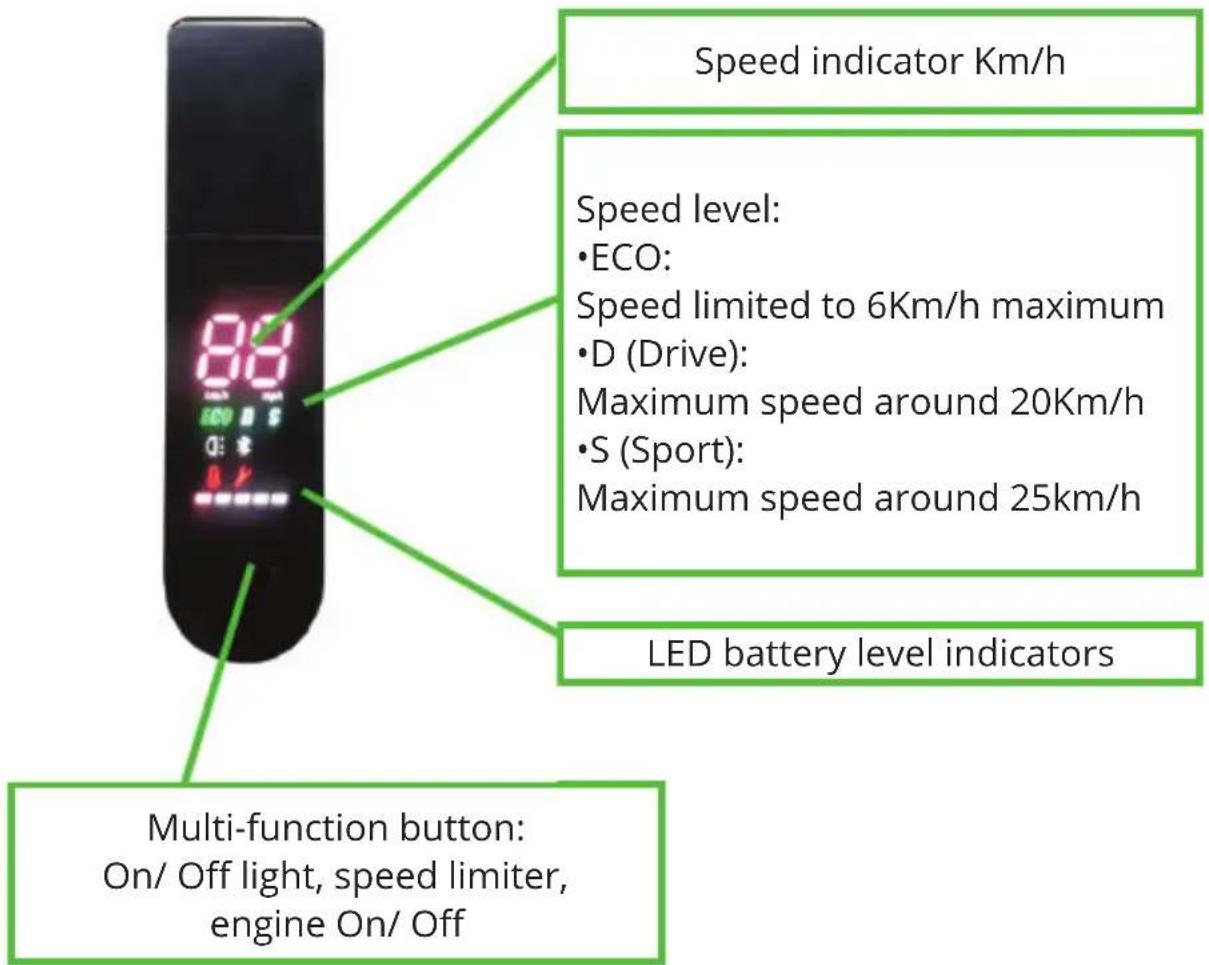
Press the multi-function button once to turn On; hold it down for 3 seconds to turn Off.
Turn On the front and rear LED light
This escooter is equipped with front and rear LED lights. Press the multi-function button once to turn On/ Off both LED lights. Note: The front LED is white and the rear LED is solid red. Press the brake to make the LED taillight flash
Speed level selection
To select the maximum speed level:
ECO: 6Km/h, D: 20Km/h, S: 25Km/h, quickly press the multi-function button twice until the indicator corresponding to the desired speed level lights up
TURNING LIGHTS
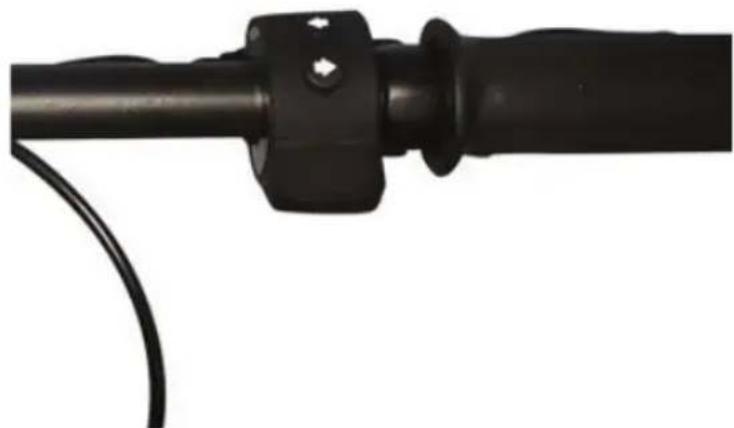
The scooter is equipped with turinng lights, easily operated from the handlebar control. The left arrow on the switch controls the left turning light, and vice versa.
natural_image
Close-up of a black mechanical component with a curved cable attached (no text or symbols visible)CRUISE CONTROL
The scooter is also equipped with the cruise control function.
The function is activated automatically, maintaining a constant speed for about 5 seconds.
Cruise control maintains engine power (speed may vary depending on the slope of the terrain) even if the accelerator is not pressed.
The cruise control function is interrupted by pressing any brake lever or the accelerator.
APP
VELOCIPTOR ES 120EW can be connected and managed for some of its functions through an app called KCQ Scooter.
The app for Android phones can be downloaded from the Google Play Store, while, for Iphone devices, it can be downloaded from the Apple Store, or by scanning the following QR code:

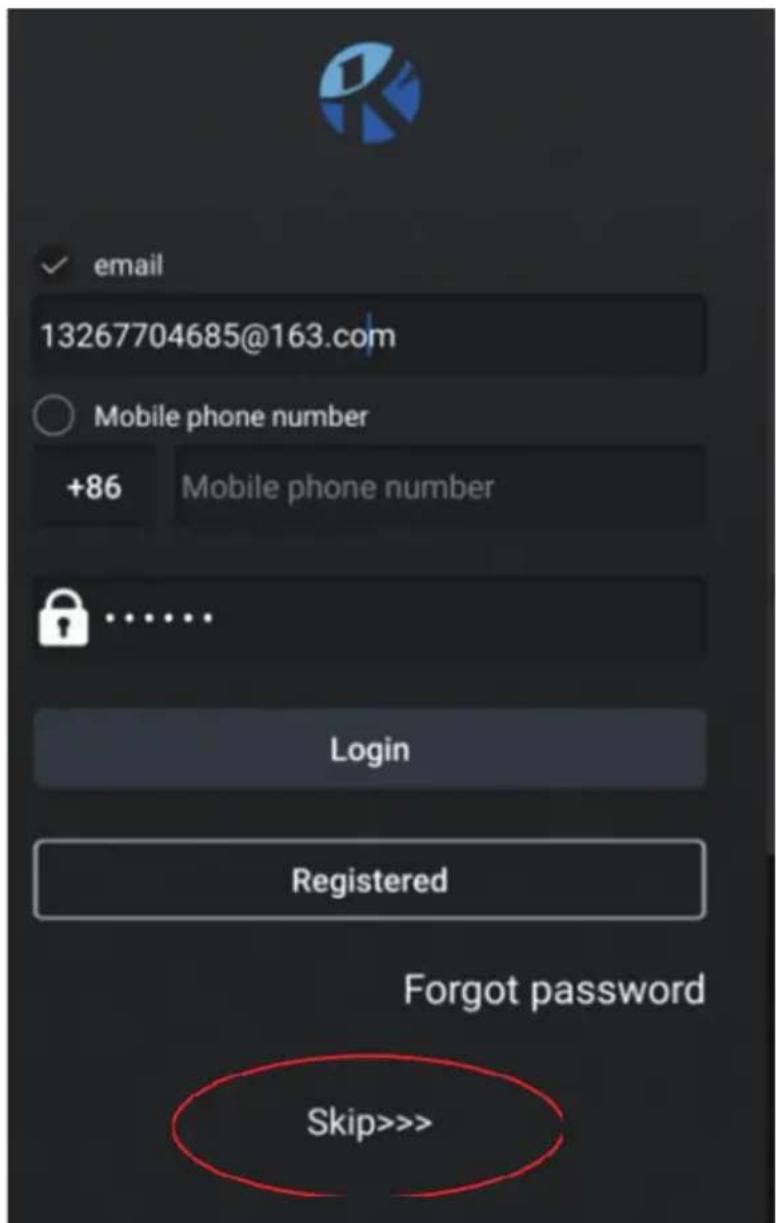
Once the application has been downloaded, open it and register a personal account, so as not to lose data in the event of a phone change. If you don't want to register, just press Skip
SCOOTER CONTROL APP
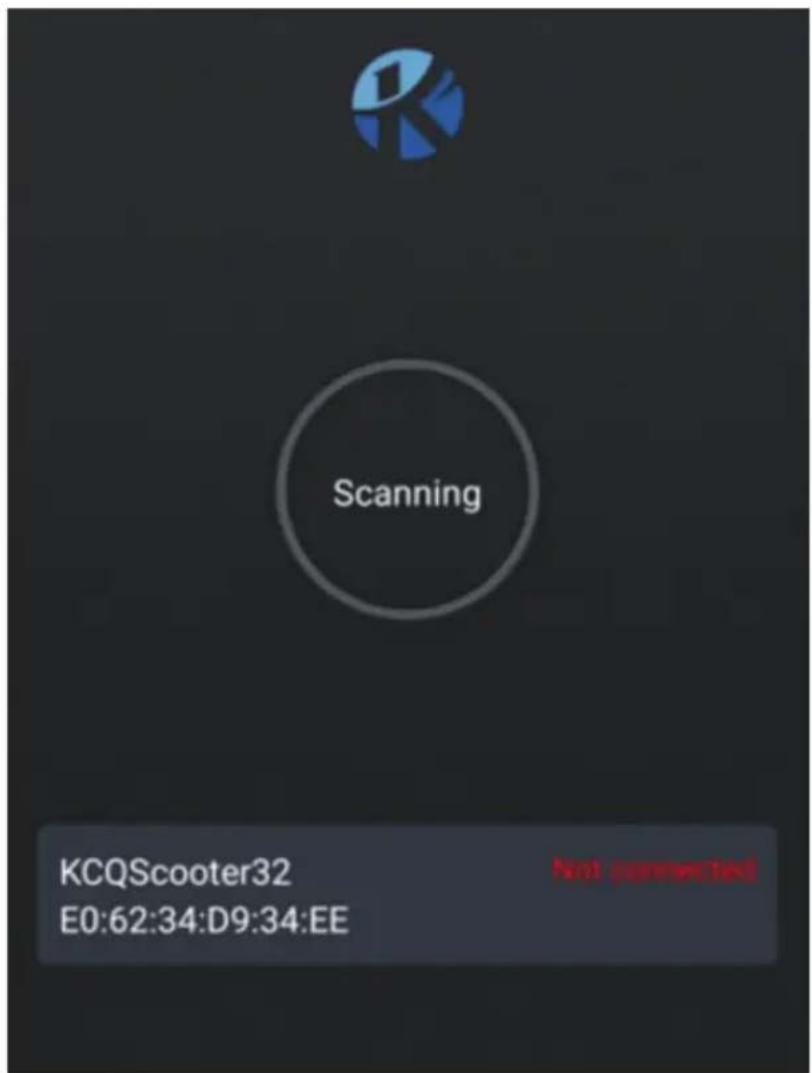
SCOOTER CONNECTION
- Activate Bluetooth on your phone
- Start the previously downloaded KCQ Scooter application, register or skip the registration
- Turn on the scooter; the application on your phone will search for available Bluetooth devices nearby
- If necessary, choose the scooter code in the device list detected, on the lower part of the phone screen (the name of the scooter will be STREET or similar
(Next)
SCOOTER CONTROL APP
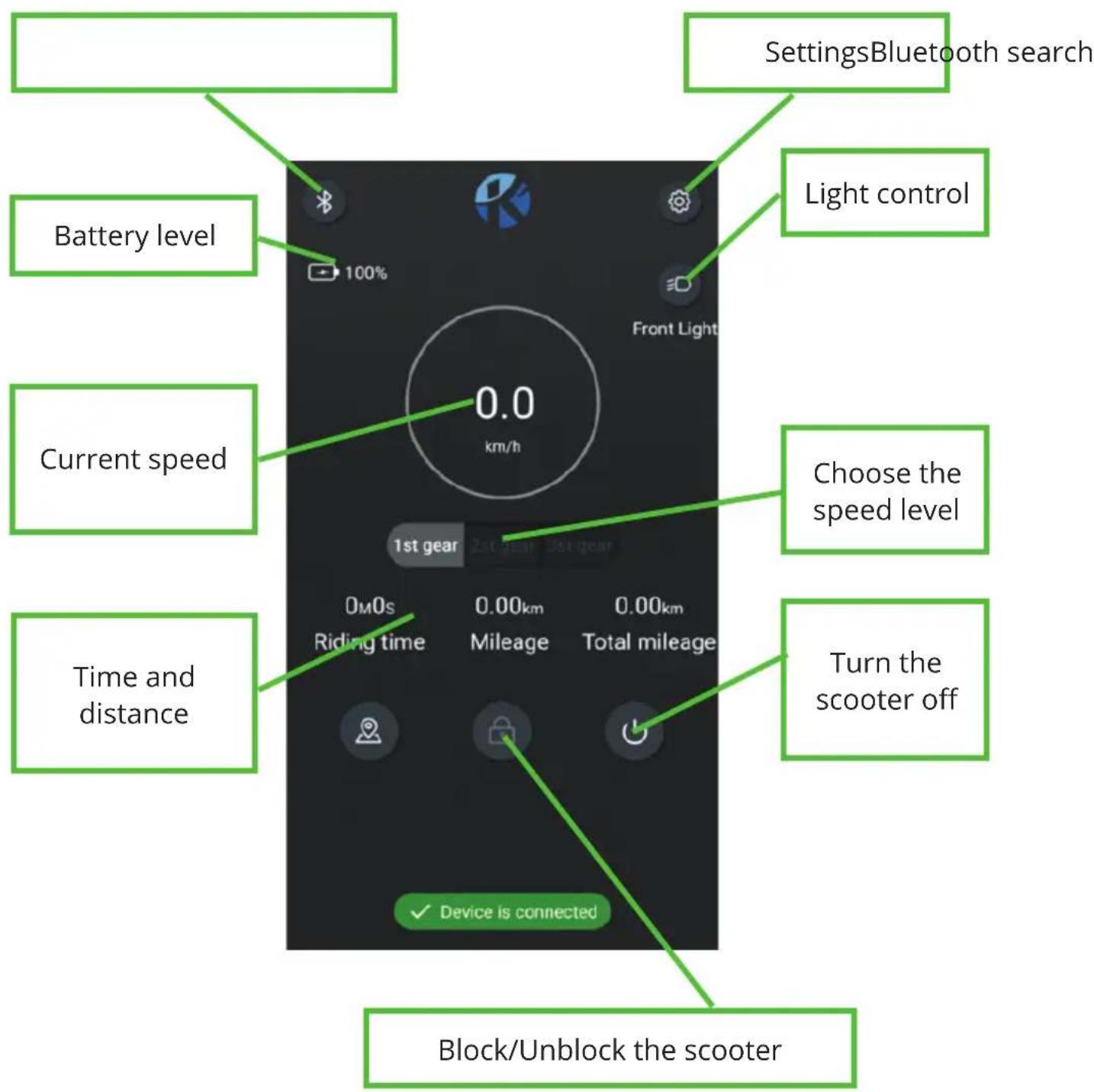
After connection, the main app screen will appear.
SCOOTER CONTROL APP
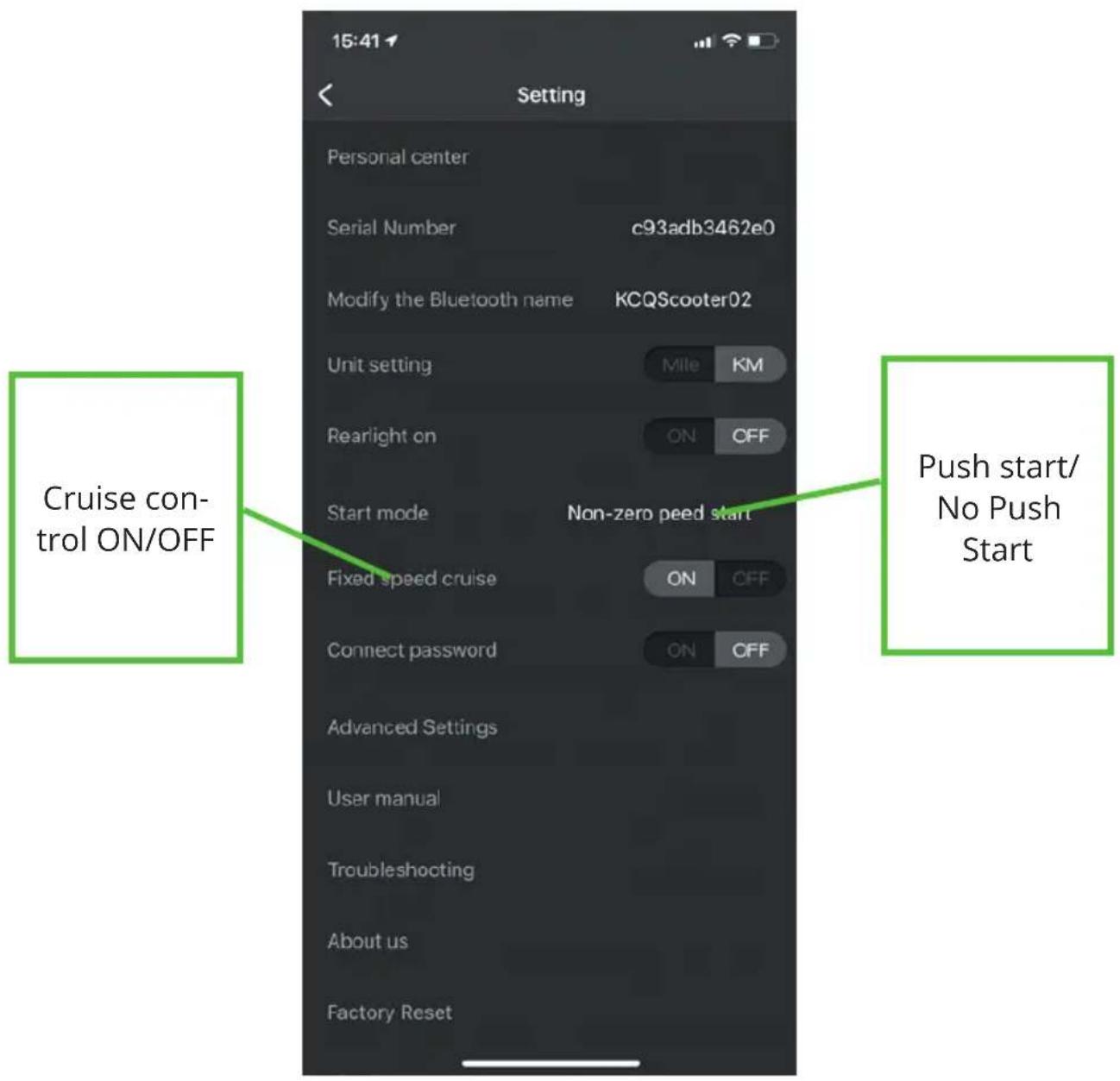
In the "Settings" section it is possible to set various parameters, the most relevant are the following:

HOW TO USE THE SCOOTER
First of all, it is advisable to adjust the disc brakes, tightening them or softening them, according to your driving style.
Start the engine by pressing the multifunction button.
Make sure that the stand is in the closed position, get on the scooter with one foot and give yourself a slight push with the other; gently act on the accelerator lever to start the electric motor.
To brake, release the accelerator, in order to make the engine brake act, or, for more abrupt braking, use the disc brake levers.
TECHNICAL SPECIFICATIONS
■ Steel and aluminum frame with a maximum capacity of 120 Kg (passenger + luggage)
- Foldable
■ 12 "pneumatic wheels
■ Motor power 0,45 KW
■ 3 speed levels: 1- ECO 6km / h, 2- Drive 20km / h, 3- Sport 25km / h
■ 36V. 10 Ah lithium battery rechargeable in about 7 hours
■ Multifunction LED display
■ Rear and front disc brakes
■ Front and rear LED lights
■ Double front shock absorber
■ Directional arrows
■ Convenient side stand
■ Maximum incline: 15% (subject to change based on cycle weight, battery charge level and road conditions)
■ Waterproof: IPX4
■ Airborne noise: <70dB (A)
■ Weight about 21 Kg
■ Power supply included 100-240V \~ 50 / 60Hz / 42V 1.5A output
■ BT frequency 2.4GHz
■ Power: 2.4mW
INFORMATION TO USERS ABOUT HOUSEHOLD APPLIANCES
natural_image
Symbol of a trash bin crossed with no text or numbers, representing environmental restriction (no text present)
Precautions for correct disposal of the product.
The symbol shown on the equipment indicates that waste must be disposed of in “separate collection” and so the product must not be disposed of together with urban waste.
The user must take the product to special “separate waste collection centres” provided by local government, or deliver it to the retailer against the purchase of a new product.
Separate collection of waste and subsequent treatment, recycling and disposal operations promotes the production of equipment with recycled materials and limits negative effects on the environment and on health caused by improper handling of waste.
Illegal disposal of the product leads to the enforcement of administrative penalties.
natural_image
Symbol of a trash bin crossed out by two diagonal lines (no text or numbers present)The product works with batteries that fall under the European directive 2013/56 / EC and that cannot be disposed of with normal household waste. Please inform yourself about the local directives regarding the separate collection of batteries: a correct disposal allows to avoid negative consequences for the environment and health.
TECHNICAL ASSISTANCE
Product technical assistance is guaranteed by:
Trevi S.p.a. Technical assistance
Via Raibano 40, 47853 Coriano (Rimini) Italia
Tel.: +39 0541 694839 | Web: www.emgmobility.it
CE
WARRANTY
-
The warranty comes into force on the date of the tax document and covers manufacturing defects and consequent failures that arose during the warranty period.
-
In the event of a device failure, the buyer can ask for assistance
contact the retailer where you purchased the product or:
center Trevi S.p.a. Technical Assistance, Via Raibano 40, 47853 Coriano (Rimini) Italy
- Tel.: +39 0541 694839 | Web: www.velociptor.it
-
In order for the warranty to be valid, the buyer must present a valid proof of purchase of the product for which he intends to request assistance (invoice or sales receipt in which an identification code and product description are expressly indicated), together with this warranty certificate.
-
The external parts of the appliance, components and accessories purchased separately, parts and components which by their nature are subject to wear and tear, decay, and therefore require periodic maintenance and / or replacement (for example cables) are not covered by the warranty. power supply, power supplies / battery charger, batteries, wheels, cases, etc ...).
The guarantee does not cover direct and indirect damages, suffered by the user or by third parties, deriving from knocks and falls (even accidental), misuse by the user, use in an unsuitable environment, other components, atmospheric agents, sudden changes in tension, fires. The warranty does not cover those marginal aesthetic defects that have a negligible effect on the value or functionality of the product. Except as otherwise prescribed in other parts of this certificate, the warranty automatically lapses in the following cases:
a) if the serial number of the device is removed, modified or made unrecognizable; b) in the event of tampering, alteration, replacement, repair, attempted repair, disassembly (even partial) of the product carried out by unauthorized personnel;
c) in case of tampering or other violation of the integrity of the warranty seals placed on the product;
d) in the event of use that does not comply with current legislation <applicable to the product covered by the warranty.
The recognition of direct and indirect damages of any kind to persons and things deriving directly or indirectly from one or more causes of exclusion mentioned in this paragraph is also excluded.
WARRANTY

- The mere authorization to send the product to the service center does not imply that the defect has been recognized as covered by the warranty with consequent free repair of the product. The product must be shipped in the original packaging, or in another suitable packaging, and in any case inserted in a protective packaging that is suitable for shipment by courier or postal service. Until delivery to the service center, the goods travel at the sender's risk. The warranty does not cover any damage that may have occurred during transport to the service center. The service center reserves the right to check the validity conditions of the guarantee upon receipt of the product. For requests for warranty assistance which, following verification by authorized service personnel, should prove to be unfounded due to the absence of real defects or due to the absence of defects covered by the guarantee, all costs incurred for the repair will be charged to the customer, the verification and controls on defect-free units covered by warranty. The customer will also be charged for all transportation costs.
- If parts or components under warranty are replaced, the parts removed and replaced will become the property of the service center. In the event that the repair is not physically possible, or is excessively expensive in relation to the value of the product, this can be replaced with a product with equivalent or superior technical characteristics.
- The manufacturer is not responsible for any damage or loss resulting from the failure to use a product for repair, or for any damage or loss resulting from the malfunction of the product or some of its parts.
- The period of validity of the battery warranty (if any) is 6 months from purchase.
- The period of validity of the guarantee for consumers, that is, those who buy for purposes unrelated to one's professional or business activity, it is governed by Legislative Decree 2 February 2002, n.24. - articles 1519-bis and following of the Italian Civil Code - (2 years from delivery under legal conditions). For buyers who purchase with a VAT number for purposes related to their professional activity, the legal guarantees referred to in articles 1490 and following of the Civil Code will apply (1 year from delivery under the conditions of the law).
VELOCIPTOR street
es 120EW STREET
natural_image
Simple black-and-white icon of a helmet and bucket inside a circle (no text or symbols)Obligation de porter un casque de protection

Fabricant: SHENZHEN HYLETON TECHNOLOGY CO.,LTD
natural_image
Technical line drawing of a mechanical device with an inset showing a close-up of its internal components (no text or symbols present)natural_image
Technical line drawing of a mechanical device with attached components, shown in two views: top is exploded view (no text or symbols)natural_image
Three-panel image showing a black electric scooter with red grip and green directional arrows indicating motion (no text or symbols)natural_image
Three-panel illustration showing a black electric scooter with red cable and green directional arrows indicating motion (no text or symbols)OUVRiR ET PLIER LA TROTTINETTE


COMMENT RECHARGER LA BATTERIE
natural_image
Close-up of a black mechanical component with a curved cable attached (no text or symbols visible)RÉGULATEUR DE VITESSE (CRUSE CONTROL)