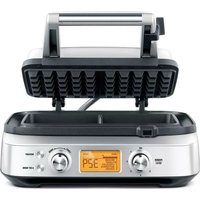
the Smart Waffle BWM620 - Waffle Maker SAGE - Free user manual and instructions
Find the device manual for free the Smart Waffle BWM620 SAGE in PDF.



| Product type | Waffle iron |
| Brand | Sage |
| Model | the Smart Waffle BWM620 |
| Power supply | 220-240 V ~ 50/60 Hz |
| Power | Approximately 1000 W (estimated) |
| Dimensions (L x D x H) | Approximately 25 x 30 x 15 cm (estimated) |
| Weight | Approximately 2.5 kg (estimated) |
| Plate material | Cast aluminum with PFOA-free non-stick coating |
| Number of browning levels | 12 levels (1 to 12) |
| Main functions | LCD screen with timer, A Bit More™ function, Restart button, browning control |
| Capacity | Approximately 1/2 measuring cup per waffle |
| Waffle type | Classic waffles (honeycomb plates) |
| Care and cleaning | Wipe with a soft cloth and soapy water; do not use metal utensils or non-stick sprays |
| Safety | Hot surfaces indicated; requires supervision; do not immerse; locking clip for storage |
| Included accessories | BPA-free measuring cup, stainless steel container, power cord |
| Warranty | 2 years (domestic) |
| Repairability | Service by Sage® authorized center |
Frequently Asked Questions - the Smart Waffle BWM620 SAGE
User questions about the Smart Waffle BWM620 SAGE
0 question about this device. Answer the ones you know or ask your own.
Ask a new question about this device
Download the instructions for your Waffle Maker in PDF format for free! Find your manual the Smart Waffle BWM620 - SAGE and take your electronic device back in hand. On this page are published all the documents necessary for the use of your device. the Smart Waffle BWM620 by SAGE.
USER MANUAL the Smart Waffle BWM620 SAGE
natural_image
Front view of a modern kitchen griddle with digital display and control knobs (no visible text or symbols on main body)EN QUICK GUIDE
DE KURZANLEITUNG
FR GUIDE RAPIDE
NL SNELSTARTGIDS
ES GUÍA RÁPIDA
Sage®
2 We Recommend Safety First
4 Getting To Know Your New Appliance
5 Operating Your New Appliance
6 Care & Cleaning
7 Guarantee
SAGE® RECOMMENDS SAFETY FIRST
At Sage® we are very safety conscious. We design and manufacture consumer products with the safety of you, our valued customer, foremost in mind. In addition we ask that you exercise a degree of care when using any electrical appliance and adhere to the following precautions.
IMPORTANT SAFEGUARDS
READ ALL INSTRUCTIONS BEFORE USE AND SAVE FOR FUTURE REFERENCE
- A downloadable version of this document is also available at sageappliances.com
-
Before using for the first time ensure your electricity supply is the same as shown on the label on the underside of the appliance.
-
The appliance is for household use only. Do not use the appliance for anything other than its intended use. Do not use in moving vehicles or boats. Do not use outdoors. Misuse may cause injury.
- Fully unwind the power cord before operating.
- Position the appliance on a stable, heat resistant, level, dry surface away from the edge and do not operate on or near a heat source such as a hot plate, oven or gas hob.
- Do not let the power cord hang over the edge of a bench or table, touch hot surfaces or become knotted.
- Position the appliance at least 20cm from walls or heat/steam sensitive materials and provide adequate space above and on all sides for air circulation.
- Ensure the power cord does not become trapped between the upper and lower hot plates of the appliance during use or storage.
- Do not leave the appliance unattended when in use.

The appliance is marked with a HOT surface symbol. The lid and other surfaces will be hot when the appliance is operating and for some time after use. To prevent burns always use insulated oven mitts or use handles or knobs where appropriate.
WE RECOMMEND SAFETY FIRST
• Always ensure the appliance is turned OFF, unplugged at the power outlet and has been allowed to cool before cleaning, moving or storing.
- Do not use the appliance if the power cord, plug, or appliance becomes damaged in any way. If damaged or maintenance other than cleaning is required, please contact Sage Customer Service or go to sageappliances.com
- Any maintenance other than cleaning should be performed by an authorised Sage® service centre.
• Children shall not play with the appliance.
- The appliance can be used by children aged 8 years or older and persons with reduced physical, sensory or mental capabilities or a lack of experience and knowledge, only if they have been given supervision or instruction concerning use of the appliance in a safe way and understand the hazards involved.
- Cleaning of the appliance should not be carried out by children unless they are 8 years or older and supervised.
- The appliance and its cord should be kept out of reach of children aged 8 years and younger.
- The appliance is not intended to be operated by means of external timer or separate remote control system.
- The installation of a residual current safety switch is recommended to provide additional safety when using all electrical appliances. Safety switches with a rated operating current not more than 30mA are recommended. Consult an electrician for professional advice.

The symbol shown indicates that this appliance should not be disposed of in normal household waste.
It should be taken to a local authority waste collection centre designated for this purpose or to a dealer providing this service. For more information please contact your local council office.
To protect against electric shock, do not immerse the power cord, power plug or appliance in water or any other liquid.
SAVE THESE INSTRUCTIONS

text_image
B C H K I J G A F 329 D E L MA. POWER/MENU dial
B. Top plate lid
C. Storage locking clip
D. LCD with countdown timer
E. Browning control dial
F. Restart timer button
G. Integrated moat
H. Stainless steel housing
I. Sage ^ Assist ^TM plug (not shown)
J. PFOA-free non-stick
K. Die-cast aluminum cooking plates
L. A Bit More ^TM button
M. BPA-free dosing cup
OPERATING YOUR NEW APPLIANCE
Before first use, remove and safely discard any packing material, promotional labels and tape from the waffle maker.
- Wipe the waffle maker cooking plates with a damp sponge or cloth. Dry thoroughly.
- Place the waffle maker on a flat, dry surface. Ensure there is a minimum distance of 10cm of space on all sides of the waffle maker. Ensure there are no items on top of the waffle maker.
- Unwind the power cord completely and insert the power plug into a grounded 220–240V power outlet.
- Turn the POWER / MENU dial clockwise until the dial indicator reaches the desired waffle type or choose the CUSTOM setting. HEATING will be displayed on the LCD.
NOTE
When the waffle maker is turned on for the first time, it may emit vapors. It is safe and not detrimental to the performance of the appliance.
- There are 12 browning settings ranging from '1' (lightest) to '12' (darkest). The default browning setting is '6.' Use the Light-Dark browning control dial to adjust the brownness of your waffle. Rotate clockwise to increase brownness, or rotate counterclockwise to reduce the brownness for a lighter coloured waffle.
- Once the waffle maker has completed the preheating cycle, two audible alerts will sound and the LCD screen will turn orange. Lift the top plate lid completely into the open position. When the lid is in the open position, the LCD will turn blue and close lid to start will appear. Pour in the batter evenly into the waffle plates. The batter should cover the peaks of the waffle plate (approximately half the waffle dosing cup for each waffle).
- Close the lid once the batter has been poured in. Once the lid is closed, the timer will automatically begin to count down. The LCD changes to orange to indicate that the cooking cycle has commenced. The waffle maker will automatically calculate the correct cooking time depending on a number of variables.
NOTE
The storage clip should be in it's open position when the waffle maker is cooking.
- Three audible alerts will sound at the end of the cooking cycle, the timer will disappear and "End" will be shown on the screen. Open the waffle maker lid and carefully remove your waffles. If you will no longer be cooking any more waffles, turn the Selector Dial to the OFF position.
NOTE
Do not use metal utensils when removing the waffles from the waffle maker as they may scratch the non-stick surface.
NOTE
If waffles are not removed immediately after the cooking cycle has completed, an audible alert will sound every 30 seconds.
- If you are cooking additional waffles, simply add more batter to the lower waffle plate and follow steps 7 & 8 above. If necessary to reset the time cycle, press the RESTART button.
A BIT MORE™
Allows you to conveniently and quickly add time to a cooking cycle. A BIT MORE ^™ can be used both during the cooking cycle or immediately after the cooking cycle has finished. In both instances, it will add a small amount of time proportional to the overall cooking time for that batch of waffles.
CARE & CLEANING
Before cleaning, ensure the POWER / MENU dial is set to the OFF position and then remove the power plug from the power outlet.
Allow your waffle maker to cool a bit before cleaning. The waffle maker is easier to clean when slightly warm.
Always clean your waffle maker after each use to prevent a build-up of baked-on foods. Wipe cooking plates and overflow moat with a soft cloth to remove food residue.
PFOA-FREE NON-STICK COATING
Cooking on a non-stick surface minimizes the need for oil, food does not stick and cleaning is easier. Any discolouration that may occur will only detract from the appearance of the waffle maker and will not affect the cooking performance. When cleaning the non-stick coating, do not use metal (or other abrasive) scourers. Wash with warm soapy water. Remove stubborn residue with a non abrasive plastic scouring pad or nylon washing brush.
NOTE
Do not use spray-on non-stick coatings as this will affect the performance of the non-stick surface on the cooking plates.
STORAGE
To store your waffle maker:
- Ensure the POWER / MENU dial is set to the OFF position and then unplug power cord from the power outlet.
- Allow the waffle maker to fully cool.
- Set the top plate storage clip into the locked position.
- Wrap the power cord in the cord wrap area below the waffle maker.
- Store on a flat, dry level surface.
GUARANTEE
2 YEAR LIMITED GUARANTEE
Sage Appliances guarantees this product for domestic use in specified territories for 2 years from the date of purchase against defects caused by faulty workmanship and materials. During this guarantee period Sage Appliances will repair, replace, or refund any defective product (at the sole discretion of Sage Appliances).
All legal warranty rights under applicable national legislation will be respected and will not be impaired by our guarantee. For full terms and conditions on the guarantee, as well as instructions on how to make a claim, please visit www.sageappliances.com.
INHALT
text_image
B C H K I J G A F D E L Mnatural_image
Exterior view of a modern kitchen griddle with digital display and control knobs (no text or symbols on main body)FR
GUIDE RAPIDE
Sage®
TABLE DES MATIÈRES
text_image
B C H K I J G A F 329 D E L Mnatural_image
Exterior view of a modern electric grill with digital display and control knobs (no text or symbols on main body)NL
SNELSTARTGIDS
Sage®
text_image
B C H K I J G A F D E L Mnatural_image
Front view of a modern kitchen griddle with digital display and control knobs (no visible text or symbols on main body)ES
GUÍA RÁPIDA
Sage®
ÍNDICE
text_image
B C H K I J G A F 329 D E L Mwww.sageappliances.com
Registered in Germany No. HRB 81309 (AG Düsseldorf).
Registered in England & Wales No. 8223512.
- Due to continued product improvement, the products illustrated or photographed in this document may vary slightly from the actual product.
Copyright BRG Appliances 2019.